

Weflow vs Chorus: AI Field Updates and Salesforce Write-Back Compared (2026)
Learn how Weflow vs Chorus handle AI field updates from call transcripts and Salesforce write-back.


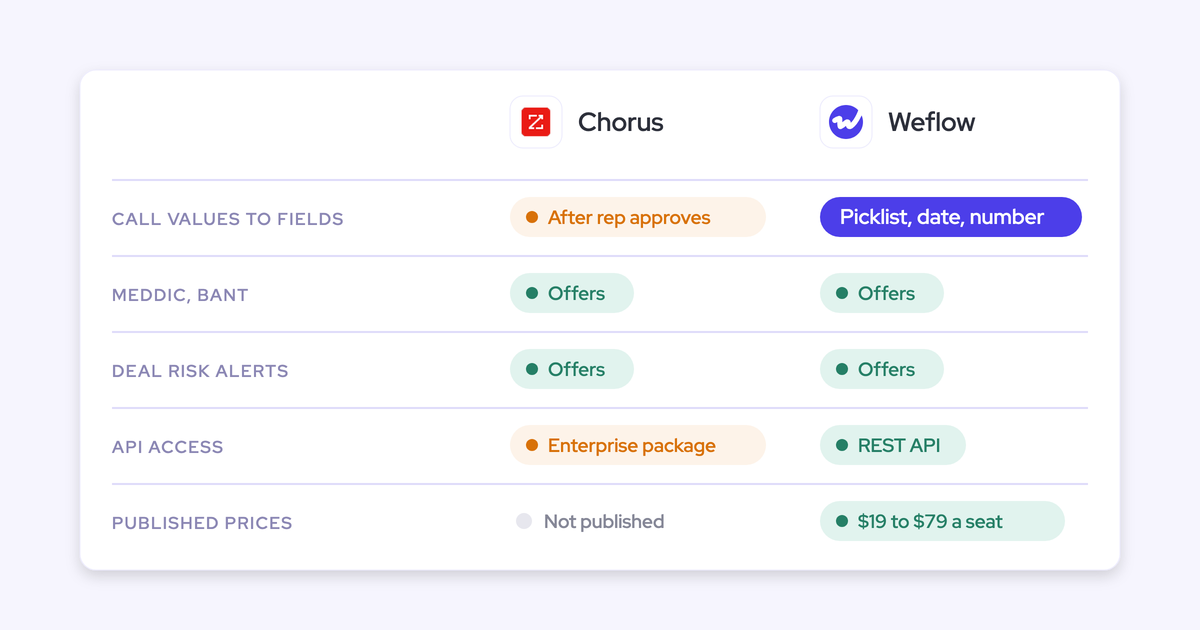

Chorus writes more to Salesforce than its reputation suggests. Every recorded meeting becomes a completed Task with topics and next steps. With the managed package, the transcript and a Moment record for each tracker hit land in your org. Meeting-Based CRM Updates drafts MEDDIC, MEDDPICC, BANT or SPIN values into opportunity fields you've mapped.
So the real question is how values get into Salesforce, what they can reach, and what they read. The difference between the two tools comes down to three things:
- The gate: Chorus writes a methodology value only after a rep clicks Approve Update. Weflow lets you set each field to write automatically or wait for review.
- The scope: Chorus covers four frameworks on mapped opportunity fields. Weflow writes any framework to any object and any field type except lookups, including Stage, picklists and your own custom objects.
- The shape: Chorus drafts from discovery and qualification calls. Weflow AI Playbooks read the whole deal, emails included, and keep each field at the best current answer.
Weflow is the Revenue AI Orchestration platform for sales, customer success, and RevOps teams, built for Salesforce teams. Below is a field-by-field audit of Weflow Conversation Intelligence + AI Field Updates next to Chorus. We state the limits on both sides plainly, so you can reproduce every claim in your sandbox.
Weflow vs Chorus at a glance across nine capabilities
Start with the grid to see where to read closely: both tools offer something on almost every row, and the gap is in how field updates reach Salesforce and whether you can see the price.
| Capability | Weflow | Chorus |
|---|---|---|
| CRM field updates from conversations | Writes call values into every Salesforce field type except lookups, including picklists, numbers, dates, multi-selects and methodology fields. Each field is set to automatic or review. Custom objects need setup by Weflow support. | Meeting-Based CRM Updates drafts MEDDIC, MEDDPICC, BANT or SPIN values into mapped opportunity fields and writes them once a rep approves. Topics and next steps land on the meeting Task. |
| Writes its own insights into the CRM | Activity, the summary on the Event, the transcript on the Weflow recording object, field values and playbook methodology fields land in Salesforce. Deal warnings, playbook scores, tracker hits, agent outputs and forecast submissions stay in Weflow. | A completed Task per meeting with recording link, attendees, topics and next steps. With the managed package, transcripts on Engagement records and tracker hits as reportable Moment records. |
| Qualification methodology capture | AI Playbooks fill MEDDIC, SPICED, BANT or a house framework from every email, meeting, transcript and field on the deal, and grade how well each element is established. About thirty templates ship. Only opportunities created or changed after setup are scored until older ones are regenerated. | MEDDIC, MEDDPICC, BANT or SPIN drafted from discovery and qualification calls into mapped opportunity fields, written after rep approval. SPICED and house frameworks stay manual. |
| Recording video meetings | Notetaker on Zoom, Microsoft Teams, Google Meet and Webex. Webex is switched on per workspace, Zoom needs admin-enabled local recording, and bots are admitted from the lobby. A desktop app records without a bot. | Notetaker auto-joins business meetings once calendars are synced. Meeting Import brings native recordings in after the call. Consent handling works well on Zoom and poorly on Teams. |
| Deal risk warnings | 50+ signals plus custom AND/OR warnings on any non-text opportunity field or computed fields like days inactive and close-date pushes. Warnings stay in Weflow and don't reach Salesforce reports. | Momentum Signals ships twelve alerts on activity, CRM data and conversations, six with adjustable thresholds, plus user-built daily tracker alerts. |
| Integrations with other tools | Salesforce as the only CRM, Google and Microsoft mail and calendars, Zoom, Teams, Meet, Webex, Slack and the Outreach dialer. No native warehouse connector; teams use the API. | 19 conferencing providers, 30+ dialers, Salesforce, HubSpot and Dynamics, Clari, Gainsight and SSO providers. Slack and Zapier need the Enterprise package. |
| Access from AI assistants (MCP) | Official read-only connector for playbooks, summaries, transcripts, forecast calls and pipeline metrics. Admin-enabled per workspace with a separate transcript toggle. Per-rep breakdowns cap at 25 owners. | ZoomInfo's first-party MCP server across Claude, ChatGPT and other clients answers from Chorus calls, emails and transcripts. Usage is metered against ZoomInfo credits. |
| Raw data access outside the tool | REST API bulk-exports transcripts, metadata, scores and signals as JSON or CSV. Recordings export to your own storage. An audit log records field write-backs. | API access comes with the Enterprise package only, and Zapier depends on it. |
| Pricing | Published per seat: Weflow Conversation Intelligence at $39 per user per month, bundles at $49, $59 and $79, billed annually with a 10-user minimum. | No published prices. Custom plans across three packages, quoted through sales. |
Why Salesforce teams compare Chorus and Weflow before renewal
The teams that reach out to us are rarely unhappy with Chorus recordings. The problem is that every call is recorded and the qualification fields are still thin or empty.
Some also see meetings fail to reach Salesforce at all. One RevOps leader described it like this on a call with us:
"we use Chorus for recording of our meetings. It's across the board with some of my reps where the Chorus meeting is not syncing back to Salesforce."
Transcription is a commodity now. Every tool in this category produces a usable transcript. What separates them is what happens after it: whether the conversation becomes structured Salesforce data you own and report on, or stays in a second portal.
That's the renewal question. Across the Salesforce orgs we connect to, methodology fields are almost always empty before Weflow goes in. The evidence exists in calls and emails. It just never reaches the record.
How Weflow handles field updates, recording, signals and data access
We start with Weflow and run through eight capabilities in the same order as the Chorus section, so you can read them side by side. Pricing gets its own section after both.
Weflow AI Field Updates write any field type, automatic or reviewed
Every Salesforce field you want filled gets its own prompt and its own write setting. You decide per field whether Weflow writes the value automatically or holds it for review.
Review is the default. The rep sees the current value next to the proposed one, accepts, edits or rejects each, and writes them back with one click. Proposed updates arrive 30 to 60 seconds after the call ends, alongside the AI summary on the Salesforce Event.
Weflow AI Field Updates write to every Salesforce object and field type except relationship lookups. In practice that means:
- Picklists and multi-selects: Weflow reads the field's allowed values and matches its output against them, so it never writes a value the field doesn't accept.
- Numbers and dates: a zero-to-three qualification score or a competitor multi-select becomes a field you can chart.
- Opportunity Stage: the deal moves when the exit criteria written into the prompt are met on the call.
- Fields validation rules gate on: the rules still apply, so a blocked stage change stays blocked until its dependent fields are filled.
- Standard and custom objects: Account, Contact, Opportunity, Lead, and your own custom objects.
Lookup fields are the one exception. Weflow can't write relationship lookups, so an automation that depends on one can't be built this way.
Custom objects are in scope, and Weflow support sets them up for you. Templates are assigned per team, so sales, onboarding and customer success can each run their own structure and write to different objects.
Methodology fields append rather than overwrite. A MEDDIC or SPICED field gets richer across the deal instead of turning into a summary of the last call. Single-value fields like amount can only be overwritten, which is why they need more care before you automate them.

What Weflow writes into Salesforce, and what stays in Weflow
Most of what Weflow produces lands in native Salesforce objects your reports already read. A few outputs don't, and you should know which before you plan a dashboard.
| Weflow output | Where it lives |
|---|---|
| Emails, meetings and contacts | Salesforce, on Task, EmailMessage, Event and Contact |
| AI call summary | Salesforce, on the related Event, with a link to the recording |
| Summary and full transcript | Salesforce, on the Weflow_Recording__c object from the managed package |
| AI field update values | Salesforce, on standard and custom objects |
| Methodology field values from AI Playbooks | Salesforce, in the mapped fields |
| Deal warnings | Weflow |
| AI Playbook scores | Weflow |
| Tracker hits | Weflow |
| Agent outputs | Weflow, delivered by email and Slack |
| Forecast submissions, targets and roll-ups | Weflow |
| Video files | Weflow storage, kept out of Salesforce file storage and exportable through the API |
Weflow fields carry a W marker in the interface. That's the quickest way to tell what will reach a Salesforce report and what won't.
Weflow AI Playbooks score any methodology across the whole deal
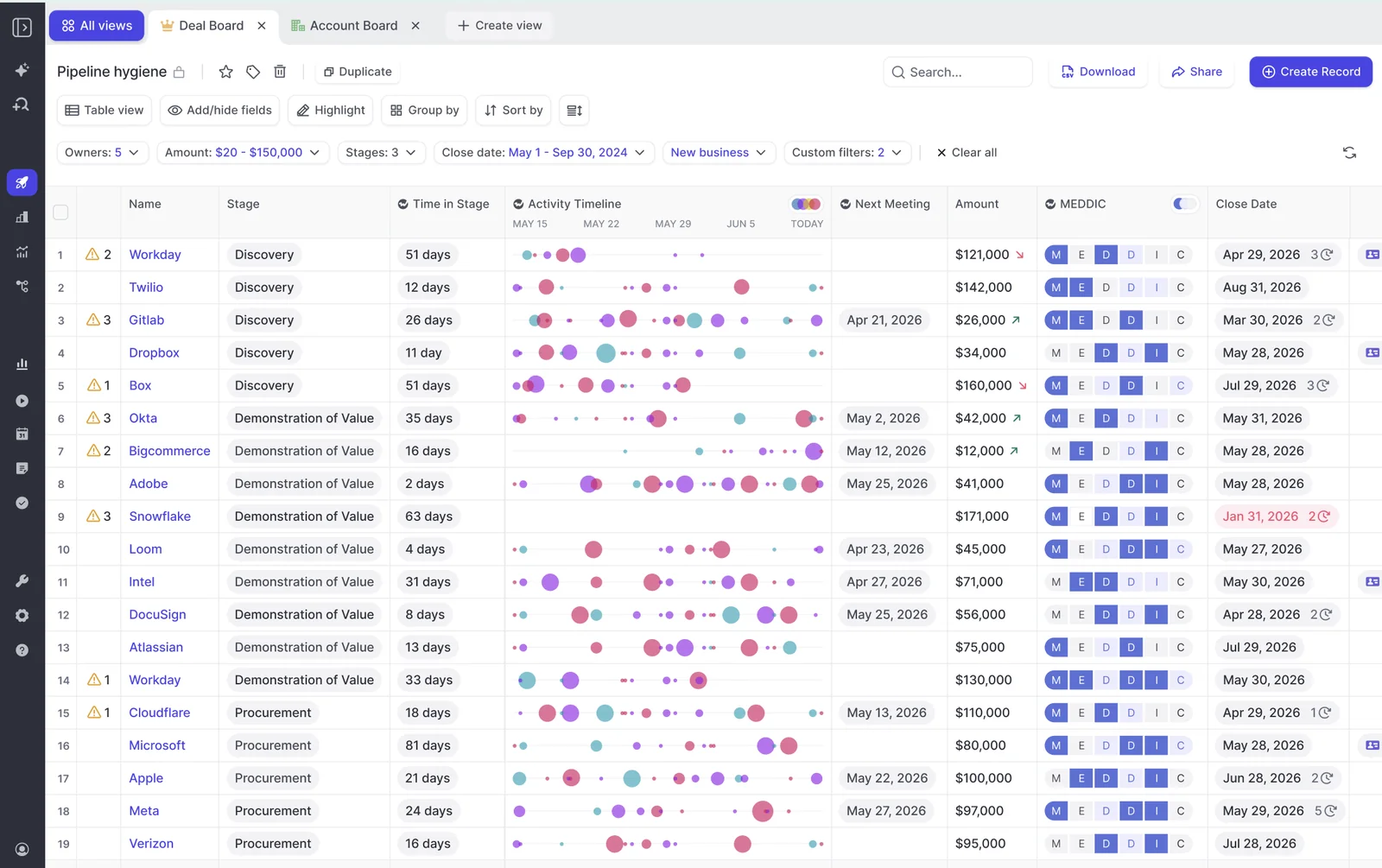
Weflow AI Playbooks score an opportunity against any methodology, not a fixed list. About thirty templates ship, and you build a house framework the same way: name the elements, map a prompt to each, and it runs like a standard one.
A playbook runs two passes. The first fills in each methodology element from the deal's evidence. The second judges how well each element is actually established, including text a rep typed. A MEDDIC field filled with filler to clear a validation rule is marked not assessed, not complete.
Each playbook reads:
- every email on the opportunity;
- every meeting and call transcript;
- every related CRM field and record.
It reruns when new activity lands on the record, and otherwise every three hours. The field holds the best current answer across the deal rather than whatever the most recent call said.
Meeting type detection keeps a closing call from being asked discovery questions, so a rep isn't marked down for being further along. Playbooks also attach to the account object for customer success and renewal work.
Two limits to plan for:
- Playbooks score only opportunities created or changed after setup. Your existing pipeline stays blank until someone regenerates those records, or Weflow runs a batch for you.
- Methodology field values write to Salesforce, but the playbook scores themselves stay in Weflow.
The Weflow notetaker records Zoom, Teams, Google Meet and Webex
The Weflow notetaker schedules itself onto every external meeting from the calendar connection. Reps don't invite it, so the share of meetings recorded stays high.
Setup conditions to handle at rollout:
- Webex is off by default and has to be enabled per workspace.
- Your Zoom admin has to enable local recording, and the host approves the bot.
- On Teams and Meet, someone admits the bot from the lobby. If nobody does, it leaves after about ten minutes, and the rep can send it back in from the Weflow calendar mid-call.
- A licensed user has to sign in to Weflow once before the notetaker joins their meetings.
The Weflow desktop app for Windows and macOS records without a bot joining, and the recording runs through the same field updates, summaries and scorecards. Calls from the Outreach dialer come in as recordings too. Transcription auto-detects 96+ languages.
Weflow has no live in-meeting assistant. Everything arrives after the call.
Weflow deal warnings run on rules you build yourself
Weflow ships 50+ deal signals and lets you write your own warnings with AND/OR logic. Rules run on any non-text opportunity field, or on computed fields Salesforce doesn't have, such as days inactive, days in stage and close-date push count.
Typical triggers look like this:
- close date pushed more than twice;
- only one contact on the deal;
- a methodology field still missing;
- too many days in the current stage;
- no activity in a set number of days.
Warnings surface inside the forecast submission screen, at the moment a rep decides what to commit. The limit: warnings are Weflow fields, so they don't reach Salesforce reports.
Weflow connects Salesforce, calendars, Slack and the Outreach dialer
Weflow integrates natively with the tools a Salesforce revenue team already runs:
- Salesforce, the only CRM Weflow works with;
- Gmail, Google Calendar and Outlook;
- Zoom, Microsoft Teams, Google Meet and Webex;
- Slack;
- the Outreach dialer, connected from the Setup and Integrations page.
The desktop app catches softphone calls on Aircall or RingCentral, because it records system audio rather than connecting to the provider. Weflow runs alongside Outreach and Salesloft through compatibility mode.
Weflow isn't an integration catalogue. There's no native Snowflake, Databricks or BigQuery connector, so teams move data into a warehouse through the API.
The Weflow MCP connector gives assistants read-only access
The official Weflow MCP connector lets Claude, ChatGPT and other assistants read playbooks, call summaries, transcripts, forecast calls and pipeline metrics. It's read-only, so an assistant can't change anything.
An admin switches it on per workspace. A separate toggle decides whether assistants see full transcripts or only AI summaries, and the console lists every connected user and the date they connected. Per-rep breakdowns cap at 25 owners, so a large org gets aggregate answers unless you narrow the question to a team.
The Weflow REST API bulk-exports transcripts, scores and signals
The Weflow REST API bulk-exports transcripts, metadata, scores and signals as JSON or CSV, on a schedule or on demand. It feeds warehouses and BI tools such as Tableau and Looker.
Recordings export to your own cloud storage. An exportable audit log records every field write-back and configuration change, which is what a compliance review usually asks for.
How Chorus handles field updates, recording, signals and data access
Here are the same eight capabilities for Chorus, at the same depth, with its methodology feature under its own name, Meeting-Based CRM Updates.
Chorus Meeting-Based CRM Updates write only after a rep approves
Chorus Meeting-Based CRM Updates turns discovery and qualification calls into methodology values through this flow:
- An admin picks MEDDIC, MEDDPICC, BANT or SPIN under Settings, CRM Automation Rules, Deal Qualification Mapping.
- The admin maps each framework field to an opportunity field and chooses Overwrite or Append.
- After the call, Chorus reads the transcript and the opportunity record and drafts values.
- The rep reviews the draft, edits it and clicks Approve Update. On the Enterprise package, where the Slack integration lives, the rep can start this from the Slack recap.
- Chorus writes the approved values to the mapped opportunity fields.
The feature comes with every Chorus package. There's no option to write without the rep's approval, so fields fill only as fast as reps click.
What Chorus writes into Salesforce: Tasks, Engagements and Moments
Chorus has a real Salesforce footprint, and most of it depends on the managed package. Data reaches Salesforce 30 to 60 minutes after the call, once processing finishes.
| Chorus output | Where it lives |
|---|---|
| Completed Task per meeting with recording link, attendees, topics and next steps | Salesforce, on the matched Account and Opportunity (admin can choose Task or Event) |
| Rep-approved methodology values | Salesforce, in mapped opportunity fields |
| Full transcript | Salesforce, on the Engagement object, with the managed package and Push Transcript on |
| Tracker hits | Salesforce, as child Moment records, with the managed package |
| Six pre-built reports and Flow triggers on Moments | Salesforce, with the managed package |
| Recording file | Chorus, with a secure link on the Engagement record |
| Draft values a rep never approves | Chorus |
| Values for frameworks outside the four | Not extracted |
| Your own custom objects | Not written |
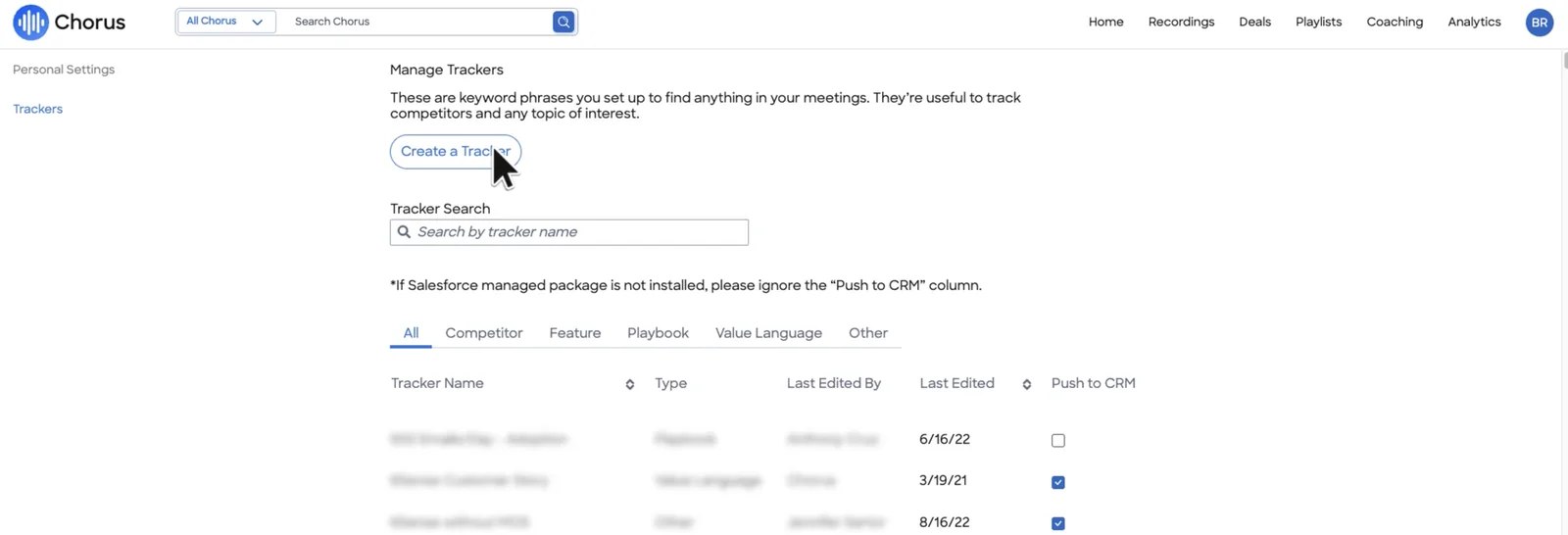
Chorus's own Manage Trackers screen says it directly: without the Salesforce managed package, the Push to CRM column does nothing.
Chorus extracts MEDDIC, MEDDPICC, BANT and SPIN from discovery calls
Chorus supports four frameworks: MEDDIC, MEDDPICC, BANT and SPIN. It drafts them from discovery and qualification calls into mapped opportunity fields. SPICED isn't on the list, so a SPICED or house-framework team still fills those fields by hand.
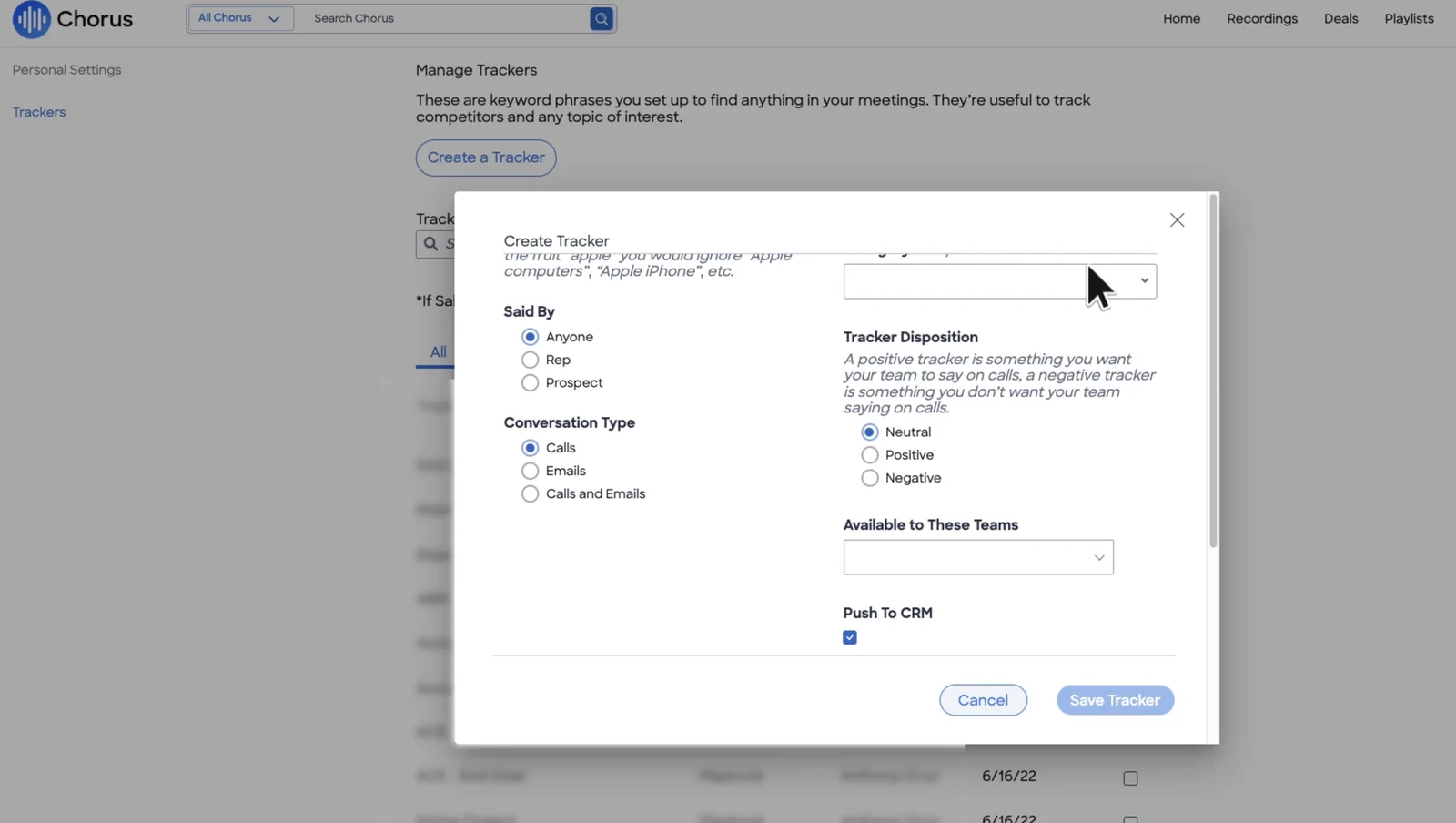
Trackers are a separate thing. A Chorus tracker is a keyword phrase typed as Competitor, Feature, Playbook, Value Language or Other, running across calls, emails or both, with 50+ pre-built. A tracker hit tells you something was mentioned. It isn't an extracted methodology value.
Chorus records through a notetaker or imports native recordings
Chorus captures meetings three ways:
- Notetaker: once calendars are synced, it auto-joins business meetings, identified by an external attendee domain plus a conferencing link.
- Meeting Import: Chorus pulls native recordings from Zoom, Teams or Meet after the meeting, with no bot. On Teams it usually arrives within 30 minutes to an hour, three hours at most.
- Mobile app: reps record in-person meetings and calls on the phone.
Consent handling is strong on Zoom and weak on Teams. One Teams-based customer gave up on the built-in compliance mode and built its own integration to pull recordings into Chorus after the call.
Chorus doesn't detect the spoken language: each call transcribes in the user's preset default, and summaries and next steps are always in English.
Chorus Momentum Signals flags risk with twelve built-in alerts
Chorus Momentum Signals ships twelve alerts on activity, CRM data and conversations, and six of them have thresholds you can adjust. Alerts show in the Deal Info column on the Deals page.
The alert set covers:
- no activity, stuck in stage, and no prospect engagement;
- fewer than two active contacts, and single-threaded deals;
- late-stage competitor mentions, and close date near with no pricing discussion;
- slow rep or buyer responses, and no demo in the cycle;
- negative buyer sentiment, and decision makers absent from a late-stage deal.
Users also build their own daily alerts from any tracker or keyword, filtered by rep, team, stage and amount. The Deals page shows CRM field and tracker columns you can save as private or team views.
Chorus integrates with 19 conferencing tools and 30+ dialers
Chorus's integration reach is wide:
- 19 web-conferencing providers, including Zoom, Teams, Meet, Webex, GoToMeeting and BlueJeans;
- 30+ dialers, including Outreach, Salesloft, Aircall, Dialpad, Five9, Orum, RingCentral, Talkdesk and Zoom Phone;
- three cloud CRMs: Salesforce, HubSpot and Microsoft Dynamics;
- Clari and Gainsight;
- Okta, Microsoft Entra ID and JumpCloud for single sign-on.
Slack and Zapier need the Enterprise package.
The ZoomInfo MCP server answers questions from Chorus conversations
ZoomInfo ships its MCP server as a first-party connector across most major AI clients, including Claude, ChatGPT, Perplexity, Cursor and VS Code Copilot. Since July 2026, a conversation_intelligence tool answers account questions from Chorus calls, emails and transcripts, with citations, next to ZoomInfo's B2B data.
Two things come with it. Usage is metered: enrichment and research calls spend ZoomInfo credits. And ZoomInfo puts the model-training obligation on you: you turn training off in your own AI client before connecting.
Chorus API access comes only with the Enterprise package
Chorus API access is a purchasing condition. It comes with the Enterprise package at no extra cost, and Zapier depends on it. A team below Enterprise has no API route to its own Chorus data.
Where Chorus is the stronger choice for your team
Chorus is the better fit in several situations:
- If you report on tracker hits in Salesforce, Chorus Moments are reportable records with six pre-built reports and Flow triggers. Weflow tracker hits stay in Weflow.
- If you run HubSpot or Microsoft Dynamics, Chorus supports them. Weflow works only with Salesforce.
- If your reps call through a long tail of dialers or conferencing tools, Chorus's 30+ dialers and 19 providers cover more ground.
- If your team relies on ZoomInfo contact and company data, Chorus enriches every participant and adds org charts and unengaged buying-committee contacts.
- If you want your assistants to reach call data from the most clients, ZoomInfo's MCP distribution is wider than ours.
- If your procurement mandates ISO 27001 today, ZoomInfo holds it for Chorus. Weflow's is in progress.
- If you need a 99.9% availability commitment, Chorus offers it with a termination right. Weflow's SLA is 99.5% plus.
- If managers take timestamped notes and pin moments live in Zoom, the Chorus app for Zoom does that. Weflow has no in-meeting surface.
Where Weflow pulls ahead: the gate, the scope, the shape
With both mechanisms laid out, here's what each one means for your Salesforce data.
The gate: Weflow sets write rules per field, Chorus needs approval
On Chorus, qualification fields fill only as fast as reps approve drafts, and reps skip the step. Weflow puts the decision at the field level, which matches the rule buyers describe to us:
"after every call, after every email, after every activity, if we're confident, let's just populate that field. If we're not confident, let's ask the salesperson what we should fill."
| Dimension | Weflow | Chorus |
|---|---|---|
| Approval model | Review by default, automatic per field when you enable it | Rep approval on every Meeting-Based CRM Update, no automatic option |
| Per-field control | Yes, each field has its own write setting | No, the same approval step covers every mapped field |
| Append or overwrite | Methodology fields append; single-value fields overwrite | Overwrite or Append chosen per mapped field |
| Time to Salesforce | Proposed updates 30 to 60 seconds after the call | Data lands 30 to 60 minutes after the call |
Chorus is at parity on append versus overwrite, and it deserves credit for it. The gap is the approval step.
The rollout we recommend is staged. Start every interpretive field on review so you can watch the output. Unambiguous fields, like a website or billing address, go automatic on day one. Cumulative methodology fields move to automatic once you trust them. Stage, amount and close date stay reviewed, because one misheard sentence moves the forecast.
The scope: any framework on any object versus four on opportunities
Weflow reaches the fields your reporting depends on, including your own objects and the fields that gate stage changes. Chorus covers four frameworks on mapped opportunity fields.
| Dimension | Weflow | Chorus |
|---|---|---|
| Frameworks | About thirty templates, including SPICED, plus any house framework | MEDDIC, MEDDPICC, BANT, SPIN |
| Objects | Account, Contact, Opportunity, Lead and your custom objects (support setup) | Mapped opportunity fields, plus Chorus's own Engagement and Moment objects |
| Field types | Text, picklists matched to allowed values, numbers, dates, multi-selects; not lookups | Mapped opportunity fields |
| Stage and validation-gated fields | Stage and the fields validation rules depend on, via their own prompts | Not covered by Meeting-Based CRM Updates |
| Calls in scope | Any call, with meeting type detection choosing the right template | Discovery and qualification calls |
If your team scores qualification as a picklist, tracks competitors as a multi-select, or tags calls to a custom initiative object, those are fields Weflow writes and you can chart.
The shape: Weflow reads the whole deal, including email
Plenty of deals never get a recorded call. One RevOps leader put their coverage plainly:
"In our situation, generously, 50 percent will have calls. I'm trying to push them to record more, but there's a ton of activity that happens in email."
Chorus captures email and runs trackers across it, and that's worth crediting. But Meeting-Based CRM Updates drafts methodology values from discovery and qualification calls, so the email-driven half of the pipeline gets no values.
Weflow AI Playbooks read every email, meeting, transcript and field on the opportunity, on a schedule. The budget signal in an email, the champion on a call and the compelling event in a meeting note all feed the same field. Rep-typed filler gets graded as not assessed, and meeting type detection keeps a closing call from being scored on discovery criteria.
What Weflow and Chorus cost for a Salesforce team
Weflow publishes per-seat prices, and Chorus doesn't. The table sets out each model, with Chorus figures shown as reported benchmarks, not quotes.
| Dimension | Weflow | Chorus |
|---|---|---|
| Pricing model | Per seat, published on weflow.ai | Custom plans quoted through sales across three packages: Chorus Basic, Revenue Intelligence, Enterprise |
| List price | Weflow Conversation Intelligence $39 per user per month. Weflow Revenue AI Foundation $49, Weflow Revenue AI Business $59, Weflow Revenue AI Enterprise $79 | Not published. Reported benchmark: about $8,000 a year for a base with three seats, plus about $1,200 a year per additional seat |
| Minimums and term | 10-user minimum, 12-month term, billed annually | Not published |
| Included AI | AI field updates, summaries and Ask Weflow AI Pro in the seat. Mobile Copilot and the desktop app come with Conversation Intelligence | Unlimited recordings, transcription and storage in the plans |
| What costs extra | Agent Builder beyond the free 25 actions a month: $299 for 500, $999 for 2,500, custom Enterprise | API, Slack and Zapier need Enterprise. MCP usage spends ZoomInfo credits |
| Forecasting | Included in Weflow Revenue AI Enterprise, or Weflow Deal Intelligence & Forecasting at $39 | Not in Chorus. ZoomInfo sells forecasting through GTM Workspace |
Here's how a 20-seat team sizes up at list price:
- Chorus benchmark: close to $28,000 a year for conversation intelligence alone.
- Weflow Conversation Intelligence: $9,360 a year.
- Weflow Revenue AI Enterprise: $18,960 a year, with Weflow Activity & Contact Capture, Weflow Conversation Intelligence, Weflow Deal Intelligence & Forecasting all on one seat.
Deal warnings sit in Weflow Deal Intelligence & Forecasting, so they come with Weflow Revenue AI Business or Enterprise, not the Conversation Intelligence seat alone. Volume and multi-year discounts apply on top of list.
How to switch from Chorus and keep your call recordings
Your Chorus recordings come with you. Here's the path:
- Share a Chorus API key with us. We run the import on our side, with no manual export or file upload.
- Weflow links each recording to the right Salesforce account, opportunity or contact, using the association from the Chorus API where it's available.
- Where the API doesn't carry the association, Weflow runs its own lookup service to match recordings to Salesforce records.
- If you're below Chorus Enterprise and have no API access, a raw file export works too; our team evaluates it first.
- Weflow Activity & Contact Capture backfills up to 24 months of emails, meetings and contacts, so playbooks have history to read.
Week-one checks that prevent "it didn't record" tickets:
- Enable Webex per workspace if any customers host on Webex.
- Have every licensed user sign in to Weflow once, so the notetaker joins their meetings.
- Configure your internal domains, since the notetaker joins meetings with at least one external attendee.
- Assign field update templates to each team, because the update pop-up appears only for users whose team has one.
- Regenerate AI Playbooks on existing opportunities, or ask us to run a batch.
You don't have to move everyone at once. Different teams can run different Weflow products, so conversation intelligence can go to customer-facing teams first and forecasting to leaders later.
When to choose Weflow and when to stay on Chorus
The call depends on where your fields need to land and which systems you run.
| Choose Weflow if | Stay on Chorus if |
|---|---|
| Your CRM is Salesforce and your problem is empty qualification fields despite recorded calls. | You run HubSpot or Microsoft Dynamics. |
| You want some fields to write automatically and others to wait for review, set per field. | You rely on tracker Moments reported in Salesforce and Flows triggered from them. |
| You run SPICED, a house framework, or need writes to custom objects, Stage and picklists. | You depend on ZoomInfo enrichment, org charts and a wide dialer and conferencing list. |
| Your deals live partly in email and you want methodology kept current across calls and emails. | Your procurement requires ISO 27001 today. |
| You want capture, conversation intelligence and forecasting on one platform at a published seat price. | Managers take live notes in Zoom through the Chorus app. |
See how Weflow captures activity, updates Salesforce fields from calls, and rolls up your forecast. Book a 30-minute demo.
Questions RevOps teams ask about Weflow vs Chorus field updates
Will Weflow overwrite what a rep already typed in a field?
No, not on methodology fields. Weflow appends to methodology fields that already hold content, so what a rep typed stays and the field builds up over the deal.
Single-value fields like amount can only be overwritten, which is why you control each field's write setting. On review, the rep sees the current and proposed value side by side before anything changes.
What happens when Weflow fills a field confidently and wrongly?
On review, which is the default, the rep catches it in the comparison view before it writes. On AI Playbooks, the evaluation pass grades each element, so a value that doesn't establish the criterion shows as partial or not assessed.
The bigger lever is the prompt. A metrics field that returns headcount is a prompt problem, and you fix it by defining what counts as a metric. You can attach up to three PDFs, such as your methodology definition, as context.
How do I restrict a Weflow field update to call evidence only?
Internet search is off by default on every Weflow field update prompt. A prompt reaches the web only if someone ticks that option.
Weflow doesn't mark whether a value came from the call or the web; the comparison view shows what changed, not the source. To keep a field to conversation data, leave search off and write the restriction into that field's prompt.
Which Salesforce fields should write automatically and which need review?
Split the fields into three groups:
- Automatic from day one: unambiguous fields like website or address.
- Automatic once you trust them: cumulative methodology fields, like champion or metrics, which Weflow keeps current from every call and email.
- Always reviewed: Stage, amount and close date, because they hold one value and move the forecast the moment they change.
Decide which route owns each field up front, so per-call updates and playbooks don't write over each other.
Can I migrate Chorus recordings if we're not on Chorus Enterprise?
Yes. Chorus API access comes with Enterprise, so below it the API-key import isn't available.
A raw file export works instead, and our team evaluates it before the import. Weflow then matches recordings to Salesforce records with its own lookup service.
Can I rebuild Chorus tracker reporting in Salesforce with Weflow?
Not one-to-one. Chorus is stronger here: its Moments are reportable Salesforce records with six pre-built reports and Flow triggers, and Weflow tracker hits stay in Weflow.
What you can do is create a Salesforce field, such as a competitors-mentioned multi-select, and have a Weflow field update fill it from each call. That gives you a reportable field. It won't give you Chorus's out-of-the-box reports.
How much prompt setup does Weflow need before fields are accurate?
Weflow ships 250+ pre-built prompts, and we tune them with you during onboarding. Full time to value, including template customization and team rollout, runs one to three weeks.
Accuracy depends on how well each prompt is written. Simple prompts usually beat over-specified ones, and the best corrections come from the people reading the output daily. Most buyers set a realistic bar, as one told us:
"If it is only 90% accurate, then I will take it, I will work with it."
How does Weflow handle recording consent on Microsoft Teams?
The Weflow notetaker carries the consent flow on Teams. It offers:
- opt-in, opt-out or none;
- a pre-meeting email with an opt-in or opt-out link;
- an in-meeting chat notice with a link that stops the recording and permanently deletes its data.
The desktop app has no consent flow, because nothing joins the meeting to post a notice, so the rep is responsible for consent there. Chorus, by comparison, handles consent well on Zoom and poorly on Teams.
Does Weflow train AI models on our calls, and where is data hosted?
No. Weflow runs Zero Data Retention for AI processing and never uses customer data to train AI models. We hold SOC 2 Type II and are GDPR compliant. ISO 27001 is in progress.
ZoomInfo's privacy policy lists training AI models among the uses of the data it collects and applies those terms to Chorus recordings. For hosting, Weflow offers EU, US and APAC regions (Frankfurt, New York or Sydney). ZoomInfo hosts in US data centers.
Do we lose Chorus coaching features like playlists and in-meeting notes?
You keep most of the coaching surface. Weflow Conversation Intelligence includes AI coaching scorecards aligned to your methodology, clips and playlists, trackers that crawl past recordings, and a Rep 360 view.
You lose the live surface. Weflow has no in-meeting assistant and no equivalent of the Chorus app for Zoom's timestamped notes and pins.











