

Best Nektar.ai Alternatives for Activity Capture Under 500 Seats (2026)
Compare Nektar.ai alternatives under 500 seats and decide if Weflow is the best Salesforce fit.


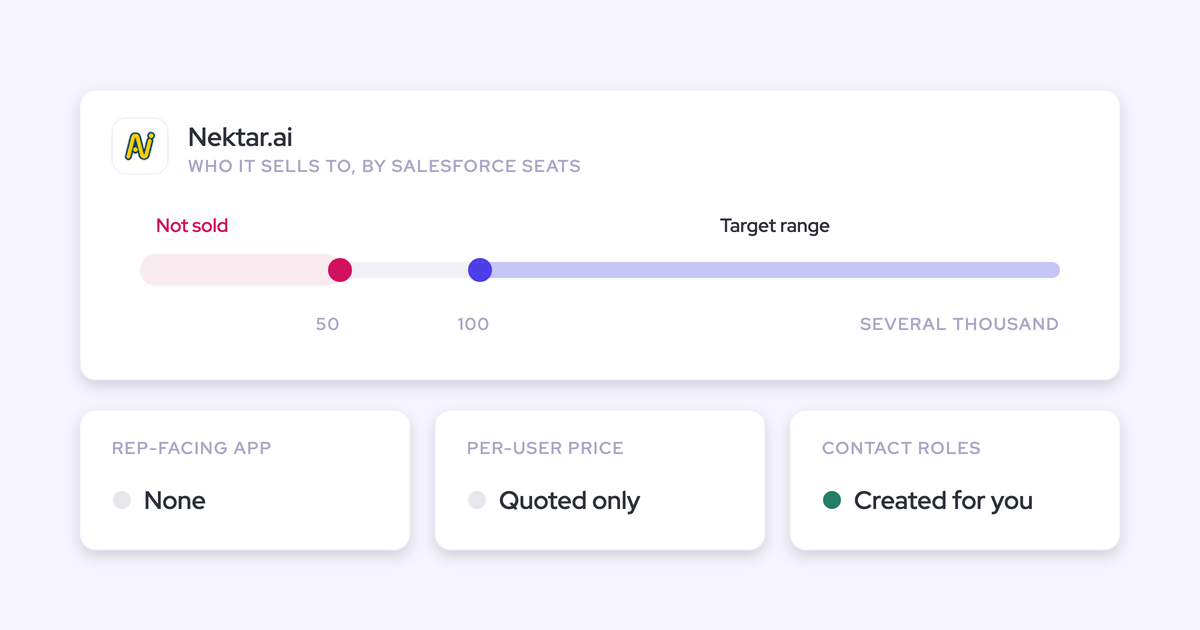

If your team runs under 500 Salesforce seats and you came to Nektar.ai for automatic contact creation and contact roles, Weflow Activity & Contact Capture is the closest like-for-like alternative. It captures email and meetings in the background, creates contacts, and writes Opportunity Contact Roles at a published $19 per user per month. When a match is wrong, your reps can move it from the inbox.
If you run 1,000+ seats and have a data team feeding Snowflake, stay on Nektar.ai. The other four tools here each fit a narrower case, and we say which one below.
Nektar.ai is a strong capture engine built for enterprise estates and data teams. Below 500 seats, the questions that decide the purchase are different:
- Can you see the price?
- Are contact roles included?
- Can a rep fix a wrong match?
- Does data arrive in minutes?
- Does capture become step one of a platform, or another point tool?
We test every tool on two things: the account with several open opportunities, which is the case that breaks capture tools, and a one-for-one parity run.
What Nektar.ai does well, and who it's built for
Nektar.ai is a well-engineered background capture service for enterprise Salesforce estates, typically 100 to several thousand seats. Reps get no interface, so there's nothing for them to learn and almost no change management. That matters, because anything that depends on reps changing how they work gets discounted before the demo is over.
Nektar.ai has other real strengths:
- Its machine-learning mapping falls back to the account instead of guessing.
- Self-healing re-evaluates past decisions as new data arrives.
- Data time travel logs earlier conversations once a missing account is created.
- Its Harvest package adds buyer-role inference and engagement scoring.
Nektar.ai positions itself as revenue telemetry: the data layer under Gong and Clari, not a replacement for either. It names AI and data teams as its primary buyer. It also writes standard Salesforce Tasks, Events, Contacts and Opportunity Contact Roles, so it passes the data-ownership test. Ownership isn't what separates these tools.
Here's where Nektar.ai sits on the eight capabilities this article compares:
- Automatic email capture: Nektar.ai reads sent and received email through admin-level Google Workspace and Microsoft 365 connections and writes it to Salesforce as Tasks. It captures an email only when a participant is an existing contact or lead, or shares a company domain with one.
- Automatic contact creation: It creates missing contacts under the account whose domain matches and fills name, title and phone from signatures. It skips public domains and existing contacts or leads.
- Opportunity contact roles: It creates an Opportunity Contact Role for every contact on an activity linked to an opportunity, filling Role and Is Primary. This sits only in the Harvest package.
- Setup and rollout: An admin connects the mail tenant once and enables sync user by user, and reps install nothing. The default integration user asks for broad admin permissions, and the first sync can take days.
- Integrations: Salesforce, Snowflake, Google Workspace, Microsoft 365 and Zoom, plus meeting data from Microsoft Teams and Google Meet. Salesforce is its only CRM.
- Access from AI assistants (MCP): It has no MCP server of its own. Assistants reach its data through Salesforce's MCP once it's written into Salesforce.
- Raw data access: It delivers to Snowflake, including a headless option with no user interface.
- Pricing: It publishes what Bloom and Harvest contain, but every price is quoted. The only published figure is the backfill add-on.
Why teams under 500 seats look past Nektar.ai
The friction shows up at purchase, not in the product demo. It comes from packaging, visibility and speed.
You can't price Nektar.ai without a sales conversation
Nektar.ai publishes what's in each package but no per-user price, so you can't put a number in a business case until you've had a sales call. Pricing is quoted per organization with volume tiers.
The only public figure is the Data Backfill add-on: $8 per user for every month of history, up to 18 months, charged once. For a 50-user team backfilling 12 months, that's 50 × 12 × $8 = $4,800 before the subscription.
Quote-only pricing has a known failure mode. A team gets priced out once, the requirement gets parked, and the problem sits unsolved for another 18 months.
Automatic contact roles need Nektar.ai's higher Harvest package
Bloom, the entry package, includes automatic contact creation but not automatic Opportunity Contact Roles. If contact roles are the reason you're looking at Nektar.ai, you're buying Harvest.
| Contact capability | Bloom | Harvest |
|---|---|---|
| Automatic contact creation and enrichment | Included | Included |
| Automatic Opportunity Contact Roles | Not included | Included |
| Buyer role identification | Not included | Included |
| Controls on which contacts and contact roles get created | Not included | Included |
You see a match score, not the rule behind it
Nektar.ai scores candidate records with machine-learning affinity models. An admin sees the score, not the rules behind it, and buyers name this as a hesitation.
When the choice between opportunities is ambiguous, the activity lands on the account. Because there's no rep interface, every correction happens in Salesforce. Nektar.ai learns from those edits, but you still can't read why the first match happened.
Activity reaches Salesforce hours later, not minutes
Nektar.ai's pipeline is batched by design. Latency depends on whether the people on the email already exist:
- Contacts already in Salesforce: about 1 hour typically, up to 9 hours.
- Contacts it has to create first: about 2 hours, up to 18.
- First sync: it can take days.
So the timeline your managers read isn't same-hour, and anything you want to trigger off a fresh email, like an alert or a follow-up task, waits with it.
Nektar.ai adds a tool rather than letting you switch one off
Nektar.ai doesn't record calls, so conversation intelligence stays a separate tool. It also doesn't deduplicate against other capture tools on the same users, so those have to be switched off. It can't dedupe against Gong Engage at all, because Gong doesn't write the message ID Nektar.ai would need.
Most RevOps teams judge a new vendor on how many tools it lets them retire. Adding Nektar.ai moves the count up.
What to test before you replace Nektar.ai
Judge capture on the ambiguous case and on parity. Feature grids won't decide it, because every vendor ticks the same boxes.
"I sometimes show Activity Capture as this kind of checkbox item a lot of companies offer, but very few do very well. So, yeah, the devil is really in the detail as always."
These are the tests we'd run in any capture trial, including ours:
| What to test | How to check it in a trial |
|---|---|
| Price at your seat count, with contact roles included | Get the number for the package that actually writes Opportunity Contact Roles, not the entry tier. |
| The multi-opportunity account | Email a contact who sits on a renewal and an upsell. See where it lands and who can move it. |
| Time from send to Salesforce record | Send an email and time it until the record appears on the opportunity. |
| Integration-user permissions | Put the permission set in front of your security team on day one. Nektar.ai's default asks for Modify All Data, Modify Metadata, Customize Application and Manage Profiles and Permission Sets. |
| Coexistence with your sequencer and other capture tools | Leave Outreach or Salesloft on and count duplicate activities after a week. |
| History included vs billed | Ask how many months come standard and what each extra month costs. |
| A one-for-one parity run on defaults | Run the new tool unconfigured and compare against saved reports from the old one. |
| Whether it lets you switch another tool off | List the tools you'd retire at signature, and the ones you'd still pay for. |
How Nektar.ai and five alternatives compare on capture
The six tools diverge most on contact roles, setup and pricing. Here's everything in one place.
| Capability | Weflow | Nektar.ai | Einstein Activity Capture | Revenue Grid | Gong | Cirrus Insight |
|---|---|---|---|---|---|---|
| Automatic email capture | Server-side through a central mail app, on any device, with no rep action. Writes almost immediately and logs only mail that matches a Salesforce record. | Background capture through admin-level mail connections, written as Tasks. About 1 hour typically, up to 9 hours. | Automatic from the connected Microsoft or Google account. Reps estimate it logs about 80% of activity, and connections drop without explanation. | Server-side Sync Engine saves all non-blocklisted email in 30-minute sessions, stretching to 60 or 120 minutes on quiet mailboxes. | Imports mail server-side and keeps CRM-matched email. Exports to Salesforce as tasks or events only from the day an admin enables it. | Email Sync ($5) logs by admin rules when an existing contact or lead is on the email. 15-minute cycle, or 5 minutes with Fast Sync ($5). |
| Automatic contact creation | Creates contacts from To and CC when the rep sends. Guards: existing accounts only, a cap per meeting, blocked prefixes. Never creates leads. | Creates contacts under the domain-matched account and fills details from signatures. Controls on creation sit in Harvest. | Contact Auto-Creation is unavailable under Sync Email as Salesforce Activity, the default since Summer '25. Unknown addresses aren't logged. | Can create contacts, leads or accounts for unknown participants, but both creation modes are off by default. | Its own sync doesn't create contacts. An inactive Flow template covers call participants only, once an admin turns it on. | Email Sync never creates contacts. Reps add them from the sidebar with fields pre-filled. |
| Opportunity contact roles | Creates the role automatically when it logs an email from a contact with no role on that opportunity. One fixed role value per configuration. | Creates a role for every contact on a linked activity, with title-based role logic. Harvest only. | Not offered. It reads existing roles to match email but never adds them. | Reads existing roles to link email. Doesn't add them; a rep creates one by hand from the Sidebar. | An inactive Flow template adds call participants who are contacts as roles, once an admin activates it. | CRM AI prepares contact roles for the rep to confirm with one tap. |
| Setup and rollout | Two managed packages, one integration user, one central mail app. About 45 minutes of admin time, 2 to 4 weeks to roll out, implementation not charged. | One org-level mail connection, then sync enabled user by user. Broad default permissions; first sync can take days. | Admin assigns license, permission set and configuration, then each rep connects. No documented setup time; reports can lag 24 hours. | Central admin rollout, but reps sign in to the Sidebar. Removing rep steps needs a paid Salesforce license for a service account. One-time implementation fee. | Company-wide mail connection with no per-rep install. Rollout sold as paid professional services, 8 to 15 hours within 30 to 45 days. | Integration user and service accounts for the background syncs. The sidebar needs a per-rep extension, and every user needs API Enabled. |
| Integrations with other tools | Native Salesforce, Gmail, Google Calendar, Outlook, Zoom, Teams, Meet, Slack and the Outreach dialer. Compatibility mode with sequencers. No native Snowflake connector. | Salesforce, Snowflake, Google Workspace, Microsoft 365 and Zoom, plus Teams and Meet meeting data. | Microsoft 365, on-premises Exchange and Google Workspace, alongside Salesforce Inbox, Einstein Conversation Insights and Agentforce. | Microsoft 365, Exchange and Google Workspace; records Teams, processes Zoom. Third-party API integrations sit in a paid customization package. | About 450 integrations and partner solutions, about 30 dialers, 11 meeting platforms. | Salesforce, Gmail, Outlook, Teams, scheduling links, a HubSpot scheduler embed, Zapier and scheduling webhooks. |
| Access from AI assistants (MCP) | Official read-only MCP connector with summaries, transcripts, playbooks, forecast calls and pipeline metrics. | No MCP of its own. Assistants read its data through Salesforce's MCP. | No MCP of its own. Reachable through Salesforce Hosted MCP Servers, which need Flex Credits. | MCP server launched July 2026, connected manually. The Claude plugin needs Pipeline Assistant, Meetings Assistant or AI Mentor. | Three record-scoped tools that return insights, not transcripts. Read-only and metered in credits. | Not offered. |
| Raw data access outside the tool | REST API bulk export of transcripts, metadata, scores and signals as JSON or CSV. | Snowflake delivery, including a headless option. | Synced Task and EmailMessage records are reachable through Salesforce APIs. Data in its own store isn't exportable. | No public activity API. Activity is reachable through Salesforce's API. | Public API capped at 3 calls a second and 10,000 a day. Warehouse delivery through Data Cloud, about $5,000 a year. | Preview REST API. No direct warehouse delivery. |
| Pricing | Published: $19 per user per month, billed annually, 10-user minimum. | Quote-only. Backfill published at $8 per user per month of history. | Standard included with several editions for up to 100 users; full version $50 via Sales Engagement. | Published tiers at $30, $49 and $149, sold by quote on a yearly commitment. | No published prices. Per-user licenses plus a platform fee, with AI credits on top. | À la carte. Sidebar, email and calendar sync together cost $27. |
The row that decides most evaluations isn't in the table, though. It's what each tool does when a contact sits on two open deals.
How each tool handles accounts with several open opportunities
Every tool falls back somewhere when the opportunity is ambiguous. What differs is whether you can see the rule, and who resolves the ambiguity: a rep in the inbox, an admin in Salesforce, or an opaque score.
For a mid-market team running new business, renewal and upsell on the same accounts, this is the common case, not the edge case. And a silent wrong match is worse than no match, because nobody spots it until the report is already built on it.
"If there are multiple opportunities, they just don't know where to map it and just randomly assign it to something. This is not acceptable."
| Tool | How it picks the opportunity | What happens when it's ambiguous | Where a wrong match gets corrected |
|---|---|---|---|
| Weflow | A stated rule: the contact holds a role on exactly one open opportunity, or the account has a single open opportunity. Closed opportunities are never written to. | The activity falls back to the account. | The rep picks or moves the record from the Outlook add-in or Chrome extension, before or after logging. |
| Nektar.ai | Machine-learning affinity scores on candidate records up to three or four relationship hops away. | The activity falls back to the account instead of guessing. | An admin or rep edits the record in Salesforce, and Nektar.ai remembers the reversal. |
| Einstein Activity Capture | Contact roles first, then the account's opportunities through a documented tiebreaker chain (close date, owner on the email, activity dates and more). | The tiebreakers pick a deal. Customers also see one email surface on every opportunity the contact sits on. | The rep changes the association on the email record; an admin edits the matching flow. |
| Revenue Grid | Links only when the rep owns the open opportunity and the contact already holds a role on it. | The email lands without the opportunity. | The rep picks records in the Sidebar's Save dialog; thread auto-saving then applies that choice to the thread. |
| Gong | Admin rules narrow deals by filters, who took part (owner, contact role, deal team), contact count and a date field. | Gong associates every remaining deal, up to a maximum of 20. | Any user changes it in Gong, which freezes that call's association from then on. |
| Cirrus Insight | Smart Link relates the email to the most recently created or edited record of one object type. | The email lands on whichever deal was touched last. | The rep files the first email by hand; Thread-Based Smart Link (Pro plan and up) keeps the thread there. |
Nektar.ai and Weflow share the same instinct here: when in doubt, log to the account. We think that's right. The difference is who gets to resolve it, and whether you can read the logic when something looks off.
Contact roles also change the size of the problem over time. Weflow and Nektar.ai (in Harvest) both create Opportunity Contact Roles as capture runs, so each resolved email makes the next one easier to map. Einstein Activity Capture and Revenue Grid depend on roles that already exist, so their ambiguity stays as large as your contact-role hygiene leaves it.
Weflow Activity & Contact Capture: contact roles in the $19 seat
Weflow is the Revenue AI Orchestration platform for sales, customer success, and RevOps teams. Weflow Activity & Contact Capture is its first module: it syncs emails, meetings and contacts from Google Workspace or Microsoft 365 into native Salesforce objects, mapped to the right opportunity, account, contact or lead.
We built it after learning the hard way that reps won't log, even with a nice interface. So capture is automatic by default, and the rep controls are there for the ambiguous case.
- Automatic email capture: Capture runs server-side through a central app in Microsoft Entra or Google Workspace, so every enrolled user's mail is logged on any device with no rep action. Writes reach Salesforce through the integration user almost immediately, not in hourly batches.
- Automatic contact creation: Weflow creates contacts from To and CC recipients when the rep sends, with guards: existing accounts only, a cap per meeting and blocked prefixes like billing and no-reply. It enriches them on the way in at no extra charge and never creates leads.
- Opportunity contact roles: When Weflow logs an email from a contact with no role on that opportunity, it can create the Opportunity Contact Role automatically. It writes one fixed role value per configuration.
- Setup and rollout: The install is two managed packages, one integration user and one central mail app, in a single admin session of about 45 minutes. Rollout typically takes 2 to 4 weeks, we don't charge for implementation, and you can run a free 14-day proof of concept.
- Integrations with other tools: Weflow integrates natively with Salesforce, Gmail, Google Calendar, Outlook, Zoom, Teams, Meet, Slack and the Outreach dialer. Compatibility mode lets Outreach and Salesloft keep running, and the parallel setup with Einstein Activity Capture is documented. There's no native Snowflake connector; teams move data through the API.
- Access from AI assistants (MCP): Our official read-only MCP connector gives Claude, ChatGPT and other assistants summaries, transcripts, playbook output, forecast calls and pipeline metrics. Nektar.ai's point that Salesforce's MCP can read what it writes is fair, since both tools write into Salesforce. Our connector adds transcripts and forecast data that never reach Salesforce objects.
- Raw data access outside the tool: The REST API bulk-exports transcripts, metadata, scores and signals as JSON or CSV into a warehouse or BI tool.
- Pricing: $19 per user per month, billed annually, with a 10-user minimum, and it includes Ask Weflow AI Pro and Agent Builder Free. Weflow Revenue AI Foundation adds Weflow Conversation Intelligence for $49, roughly 16% off buying both standalone.
Where it stops:
- No native Snowflake connector.
- No inferred role values like champion or economic buyer.
- It never creates leads.
- It's configured per mail tenant, with no single view across tenants.
- It doesn't capture personal channels such as personal email, SMS or calls from a personal phone.
- It doesn't capture mail sent from separate deliverability subdomains.
Choose Weflow if you're a 10 to 500-seat Salesforce team that wants automatic capture, contact creation and contact roles at a published price, rep correction in the inbox, and conversation intelligence and forecasting on the same platform when you're ready.
Einstein Activity Capture: free basic sync, but no contact roles
Einstein Activity Capture is Salesforce's own background capture feature. Many readers here are on it today and are leaving because of what it doesn't do.
- Automatic email capture: It captures sent and received email from the connected Microsoft or Google account. Reps estimate it logs about 80% of their activity, connections drop without explanation, and it doesn't store attachments.
- Automatic contact creation: Under Sync Email as Salesforce Activity, the default since Summer '25, Contact Auto-Creation isn't available. Email from an unknown address isn't logged until someone creates the contact or lead.
- Opportunity contact roles: Not offered. It reads existing roles to pick an opportunity but never adds them.
- Setup and rollout: An admin assigns each user a license, a permission set and a configuration, then each rep connects their own settings. Salesforce documents no setup time, and data can take 24 hours to show in reports.
- Integrations with other tools: It connects to Microsoft 365, on-premises Exchange and Google Workspace and works alongside Salesforce Inbox, Einstein Conversation Insights and Agentforce. There's no wider catalogue.
- Access from AI assistants (MCP): No MCP of its own. Assistants reach its records through Salesforce Hosted MCP Servers, which need Flex Credits.
- Raw data access outside the tool: Email synced as Task and EmailMessage records is reachable through reports and APIs. Salesforce doesn't support exporting the data held in its own store.
- Pricing: The Standard version comes with Starter, Pro Suite, Professional and Enterprise editions, free for up to 100 users. The full version is $50 per user per month through Sales Engagement, or included in Unlimited.
Where it falls short: Salesforce has named Momentum as the future of activity capture, so Einstein Activity Capture no longer has a stated roadmap of its own. It also fails the multi-opportunity test that sends most teams looking.
Choose it if you're under 100 users on the free Standard version, or an Unlimited Edition org that already holds it and only needs basic email and calendar sync.
Revenue Grid: an Outlook sidebar with a published $30 tier
Revenue Grid pairs an Outlook add-in or Gmail extension with a server-side Sync Engine, and publishes list prices for its tiers.
- Automatic email capture: The Sync Engine saves every non-blocklisted email in 30-minute sessions, stretching to 60 or 120 minutes on quiet mailboxes. An email a rep saves from the Sidebar is written immediately.
- Automatic contact creation: It can create contacts, leads or accounts for unknown participants with domain-matching rules, but both creation modes are off by default.
- Opportunity contact roles: It doesn't add roles. Auto-saved email links to an opportunity only when the rep owns it and the contact already holds a role there.
- Setup and rollout: An admin rolls it out centrally, but reps still sign in to the Sidebar with their own Salesforce login. A fully admin-authorized setup needs a paid Salesforce license for a service account, and implementation carries a one-time fee.
- Integrations with other tools: It connects to Microsoft 365, Exchange on premises and Google Workspace, records Teams meetings and processes Zoom recordings. Third-party API integrations sit in a paid customization package.
- Access from AI assistants (MCP): An MCP server launched in July 2026 and is connected manually. The Claude plugin needs Pipeline Assistant, Meetings Assistant or AI Mentor.
- Raw data access outside the tool: There's no public API for captured activity; you reach it through Salesforce's API.
- Pricing: $30, $49 and $149 per user per month, sold by quote on a yearly commitment. History defaults to the previous six days, and older history is a custom service.
Where it falls short: Half-hour sync, contact creation off by default and no automatic contact roles put the same burden back on your team that Nektar.ai removes.
Choose it if you're Outlook-heavy, want a sidebar with a published capture price, and can live with 30-minute sync and hand-maintained contact roles.
Gong: deep call analytics, but not a capture replacement
Gong invented conversation intelligence and has the deepest call analytics in the category. It isn't a capture replacement for Nektar.ai, and Nektar.ai itself positions as Gong's complement.
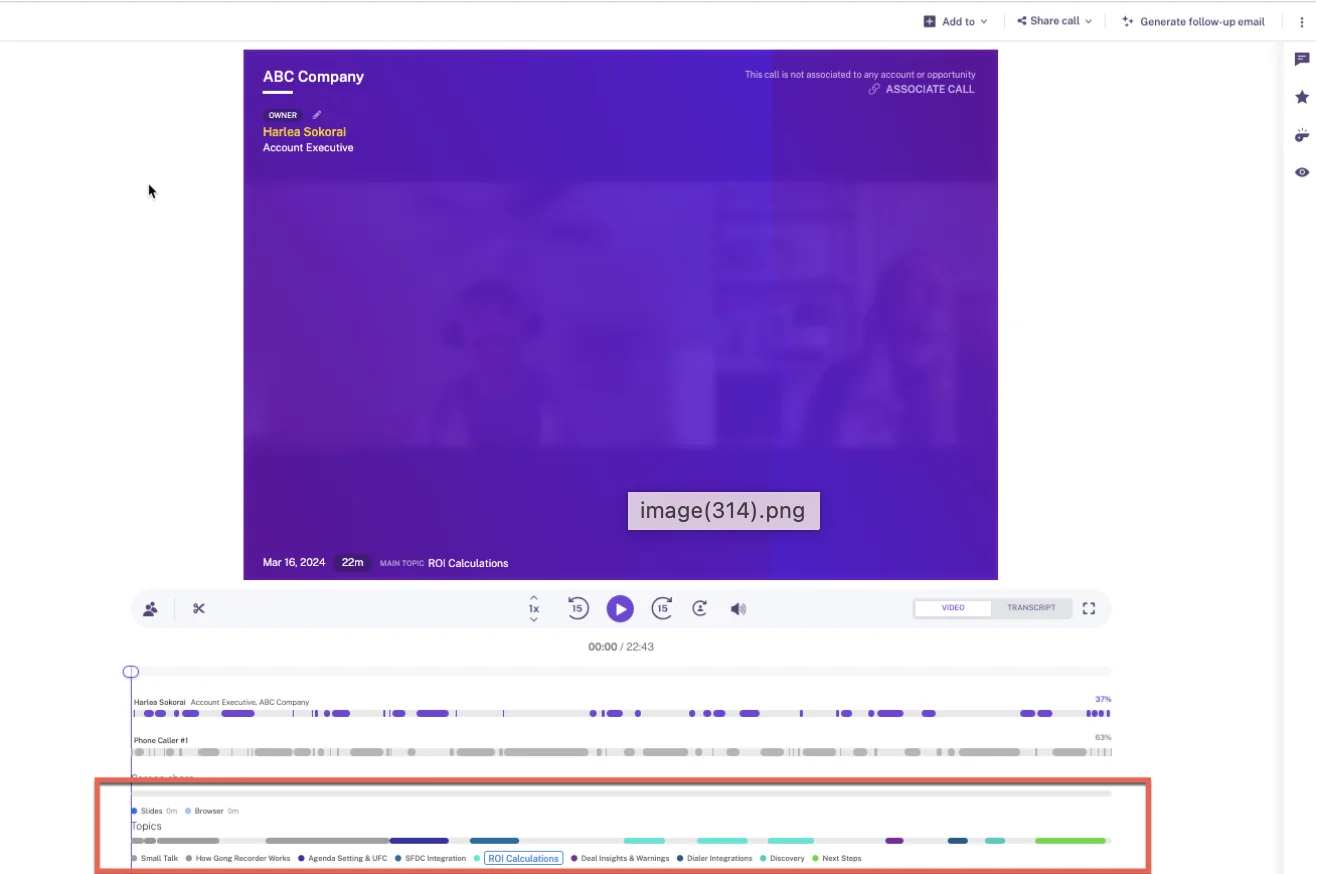
Gong's call page, shown below, is a good example of that depth: its AI topic track splits each recording into the subjects discussed.
- Automatic email capture: Gong imports CRM-matched email server-side and exports it to Salesforce as tasks or events once an admin turns export on, only from that day forward. It has no email or calendar backfill.
- Automatic contact creation: Its own sync doesn't create contacts. An inactive Flow template creates them for call participants only, once a Salesforce admin activates it.
- Opportunity contact roles: A second inactive Flow template adds call participants who are contacts as roles on the opportunity.
- Setup and rollout: An admin connects mail company-wide with no per-rep install. Gong sells the rollout as paid professional services, in fixed packages of 8 to 15 hours used within 30 to 45 days.
- Integrations with other tools: About 450 integrations and partner solutions, about 30 dialers and 11 meeting platforms. This is Gong's strongest capability row.
- Access from AI assistants (MCP): Three record-scoped tools that return AI insights rather than transcripts, read-only and metered in credits.
- Raw data access outside the tool: The API returns transcripts and scorecards, capped at 10,000 calls a day. Warehouse delivery needs Data Cloud, about $5,000 a year.
- Pricing: No published prices. Per-user licenses plus a platform fee, a mandatory Foundation license, and AI credits on top.
Where it falls short: Capture is built around recorded calls. Email between meetings and contacts who never joined a call are largely missing.
Choose it if conversation analytics is your priority, and pair it with a dedicated capture layer for email, contacts and contact roles.
Cirrus Insight: rep-directed filing with à la carte pricing
Cirrus Insight is an inbox add-on for Gmail and Outlook, sold as 16 separately priced capabilities. It's built for teams that want reps to decide what gets filed.
- Automatic email capture: Email Sync ($5) logs email by admin rules without the sidebar open, but only when an existing contact or lead is on it. It runs on a 15-minute cycle, or 5 minutes with Fast Sync for another $5.
- Automatic contact creation: Email Sync never creates contacts. Reps add them from the sidebar, with the account and signature details pre-filled.
- Opportunity contact roles: CRM AI prepares contact roles on the record for the rep to confirm with one tap.
- Setup and rollout: The background syncs run through an integration user and service accounts. The sidebar needs a per-rep extension or add-in, every user needs API Enabled, and required Task or Event fields have to be changed first.
- Integrations with other tools: Salesforce, Gmail, Outlook and Teams, plus scheduling links, a HubSpot scheduler embed, Zapier and scheduling webhooks.
- Access from AI assistants (MCP): Not offered.
- Raw data access outside the tool: A preview REST API covers scheduling, transcripts and CRM records. There's no direct warehouse delivery.
- Pricing: À la carte. The sidebar, email and calendar sync together cost $27 per user per month.
Where it falls short: Smart Link picks the most recently touched record, so a multi-opportunity account gets whichever deal moved last. New contacts depend on reps adding them.
Choose it if you want reps directing what gets filed and prefer to buy capabilities line by line.
What each Nektar.ai alternative costs, and what costs extra
Only some vendors publish a price. Nektar.ai and Gong don't. What decides the business case is whether contact roles, history and implementation are included in that price.
| Tool | Published price | Contact roles in that price? | History included | Implementation and extras |
|---|---|---|---|---|
| Weflow | $19 per user per month, billed annually, 10-user minimum | Yes, automatic in the $19 seat | 24 months standard, up to 3 years custom | Implementation not charged. Weflow Conversation Intelligence $39, or Weflow Revenue AI Foundation $49 for both. |
| Nektar.ai | None; Bloom and Harvest are quoted per organization | Only in Harvest | Paid add-on: $8 per user per month of history, up to 18 months | No platform fee; 24/7 CSM support on every plan |
| Einstein Activity Capture | Standard included for up to 100 users; full version $50 via Sales Engagement | Not offered | Switching to Sync Email as Salesforce Activity can bring in up to six months of past email | No attachments; Hosted MCP needs Flex Credits |
| Revenue Grid | $30, $49 or $149, sold by quote on a yearly commitment | No automatic contact roles | Six days by default; older history is a custom service that may carry a fee | One-time implementation fee; customization and premium success sold separately |
| Gong | None; per-user licenses plus a platform fee, by proposal | Inactive Flow template, call participants only | No email or calendar backfill | Paid professional services rollout; AI credits; Data Cloud about $5,000 a year |
| Cirrus Insight | À la carte; $27 for sidebar, email and calendar sync | Not from the sync lines; CRM AI prepares roles for rep confirmation | Email backfill scoped as a service; calendar reaches back up to 7 days | Fast Sync +$5 per user per month |
Here's what that looks like for a 50-seat team at list price. Weflow Activity & Contact Capture is $19 × 50 × 12 = $11,400 a year, with 24 months of history included, before volume discounts. On Nektar.ai, 12 months of backfill alone is $4,800, and the subscription itself is quote-only.
Which Nektar.ai alternative fits your team
The right pick follows from your seat count, whether contact roles matter, how much rep involvement you'll accept, and whether you want to consolidate tools.
| If your team… | Pick | Why |
|---|---|---|
| Has 10 to 500 seats and needs contacts plus Opportunity Contact Roles at a published price | Weflow Activity & Contact Capture | Contact roles are in the $19 seat, writes are near-immediate, and reps fix matches from the inbox. |
| Has under 100 users and only needs basic email and calendar sync | Einstein Activity Capture | The Standard version comes with your edition, as long as you can live without contact roles. |
| Is Outlook-heavy and fine with 30-minute sync | Revenue Grid | A sidebar and server-side sync at a published $30 tier. |
| Puts conversation analytics first | Gong, paired with a capture layer | The deepest call analytics, but email and contact capture need another tool. |
| Wants reps to decide what gets filed | Cirrus Insight | Rep-directed filing and line-by-line pricing. |
| Runs 1,000+ seats with a data team on Snowflake | Stay on Nektar.ai | Headless Snowflake delivery and role inference are built for that estate. |
When you should stay on Nektar.ai
Nektar.ai is the better choice in specific situations, and we'd rather tell you now than after a trial:
- You run 1,000+ seats with an AI or data team that wants a headless feed into Snowflake. Weflow has no native Snowflake connector and moves data through its API.
- You need buying-role inference. Weflow writes one fixed role value per configuration.
- You need engagement scoring or meeting-attendance tracking, which Nektar.ai offers in Harvest.
- Your security team requires ISO 27001, which Nektar.ai holds. Weflow's trust claims are SOC 2 Type II, GDPR compliance, Zero Data Retention for AI processing, and no customer data used to train AI models.
- You run several mail tenants from acquisitions. Weflow is configured per tenant, with no single view across them.
How to move off Nektar.ai without losing activity
A switch can be measured and reversed. The records Nektar.ai wrote stay in Salesforce, and the backfill tells you exactly what the old tool missed.
Run a one-for-one parity test without duplicate activity
Two capture tools can't run on the same user at once, and Nektar.ai doesn't deduplicate against other capture tools. So you move a group across completely rather than running both side by side.
"We tested it out, made sure it tracked one for one. We kind of ran it out of the box, we did not try to put any of our own use cases for templates. We said we just want to do it one for one."
- Save your activity reports for the test group from Nektar.ai first.
- Switch Nektar.ai off for that group and enroll the same users in Weflow.
- Run Weflow on its defaults, with no templates or custom use cases.
- Backfill the test period. Weflow's backfill checks each email's message ID before writing, so it adds only what the old tool missed, and that difference is your measure against the saved reports.
- Talk to the reps who complained most about missing activity and ask what they see now.
Splitting different users across the two tools doesn't give you a fair test, because activity volumes differ from person to person.
Keep the contacts and contact roles Nektar.ai already wrote
Nektar.ai writes standard Salesforce Contacts, Opportunity Contact Roles, Tasks and Events. Those are records in your org, and they stay there when you switch.
Before Weflow creates a contact, it looks up the address in real time across contacts, leads, custom objects with an email field and secondary email fields. So it won't create a second copy of someone Nektar.ai already created. It doesn't merge duplicates that already exist.
For those, the Activity Capture Health view in Weflow Analytics flags duplicate contacts by email and duplicate accounts sharing a website, inside Salesforce.

Backfill 24 months of email and meeting history as standard
Weflow backfills up to 24 months of emails, meetings and contacts as standard, and up to 3 years on a custom basis. Nektar.ai charges per user per month of history and caps it at 18 months.
One point in Nektar.ai's favor: its backfill runs through the same pipeline as live capture, so it also creates contact roles for the historical period. Weflow's backfill brings in emails, meetings and contacts.
| Backfill | Weflow | Nektar.ai |
|---|---|---|
| Standard depth | 24 months | None without the add-on |
| Maximum depth | Up to 3 years, custom | 18 months |
| Cost | Included | $8 per user per month of history, one time |
| What it brings in | Emails, meetings and contacts | Activity, contacts and historical contact roles |
See how Weflow captures activity, updates Salesforce fields from calls, and rolls up your forecast. Book a 30-minute demo.
FAQ: switching from Nektar.ai to another capture tool
How much does Weflow Activity & Contact Capture cost for my seat count?
Weflow Activity & Contact Capture costs $19 per user per month, billed annually, with a 10-user minimum. Volume discounts start to matter at around 30 to 40 seats. Our prices are published on the website, so you can size the business case before a call.
Can we sign for less than 12 months or cut seats mid-term?
Weflow's minimum term is 12 months, and there's no shorter term. There's no contractual right to reduce seats mid-term, but you can reassign a seat when someone leaves. Seats you add mid-term are charged pro rata to the end of the term.
What does Weflow's 24-month backfill bring into Salesforce?
Weflow's backfill brings in emails, meetings and contacts. Twenty-four months is standard, and up to 3 years is available on a custom basis. It runs as part of setup, so your opportunity timelines have history from the first week.
What permissions does the Weflow integration user need?
Weflow uses one integration user with a dedicated permission set, installed through two managed packages with no code deployment. Weflow reads no mailbox until a user is enrolled in a capture configuration, so you can finish the technical setup while legal review is still open. Our support team sees how Weflow decided to log or skip each email, not what the email says.
Does Weflow need Microsoft or Google admin consent to go live?
Yes. A mail admin installs Weflow's app centrally in Microsoft Entra or Google Workspace, and no rep grants anything. For Microsoft 365, the Microsoft admin has to start the install from Weflow's admin console; approving the request in the Microsoft 365 admin center alone doesn't complete it. Plan for both a Salesforce admin and a mail admin in the setup session.
Should Weflow log our email as Task or EmailMessage records?
You choose per configuration, and about nine in ten of our customers choose EmailMessage. EmailMessage carries From, To and Cc and thread structure, and one record can relate to up to 50 recipients. Task is roughly seven times lighter on storage and fits teams whose reports already run on tasks, since one activity report can span tasks and events.

Will Weflow double-log email we already send through Outreach or Salesloft?
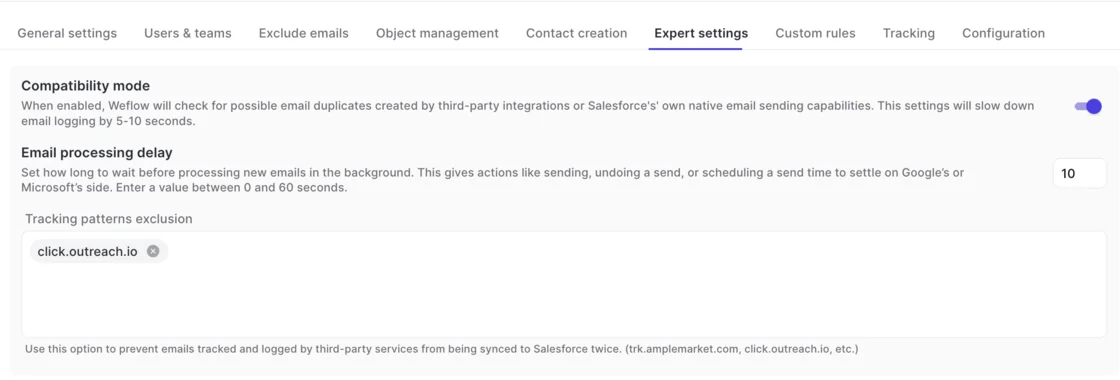
No. Weflow's compatibility mode reads the sequencer's tracking pattern in the email body and skips messages the sequencer already logs, so only one tool writes each email. It adds five to ten seconds to email logging.
Can we exclude executive, HR or M&A mailboxes from capture?
Yes. You can scope Weflow's mail app to a single organizational unit in Google Workspace, or to assignment groups in Microsoft Entra, so only licensed users are captured. Mail where every participant is on an internal domain is never logged, and admins can exclude supplier domains as well.
Does Weflow capture email from aliases and deliverability subdomains?
Weflow doesn't capture mail sent from a separate deliverability subdomain, because capture matches on the sender address held in Salesforce. Those threads appear once the buyer replies to the rep's standard address. Aliases scatter activity in every capture tool we've seen, and the fix is organizational: consolidate your sellers onto one domain.
How do champion and economic buyer roles get set without inference?
Weflow writes one fixed role value per configuration, so contact role coverage goes up while the role labels stay generic. You refine them with a Salesforce flow that fires on what Weflow wrote, an agent that updates the record afterwards, or a rep creating the contact through the extension with the full field set.
What does adding Weflow Conversation Intelligence later cost?
Weflow Revenue AI Foundation costs $49 per user per month, against $19 plus $39 for the two products standalone. Weflow logs the meeting whether or not it's recorded. Recording then adds the summary and AI field updates to that same activity, so you get one meeting record, not two.
Who runs a Weflow rollout, and what does it need from our team?
Weflow runs onboarding in-house, and we don't charge for implementation. A managed-service option is there if your RevOps team is stretched. Rollout typically takes two to four weeks. From your side, it needs a Salesforce admin, a mail admin, and decisions on how you want capture configured.











