How Weflow Handles a Works Council Review for Conversation Intelligence in Germany and Austria
Learn how Weflow handles a works council review for Conversation Intelligence in Germany and Austria


Your works council doesn't vote on demos. It votes on a file: what the tool captures, where the data goes, who can hear it, and how every participant gets a say.
If Weflow is on your shortlist, this article is laid out as that file. For each question, you'll find the Weflow Conversation Intelligence setting that controls it, and where that setting stops.
Weflow is the Revenue AI Orchestration platform for sales, customer success, and RevOps teams. The good news is that you can install Weflow before the vote, because it reads nothing until you enroll a user.
Weflow Conversation Intelligence costs $39 per user per month. Revenue AI Foundation, which adds activity capture, costs $49.
We've been upfront about the limits too, including the desktop-app trap and the coaching data your council will likely treat as performance monitoring.
One quick note before we start: this isn't legal advice, and Weflow doesn't supply a Betriebsvereinbarung template. You and your counsel write the agreement, and this article gives you the inputs.
What Weflow puts in your works council file
Here's the whole file at a glance: each question your council will ask, the Weflow setting that controls it, and where that setting stops.
| Council question | The Weflow setting that controls it | Where that setting stops |
|---|---|---|
| What is captured? | Nothing, until an admin enrolls a user in a configuration. The notetaker joins a user's meetings only after enrollment in Conversation Intelligence and that user's first sign-in. | The Weflow desktop app records whenever a rep starts it, outside the notetaker's consent flow. |
| Who is recorded? | Only users enrolled in the Conversation Intelligence configuration, and only in meetings with at least one external attendee. Customer domains can be excluded. | Rules apply per configuration, so a different rule for a different market means a separate team. |
| Where is data stored? | The summary and full transcript sit in your Salesforce org. Audio, video, transcripts and Weflow-native fields sit in Weflow's AWS environment in Frankfurt, New York or Sydney. | Video never lands in Salesforce. Weflow holds it and streams it back. |
| Where is it processed, and by whom? | Temporary processing data stays tenant-isolated and is deleted after processing. Sub-processors and their jurisdictions are documented in the sub-processor list. | Storage region and processing location are separate answers, and the sub-processor list carries the processing half. |
| Does any model train on it? | Weflow never uses customer data to train AI models, and AI processing runs under Zero Data Retention. | Your council will read this answer against the sub-processor list, so both belong in the file. |
| Who can see or hear a recording? | Meeting participants, plus the people the recorded user rolls up to in the Salesforce role hierarchy. Admins can replace this with a custom Weflow hierarchy. | A single recording can't be made private. |
| How does per-session consent work on Microsoft Teams? | Weflow posts a chat notice with a consent link and can send a pre-meeting email about an hour ahead. Recording status shows on the notetaker's picture, you choose opt-in, opt-out or none, and outcomes go to a downloadable log. | Consent doesn't vary by account region or local law. The log doesn't record who removed the notetaker. |
| How do retention and deletion work? | You can delete recordings after a set period and keep transcripts, delete both, or delete transcripts and keep summaries. An opt-out destroys the recording, transcript and notes. | If you keep transcripts after the audio goes, the text stays inside the scope of your retention rule. |
What a works council actually reads for in conversation intelligence
A council's file has two halves:
- The customer half covers consent, residency and training.
- The employee half covers who gets recorded, who can listen, and whether the tool turns into Leistungskontrolle.
Most vendor security packs answer the first half and stay quiet on the second.
That's why a certification pack alone won't close the review. Legal sees a SOC 2 report and a DPA as necessary, but not sufficient. What they really want is the working procedure, explained by the person who'll field the requests.
It also helps to know that councils learned to assume the worst from the first generation of US-built tools. Gong, for example, defaults new customers to US storage, and even choosing its EU data center still leaves processing in the United States, Israel and Ireland.
So the questions your council asks often sound simpler than what they're really testing:
| What the council asks | What it's testing underneath |
|---|---|
| "Where is it hosted?" | Whether you can separate storage location from processing location. |
| "Is it GDPR-compliant?" | Which setting controls each risk, and what that setting can't do. |
| "Who can see it?" | Whether managers can monitor reps through their recordings. |
| "Is there AI in it?" | Whether the no-training answer holds through every sub-processor. |
| "Is there a consent popup?" | Whether you know Microsoft Teams has no native consent dialog, so the tool has to carry consent. |
What Weflow captures, and who it records
In Weflow, recording only happens after deliberate enrollment, and only in external meetings. That means your council approves a defined scope, not a blanket permission.
Weflow reads nothing until you enroll a user
Installing the managed package, connecting the integration user and adding the workspace app all grant access, but none of them capture anything.
Until an admin enrolls a user in a configuration, Weflow reads no emails or calendar events and writes nothing to Salesforce.
This gives IT room to finish the technical setup while the Betriebsrat review is still open.
There's also a second gate: the notetaker only starts joining a licensed user's meetings after that user signs in to Weflow for the first time.
Recording follows Conversation Intelligence enrollment, not app access
Only people enrolled in the Conversation Intelligence configuration have their meetings recorded.
This lets you separate the people who watch from the people who are recorded:
- A sales leader who only needs to watch team recordings gets a view-only license or admin rights, without enrollment.
- A view-only user watches recordings but has no pipeline management or forecasting.
- An admin left out of the configuration has full platform access, and nothing of theirs is recorded.
Every Weflow plan includes unlimited view-only licenses, so this scoping doesn't cost you seats.
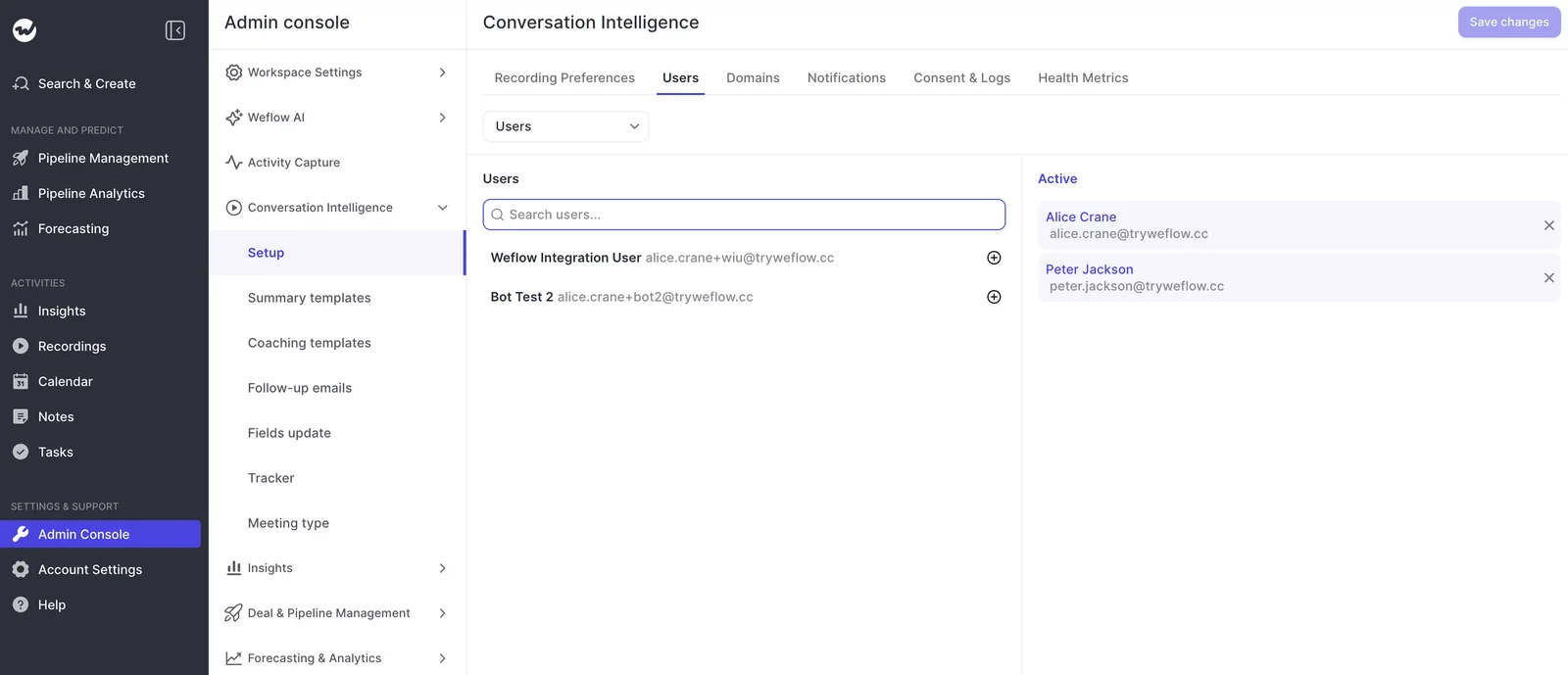
For the council, that means two lists you can show side by side: who watches and who's recorded.
The Weflow notetaker joins only meetings with external attendees
The notetaker only joins meetings where at least one attendee is outside your configured internal domains, so these meetings never get one:
- A manager's one-on-one with a rep.
- A team stand-up.
- An internal pipeline review.
This answers the first employee-side question most councils raise: performance conversations between managers and reps stay outside the notetaker by design.
The notetaker also joins as a guest, so someone has to admit it. If nobody lets it in from the lobby within about ten minutes, nothing gets recorded.
Exclude existing customers from recording by domain
Admins can add a customer's domain to the notetaker exclusion list, and Weflow keeps that customer's meetings out of recording entirely. Reps don't have to remember anything on the day.
This is how you meet a condition legal often sets for a first phase: prospects yes, existing customers no.
- Add the domains of every existing customer to the exclusion list.
- Enroll one pilot team in Conversation Intelligence.
- Prospect meetings get recorded, with notice, and customer meetings don't.
- Remove domains from the list as legal widens the scope.
Where Weflow stores and processes your conversation data
Your conversation data lives in two places: your own Salesforce org and Weflow's AWS environment in the region you choose. Processing is a separate question, which we cover below.
This is usually the first thing German buyers ask about. HolidayCheck, for example, chose Weflow over Gong as a GDPR-compliant European alternative.
Your Weflow instance follows your Salesforce region
Weflow is a German company hosted in Frankfurt. We spin up your instance in the region where your Salesforce org is hosted, and you can override that to keep data in the EU or UK.
Residency is a setting, not a paid migration, so if your Salesforce org already sits in Europe, your Weflow data follows it there.
Summaries and transcripts land in your own Salesforce org
Weflow writes conversation data into two Salesforce objects in your org:
- A recording object, which holds the summary and the full transcript.
- An indexing object.
That data sits under the Salesforce permissions and residency your company has already approved. And because it's your record, not a link back to our cloud, it stays when the subscription ends.
Recordings stay in your chosen AWS region, such as Frankfurt
Everything that doesn't live in Salesforce, including audio, video, transcripts and Weflow-native fields, sits in Weflow's AWS environment in Frankfurt, New York or Sydney.
Video is deliberately kept out of Salesforce, since it's a poor place for large files. Instead, Weflow holds it and streams it back.
Here are the controls around that data:
- Every record is scoped to your tenant ID, and access is enforced at the application layer.
- Data is encrypted at rest with AES-256 and in transit with TLS 1.2 or higher.
- These segregation controls sit inside our SOC 2 Type II audit scope.
| Data type | Where it is stored |
|---|---|
| AI summary | The Weflow recording object in your Salesforce org |
| Full transcript | The Weflow recording object in your Salesforce org, and Weflow's AWS environment in your chosen region |
| Audio and video recording | Weflow's AWS environment in your chosen region, streamed back on playback |
| Weflow-native fields | Weflow's AWS environment in your chosen region |
| Temporary processing data | Tenant-isolated in Weflow's environment and deleted after processing |
Attach the sub-processor list and DPA to the processing question
Your data protection officer will treat storage location and processing location as two separate questions.
For the processing section of your file, you'll need these documents:
- The data processing agreement sets the contractual terms for how Weflow processes conversation data on your behalf.
- The sub-processor list names each sub-processor with its jurisdiction, LLM providers included.
- Weflow's trust center holds our certificates and controls, including the results of third-party penetration testing.
Does Weflow train AI models on your call data?
Your council will want to know whether that holds for every party in the chain, so file this commitment next to the sub-processor list. That way, the DPO can read the training answer and the parties it applies to on the same page.
Beyond that, the trust section is short:
- Weflow holds SOC 2 Type II and is GDPR-compliant.
- ISO 27001 is in progress, with a target of December 2026.
Who can watch a rep's call recordings in Weflow?
By default, a recording is visible to the people who were in the meeting and to the people the recorded user rolls up to in the Salesforce role hierarchy. So yes, managers can see their reports' recordings, and that's the line your council will look at hardest.
If your agreement draws a different line, admins can replace the Salesforce hierarchy with a custom Weflow hierarchy or grant access through Weflow teams.
Sign-in runs only through Salesforce, using your existing SSO or Salesforce two-factor. When you deactivate a user in Salesforce, their Weflow access ends immediately.
| Who | What they can see by default |
|---|---|
| The recorded rep | Their own recordings and the meetings they were invited to |
| Another meeting participant | The recordings of meetings they were in |
| Manager in the hierarchy | The recordings of the people who roll up to them |
| View-only user | Recordings within their access, with no pipeline management or forecasting |
| Admin | Full platform access, and can set the hierarchy that governs everyone else |
Visibility runs up the hierarchy, not down, so an executive's calls don't reach the team below them by default.
There are two limits to keep in mind here:
- Access is set at hierarchy and team level, so you can't make an individual recording private.
- Every comment on a recording or clip shows who wrote it, and there's no anonymous option.
The coaching and performance data your works council will see
Weflow produces per-rep data that your council will treat as performance data, so it's best to put it in the file yourself before someone spots it in a demo.
- Recording volume is reported per rep as internal and external meeting counts with a weekly average, which compares one rep against the team.
- Interaction metrics measure talk ratio, longest monologue, longest customer story, interactivity score, patience and question rate per rep.
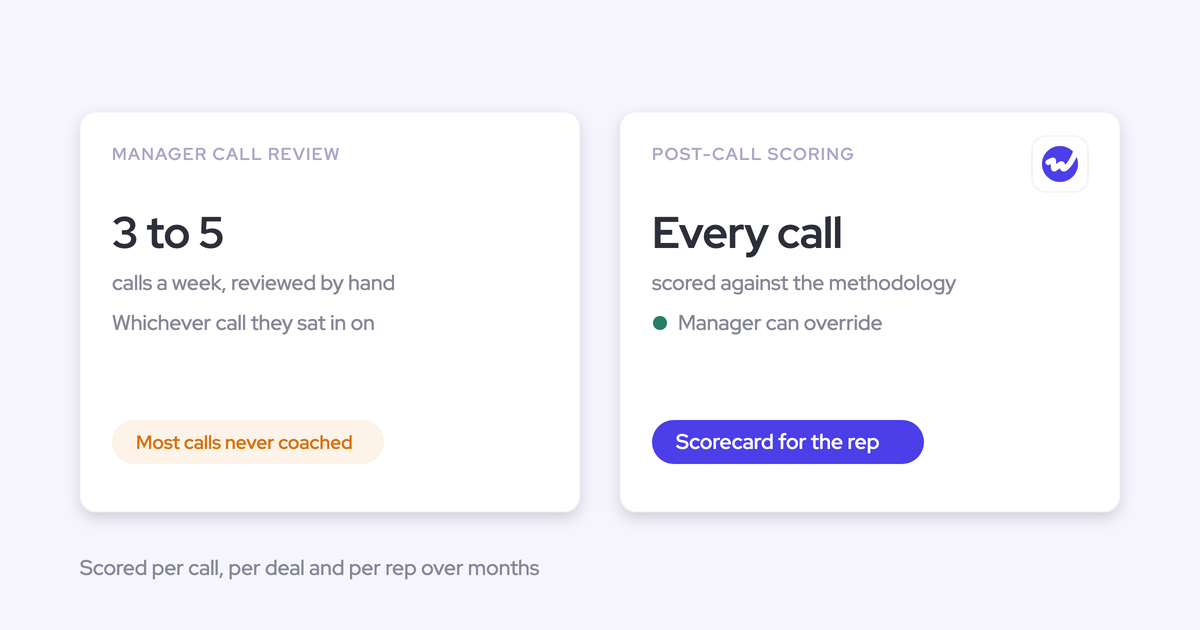
- Coaching scorecards score each recorded external conversation against your sales methodology, and managers can override the score.
- Trackers count defined keywords across calls and roll the hits up by rep, team and region.
Scoring only applies to meetings with external participants, and you can use the Score Meeting toggle on any single recording to remove its scorecard and coaching feedback.
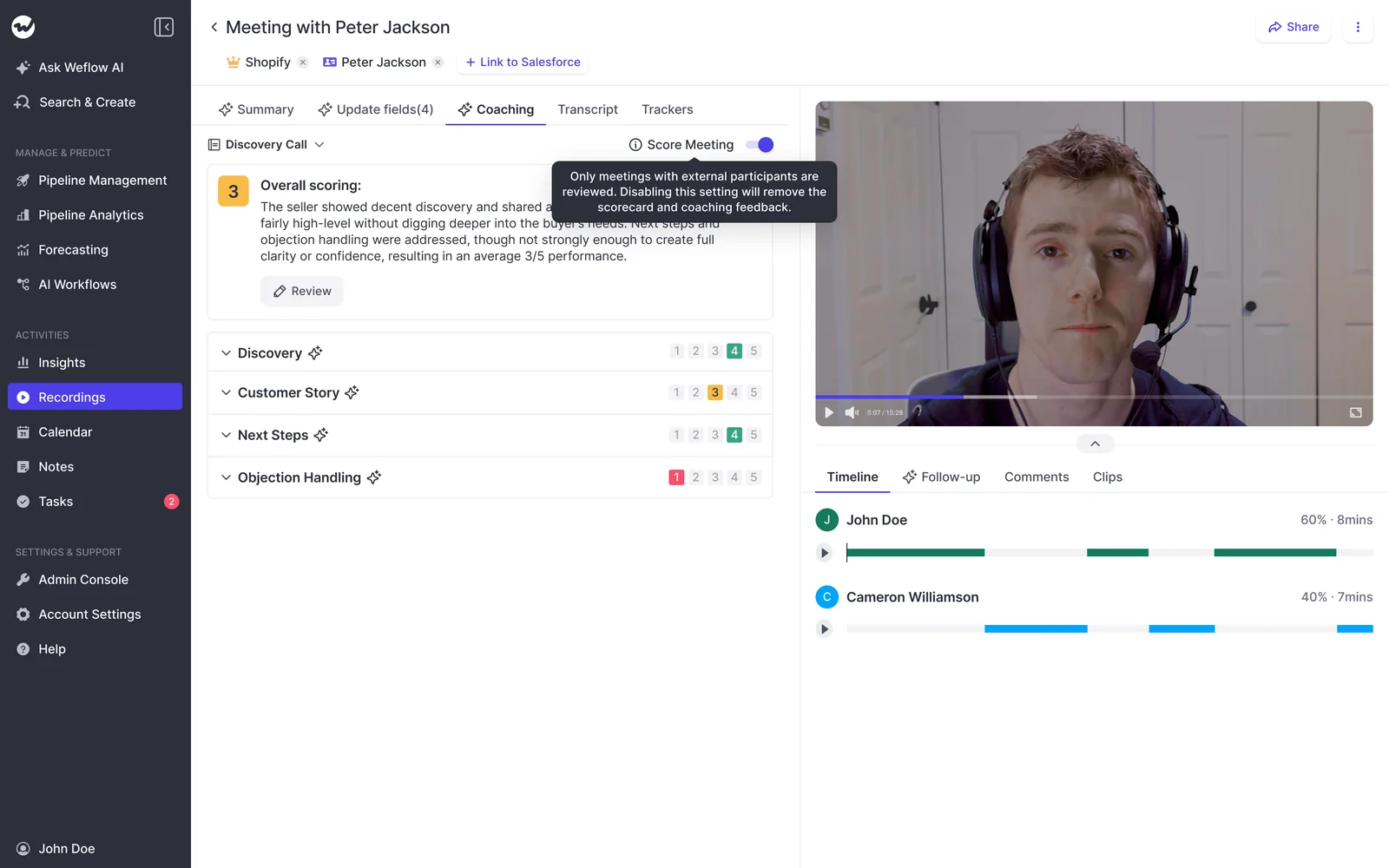
Your Betriebsvereinbarung is where you define what these numbers may be used for and who may read them. Naming them upfront lets the council write that purpose down instead of guessing at it.
How Weflow handles per-session consent on Microsoft Teams
Zoom has a built-in recording consent prompt, but Microsoft Teams doesn't, so consent has to come from the tool.
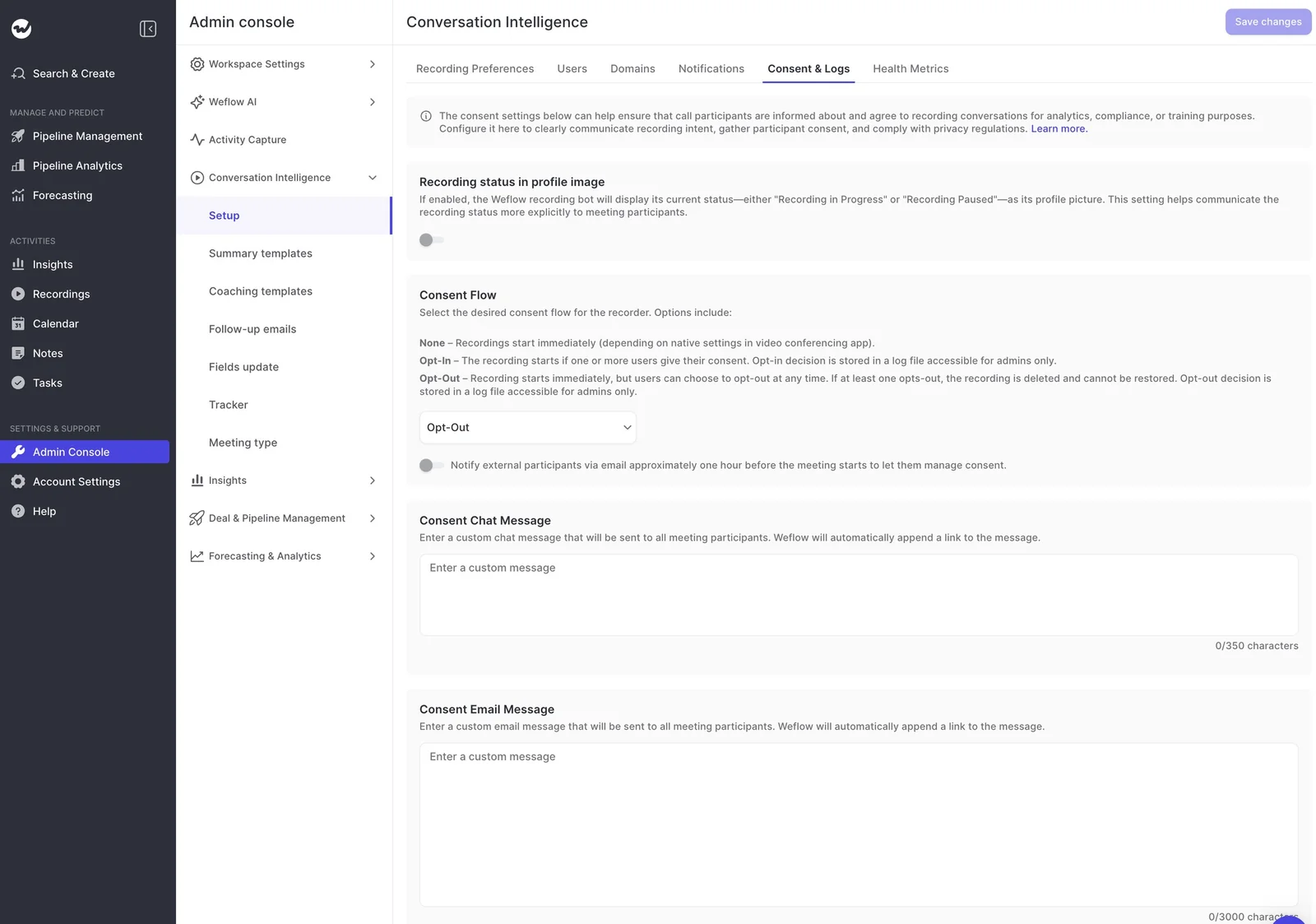
In Weflow, the product carries consent, so reps don't have to remember it. Every session gets a notice, a way to decline and a logged outcome.
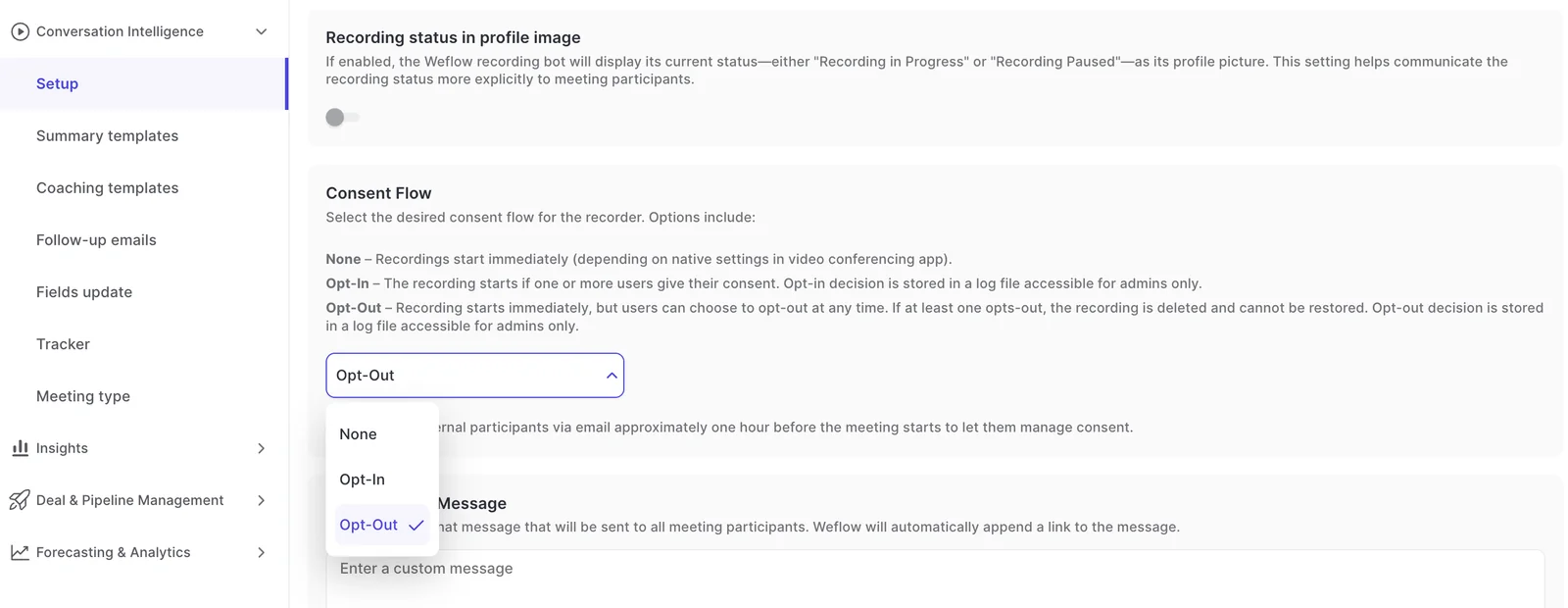
Choose opt-out, opt-in or none for each team
You set the consent mode per configuration, and it applies to every meeting that configuration covers. It's best to pick it with legal before rollout, rather than after the first guest objects.
| Opt-out | Opt-in | None | |
|---|---|---|---|
| When recording starts | Immediately, by default | After consent is given | Immediately, depending on the video app's settings |
| What the participant does | Reads the notice and declines through the link if they object | Actively accepts before anything records | Nothing in Weflow's flow |
| What an objection does | The bot leaves, and the recording, transcript and notes are destroyed | The meeting isn't recorded | No product route to decline |
| Group calls | Holds up, and coverage stays high | Breaks easily, because one person who forgets to accept stops the recording | Not relevant to consent |
| Where it fits | The mode most customers choose | One-to-one and small meetings where legal wants active consent | Rarely a fit for a DACH council file |
Weflow stores every consent decision in a log that only admins can access.
Send the pre-meeting email and chat notice in German
Admins write the notices themselves, in any language:
- The chat message the notetaker posts in every meeting, up to 350 characters.
- The consent email, up to 3,000 characters.
Weflow appends the consent link to both automatically, so a custom message can't leave it out.
The pre-meeting email is a separate switch. When it's on, Weflow emails external participants about an hour before the meeting, so guests can decline before the call even starts.
Your text can explain who records, why, and where the data goes. Whether that also covers consent to process and analyse, separately from consent to record, is your counsel's call.
Reps feel the difference too. Without an upfront notice, consent eats into call time. With the email on, the customer arrives having already decided, and the call can start on the subject it was booked for.
Show recording status on the notetaker for Teams late joiners
Depending on your Teams chat settings, someone who joins after the notetaker may not see the chat history, and with it, the notice. The notetaker does stay visible in the participant list, though.
To close that gap, switch on "Recording status in profile image" on the Consent & Logs tab. The notetaker's picture then reads "Recording in Progress" or "Recording Paused" for the whole call.
You can also rename the notetaker. Participants judge a recorder's name and picture before they read any notice, and a plain name like "Note taker" tends to draw fewer objections than an AI-styled one.
What happens when a participant opts out or the host removes the bot
Legal will want to know exactly what survives an objection. Here's what happens in each case:
| Action | What happens to the recording, transcript and notes |
|---|---|
| A participant opts out through the consent link in chat | The notetaker leaves, and the recording, transcript and notes are destroyed. |
| A guest declines through the pre-meeting email | They decline before the call, and the outcome lands in the consent log. |
| The host removes the notetaker mid-call | Everything recorded up to that point is kept, and the rest of the meeting goes unrecorded. |
| Nobody admits the notetaker from the lobby | Nothing is recorded, and the log records the meeting as "not admitted." |
Export the Weflow consent log for your legal team
Weflow stores the consent outcome per meeting, with its reason:
- A participant opted out.
- The notetaker wasn't admitted.
- An error occurred.
Admins can download the history as a CSV, which is the document legal will read consent decisions from.

There are two limits to keep in mind across the consent setup:
- The log doesn't record who removed the notetaker from a call.
- The consent mode doesn't vary by the region an account sits in or adapt to local law. It's one behavior per configuration, so separate rules mean separate teams with separate configurations.
To be fair, Gong's consent profiles do handle region and team differences within one setup, which makes them a credible option for companies selling into several jurisdictions from one team.
Why the Weflow desktop app won't get you past the council
The Weflow desktop app records without a bot, but that doesn't make the consent question go away. It just moves it onto the rep.
The app records Zoom, Google Meet and Microsoft Teams meetings on Windows and macOS. It captures system audio, the microphone and the video where there is one. Nothing joins the meeting, so nothing posts a notice or leaves when someone objects.
We bring this up because DACH buyers often ask about the botless route early, and some have already bought a transcript-only tool to avoid the bot fight entirely. The desktop app isn't that tool, since it records video too:
Botless isn't automatically the safer route, either. Some legal teams actually prefer a visible bot, because the consent prompt itself is the compliance artifact.
| Weflow notetaker | Weflow desktop app | |
|---|---|---|
| Who starts the recording | Scheduled from the calendar onto external meetings | The rep, per recording |
| Consent notice posted | Yes, in chat, with an optional pre-meeting email and a status picture | No, the product posts nothing |
| What happens on objection | The bot leaves and the recording is destroyed | Depends on the rep stopping the recording |
| Video captured | Yes | Yes, where there is video |
| Who carries consent | The product | The rep, under local law |
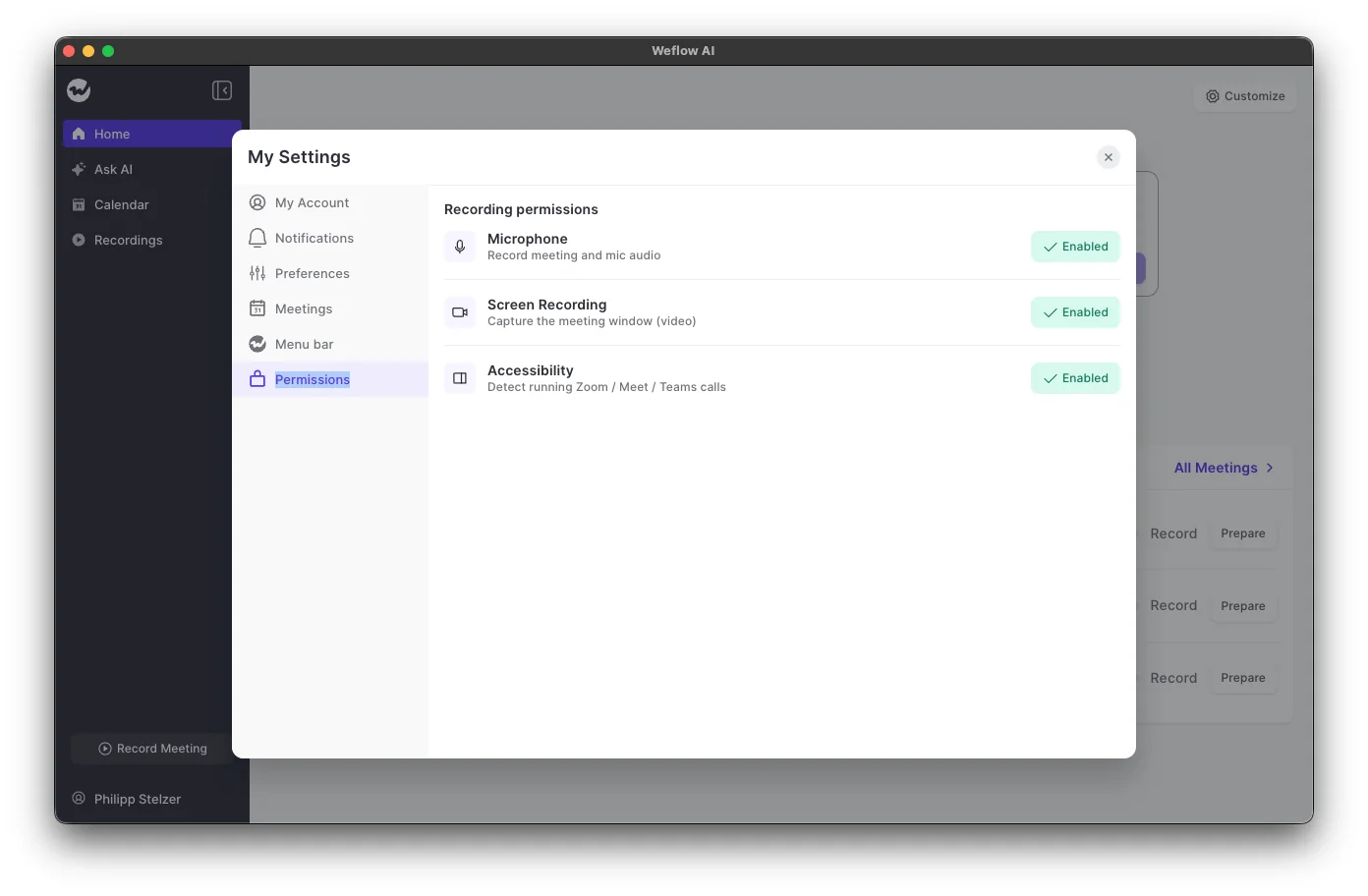
On macOS, the app asks for Microphone, Screen Recording and Accessibility permissions before it can record, so your IT team sees exactly what it touches.
If you don't yet know which camp your council is in, keep the desktop app out of the first rollout.
Set Weflow retention to match your legal deletion rule
If legal sets a hard rule, like deleting everything after 60 days, you can mirror it in Weflow and choose what goes and what stays.
| Retention option | What is deleted | What remains |
|---|---|---|
| Delete recordings, keep transcripts | Audio and video, after the set period | Transcripts, summaries and field updates |
| Delete recordings and transcripts | Audio, video and transcripts, after the set period | AI summaries and field updates |
| Delete transcripts, keep summaries | Transcripts, after the set period | AI summaries |
| Participant opts out during the call | Recording, transcript and notes, immediately | The consent log entry |
"Delete the audio and video, keep the text" is the closest honest answer we have to a transcript-only demand. Weflow builds the transcript from the audio, so the meeting has to be recorded first, but the recording doesn't have to outlive your retention window.
If a customer won't be recorded at all, the rep can dictate a voice note in Weflow Mobile Copilot after the meeting instead.
The Weflow rollout order that keeps each council review small
The idea is to sequence the risk. Each stage asks the council to approve a little less, and nothing moves forward without sign-off.
- Install Weflow with nobody enrolled: IT installs the managed package, connects the integration user and adds the workspace app. The council approves the technical install, and all capture stays off.
- Approve and enroll Weflow Activity & Contact Capture: Emails, meetings and contacts for enrolled users sync into Salesforce, with internal and customer domains excluded where you choose. The council approves activity capture, and recording stays off.
- Run a second review, then enroll users in Weflow Conversation Intelligence: Start with a scoped group, such as one team recording prospects only, with existing-customer domains excluded and the pre-meeting email on. The desktop app stays off until legal rules on rep-carried consent.
We hear buyers ask for exactly this sequence:
"Would rather just have activity capture, like with WeFlow in the door, and then go back and say, hey, they're approved provider. Now we need to have another review to turn AI on. But that's okay."
A slow first review also costs less than you might think on the activity side. Weflow can backfill historical emails and meetings later, although conversations are only captured from the day recording starts.
If your company legally can't record or transcribe calls at all, stop at stage two. Capture still gives you complete activity data in Salesforce, and Conversation Intelligence can wait.
Which Weflow settings to switch on first for a council review
Start with the most conservative, most visible configuration, so the council approves something it can see working. You can widen the scope from there.
- Turn the pre-meeting email on, so every external participant hears about the recording before the call.
- Write the chat notice in German, explaining who records, why and where the data goes.
- Switch on recording status in the notetaker's profile picture, so Teams late joiners see it for the whole call.
- Add every existing-customer domain to the exclusion list, so the first phase covers prospects only.
- Give leaders view-only or admin access without enrolling them, so watching and being recorded stay separate.
- Review the access hierarchy before go-live, and use a custom Weflow hierarchy if the agreement draws a different line than Salesforce.
- Set the retention rule to legal's period, with recordings deleted and transcripts kept if that matches the agreement.
- Choose opt-out or opt-in with legal, and write the choice into the file.
- Hold the desktop app back until legal has ruled on rep-carried consent.
What Weflow Conversation Intelligence costs if the council cuts seats
Weflow prices per user, so your bill follows the scope your council approves. If the council only approves recording for part of the team, only those users need a Conversation Intelligence seat.
Buyers raise this as soon as the scope narrows:
"this isn't a fully rolled out implementation, it's just specific parts · recording existing customers is more sensitive than prospects · that might limit our seat count"
| Product or bundle | Price per user per month | What it includes for this rollout |
|---|---|---|
| Weflow Activity & Contact Capture | $19 | Stage two of the rollout: emails, meetings and contacts into Salesforce, no recording |
| Weflow Conversation Intelligence | $39 | Recording, transcripts, summaries, AI field updates and coaching, plus the desktop app and Weflow Mobile Copilot |
| Revenue AI Foundation | $49 | Activity & Contact Capture and Conversation Intelligence together, for the users the council approves for recording |
| Revenue AI Business | $59 | Foundation plus Deal Intelligence, for when the rollout reaches pipeline management |
A few things shape the final invoice:
- Bundling capture and Conversation Intelligence costs about 16% less than buying the two standalone.
- You can mix plans, with the recorded group on Revenue AI Foundation and everyone else on Weflow Activity & Contact Capture.
- Plans have a 10-user minimum and annual billing, and we quote in euros at the same number as dollars.
- There are no platform fees, and view-only licenses are unlimited.
If you want to walk through the consent, access and retention settings before your first council meeting, we'll show you the live configuration.
FAQs RevOps leaders ask us about Weflow and works councils
Can we pilot Weflow Conversation Intelligence on prospects only?
Yes. Add your existing customers' domains to the notetaker exclusion list, and Weflow keeps their meetings out of recording centrally. Legal can widen the scope later by removing domains from the list.
What happens if our IT blocks third-party notetakers in Microsoft Teams?
The notetaker can't join meetings IT blocks it from, but the desktop app still records on the rep's machine. On Teams, the rep starts it with the Record meeting button. Since consent then falls to the rep, run it past legal before you roll it out.
Do German and Austrian works council requirements differ?
That's one for your counsel. What we can tell you is that the Weflow settings described here behave the same way in both countries.
Which Weflow plan includes call recording?
Call recording sits in Weflow Conversation Intelligence. You can buy it standalone at $39 per user per month, or inside Revenue AI Foundation at $49 and the larger bundles. Weflow Activity & Contact Capture on its own doesn't record calls.