How to Send a Weekly Competitor Mentions Digest From Sales Calls With Weflow Agent Builder
Learn to send a weekly competitor mentions digest from sales calls with Weflow Agent Builder


Your competitor trackers tell you how often a rival comes up, but they can't tell you what buyers actually said about it. This guide shows you how to fill in that missing half.
If you're already using Weflow Conversation Intelligence, the tracker leaderboard shows you mentions by rep and by month. Weflow is the Revenue AI Orchestration platform for sales, customer success, and RevOps teams.
On top of that, you can set up a scheduled Weflow Agent Builder agent to read last week's calls and emails and send product marketing a short digest in Slack, Microsoft Teams or email.
Each claim comes with the buyer's own words and the call or email where they said it.
What the weekly competitor digest sends product marketing
The digest is one short message with five parts.
| Digest section | What it shows | Where it comes from |
|---|---|---|
| Competitor tally | Each tracked competitor and how many of last week's calls and emails it came up in | The agent's own count over the records the lookup pulled |
| What buyers said | One sentence per finding, plus a short verbatim buyer quote | The agent's read of transcripts and attached emails |
| Source | Meeting or email title, date and opportunity for every quote | The activities attached to each looked-up record |
| Deal weight | Stage and amount next to each finding, with the biggest late-stage deals first | Salesforce opportunity fields, read live |
| Unlisted rivals | Any vendor buyers compared you to that isn't on your tracker list | The agent's read of transcripts and emails |
Each digest also includes a link back to Ask Weflow AI, so when someone has a follow-up question (like "is this only in EMEA?"), they can ask it against the same data.
Why tracker counts alone can't tell you what was said
Trackers and recording search are great for counting mentions and finding calls, but they stop there. Here's where the agent picks up.
| Question | Trackers and recording search | The scheduled agent |
|---|---|---|
| How often did Competitor X come up? | Mentions, meetings and share of meetings, per rep and per month | A weekly tally over the deals in scope |
| Which calls mentioned it? | Search returns the recordings, but not where in each call it was said | Cites the specific call or email for each finding |
| What did buyers actually say? | Not answered. You open each call by hand | A one-line finding plus the buyer's words |
| Which rivals did we never list? | Not answered. Trackers only find words chosen in advance | Names any other vendor buyers compared you to |
| Does the mention matter? | Every hit counts the same | Weighs it by the deal's stage and amount |
One thing to keep in mind: these are two different counts. The tracker dashboard in Insights gives you a number you can trend over months, while the digest's tally covers one week and one set of deals.
It helps to keep them separate, both in your own head and when you share numbers with PMM.
What you need before you build the digest
You'll need five things in place before you start.
- A Weflow Conversation Intelligence license: This is where recordings and trackers live, and it's available standalone at $39 per user per month or as part of the Revenue AI bundles.
- Admin rights in Weflow: For now, only admins can create or edit agents.
- Weflow Agent Builder: The Free tier, with 25 agent actions per workspace per month, is included in every Weflow plan and bundle.
- Slack or the Microsoft Teams (Chat) app connected: You can set up both under Workspace apps in Setup & Integrations. If you're sending by email, you don't need anything extra.
- Your written competitive glossary: This should cover your competitor list, each competitor's product names, your own product names, and the partners and integrations that must never count as competitors.
A quick note on timing: a new tracker can only be applied to the previous two weeks of conversations. If you want some history in place before PMM starts asking about trends, it's worth setting up your trackers now.
Step 1: Set up one Weflow tracker per competitor
Start by building a separate tracker for each competitor and its products. It's tempting to create one catch-all "Competitors" tracker, but it'll fire on passing mentions and give you a number that looks like data without really meaning much.
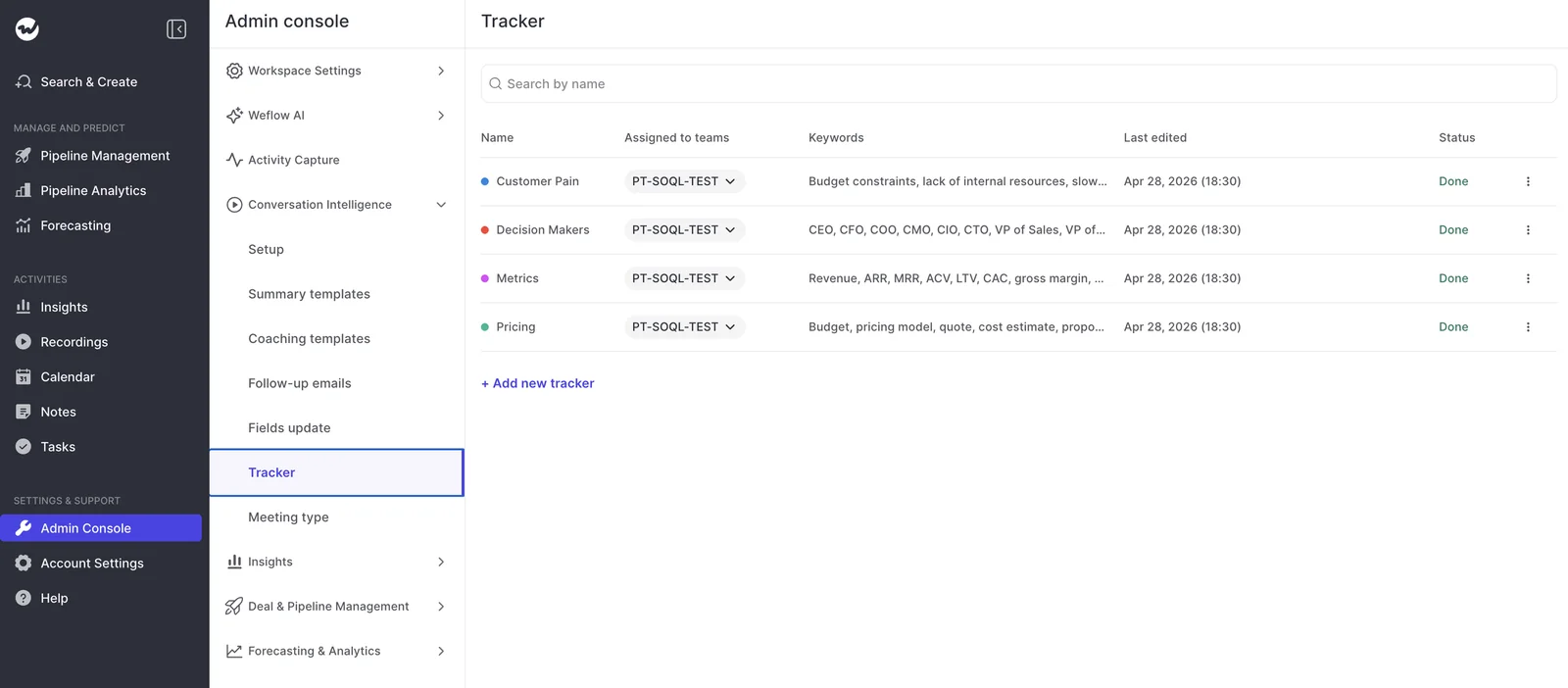
- In the Admin Console, open Conversation Intelligence, then Tracker, and add a new tracker.
- Name it after the competitor and pick a highlight color.
- Add the keyword list: the company name and its product names.
- Add exclusion terms for anything with a similar name, so those lines are never counted.
- Leave contextual matching off, since you only want the exact company name to count.
- Assign the teams whose calls should be tracked.
For example, say one rival is called Beacon and sells Beacon Insights, and one of your integration partners is Beacon Pay. Add "Beacon" and "Beacon Insights" as keywords and "Beacon Pay" as an exclusion term.
That way, calls about the payment integration stay out of the competitor count.
You might miss the odd mention where a buyer says "that other vendor," but that's a fair trade for a tight tracker that gives you a number you can trend over months.
Step 2: Schedule a weekly run in Weflow Agent Builder
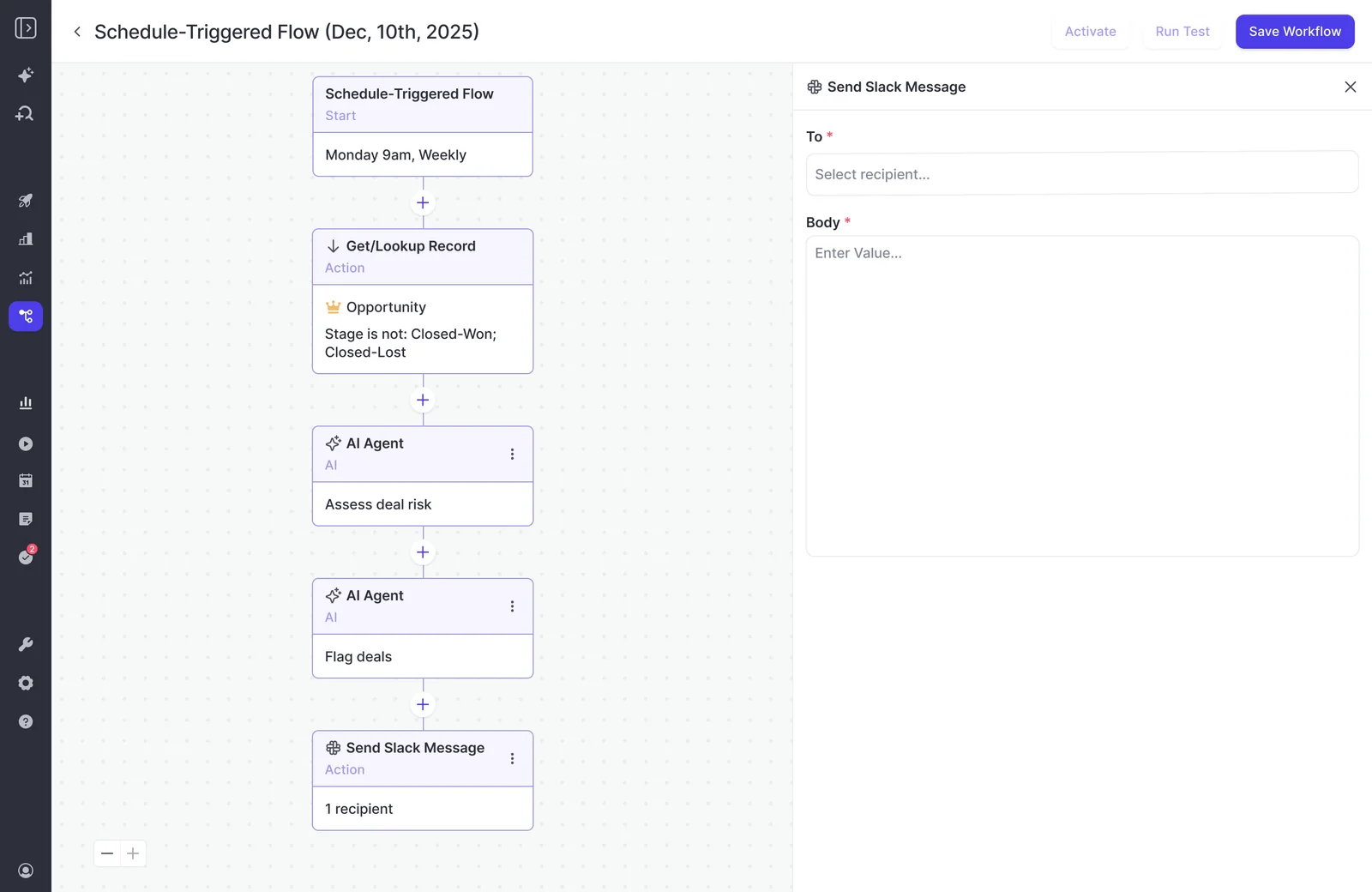
Next, create a new agent in Weflow Agent Builder and set it to run weekly. A weekly cadence keeps this a briefing PMM actually reads, rather than another alert stream they end up muting.
- Day: Monday, so the digest covers the full prior week.
- Time: Early morning, before PMM's first meeting.
- Timezone: The one your PMM team works in, not the one your Salesforce org defaults to.
Keep in mind that a competitor mentioned on Tuesday will show up in the following Monday's digest, not that afternoon.
Step 3: Narrow the lookup to last week's deals
The lookup decides which records the agent can read, and it affects output quality and action cost more than any other step.
A prompt that works well in Ask Weflow AI can return an empty or unusable report when an agent runs it without a lookup. Pointed at every deal in the CRM, the agent simply doesn't know what to focus on.
Set the lookup to Opportunity and filter it with standard Salesforce fields:
| Filter | Example value | Why it matters |
|---|---|---|
| Object | Opportunity | Competitive context lives on deals, and the agent reads the calls and emails attached to them |
| Stage | Not Closed Won or Closed Lost | Keeps the digest on deals where PMM can still change the outcome |
| Last Modified Date | Last 7 days | Limits the set to deals that moved last week |
| Region or team field | Your territory field, if you split digests | Keeps one agent to one audience |
| Amount (optional) | Above your mid-market floor | Cuts noise from tiny deals when volume is high |
Lookups read Salesforce live rather than from a snapshot, so even a stage change a rep made five minutes before the run gets picked up.
Step 4: Write a prompt that knows your competitive market
Your prompt needs to carry your company's context and clear output rules. Without them, the agent will pull the right records but tell you things that could be true of any company.
The prompts that work are long and specific: whose deals, which dates, which rivals, and what to leave out.
Give the agent your competitor list and what doesn't count
Start by pasting your glossary into the prompt. Otherwise, the agent has to decide on its own what counts as a competitor, and it'll do that like an outsider would. Include:
- Every competitor by name, with its product names.
- Your own product names, so the agent never reports you as a rival.
- Partners and integrations that come up on calls and aren't competitors, such as your CRM, your chat tool or a payments partner.
- The exact date window the digest covers.
- A line on your sales cycle and what "opportunity" means in your business, if it differs from the textbook.
Ask for competitors that aren't on your tracker list
Since trackers only find the words you chose in advance, use the prompt to ask for everything else. Add this line:
List any other vendor a buyer compared us to, evaluated, or said they use today that is not on the competitor list above, with a quote and source for each.
This tends to be the section PMM reads first, and it's also how you'll spot which tracker to add next.
Require a buyer quote and a call link for every claim
The digest needs a count and a quote, plus the source, so PMM can check any line before it goes into a battlecard.
For every finding, include one short verbatim buyer quote and its source: meeting or email title, date and opportunity name. Never paraphrase inside quotation marks. If you can't find a verbatim line, drop the finding.
Because the agent reads the emails attached to each opportunity as well as the calls, a buyer who only mentions a competitor in a reply to your proposal still shows up.
Rank mentions by deal stage and amount
The agent also reads the opportunity's fields, so a competitor named on a large, late-stage deal can rank above a passing mention on an early one.
Order findings by deal weight: later stage first, then larger amount. Show stage and amount next to each finding.
Without that commercial weight, every mention looks equally urgent.
Here's the full prompt template. Just replace everything in brackets:
You are preparing a weekly competitor briefing for [Company]'s product marketing team.

About us:
- We are [Company]. We sell [our product names] to [target customer].
- Our competitors are: [Competitor A (products: ...)], [Competitor B (products: ...)], [Competitor C (products: ...)].
- These are NOT competitors and must never be reported as one: [our own product names], [partners and integrations], [internal tools].
- Our typical sales cycle is [length]. An opportunity here means [definition].

Scope:
- Use only the calls, transcripts and emails on the opportunities provided, dated [start date] to [end date].
- Count a mention only where a buyer raised or discussed the competitor.

Output, in this order:
1. For each listed competitor: how many calls and emails it came up in, and on how many opportunities. If zero, write "No mentions" and move on.
2. Up to three findings per competitor. Each finding: one sentence on what buyers said, one short verbatim buyer quote, and the source (meeting or email title, date, opportunity name, stage, amount).
3. Order findings by deal weight: later stage first, then larger amount.
4. Other vendors: any company a buyer compared us to, evaluated, or said they use today that is not on the competitor list, with a quote and source for each.

Rules:
- Never paraphrase inside quotation marks. If there is no verbatim line, leave the finding out.
- Do not add general market commentary or anything not found in the provided records.
- Keep the whole briefing under [word limit] words.
Don't skip the word limit. A digest PMM can read in two minutes gets read, while a longer one tends to get saved for later and forgotten.
Step 5: Test the agent without emailing anyone
Before anyone receives the digest, run a test. Test runs show the result in the app without sending anything, so you can iterate as much as you need without PMM seeing a single draft.
- Leave the recipient list empty for now.
- Run a test and read the output in the app.
- Open three or four of the cited calls and emails and check that each quote is really there, word for word.
- Check the "other vendors" section for false positives, such as a partner the agent mistook for a rival, and add it to your "not a competitor" list.
- Adjust the prompt or the lookup, then run the test again.
- Once two runs in a row come back clean, add recipients and let the schedule take over.
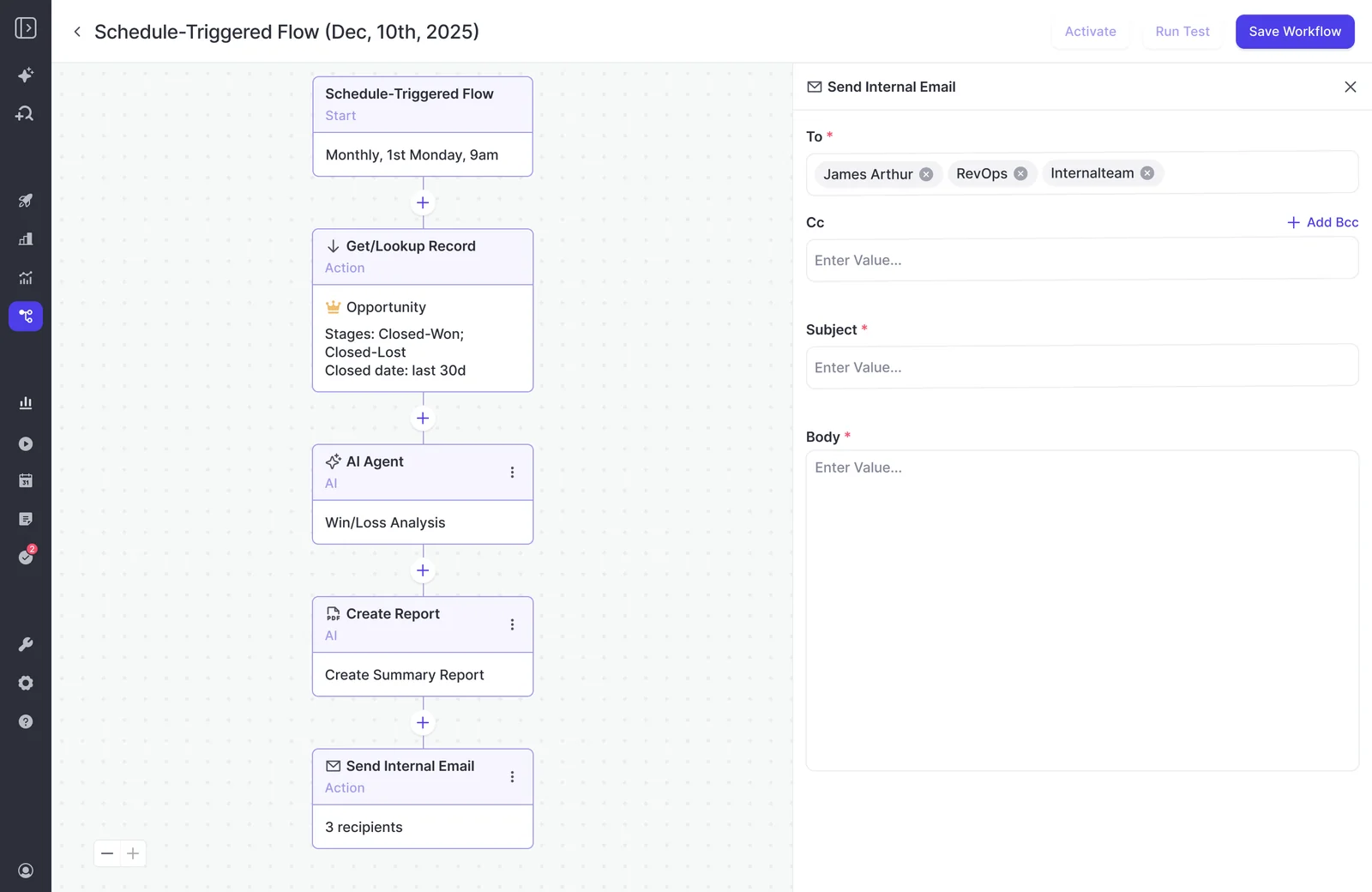
Step 6: Deliver the digest to Slack, Teams or email
Send the digest wherever PMM already works, in a format that suits how they like to read. Here are your options.
| Option | Best for |
|---|---|
| Slack channel | A PMM or competitive-intel channel where people already discuss rivals |
| Microsoft Teams chat | Companies that run internal conversation in Teams |
| Named recipients, such as the CRO, who live in their inbox | |
| CSV attachment | A per-competitor table PMM can sort or paste into a tracker sheet |
| PDF attachment | A narrative read, or something to forward to leadership |
It's best to start small, with the people who will actually act on the digest. Usually, that's two or three people in PMM plus the CRO.
Be careful with broad channels, though. In Weflow, recording access follows the Salesforce hierarchy, so not everyone can see a given rep's calls.
Posting the digest to a company-wide channel would put transcript quotes in front of all of them, so stick to a restricted channel or named email recipients.
Step 7: Check what the digest costs in agent actions
Agent actions are the one metered item in Weflow. Recordings, transcripts, AI templates and Ask Weflow AI prompts are all included in the seat, and Agent Builder is priced per workspace rather than per user.
| Tier | Monthly actions | Price per workspace |
|---|---|---|
| Free | 25 | Included in every Weflow plan and bundle |
| Growth | 500 | $299 per month |
| Scale | 2,500 | $999 per month |
| Enterprise | Custom | Custom package |
A weekly digest runs four or five times a month, but how many actions each run uses depends on what the agent does. That's why it's best to size your tier from real usage rather than a guess.
After the first two or three runs, open the Agent Usage page in the admin console. It shows:
- Actions used this month, against your plan and against last month.
- A per-workflow breakdown: runs, total actions, average actions per run and share of the total.
- The date your allowance resets.
If your workspace runs out of actions, scheduled agents pause instead of overrunning, so you won't get a surprise bill. The downside is that the digest skips a week, so keep an eye on usage if this agent shares the allowance with others.
What the digest won't do and where to go instead
Since the digest is a weekly, post-call briefing, there are a few things it doesn't cover yet. Here's what to use instead.
| What it doesn't do | What to use instead |
|---|---|
| Live battlecards when a rep hears a competitor name. Everything in Weflow is post-call | Clari Copilot ships live trigger-word battlecards. If in-call cues are what you need, look there |
| Fire a routing rule the moment a call matches a competitor | The weekly agent, or a Salesforce Flow that fires on the call summary Weflow writes to Salesforce |
| Write findings into a Salesforce competitor field | A person brings the conclusions into Salesforce. Agent write-back is planned |
| Read Slack deal channels as a source | The agent reads calls, transcripts and emails attached to the records. Reading Slack is on the roadmap |
| Run one prompt per region or per competitor from a single agent | Build another agent for each variant |
| Match the maturity of capture and Conversation Intelligence | Weflow Agent Builder is our newest product, so expect it to keep changing |
On live battlecards, our view is that a rep reading a card mid-call has stopped listening. Besides, most of PMM's competitive work happens after the call, in messaging and pricing, and that's where this digest fits in.
How to keep the digest from becoming a muted report
The real test of the digest is whether anyone acts on it. Most RevOps leaders have built a report that was useful for a quarter and then kept running, unread, for years.
Agents can speed up that decay because they push into a channel instead of waiting to be opened. Most of the noise comes from four build mistakes:
- Catch-all trackers with too many terms, so the count stops meaning anything.
- An unconstrained lookup that hands the agent every deal in the CRM.
- A prompt with no company context, which produces generic market commentary.
- Too many recipients, so nobody feels the digest is theirs to act on.
To avoid that, schedule a review four weeks after the first scheduled run:
- Ask PMM what changed because of the digest: a battlecard edit, a new message, a pricing conversation, a tracker added for a rival that showed up in "other vendors".
- Check the Agent Usage page for actions per run, and decide whether the digest earns its share of the allowance.
- Narrow it if most of the output was skimmed past. Tighten the lookup, cut competitors with no mentions, or lower the word limit.
- Retire the agent if nobody acted on it. A switched-off agent costs you nothing, but a muted one teaches PMM to ignore the next thing you send.
If you'd like to build this agent with our team on your own calls and competitor list, start with a demo.
FAQ: Weekly competitor digests in Weflow Agent Builder
How many agent actions does a weekly competitor digest use?
It depends on what the agent does on each run, so check the Agent Usage page after the first few runs. Every Weflow plan includes 25 free agent actions per workspace per month, and agents pause at the limit instead of overrunning.
Which Weflow license do I need for trackers and agents?
You'll need Weflow Conversation Intelligence for trackers and recordings. Agent Builder Free is included in every Weflow plan and bundle, though only admins can build or edit agents.
Can product marketing read the digest without a Weflow seat?
Yes. Recipients get the digest by email, Slack or Microsoft Teams without needing Agent Builder access. If PMM also wants to open recordings, view-only licenses are free, up to the number of recording licenses you hold.
Will the digest catch a competitor that isn't on our tracker list?
Yes, if the prompt asks the agent to name any other vendor buyers compared you to.
Can I run a separate digest per region or per competitor?
Yes, but you'll need one agent per variant. Each agent runs one fixed prompt, so a per-region digest needs its own agent with its own lookup filter and prompt. Keep in mind that every extra agent adds to your monthly action usage.
Can the agent write competitor findings into a Salesforce field?
Not yet. For now, agents deliver to email, Slack and Microsoft Teams, and someone on your team enters the conclusions into Salesforce. Agent write-back is planned.
Does the agent read competitor mentions in emails and Slack deal channels?
It reads the emails attached to the opportunities the lookup pulls, along with calls and transcripts, but not Slack messages. For now, Slack is only a delivery destination, though reading Slack is on the roadmap.