How to Send Every Account Manager Their Own Weekly Pipeline Report With Weflow Agent Builder
Learn how to send each account manager a weekly pipeline report with Weflow Agent Builder, not 150 workflows.


You've been asked for the obvious thing: a weekly pipeline report for every account manager, covering that person's own book. You can already see the trap. If every report is its own workflow, two of you end up owning 150 of them.
Here's how the build works. A Weflow agent runs one scoped Salesforce lookup and delivers one report to the recipients you set. The personalization comes from the lookup filter, so you build and test one agent, scope it to a book through Salesforce ownership, and reuse the same template and prompt per team or manager. Done that way, 150 account managers come out to tens of agents, not 150.
The report reads the calls, emails and transcripts on each deal as well as the Salesforce fields. Every report also carries a link back into Ask Weflow AI, so the account manager asks the follow-up question against the same data instead of pinging you. That link is what takes RevOps off the lookup desk.
Do you need a separate agent for every account manager?
No. You need one agent per recipient group, and you decide what a group is: one account manager, one manager's team, or one team channel. That choice sets how many agents you maintain and how many actions you spend each month.
What one Weflow agent scopes and delivers today
A Weflow agent is four steps:
- A scheduled trigger with day, time and timezone.
- A Salesforce lookup on accounts, contacts, leads or opportunities, with field-level filters.
- An agent step carrying your free-text prompt.
- A delivery step that sends the result by email (with an optional PDF) or to Slack.
The lookup reads Salesforce live at run time, not from a snapshot. The agent step then reads the activities, emails, calls and transcripts attached to the records the lookup pulled. It can also take an uploaded document as grounding and optionally search the web.
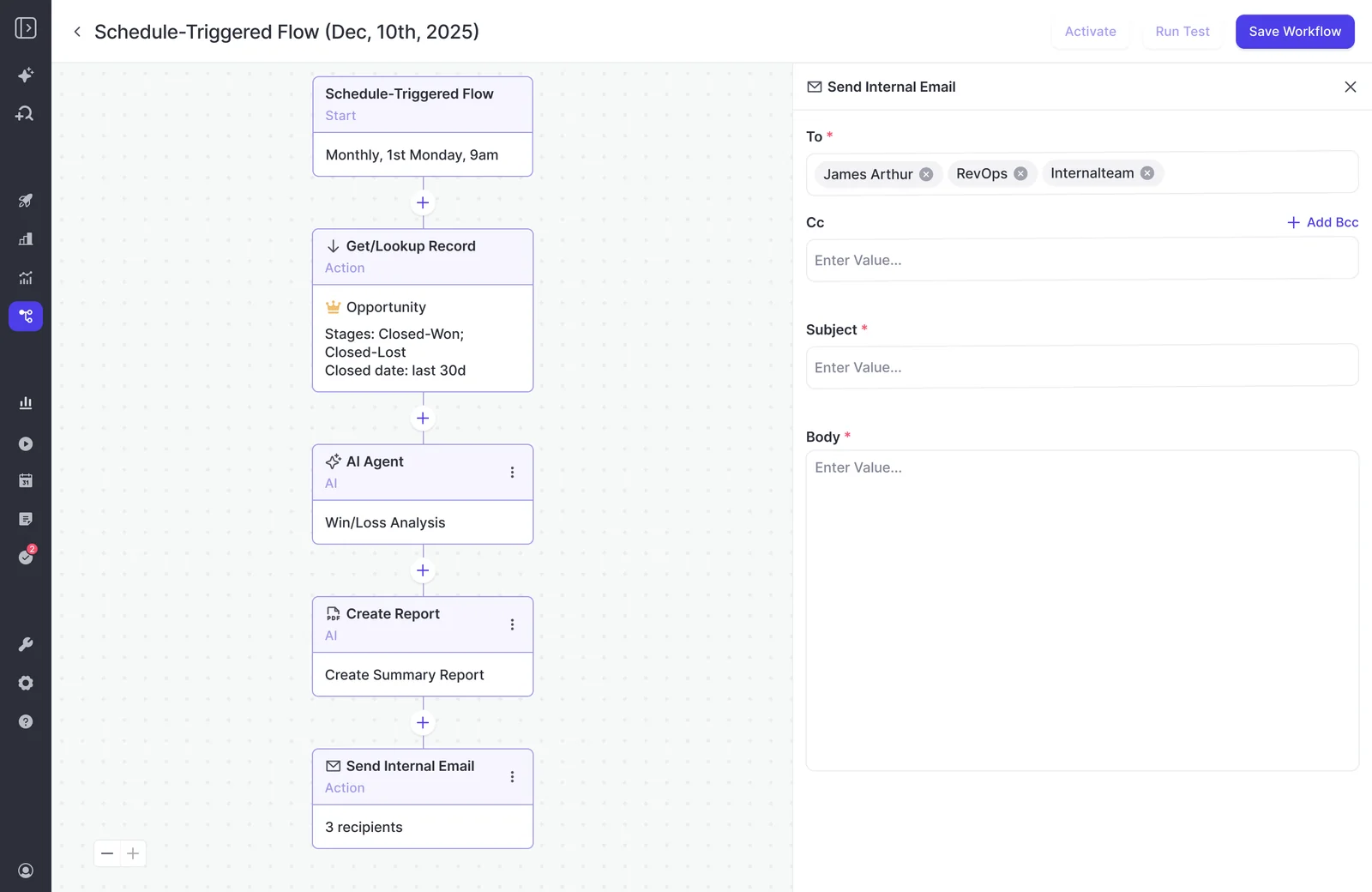
Here's a weekly deal-risk agent with the same shape: a Monday schedule, an opportunity lookup, two AI steps and a Slack delivery.
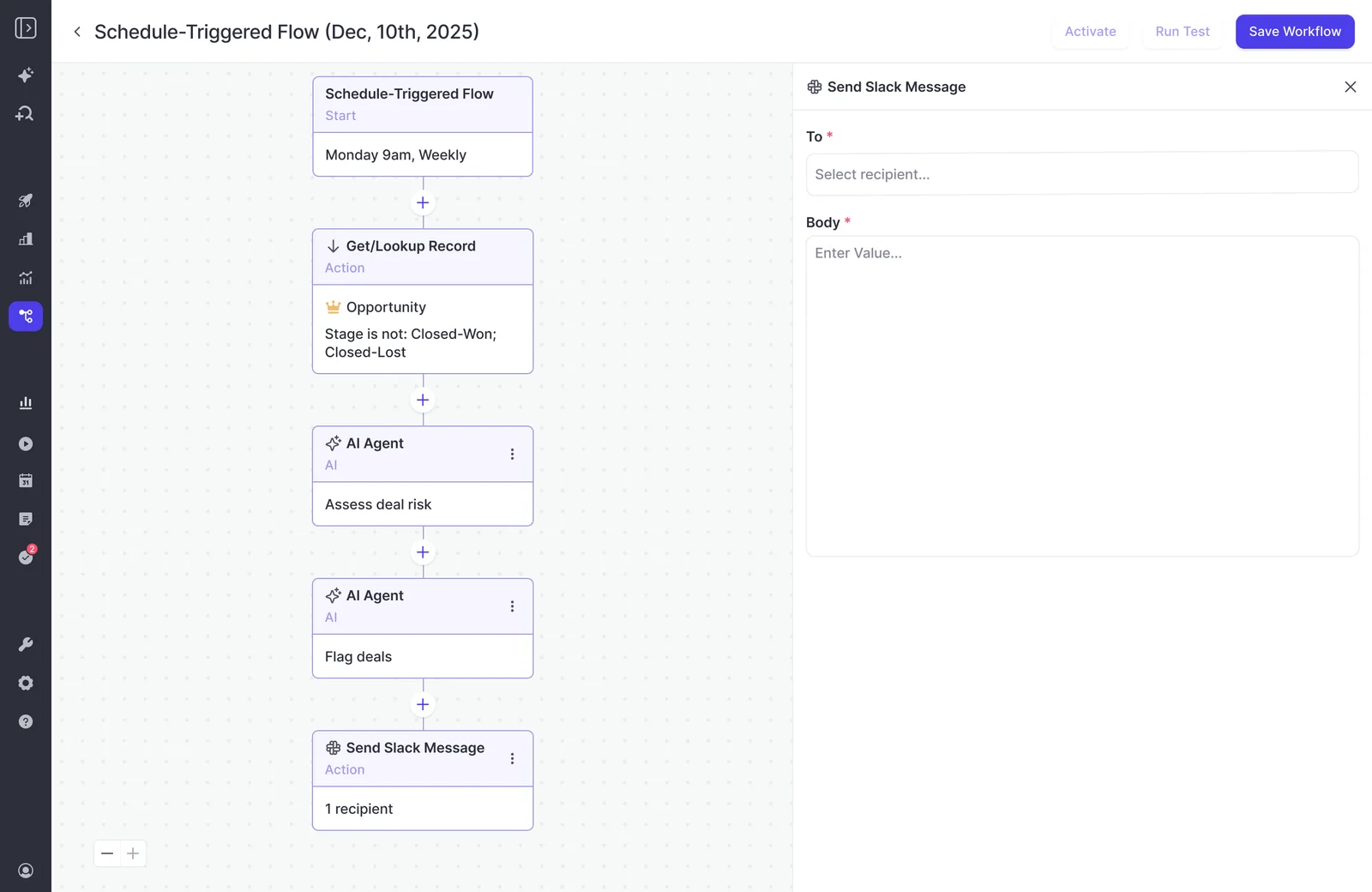
The part that matters for your 150 account managers is the scoping. The lookup scopes the data once per run, and the delivery step sends that run's report to its recipients. So plan for one agent per recipient group, and let the filter on each agent define whose book it reads.
Weflow is the Revenue AI Orchestration platform for sales, customer success, and RevOps teams. Agent Builder is the part of it where you compose the trigger, lookup, reasoning step and delivery yourself. Gong Agent Studio is a good comparison point here. Its eighteen named agents cover a lot of jobs out of the box, but each one is configured within bounds Gong defined, and there's no way to compose your own multi-step flow from those parts.
Per account manager, per manager or per team: choosing the split
Per-team or per-manager agents keep your agent count in the tens. Per-account-manager agents give the tightest "own book" report, at the highest maintenance and action cost.
| Per account manager | Per manager | Per team | |
|---|---|---|---|
| Who receives it | One account manager | One first-line manager, optionally copying their AMs | Everyone in a team's Slack channel |
| How the lookup is scoped | Opportunity Owner equals that AM | Opportunity Owner is any AM reporting to that manager | Opportunity Owner is any AM in the team |
| Delivery | Individual email or Slack message to the person | Email to the manager, with optional PDF | Team Slack channel |
| Agents you maintain for 150 AMs | 150 | One per manager, typically 10 to 20 | One per team, typically 10 to 20 |
| Relative action consumption | Highest: one full run per AM per week | Low: one run per manager per week | Low: one run per team per week |
| When it fits | Small groups of senior AMs with large, sensitive books | Managers who run a weekly pipeline review from the report | Teams that already work deals in a shared channel |
Our recommendation: start per team or per manager, and have the prompt group the output by opportunity owner with one section per account manager. Every AM still finds their own book in the report, and you maintain fifteen agents instead of 150.
The tradeoff of a team channel is visibility. Every AM in the channel sees their teammates' deals, so use it where your team already works that way.
What to have ready in Weflow and Salesforce before you build
Six things need to be in place before you open Agent Builder. Clean ownership in Salesforce matters most, because the whole report scopes against it.
- Admin access. You need Weflow admin rights, because only admins configure agents today.
- Ownership in Salesforce. Opportunity Owner and the role hierarchy have to reflect who owns which book. Weflow builds its teams dynamically from Salesforce by manager, role or field condition, so a clean Salesforce structure carries straight through.
- Captured activity. Weflow Activity & Contact Capture and Weflow Conversation Intelligence recordings should be running, so the agent has emails, meetings and transcripts to read, not just fields.
- A delivery destination. You need recipient email addresses, or a connected Slack workspace with a channel or person to post to. If your company runs chat in Microsoft Teams, delivery is email.
- Written context. Write a short document covering your stages, your typical cycle length and what "at risk" means at your company. You'll paste parts of it into the prompt and can upload it as grounding.
- An action allowance. The Free tier's 25 actions a month is enough to pilot on yourself. It isn't enough to roll out to the org.
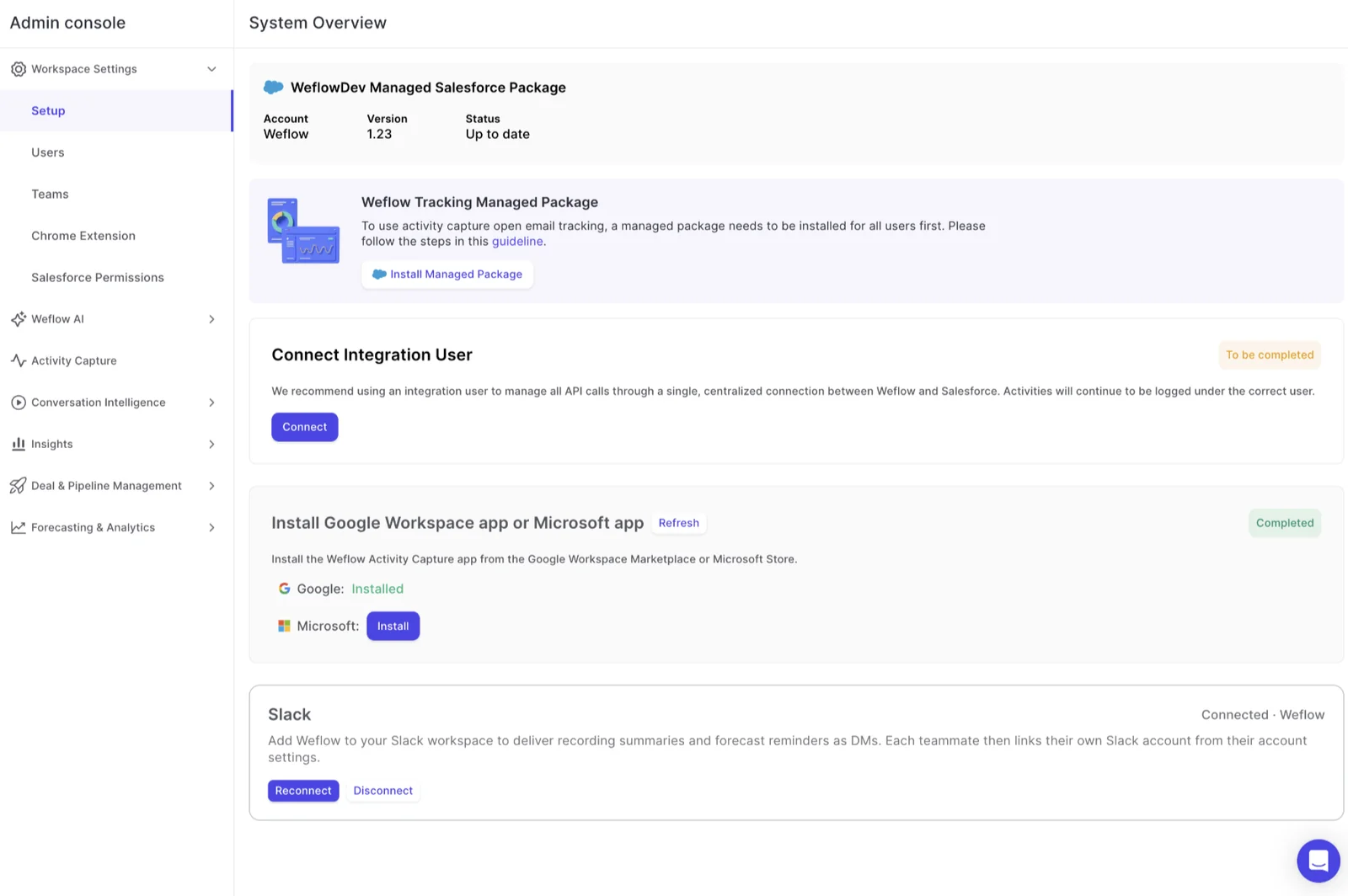
Slack connects from the System Overview in the Weflow Admin Console.
Build the pipeline report agent in Weflow Agent Builder, step by step
Six steps take you from a template to a first edition you've vetted yourself. Each one gives the action, the configuration, and the one thing that goes wrong at that step.
Step 1: Start from the pipeline snapshot template, not a blank agent
Open Agent Builder and start from the pipeline snapshot template. The template already places a scoped lookup before the prompt. That ordering is what separates a usable report from an empty one.
The same prompt that returns a strong answer in Ask Weflow AI returns an empty or unusable report from an agent with no lookup in front of it. The lookup tells the model what it's allowed to look at.
Pitfall: the template's prompt is deliberately basic. It's a placeholder, and Step 4 replaces it.
Step 2: Set the weekly schedule, day and timezone
Set the trigger so the report lands before your account managers plan their week.
- Frequency: weekly.
- Day: Monday, or the day before your pipeline meeting.
- Time: early, so it's in the inbox before the first meeting of the day.
- Timezone: the account managers' timezone, not yours.
Weflow agents run on a schedule, not on a change to a Salesforce record. Treat this as a weekly briefing, not an alert. A deal that slips on Tuesday shows up in next Monday's report.
Pitfall: one agent has one timezone. If your teams span regions, split agents by region so nobody gets Monday's report on Sunday night.
Step 3: Scope the Salesforce lookup to one book of business
The lookup is your quality lever and your cost lever at the same time. A narrow record set gives the agent a question small enough to answer well, and it consumes less. On the opportunity object, filter on:
- Opportunity Owner: the AM, or the set of AMs in the team or under the manager.
- Stage: open stages only, excluding Closed Won and Closed Lost.
- Close date: a window that matches how your AMs plan, such as this quarter and next.
- Anything else that defines the book: a region, segment or record type field, if your org uses one.
The lookup reads Salesforce live at run time. When an account changes owner in Salesforce, the next run follows it with no edit on your side.
When an account manager moves team, it works differently. If the agent filters on a list of named owners, you move that person's name from one agent's filter to the other's. That edit is the main ongoing maintenance in this design, which is another reason to keep the agent count small.
Pitfall: a lookup that reads the whole pipeline overwhelms the agent. It doesn't know what to focus on, and you pay for every record it reads.
Step 4: Write the prompt in your company's own pipeline vocabulary
A working prompt is long and specific. When an agent's output reads as generic, the extraction is usually fine and the interpretation is what fails. It returns what could be said about any company because nobody told it what your stages, cycle and risk signals mean.
Here's a prompt skeleton. Fill every bracket with your own definitions.
ROLE AND READER
You are writing the weekly pipeline brief for [one account manager / the manager of team X / the team X channel].
The reader manages existing customer accounts at [company]. They have two minutes on Monday morning.

SCOPE
Use only the opportunities returned by the lookup: open opportunities owned by [owner name(s)],
with a close date between [start] and [end].
Do not mention any deal outside this list.
Exclude [your exclusions, such as renewals under a set amount, a specific stage, internal test accounts].

OUR DEFINITIONS
Our stages mean: [Stage 1 = ..., Stage 2 = ..., Stage 3 = ...].
A typical cycle for this motion is [length].
A deal is "at risk" here when [your criteria, such as no customer reply in N days,
close date pushed more than once, no economic buyer identified].
Terms our team uses: [competitor names, product names, internal shorthand].

SOURCES
For each deal, read the emails, meetings, call transcripts and activities attached to the opportunity,
not only the Salesforce fields.
Where something said on a call contradicts a field, say so in one line.

OUTPUT
Group by opportunity owner, one section per owner.
For each owner, list at most [N] deals that need action this week:
one line on why, one suggested next step.
End with deals closing in the next [N] days.
Leave out any deal that needs no action. No introduction, no recap. Maximum [N] words.
Upload your process document to the agent step as grounding, and keep the definitions in the prompt short. You can also tell Weflow AI what each object and field means in the Object Context and Field Context tabs of the Admin Console's AI section.
Pitfall: a prompt that doesn't name whose deals and which dates it means answers from the wrong context.
Step 5: Deliver by email or Slack, with the Ask Weflow AI link
Pick the channel your recipients already read. Every report, on either channel, carries a link back into Ask Weflow AI, so the account manager opens the follow-up question against the same data without logging in to look for it.
| Slack | ||
|---|---|---|
| Recipients | Individual addresses you add to the delivery step | A channel, or a person |
| Format | Written report in the email body | Written report as a Slack message |
| Attachment | Optional PDF | Optional PDF or CSV |
| Best for | Per-AM or per-manager reports, and leaders who live in the inbox | Per-team reports in channels where the team already works deals |
Microsoft Teams chat isn't a delivery surface for Weflow agents, so Teams shops deliver by email.
On the email step, you set the recipients, subject and body.
Step 6: Preview the real output by sending it to yourself first
A test run shows the result inside Weflow but doesn't send the email. Delivery only happens on the live schedule. We built it that way because early builds emailed on every test and customers got buried. The cost is that you can't see the recipient's exact copy from a test.
The first edition is the one that decides whether anyone reads the second.
Here's how to vet it privately:
- Set yourself as the only recipient.
- Scope the lookup to a real book, not a test account.
- Use test runs to tune the prompt inside Weflow.
- Let one scheduled run deliver to you, and read it as the AM would.
- Tune the prompt again, then add account managers and managers.
Roll one tested agent out across your account management teams
Keep one master prompt and change only the owner filter and the recipients per agent. Your fleet of fifteen agents then behaves like one definition, because every copy runs the same instructions against a different book.
Expand in stages:
- Yourself. One agent, one real book, one delivered run.
- Two or three managers who'll give you honest feedback. Run it for two or three weeks.
- Team by team. Build each team's agent from the same template and the same prompt text, then add recipients.
- The rest of the org, once the format has stopped changing.
Rules that keep the fleet countable:
- The master prompt lives in one place, such as a shared doc. Each agent's prompt is a copy of it, and the only edits per agent are in the scope lines.
- Use a naming convention that says what and for whom, for example "Weekly pipeline: EMEA Team 2".
- Apply prompt changes across every copy in the same sitting, so no team runs last month's definitions.
- Keep the ownership list next to the prompt, so a team move means one edit you can find.
What a weekly pipeline report costs in agent actions
Cost follows two things: how many agents you run, and how much each run reads. A per-team split usually keeps a weekly report in a far lower tier than per-AM agents.
How Weflow Agent Builder meters a report run
Weflow meters agent runs in actions, not runs, and an agent reasoning across transcripts and activity costs more than a simple lookup. The weights below are approximate:
- A simple lookup: about 1 action.
- A research agent: about 3 actions.
- An agent reasoning across transcripts and activity: about 5 actions. A pipeline report reading calls and emails sits here.
Ask Weflow AI isn't metered, so every follow-up an account manager asks from the report link costs nothing against the allowance. Standard workflows such as meeting prep, summaries, field updates and coaching scorecards don't draw on it either.
Which Agent Builder tier fits your account management org
Agent Builder tiers are priced per workspace, not per user. Size from agents × weekly runs × estimated actions per run.
Here's the sizing for 150 account managers in 15 teams of ten, at five runs a month (some months have five Mondays) and about five actions per run:
| Pilot on yourself | Per-team rollout | Per-AM rollout | |
|---|---|---|---|
| Agents | 1 | 15 | 150 |
| Runs per month | 5 | 75 | 750 |
| Estimated actions per run | 5 | 5 | 5 |
| Monthly actions | 25 | 375 | 3,750 |
| Matching tier | Free | Growth | Enterprise |
Because the weights are approximate, leave headroom. The per-team rollout uses 375 of Growth's 500, which leaves room for a second agent or a heavier month. The Agent Usage tab in the Admin Console's AI section shows what your agents actually consume, so you can adjust after the first month.
The tiers:
- Free: 25 agent actions per month.
- Growth: $299 per month for 500 agent actions.
- Scale: $999 per month for 2,500 agent actions.
- Enterprise: a custom package.
The Free tier is included in every Weflow plan and bundle, from the standalone products to Revenue AI Foundation, Revenue AI Business and Revenue AI Enterprise.
What the agent won't do, and what to do instead
Every limit below has a workable path. Knowing them up front keeps the first edition from failing in front of your managers.
| Limit | What to do instead |
|---|---|
| No write-back to Salesforce fields | The AM or manager records the decision on the opportunity. Fields that must be machine-written belong to AI field updates after calls, or to AI Playbooks on a schedule, which set fields directly. |
| Scheduled only, not record-triggered | Use it as a weekly briefing. For in-week deal risk, use Weflow deal warnings, which you build as rules on opportunity and computed fields. |
| No Microsoft Teams chat delivery | Deliver by email. Teams meetings still record and feed the report normally. |
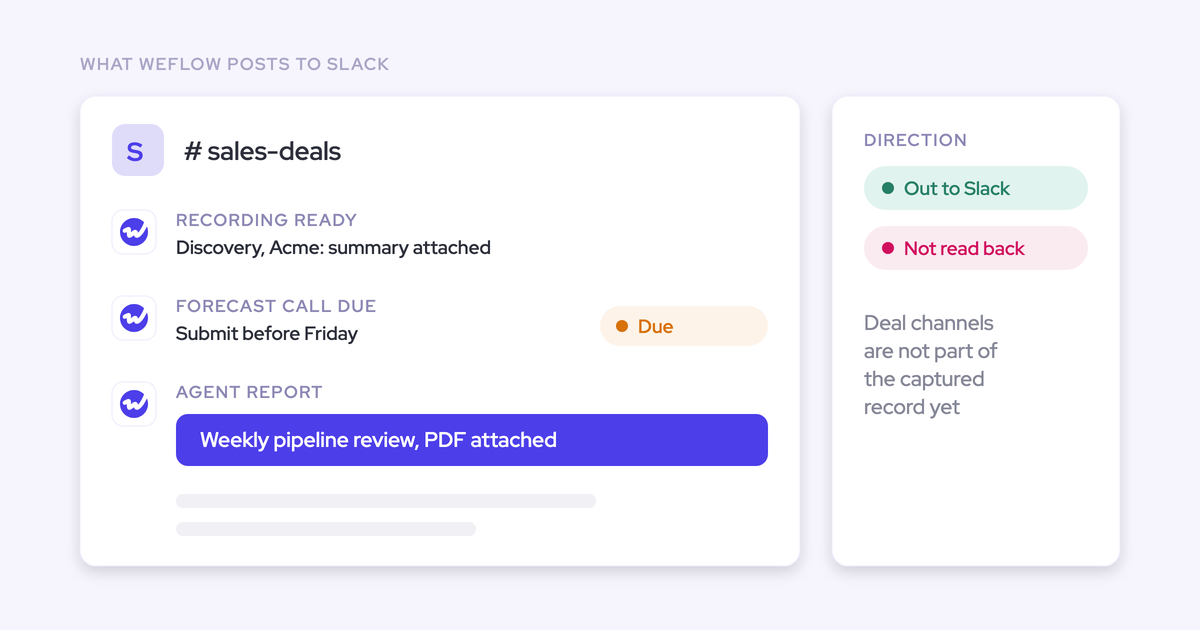
| Doesn't read Slack messages as input | Context from deal channels stays out of the report. Anything that matters belongs in an email, a call or the opportunity. |
| Admin-only authoring | Managers send prompt changes to you, and you apply them to the master prompt. Granting individual non-admins the permission is coming. |
| Newer than the rest of the platform | Agent Builder is the newest Weflow product. Pilot before rollout and keep the first agent narrow. |
| Charts and numbers rather than written analysis | Use Salesforce report subscriptions through the Weflow Analytics package. Agents deliver text. |
Keep the report short, acted on, and easy to retire
The report survives only if every line enables an action. Agents push instead of waiting to be opened, so a badly scoped report becomes noise faster than a dashboard ever did.
A routine a two-person team can actually run:
- Cap the length. Put a word limit and a deal count per owner in the prompt, and hold to it when people ask for more.
- Test every line for an action. If a line doesn't tell the AM what to do this week, cut it from the prompt.
- Grow recipients on request. Add a manager or team when they ask for it, not when they might find it useful.
- Review on a fixed cadence. Once a quarter, ask each manager which deals from the report they acted on.
- Retire on evidence. If a team's report hasn't changed what anyone did in a quarter, switch the agent off.
- Name an owner. One person owns the master prompt, the agent list and the review. On a two-person team, that's one of you, not both.
For the wider governance routine across all your agents, grab our Free AI Agent Ops Cheatsheet for RevOps.
FAQ: weekly pipeline reports in Weflow Agent Builder
Will an account manager see only their own deals in Ask Weflow AI?
Ask Weflow AI inherits Salesforce permission sets, field-level security and the role hierarchy, so an AM sees in Weflow what they see in Salesforce under those controls. It doesn't inherit restrictions you enforce through list views or Lightning component visibility. If your org segregates access that way, rebuild it in Weflow by creating views centrally, assigning them per team and switching off users' ability to build their own.
Does the report read calls and emails, or only Salesforce fields?
It reads both. The agent step reads the activities, emails, calls and transcripts attached to every record the lookup returned, alongside the fields. A report that only reads fields returns what the rep typed. This one adds what was actually said.
Is the pipeline data live when the agent runs?
Yes. Weflow agent lookups read Salesforce live at run time, not from a snapshot, so a change made a minute before the run is in the report.
Can the agent post the report to each account manager directly in Slack?
Yes. Weflow's Slack delivery posts to a chosen channel or person. Each agent still delivers the report for its own scoped lookup, so a direct message per AM means one agent per AM, with the cost that brings.
What happens if our company runs Microsoft Teams instead of Slack?
Deliver by email. Weflow records and analyzes Microsoft Teams meetings normally, but Teams chat isn't a surface Weflow agents post into.
Can sales managers edit their own version of the agent?
Not today. Only Weflow admins configure agents, because an agent can reach a lot of data and run on a schedule. Granting the permission to individual non-admins is coming. Until then, managers send changes to the agent owner, who applies them to the master prompt.
How do flagged deals get into Salesforce if the agent can't write back?
The account manager or manager records the decision on the opportunity, usually in next steps or the field your process uses. Where a field must be filled by AI, Weflow AI field updates set it after calls and AI Playbooks set methodology fields on a schedule.
Is Weflow Agent Builder priced per user or per workspace?
Per workspace. The Free tier's 25 actions a month comes with every Weflow plan and bundle. Paid tiers are Growth at $299 per month for 500 actions, Scale at $999 per month for 2,500 actions, and a custom Enterprise package.