Which Weflow Data Lives in Salesforce and Which Stays in Weflow
Learn which Weflow data lives in Salesforce, what stays in Weflow, and what you can export.


Weflow is the Revenue AI Orchestration platform for sales, customer success, and RevOps teams. Here's where its data lives. Records of what happened land in your Salesforce as native records you own. Large media files and Weflow's own computations over time stay in Weflow. Which of those you end up with depends on the products you buy.
Emails, meetings, contacts, linked notes, transcripts, summaries and AI field updates are all Salesforce records. These things aren't:
- Video recordings
- Opportunity snapshots, which hold your pipeline history
- Forecast submissions, targets and roll-ups
- Deal warnings and AI Playbook scores
That last group is the signal layer managers work from in Weflow deal reviews, and it lives in Weflow fields. For each exception we give you the reason it stays out, your way to get it out, and whether it survives if you cancel.
You can also run your own test on any screen. Weflow fields carry a W in the interface. If a value has the W, it won't reach a Salesforce report.
Where every type of Weflow data lives: Salesforce or Weflow
Every type of Weflow data has one home. Here's the full map, written so you can paste it into a security questionnaire.
| Data | Where it lives | Created by | Why it lives there | Way out | Survives cancellation |
|---|---|---|---|---|---|
| Emails | Salesforce EmailMessage or Task (admin's choice) | Weflow Activity & Contact Capture | Record of what happened | Your Salesforce-to-warehouse sync | Yes |
| Meetings | Salesforce Event | Weflow Activity & Contact Capture | Record of what happened | Your Salesforce-to-warehouse sync | Yes |
| Contacts | Salesforce Contact | Weflow Activity & Contact Capture | Record of what happened | Your Salesforce-to-warehouse sync | Yes |
| Notes linked to a record | Salesforce, as markdown | Weflow Activity & Contact Capture | Record of what happened (private notes never sync) | Your Salesforce-to-warehouse sync | Yes |
| Transcripts and summaries | Weflow_Recording__c plus an indexing object; summary also on the Event | Weflow Conversation Intelligence | Analyzable call content | Salesforce sync, Weflow public API or MCP | Yes |
| AI field updates from calls | The Salesforce fields you map | Weflow Conversation Intelligence | Structured call outcomes | Your Salesforce-to-warehouse sync | Yes |
| AI Playbook methodology field values | The Salesforce fields you map | Weflow Deal Intelligence & Forecasting | Structured deal qualification | Your Salesforce-to-warehouse sync | Yes |
| Opportunity edits made in Weflow | Salesforce Opportunity | Weflow Deal Intelligence & Forecasting | The opportunity stays the source of truth | Your Salesforce-to-warehouse sync | Yes |
| Video recordings | Weflow storage | Weflow Conversation Intelligence | Salesforce file storage is expensive | Weflow public API export to your own cloud | No, export first |
| Tracker hits | Weflow | Weflow Conversation Intelligence | Weflow computation over transcripts | Weflow MCP connector | No |
| Opportunity snapshots (waterfall, push counts, amount changes) | Weflow | Weflow Deal Intelligence & Forecasting | Salesforce keeps only current state | Not exportable as history | No |
| Forecast submissions, targets and roll-ups | Weflow | Weflow Deal Intelligence & Forecasting | The forecast layer sits on top of the pipeline | Weflow MCP connector | No |
| Deal warnings, AI Playbook scores, computed fields (days inactive, activity velocity) | Weflow fields (marked W) | Weflow Deal Intelligence & Forecasting | Weflow computations | Not reportable in Salesforce or BI today | No |
| Agent outputs | Delivered to email and Slack | Agent Builder | Agents don't write to Salesforce fields | None to Salesforce | Stays in your inbox and Slack |
| Saved deal boards and views | Weflow only | Weflow Deal Intelligence & Forecasting | Weflow configuration | Not exposed via API or MCP | No |
Agent outputs and saved boards don't get a section of their own. The two rows above cover all there is to know about them. For everything else, the W marker is your shortcut.
Why records go to Salesforce and computations stay in Weflow
Records go to Salesforce because native records are the only data your flows, reports and warehouse can use. You already run on that rule, even if nobody wrote it down. If it isn't a Salesforce record, a flow can't trigger on it, a report can't see it, and the warehouse never gets it.
"If you haven't stored an object or record into the core Salesforce database, then you cannot do automations with it."
So everything that records what happened gets written to Salesforce:
- Every email and meeting
- Every contact
- Every transcript
- Every field value extracted from a call
Weflow's Unified Data Layer keeps only two kinds of data on its own side:
- Large media that Salesforce is a poor place to store. Video files would eat your file storage and add nothing you can report on.
- Computations over time that Salesforce can't keep. Salesforce stores an opportunity's current state, not what it looked like three weeks ago. A waterfall, a push count or a forecast submission only exists if something outside the record keeps the history.
That second category is the intelligence layer, and it's Weflow's own. Factual records land in your CRM. Weflow computes the signals on top. Each exception below follows from one of those two reasons.
What Weflow Activity & Contact Capture writes to Salesforce
Weflow Activity & Contact Capture writes every captured email, meeting and contact as a standard Salesforce record, and keeps nothing of substance on Weflow's side. If capture is the only product you buy, there's no second place your data lives.
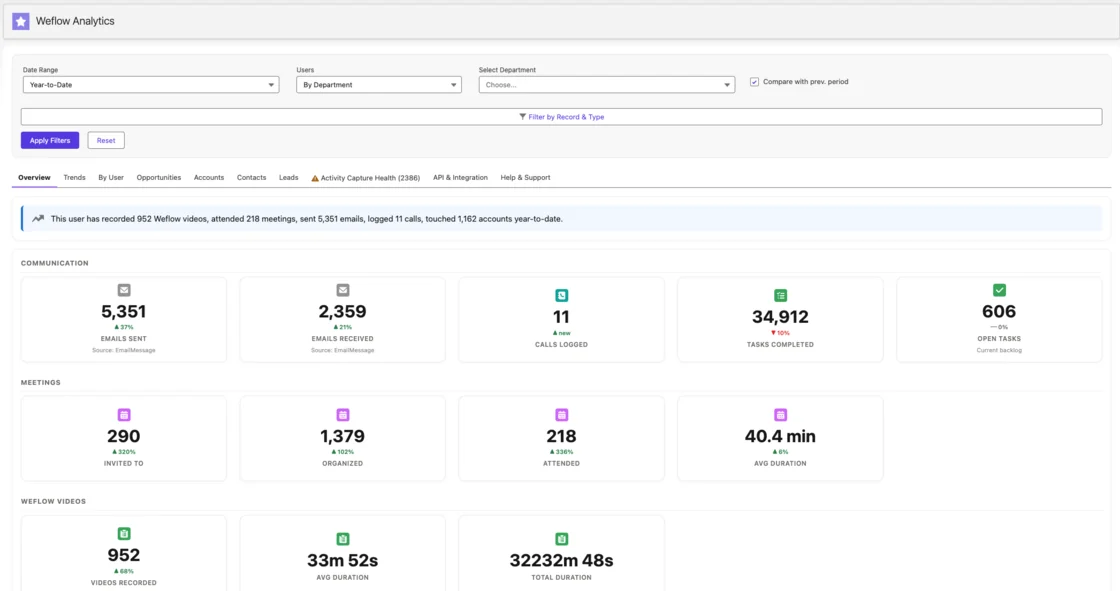
Because these are native records, you report on them in Salesforce like anything else. The Weflow Analytics package adds activity reports as a Salesforce app, and those reports use no Salesforce API calls.
Emails land on EmailMessage or Task, and you choose which
Your admin picks the object. About nine in ten of our customers choose EmailMessage. The captured content is identical either way. What changes is reporting, storage and access control.
| EmailMessage | Task | |
|---|---|---|
| Reporting | Full From, To and Cc metadata, easy to read in the CRM | Type=Email, no native From/To/Cc or threading |
| Direction metrics | Separates sent from received, so reply counts and reply rate work | Volume reporting only |
| Multi-recipient emails | One record relates to up to 50 recipients | Separate records per relationship |
| Access controls | Fewer controls in Salesforce | More controls in Salesforce |
| Storage | Roughly 7x heavier per record | Lightweight |
| Best fit | Teams that want interaction metrics as a leading indicator of deal health | Teams whose reports are already built on tasks |
Our view is that EmailMessage is the right default for most teams. Direction is what turns activity into a deal signal. Pick Task if you'd otherwise rebuild a stack of task-based reports, or if storage is the constraint.
How much Salesforce storage EmailMessage and Task records use
The storage cost of Weflow comes down to your object choice. An EmailMessage record is roughly seven times heavier than a Task. Video never touches your Salesforce storage at all. We hear this on calls with long-established orgs:
"We have twenty years worth of data in our system, so we are constantly having to go through and delete old data because we are at about 98 percent storage."
If that's you, here's how we'd approach it:
- Choose Task over EmailMessage if storage outranks direction-based reporting for you.
- If you choose EmailMessage, remember that one record covers up to 50 recipients. An email copied to three colleagues is one record, not four.
- Weflow only logs activity it can match to an existing Salesforce record, and it never logs internal-only threads. Unmatched mail and internal chatter don't add to your storage.
Meetings land on Event, and contacts and linked notes sync too
Here's the rest of what capture writes, and what it never writes:
- Meetings become Events whether or not they're recorded. Recording adds the summary and AI field updates on top. The activity trail stays complete even when the recorder wasn't admitted.
- Contacts sync to Salesforce. Weflow can also create missing contacts and set Opportunity Contact Roles.
- Notes sync only when they're linked to a record. They're stored as markdown, with attachments as URL references. A note marked private never syncs.
- Private events and emails don't log. Neither do calendar entries with no other attendees and no meeting link, like a lunch block. A meeting already logged before someone marked it private stays in Salesforce.
Capture also logs to Cases and to custom objects. About 20 to 30 percent of our customers log activity to custom objects alongside the standard ones.
What Weflow Conversation Intelligence stores in Salesforce and in Weflow
Weflow Conversation Intelligence writes the analyzable content of every call (transcript, summary, field values) to Salesforce, and keeps the video file in Weflow with an export path.
"Do we own like the underlying data that's been pushed in Salesforce, but will we also own like the phone calls in that transcription too? If we say we use your platform but then we decided to move on, would we own those calls?"
You own the transcription in Salesforce. For the calls themselves, you export the video. Here's how each piece works.
Transcripts and summaries land on Weflow_Recording__c and the Event
Transcripts and summaries live on Weflow_Recording__c, the recording object our managed package adds, plus an indexing object. Because the transcript is a Salesforce record, it's reportable, permissioned and queryable alongside the rest of your CRM.
Weflow_Recording__cholds the full transcript and the summary. One recording can link to several records at once, for example an opportunity and its account, or a renewal and an expansion discussed on the same call.- The indexing object sits alongside the recording object.
- The Event also gets the summary. Salesforce lets an Event link to only one opportunity or account.
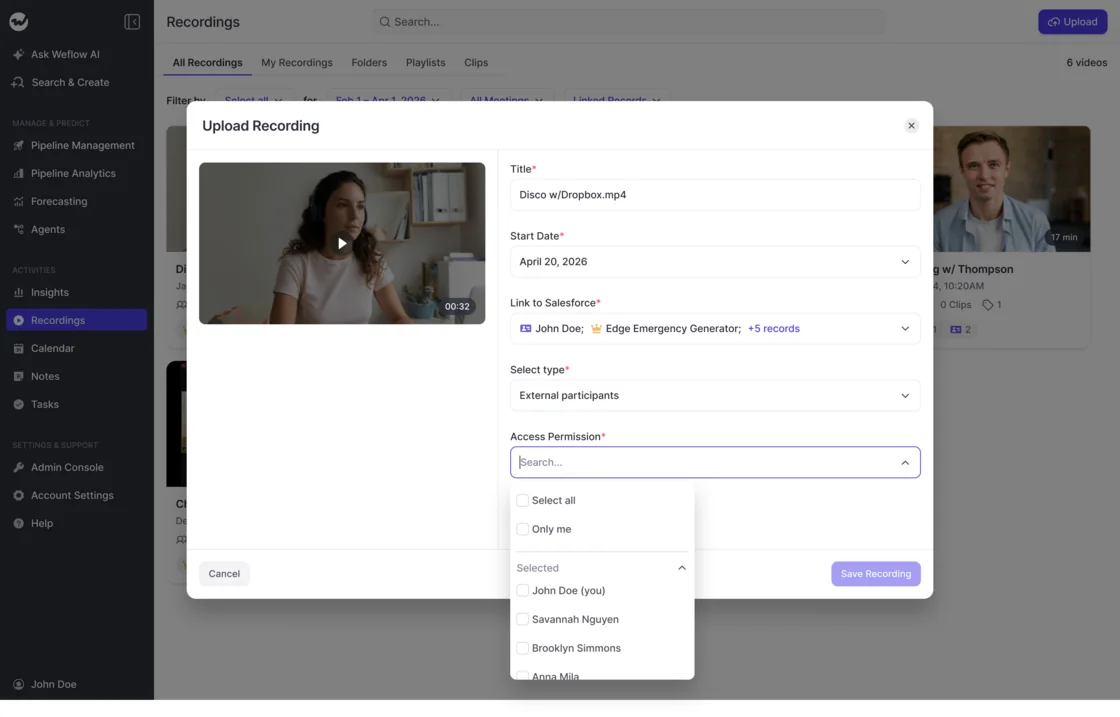
One practical rule: correct a mapping from the Outlook or Chrome extension, because that moves both the Event and the recording. Changing it inside the Weflow app moves only the recording. We built it that way on purpose, so nobody rewrites a Salesforce activity by accident from the recording view.
Video recordings and tracker hits stay in Weflow storage
Video stays out of Salesforce because Salesforce file storage is expensive and video adds nothing you can report on. Weflow holds the file, streams it back when you watch, and links out to it from the record.
Your way out is the Weflow public API, which exports video to your own cloud storage. Tracker hits also live in Weflow, and you reach them through the Weflow MCP connector.
If you ever switch conversation intelligence vendors, the transcripts and their metadata are what carry your history. That means who took part, when, and which record the call belongs to. Video mostly matters for clip libraries. The transcripts are already in your Salesforce.
How long we keep recordings, and how you delete them
By default, Weflow keeps recordings for as long as you subscribe, with no storage cap under fair use. You can shorten that window. Some customers have every recording deleted on a fixed schedule because they treat retention as a security control.
- Default: Recordings are kept for the life of the subscription.
- Configured: All recordings are deleted after a set period, for example every 30 days.
Participants have their own path too. On Microsoft Teams, a pre-meeting email carries an opt-in and opt-out link. An in-call chat message offers a removal option that permanently deletes all recording data for that meeting right away.
What Weflow Deal Intelligence & Forecasting keeps in Weflow
The Salesforce opportunity stays the source of truth for the deal. The forecast layer and Weflow's computations sit on top of it, in Weflow. This product has the most exceptions, so we'll start with what does write back.
Opportunity edits and AI Playbook methodology fields write back to Salesforce
These deal-layer outputs reach Salesforce:
- Opportunity edits made in Weflow write straight back. Update a deal in Weflow or in Salesforce, and both show the change.
- AI Playbooks write methodology field values to your Salesforce fields. The playbook reads every email, meeting, transcript and CRM field on the deal, so a MEDDPICC or SPICED gap shows up as an empty Salesforce field you can report on.
- AI field updates from calls land in the fields you map.
The playbook's overall score isn't on this list. It's a Weflow field, covered two sections down.
Opportunity snapshots hold the pipeline history Salesforce doesn't keep
Pipeline history lives in Weflow because Salesforce stores only the current state of an opportunity. Weflow snapshots every opportunity every few hours. The difference between snapshots is what gives you a waterfall, push counts and amount changes as separate bars instead of one net number.
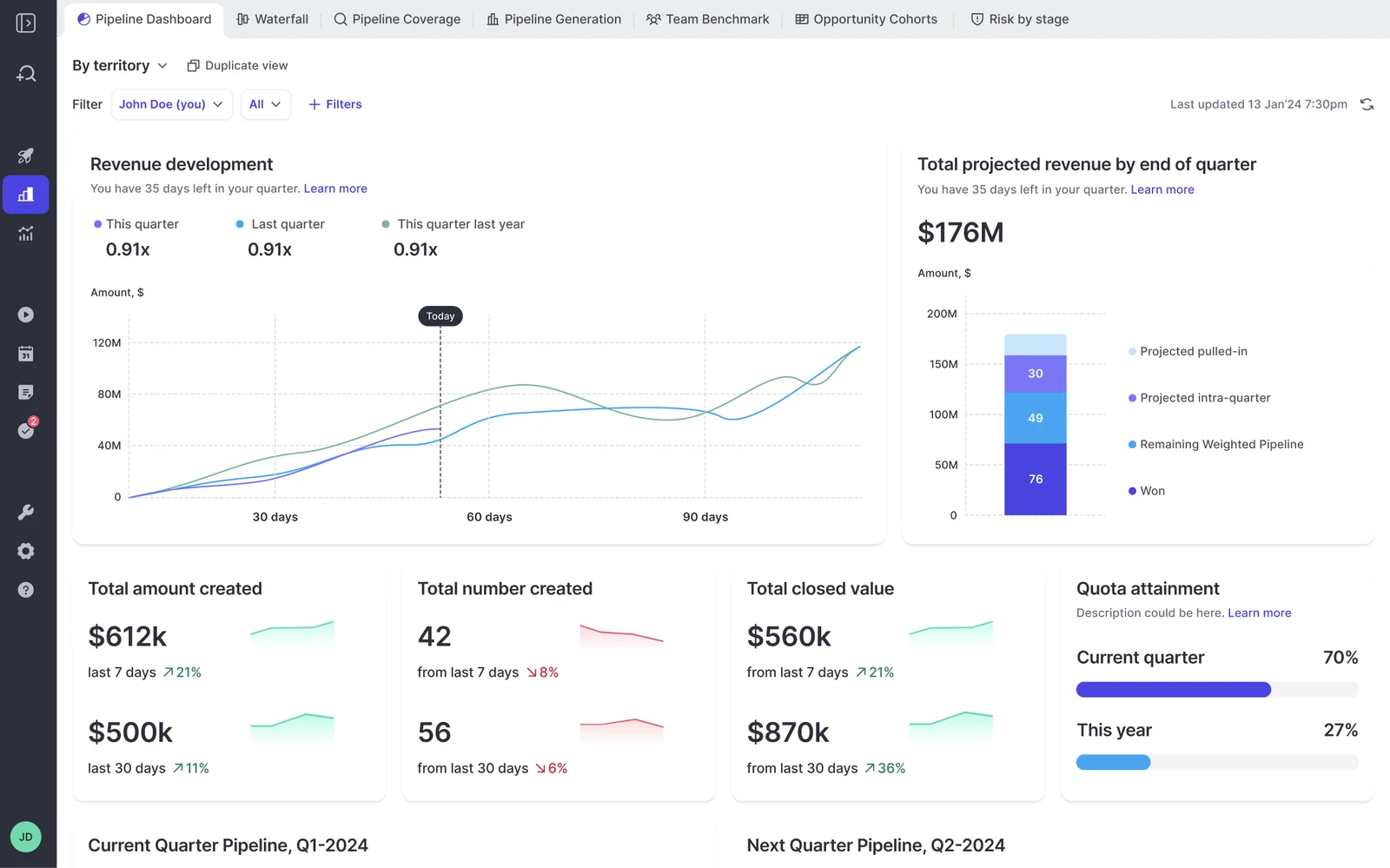
That history doesn't survive cancellation. It only exists because Weflow took the snapshots, and there's no Salesforce object for it to fall back to.
Forecast submissions, targets and roll-ups stay in Weflow
No submitted forecast number lands on a Salesforce object today. Submissions, targets and roll-ups live in the Weflow application, and the Weflow MCP connector can read them.
If your rule is that everything lands in the CRM, the forecast is the one number in your process that lives only in the tool. We haven't built a write-back. The reason is that customers hadn't asked for one, not that it's hard. If that matters to you, it's the gap to weigh.
Deal warnings, AI Playbook scores and computed fields are Weflow fields
You can't report on deal warnings, AI Playbook scores or computed fields in Salesforce or a BI tool. They're Weflow fields. Here's what that covers:
- Deal warnings, including the ones you build on any opportunity field except text fields
- AI Playbook scores
- Days inactive
- Activity velocity
- The rolling four-week activity timeline
- Last and next meeting
- Per-contact engagement
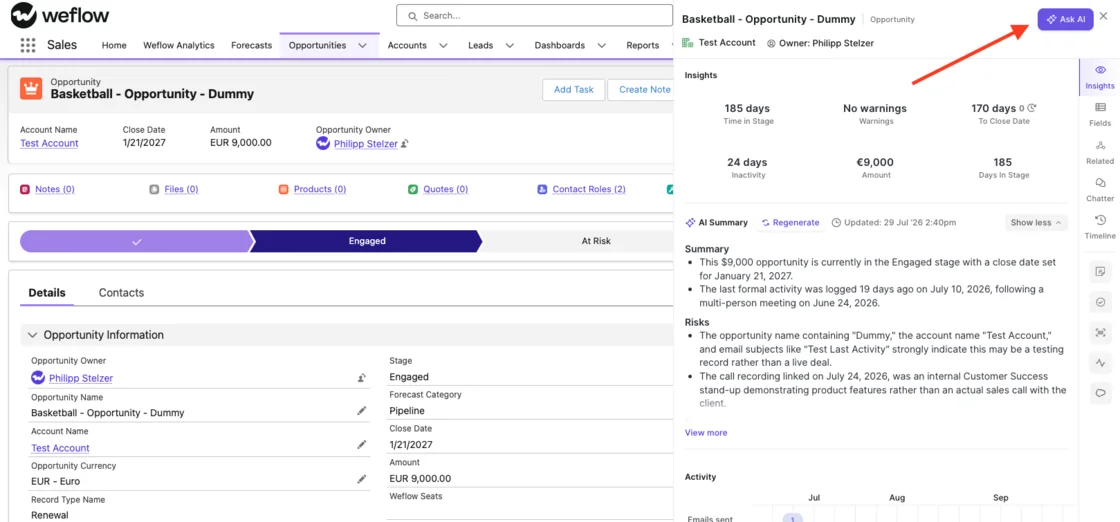
Tip: Look for the W. Any field marked with a W in the Weflow interface stays in Weflow and won't show up in a Salesforce report.
Where Weflow's forecast and warnings don't fit a Salesforce-only rule
The gaps sit in the forecast and deal-signal layer. Weflow Activity & Contact Capture and Weflow Conversation Intelligence fully satisfy a Salesforce-only rule. Here's how the gaps play out against three common rules.
If your board deck needs deal warnings in Power BI
Your executive reporting runs from Salesforce dashboards or Power BI. A manager sees a deal flagged at risk in Weflow, and that flag can't go into the report the board reads without a workaround someone has to build. Agent outputs won't fill the gap either, because they go to email and Slack, not to fields.
What works today is the methodology layer. AI Playbooks write their field values to Salesforce, so "economic buyer still unidentified on a deal closing this quarter" can become a Salesforce report from an empty field. That covers qualification risk. Activity risk, like days inactive, stays in Weflow.
If the at-risk flag itself has to appear in the board deck, know that before you sign. Weflow doesn't do that natively today.
If your reps must work only inside Salesforce
Some teams decide reps live in one system, and that system is Salesforce. Roll-up submission happens in Weflow, so you can't use it without breaking that rule.
The weighted forecast and the AI projection still work for you. Both run on CRM data with no rep input, so reps never leave Salesforce. You get a forecast built on live deal data, minus the rep-by-rep submission motion.
If your native Salesforce forecast is already half-built
Some teams already have every forecast number they need in the CRM and a native Salesforce forecast part-built. If that's you, our honest advice is to weigh staying put on forecasting for now.
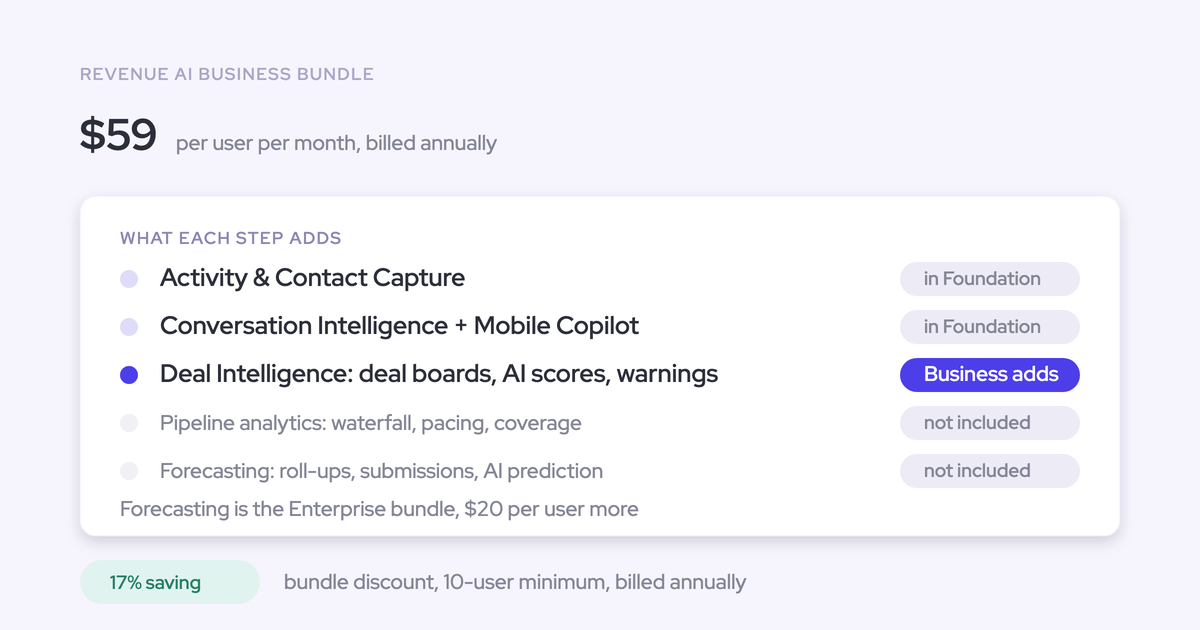
Take Weflow Activity & Contact Capture and Weflow Conversation Intelligence, which is the Revenue AI Foundation bundle. Every email, meeting and transcript lands in Salesforce, and your native forecast reads from more complete data. Moving forecasting over later costs roughly $10 more per user per month, not a new contract.
How to get Weflow data into your warehouse, BI or assistant
Activity rides the Salesforce sync you already run. Weflow-side data comes out through the Weflow public API or the Weflow MCP connector. There's no native Snowflake, Databricks or BigQuery connector today.
| Data | Route |
|---|---|
| Emails, meetings, contacts, notes | Your existing Salesforce-to-warehouse sync |
| Transcripts, summaries, AI field values | Your Salesforce sync, or the Weflow public API |
| Video recordings | Weflow public API to your own cloud |
| Forecast calls, pipeline metrics, playbook output | Weflow MCP connector |
| Tracker hits | Weflow MCP connector |
| Saved deal boards and views | Not exposed; rebuild the filter from raw records |
Activity reaches your warehouse through your existing Salesforce sync
Weflow writes captured activity to native Salesforce objects. So it flows to Snowflake, Fabric or any other warehouse the same way the rest of your CRM data does, through the sync you already maintain.
We sometimes hear the idea of routing capture through the warehouse first. It adds months and no data. The warehouse is only as complete as what reached the CRM.
Use the Weflow public API for recordings and bulk conversation data
The Weflow public API is the route for video, conversation data and Weflow-side records. Customers use it to bring that data into Snowflake, Databricks or BigQuery, next to what they already sync from Salesforce.
Records come back tied to the Salesforce object they were matched to. Your data team can join them to accounts, contacts and opportunities without a reconciliation project.
Direct delivery runs from a short-lived copy you can switch off
Direct push to a warehouse, or to agents over the API and MCP, runs from a copy of your activity that Weflow keeps for a day or two. You can opt out of that copy. Your activity then lives only in Salesforce, but you lose the direct-push path.
| Keep the short-lived copy | Opt out | |
|---|---|---|
| Where activity lives | Salesforce, plus a Weflow copy for a day or two | Salesforce only |
| Direct push to your warehouse | Available | Not available |
| Activity for agents over API and MCP | Available | Not available |
| How activity reaches the warehouse | Direct push or your Salesforce sync | Your Salesforce sync |
If your warehouse already pulls from Salesforce, opting out costs you little. If you want activity to reach your agents directly, keep the copy.
The Weflow MCP connector reads forecast calls Salesforce can't see
Weflow's MCP connector is worth connecting alongside Salesforce's own. The forecast layer and parts of the conversation layer never reach Salesforce, so no Salesforce connector can see them. Run both, and your assistant answers questions about the record and about the forecast in one chat.
Here's what the Weflow MCP connector returns:
- Forecast calls: the most recent submitted number for a period, the live pipeline total, and the delta between them. A null means nothing was submitted for that period.
- Per-rep pipeline metrics: weighted and unweighted pipeline, closed-won amount and count, win rate, average deal size, cycle length, coverage, gap to forecast, and the opportunity IDs behind them
- AI Playbook output
- Call summaries and, if you allow it, full transcripts
Here's what it doesn't return:
- Saved deal boards and views. An external agent rebuilds the filter from raw records.
- Per-rep breakdowns for more than 25 owners. Larger orgs get aggregate answers unless they narrow the question to a team.
What stays in your Salesforce if you cancel Weflow
If you cancel, the activity and contact layer, transcripts, summaries and field values stay in your Salesforce as your data. Recordings need exporting first. Pipeline history and the forecast layer don't survive.
"If you ever stop using Weflow, the data persists. It is your data."
| Data | What happens | How to keep it |
|---|---|---|
| Emails, meetings, contacts, linked notes | Stays in Salesforce | Nothing to do |
| Transcripts and summaries | Stays in Salesforce | Nothing to do |
| AI field updates and playbook methodology values | Stays in Salesforce | Nothing to do |
| Opportunity edits made in Weflow | Already in Salesforce | Nothing to do |
| Video recordings | Export before cancelling | Weflow public API to your own cloud |
| Opportunity snapshots and pipeline history | Lost | No export path for the history |
| Forecast submissions, targets, roll-ups | Lost | Pull forecast calls over MCP while you're still live |
| Deal warnings, scores, computed fields | Lost | None |
Before you cancel, work through this list:
- Export every video recording you want to keep through the Weflow public API.
- Pull your forecast calls by period over the Weflow MCP connector and store them where your reporting lives.
- Note any deal warning rules and playbook definitions you want to rebuild elsewhere.
- Leave everything else alone. It's already in your Salesforce.
What your security team will ask about Weflow data handling
Each control is either configurable or inherited from Salesforce, and the limits are below.
Which region Weflow stores your data in
Data that lands in Salesforce never leaves your org, so it lives wherever your Salesforce instance lives.
Data Weflow holds, such as recordings and Weflow fields, sits in Weflow's AWS environment in Frankfurt, New York or Sydney. Weflow keeps it in the region where your Salesforce instance sits, so a European org keeps its Weflow data in Europe. Every record is scoped to your workspace and encrypted at rest and in transit.
Who can connect an AI assistant through the Weflow MCP connector
Your admin decides who connects an assistant, and what it can read:
- The connector is read-only.
- An admin switches it on per workspace.
- A separate toggle decides whether assistants read full transcripts or only AI summaries.
- The admin console lists every connected user with their email and the date they connected.
- Team scope follows your reporting hierarchy. With no hierarchy configured, it resolves to every active user, so set the hierarchy before you switch the connector on.
- If your security team won't enable a vendor-hosted connector, you can build your own MCP server inside your boundary on a Weflow API key.
Which Salesforce permissions Weflow inherits, and which it can't
Weflow inherits your Salesforce permission model. It can't inherit visibility you enforce through list views or Lightning components, because those aren't part of the permission model.
| Salesforce control | Inherited by Weflow? | What to do |
|---|---|---|
| Permission sets | Yes | Nothing |
| Field-level security | Yes | Nothing |
| Role hierarchy | Yes | Nothing |
| List-view restrictions | No | Create pipeline and account views centrally, assign them per team, and turn off user-built views |
| Lightning component and page visibility rules | No (not exposed through the Salesforce API) | Set the restriction at the permission layer |
| Data export from a view | No | Controlled by a Weflow feature flag |
Ask Weflow AI goes a step further than Salesforce does. It uses your Salesforce permissions as a floor and then applies its own guardrails, so it can withhold information a user could reach directly in Salesforce.
Weflow's SOC 2 Type II, GDPR and AI data commitments
- SOC 2 Type II certified, with tenant segregation controls in the audited scope
- GDPR compliant
- Zero Data Retention for AI processing
- Customer data never used to train AI models
How to configure where Weflow writes your data
A handful of settings decide where your data lands. Lock them before the first sync, because changing them later means data already written the old way stays that way. Salesforce doesn't allow editing a synced email record, so correcting one means deleting it and re-adding it.
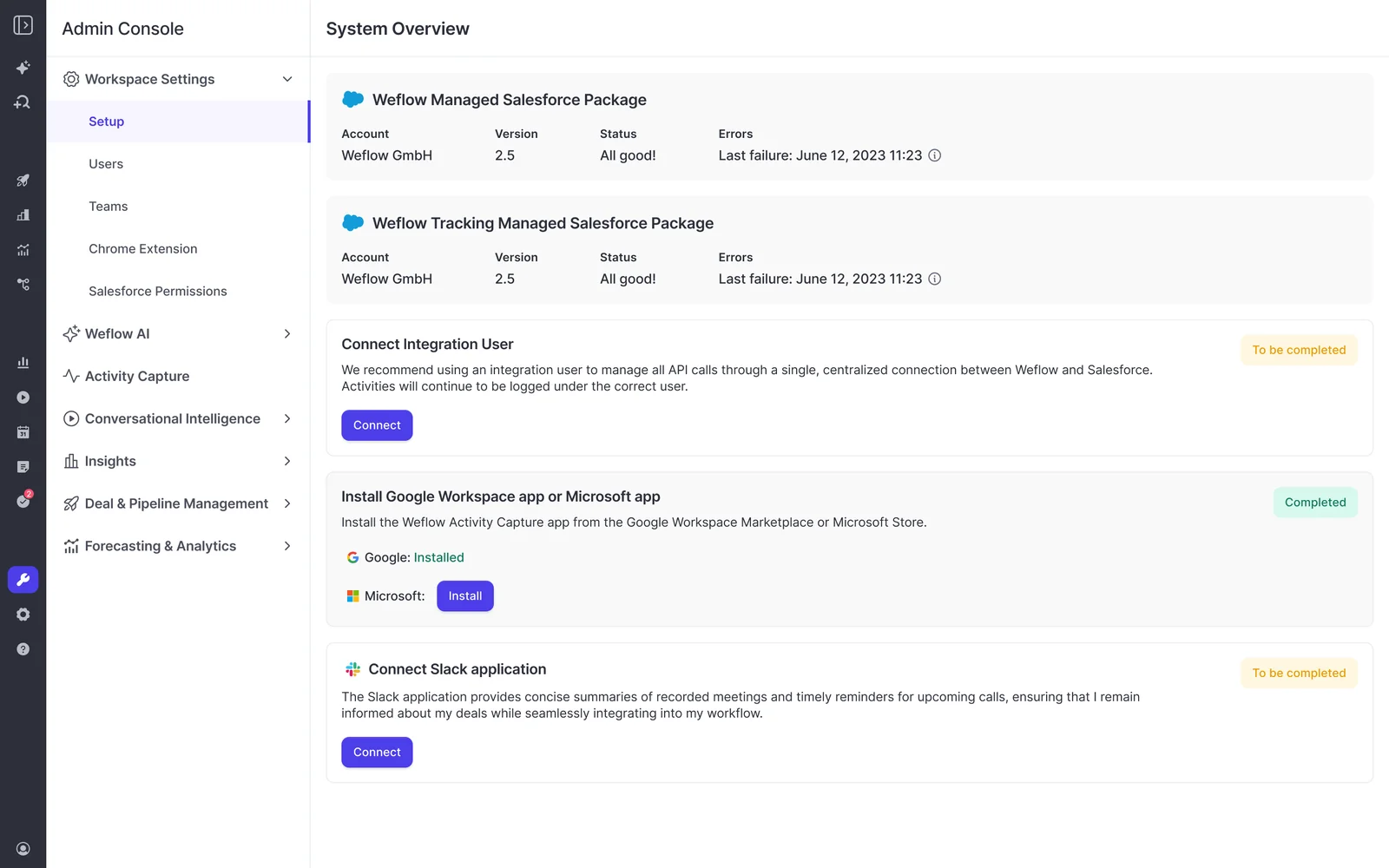
Settings to decide before the first sync
- Choose EmailMessage or Task. Base the call on your reporting and your storage headroom, using the trade-offs above.
- Set up Object Management. Under Admin Console, Activity Capture, Object Management, turn on Cases and any custom objects you log to. Decide whether logging to a custom object or Opportunity should require the record owner to be on the email or meeting.
- Decide on the short-lived activity copy. Keep it if you want direct push to your warehouse or agents. Opt out if activity must live only in Salesforce.
- Set calendar sync to one-way. We recommend calendar-to-Salesforce only, because the Salesforce-to-calendar direction is unreliable.
- Rebuild view-based restrictions. If your org restricts access through list views, create and assign views centrally before users log in.
Settings you can change after rollout
- Recording retention window. Move from subscription-length retention to a fixed deletion schedule whenever your policy requires it.
- Weflow MCP connector and transcript access. Switch the connector on or off, and decide whether assistants see transcripts or only summaries.
- Warning signals and AI Playbooks. Build and assign them per team. A signal only takes effect once it's assigned to a team.
What each Weflow product costs and what data it adds
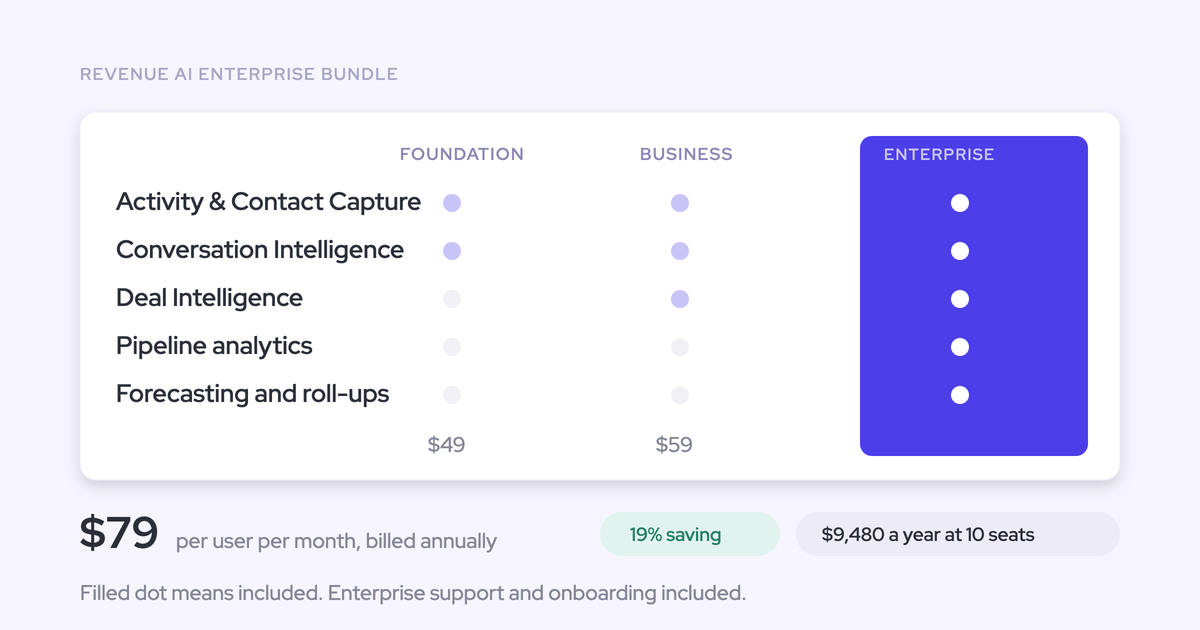
Your data footprint grows with the products you buy, and we publish every price. All plans bill annually with a 10-user minimum.
| Product or bundle | Per user per month | Data in your Salesforce | Data in Weflow |
|---|---|---|---|
| Weflow Activity & Contact Capture | $19 | Emails, meetings, contacts, linked notes | Nothing of substance |
| Weflow Conversation Intelligence | $39 | Transcripts, summaries, AI field updates | Video recordings, tracker hits |
| Weflow Deal Intelligence & Forecasting | $39 | Opportunity edits, playbook methodology values | Snapshots, forecast layer, warnings, scores, computed fields |
| Revenue AI Foundation (Activity & Contact Capture + Conversation Intelligence) | $49 | Everything from capture and Conversation Intelligence | Video recordings, tracker hits |
| Revenue AI Business (Foundation + Deal Intelligence) | $59 | Foundation, plus opportunity edits and playbook methodology values | Foundation, plus snapshots, warnings, scores, computed fields |
| Revenue AI Enterprise (Business + Forecasting) | $79 | Same as Business | Business, plus forecast submissions, targets and roll-ups |
Every plan includes Ask Weflow AI Pro and Agent Builder Free with 25 agent actions a month. Everything is priced per seat except Agent Builder above the free tier.
See how Weflow captures activity, updates Salesforce fields from calls, and rolls up your forecast. Book a 30-minute demo.
FAQ: Weflow data storage, ownership and export
Will Weflow create duplicate Events if we also run Outreach or Salesloft?
Weflow creates one Event per meeting and updates it with the recording summary. You get duplicates when a separate recorder and a separate capture tool each create their own Event. Weflow runs alongside Outreach and Salesloft through compatibility mode. If you're testing Weflow against another capture tool, disable one of them during the bake-off so they don't compete over the same inbox.
Can Weflow group or filter by Salesforce formula and roll-up fields?
Weflow reads formula and roll-up fields and shows them as columns, but it can't group or filter by them. Group by the object the formula reads from instead. For example, group a sales team derived from the opportunity owner by owner title. Currency and amount roll-ups read without difficulty.
How much pipeline history does Weflow import at rollout?
Weflow imports up to 12 months of historical Salesforce data by default. History for custom fields depends on whether you had Salesforce field history tracking switched on. From rollout onward, Weflow builds its own snapshots every few hours.
Do exported Weflow recordings carry Salesforce record IDs?
Records from the Weflow public API come back tied to the Salesforce object they were matched to: the account, contact, opportunity or lead. That's what lets your data team join recordings and conversation data to the rest of the CRM in the warehouse.
Can a Salesforce retention flow find and delete records Weflow writes?
Yes. Weflow writes native records on standard objects and on Weflow_Recording__c, and your flows can read and act on those like any other Salesforce record.
Does Weflow store email attachments in Salesforce?
Email attachments can land in Salesforce. ADVISA moved off Einstein Activity Capture partly because it didn't support attachments, and it now stores email attachments in Salesforce through Weflow. Notes work differently: note attachments are stored as URL references.
Can we build our own MCP server on a Weflow API key?
Yes. Some security teams won't enable a vendor-hosted connector and run their own MCP server inside their boundary instead. The Weflow public API supports that on an API key.
How is this different from how Gong stores call data?
Gong keeps recordings, transcripts and intelligence in its own cloud. Gong data can display inside Salesforce through embedded components, but it doesn't live as native Salesforce records. Gong keeps calls and their transcripts for up to three years by default, and calls saved to the Gong library are exempt from that policy.
Weflow writes transcripts and summaries to Salesforce, where they stay after cancellation. Not every conversation intelligence tool works like Gong. Chorus, for example, writes each call to a Salesforce Engagement record that includes the transcript.
Does Einstein Activity Capture still keep email outside Salesforce?
Not anymore, if you've moved to the newer setup. With Sync Email as Salesforce Activity turned on, Einstein Activity Capture stores email as Salesforce records you can use in reports, workflows and the APIs. Off-org storage applies only to setups made before the Summer '25 release that haven't moved over.