Weflow Revenue AI Business Bundle: Price, What It Includes, and Who It Is For (2026)
Learn Weflow Revenue AI Business pricing, features, and when to choose it vs Foundation or Enterprise.


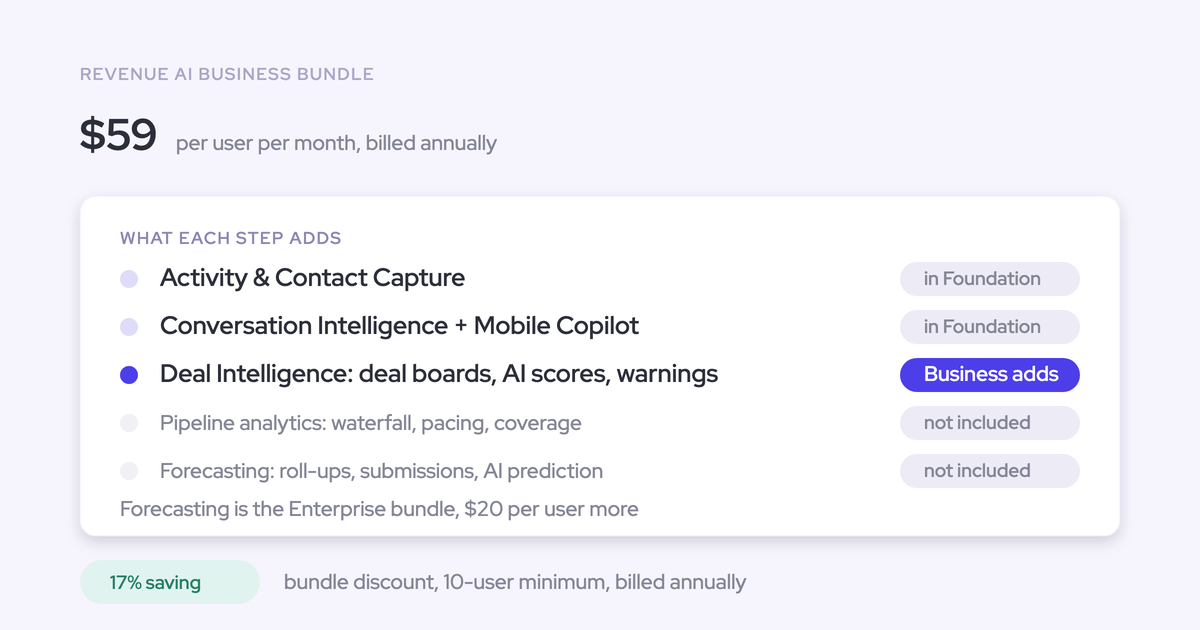

Weflow Revenue AI Business ($59/user/month) adds deal intelligence to Revenue AI Foundation ($49/user/month): deal and account views, AI summaries, scoring, warnings, and buying-committee intelligence. You can use it to prepare deal reviews while keeping your existing forecast process. It doesn’t include pipeline analytics or forecasting.
The price is $59 per user per month, billed annually, with a 10-user minimum. That makes the minimum annual license cost $7,080. Implementation is free, and your first-year budget also needs to account for any applicable platform fee.
Weflow is the Revenue AI Orchestration platform for sales, customer success, and RevOps teams. Revenue AI Business includes the deal-inspection portion of Weflow Deal Intelligence & Forecasting, rather than the full standalone product.
What does Weflow Revenue AI Business include?
Revenue AI Business combines Weflow Activity & Contact Capture, Weflow Conversation Intelligence, and Deal Intelligence capabilities. The additional layer helps you decide which opportunities need attention and what to examine before asking the rep for an update.
Weflow Revenue AI Business includes Weflow Revenue AI Foundation
You keep every Revenue AI Foundation capability when you choose Revenue AI Business. The $10-per-user monthly difference pays for deal inspection, not for recording, Salesforce field updates, or AI chat access you already have.
| Capability group | Included functionality | What you can do |
|---|---|---|
| Weflow Activity & Contact Capture | Email, meeting, and contact capture from Google Workspace or Outlook into Salesforce, with activity mapping and reporting. | Review the customer interactions behind an opportunity without relying on reps to log them. |
| Weflow Conversation Intelligence | Meeting recording, transcripts, summaries, and AI field updates. | Turn conversations into structured Salesforce data, including qualification answers and next steps. |
| Coaching and follow-up | AI coaching scorecards, follow-up email drafts, topics and trackers, clips, and playlists. | Coach against your methodology and reuse useful customer conversations. |
| Recording applications | Mobile Copilot and the Windows and macOS desktop app. | Record in-person conversations or calls running through a computer, alongside online meeting recording. |
| Ask Weflow AI Pro | Questions across available recordings, Salesforce records, and related activity. | Prepare for a meeting or investigate a deal using the underlying customer history. |
| Agent Builder Free | 25 agent actions per workspace per month. | Start a small automation workflow before adding paid agent capacity. |
| View-only access | Free view-only licenses (up to one per recording license). | Share available recordings, summaries, and views with stakeholders who don’t need editing capabilities. |
The desktop app doesn’t require a meeting bot, but the rep starts the recording and obtains participant consent. Our automated notetaker consent flow doesn’t run through the desktop app.
Run deal reviews with Weflow Revenue AI Business
Weflow Revenue AI Business brings deal summaries, engagement, scoring, and warnings into the review so you can spend the meeting on decisions. Start with the opportunities that need attention rather than asking every rep to narrate every deal.
- Open the team’s deal view. Use a table or Kanban view to focus on the opportunities you’re reviewing. Keep the visible fields relevant to that meeting instead of displaying every field RevOps maintains.
- Use warnings and scores to select deals. Look for conditions such as inactivity, a missing next meeting, or single-threaded engagement. Configure warning thresholds around your sales cycle so normal behavior doesn’t create noise.
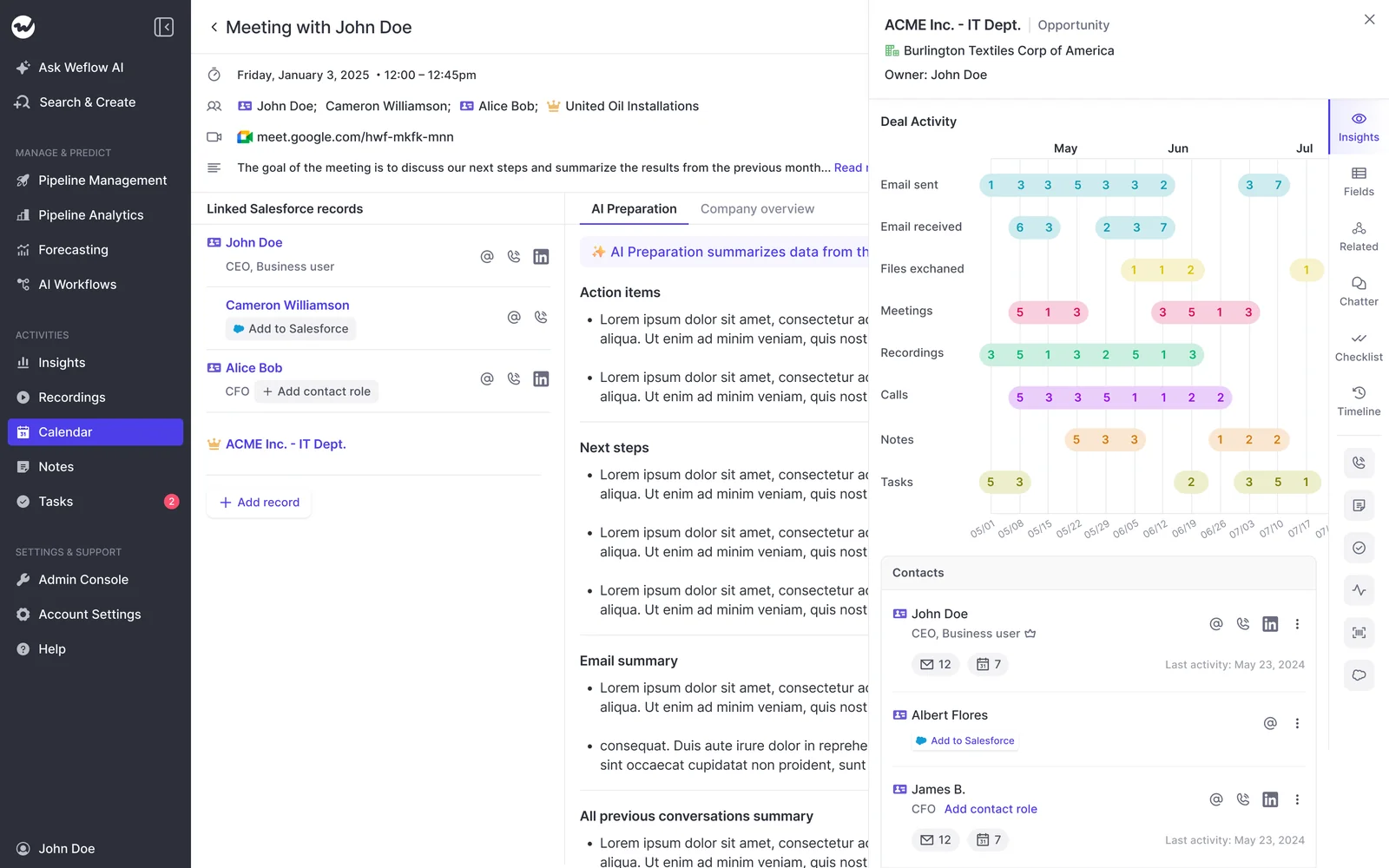
- Read the deal summary. Weflow’s deal-level AI summary reasons across meetings on the opportunity. You can examine the relationship’s progression without opening each recording.
- Inspect the buying committee. Compare the contacts on the record with the people actually replying and attending meetings. Six attached contacts with one active participant still leaves you dependent on one person.
- Agree on the next action. A quiet economic buyer might call for an introduction. An unresolved decision process needs a buyer conversation. Update the opportunity in the editable view, which syncs changes back to Salesforce.
Weflow’s company overview brings activity and contact recency together. That gives the manager evidence for the conversation, although engagement alone doesn’t establish that someone is a champion.
Zeotap uses custom pipeline views and templates for weekly sales meetings and inspections, alongside an ICP scorecard for qualification. Its published results include a 12% increase in win rate.
Zeotap uses Weflow Deal Intelligence & Forecasting. That result reflects its broader deployment and review discipline, rather than Revenue AI Business alone.
Which forecasting capabilities does Weflow Revenue AI Business exclude?
Revenue AI Business excludes pipeline analytics, forecast submissions, roll-ups, and forecast accuracy measurement. Choose Revenue AI Enterprise for those capabilities within a bundle, or keep forecasting in your existing system.
| Deal-inspection work included | Analytics and forecasting outside Revenue AI Business |
|---|---|
| Inspect and edit opportunities in table or Kanban views. | Analyze pipeline movement through waterfall and pacing views. |
| Read AI deal summaries and deal or account scores. | Run the full AI forecasting layer. |
| Use warnings to identify opportunities needing attention. | Collect forecast submissions and roll them up through the organization. |
| Review buying-committee engagement. | Measure submitted forecasts against actual results. |
What does Weflow Revenue AI Business cost?
Revenue AI Business costs $708 per user annually at the one-year USD list price. Separate licenses, applicable commercial fees, and optional Agent Builder capacity in your budget so the seat price doesn’t become an incomplete first-year total.
How does Weflow Revenue AI Business seat pricing work?
Weflow bills Revenue AI Business annually, with a 10-user minimum. The monthly rate describes the seat price; it isn’t a month-to-month purchase option.
| Commitment | Seat discount | USD per user per month | USD per user annually | Billing |
|---|---|---|---|---|
| One year | List price | $59.00 | $708.00 | Annual |
| Two years | 10% | $53.10 | $637.20 | Annual |
| Three years | 20% | $47.20 | $566.40 | Annual |
These calculations apply the multi-year discount to the seat price. Weflow also offers pricing in EUR and volume discounts for larger teams.
At list price, Revenue AI Business adds $120 per user annually over Revenue AI Foundation. Revenue AI Enterprise adds another $240 per user annually over Revenue AI Business.
Which fees affect Weflow Revenue AI Business’s first-year cost?
Implementation is free. A variable platform fee can increase the first-year cost beyond annual licenses. Keep it separate from seat spend.
| Charge | Budget treatment |
|---|---|
| Annual licenses | Recurring seat cost. |
| Platform fee | Variable commercial charge. (applicable for contracts below $10K) |
Calculate Weflow Revenue AI Business costs for your team
Use this formula for Revenue AI Business: first-year cost = annual licenses + applicable platform fee + optional paid Agent Builder capacity.
The table below uses the one-year USD list price. Platform fees remain separate, and the calculations don’t include paid Agent Builder capacity.
| Paid users | Annual licenses | Platform fee |
|---|---|---|
| 10 | $7,080 | Additional, if applicable |
| 25 | $17,700 | Additional, if applicable |
| 50 | $35,400 | Additional, if applicable |
| 100 | $70,800 | Additional, if applicable |
For a 25-user team, the annual license difference between Revenue AI Foundation and Revenue AI Business is $3,000. That’s the upgrade cost to weigh against the team’s use of deal summaries, warnings, scoring, and buying-committee inspection.
Does Weflow Revenue AI Business charge for AI usage?
Weflow includes everyday AI usage in the seat price. Paid Agent Builder capacity is the consumption-priced exception, measured in agent actions per workspace rather than tokens per user.
| Capability | Included usage or capacity | Charging basis |
|---|---|---|
| Recordings and transcripts | Unlimited. | Included in the seat. |
| AI summaries, templates, and field updates | No usage caps or metering. | Included in the seat. |
| Ask Weflow AI Pro | No prompt usage caps or metering. | Included in the seat. |
| Agent Builder Free | 25 agent actions per month. | Included per workspace. |
| Agent Builder Growth | 500 agent actions per month. | $299 per workspace per month. |
| Agent Builder Scale | 2,500 agent actions per month. | $999 per workspace per month. |
| Agent Builder Enterprise | Custom capacity. | Custom package. |
You don’t need to ration recordings or AI questions to protect the budget. Scheduled automation needs its own capacity planning because agent actions draw from the workspace allowance.
Who should choose Weflow Revenue AI Business?
Choose Revenue AI Business when reps and managers will use deal intelligence to prepare reviews and act on risk. Stay with Revenue AI Foundation if your immediate work is capturing activity, recording conversations, and updating Salesforce fields.
The extra license spend needs a workflow behind it. We’d start with a recurring deal-inspection session that has a manager, selected opportunities, and decisions to make.
Keep your forecast tool with Weflow Revenue AI Business
You can use Weflow Revenue AI Business for deal inspection while keeping forecasting in Clari, Salesforce, Kluster, or a spreadsheet. The tools have different responsibilities.
| Responsibility | Where the work happens |
|---|---|
| Capture customer activity and conversation outcomes. | Weflow writes captured activity and CRM updates into Salesforce. |
| Inspect opportunity health and buying-committee engagement. | Revenue AI Business provides summaries, views, scores, and warnings. |
| Maintain shared opportunity fields. | Salesforce holds the CRM records, with bidirectional Weflow sync. |
| Submit, consolidate, and review the forecast. | Your existing forecasting system or spreadsheet retains that process. |
Clari’s roll-up flexibility can remain useful even when you want better evidence underneath it. Clari reads activities from Salesforce, so Weflow can supply captured activity without taking over forecast ownership.
For coexistence, we recommend three operating rules:
- Assign activity-writing ownership. Two capture engines logging the same interactions can create duplicates.
- Keep shared field definitions consistent. Deal inspection and forecasting should use the same meaning for stage, amount, and close date.
- Separate inspection from submission. Use the deal review to resolve risks; use the forecast meeting to make the number.
Assign Weflow Revenue AI Business seats by team needs
Weflow supports different products and bundles for different teams in the same company. You don’t need to give every customer-facing employee the same license.
| Team workflow | Recommended license | Why it fits | What changes the recommendation |
|---|---|---|---|
| Capture emails, meetings, and contacts for reporting. | Weflow Activity & Contact Capture | Automates capture without adding recording or deal inspection. | The team needs recordings and call-derived Salesforce updates. |
| Record calls and update Salesforce from conversations. | Weflow Conversation Intelligence | Provides conversation workflows when broader activity capture isn’t needed. | The team also needs email, meeting, and contact capture. |
| Combine activity capture with conversation intelligence. | Revenue AI Foundation | Builds the customer record and automates post-call work. | Reps or managers need deal-level inspection. |
| Inspect deals or accounts using engagement, summaries, scores, and warnings. | Revenue AI Business | Adds the evidence needed for opportunity and account reviews. | The team needs pipeline analytics or forecasting in Weflow. |
| Combine capture, conversations, deal inspection, and forecasting. | Revenue AI Enterprise | Includes the full forecasting layer. | Only deal management and forecasting are needed, without capture or recording. |
| Run deal management and forecasting without the other core products. | Weflow Deal Intelligence & Forecasting | Provides the standalone product instead of a full bundle. | The team also needs Weflow’s capture and conversation products. |
Include reps in the deal-inspection workflow when you expect them to act on warnings. Giving managers all the signals while reps wait for follow-up emails turns useful guidance into another layer of supervision.
For the first rollout, prioritize:
- Correct activity-to-opportunity mapping.
- Accurate summaries and a small set of useful field updates.
- One shared deal-review view with actionable warnings.
Our platform demo also covers forecasting, which Revenue AI Enterprise adds beyond Revenue AI Business.
See how Weflow captures activity, updates Salesforce fields from calls, and rolls up your forecast. Book a 30-minute demo.
Weflow Revenue AI Business FAQs
The remaining purchase considerations are CRM compatibility, pilot evidence, data storage, and the scope of your rollout.
Does Weflow Revenue AI Business support CRMs other than Salesforce?
No. Weflow works exclusively with Salesforce. Revenue AI Business doesn’t support HubSpot, Microsoft Dynamics, or Pipedrive.
What can a Weflow Revenue AI Business pilot prove?
A short Revenue AI Business pilot can show whether capture, conversation outputs, and deal inspection work with your data. Use it to assess observable results:
- Emails and meetings map to the correct Salesforce records.
- Summaries reflect what participants said.
- AI field updates respect your field definitions.
- Warnings identify deals that merit attention.
- A manager can run a useful inspection session in the deal view.
Weflow’s predictive deal scoring needs about six months of closed-opportunity history to learn your business’s patterns. A short pilot won’t establish a win-rate improvement or prove a change in forecast accuracy.
How do you upgrade to Weflow Revenue AI Enterprise?
Move to Revenue AI Enterprise when you want Weflow to run pipeline analytics and forecasting alongside capture, conversations, and deal inspection.
Revenue AI Enterprise costs $79 per user per month at the annual list price, compared with $59 for Revenue AI Business. The additional capabilities include forecast submissions, roll-ups, and forecast accuracy measurement.
Where does Weflow Revenue AI Business store your data?
Weflow stores different data types in different places:
- Salesforce: captured emails, meetings, contacts, and CRM field updates. The Weflow recording object also holds transcripts and executive summaries.
- Weflow: recording files and opportunity snapshot history used by the relevant products.
Captured activity and contact records remain in Salesforce after cancellation. Recordings and Weflow-held history don’t share that same storage arrangement.
Which Weflow Revenue AI Business contract terms should you confirm?
Revenue AI Business uses annual billing and a 10-user minimum. The $59 monthly seat rate represents a $708 annual license commitment per user.
Two-year commitments receive a 10% seat discount, and three-year commitments receive a 20% seat discount. Paid Agent Builder capacity remains a separate workspace-level purchase.
Which Weflow security documents can your procurement team review?
Weflow’s trust center provides security documentation covering certificates and controls. We hold SOC 2 Type II certification and comply with GDPR.
Our AI processing uses Zero Data Retention, and customer data doesn’t train foundation AI models. ISO 27001 work is in progress; it isn’t a held certification.
Start the security review alongside technical setup. Keep mailbox enrollment as the activation step after your organization approves the capture policy.