What Data a Revenue AI Platform Needs Before Its AI Is Useful: Email, Calendar, Calls and CRM
Learn why a revenue AI platform needs email, calendar, calls, and CRM data to be useful.


A revenue AI platform needs four sources joined to the Salesforce record before its answers are worth trusting: calendar, email, calls and the CRM itself. Each one answers a different question for the AI:
- Calendar tells it who met.
- Email tells it who decides.
- Calls tell it why the deal moves.
- The CRM tells it what the deal is supposed to be.
Leave one out and you get a specific, predictable wrong answer, delivered with full confidence. Assemble the sources in order: calendar, then email, then calls, then mapping to your CRM structure. And don't let a Salesforce cleanup delay call capture. You can backfill email history later. A call nobody recorded is gone for good.
We work on this problem every day. Weflow is the Revenue AI Orchestration platform for sales, customer success, and RevOps teams. Most of our engineering goes into capture and mapping, because that's what decides whether AI can help with deal execution at all.
Why Claude on Salesforce alone gives confident, wrong answers
Claude on Salesforce gives wrong answers because an assistant can only reason over what reached your org. In most orgs, half of each deal never got there. The model is fine and the connector is fine. The gap sits in what landed on the record.
Salesforce's own hosted MCP server makes the ceiling clear. It lets an assistant read objects, check required fields and pull filtered lists. So the assistant sees exactly what's in the org and nothing else. Anything your capture layer failed to write stays invisible, however good the connector is.
The answer still sounds right, and that's what makes it dangerous. Ask about a deal with three unlogged meetings and you get a fluent summary of a deal that looks quiet.
"If you could just hook Claude into Salesforce and it gives you the truth. I mean, in theory, if it's a system of truth, it should be able to do it. But the reality is it just doesn't work."
We learned this the hard way. Our early AI forecast shipped and didn't work well. No model can tell whether a deal is stalling or slipping without the activity and conversation data underneath it. That mistake is why we now spend most of our effort on capture.
The rest of the market has reached the same conclusion. Salesforce positions Momentum as the capture layer beneath Agentforce. Backstory and Kluster both argue that an LLM on a raw CRM produces almost-right answers.
What email, calendar, calls and CRM each tell your AI
Each source answers a different question. That's why each gap produces its own wrong answer, and why you can trace the bad output you've already seen back to the source that's missing.
| Source | Question it answers for the AI | Wrong answer when it's missing |
|---|---|---|
| Calendar | Who met whom, and when | An active deal reads as cold, and attendees never become contacts |
| Who champions, who decides, what was agreed in writing | Champion and decision maker come back blank or wrong | |
| Calls | Why the deal moves: objections, competitors, context | The AI repeats what the rep typed, not what the buyer said |
| CRM | Stage, amount, owner and your custom structure | Everything else floats with no deal to attach to |
Contacts aren't a fifth source. They come out of email and calendar: the people who write and the people who show up.
Calendar tells your AI who actually met
Calendar is the record of who met whom. In most setups it also triggers the notetaker, so if meetings aren't captured, recording doesn't happen either.
The failure is easy to picture. Your AE met the buying committee twice last week. Nothing reached the Event object. Ask the assistant which deals have gone quiet and that deal tops the list.
Missed meetings cost you contacts as well. The new VP who joined the second call never becomes a Contact in Salesforce. Every multi-threading question after that runs on an incomplete buying committee.
Email tells your AI who really decides
Email is where qualification facts often surface for the first time, so a calls-only setup misses them entirely.
If you have call recording and no email capture, your MEDDPICC fields stay half-filled. The AI reports that the champion is unknown when the champion has been replying to your AE for a month.
Calls tell your AI why the deal moves
Calls carry the reasons behind a deal: objections, competitors, pricing pushback and context someone mentions once. A transcript that isn't mapped to a record is as good as missing, because the AI can't find it when it's asked about the deal.
Most teams already have transcripts from Teams or Zoom. They sit in the meeting platform. Nobody syncs them to the opportunity or queries them. The only way to use them is to open one and read it.
Salesforce tells your AI what the deal should be
The CRM stays one of the four even when you don't trust it, because it holds the skeleton everything else hangs on. That means the opportunity, the account, the owner, the stage and your custom objects. The other three sources only become useful once they're joined to those records.
Without that join, the emails, meetings and transcripts float. The AI knows a conversation happened. It can't tell which deal the conversation belongs to.
The CRM also needs a clear answer on structure. If your org carries twenty or thirty amount fields, the AI picks one. Unless your mapping says which one is the truth, it may pick the wrong one.
What sits outside the four sources: intent data, business context, Slack
The four sources are the first-party core. Three other inputs matter to revenue AI, and none of them comes from capturing your own customer interactions:
- Third-party market data. Kyle Norton, CRO at Owner.com, splits revenue AI data into two halves: third-party data about your market and accounts, and first-party data about your customer journey. Intent and firmographic data usually reach the AI only when the provider writes them onto the Salesforce record.
- Your own business context. Your personas, industries, buying cycle and the terms that should raise a red flag don't live in any deal. They reach the AI when you upload them as documents or connect the system that holds them.
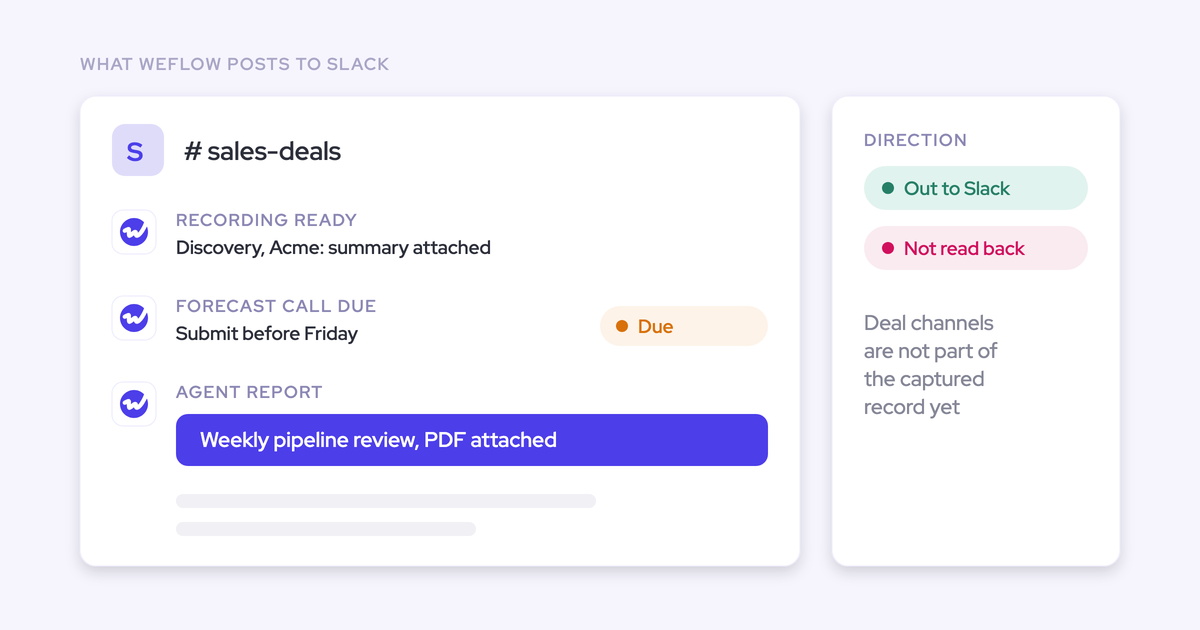
- Deal Slack channels. Teams that run a shared channel per customer hold real deal context there. Most capture setups don't read it, so that context stays in Slack.
- Product usage from your warehouse. Usage data lives in the warehouse, not the CRM. An AI that reads Salesforce sees it only once you sync it into a Salesforce field.
Assemble in this order: calendar, email, calls, then CRM mapping
The order follows mechanical dependencies, not preference. Each step makes the next one possible.
- Calendar first. Calendar gives you the meeting record and the schedule a notetaker joins from. Skip it and recording has nothing to trigger on. In Weflow, Weflow Conversation Intelligence requires Weflow Activity & Contact Capture with calendar access connected first for exactly this reason.
- Email second. Email captures who writes, who decides and the contacts who never appear on a call. Skip it and your methodology fields only ever reflect what was said out loud.
- Calls third. Calls add the reasons. With email already flowing, both feed the same methodology fields, so champion and decision maker get filled from whichever source mentioned them. Skip calls and the AI can tell you who and when, but never why.
- Mapping to your CRM structure last. Mapping attaches every email, meeting and transcript to the right account, opportunity and contact inside your own objects. Skip it and the data exists but can't be queried deal by deal.
Once all four are in place, you can reason over them. KORE Wireless rolled Weflow out in this order: activity capture first, then conversation intelligence, then the layers on top.
Do you need to clean Salesforce before turning on AI?
No. Run the cleanup and call capture in parallel, because waiting costs you the one input a cleanup can't bring back.
The trouble is what a cleanup really involves. With ten or fifteen years of decisions in the org, it's a migration. You're dealing with objects nobody dares delete and integrations whose owner left. That migration competes with the quarter, and it rarely finishes on schedule.
Meanwhile, every month of waiting is a month of calls that will never exist in the record. Here's how each source holds up if you start capture after the cleanup:
| Source | Can you recover it after a cleanup? |
|---|---|
| Yes. Weflow backfilled several months of email history for Lendz Financial, and the history then fed Lendz's own AI models. | |
| Calendar | Yes. Past meetings still sit in the calendar, and historical backfill brings them onto the record. |
| Calls | No. A meeting nobody recorded has no transcript, and no later project can create one. |
| CRM fields | Yes. Your existing records stay in place, and the cleanup can work on them at any point. |
Capturing into a messy org has another benefit: it separates the problems. Once capture runs, you can see which gaps come from capture and which were already in the org. That turns an open-ended audit into a list.
Can you build this yourself with Claude, MCP and transcripts?
Mostly yes, for the reasoning layer. The part teams keep buying is capture and mapping, because that's the hardest piece to build and keep running.
What a Claude, MCP and transcripts build gets right
A technical RevOps lead can build a lot with seats the company already pays for. Teams vibe-code forecasting dashboards, build agents that flag deals with stale data, and extract methodology from transcripts. We've seen one build where Teams records the calls and a Claude skill pulls MEDDPICC from each one. The assistant reads inboxes and fills the Salesforce fields.
We'll concede this openly. If your question is whether you can build the chat, the dashboard or the agent, you probably can.
Where the in-house build breaks: capture, mapping and upkeep
The build loses on brittleness and rollout. Capability isn't the problem. The pipeline is easy to describe: ingest transcripts, tell an LLM how to update records, done. The hard part is keeping it alive across schema changes, a whole sales org and a security review.
| Part of the stack | Realistic to build in-house? | What breaks or costs over time |
|---|---|---|
| Dashboards and reports | Yes | Someone maintains them, and other people struggle to understand them |
| Agents and prompts | Yes | They inherit whatever gaps the data underneath has |
| Methodology extraction from transcripts | Yes, quickly | Summaries miss what the call was actually about, with no review step for reps |
| Meeting capture and recording coverage | Partly | Rescheduled meetings and meetings nobody recorded drop out silently |
| Email capture and contact creation | Hard | Email-only contacts never make it into Salesforce |
| Mapping to your custom schema | Hard | Every schema change and every vendor API change breaks the matching |
| Security and access | Hard | A direct MCP connector into Salesforce exposes deal intel if it's compromised |
| Management layer | Rarely built | Nobody can see how reps work or what they log, so there's nothing to coach from |
Security is the line that ends many builds.
Other security teams won't enable a vendor-hosted connector at all. They run their own MCP server inside their boundary and connect it with an API key. Either way, somebody owns that work permanently.
When your warehouse and semantic layer already do the job
If you already run a warehouse with a semantic layer, agents on top and capture solved, you don't need a platform. You need a feed.
That setup takes real investment. In one example we've seen, it took about two years to reach a solid warehouse foundation and another year of building for AI. Once transcripts sit in the warehouse next to email, usage and support data, analysis there beats any single tool's AI.
One caution if you're earlier in that journey: don't route capture through the warehouse first. Activity captured into Salesforce already reaches the warehouse through your existing CRM sync. Detouring adds months and no data.
How Weflow assembles the four sources inside your Salesforce
Weflow captures calendar, email and calls, maps them into your own Salesforce, and joins all four sources in the Unified Data Layer. The data stays reachable from your own tools. One of our customers described the distinction better than we do:
"We weren't buying conversation intelligence. We were buying a unified data layer that the entire go-to-market motion could run on, and a partner who understood that distinction."
Email and meetings land in standard Salesforce objects you already report on
Weflow writes captured email to the Task object or the Email Message object, whichever your admin chooses, and calendar events to the Event object. Your data stays in your Salesforce, so the activity timeline is the same one your reports, your warehouse sync and the Salesforce MCP already read.
| Source | Where it lands in Salesforce | Who can read it |
|---|---|---|
| Task or Email Message, at the admin's choice | Salesforce reports, your warehouse sync, BI tools, the Salesforce MCP | |
| Calendar events | Event | Salesforce reports, your warehouse sync, BI tools, the Salesforce MCP |
| Contacts | Contact, created automatically, plus Opportunity Contact Roles | Anything that reads your Salesforce |
| Call transcripts and outputs | The Weflow managed package objects and the fields you map | Salesforce, Ask Weflow AI, the Weflow API |
| Video recordings | Not stored in Salesforce | Weflow, and your own cloud storage via the API |
The Weflow Analytics package adds activity reports inside Salesforce that use no Salesforce API calls. Activity reporting doesn't compete with your other integrations for the daily API limit.
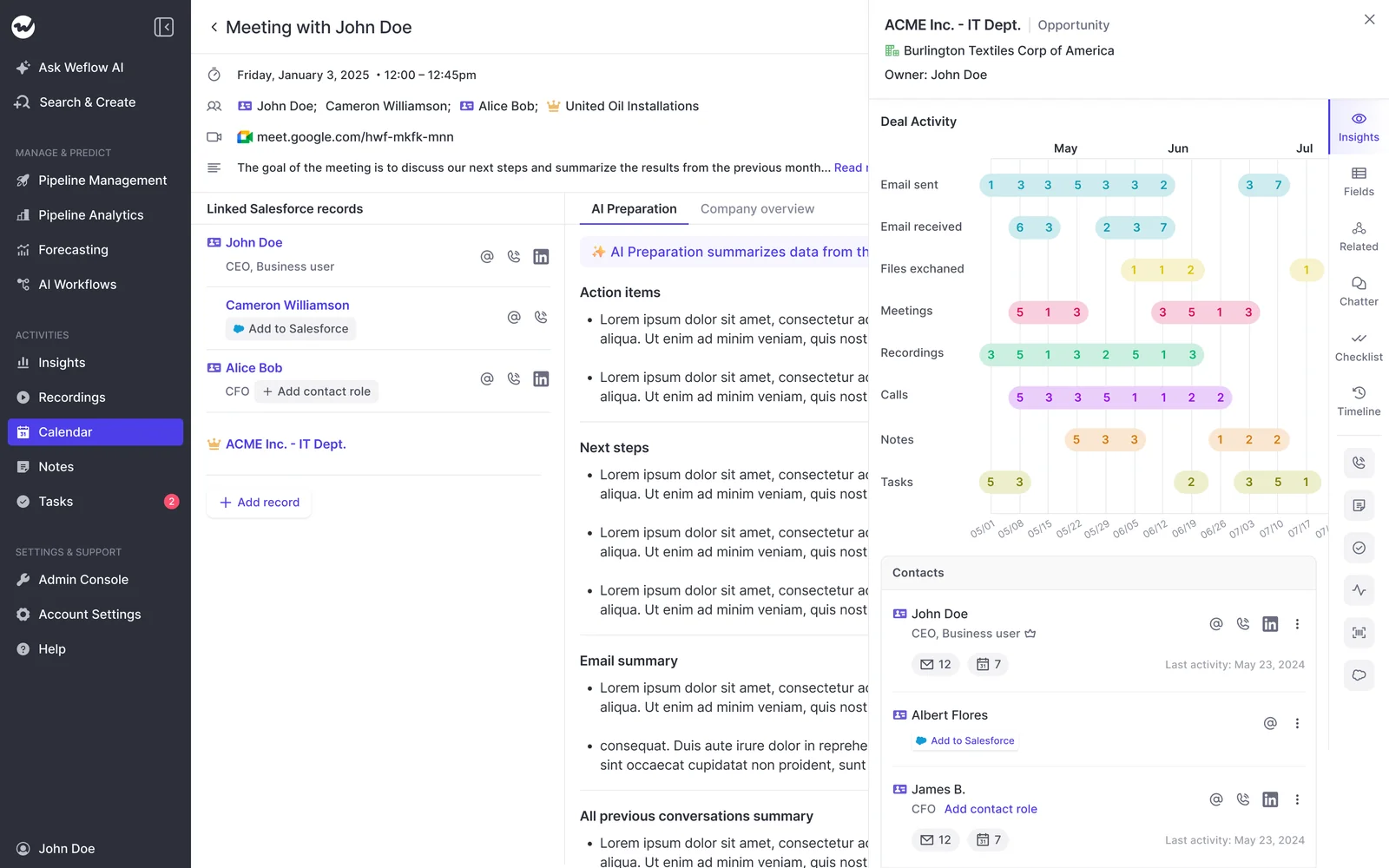
Weflow maps to your custom objects, not a vendor data model
Weflow inherits your existing Salesforce setup: standard and custom objects and fields, field dependencies, validation rules, permission sets and role hierarchy. Weflow works only with Salesforce, and that depth lets setup skip a separate field-mapping step.
This is the mapping layer the build section called hardest. AI field updates write call outcomes into any standard or custom field except lookup relationships. Validation rules still apply. You choose whether updates write automatically or go to a rep for review first, with the AI's suggestion shown next to the current value.
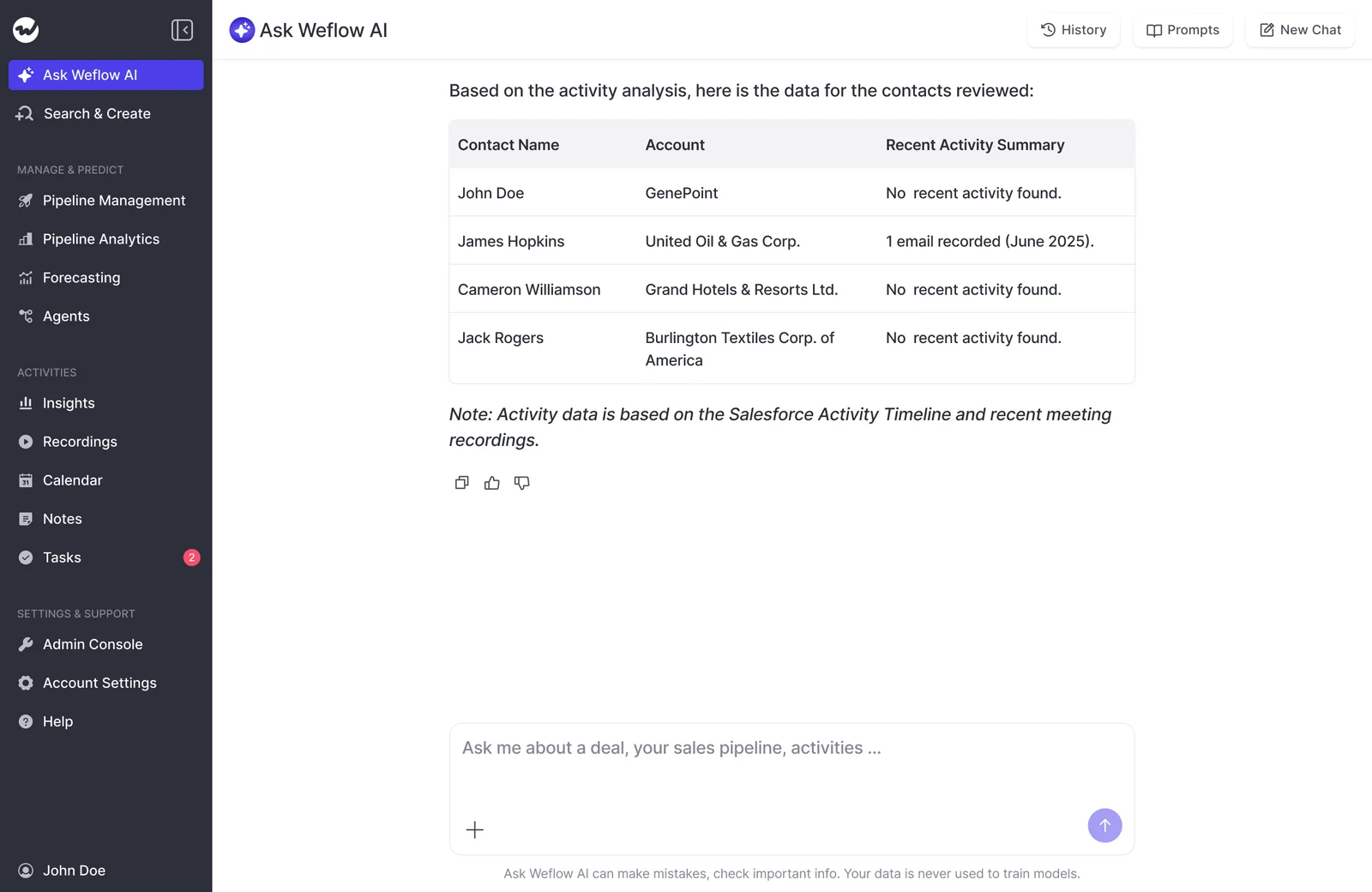
Weflow's Unified Data Layer joins the four sources for Ask Weflow AI
The Unified Data Layer combines activity, conversation, contact and CRM data into one queryable layer readable by Ask Weflow AI. You can point Ask Weflow AI at a single call, a deal, a filtered deal board, an account or the whole system.
Ask Weflow AI authenticates with the user's Salesforce token. Salesforce permissions act as the floor, and Ask Weflow AI adds its own guardrails on top. A user never sees more than they could in Salesforce, and sometimes sees less.
These are the questions that need all four sources at once:
- Which contact is actually the decision maker on an account with years of email history?
- Which open deals are missing methodology information?
- Which competitors came up in the last six months, and what happened when they did?
- What do the deals we lost in the last 90 days have in common?
Your own Claude, warehouse and BI can still reach the data
Your data doesn't get trapped behind our chat box. These are the routes out:
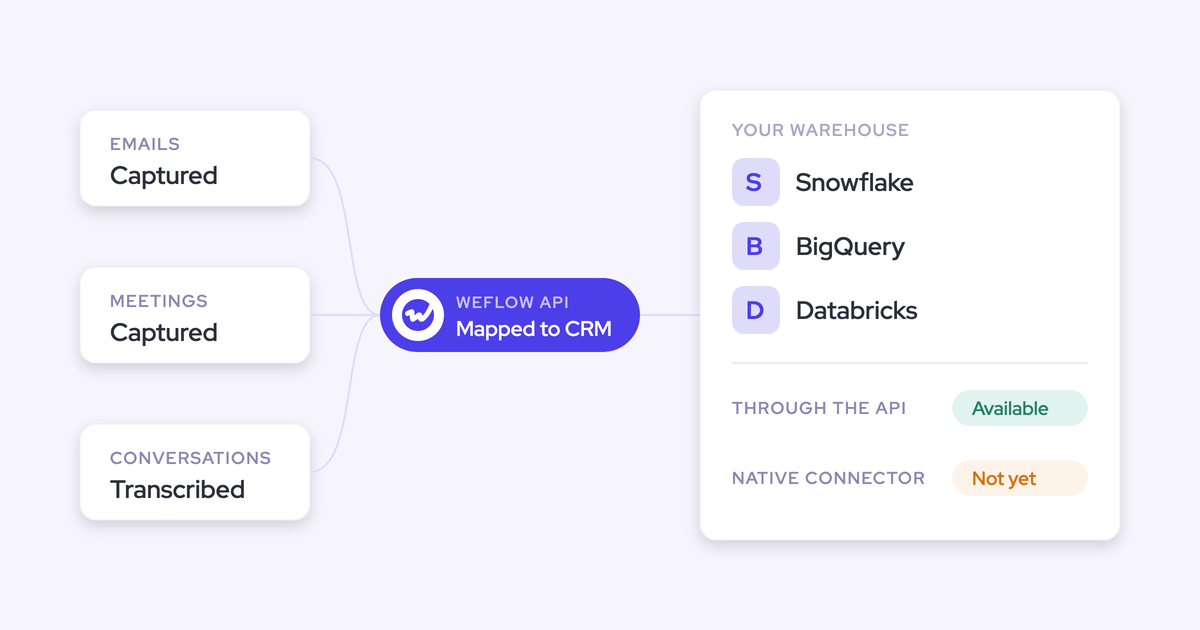
- The Weflow REST API bulk-exports transcripts, metadata, scores and signals as JSON or CSV, on a schedule or on demand.
- The API feeds BI tools such as Tableau and Looker.
- You can query Weflow conversation data from Claude, ChatGPT and other assistants through the API.
- An exportable audit log records field write-backs and configuration changes for compliance review.
- Weflow has no native Snowflake, Databricks or BigQuery connector. Teams move the data into their warehouse through the API, already mapped to Salesforce records.
- Direct delivery to a warehouse or agent runs from Weflow's own data store, which holds a copy that can be short-lived. If you'd rather Weflow kept nothing, activity reaches your warehouse through your existing Salesforce sync instead.
Where Weflow stops: Slack, third-party data, phone calls and other CRMs
Here's where Weflow ends and what to do about each gap today:
| What isn't covered | What to do instead today |
|---|---|
| Reading Slack channels (Weflow posts into Slack but doesn't read it; reading is on the roadmap) | Move key deal decisions onto the Salesforce record or into email |
| ZoomInfo, 6sense or Clay connections | Have the provider write its data onto the Salesforce record, where Weflow reads it |
| LinkedIn activity | None; LinkedIn offers no API for it, and we don't use scrapers |
| VoIP and phone call capture | Calls in Outreach come through the Outreach integration; Zoom Phone is on the roadmap |
| Inbound data from your warehouse | Sync product usage into a Salesforce field first |
| Video recordings inside Salesforce | Transcripts and outputs land in Salesforce; export video to your own storage via the API |
| Deal warnings and AI Playbook scores in Salesforce reports | Read them in Weflow, where Weflow fields carry a W marker |
| CRMs other than Salesforce | None today; other CRMs are on the 2027 roadmap |
Some teams should stay where they are:
- Teams on HubSpot, Dynamics or any other CRM.
- Transactional or B2C motions with one contact and a few touchpoints per deal, where there's little for AI to read.
- Teams whose warehouse and semantic layer already do the job with capture solved. You need a feed, and our API is one.
What Weflow Activity & Contact Capture and Weflow Conversation Intelligence cost
Weflow's bundles start at $49 per user per month. You can also buy each product on its own. Call recording lives in Weflow Conversation Intelligence, not in capture, so getting the calls source means taking both products. The Weflow Revenue AI Foundation bundle pairs them for exactly that reason.
| Product or bundle | What it covers of the four sources | List price per user per month |
|---|---|---|
| Weflow Activity & Contact Capture | Calendar, email and contacts, mapped to your Salesforce | $19 |
| Weflow Conversation Intelligence | Calls: recording, transcripts, AI field updates | $39 |
| Weflow Deal Intelligence & Forecasting | Reasoning over the CRM: deal health, pipeline, forecast | $39 |
| Weflow Revenue AI Foundation | All four sources: capture plus Conversation Intelligence | $49 |
| Weflow Revenue AI Business | Foundation plus Deal Intelligence | $59 |
| Weflow Revenue AI Enterprise | Business plus Forecasting | $79 |
Every plan includes Ask Weflow AI and the free tier of Weflow Agent Builder. Plans start at 10 users with annual billing.
Whichever path you take, you'll own the orchestration work that sits on top of these four sources. Our free RevOps AI Orchestrator Cheatsheet lays out what that role covers.
FAQ
What is a unified data layer for revenue teams?
A unified data layer combines activity, conversation, contact and CRM data into one queryable layer. The CRM alone holds what reps typed. The unified layer adds what actually happened: the emails, meetings and calls, joined to the same records. In Weflow, Ask Weflow AI reads the Unified Data Layer.
What is a revenue AI orchestration platform, and where does the data layer fit?
A revenue AI orchestration platform runs three layers: a system of truth, a system of intelligence and a system of action. The data layer is the system of truth. Deal health and methodology coverage are the intelligence layer. Agent workflows and field updates are the action layer. Whether a person or an agent takes the action stays your decision.
How is a revenue AI platform different from a BI tool?
A BI tool displays what reached the CRM. A revenue AI platform also reads conversations and acts on them. On incomplete data, both inherit the same gaps.
"If you connect Claude to Salesforce today and you don't have good data in Salesforce, it's like BI with data you cannot trust."
How does revenue AI capture customer interactions?
Weflow captures email and calendar server-side through a Google Workspace admin app or a Microsoft Entra ID app, so reps install nothing. The notetaker joins Zoom, Teams and Google Meet calls based on calendar events. Weflow then maps every email, meeting and transcript to the right account, opportunity and contact, and creates missing contacts automatically.
How far back can you backfill email, meetings and calls?
Weflow backfills email and meeting history, up to 24 months as an add-on. Lendz Financial backfilled several months of email and used it to train its own models. Calls work differently: a meeting nobody recorded can't be recovered.
Does captured data stay in our Salesforce, and what about storage?
Yes. Activity, contacts, transcripts and call outputs land in your Salesforce. We deliberately keep video files out of Salesforce, because Salesforce storage is expensive and heavy, and Weflow streams recordings back from its own storage. Weflow stores your data in the region where your Salesforce org is hosted.
Can our own assistant reach Weflow data through an API or MCP?
Yes. You can query Weflow data from Claude, ChatGPT and other assistants through the Weflow API. Security teams that want the connection to end inside their own boundary run their own MCP server and connect it with an API key.
How does Weflow handle permissions, AI models and data residency?
Weflow inherits Salesforce permission sets, field-level security and role hierarchy, and Ask Weflow AI adds its own guardrails on top. Visibility enforced only through list views or Lightning component visibility doesn't carry over. Admins reproduce it by assigning views centrally.
Weflow runs primarily on Google Gemini, with Zero Data Retention for AI processing, and your data is never used to train models. Data residency follows your Salesforce org's region. Weflow is SOC 2 Type II certified and GDPR compliant, and is working toward ISO 27001 with a target date of December 2026.
Can product usage data from our warehouse reach the AI?
Only once you sync it into a Salesforce field. Weflow has no inbound warehouse connector. It reads everything connected to Salesforce, including custom objects that hold usage data.
Will AI usage make the Weflow invoice unpredictable?
No. Weflow prices per seat. Recordings, transcripts, AI templates and Ask Weflow AI prompts carry no usage caps. Weflow Agent Builder is the only metered product: 25 agent actions per month per workspace are free, then Growth costs $299 a month for 500 actions and Scale costs $999 a month for 2,500.
We're on Einstein Activity Capture. What happens when we switch?
Lendz Financial made this move. Weflow Activity & Contact Capture writes Lendz's Outlook email to standard Email Message objects and links multiple email addresses to a single contact. Weflow also backfilled several months of email history. From then on, everything Weflow captures stays in your Salesforce objects.
How soon is the AI useful once capture is running?
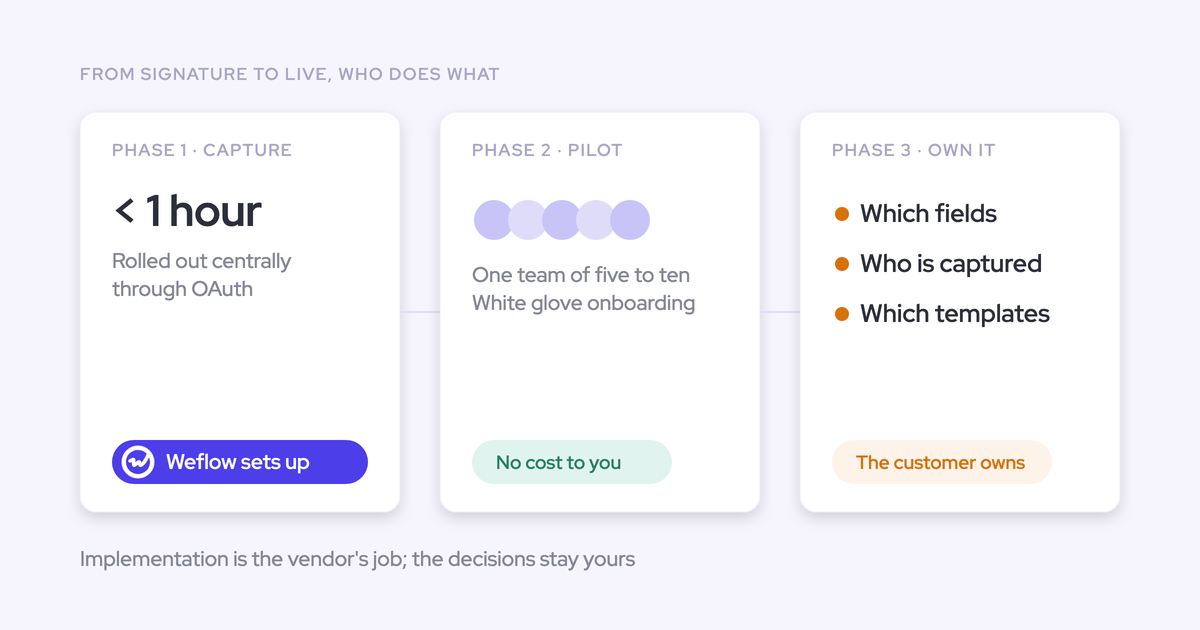
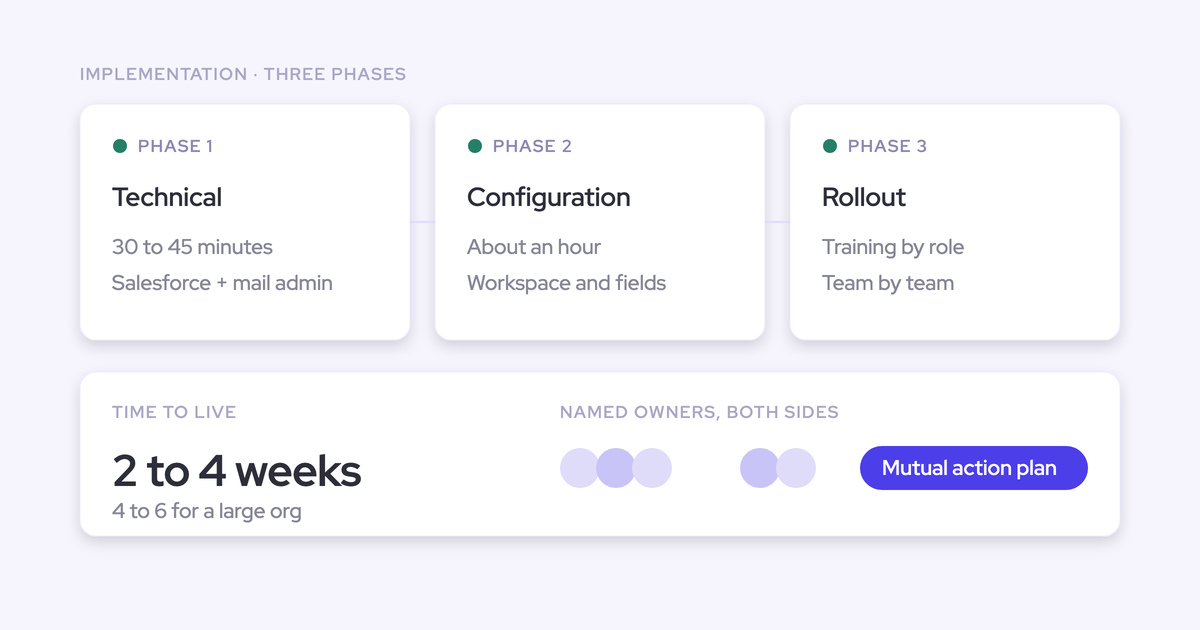
Technical setup takes 30 to 45 minutes with your Salesforce admin and your Google or Microsoft admin. Full rollout, including AI templates and team configuration, takes one to three weeks. Backfilled email gives the AI history from day one, and call insight builds from the first recorded meeting.