Running Weflow Without a Dedicated RevOps Team: What the Customer Has to Own
Learn what you must own to run Weflow without a dedicated RevOps team.


You don't need a RevOps team to run Weflow. You need three things:
- one named owner on your side;
- a Salesforce admin and a mail admin for a single 45 to 60 minute session;
- a handful of decisions only you can make.
We run the rest of implementation ourselves, and we don't charge for it.
Weflow is the Revenue AI Orchestration platform for sales, customer success, and RevOps teams. It's built for Salesforce teams, so everything it captures lands in your own Salesforce objects.
By now the product question is probably settled. What's left is who on your side sets this up and keeps it running when nobody has spare time. You've likely bought a tool that never got configured, and you remember how that renewal conversation went.
Waiting costs something too. Every week of implementation is another week of chasing reps for updates and running deal reviews on hearsay.
Weflow doesn't remove the need for someone on your side to own conversation intelligence configuration. Below is exactly what that person does, what your admins give once, and what we carry.
Why revenue AI rollouts fail in month four, not week one
Revenue AI rollouts fail when nobody owns the configuration after go-live. Week one almost always goes fine. Month four is where things break.
Configurable revenue AI has two kinds of work:
- Activity capture runs itself once it's connected.
- Conversation intelligence needs an owner. Prompts, scorecards, field mappings and per-team templates reflect how your teams worked on the day you set them up.
Then the business changes. A team gets added, the methodology shifts, a field gets retired. The summaries still follow last year's use cases, the field updates point at fields nobody reads, and nothing announces the drift.
Usage drops, and it looks like the tool failed.
That's a maintenance problem that looks like an adoption problem. And lean ops teams are how most companies are built now. Efficient growth keeps non-quota functions small, and the AI mandate lands on top with no new headcount.
"RevOps teams are small, and now AI comes on top. For everybody who is stressed out, you are not alone."
— Philipp Stelzer, Co-founder and CPO of Weflow
The category's usual answer is professional services. Gong sells implementation as fixed-scope services packages. Its call intelligence package asks you to name a Gong administrator who owns all configuration, plus a project manager, sales process leaders, an executive sponsor and system administrators.
Gong is right about the administrator. The rest of that list is a project team that a 100-seat company doesn't have.
The other trap is configuration that only the vendor can change. If every new template or field mapping needs a ticket, the tool stays slow and expensive long after you've signed.
Who owns what when you run Weflow without RevOps
The work splits three ways: what Weflow does, what your admins give once, and what one named person on your side owns for good. Your share is small, named and finite.
| Work item | Weflow | Your Salesforce and mail admins (once) | Your named owner (ongoing) |
|---|---|---|---|
| Technical install | Runs the session with your admins | Two packages, integration user, mail app: 45 to 60 minutes | Books both admins into one slot |
| Workspace configuration | Configures it with you, or for you under managed service | Nothing | Signs off on it |
| Methodology and field choices | Brings 250+ pre-built prompts to choose from | Nothing | Decides what to score and which fields to fill |
| Summary and field templates | Builds the first versions with you | Nothing | Reviews them when teams change |
| Joiners and leavers | Nothing to do: teams update from Salesforce | Manage Salesforce users as they already do | Nothing |
| Rep and leader training | Runs role-based sessions | Nothing | Sets the order |
| AI field-write testing | Guides it during onboarding | Fix any permission gaps it finds | Runs it before reps enroll |
| Rep sign-in | Nothing | Nothing | Checks every licensed rep signed in once |
| Forecasting cadence | Configures it once you've decided | Nothing | Decides who submits, how often, against which quota |
| Later configuration changes | Support answers questions, no ticket needed | Nothing | Makes them in the admin console |
Read the last column twice. That's the whole of month four.
What Weflow's team does for you during onboarding
Weflow runs implementation itself, at no charge. There's no partner in the middle and no services package to buy. You can hand over nearly all of it.
How Weflow runs implementation on a mutual action plan
Onboarding runs as a project against a mutual action plan, with named owners on both sides. It has three phases.
- Technical implementation. A 45 to 60 minute session that connects Salesforce and your mail system. From your side: a Salesforce admin and a mail admin.
- Configuration. This is where the real time goes: team structure and hierarchy, sales methodology, which custom fields AI populates, playbooks, deal warnings and prompt templates. From your side: your named owner, making the business calls.
- Role-based rollout and training. Leadership and reps get separate sessions, and a large org can run to fifteen or more. From your side: your owner sets the order and your leaders attend their session.
Most teams are live in two to four weeks. A large org takes four to six.
When to let Weflow run onboarding as a managed service
If you can't spare anyone for configuration work, let Weflow run onboarding as a managed service. We do the heavy lifting. Your side answers questions and unlocks access.
This is the route for a team whose blocker is bandwidth, not product fit. KORE Wireless took it:
"I made a deliberate choice to let Weflow own end-to-end onboarding rather than pull my team off revenue-generating work. That's exactly the kind of partnership leverage I was looking for."
— Scott Jones, SVP of GTM Revenue Intelligence & Enablement, KORE Wireless
KORE then rolled out across Europe, the Americas, Brazil and APAC without adoption friction. Our team ran the Brazil training live with a real-time Portuguese translator.
The managed service takes the work off your team. The decisions stay with you: methodology, target fields and forecasting cadence still need your answer.
What your Salesforce and mail admins give, once
Your admins give one session of 45 to 60 minutes, together. There's no code, nothing installed per rep, and nothing new to maintain afterward beyond the Salesforce users they already manage.
What happens in the 45 to 60 minute technical session
Here's the session as your admins experience it.
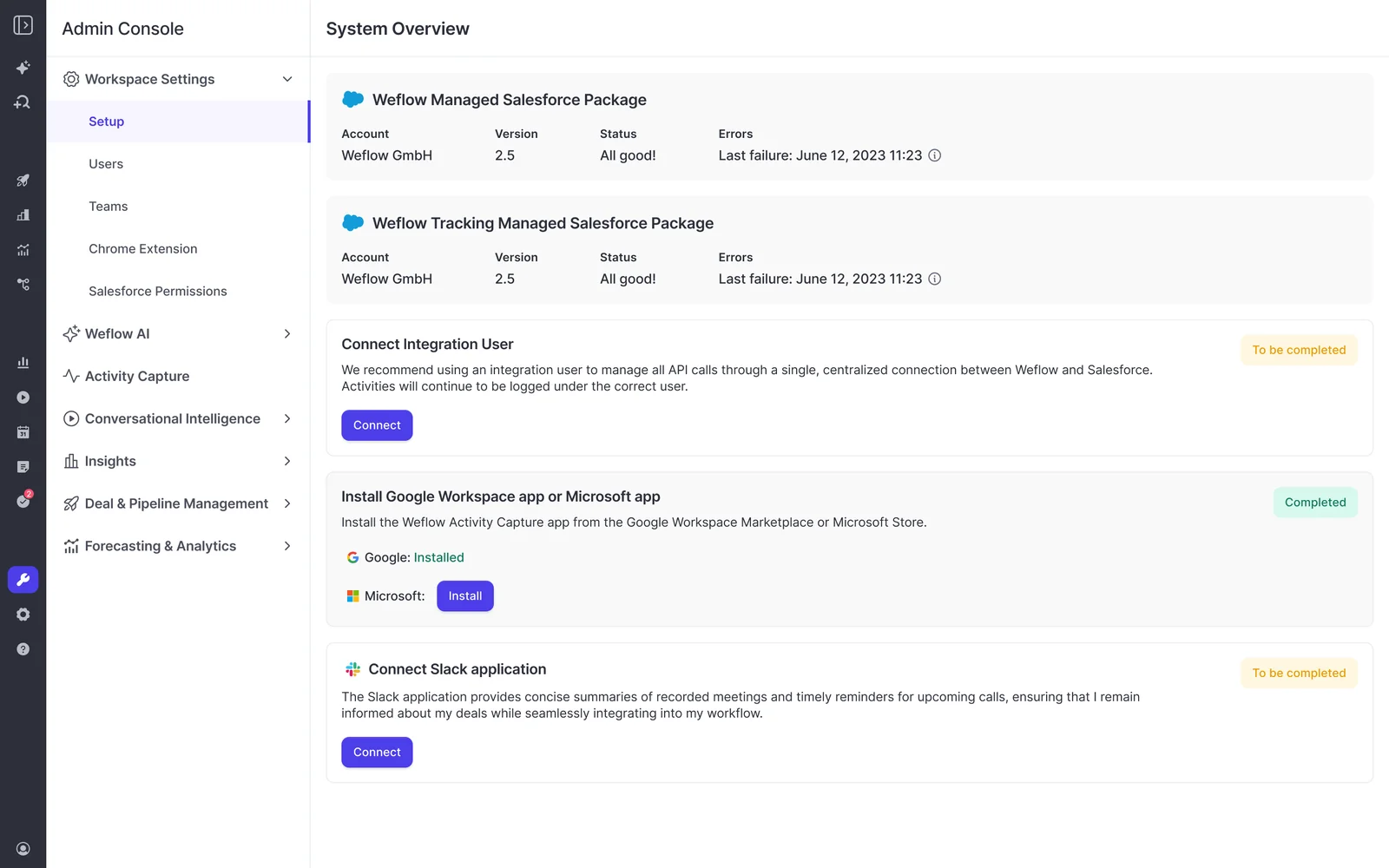
- Before the call, your Salesforce admin relaxes IP restrictions on the connected app. The install needs this.
- They install the core Weflow managed package, which carries the capture objects and fields.
- They optionally install the second package, which adds email open tracking.
- They create the integration user and assign its dedicated permission set.
- Your mail admin installs the Weflow app once in Microsoft Entra or Google Workspace. They can scope it to a single organizational unit so only licensed users are captured.
- Weflow connects the systems.
Because the mail app sits at tenant level, capture runs server side. No rep has to grant access to anything.
Customers regularly finish faster than the hour. Blacklane's technical implementation was virtually done after a 30-minute session.
"It took less than an hour to install the managed package and start syncing data. Everything was live immediately."
— Bastian Stosic, Head of Media Sales Operations, HolidayCheck
How to bring in a Microsoft admin from another team
Your Microsoft admin has to start the install themselves, from the Microsoft section of Weflow's admin console. Approving the app's permission request in the Microsoft 365 admin center doesn't complete the connection, and your Salesforce admin can't do it on their behalf.
Reaching Weflow's admin console means signing in with a Salesforce user. Two routes work when your Microsoft admin sits in IT:
- Temporary Salesforce license. Give the Microsoft admin a Salesforce user for the install, then deactivate it afterward. Capture keeps running.
- Screen-share. The Microsoft admin takes control of a Weflow admin's session and completes the install there. This is the quickest option.
After the install, IT can limit access by setting assignment required on the Weflow enterprise app in Entra ID and adding user groups.
Book this conversation first. No capture configuration can exist until the tenant is connected, so IT's approval sets your earliest go-live date. Google environments generally move faster than Microsoft ones.
What runs on its own: capture, recording and team changes
Capture, recording coverage and team membership maintain themselves in Weflow. That shrinks your owner's list before it starts.
- Capture starts the moment a user is added to a capture configuration, whether or not they've ever signed in to Weflow.
- Teams build themselves from Salesforce, by manager, role or a field condition. A rep who moves team in Salesforce moves in Weflow automatically.
- Recording follows the team. When you point Weflow Conversation Intelligence at a team, a new hire gets recorded without anyone remembering to add them.
- Reps do nothing for capture. Emails, meetings and contacts land on the right Salesforce records in the background.

"Most of our team doesn't even know we have Weflow for activity capture. That was a big attraction for me: I didn't need them to set it up or learn anything new."
— Leslie Phillips, Director of Operations, ADVISA
Joiners and leavers run on the Salesforce user logic your identity and HR systems already feed. Nobody adds and removes users in a second tool every week.
What your one Weflow owner keeps after go-live
One named person owns four recurring jobs after go-live:
- choosing the methodology and the fields Weflow fills in;
- revisiting summary and field templates when teams change;
- testing AI field writes before each rollout;
- confirming every licensed rep has signed in once.
None of these needs a vendor ticket. Configuration sits in a self-service admin console that follows your existing Salesforce permission sets and role hierarchy, so your owner changes things directly. Customers tell us the admin console is the capability they most underestimated before buying.
Choose the methodology and the fields Weflow fills in
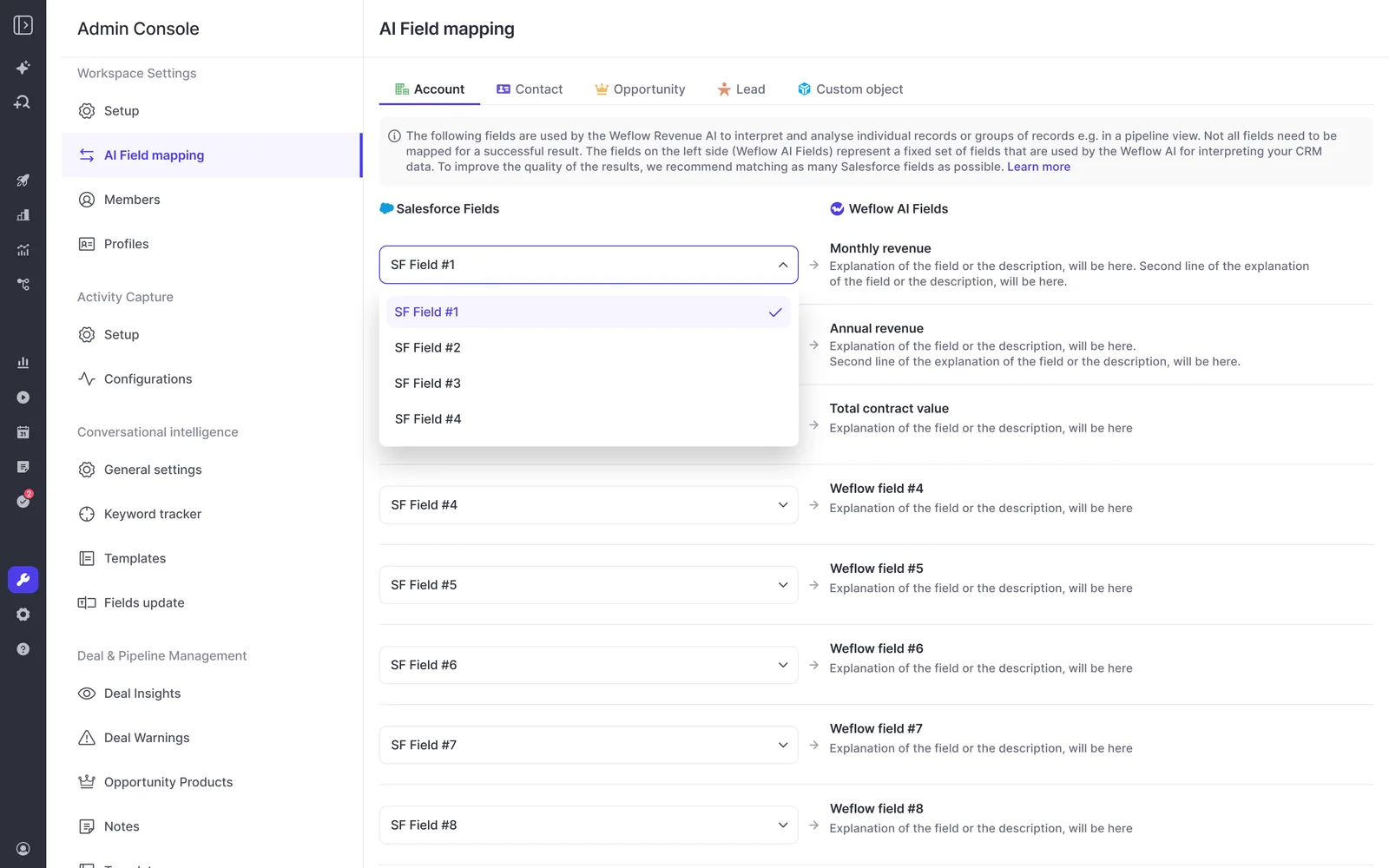
Before we configure anything, your owner decides what Weflow listens for and where it writes. This is a business decision, not a technical task, and it's what really drives implementation time.
- Methodology: MEDDIC, MEDDPICC, SPICED, BANT or the qualification structure you already run.
- Target fields: which standard or custom Salesforce fields AI should populate, on which objects. Lookup fields are the one type Weflow doesn't update.
- Team structure: who sits where, and which teams need their own templates.
- Playbooks and deal warnings: what a healthy deal looks like at each stage, and what should trigger an alert.
We bring 250+ pre-built prompts across the common methodologies. Your owner chooses and adjusts rather than writing from scratch.
Revisit summary and field templates when your teams change
Templates in Weflow are set per team, and your owner edits them directly in the admin console. Sales, onboarding and customer success can each run their own qualification structure and write to different Salesforce objects.
The job is a recurring check that summaries and field updates still match how each team works. Run it whenever one of these happens:
- a new team starts selling or onboarding customers;
- your qualification methodology changes;
- fields get retired or replaced in Salesforce;
- a new post-sale motion starts running calls.
This check is what keeps month four looking like week one.
Test AI field writes on every object before rollout
A failed AI field write can't be replayed. The update fires once, when the call ends. A misconfiguration fails silently, so the gap usually covers everything up to the day someone notices.
The content survives in the Weflow recording object. The write to the Event or the opportunity field doesn't come back unless someone copies it across by hand. So your owner tests before reps enroll:
- Enroll one test user before anyone else.
- Run a test meeting with at least one attendee from outside your company. The notetaker only joins meetings that include an external attendee.
- Check that the write landed on every object your activities map to: the Event, the opportunity fields, and any other object a template writes to. A pass means each mapped field shows content from the call.
- Send email to an outside address, then create, move, reschedule and delete a test meeting. Creating a meeting only proves the create permission. Moving and deleting proves the update rights that otherwise fail weeks after go-live.
- Fix any permission or record-type gap your admin finds, and retest before enrolling the team.
Confirm every licensed rep signs in to Weflow once
There's one rep step, and it's small: every licensed rep signs in to Weflow once. Capture runs without it. The notetaker doesn't join that rep's meetings until they have.
The admin view won't flag this for you. An assigned but unregistered user shows as external, and the license looks allocated.
Your owner's check: after rollout training, open the user list and look for licensed reps still showing as external. Each one is a rep whose calls aren't being recorded.
How to phase a Weflow rollout around a lean team
Go live with capture and recording first, in about two weeks. Add forecasting once you've decided how your forecast runs.
| Phase | What goes live | What your owner decides |
|---|---|---|
| Technical session (day one) | Packages, integration user and mail app, with systems connected | Which two admins attend, and when |
| Configuration | Teams, templates, field mappings, playbooks and warnings | Methodology, target fields and team structure |
| First wave (about two weeks) | Weflow Activity & Contact Capture and Weflow Conversation Intelligence | Training order by role |
| Second wave (once adoption sticks) | Weflow Deal Intelligence & Forecasting | Submission cadence, level and quota |
You can slice it finer. KORE Wireless ran five phases: activity capture, conversation intelligence, coaching, deal intelligence, then forecasting.
Launch Weflow Activity & Contact Capture with Weflow Conversation Intelligence first
Weflow Activity & Contact Capture and Weflow Conversation Intelligence go first because they make reps' lives easier and ask nothing of them. Adoption sticks before anything new shows up, which matters when your team is already tired of new tools.
Run them together. Call recording lives inside Weflow Conversation Intelligence, not inside capture. That's why the Revenue AI Foundation bundle pairs the two.
In the first two weeks, your reps get:
- emails, meetings and contacts on the right Salesforce records without logging anything;
- calls recorded, transcribed and summarized, with fields updated from the conversation;
- a drafted follow-up email after each meeting.
As the manager, you get:
- deal reviews built on captured emails and calls instead of what reps remember;
- Ask Weflow AI to query calls, deals and accounts without pinging a rep;
- an end to chasing reps for Salesforce updates.
Add Weflow Deal Intelligence & Forecasting once your cadence is decided
Add Weflow Deal Intelligence & Forecasting once you've decided your cadence. Forecasting is less a tool setting than a record of how your team runs the number.
Your owner decides:
- who submits a forecast;
- how often they submit;
- whether submissions happen deal by deal or at manager level;
- which quota and budget the forecast is measured against;
- which motions forecast separately, such as new business and renewal.
Your existing Salesforce forecast settings don't carry over, so these decisions get made fresh in Weflow.
Once your opportunity history is imported, Weflow's AI projection is ready within 48 to 72 hours. It needs at least six months of history to work.
When running Weflow without RevOps is the wrong call
Weflow assumes someone on your side can own conversation intelligence configuration. In these cases, it's not the right setup:
- You have fewer than 10 sellers, or want to pilot with one or two people. Weflow's minimum is 10 users on annual billing.
- Nobody can own configuration. The managed service carries the work. The decisions still need a person.
- Your group runs several mail tenants. Each tenant needs its own capture configuration, users can only be assigned within their own domain, and the conversation intelligence setup accepts a single tenant. You get no single admin view across them.
- You're not on Salesforce. Weflow works only with Salesforce.
- You run a high-volume B2C motion. Weflow is built for B2B buying committees, and most of its value assumes one.
If that's your shape, we'd rather tell you now than at renewal.
What Weflow costs a lean team, implementation included
Weflow publishes its pricing, charges per seat with AI usage included, and doesn't charge for implementation.
| Product or bundle | What it covers | List price per user per month |
|---|---|---|
| Weflow Activity & Contact Capture | Emails, meetings and contacts synced to Salesforce | $19 |
| Weflow Conversation Intelligence | Recording, transcripts, summaries and AI field updates | $39 |
| Weflow Deal Intelligence & Forecasting | Deal health, pipeline analytics and forecast roll-ups | $39 |
| Revenue AI Foundation | Activity & Contact Capture plus Conversation Intelligence | $49 |
| Revenue AI Business | Foundation plus Deal Intelligence | $59 |
| Revenue AI Enterprise | Business plus Forecasting | $79 |
| Implementation | Weflow-run onboarding | No charge |
Three things matter for a lean team.
- Minimum and billing. The minimum is 10 users on annual billing. Recordings, transcripts, AI templates and Ask Weflow AI prompts carry no usage caps. Agent Builder is the one metered product, and every plan includes its free tier of 25 agent actions per month.
- Mixed products. Teams can sit on different products. You can put capture under everyone and conversation intelligence only on the teams that meet customers.
- Expansion. Adding forecasting later is a step up the bundle list: $10 per user per month from Revenue AI Foundation to Revenue AI Business, then $20 more to Revenue AI Enterprise. That's not a second forecasting contract priced at $100 to $200 per user per month.
Multi-year terms carry a discount of 10% for two years and 20% for three.
What to line up before your Weflow kickoff call
A lean team that arrives with these settled gets through implementation fastest.
- Name the one owner. Make it someone who can make methodology and field calls without escalating each one.
- Book your Salesforce admin and mail admin into the same slot. If your Microsoft admin sits in IT, pick the temporary-license or screen-share route now.
- Decide the methodology and target fields. A first answer is enough, because your owner can change it later in the admin console.
- Choose standard or managed-service onboarding. Pick based on how much of your team's time you can spare in the next few weeks.
- Set the cutover date for any incumbent notetaker. A weekend works best.
- Name who handles the security review. Start it before kickoff so it doesn't hold up go-live.
See how Weflow captures activity, updates Salesforce fields from calls, and rolls up your forecast. Book a 30-minute demo.
FAQ: running Weflow without a dedicated RevOps team
How many seats do we need to start with Weflow?
Weflow's minimum is 10 users on annual billing. One team can start first, as long as it meets that minimum. Different teams can also run different products, so capture can cover everyone while conversation intelligence covers only customer-facing teams.
Does Weflow charge for implementation?
No. Weflow runs onboarding itself, without a third-party partner, and our pricing carries no implementation or platform fees. If your team can't spare time for configuration, the managed-service option has Weflow do the heavy lifting while your side answers questions and unlocks access.
What happens if our Weflow owner leaves the company?
The risk is real: teams that inherit a capture setup often can't tell who's being captured or why activity has gaps. Weflow lowers that risk because teams build themselves from Salesforce, and every team, template and field mapping sits visibly in the admin console. A successor can see the whole configuration in one place, and our support team helps them pick it up.
Will turning on capture make our Salesforce data look worse at first?
It can, and the cause is the data you already had. Automated capture surfaces duplicate accounts, contacts on the wrong parent and reports that never reconciled, which selective manual logging used to hide. Expect the first weeks to reveal hygiene work, and brief whoever owns your reports before go-live so they don't read it as the tool breaking things.
Will reps see Weflow as surveillance?
Not if you introduce it as coaching and enablement. Pace the rollout behind whatever else your team is still learning, and say plainly that capture asks nothing of reps. What they notice is the follow-up drafts, meeting notes and CRM updates done for them.
How do we switch from Gong or another notetaker without two bots?
Switch cleanly rather than running both tools in parallel. Two notetakers in one meeting put two bots in front of your customer and split your data. Teams usually go live over a weekend: turn the incumbent off, test without users on, and train everyone on Monday. Weflow imports your call history through the old vendor's API or from exported files, at no extra cost, in about one to two weeks.
Should we run a 14-day POC or a three-month paid pilot?
The free 14-day POC fits Weflow Activity & Contact Capture and Weflow Conversation Intelligence, which show their value inside two weeks. Forecasting can't be proven that fast, because the instance has to be configured and a roll-up has to run for a full cycle. For that, Weflow offers a three-month paid pilot that's contractually the first three months of a multi-year agreement, with an opt-out at the end.
Who handles the security review for Weflow?
Weflow is SOC 2 Type II certified and GDPR compliant, uses Zero Data Retention for AI processing, and never uses customer data to train AI models. Your data stays in the region of your Salesforce instance. Video recordings are the one exception: Weflow holds them and streams them back. On your side, whoever reviews vendors for IT or security usually takes it, and naming that person before kickoff keeps the review off your critical path.