Weflow Revenue AI Foundation Bundle: Price, What It Includes, and Who It Is For (2026)
Learn Weflow Revenue AI Foundation pricing, included tools, and when to choose it vs Business or Enterprise.


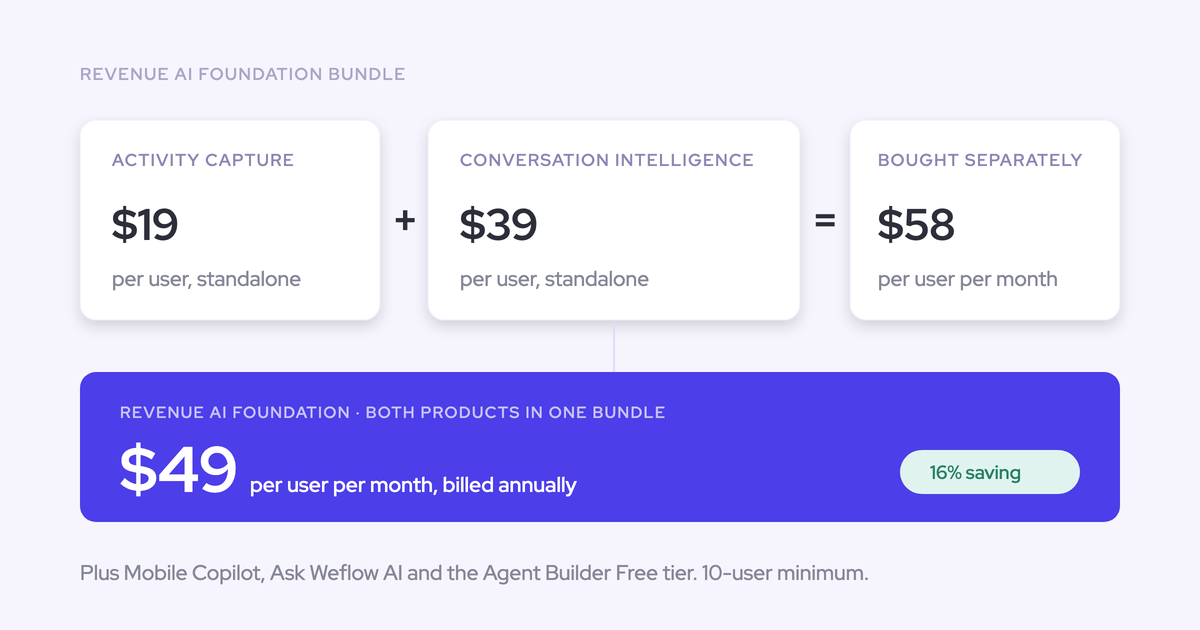

Weflow's Revenue AI Foundation bundle costs $49 per user per month, billed annually, with a 10-user minimum. You get automatic activity and contact capture plus conversation recording, analysis, and Salesforce field updates. Deal Intelligence, pipeline analytics, and Forecasting aren’t included.
Choose this bundle when you need a complete activity record and structured conversation data now, while your forecasting process stays where it is. The seat price starts the budget calculation: 10 seats cost $5,880 annually.
Weflow is the Revenue AI Orchestration platform for RevOps teams. Built for Salesforce teams, Revenue AI Foundation combines Weflow Activity & Contact Capture with Weflow Conversation Intelligence. Here’s what you’re buying, what stays outside the contract, and what your team needs to run it.
What does Weflow Revenue AI Foundation include?
Revenue AI Foundation includes two connected products: Weflow Activity & Contact Capture and Weflow Conversation Intelligence. Together, they log customer activity and turn conversations into structured Salesforce data.
You also get Mobile Copilot, the Windows/macOS desktop app, Ask Weflow AI Pro, and the Weflow Agent Builder free tier. Recording belongs to Weflow Conversation Intelligence, not Weflow Activity & Contact Capture.
What does Weflow Activity & Contact Capture automate?
Weflow Activity & Contact Capture syncs emails, meetings, and contacts from Google Workspace or Microsoft 365 into Salesforce. Capture runs in the background for enrolled users, even if they never open Weflow.
| Input | Automated work | Salesforce output |
|---|---|---|
| Sent and received emails | Logs correspondence and maps it using email addresses and Salesforce relationships. | EmailMessage or Task records, depending on your configuration. |
| Calendar meetings | Logs meeting activity and associates it with customer records. | Event records. |
| New customer participants | Creates missing contacts when their domain resolves to an existing account. | Contact records with first name, last name, and email address. |
| Contacts involved in opportunities | Optionally creates an opportunity contact role when logging a mapped email. | Opportunity Contact Role records. |
Your email object choice affects reporting. Task records let you report on emails alongside other tasks and events. EmailMessage records preserve native From, To, Cc, and thread structure.
Mapping follows Salesforce relationships rather than interpreting email content. When those relationships don’t identify one opportunity, Weflow logs the activity to the account instead of guessing.
What does Weflow Conversation Intelligence add?
Weflow Conversation Intelligence records customer conversations, analyzes them after the call, and writes the output into Salesforce. You get more than a transcript library: your team can use summaries, field updates, coaching, and searchable conversation content.
| Workflow | Included capability | What you can do |
|---|---|---|
| Online recording | Notetaker for Zoom, Microsoft Teams, and Google Meet. | Capture eligible customer meetings from the calendar. |
| Desktop recording | Windows and macOS app, included with the seat. | Record system audio and microphone audio without a notetaker joining. The rep starts desktop recording. |
| In-person recording | Mobile Copilot. | Record customer conversations away from your computer. |
| Post-call processing | Transcripts, AI summaries, chapters, and follow-up email drafts. | Review the discussion and prepare follow-through without rebuilding the notes. |
| Structured Salesforce updates | AI templates and field mappings. | Populate qualification answers, next steps, and other supported fields from the conversation. |
| Conversation analysis | Coaching scorecards, conversation metrics, topics, and trackers. | Review call quality and recurring objections or competitor mentions. |
| Shared learning | Clips, playlists, and free view-only licenses (up to one per recording license). | Give colleagues access to useful recordings without assigning every viewer a paid seat. |
| Questions across customer context | Ask Weflow AI Pro. | Ask questions using transcripts, linked Salesforce records, and related activity. |
You can start with one practical use: extract agreed next steps from discovery calls into Salesforce. Add methodology templates and coaching dimensions once the first output meets your team’s needs.
How does Weflow Revenue AI Foundation update Salesforce?
Revenue AI Foundation coordinates meeting activity and conversation output around the same meeting, rather than creating a second Salesforce Event for the recording.
- The meeting enters the calendar. Weflow Activity & Contact Capture creates the Salesforce Event and maps it to the relevant customer record.
- The conversation takes place. Weflow Conversation Intelligence records the meeting through your selected recording method.
- Weflow processes the recording. The recording object holds the transcript and executive summary. Configured writes add summaries and extracted values to Salesforce.
- Your team uses the output. Salesforce reports and automations can read the captured activity and populated fields.
The Event and recording remain separate records. A Salesforce Event has one related account or opportunity; a Weflow recording can link to several records.
If you need to correct both mappings, use the Outlook add-in or Chrome extension. Moving a recording inside Weflow changes its links without moving the Event.
What does Weflow Revenue AI Foundation leave out?
Revenue AI Foundation excludes Deal Intelligence, pipeline analytics, and Forecasting. Some other requirements sit outside Weflow entirely, so a higher bundle won’t address them.
| Capability you need | Availability boundary | Purchase implication |
|---|---|---|
| Deal table and Kanban views, AI deal and account scoring, warnings, and buying committee intelligence | Revenue AI Business adds these capabilities. | Choose Revenue AI Business if managers need this deal-management workspace now. |
| Pipeline analytics and forecasting | Revenue AI Enterprise adds these capabilities. Revenue AI Business doesn’t include them. | Choose Revenue AI Enterprise or keep your existing forecasting product. |
| Live in-meeting assistance or real-time battlecards | Weflow doesn’t provide these capabilities. | Keep a product that meets this requirement if it’s essential to your team. |
| Sales engagement, sequencing, or a dialer | Weflow doesn’t replace engagement products. | Continue using Outreach, Salesloft, or your existing engagement system. |
| A non-Salesforce CRM integration | Weflow works exclusively with Salesforce. | Revenue AI Foundation isn’t a fit for a HubSpot, Dynamics, or Pipedrive deployment. |
How much does Weflow Revenue AI Foundation cost?
Revenue AI Foundation costs $49 per user per month, billed annually, with a 10-user minimum. That’s $588 per paid user per year.
Buying the two included products separately costs $58 per user per month. The bundle saves $9 monthly, or $108 annually, for each user who needs both products.
| Purchase | Per user/month, billed annually | Annual licenses per user |
|---|---|---|
| Weflow Activity & Contact Capture | $19 | $228 |
| Weflow Conversation Intelligence | $39 | $468 |
| Both products purchased separately | $58 | $696 |
| Revenue AI Foundation | $49 | $588 |
Which charges sit outside Weflow Revenue AI Foundation seats?
Revenue AI Foundation seat spend doesn’t always equal the full contract cost. Smaller contracts carry a platform fee, and implementation is free.
| Charge | Applicability | Billing treatment |
|---|---|---|
| Platform fee | Applies below $10,000 in annual contract value. | One-time. |
| Additional Weflow Agent Builder capacity | Paid capacity beyond the included free tier. | Workspace-level subscription. |
| Historical activity backfill | Up to 24 months is available as an add-on. | Separate from the base seat calculation. |
Which Weflow AI capabilities carry usage charges?
Weflow includes daily conversation AI in the seat price. Weflow Agent Builder is the consumption-priced exception, with a free monthly allowance included in every plan.
| Capability | Pricing basis | Included allowance or policy | Additional-spend trigger |
|---|---|---|---|
| Recordings and transcripts | Included with Weflow Conversation Intelligence. | Unlimited recordings and transcripts. | No separate recording or transcription charge. |
| AI summaries and field updates | Included in the seat. | No separate usage metering. | No per-summary or per-field-update charge. |
| Ask Weflow AI Pro | Included in the seat. | Fair use policy. | No separately metered prompt charge. |
| Weflow Agent Builder Free | Included per workspace. | 25 free agent actions per month. | Moving to paid capacity for more actions. |
| Weflow Agent Builder Growth | $299 per workspace/month. | 500 agent actions per month. | Separate top-up. |
| Weflow Agent Builder Scale | $999 per workspace/month. | 2,500 agent actions per month. | Separate top-up. |
The free tier includes 25 actions, not 25 agents or 25 actions for every user. You don’t need a paid Weflow Agent Builder subscription to receive call summaries or AI field updates.
What does Weflow Revenue AI Foundation cost by team size?
Revenue AI Foundation annual license spend equals paid seats × $49 × 12. Keep that number separate from any recurring platform fee.
| Seats | Annual licenses | Platform fee |
|---|---|---|
| 10 | $5,880 | Applies |
| 25 | $14,700 | Outside the sub-$10,000 fee rule. |
| 50 | $29,400 | Outside the sub-$10,000 fee rule. |
| 62 | $36,456 | Outside the sub-$10,000 fee rule. |
| 100 | $58,800 | Outside the sub-$10,000 fee rule. |
The roughly $36,000 example for 62 users refers to annual licenses: exactly $36,456 at list price. It isn’t a fixed all-in first-year total.
Who should choose Weflow Revenue AI Foundation?
Choose Revenue AI Foundation when your immediate requirement is automatic Salesforce activity capture and structured conversation output. You can buy those capabilities without replacing a forecasting process that still serves your team.
When should you start with Weflow Revenue AI Foundation?
Revenue AI Foundation fits a phased purchase when both included products solve a current gap. If you need only one, we sell each product separately.
| Choose this bundle when… | Choose another path when… |
|---|---|
| You need emails, meetings, contacts, and conversation outcomes in Salesforce. | You need only email and calendar capture. Weflow Activity & Contact Capture is available separately. |
| Your existing recorder leaves Salesforce field updates to reps. | Your activity capture already meets your requirements and you need only Weflow Conversation Intelligence. |
| Your Clari contract still has time to run, or leadership wants to keep the current forecast process. | You need pipeline analytics and forecast submissions immediately. Revenue AI Enterprise includes that scope. |
| You have an internal owner for conversation templates and field mappings. | You can’t assign anyone to maintain the configuration. Resolve that ownership gap before deploying conversation automation. |
Which Weflow bundle adds deal intelligence or forecasting?
Revenue AI Business adds Deal Intelligence for $10 more per user per month than Revenue AI Foundation. Revenue AI Enterprise adds Deal Intelligence, pipeline analytics, and Forecasting for $30 more.
| Bundle | Price per user/month, billed annually | Scope added beyond Revenue AI Foundation | Monthly uplift per user | Annual uplift per user | Upgrade trigger |
|---|---|---|---|---|---|
| Revenue AI Foundation | $49 | Starting scope: activity capture and conversation intelligence. | $0 | $0 | You need capture and structured call output. |
| Revenue AI Business | $59 | Deal and account scoring, table/Kanban views, warnings, and buying committee intelligence. | $10 | $120 | Managers need deal-health inspection and a deal-management workspace. |
| Revenue AI Enterprise | $79 | Deal Intelligence, pipeline analytics, and Forecasting. | $30 | $360 | You’re moving pipeline analysis and the forecast process into Weflow. |
These differences compare annual list prices. They describe the additional license spend, not a mid-contract invoice or proration calculation.
How can teams use different Weflow products?
Weflow lets different teams use different products within the same company. You don’t need to assign the same bundle to everyone.
| User’s work | Product requirement | Allocation |
|---|---|---|
| Customer correspondence needs to reach Salesforce, but the user doesn’t need recording. | Background email, meeting, and contact capture. | Weflow Activity & Contact Capture. |
| The user runs customer meetings and needs structured call output. | Activity capture plus conversation intelligence. | Revenue AI Foundation. |
| The user manages deals with views, scoring, and warnings. | Deal Intelligence alongside capture and conversations. | Revenue AI Business. |
| The user runs pipeline analytics and forecast submissions. | The full forecasting layer. | Revenue AI Enterprise. |
| The colleague only reviews shared recordings and summaries. | Read-only access. | An included view-only license. |
A mixed team can put customer-facing reps on Revenue AI Foundation, capture-only colleagues on Weflow Activity & Contact Capture, and forecasting leaders on Revenue AI Enterprise. Marketing colleagues who only review shared calls can use view-only access.
A capture-only user still needs a paid capture seat. Background capture without a Weflow login doesn’t mean unlicensed capture.
How do you roll out Weflow Revenue AI Foundation?
Roll out Revenue AI Foundation with a small cohort and prove the Salesforce output before adding teams. Installation gives you access; configuration determines which customer records receive the data.
1. Prepare Salesforce for Weflow Revenue AI Foundation
Start with a Salesforce admin, a Google Workspace or Microsoft 365 admin, and one RevOps owner for the business configuration.
- Salesforce admin: Install the required managed package, which adds recording, linking, and event objects. Connect the integration user.
- Salesforce admin: Provide the Account, Opportunity, and Contact access that activity mapping requires. Contact-only access isn’t sufficient.
- Security owner: Review recording-object access by profile. That object holds transcripts and executive summaries, so access exposes conversation content.
- Workspace admin: Install the Google Workspace or Microsoft application and establish the tenant connection.
- RevOps owner: Define the pilot cohort, capture scope, target fields, and the person who maintains templates.
- Legal owner: Approve the recording method and consent process before recording starts.
The Weflow Admin Console shows package installation and integration setup in one place.
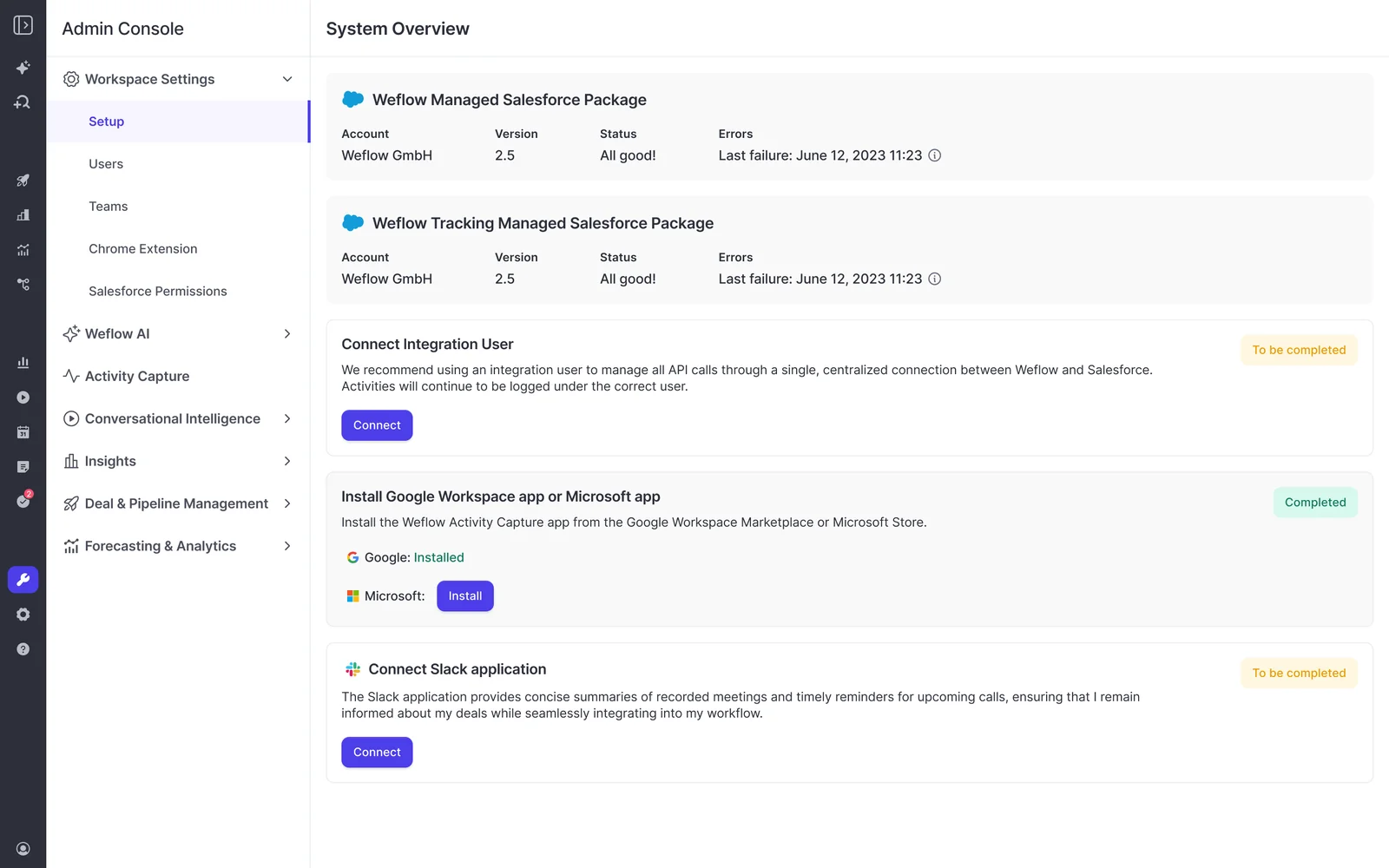
For Salesforce orgs with Private org-wide defaults, the integration user needs Modify All Records on Account, Opportunity, and Contact. Read, Edit, and View All alone don’t support the subsequent activity updates this configuration requires.
You can complete technical setup before enabling capture. Weflow doesn’t read a user’s mailbox until you enroll that user in an activity capture configuration.
2. Configure Weflow Activity & Contact Capture
Configure a small cohort around real mapping cases, including accounts with multiple open opportunities and customer success activity outside an opportunity.
- Set tenant scope. Each mail tenant needs its own activity capture configuration.
- Apply exclusions. Exclude internal and sibling-company domains, test records, and confidential accounts or contacts. Record-field rules handle restrictions that domain lists can’t express.
- Choose the email object. Use Task or EmailMessage according to your Salesforce reporting requirements.
- Set mapping rules. Separate new-business, renewal, and post-sale activity where the workflows require different destinations.
- Review contact creation. Required fields beyond first name, last name, and email can cause Salesforce validation rules to reject automatic creation.
- Assign logging ownership. Decide which system writes each activity type before enabling overlapping capture.
Salesforce Shared Activities must be enabled to relate meetings to all attendees rather than only the primary contact. Treat that as part of Salesforce preparation if attendee-level reporting matters to you.
| Acceptance test | Expected result |
|---|---|
| Send and receive a customer email. | The chosen Salesforce object contains the activity against the intended customer record. |
| Meet with a contact involved in multiple opportunities. | The mapping follows your configuration, with account fallback where the relationship remains ambiguous. |
| Include a new contact on an eligible customer thread. | Salesforce accepts contact creation under your validation rules. |
| Use an excluded test or confidential record. | Weflow doesn’t log the excluded activity. |
3. Configure Weflow Conversation Intelligence
Activate pilot users, choose a recording method, and build a small set of useful field updates before expanding the template library.
- Have users sign in once. Assigning a license alone doesn’t activate the notetaker. Activity capture can already be running while recording remains inactive.
- Choose your initial recording method. Calendar-based notetaker recording and desktop recording have different consent responsibilities.
- Define eligible meetings. The notetaker attempts to join meetings with at least one attendee outside your configured internal domains.
- Start with one meeting type. Use discovery, renewal, or another recurring customer conversation.
- Map a few useful outputs. For discovery, start with the customer’s problem, decision process, and agreed next steps.
- Assign ongoing ownership. Your RevOps owner maintains prompts, scorecards, and mappings as the sales process changes.
Weflow’s AI field mapping connects extracted conversation values to Salesforce fields across supported objects. Lookup relationship fields aren’t supported.
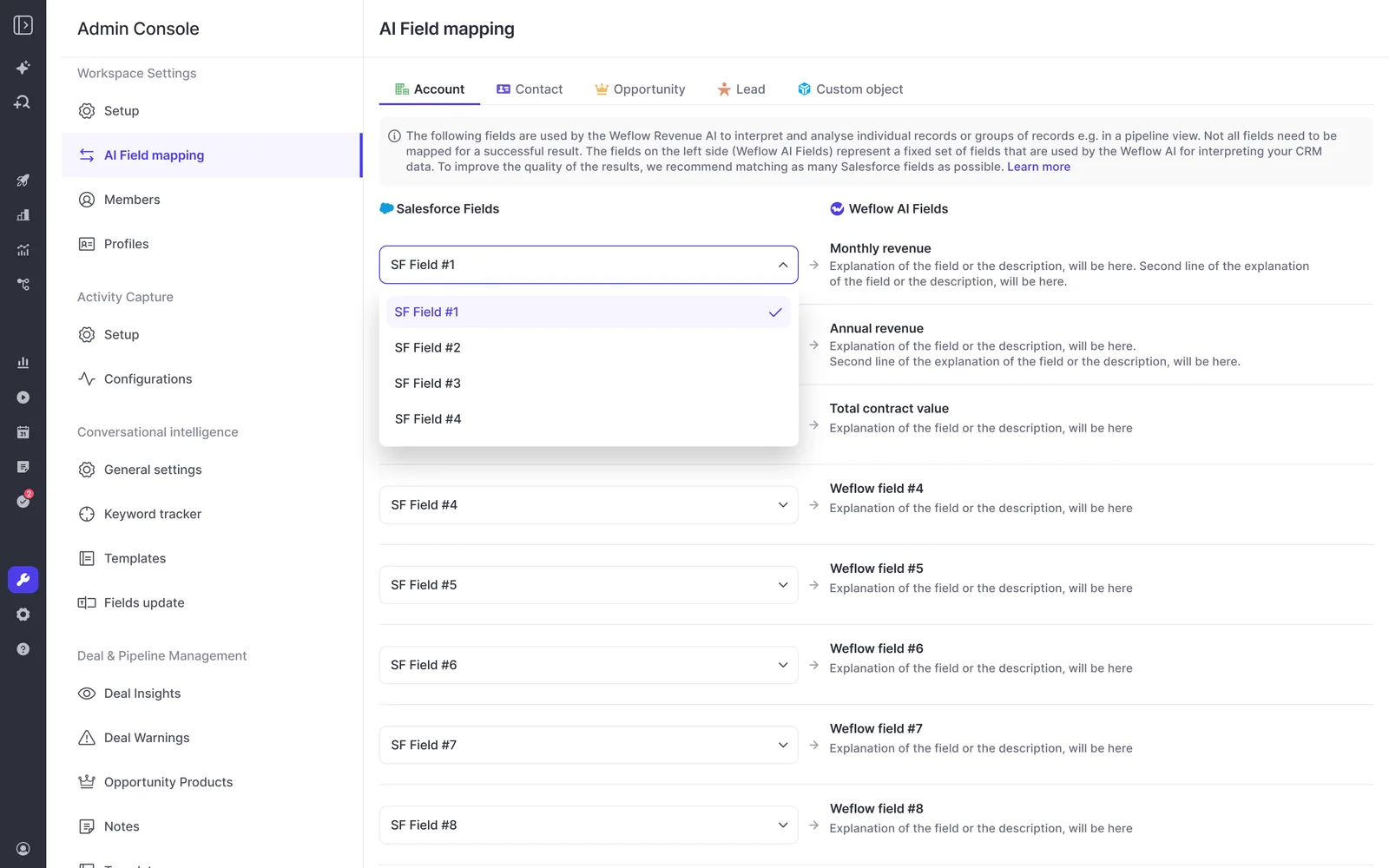
Test the resulting writes against every object your pilot uses:
- The Event receives its intended summary.
- The Account or Opportunity receives the mapped field values.
- The recording links to the intended records.
- Salesforce permissions and validation rules allow each write.
A failed post-call summary or field write can’t be replayed automatically. The content remains in the recording object, but recovering the missed destination update requires manual copying.
4. Validate Weflow Revenue AI Foundation before expanding
A two-week proof of concept can establish whether Revenue AI Foundation captures the expected activity and produces usable conversation output. Judge the records your team will rely on, not login counts.
| Test | Expected observable result | Owner | Expansion decision |
|---|---|---|---|
| Activity coverage | Eligible emails and meetings appear in Salesforce without duplicate logging. | RevOps and Salesforce admin. | Resolve missing or duplicated activity before adding users. |
| Recording coverage | Eligible pilot meetings produce recordings through the selected method. | Team manager. | Resolve activation and recording-rule gaps first. |
| Mapping accuracy | Activity and recording links match the intended account or opportunity. | RevOps and pilot reps. | Correct ambiguous mappings and teach the correction workflow. |
| AI output quality | Summaries and field values reflect what participants actually said. | RevOps and enablement. | Adjust prompts that invent, omit, or misclassify information. |
| Salesforce writes | Every intended destination receives its output. | Salesforce admin. | Resolve permission and validation failures before expansion. |
| Privacy and access | Exclusions, consent procedures, and user access behave as intended. | Legal and IT. | Expand only after the agreed controls work in practice. |
Use the demo to walk through your target fields, logging ownership, and proposed contract. Forecasting belongs to the broader platform, not Revenue AI Foundation.
See how Weflow captures activity, updates Salesforce fields from calls, and rolls up your forecast. Book a 30-minute demo.
Weflow Revenue AI Foundation FAQ
Revenue AI Foundation can fit alongside your existing stack, with separate responsibilities for capture, forecasting, and data storage.
Can Weflow Revenue AI Foundation coexist with Clari?
Yes. Weflow can capture activity into Salesforce while Clari continues to run forecasting. Clari reads Salesforce activity, so you don’t need to replace the forecast process to improve the data underneath it.
- Weflow: Activity capture, conversation recording, and structured Salesforce updates.
- Salesforce: Customer records and captured activity.
- Clari: Your existing forecasting process.
Keep one capture owner for each activity type. Running overlapping capture engines creates duplicate activities.
How does Weflow avoid duplicate activity alongside existing tools?
Weflow uses compatibility configuration and explicit logging ownership to coexist with existing activity writers. The setup differs by product.
| Existing product | Overlap | Configuration |
|---|---|---|
| Salesforce Einstein Activity Capture (EAC) | Calendar Event creation and sync. | Set EAC event sync to one direction, from email/calendar into Salesforce. Weflow can add conversation output to the existing Events. |
| Outreach | Engagement emails and calls. | Use Compatibility Mode to divide logging responsibilities. Keep Outreach responsible for the engagement activity it owns. |
| Salesloft | Engagement activity logging. | Use Compatibility Mode and define which activities Salesloft logs versus Weflow. |
Changing the EAC sync configuration doesn’t remove duplicates that already exist. Those records need separate cleanup.
Can Weflow import historical activity and recordings?
Weflow can backfill up to 24 months of historical emails and meetings, and migrate an existing recording library during onboarding. Weflow can’t recreate conversations nobody recorded.
| Data type | Historical coverage | Boundary |
|---|---|---|
| Emails and calendar meetings | Up to 24 months of sync-back. | Historical backfill is an add-on. |
| Existing recording library | Migration during onboarding. | The recording must already exist. |
| Unrecorded conversations | No recovery. | A calendar entry doesn’t contain the conversation. |
Where does Weflow store conversation data?
Weflow writes transcripts, executive summaries, and configured field updates into Salesforce. Weflow hosts the recording files separately rather than storing video as Salesforce files.
| Data type | Location | What that means for your team |
|---|---|---|
| Emails, meetings, and contacts | Native Salesforce objects. | Your Salesforce reports and automations can use the records. |
| Transcript and executive summary | The Weflow recording object in Salesforce. | Salesforce object permissions govern access to this content. |
| Configured summaries and extracted values | Mapped Salesforce fields and records. | Your existing CRM workflows can read the output. |
| Video and audio recordings | Weflow-hosted storage. | Playback doesn’t require storing large media files in Salesforce. |
Zero Data Retention for AI processing describes model processing. It doesn’t mean Weflow deletes the recordings your team uses.
What should legal verify before approving Weflow recordings?
Legal approval should address the recording method, participant consent, and who can access conversation content. Weflow provides SOC 2 Type II, GDPR compliance, Zero Data Retention for AI processing, and a commitment that customer data never trains AI models.
The recording methods carry different responsibilities:
- Notetaker: Configurable consent flows include participant notices and an opt-out route.
- Desktop app: Weflow doesn’t notify participants or manage consent. The rep obtains consent under your approved procedure.
- Salesforce access: Recording-object access exposes transcripts and summaries. Assign it as a confidentiality decision.
- Processing: Your legal policy needs to address recording and subsequent analysis, rather than treating them as the same action.
Weflow uses Salesforce authentication and inherits Salesforce permission sets and role hierarchy. List-view restrictions and Lightning component visibility aren’t Salesforce data permissions, so they don’t provide the same access boundary.
What data remains after you cancel Weflow?
Activity and contact records that Weflow writes into native Salesforce objects remain in your Salesforce after cancellation. You retain that history for your own reporting and automations.
Weflow-hosted recordings have a separate storage boundary. They aren’t Salesforce files, and the activity-data retention promise doesn’t extend to continued recording access.
For your purchase request, keep the scope equally precise: Revenue AI Foundation provides activity capture and structured conversation data. Add the applicable fees to the annual seat spend, and keep deal intelligence and forecasting outside this first contract unless your team needs them now.