What Is Revenue AI Orchestration? The Platform Category, Defined
Learn what Revenue AI Orchestration is and how it differs from revenue intelligence.



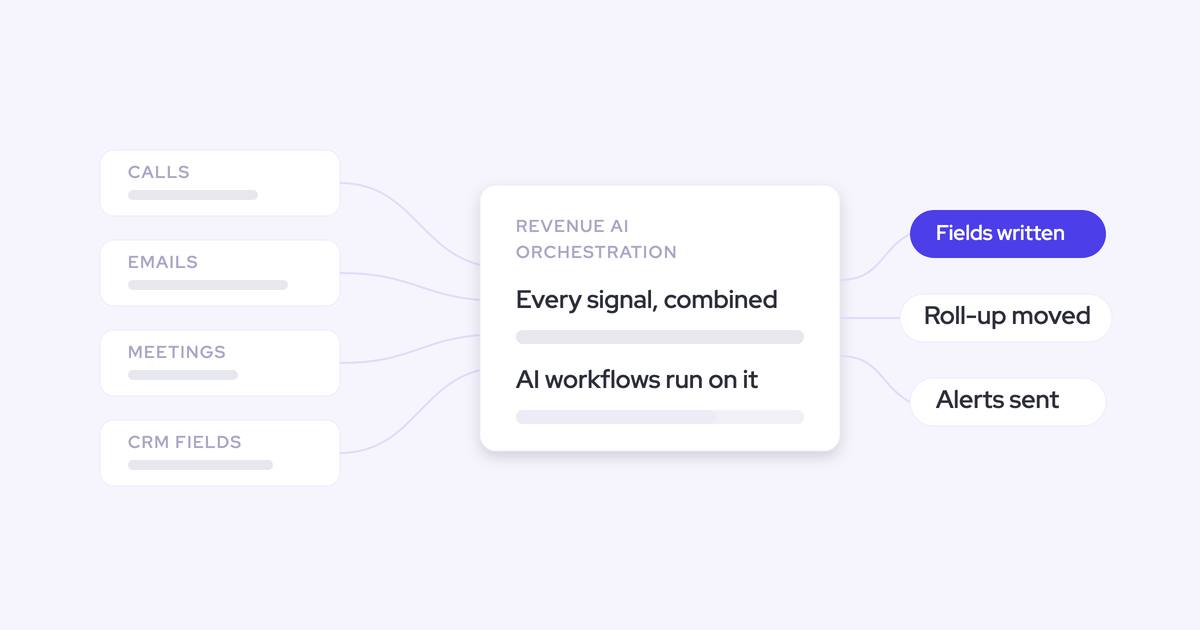

Revenue AI orchestration is an architecture, not a feature. One unified data layer, three layers of capability on top of it: a system of truth, a system of intelligence, and a system of action.
- The system of truth is every activity, contact and conversation captured automatically into the CRM you own.
- The system of intelligence is what gets inferred from that record: deal health, risk, methodology coverage, the forecast.
- The system of action is what gets done about it, and whether an agent or a human does it stays your governance decision.
Weflow is the Revenue AI Orchestration platform for sales, customer success, and RevOps teams, built for Salesforce teams. Read the definition, then judge whether the category is real or whether it's revenue intelligence with a new label.
Why the revenue intelligence stack stopped being enough
The first generation of revenue tools each solved one slice of the problem, and each kept its data in its own cloud. Conversations went to a conversation tool. The roll-up went to a forecasting tool. Capture went to whatever was bundled with the CRM.
All useful. None of it landed anywhere the company could reconcile.
So the truth about a deal ends up spread across six places:
- Emails and meetings in Outlook or Google Workspace
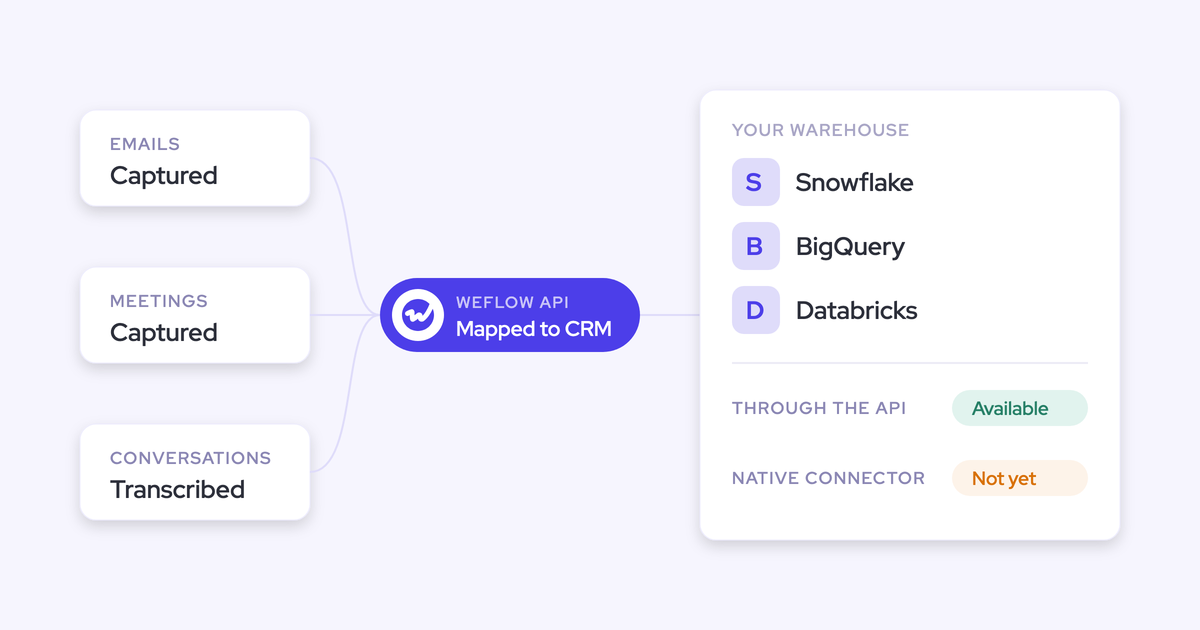
- Transcripts in a notetaker or conversation tool
- The forecast in a spreadsheet
- Reporting in a BI tool
- Salesforce, carrying twenty or thirty different amount fields
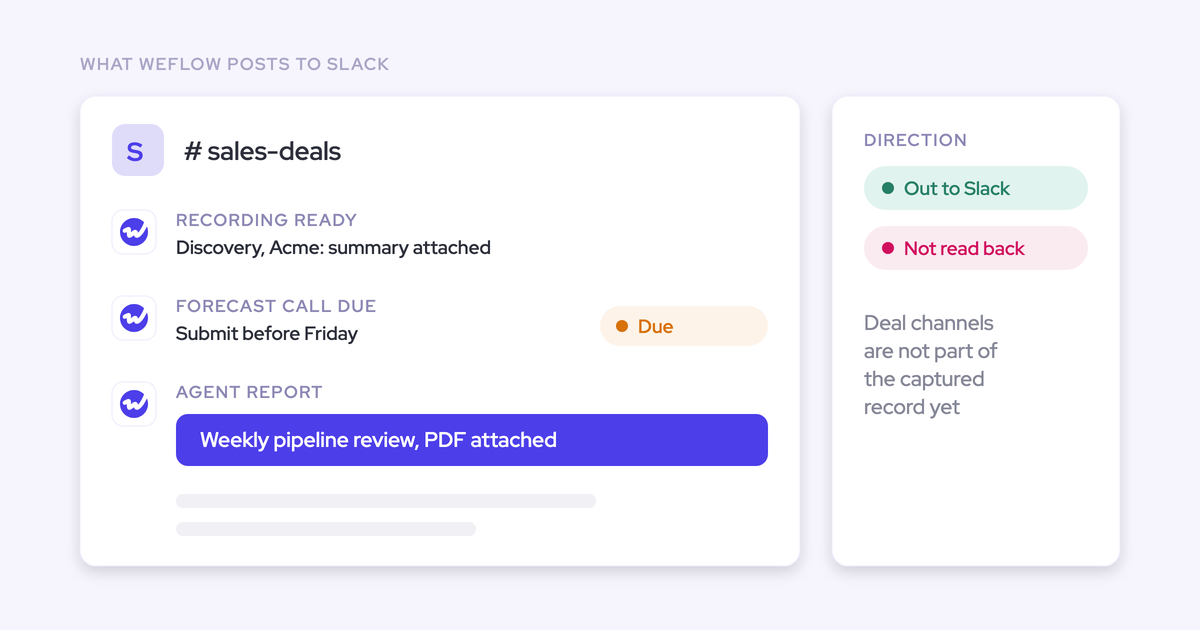
- A Slack channel per customer that nothing reads
When two leaders bring two different numbers to the same meeting, both can point at a system that backs them. The meeting turns into a debate about which tool is right instead of a decision.
Gartner did a study on sales operations and found out that fifty three percent of the go to market executives don't trust their data.
Then the spend stops making sense. We hear a version of this on nearly every switch call: a six-figure contract for a layer that produces a roll-up and little else, two modules nobody opens, and the AI everyone promised never arrived. One RevOps lead ran an account review on their forecasting tool and found license usage at about 8 percent, with half the reps never having connected a calendar.
Two things changed at once, and together they broke the old model. AI made automatic capture and structured extraction reliable, which removed the last excuse for asking reps to log their own work. And AI made unified data urgent, because an agent is only as good as the data it can reach. A revenue team whose intelligence is scattered across four vendor clouds has nothing to orchestrate.
The three layers of revenue AI orchestration
Orchestration is three layers standing on one unified data layer, and the order is load-bearing. Intelligence bought on top of data that was never captured has no foundation under it, which is exactly how a company ends up with a confident chart built on a third of reality.
| Layer | What it is | What it produces |
| System of truth | Every email, meeting, contact, call and connected deal channel captured automatically into native CRM objects | One record of what actually happened that a human, a report, and an agent all read the same way |
| System of intelligence | What gets inferred from that record: deal health, risk signals, methodology coverage, the forecast | A number you can defend in a board meeting, with the evidence attached to it |
| System of action | What gets done about it: fields written, briefs delivered, workflows triggered, people nudged | Work that happens without someone remembering to do it |
System of truth: unified capture in the Salesforce you own
The system of truth is the complete, automatic record of every activity, contact and conversation, landing in native Salesforce objects the customer owns rather than in a vendor's cloud.
We learned how load-bearing this is the expensive way. Weflow started as a better interface for entering data into Salesforce. Users liked it. They still didn't enter the data.
So we rebuilt the product to capture in the background and left the rep controls as an option. Capture that depends on a rep doing a small piece of admin does not happen, and no amount of interface polish changes that.
This is also where the honest tension sits. The first question a leader asks about any new capture layer is whether the data is accurate, and it's a loaded question, because the tool is usually capturing correctly into a CRM carrying ten years of accumulated damage. Separating "the capture is wrong" from "the CRM was already wrong" one user and one record at a time is real work, and it's the work that unlocks everything above it.
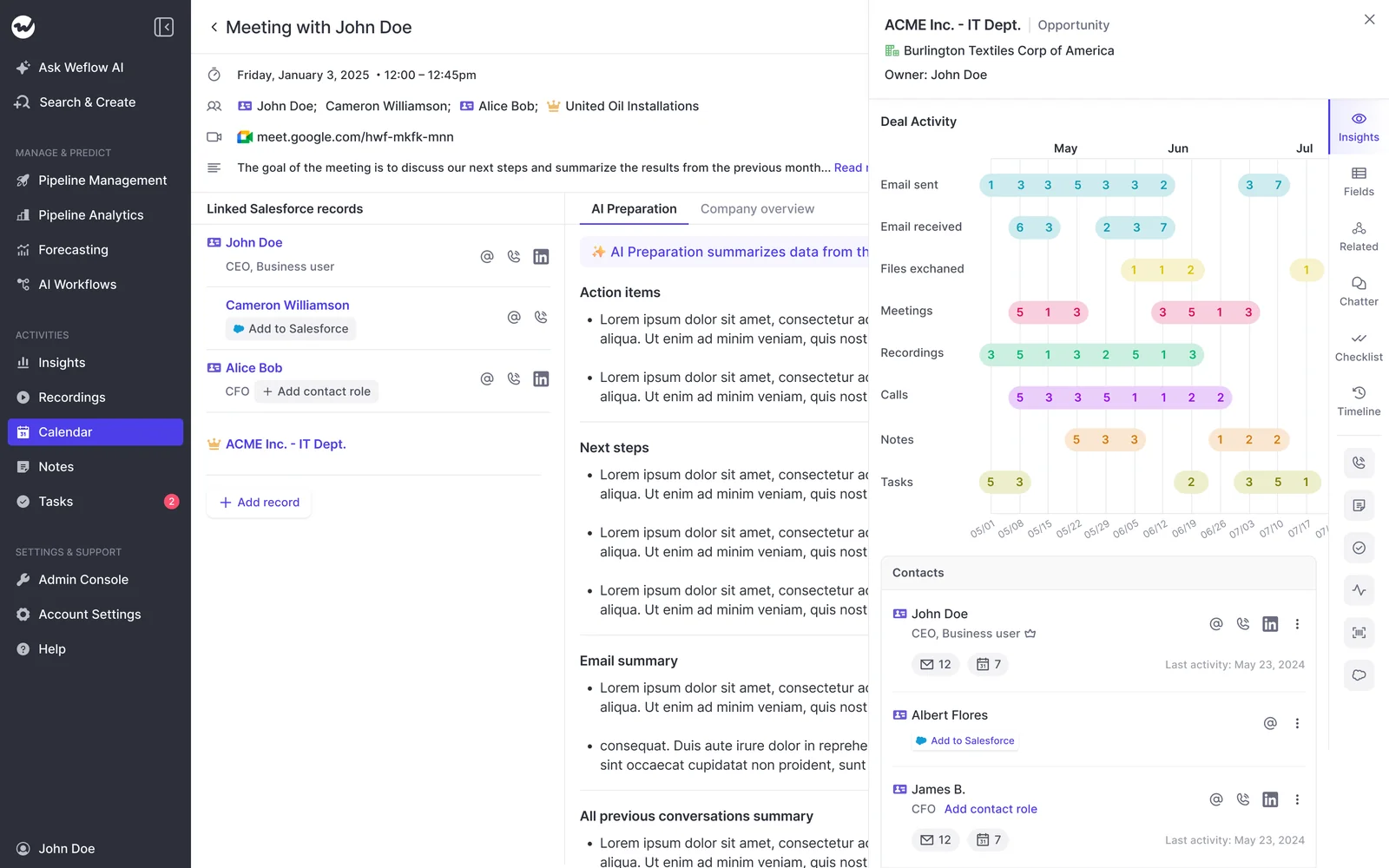
We weren't buying conversation intelligence. We were buying a unified data layer that the entire go-to-market motion could run on, and a partner who understood that distinction.
— Scott Jones, SVP of GTM Revenue Intelligence & Enablement at KORE Wireless
System of intelligence: deal, pipeline, and forecast insight
The intelligence layer is everything inferred from the truth layer: deal health and risk signals, methodology coverage, pipeline analytics, and the forecast itself. This is the layer most companies already bought, as two or three standalone tools.
It's genuinely valuable, and it's the layer that stalls first when the foundation is thin. Incomplete data is worse than no data, because the reporting layer still renders a chart and leadership still acts on it.
The spread tells you how much room there is. The strongest revenue teams reach roughly 95 percent forecast accuracy. The average sits nearer 85, and that ten-point gap doesn't close with a better model. It closes with a submission cadence that repeats often enough to be judged, and with a base of data nobody argues about.
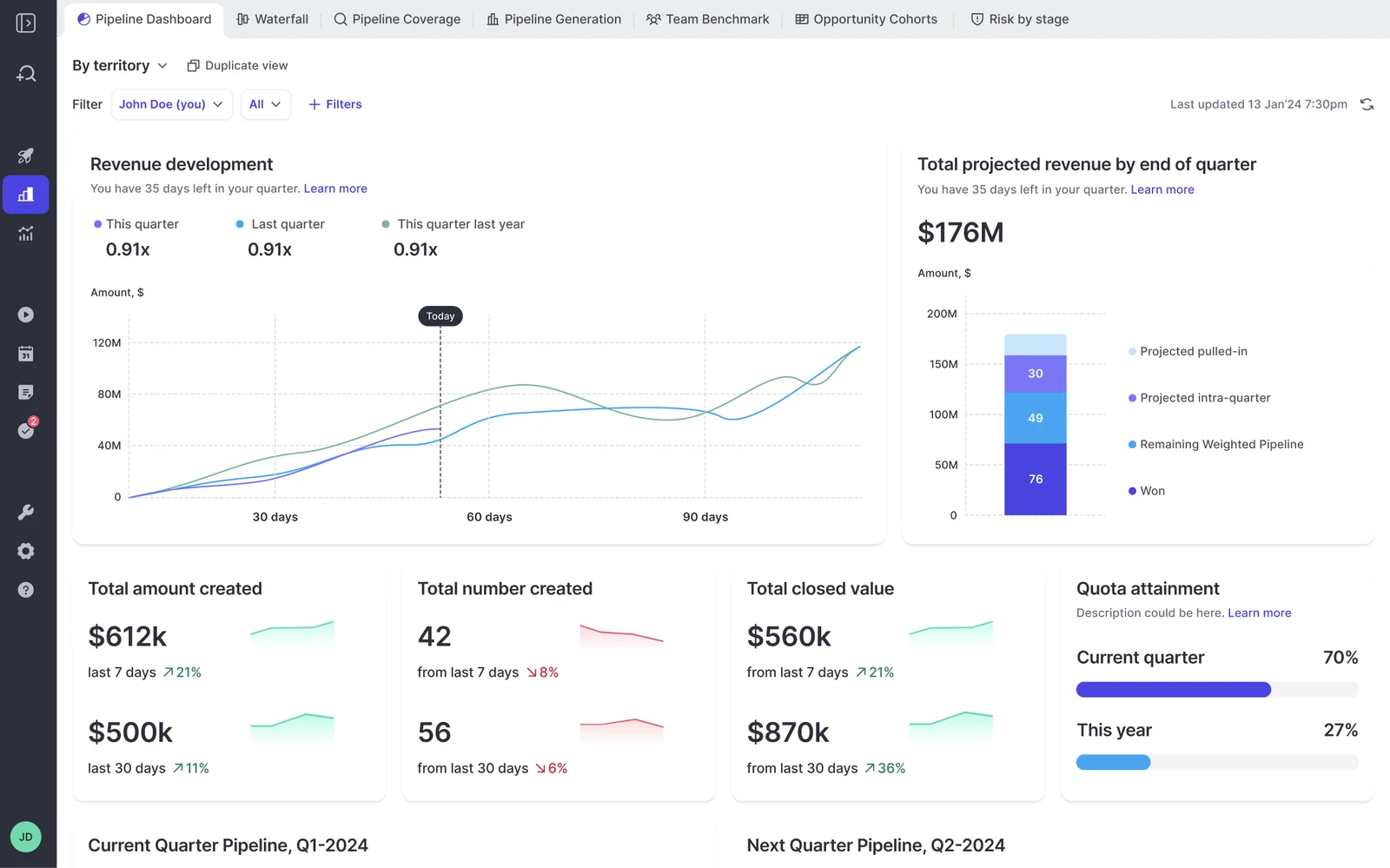
The version of this layer that holds up reads three numbers together rather than picking a winner: the bottom-up submission, a weighted forecast, and an AI projection. Each is wrong in a predictable direction. The gaps between them are what the forecast call should actually be about.
System of action: agents and field writes you govern
The action layer is what happens to the intelligence: a Salesforce field written from what was said on the call, a methodology playbook scored on a schedule, a risk scan delivered before the forecast call, a follow-up pre-written for the deals that went quiet.
Whether an agent or a human takes that action is a customer governance choice, never a product default. That distinction is the whole reason the layer is separable from the other two.
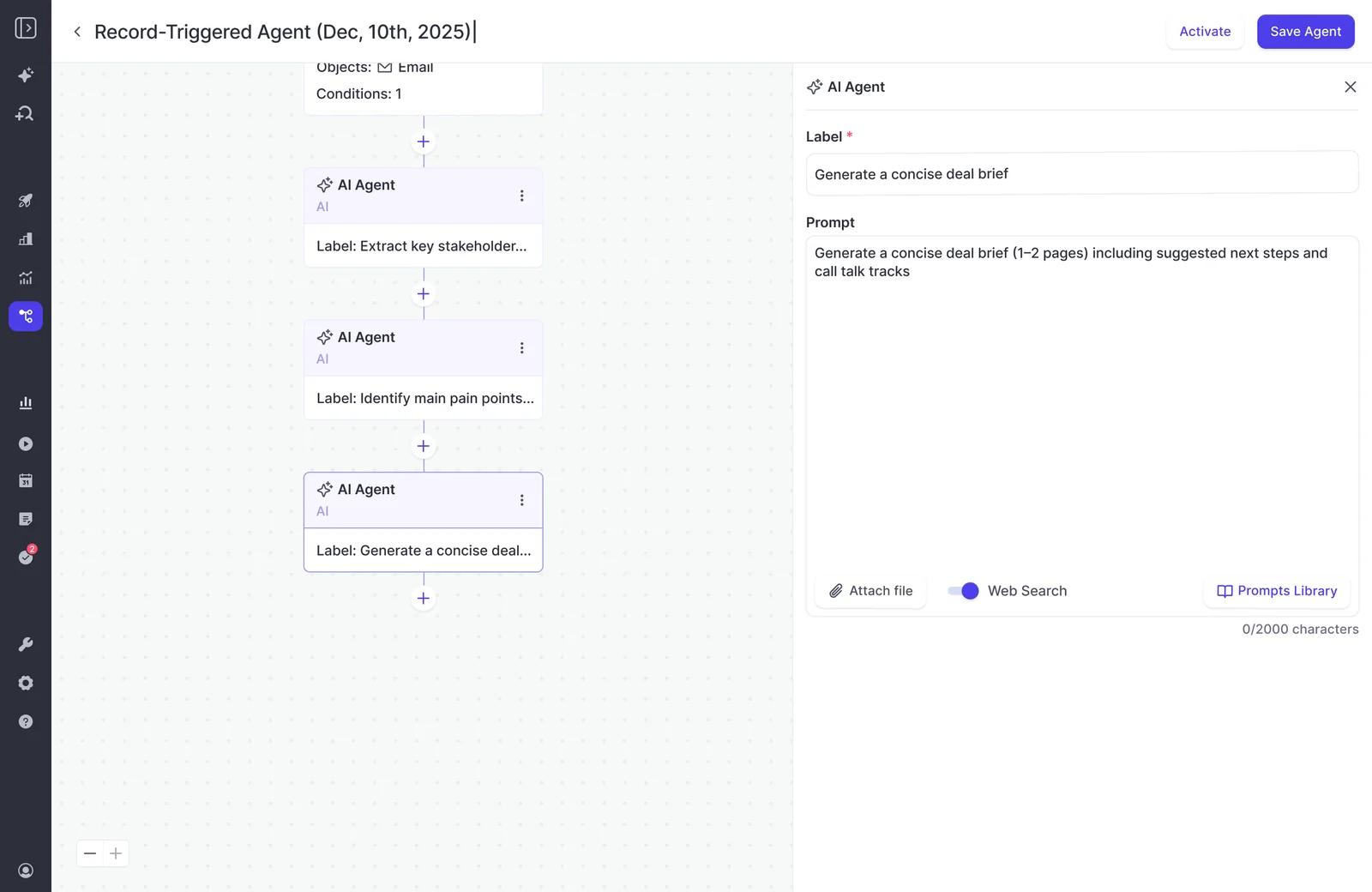
One practical thing we've learned building this: an agent pointed at "every deal in the CRM" produces mush. Narrow the lookup first, to a close-date window, a stage, a team, and the same prompt returns something a manager will act on. Scope discipline is the biggest lever on output quality and the step first-time builders skip.
The roles of sales, the roles of CSMs, the roles of SDRs, they will not go away, but they will be better. They will also be a little bit more fun for us, I think, because we can actually do the tasks that we like doing.
Revenue intelligence vs revenue AI orchestration
Revenue intelligence tells you what's happening from its own slice of data held in its own cloud. Revenue AI orchestration runs truth, intelligence and action on one data layer in the CRM you own. The difference is architectural, and you can test a vendor against it.
| Dimension | Revenue intelligence | Revenue AI orchestration |
| Where the data lives | The vendor's cloud, with a copy mirrored back | Native CRM objects you own, readable by your own reports, automations and AI |
| The foundation | Assumed. The tool analyzes whatever happened to reach it | Capture is the first layer of the product, so completeness is the vendor's problem |
| What comes out | Dashboards, scores, a roll-up | The same insight, plus a written field, a scheduled brief, a triggered workflow |
| Who acts | A human, once they open the dashboard | A human or an agent, decided per workflow by an admin |
| How it reaches the team | A separate app people have to log into | Inbox, Slack, chat, the CRM record, and external assistants over a connector |
| What you keep at renewal | Access ends with the contract | Activity, conversation and field history stay in your CRM |
So when a vendor site says orchestration, three questions settle whether it's real:
- Does the platform capture the activity and conversation data itself, or does it analyze what somebody else captured?
- Where do the outputs land, in native CRM objects or in the vendor's database?
- Can a workflow end in an action, or does it end in a chart?
Two out of three is intelligence with a new headline. That's not a criticism of the tools, it's a description of what you bought.
What revenue AI orchestration looks like in practice
The architecture changes two visible things in a revenue org: who runs the machinery, and where the answers show up.
RevOps becomes the orchestrator of humans and AI agents
RevOps moves from administering tools to designing and governing the workflows that humans and agents both run. That's not a prediction anymore, it's appearing in job descriptions.
What I find really, really interesting is that suddenly we see responsibility for orchestrating agents as part of the job description of revenue operations.
The reason it lands there is structural. No rep is going to manage five to ten agents of their own, and no other go-to-market function already owns the data, the tools and the process those agents depend on.
The honest caveat: this is also where rollouts stall. RevOps bandwidth, not product fit, is the blocker in most of the deals we work, and a tool configured once goes stale as soon as the business changes. Somebody has to own it by name.
Revenue answers arrive in email, Slack, and AI assistants
Once the data layer is unified, the interface stops being the interesting question. One system of truth, several doors into it.
The answer is that you live in whichever door suits the job, because they all read the same layer:
- Inbox: a scheduled brief or PDF that names the deals at risk and why. As one RevOps lead put it, most CEOs and CROs would rather have a PDF in their inbox Monday morning than log into anything.
- Slack: agent output delivered to a channel, and connected deal-room channels read back in as context.
- In-platform chat: a rep asking about a deal, a pipeline view, or the meeting starting in ten minutes.
- An external assistant: Claude or ChatGPT reaching the layer through a read-only connector, switched on per workspace by an admin.
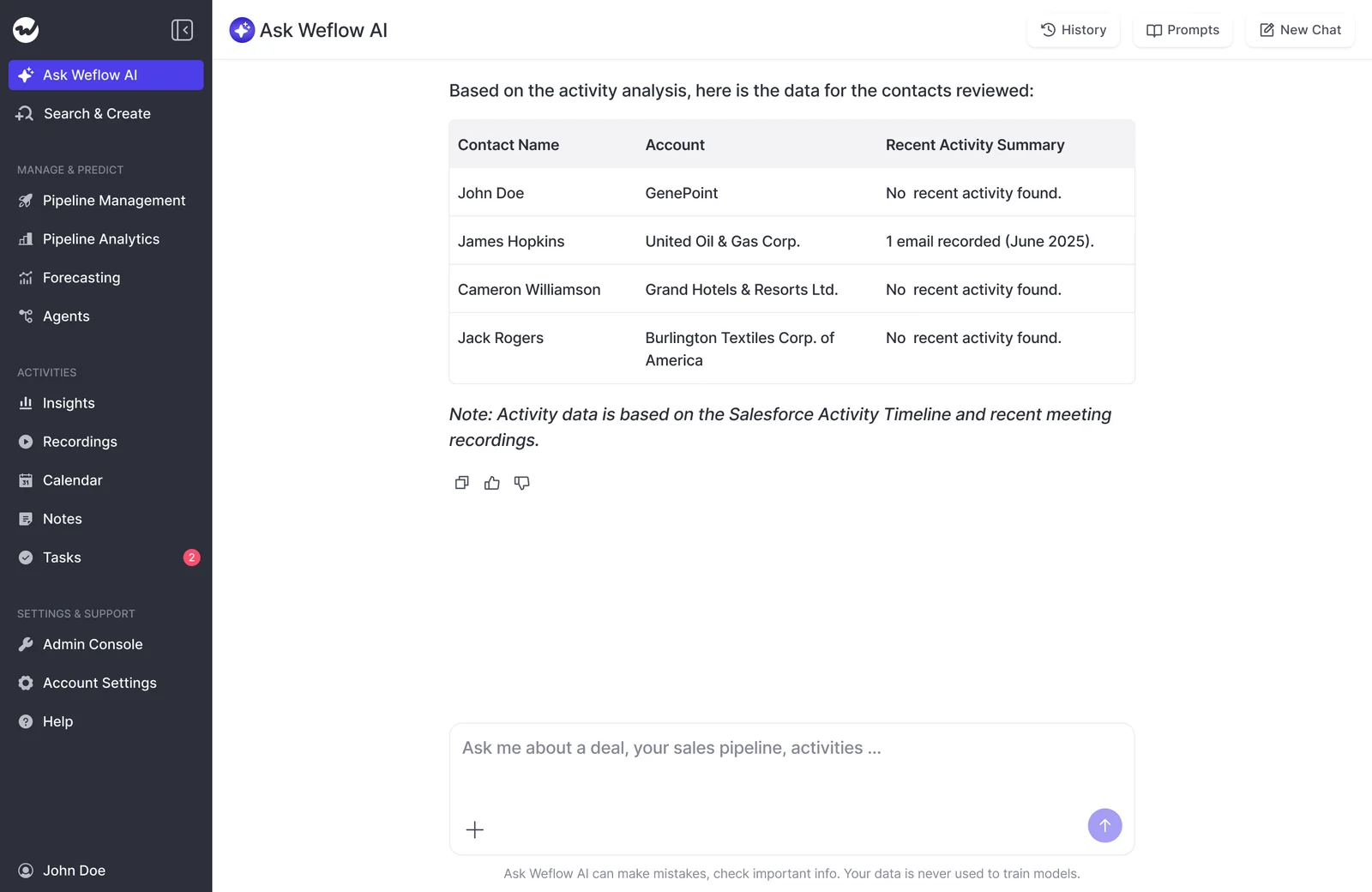
Weflow's MCP connector is worth running alongside Salesforce's own, and the reason is specific: forecast calls, submissions and targets live in the Weflow application rather than in Salesforce objects, so no Salesforce connector can see them. Salesforce's connector answers questions about the record. Ours answers questions about the forecast and the conversation. Admins control the switch, with a separate toggle for whether an assistant can read full transcripts or only AI summaries.
What orchestration delivers today and what remains unsolved
The truth and intelligence layers are mature and deliver value this quarter. The action layer is a maturing frontier, and turning captured context into fully orchestrated action is not solved yet, by anyone, including us.
| Deployable now | Still frontier |
| Automatic capture of emails, meetings and contacts into native Salesforce objects | Agents writing their own conclusions back into CRM fields. In Weflow, agent output goes to email or Slack, and a person still enters it on the record |
| Recording, transcription and AI field updates written from conversation content | Reliable agent output without a narrow record lookup in front of the prompt |
| Deal signals, risk warnings, pipeline analytics, forecast roll-ups and accuracy tracking | Who is allowed to act on continuous AI analysis without waiting for the weekly meeting. Nobody has settled the delegation model |
| Conversational questions across calls, deals and pipeline, plus scheduled agent reports | Reasoning across finance or ERP systems. Weflow's agents work customer-facing data mapped to Salesforce, not an integration catalogue |
If you open LinkedIn today, you see all these fancy workflows where basically everybody tells you, well, agents basically replace humans. And I think, to be honest, that's not what we've seen. I would say the majority of products and tooling today are very much an enabler of the human. It basically automates nitty gritty workflows instead of replacing the humans. The reality we also see is that the hype cycle is very high and the deployment is still nascent.
— Janis Zech, CEO and Co-founder of Weflow
Calibrate accordingly. If what you need this year is a forecast you can defend and clean data underneath it, that's buyable today from several vendors including us. If you're being sold autonomous agents running your pipeline, ask what shipped in the last twelve months and who is running it in production.
Agent Builder is the newest product we ship and the least mature of the four. We'd rather say that than have you find out in month three.
How Weflow builds the revenue AI orchestration platform
Sophisticated buyers don't read our feature list as a selling point. They read it as a warning, and they ask the right question back.
We started at capture. The first product was a faster way for reps to update Salesforce, it didn't work as a behavior change, and we rebuilt it to capture automatically in the background. Everything since has been built upward from that layer, in this order:
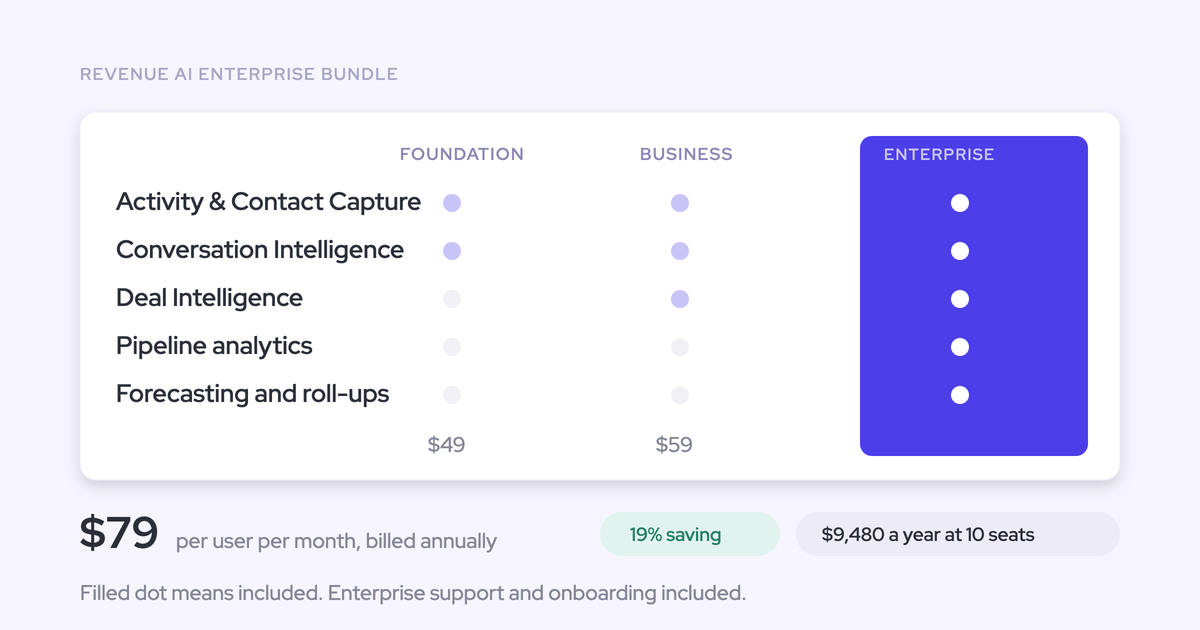
- System of truth: Weflow Activity & Contact Capture and Weflow Conversation Intelligence, writing emails, meetings, contacts, recordings and transcripts into native Salesforce objects
- System of intelligence: Weflow Deal Intelligence & Forecasting, with deal signals, pipeline analytics, roll-ups and forecast accuracy tracking
- System of action: AI field updates after each call, AI playbooks on a schedule, and Agent Builder for scheduled and record-triggered workflows
- Access: Ask Weflow AI across the whole layer, plus a read-only MCP connector for Claude and ChatGPT
Capture is also where the defensibility sits, and we're direct about why. Any competitor can copy a summary template. What decides whether an AI deal summary, a coaching scorecard or a prediction is trustworthy is the completeness of the data underneath it, and that's the hard part.
Pricing is published, per seat, and predictable: bundles at $49, $59 and $79 per user per month, standalone products from $19, minimum 10 users, billed annually. Agent Builder is the only consumption-priced product, and Ask Weflow AI, AI summaries and AI field updates are included in the seat, so nobody has to ration the features that drive daily use.
Where Weflow isn't the answer: if your CRM isn't Salesforce, we're out, and that's a hard gate. If you want sequencing, keep Outreach or Salesloft and run us alongside, compatibility mode stops both systems logging the same email. And if you want one workflow reading your ERP, your finance system and your CRM together, you're describing a different product.
Frequently asked questions about revenue AI orchestration
Do you have to replace Gong or Clari to adopt orchestration?
No. Orchestration consolidates conversation intelligence, activity capture and forecasting into one platform over time, but adoption is phased around your renewals, because nobody gets a second forecasting tool approved in the same year they signed the first one. The common sequence we see is capture and conversation intelligence first, then forecasting later for roughly $10 more per user per month rather than a separate contract. Engagement platforms like Outreach and Salesloft are not part of that consolidation at all, they run alongside.
Is revenue AI orchestration priced per seat or by usage?
It should be per seat, with AI included, because an invoice that moves with adoption is what kills AI rollouts. Weflow prices everything per seat except Agent Builder: bundles at $49, $59 and $79 per user per month, and Ask Weflow AI, AI summaries and AI field updates included with no metering. Agent Builder is metered by workspace, with 25 agent actions a month free on every plan, $299 a month for 500, and $999 a month for 2,500.
Does revenue AI orchestration require Salesforce?
The architecture requires a CRM the company owns as the destination for captured data, otherwise there's no unified layer, only another vendor database. Weflow specifically works exclusively with Salesforce, and that's a hard product gate rather than a roadmap item. Data is stored in the region where your Salesforce instance sits, so a European org keeps its Weflow data in Europe.
Can your team work through Claude or ChatGPT instead?
Yes, through a connector rather than instead of the platform. Weflow's MCP connector is read-only, enabled per workspace by an admin, and gives an assistant access to playbooks, call summaries, transcripts and forecast calls, with a separate toggle for transcript depth. What it doesn't do is reach your other knowledge systems, so process documentation, product guides and tickets stay outside it. Weflow supplies the revenue context a general assistant lacks; it doesn't replace the assistant.
What does a RevOps team need to run orchestration?
A named internal owner and a phased rollout. Technical implementation takes 45 to 60 minutes with a Salesforce admin and a mail admin in the room; the real time goes into configuration, meaning team structure, methodology, which fields AI populates, playbooks and warnings. Typical time to live is two to three weeks, and Weflow doesn't charge for implementation. We also run a managed option where we do the heavy lifting, precisely because RevOps bandwidth is the usual blocker.
What is a unified data layer for GTM?
A unified data layer for go-to-market is the single captured record of activity, contacts and conversations, mapped to CRM objects, that all three orchestration layers read from. It's the difference between six systems each holding a partial copy and one record every report, agent and person reads the same way. Without it, intelligence is inference over a thin slice of reality and action has nothing dependable to fire on.
If you're orienting on this and want the operating metrics that sit on top of it, grab the free CRO cheat sheet and pressure-test your current stack against what it asks for.