What a Weflow Implementation Looks Like: Install, Configuration and Rollout in Two to Four Weeks
Learn what a Weflow implementation includes, who owns each step, and why rollout takes 2–4 weeks.


Weflow is the Revenue AI Orchestration platform for sales, customer success, and RevOps teams. The technical install is one session of under an hour with your Salesforce admin and your mail admin. Our customer success team then runs configuration and rollout with you, and most teams are live on Weflow Activity & Contact Capture and Weflow Conversation Intelligence in two to four weeks.
The product doesn't set that calendar. Three things on your side do:
- getting your Salesforce admin and your mail admin into one call
- IT's Microsoft or Google consent
- agreeing with sales leadership what Weflow should write into Salesforce
You've probably been quoted two weeks before and then lived through twelve. So here's the actual project plan: what we do, what RevOps owns, which step gates go-live, what to test before reps see anything, and why forecasting runs on a longer clock.
How long a Weflow implementation takes, from signature to live
Most teams go live on Weflow in two to four weeks, and the product itself takes about an hour of that. The rest is configuration decisions and a paced rollout to your team.
The spread comes from your org, not the product:
- Large orgs typically take four to six weeks, and six weeks is the upper end we see.
- Google Workspace environments move faster than Microsoft 365 tenants.
- The fastest rollout we've run took three days, for a 120-seat conversation intelligence replacement. We don't recommend that pace, but it shows where the floor sits.
| Phase | Typical duration |
|---|---|
| Technical session (Salesforce admin plus mail admin) | 30 to 60 minutes |
| Workspace configuration | About an hour of setup, plus the time your team needs to make decisions |
| Guided rollout and training | Two to four weeks to live, four to six for large orgs |
| Weflow Deal Intelligence & Forecasting | Proves out over forecast cycles, closer to three months |
Time to value tracks the same order. Capture writes to Salesforce the day you enroll users. Forecasting pays off once it has run enough cycles to compare predicted against actual.
"It took less than an hour to install the managed package and start syncing data. Everything was live immediately."
— Bastian Stosic, Head of Media Sales Operations at HolidayCheck
Who owns what in each Weflow implementation phase
Weflow's own customer success team runs onboarding. We don't hand it to a third-party partner, and we don't sell it as a professional services project.
The work runs as three phases against a mutual action plan with named owners on both sides. Your job is mostly to unlock access and make decisions.
| Phase 1: Technical implementation | Phase 2: Configuration | Phase 3: Role-based rollout and training | |
|---|---|---|---|
| What Weflow's team does | Runs the session, installs the packages with your admin, connects the integration user and mail app | Builds hierarchy, methodology templates, AI field mapping, playbooks, deal warnings and prompt templates with you | Runs separate leadership and rep training sessions |
| What RevOps owns | Booking both admins, granting access, raising any Salesforce change requests | Decisions: methodology, fields, exclusions, contact creation | Choosing the pilot group, enrolling users in waves, making sure reps sign in once |
| Who must attend | A Salesforce admin and a Microsoft or Google admin | RevOps, plus sales leadership for methodology and field decisions | Sales leadership, managers and reps, in separate sessions |
| Typical length | 30 to 60 minutes | About an hour of setup, plus decision time | Most of the two to four weeks |
| What gates it | Two admins in one call, and IT consent | Sales leadership agreeing what Weflow writes | Legal sign-off on capture and recording consent |
If your team has no spare bandwidth at all, we offer a managed service. Weflow does the heavy lifting, and your RevOps team only answers questions and unlocks access.
That option exists because in most switches, the blocker is RevOps capacity, not product fit.
"I made a deliberate choice to let Weflow own end-to-end onboarding rather than pull my team off revenue-generating work. That's exactly the kind of partnership leverage I was looking for."
— Scott Jones, SVP of GTM Revenue Intelligence & Enablement at KORE Wireless
Phase 1: connect Weflow to Salesforce and your mail in one session
The Weflow technical install happens once, centrally, with no code and nothing to install per rep. Your Salesforce admin and your mail admin sit in the same call, and the systems are connected by the end of it.
The session only fails when someone is missing or an access setting blocks a step. Here's how to avoid both.
What to have ready before the Weflow technical session
Book the right two people and check a handful of Salesforce settings before the call, so you don't need a second one.
- Invite a Salesforce admin who can install managed packages and create permission sets.
- Invite a Microsoft 365 or Google Workspace admin who can approve apps for your tenant.
- Relax IP restrictions on the connected app, because the install won't complete with them on.
- Give the integration user full access to the Event and Task objects, including every field and record type it writes. Missing access on a single Event field, such as location, makes meetings fail to log while emails keep working.
- Pick a default Event record type if your org has several, because Weflow can't choose one on its own.
- Check whether Salesforce Shared Activities is on. You need it to relate a meeting to every attendee, and in a large org turning it on is a change request, so raise it now.
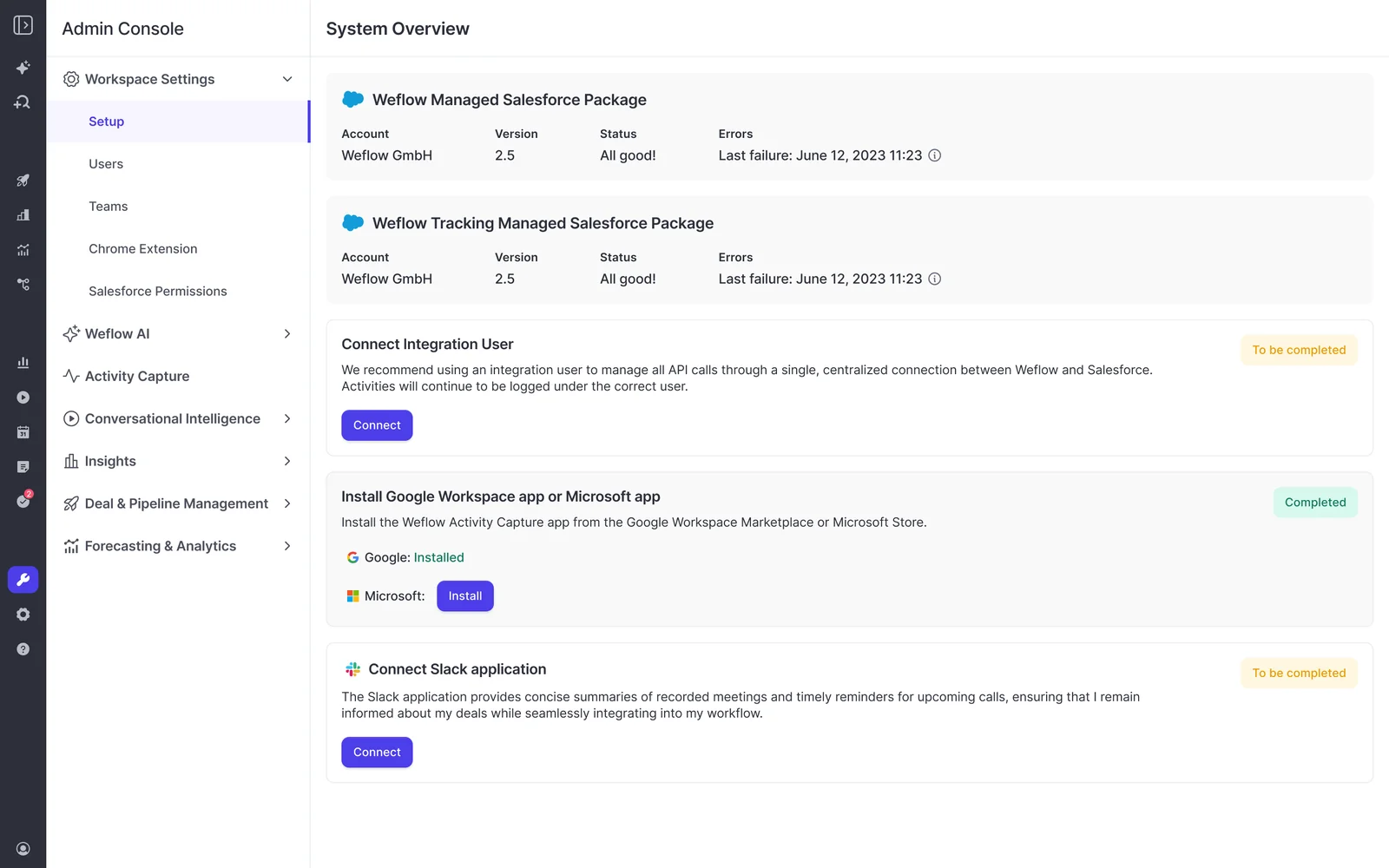
What the Weflow install adds to your Salesforce org
The Weflow install is small and least-privilege. Your IT and security reviewers will ask about this, so here's the full footprint:
- Two Salesforce managed packages. The first carries the core capture objects and fields. The second is optional and only handles email open tracking.
- One integration user on a least-privilege permission set we design with you. Weflow doesn't need Modify All Data.
- One exception: in orgs with Private org-wide defaults, the integration user needs Modify All Records on Account, Opportunity and Contact.
- The Weflow connected app, installed under Setup, Connected Apps OAuth Usage. Sign-in runs through Salesforce OAuth, so nobody can log in until it's installed.
For the security review, that means the integration user touches only the records and fields capture writes to.
How the Weflow mail app installs on Microsoft 365 versus Google Workspace
On Microsoft 365, the install completes only when your Microsoft admin starts it from the Microsoft section of Weflow's admin console. Approving the app's permission request in the Microsoft 365 admin center doesn't finish the connection, because Weflow needs Microsoft's callback to link the two systems.
On Google Workspace, your admin approves the app for the whole organization or for a named group.
| Microsoft 365 | Google Workspace | |
|---|---|---|
| Where the install starts | The Microsoft section of Weflow's admin console | The Google Workspace admin console |
| Who must act | A Microsoft admin, signed in to Weflow with a Salesforce user. A Salesforce admin can't do it on their behalf | A Google Workspace admin |
| How to scope to licensed users | Set "Assignment required" to Yes on the Weflow enterprise app in Entra ID, then add your user groups | Approve the app for a named group instead of the whole organization |
| Common failure | Approving in the admin center only, or adding a group without "Assignment required", which leaves mailboxes outside the group reachable | A Weflow user who isn't in the group shows a connection warning and logs nothing |
If your Microsoft admin has no Salesforce user, give them a temporary Salesforce license and deactivate it afterwards. Capture keeps running. The quicker route is a screen-share where your Microsoft admin takes control of a Weflow admin's session.
Four things outside the product that set your go-live date
Every real delay in a Weflow implementation is internal, and you can start all four on day one.
Get your Salesforce admin and mail admin into one call
Your Salesforce admin and your mail admin usually sit on different teams with different calendars. Finding a slot for both is what turns a one-hour job into a two-week one.
So book that call before anything else. Once it's on the calendar, the rest of the plan has a start date.
Book IT's Microsoft or Google consent in week one
Weflow can't create an activity capture configuration until your tenant is connected, so IT's approval sets your earliest go-live date.
Microsoft tenants move slower than Google ones. If you're on Microsoft 365, get the request into IT's queue in the first week, and brief your admin on the admin console route above so the approval lands in one pass.
Agree with sales leadership what Weflow should write
Deciding which methodology to score against and which fields AI should write is a change-management conversation with sales leadership. It's the decision that changes what reps and managers see on every deal, so it needs their name on it.
Schedule it before Phase 2 starts, and bring these decisions to the room:
- Which methodology you score deals against, such as MEDDPICC or SPICED
- Which Salesforce fields AI should fill from conversations
- Whether AI writes fields automatically or a rep reviews suggestions first
- Whether reps still add a short note of their own on top of the AI summary
That last one comes up more than you'd expect. Some sales leaders want the AI summary plus one line in the rep's own voice, as proof the rep engaged with the deal. Decide it now rather than after launch.
Let legal review run while technical setup finishes
Weflow reads no mailbox until a user is enrolled in an activity capture configuration. Installing the packages, connecting the integration user and adding the mail app grant access without capturing anything.
That means legal review doesn't have to block your technical setup. Finish Phase 1 and most of Phase 2 while legal is still reading, and enroll users once they sign off.
For the review itself, Weflow is SOC 2 Type II certified and GDPR compliant, runs Zero Data Retention for AI processing, and never uses customer data to train AI models.
Phase 2: configure what Weflow writes before reps see it
Configuration is where the real time in a Weflow implementation goes, and you do it centrally in the admin console. The workspace setup itself takes about an hour. The decisions behind it take longer.
The configuration scope covers:
- team structure and hierarchy
- your sales methodology
- AI field mapping
- playbooks and deal warnings
- prompt templates
Playbooks and deal warnings matter once Weflow Deal Intelligence & Forecasting comes on. If you're starting with capture and conversation intelligence, park them for a later wave.
This phase is also where you build confidence. Nobody wants to launch a tool they can't yet defend to a team that just absorbed another one, so get the configuration right before any rep sees it.
Set up teams, hierarchy and Weflow Conversation Intelligence recording by team
Weflow Conversation Intelligence recording is configured by team, not by individual user, and the team updates automatically as its membership changes.
That matters more than it sounds. When you add people one at a time, a new joiner isn't recorded until someone remembers to add them, and that's how recording coverage quietly decays. Pointing recording at a team makes coverage follow your org chart.
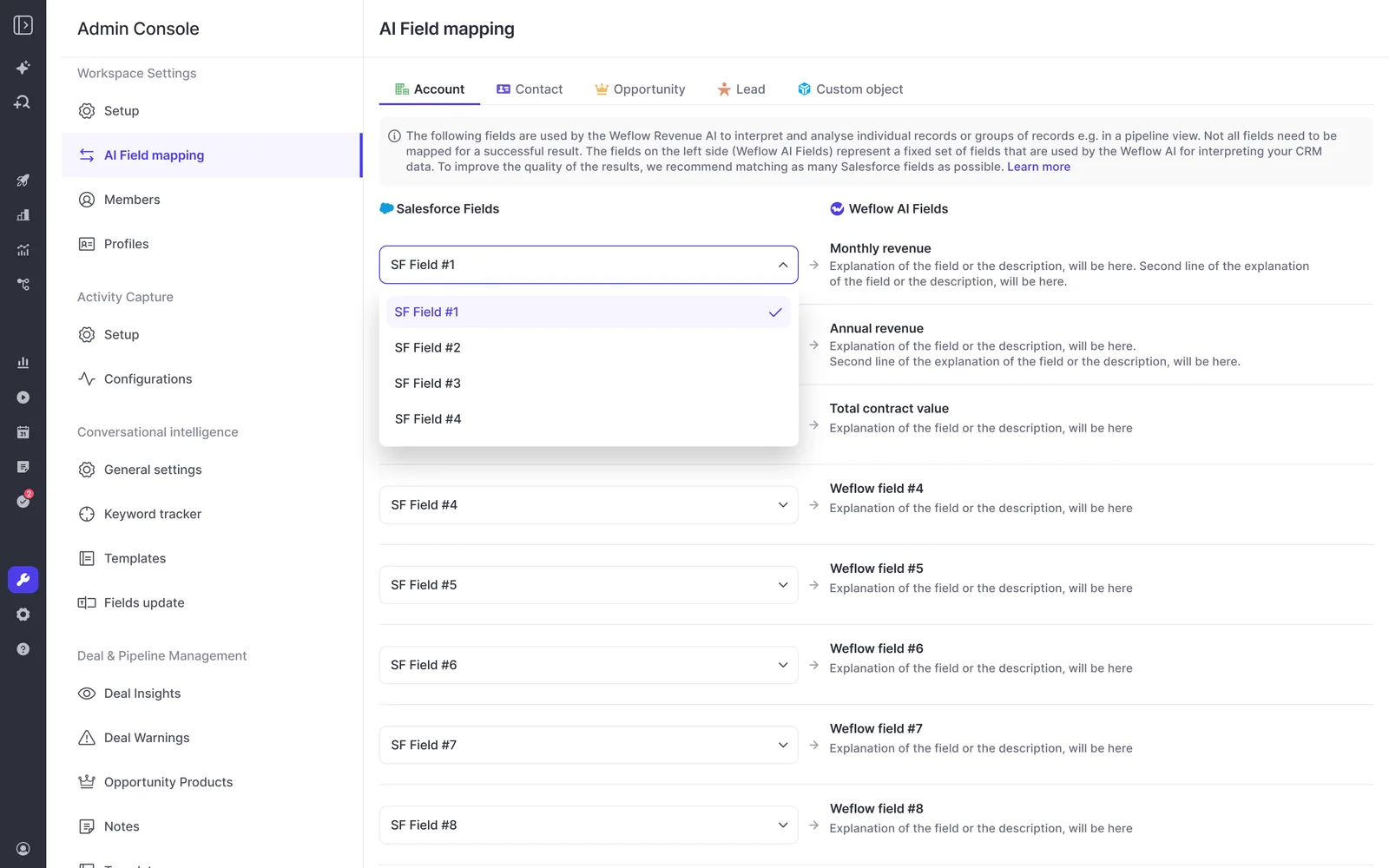
Map your sales methodology to Weflow AI Field Updates
Weflow AI Field Updates write structured data from conversations into your Salesforce fields, and the quality depends on how you set up each field. A few rules from the implementations we've run:
- Map each Salesforce field to its own prompt, rather than one prompt filling several fields.
- Build the allowed values into the prompt for picklists and multi-picklists, or the AI returns values the field can't store.
- Use numeric fields where the call carries the inputs. AI can calculate an amount from the seat count and seat price discussed.
- Start from our pre-built methodology prompts for MEDDIC, MEDDPICC, SPICED and others, then tune them to your definitions.
Expect some qualification facts to show up outside calls. One RevOps lead found this on a test deal:
"On one of our test opportunities, the champion was never talked about on the call, and the decision maker was never talked about on the call either. All of this came through email."
So when you judge field completeness in the first weeks, an empty champion field doesn't always mean the call missed it.
Exclude sensitive accounts and executive mailboxes from day one
Weflow exclusions are set centrally by admins, so no rep has to remember to opt a customer out on every thread. Set them before you enroll anyone.
| Control | What it blocks |
|---|---|
| Field-based custom rules | Any account or contact matching a Salesforce field value, such as accounts flagged confidential, contacts marked personal, or every account in a given billing country |
| Domain exclusions | Internal and free-mail traffic, plus domains of specific customers or the tools you buy from |
| Automatic internal-instance blocking | Logging to your own company's records, matched on the Salesforce instance name |
| Company-name filter | Any account, contact or opportunity whose name contains a given string, for inherited orgs or old company names |
| Capture configuration scope | Executive mailboxes you leave out of the configuration, which Weflow never reads |
The executive mailbox point is often what gets legal comfortable. Weflow only reads mailboxes enrolled in a capture configuration, so the CEO's M&A and HR conversations stay out because that mailbox was never enrolled.
Check Weflow contact creation against your validation rules
Weflow Activity & Contact Capture only knows a new contact's name and email address. If your org requires a phone number or job title before a contact can be saved, every contact Weflow tries to create gets rejected.
You have three options:
- Scope contact creation to accounts that already exist, which also keeps webinar attendees and free-mail addresses out.
- Adjust the validation rules to allow contacts with name and email only.
- Switch contact creation off, if contacts feed a billing or subscription system where a half-formed record causes real damage.
Switching it off costs you visibility into who's actually on the buying committee, so we'd scope it before we'd disable it.
Test Weflow capture with one user before enrolling the team
Test the paths that fail later, not the happy path. Run these steps in order with one user, and each one catches a specific failure before your reps ever see it.
- Run the test in a sandbox or with one user. This keeps a permission gap from showing up across your whole sales floor at once.
- Email an external or personal address. Mail between two addresses on your own domain is excluded as internal, so a test with colleagues logs nothing and looks broken.
- Set up a test account with that external domain in its website field. This lets you test contact creation against your validation rules.
- Create, move, reschedule and delete meetings. Creating proves create rights only. Missing update rights otherwise surface weeks later, when a logged meeting changes.
- Check every Event field and the record type default. One inaccessible field, such as location, makes the whole event fail to log.
- On Microsoft, add an out-of-scope user to a configuration and save. When your Entra restriction holds, a warning icon appears next to that user. No warning means Weflow can still reach mailboxes outside your group.
- Open the Outlook add-in or Chrome extension and check which record each email logged to. This is the same view your reps will use to check and correct mapping.
Our co-founder puts the principle plainly, for any conversation tool you evaluate:
"Look at the Salesforce integration, trial it. That is often something that most CI providers don't start with. They see it as an afterthought."
Phase 3: roll Weflow out by role, in waves
Almost nothing in a Weflow rollout depends on reps doing setup. You pace it by role and by wave, so your team gets used to one thing before the next arrives.
Reps sign in once, and capture needs nothing from them
Weflow Activity & Contact Capture runs server-side, so reps don't connect anything, grant anything, or opt out. That removes the step that usually breaks a rollout. One RevOps lead described what happens otherwise:
"You can create the templates, but then somebody has to go in and find the template that you have created and connect it, which, as soon as you ask them to do any kind of admin like that, they just sort of freak out. So I just ended up doing it all for them."
There's one thing reps do have to do: sign in to Weflow once. The notetaker won't join meetings for a licensed user who has never signed in, even though capture runs for them in the background.
Skip that step and you end up with a team whose emails and meetings are all in Salesforce and whose calls were never recorded. Put the first sign-in on the training agenda.
"Most of our team doesn't even know we have Weflow for activity capture. That was a big attraction for me: I didn't need them to set it up or learn anything new."
Start with a pilot group, then expand team by team
Crawl, walk, run works well here, and it's what most teams ask us for. A typical wave sequence:
- Pick a small pilot group, for example two users per region, so you see every time zone and mail setup early.
- Run one short session for them, and record it for anyone in another time zone.
- Let capture and recording run for a week or two, and watch the health metrics in the next section.
- Expand team by team, with a short session per wave and a follow-up slot for the questions it raises.
- Add the next Weflow product once the current one has stuck.
Pick your conversation intelligence pilot with care. A small group that has never been recorded can turn the pilot into a debate about being tracked, rather than a test of the product. Choose people who already record calls or understand why the team is doing it.
KORE Wireless ran this at larger scale, in five phases: activity capture, conversation intelligence, coaching, deal intelligence, then forecasting.
Train sales leadership and reps in separate sessions
Weflow training is role-based, because leadership and reps use different parts of the platform. Leaders need pipeline views, deal warnings and forecast submission. Reps need the add-in, recordings and AI summaries.
The number of sessions scales with your org. Large orgs can run fifteen or more. KORE's onboarding included live training with a real-time Portuguese translator for its Brazil team. Smaller teams often need one session.
"Weflow was super easy to set up, configure, and navigate around: we did one set of training with the team, and they got everything we would want them to get. One of the easiest tools I've ever implemented."
Which Weflow products to switch on first
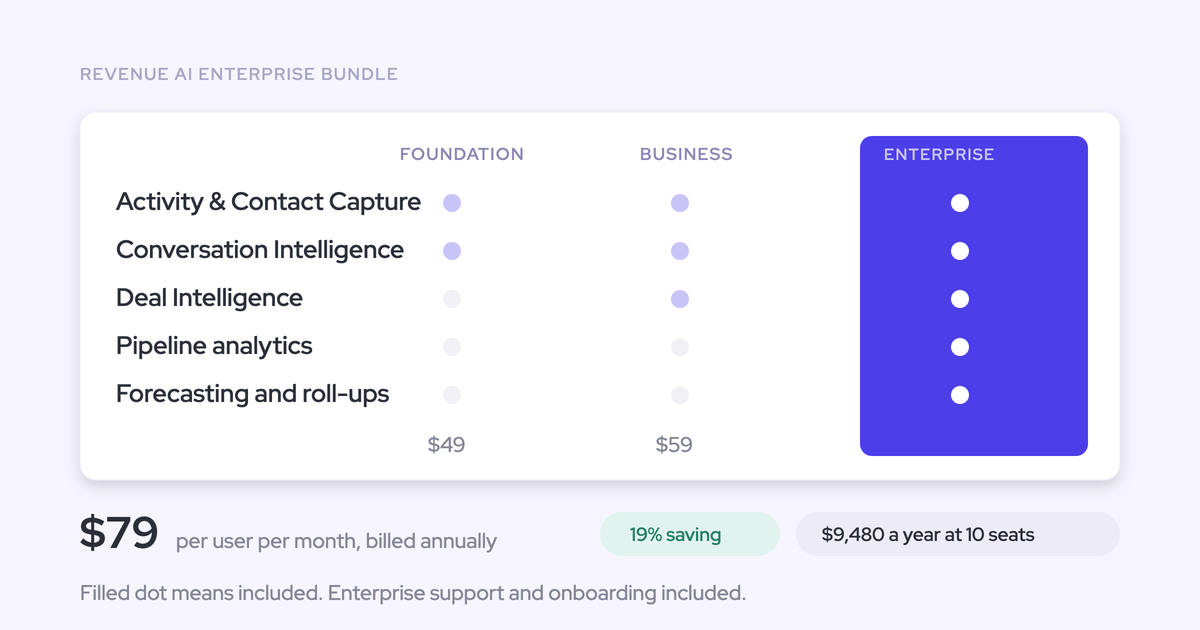
Roll Weflow out in data-foundation order: Weflow Activity & Contact Capture, then Weflow Conversation Intelligence, then Weflow Deal Intelligence & Forecasting. Each layer feeds the next, and a forecast built on incomplete activity data inherits a number nobody trusts.
| Weflow Activity & Contact Capture | Weflow Conversation Intelligence | Weflow Deal Intelligence & Forecasting | |
|---|---|---|---|
| Rollout order | First | Second | Third |
| What it needs first | The technical session and IT consent | Calendar access from capture, and a first sign-in per rep | Activity mapped to opportunities, and an agreed forecast cadence |
| What reps do | Nothing | Sign in once | Submit forecasts on the cadence you set |
| When it typically goes live | Together with conversation intelligence, about two weeks into rollout | About two weeks into rollout | After capture has run, with the AI projection ready 48 to 72 hours after history import |
| When it starts paying | The day users are enrolled | From the first recorded call | Once enough forecast cycles have run to compare predicted against actual |
Why Weflow Activity & Contact Capture goes live first
Weflow Activity & Contact Capture asks nothing of reps and starts writing to Salesforce the day you enable it. Everything downstream depends on it.
Weflow Conversation Intelligence also needs it, because the notetaker is scheduled from the calendar events capture connects. Capture and conversation intelligence typically go from implementation to rollout in about two weeks.
One packaging detail catches teams out: call recording lives in Weflow Conversation Intelligence, not in capture. If you want recordings, you need conversation intelligence. That's why Revenue AI Foundation pairs the two.
Why Weflow Deal Intelligence & Forecasting runs on a longer clock
Weflow Deal Intelligence & Forecasting doesn't prove itself in two to four weeks, and we won't pretend it does. Forecasting encodes your operating cadence: who submits, how often, at deal or manager level, and against which quota.
Those are sales leadership decisions. Then the motion has to run for real cycles before anyone can judge whether the predicted number held.
A few specifics shape the timeline:
- Weflow forecasting runs independently of Salesforce forecasting, so your existing Salesforce forecast configuration doesn't carry over. You set it up in Weflow.
- The AI projection needs at least six months of opportunity history. Once that history is imported, the first projection is ready within 48 to 72 hours.
- Very custom forecasting built on non-standard Salesforce objects isn't always feasible, and the trial is where that gets settled.
That's why we offer a three-month paid pilot for forecasting. It gives the roll-up motion time to run a full cycle before you commit.
Running capture first also helps here. By the time your team agrees the forecast design, you already have weeks of clean activity data underneath it.
Switch to Weflow without losing history or doubling activity
When you switch to Weflow, your history comes with you. During cutover, run only one capture engine at a time.
Backfill historical email and meetings into Salesforce
Weflow backfills historical emails and meetings into Salesforce, up to 24 months as an add-on. A backfill draws on your own Salesforce API allowance, so we cap it at 50,000 API calls per company per day, pause at the cap and resume the next day.
That's deliberate. A heavy mailbox history would otherwise crowd out your other integrations for the day. For a team with a lot of history, the backfill runs over several days, up to about a week.
Blacklane is a good reference: we synced four months of their historic emails and meetings, batched over one week to protect their daily Salesforce API limits.
Import recordings from your current conversation intelligence tool
Weflow imports recordings and transcripts from most conversation intelligence tools, either through the vendor's API or from files exported out of the tool. It takes about one to two weeks depending on volume, at no extra cost.
The imported calls stay searchable afterwards. A question about how an objection was handled last quarter still gets answered after you move, so your call library doesn't become a folder nobody opens.
Run Weflow alongside Einstein Activity Capture or Clari during cutover
Two capture engines running against the same mailboxes create duplicate activities. Pick one capture layer and let everything else read from Salesforce.
Einstein Activity Capture is typically disabled during Weflow onboarding, because Weflow takes over the job.
Clari is different. Clari reads activity from Salesforce, so you can run Weflow for capture and keep forecasting in Clari on cleaner Weflow-captured data. What breaks things is switching on both captures, not running both products.
The same logic applies to a separate notetaker writing its own meeting record:
"Because, obviously, if you record a meeting, it's not another meeting. It's the same meeting."
How to tell Weflow is working after week two
Measure what Weflow writes into Salesforce, and catch the known week-two issues before reps turn them into a verdict on the tool.
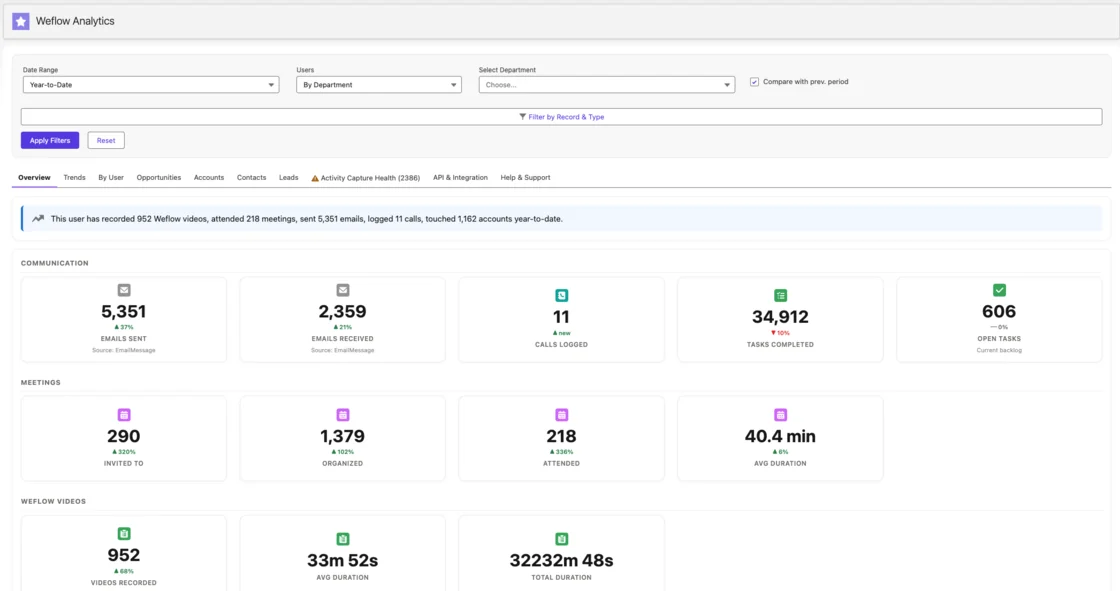
Measure what Weflow writes, not how often reps log in
Login rate is the wrong metric for Weflow Activity & Contact Capture, because capture works best when nobody opens it. A falling login count can mean the tool is doing exactly its job.
Track these instead:
- Activity still being written per user, week over week, so a user who silently stopped capturing shows up fast.
- Record completeness, the share of leads, accounts and opportunities with emails, meetings and contacts logged. Blacklane reached 96%.
- Recording coverage, including licensed users who have never signed in. They show as external in the admin view and look allocated, so check them by name.
Catch the week-two issues before reps lose trust
These are the issues we see surface in the second week. Each has a known cause and fix, and fixing them early keeps a support question from becoming a story on the sales floor.
| What reps see | Cause and fix |
|---|---|
| Salesforce says "your email is not connected" | Salesforce prompts each user to link their mailbox and doesn't know about server-side capture. Tell reps up front it's expected, and show them the Outlook add-in or Chrome extension, which confirms what logged and where. |
| A deal shows no activity while the rep is working it | A calendar event links to one opportunity and falls back to the account when several are open. Weflow prefers the opportunity where the contact holds a contact role, so switch on automatic opportunity contact role creation, and let reps move activity in the add-in. |
| Rescheduled or moved meetings don't update | The integration user can create events but not update them. Grant update rights on Event and Task, then retest by moving and deleting a meeting. |
| One user's email isn't captured at all | The user sits outside the Google group or Entra scope, or their email address differs between Microsoft and Salesforce. Add them to the group and check for the warning icon in the configuration. |
| A rep's calls aren't recorded | The rep has a license but has never signed in to Weflow, so the notetaker doesn't join. Have them sign in once. |
The second row deserves extra attention, because it's the one that turns into "the tool doesn't work". The account timeline in Weflow shows activity logged to child opportunities, so managers still see the full picture. For accounts running renewal and expansion in parallel, separate capture lanes by opportunity type.
What a Weflow implementation costs at your contract size
Weflow implementation is a $5,000 package, waived when your annual spend exceeds $20,000. That's a published threshold, not a negotiation, so most teams of any real size get implementation included.
Paid contracts start at 10 seats, billed annually, and you have two ways to evaluate before committing.
| 14-day trial | Three-month paid pilot | Paid contract | |
|---|---|---|---|
| Scope | One team of five to ten people, or one or two users | Forecasting, or any evaluation two weeks can't cover | Your full rollout, from 10 seats |
| What's included | White-glove setup by our implementation team on your own Salesforce, with your real activity | The first three months of a multi-year agreement, with an opt-out at the end | Onboarding run by Weflow's customer success team, with a managed-service option |
| Cost | Free | A small bill for three months | Per-seat pricing, from $19 per user per month for a single product or $49 for Revenue AI Foundation. The $5,000 implementation package is waived above $20,000 annual spend |
| Best for | Proving Weflow Activity & Contact Capture and Weflow Conversation Intelligence | Proving Weflow Deal Intelligence & Forecasting over real cycles | Teams that have proven fit and are ready to roll out in waves |
| Length | 14 days | Three months | Annual, with multi-year terms available |
Some vendors sell rollout as a separate services project, and those projects have real structure. Gong sells Gong Forecast rollout as a fixed-scope services project of up to 22 hours, used within 60 days, with Gong's team building forecast boards for each line of business. Deploying Salesforce Agentforce through Salesforce professional services or a partner is quoted in the hundreds of thousands of dollars.
With Weflow, the implementation cost is a known number before you sign, and above the threshold it's zero.
See how Weflow captures activity, updates Salesforce fields from calls, and rolls up your forecast. Book a 30-minute demo.
Frequently asked questions about Weflow implementation
Can we start with a handful of users before rolling out to the whole team?
Yes, through the trial. Weflow's paid contracts start at 10 seats, so a team that wants to try Weflow with one or two people, or with one team of five to ten, uses the 14-day trial rather than buying a small seat count.
Can Weflow's commercial terms follow a phased rollout?
Weflow's packaging is built for phased product rollout. You can start on Revenue AI Foundation, with capture and conversation intelligence, and expand into deal intelligence and forecasting for roughly $10 more per user per month at each step, rather than signing a separate contract. Paid contracts start at 10 seats.
What does the 14-day Weflow trial include compared with the three-month paid pilot?
The 14-day trial includes white-glove setup by our implementation team on your own Salesforce, and it proves Weflow Activity & Contact Capture and Weflow Conversation Intelligence on your real meetings and emails. The three-month paid pilot is contractually the first three months of a multi-year agreement, with an opt-out at the end. We built it for forecasting, which needs real forecast cycles to prove itself.
Can our Microsoft admin install Weflow without a Salesforce user?
Your Microsoft admin needs to reach Weflow's admin console, which means signing in with a Salesforce user. A temporary Salesforce license works and can be deactivated afterwards without affecting capture. The quickest alternative is a screen-share where your Microsoft admin takes control of a Weflow admin's session.
What Salesforce permissions does the Weflow integration user need?
The Weflow integration user runs on a least-privilege permission set without Modify All Data. It needs full access to Event and Task, including every field and record type it writes. In orgs with Private org-wide defaults, it also needs Modify All Records on Account, Opportunity and Contact.
Who decides the recording consent flow, and what are the options?
You decide the recording consent flow with your legal team, before rollout. Weflow's notetaker supports opt-out, opt-in, or no consent flow, with a notice in the meeting chat that links to stop the recording and an optional pre-meeting email. When a rep records with the Weflow desktop app instead of the notetaker, there's no automated consent flow, and the rep obtains consent from participants.
Where does Weflow store our data during and after implementation?
Weflow stores your data in the region where your Salesforce instance sits, so a Salesforce org hosted in Europe keeps its Weflow data in Europe. Captured activity lands in native Salesforce objects you own. Call recordings live in Weflow's storage, kept for as long as you subscribe by default, and you can have them deleted on a schedule such as every 30 days.
What happens if the admin who set up Weflow leaves?
Weflow configuration lives centrally in the admin console, and recording follows team membership, so coverage doesn't depend on one person remembering to add new joiners. Document your capture scope, exclusions and field mappings in the mutual action plan during onboarding. Whoever inherits the setup can then see who is captured and why.
Does Weflow work if we aren't on Salesforce?
No. Weflow works exclusively with Salesforce and doesn't support HubSpot, Dynamics or other CRMs. If your team isn't on Salesforce, a Weflow implementation isn't the right project for you.