Weflow Conversation Intelligence licenses: Full, lightweight, and view-only, and who needs which
Learn which Weflow Conversation Intelligence license fits each user: full, lightweight, or view-only.




Weflow is the Revenue AI Orchestration platform for sales, customer success, and RevOps teams. Built for Salesforce teams, we offer these three license types within Weflow Conversation Intelligence so you can separate recording needs from access to the call library.
Choose a full recorder license ($39/user/month) for people who record calls and work with conversation data in Salesforce. Use a lightweight license for non-Salesforce users who need the AI notetaker ($39/user/month), and view-only access (free) for people who consume recordings rather than create them.
Start with each person’s workload. An AE and a CSM may need the same recording capabilities. Two sales managers may need different access because one records customer meetings while the other only reviews the team’s calls. Buying by title misses that distinction and creates paid seats nobody uses.
What does each Weflow Conversation Intelligence license include?
Weflow Conversation Intelligence separates full recording and Salesforce workflows, lightweight AI notetaker access, and view-only consumption. A full recorder license covers Conversation Intelligence, not every Weflow product.
| Capability and purpose | Full recorder | Lightweight | View-only |
|---|---|---|---|
| Primary workload | Record customer conversations and use the resulting intelligence in Salesforce. | Record meetings as someone who doesn't use Salesforce. | Review conversations and consume shared intelligence. |
| Core access |
| AI notetaker access without the rest of the platform. | Access to recordings, summaries, transcripts, and available views and analytics, subject to permissions. |
| Allocation reason | The person creates conversation data and needs the Salesforce-connected conversation workflows. | The person needs a recorder without the broader Salesforce workflows. | The person needs to learn from conversations without a paid recorder seat. |
The standard Conversation Intelligence seat includes the desktop app and Mobile Copilot without a separate license charge. You can record online meetings from your computer or capture in-person conversations on mobile.
Weflow Activity & Contact Capture and Weflow Deal Intelligence & Forecasting remain separate products unless you purchase a bundle. Full recorder doesn't mean full-platform access.
Which Weflow Conversation Intelligence license fits each person?
Assign the least extensive license that supports the person’s actual work. Recording responsibilities matter more than seniority or department.
| Representative role | Required actions | Recommended license | What changes the recommendation? |
|---|---|---|---|
| AE or account manager | Record customer calls and turn conversations into Salesforce updates. | Full recorder. | A person who only reviews other people's calls has a consumption workload. |
| CSM | Record onboarding, renewal, and account conversations; use the outcomes in Salesforce. | Full recorder. | A non-Salesforce user who only needs the AI notetaker fits lightweight access. |
| Non-Salesforce recorder | Record meetings without the broader Salesforce workflows. | Lightweight. | The person starts owning Salesforce-connected conversation work. |
| VP or sales manager | Watch calls and review available dashboards. | View-only. | The manager also needs to record their own customer meetings. |
| Product, marketing, support, or enablement consumer | Review customer conversations and learn from shared recordings. | View-only. | The person needs to create recordings rather than consume them. |
| RevOps or enablement administrator | Own configuration, field mappings, templates, or scorecards. | Separate administrative requirements from the recorder/viewer allocation. | Watching calls is only part of the role; configuration is a different workload. |
For example, a team with 12 AEs and eight CSMs who record customer calls needs 20 full recorder licenses. If another 15 people only review conversations, allocate view-only access to those people rather than another 15 recorder seats.
Weflow provides free view-only licenses up to the number of recording licenses held. That allowance makes the call library useful beyond sales without making every consumer a paid recorder.
Mixed responsibilities deserve attention. A manager who reviews calls all week but also records executive customer meetings still needs recording access.
How do you control access to Weflow recordings?
A Weflow license determines what someone can do; permissions determine which conversations they can access. Giving someone a free viewer seat doesn't mean giving them the whole call library.
Weflow writes conversation summaries and full transcripts into a Salesforce recording object. Access to that object is a confidentiality decision because the record contains what people said, not just evidence that a meeting happened.
| Access-control mechanism | What it governs | Configuration boundary |
|---|---|---|
| Salesforce permission sets, field-level security, and role hierarchy | The underlying Salesforce access model that Weflow inherits. | Design access around underlying permissions, not just what the Salesforce interface displays. |
| Salesforce recording-object access | Access to stored conversation summaries and transcripts. | Include this object in your conversation-confidentiality review. |
| Salesforce list views and Lightning component visibility | What users can reach through those Salesforce interface elements. | Weflow doesn't inherit these interface restrictions. Configure corresponding restrictions in Weflow separately. |
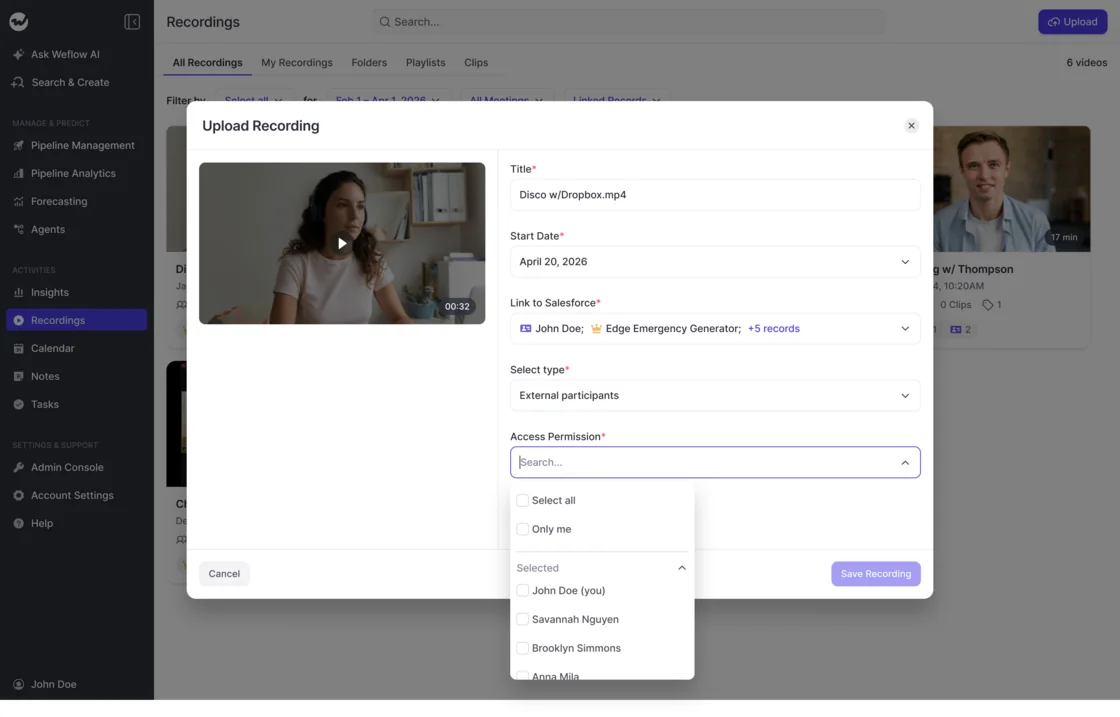
| Access permissions on a manually uploaded recording | The selected audience for that upload. | The upload dialog offers Only me and named-user selections. |
When you upload a recording, you can set its audience alongside its Salesforce links. Keep those decisions separate: linking a call to an opportunity describes its context, while the access selection controls its audience.
Test visibility with representative users before opening access across departments:
- Choose a recorder, a manager, and a cross-functional viewer with different access requirements.
- Give each person a conversation they should be able to open and one they shouldn't.
- Test access in Weflow and access to the corresponding conversation text in Salesforce.
- Correct the underlying permissions or Weflow configuration wherever the result differs from your intended policy.
How much do Weflow Conversation Intelligence licenses cost?
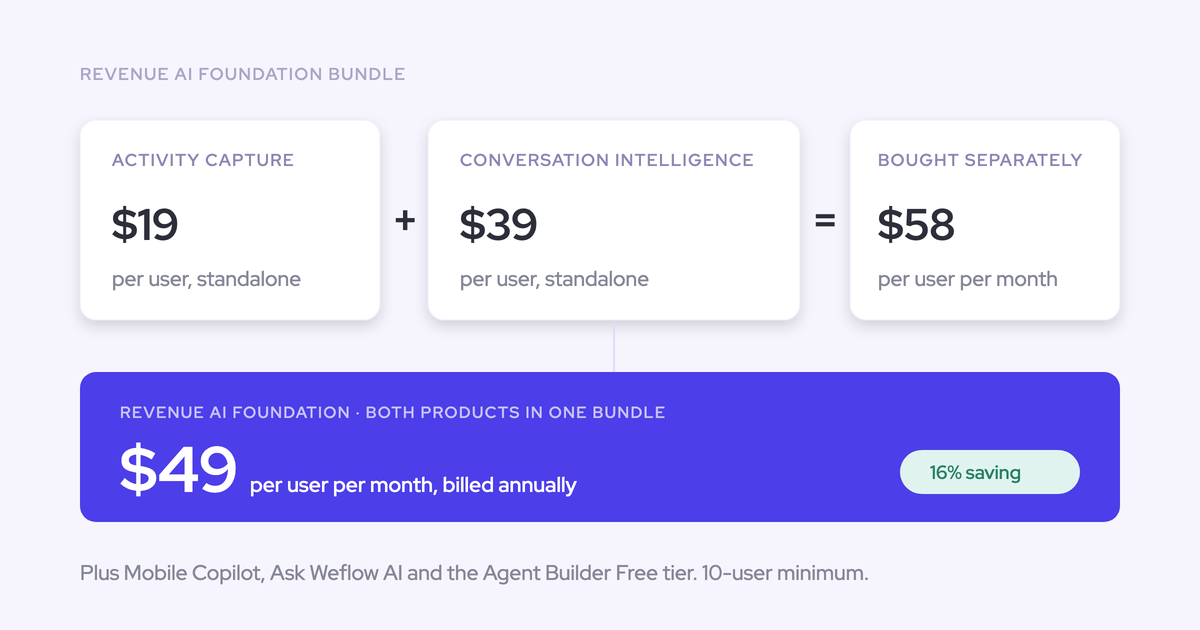
Weflow Conversation Intelligence costs $39 per user per month, billed annually. Build your budget from the paid recording population, then account for the free viewer allowance and any separately purchased automation capacity.
How do you calculate Weflow Conversation Intelligence seat costs?
A standard Weflow Conversation Intelligence seat costs $468 per year at list price. Weflow bills annually with a 10-user minimum.
Using the team above, the seat calculation looks like this:
| License type | Quantity | Billing basis | Annual subtotal | Allowance or minimum |
|---|---|---|---|---|
| Full recorder | 20 | $39 per user per month × 12 months. | $9,360 | The paid population exceeds the 10-user minimum. |
| Total | 35 people | 20 paid recorder seats. | $9,360 | Standalone Conversation Intelligence at list price. |
If your recorders also need other Weflow products, compare the bundle that matches their work:
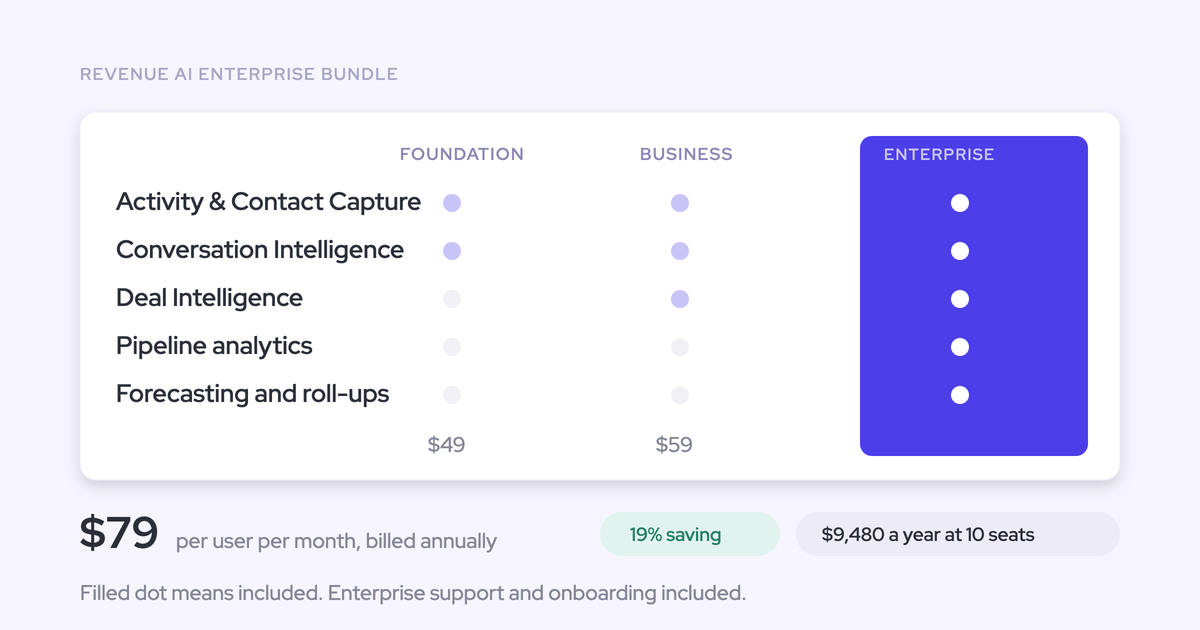
- Revenue AI Foundation, $49 per user per month: Weflow Activity & Contact Capture plus Weflow Conversation Intelligence.
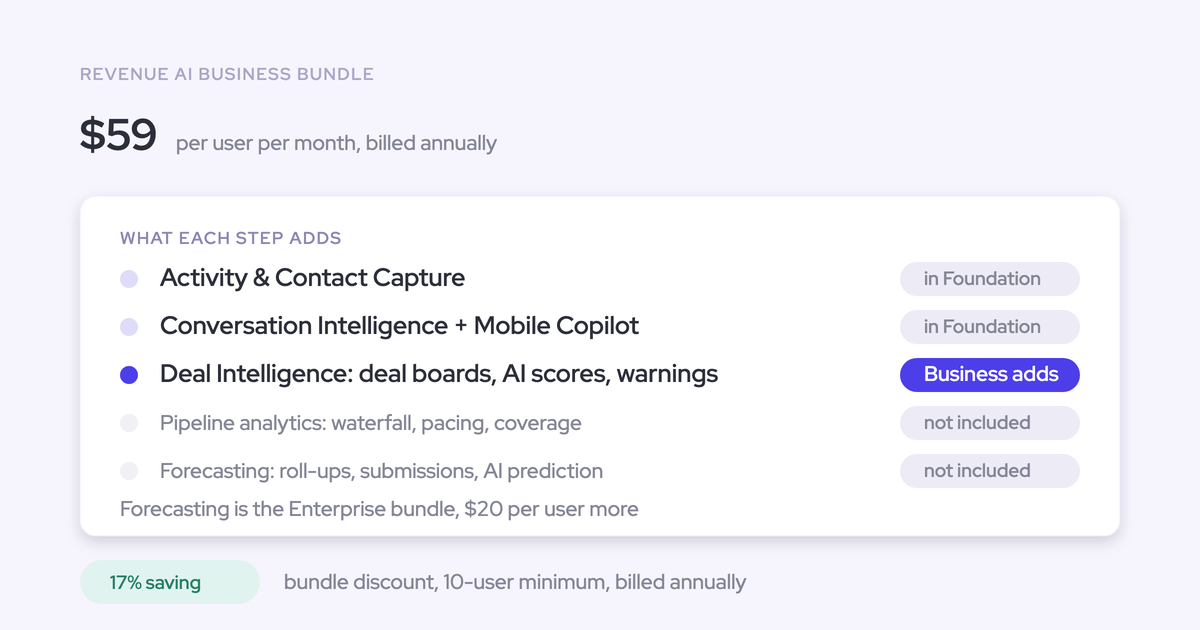
- Revenue AI Business, $59 per user per month: Revenue AI Foundation plus Deal Intelligence.
- Revenue AI Enterprise, $79 per user per month: All three Weflow products, including Forecasting.
These bundle prices use annual billing. Buy the additional product because someone needs its workflows, not because their title suggests they might use it later.
When does Weflow Agent Builder add usage charges?
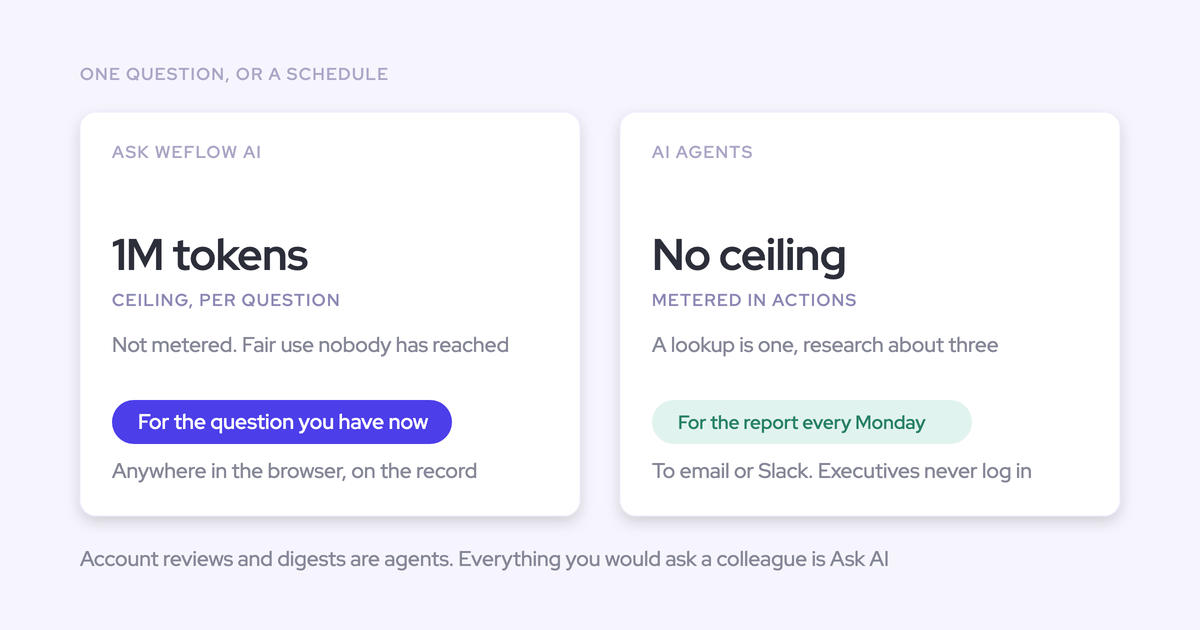
Weflow Agent Builder has a separate workspace-level action allowance. Ordinary Conversation Intelligence usage doesn't consume a metered recording, transcript, or prompt budget.
| Workload or tier | Charging basis | Allowance | Budget implication |
|---|---|---|---|
| Recordings, transcripts, AI templates, and Ask Weflow AI prompts | Included in the seat. | No usage caps or token metering. | More conversation usage doesn't add consumption charges. |
| Agent Builder Free | Included in every Weflow plan and bundle. | 25 agent actions per workspace per month. | The allowance belongs to the workspace, not each seat. |
| Agent Builder Growth | $299 per workspace per month. | 500 agent actions per month. | A separate automation budget. |
| Agent Builder Scale | $999 per workspace per month. | 2,500 agent actions per month. | More action capacity without per-user pricing. |
| Agent Builder Enterprise | Custom package. | — | Separate from the Conversation Intelligence seat calculation. |
Keep the two budgets separate. Recording more customer calls is seat usage; running Agent Builder workflows draws on an action allowance.
How do you activate Weflow Conversation Intelligence licenses?
Assigning a Weflow Conversation Intelligence license isn't enough to activate the notetaker. Each recorder must sign in once before the notetaker starts joining their meetings.
That distinction matters during rollout. Activity capture can run for an enrolled user who has never signed in, so populated email and meeting records don't prove that conversation recording works.
Before rollout, put these prerequisites in place:
- A Salesforce admin and a Google Workspace or Microsoft administrator for the integration setup.
- The required managed package, integration user, and workspace connection.
- A named owner for recording preferences, consent, templates, and Salesforce field mappings.
- A recorder roster and an access policy for the people consuming calls.
- Add the intended recorders. Assign users or teams to the Conversation Intelligence configuration. Reconcile the selected population with your recorder roster.
- Complete the first sign-in. Have each recorder open Weflow once. An allocated license without that sign-in won't start the notetaker.
- Test an eligible external meeting. The notetaker only attempts to join meetings with at least one attendee outside the configured internal domains. Admit it from the meeting lobby where required, then look for the processed recording.
- Inspect the Salesforce output. Test summaries and field updates against the objects your conversations map to. A recording in Weflow doesn't prove that every Salesforce write succeeded.
- Test the consumer's access. Have a viewer open an allowed recording and test a restricted one. Use the intended access policy as the acceptance criteria.
You can add whole teams to the Conversation Intelligence recording configuration. That reduces individual setup work, but team membership still needs to match the people you intend to record.

Test Salesforce writes before broad rollout. Weflow can't replay a failed post-call summary or field update after you fix the configuration; recovery requires copying the surviving content across manually.
Recording consent also depends on the client. The desktop app doesn't run the notetaker's automated consent flow. Reps must obtain participant consent when recording from the desktop app.
Keep the roster current after launch:
- Joiners: Assign the appropriate access and complete a first-recording test.
- Leavers: Remove access through your offboarding process and update the roster.
- Role changes: Reassess recording, consumption, and administrative responsibilities separately.
- Monthly review: Compare intended recorders with actual recording activity. Keep this internal review separate from changes to purchased seats.
See how Weflow captures activity, updates Salesforce fields from calls, and rolls up your forecast. Book a 30-minute demo.
Weflow Conversation Intelligence license FAQs
Product entitlements and data ownership remain separate from the person holding a license. These distinctions matter when you finalize access and offboarding policies.
What happens to conversation data when you remove Weflow licenses?
Weflow writes conversation summaries and full transcripts into a Salesforce recording object. That stored text remains in your CRM after the subscription ends, with access governed by Salesforce permissions.
Video recordings remain stored by Weflow. The ownership statement about conversation text in Salesforce doesn't extend to continued access to Weflow-hosted video.
Does Weflow Activity & Contact Capture include call recording?
No. Weflow Activity & Contact Capture logs emails, meetings, and contacts; recording belongs to Weflow Conversation Intelligence. Choose Conversation Intelligence for people who need to record calls, or Revenue AI Foundation when they also need activity and contact capture.