How to Build the ROI Case for a Revenue AI Platform: Selling Time and Forecast Accuracy
Learn how to build a Revenue AI ROI case around selling time, forecast accuracy, and budget approval.


The revenue AI business case that gets approved usually claims less, not more. Instead of leading with the biggest possible number, start with selling time. Then put forecast accuracy second, backed by customer cases and a pilot long enough to prove it.
Next, add the cost side finance actually checks right next to it: the whole invoice, no second meter, and value that shows up in weeks, not quarters.
The hard part is putting a number on it that your CFO will sign off on, and your own RevOps lead won't pick apart in the first review.
Weflow is the Revenue AI Orchestration platform for sales, customer success, and RevOps teams. The hours it returns to your reps go back into working deals, which is the whole point of AI-powered deal execution with Weflow.
This guide shows you how to build the case around those hours, what to say about forecasting, and how to answer the alternatives finance will raise.
Which revenue AI returns a CFO will actually sign off on
A CFO signs off on selling time first, forecast accuracy second, and win rate last, because that's the order in which each return can be proven.
Here's how each one gets measured, and how it gets challenged.
| Selling time | Forecast accuracy | Win rate | |
|---|---|---|---|
| What you measure | Admin hours per rep per week, and the share of activity that reaches Salesforce | Forecast call versus closed-won, per rep and per quarter | Closed-won divided by closed opportunities, before and after |
| Where the evidence comes from | Your own Salesforce activity data and a rep time baseline | Your forecast history, plus named customer cases | Your closed deals over several quarters |
| How soon it shows | Weeks after go-live | After history is imported and at least one forecast cadence has run | Several quarters, once enough deals close |
| How RevOps or the CFO challenges it | "Is that net of checking the AI's output?" | "Was it the tool, or a better cadence?" | "Was it the tool, the market, the pricing or the new reps?" |
| Where it belongs in the case | The headline ROI line | The second line, with a pilot plan attached | Upside or appendix only |
Leading with win rate flips this order. It produces the biggest number, and that's exactly why your finance team discounts it.
You've probably watched the AI SDR wave do the same thing: a great pitch, priced against a salary, that burned through the TAM.
Our co-founder summed up the lesson:
"Everybody buys the value proposition. But if the product doesn't deliver repeatedly on the value proposition, it's just not yet a real, repeatable product."
Lead the business case with selling time per rep
Selling time goes first because it's the only return you can measure in your own system before and after, and convert directly into capacity.
Build it in three steps: measure the baseline, count only net hours, and translate those hours into customer conversations.
Measure today's admin hours and activity coverage first
Your baseline has two halves: the hours reps spend feeding the CRM, and the share of activity that actually lands there. Most teams can't state either, because nobody tracks admin time line by line.
Weflow Activity & Contact Capture writes emails and meetings into native Salesforce objects in your own org. From day one, activity volume and coverage become numbers you can report on yourself, without a vendor dashboard needed.
What to measure at baseline:
- Emails and meetings logged per rep per week in Salesforce today.
- The share of external meetings that have a logged activity on the right opportunity, not just the account.
- Hours per rep per week spent on CRM updates, call notes, and follow-up writing, from a short rep survey or a calendar sample.
- Open opportunities with an empty next step or a past close date.
- Contacts in active deals that don't exist in Salesforce.
Once capture is running, the first two become hard numbers. The rest give you the "before" you'll compare against.
Count hours saved net of checking the AI's work
Only count the hours that remain after a human has verified the AI's output. If the AI needs checking, it's the first thing your RevOps lead will ask about.
A RevOps practitioner described what happens when the review burden goes uncounted:
"And suddenly you need for an email that would have taken you five minutes, fifteen minutes because you let it cross check several times, still need to read it."
One buyer told us they expect automation to save each rep three to five hours a week. Treat figures like that as a hypothesis for the pilot to test, never as a number to write into the case on day one.
| Gross saving | What you subtract to get net |
|---|---|
| Time no longer spent logging emails and meetings | Nothing, if capture runs server side with no rep action |
| Time no longer spent writing call notes | Time reps spend reading and correcting the AI summary |
| Time no longer spent updating opportunity fields | Time spent reviewing AI-suggested field values before accepting them |
| Time no longer spent drafting follow-up emails | Time spent editing the draft before sending |
| Admin work reps were skipping anyway | All of it: hours nobody spent can't be saved |
Weflow makes the review step measurable. AI field updates run either in manual review mode, with the suggested value shown next to the current Salesforce value, or fully automatically.
Most teams start in review mode, track how often reps change the suggestion, and switch to automatic for the fields where they've stopped changing it. That gives you a defensible net number instead of a guess.
Turn returned hours into customer conversations, not headcount cuts
Frame returned hours as more customer conversations for the reps you already have. A case built on cutting headcount kills rep adoption before rollout even starts.
Convert hours into pipeline using your own assumptions:
- Start with net hours returned per rep per week, from the pilot.
- Decide what share of those hours you expect to go into customer time, then divide by the hours one meeting takes, including prep. That gives extra meetings per rep per week.
- Multiply by your meeting-to-opportunity rate to get extra opportunities per rep.
- Multiply by your average deal size and win rate to get extra pipeline and bookings per rep.
- Multiply by the number of reps in scope.
Every input in that chain is yours, which is exactly why finance will accept it.
Put forecast accuracy second and back it with evidence
Forecast accuracy belongs in the case, but only if you can show what caused the improvement and give it enough time to prove itself.
You're the one who takes the number into the boardroom, so it has to hold up there too.
Cite forecast results as customer cases, never as guarantees
Use named customer outcomes as cases, and always say what produced them. Forecasts improve when the pipeline data is complete, and a regular cadence runs on top of it. The tool alone doesn't do it.
- Zeotap forecasts the quarter within 7%: Before Weflow, Zeotap already ran a tight weekly, monthly and quarterly cadence. But AEs only partially updated opportunities, next steps and close dates went unfilled, and leading indicators were missing. The accuracy came once the data underneath the cadence was complete.
- HolidayCheck cut past-due opportunities by about 75%: This came alongside better Salesforce data quality, and it means fewer deals sitting in the forecast with close dates already behind them.
Your board will also ask why it should trust a single number. Weflow Deal Intelligence & Forecasting doesn't give it one. It runs three forecasts side by side:
- A weighted forecast from your historic stage close rates.
- The rep and manager roll-up.
- An AI projection built on more than 50 deal-level signals and up to two years of history, which returns a landing range.
Where the three agree, you have a credible range. When they don't, you know exactly what to discuss on your forecast call. That range is what you should take to the board.
Prove forecasting with a three-month paid pilot, not a trial
A two-week trial can't prove a forecast. The instance has to be configured and run at least one full roll-up cycle before anyone can judge the results.
That's why we offer a three-month paid pilot, written as months one to three of a multi-year agreement, with an opt-out at the end. You get a real way out and a small bill. We get a multi-year term, where you'll also find better pricing.
How the pilot runs:
- History import: We import your Salesforce opportunity history at install: twelve months by default, more on request where field history allows.
- First AI projection: The projection is ready 48 to 72 hours after import and needs at least six months of history. When it isn't confident in a range, it shows none and says why.
- First cadence cycle: Reps and managers submit through a full forecast period, and you compare the three methods against each other.
- Opt-out decision: At the end of month three, you compare forecast calls against closed-won and decide whether to continue.
Procurement teams tend to prefer this to an unpaid proof of concept. After a long evaluation, a free pilot with no commitment attached is hard to justify. A paid one with an exit isn't.
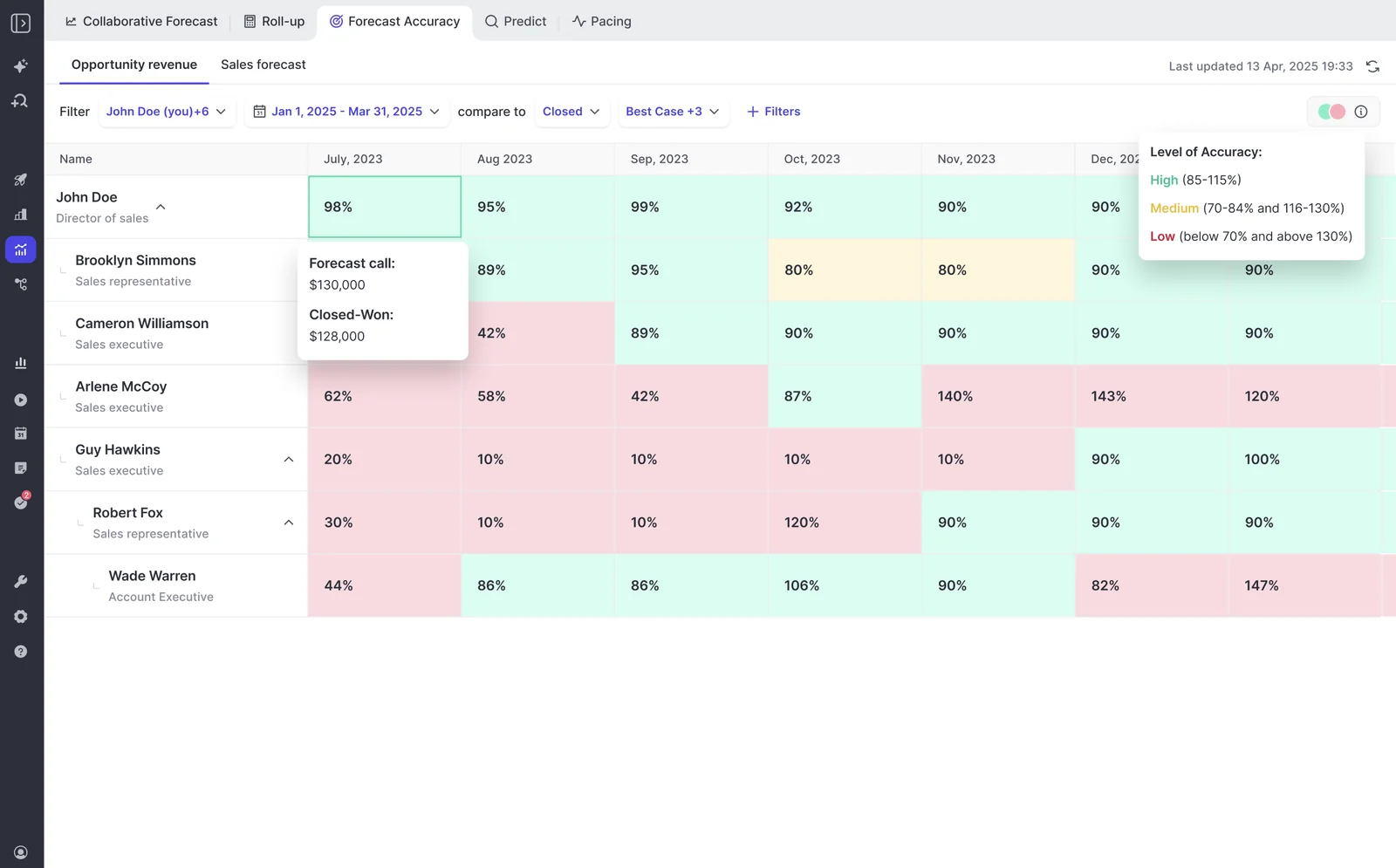
During the pilot, Weflow's forecast accuracy report grades each rep's forecast against what closed, month by month:
Leave win rate out of your headline ROI number
Win rate is the hardest return to prove and the first one finance challenges. Use it as supporting evidence of qualification discipline, not as your headline. Too many things move it at once: pricing, market, rep mix, product.
Win rate still deserves a place, as long as you're honest about what moved it.
Zeotap's win rate rose 12%. Zeotap runs custom pipeline views and templates for weekly sales meetings and pipeline inspections, and its AEs complete a custom ICP scorecard to sharpen discovery and qualification.
The win rate came from qualification and review discipline, which Weflow made easier to run. It isn't a calculation the tool produced on its own.
Put win rate in the appendix or label it as upside. If the case only pays back with win rate included, it doesn't pay back.
What a Weflow invoice looks like for your team
You can see the whole Weflow invoice up front. AI features are included in the seat price, and only one component is metered. That second consumption charge is what makes most AI budgets indefensible. We built our pricing to avoid that.
"We want to make sure that you have predictable pricing, and it is very, very hard to achieve in the age of AI."
— Philipp Stelzer, Co-founder and Chief Product Officer of Weflow
What every Weflow seat includes before you pay extra
AI usage inside the products you buy carries no usage caps and no metering. What you get depends on the product:
- Every Weflow product and bundle includes Ask Weflow AI and the Agent Builder free tier of 25 agent actions a month.
- Weflow Conversation Intelligence seats include unlimited recordings, unlimited transcripts, AI summaries, AI field updates and Mobile Copilot.
- AI templates and Ask Weflow AI prompts run without a usage meter.
- Unlimited view-only licenses come with every plan, so leadership, enablement and product teams don't consume paid seats.
- There are no platform fees and no implementation fees.
Call recording sits in Weflow Conversation Intelligence, not in Weflow Activity & Contact Capture. If you want meetings recorded, you need Conversation Intelligence. That's why the Revenue AI Foundation bundle pairs the two.
Weflow list prices by product and bundle
We publish list prices on our website, so finance can build the invoice before anyone books a demo.
| Product or bundle | What it contains | List price per user per month |
|---|---|---|
| Weflow Activity & Contact Capture | Email, meeting and contact capture into Salesforce | $19 |
| Weflow Conversation Intelligence | Recording, transcripts, AI summaries, AI field updates, coaching | $39 |
| Weflow Deal Intelligence & Forecasting | Deal views, scoring, warnings, pipeline analytics, forecasting | $39 |
| Weflow Revenue AI Foundation | Activity & Contact Capture plus Conversation Intelligence | $49 |
| Weflow Revenue AI Business | Foundation plus Deal Intelligence | $59 |
| Weflow Revenue AI Enterprise | Business plus the full forecasting layer | $79 |
All plans have a minimum of 10 users and are billed annually.
Revenue AI Business includes Deal Intelligence (table and Kanban views, AI deal and account scoring, warnings and buying committee intelligence) without pipeline analytics and forecasting. Revenue AI Enterprise adds the full forecasting layer.
For a 50-rep team at list price, before any negotiated discount, the annual seat cost is:
- Revenue AI Foundation: 50 × $49 × 12 = $29,400.
- Revenue AI Business: 50 × $59 × 12 = $35,400.
- Revenue AI Enterprise: 50 × $79 × 12 = $47,400.
Agent Builder is the one consumption-priced piece
Agent Builder is the only Weflow product with variable cost, because it's the one that consumes tokens at scale. It's priced per workspace, not per user, and the paid tiers are published. You only cross a tier boundary by buying the next tier.
| Agent Builder tier | Price | Agent actions included |
|---|---|---|
| Free | Included in every plan | 25 per month |
| Growth | $299 per month | 500 per month |
| Scale | $999 per month | 2,500 per month |
| Enterprise | Custom package | Custom |
How adding reps mid-year or forecasting later is priced
Seats you add partway through a term are charged pro rata to the end of that term. You don't have to over-buy at signature or hold hiring until renewal to keep the commercials clean.
Forecasting doesn't have to come first, either. You can start with capture and conversation intelligence and add forecasting later for roughly $10 more per user per month, instead of a separate forecasting contract at $100 to $200 per user per month. If you've just renewed a forecasting tool, that's the route a CFO can approve.
How fast the case pays back and what RevOps carries
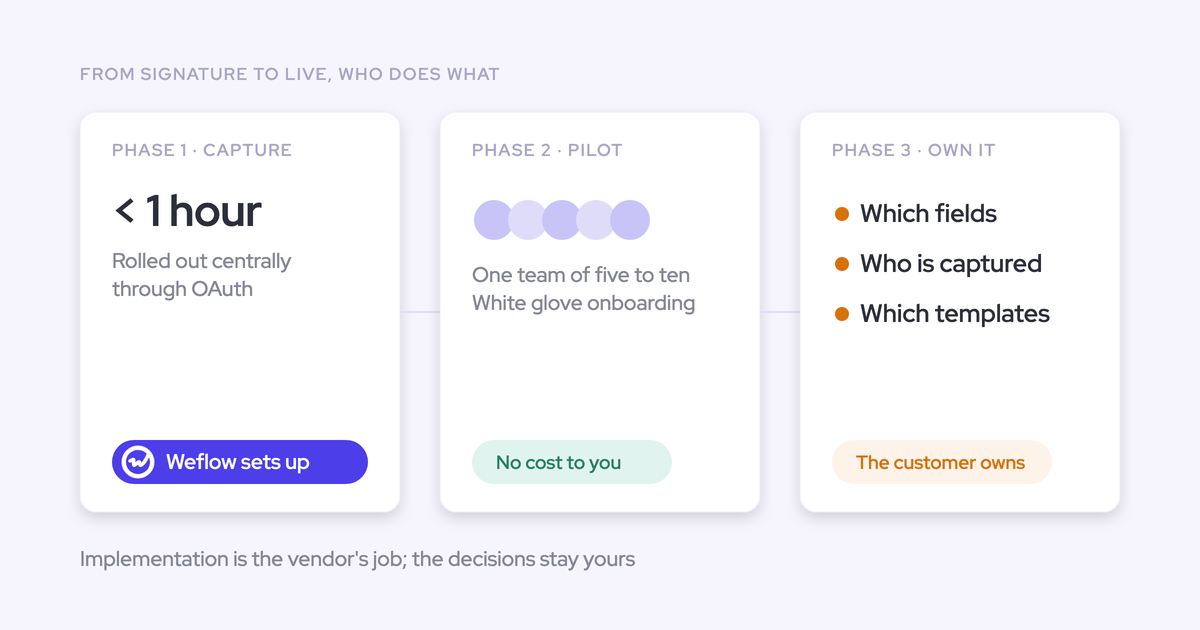
The technical work takes under an hour. What usually slows things down is internal alignment and forecasting decisions, so plan your RevOps time around those.
Who from your team has to be in the setup session
You need two admins in one session, then a handful of decisions from the people who own your process:
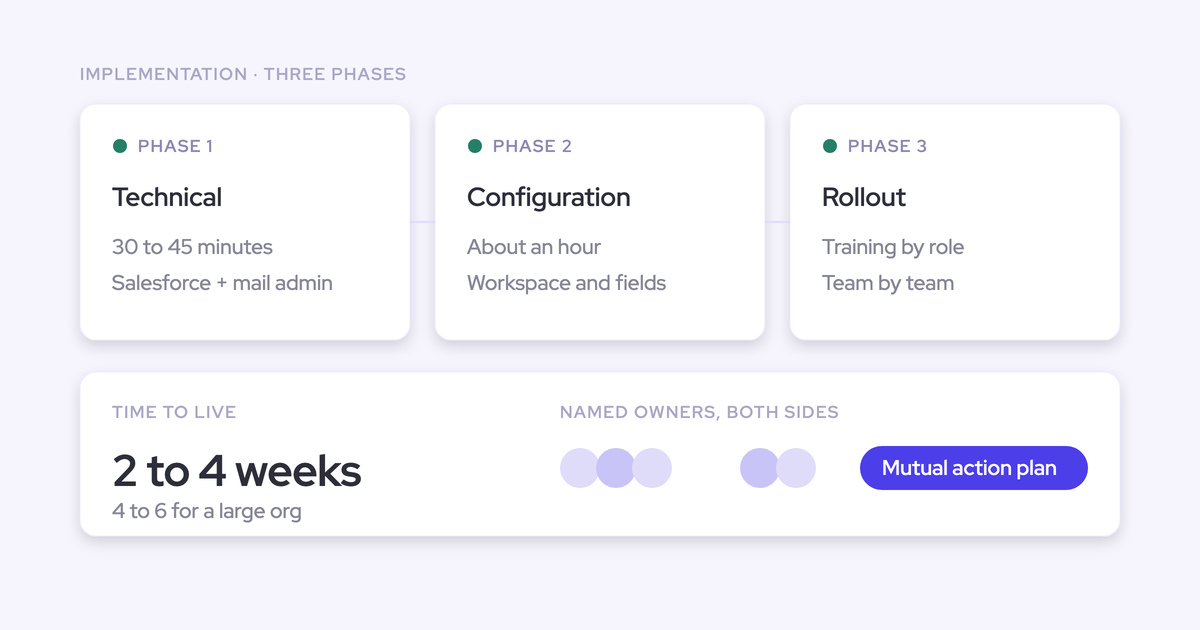
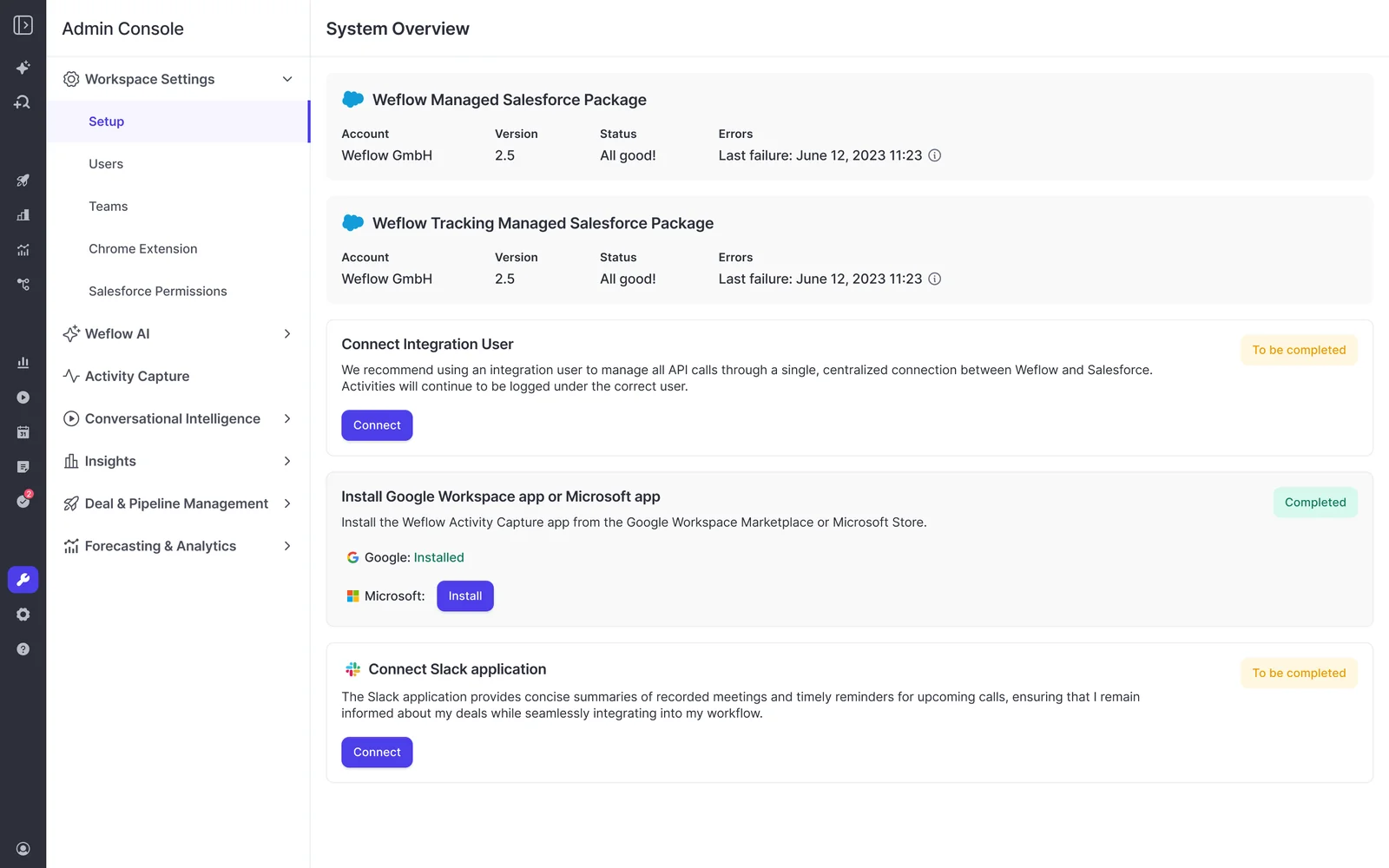
- Salesforce admin: Installs the managed packages and connects the integration user, in a 30 to 45 minute technical session.
- Mail admin (Microsoft or Google): Installs the mail app centrally in the same session, so capture runs server side and no rep has to install anything.
- RevOps lead: Decides which sales methodology to score against and which Salesforce fields the AI writes.
- Sales leadership: Confirms team structure and hierarchy, and who joins rollout training.
Getting both admins into the same call is often what turns a one-hour job into a two-week one, because they usually sit on different teams.
Implementation is free. Weflow's customer success team runs it with you against a mutual action plan with named owners on both sides. If your RevOps team is already at capacity, a managed service option has Weflow do the heavy lifting while your team answers questions and unlocks access.
Why selling time shows in weeks and forecasting takes longer
Weflow Activity & Contact Capture and Weflow Conversation Intelligence typically go live in two to three weeks. Forecasting takes longer because it builds an operating cadence: who submits, how often, at deal or manager level, and against which quota.
| Selling-time value | Forecasting value | |
|---|---|---|
| What has to happen first | Technical setup, field mapping, rep sign-in | History import, cadence design, quota and hierarchy setup |
| Typical time to show | Two to three weeks to go live | At least one full forecast cycle after configuration |
| What you can measure | Activity coverage, fields filled, admin hours returned | Forecast call versus closed-won per rep and manager |
| What usually delays it | Getting both admins into the same session | Deciding the cadence and who owns which forecast |
| History it depends on | None | At least six months of opportunity history |
One rollout detail affects your first-month numbers. Each licensed user has to sign in to Weflow once before the notetaker joins their meetings, even though their activity capture runs from day one.
For comparison, Salesforce Agentforce seats are priced aggressively, but deployment through Salesforce professional services or a partner is quoted in the hundreds of thousands of dollars. That services bill, not the seat, is what moves the payback date.
How to answer the CFO's "why not just…" questions
Every alternative finance raises makes sense somewhere, and saying where it fits makes the rest of your case more credible.
Why not hire more reps instead?
Hiring adds cost before it adds capacity. Ramp takes months, tenure is short, and one RevOps leader on our podcast put CAC payback at around 32 months. A new hire can leave before they pay back, while hours returned to existing reps show up within the quarter.
Hiring still makes sense when the constraint is territory coverage (accounts nobody is working at all) rather than time per rep.
Why not turn on the AI already in our stack?
Audit what you already own first. It's free and fast, and half your stack has probably shipped AI features in the last year. Any platform you buy has to beat what's already installed.
The gap is usually the data underneath the AI. When half your meetings are missing, and the fields are empty, the AI gives confident wrong answers. Weflow first builds a complete activity and conversation record in your Salesforce, and its AI works on that.
Turning on existing AI makes sense when your activity and call data are already complete in the CRM.
Why not build it ourselves with AI?
Building wins the decision today but pushes the maintenance bill down the road. One customer's head of finance built a working forecasting interface in weeks. The CRO's question was what would it cost to maintain, compared to building.
What we see most often is teams building dashboards and agents themselves and buying the capture and mapping, because that's the hardest part to build and keep running.
"I think AI should be the opportunity for exploration and for prototyping, but it should not be an area where I'm looking to displace core functionality in the business that I support to drive outcomes and reduce friction, and then from that, pull out a signal from the noise."
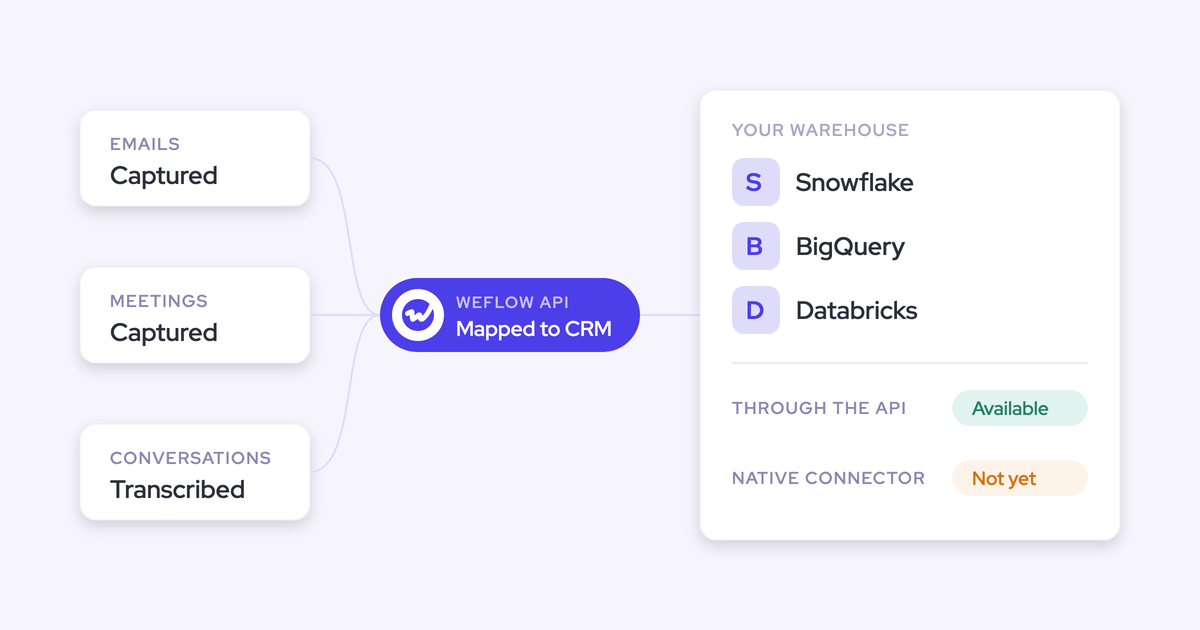
Building fits when the data is already captured and unified, and you need a view or an agent no vendor offers. The Weflow API and MCP server can feed your build with the revenue data Weflow captures.
Route the purchase through the budget line that moves fastest
How you frame and time the purchase decides how fast it gets approved.
Frame the purchase for the AI budget, not the sales tools line
A separate AI budget often carries lighter scrutiny than the sales tools line.
Positioning Weflow as revenue AI rather than sales software is accurate, and it can shorten the path. You'll still need buy-in from the other leaders the purchase touches.
Time the case against your fiscal year turnover
A paid pilot lets you start before the new budget year and convert into the multi-year term once the budget opens.
- About a quarter before fiscal year end: Run your activity and admin-time baseline, and audit the AI you already own.
- Before year end: Start the three-month paid pilot as months one to three of the agreement, on the reps whose numbers you'll cite.
- At the start of the new budget year: Bring pilot results into the case, with net hours and forecast-versus-closed from the first cycle.
- End of month three: Continue into the multi-year term or use the opt-out.
- Through the year: Add seats as you hire, charged pro rata, instead of buying for next year's headcount at signature.
When the ROI case for revenue AI won't hold up
The return from revenue AI scales with customer touchpoints. If deals close in a few clicks, there's not much for the AI to work with, and your case may not hold up. Here's where it gets weaker:
- Transactional, short-cycle sales give the AI too few emails, meetings and stakeholders to add value.
- Teams with less than six months of opportunity history won't get an AI forecast projection until they have it.
- Forecasting setups that keep deal data on highly custom, non-standard Salesforce objects may not be feasible, and we validate that during the trial.
- Teams on a CRM other than Salesforce can't use Weflow, because it works only with Salesforce.
Put the case on one page for your CFO and RevOps
The case that gets signed fits on one page and runs in the same order finance reads it:
- Measured baseline: Today's admin hours per rep and the share of activity reaching Salesforce.
- Net selling hours: Hours returned after review, validated in the pilot.
- Capacity: Those hours converted into meetings, opportunities and pipeline per existing rep, using your own conversion rates.
- Forecast evidence: Named customer cases with the conditions that produced them, plus your three-month pilot plan.
- Win rate: Upside only, with what would drive it.
- The full invoice: Seat price times reps, any Agent Builder tier, and confirmation that nothing else is metered.
- Time to value: Two to three weeks for capture and conversation intelligence, one full cycle for forecasting.
- The alternatives: One line each on hiring, existing AI and building, including where each would fit.
Send it to your RevOps lead before it goes to the CFO. CROs who report high-value AI use cases usually had RevOps build and run them, so if the page holds up with RevOps, it'll hold up in finance.
For the metrics and board framing that sit around this case, get the free CRO Cheat Sheet.
Revenue AI ROI case: FAQ
Will reps actually use a revenue AI platform, or is it for managers?
Reps use a revenue AI platform when it takes work off their week, not when it adds visibility for their manager. The last generation of tools often served the inspector.
KORE Wireless rolled Weflow out across Europe, the Americas, Brazil and APAC with zero adoption friction. When the tool was removed from sandbox beta users for two weeks, they asked for it back:
"The feedback was immediate and unambiguous. Within days the beta users were asking when it was coming back and pushing to get it into production."
— Scott Jones, SVP of GTM Revenue Intelligence & Enablement at KORE Wireless
What happens to our existing tool's contract if we switch?
Start Weflow on a capability your team doesn't already own, so you aren't paying for two of the same thing during an existing vendor's term.
When you do move off a conversation intelligence tool, Weflow imports your recording library through the vendor's API or from exported files, at no extra cost, in about one to two weeks depending on volume. The transcripts land in your Salesforce and stay searchable by Ask Weflow AI.
When does security and data residency review come up?
Security review happens regardless of which budget line the purchase comes from. Weflow stores your data in the region where your Salesforce instance sits; video recordings are the exception, which Weflow holds and streams back. Weflow runs on third-party foundation models, primarily Google Gemini, and customer data isn't used to train them.
Weflow is SOC 2 Type II certified and GDPR compliant, with Zero Data Retention for AI processing. We're working toward ISO 27001, with a target date of December 2026.
Does Weflow work with CRMs other than Salesforce?
No. Weflow works only with Salesforce, and there's no support for HubSpot, Dynamics or Pipedrive.
Should we push for a big discount off list price?
Experienced procurement judges a vendor on the gap between list price and final price, and a huge discount off an inflated list reads as a tactic. Weflow publishes its list prices and offers discounts based on contract size, so the quote starts close to the real number.
Is there a free trial before a paid pilot?
Yes. A free 14-day proof of concept covers Weflow Activity & Contact Capture and Weflow Conversation Intelligence. Forecasting needs the three-month paid pilot, because a forecast can't be judged until a full cadence cycle has run.