Weflow Revenue AI Enterprise Bundle: Price, What It Includes, and Who It Is For (2026)
Learn Weflow Revenue AI Enterprise price, features, and when to choose it over Business or Foundation.


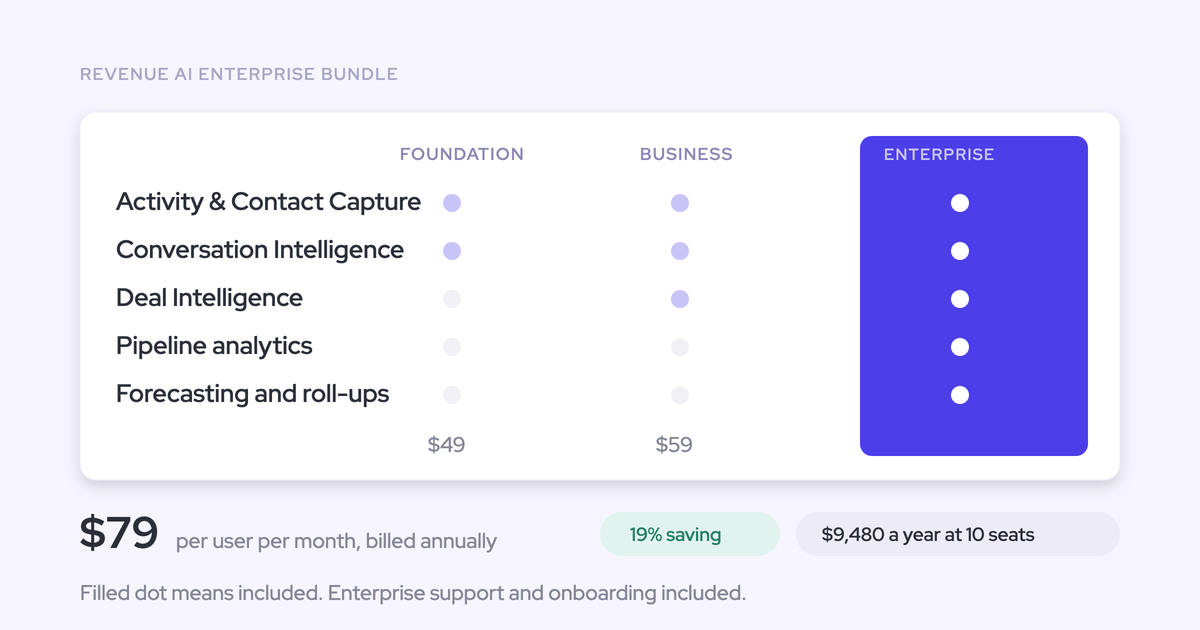

Weflow is the Revenue AI Orchestration platform for sales, customer success, and RevOps teams. Revenue AI Enterprise adds pipeline analytics and the full forecasting layer to Revenue AI Business. It costs $79 per user per month, billed annually, with a 10-user minimum.
Choose Weflow's Revenue AI Enterprise bundle when your team is ready to run a formal forecast cadence alongside activity capture, conversation intelligence, and deal reviews. If your immediate priority is better Salesforce data or pipeline inspection, start with a smaller bundle. You don’t need to buy forecasting before your team has a process for using it.
What does Weflow Revenue AI Enterprise include?
Revenue AI Enterprise combines Weflow Activity & Contact Capture, Weflow Conversation Intelligence, and Weflow Deal Intelligence & Forecasting. The upgrade from Revenue AI Business gives you pipeline analytics, AI prediction, forecast submissions, automated roll-ups, and forecast accuracy tracking.
Revenue AI Business already gives managers deal views, scoring, warnings, and buying-committee intelligence. You don’t need Revenue AI Enterprise just to identify an unhealthy opportunity.
| Capability | Weflow Revenue AI Foundation | Weflow Revenue AI Business | Weflow Revenue AI Enterprise |
|---|---|---|---|
| Price/user/month | $49 | $59 | $79 |
| Activity and contact capture | Capture emails, meetings, and contacts into Salesforce | Same capture capabilities | Same capture capabilities |
| Conversation intelligence | Recordings, transcripts, summaries, coaching, and AI field updates | Same conversation capabilities | Same conversation capabilities |
| Deal intelligence | Not included | Table and Kanban views, AI deal and account scoring, warnings, and buying-committee intelligence | Same deal intelligence capabilities |
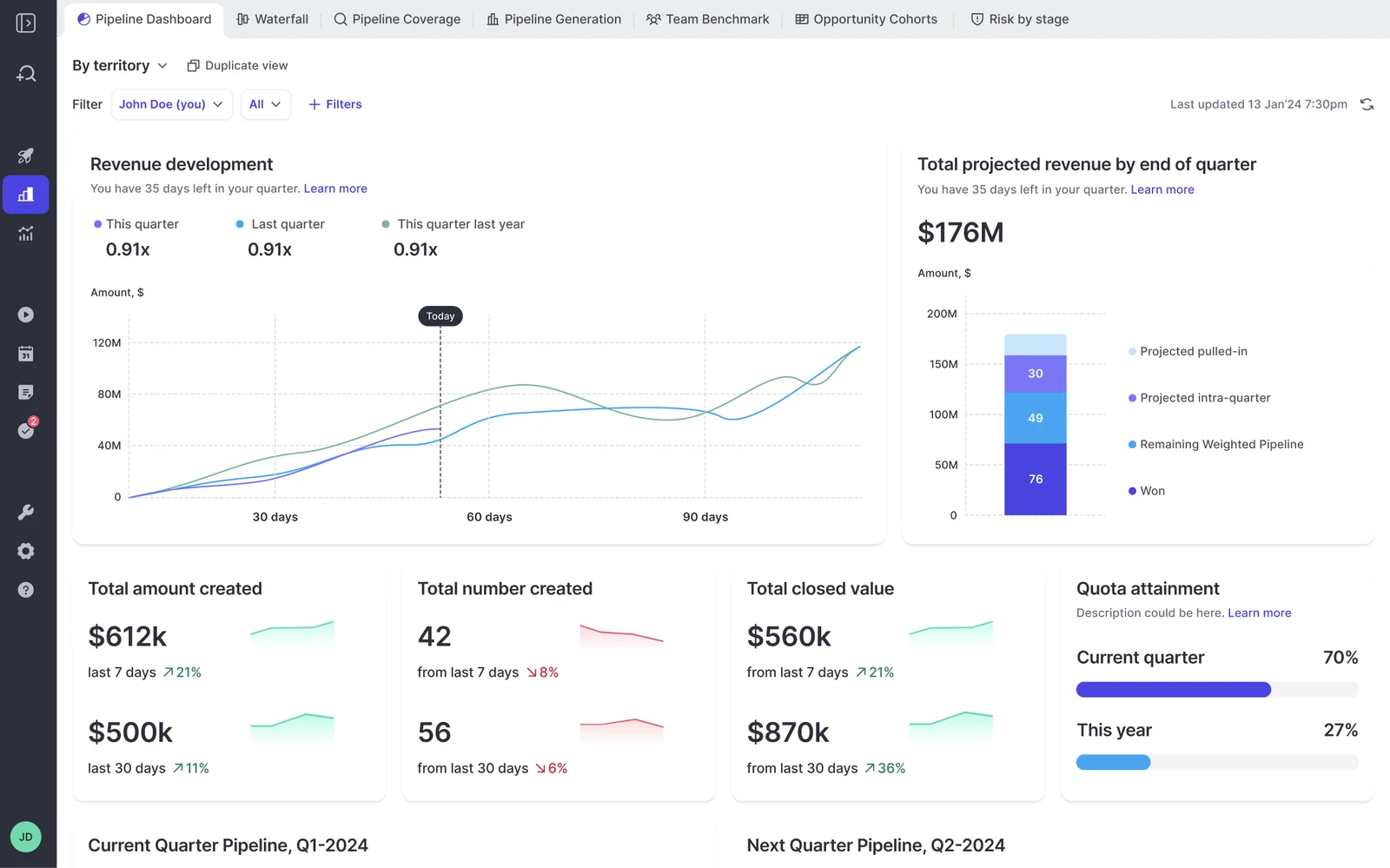
| Pipeline analytics | Not included | Not included | Waterfall, pacing, coverage, generation, and team benchmarks |
| Forecasting | Not included | Not included | AI prediction, submissions, hierarchy-based roll-ups, quotas, and accuracy tracking |
| AI access and automation | Ask Weflow AI Pro and Weflow Agent Builder Free | Ask Weflow AI Pro and Weflow Agent Builder Free | Ask Weflow AI Pro and Weflow Agent Builder Free |
Run your forecast cadence in Weflow Revenue AI Enterprise
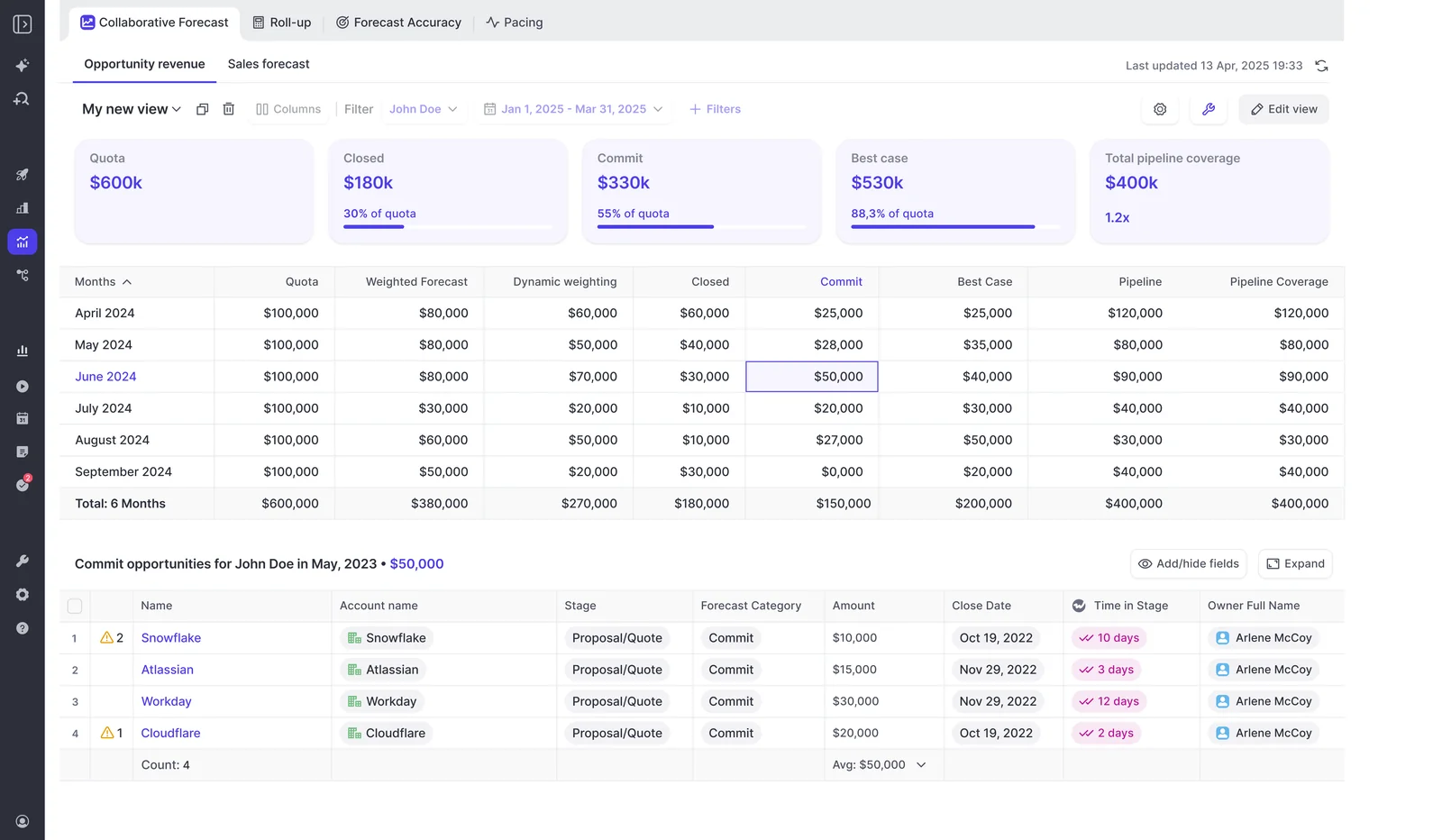
Weflow coordinates forecast submissions, manager adjustments, hierarchy-based roll-ups, and locking on your schedule. You decide who submits, who can override, and when the number becomes fixed.
A weekly cycle gives those settings a purpose:
- Update the pipeline. Sellers review deal amounts, close dates, next steps, and forecast categories before the submission deadline.
- Review the deals. Managers inspect warnings and engagement signals, then challenge the opportunities carrying the forecast.
- Submit the forecast. Reps enter their position against the forecast period. Your configuration controls submission access and how often they resubmit.
- Reconcile the roll-up. Managers compare team submissions with the underlying deals and AI prediction. Override permissions and an adjustment window govern changes.
- Lock and measure. Weflow fixes the submission at the configured deadline so you can compare it with actual results by rep and manager.
The useful conversation happens where the numbers disagree. A manager’s commit, the team’s roll-up, and the pipeline calculation answer different questions. Keeping them visible lets you challenge the gap instead of replacing one opinion with another.
Track pipeline changes in Weflow Revenue AI Enterprise
Weflow takes hourly opportunity snapshots to explain how your pipeline changed. Waterfall analysis, push counts, and amount changes give you evidence behind the movement in the forecast.
A current pipeline total can hide deals slipping out while new opportunities replace their value. You need to see both movements before deciding whether the quarter has improved.
| Management question | Weflow analytical output | How you use it |
|---|---|---|
| Why did the pipeline number change? | Pipeline waterfall and opportunity snapshot comparisons | Separate creation, amount changes, timing changes, wins, and losses |
| Are we progressing at the expected pace? | Pacing and revenue development views | Compare progress across periods instead of judging the current total alone |
| Which deals keep moving out? | Push counts, amount changes, and deal warnings | Bring repeat slippage into the deal review |
| Where is coverage weakening? | Pipeline coverage, generation, and team benchmarks | Separate a pipeline creation gap from deterioration in existing deals |
| How close were our calls? | Forecast-versus-actual tracking by rep and manager | Identify recurring optimism or sandbagging across submissions |
You can filter analytics and assign views to teams. Downloadable reports support work outside Weflow, but Weflow isn’t a general-purpose BI or financial planning system.
Where does Weflow Revenue AI Enterprise store your data?
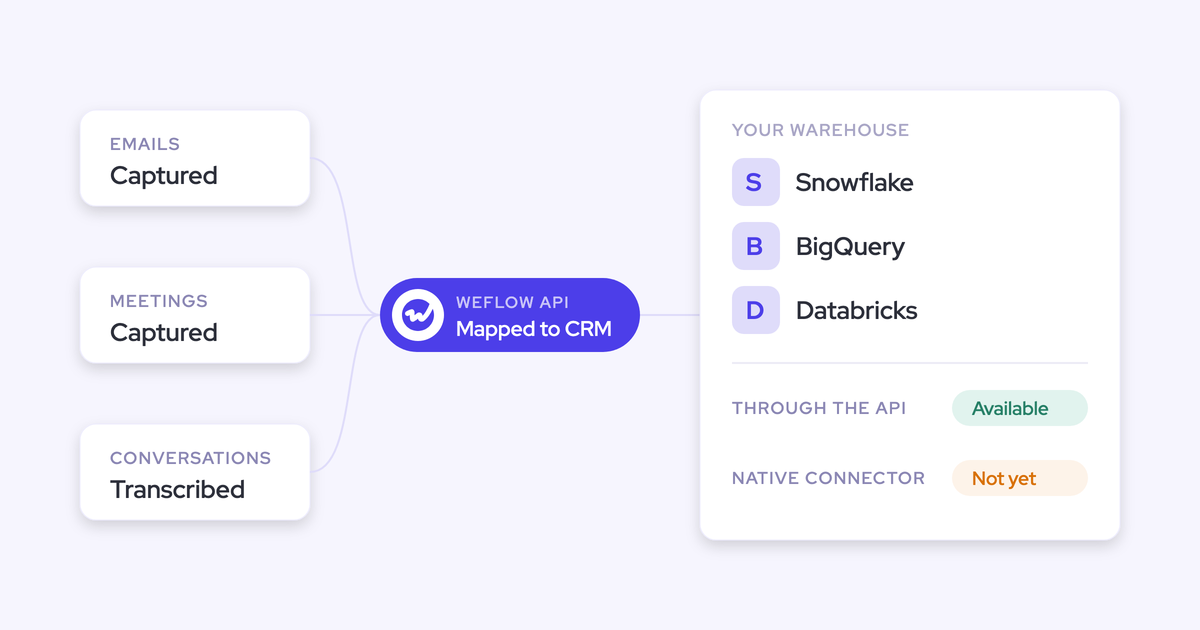
Weflow writes captured activity, contacts, and structured field updates into Salesforce. Recordings, opportunity snapshots, and submitted forecast numbers live in Weflow.
Transcripts and video recordings follow different paths. The managed package makes transcripts available in Salesforce; Weflow hosts the recording files.
| Data type | Storage location | Salesforce availability | Retention and access |
|---|---|---|---|
| Emails, meetings, and contacts | Native Salesforce objects | Available to Salesforce reporting and automation according to the chosen objects | Remain in your Salesforce after cancellation |
| Structured AI field updates | Your Salesforce records | Available in the destination fields | Remain as values in your records |
| Transcripts and executive summaries | Weflow recording object in Salesforce | Accessible through managed-package object permissions | Access follows the recording object’s permissions |
| Audio and video recordings | Weflow | The recording file doesn’t live in Salesforce | Available through Weflow and its API |
| Hourly opportunity snapshots | Weflow | Not stored as Salesforce opportunity history | Power Weflow’s pipeline analytics |
| Submitted forecast numbers | Weflow | No current writeback to Salesforce fields | Accessible through Weflow and its MCP connector |
If your warehouse depends on submitted forecasts appearing in Salesforce fields, that writeback limit matters to the purchase. Activity ownership and forecast storage aren’t the same promise.
What will Weflow Revenue AI Enterprise cost your team?
Weflow Revenue AI Enterprise costs $79 per user per month in USD, billed annually. The 10-user minimum puts the recurring seat commitment at $9,480 per year.
| Pricing item | USD list price |
|---|---|
| Monthly rate per paid user, billed annually | $79 |
| Annual subscription per paid user | $948 |
| Minimum paid users | 10 |
| Minimum annual seat subscription | $9,480 |
| View-only licenses | Unlimited, at no additional cost |
The monthly rate is the unit used to calculate your annual subscription. It isn’t a month-to-month billing option.
Calculate your first-year Weflow Revenue AI Enterprise cost
Your first-year seat subscription equals paid users × $79 × 12. Keep that recurring commitment separate from paid Weflow Agent Builder usage when building your budget.
| Paid seats | Monthly equivalent | First-year seat subscription |
|---|---|---|
| 10 | $790 | $9,480 |
| 25 | $1,975 | $23,700 |
| 50 | $3,950 | $47,400 |
| 100 | $7,900 | $94,800 |
These subscription amounts use the annual list rate before volume or multi-year discounts. Weflow Agent Builder Free is included; paid workspace tiers carry a separate charge.
For a consolidation business case, count savings when an existing subscription ends. Activating Weflow doesn’t remove the remaining commitment on a Gong or Clari contract.
Compare Weflow Revenue AI Enterprise with standalone products
Revenue AI Enterprise saves $18 per user per month against buying all three core products for the same users. That’s $216 per user annually.
| Purchase | Per user per month, billed annually | Annual cost for 10 users |
|---|---|---|
| Weflow Activity & Contact Capture | $19 | $2,280 |
| Weflow Conversation Intelligence | $39 | $4,680 |
| Weflow Deal Intelligence & Forecasting | $39 | $4,680 |
| All three purchased separately | $97 | $11,640 |
| Revenue AI Enterprise | $79 | $9,480 |
| Bundle saving | $18 | $2,160 |
The same-user comparison matters. If you need capture across the revenue organization but forecasting for a smaller group, mixed product allocation can suit your team better than a uniform bundle.
Revenue AI Business costs $59 per user per month, billed annually. Moving the same users to Revenue AI Enterprise adds $20 per user per month, or $240 annually, for pipeline analytics and forecasting.
Which Weflow AI capabilities carry usage charges?
Weflow includes everyday AI usage in the seat price. Weflow Agent Builder is the consumption-priced exception, with allowances and paid tiers at the workspace level.
| Capability | Charging basis | Included allowance or paid tier |
|---|---|---|
| Recordings and transcripts | Included in the applicable seat | Unlimited |
| AI templates, summaries, and field updates | Included in the applicable seat | No usage metering |
| Ask Weflow AI Pro | Included in every plan and bundle | No prompt metering |
| Weflow Agent Builder Free | Included per workspace | 25 agent actions per month |
| Weflow Agent Builder Growth | $299 per workspace per month | 500 agent actions per month |
| Weflow Agent Builder Scale | $999 per workspace per month | 2,500 agent actions per month |
| Weflow Agent Builder Enterprise | Custom workspace package | Custom allowance |
You don’t need to ration meeting summaries or Ask Weflow AI prompts to protect the budget. Agent actions belong in a separate automation budget because their charging model differs.
Should your team choose Weflow Revenue AI Enterprise?
Choose Revenue AI Enterprise when you need the complete capture-to-forecast workflow and have leadership ready to run it. The bundle name describes capability, not company size.
| Your situation | Recommended path | Why |
|---|---|---|
| You need capture, conversation intelligence, pipeline analytics, and formal forecasting | Revenue AI Enterprise | Combines the data foundation with submissions, roll-ups, and accuracy tracking |
| Managers need deal scoring and warnings, but forecasting will stay where it is | Revenue AI Business | Supports deal inspection without buying the forecasting layer |
| Your immediate problem is missing activity and call outcomes | Revenue AI Foundation | Combines capture and conversation intelligence before introducing a forecast process |
| Different teams need different capabilities | Mixed standalone products or bundles | Allocates capture, conversation intelligence, and forecasting around actual responsibilities |
| You need forecasting but already have the capture and conversation layers you want | Weflow Deal Intelligence & Forecasting | Provides the forecasting product without requiring the full bundle |
| Your hierarchy and forecast ownership are still changing | Start with the data foundation and keep the current forecast process | Avoids configuring a process your leadership hasn’t settled |
Different teams can use different Weflow products. Capture can cover people who never open Weflow, while paid intelligence access goes to the people doing that work. View-only licenses give other stakeholders access without adding paid seats.
We recommend buying around responsibilities first. A smaller deployment that replaces an existing workflow is more useful than a full bundle with an idle forecasting module.
How should you roll out Weflow Revenue AI Enterprise?
Roll out Revenue AI Enterprise in data-foundation order: activity capture, conversation intelligence, deal intelligence, then forecasting. Buying the full bundle doesn’t require activating every capability on the same day.
Keep security review, technical setup, and process design moving in parallel. Forecasting needs sales leadership and finance involvement, not just an administrator connecting Salesforce.
Define your forecast process before configuring Weflow Revenue AI Enterprise
Agree how your team will forecast before configuring the hierarchy, fields, and deadlines. Weflow can encode that process; it can’t decide who owns your number.
- Define the revenue motions. RevOps and sales leadership separate new business, renewal, and expansion where their processes differ. Weflow supports opportunity record types with their own stage paths, forecast-category mappings, and roll-ups.
- Choose the financial inputs. Finance and the Salesforce administrator identify the amount fields, currencies, periods, and quotas the business uses. Reconcile a sample of opportunities with finance’s reporting before accepting the configuration.
- Set submission ownership. Sales leadership names the submitters and managers at each level. Test a roll-up through the hierarchy so every number has a clear owner.
- Agree the cadence. RevOps sets submission deadlines, resubmission frequency, override access, and lock timing. Run one complete cycle before making Weflow the official submission system.
- Test access and write behavior. The Salesforce administrator tests representative users, activity mapping, field updates, and transcript access. Include required fields and validation rules in the test.
Don’t carry deprecated formula fields into the new forecast just because the old setup used them. Start with the business number finance recognizes and trace the fields that produce it.
Phase Weflow Revenue AI Enterprise around your renewal dates
Start with the capability you can replace now, then introduce forecasting when the process and contract timing align. You can use Weflow for capture while keeping Clari for forecasting.
- Establish capture ownership. Your administrator configures the integration, exclusions, mapping, and enrollment. Assign one writer to each activity workflow so overlapping systems don’t create duplicate records.
- Introduce conversation intelligence. Enable recording and the field-update templates your sellers need first. Enablement owns training; managers review summaries and extracted values before expanding automation.
- Move deal reviews. Give managers pipeline views, scoring, and warnings. Retire the previous review workflow once they can inspect their deals and take action in Weflow.
- Move forecast submissions. Run the agreed cadence, reconcile roll-ups, and review pipeline movement. Retire the incumbent forecasting workflow after your leadership accepts the replacement.
If Salesforce Einstein Activity Capture remains active, set its event sync to one direction, from the mail and calendar system into Salesforce. Bidirectional event sync can create duplicate meetings during coexistence.
KORE Wireless selected Weflow over Gong and used five rollout phases: activity capture, conversation intelligence, coaching, deal intelligence, and forecasting. That sequence gave each workflow its own introduction.
Name a backup administrator before rollout ends. Keep a configuration record and repeat enablement when ownership changes, so the next operator knows which capabilities the team already has.
Validate Weflow Revenue AI Enterprise beyond a short pilot
A two-week pilot can establish whether capture and conversation intelligence work in your environment. Forecast performance needs repeated submissions and actual outcomes to compare against them.
| Short-pilot validation | Longer-running forecast evaluation |
|---|---|
| Emails and meetings map to the intended Salesforce records | Managers and reps submit on the agreed cadence |
| Contact creation works with your required fields and permissions | Roll-ups reconcile across teams and revenue motions |
| Recordings, transcripts, and summaries support daily work | Pipeline movement explains changes in the submitted number |
| AI field updates respect your field configuration and validation rules | Locked forecasts produce a usable forecast-versus-actual baseline |
| Representative users have the right access | Leadership uses Weflow rather than maintaining a separate submission sheet |
Zeotap reports forecasting within 7% by week four of the quarter with Weflow. The timing matters: useful accuracy arrives early enough to inform decisions, rather than only becoming visible at quarter-end.
Before retiring the previous workflow, your acceptance criteria should include:
- Correct activity mapping and usable call-derived field updates.
- Reconciled forecast totals and clear submission ownership.
- A completed submission, adjustment, and lock cycle.
- An administrator handover and a named owner for ongoing training.
See how Weflow captures activity, updates Salesforce fields from calls, and rolls up your forecast. Book a 30-minute demo.
Weflow Revenue AI Enterprise pricing and rollout FAQs
These answers cover the recurring subscription, purchase minimum, supported forecast scope, and rollout support.
How much does Weflow Revenue AI Enterprise cost annually?
Weflow Revenue AI Enterprise costs $948 per paid user annually at the $79 monthly list rate. The 10-user minimum puts the annual seat subscription at $9,480, before discounts. Paid Weflow Agent Builder tiers add a workspace charge.
How many Weflow Revenue AI Enterprise seats must we buy?
Revenue AI Enterprise has a 10-user minimum with annual billing. Weflow also includes free view-only licenses (up to one per recording license). You can activate your rollout in phases without switching every workflow on at once.
Does Weflow Revenue AI Enterprise support consumption-based revenue forecasting?
No. Weflow forecasts deal-based revenue through weighted forecasts, rep roll-ups, and AI prediction. If your forecast depends on customer consumption or usage, keep a forecasting system that supports that revenue model.
Can we keep Outreach or Salesloft alongside Weflow Revenue AI Enterprise?
Yes. Weflow works alongside Outreach and Salesloft through compatibility mode. Keep those products for sequencing and dialing, and assign ownership of overlapping activity logging so two systems don’t write the same activity. Weflow also imports recordings from Outreach’s dialer for transcription, summaries, field updates, and coaching.
What onboarding does Weflow Revenue AI Enterprise include?
Weflow offers a 14-day free trial with guided onboarding. Technical setup typically takes 30–45 minutes with a Salesforce administrator and a Google Workspace or Microsoft administrator. Your team then configures templates, permissions, pipeline views, and the forecast process around its operating requirements.
Which security documents does Weflow provide for procurement?
Weflow’s trust center provides security assurance materials, certificates, and controls for procurement review. Weflow holds SOC 2 Type II certification, complies with GDPR, uses Zero Data Retention for AI processing, and never uses customer data to train AI models.