Revenue Team Pain Points Ranked: The Problems Buyers Raise Most on Sales Calls
Learn which revenue team pain points buyers raise most on sales calls, from forecast accuracy to CRM trust.


We're Weflow, the Revenue AI Orchestration platform for sales, customer success, and RevOps teams. We counted the pains buyers raise on our sales calls. Forecast process, capture accuracy and CRM data trust top the list. Security and procurement comes fourth.
The top three are one problem: the record misses what actually happened. You see it as a forecast that misses. Your ops team sees activity that never lands. Your board sees reports nobody will vouch for. Underneath sit dead deals nobody closes lost and close dates pushed for the fourth time, the work most teams file under deal hygiene, which is where the forecast actually starts breaking.
The fourth theme works differently. Security and procurement isn't a symptom of bad data. It's the gate that blocks the fix.
The revenue team pain points we hear most, ranked
The four pain themes buyers raise most on Weflow sales calls are, in order: forecast process and accuracy, activity capture accuracy, CRM data trust, and security and procurement.
| Rank | Pain theme | What it looks like on the ground |
|---|---|---|
| 1 | Forecast process and accuracy | Three numbers that never converge, a weekly call that eats days of work, and deals that slide out of the quarter |
| 2 | Activity capture accuracy and mapping | Emails and meetings that never reach Salesforce, or land on the wrong opportunity, and meeting counts multiplied by the number of attendees |
| 3 | CRM data trust | Reports leaders won't present as true, KPI reviews nobody can enforce, and "is the data accurate?" as the first question about any new tool |
| 4 | Security, compliance and procurement | Works councils, recording consent and model-training questions that stop a rollout after the buying decision is made |
Below these four, the list thins into themes like rep adoption, manual logging and AI strategy. Most of them are fed by the top three.
How we counted the pains buyers raise on calls
The ranking counts approved pains from private Weflow sales calls, grouped into themes. A human on our team approves every pain before it enters the count.
- What counts as a pain: one buyer raising one issue on a call. This isn't a survey, so nobody picked from a list of options.
- What's in the ranking: private sales calls only.
- What's out of the ranking: RFPs and private buyer documents, episodes of our RevOps Lab podcast, and Q&A from Salesforce's Momentum webinar. Where one of those sources adds color later in the article, we say so.
- How themes form: pains are grouped into themes, and the themes are ranked.
The data has no cut by company size or industry, so we don't claim one. The FAQ covers what we can say about your size and motion.
What the top three pains sound like on our calls
Each of the top three themes has a cost you can put on the person who owns the number. Here's how buyers describe them, and what each one costs you.
Forecast process: the weekly call that still gets the number wrong
The forecast call costs days of work across your organization, and the number still misses. Buyers rarely describe a bad formula. They describe numbers they can't reconcile and a process that eats the week.
And from a leader measuring themselves against what they've run before:
"Our forecasting is abysmal. We're sub 85% in bookings forecast. I've never been in a company where we weren't able to get to 97 plus."
A buyer on a sales call with us
| Symptom | What it costs you |
|---|---|
| Rep commit, weighted pipeline and your own gut give three different numbers | The forecast call turns into reconciling numbers instead of calling one |
| One hour on the calendar, around four days of work across ops, reps and managers | That prep repeats every week, and the number is still wrong |
| A large deal moves from August to December | The quarter gets rewritten, even though every deal in it was real |
| Dead deals stay open with a close date that keeps moving | The pipeline looks bigger than it is, and your cycle-length and win-rate benchmarks measure deals that died months ago |
| Accuracy sits below the standard you've hit at past companies | You defend a number to the board that you don't believe yourself |
Capture accuracy: activity that never lands in Salesforce, or lands wrong
Activity either never reaches Salesforce, or it lands on the wrong deal. The second failure is worse, because nobody sees it.
"We are trusting sellers that they are logging tasks in Salesforce, but that's also not widespread practice."
A buyer on a sales call with us
Buyers who've already automated capture describe the mapping problem just as bluntly:
"If there are multiple opportunities, they just don't know where to map it and just randomly assign it to something. This is not acceptable."
A buyer on a sales call with us
| Symptom | What it costs you |
|---|---|
| Reps don't log calls, emails or meetings | Deals look quiet when they aren't, and look active when they've stalled |
| An email lands on a sibling opportunity at the same customer | The deal your manager inspects looks dead while the work sits on another record |
| One meeting with five attendees logs as five meetings | Activity metrics you can't manage a team on |
| New stakeholders on a thread never become contacts | The deal shows one champion while five people are actually involved |
CRM data trust: reports leaders won't present to the board as true
Leaders stop believing the reports, then they stop using them. "Directionally correct" becomes the most anyone will say to the board.
"…It is hard to enforce anything if you do not know that the data is clean or that it is accurate."
A RevOps leader on a sales call with us
The record can even pass a hygiene check and still tell nobody anything:
"…We have got an opportunity in the CRM but nobody knows what it means other than the rep."
A buyer on a sales call with us
| Symptom | What it costs you |
|---|---|
| Dashboards render, but nobody presents them as true | Your board credibility rests on numbers you hedge every time |
| KPI reviews get built and then quietly ignored | You can't hold anyone to a target |
| Fields are filled, but the meaning lives with the rep | Every deal review starts with half an hour of reconstruction |
| Partial data looks complete | Hiring, spend and forecast calls get made on a reality that isn't real |
Our co-founder Philipp Stelzer puts the last row plainly:
"It's worse to have basically incomplete, inconsistent, or inaccurate data than to have no data at all because then you have this illusion of like, oh, I have data and I can trust the data…"
Philipp Stelzer, CPO & Co-founder of Weflow
Why forecast, capture and data trust are one problem
Forecast process, capture accuracy and CRM data trust are one problem seen from three seats: the Salesforce record is missing what actually happened on the deal.
Most companies give each pain its own owner. Slippage belongs to sales, dirty data to RevOps, and the board deck to finance. That split is why the same problems come back every quarter.
| Seat | The pain they name | What's missing underneath |
|---|---|---|
| CRO / VP Sales | "Our forecast is always wrong" | The last three conversations on each deal never reached the record |
| RevOps | "Activity doesn't land, or lands on the wrong deal" | Capture that depends on reps clicking, plus mapping rules nobody can see |
| The board | "Can we trust these numbers?" | Reports built on fields that are partially filled and weeks stale |
| The CEO | "Where's our AI layer?" | The same gaps, which any AI will inherit |
One buyer said it in a single line:
"I feel like I'm pretty good at it and I just can't do it without activity."
A revenue leader on a sales call with us
That's the shift. Your reps probably aren't bad forecasters. They forecast from records missing the last three conversations.
How missing activity data turns into a missed forecast
Missing activity data turns into a missed forecast through a chain you can trace step by step. The gaps aren't random, and every number downstream inherits them.
- Reps don't hand-log activity, because admin competes with selling and loses.
- The gaps cluster where deals got hard: the tense call, the new stakeholder, the email that went unanswered.
- Stages, close dates and next steps go stale, and stage probabilities set once in Salesforce never get revisited.
- The forecast inherits all of it, so dead deals carry full dollar value and slips stay invisible until late in the quarter.
- Leaders override the number by gut, which is how you end up with three forecasts and a call that eats days.
- Trust collapses, first in the forecast and then in every report built on the same records.
Janis Zech, our CEO, sees the same pattern when teams come to us asking for better forecasting:
"We have so many customers that come to us and say, oh, we need to improve our forecasting. We need to improve our forecast accuracy. And, you know, then you peel back the onion and you see that data is missing, visibility is missing, understanding of what's going on is missing."
Janis Zech, Co-founder and CEO, Weflow
Why logging mandates haven't fixed incomplete CRM data
Logging mandates raise field completion without improving what gets written. Reps fill the field with whatever clears the validation rule, then get back to selling.
Process still matters. Stage criteria and a submission deadline give the forecast its structure. They just can't produce the record, because the rep doing the job well spends the day talking to customers, and the CRM is what gets left.
| Mandate | What it improves | What it doesn't |
|---|---|---|
| Required fields and validation rules | The completion rate | Whether the content is true |
| Logging quotas | Activity volume on the dashboard | Whether the hard conversations get logged |
| Written stage exit criteria | A shared definition of each stage | Whether the stage actually gets moved |
| A Friday update deadline | Records that look fresh before the call | Next steps written from memory three days late |
One buyer summed up the ceiling:
"…as long as it's a manual process, it won't be 100%, it won't be close to it actually…"
A buyer on a sales call with us
Why the AI mandate stalls on the same missing data
The AI mandate stalls because any AI you add reads the same incomplete Salesforce record, and returns confident, wrong answers from it. So the project slides behind a data audit with no end date.
"Obviously look, bad data. We're not ready for the AI layer, however, very interested in speaking to people because my CEO sure as hell wants the AI layer."
A buyer on a sales call with us
What happens when you point an LLM at Salesforce
When you point an LLM at Salesforce, it reasons over missing meetings, empty fields and the same account entered three times. The answer comes back fluent, and wrong in ways nobody can see.
"If you could just hook Claude into Salesforce and it gives you the truth. I mean, in theory, if it's a system of truth, it should be able to do it. But the reality is it just doesn't work."
Philipp Stelzer, Co-founder and CPO, Weflow
Some teams already hold the AI licences and can't use them. The data is the blocker, not the will to adopt.
"We are quite limited right now, but it is because the data is not ready."
A RevOps leader on a sales call with us
Mollie Bodensteiner, VP of RevOps at ZoomInfo, put it this way on our podcast:
"Because we all know, Claude, love it, confidently wrong a lot. And, like, you have to make sure you're building on, again, good data, good context, everything, so you're confidently right."
Mollie Bodensteiner, VP of RevOps at ZoomInfo
Why Weflow's own first AI forecast didn't work
Weflow's own early AI forecast prediction didn't work. We shipped it early, and it wasn't accurate enough.
The lesson was the same one in this article. No model can tell whether a deal is stalling or slipping without the activity and conversation data underneath it.
That's why a company that sells forecasting spends most of its engineering effort on capture and mapping.
Security reviews and works councils: the gate that blocks capture
Security, legal and works-council reviews are the gate that stops capture after the buying decision. Recording and capture often clear the CRO's approval, then stop dead at review.
The questions reviewers ask are predictable. These come from RFPs and buyer Q&A rather than the ranked calls:
- Reviewers want written documentation of what gets captured, where it's processed and who can hear it.
- Works councils, especially in Germany and Austria, expect consent handled per recorded session in the product, not a line in an employment contract.
- Buyers want a written guarantee that no conversation data trains a model, including through any sub-processed LLM provider.
- Legal teams ask for a working right-to-be-forgotten path and recording that stops when someone declines.
- IT asks for control over who inside the company can open a given conversation.
What to fix first when your top pains share a root
Start capturing now instead of waiting for a full cleanup. Activity history can be backfilled after a cleanup. Conversations that happen before you start recording are gone for good.
Plenty of teams reason the other way, and it sounds prudent:
"Before we get to this, I actually need to make sure we have a good foundation to build anything on top."
A buyer on a sales call with us
Here's the order we'd follow in your seat:
- Start capture now. Every month you wait is a month of calls that will never exist in the record.
- Expect old hygiene problems in month one. Duplicate accounts and wrong website fields predate any tool, and automatic capture makes them visible fast.
- Clear the security gate early. Many teams phase it: capture first, then a second review to switch on AI.
- Define the forecast process before you automate it if your go-to-market org is mid-reshape. Automating a process nobody can describe yet hardens the wrong one.
- Measure accuracy from a locked early-quarter snapshot. A commit given in the last week is a report, not a forecast.
The buyer who phased their security review put step three better than we could:
"Would rather just have activity capture … in the door, and then go back and say, hey, they're approved provider. Now we need to have another review to turn AI on. But that's okay."
A buyer on a sales call with us
On step five, former Camunda CRO Robert Gimbel ran exactly this discipline:
"Like, we would take the fourth forecast of a quarter, like week four, everyone got logged in, we put it onto a Confluence page, and towards the end, we wouldn't punish publicly the people who got it wrong. There's multiple reasons for that, right? But we would celebrate the teams and people who got it right."
Robert Gimbel, GTM Advisor, former CRO at Camunda
How Weflow fixes the data layer under all three pains
Weflow is the Revenue AI Orchestration platform for sales, customer success, and RevOps teams. We start at the data foundation: capturing activity and contacts into Salesforce objects you own. Then we use that foundation to keep the forecast honest.
Weflow Activity & Contact Capture logs meetings and emails to Salesforce
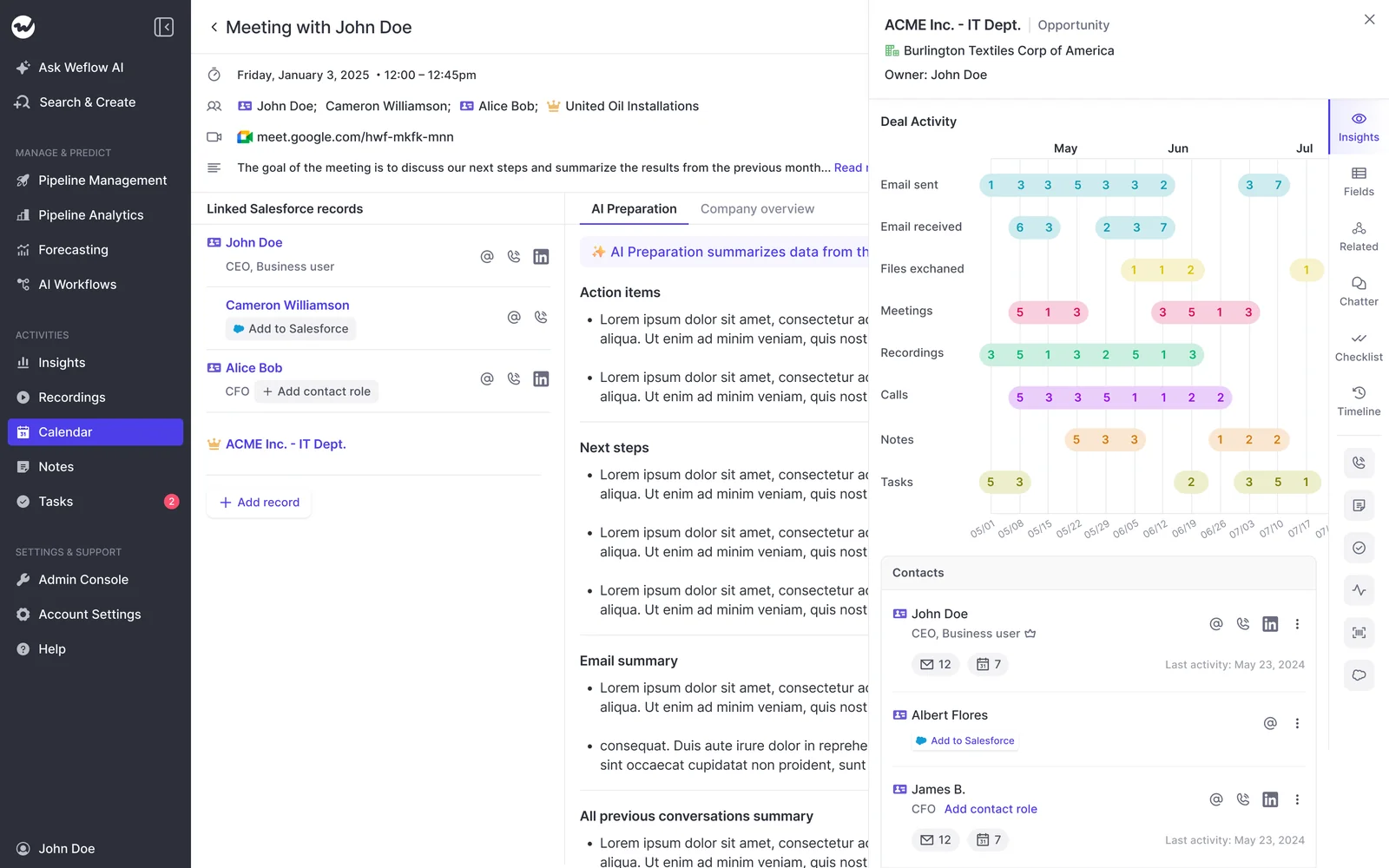
Weflow Activity & Contact Capture writes emails, meetings and new contacts into native Salesforce objects, so the activity your reps never logged becomes part of the record without them clicking anything.
- Emails land on the Task or Email Message object, whichever your admin picks, and meetings land on the Event object. You can report on them in Salesforce, or read them with your own BI and AI, without going through Weflow.
- Every meeting logs as Salesforce activity whether or not it was recorded. Weflow Conversation Intelligence adds the summary and AI field updates on top when it is recorded, so a "days inactive" warning stays trustworthy even when recording coverage is partial.
- New people on a thread become Salesforce contacts when the rep replies, and can be added to the opportunity as contact roles. Caps per event and an existing-accounts-only rule keep a 200-person webinar out of your contact table.
- When the evidence doesn't settle which opportunity an email belongs to, Weflow logs it to the account instead of guessing. A rep's correction then holds for every later reply on that thread.
United Fintech saw a 3x increase in captured activities after switching, validated manually as real interactions that had been slipping through:
"We thought it was just wrong data - but we looked manually and realized this is the amount of insight we were missing before."
Rugile Pudzevelyte, Senior Revenue Operations Manager at United Fintech
"The biggest win is data quality. We finally trust our Salesforce data. It's consistent, reliable, and actionable."
Bastian Stosic, Head of Media Sales Operations at HolidayCheck
Weflow Deal Intelligence & Forecasting keeps unhealthy deals out of the forecast
Weflow Deal Intelligence & Forecasting puts deal warnings inside the forecast submission screen, so a stalled deal gets flagged at the moment a rep decides whether to commit it.
- Warnings like a close date pushed more than twice, a single contact on the deal or no activity in a set number of days come from captured activity, so reps can't type their way around them. You define the rules to match your own sales cycle.
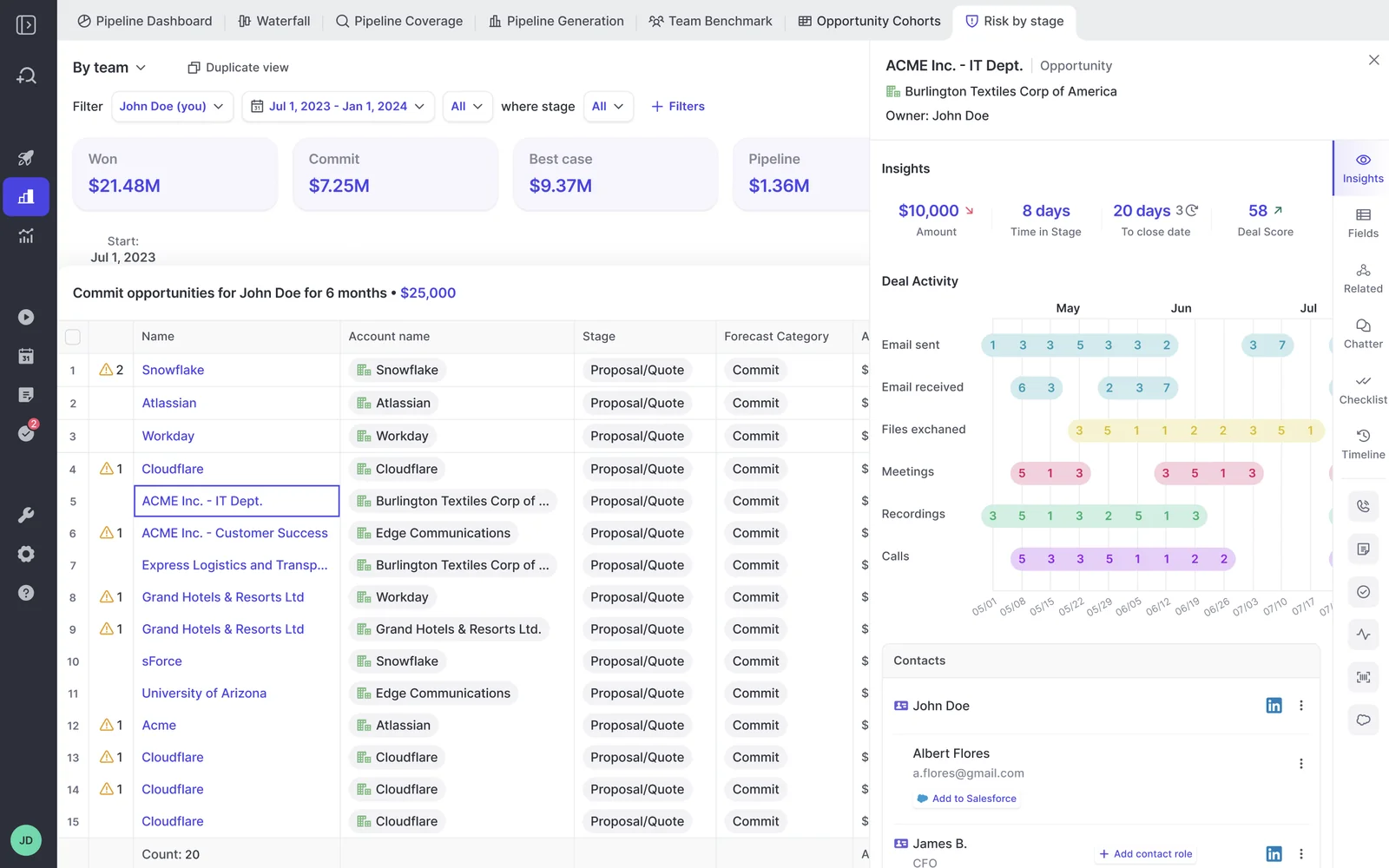
- You configure the cadence: submission deadlines, who can override and when the forecast locks. Locked submissions get compared against outcomes, which gives you per-rep accuracy and shows who habitually sandbags and who's habitually optimistic.
- The weighted forecast recalculates each stage's win rate from a rolling window, such as the last 90 or 180 days, instead of the fixed probability someone typed into Salesforce years ago.
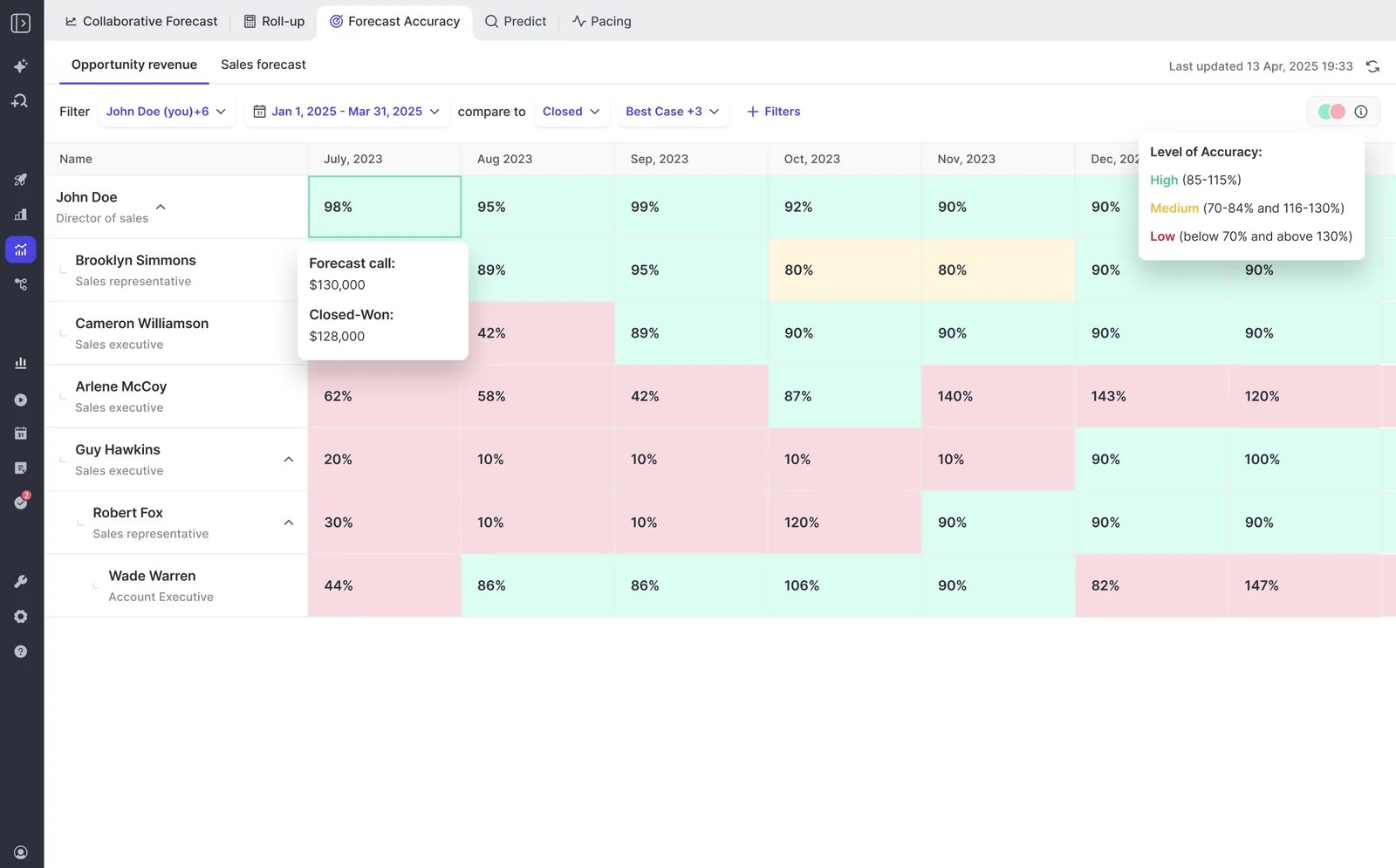
"With Weflow, we forecast within 7% by week 4 of the quarter."
Tibor Stefán, Chief Revenue Officer at Zeotap
"It's no longer third-party hearsay from reps or sales leaders. It's now proof in front of us – AI summaries that tell us we're not talking to the economic buyer, that we're single-threaded, whatever it might be."
Scott Jones, SVP of GTM Revenue Intelligence & Enablement at KORE Wireless
What Weflow won't fix for you
Weflow has clear limits, and you should know them before you start:
- Weflow works only with Salesforce.
- Weflow doesn't merge the duplicates already in your org or fix a wrong website field on an account. Turning capture on surfaces those problems in month one. Our Activity Capture Health view inside Salesforce flags duplicates and unconverted leads so you can see which issues predate capture.
- Weflow writes one fixed contact role per configuration. It links new people to the deal, but naming the champion or economic buyer stays a human step.
- A team with a deeply customized forecasting setup won't get full forecasting parity on day one.
One customer described the first weeks honestly:
"Weflow kind of magnified our data hygiene issues."
A customer on a call with us
How Weflow pricing works, from standalone products to bundles
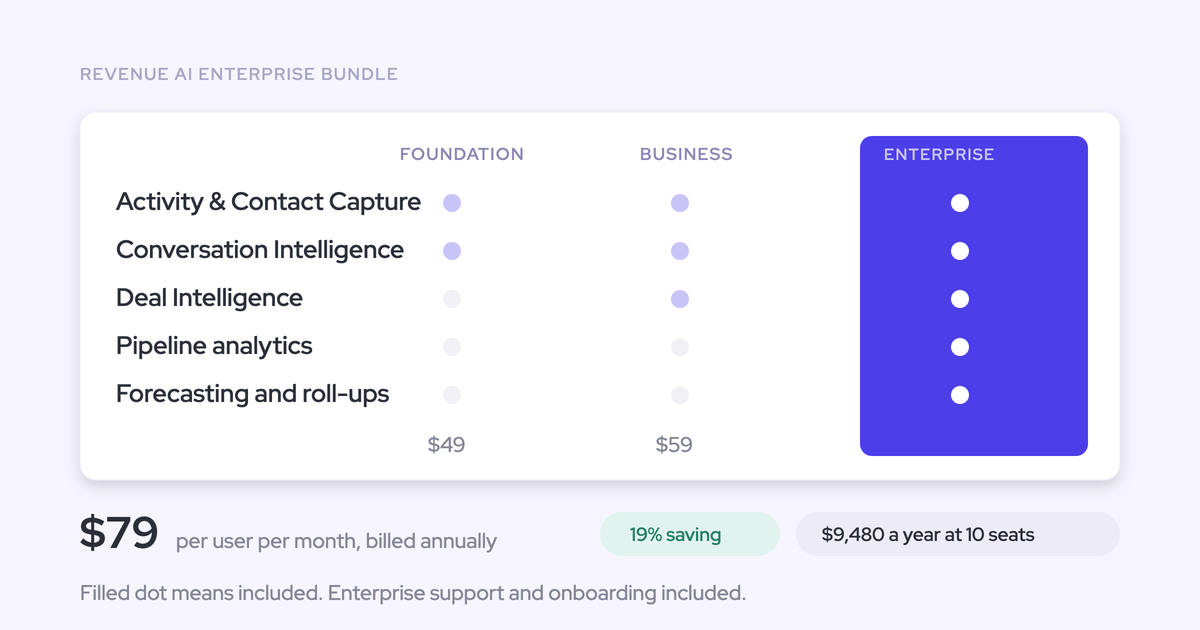
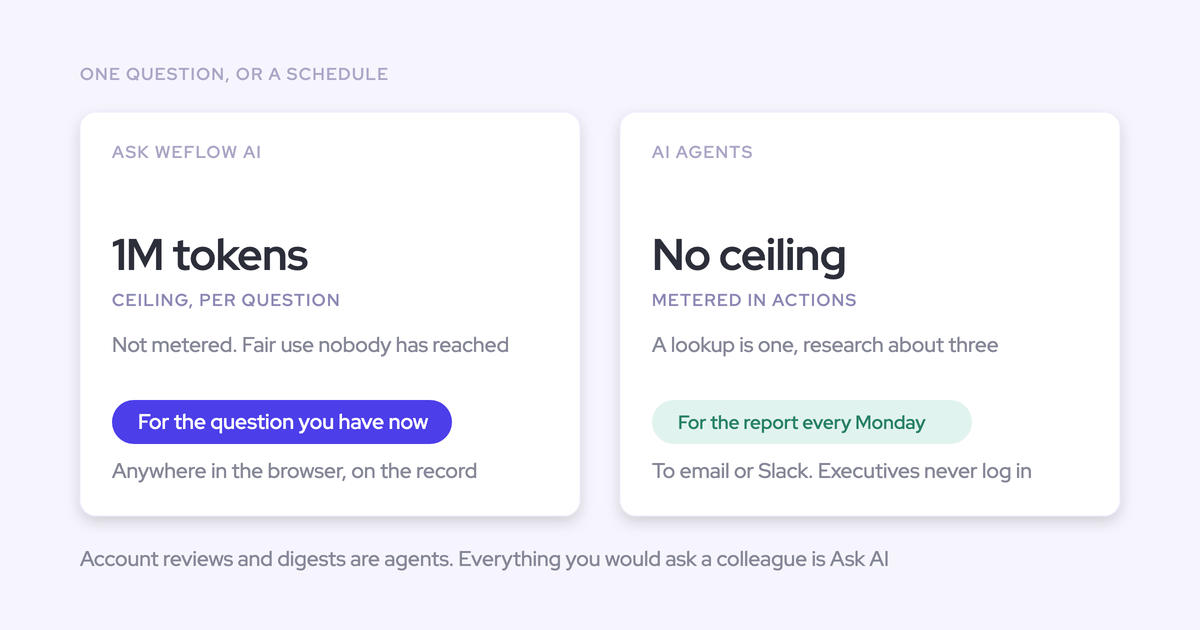
Weflow's pricing is published and per seat, with AI usage included. Recordings, transcripts, AI field updates and Ask Weflow AI prompts carry no usage caps or metering.
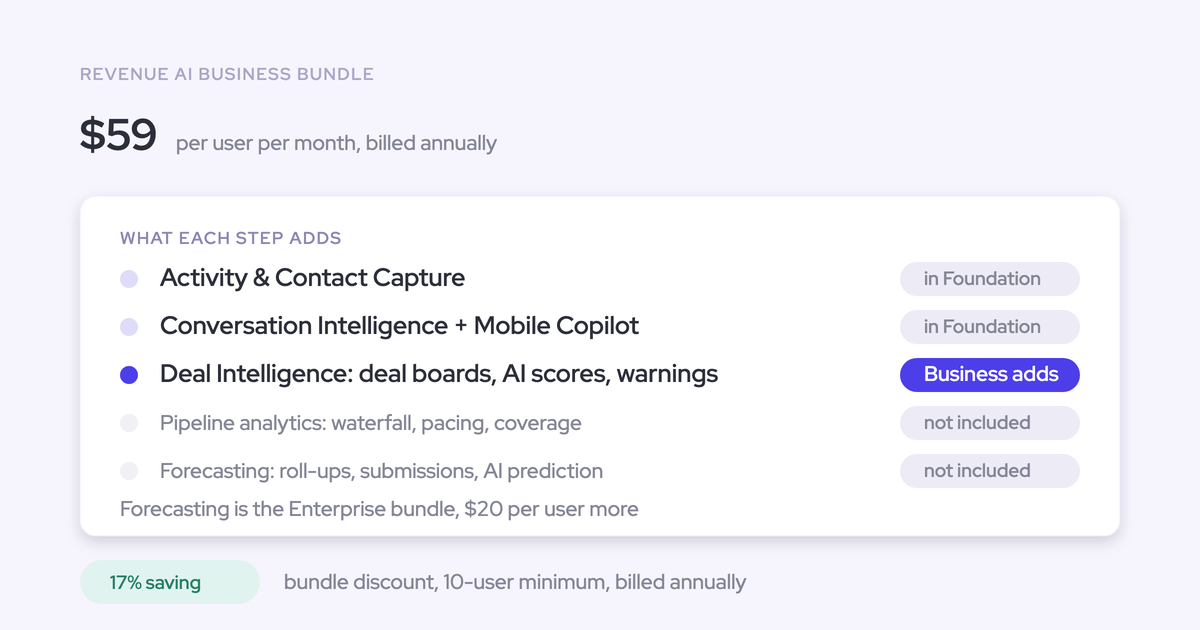
| Product or bundle | Per user per month | What it includes |
|---|---|---|
| Weflow Activity & Contact Capture | $19 | Email, meeting and contact capture into Salesforce |
| Weflow Conversation Intelligence | $39 | Recording, transcripts, summaries and AI field updates |
| Weflow Deal Intelligence & Forecasting | $39 | Deal warnings, pipeline analytics, forecast roll-ups and accuracy tracking |
| Revenue AI Foundation | $49 | Activity & Contact Capture plus Conversation Intelligence |
| Revenue AI Business | $59 | Foundation plus Deal Intelligence, without pipeline analytics and forecasting |
| Revenue AI Enterprise | $79 | Everything, including the full forecasting layer |
Every plan includes Ask Weflow AI Pro and Agent Builder Free with 25 agent actions a month. Agent Builder is the only consumption-priced product beyond that. All plans bill annually with a 10-user minimum.
If you want to bring this to your next leadership meeting, our free CRO Cheat Sheet gives you the forecast and pipeline questions to work through first.
How to cite this revenue team pain points research
- Source: Weflow
- Study: Revenue Team Pain Points Ranked: The Problems Buyers Raise Most on Sales Calls
- Method: approved buyer pains from private Weflow sales calls, one pain per issue raised, grouped into themes and ranked by frequency; RFPs, podcast episodes and webinar Q&A excluded from the ranking
Key findings:
- The four pain themes buyers raise most on Weflow sales calls are forecast process and accuracy, activity capture accuracy, CRM data trust, and security and procurement.
- Weflow's research finds that the top three revenue team pains are one problem: the Salesforce record is missing what actually happened on the deal.
- Logging mandates raise CRM field completion without improving the accuracy of what reps write.
- Security and works-council reviews act as a gate that blocks activity capture after the buying decision, rather than as a symptom of bad data.
FAQ: revenue team pain points and fixing the data foundation
Will our pain-point ranking look the same at our size?
Our data has no size cut, so we can't say your ranking will match. What varies most is motion. Consumption revenue, channel and agency selling, and accounts with many parallel deals each add their own capture and forecasting problems. The shared root of missing activity on the record holds across all of them.
How long before our forecast accuracy measurably improves?
You need a baseline before you can call it an improvement. That means locked submissions compared against closed results over consecutive quarters. Weflow tracks that comparison per rep, manager and team from your first locked forecast. Zeotap reached within 7% by week four, which shows what's possible rather than a promise.
Does fixing activity capture give my reps a second tool?
No. Weflow Activity & Contact Capture runs server side and writes into Salesforce, so reps don't click anything and Salesforce stays the record. The Chrome extension and Outlook add-in are optional, for reps who want to see or correct what was logged.
What does Weflow give a security review or works council?
Weflow gives reviewers four commitments:
- SOC 2 Type II
- GDPR compliance
- Zero Data Retention for AI processing
- Customer data never used to train AI models
Weflow also stores your data in the region where your Salesforce instance sits, so a Salesforce org hosted in Europe keeps its Weflow data in Europe.
We just renewed our forecasting tool. Do we replace it?
No. The data foundation sits underneath whichever forecasting tool you run. Most teams in your position start with Weflow Activity & Contact Capture and Weflow Conversation Intelligence, then add forecasting at their next renewal for a small per-seat increment instead of a second contract.