5 Weflow MCP Prompts for a Sales-to-Customer-Success Handoff: Goals, Promises, Stakeholders, and Risks
Learn 5 Weflow MCP prompts for sales-to-CS handoffs: goals, promises, stakeholders, risks


You can use these five prompts in Claude to turn accessible Weflow sales context into a reviewable customer handoff. The first four extract goals, promises, stakeholders, and unresolved risks. The fifth assembles an internal kickoff brief that keeps the evidence and gaps attached.
The standard is whether CS can trace a finding back to its source. A customer request must stay a request. A missing deadline must stay missing. And conflicting statements need to survive the summary so you know what to resolve before onboarding starts. These prompts ask for that discipline, whether your team permits full transcripts or works from summaries.
Weflow is the Revenue AI Orchestration platform for sales, customer success, and RevOps teams. You can ask questions inside Weflow through Ask Weflow AI or directly in Claude, using our Model Context Protocol (MCP) connector to retrieve permitted Weflow context.
Prepare Claude for a Weflow MCP handoff
Start with approved source access and a specific opportunity. A handoff needs the right customer history, not everything the assistant can retrieve.
Approve which Weflow sources Claude can access
Weflow gives admins separate controls for enabling MCP and allowing full-transcript access. That distinction determines whether Claude can examine the conversation itself or work from AI-generated summaries.
- Workspace: An admin enables the Weflow MCP connector.
- Claude connection: Add the workspace connector URL as a custom connector and authorize access.
- Evidence depth: The admin separately enables or disables full-transcript access.
- Connection visibility: The admin console lists connected users, their email addresses, and connection dates.
- Customer-data approval: Use your organization’s approved Claude environment for the handoff.
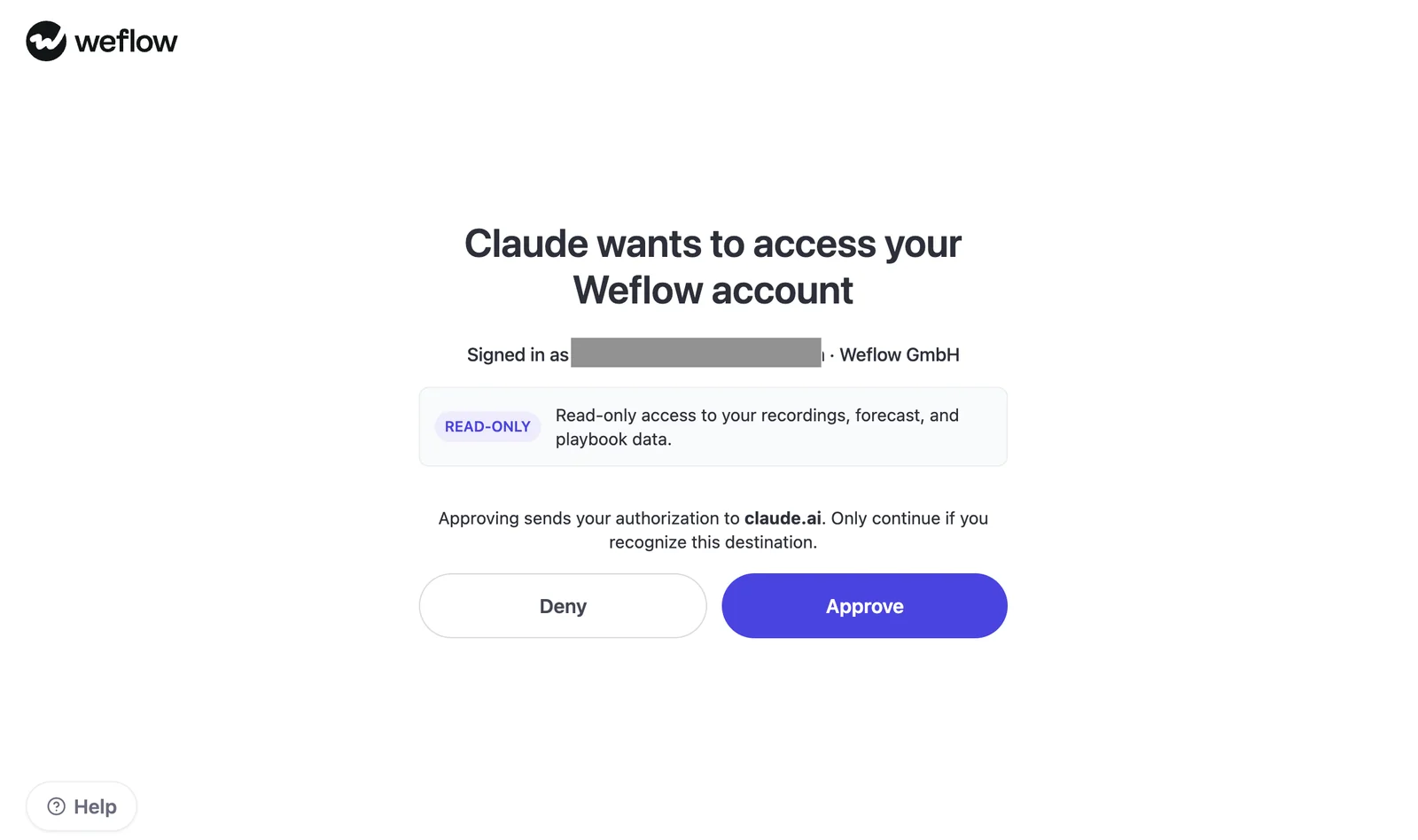
Weflow’s authorization screen gives Claude read-only access to recording, forecast, and playbook data. These prompts return a brief in Claude; they don’t publish it into Salesforce.
| Access mode | Evidence available | Attribution limit | Review implication |
|---|---|---|---|
| Full-transcript access off | AI call summaries and accessible playbook output | A summary’s wording isn’t a verbatim customer statement. | Keep findings labeled as summary- or playbook-derived. Treat exact promises as needing source review. |
| Full-transcript access on | Full call transcripts alongside accessible summaries and playbooks | Use speaker names, dates, and excerpts only when the source supplies them. | Read the surrounding exchange before accepting a commitment or resolving a contradiction. |
Set the deal scope and evidence rules
Give Claude the account, opportunity, and sales-history window before asking for findings. An account name alone can mix the original sale with an expansion or renewal.
- Account: Name and Salesforce account ID, if available.
- Opportunity: Name and Salesforce opportunity ID, if available.
- History window: Start date, end date, and handoff date.
- Boundaries: Related opportunities to include or exclude.
- Internal vocabulary: Your metric names, stakeholder roles, and onboarding terminology.
Weflow AI playbooks reason across an opportunity’s meetings, emails, related records, transcripts, and fields. They maintain the current best answer rather than simply repeating the latest call. That makes them useful handoff context, but a playbook finding still needs a different evidence label from a transcript excerpt.
Use this evidence structure throughout the handoff:
| Field | What belongs in it |
|---|---|
| Finding and status | Supported finding, inference, or “not found” |
| Source identity and type | Available title or ID, labeled transcript, summary, or playbook |
| Attribution | Call date and speaker when available; “not found” otherwise |
| Supporting excerpt | Exact text from the retrieved source, clearly labeled by source type |
| Conflict or gap | Contradictory evidence, missing details, and the question needed to resolve them |
| Coverage | Sources and dates reviewed, plus unavailable material or retrieval limits |
“Not found” means the reviewed material doesn’t support an answer. It doesn’t mean the customer never discussed it.
Extract sales context with four Weflow MCP prompts
Run separate passes for goals, promises, stakeholders, and risks because each requires a different judgment. You can use any prompt independently or feed all four outputs into the final brief.
Prompt 1: Extract customer goals and success criteria
Use this prompt to carry the customer’s definition of success into onboarding without adding metrics they never agreed to.
Inputs: Account, opportunity, history window, exclusions, and internal metric terminology.
Run location: Claude with the Weflow MCP connector.
Prepare a customer-goal register for a sales-to-CS handoff.

Account: [ACCOUNT NAME AND ID]
Opportunity: [OPPORTUNITY NAME AND ID]
Sales-history window: [START DATE TO END DATE]
Handoff date: [DATE]
Exclude: [OTHER OPPORTUNITIES OR NONE]
Internal terminology: [METRIC NAMES AND DEFINITIONS OR NONE]

Use accessible Weflow playbooks, call summaries, and permitted
transcripts for this opportunity. If the record match is ambiguous,
ask me to identify it before continuing.

Extract:
- The customer's desired outcomes and reasons for buying.
- Stated success measures, baselines, and targets.
- Timing, constraints, and dependencies.
- Missing definitions that CS needs before onboarding.

Separate customer-stated goals from seller proposals.
Don't invent a metric, target, deadline, or agreed priority.

For every finding:
- Label it supported, inference, or "not found."
- Identify the source by its available title or ID and type:
  transcript, summary, or playbook.
- Include the call date, speaker, and supporting excerpt when
  available. Mark missing metadata "not found."
- Label summary and playbook excerpts as derived evidence,
  not verbatim customer speech.
- Never invent quotations, metadata, or URLs.
- Preserve conflicting statements with both sources.
  Recency alone doesn't resolve a contradiction.

Return a table:
Goal | Stated success criteria | Baseline and target | Timing |
Constraints | Evidence status | Source evidence | Open question

Put inferred onboarding implications in a separate section.
Finish with a coverage note listing sources and dates reviewed,
unavailable material, and any uncertainty about retrieval.
Don't describe the history as complete unless you can establish it.
Output: A goal register, separate onboarding implications, and a coverage note.
Customize: Supply your metric definitions so Claude uses your vocabulary. Leave customer targets out of the instructions unless you supply them as separately identified evidence.
Prompt 2: Separate sales promises from customer requests
Use this prompt to distinguish what someone committed to from what the customer asked for. A feature discussion shouldn’t become a delivery obligation during summarization.
Inputs: Account, opportunity, history window, exclusions, and commitment categories.
Run location: Claude with the Weflow MCP connector.
Build a commitment register for a sales-to-CS handoff.

Account: [ACCOUNT NAME AND ID]
Opportunity: [OPPORTUNITY NAME AND ID]
Sales-history window: [START DATE TO END DATE]
Handoff date: [DATE]
Exclude: [OTHER OPPORTUNITIES OR NONE]
Categories to examine: [IMPLEMENTATION, FEATURES, SERVICES,
TIMING, OR YOUR OWN CATEGORIES]

Use accessible Weflow playbooks, call summaries, and permitted
transcripts. Ask me to resolve an ambiguous record match.

Classify each relevant statement as:
- Explicit commitment
- Customer request
- Seller suggestion
- Assumption
- Unresolved question

For commitments, identify who made the statement, its scope,
conditions, stated owner, deadline, and evidence of amendments.
Don't turn a request, possibility, or suggestion into a promise.
Don't infer contractual status from a sales conversation.

For every finding:
- Label its evidence status supported, inference, or "not found."
- Supply the available source title or ID and source type:
  transcript, summary, or playbook.
- Include the available call date, speaker, and supporting excerpt.
  Mark missing details "not found."
- Distinguish transcript wording from derived summary or playbook
  evidence. Don't present derived text as customer speech.
- Never invent quotations, metadata, or URLs.
- Keep earlier commitments, amendments, and contradictory statements
  visible. A later date alone doesn't prove an amendment.

Return a table:
Statement | Classification | Person making statement | Conditions |
Stated owner and deadline | Status | Evidence status |
Source evidence | Confirmation needed

Flag summary-only commitments for source review before CS treats
them as obligations.
Finish with coverage: sources and dates reviewed, unavailable
material, and retrieval uncertainty.
Output: A classified commitment register with conditions and unresolved confirmations attached.
Customize: Focus the categories on what your implementation team inherits. Keep the distinction between a conversational commitment and a contractual obligation.
Prompt 3: Map customer stakeholders by influence and concerns
Use this prompt to transfer relationship context without turning job titles into claims about influence. Attendance tells you who joined; observed behavior tells you more about who shapes the outcome.
Inputs: Account, opportunity, history window, exclusions, and stakeholder-role vocabulary.
Run location: Claude with the Weflow MCP connector.
Build an internal stakeholder map for a sales-to-CS handoff.

Account: [ACCOUNT NAME AND ID]
Opportunity: [OPPORTUNITY NAME AND ID]
Sales-history window: [START DATE TO END DATE]
Handoff date: [DATE]
Exclude: [OTHER OPPORTUNITIES OR NONE]
Our stakeholder-role vocabulary: [ROLES AND DEFINITIONS OR NONE]

Use accessible Weflow playbooks, call summaries, and permitted
transcripts. Ask me to resolve an ambiguous record match.

Identify customer stakeholders and separate:
- Stated title or role.
- Observed involvement in decisions and next steps.
- Expressed goals, concerns, and objections.
- Inferred influence or relationship role.

Don't infer decision authority from title or attendance alone.
Don't label someone a champion or blocker without supporting
behavior. Keep relationship hypotheses separate from facts.

For every finding:
- Label it supported, inference, or "not found."
- Identify the available source title or ID and type:
  transcript, summary, or playbook.
- Include the call date, speaker, and supporting excerpt when
  available. Mark missing metadata "not found."
- Distinguish transcript evidence from derived summary or playbook
  evidence. Never turn a summary into a verbatim quote.
- Never invent names, quotations, metadata, or URLs.
- Preserve conflicting descriptions of a person's role.
  Recency alone doesn't settle them.

Return a table:
Person | Stated role | Observed involvement | Expressed concerns |
Inferred influence and rationale | Evidence status |
Source evidence | Relationship question for CS

Keep this map internal.
Finish with coverage: sources and dates reviewed, unavailable
material, and uncertainty about stakeholder coverage.
Output: A stakeholder map that separates observed involvement from relationship hypotheses.
Customize: Add your definitions of sponsor, champion, implementation owner, and economic buyer. Those definitions guide classification; they don’t establish anyone’s role.
Prompt 4: Surface unresolved customer risks before onboarding
Use this prompt to carry unresolved concerns across the closed-won boundary. A concern doesn’t become resolved because the customer signed or later calls stopped mentioning it.
Inputs: Account, opportunity, history window, exclusions, and optional severity definitions.
Run location: Claude with the Weflow MCP connector.
Build an onboarding risk register from the sales history.

Account: [ACCOUNT NAME AND ID]
Opportunity: [OPPORTUNITY NAME AND ID]
Sales-history window: [START DATE TO END DATE]
Handoff date: [DATE]
Exclude: [OTHER OPPORTUNITIES OR NONE]
Severity definitions: [YOUR DEFINITIONS OR LEAVE UNRATED]

Use accessible Weflow playbooks, call summaries, and permitted
transcripts. Ask me to resolve an ambiguous record match.

Find objections, dependencies, readiness concerns, expectation
mismatches, and unresolved questions relevant to onboarding.

For each issue, look for explicit resolution evidence.
Closed-won status and silence on later calls aren't resolution.
Separate demonstrated concerns from missing information.
Label potential onboarding impact as inference unless stated.

For every finding:
- Label it supported, inference, or "not found."
- Identify the available source title or ID and type:
  transcript, summary, or playbook.
- Include the available call date, speaker, and supporting excerpt.
  Mark missing metadata "not found."
- Distinguish transcript evidence from derived summary or playbook
  evidence. Don't present derived text as verbatim speech.
- Never invent quotations, metadata, or URLs.
- Preserve conflicting accounts of the issue and its resolution.
  Don't settle them by choosing the latest statement.

Return a table:
Issue | Concern or information gap | Resolution status |
Potential onboarding impact | Severity under supplied definitions |
Evidence status | Source evidence | Next question

Use "resolution not found" when no reviewed source establishes it.
Keep proposed follow-up actions separate from agreed actions.
Finish with coverage: sources and dates reviewed, unavailable
material, and retrieval uncertainty.
Output: A risk register with resolution evidence, information gaps, and targeted follow-up questions.
Customize: Supply severity definitions if your team uses them. Otherwise, leave severity unrated rather than accepting an unexplained high-medium-low score.
Prompt 5: Assemble a source-grounded customer kickoff brief
Use the fifth prompt to assemble the four extraction outputs into an internal kickoff brief without losing their evidence status. A shorter brief should still show where CS needs an answer.
Inputs: Outputs from prompts 1–4 with their source references, deal scope, internal audience, and desired length.
Run location: Claude with the Weflow MCP connector.
Assemble an internal customer kickoff brief from these handoff
registers and their source references.

Account: [ACCOUNT NAME AND ID]
Opportunity: [OPPORTUNITY NAME AND ID]
Sales-history window: [START DATE TO END DATE]
Handoff date: [DATE]
Internal audience: [CS, IMPLEMENTATION, ACCOUNT TEAM]
Target length: [LENGTH]

Inputs:
1. Goals: [PASTE OUTPUT OR IDENTIFY IT IN THIS CONVERSATION]
2. Promises: [PASTE OUTPUT OR IDENTIFY IT IN THIS CONVERSATION]
3. Stakeholders: [PASTE OUTPUT OR IDENTIFY IT IN THIS CONVERSATION]
4. Risks: [PASTE OUTPUT OR IDENTIFY IT IN THIS CONVERSATION]
Source references: [SUPPLY THEM OR USE THE REFERENCES ABOVE]

Use the supplied outputs even if they came from separate chats.
If an output or its references are missing, name the gap.
Don't invent the missing register.

Preserve supported findings, inference, and "not found" labels.
Keep commitments separate from requests and suggestions.
Don't turn proposed owners or actions into agreed assignments.

For each substantive finding, retain the available source title
or ID, source type, call date, speaker, and supporting excerpt.
Mark missing metadata "not found."
Distinguish transcript evidence from summary or playbook evidence.
Never invent quotations, metadata, or URLs.

Use permitted Weflow sources to inspect supporting evidence where
available. Distinguish references carried forward from sources
you actually reviewed during this synthesis.
Preserve contradictions and their sources; recency alone doesn't
resolve them. Don't smooth uncertainty into a confident narrative.

Return:
- A compact customer-context summary.
- Customer goals and stated success criteria.
- Commitments, conditions, and requests.
- Stakeholders, observed involvement, and labeled hypotheses.
- Unresolved risks and dependencies.
- A gap table: Missing answer | Why it matters | Follow-up question |
  Proposed internal owner.
- Source references and coverage limitations.

Keep the brief internal. Flag relationship observations that need
audience review before anyone creates customer-facing material.
Return the brief here without publishing it to another system.
Output: An internal kickoff brief with a gap-and-follow-up table, source references, and coverage limitations.
Customize: Adjust the audience and length. For a shorter brief, reduce background detail before cutting conditions, conflicts, or source references.
Walk through the product yourself, no call required.
Weflow MCP handoff FAQs
Can Claude prepare a handoff without full transcript access?
Yes. Claude can prepare a draft from accessible Weflow call summaries and playbook output when full-transcript access is off. Keep those findings labeled as derived evidence.
A summary can support a useful handoff, but it can’t establish the exact words someone used. The prompts preserve that distinction rather than manufacturing speaker quotations.
Can Weflow MCP read every raw email?
Weflow MCP doesn’t provide unrestricted retrieval of every raw email. Weflow AI playbooks can incorporate email context, which Claude can receive through playbook output. That’s derived context, not the original email body.
Should I connect both Weflow and Salesforce to Claude?
Connect both when your handoff needs Salesforce records alongside Weflow conversation context. Salesforce’s connector exposes CRM records; Weflow MCP provides direct access to permitted playbooks, summaries, transcripts, and forecast calls.
These five prompts use Weflow MCP and don’t require a Salesforce connector.
Can Claude write the handoff back to Salesforce?
No, not through Weflow MCP’s read-only connection. These prompts return the handoff in Claude. You can copy the reviewed brief into your team’s handoff record.
How do admins control CSM access through Weflow MCP?
Weflow admins enable MCP per workspace and separately control full-transcript access. The admin console also shows connected users, their email addresses, and when they connected.
The account and opportunity placeholders in these prompts narrow the analysis. They aren’t access controls.
How does Claude handle customer data from Weflow MCP?
Connecting Claude lets the external assistant retrieve permitted Weflow context. Treat that as a customer-data sharing decision, including when you leave transcript access off: summaries can still contain sensitive information.
Weflow provides Zero Data Retention for our AI processing and doesn’t use customer data to train AI models. Those assurances describe Weflow’s processing, not Claude’s retention or training terms.
Can I reuse these prompts for implementation and renewal handoffs?
Yes. Change the history window, receiving team, and questions to match the handoff. Weflow account-level playbooks support context that spans multiple opportunities, which matters when a renewal depends on more than the original sale.
Weflow isn’t a general-purpose connector for support, ERP, product-usage, or implementation systems. If those systems hold necessary evidence, add that context through separately approved sources and keep its origin visible.
For the next handoff, start by naming what the receiving team needs to decide. Then run the relevant extraction prompts against that scope.