Weflow for Customer Success Leaders: Churn Signals From Calls and Renewal Forecasts
Learn how Weflow reads churn signals from calls and where its renewal forecasting for CS stops.


If your sales or RevOps team already uses Weflow, or is looking into it, here's what it can do for customer success. Your CS team gets three things:
- It captures every CSM, AM and exec-sponsor email and call into Salesforce.
- It reads churn risk across months of those conversations, against a definition your team writes, and puts the result on the account.
- It forecasts renewals as their own motion, on contract dates.
It also has limits: it doesn't ship a built-in health model, read tone of voice, roll renewal work up by account in the forecast, or work as a helpdesk
If you're already a customer and your CSMs were never licensed, there's nothing new to bolt on. It's the same Salesforce data your sales team already works from, extended past closed won.
The capture and call work runs through Weflow Activity & Contact Capture and Weflow Conversation Intelligence. The renewal number runs through Weflow Deal Intelligence & Forecasting.
What Weflow does for your CS team, and where it stops
Here's the short version, and the sections below go through each row in more detail.
| What your CS team needs | What Weflow does | Where it stops |
|---|---|---|
| Capture for every customer-facing role | Logs CSM, AM and exec-sponsor emails, meetings and contacts to Salesforce, including the Case object | An email logs to only one opportunity |
| Call output that fits CS work | Runs CS summary and field-update templates on post-sale calls | Templates are configured by your admin, not prebuilt for CS |
| A churn risk definition | Scores accounts against a churn playbook your team writes | No built-in health model, no tone detection |
| Risk on the account record | AI Playbooks write each account's result to Salesforce fields on a schedule | The result is only as specific as your definition |
| A renewal-risk briefing | Agent Builder sends a scheduled brief to Slack, email or Teams, ranked by account value | Scheduled, not real-time, and agents don't write to Salesforce |
| A renewal forecast | Runs a separate setup on contract dates, with its own weighting and AI projection | Forecasts on opportunities, not accounts, and uses one period type across all forecasts |
| Tickets, usage and NPS | Reads them when the data already sits in Salesforce fields | No direct connection to your helpdesk or product analytics |
Why health scores and renewal forecasts break on missing data
Your health read and your renewal number break for the same reason: the tooling was bought for new business. CS never got captured data, and renewals inherited the sales pipeline's shape.
Health scores come from memory because CS calls never reach Salesforce
Without CS emails and calls in the CRM, health can only be a picklist someone fills in. Capture licenses usually stopped at the people who send sequences, so SDRs and AEs got them, and CSMs stayed next on the list for years.
That means post-sale conversations end up in a CS platform, an inbox, or nowhere at all, and onboardings, QBRs and renewal calls leave no structured trace in the CRM.
You probably already know the score is subjective. The harder part is that trying harder won't fix it, because there's nothing underneath to compute from.
| Today's workaround | What it misses |
|---|---|
| Monthly red/yellow/green picklist | Whatever the CSM doesn't remember, and everything after the last pleasant call |
| NPS | The unhappy customers, who mostly don't answer surveys |
| One risk field passed between the CS platform and Salesforce | Every signal that relies on someone remembering to update it |
| Spreadsheet readout for leadership | Anything that changed in the one to two hours it took to build |
Renewals get weighted like new business inside the sales pipeline
Renewals sit in the same stages as new business, with the same close-date logic and stage probabilities tuned for new logos.
Say a company loads the year's renewals at the first stage, where they close around 95% of the time. If that stage carries a new-business probability, the weighted forecast badly underweights the renewal book.
Timing is the other problem. Customers on multi-year contracts often signal they'll leave one to two years before renewal, but the forecast only looks one to four quarters out.
By the time a renewal shows up in the forecast, the decision is usually made. The signals that reach back that far come from engagement and conversation signals, not pipeline fields.
How Weflow captures every CSM, AM and exec sponsor conversation
The churn read only works when the account history is complete, so let's start with capture.
Weflow Activity & Contact Capture logs post-sale work to accounts and cases
Weflow Activity & Contact Capture syncs emails, meetings and contacts from Outlook or Google into Salesforce for every role you license, not just the sellers.
That closes a common gap, where only the CSM inbox is connected and the AE and exec-sponsor threads are missing.
Here's where post-sale activity lands:
- Contact or lead: Every email logs here, matched on the email address.
- Account: Activity relates to the parent account by default, so account-level work shows up even when no opportunity is open.
- Open opportunity: Weflow logs to a renewal or expansion when the contact role and Salesforce relationships make clear which one. It never logs to a closed opportunity.
- Case: Activity can log to the Salesforce Case object, with pattern matching on subjects to find the right case.
For onsite visits and in-person QBRs, Weflow Mobile Copilot records the conversation from your phone and processes it like any other meeting.
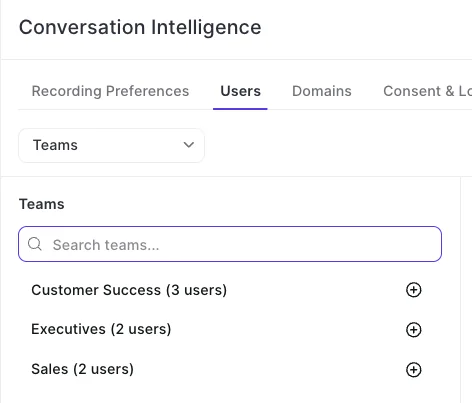
One limit to know: an email logs to only one opportunity. If a renewal and an expansion are both open on the same account, you separate them through configuration (more on that in the FAQ).
Meeting types separate QBRs and onboardings from escalations
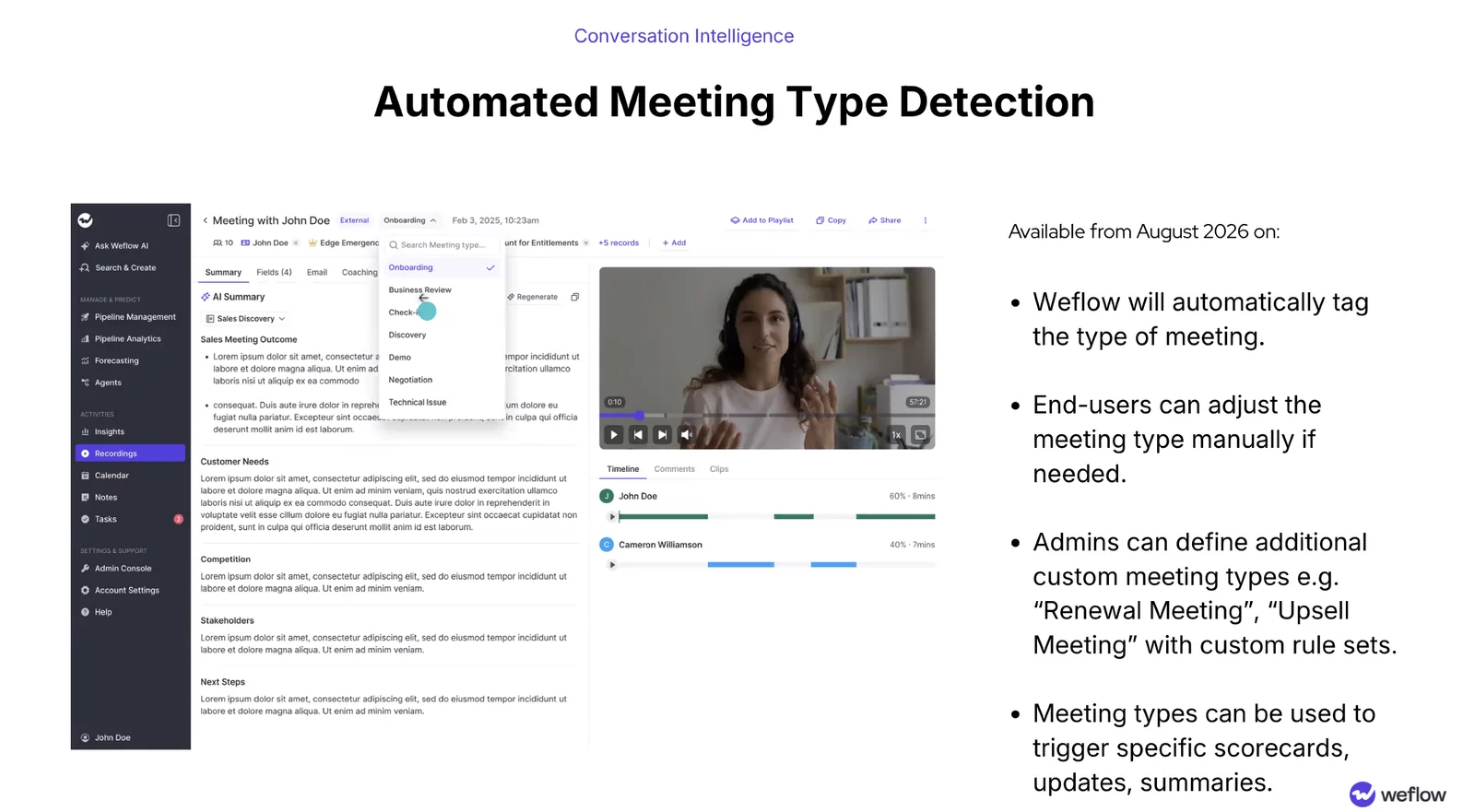
Weflow automatically sorts every new recording into a meeting type. Admins can run up to ten types, dropping the defaults they don't need and adding their own. For example, a call spent walking a customer through configuration comes back labeled as onboarding.
That makes your post-sale funnel reportable, and it protects your best renewal predictor
Engagement frequency only predicts renewal if you count proactive and reactive engagement separately. An account with eight escalation calls this quarter isn't healthy, but mix everything into one count and it looks like your most engaged customer.
| Proactive types | Reactive types |
|---|---|
| Onboarding | Technical issue and troubleshooting |
| Business review | Escalation (as a custom type) |
| Check-in or adoption call | |
| Renewal meeting (as a custom type) |
Weflow Conversation Intelligence runs CS templates, not the sales template
Your CSMs won't get BANT fields on an onboarding call.
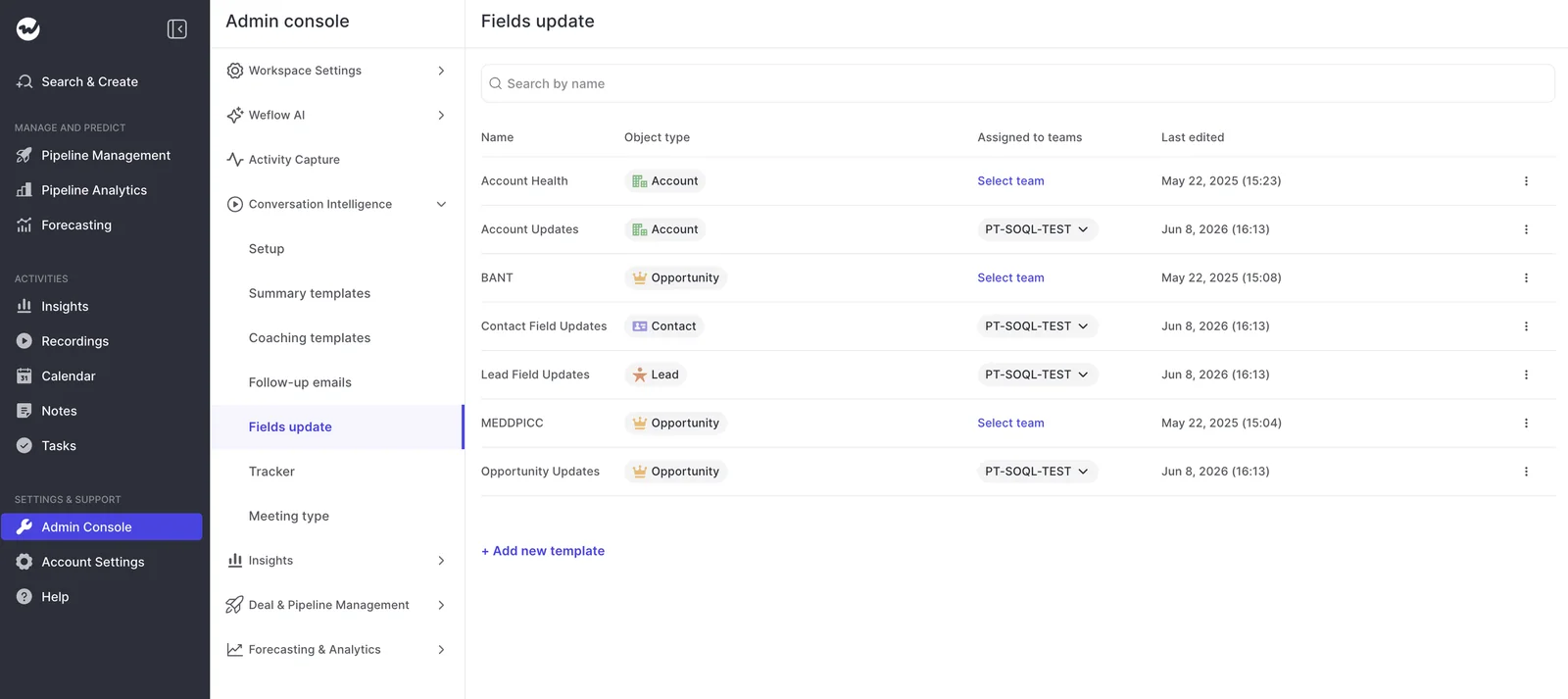
Weflow Conversation Intelligence supports separate summary and field-update templates for each team, so sales, onboarding and CS each run their own structure and write the output to the objects they use.
A CS account template might write fields like these to the Account object after a QBR:
- Adoption status and the blockers the customer named
- Champion and any change in stakeholders
- Expansion interest, with the product mentioned
- Commitments made on the call and the agreed next step
How Weflow reads churn signals from calls, on your definition
There's no built-in health model and no automatic churn score. Instead, your team defines risk, Weflow reads it from months of calls, emails and CRM fields, and the result lands on the account in Salesforce.
We think that's the right trade-off for a CS team that already knows its scores are biased. The read comes from what customers said across many conversations, not one pleasant call (or one bad one).
Write the churn definition as a playbook in your vocabulary
The most useful approach we've seen is to flip a methodology playbook on its head.
A MEDDPICC playbook scores how well a deal matches success criteria, while a churn playbook describes the failure state as if it were the goal, then scores how close each account has come to it.
Your CS team owns that definition, and Weflow's CSMs help you write it. It stays specific when it uses your own vocabulary: what silence means for this customer type, over what period, and which signals confirm it.
For example, it can name signals like these:
- The champion who bought the product has left, and no new sponsor has appeared on calls or emails.
- Proactive meetings such as business reviews have stopped, while troubleshooting calls keep coming.
- Usage questions on calls have turned into pricing questions.
- The implementation never went live, or the customer talks about the subscription as a finished project.
- A suite vendor is consolidating the capability, or a competitor gets named on a call.
- The customer keeps describing a gap between what was sold and what the product does.
Have the playbook return a number, not just prose. A score lets you sort 300 accounts, while a paragraph per account stops being useful after a handful.
Two limits to keep in mind:
- Weflow reads words, not tone: It works from the transcript and the timeline of who spoke when, so a cooling tone only counts if it shows up in what people said.
- There's no health model to fall back on: A quiet but stable customer and a disengaging one look the same unless your definition says how to tell them apart.
AI Playbooks write each account's risk result to a Salesforce field
Account-level AI Playbooks run on a schedule and write their results back to Salesforce fields on the account. That way, your health and risk values sit in the CRM next to the renewal opportunity, not in yet another dashboard.
A playbook looks at the whole record. It reads every email, meeting and transcript on the account, so evidence spread across six months of calls still counts.
It can also pull in any Salesforce field, so adoption, NPS or ticket data your team already syncs becomes part of the read.
Alongside it, the account summary gives you one view of summary, risk and next steps across every product the customer uses.
| Health field today | Health field with a playbook | |
|---|---|---|
| Who sets it | The CSM, from memory | The playbook, against your written definition |
| How often | Monthly or quarterly | On the schedule you set |
| What it reads | The last call the CSM remembers | Every captured email, meeting and transcript on the account, plus the Salesforce fields you choose |
| Where it lands | A picklist someone updates | Salesforce fields on the account |
Weflow Agent Builder sends a scheduled renewal-risk brief ranked by account value
A CSM juggling 30 to 40 accounts often gets to the red ones too late. Agent Builder helps them work in the right order: a scheduled agent reads calls, emails and CRM fields across your accounts and sends a brief to Slack, email or Microsoft Teams.
The CRM fields are what make the brief useful. A churn scan that only reads transcripts gives you a flat list, where a complaint from a small account looks the same as one from your largest.
Because a Weflow agent also sees contract size and account value in Salesforce, it can rank what it finds.
To set up the agent, you choose:
- A schedule: Day, time and timezone, such as Friday afternoon before Monday's review.
- A record filter: Renewals due in the next two quarters, for example.
- A prompt: Your churn definition and how to rank the findings.
- A delivery channel: A Slack channel, an email list or Teams.
You can test-run the agent and see its output in Ask Weflow AI before it goes live.
There are two limits. The agent runs on a schedule, so you get a briefing, not a real-time alert, and a renewal that goes quiet on Tuesday shows up at the next run.
The agent also doesn't write to Salesforce. AI Playbooks and field updates set fields, so someone on your team brings the agent's conclusions into the record.
Ask Weflow AI shows the exact call behind every risk flag
When an account gets flagged, you can check the flag against what the customer actually said. A single Ask Weflow AI question covers many recordings at once, and you can point it at one account, a filtered board or everything.
Every answer cites its sources, so you can trace it back to the exact call, transcript or email.
Here are a few questions a CS leader might ask:
- "Across the last six months of calls with this account, when did pricing first come up, and who raised it?"
- "Has our original champion been on any call since the new VP joined?"
- "What did we promise in the last two business reviews, and has the customer mentioned any of it since?"
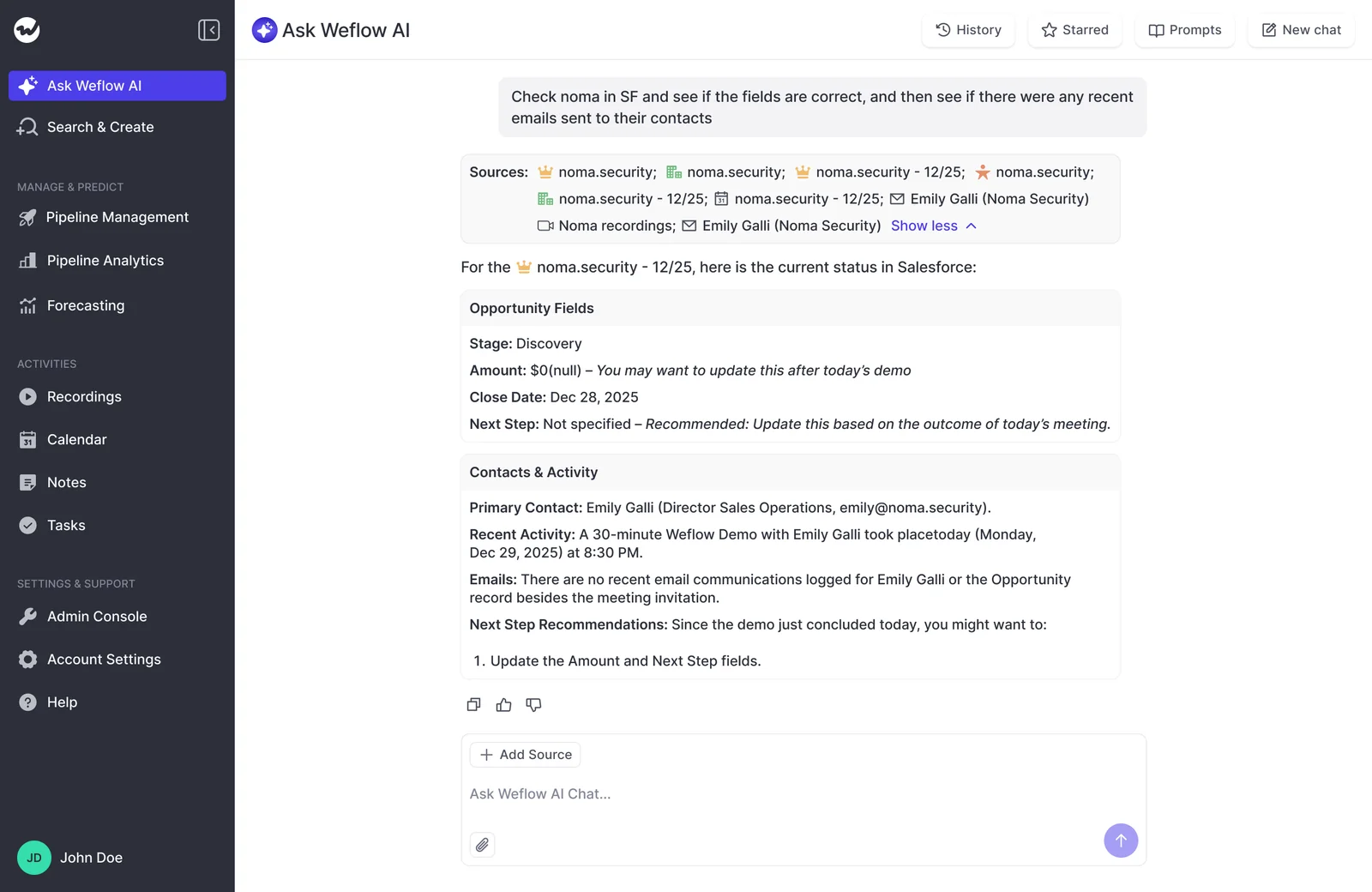
The citations are what make a flag something you can act on.
"I love being able to go right to the call, transcript or email and see where something was said that the AI is referencing."
— Scott Jones, SVP of GTM Revenue Intelligence & Enablement, KORE Wireless
How Weflow forecasts renewals separately from new business
Weflow Deal Intelligence & Forecasting gives renewals their own setup, with their own stages, cadence, targets, date logic, weighting and AI projection. Your renewal number is no longer just a filtered view of the sales forecast.
Index the renewal forecast on contract date, not close date
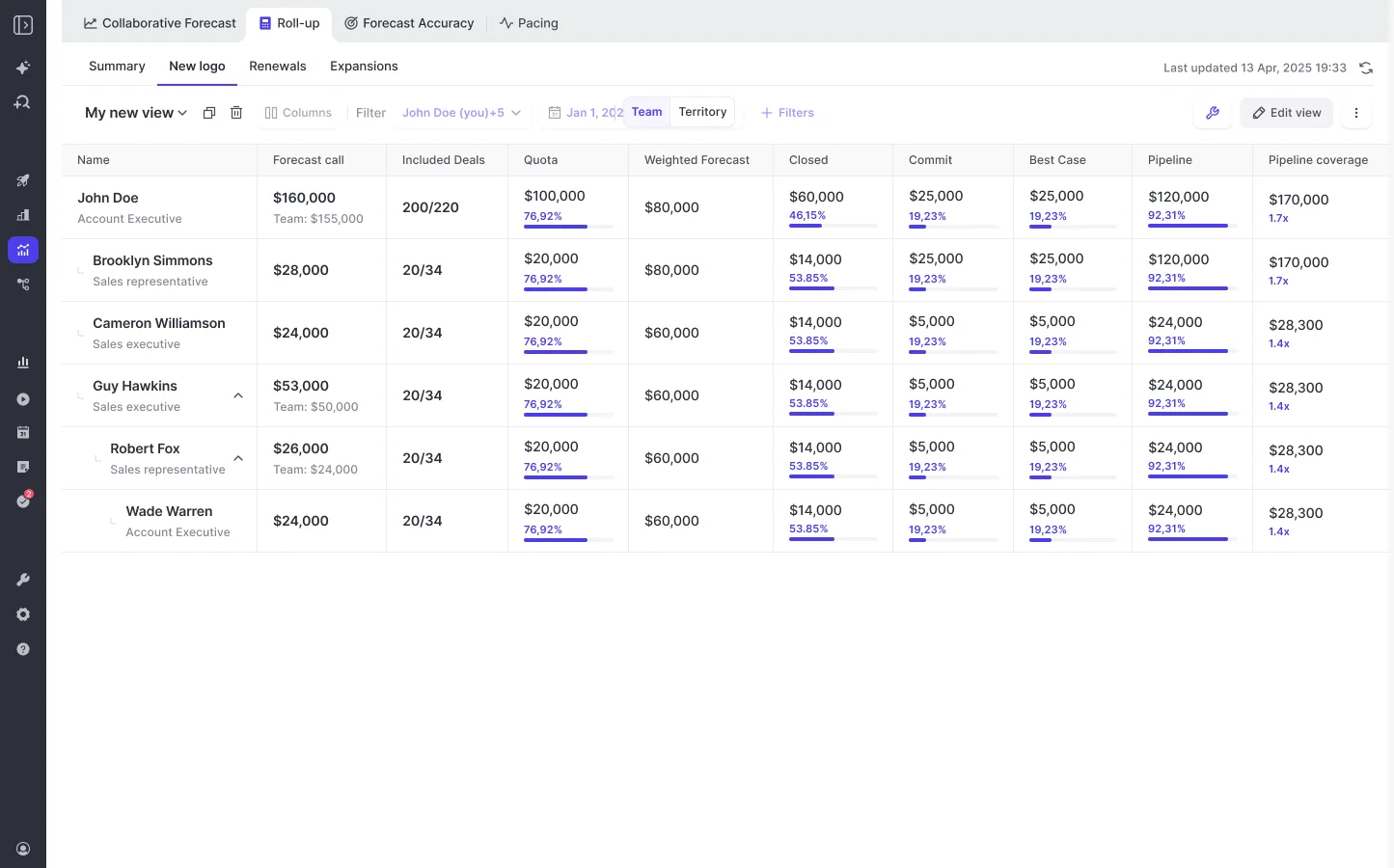
Weflow can run several forecast setups side by side, each built on its own Salesforce amount and date fields, with its own stages, cadence, targets and forecast calls.
Each opportunity record type, such as New Business or Renewal, also keeps its own stage path, forecast-category mapping and roll-up.
A renewal setup can use contract start date instead of close date, so you forecast the renewals due this quarter. That's how most CS leaders already track them.
When I'm doing the renewal forecast, I don't care what my close date is. What I want to track is renewals that are due in this quarter and how we are doing against those.
You can build a setup on any Salesforce currency field. If your previous contract ARR and forecast renewal amount both sit in currency fields, you can forecast on whichever one answers your question.
A renewal dropping from $2M to $1M then shows up as the number you care about, not a generic Amount.
Weight renewals on their own close rates and AI projection
Weflow's dynamic weighted forecast replaces Salesforce stage probabilities with each stage's historical close rate over a rolling window, such as the last 365 days, and recalculates daily.
You can create several weighted forecasts and apply each to the right setup, so renewals get renewal close rates.
Each forecast setup also gets its own AI projection model, so renewals are projected from renewal history, not new-business history. A few details worth knowing:
- It needs at least six months of opportunity history and imports up to two years at install.
- The first projection is ready within 48 to 72 hours.
- It refreshes nightly and returns a low, middle and high value.
- When it isn't confident in a range, it shows none and says why.
| Weighted on sales stage probabilities | Weighted on renewal history | |
|---|---|---|
| Source of each stage's weight | Probabilities set with new business in mind | Your renewals' own close rates by stage |
| A renewal sitting in stage one | Weighted like an early new-logo deal | Weighted at the rate renewals in stage one actually close |
| How it updates | When someone edits the probabilities | Daily, over the rolling window you set |
| AI projection | Shared with new business, if there is one | A separate model trained on renewal history |
Give one CSM both a renewal number and an expansion number
A CSM can belong to several teams in Weflow, which covers the common case of a where they carry both a renewal and an expansion number. Each number rolls up through its own setup.
A CS setup can also exclude expansion opportunities whose net new ARR is negative, so contraction stays out of the expansion forecast.
Sales and CS also follow the same roll-up process: reps and CSMs submit calls tied to named opportunities, managers review and adjust, and every version is saved.
You get one methodology across the org, with separate numbers for each motion, so you can see exactly which one missed.
What a CSM sees in Weflow when a renewal goes quiet
Here's how it plays out on a mid-sized account with a renewal due in two quarters, from the first signal to the forecast:
- Captured emails show the champion's address bouncing and a new name on the thread. Meeting types show the last two business reviews were skipped, while a troubleshooting call was booked.
- On its next scheduled run, the account's churn playbook scores the account against your definition and writes the higher risk result to the Salesforce field on the account.
- Friday's Agent Builder brief lands in the CS Slack channel. The account sits near the top because its contract value is one of the larger renewals due.
- The CSM opens Ask Weflow AI on the account, asks what changed since the champion left, and follows the citations to the troubleshooting call where pricing came up.
- The CSM lowers the renewal forecast call on that opportunity and adds a comment explaining why.
- In Monday's review, the CS leader sees the renewal number move in a forecast indexed on contract date, with the comment and the submission history behind it.
None of this depends on the CSM remembering to update a picklist, and you get the chance to step in while the customer is still talking to you.
How Weflow fits next to your CS platform and helpdesk
Weflow works alongside your CS platform and helpdesk rather than replacing them. It handles the account work in Salesforce: capture, churn read, and renewal and expansion forecasting.
| Work | Where it lives |
|---|---|
| Ticket handling and support queues | Your helpdesk, such as Zendesk or Intercom |
| The workflows your team runs in a CS platform such as Planhat | Your CS platform |
| CSM, AM and exec-sponsor emails and meetings | Salesforce, through Weflow Activity & Contact Capture |
| Call summaries and CS field updates | Salesforce, through Weflow Conversation Intelligence |
| Account risk results | Salesforce fields, written by AI Playbooks |
| Renewal and expansion forecasts | Weflow, built on your Salesforce opportunities |
| Ticket counts, product usage and NPS | Part of Weflow's read only when that data already sits in Salesforce fields |
Today, the CSM often owns renewal risk in one system while the AE owns the forecast in another, so the same account can be green in the CS tool and at risk in the pipeline review on the same day.
With the risk result on the account in Salesforce, right next to the renewal opportunity, both come from the same record.
Which renewal motions Weflow doesn't fit
Three limits will decide whether Weflow fits your renewal process:
- There's no account-level portfolio roll-up of renewal work: Weflow forecasts on renewal opportunities. Teams whose AMs and CSMs need an account board that rolls the whole customer up in the forecast should look at Clari's account module, which offers one.
- There's no consumption forecasting: Weflow models deal-based revenue, weighted by stage, rep roll-up, and AI projection. Teams whose renewals depend on usage ramp need a different method.
- All forecasts use one period type: A team that plans renewals on annual periods while new business runs quarterly by month has to pick one shape for both. Most renewal teams forecast inside the same quarter as sales, so this mainly affects teams with annual-only renewal planning.
If your renewals are opportunity-based, contract-dated and forecast quarterly alongside sales, Weflow is a good fit.
How Weflow handles consent when you record existing customers
Recording existing customers can feel more sensitive than recording prospects, and how consent works depends on how you record.
When the Weflow notetaker joins a call, it handles consent for you, with an opt-in, opt-out or no consent flow. It posts a notice in the meeting chat with a link to stop the recording, and you can also send a pre-meeting email.
When a CSM records with the desktop app, nothing joins the meeting, so the automated consent flow doesn't run, and getting consent under local law is up to the CSM.
A few points for your legal and security review:
- Weflow spins up your instance in the region where your Salesforce is hosted, and you can override it to keep data in the EU or UK.
- You can delete recordings after a set retention period and keep the transcripts, or delete both.
- Weflow holds SOC 2 Type II certification and is GDPR compliant. ISO 27001 is in progress, not achieved.
- AI processing runs with Zero Data Retention, and Weflow never uses customer data to train AI models.
What Weflow costs when you add every CSM and AM
Weflow pricing is seat-based and billed annually, with AI usage bundled in, so recordings, transcripts, AI templates and Ask Weflow AI prompts have no usage caps or token metering. Agent Builder is priced per workspace, not per user.
| Product | Price | What a CS team gets from it |
|---|---|---|
| Weflow Activity & Contact Capture | $19 per user per month | Every CSM, AM and exec-sponsor email, meeting and contact logged to Salesforce. No recordings. |
| Weflow Conversation Intelligence | $39 per user per month | Recordings, transcripts, CS templates and meeting types. Includes Weflow Mobile Copilot, the desktop app, Ask Weflow AI Pro and Agent Builder Free. |
| Weflow Deal Intelligence & Forecasting | $39 per user per month | Renewal and expansion forecast setups, dynamic weighting and the AI projection |
| Weflow Agent Builder Free | Included in every plan, 25 agent actions per month per workspace | Enough to set up and test your first scheduled risk brief |
| Weflow Agent Builder Growth | $299 per month for 500 agent actions | Recurring briefs across more accounts and teams |
| Weflow Agent Builder Scale | $999 per month for 2,500 agent actions | Agents running across the whole CS and sales org |
Most CS teams start with Weflow Revenue AI Foundation, which pairs capture with Conversation Intelligence. Capture alone doesn't include recordings, so you'll need both for the churn read.
Adding forecasting later costs roughly $10 more per user per month, with no separate forecasting contract. Unlimited view-only licenses are included too, so a CS leader or exec sponsor who only reviews recordings, summaries and views doesn't need a paid seat.
How to roll Weflow out to your CS team in phases
We recommend rolling out in three phases, so each one earns your team's trust before the next asks more of them:
- Capture and Conversation Intelligence first: These ask nothing of CSMs: emails, meetings and calls simply start landing on accounts, with CS templates and meeting types.
- Churn playbooks and the risk agent next: Once a few months of conversations are in Salesforce, write your churn definition with Weflow's CSMs and schedule the brief.
- The renewal forecast last: Forecasting is a leadership motion, so launch it once CSMs trust the data underneath and aren't submitting numbers built on records they know are incomplete.
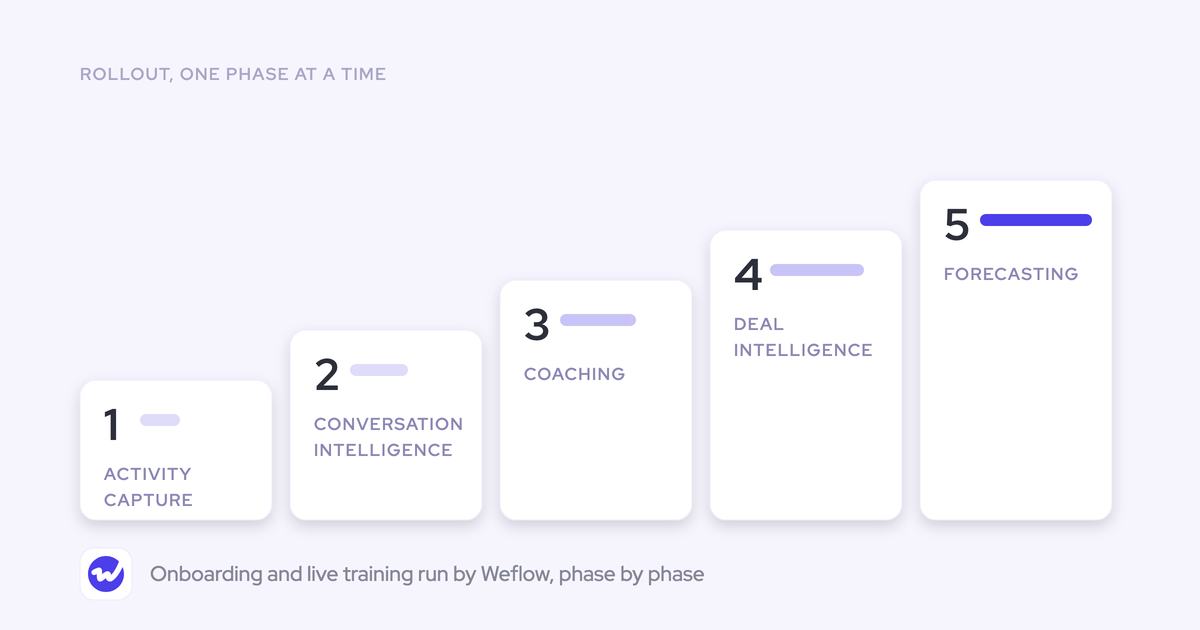
KORE Wireless followed the same logic across its whole go-to-market team in five phases: Activity Capture, Conversation Intelligence, Coaching, Deal Intelligence, then Forecasting, with Ask Weflow AI on top.
It isn't a CS-specific case, but the reason they bought Weflow is the same one that makes it work for CS.
"We weren't buying conversation intelligence. We were buying a unified data layer that the entire go-to-market motion could run on, and a partner who understood that distinction."
— Scott Jones, SVP of GTM Revenue Intelligence & Enablement, KORE Wireless
The fastest way to see whether that layer fits your post-sale motion is on your own Salesforce data.
FAQs CS leaders ask about Weflow for customer success
Does Weflow detect tone or sentiment on customer calls?
No. Weflow works from the transcript and the timeline of who spoke when, not voice tone. To find upset customers, use a keyword or AI tracker, a churn playbook, or an Ask Weflow AI search across the week's calls.
How does Weflow log emails when a renewal and an expansion are open on one account?
An email logs to one opportunity, and there's no rule that automatically picks the one closing soonest. Instead, you separate them through configuration:
- One lane for the renewals team and one for everyone else, filtered on opportunity type or a close-date threshold.
- Reps can re-map an email once from the Outlook add-in or Chrome extension, and Weflow applies that choice to the rest of the thread.
Can we bring historical recordings from Fathom or Gong into Weflow?
Yes. Weflow imports recordings from most conversation intelligence tools, through the vendor's API or from exported files, then re-links them to Salesforce records. That way, your migration doesn't depend on the old vendor turning an API on.
Can Weflow build the sales-to-CS handover from the sales calls?
Yes. Your CSM can point Ask Weflow AI at the account's sales recordings and ask what pain drove the purchase, who was involved and what was promised, with citations to each call. An onboarding template then captures the first CS conversation in your team's structure.