How the Gong Salesforce Integration Works: What Syncs and What Does Not
Learn how the Gong Salesforce integration works: what syncs, what doesn't, and how AI fields update.


If your Salesforce meeting counts don't match Gong, calls keep landing on the renewal, or your MEDDIC fields are empty even though "Gong has it," don't worry, your org isn't broken.
Gong's Salesforce integration just isn't one sync. It's four separate layers: import, the Gong Conversation object, the activity export, and AI Data Extractor. Every gap you're chasing traces back to one of them.
The good news is that some of those gaps close with a setting you can change this week. Others come from how Gong is built, so no setting will fix them.
Below, we'll walk through each layer: what lands in Salesforce, where it lands, what doesn't make it, and which setting controls it.
Full disclosure, we're Weflow, and we build Weflow Conversation Intelligence + AI Field Updates that write straight into Salesforce. Weflow is the Revenue AI Orchestration platform for sales, customer success, and RevOps teams.
But we'll cover everything you can fix inside Gong first.
The Gong Salesforce integration is four layers, not one sync
Each layer has its own direction, target object, and rules, and each one covers a different slice of your call data. That's why Salesforce shows you fragments instead of one complete history.
- Import (into Gong): Gong reads accounts, contacts, leads and opportunities from Salesforce so it can match calls to records.
- Gong Conversation object (into Salesforce): Gong's managed package stores each call on its own custom object, separate from the activity timeline.
- Activity export (into Salesforce): Gong writes meetings, calls and emails as Tasks or Events, but only after a tech admin turns it on.
- AI Data Extractor (into Salesforce): Gong writes AI-extracted answers into CRM fields that already exist and are already imported into Gong.
The split comes down to how Gong was built: conversation-first, in its own cloud. So Salesforce is a destination Gong exports to, not the system it writes into.
Here's what syncs to Salesforce and what stays in Gong
Each type of call data lands in one specific place in Salesforce (or doesn't land at all), and most of it is controlled by a setting. You can use this table as a reference sheet for your org:
| Data | Where it lands in Salesforce | What doesn't arrive | Setting that changes it |
|---|---|---|---|
| Accounts, contacts, leads, opportunities | Read into Gong. Import writes nothing back to Salesforce. | Any field the admin didn't select for import | Field selection in Gong's CRM import configuration |
| Custom objects | Not imported directly | All custom object data, unless it's moved onto a supported parent | Roll-up fields or Flows onto a supported object, about 2 to 4 hours of admin setup |
| Call record, highlights, call notes | Gong Conversation object, linked to accounts, contacts, leads and opportunities | A place on the native activity timeline, and ready-made reports | None. This is how the package stores calls. |
| Transcript | Can sit on the Gong Conversation object | Gong's Task/Event export doesn't include transcripts | See the transcript section below |
| Meetings and calls as activities | Tasks or Events | Everything, until the export is enabled | Activity export, enabled by a Gong tech admin, on any plan |
| Dialer calls vs Teams meetings | Dialer calls as Tasks, Teams meetings as Events | One object that holds every call | No Gong setting. You need a report type that joins both objects. |
| Emails | Tasks or Events through the export | Emails from before export was enabled, and emails with no matching contact or lead | Enabling email export, which only works going forward |
| Contacts and contact roles for participants | Gong participant object, then contacts, leads and opportunity contact roles through Flows | New contacts and contact roles, until the Flows are active | Activating Gong's two Flow templates, done by a Salesforce admin |
| Methodology and other field values | Existing CRM fields mapped in AI Data Extractor | Values for fields nobody pre-built and imported, and anything past 20 extractors | A business admin publishes extractors against prepared fields |
| Opportunity association | Whichever deals the matching rules pick, up to 20 per call | The right deal, when the rules favor another one | Matching rules, simulation, and reassociation of the last 30 days |
Why the gaps hide until you report from Salesforce
As long as everyone works inside Gong's UI, these gaps stay invisible. Reps open the call, managers open the deal board, and nobody notices that Salesforce holds a thinner version of the truth.
That changes as soon as leadership asks for call data in Salesforce, like:
- A pipeline report that counts every customer conversation.
- A Flow that fires when a competitor comes up.
- An AI agent that reads what buyers actually said.
None of those can run on data that only lives in a vendor's UI. That's usually when the question lands on the admin's desk, and no, it doesn't mean you misconfigured anything.
Teams moving to AI on top of Salesforce describe the shift this way:
"We are trying to move to a more AI-native internal stack. We are connecting AI into Salesforce, and this direction makes things standing outside the sales stack even a bigger issue than it has been historically."
This is also where conversation intelligence vendors really differ. Most tools now transcribe about equally well, but how deeply each one writes back into the CRM still varies a lot.
"Look at the Salesforce integration, trial it. That is often something that most CI providers don't start with. They see it as an afterthought."
How each of Gong's four Salesforce layers works
Each layer has its own rules and is controlled by a different admin, so it helps to know who owns what. Here's how each one works.
Layer 1: Gong imports Salesforce accounts, contacts, leads and opportunities
Gong's import is read-only. Gong pulls in Salesforce records so it can match conversations to them. It covers the four standard objects (leads included), and an admin chooses which fields come across.
- Accounts, contacts, leads and opportunities import directly. If you've heard that "Gong can't handle leads," that's not true.
- Custom objects don't import directly.
- The workaround is to use roll-up fields or Salesforce Flows to move the data onto a supported parent object, which takes about 2 to 4 hours of admin setup.
- Any field you want AI Data Extractor to write later has to be imported here first (more on that in Layer 4).
Layer 2: Gong stores each call on its Conversation object
Gong for Salesforce writes each call to the Gong Conversation object, a custom object installed by its managed package. The object can link to several accounts, contacts, leads and opportunities, with a participant object in between.
The catch is that this object sits apart from the native activity timeline. Emails, events, and tasks live on the timeline, while calls live on Gong's object, so anyone reading the account has to check two places to see the full history.
- Gong supplies no ready-made reports on the Conversation object, so you'll need to build call reporting on it yourself.
- Gong ships a Flow template that creates a contact, or a lead when no account is found, for every external participant not already in Salesforce. It's inactive until a Salesforce admin activates it.
- Heads up: that Flow also overwrites a known contact's or lead's title with the one from their email signature, so review it before you switch it on.
- A second Flow template adds participants who are contacts as contact roles on the related opportunity. It's also inactive by default.
So if nobody activated those two Flows, missing contacts and empty contact roles are exactly what you'd expect.
Layer 3: Gong's activity export writes Tasks or Events, once enabled
Gong's activity export writes meetings, calls and emails into Salesforce as Tasks or Events. It's available on any Gong plan, but it stays off until a Gong tech admin turns it on. Its limits are documented, and they explain most "missing activity" tickets:
- It only exports activity with an external participant who matches a Salesforce contact or lead.
- It only exports emails from the day email export was enabled.
- It doesn't export call transcripts.
- Dialer calls land as Tasks and Teams meetings land as Events, on different objects with different fields.
You also get to choose how activities are placed: either one task per activity, with context held in custom fields, or separate tasks so the same activity appears under several Salesforce records. Private calls still export, but with the subject "Private call" and their details hidden.
One thing Gong gets right here: it creates tasks through an integration user but assigns each one to the rep who owns the activity, so owner-based activity reports and manager views stay accurate.
Layer 4: Gong AI Data Extractor writes only into existing fields
Gong AI Data Extractor writes AI-generated answers from calls into CRM fields that already exist and are already imported into Gong. Since Gong doesn't create fields in your CRM, you'll need to handle that setup before the extractor can do anything.
- Deal-target extractors can't be saved without a field mapping, while account-target extractors can live in Gong alone.
- A workspace can publish at most 20 extractors, and only a business admin creates them.
- Custom objects work only where the relationship to the account or deal is one to one and the record already exists, because Gong updates records and never creates them.
- Answers come from calls over a rolling six-month window, and the extractor overwrites the previous value whenever it finds newer information.
It's also worth knowing that teams using Gong mainly to record calls get a weaker version of field updates than teams on the full suite, and extending Gong into Salesforce field updates costs extra on top of your existing licence.
That's why we still hear from Gong teams whose reps copy call content into Salesforce by hand.
Deal boards offer a second route. A single text field shown as a column, such as next steps, can take AI-suggested updates from the current and previous week's calls. Just note that deal boards require Forecast Essentials or Gong Forecast.
How Gong decides which opportunity a call lands on
Gong attaches calls to opportunities using matching rules your admin configures. When those rules can't single out one deal, the call goes to several deals or to whichever deal the rules favor. On an account with a live renewal, that's often the renewal.
Here's the order Gong works through:
- Participants match to contacts and leads by phone number or email fields.
- Contacts and leads resolve to accounts through the contact, the email domain, contact roles on other accounts, or related parent accounts.
- Candidate deals are those open around the conversation, including deals closed in the last 14 days or up to 100 days past their close date.
- Gong narrows candidates by deal filters, by whether the deal owner, a contact role or a deal team member took part, by the number of CRM contacts involved, and by a chosen date field.
- If several deals remain, Gong associates all of them, up to a maximum of 20.
The renewal problem happens in step 4. If the new-business deal has no contact roles yet and the renewal does, nothing in the rules points to the new deal, so the call never shows up on the opportunity it was actually about.
To fix it, simulate rule changes before you activate them, then reassociate the last 30 days of calls once the rules look right.
Does Gong put the full call transcript into Salesforce?
Not through the activity export, as Gong's own documentation confirms. Whether transcript text reaches Salesforce at all depends on what Gong writes to its Conversation object in your setup.
- Possible on the custom object: Gong can write each call's highlights, call notes and full transcript onto its managed-package object.
- Reported by customers: Some Gong customers receive an AI summary and a document in Salesforce rather than queryable raw text.
This matters as soon as you want to build on it. Any agent or analysis running on Salesforce needs text it can query. A summary is just someone else's interpretation of the call, and an attached document isn't something you can search or analyze at scale.
Trace your Salesforce symptom back to the Gong layer
Each common symptom maps to one layer and one cause. Find yours in the table below, then check whether a setting can fix it.
| Symptom in Salesforce | Gong layer | Cause | Fixable in configuration or structural |
|---|---|---|---|
| Meeting counts don't reconcile | Activity export | Dialer calls land as Tasks and Teams meetings as Events | Structural, worked around with a joined report type |
| Calls missing from the activity timeline | Conversation object, activity export | Calls live on Gong's object, or the export is off | Export: fixable. Separate object: structural. |
| Calls on the renewal | Matching rules | Rules can't separate several open deals on one account | Fixable in part, through rule tuning and contact roles |
| Emails missing before a date | Activity export | Email export only runs from its enablement date | Structural for the past, fixable going forward |
| Activity with unknown participants missing | Activity export | Only activity matching a contact or lead exports | Structural, narrowed by activating the contact Flow |
| Contacts or contact roles missing | Conversation object Flows | Both Flow templates ship inactive | Fixable, by a Salesforce admin |
| MEDDIC fields empty | AI Data Extractor | Fields weren't pre-built, imported and mapped, or the 20-extractor cap is reached | Fixable in part. Cap and pre-built fields: structural. |
| Stage updates lagging | Integration connection | The connection breaks intermittently and pipeline falls behind | Not a setting: connection reliability |
| Leadership can't build Flows on call data | All four layers | Transcripts, unmatched activity and unmapped values never reach Salesforce objects | Structural |
We hear about lagging stage updates a lot from former Gong customers, including our own Head of Sales:
"That was like just a consistent, I would say like paper cut and annoying thing. And what would end up happening is pipeline wouldn't get updated, you know, fast enough when that stuff would happen. So we'd be lagging behind."
— Chris Nethercote, Head of Sales at Weflow, former Gong enterprise customer
Which Gong gaps you can fix and which you can't
Before you act, it helps to separate configuration issues from architecture ones. If a setting closes the gap, just flip it. If it doesn't, you're looking at a design decision, and that's a different conversation to have with your economic buyer.
What you can fix in Gong settings today
These four configuration changes close real gaps, and most of them work on any Gong plan:
- Enable the activity export: Choose the placement up front (one task per activity or separate tasks per record), since it decides how multi-record conversations show up in reports.
- Activate the contact and contact-role Flows: A Salesforce admin activates both templates. If you don't want email-signature titles overwriting known contacts, edit the contact Flow first.
- Tune matching rules and simulate before activating: A Gong admin adjusts deal filters and the date field, simulates the result, then reassociates the last 30 days.
- Pre-build the fields AI Data Extractor needs: A Salesforce admin creates the fields and imports them into Gong, and a business admin publishes the extractors within the 20 cap. For custom objects, add the roll-up or Flow workaround onto a supported parent.
What no Gong setting will change
These gaps come from how Gong is designed, so no configuration closes them:
- Calls live on Gong's Conversation object, separate from the native activity timeline.
- Dialer calls land as Tasks and Teams meetings as Events, so no single object holds every call.
- The activity export never sends transcripts, emails from before enablement, or activity without a matching contact or lead.
- AI Data Extractor writes only into pre-built, imported fields, and a workspace publishes 20 extractors at most.
- Field updates do more for teams running the full Gong suite than for teams that bought Gong to record calls.
- The managed-package object stays behind if you leave, so you either keep two objects of call history or migrate it out and uninstall the package.
When fixing Gong configuration is the right call
If your team lives in Gong's UI, runs the full suite, and values what Gong does best, fixing the configuration and staying put is probably the right move. Gong has the deepest conversation analytics in the category.
It records on Zoom, Google Meet, Microsoft Teams, Webex and seven other providers, and its certification set includes SOC 2 Type II and the ISO 27001 family.
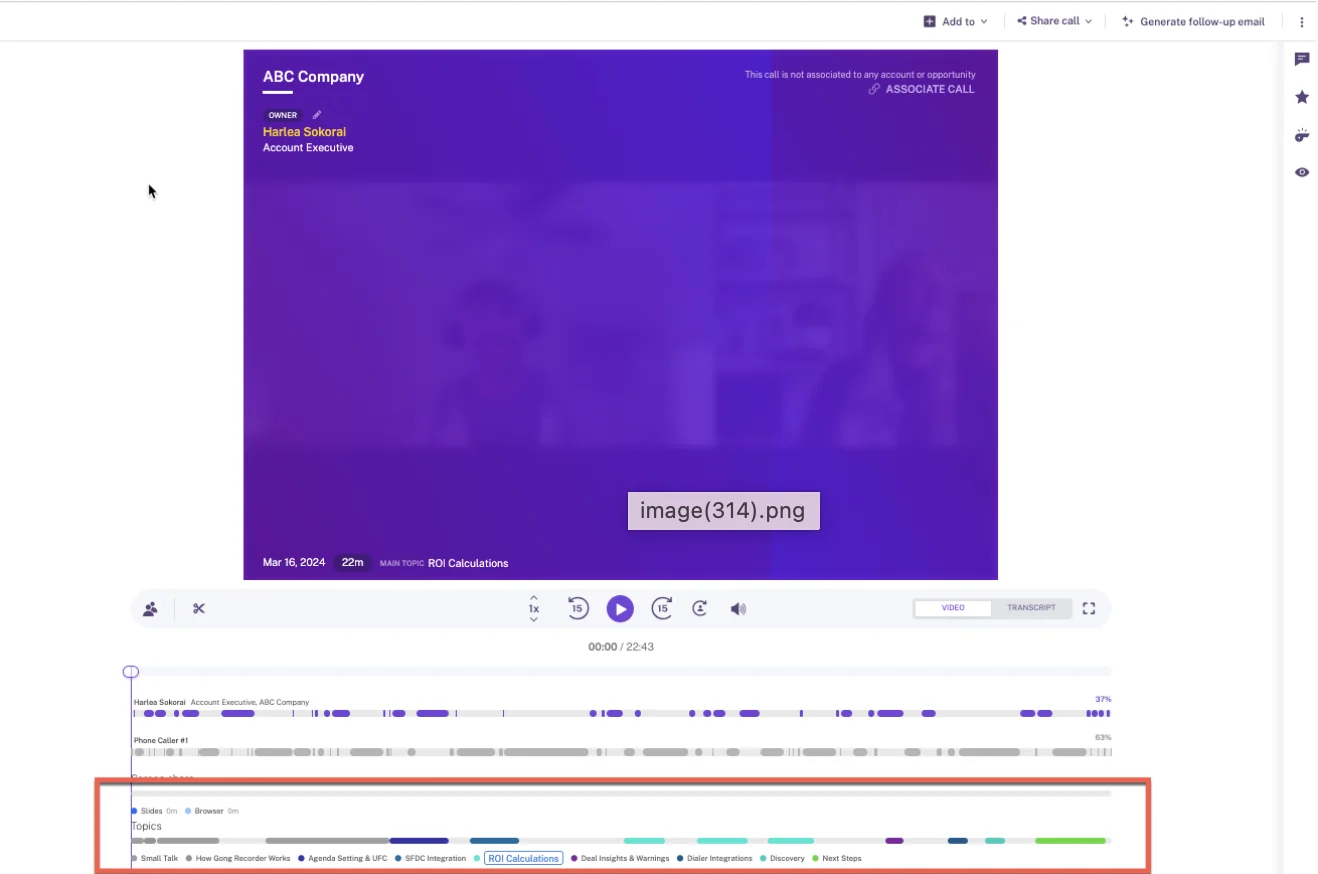
Those analytics show up right on the call page. Here's Gong's call view, with its topic track running across the recording:
Reps also tend to get attached to the deal boards, which is a real switching cost:
"Like the deal board specifically, the reason why I stuck with it was like the bubbles, like, you sort of get like addicted to the bubbles."
— Chris Nethercote, Head of Sales at Weflow, former Gong enterprise customer
For that kind of team, living with the structural gaps costs less than leaving would. Work through the four fixes above, and you may never need anything else.
What happens when a later call contradicts an earlier one
AI Data Extractor overwrites the field with the latest reading, and there's no setting to append to the value or hold it.
If Monday's call names one competitor and Wednesday's names another, the field holds Wednesday's answer, with nothing to flag that it's contested.
For any field that a report or routing rule reads, a confidently wrong value is worse than an empty one. An empty field gets chased. A wrong one gets trusted.
Whichever tool writes Salesforce fields from your calls (Gong and Weflow included), it should give you these controls:
- Review before write: The rep sees the current value beside the suggested one before anything changes.
- Leave unchanged when there's nothing new: A call that never touched the topic shouldn't blank the field.
- Per-call history kept separately: Each call's values live on their own record, so the opportunity field can hold the latest picture without erasing the arc.
- A deal-level assessment for cumulative fields: Champion or metrics get judged across every call and email, not by the last call that mentioned them.
- Visible provenance: You can see whether a value came from the call or from somewhere else.
How Weflow writes call data straight into Salesforce records
Weflow writes call outcomes straight into your Salesforce records as data you own, rather than exporting them from a vendor cloud after the fact. That architectural difference targets the structural gaps above, not the configuration ones.
Weflow writes the call summary onto the Salesforce Event
Weflow writes the AI summary onto the existing Salesforce Event within 30 to 60 seconds of the call ending, with a link to the recording.
Since it lands on the Event, the summary shows up on the opportunity's activity timeline, right where reps and managers already look.
To be fair, Weflow also keeps the summary and transcript on its own managed-package object, Weflow_Recording__c. So the real difference from
Gong isn't the custom object, it's the Event write-back. And because the transcript text lives on that object in Salesforce, your own agents and reports can reach it.
Weflow AI Field Updates write through the Salesforce API
Weflow AI Field Updates write through the real-time Salesforce API rather than field mapping, so your validation rules, field dependencies and permission sets apply to every write.
"Everything we do has a bi-directional Salesforce integration that is real time and API based, that respects all your validation, field dependencies, permission sets."
Here's how that maps against the Gong limits above:
- Against fields imported into Gong first: AI Field Updates write to every Salesforce object, standard and custom, and every field type except relationship lookups. Weflow support sets up custom objects for you.
- Against invented picklist values: Before writing a picklist or multi-select, Weflow reads the field's allowed values and matches its output to them.
- Against validation bypass: A stage change blocked by a rule stays blocked until the fields the rule depends on are filled, and AI Field Updates can fill those fields from the call too.
- Against the 20-extractor cap: Weflow ships unlimited templates and 250+ pre-built prompts, covering MEDDIC, MEDDPICC, SPICED, BANT and custom frameworks.
- Against overwrite with no review: You set each field to write automatically or wait for review. The rep sees the current value beside the suggested one and accepts, edits or rejects it.
- Against cumulative fields judged by the last call: AI Playbooks read every email, meeting, transcript and CRM field on the deal and keep methodology fields at the current best answer. They re-evaluate changed records every two hours and write back to Salesforce when you switch write-back on.
You control each field in the prompt editor, right next to the prompt itself:
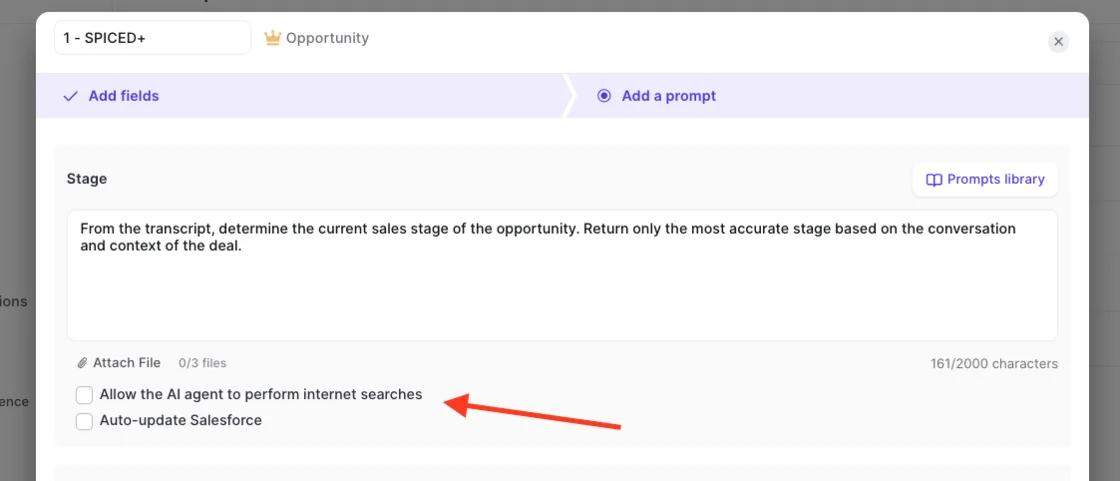
We recommend review mode for interpretive fields like champion or pain, and automatic mode for fields one call answers clearly, like next step.
Just keep in mind that playbook write-back has no approval step, so decide upfront which fields the playbook owns and which belong to per-call updates.
Where Weflow has limits of its own
Of course, Weflow has gaps of its own, and it's worth weighing them alongside Gong's:
- Each field update overwrites the field's content, and there's no append mode. To protect earlier values, use review mode, add a "leave unchanged if nothing new" instruction to the prompt, or keep per-call fields on the recording object.
- No provenance flag marks whether a value came from the call or from a web search. Web search is off by default for each prompt, and if you want a field limited to conversation data, you'll need to write that restriction into its prompt.
- When an automatic field write fails, the error email names neither the field nor the cause. The content stays on the recording object and can be regenerated and pushed again, but we'd recommend testing writes against every target object before rollout.
- AI Field Updates run only on Weflow's own recordings. Weflow doesn't process Gong recordings.
- Weflow works only with Salesforce.
What Weflow Conversation Intelligence + AI Field Updates costs
Weflow Conversation Intelligence + AI Field Updates costs $39 per user per month, billed annually. It includes Ask Weflow AI Pro, the Agent Builder free tier with 25 agent actions per month, and Weflow Mobile Copilot for in-person meetings.
If you want to see the Event write-back and per-field review, take the product tour.
FAQ
How do I report on every Gong call in one Salesforce report?
Gong splits calls across three places: dialer calls as Tasks, Teams meetings as Events, and every recorded call on the Gong Conversation object.
To see them in one report, you'll need a report type that joins those objects, or a capture setup that writes every call to a single object.
What happens to Gong's Conversation object if we leave Gong?
The managed package's object and its call history stay in Salesforce. You can either live with two objects of call history (one from before the switch, one after) or migrate the history out and uninstall the package to free up storage.
Can I run a second recorder alongside Gong without duplicate meetings?
Only if one tool owns the meeting activity. When two tools write the same meeting to Salesforce, it lands as two separate records and inflates your meetings-per-rep and meetings-per-opportunity reports.
So let one tool write the meeting, and turn that off in the other.
What does Weflow's integration user need in Salesforce?
The REST API needs to be enabled, since Weflow logs to Salesforce through it. Weflow_Recording__c records are owned by the integration user, and users see them through the object's sharing settings.
For playbook write-back, the integration user also needs edit access on the target fields.
Where do Gong and Weflow store call data by default?
Gong stores data in the US by default, though new customers can choose the EU data center at onboarding. Weflow stores data in the same region as your Salesforce instance by default, with EU, US, and AU available.