What Weflow Forecasting Does Not Do: Consumption Revenue, Split Amounts, Logo Targets and Dated Exchange Rates
Learn where Weflow Forecasting falls short: consumption revenue, split amounts, logo targets, FX rates.


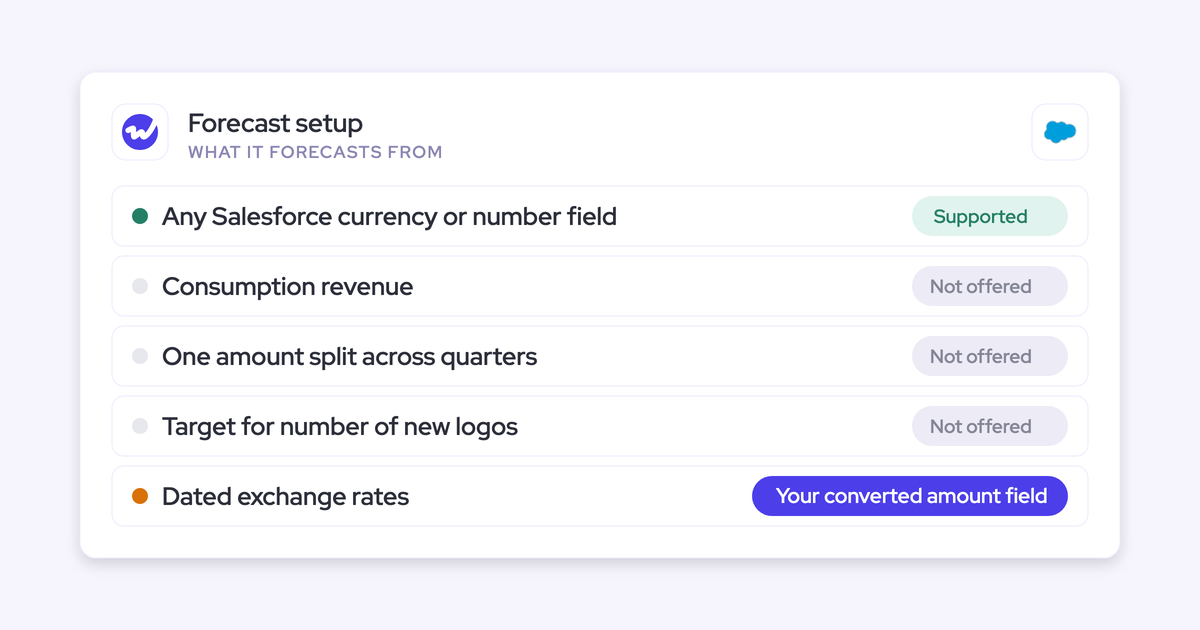

Weflow forecasting is built for deal-based revenue. Each forecast setup takes one amount field from the Salesforce opportunity, places it in one period using one date field, and rolls it up through the opportunity owner.
That's how Weflow forecast roll-ups work. If your revenue doesn't sit on the opportunity as a single dated amount, that's where Weflow reaches its limit.
Here are the four places where that matters most, and our verdict on each:
- Dated exchange rates: Workaround. Point the forecast at your own converted-amount field.
- Consumption revenue: Process change if you're hybrid (bookings in Weflow, ARR run-rate with FP&A). Look elsewhere if usage is your main number.
- Splitting one opportunity across quarters: No in-forecast workaround.
- Targets for a number of new logos: No in-forecast workaround.
Weflow is the Revenue AI Orchestration platform for sales, customer success, and RevOps teams. Think of this page as our answer to the question your CFO will ask about Weflow Deal Intelligence & Forecasting: What won't it do?
How Weflow forecasting reads your Salesforce opportunities
On top of the amount and date, each forecast sorts deals into columns using a forecasting field, then rolls them up through the opportunity owner, following the hierarchy built from the Salesforce Manager field.
If your revenue fits that shape, Weflow forecasts it. If it doesn't, you've found the ceiling.
We're starting here because forecasting tools rarely break on dashboards. They break on structure: which amount, which date, which currency and which unit. Once you know exactly what Weflow reads, you can test your own business against it before you talk to us.
The three fields every Weflow forecast setup maps
Each setup maps three fields (revenue, forecasting and date), and your admin can add permanent filters on top. It all runs independently of your Salesforce forecast settings.
| Field | What it decides | What it can be |
|---|---|---|
| Revenue field | The number the forecast sums | Any opportunity currency or number field: Amount, Expected Amount, a custom ARR field, or a number field such as Quantity |
| Forecasting field | Which column a deal sits in | Stage, Forecast Category or any custom picklist |
| Date field | Which period a deal lands in | Close Date by default, or another date such as contract start date |
| Permanent filters | Which opportunities the setup includes | Record type, opportunity type or any field condition, combined as needed |
Your admin can change any of these in the Weflow Admin Console, so you don't need to file a support ticket to move a forecast to a different field.
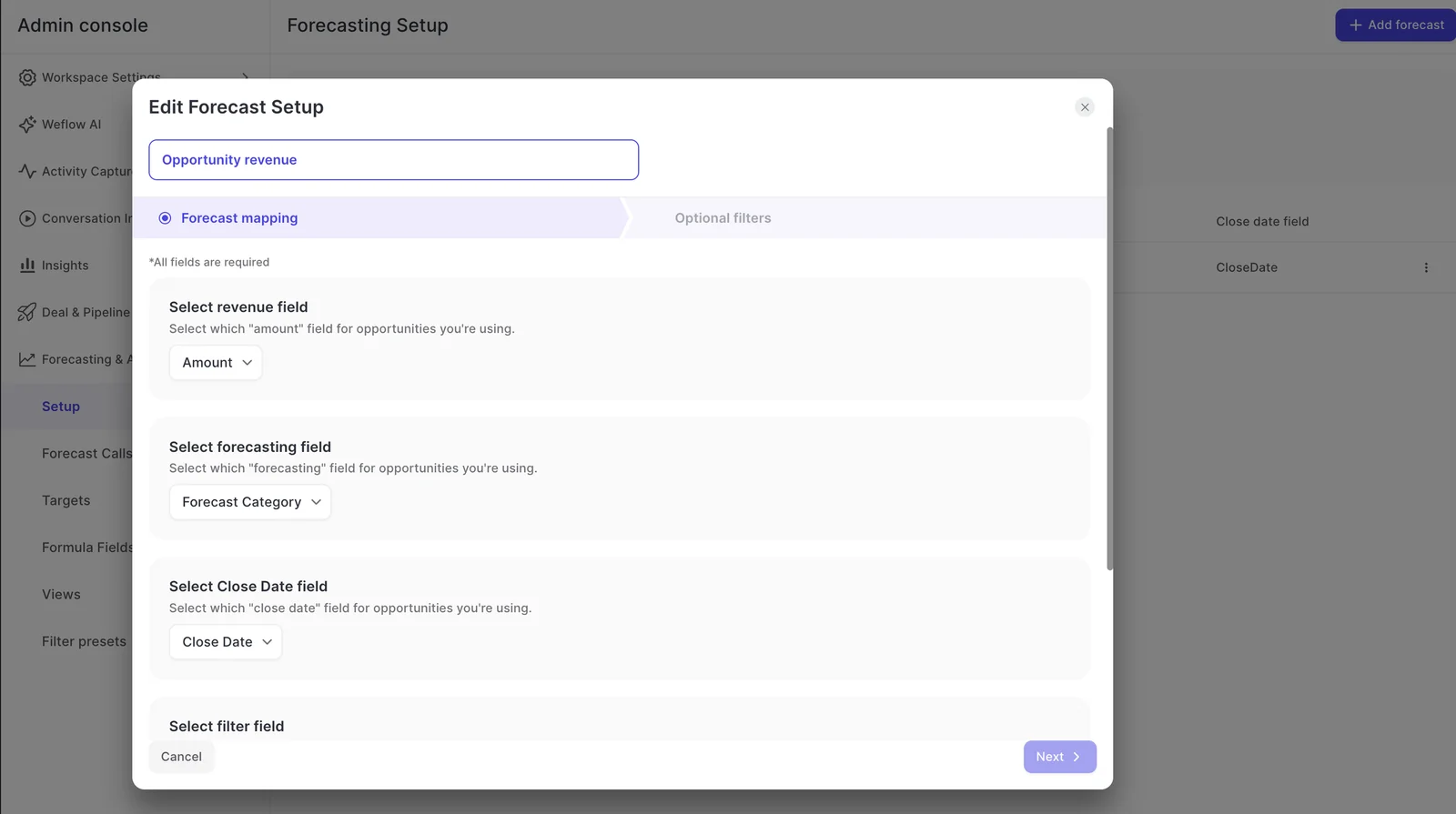
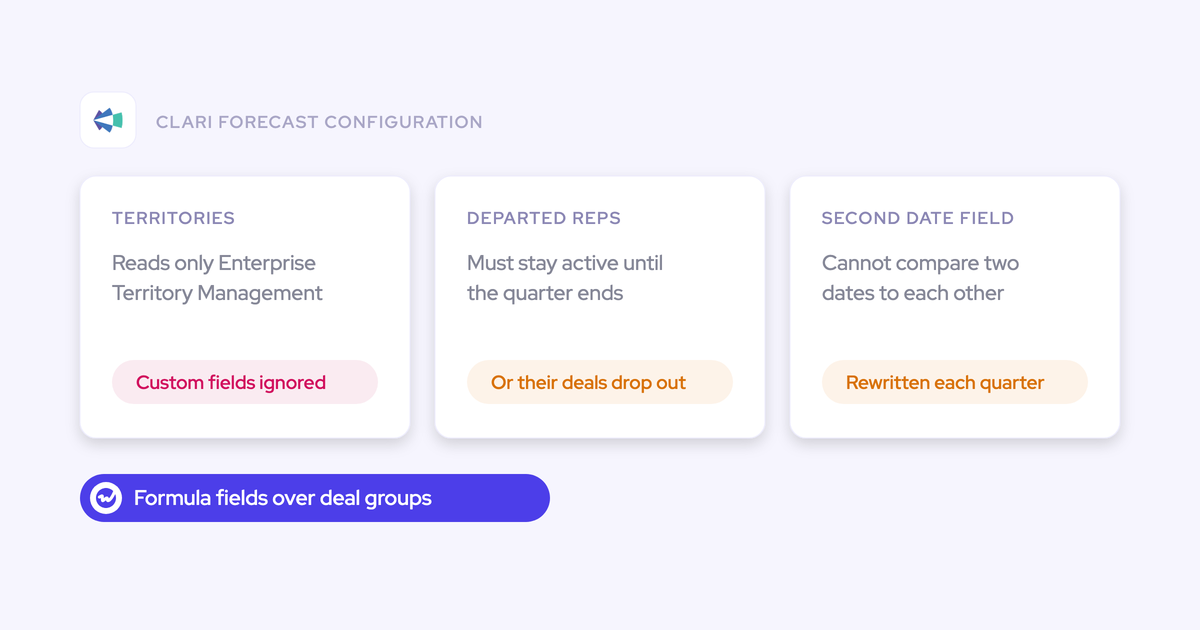
On switch calls, Clari customers tell us that adding a second date (say, a booking date finance tracks separately from close date) meant rewriting every formula in the forecast. In Weflow, the date field is just a setup choice.
How parallel setups keep new logo, renewal and expansion apart
You can run several forecast setups in parallel. Each one has its own amount field, date field, stages, cadence, targets and forecast calls, so every revenue motion gets forecast on its own terms instead of disappearing into one blended number.
The revenue field (we call it the foundation field) applies to everyone in a setup, so a team forecasting on incremental ARR and a team forecasting on a calculated revenue field need two separate setups. Here's what typical configurations look like:
- New logo: Amount, dated on Close Date, filtered to the new business record type.
- Renewal: Your renewal ARR field, dated on contract start date, so the quarter shows renewals due rather than renewals someone guessed a close date for.
- Expansion: Filtered to exclude opportunities with negative net new ARR, so contraction stays out of the expansion number.
- Licenses vs professional services: Two setups on two revenue fields, each with its own quota.
The AI projection builds a separate model for each setup, so renewals are projected from renewal history and new logos from new logo history. You can also run a dynamic weighted forecast per setup, calculated from each stage's historical close rate.
This is especially useful for renewals, which often sit in an early stage but still close at high rates.
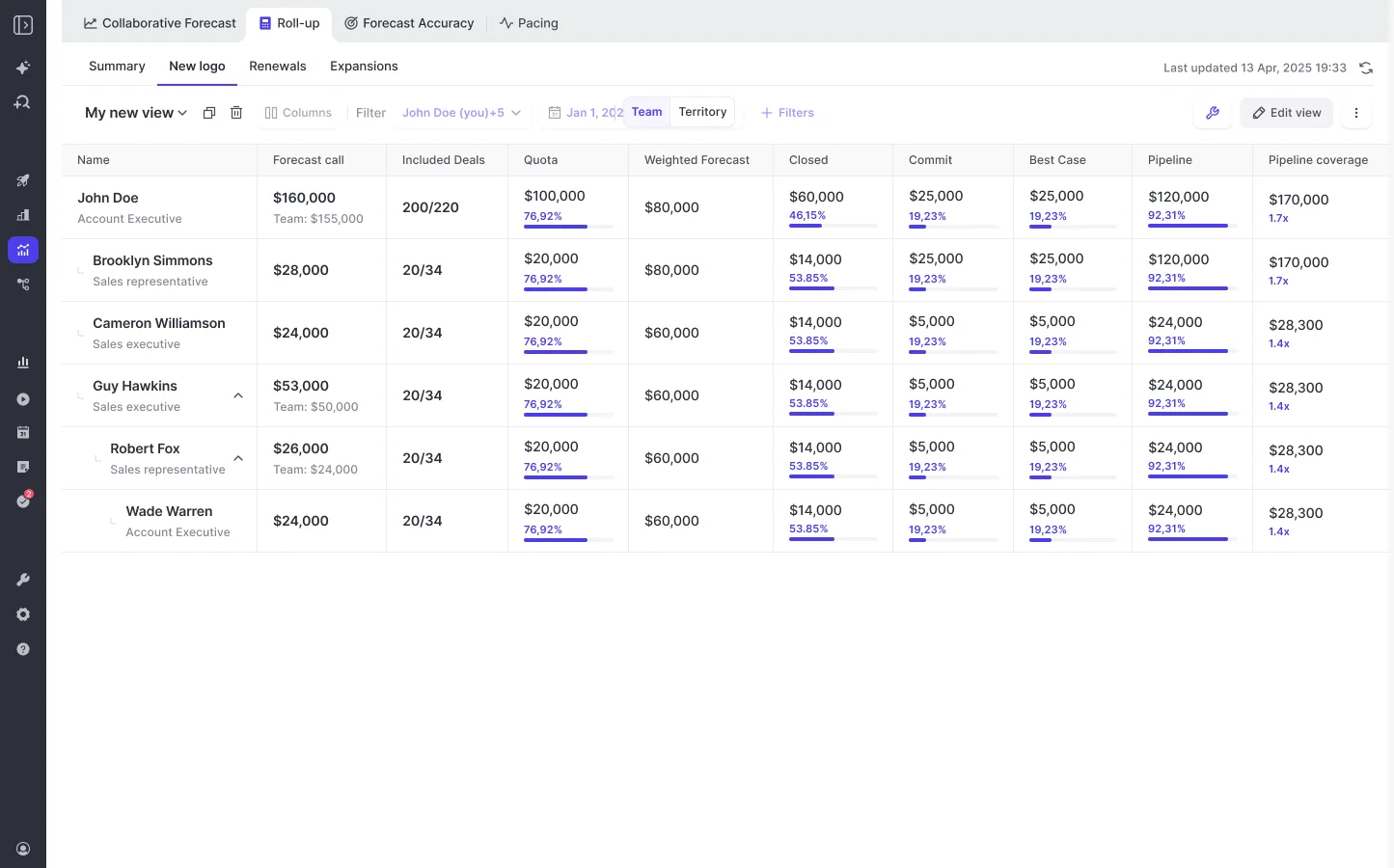
The one thing all setups share is the period type. We cover that in the table further down.
Does Weflow forecast consumption or usage-based revenue?
No. Weflow forecasts deal-based revenue, and usage doesn't sit on the opportunity. All three of our forecasting methods (the weighted forecast, the rep and manager roll-up, and the AI projection) read from opportunities.
Booking-based SaaS fits cleanly because a contracted deal maps neatly onto the opportunity roll-up. If your revenue depends on when and how much customers consume, the fit is weaker.
"The customer starts consuming whenever they decide, so I know what we are consuming now, but six or twelve months out is where it gets really critical."
So the real question is how much of your number comes from usage.
Run the bookings forecast in Weflow and ARR run-rate with FP&A
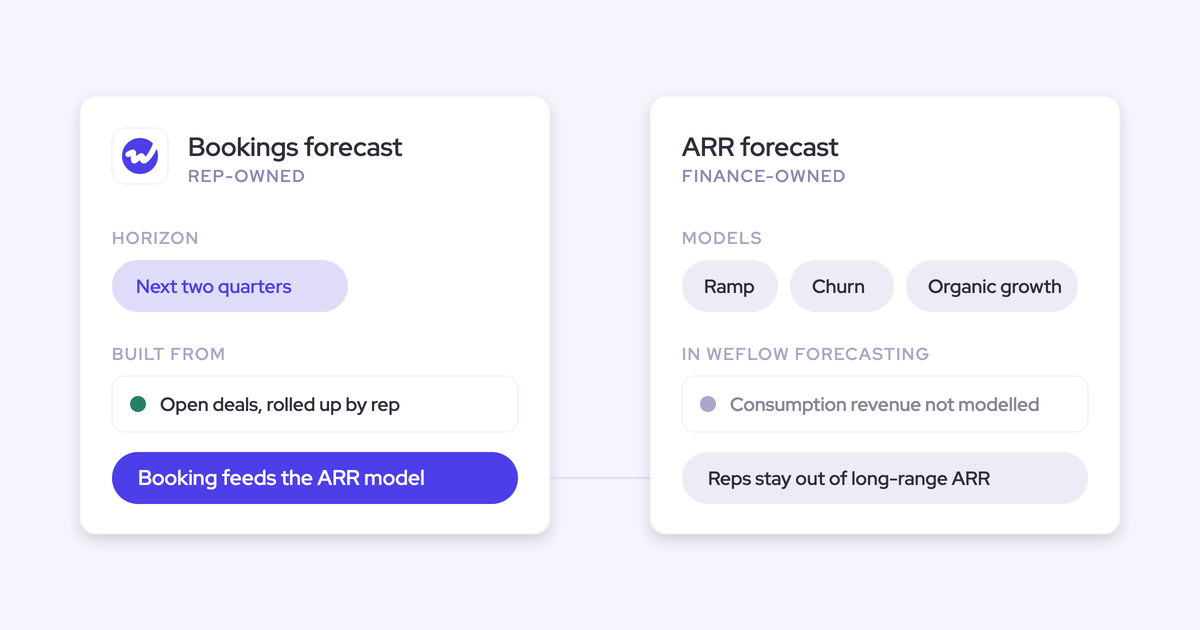
If you're hybrid, you can forecast bookings in Weflow and leave the ARR or run-rate model with FP&A. Verdict: process change.
It's the same split both of our RevOps Lab guests from consumption businesses described.
At Aiven, reps forecast bookings for roughly the next four months, and each month FP&A extrapolates those numbers, layering in historical ramp patterns, known churn and organic growth.
Aiven had tried having reps forecast ARR directly. It was accurate, but it took up too much of the company's time.
Socure, meanwhile, treats bookings as the goal line for revenue and tracks how much of each quarterly booking cohort realizes by month twelve, aiming for about ninety percent.
"I think it's a common misconception in consumption based models that bookings are sort of irrelevant or it just comes down to revenue because you're kinda booking a made up number, but that's not really the case, because that does inform essentially your forecast and understanding how much revenue do we expect and how do we track towards this. So that's the goal line."
| Bookings forecast | ARR or run-rate forecast | |
|---|---|---|
| Owner | Reps and managers | FP&A with RevOps |
| Horizon | The next quarter or two | Twelve months and beyond |
| Inputs | Opportunities, forecast calls, deal health | Ramp curves, seasonality, churn, organic growth |
| Where it runs | Weflow | Your FP&A model |
Weflow gives you a disciplined bookings forecast and a roll-up your reps submit against, but not the revenue number your board asks about. That consolidation still happens outside Weflow.
When usage is your main number, look at Aviso or Salesloft
If your business runs on usage-based revenue, Weflow isn't the right forecasting tool for you. Verdict: look elsewhere.
- Aviso runs consumption forecasting that turns account usage into ARR or MRR and flags outlier accounts, alongside traditional revenue forecasting.
- Salesloft offers account-based forecasting built for variable or consumption revenue. Each account carries a machine-predicted Pace number that sellers adjust with an override and a comment.
Both are built for a problem we don't solve, and we'd rather you hear that from us now than three months into a rollout.
Can Weflow split one opportunity amount across quarters?
No. A Weflow forecast setup places the full opportunity amount in whichever period its date field falls into, so it can't recognize part of a deal in one quarter and the rest in the next.
Your one lever is the date the setup reads. You can point it at a delivery date or an end date instead of the close date, but that moves the whole deal, not part of it.
For example, take a $100,000 deal that delivers $60,000 in Q3 and $40,000 in Q4, with a Q3 close date:
| Period | What finance books | What the Weflow forecast shows |
|---|---|---|
| Q3 | $60,000 | $100,000 |
| Q4 | $40,000 | $0 |
| Full deal | $100,000 | $100,000 |
| Source | Delivery schedule or line items | One amount field, one date field |
If you recognize revenue on delivery schedules or on line items that span quarters, the split you see in Salesforce won't appear in the forecast view. Verdict: no in-forecast workaround.
Can a Weflow forecast target count new logos?
No. Weflow forecast targets are currency amounts. So if your goal for the year is a number of new customers, there's no target type for it.
Here's what you get and what you don't:
- You get quotas, manager targets and budgets as amounts, per user and per forecast setup.
- You get counts through the Weflow MCP connector, which returns closed-won count and total opportunity count per rep for a chosen period, as data an AI assistant can read.
- You don't get a target set as a number of logos or deals.
- You don't get a count of opportunities in the forecast view next to the amounts.
If your new-logo goal is a count because pricing hasn't settled yet, Weflow can show you how many deals closed, but it can't track that number as a target. Verdict: no in-forecast workaround.
Does Weflow forecasting apply Salesforce dated exchange rates?
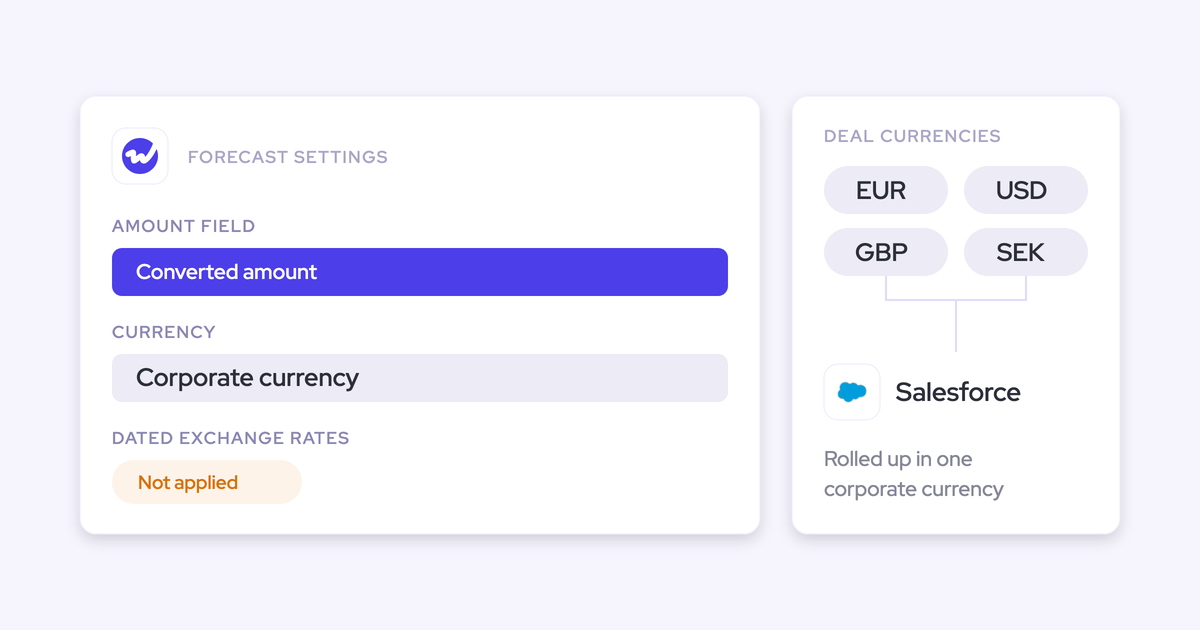
No. Weflow forecasts use the standard Salesforce currency conversion, not dated exchange rates.
If you need dated conversion, you can point the forecast at your own calculated converted-amount field, so the numbers follow finance's conversion logic instead of ours. Verdict: workaround.
The risk here is easy to miss. If your global team sells in local currency and relies on dated rates, regional pipeline gets converted at one standard rate, and the regional numbers drift from the ones finance closes on.
Nothing throws an error; the forecast just quietly misstates the regions.
Setting it up takes two steps:
- Create or confirm a calculated converted-amount field on the opportunity that applies your finance-approved conversion. Many global teams already have one, such as a converted USD amount.
- In the Weflow Admin Console, set that field as the revenue field of the forecast setup. If you run several setups, set it on each one that needs it.

Forecast totals show in your Salesforce org's default currency (set at the org level, not per user), and deals in other currencies show both their original and converted values.
More Weflow forecasting limits, each with its workaround or none
These are the structural limits RevOps leaders usually ask about next, each with the workaround we know works, or "none" if there isn't one.
| Limit | What happens | Workaround or alternative | Verdict |
|---|---|---|---|
| Opportunity splits and overlay credit | A deal rolls up in full through its opportunity owner. Salesforce opportunity splits and overlay roll-ups for specialist or partner teams aren't supported. | None | No workaround |
| One period type across all setups | Every setup in a workspace uses the same period type, such as quarterly broken down by month. Annual renewals can't run beside quarterly new business. | Pick one shape for all motions. Quarterly by month is the most common setup among our customers. | Process change |
| Submissions and targets live in Weflow | Forecast submissions, targets and roll-up data stay in the Weflow app and aren't written to a Salesforce field. Opportunity edits made in Weflow do write back to Salesforce. | Read submissions over the Weflow MCP connector. | Workaround, or deal-breaker if every number must live in Salesforce |
| AI projection and ramping reps | The projection scores deals partly on the owner's history, so a new rep's deals can project too high or too low. | Look at the team-level range, which absorbs the effect, and treat a new rep's individual line with some caution. | Process change |
| No account-level renewal board | Forecasting and deal inspection run on opportunities. There's no board that rolls renewal and account work up by customer. | Renewal opportunities on contract dates cover the forecast. For an account board, Clari's account module offers one. | Look elsewhere if you need an account board |
| Quote-line and CPQ values | Weflow forecasts from a value on the opportunity, not from quote lines or quote line recipients. | Calculate the net or commissionable amount onto an opportunity field and forecast on it. | Workaround |
| No probability weighting in the roll-up | The roll-up sums the chosen amount. It doesn't apply stage probability unless the weighted value is the foundation field. | Forecast on a weighted Salesforce field, or treat the raw sum as best case. The weighted pipeline view and the AI projection model likelihood separately. | Workaround |
| Fixed summary tiles | The tiles at the top of the collaborative forecast follow the Salesforce forecast categories. You can hide or reorder them, not put a formula there. | Show the formula as a column, and type the matching target into the target setup. | Workaround |
| Deal data on non-standard objects | Highly custom setups where the deal data doesn't live on standard objects may not be feasible. | Validate feasibility during the trial. | Depends on your data model |
| No mobile or chat submission | Forecasts are submitted and adjusted in the Weflow web app only. | Weflow emails a reminder per setup when a forecast is due and flags a missing submission as a warning. | Process change |
If your rule is that every number, forecast submissions included, must live in Salesforce, the roll-up won't meet it. The weighted forecast and the AI projection will still work for you, though, because both run off CRM data with no rep input.
What Weflow Deal Intelligence & Forecasting costs
Weflow Deal Intelligence & Forecasting costs $39 per user per month, billed annually, and forecasting is also included in the Revenue AI Enterprise bundle.
| Option | What's included | Price |
|---|---|---|
| Weflow Deal Intelligence & Forecasting | Pipeline management, deal signals and warnings, pipeline analytics, forecasting with roll-ups, AI projection and accuracy tracking, plus Ask Weflow AI and Agent Builder | $39/user/month |
| Revenue AI Foundation | Weflow Activity & Contact Capture and Weflow Conversation Intelligence, no forecasting | $49/user/month |
| Revenue AI Business | Foundation plus Deal Intelligence (table and Kanban views, deal and account scoring, warnings). Pipeline analytics and forecasting aren't included. | $59/user/month |
| Revenue AI Enterprise | Business plus pipeline analytics and forecasting | $79/user/month |
| View-only seats | Leaders and stakeholders who only read dashboards and pipeline views | Free, unlimited |
All plans are billed annually with a 10-user minimum, and we don't charge for implementation.
If you've just renewed another forecasting tool, the usual route is to start on Revenue AI Foundation for capture and conversation intelligence, then add forecasting to the same contract when your current tool comes up for renewal.
That way, you don't have to ask your CFO to approve a second forecasting contract.
This order also helps accuracy. Forecasting without Activity & Contact Capture and Conversation Intelligence underneath gives weaker roll-up results, because a forecast is only as good as the deal data it reads.
How to prove your edge case in a Weflow trial or pilot
A two-week trial isn't enough to prove forecasting. Capture and conversation intelligence show results within a day, but forecasting changes how your team runs its week, and that takes a full roll-up cycle to see.
So find your deal-breakers on paper first, then prove the rest in a pilot.
- Map your revenue against the model: Write down which amount field, which date, which currency and which unit your business runs on, and test each against the four limits and the table above.
- Hold an alignment session with the finance owner in the room: Settle who submits, how often, at deal or manager level, and against which quota, before anything is configured.
- Test non-standard objects early: If your deal data lives outside standard objects, validate feasibility in the first days of the trial.
- Use the 14-day trial for capture and conversation intelligence: Two weeks is enough to see whether the record is complete and the summaries are usable.
- Run forecasting in the three-month paid pilot: It's contractually the first three months of a multi-year agreement, with an opt-out at the end. You get a real exit and a small bill, and your team gets to run real submission cycles before you commit.
That said, the cadence is the one part no tool can install for you.
"If you don't run an operating cadence, the best tool in the world won't help you."
Bring your hardest edge case to the first call, and we'll walk through it against the setup live. See how Weflow captures activity, updates Salesforce fields from calls, and rolls up your forecast. Book a 30-minute demo.
Weflow forecasting limits: FAQ
Are these Weflow forecasting limits on the roadmap or by design?
Most of them are by design. Consumption revenue, split amounts, count targets and native dated rates all follow from Weflow's deal-based model.
Two are gaps rather than design:
- We haven't built write-back of submitted forecast numbers to a Salesforce field because no customer has asked for it yet, not because it's hard.
- The AI projection doesn't yet adjust for reps who are still ramping.
How much Salesforce history does the Weflow AI projection need?
The Weflow AI projection needs at least six months of opportunity history. At install, Weflow imports up to two years of Salesforce opportunity data, and the first projection is ready within 48 to 72 hours.
The projection refreshes nightly and returns a low, middle and high value. The range widens when your business is changing (new products, motions or territories, for example), and if the projection isn't confident in a range, it shows none and tells you why.
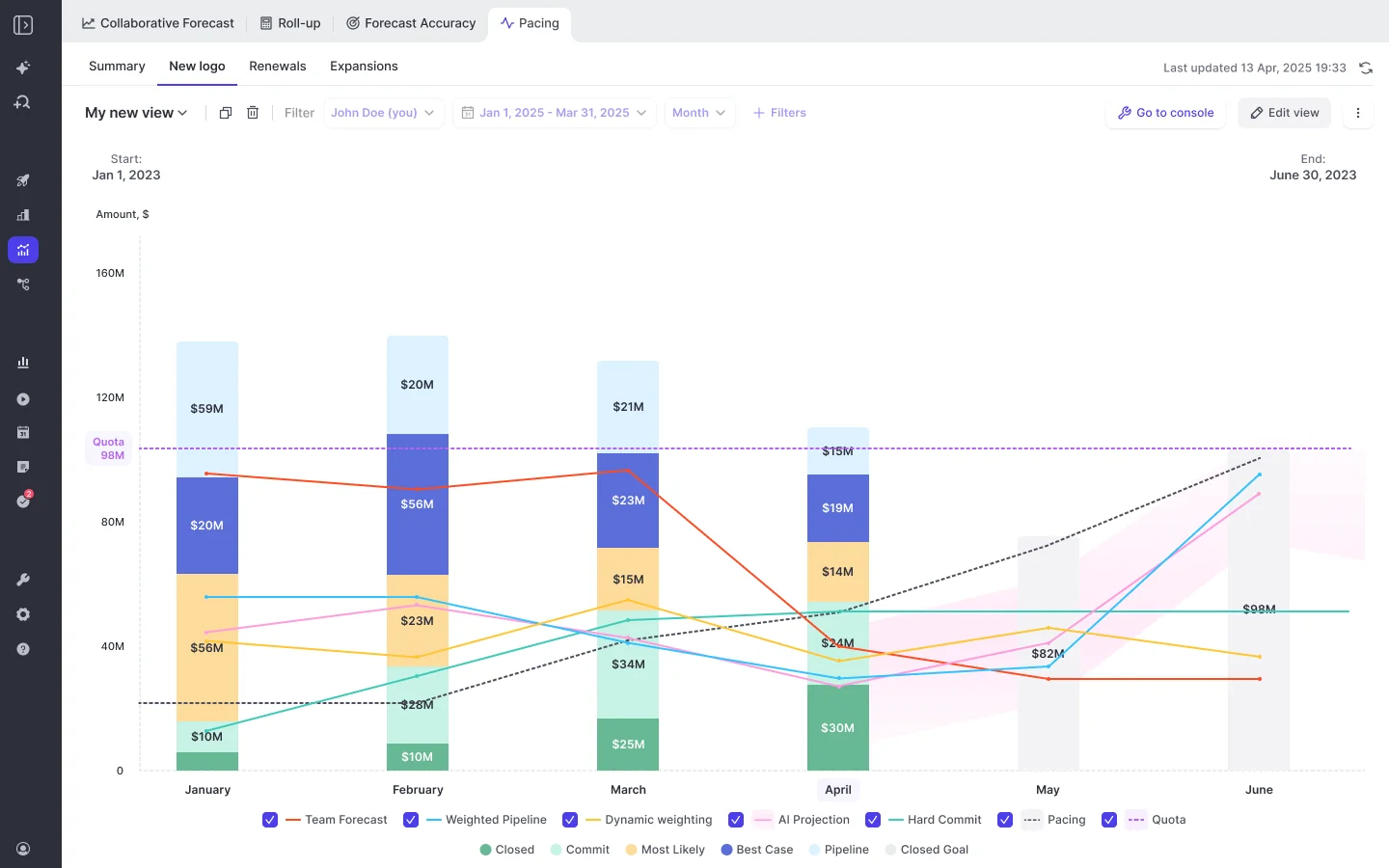
Buyers on switch calls tell us Clari's projection took 12 to 18 months to become useful for their RevOps team, because it learns from history built up after adoption.
Can Weflow rebuild the calculated columns we built in Clari?
Yes. Weflow forecasting has its own formula fields: your admin defines condition groups (such as the opportunities in Best Case and Commit), writes formulas over them with ordinary arithmetic, and adds the result as a column in forecast views.
The output shows as a currency, a percentage or a plain number, and clicking it opens the opportunities behind it. Formulas can use Salesforce fields and fields Weflow calculates itself, such as deal age. Teams use them for:
- A Best Case plus Commit total
- Net or gross dollar retention
- Renewals due in a period
- Their own stage weighting
What happens to our existing Salesforce forecast settings?
Nothing carries over. Weflow forecasting runs independently of Salesforce Collaborative Forecasts, so you'll set up your forecasts in the Weflow Admin Console during onboarding.
Does Weflow forecasting follow a custom Salesforce fiscal year?
Yes. Weflow forecast periods and quarterly targets follow the fiscal year set in Salesforce, including one that doesn't start in January. You change it in Salesforce, not in Weflow.
That's one difference from Salesforce Einstein Forecasting, which isn't available to orgs on a custom fiscal year.
How do we get Weflow forecast submissions into our BI tool or warehouse?
Through Weflow rather than Salesforce, since submissions don't land in a Salesforce field.
Right now, the Weflow MCP connector returns the most recently submitted forecast call for a period, the live pipeline total and the delta between them.
It returns null where nobody submitted. It also returns per-rep pipeline, closed-won and coverage metrics with the opportunity IDs behind them. We're also planning broader API access to submitted forecasts.