Forecasting Revenue and Project Starts From One Pipeline in Professional Services Firms
Learn how to forecast revenue and project starts from one Salesforce pipeline.


Project starts deserve their own forecast, not just an extra column on your revenue forecast.
That means a number field that counts people, a start-date field with one owner who keeps it current, and a weekly starts submission of its own, all reading the same Salesforce pipeline your revenue forecast already uses.
There are five realistic ways to get there:
- Keep the spreadsheet.
- Add a start-date field and build reports.
- Bend Collaborative Forecasts.
- Plan starts in your PSA.
- Run starts as a parallel forecast setup with its own submissions and roll-up, which is how forecast submissions and roll-ups in Weflow work.
Below, we put all five through six tests, explain why we recommend the last one, and flag when you're better off staying where you are.
A quick note on scope: in this guide, "revenue" means deal value placed in one period by a chosen date. Splitting one deal's value across quarters on a delivery schedule is a different problem, so we won't cover it here.
Why a close-date forecast can't show when people start
A Salesforce opportunity carries one amount and one close date, and every forecast built on it inherits that shape. Starts are a different event, with their own date and their own unit (people, not currency). And the people who know that date usually work outside the CRM.
Here's how the two compare:
| Revenue | Starts | |
|---|---|---|
| Unit | Currency | People |
| Date that matters | Close date | The date people begin work on the project |
| Who knows it | The account executive | Delivery and resourcing leads |
| Where it lives today | The opportunity in Salesforce | A spreadsheet rebuilt from a CRM export, or the PSA |
That's how a start can slip without anyone noticing. A deal closes on time but starts six weeks late, and the close-date forecast never shows it. You only find out when bench time or overcapacity shows up in delivery.
The fix starts with your data model, not with rep discipline.
Where to keep expected starts and start dates in Salesforce
Every path in this guide, except planning purely in your PSA, reads two fields on the opportunity. Your starts forecast will only be as good as those fields and the person who owns them, so settle this before you pick a tool.
Put an expected starts number and a start date on the opportunity
Add two custom fields to the opportunity: a number field for how many people are expected to start, and a date field for when they start. Keep both separate from Amount and Close Date, since they answer different questions.
| Expected Starts | Expected Start Date | |
|---|---|---|
| Field type | Number | Date |
| What it holds | Headcount expected to begin work on the project | The date those people begin work |
| Why it's separate | Amount counts currency, and staffing runs on people | Close Date marks the signature, not the first day on the project |
| Build note | Make it a plain number field, not a formula | Turn on field history tracking before go-live |
Those build notes come from a Salesforce limit that often catches teams too late. Salesforce only records a field's change history if tracking was switched on in advance, and it can't track calculated or roll-up fields at all.
So if Expected Starts is a formula, you'll never see how it moved.
Give the start date one owner before you build anything
If nobody maintains the start date, you've just recreated the close-date problem on a second field.
No tool can make this call for you; ownership is a process decision. We recommend giving the date to whoever learns first that it moved. That's usually the account executive while the deal is open, and the delivery or resourcing lead once it's won.
Write these four decisions down before you build:
- Who owns it: One named role per stage band, never "the team".
- What triggers an update: A scoping call, a contract signature, or a resourcing conversation.
- How often it's reviewed: Every week, before the starts call is submitted.
- What a moved start triggers: Who gets told, and whether the deal drops out of the period's starts call.
As our co-founder puts it:
"If you don't run an operating cadence, the best tool in the world won't help you"
— Philipp Stelzer, Co-founder and CPO, Weflow
Calculate PSA or custom-object starts data onto the opportunity
Opportunity-based forecasts, whether Salesforce's or ours, read fields on the opportunity. So if your starts data lives in a PSA or on a custom object, bring it onto the opportunity first with a flow, a roll-up or your PSA integration.
When delivery sits entirely outside the CRM, the opportunity field becomes the handshake between sales and delivery. Whoever owns the start date updates it there, even if the detailed staffing plan stays in the PSA.
If your starts live on a non-standard object, we'll check during the trial whether that data can reach the opportunity. (Some very custom spreadsheet setups can't be solved this way.)
Six tests any project starts forecast has to pass
For a starts forecast to be useful for staffing, it needs to pass all six:
- It counts people: Resourcing plans headcount, so a dollar-only forecast forces a conversion nobody trusts.
- It reads its own date: If it places deals by close date, every late start stays invisible.
- It keeps history: Snapshots and versioned calls let you see what you forecast three weeks ago and what moved since.
- It takes submissions from named owners, tied to named projects: A number with no projects behind it can't be challenged in the forecast call.
- It leaves the revenue forecast and its history untouched: Adding starts shouldn't put this quarter's revenue submissions at risk.
- RevOps can configure it without a vendor ticket: When executives ask for a new view, it should be a quick edit, not a rebuild.
Five ways to forecast project starts from your Salesforce pipeline
Each path solves part of the problem. Where they differ is history, ownership and whether they put your revenue forecast at risk.
| Test | Spreadsheet | Field plus reports | Collaborative Forecasts | PSA | Parallel setup |
|---|---|---|---|---|---|
| Counts people | Any column you add | Report sums the number field | Built around standard Amount, so a people count is a workaround | Yes, by role | Value field can be a number field |
| Reads its own date | Whatever date someone types | Group by start date | Expects the standard opportunity shape | Planned start per role | Date field set to the start date |
| Keeps history | Saved copies only, no snapshots | Current state only, plus tracked fields | Changing a forecast type wipes the quarter's history | Keeps the staffing plan, not weekly calls on open deals | Snapshots and versioned calls per setup |
| Named owners and projects | Usually a manager-only number | No submission | Submissions roll up the role hierarchy | Delivery owners, outside the pipeline | Calls built from named opportunities |
| Leaves revenue untouched | Yes, separate file | Yes | A forecast type set up wrong is costly to fix | Yes | Runs independently of the revenue setup |
| RevOps configures it | By hand, every cycle | Yes | Yes, but mid-quarter changes are expensive | The PSA admin, outside the CRM | Admin console and formula fields |
| Where it fits | The org is still changing shape | You need visibility, not accountability | A quarter that rests on about ten material deals | Role-by-role staffing | Several managers and weekly starts calls |
Keep the starts number in a spreadsheet
A spreadsheet is a fair choice while your go-to-market organization is still changing shape. After acquisitions or repeated team changes, automating a process nobody can describe yet would only lock in the wrong one.
Where it falls short is history, submission and accountability, and those gaps open up at exactly the growth stage when a staffing error costs the most.
"What you miss in a spreadsheet is three main things. Typically reps do not go into a spreadsheet and report their numbers, so it is only a manager forecast. You cannot do a deal by deal forecast call because with fifty reps each holding ten to fifty deals a quarter it is just too complicated. And you cannot inspect which deals are slipping or stalling because a lot of context is missing."
— Janis Zech, Co-founder and CEO, Weflow
First step if you stay here: Build the two opportunity fields anyway and export from them, so the spreadsheet stops being the system of record for the start date.
Add a start date field and build Salesforce reports
Group open opportunities by Expected Start Date month, sum Expected Starts, and you've got starts by month. For visibility, that's a real step up from the export.
But it falls short in three ways:
- There's no submission, so nobody commits to a number.
- There's no roll-up, so delivery leads can't adjust what sits under them.
- There's no point-in-time record, because a report shows the pipeline as it is today. Without a warehouse taking snapshots, you can't see what last month's starts forecast said.
First step: Build the report on the two fields and review it in the weekly pipeline meeting, so the owner keeps the date current.
Bend Salesforce Collaborative Forecasts into a starts forecast
Collaborative Forecasts is built around the standard Amount field and Salesforce's own quota structure.
Teams that forecast on their own custom fields tend to drop the native categories and quota fields and rebuild targets in custom objects. A number field that counts people pushes you down the same road.
The bigger risk is the setup itself: changing a forecast type in Collaborative Forecasts wipes that quarter's forecast history and makes the team re-enter quotas.
We've seen a team accidentally include renewals and then filter them out of reports for an entire quarter, because fixing the type would have erased their submissions.
Native forecasting also gives you no pipeline waterfall and no history of how the pipeline moved.
First step: Build the starts forecast type in a sandbox and get it right before it touches production, because getting it wrong later is expensive.
Plan starts in your PSA tool
Your PSA is the right home for role-by-role staffing across many start dates: who starts, in which role, on which day. Keep that work there.
What a PSA isn't is a pipeline forecast that sales and delivery submit against each week. It plans people on projects, but it's not where an account executive commits to how many starts will come out of open deals this quarter and gets held to that call.
First step: Decide which single PSA value feeds the Expected Starts and Expected Start Date fields on the opportunity, and how it gets there.
Run starts as a parallel forecast setup
A parallel setup is a second forecast on the same pipeline, with its own number field, date field, owners and submission. It never shares a column with revenue.
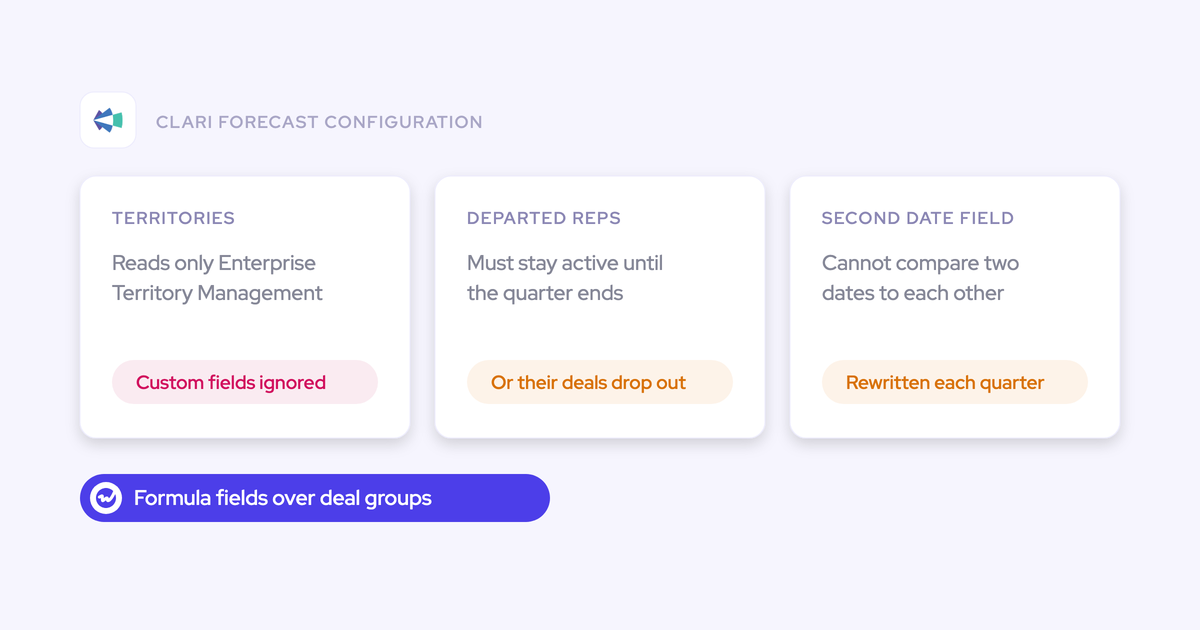
In point tools, that second date is harder than it sounds. Clari's roll-up mechanics are strong and flexible (it's why many teams bought it), but adding a second date to a Clari forecast meant rewriting every forecast formula.
Even after the rewrite, some deals still showed reps different values from what leaders saw.
Clari also can't compare two date fields against each other, so any view that depends on a start date falling after a close date gets hard-coded and rewritten every quarter.
Gong Forecast does run separate boards per motion, each with its own filters and targets. Still, teams forecasting several motions in one module tell us it gets clunky, and some have moved back to spreadsheets.
First step: Finish the two opportunity fields and the owner decision. A parallel setup on an unmaintained start date is just a faster way to forecast the wrong number.
Why we recommend a parallel starts forecast on one pipeline
We recommend the parallel setup because it's the only path that passes all six tests.
The real question is whether your scale justifies a dedicated forecast at all.
Why a second forecast beats a second column
A blended view hides which number is failing. If starts sit in a column on the revenue forecast, a quarter where revenue lands but starts slip looks fine at the top line. The miss only shows up a month later, as idle consultants.
Keeping them apart surfaces the deal that closed on time but started late: it stays in this quarter's revenue call, drops out of the starts call, and you see both in the same week.
It also puts the right people on each number. Account executives own revenue, while delivery leads own starts without inheriting a revenue roll-up that isn't theirs.
When native Salesforce or your PSA is enough
Stay where you are if either of these applies:
- Your quarter rests on about ten material deals: At that size, the forecast is a deal-by-deal judgment call, and native Salesforce forecasting plus a starts report can carry it. A dedicated forecast pays off once you have roll-up layers, many managers and many open deals.
- Staffing is planned role by role across many start dates: That level of detail belongs in your PSA. A pipeline forecast places a deal's starts in one period and can't carry a role-by-role plan.
How Weflow runs revenue and starts as two forecast setups
Weflow is the Revenue AI Orchestration platform for sales, customer success, and RevOps teams. It's built for Salesforce teams, and it reads its forecasts from your opportunity fields.
In Weflow Deal Intelligence & Forecasting, starts become their own forecast setup on their own fields, owned and submitted separately.
Point the starts setup at a number field and a start date
Each Weflow forecast setup maps three fields:
- A value field, which can be any currency or number field.
- A forecasting field that sorts deals into columns: Stage, Forecast Category or a custom picklist.
- A date field that places each deal in a period.
For starts, the value field is Expected Starts and the date field is Expected Start Date.

Each setup is scoped by permanent filters that the admin sets once, on record type, opportunity type or any field condition. That way, the Starts setup only reads service opportunities.
| Setting | Revenue setup | Starts setup |
|---|---|---|
| Value field | Amount, or your own revenue currency field | Expected Starts (number) |
| Date field | Close Date | Expected Start Date |
| Forecasting field | Forecast Category | Forecast Category, or a custom picklist for start confidence |
| Filters | All revenue-bearing opportunity types | Services opportunities only |
| Roll-up | Sales hierarchy from the Salesforce Manager field | Custom hierarchy with delivery and resourcing leads |
| Submission | Weekly revenue call | Its own forecast call on its own rhythm |
| Targets | Currency quota per user | Set per user on this setup, in currency amounts |
Keep the revenue forecast and its history untouched
Adding a starts setup doesn't touch your Salesforce forecast configuration. Weflow forecasting is configured in Weflow itself, so your Collaborative Forecasts types, quotas and history stay exactly as they are.
Inside Weflow, the starts setup has its own views, snapshots and AI model, so creating it won't disturb the revenue setup either.
The flip side is that your existing Salesforce forecast settings don't carry over, so you'll build both setups in Weflow.
Give delivery and resourcing leads their own starts roll-up
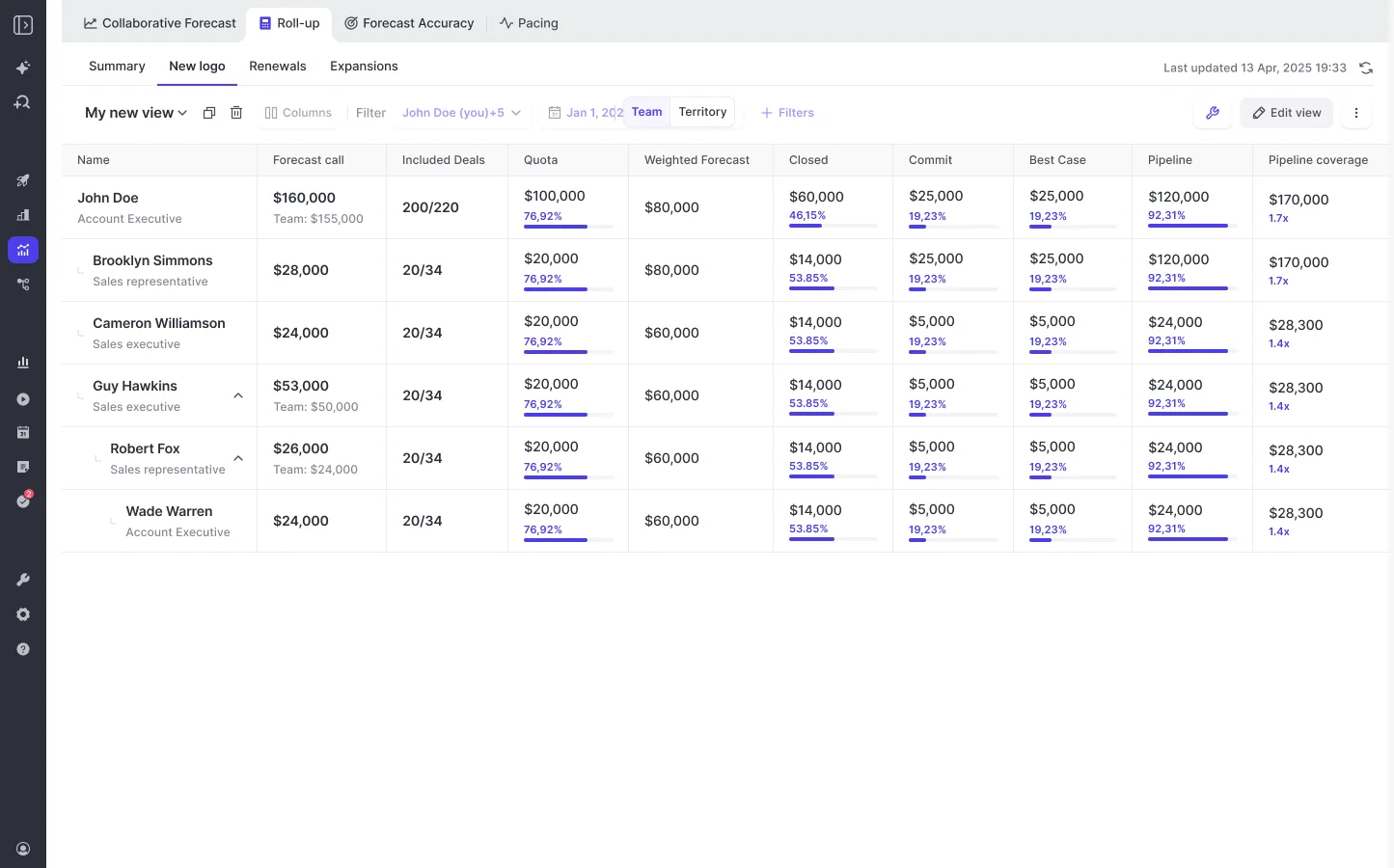
Each Weflow setup has its own stages, cadence, targets and roll-up. By default, the roll-up follows the Salesforce Manager field, but you can switch on a custom hierarchy and drag and drop teams into place.
That's how delivery and resourcing leads can sit in the starts roll-up without showing up in the revenue one. And since one person can belong to several teams, a practice lead who carries both a revenue and a starts number appears in both.
Tie each starts call to named projects and see moved starts
In Weflow, a forecast call is built from named opportunities. A rep or delivery lead can submit:
- A total
- A selection of the opportunities behind it
- Or both, with a comment
A manager submitting for the team can pick deals owned by anyone on the team. Every version is kept, with an arrow showing the change since the previous call.
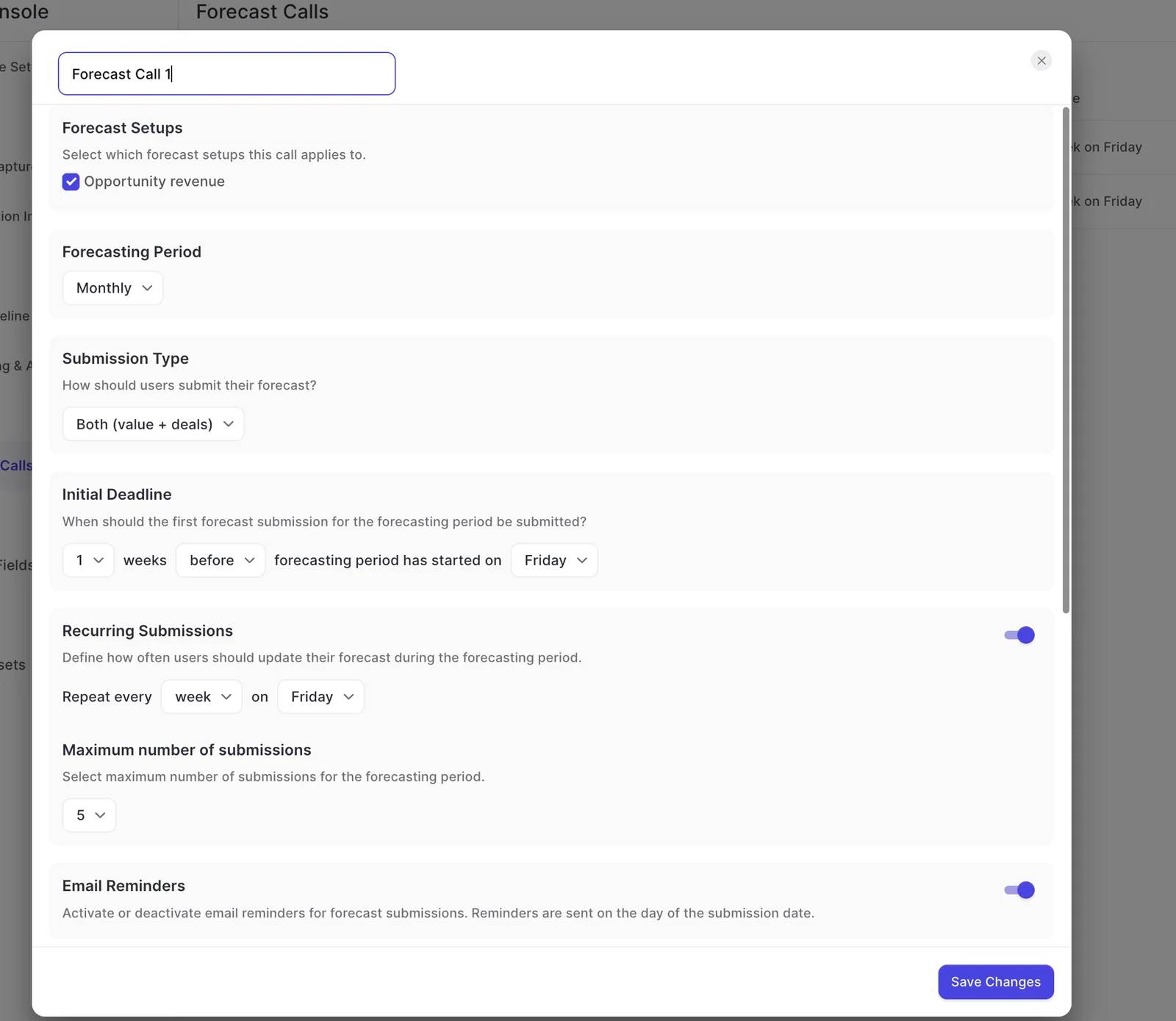
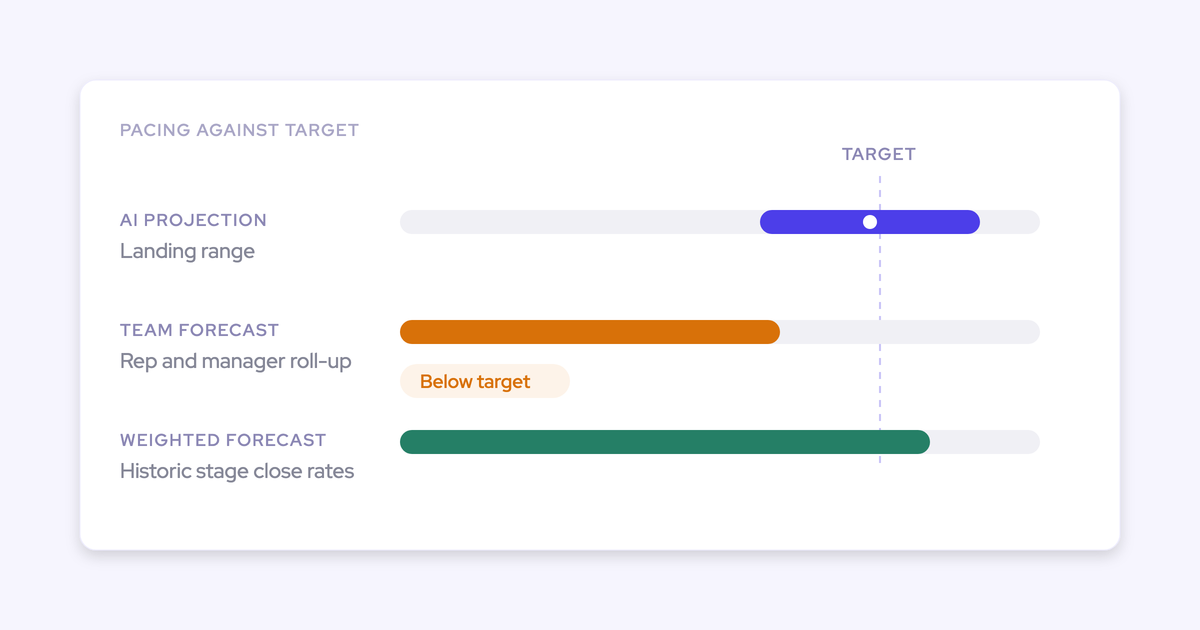
So when a start moves, you see which project moved and when the call changed. Snapshots, the waterfall and the pacing view all run per forecast setup.
On the starts setup, the waterfall's "moved out of period" bucket becomes your list of slipped starts, kept separate from revenue slips.
Build starts-at-risk formulas yourself, without a vendor ticket
Weflow forecasting has its own formula fields: an admin defines condition groups and writes ordinary arithmetic over them.
The result shows up as a column in your forecast views (as a currency, a percentage or a plain number), and clicking the value shows you the opportunities behind it.
For a starts forecast, three formulas are especially useful:
- Starts already sold: Expected Starts on closed-won opportunities whose start date falls in the period. That's the part of the starts call nobody should be arguing about.
- Starts on quiet deals: Expected Starts on open opportunities with too little recent activity. Your delivery leads should challenge these first.
- Starts that should have happened: Expected Starts on opportunities whose start date has already passed. Each one is either a stale field or a start that slipped without anyone saying so.
So when an executive asks for a new cut, you add a formula instead of rebuilding the forecast.
Where a Weflow starts forecast stops, and the workarounds
Weflow has a few limits worth knowing about. Here's what each one means for a services firm, and what to do instead.
| Limit | What it means for a starts forecast | What to do instead |
|---|---|---|
| No split across periods | A project's full Expected Starts lands in the one period its start date falls in. Staggered starts and quarter-spanning delivery aren't split. | Where your sales process allows it, create one opportunity per start wave. Otherwise date the first wave and keep later waves in the PSA. |
| One period type for every setup | Revenue and starts share the same period shape, for example quarterly broken down by month. | Keep the shared period shape and give starts its own submission rhythm on its own forecast call. |
| Targets are currency amounts | Weflow has no deal-count or headcount target type, so a starts target in people isn't available today. | Keep the headcount plan beside the forecast and compare the submitted starts call against it each week. |
| Forecasts read opportunity fields only | Starts data in a PSA or on a custom object is invisible until it reaches the opportunity. | Calculate it onto Expected Starts and Expected Start Date first. |
| AI projection needs six months of history per setup | A new start-date field with no past values gets no projection at first. Weflow shows no range and says why. | Run the starts setup on submitted calls and the roll-up until enough history builds up. |
| No write-back to a Salesforce field | The submitted starts call lives in Weflow, not on an opportunity or custom field. | Read submitted calls over the Weflow MCP connector. API access is planned. |
What Weflow Deal Intelligence & Forecasting costs for starts
Weflow Deal Intelligence & Forecasting costs $39 per user per month, billed annually. Viewer seats are free, so delivery managers who only read the starts forecast don't need a paid seat.
| Who | Seat type | Cost |
|---|---|---|
| Reps who submit revenue and starts calls | Full seat | $39 per user per month, billed annually |
| Delivery and resourcing leads who submit starts calls | Full seat | $39 per user per month, billed annually |
| Delivery managers who only read the starts forecast | Viewer seat | Free |
| Finance and leadership reading both forecasts | Viewer seat | Free |
Here's how the packaging works:
- You can reallocate seats between full and viewer each quarter as your team changes.
- Forecasting also sits in Weflow Revenue AI Enterprise at $79 per user per month, alongside Activity & Contact Capture, Conversation Intelligence and Deal Intelligence. Revenue AI Business includes Deal Intelligence but not forecasting.
- All plans start at 10 users.
How to move your starts forecast off the spreadsheet
Work through these steps in order, since each one builds on the last.
- Build the data model and name the owner: Add Expected Starts and Expected Start Date, turn on field history, and write down who updates the date and when.
Done when: every open services opportunity has both fields filled and a named owner. - Create the starts setup: Point it at the two fields and filter it to services opportunities.
Done when: the starts total for this quarter matches what your spreadsheet shows from the same export. - Build the hierarchy: Add delivery and resourcing leads to a custom hierarchy for the starts setup.
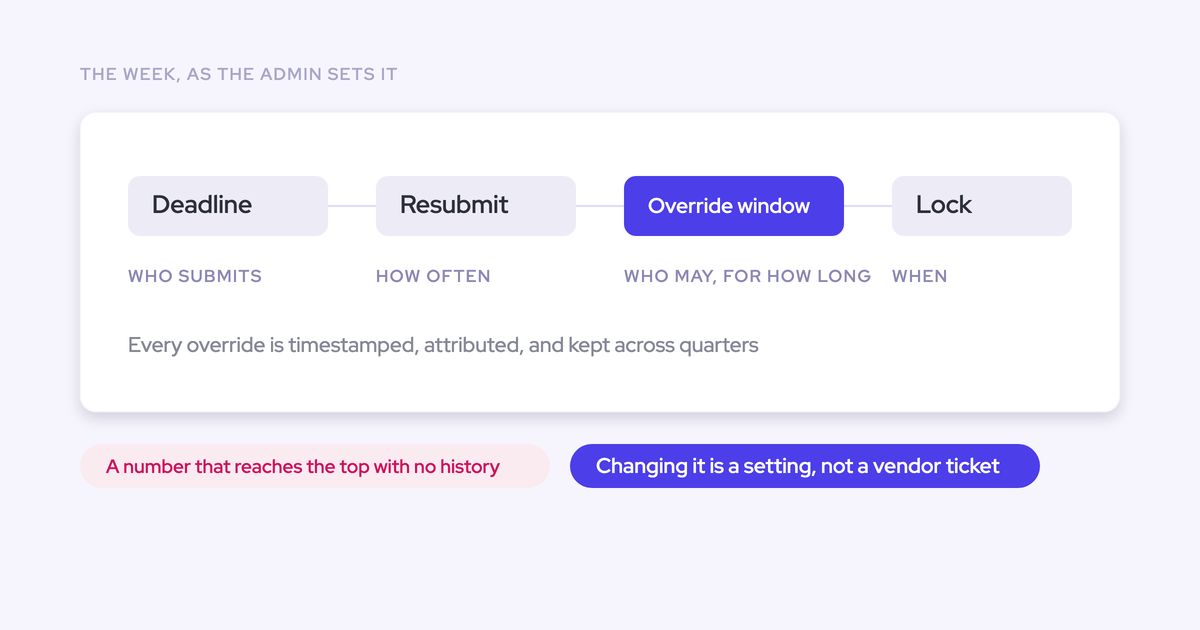
Done when: each lead sees only the projects that roll up to them. - Set the submission cadence: Create a forecast call for starts with its own weekly deadline and reminder.
Done when: every owner has submitted at least one starts call tied to named projects. - Run alongside the spreadsheet for a cycle: Keep both for one quarter and reconcile any differences each week.
Done when: the gaps you find come from moved dates, not from the setup. - Retire the spreadsheet: Archive it as your record of past quarters.
Done when: the weekly staffing conversation opens on the starts setup.
One thing to flag with your manager: snapshots of the starts setup begin the day it goes live, and your spreadsheet's past quarters don't import.
So for the first few quarters, you'll compare Weflow's numbers against the archived spreadsheet. After that, the comparison runs inside Weflow.
Forecasting can't be proven in two weeks, since a roll-up has to run a full cycle before anyone can judge it. That's why we offer a three-month paid pilot: contractually, it's the first three months of a multi-year agreement, with an opt-out at the end.
Walk through the product yourself.
FAQ: Forecasting project starts from your Salesforce pipeline
Can I set a starts target in headcount instead of currency?
No. Weflow forecast targets are currency amounts, and there's no deal-count or headcount target type today. The starts setup still counts people in its value field and its forecast calls.
Keep your headcount plan beside it and compare the submitted call against that plan.
Can revenue and starts run on different forecast cadences?
They share one period type, so if revenue runs quarterly broken down by month, starts does too. The submission rhythm is separate. Each forecast call has its own deadline, recurring submissions and reminder.
What happens when one project has people starting in different quarters?
The opportunity's full Expected Starts lands in the one period its start date falls in. Weflow doesn't split one opportunity across periods. If your waves are large enough to matter, create one opportunity per start wave.
Otherwise, date the first wave and plan the rest in your PSA.
How long does setup take, and can we prove it in a trial?
The technical connection takes a single call with your Salesforce admin and your mail admin. Most teams go live in two to three weeks, and implementation is free.
Forecasting takes a little longer than capture, because you're encoding who submits, how often and against what.
Does Weflow handle multi-currency, custom fiscal years and dated exchange rates?
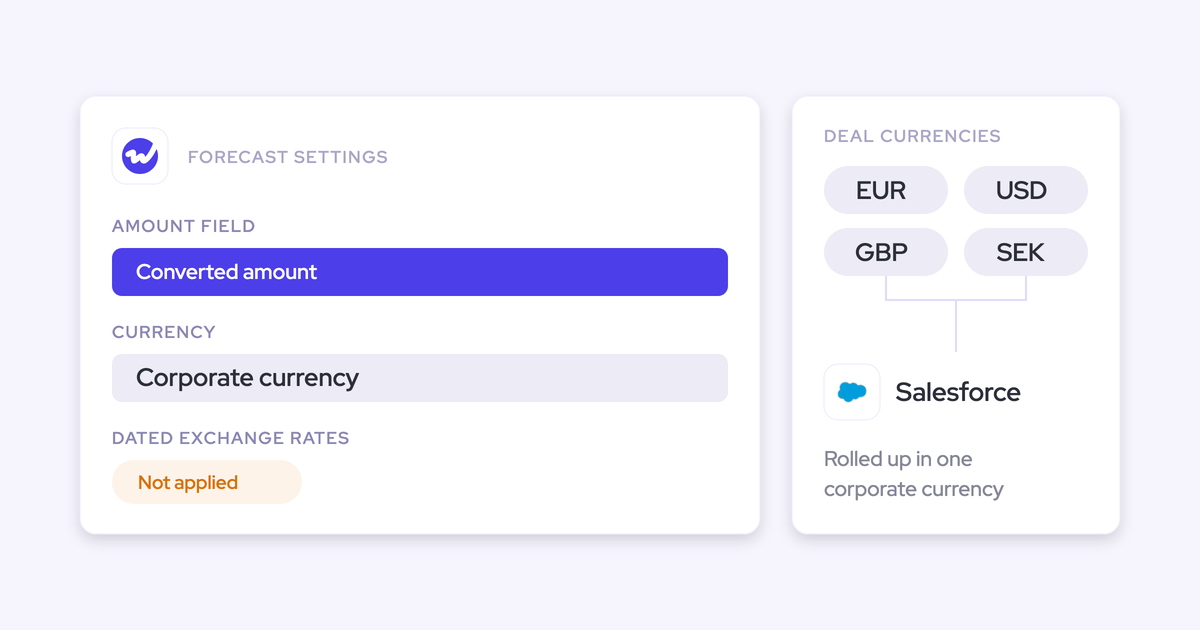
Yes to multi-currency and custom fiscal years. Weflow shows forecast totals in your org's default currency, and each deal shows both its own and its converted value.
Forecast periods and quarterly targets follow the fiscal year set in Salesforce, even if it doesn't start in January.
Weflow doesn't apply Salesforce dated exchange rates, though, so if you need dated conversion, point the revenue setup at your own converted amount field.