How to Present a Sales Forecast to the Board: Five-Quarter View, Variance and Commit History
Learn how to present a sales forecast to the board with a five-quarter view, variance, and commit history


Boards trust a forecast when you can show your record of calling it. A more precise number this quarter doesn't earn that trust. Your forecast slide should carry three things, in the same format every meeting:
- a five-quarter trend of what you called at a fixed lock point against what closed
- this quarter's corridor of three forecasts, with the gap between them explained
- a waterfall of what moved since the last meeting
That track record comes from locked, versioned forecast submissions, scored against what closed. It starts on the day you begin locking. If you start this quarter, you'll have a credible trend in a few quarters. If you wait, next year's board meeting will look like this one.
What should the board forecast slide actually show?
The board forecast slide shows three panels: your called-versus-closed record over five quarters, this quarter's corridor of three forecasts, and a waterfall of what moved since the last meeting. Each panel answers one question the board is already asking.
| Panel 1: Track record | Panel 2: Corridor | Panel 3: Waterfall | |
|---|---|---|---|
| What it shows | What you called at the week-four lock against what closed, for the last four quarters plus this one | The roll-up, weighted and AI forecasts for this quarter as a range, with your call marked | Starting pipeline reconciled to ending pipeline, bucket by bucket, each bucket tied to named deals |
| Board question it answers | Can we trust your calls? | Where will we land? | What changed since last time? |
| Data it needs | Locked submissions, stored every quarter | Three forecast methods running on the same pipeline | Pipeline snapshots at two points in time |
| How it looks | A line or bar chart of called against closed, with variance per quarter | A range bar with three points and your call | A waterfall chart |
| Built in | Steps 1 and 2 | Steps 3 and 4 | Step 5 |
The data row matters most. Two of the three panels depend on history you have to store yourself, because Salesforce keeps only the current state of each deal.
Why the board discounts a single quarter's forecast
A single quarter's forecast can always be explained away, so the board discounts it, and your explanation along with it. Every miss comes with a reason: a slipped deal, a delayed signature, a one-off. After two or three quarters of reasons, the board stops listening to them.
John McMahon makes the case for trends in the boardroom:
"Those trends are really hard to argue with. Something's happening or something's not happening. You just can't lie."
— John McMahon, Board member at Snowflake and MongoDB, five-time CRO
He's talking about operating metrics: ramp time, productivity per rep, new logos, churn. We apply the same format to the forecast. One quarter of called versus closed is an anecdote. Five quarters is a track record.
Most teams can't show that record, and the reasons build on each other:
- Commit means whatever each manager decides it means. Leaders say they're 80 or 90 percent confident in commit, and then 50 to 60 percent of those deals close.
- Nothing gets locked. "Pipeline updated by Friday" counts as the submission, so nobody can say what the forecast was three weeks ago.
- Finance fills the gap. Finance exports the pipeline, applies weighted averages and sends a second number upstairs. Sometimes finance turns out to be more accurate, and sales loses authority over its own business.
Boards forgive a miss they saw coming. Surprises are what cost you. The three-panel format is designed to take the surprise out.
What you need before building the board forecast slide
You need five things in place before the slide can exist. Each one comes with a quick test so you can tell whether you already have it.
- A fixed submission event, locked at a point in time. Each leader submits a number by a deadline, and nobody can change it afterward. You have this if you can pull up what each manager called in week four of last quarter.
- A written commit definition every manager uses. These are criteria the deal record has to show, such as a late stage and an attached quote, rather than a feeling. You have this if two managers would put the same deal in the same category.
- Pipeline history you can compare against today. You need a stored record of what each open deal looked like on earlier dates. You have this if you can list, deal by deal, what this quarter's pipeline looked like on day one.
- A decision on bookings or revenue. Your board debates one of them more than the other. You have this if you know which number the board argued about at the last meeting.
- A named producer each cycle. One person, usually in RevOps, builds the pack, and nobody else edits the numbers. You have this if you can name that person without checking.
How to build the board forecast slide, step by step
Six steps produce the three panels and the cadence that keeps them credible. Each step works with or without a forecasting tool, and each one says where a spreadsheet holds up and where it doesn't.
Step 1: Lock the forecast in week four and score it
Lock every leader's call in week three or four, while it's still a judgment, and score it against what closed at quarter end. This fixed point is what makes accuracy measurable.
- Pick week three or week four, and keep the same week every quarter.
- Have every rep, manager and team leader submit a commit and a best case, tied to named deals.
- Freeze the submissions and publish them where everyone can see them.
- At quarter end, score each call against closed won. Record the variance in dollars and percent for each rep, manager and team.
- Publish the results. Celebrate the accurate teams, and don't call out the misses in public.
Robert Gimbel ran this routine as a CRO:
"we would take the fourth forecast of a quarter, like week four, everyone got logged in, we put it onto a Confluence page, and towards the end, we wouldn't punish publicly the people who got it wrong. There's multiple reasons for that, right? But we would celebrate the teams and people who got it right."
You can also have finance submit a number alongside sales. It turns accuracy into a friendly competition and shows that predictability is a priority, not a talking point.
A call made in the final week proves nothing. By then the outcome is mostly decided, so the forecast is a report, not a prediction. A week-four lock forces a judgment early enough to be tested. It also makes calls comparable between reps and across quarters.
A spreadsheet handles this step. Copy the submissions into a locked tab on the lock date and never touch it again. The weakness is that someone with edit access eventually does.
Step 2: Trend called versus closed across five quarters
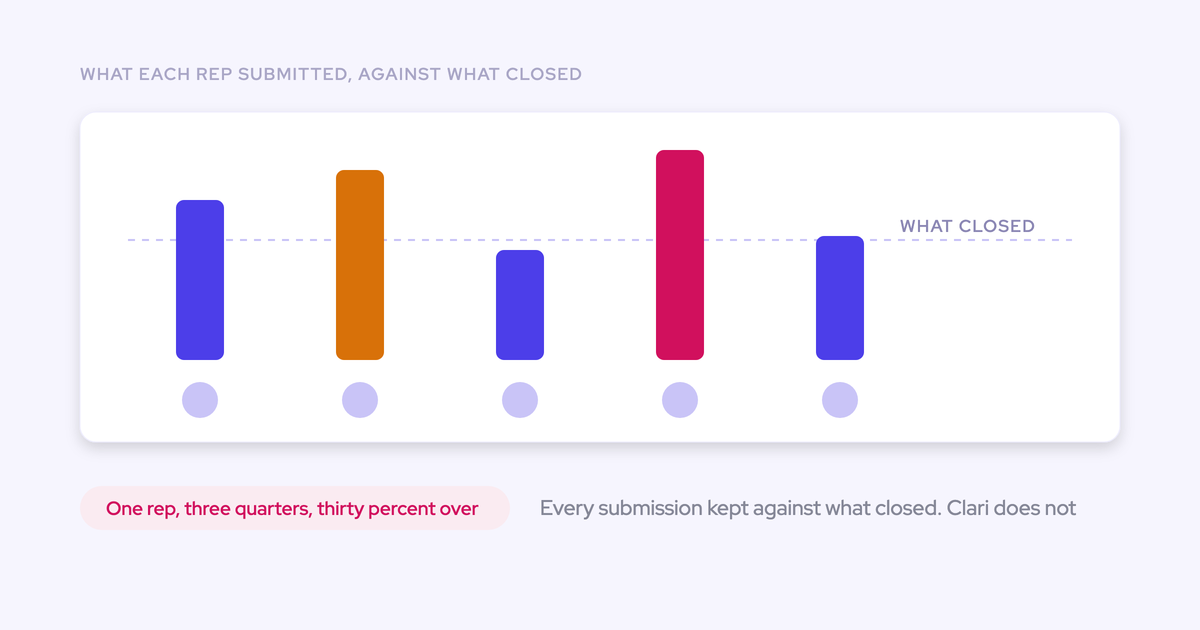
Panel 1 plots the last four closed quarters plus the current one, showing the number you called at lock against what closed. If the board asks which team is driving a miss, add variance per team underneath.
| Quarter | Called at lock | Closed | Variance |
|---|---|---|---|
| Four quarters ago | [week-four call] | [closed won] | [closed vs called, %] |
| Three quarters ago | [week-four call] | [closed won] | [closed vs called, %] |
| Two quarters ago | [week-four call] | [closed won] | [closed vs called, %] |
| Last quarter | [week-four call] | [closed won] | [closed vs called, %] |
| This quarter | [week-four call] | In progress | Scored at quarter end |
This line exists only from your first locked quarter onward. You can't rebuild past calls from memory, and the board would be right not to believe you if you tried.
Once the locked tabs exist, a spreadsheet builds this trend in minutes. The hard part is having the locked tabs in the first place.
Step 3: Show the roll-up, weighted and AI forecasts as a corridor
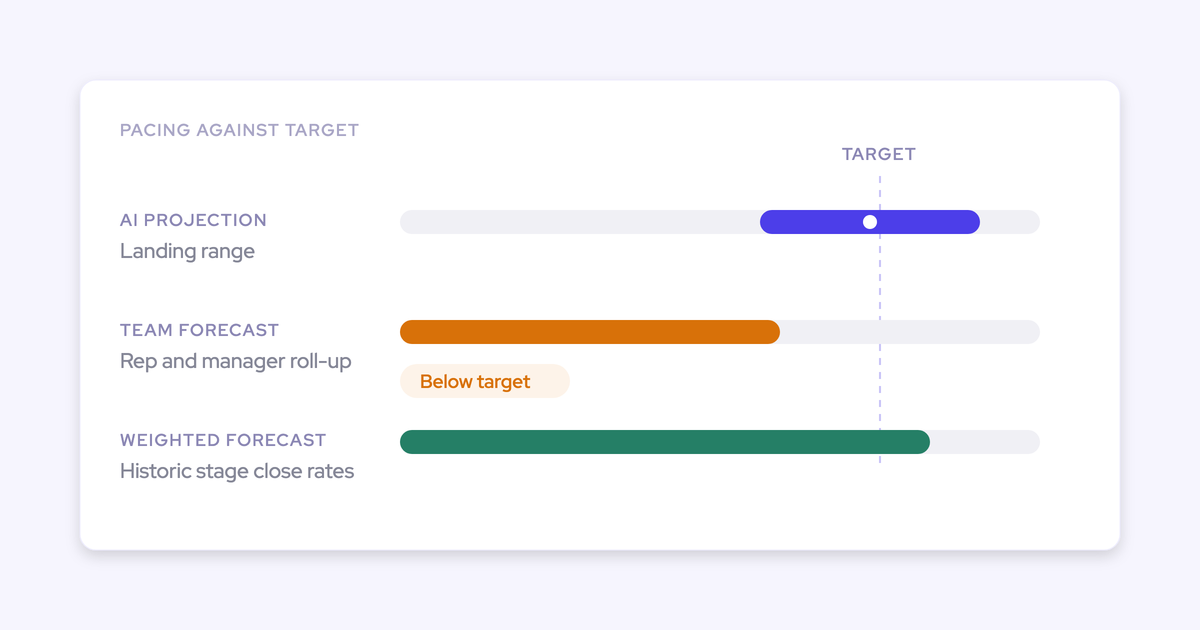
Panel 2 presents three forecasts as a range, so the board sees what the team says, what the pipeline supports and what history predicts. Each method on its own is wrong in a predictable direction.
| Rep and manager roll-up | Weighted forecast | AI or statistical projection | |
|---|---|---|---|
| Built from | Reps' and managers' calls on named deals | Deal value multiplied by stage win rates from recent history, not fixed Salesforce probabilities | Deal signals and history: activity cadence, next meeting booked, past conversion, rep performance, seasonality |
| What it gets right | The judgment of the people closest to the deals, including things the CRM doesn't hold | How deals have actually converted across many opportunities | The signals nobody has time to read, with no incentive to shade the number |
| Predictably wrong | Optimistic in month one, defensive in month three, and shaded by sandbagging or happy ears | Blind to context, says little about any single deal, and stale if the stage rates never update | No accountability, and the range widens when the business changes |
| Who answers for it | The person who submitted it | RevOps, who maintains the rates | Nobody, which is why it works as a check rather than a call |
| Role on the slide | The number you're accountable for | What the pipeline mathematically supports | What history predicts |
Draw it as a range bar with all three points, and mark your own call on it. A point estimate reads as a guess. A corridor with your call inside it reads as judgment.
"The AI prediction is not one number, it is actually a mid, high, and base case, so you have a corridor, because the reality is it is a corridor and a lot of things can happen."
A spreadsheet can produce the roll-up and the weighted number. The weighted number goes stale quickly, though: stage conversion keeps moving, so rates you calculated in pivot tables 30 days ago may already be wrong. The projection needs a model, which a spreadsheet won't give you.
Step 4: Explain the gap between the three forecasts
The gap between the three forecasts is the board conversation. Name why the roll-up sits above or below the other two, deal by deal, and then say where you're calling and why. That reads as judgment backed by evidence, not indecision.
These gap patterns come up often, and each usually means something specific:
- Roll-up well below weighted: reps are holding back a hedge, or they know late-stage deals have stalled even though the stages haven't moved.
- Roll-up above the AI projection: the team is counting on deals the signals say are poorly worked, often a few large ones. Name them.
- Weighted far above both: stalled deals are still carrying full value in the pipeline, and every method that reads them inherits the inflation.
- All three close together: say so. That's the strongest slide you can show.
- A wide AI range: the business is changing, through new products, motions or territories, and history predicts less than usual.
Then put it in one sentence the board can hold you to: "We're calling this number, between the roll-up and the projection, because these two deals carry the gap, and here's where each one stands."
Any tool, or no tool, can give you three numbers. Assigning the gap to specific deals is the work, and it's the part the board remembers.
Step 5: Add a waterfall of what moved since last meeting
Panel 3 reconciles the pipeline you showed last time to the pipeline you're showing now. Every bucket traces to named deals, in this order:
- Starting pipeline at the last meeting
- Plus newly created deals
- Plus amounts increased
- Plus deals pulled in from a later period
- Minus deals pushed out
- Minus deals lost
- Minus amounts decreased
- Minus deals won and banked
- Ending pipeline
This is the question leaders ask every week.
A live pipeline report can't answer it. A Salesforce opportunity holds today's value, not the value it had three weeks ago, and Salesforce doesn't history-track calculated or roll-up fields at all. You need stored snapshots to compare.
In a spreadsheet, that means a saved weekly export, compared against the previous one by opportunity ID. It works as long as nobody misses a week.
Step 6: Send the same format ahead of every board meeting
Keep the three panels identical every meeting and change only the narrative. Consistency is the credibility signal.
"you may have a different narrative for every meeting, depending on what story you want to tell or what strategy you're employing and how the numbers support that. And you can do that with narrative and the different things that you call out, but the metrics should largely be the same and consistently reported every meeting."
| Stays the same every meeting | Changes every meeting |
|---|---|
| The three panels and their order | Which deals you call out |
| The lock week you score against | Your call inside the corridor, and why |
| The commit definition | The explanation of the gap |
| Chart types, scales and labels | The issues you want advice on |
| The accuracy calculation | The new point on the five-quarter line |
Send the slide as a PDF or email pre-read days before the meeting. Board members read the pack before anyone speaks, so the meeting is for debate, not news. If a number lands as a surprise in the room, the cadence failed before the meeting started.
What you can show the board if nothing was locked
If nothing was ever locked, you can still show the corridor and the waterfall this quarter. The accuracy trend starts with a single point, because past forecast calls can't be backfilled.
| Element | Available now | Starts accruing from your first lock |
|---|---|---|
| Weighted forecast | Yes, from stage conversion in your closed history | Rates keep refreshing as deals close |
| AI projection | Yes, if you have enough opportunity history to train on | Gets better as history grows |
| Roll-up | Yes, from this quarter's submissions | The version history of each call |
| Waterfall | Yes, if pipeline history exists through field history tracking or a tool that imports it | Starts at your first snapshot if no history exists |
| Called-vs-closed trend | No | One point at the end of this quarter, five points after five quarters |
| Per-rep accuracy | No | From the first scored quarter |
Watch for one trap. If you migrated to Salesforce from another CRM and didn't bring over the stage history, everything that learns from history has only the months since go-live to work with.
Present a one-point trend as exactly that:
- Show the chart with five slots and one filled.
- Tell the board the lock week and the scoring rule.
- Tell them which quarter the line becomes a trend.
A board that sees the method on day one will trust the second point more than one that hears about it after the fact.
Adjust the board forecast for big deals, renewals and revenue
Three business shapes break the standard slide, and each one needs a specific adjustment.
When your quarter rests on a handful of large deals
When about 10 material deals make up the quarter, the forecast is a deal-by-deal judgment. Put the named deals beside the corridor, each with its slip risk and the evidence behind it.
In these businesses deals slip out of the quarter, not out of the pipeline. One deal moving from August to December rewrites the quarter even though every deal was real. The waterfall's "pushed out" bucket matters more than the total.
Native Salesforce plus a spreadsheet can carry a quarter this size. Expect the accuracy trend to move a lot from quarter to quarter, because one deal swings it. Show that variance honestly rather than smoothing it.
Should you show new logo and renewal forecasts separately?
Yes. Run separate forecasts for new logo and renewal, with separate accuracy lines, because a blended forecast hides the motion that's failing.
Renewals involve different deals, different people and a different cadence, so they deserve their own weekly forecast. Show renewal as dollars at risk: the previous contract value, what the team now forecasts, and the difference between the two. A renewal that was $2M and is forecast at $1M is $1M at risk, and the board reads that faster than a retention percentage.
What to do when the board asks for revenue, not bookings
A bookings forecast doesn't settle an argument about revenue run rate. Before you build anything, decide which number your board actually debates.
If the debate is about recognized revenue and the provisions against it, you need a revenue model, and the bookings slide becomes supporting material. Finance-side tools fit that work. Kluster, for example, forecasts recognized revenue as well as bookings and builds board packs you can freeze as snapshots. A sales-side forecast won't win that argument for you.
Mistakes that cost you the board's trust in the forecast
You lose board credibility through a handful of habits, and each one has a direct fix:
- Changing the metrics to fit the story. The board loses its ability to check your story against history. Fix the panels and change only the narrative.
- Locking too late. A final-week call is a report, not a forecast. Lock in week three or four.
- Presenting one point estimate. A single number invites the board to haircut it. Show the corridor and your call inside it.
- Leaving commit undefined. If commit means something different to every manager, nothing in the roll-up can be checked. Write the criteria down and make the deal record prove them.
- Haircutting by gut. Your discount on top of a rep's optimism is two people's instincts stacked on each other. Let the gap between the three forecasts tell you where to adjust.
- Surfacing news in the meeting. Boards punish surprises. Send the pre-read, and raise bad news between meetings.
- Hand-rebuilding the pack every cycle. When the board version is assembled one layer away from the source, the versions drift. Produce it from one source in one format.
- Building on deal records with gaps. Blank next steps, close dates pushed four times and unlogged meetings feed every method you use. Fix capture before you trust any of the three numbers.
Spreadsheet, BI build or forecasting tool: which path fits you?
The method decides the path. All three can produce the slide. They differ in who stores the history and who maintains it.
| Spreadsheet plus Salesforce | BI build (for example Tableau) | Dedicated forecasting tool | |
|---|---|---|---|
| Stores locked submissions | A frozen tab per lock date, only as safe as edit access | Only if you build a submission store and a way to collect calls | Stored and versioned by the tool. Scoring against actuals differs between tools |
| Produces snapshots and waterfall | Weekly exports compared by hand | Scheduled snapshot jobs you build and own | Snapshots taken automatically on a schedule |
| Ongoing maintenance | A skilled person's time every cycle | Analyst or engineering time indefinitely, and rework when the hierarchy or fields change | RevOps maintains configuration, and the vendor maintains the system |
| Delivery to the board | An emailed file, as polished as the person building it | Presentable dashboards that still need a login unless you schedule exports | Varies by tool: scheduled reports, exports or assistant access |
| Best fit | About 10 material deals and a flat hierarchy | A strong data team, and a board that wants sales and finance data in one view | Many reps, several roll-up layers, and a need for locked history without building it |
Choose based on your situation:
- Choose the spreadsheet if one person can name every deal that decides the quarter.
- Choose a BI build if you already run a warehouse and have people whose job is to maintain it, and you've priced that maintenance.
- Choose a forecasting tool if the week of rebuilding every cycle costs more than the license, or if per-rep accuracy matters to your coaching.
The BI path has a cost that doesn't show up in the first quarter. A finance lead can now build a working forecast interface in weeks. The bill arrives later, when the build has to be handed to engineering and maintained permanently.
If you buy, the scoring is where tools differ most. Gong Forecast reports accuracy per person against a chosen forecast week. We don't have enough data to confirm it for every account, but buyers on switch calls tell us Clari leaves the called-versus-closed calculation to RevOps.
How Weflow builds the board forecast from locked submissions and snapshots
Weflow is the Revenue AI Orchestration platform for sales, customer success, and RevOps teams. Weflow Deal Intelligence & Forecasting stores what this method needs from the first day you lock: versioned submissions, accuracy scoring, three forecast methods and pipeline snapshots. It can't create history that was never recorded.
Weflow versions every commit and tracks accuracy per rep
Panel 1 starts with the submission. In Weflow, each rep submits a baseline and a best case, either as a total or by selecting the opportunities behind each figure, with a free-text comment.
Weflow versions every submission, managers can override, and a manager submitting for the team can pick deals owned by any rep on that team. Because each number is tied to named opportunities, the forecast review runs deal by deal instead of turning into an argument about a total.
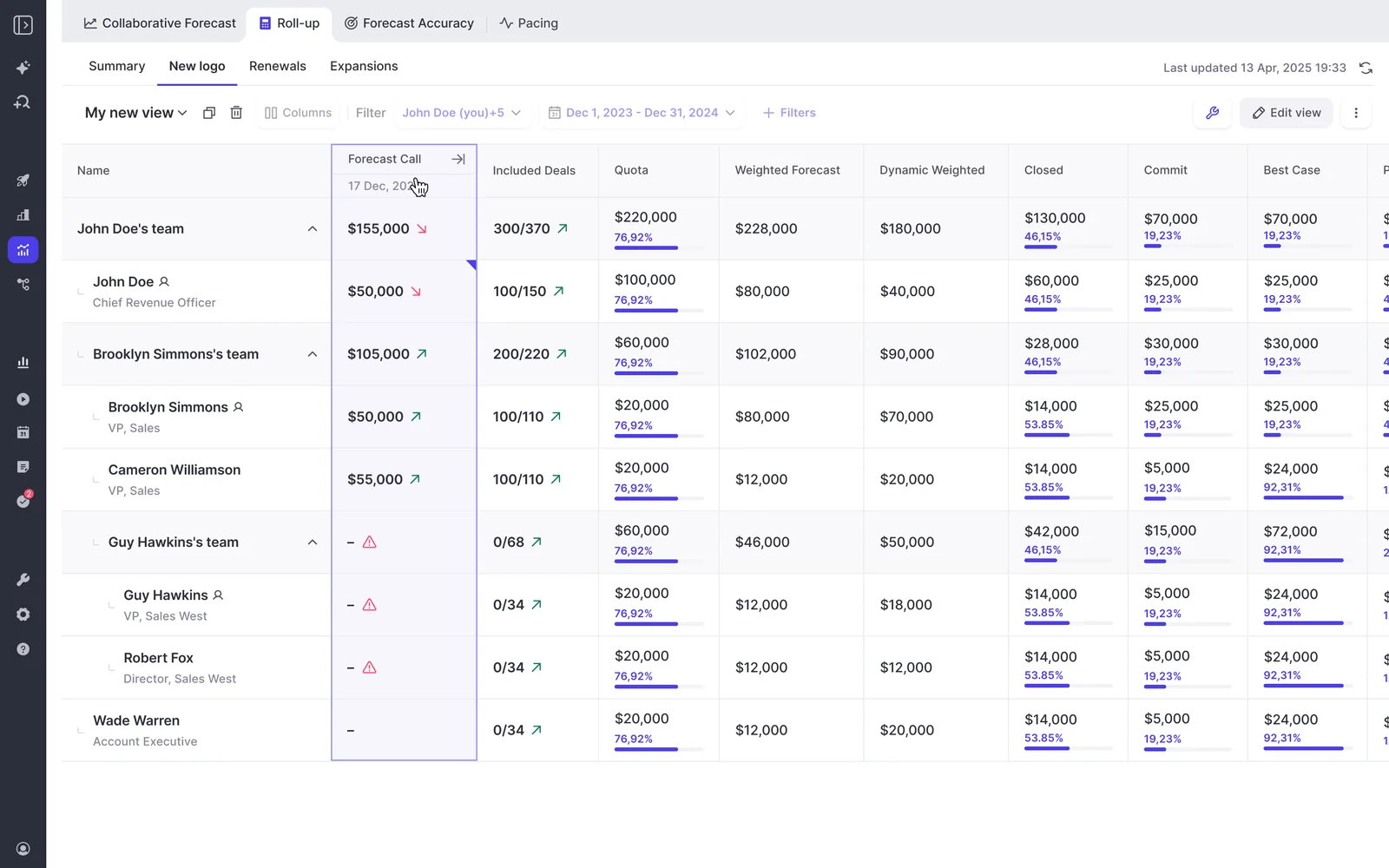
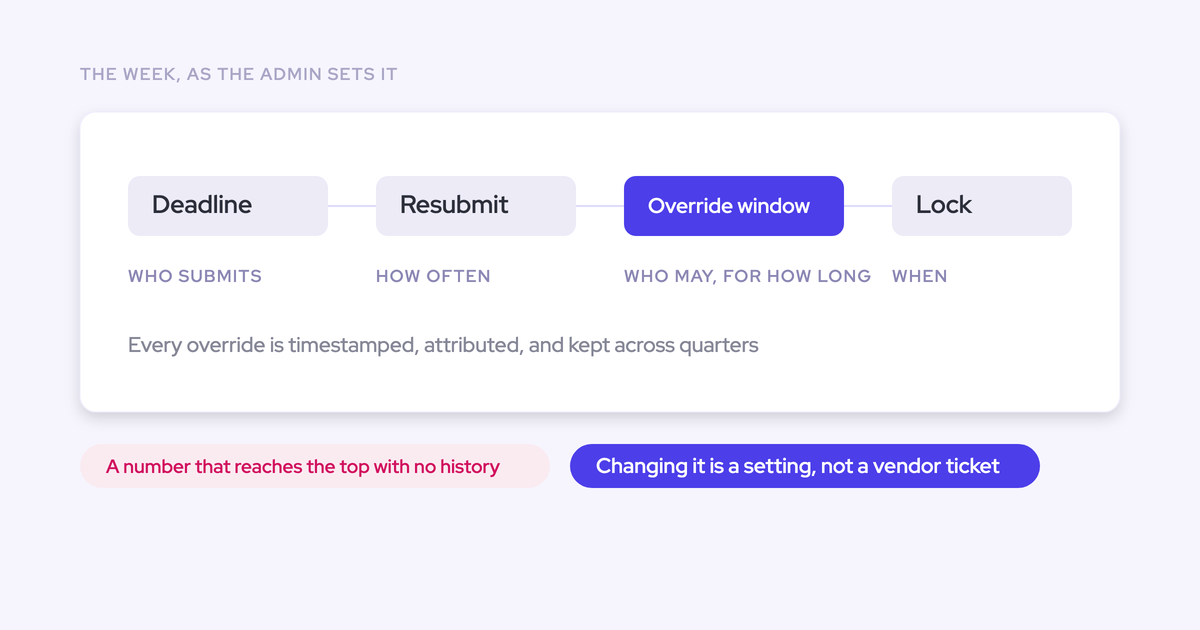
Your admin configures the cadence to match Step 1:
- Submission deadlines and how often reps resubmit
- Who can submit and who can override
- How long an override window stays open
- When the forecast locks
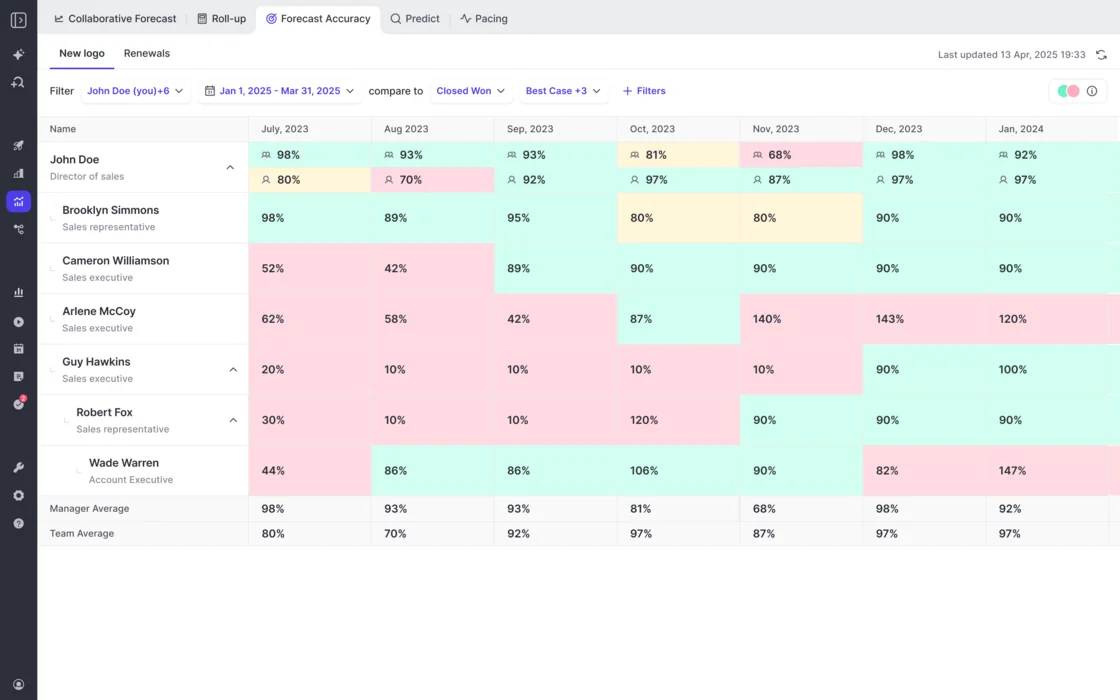
Once a call is locked, Weflow scores it. Forecast accuracy tracking is on for every Forecasting customer with no setup. Your admin chooses the field accuracy is measured against, such as Closed Won. Weflow reports accuracy per period for each person, with manager and team averages on their own rows, so you can read a manager's own call against their team's.
Zeotap's CRO puts the result in terms of the lock point:
"With Weflow, we forecast within 7% by week 4 of the quarter."
Weflow runs the roll-up, weighted and AI forecasts side by side
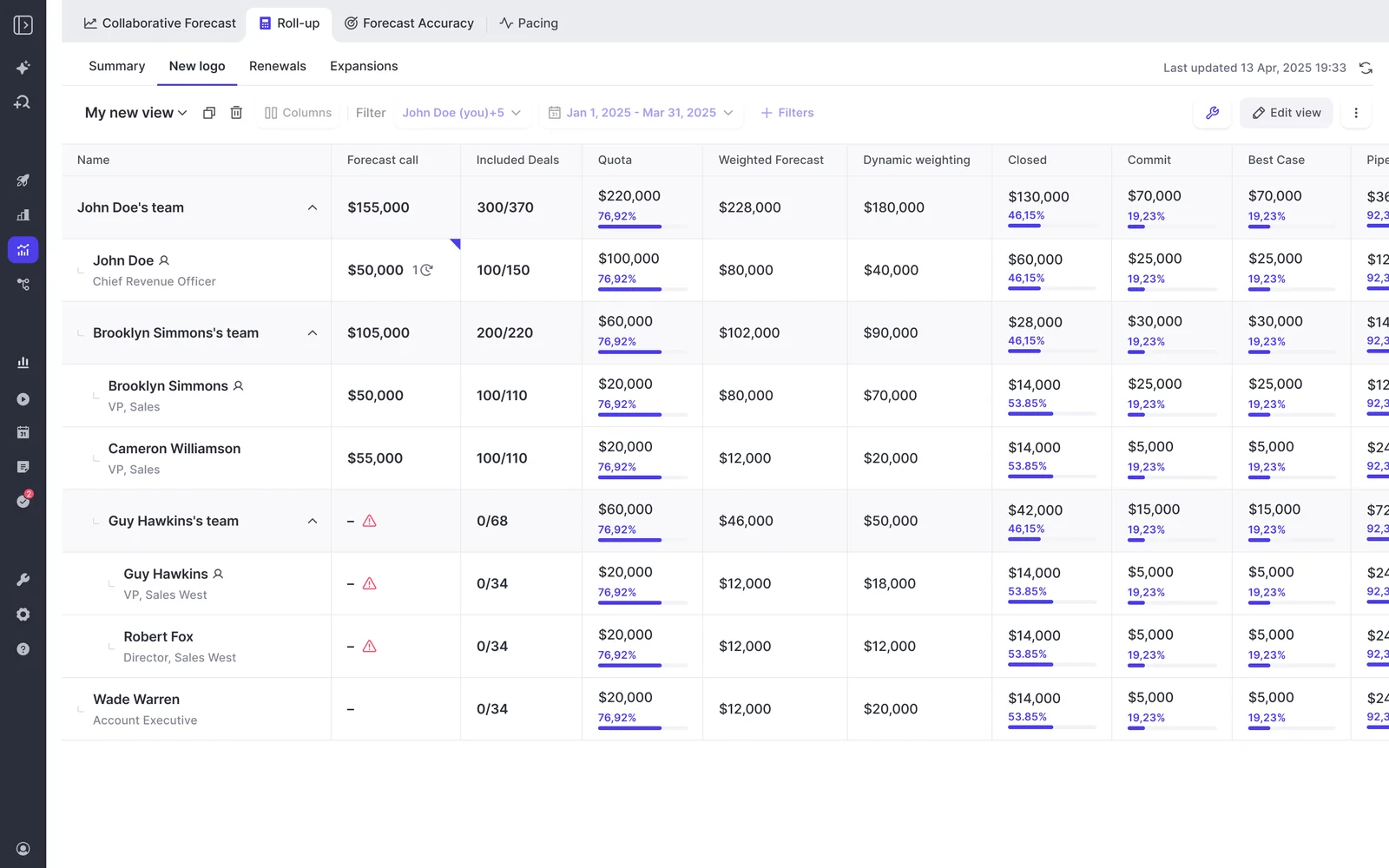
Panel 2 comes from three methods Weflow runs on the same pipeline, so the corridor is there whenever you open the forecast.
- Roll-up: submissions roll up from rep to manager, VP and executive along the Salesforce role hierarchy, or along a custom hierarchy your admin arranges in Weflow.
- Weighted forecast: Weflow recalculates each stage's win rate from a rolling window, such as the last 90 or 180 days, per rep and per team, instead of using the fixed probability on the Salesforce stage.
- AI projection: built on more than fifty deal-level signals and up to two years of history, it returns a low, middle and high value and refreshes nightly.
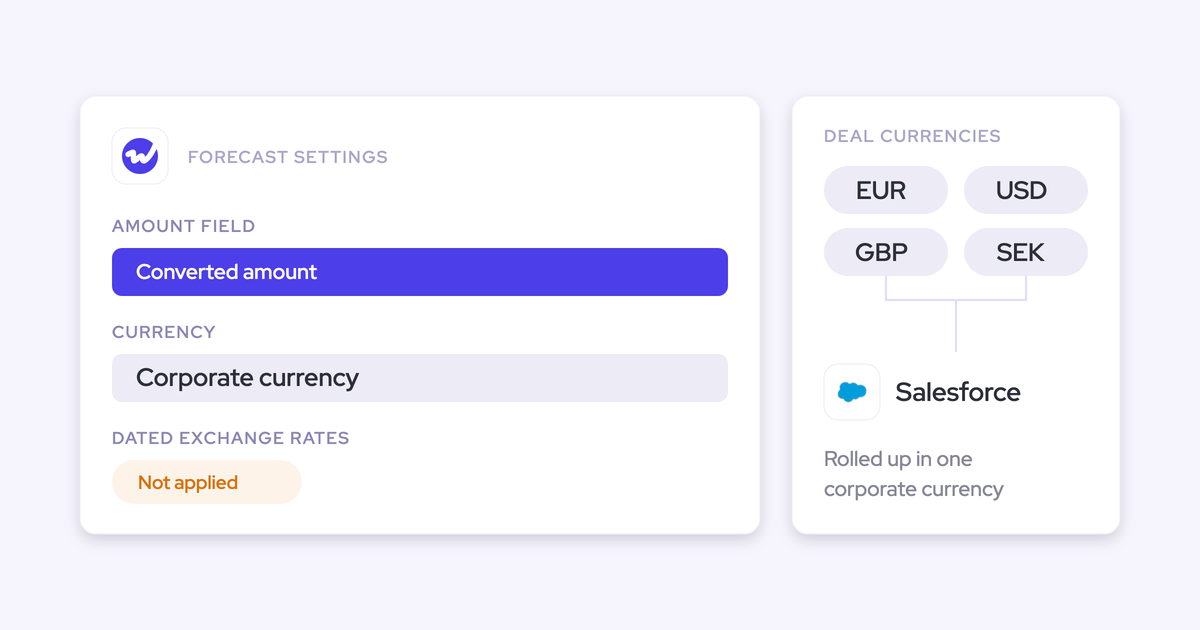
The projection needs at least six months of opportunity history. Weflow imports twelve months by default at install, so the first projection is ready within 48 to 72 hours. When the projection isn't confident in a range, it shows none and says why. Each forecast setup gets its own model, so new logo and renewal are each projected from their own history.
Weflow snapshots the pipeline to build the quarter's waterfall
Panel 3 runs on snapshots. Weflow snapshots opportunity data every few hours and builds a clickable waterfall from them: newly created, increased, moved into the period, moved out, lost, decreased and won.
Each bucket drills through to the actual opportunities, so "commit dropped from 100k to 80k" becomes a list of the deals that caused the drop. Because the waterfall compares stored snapshots rather than reading current state, it also shows the sandbagging and chronic slippage that a live report hides.
Pull the weekly board update through the Weflow MCP connector
Your board won't log into Weflow, and you shouldn't have to either. The Weflow MCP connector gives your AI assistant the submitted forecast call for a period, the live pipeline total and the delta between them. That's the core of a weekly board email: are we calling above or below our own pipeline?
A few details matter when you set it up:
- When nothing was submitted for a period, the connector returns null. That's a real answer, not an error.
- For each rep in scope, it also returns weighted and unweighted pipeline, win rate, coverage, gap to forecast and the opportunity IDs behind the numbers.
- The per-rep breakdown is capped at 25 owners. In a larger org, narrow the request to a team to get rep-level detail.
Where Weflow is the wrong fit for board forecasting
Weflow doesn't fit every board conversation, and these are the limits:
- Weflow forecasts bookings and places each deal's full amount in the single period its chosen date falls into. It can't split one deal across quarters.
- Weflow isn't a revenue-recognition or FP&A tool. If your board fight is about run rate and provisions, Kluster-type tools fit better.
- Submitted forecasts live in Weflow, not in Salesforce. Every other Weflow output lands in Salesforce objects, but forecast calls don't. Today you read them over the MCP connector.
- Commit history starts at your first lock. Weflow imports about 12 months of pipeline history, but it can't backfill calls nobody made.
- Weflow forecasting depends on the data underneath. Without Activity & Contact Capture and Conversation Intelligence feeding the deal records, the roll-up rests on whatever reps remembered to type.
- If your quarter rests on about 10 deals, native Salesforce plus a spreadsheet may carry it, and you may not need us for forecasting.
What Weflow Deal Intelligence & Forecasting costs and how to pilot it
Weflow Deal Intelligence & Forecasting is $39 per user per month, billed annually. Forecasting is part of the Weflow Revenue AI Enterprise bundle, not Weflow Revenue AI Business.
| Item | Detail |
|---|---|
| Standalone price | $39 per user per month, billed annually |
| Bundle | Weflow Revenue AI Enterprise at $79 per user per month. Weflow Revenue AI Business at $59 includes Deal Intelligence without forecasting |
| Expansion route | Existing Activity & Contact Capture and Conversation Intelligence customers add forecasting as an expansion, not a separate contract |
| Seats | Unlimited view-only licenses at no cost, so leaders who only read the forecast don't take a paid seat. Ten-user minimum |
| Proving it | A three-month paid pilot that forms the first three months of a multi-year agreement, with an opt-out at the end |
We offer the three-month pilot because forecasting doesn't prove itself in a 14-day trial. You need enough forecast cycles to compare predicted against actual, which takes about three months.
If you're still choosing a path, start with the method. Our free Sales Forecasting Cheat Sheet lays out the forecasting framework on a single page you can apply this quarter, with or without a tool.
Questions CROs ask about board forecast reporting
How many quarters of history make the accuracy trend credible?
A called-versus-closed trend is credible to a board at five quarters: the last four closed quarters plus the current one. It's useful from the second quarter, when you can first show a direction. Before that it's a single point, and you should present it as one.
Should you measure commit accuracy or whole-forecast accuracy?
Commit accuracy scores only the deals a team committed, so it usually comes out higher and answers a narrower question: does the team deliver what it promises? Whole-forecast accuracy scores the full call against everything that closed, which tells the board more about predictability. Pick one, say which one it is on the slide, and never switch.
Who should produce the board forecast each cycle, RevOps or the CRO?
RevOps should produce the board forecast, and the CRO should own the narrative. RevOps builds the panels from one source in the same format every cycle. The CRO decides the call inside the corridor and explains the gap. Keeping those roles separate stops the numbers from bending to the story.
Can the board forecast arrive as a PDF or email instead of a login?
Yes, and it should. Executives and board members read a scheduled PDF or email. They don't open dashboards. Send the three panels as a pre-read days before the meeting, so the discussion starts from what everyone has already seen.
Does Weflow forecast data reach Salesforce or your data warehouse?
Weflow forecast submissions don't land in Salesforce today. They live in Weflow, while Weflow's activity, conversation and field-update data does land in Salesforce objects. You read submitted calls, pipeline totals and the delta between them over the Weflow MCP connector.
What goes on the forecast slide versus the rest of the board pack?
The forecast slide covers the forecast only: the track record, the corridor and the waterfall. Pipeline generation, coverage, capacity, attainment and retention go in their own sections of the board pack. Mixing them onto the forecast slide makes it harder to read and harder to keep consistent.
How long does it take to prove a forecasting tool works?
Proving a forecasting tool takes about three months, because you need enough forecast cycles to compare predicted against actual. Capture and conversation intelligence prove out in two weeks. Forecasting doesn't, which is why Weflow runs forecasting evaluations as a three-month paid pilot.
How do you get a forecasting tool past the CFO?
Build the business case from three costs the CFO already pays: the week of skilled time spent rebuilding the board pack every cycle, the parallel forecast finance maintains because it doesn't trust sales, and the risk of guidance set against a commit that gets reset in the last two weeks. Then propose a pilot with an exit, so the CFO approves a test, not a bet.