Weflow vs Attention Call Scorecards: Scoring Calls Against Your Own Methodology (2026)
Decide between Weflow vs Attention for AI coaching scorecards, custom rubrics, Salesforce sync, and pricing.


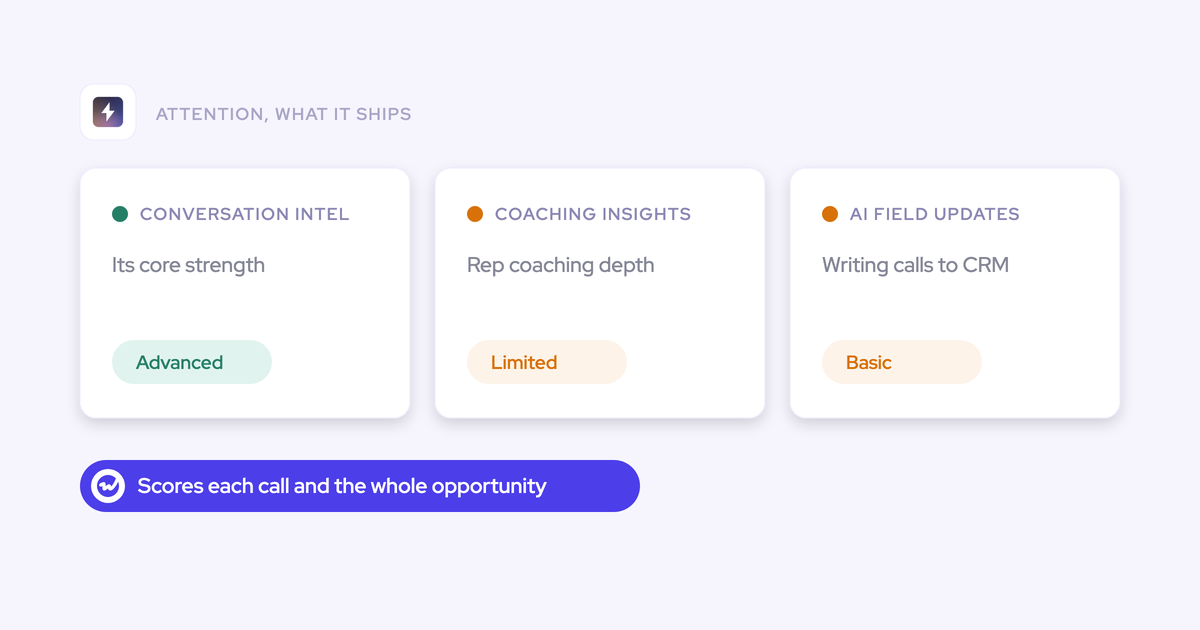

Weflow and Attention both score every recorded call against your methodology, so that won't be what separates them. The real question is whether you can coach from the score.
Here's the short answer:
- Weflow fits a Salesforce team running a named methodology across long sales cycles. It scores each call and the whole deal, writes the scores into Salesforce, and publishes its per-seat price.
- Attention fits a team with strong RevOps that wants to write weighted, prompt-tested rubrics, get live prompts during calls, and push call output into many other tools.
Weflow is the Revenue AI Orchestration platform for sales, customer success, and RevOps teams on Salesforce. Call scoring lives in Weflow Conversation Intelligence, at $39 per user per month billed annually. Attention doesn't publish its pricing.
Weflow vs Attention scorecards, integrations, MCP and pricing at a glance
Where they differ is how you build and compare scores, where those scores end up, how open the AI side is, and whether you can see the price before talking to sales.
| Capability | Weflow | Attention |
|---|---|---|
| Coaching scorecards | Every recorded call is scored against templates you edit: nine ready-made methodologies, a section library and custom prompts. Sections use a fixed 1–5 or free-text scale, and managers can override any score. Separate Weflow AI Playbooks score the whole opportunity. Scores roll up per call, per deal and per rep over months. | Criteria are written in plain language describing low and high scores. Each criterion can carry a weight, the scale is set per scorecard, and you can test a criterion against a past call before saving. Prebuilt MEDDIC, BANT and SPICED frameworks are available, plus AI-drafted scorecards once a CRM is connected. |
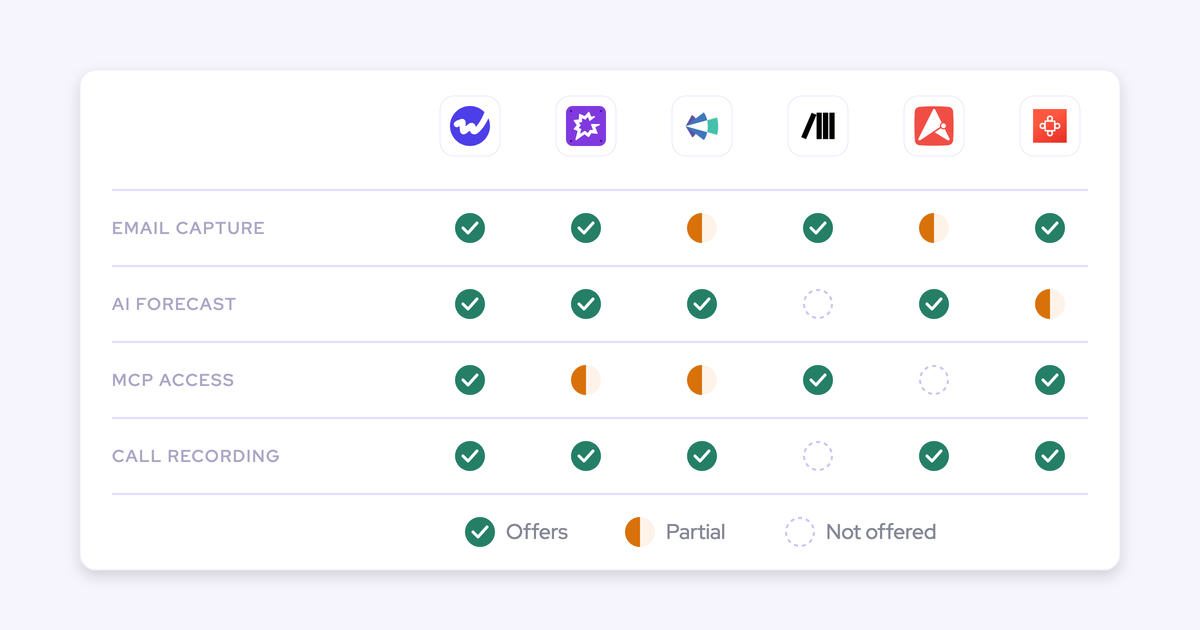
| Integrations with other tools | Native integrations with Salesforce, Gmail, Google Calendar, Outlook, Zoom, Microsoft Teams, Google Meet, Slack and named dialers. The API and MCP connector send data out to BI tools and AI assistants. Works with Salesforce only, with no connector catalogue or native warehouse connector. | Workflow steps act inside Salesforce, HubSpot, Pipedrive, Zoho, Gmail, Google Sheets, Google Docs, Asana, Airtable, Notion, Linear, Snowflake and Slack. Calls import from Zoom Phone and Aircall. HTTP request and custom code steps reach any API. |
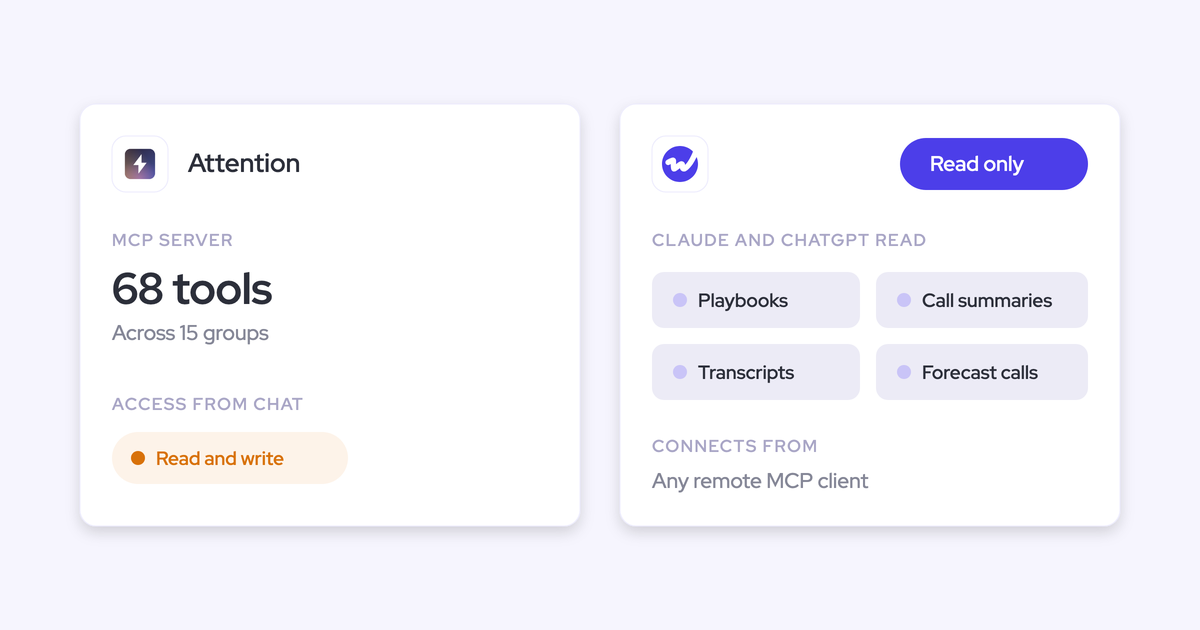
| Access from AI assistants (MCP) | An official read-only connector with six tools, for Claude, ChatGPT and any remote MCP client. It returns coaching scores, playbook results, summaries, transcripts and forecast data. An admin switches it on, and a separate toggle controls transcript access. | A read-write MCP server with 68 tools across 15 groups. It returns raw transcripts, runs analysis across up to 25 calls or a whole deal, and exposes the Super Agent. Usage is rate-limited with no consumption charge. |
| Raw data access outside the tool | The public API is on every plan. It reads scorecards, transcripts, summaries and interaction metrics, and bulk-exports JSON or CSV. Video goes to your own storage. | Transcripts, scorecard results and AI insights come out through MCP and API keys. Workflows can send data to Snowflake or to any API. |
| Pricing | Published: Weflow Conversation Intelligence at $39 per user per month, billed annually. Minimum of 10 users and a 12-month term. | Not published. Pricing is quote-only through a demo booking. |
In short, Attention gives you more control over how a single call is scored, while Weflow scores both the call and the whole deal on one fixed scale, so a rep's number means the same thing across teams and quarters.
Why sales managers end up choosing between Weflow and Attention
Recording and transcription stopped setting vendors apart a while ago, and every serious conversation intelligence product now scores calls with AI. In fact, buyers often open our demos by telling us every tool they've seen sounds the same.
By the time the scorecard decision comes up, the setup usually looks like this:
- RevOps has already signed off on capture and CRM fit.
- The coaching question lands with you, the manager.
- And since both tools produce a score, the decision comes down to how that score is designed.
Most managers we talk to have also watched manual scorecards fall apart:
"While we can create the scorecards, people have to do the scorecards, and our sales leaders are not great at doing that."
— Sales leader, on an evaluation call with us
After Gong and Clari, Attention is the competitor we meet most often, usually in conversation intelligence evaluations, rather than forecasting ones.
Weflow comes in as the platform that also covers activity capture, deal intelligence and forecasting in Salesforce.
That's how this pair ends up on your desk, with one question attached: which tool scores my team's calls the way we actually sell?
What makes an AI call score worth coaching from
A score is only worth coaching from if it passes four tests, and we'll hold both tools to all four throughout this article.
- The right rubric for the call type: A renewal call scored on the discovery rubric produces a low number that tells you nothing about the rep.
- Fair to what the call was for: A discovery call that never touched the paper process didn't fail on it. That element just wasn't relevant yet.
- Comparable across teams and across 90 days: If the scale changes between scorecards or drifts over time, you can't show a rep improved or compare two teams.
- Delivered before the one-on-one: If you have to dig through a tool call by call to find the pattern, chances are you won't, and the score goes unread.
The second test is where most AI scorecards break down in long sales cycles. On its own, a per-call score reflects which calls happened to get sampled, not how well the rep qualifies. Reps notice this, and so do managers:
"Right now it scores us on an individual call. So if we talk about metrics on the first call and get a four, then on the second call, because it's already been decided, we score a one because we didn't discuss it again."
— Sales leader running MEDDPICC, on an evaluation call with us
How Weflow Conversation Intelligence scores your team's calls
Weflow scores each call against a rubric you own, scores the whole deal separately, and keeps both on a comparable scale that lands in Salesforce.
How you build Weflow coaching templates around your sales process
You define the scorecard per team and per call type, but you don't have to start from a blank page. Weflow ships nine ready-made coaching templates:
- BANT
- Challenger Selling
- MEDDIC, MEDDICC and MEDDPICC
- Solution Selling
- SPARK and SPIN
- Value Selling
You can also build your own sales process alongside them. Every prompt behind a template, whether ready-made or custom, can be rewritten (up to 2,000 characters each), so the rubric ends up in your wording and reflects your priorities.
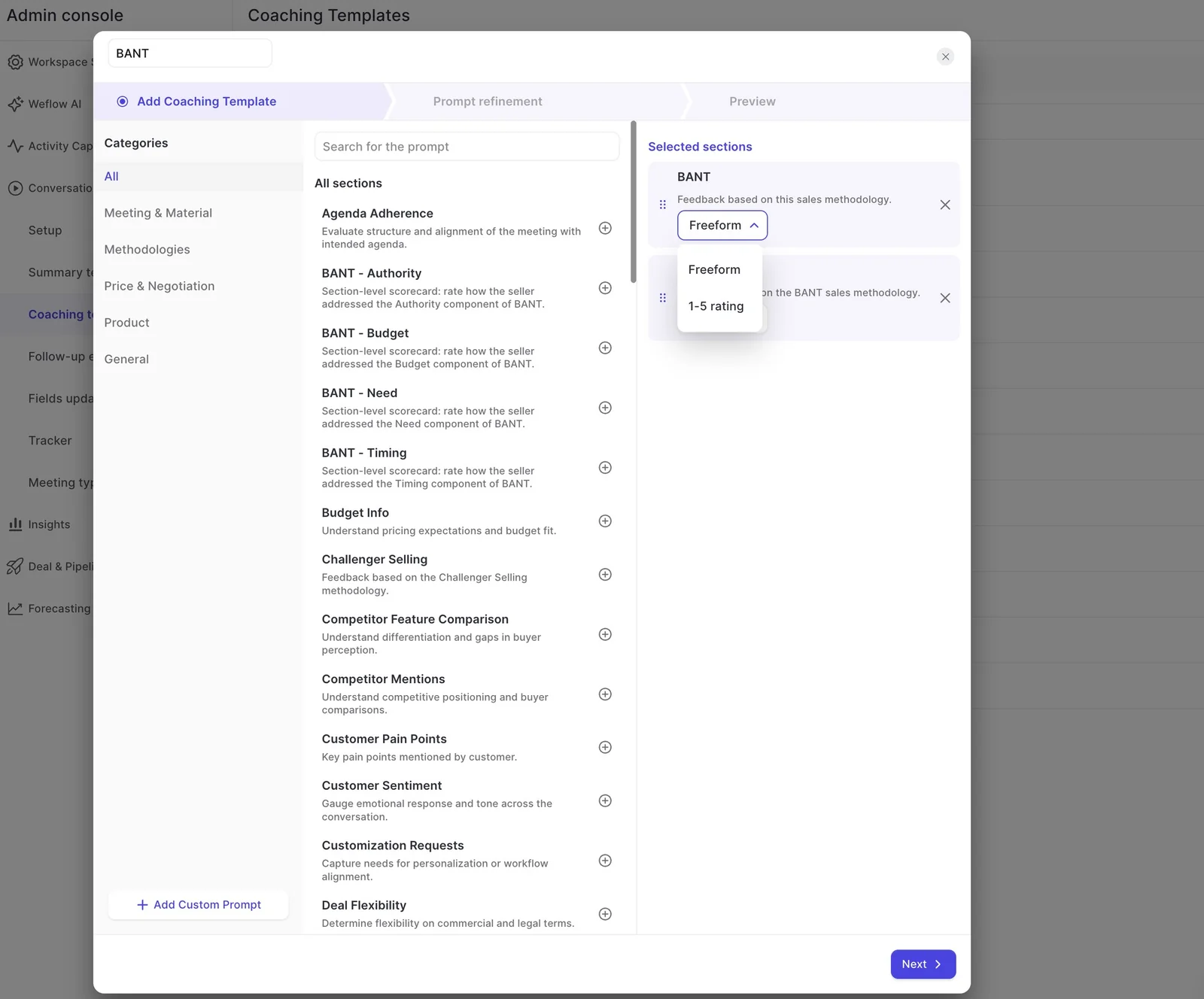
Building a template takes three steps:
- Choose sections from the library: Sections are grouped as Meeting & Material, Methodologies, Price & Negotiation, Product and General. They include agenda adherence, competitor mentions, customer pain points, customer sentiment and deal flexibility.
- Refine the prompt behind each section: You can also add a custom prompt with a name, a description and the prompt text. Then set each section to a 1–5 rating or free-text feedback.
- Preview the template, then save it.
Once real calls start running through it, a few things decide whether the rubric holds up:
- Criteria judge behavior, not keywords: A keyword tracker credits any rep who mentions the product name. A criterion prompt, on the other hand, can ask whether the rep uncovered pain and need before describing the product. Product context you add under Context and Sources helps the AI recognize that step.
- Methodologies can be scored element by elementa: For example, BANT can run as separate Budget, Authority, Need and Timing scores, so you see which element slipped instead of one blended number.
- Every element prompt should carry a neutral rule: In the setups we've done with customers, the most reliable pattern is one block per element, each rated 1–5 with a reason, plus an explicit rule that an element not discussed on the call scores neutral rather than low.
- Templates go to teams, and meeting types decide which template runs: Weflow classifies recordings into up to ten meeting types, including custom ones like renewal or upsell, and each type can trigger its own scorecard, so a renewal call never gets scored on the discovery rubric. Attention does the same through team and call-tag targeting, so the two are even here.
- You can override any score: Managers can change any AI score by hand.
- Scores sync to Salesforce: Templates write to Salesforce where the matching fields exist.
How Weflow AI Playbooks score the whole deal across calls and emails
While coaching templates judge one call, Weflow AI Playbooks judge the whole opportunity across every call, email and CRM field on it.
This second layer means a rep doesn't lose points on call two for something already settled on call one. It also counts evidence that never came up on a call at all:
"On one of our test opportunities, the champion was never talked about on the call, and the decision maker was never talked about on the call either. All of this came through email."
— RevOps lead, during a Weflow evaluation
| Coaching template | Weflow AI Playbook | |
|---|---|---|
| What it reads | One recorded conversation | Every email, meeting, transcript, CRM field and related record on the opportunity |
| The question it answers | How well did the rep run this call against MEDDPICC or BANT? | Does the deal as a whole meet the methodology? |
| When you use it | Fresh feedback on a call and skill coaching | Pipeline reviews, and judging how completely a rep qualifies |
| When it runs | After each recording is processed | Every two hours on any opportunity that changed |
A playbook shows each element as fully established, partially established with a note on what's missing, or never discussed. It also checks text a rep typed, so filler in a MEDDIC field shows up as not assessed rather than complete.
One limit remains: a single call score still judges that call alone, so read it with the meeting's purpose in mind. To see how well a rep qualifies, look at the deal score.
How Weflow Insights tracks a rep's scores over 90 days
Weflow scores methodology at three levels: one call, one opportunity, and one rep across every deal they've worked over months. The rep level answers the question managers ask us most often:
"If I needed a rep to improve in a certain area, I'd look at her calls from 90 days ago and then look at them again now."
— Sales manager, on an evaluation call with us
Weflow Insights lets you slice scorecard results by user, team, time period, opportunity, account and meeting type.
You can also compare methodologies side by side (BANT against MEDDPICC, for example), and export any scorecard view to CSV, share it, or add it to a dashboard.
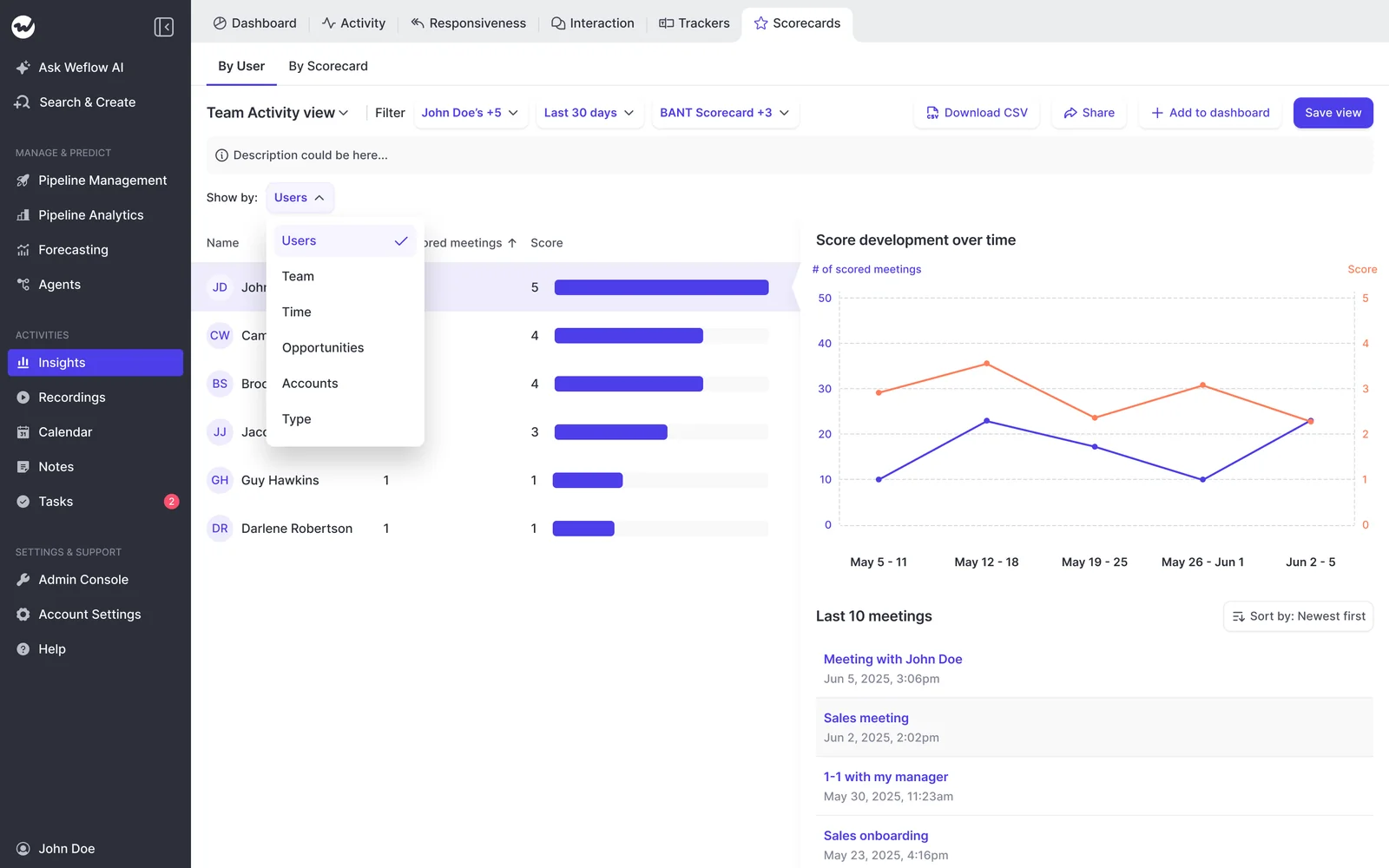
Because every section uses the same 1–5 scale, a 3 on champion means the same thing for a rep in one team as in another, and the same thing this quarter as last.
The Interaction tab adds six metrics per rep: talk ratio, longest monologue, longest customer story, interactivity score, patience and question rate.
The catch is that the rep picture lives in two places today: trends and metrics in Weflow Insights, and call-by-call scores in the coaching tab. There's no single page that brings one rep's calls, scores and metrics together over time.
Which tools Weflow connects to and where integrations stop
Weflow connects natively to the tools your reps already use, and sends data outward through its API and MCP connector:
- CRM: Salesforce, with real-time two-way sync.
- Calendar and mail: Gmail, Google Calendar and Outlook.
- Meeting platforms: Zoom, Microsoft Teams, Google Meet and Webex through the notetaker. The desktop app records without a bot in the call.
- Dialers: The Outreach dialer, which your admin connects directly. Aircall, CloudTalk, Dialpad and Zoom Phone, which our team activates.
- Messaging: Slack and Microsoft Teams notifications for meeting summaries.
- BI and assistants: The API feeds Tableau and Looker, and the MCP connector feeds Claude, ChatGPT and other assistants.
Keep in mind that Weflow works only with Salesforce. There's no connector catalogue and no native Snowflake, Databricks or BigQuery connector, so teams that centralize data in a warehouse move it there through the API.
What Claude and ChatGPT can read from Weflow over MCP
Weflow's official MCP connector is read-only and lets you ask your own AI assistant about your team's scores.
Here's how the setup works:
- An admin switches the connector on per workspace.
- A separate toggle decides whether assistants can read full transcripts or only AI summaries.
- The connector answers with what the connected user can see in Weflow, so a rep can't reach a teammate's recordings through Claude if they can't see them in Weflow.
It works with Claude, ChatGPT and any client that supports remote MCP servers, and exposes six tools: Get Forecast, Get Org Structure, Get Recording, List Playbooks, List Recordings and Playbook Values.
What it returns:
- coaching scores and AI Playbook results
- call summaries, plus transcripts when the toggle allows them
- forecast data for a close-date period, with pipeline metrics per rep for up to 25 owners
What it doesn't return:
- the content of emails captured by Weflow Activity & Contact Capture
- Salesforce field values, which you reach through Salesforce's own MCP server
- saved deal board views
That makes it narrower than Attention's server, which reads and writes across 68 tools.
How you pull Weflow scores and transcripts out through the API
Every Weflow plan includes the public API, so RevOps can pull your scores into its own reporting without buying a separate tier.
- Eleven read endpoints cover recordings and their scorecards, transcripts, summaries, interaction metrics, trackers, comments and clips.
- Bulk export runs scheduled or on demand, in JSON or CSV.
- Meeting video exports to your own cloud storage, while transcripts and call outputs land in Salesforce.
- The API only reads data out. Past recordings from another tool come in through a migration import our team runs.
How Attention scores your team's calls
Attention gives a strong RevOps team a tunable, prose-written scoring system and the widest agent and workflow surface we see in conversation intelligence.
How Attention turns your written criteria into weighted call scores
In Attention, your admin writes the scorecard in plain prose. For each criterion, they describe what the lowest and highest scores look like, and that description becomes the prompt the AI uses to score every matching call.
Here are the controls you get:
- Score anchors: A minimum and maximum description per criterion, plus an optional midpoint.
- Weights: An optional weight per criterion, defaulting to 1, so some behaviors count more toward the total.
- Scale per scorecard: The admin chooses the range, typically 1 to 5.
- Test Your Prompt: The admin runs a criterion against a real past call and reviews the output before saving.
- Targeting: Scorecards apply to chosen teams and, optionally, call tags like Discovery or Closing.
- Multiple scorecards: Several scorecards can run on one call.
That means the scorecard is only as good as the prose behind it.
A hand-built scorecard starts empty, though Attention also offers prebuilt MEDDIC, BANT and SPICED frameworks, and since May 2026 it drafts suggested scorecards when an admin connects a CRM.
Either way, someone on your team still has to judge the drafts and write the final criteria.
How Attention reads methodology across a long deal
Attention's call-level scoring and analysis work from conversations. They use CRM data to choose which calls to read and as a place to send extracted values, but they don't analyze the CRM record itself.
The Insights tab works within one conversation or across one deal's calls, as the scope selector below shows on an Attention conversation page.
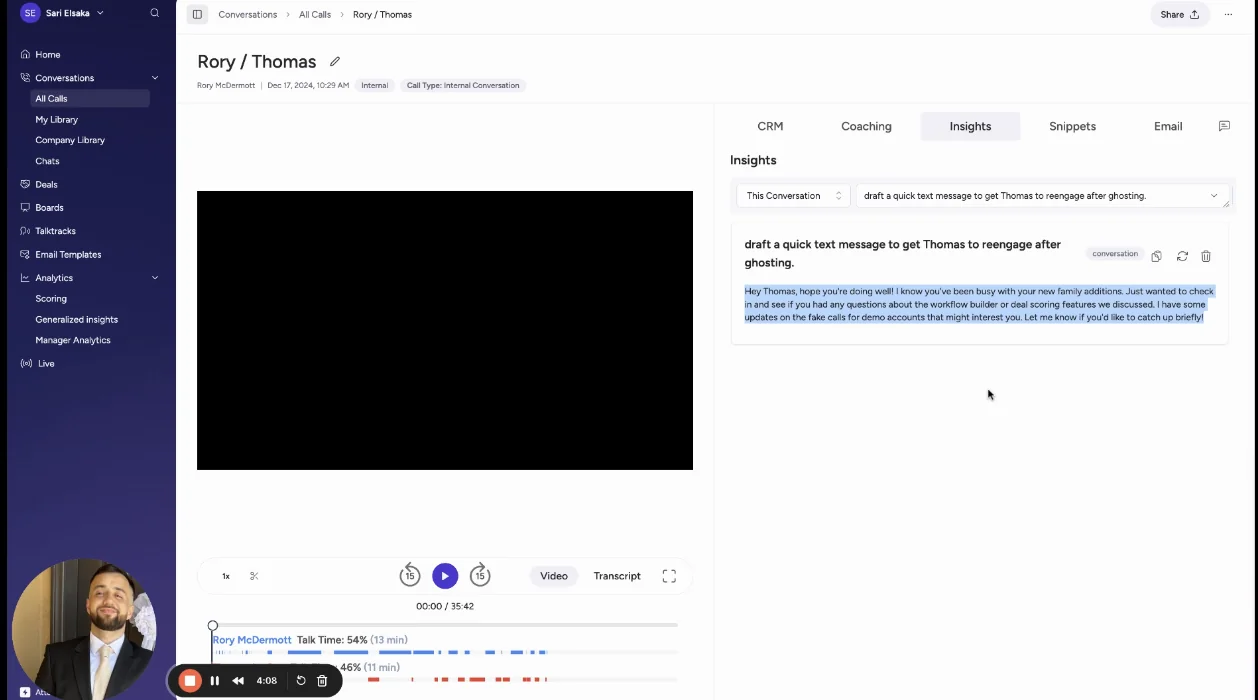
The Super Agent is the exception. Since April 2026, it can search Salesforce and HubSpot accounts, filter pipeline queries, and read imported email and chat threads.
So a champion who only showed up in email is reachable when you ask the Super Agent, but that evidence doesn't feed the call scorecard.
How Attention tracks rep scores over time
Attention's analytics dashboard tracks scores over time and compares reps.
Manager Analytics covers the coaching side, measuring calls listened to, comments left, minutes listened and active listening.
You can export it to CSV. Comments pin to a timestamp on the recording, and an @mention emails the teammate a link that opens the call at that exact moment.
One thing to watch: because each scorecard sets its own scale, scores from two scorecards only compare cleanly if you keep the scale consistent across them.
Which tools Attention pushes call output into
Attention's workflow builder acts directly inside a long list of tools:
- CRMs: Salesforce, HubSpot, Pipedrive and Zoho.
- Google Workspace: Gmail, Google Sheets and Google Docs.
- Productivity apps: Asana, Airtable, Notion and Linear.
- Data: Snowflake.
- Slack, in both directions: Workflows post summaries and alerts, and people tag @Attention to ask its agents questions.
- Calls: Imports from Zoom Phone and Aircall. Calendars connect through Google, Outlook or Zoom.
Attention says it has more than 200 integrations in total. Below is its Slack call-summary template on the Attention Builder canvas: a trigger, an Ask Attention step and a Slack message.
The builder also goes beyond prebuilt actions, with:
- Routers and loops
- Storage across steps
- An HTTP request step that calls any API
- Custom Node.js and TypeScript code
- Steps that call OpenAI or Anthropic models directly
Just remember that a workflow with code in it is software, and someone on your team has to maintain it.
What AI assistants can read and change in Attention over MCP
Attention's MCP server is read-write, with 68 tools across 15 groups. An assistant connected to it acts on the workspace the way a logged-in user would.
- It returns raw transcripts and full-text searches inside them.
- It runs AI analysis across up to 25 calls in one request, or across every call on a deal.
- It exposes the Super Agent, which decides which sources to query and takes as many steps as it needs.
- It can configure scorecards, teams, users, labels and CRM integrations. Nine tools are flagged destructive.
- Usage is rate-limited with no consumption charge.
- Calls run under the caller's own permissions. Org-level API keys are the exception and carry full organization access.
How you pull Attention transcripts and scores out
Attention exposes transcripts, scorecard results and AI insights through its MCP server and API keys, and its workflows can push data to Snowflake or to any API through the HTTP request step.
How a coaching week runs in Weflow and in Attention
Both tools score every recorded call and can send results to you without you opening the app. That matters more than it sounds, since this is what managers tell us most often:
"I don't think anybody will go into the tool to review call by call. Getting a summary sent out by email might be the best way to get into these."
— Sales leader, on an evaluation call with us
Here's how a week runs in each tool, from the calls themselves to the one-on-one.
| Moment in the week | Weflow | Attention |
|---|---|---|
| Calls get scored | Every recorded call is scored against the team's template once processing finishes. | Every matching call is scored against the scorecard targeted at that team. |
| The right rubric applies | The meeting type is classified automatically and triggers its own scorecard. Templates are assigned per team. | The scorecard is targeted by team and call tag. |
| A long-cycle rep gets judged | The call score covers that call. The AI Playbook score covers the deal across calls, emails and CRM fields. | Call scores come from conversations. The Super Agent can query CRM and imported email when you ask it. |
| Findings reach you | A scheduled agent built in Weflow Agent Builder runs an Ask Weflow AI review of each rep's week. It reaches you before the one-on-one, for example as a PDF or CSV posted to Slack. | Slack alerts on high- and low-scoring calls, @mention emails on timestamped comments, and workflows. |
| The one-on-one uses a trend | Weflow Insights shows the rep's scores over time on the fixed 1–5 scale, element by element, so you can compare 90 days ago with now. | Analytics show trends per scorecard. Comparisons across scorecards hold if your scales match. |
| The score lands where the team works | Scores sync to Salesforce where matching fields exist, next to capture and deal scoring. They're also available through the API and MCP. | Workflows push output into Slack, Google Docs, CRMs, Snowflake and other tools. |
The time math works out the same in both tools. You can realistically listen to three to five calls a week, but with every recorded call scored, you stop sampling to find problems and start reading a trend. The few calls you do listen to become the ones the score flags.
In Weflow, the weekly review also goes beyond methodology. Ask Weflow AI can rate how a rep presented, picking up things like a clunky transition or a firm grip on next steps, and turn that into coaching recommendations.
Where Attention is the stronger choice for call coaching
If you want weighted rubrics tuned against real calls, live help during calls, or the broadest agent and workflow surface, Attention is likely the better fit.
What Attention does on scorecards that Weflow doesn't
- Per-criterion weights let discovery quality count more than agenda-setting, and you retune by moving weights instead of rewriting criteria.
- Test Your Prompt runs a criterion against a real past call before you publish, so you can tune wording in minutes instead of waiting a month of scored calls to find out it's off.
- Live talk-track and battlecard prompts appear in Attention's desktop app during the call, on Apple Silicon Macs.
- A read-write MCP server and a programmable workflow builder let your own agents act on call data inside many more tools than Weflow reaches.
What Weflow coaching doesn't cover today
- No yes/no criterion scale: A checkbox item has to map onto 1–5, for example 1 for not done, 3 for partly done and 5 for done.
- No anonymous peer review: Every comment on a recording or clip shows who wrote it.
- No separate scores for an AE and an SE on the same call: The scorecard rates the call as a whole.
- No AI roleplay or practice calls: Teams that want roleplay run a separate enablement tool, and our API and MCP connector can pass it call data.
- No live in-call prompts: Summaries, field updates and scores arrive after the call.
- No single manager page for one rep over time: The picture is split between Weflow Insights and the coaching tab. Gong is further along here.
- No CRM other than Salesforce.
What Weflow and Attention cost for a ten-rep team
Weflow publishes its prices. Attention doesn't, so you'll need a quote to compare.
| Weflow | Attention | |
|---|---|---|
| Pricing model | Per seat, billed annually. Weflow Agent Builder is the only product priced by consumption, per workspace. | Not published. Negotiated contract. |
| List price | Weflow Conversation Intelligence at $39 per user per month. The Revenue AI Foundation bundle (Weflow Activity & Contact Capture plus Weflow Conversation Intelligence) at $49 per user per month. | Not published |
| Minimum and term | 10 users and a 12-month term | Not published |
| What's included | Ask Weflow AI Pro, the desktop app, Mobile Copilot, public API access, free view-only seats, and unlimited recordings and transcripts. The Agent Builder free tier includes 25 agent actions a month per workspace. | No published credits or metered AI. MCP usage is governed by rate limits. |
| What costs extra | Agent Builder Growth at $299 a month for 500 actions, and Scale at $999 a month for 2,500 actions | Not published |
For ten reps on Weflow Conversation Intelligence, that's 10 × $39 × 12 = $4,680 a year at list. On the Revenue AI Foundation bundle, which adds activity and contact capture, it's 10 × $49 × 12 = $5,880 a year.
A scheduled weekly review across the team runs on Agent Builder actions. The free tier covers 25 a month, and heavier schedules move to the Growth tier.
How to test Weflow and Attention scoring on past calls
You can score your own recordings in both tools before you commit.
- Weflow imports past calls as audio or video files (not text transcripts on their own) and scores them like any other recording. It can pull recordings from most conversation intelligence tools through the vendor's API or from exported files. Since uploaded files carry no attendee list, speakers show up as letters.
- Attention tests a criterion against a past call in-app. Its Import Conversation endpoint brings in recordings from a file URL.
For a test that actually tells you something, follow these steps:
- Pick ten to twenty representative calls by type: discovery, demo, negotiation and renewal, from strong and struggling reps.
- Import the recordings into each tool.
- Apply your own rubric, not the default, with the same criteria in both.
- Compare scores across call types. A renewal shouldn't lose points on elements only discovery covers.
- Pick one rep with several calls on the same deal and look at the trend and the deal-level view.
Make sure to clear legal before you start. Legal teams often won't approve a proof of concept on real customer calls, but one without real calls proves nothing.
The way around this is contractual: agree on deletion terms for trial data between both legal teams before the pilot starts.
When you plan the rollout, make recording coverage the first milestone and coaching the second, since a scorecard can only measure the calls that got recorded.
When Weflow fits your team and when Attention does
Choose Weflow if:
- You're a Salesforce team running a named methodology across several teams and long cycles.
- You want each call and the whole deal scored, so reps aren't marked down for elements already settled or covered in email.
- You want one comparable scale, so a 90-day trend and a team comparison mean something.
- You want scores in Salesforce next to activity capture and deal scoring, on one platform, at a published per-seat price.
Choose Attention if:
- You have strong RevOps capacity to write and maintain weighted, prompt-tested rubrics.
- You want live talk-track and battlecard prompts during calls.
- You want a programmable workflow builder and a read-write MCP server for your own agents.
- You run a CRM other than Salesforce.
See how Weflow captures activity, updates Salesforce fields from calls, and rolls up your forecast. Book a 30-minute demo.
FAQ: Weflow and Attention call scorecards
Who on our team should own and maintain the coaching templates?
Name one internal owner before you sign, usually in RevOps or enablement. Without one, prompts go stale as your process changes and managers stop trusting the scores.
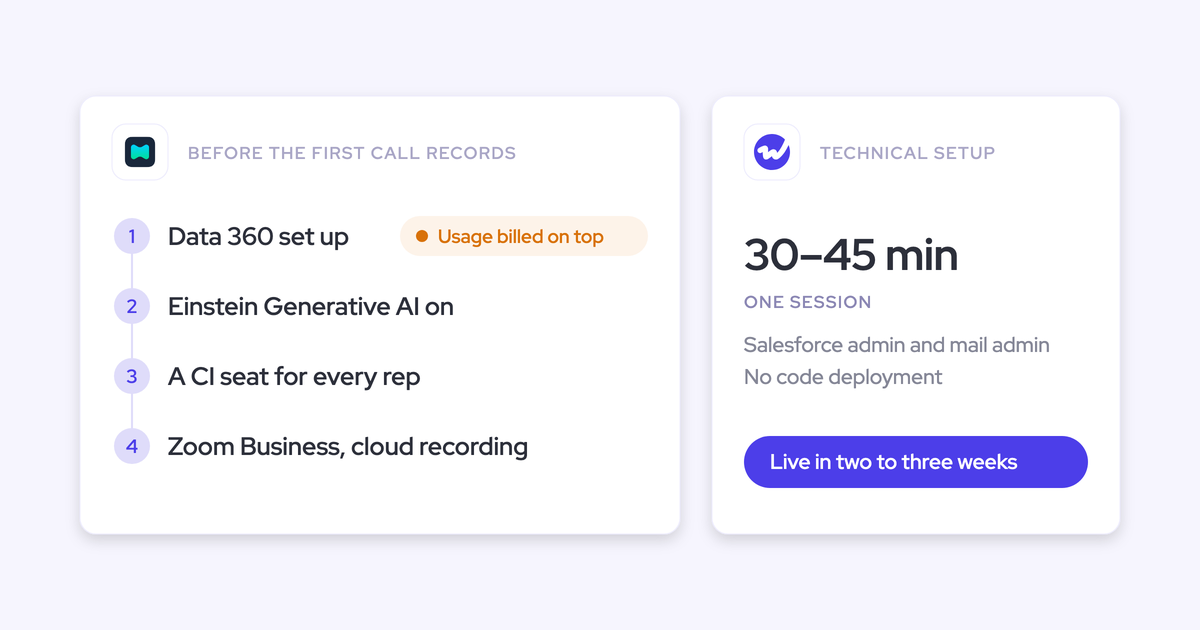
In Weflow, technical setup takes 30 to 45 minutes, and full rollout takes one to three weeks, mostly spent on template configuration.
Can different sales teams run different methodologies under one standard?
Yes. In Weflow, you assign each coaching template to one or more teams. To keep a common standard, leadership can reuse the same section or prompt across every template, which is exactly what one leader asked us for:
"I think we need to have all the same. So the VP coaching prompts are all the same. So we can have some consistency across the teams."
— Revenue leader, on an evaluation call with us
How does Weflow score a call with an AE and an SE on it?
Weflow scores the call as a whole, not each seller. It identifies speakers from what Zoom, Google Meet or Teams report about the active speaker, with no voice fingerprinting of its own.
Should AI call scores feed rep compensation or MBOs?
We recommend using AI call scores for coaching focus and enablement, not for pay. AI assessments can vary between runs, and a wrong rating tied to pay turns into an argument instead of a coaching conversation.
One customer's RevOps team kept per-seller AI reports with leadership and out of MBO scoring for exactly this reason, and used the team-wide analysis to build its enablement standard instead.
Do reps have to remember to start recording in Weflow?
No. An admin chooses which users and teams get recorded, and the notetaker joins their meetings from the calendar automatically. The calendar shows a Record switch for each upcoming meeting.
Our Conversation Intelligence customers typically record 50 to 70 percent of their meetings, so it's worth watching the recording ratio by team in your first month.
Will reps have to work in a second tool beside Salesforce?
Mostly no. Weflow writes summaries, field updates and coaching scores into Salesforce where matching fields exist, so reps see call outcomes on the records they already work in.
Managers still open Weflow for Weflow Insights and the coaching tab, but scheduled reviews can reach them in Slack, so they don't have to log in to see the week.
How do Weflow and Attention handle recording consent and GDPR?
Weflow:
- Weflow is a German company and is GDPR compliant.
- It stores data in your Salesforce instance's region by default, with the EU, US or Australia available.
- You can delete recordings after a set period while keeping transcripts, or delete both.
- Consent flows include a pre-meeting email with an opt-out link on Microsoft Teams, and an in-call chat message where removing the notetaker permanently deletes the recording data.
- Weflow holds SOC 2 Type II, applies Zero Data Retention to AI processing, and never uses customer data to train AI models.
Attention:
- Attention runs a separate EU instance.
- Admins set media retention policies.
- Attention doesn't use user data to train AI models.