Weflow vs Avoma: How Each Syncs Calls, Notes and Activity to Salesforce (2026)
See how Weflow vs Avoma sync calls, notes and activity to Salesforce, and where field sync differs.


Avoma and Weflow both promise a "two-way native Salesforce integration," but that phrase means something quite different for each of them.
Avoma pushes the meeting out into Salesforce: it creates an Event for each meeting, attaches the notes, and maps Smart Topics into a limited set of Opportunity and Account fields (custom objects aren't supported).
Weflow, on the other hand, makes Salesforce the complete record.
Weflow is the Revenue AI Orchestration platform for sales, customer success, and RevOps teams, built for Salesforce teams. With Weflow Activity & Contact Capture, we write all of this into native objects:
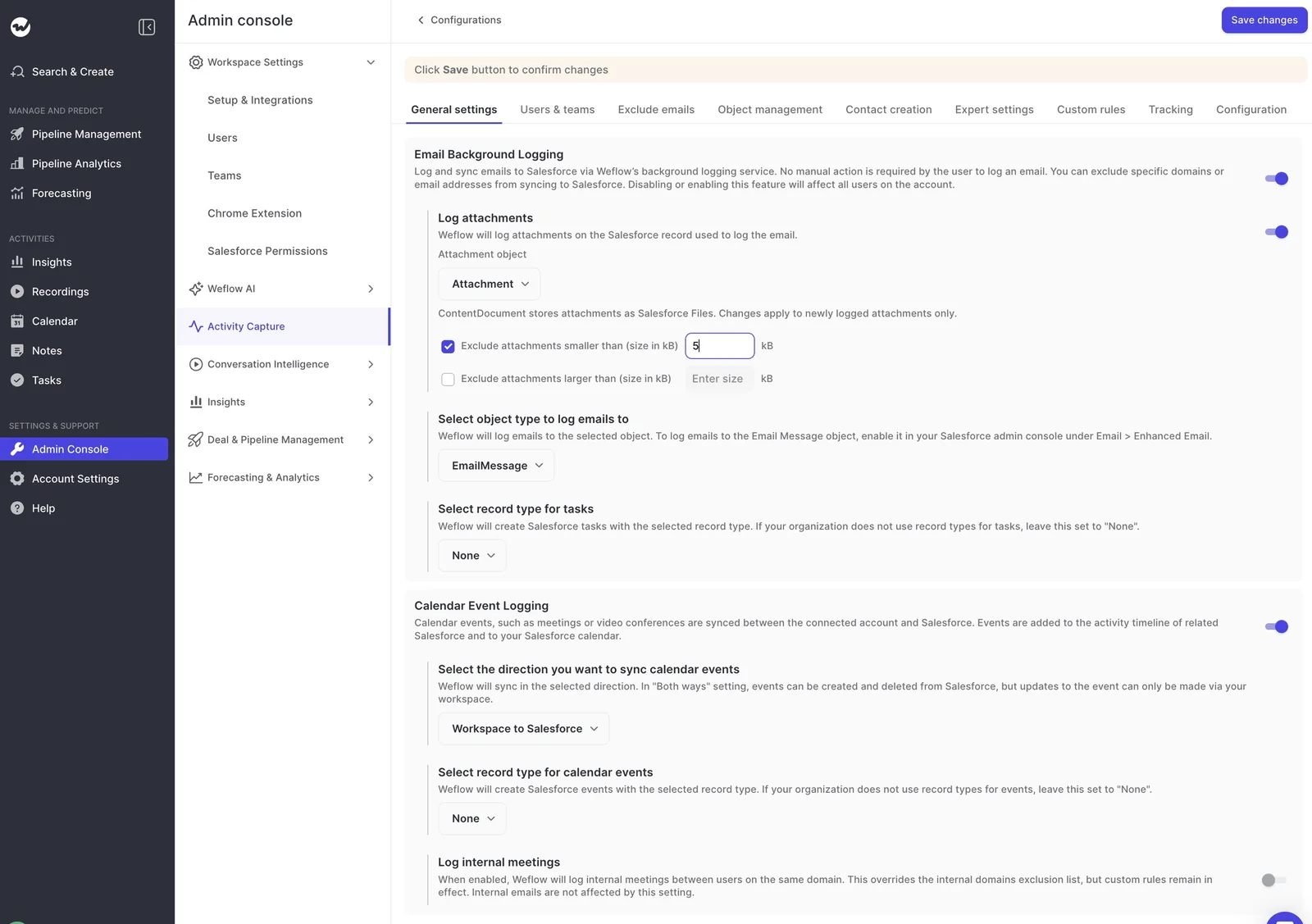
- Inbound and outbound email
- Meetings linked to every attendee
- Auto-created contacts
- Opportunity contact roles
Weflow Conversation Intelligence then adds AI Field Updates on any object, and every write follows your org's own validation rules and permission sets.
If you're the admin who'll install the package and test it in a sandbox, you need the object-level detail. So this article gives you two things to take to your RevOps lead: a per-object, per-direction table, and the sandbox test plan we'd run if we were in your seat.
Weflow vs Avoma at a glance: Salesforce, integrations, MCP, pricing
On a checklist, the two tools look alike. Where they really differ is how deeply they write into Salesforce, how many tools they connect to, and what their API and MCP access can reach.
| Capability | Weflow | Avoma |
|---|---|---|
| Salesforce integration | Real-time two-way REST API integration with no middleware. Inherits standard and custom objects, validation rules, field dependencies, permission sets and role hierarchy. Works only with Salesforce, and Starter Edition can't connect. | Native integration that sets sync direction per imported field (out, in or both). Creates an Event per meeting and writes notes to a Note, the Event or a Task. Field mapping works on Opportunity and Account only, with no custom objects. Two-way field updates need the Revenue Intelligence add-on. |
| Integrations with other tools | Gmail, Google Calendar, Outlook, Zoom, Microsoft Teams, Google Meet, Webex, Slack and the Outreach dialer. Support activates Aircall, CloudTalk, Dialpad and Zoom Phone. Other dialers are available by custom request. No native Snowflake, Databricks or BigQuery connector. | 26 native integrations: eight conferencing tools, six CRMs, nine dialers and sales engagement tools, Slack, Microsoft Teams chat and ClickUp. Also connects to Zapier. |
| Access from AI assistants (MCP) | Official read-only connector for Claude, ChatGPT and any remote MCP client. Returns recordings, summaries, transcripts (behind an admin toggle), playbook values and forecast data. Doesn't return captured email content or Salesforce field values. | Connector for Claude and ChatGPT with 11 read tools and 3 write tools, which set a meeting's outcome, purpose and privacy. Needs the Organization or Enterprise plan, or the API Access add-on. Broad queries can time out. |
| Raw data access outside the tool | Public API on every plan. Bulk export of transcripts, metadata, scores and signals as JSON or CSV. Video exports to your own storage. Warehouse loads run through the API. | Public REST API and webhooks for meetings, recordings, transcripts, notes and scorecards. Organization plan and above, 60 requests a minute, admin-only keys. No managed warehouse export described. |
| Pricing | Published. $19 to $79 per user per month. Weflow Revenue AI Foundation (capture plus recording) is $49. Annual billing, 10-user minimum. | Published. Recorder seats at $19, $29 or $39 per seat per month billed annually. Revenue Intelligence and Conversation Intelligence add-ons at $29 a seat each. Free unlimited viewer seats. |
Avoma starts from the meeting, Weflow starts from Salesforce
Avoma started out recording, transcribing and summarizing calls, and only added CRM depth later. That's why everything in Avoma anchors to the meeting.
A capture-first tool like Weflow starts from the CRM record instead, which means it has to work with the whole org: every mailbox, every object and every rule.
This difference matters because of how Salesforce works. An activity can relate to an opportunity or an account, but never both, and opportunity contact roles are usually only half-maintained.
So any tool without a better mechanism falls back to the account, and how each tool handles that fallback is where Weflow and Avoma part ways.
What Weflow and Avoma write to each Salesforce object
Avoma writes the meeting, its notes and mapped fields on Opportunity and Account, and sends captured emails to Task and EmailMessage.
Weflow writes email, meetings, contacts, contact roles and field updates across standard and custom objects, under your org's rules. You can test every row below in a sandbox.
| Salesforce object | What Weflow writes, and in which direction | What Avoma writes, and in which direction | What governs the write |
|---|---|---|---|
| Event | One Event per calendar meeting, synced from Google Workspace or Microsoft 365 into Salesforce. Relates to up to 50 attendees when Shared Activities is on. | An Event per meeting from calendar sync or an impromptu external meeting. The Event anchors notes and Smart Topic data. Meeting purpose and outcome can map to Event fields. | Weflow: the integration user needs full access to Event fields and record types, with a default record type set in Weflow. Avoma: per-field sync direction and field-level security. |
| Task | Emails, when you choose Task as the logging object. These relate to up to 50 people with Shared Activities on. | Meeting or call notes when routed to Task, plus captured emails. AI action items are pushed as Tasks assigned to the meeting owner. | Weflow: the task record type you set in the configuration, plus validation rules. Avoma: notes settings at organization, member and individual level. |
| EmailMessage | Inbound and outbound email from server-side capture, with attachments if you turn them on. Weflow keeps no copy after the write. | Captured emails, tied to the opportunity as well as the contact. Avoma can also read emails that Salesforce's own email sync wrote. | Weflow: domain exclusions, record-field rules and the integration user's permissions. Avoma: not described in Avoma's documentation. |
| Note | Notes reps write in Weflow, synced to Salesforce. | Meeting notes, attached to Leads, Contacts, Accounts and Opportunities. | Avoma: Salesforce Enhanced Notes must be on, and an admin must switch notes on in Salesforce. |
| Contact | Auto-created from email threads and calendar attendees, only for accounts that already exist. Internal, free-mail and system addresses are excluded. | Avoma documents contact creation from meeting participants for HubSpot. Its Salesforce documentation doesn't describe it. | Weflow: Contact validation rules and the default contact record type. |
| Opportunity Contact Role | Created when an email is logged to an opportunity and the contact has no role there (an option you turn on). | Not described in Avoma's Salesforce documentation. | Weflow: the org's permissions on OpportunityContactRole. |
| Opportunity fields | AI Field Updates on every field type except lookups. Edits made in Weflow write back in real time, in both directions. | Smart Topics appended to mapped fields, excluding single-line text and address fields. The first sync covers open deals modified in the last 90 days. Edits in Revenue Insights write back. | Weflow: validation rules, picklist values and permission sets. Avoma: field-level security, character limits and the Revenue Intelligence add-on for two-way updates. |
| Account fields | AI Field Updates on every field type except lookups, two-way. | Smart Topic mapping with the same field-type exclusions. | Same as Opportunity for each tool. |
| Custom objects | Activity logging and AI Field Updates on custom objects. | Not supported for field mapping. Avoma asks customers who need one to contact its support team. | Weflow: the same org rules as standard objects. |
| Transcript and recording storage | Transcript and executive summary on Weflow's recording object in Salesforce. Recordings stored in AWS in your chosen region. Video exports to your own storage. | Notes and Smart Topic data written to Salesforce. Recordings and transcripts encrypted at rest and in transit. | Weflow: access to the recording object is set per profile. Avoma: private meetings don't sync automatically. |
Sync direction works differently too. Avoma sets it field by field:
- Out to Salesforce when a Smart Topic is mapped
- In when the field is read-only
- Typically both ways when the field is editable and unmapped
Weflow can sync calendar events both ways, but the Salesforce-to-calendar direction is unreliable, so we recommend one-way sync from calendar to Salesforce. Since most teams create meetings in their calendar anyway, you won't lose anything.
Field edits sync two ways in both tools.
What happens when one account has several open opportunities
No tool handles this case perfectly. When a contact sits on a new-logo deal, a renewal and an expansion at the same time, Salesforce still only lets the activity relate to one opportunity or to the account. It's a problem we hear about constantly:
"mapping to opportunities is quite unreliable. I would say it works more or less if you have just one opportunity per account. But let's face it, like, you typically have more than one."
And a missing record is actually the smaller risk. The bigger one is a wrong record that looks right, like an escalation call filed as evidence on a renewal:
"This is a project call, and I have just had an escalation call before this one. It should not be referring to that opportunity at all."
So judge each tool on two things: how it picks the opportunity, and how a wrong match gets corrected.
Weflow follows contact roles and lets reps move the activity
Weflow prefers the opportunity where the contact holds an opportunity contact role. If you turn on the contact role option, Weflow creates that role the moment an email logs to an opportunity.
From then on, every email or meeting from that contact resolves to the same deal, so the mapping gets more accurate the more the deal is worked.
Each new email is matched against Salesforce as it stands at that moment, so a contact role added between two emails changes where the second one lands.
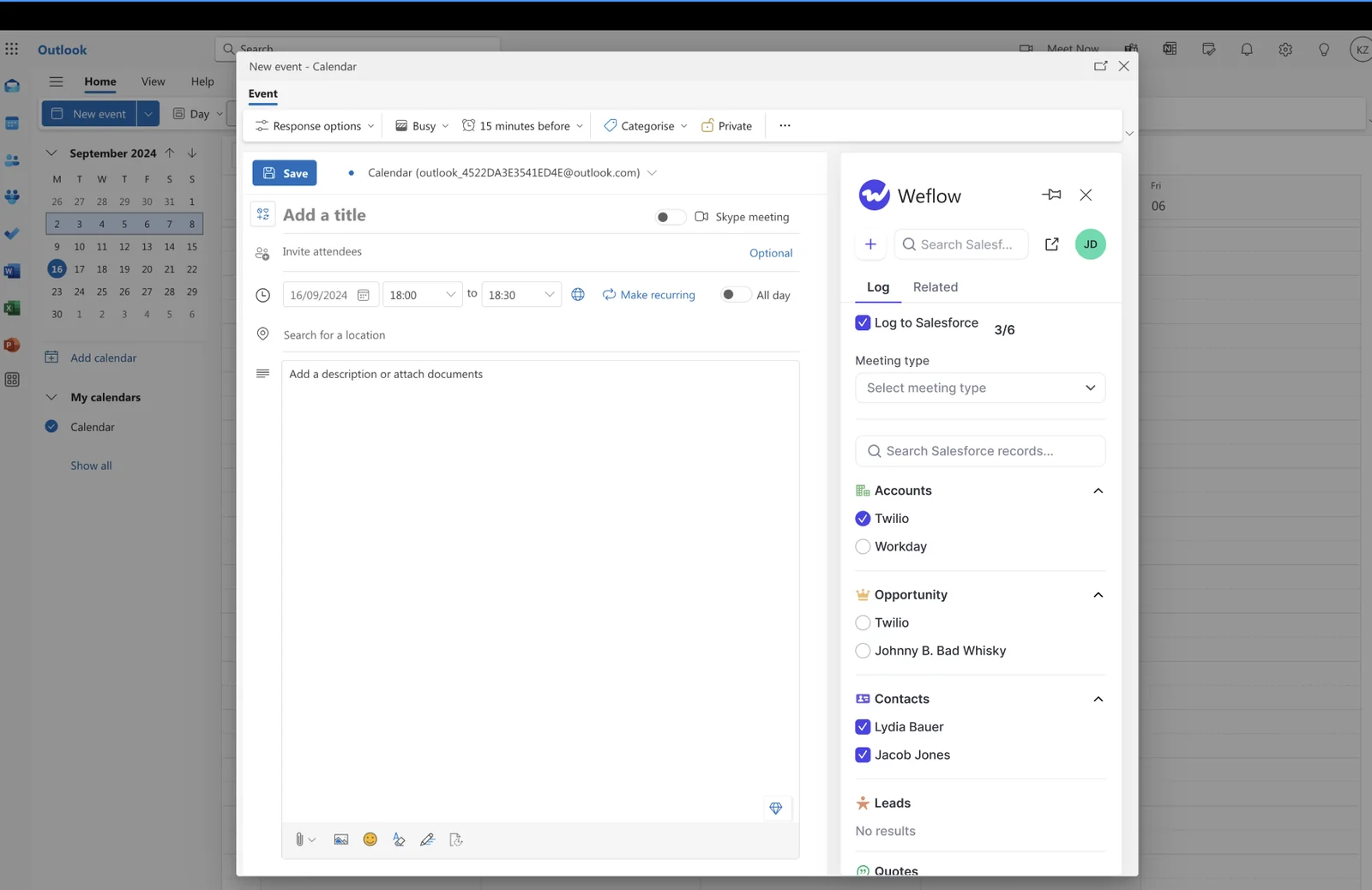
Reps see the suggested match in the Outlook add-in or the Chrome extension, and they can change it either before or after the activity logs.
The hard case is renewals and expansions running in parallel. The primary contact role usually gets copied onto every opportunity, so it points at all of them. You can separate those lanes by configuration:
- One lane for the renewals team.
- One lane for everyone else.
- Each filtered on opportunity type or a close-date threshold.
In the meantime, Weflow's account timeline also shows activity logged to the account's opportunities, so nothing disappears from the account view while you sort out the deal.
That said, here's where Weflow stops:
- There's no nearest-close-date rule. It's usually the first rule teams ask for, and we don't offer it.
- A recording and its calendar Event are separate records. Moving the recording doesn't move the Event, and the opportunity timeline reads the Event.
- Logged activity never moves on its own. When a contact gains a role later, new activity follows the role, and earlier activity stays where it logged until someone moves it.
- Owner-only logging exists, but it drops activity from everyone else on the deal, so we don't recommend it.
Avoma links the meeting by hand when matching fails
Avoma matches meeting participants to Salesforce leads, accounts and opportunities and writes the meeting notes to those records.
When matching fails, the documented fix is the No Associations icon on the meeting, where a user links the meeting to the right record by hand.
Association edits made in Avoma sync to Salesforce, but not the other way around, so corrections have to happen in Avoma.
Meetings set to private don't sync automatically.
How Weflow and Avoma avoid double-logging alongside Outreach or EAC
Weflow uses compatibility mode to skip any email a sequencer already logged. Avoma documents one configured deduplication path (a booking-ID match for Chili Piper Events) and describes no general deduplication.
It's a question that comes up on almost every capture call:
"All my activities are already logged through Outreach. Is there any conflict with weflow? Is it gonna double log into Salesforce?"
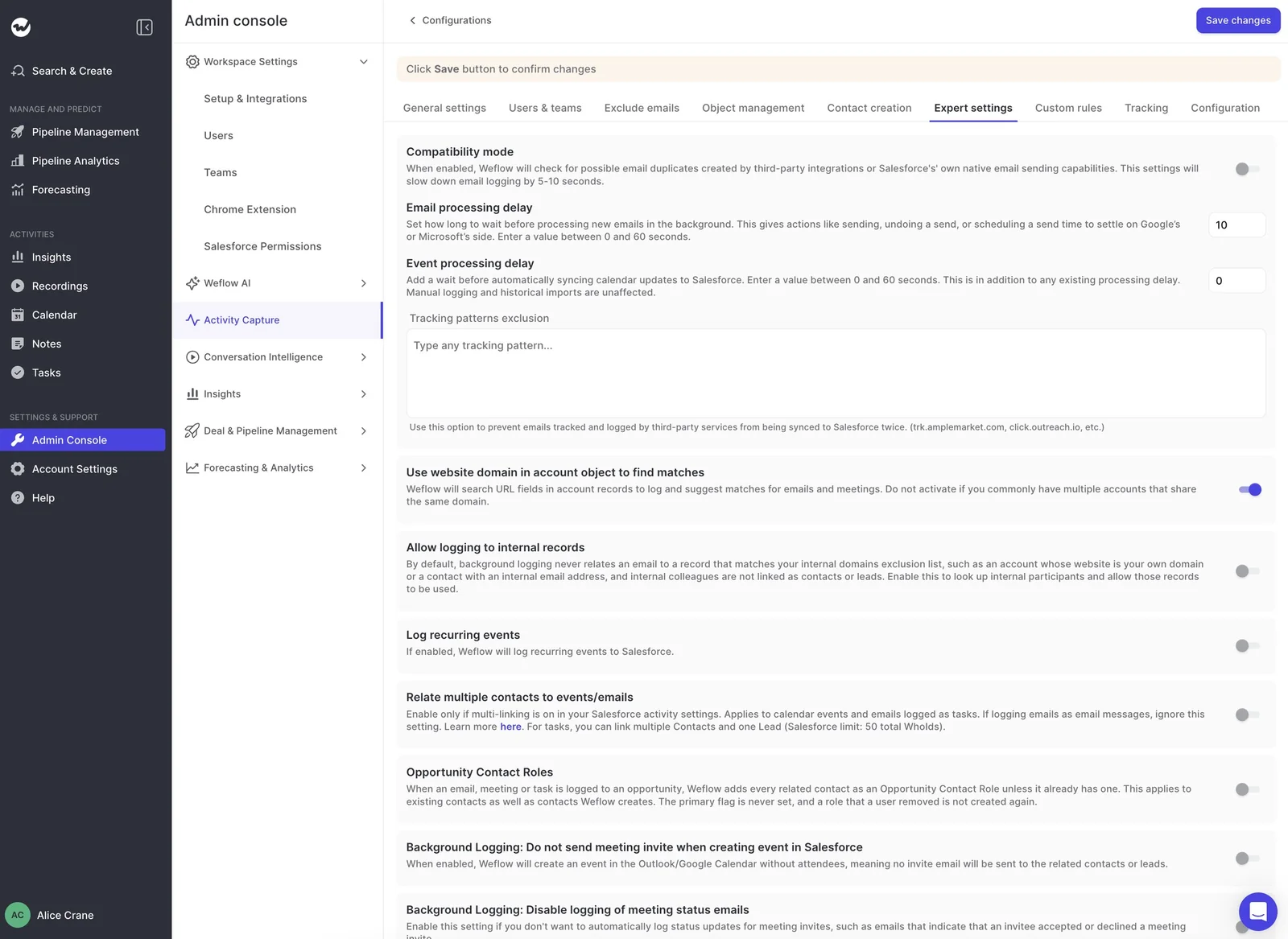
Here's how compatibility mode works:
- You name the other tool's sending domain. Named sequencers ship as presets.
- Weflow delays its own sync by roughly ten seconds.
- Weflow checks the message for the other tool's tracking pattern.
- If the pattern is there, Weflow skips the email, so the other system keeps the record.
During cutover, each tool owns a different slice of activity:
| Already writing activity | Weflow | Avoma |
|---|---|---|
| A sequencer such as Outreach, Salesloft or Apollo, sending email | Compatibility mode reads the sequencer's tracking pattern and skips the email. Weflow still captures one-off emails sent outside the sequencer as ordinary activity. | No deduplication against sequencer email described. |
| A scheduling tool such as Chili Piper, creating the Event | Compatibility mode works on email tracking patterns and doesn't deduplicate an Event another tool created. Pick one owner for calendar logging during cutover. | Writes notes to the Chili Piper Event instead of creating a second one. This requires mapping the booking ID to a custom Event field and having Avoma's team configure the match. |
| Einstein Activity Capture | Most teams disable EAC once Weflow takes over capture. Run both in parallel only for the parity test. | Can read emails that Salesforce's own email sync wrote to standard objects, so EAC can stay on. That's coexistence, not deduplication. |
| Another tool already logging calendar meetings | Weflow writes one Event per meeting and puts the recording on its recording object, so a recorded meeting doesn't become two meetings. | Creates its own Event per meeting. The only documented match is the Chili Piper one. |
Keep in mind that you only need compatibility mode while a second capture tool is still live. The clean end state is one capture layer, with the old tool switched off.
How Weflow connects to Salesforce and the rest of your stack
This section covers what you install, what it can touch, and where it stops, capability by capability.
Weflow's Salesforce integration inherits your org's rules and permissions
Weflow talks to Salesforce directly through the REST API, in real time and in both directions. With no middleware hop and no nightly batch, a write lands in about 200 milliseconds.
The managed package installs in about five minutes and uses webhooks to capture field changes, which keeps API consumption down.
Every write runs under the setup you already have:
- Standard and custom objects
- Field dependencies
- Validation rules
- Permission sets
- Role hierarchy
So if a validation rule blocks a stage change, it stays blocked until the fields the rule depends on are filled.
"Everything we do has a bi-directional Salesforce integration that is real time and API based, that respects all your validation, field dependencies, permission sets."
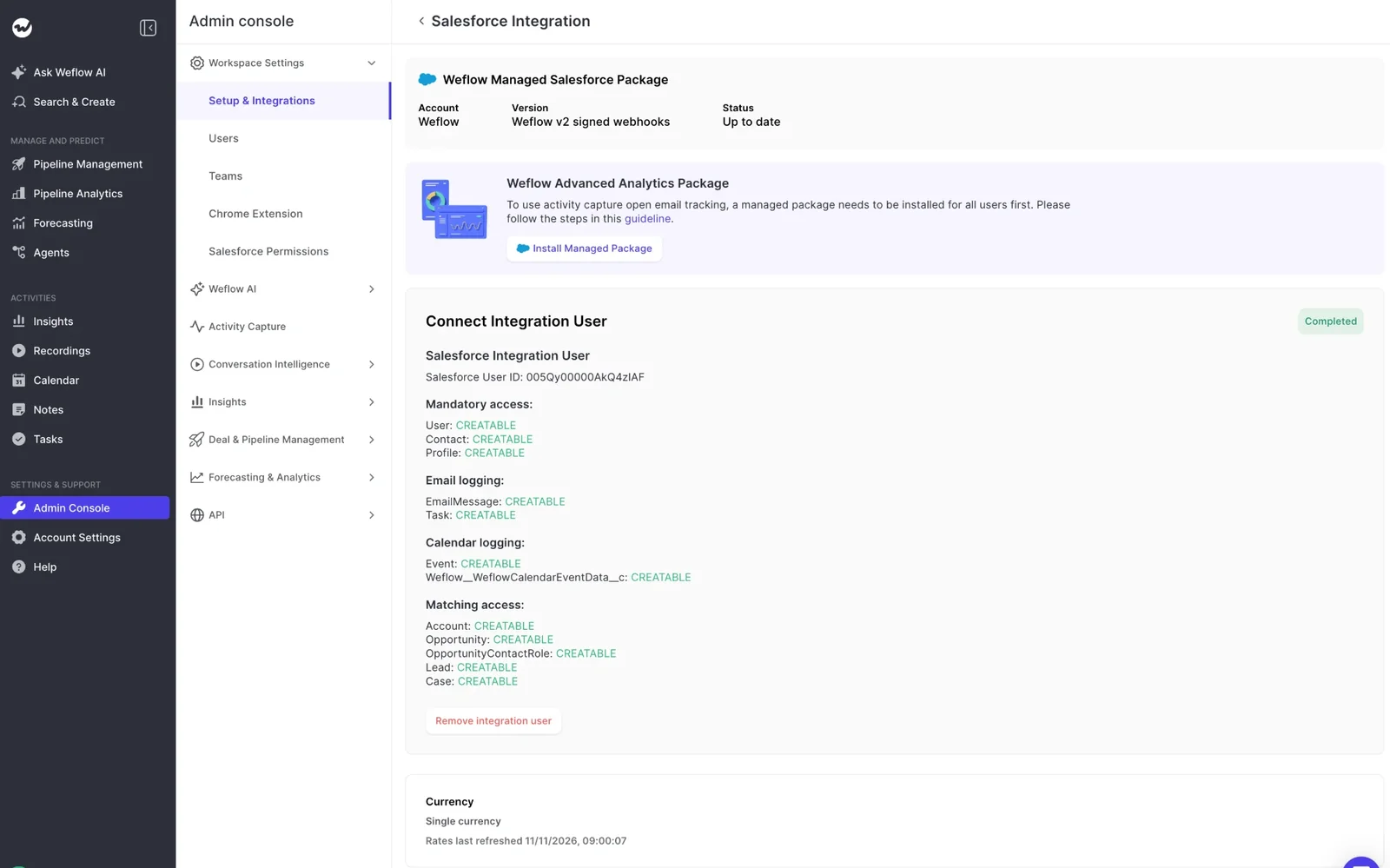
The integration user runs on least privilege and never needs Modify All Data. We'll work out the permission set with you during setup, and the integration page then shows the access the user holds, grouped by purpose:
- Mandatory: User, Contact and Profile.
- Email logging: EmailMessage and Task.
- Calendar logging: Event and Weflow's calendar event data object.
- Matching: Account, Opportunity, OpportunityContactRole, Lead and Case.
The admin controls you'll use most:
- Read-only mode: One switch under Admin Console, Salesforce Permissions. It blocks every record creation and field update flowing from Weflow into Salesforce, while capture and recording keep running.
- Record creation toggle: A separate switch that decides whether Weflow may create new Salesforce records at all.
- 100-day review: You can review field changes made through Weflow for up to 100 days.
- Warning icons: These flag a broken Salesforce, Microsoft or Google connection, and users whose capture fails.
- Enrollment gate: No mailbox is read until a user is enrolled in a configuration, so you can finish technical setup while legal review is still open.
And the limits:
- Weflow works only with Salesforce. The HubSpot card in our admin console reads "Coming soon" with no date.
- Starter Edition has no API access, so it can't connect.
- A new Salesforce field can take up to 8 hours to appear in Weflow. Support can trigger a sync sooner.
Which tools Weflow integrates with natively, and where it stops
Weflow covers the tools where customer conversations happen:
- Mail and calendar: Gmail, Google Calendar and Outlook
- Conferencing: Zoom, Microsoft Teams, Google Meet, and Webex when a paid Webex user organized the meeting
- Messaging: Slack
- Bot-free recording: A desktop app for Windows and macOS records without a bot joining, and Mobile Copilot records in-person meetings
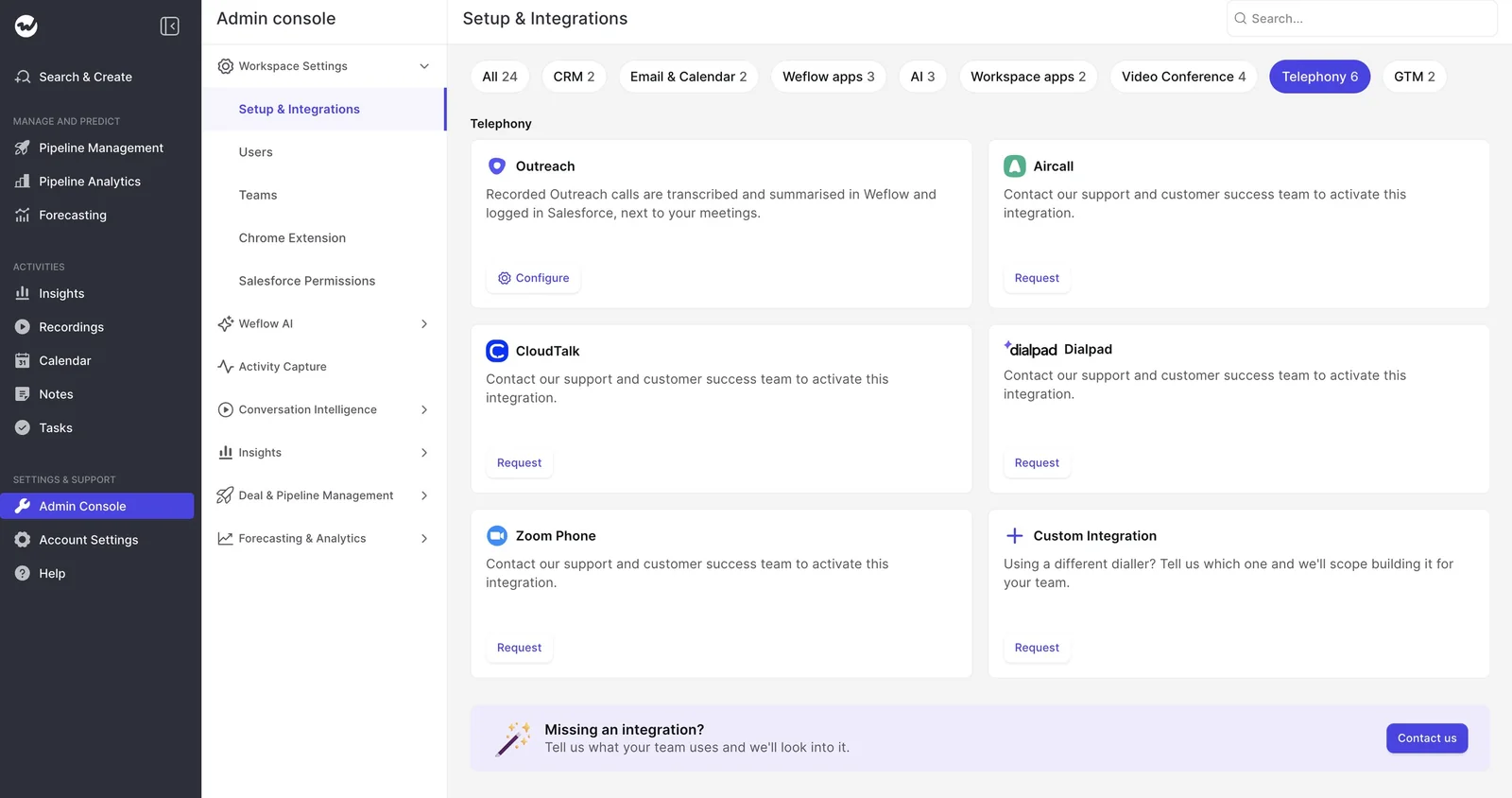
For telephony, you can connect the Outreach dialer yourself in the admin console. Recorded Outreach calls are then transcribed, summarized and logged in Salesforce next to your meetings.
Our support team activates Aircall, CloudTalk, Dialpad and Zoom Phone. For any other dialer, you can send a Custom Integration request and we'll scope the build.
Weflow has no native Snowflake, Databricks or BigQuery connector, so teams move data into the warehouse through the API.
It's also worth knowing that Weflow isn't an integration platform with a connector catalog. If you want one workflow that reads your ERP, finance system and CRM together, Weflow feeds that system through its API and MCP server rather than becoming it.
What Claude and ChatGPT can reach through Weflow's MCP connector
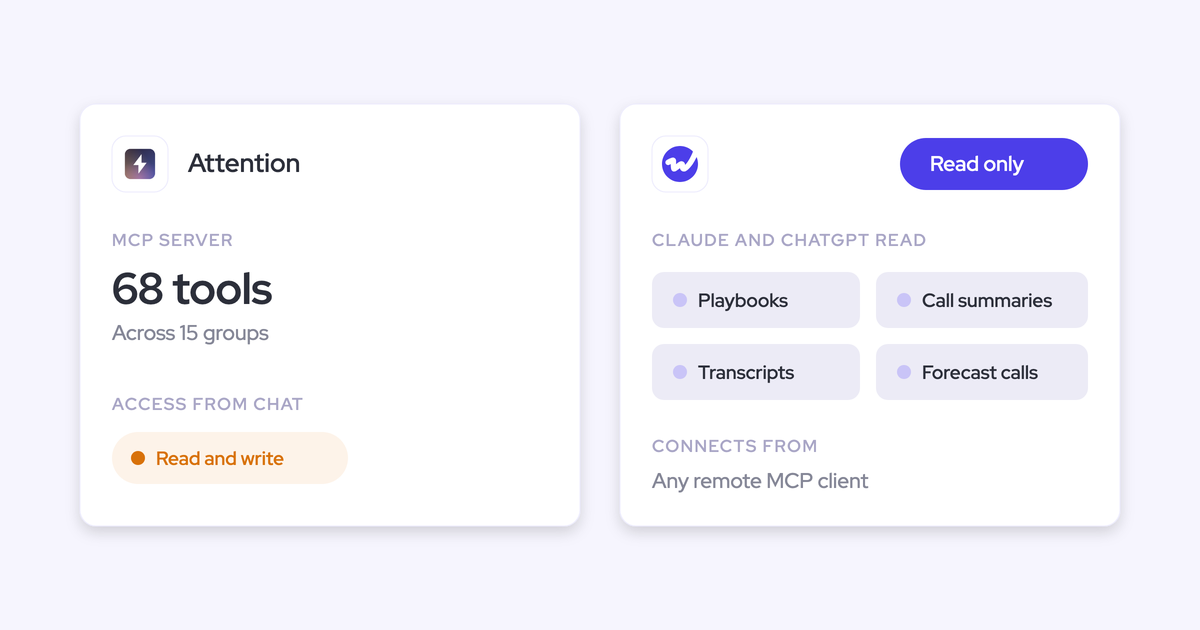
Weflow's MCP connector is read-only, and it only answers with what the connected user can already see in Weflow.
An admin switches it on per workspace, and a separate toggle decides whether assistants get full transcripts or only AI summaries. The console also lists every connected user and when they connected.
Claude, ChatGPT and any client that supports remote MCP servers use the same connector URL.
The connector returns:
- Recordings and AI summaries.
- Transcripts, when the admin toggle is on.
- AI Playbook values.
- Forecast data for a close-date period, with pipeline, win rate, coverage and gap-to-forecast metrics, broken down per rep for up to 25 owners.
It doesn't return:
- The content of emails captured by Weflow Activity & Contact Capture.
- Salesforce field values.
- Saved deal board views.
That's because captured email and field values live in Salesforce as native records, so an assistant reads them through Salesforce's own connector. Teams that connect both get the record from Salesforce, and the forecast and conversation layer from Weflow.
How you get Weflow data out through the public API
The public API comes with every Weflow plan, with no separate API tier. You just generate keys in the Admin Console.
The API bulk-exports transcripts, metadata, scores and signals as JSON or CSV, on a schedule or on demand, which you can feed into BI tools such as Tableau and Looker or into your warehouse.
An exportable audit log records field write-backs and configuration changes.
Video stays out of Salesforce because Salesforce storage is expensive, so it exports to your own cloud storage instead. Everything else Weflow Activity & Contact Capture writes already sits in Salesforce as native records.
"If you ever stop using Weflow, the data persists. It is your data."
Note that the API only reads data out of Weflow. It doesn't support ongoing uploads of recordings made in other tools.
What Weflow Activity & Contact Capture and Weflow Revenue AI Foundation cost
Every plan is priced per seat and billed annually, with a 10-user minimum.
| Product or bundle | Price per user per month |
|---|---|
| Weflow Activity & Contact Capture | $19 |
| Weflow Conversation Intelligence | $39 |
| Weflow Deal Intelligence & Forecasting | $39 |
| Weflow Revenue AI Foundation (Activity & Contact Capture + Conversation Intelligence) | $49 |
| Weflow Revenue AI Business (Foundation + Deal Intelligence) | $59 |
| Weflow Revenue AI Enterprise (all Weflow products, including Forecasting) | $79 |
The seat includes Ask Weflow AI, AI summaries and AI Field Updates, with no usage caps on recordings or transcripts.
Agent Builder is the only usage-priced product, and it's priced per workspace:
- Free: 25 agent actions a month, included in every plan.
- Growth: $299 a month for 500 actions.
- Scale: $999 a month for 2,500 actions.
- Enterprise: Custom volume.
How Avoma connects to Salesforce and the rest of your stack
Here are the same five capabilities, in the same order, for Avoma.
Avoma's Salesforce integration sets sync direction field by field
Avoma's native Salesforce integration lets you set sync direction per field, in an Objects tab that covers Opportunity, Lead, Contact, Account, Event and Task. Admins need to import any missing Salesforce field before mapping it.
The Event Avoma creates for each meeting acts as the anchor. Notes and Smart Topic data sync to it, so they show up on the Activity Timeline, and notes can go to a Salesforce Note, the Event description or a Task.
Avoma gets several things right:
- It respects field-level security and each field's character limit.
- Meeting notes auto-save to Account, Opportunity and Contact on every base plan.
- The connection is organization-wide, one CRM per organization, so individual reps don't authenticate their own CRM.
- Field mapping works only on Opportunity and Account. Custom objects aren't supported.
- Single-line text fields (because of the 255-character limit) and address fields can't be mapped.
- The first sync covers only open deals modified in the last 90 days.
- Two-way field updates sit in the Revenue Intelligence add-on.
- Field updates write automatically, with no review step described before the write.
Avoma's 26 native integrations cover more dialers and CRMs
Integration breadth is where Avoma has a real advantage over us. It lists 26 native integrations:
- CRMs: Salesforce, HubSpot, Pipedrive, Zoho, Copper and Zendesk Sell.
- Conferencing: Zoom, Google Meet, Microsoft Teams, GoToMeeting, BlueJeans, Highfive, Lifesize and UberConference.
- Dialers and sales engagement: Aircall, Dialpad, RingCentral, Zoom Phone, Kixie, Koncert, Outreach, Salesloft and Groove.
- Collaboration: Slack, Microsoft Teams chat and ClickUp.
Avoma also connects to Zapier. It records Microsoft Teams and Google Meet without a bot through their cloud recording, and its desktop app records locally.
So if your CRM isn't Salesforce, or might not stay Salesforce, Avoma has you covered and Weflow doesn't.
What Claude and ChatGPT can read and change through Avoma's MCP
Avoma's MCP connector gives Claude and ChatGPT 11 read tools and 3 write tools. The read tools cover meetings, transcripts, notes, scorecard evaluations and usage metrics. The write tools set a meeting's outcome, purpose and privacy from chat.
An admin sets the connector up once and chooses its scope, and each member then connects their own account. The scope options are:
- One user's non-private meetings.
- Everything one user can see, including their private meetings.
- All non-private meetings across the organization.
The connector needs the Organization or Enterprise plan, or the API Access add-on, and it disconnects after 30 days without use. It's also rate limited, so broad questions spanning thousands of meetings can time out.
How you get Avoma data out through the API and webhooks
Avoma has a public REST API and webhooks covering meetings, recordings, transcripts, notes and scorecards, which Avoma suggests using for internal dashboards and BI tools.
The API comes with the Organization plan and above, it's limited to 60 requests a minute, and only admins can create keys. Avoma's documentation also describes no managed export to a data warehouse.
What Avoma's recorder seats and add-ons cost
Avoma publishes per-seat prices, and add-ons follow the base plan's billing cycle.
| Plan or add-on | Price per seat per month | Limits and terms |
|---|---|---|
| Startup | $19 annual, $29 monthly | Up to 25 recorder seats |
| Organization | $29 annual, $39 monthly | Up to 100 recorder seats. Adds the API and webhooks. |
| Enterprise | $39, billed annually only | 10-seat minimum. Adds SSO, custom data retention and concierge onboarding. |
| Revenue Intelligence add-on | $29 annual, $35 monthly | Two-way CRM field updates, deal health, roll-up forecasting |
| Conversation Intelligence add-on | $29 annual, $35 monthly | AI call scoring, custom scorecards, coaching |
| Lead Router add-on | $19 annual, $25 monthly | Lead routing |
| Viewer seats | Free | Unlimited on every plan |
| Onboarding with an Avoma expert | $1,000 one-time | Optional. No setup fee otherwise. |
What recording plus field updates costs in Weflow and Avoma
At 50 to 100 seats, a Weflow Revenue AI Foundation seat costs $49 a month.
The equivalent Avoma stack, with two-way field updates and scorecards, costs $87 a month on the Organization plan, or $97 on Enterprise above 100 seats. All of these prices are billed annually.
| Component | Weflow | Avoma |
|---|---|---|
| Base seat with recording | Weflow Revenue AI Foundation, $49, including activity capture | Organization $29 (up to 100 seats) or Enterprise $39 |
| Two-way field write-back | Included (AI Field Updates) | Revenue Intelligence add-on, $29 |
| Scorecards | Included in Weflow Conversation Intelligence | Conversation Intelligence add-on, $29 |
| API access | Included on every plan | Included from Organization upward |
| Viewer seats | Free view-only licenses, capped at the number of recording licenses held | Free and unlimited |
| Minimum seats | 10 users | 10 seats on Enterprise |
| Per-seat total | $49 | $87 on Organization, $97 on Enterprise |
That said, these totals don't cover identical scope. Weflow's seat includes email capture, contact creation and custom object writes, while Avoma doesn't support custom objects and its documentation doesn't say which plan email capture belongs to.
Monthly billing on Avoma also raises the Organization stack to $109.
As a reference point, about 62 seats of capture plus conversation intelligence on Weflow lands around $36K a year, and the full platform lands around $58K.
Volume discounts start around 30 to 40 seats, and seats you add mid-term are charged pro rata to the end of the term.
When Avoma is the better fit, and when Weflow is
Choose Avoma if:
- Your CRM isn't Salesforce, or you might move off Salesforce.
- You need native coverage of a specific dialer on Avoma's list, such as RingCentral or Kixie.
- Your team is small and mainly wants meeting notes and Smart Topic field fills on Opportunity and Account.
- You want an assistant to write meeting outcomes back through MCP, or you need free unlimited viewer seats.
Choose Weflow if:
- Your org has custom objects, validation rules and accounts with several open opportunities.
- You want email, meetings, contacts, contact roles, recordings and field updates written by one tool under your own permission sets.
- You need the activity record to stay in Salesforce as native data your flows and reports can read.
- You're replacing EAC or running alongside a sequencer and need double-logging suppressed during cutover.
How to test Weflow and Avoma in your Salesforce sandbox
Our advice is to run both tools unconfigured, in parallel, and judge each one-for-one against your incumbent before you switch on any templates. That's exactly how teams that replace capture successfully do it:
"We tested it out, made sure it tracked one for one. We kind of ran it out of the box, we did not try to put any of our own use cases for templates. We said we just want to do it one for one."
Focus on the paths where integrations actually fail:
- External email, both directions: Send and receive from an address outside your domain. Mail between colleagues counts as internal, so it logs nothing and looks broken. Put the test address's domain on a test account's website field so contact creation gets exercised too. Check EmailMessage or Task for both the inbound and outbound message.
- Meeting lifecycle: Create, move, reschedule and delete a meeting. Check that the Event updates and disappears, not just that it's created. Create rights aren't update rights, and if an update right is missing, you'll otherwise only find out weeks after go-live.
- Multi-opportunity account: Give a contact a role on one of three open opportunities, then log an email and a meeting. Check which record each lands on. Correct the mapping in each tool and check where the correction shows up in Salesforce.
- Validation rules: Trigger a validation rule on a field the tool writes. Confirm the write is rejected and see how the rejection surfaces. If your Contact object requires a phone number or job title, expect automatically created contacts to be rejected.
- Custom object write: Attempt a write to a custom object you actually report on.
- Duplicate count: Leave your existing writer on, then count Events per meeting and emails per thread for duplicates.
- Broken user: Enroll a user whose email address differs between Microsoft or Google and Salesforce. Check how each tool shows that the user isn't being captured.
See how Weflow captures activity, updates Salesforce fields from calls, and rolls up your forecast. Book a 30-minute demo.
FAQ
Which Salesforce editions does Weflow support, and what about Avoma?
Weflow runs on Salesforce Enterprise Edition and above (including Unlimited and Performance), and on Professional Edition once the org has bought Salesforce's API access add-on.
Avoma's Salesforce setup requires a Salesforce admin, recorder licenses and Salesforce Enhanced Notes.
What does the Weflow integration user need access to in Salesforce?
Weflow's integration user runs on a least-privilege permission set that we define with you during setup, and it never needs Modify All Data. It needs:
- Full access to Event and Task, including every field and record type it writes. Missing access on a single Event field, such as location, makes the whole event fail to log.
- Modify All Records on Account, Opportunity, Contact and Lead, but only in orgs with Private org-wide defaults.
- Where IP restrictions apply, an allowlist of Weflow's three backend IPs: 13.238.122.179, 3.72.162.152 and 52.22.87.230.
Does Weflow log inbound emails as well as outbound?
Yes. Weflow subscribes to each enrolled mailbox through Microsoft Graph or Google Workspace, gets notified of every inbound and outbound email and calendar event, and logs the ones that match a Salesforce record.
How far back can Weflow backfill activity, and what about API limits?
Weflow backfills up to 24 months of history as an add-on, batched to protect your daily Salesforce API limits. For Blacklane, we synced four months of historic emails and meetings over one week.
Can we bring our existing Avoma recordings into Weflow?
Yes. Avoma's API exposes recordings and transcripts for export, so you can extract them, and our team then runs the migration import into Weflow for you (it isn't done through Weflow's API).
How do I find out when Weflow stops capturing for a user?
A warning icon appears next to any user whose mailbox or calendar access fails, usually because the user is missing from the Google Workspace or Entra ID app, or their email address differs from Salesforce.
The icon clears once you fix the cause and save the configuration again.
Insights also shows whether capture is working, and we keep a 30-day log of matching decisions so support can explain why any email did or didn't log.
What happens to our Salesforce data if we stop using Weflow or Avoma?
Everything Weflow writes stays in your org as native Salesforce records after you remove it: activity, contacts, summaries and AI Field Updates.
Avoma writes to standard Event, Note, Task and EmailMessage records, and its recordings, transcripts and notes are reachable through its API.
Where do Weflow and Avoma store recordings and transcripts?
Weflow stores recordings, transcripts and Weflow-native fields in AWS in the region you choose: Frankfurt, New York or Sydney.
Weflow is SOC 2 Type II certified and GDPR compliant, applies Zero Data Retention to AI processing, and never uses customer data to train AI models.
Avoma holds SOC 2 Type II and ISO/IEC 42001 certification and encrypts recordings and transcripts at rest and in transit.
What contract terms, trials and seat changes do Weflow and Avoma offer?
Weflow runs on a standard 12-month term, with pro-rata pricing for mid-term seat adds and seats you can reassign when someone leaves. You can also negotiate an early opt-out after three months, and Weflow offers a 14-day free trial with guided onboarding.
Avoma bills annually or monthly, except Enterprise, which is annual only. It offers a 14-day trial of the Organization plan with all add-ons and no credit card.