

Best Avoma Alternatives for Salesforce Teams (2026)
Compare Avoma alternatives for Salesforce teams in 2026 by CRM depth, forecasting, hosting, and cost.



If you run Salesforce and Avoma, recording probably isn't your problem. Avoma records, transcribes and summarizes calls well. The friction is in Salesforce, and it usually comes down to five things:
- which objects and field types get written
- whether a value gets reviewed or appended automatically
- whether one forecast can cover new business and renewals
- where your data is hosted
- what the add-on stack costs per seat
Weflow is the Revenue AI Orchestration platform for sales, customer success, and RevOps teams. We built it for Salesforce teams, and Weflow Conversation Intelligence + AI Field Updates is the product this comparison turns on. We list ourselves first, and we name our own edges as plainly as everyone else's.
Here's the short answer:
- Weflow suits Salesforce-only teams that want structured writes into their own objects, including custom ones.
- Gong suits large orgs buying the deepest conversation analytics.
- Attention suits RevOps teams that want to automate the work coming out of calls.
- Jiminny suits coaching-first teams that span more than one CRM.
- Fathom is the cheapest route to good meeting notes.
- Stay on Avoma if you're on HubSpot, run several CRMs, or have fewer than 10 seats.
How the Avoma alternatives compare on Salesforce depth
On a feature checklist, these six tools look almost identical. The differences show up in objects, field types, whether email reaches Salesforce, how forecasting works and whether you can see a price.
| Capability | Weflow | Avoma | Gong | Attention | Jiminny | Fathom |
|---|---|---|---|---|---|---|
| Recording video meetings | Notetaker on Zoom, Teams, Meet, Webex; desktop app records without a bot | Bot on Zoom, Meet, Teams and four more; Webex via cloud recording | Zoom, Meet, Teams, Webex and seven other providers | Bot by default on Zoom, Meet, Teams, or its desktop app | Bot on Zoom, Meet, Teams; desktop and mobile apps too | Zoom, Meet, Teams, Slack Huddles, with or without a bot |
| CRM field updates from conversations | Any object and field type except lookups; auto or review per field | Smart Topic notes appended to Opportunity and Account fields, no review step | Up to 20 admin-built extractors into existing fields; overwrites values | Prompt per mapped field; review tab on manual sync; auto recommended | AI CRM Filling on deals, accounts, contacts, leads, tasks; auto or review | Business plan only; text fields, overwritten by each meeting |
| Automatic email capture | Server-side for every enrolled user, logged to EmailMessage or Task | Background sync with the Revenue Intelligence add-on, logged as Tasks | Server-side import; reaches Salesforce once an admin enables export | Kept in Attention's store; CRM logging needs a workflow you build | Per-user sync; emails stay in Jiminny, never reach Salesforce | No email capture |
| Forecast submissions and roll-ups | Baseline and best case per named deal; roll-up per record type | Submissions and roll-ups; one configuration per org | Rep submissions per category; separate boards per motion | Forecast grid columns; no documented overrides or submission history | No forecasting; Deal Insights table for pipeline reviews | No forecasting |
| Salesforce integration | Real-time two-way REST; inherits custom objects, validation rules, permissions | Native two-way sync; Salesforce edits don't sync back to meeting links | Imports standard objects; custom objects through roll-up workarounds | Two-way OAuth sync; connecting user needs Modify All Data | REST API, no package; calls logged as Tasks or Events | Contacts, Accounts and open Opportunities; never Leads |
| Integrations with other tools | Google, Microsoft, Zoom, Slack, Outreach dialer; API for warehouses | 26 native integrations, about a dozen dialers, Zapier | About 450 marketplace integrations, around thirty dialers | Zoom Phone, Aircall, Slack; workflow steps across many tools | Own dialer plus about 20 third-party dialers, Zapier | 30 integrations; no dialer, sequencing or warehouse tool |
| Access from AI assistants (MCP) | Read-only connector: playbooks, summaries, transcripts, forecast calls | 11 read and 3 write tools; plan or add-on required | Three record-scoped, read-only tools; insights only; metered credits | 68 read-write tools, raw transcripts, rate limits, no credits | Read-only connector on Scale and Grow tiers | Connector for Claude and ChatGPT on every plan |
| Raw data access outside the tool | REST API bulk export as JSON or CSV; no native warehouse connector | REST API and webhooks, 60 requests a minute, Organization plan up | API capped at 10,000 calls a day; Data Cloud costs extra | Raw transcripts through MCP and API keys; workflow HTTP steps | REST API with an admin-generated organization key | API on every plan; keys belong to individual users |
| Pricing | Published: $19 to $79 per seat; 10-seat minimum | Published: $19 to $39 base, plus $29 add-ons | No published price; mandatory Foundation plus metered credits | No published pricing | No published prices; flat per-seat fee, 14-day trial | Published: free for individuals; $15 to $25 per paid seat |
The rows follow what lands in Salesforce, because that's where your reporting and forecasting read from.
What Avoma does well, and why Salesforce teams leave it
Avoma grew outward from the meeting. It started with record, transcribe and summarize, then added CRM sync, coaching, deals and forecasting as add-ons.
It also connects to six CRMs, one per organization. So its Salesforce integration serves the common denominator: standard objects, text-leaning field mapping, one forecast shape. That fits a small team on a flat pipeline. It stops fitting once your org has record types, custom objects, CS running renewals and EU buyers.
Avoma gives small teams cheap, meeting-first coverage
Before anything else, here's what Avoma genuinely does well:
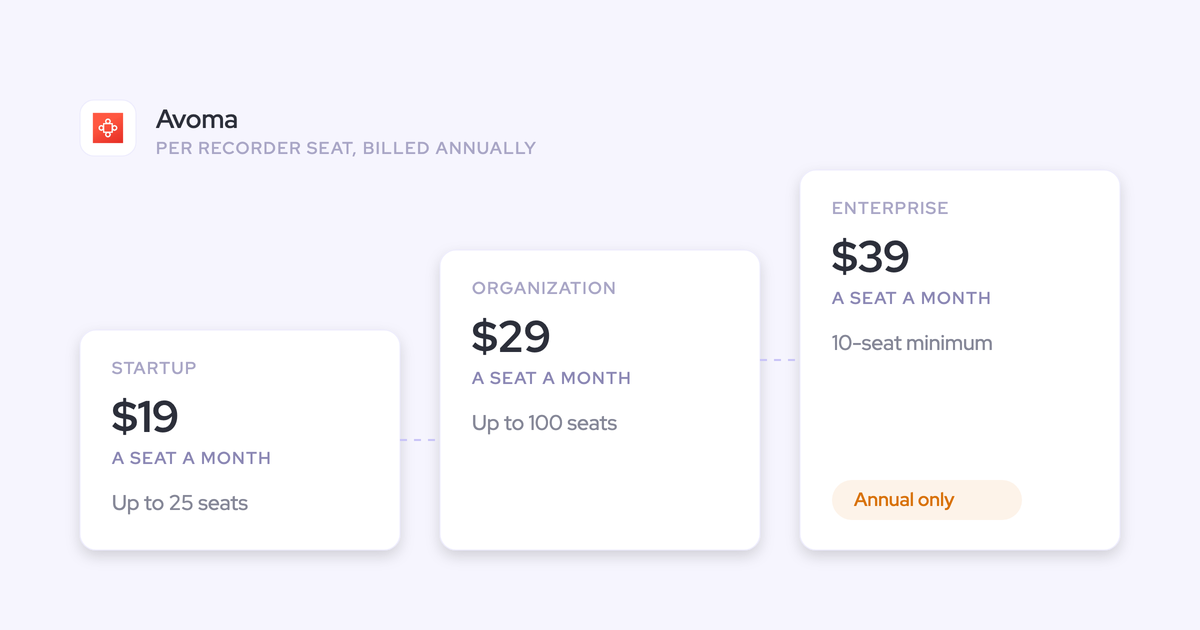
- Avoma publishes low seat prices, starting at $19 per recorder seat per month on the Startup plan.
- Viewer seats are free and unlimited on every plan.
- Transcription is unlimited, with no credits or hour packs.
- Avoma connects to about a dozen dialers and more conferencing tools than most alternatives here.
- Admins connect Google Workspace or Microsoft 365 once for the whole org, so reps don't connect their own accounts.
- Avoma cuts snippets automatically after every recorded meeting.
- It maps stakeholders on each deal from its meetings and flags single-threaded deals.
- Pipeline Walk compares the pipeline at the start and end of a period, deal by deal.
- Its MCP connector for Claude and ChatGPT can write back a meeting's outcome, purpose and privacy.
These matter most to small teams and to HubSpot or mixed-CRM shops.
Avoma maps fields only on Opportunity and Account
Avoma's Smart Topic mapping writes to Opportunity and Account, and it doesn't support custom objects. It also can't target single-line text fields, because of their 255-character limit, or address fields.
Say your CS team tracks renewal risk on a custom Renewal object. That report stays empty no matter how many renewal calls Avoma records.
There's a second gap. Edits made in Salesforce don't sync back to Avoma's meeting associations. When matching fails, someone fixes it by hand from the meeting in Avoma.
Avoma appends per-meeting notes to fields without review
Avoma extracts notes from each meeting and appends them to the mapped field in real time. Its documentation describes no review step before the write.
So fields grow, but they don't give you a deal-level qualification picture. Each value reflects one meeting. And a value can be technically filled without being a useful answer:
"If the metrics comes back and says they have 50,000 staff, that is a metric, but it's not relevant to what we're looking at in our sales process."
Prospect on a sales call with us
That's how managers learn to ignore fields that look complete.
Avoma runs one forecast configuration for the whole org
Avoma allows one forecast configuration per organization: a single monthly or quarterly period, the CRM deal amount, and one board. Weighted amounts are still marked "coming soon".
If new logo and renewal run on different cadences or different amount fields, you can't forecast them as separate motions in Avoma. One of them ends up back in a spreadsheet.
Avoma puts email sync, field updates and Ask Avoma behind add-ons
The capabilities a Salesforce team needs are split across two add-ons on top of the base plan:
- Revenue Intelligence ($29 per seat per month, billed annually): email sync, two-way CRM field updates, deal health, the dealboard and roll-up forecasting.
- Conversation Intelligence ($29 per seat per month, billed annually): call scoring, scorecards, trackers, and global Ask Avoma across meetings.
We add up the full seat in the pricing section below.
Avoma hosts your data in the US by default
Avoma hosts all customer data on AWS in the United States. For EU residency, its enterprise team "can discuss options".
Credit where it's due: Avoma holds SOC 2 Type II and ISO/IEC 42001, and it never uses meeting data to train models. The certifications aren't the issue in a European group procurement review. Where the recordings live is.
What to test in any Avoma alternative before shortlisting
Judge every tool on the same six Salesforce questions, and make each vendor show you live in a trial:
- Objects and field types. Have the vendor write a call outcome into a picklist, a number field and a field on one of your custom objects, then open the record.
- Per call or per deal. Run three calls on one opportunity and check whether a methodology field reflects all three or only the last one.
- Reviewed or automatic. Ask to set one field to auto-write and another to wait for review, inside the same template.
- One forecast or one per motion. Ask for a new business forecast and a renewal forecast side by side, each with its own stages and roll-up.
- Hosting. Ask where recordings and transcripts live, and whether you choose the region.
- The real per-seat stack. Price every role that needs each module, not one bundle for everyone.
Then test the basics: one meeting record or two, and the right contacts and opportunity on it. A duplicate or misattributed meeting should disqualify a vendor however good the summary reads.
Weflow: Conversation Intelligence + AI Field Updates for Salesforce teams
Weflow, a revenue AI orchestration platform built for Salesforce teams, started from the CRM record rather than the meeting. Calls, email and forecasts land as structured data in your own Salesforce objects, and the integration respects your org as you built it.
| Capability | What Weflow does | Limit worth knowing |
|---|---|---|
| Recording video meetings | The Weflow Conversation Intelligence notetaker joins every external meeting on Zoom, Teams, Meet and Webex automatically. The desktop app records without a bot. | The bot has to be admitted from the lobby, Webex is switched on per workspace, and the rep starts desktop recordings. |
| CRM field updates from conversations | AI Field Updates write to every Salesforce object and field type, including picklists, numbers, dates and multi-selects. Each field writes automatically or waits for review. | Lookup fields aren't writable. Weflow support sets up custom objects. |
| Automatic email capture | Weflow Activity & Contact Capture runs server side in Google Workspace or Microsoft 365 and logs to EmailMessage or Task, with up to 24 months of sync-back. | It logs only mail that matches a Salesforce record, and misses personal accounts and deliverability subdomains. |
| Forecast submissions and roll-ups | Weflow Deal Intelligence & Forecasting ties baseline and best-case submissions to named deals, versions every change and logs overrides. Each opportunity record type rolls up separately. | Submissions happen in the Weflow web app and aren't written to Salesforce fields. |
| Salesforce integration | Real-time two-way REST integration that inherits validation rules, field dependencies, permission sets and role hierarchy. | Salesforce only. A new Salesforce field can take up to 8 hours to appear in Weflow. |
| Integrations with other tools | Gmail, Google Calendar, Outlook, Zoom, Teams, Meet, Slack and the Outreach dialer. The desktop app records softphone calls that run through the computer. | No native warehouse connector. VoIP capture beyond those two routes is a gap. |
| Access from AI assistants (MCP) | Read-only connector gives Claude, ChatGPT and others playbooks, call summaries, transcripts, forecast calls and pipeline metrics, with a separate transcript toggle. | Read-only. Per-rep breakdowns are capped at 25 owners. |
| Raw data access outside the tool | REST API bulk-exports transcripts, metadata, scores and signals as JSON or CSV into warehouses and BI tools such as Tableau and Looker. | Snowflake, Databricks and BigQuery loads run through the API. |
| Pricing | Published seat prices from $19 to $79, with AI included in the seat and Ask Weflow AI Pro in every plan. | 10 seats minimum per product or bundle, 12-month term. |
How Weflow answers each reason teams leave Avoma
Weflow addresses each Avoma limit at the object, field, review, forecast and residency level:
| Avoma limit | How Weflow handles it |
|---|---|
| Field mapping on Opportunity and Account only, no custom objects | AI Field Updates write to every object and field type except lookups, including picklists, numbers, dates, multi-selects and custom objects set up by Weflow support. |
| Per-meeting notes appended with no review | You set each field to write automatically or wait for review. Methodology fields build up over the deal instead of being overwritten, and AI playbooks keep a field at the best current answer across every call, email and field on the opportunity. |
| One forecast configuration per org | Each opportunity record type, such as New Business, Renewal or Partner, keeps its own stage path, forecast-category mapping and roll-up. |
| Email sync, field updates and Ask AI behind add-ons | AI summaries, field updates and Ask Weflow AI Pro are included in the seat. Agent Builder is the one consumption-priced product. |
| US hosting by default | You choose the region: Frankfurt, New York or Sydney. By default we match the region of your Salesforce instance. |
The auto-or-review choice lives in the prompt for each field. An unambiguous field like a website can update itself, while a champion or a pain field waits for a person.

Org fit matters just as much. Weflow inherits your validation rules, field dependencies, permission sets and role hierarchy. It can even write the opportunity Stage when the exit criteria you wrote into the prompt are met on the call, and a validation rule still blocks the move until its fields are filled.
One honest note: setup without rep action is near-parity with Avoma, not a wedge. Avoma connects Google and Microsoft org-wide too. Our capture runs server side through a tenant-level app, so every email and meeting logs in real time on any device.
When Weflow is the wrong choice for your team
Here's where we'd tell you to look elsewhere:
- You run HubSpot or several CRMs. Weflow works exclusively with Salesforce, by design.
- You have fewer than 10 seats. Our standard minimum is 10 users per product or bundle.
- Your motion is phone-heavy across many dialers. We cover the Outreach dialer and softphones that run through the desktop app, where the rep starts the recording. Wider VoIP capture is a gap today.
- You need forecast submissions written into Salesforce fields. Submissions live in the Weflow app. Assistants can read them through our MCP connector, but no submitted number lands on a Salesforce object.
- You want assistants to write back through MCP. Our connector is read-only, while Avoma's has write tools.
- CS wants an account-level renewal board. Our forecasting and deal inspection are built on opportunities, so renewals forecast on renewal opportunities, not a customer-level view.
Weflow fits Salesforce-only teams writing into their own objects
Weflow fits a Salesforce-only mid-market team, typically 50 to 1,200 seats, that wants calls, email and forecasts landing as structured data in its own objects. That includes custom objects, per-field control over what writes automatically, and EU residency.
As proof of a switching path (from Gong, not Avoma): HolidayCheck moved to Weflow as an EU-made, GDPR-safe alternative, and now uses automatic activity capture, conversation intelligence and automated Salesforce field updates.
Gong: the deepest conversation analytics, in its own data layer
Gong beats Avoma on analytics depth and multi-motion forecast boards. It also holds its own data layer, meters AI usage and publishes no price.
| Capability | What Gong does | Limit worth knowing |
|---|---|---|
| Recording video meetings | Records Zoom, Meet, Teams, Webex and seven other providers on any plan. | Bot-free recording only on Zoom, through Zoom's native recording. |
| CRM field updates from conversations | AI Data Extractor writes answers from calls into existing CRM fields automatically. | Up to 20 published extractors, created only by a business admin, and each new reading overwrites the old value. |
| Automatic email capture | Imports email server side from Google Workspace or Office 365 and exports it to Salesforce as tasks or events. | Export runs forward from the day an admin enables it, and only for matched contacts and leads. |
| Forecast submissions and roll-ups | Reps submit per forecast category; separate boards per motion; an accuracy report compares calls with actuals. | Gong Forecast is an application bought on top of the Foundation licence. |
| Salesforce integration | Imports accounts, contacts, leads and opportunities, and writes field values and methodology status back. | Custom objects need roll-up workarounds, and call transcripts aren't exported to Salesforce. |
| Integrations with other tools | About 450 integrations and partner solutions, and call import from around thirty dialers. | A workspace connects to one CRM at a time. |
| Access from AI assistants (MCP) | Native connectors for Claude, ChatGPT and Microsoft Copilot. | Three record-scoped, read-only tools that return insights rather than transcripts, and every request draws credits. |
| Raw data access outside the tool | API returns transcripts, participants, trackers and scorecards; Data Cloud delivers to Snowflake, Databricks, BigQuery and Redshift. | API capped at 10,000 calls a day. Data Cloud is a separate purchase of about $5,000 a year. |
| Pricing | Per-user licences plus a platform fee that scales with users, quoted in a custom proposal. | No published prices. Foundation is mandatory, and credits meter trackers, MCP and API workflows. |
Gong goes further than Avoma on analytics and per-motion forecasts
Gong invented this category, and it shows:
- Gong has the deepest conversation analytics of any tool here, with transcription in more than 70 languages.
- Its deal board is the view managers get hooked on. Many teams run their forecast call from it before they ever buy the Forecast module.
- Gong Forecast runs separate boards for new business, renewals or any other motion, each with its own filters, metrics and targets.
- Its dialer and marketplace coverage is the broadest in the list.
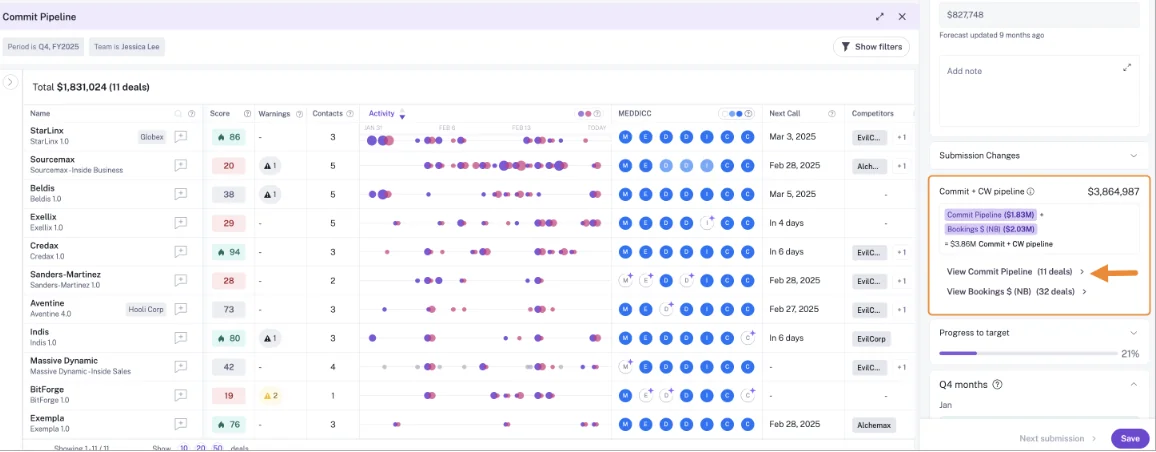
Here's Gong's commit pipeline view, which lists the deals behind a submitted number:
Gong keeps transcripts in Gong instead of Salesforce
For a Salesforce-first team, the catches are structural:
- Gong publishes no price, and the Foundation licence is mandatory before any application.
- Question-based AI Trackers, the MCP server and API workflows draw from a shared credit pool of 2,000 credits per paid seat per year.
- AI Data Extractor is capped at 20 published extractors, only admins create them, and it overwrites earlier values.
- Custom objects work only through roll-up workarounds onto a supported parent object.
- Call transcripts aren't exported to Salesforce, so any AI you build on Salesforce misses them.
Gong suits larger orgs that want the safe, deep-analytics buy
Gong suits larger orgs that put analytics depth and brand safety ahead of CRM write depth and price predictability. If your managers already live in the deal board, that habit is a real reason to stay in Gong's world.
Attention: agent workflows built on your call data
Attention is conversation-first and agent-heavy. It's strong at automating follow-through, but email doesn't reach Salesforce by default, and its defaults favor speed over control.
| Capability | What Attention does | Limit worth knowing |
|---|---|---|
| Recording video meetings | Records Zoom, Meet and Teams with a notetaker bot by default, or through its desktop app. | The desktop app doesn't support Teams in a browser, or Meet in Edge on Mac. |
| CRM field updates from conversations | A written prompt per mapped field; deal-scoped fields read every call on the opportunity; a review tab on manual sync. | Automatic sync is recommended, empty findings are written as prose, and new fields fill only on future calls. |
| Automatic email capture | Imports Gmail and Microsoft 365 email per user and ties each one to an account and deal in its own store. | Emails reach Salesforce only through a workflow you build. |
| Forecast submissions and roll-ups | A forecast grid with user-entered, deal-rolled-up and CRM-computed columns. | No documented manager overrides, submission history or hierarchy roll-up of entries. |
| Salesforce integration | OAuth app on the REST API, with real-time writes after each call. | The connecting user must hold Modify All Data. |
| Integrations with other tools | Imports Zoom Phone and Aircall calls, works both ways with Slack, and runs workflow steps in Salesforce, HubSpot, Snowflake, Notion and more. | Each user connects their own calendar and email. |
| Access from AI assistants (MCP) | 68 read-write tools that return raw transcripts and run analysis across up to 25 calls or a whole deal. | Org-level API keys carry full organization access with no user binding. |
| Raw data access outside the tool | Raw transcripts through MCP and API keys; workflows send data to Snowflake or any API. | A workflow with code in it is software someone has to maintain. |
| Pricing | Sold as a negotiated contract, with rate limits instead of AI credits. | No published pricing. |
Attention automates more call follow-through than Avoma
- Attention has the widest read-write MCP surface in this list, and it hands over raw transcripts.
- Its workflows include routers, loops, HTTP requests and custom Node.js or TypeScript steps.
- Deal-scoped fields read every call linked to the opportunity, so a next step reflects the whole deal.
- On manual sync, reps pick field by field what reaches the CRM.
Attention leaves email out of Salesforce and needs Modify All Data
- Email stays in Attention's store unless you build a workflow on its New Email Imported trigger.
- The Salesforce integration user needs Modify All Data, which overrides sharing rules and record-level access.
- When a call has no finding for a field, Attention writes prose explaining the absence into it.
- New fields are mapped by hand and fill only from future calls.
- Attention publishes no price.
- Forecasting is partial, with no documented overrides or submission history.
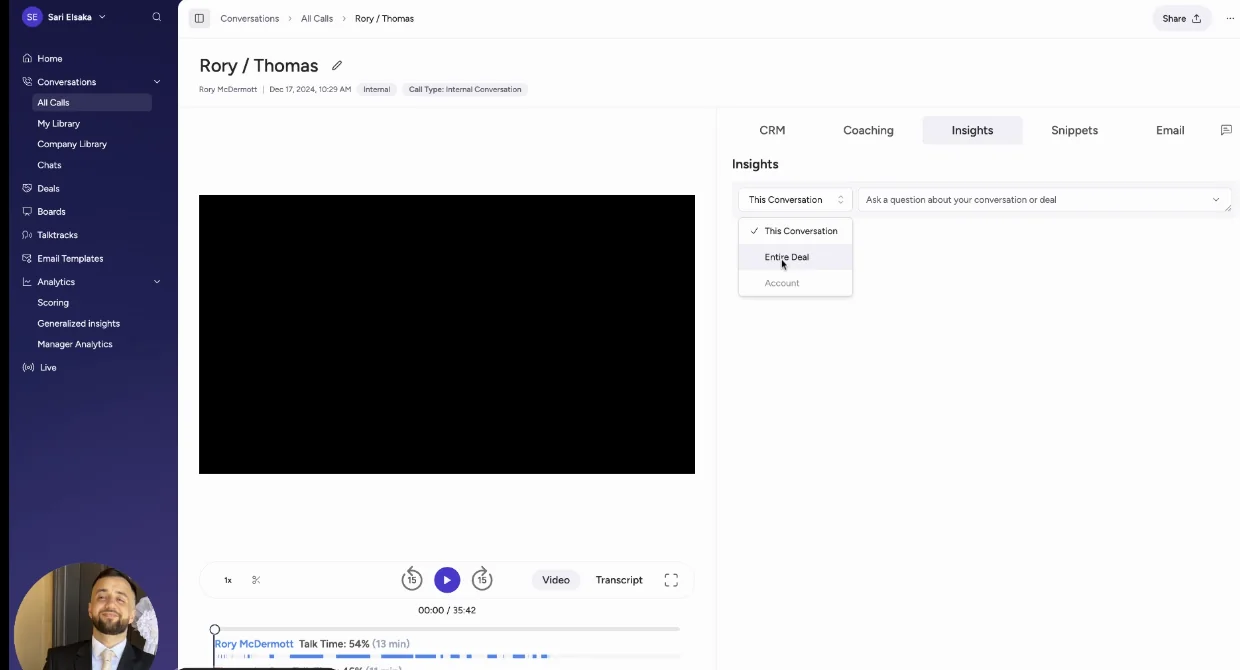
You can see the prose problem on Attention's CRM tab, where the Economic Buyer field holds a paragraph saying the call didn't cover it:
Attention suits RevOps teams that build their own automations
Attention suits a team with strong RevOps whose real problem is automating the work that comes out of calls. If your problem is completing the revenue record in Salesforce, that's a different job.
Jiminny: coaching-first conversation intelligence across CRMs
Jiminny beats Avoma on live coaching, dialer coverage and EU hosting. But its emails never reach Salesforce, and it has no forecasting.
| Capability | What Jiminny does | Limit worth knowing |
|---|---|---|
| Recording video meetings | A bot joins scheduled Zoom, Meet and Teams meetings, with a bot-free desktop app, a mobile app and uploads. | The desktop app needs macOS 13 on Apple Silicon or Windows 10 and later. |
| CRM field updates from conversations | AI CRM Filling writes from calls and emails to deals, accounts, contacts, leads and tasks, automatically or after review. | Works with Salesforce and HubSpot only. |
| Automatic email capture | Reads each user's mailbox every 15 minutes and keeps emails that match CRM records. | Emails are never logged to Salesforce, and each user switches on sync. |
| Forecast submissions and roll-ups | Deal Insights, a deal table with eight configurable risk triggers, runs pipeline reviews. | No forecast submissions or roll-ups. |
| Salesforce integration | REST API with no package required; logs calls as Tasks or Events and writes onto existing events. | Each user connects through their own OAuth login unless admins pre-authorize them. |
| Integrations with other tools | Its own dialer, Jiminny Voice, about 20 third-party dialers, Zapier and eight CRMs. | Voice minutes above 1,350 per 30 days cost 2 cents each. |
| Access from AI assistants (MCP) | Read-only connector for Claude and ChatGPT, scoped to what each user can see. | Scale and Grow tiers only. |
| Raw data access outside the tool | REST API, which Jiminny suggests for feeding a warehouse or BI tool. | Only admins generate the organization-level key. |
| Pricing | One flat per-seat fee per tier, no platform fee or credits, and a 14-day trial. | No published prices. |
Jiminny adds live coaching, its own dialer and EU hosting
- Jiminny coaches reps live during calls.
- It includes a built-in dialer and records from about 20 third-party dialers.
- It runs separate EU and US data environments.
- AI CRM Filling can wait for a rep's review before writing.
- It writes into the event or task that already exists for a meeting instead of creating a duplicate.
- It documents an import from Avoma by name, alongside Gong, Chorus, Clari Copilot and Fathom.
Jiminny keeps emails out of Salesforce and skips forecasting
- Synced emails stay inside Jiminny for Deal Insights and never reach Salesforce.
- There's no forecast submission or roll-up.
- Jiminny publishes no prices.
- Email sync needs each user to switch it on and grant consent.
Jiminny suits multi-CRM teams that coach on every call
Jiminny suits mid-market teams that put coaching first, run a phone motion, or span HubSpot and Salesforce. If your Salesforce reports depend on email activity, that gap will show.
Fathom: the cheapest route to good meeting notes
Fathom wins on price and bot-free notes, and hundreds of thousands of companies use it. It writes summaries rather than structured fields, and Superhuman's productivity suite now sets its roadmap.
| Capability | What Fathom does | Limit worth knowing |
|---|---|---|
| Recording video meetings | Records Zoom, Meet, Teams and Slack Huddles, with a bot or bot-free, chosen per meeting. | Bot-free runs on Mac only, and Fathom doesn't record phone calls. |
| CRM field updates from conversations | On the Business plan, writes headed sections of its deal summary into Opportunity fields. | Text fields only, and each new meeting overwrites the field. |
| Automatic email capture | Not offered. | Fathom captures meetings only. |
| Forecast submissions and roll-ups | Not offered. | Fathom states it has no native forecasting. |
| Salesforce integration | Matches meetings to Contacts, Accounts and open Opportunities, and logs summaries as Tasks. | Never matches Leads, and each team gets one Salesforce connection. |
| Integrations with other tools | 30 integrations, including Salesforce, HubSpot, Slack, Notion, Zapier, Make, Claude and ChatGPT. | No dialer, sequencing, warehouse or BI tool. |
| Access from AI assistants (MCP) | Official connector for Claude and ChatGPT on every plan. | Limited to meetings the connecting user can see. |
| Raw data access outside the tool | Public API with webhooks and SDKs on every plan. | Keys belong to individual users, not the organization. |
| Pricing | Free for individuals; Premium $16, Team $15 and Business $25 per seat, billed annually. | Two-user minimum on team plans, and CRM field writes need Business. |
Fathom records without a bot and starts cheaper than Avoma
- Fathom's individual plan is free with unlimited recordings.
- Paid seats start below Avoma's base plans, with no platform fee or usage credits.
- Reps can record without a bot joining the call.
- The MCP connector and API are on every plan.
- Teams switching from Gong or similar tools get Business free for the rest of their current contract, plus data migration.
Fathom writes text fields only and skips email and Leads
- Salesforce writes go to long or single-line text fields only, and each meeting overwrites them.
- Fathom doesn't capture email.
- It never matches Leads, and writes nothing when no Contact matches.
- It has no forecasting.
- Its roadmap runs through Superhuman's email, documents and agents, with nothing announced on deeper Salesforce field writes.
Fathom suits small teams that need notes, not structured fields
Fathom suits individuals and small teams whose need is good notes, not a revenue system of record. If Avoma's depth already feels thin, Fathom moves you further in that direction.
What each Avoma alternative costs per seat
Only Avoma, Weflow and Fathom publish prices. Avoma's real seat is the base plan plus add-ons. Gong, Attention and Jiminny quote privately, and Gong adds metered credits on top.
| Tool | Pricing model | Published list prices | What costs extra | Minimums and terms |
|---|---|---|---|---|
| Weflow | Per seat, AI included | Products $19 to $39; bundles $49, $59, $79 | Agent Builder beyond the free 25 actions: $299 for 500, $999 for 2,500 | 10 seats per product or bundle, 12 months, annual billing |
| Avoma | Per recorder seat plus add-ons | $19, $29, $39 base; add-ons $29 each | Revenue Intelligence, Conversation Intelligence, Lead Router, optional $1,000 onboarding | Startup up to 25 seats, Organization up to 100, Enterprise 10-seat minimum |
| Gong | Per user plus platform fee | Not published | Applications on top of Foundation, AI credits, Data Cloud | Foundation licence required |
| Attention | Negotiated contract | Not published | Not published | Not published |
| Jiminny | Flat per-seat fee per tier | Not published | Voice minutes above the allowance at 2 cents | 14-day free trial |
| Fathom | Per seat, no platform fee | Free; $16, $15, $25 per seat | Enterprise on quote | Two-user minimum on team plans |
Adding up Avoma's base plan and add-ons per seat
Email sync, two-way field updates, forecasting and global Ask Avoma need both add-ons. Here's one fully equipped seat, at annual billing:
| Line item | Organization | Enterprise |
|---|---|---|
| Base plan | $29 | $39 |
| Revenue Intelligence add-on | $29 | $29 |
| Conversation Intelligence add-on | $29 | $29 |
| Total per seat per month | $87 | $97 |
| Seat cap | Up to 100 seats | 10-seat minimum |
The Startup plan starts at $19, but it caps at 25 seats, so most mid-market teams land on Organization or Enterprise. Avoma does give you free unlimited viewer seats, which offsets some of this for teams with many read-only users.
For comparison, Weflow Revenue AI Enterprise lists at $79 per seat and covers activity capture, conversation intelligence, deal intelligence and forecasting, with Ask Weflow AI Pro included.
Mixing Weflow products and bundles by role
We publish standalone products and bundles, with AI included in the seat, so you can give each role only what it uses. The minimum is 10 seats per product or bundle on a 12-month term. Agent Builder is the only product priced per workspace.
| Role | Weflow product or bundle | List price per seat per month |
|---|---|---|
| Reps who mostly email and rarely run recorded calls | Weflow Activity & Contact Capture | $19 |
| AEs and CSMs running recorded customer calls | Weflow Revenue AI Foundation | $49 |
| AEs who also manage pipeline in deal boards | Weflow Revenue AI Business | $59 |
| Frontline managers running the forecast | Weflow Revenue AI Enterprise | $79 |
| RevOps and leaders who forecast but don't take calls | Weflow Deal Intelligence & Forecasting | $39 |
One packaging detail to know: call recording lives in Weflow Conversation Intelligence, not in Activity & Contact Capture. That's why Revenue AI Foundation pairs the two.
How to move off Avoma without losing your history
Keep the archive, and test every Salesforce write before cutover. How a vendor brings you in also tells you how easily you could leave later. With Weflow, activity and call outcomes live in your Salesforce objects, so that history stays with you either way.
Bringing your Avoma recording archive into the new tool
Here's the migration sequence as it works with Weflow:
- Keep Avoma running while you migrate. Avoma lets you export meeting data before closing an account, and its REST API comes with the Organization plan and above.
- Share the provider's API key with us. Our documented import sources are Gong, Chorus, Jiminny and others, and we handle the import on our side with no manual upload. Where no API key is available, our team evaluates a raw file export.
- We re-link each recording to Salesforce. If the provider's API holds the account, opportunity or contact association, we use it. If not, our own lookup service matches recordings to the right records.
- We backfill activity. Up to 24 months of emails, meetings and contacts sync back as standard, and up to 3 years on a custom basis.
Avoma isn't on our named list of import sources. Jiminny is the one vendor in this list that documents an Avoma import by name.
Testing every Salesforce write before you switch Avoma off
- Test writes against every object your activities will map to, not just one. With Weflow, a failed summary or field write fires once when the call ends and isn't replayed.
- Decide what happens to fields Avoma already filled. Weflow amends methodology fields rather than overwriting them, while single-value fields like amount can only be overwritten.
- Set review or auto-write per field before rollout, starting with interpretive fields like champion and pain under review.
- Check for one meeting record, not two, alongside your scheduler and engagement tool. Weflow logs the meeting as an activity whether or not it's recorded, and the recording adds the summary to it.
- Make sure every licensed user signs in to Weflow once. Activity capture runs for them anyway, but the notetaker doesn't join their meetings until they do.
Which Avoma alternative fits your Salesforce team
The right choice follows from your main reason for leaving and how your CRM is set up. If you're Salesforce-only and your problem is what lands in Salesforce, the six tests point toward writes into your own objects. If your problem is elsewhere, another tool fits better.
Stay on Avoma if your team looks like this
- You run HubSpot or several CRMs.
- You have fewer than 10 seats.
- Your pipeline is flat, with a single motion and no custom objects your reports depend on.
- Your motion is phone-heavy across many dialers.
- Free viewer seats and a low base price matter more to you than field-level control.
Match your main reason for leaving to one tool
| If your main reason is… | Shortlist… |
|---|---|
| Custom objects and structured field types | Weflow. Custom objects are set up by Weflow support, and lookups aren't writable. |
| Reviewed fields instead of automatic appends | Weflow for per-field review, or Jiminny for review on its AI CRM Filling automations. |
| Forecasting new business and renewals separately | Weflow for per-record-type roll-ups, or Gong for separate forecast boards per motion. |
| EU data residency | Weflow with a Frankfurt region, or Jiminny with its EU environment. |
| Analytics depth | Gong, if you accept unpublished pricing and metered credits. |
| Agent automation from calls | Attention, if email logging to Salesforce is a workflow you're ready to build. |
| Coaching and a built-in dialer | Jiminny, knowing emails stay out of Salesforce and there's no forecasting. |
| Lowest price | Fathom, knowing it writes text summaries rather than structured fields. |
See how Weflow captures activity, updates Salesforce fields from calls, and rolls up your forecast. Book a 30-minute demo.
Questions RevOps leaders ask about replacing Avoma
Does Avoma support custom Salesforce objects?
No. Avoma maps CRM fields only on the Opportunity and Account objects and doesn't support custom objects, and it asks customers who need one to contact its support team. Weflow's AI Field Updates reach custom objects once Weflow support sets them up.
Can Weflow import our existing Avoma recordings?
Weflow imports recordings from Gong, Chorus, Jiminny and other providers with an API key, and our team evaluates a raw file export where no key is available. Avoma isn't on that named list. Avoma does offer an API and a meeting data export, and Weflow re-links imported recordings to Salesforce records, using its own lookup where the provider's API has no association.
Do reps have to install anything to use Weflow?
No. Weflow Activity & Contact Capture runs server side through a central app in Microsoft Entra or Google Workspace, so emails and meetings log with no rep action. Each licensed user signs in to Weflow once, which is what lets the notetaker start joining their meetings.
Will reps work in Salesforce or in a second app?
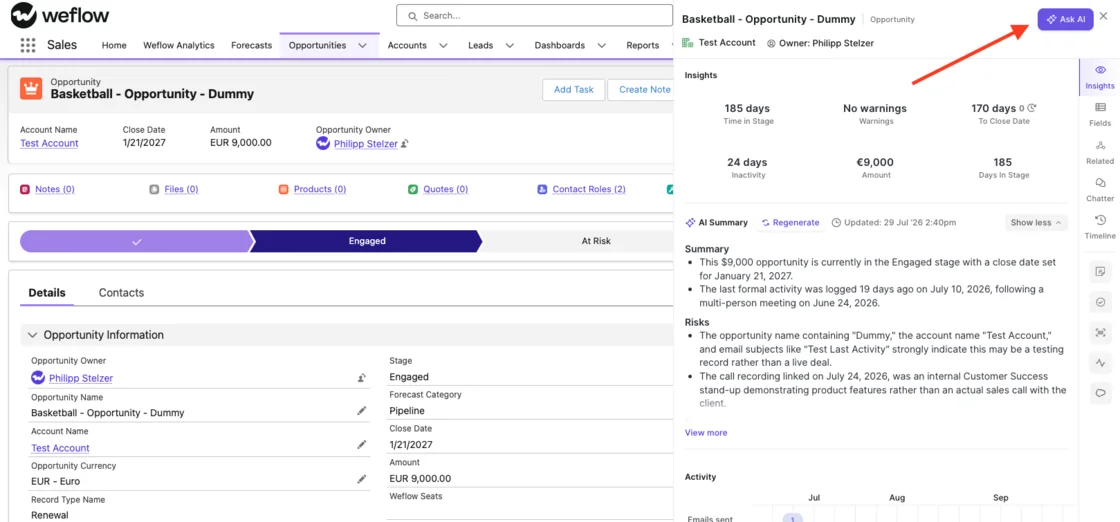
Reps work in Salesforce. The Weflow Activity Timeline is a Lightning component admins place on Account, Opportunity, Contact and Lead pages, showing last email, last and next meeting, and call summaries. Forecast submission is the one task that happens in the Weflow web app, and edits made in Weflow write straight back to Salesforce.
Does Weflow respect our validation rules and record types?
Yes. Weflow inherits your validation rules, field dependencies, permission sets and role hierarchy, and each opportunity record type keeps its own stage path and forecast roll-up. AI Field Updates write to every field type except lookups, and custom objects need setup by Weflow support.
Where does Weflow host our data, and what security documents exist?
You choose the region for recordings, transcripts and Weflow-native data: Frankfurt, New York or Sydney. CRM data lives in your own Salesforce org. Weflow is SOC 2 Type II certified and GDPR compliant, runs Zero Data Retention for AI processing, and never uses customer data to train models. We provide a DPA with EU Standard Contractual Clauses and a public sub-processor list, and ISO 27001 is in progress, not yet certified.
What contract terms and seat minimums does Weflow require?
Weflow's standard contract is 12 months, with a minimum of 10 users per product or bundle. There's no contractual right to reduce seats mid-term, but you can reassign a seat when someone leaves.
Which phone dialers does Weflow record calls from?
Weflow pulls in calls made through Outreach's dialer, with audio, transcript, summary and coaching. The Weflow desktop app also records softphone calls that run through the computer, such as Aircall or RingCentral, when the rep starts the recording. Wider VoIP capture is a gap today.
What do we give up when we leave Avoma?
Leaving Avoma for Weflow means giving up a few things Avoma does that we don't match:
- snippets cut automatically after every meeting
- automatic stakeholder mapping per deal
- connections to about a dozen dialers
- MCP write tools for meeting outcome, purpose and privacy
- support for CRMs other than Salesforce
Who runs the Weflow implementation?
Weflow runs onboarding itself, not a third-party partner. As proof from a team that switched from Gong, KORE had Weflow own its end-to-end onboarding across a five-phase rollout, including live training with a real-time Portuguese translator for its Brazil team.











