

Best Fathom Alternatives for Teams That Need Salesforce Field Updates (2026)
Compare the best Fathom alternatives for Salesforce field updates, email capture, and CRM activity


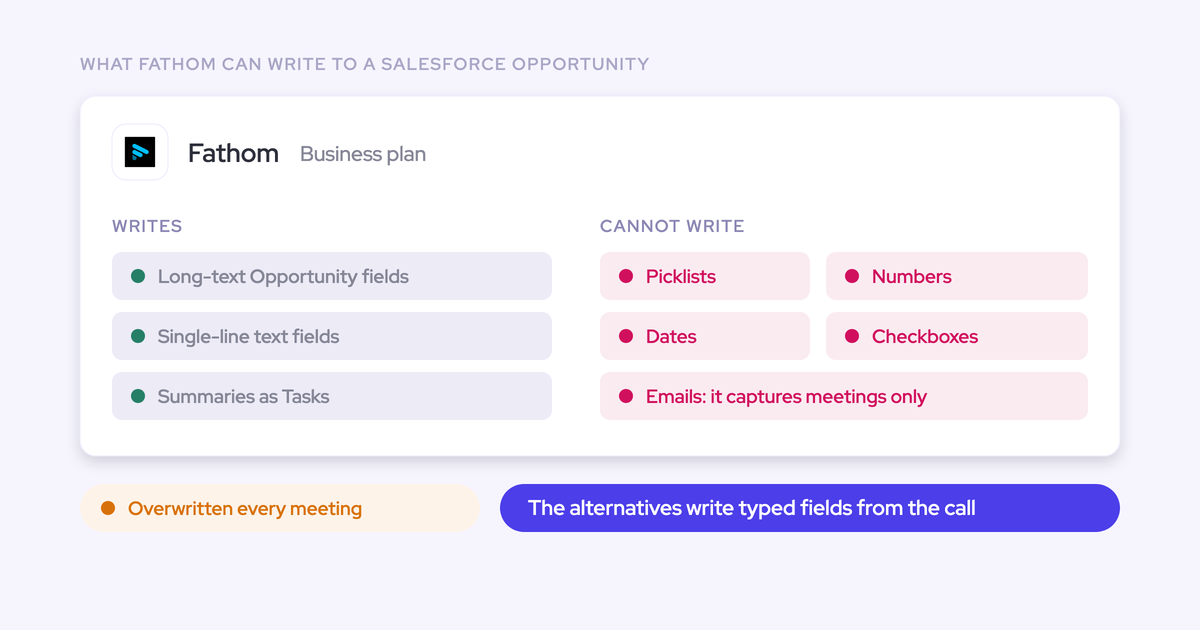

Fathom is a good notetaker. Reps like it, it's free to start, and the summaries hold up. A Salesforce team leaves it for one reason: what lands in Salesforce. That means text blobs that get overwritten, calls that miss the opportunity, and no email at all.
So we judged every alternative on the same four checks buyers now run in trials:
One meeting record in Salesforce, not two.
The call lands on the right Opportunity.
Fields of real types (picklists, numbers, dates) that don't get overwritten.
The email side of the deal captured too.
Here's the short answer, by team:
Salesforce is your only CRM and you need reportable fields plus email: Weflow.
You're moving to Salesforce's Core, Advanced or Max editions: Momentum.
Coaching comes first, or you run several CRMs: Jiminny.
A strong RevOps team wants to build call-driven agents: Attention.
A small team on a tight budget: Avoma.
Managers live in the deal board and want the safe brand: Gong.
You run HubSpot, or you only need notes: stay on Fathom.
Weflow is the Revenue AI Orchestration platform for sales, customer success, and RevOps teams. We built it for Salesforce teams. Weflow Conversation Intelligence + AI Field Updates is the part that replaces Fathom: it turns each call into deal execution driven by fields filled from the conversation, instead of a summary sitting in a text box.
Fathom alternatives for Salesforce, compared side by side
Every tool here records meetings well, so they split on what reaches Salesforce and in what shape. The first four rows are the four trial checks. The rest cover how each tool records and how you reach the data.
Capability | Weflow | Fathom | Attention | Momentum | Jiminny | Avoma | Gong |
|---|---|---|---|---|---|---|---|
CRM field updates from conversations | Picklist, number, date, multi-select and text fields on any object except lookups; auto-write or review per field | Text fields on Opportunity only, from H3/H4 headings; overwritten each meeting; Business plan | A prompt per field, to any mapped field; auto-sync by default; empty findings written as prose | Per-field auto, confirm or write-if-empty; structured MEDDPICC and SPICED fields | From calls and emails to deal, account, contact, lead and task fields; fill if empty, overwrite or append | Automatic writes to mapped Opportunity and Account fields; no single-line text; no review step | AI Data Extractor capped at 20, admin-only, existing fields only, overwrites |
Salesforce integration | Real-time two-way REST API; inherits validation rules, permissions and hierarchy; no field-mapping step | Primary email to Contact to Account to open Opportunities; no Leads; one connection per team | OAuth with real-time writes; connecting user needs Modify All Data | Managed package plus admin authorization; Sales Cloud only | REST API, no package needed; per-user OAuth unless admins pre-authorise | Two-way per-field sync; writes deal edits back | Imports accounts, contacts, leads and opportunities; field mapping is painful and the sync breaks |
Activity stored as native CRM records | Meetings as Event, emails as EmailMessage or Task; summary on the Event | Summary as a logged-call Task; action items as Tasks; standard objects only | Emails stay in Attention's store; no documented Salesforce activity records for calls | Call logs to Event once mapping is on; recordings stay in the Call Library | Calls as Tasks or Events; emails stay in Jiminny | Event per meeting; notes to Note, Event or Task | Tasks or Events once export is on; transcripts stay in Gong |
Automatic email capture | Server-side at the Google Workspace or Microsoft 365 tenant; no rep setup; up to 24 months back | No email capture; meetings only | Per-user Gmail and Microsoft 365 into its own store; CRM logging is a workflow you build | No email capture; reads emails already logged as Tasks | Per-user mailbox sync every 15 minutes; emails never logged to Salesforce | Gmail and Outlook with the Revenue Intelligence add-on; logs to Salesforce as Tasks | Server-side import; export to Salesforce runs forward from the day it's enabled |
Recording without a bot joining | Desktop app on Windows, Apple Silicon and Intel Mac; softphone audio included | Mac desktop app only; bot-free video is a limited Zoom beta | Desktop app on Apple Silicon only; no Teams in a browser | Zoom cloud recording; bot on Google Meet | Desktop app on macOS (Apple Silicon) and Windows | Zoom, Webex, Teams and Meet cloud recording, plus a desktop app | Zoom native recording and the mobile app only |
Integrations with other tools | Salesforce, Gmail, Outlook, Zoom, Teams, Meet, WebEx, Slack, Outreach dialer; warehouses via API | 30 listed; no dialer, sequencing, warehouse or BI tool | Workflow steps into Snowflake, Slack, HubSpot and more; Zoom Phone and Aircall | Five CI tools, seven dialers, Slack or Teams | About 20 dialers, Zapier and several CRMs | 26 native integrations | About 450 integrations and partner solutions |
Access from AI assistants (MCP) | Read-only connector with a separate transcript toggle | Official connector for Claude and ChatGPT on every plan; limited to the user's meetings | 68 read-write tools; raw transcripts; no consumption charge | None of its own; reached through Salesforce's Hosted MCP | Read-only connector on Scale and Grow | Connector on Organization plan and above, or the API add-on | Three record-scoped tools; insights only; draws credits |
Raw data access outside the tool | REST API bulk export in JSON or CSV | Public API on every plan; per-user keys | Raw transcripts through MCP and API | API off by default, support-enabled, 100 requests per 15 minutes | REST API with an organisation-level key | API at 60 requests a minute, Organization plan and above | API capped at 10,000 calls a day; warehouse via Data Cloud (about $5,000 a year) |
Pricing | Published: CI $39, Capture + CI $49; 10-user minimum | Published: free up to $25 on Business | Not published | Standalone $69 and $99 listed; bundled in Salesforce editions | Not published; flat per-seat fee | Published: $19, $29 and $39 plus add-ons | Not published; platform fee plus credits |
What Fathom gets right as a meeting notetaker
Fathom is one of the most widely used AI notetakers in the market. More than 300,000 companies use it. It was HubSpot's Most Used App of the Year for 2025 and sits in G2's 2026 Best Software Awards Top 100.
Your reps probably picked it for good reasons:
It's free for individuals, with unlimited recordings.
Each rep can choose a bot or bot-free capture, per meeting.
The bot-free experience builds the summary live during the call.
The API and an MCP connector for Claude and ChatGPT come on every plan.
Reps actually open it.
If what you need is meeting notes, Fathom does that job well, and nothing below changes that. The trouble starts when you ask it to become the revenue record in Salesforce.
Why Salesforce teams switch off Fathom
The limits below come from how Fathom's Salesforce integration is built, as its own help center documents it. You won't fix them with a different setting. They show up the moment a notetaker is asked to act as a system of record.
This is how one RevOps lead put it to us on a call:
"We tried the fathom Salesforce integration. It breaks half the time. It's not great. It's kind of clunky. It's not great at the context layer. It's not great at the coaching piece, it's not great at mapping the fields back to Salesforce."
Fathom writes only to text fields and overwrites them each meeting
On the Business plan, Fathom writes sections of its AI deal summary into Salesforce Opportunity fields. It writes only to long-text or single-line text fields, only from sections formatted as H3 or H4 headings, and each new meeting overwrites what the field held.
You'll feel two consequences in your reporting:
Nothing Fathom writes can be grouped or charted, because a narrative in a text field isn't a value.
Qualification captured on call one is gone by call three, so your MEDDIC fields stay a slide instead of a record managers can inspect.
What Fathom can write | What Fathom can't write |
|---|---|
Long-text Opportunity fields | Picklists |
Single-line text Opportunity fields | Number fields |
Sections formatted as H3 or H4 headings | Date fields |
Summaries and action items as Tasks | Checkboxes |
Two smaller edges: content over the field limit (32,000 characters by default) gets cut, and validation rules or required fields on the Opportunity or Task can block the write entirely.
Fathom links meetings only through a contact's primary email
Fathom follows one path to decide where a meeting belongs:
It takes an external attendee's primary email.
It finds the matching Contact.
It follows that Contact to its Account.
It reaches open Opportunities only through the Contact's contact roles.
Anything outside that path falls out:
Leads are never matched.
Secondary emails are ignored.
Closed Opportunities get nothing.
Internal meetings, impromptu calls without a calendar event, and events on secondary calendars don't sync.
Custom objects are never written, since Fathom writes to standard objects only.
A Contact with no contact role on an open Opportunity gets the summary, and the Opportunity doesn't.
If no Contact matches, Fathom writes nothing.
Fathom captures no email, so the deal's email side never lands
Fathom captures meetings only. Its apps are a desktop app, a Zoom app and a Chrome extension for Google Meet. There's no Gmail extension and no Outlook add-in.
So every email thread on the deal stays outside Salesforce. So does every contact who only ever shows up in email. On a long deal, a large share of the activity happens between the calls.
Fathom next to a capture tool logs every meeting twice
The usual patch is to add an activity capture tool next to Fathom. Both tools write the meeting, so Salesforce holds two records for one conversation.
Now meetings per rep and meetings per closed opportunity double-count. That's the exact reporting you bought the second tool for. And someone in RevOps ends up joining the two half-pictures by hand.
"They basically both create an event object, which creates a duplicate. So in your reporting you need to deduplicate that, which is really annoying."
— Janis Zech, Co-founder and CEO of Weflow
Superhuman now sets Fathom's product roadmap
Superhuman, the AI productivity company formerly called Grammarly, bought Fathom on 14 September 2026. The product and logins didn't change.
The direction did. Superhuman is folding Fathom's notes into its email, calendar, docs and the Superhuman Go assistant, and it treats CRMs as one integration destination among several. Fathom's founder describes it this way:
"By joining Superhuman, that context can travel with you to your inbox, your docs, and across every app and website you work, so nothing gets lost in the work that follows."
— Richard White, Founder and CEO of Fathom
Nothing on the announced roadmap covers deeper Salesforce field writes, deal context or coaching. If you've been waiting for Fathom to fix the Salesforce side, the roadmap gives you no reason to keep waiting.
Run these four Salesforce checks in any Fathom alternative trial
Every tool on this list transcribes well, so the transcript isn't the test anymore. Trial the Salesforce integration. Run a real customer call, then open Salesforce and look for these four things:
One meeting record. The call appears as one activity on the timeline, with the summary attached to it, not as a second record next to the calendar event.
The right records. Every participant is linked to the right Contact or Lead, and the activity sits on the correct Opportunity.
Real field types that persist. Picklists, numbers and dates are filled from the call, and what call one captured is still there after call three.
The email side. The emails around the meeting are in Salesforce too, logged against the same records.
Then filter your shortlist through three questions that come from how your team works:
Can an admin roll it out without asking reps to install or connect anything?
Can you choose, per field, what writes automatically and what waits for review, so a confidently wrong value never lands unseen?
Does the data stay in your Salesforce, and is the price published and defensible to your CFO?
Listen to #65 Leveraging AI in RevOps on the RevOps Lab podcast.
1. Weflow Conversation Intelligence + AI Field Updates for Salesforce teams
Weflow is the Revenue AI Orchestration platform for sales, customer success, and RevOps teams, and the piece that replaces Fathom is Weflow Conversation Intelligence + AI Field Updates. It writes calls, emails and meetings into Salesforce as reportable fields and records.
We treat recording as the input. The product is the structured Salesforce data that comes out of it.
Weflow writes real field types to the right record, email included
Here's how Weflow answers each of the four checks, in the order Fathom fails them.
CRM field updates. Weflow AI Field Updates write picklists, numbers, dates, multi-selects and text on every Salesforce object and field type except lookups. That covers Leads as well as Contacts, Accounts and Opportunities. Custom objects work once Weflow support sets them up.
You set each field to write automatically or wait for review. Required fields stay locked.
Methodology fields amend instead of overwrite, so MEDDIC answers build up across the deal.
AI playbooks run on a schedule across every call, email and field on the opportunity, and keep a field at the current best answer instead of the latest one.
More than 250 pre-built prompts cover MEDDIC, MEDDPICC, SPICED and BANT.
Stage can move when the exit criteria written into the prompt are met on the call, under review.

Weflow's AI field update prompt editor, with the per-field Auto-update Salesforce setting.
Salesforce integration. Weflow runs a real-time two-way integration on the Salesforce REST API and writes in under about 200 milliseconds. It inherits your validation rules, field dependencies, permission sets and role hierarchy, and there's no field-mapping step. Weflow Activity & Contact Capture maps each activity to the right opportunity, account, contact or lead.
One meeting record. The call summary writes to the related Event, and the transcript and summary land on the Weflow_Recording__c object. Capture and conversation intelligence come from the same platform, so there's one meeting, not two. Emails log as EmailMessage or Task, whichever your admin picks.
Email. Weflow Activity & Contact Capture captures email server-side through a central app in Google Workspace or Microsoft 365. It works on any device and client, with no rep setup, and syncs up to 24 months of history back.
It logs only mail that matches a Salesforce record. It doesn't capture personal accounts or mail sent from a separate deliverability subdomain.
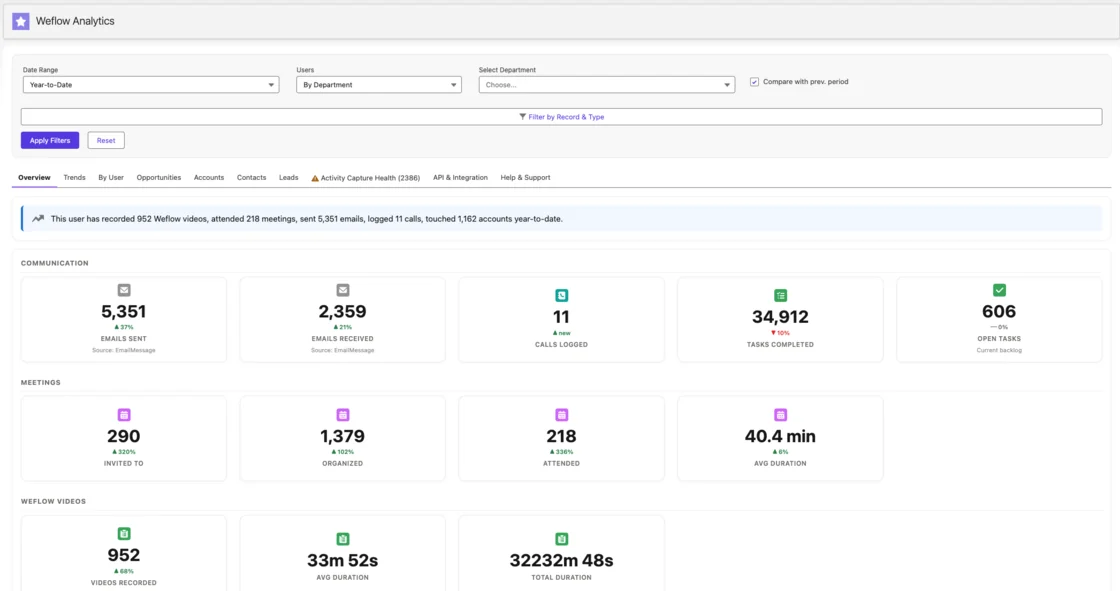
Weflow activity analytics running inside Salesforce: emails, meetings and recordings in one view.
Trial check | Fathom does | Weflow does |
|---|---|---|
Field updates | Text fields from summary headings, overwritten each meeting | Picklists, numbers, dates and multi-selects; methodology fields amend |
Matching | Primary email to Contact to open Opportunity via contact roles; no Leads | Maps to opportunity, account, contact or lead; inherits your org setup |
Meeting record | Logged-call Task; a capture tool adds a second record | Summary on the related Event; transcript on Weflow_Recording__c |
None | Server-side capture, no rep setup, up to 24 months back |
Weflow records bot-free on Windows and Mac and feeds your AI tools
Bot-free recording. The Weflow desktop app runs on Windows, Apple Silicon Mac and Intel Mac, and it's included with the Weflow Conversation Intelligence seat. It captures system audio, so softphone calls on Aircall or RingCentral get the same transcript, summary and field updates as a meeting. Fathom's bot-free capture runs on Mac only.
Integrations. Weflow integrates natively with Salesforce, Gmail, Outlook, Zoom, Teams, Google Meet, WebEx, Slack and the Outreach dialer. There's no native warehouse connector, so teams move data to Snowflake, Databricks or BigQuery through the API.
MCP. Our read-only MCP connector gives Claude, ChatGPT and other assistants playbooks, call summaries, transcripts and forecast calls. An admin switches it on per workspace, with a separate toggle for transcript access.
Raw data. The REST API bulk-exports transcripts, metadata, scores and signals as JSON or CSV into your warehouse or BI tools such as Tableau and Looker.
Pick Weflow if Salesforce is your only CRM and system of record
Weflow fits if:
Salesforce is your only CRM, and you want it to stay the place reps and managers work.
You need call outcomes as reportable fields, plus the email side of every deal.
You want per-field control over what writes automatically.
You need a published seat price you can defend, without Gong-level spend.
Look elsewhere if:
You run HubSpot or another CRM. Weflow works only with Salesforce.
You only need meeting notes and never needed Salesforce fields.
You need AI to write lookup fields. Weflow doesn't write lookups.
You want an automated consent flow on bot-free recordings. With the desktop app, consent is the rep's responsibility.
You need your Fathom recording history moved over. Our documented migration names Gong, Chorus and Jiminny, and Fathom isn't on that list.
Fewer than 10 people need seats, or you can't commit to 12 months. See the pricing section below.
"Weflow ticked all the boxes: GDPR-compliant, tightly integrated with Salesforce, simple to use - and without the heavy price tag of U.S. vendors."
— Bastian Stosic, Head of Media Sales Operations at HolidayCheck
2. Attention: call-driven automation with the most open MCP server
Attention is AI-native conversation intelligence that turns calls into scorecards, field updates and agent actions. It positions itself around agents that work the pipeline, with recording as the data those agents run on.
Its setup loop is thoughtfully built: you can test a field prompt against a real call and run a prompt optimiser before anything goes live.
Attention writes any mapped field but keeps email in its own store
CRM field updates. You write a prompt per field and map it to any Salesforce field. Automatic sync is the recommended default, so nobody sees a value before it lands. A deal-scoped field reads across every call on the opportunity. New fields are mapped by hand and fill forward only, and when Attention finds nothing, it writes prose explaining the absence into the field.
Salesforce integration. Attention connects through OAuth with real-time writes after each call. The connecting user must hold Modify All Data, which overrides sharing rules and every object and record-level permission.
Native records. Imported emails stay as Attention's own records, not Salesforce activities. No Attention page documents calls being written to Salesforce as activity records.
Email. Each user connects Gmail or Microsoft 365, and email lands in Attention's store. Logging it to Salesforce is a workflow you build on the New Email Imported trigger.
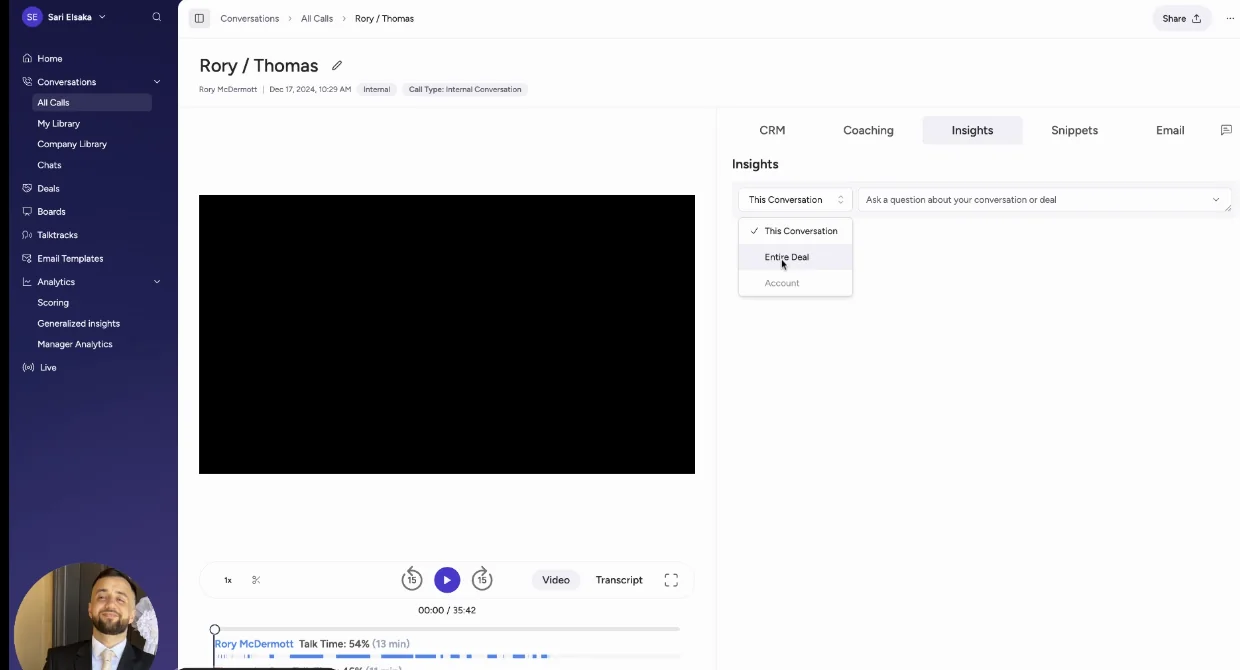
Attention's CRM tab: Economic Buyer and Decision Criteria hold paragraphs stating the call didn't cover them.
Attention opens 68 MCP tools but records bot-free on Apple Silicon only
Bot-free recording. The desktop app runs on Apple Silicon Macs only, with no Windows or Intel build and no support for Teams in a browser. Desktop recordings get weaker speaker labels, because they capture one mixed audio stream.
Integrations. Workflow steps act inside Snowflake, Slack, HubSpot, Notion, Google Sheets and more, and Attention imports calls from Zoom Phone and Aircall.
MCP. 68 read-write tools across 15 groups, returning raw transcripts, with rate limits and no consumption charge. That's the widest MCP surface in this comparison.
Raw data. Raw transcripts, scorecard results and AI insights come out through MCP and the API.
Pick Attention if a strong RevOps team wants call-driven agents
Attention fits if:
Your goal is to automate the work that comes out of sales calls.
You have RevOps capacity to write and maintain prompts and workflows.
You want the most open MCP access to raw transcripts.
Look elsewhere if:
You need email logged as Salesforce activity without building it yourself.
Your security team won't grant Modify All Data to an integration user.
You want review before writes by default. Attention's defaults favour speed over control.
You need a published price. Attention doesn't publish one.
3. Momentum: the Salesforce-owned layer above your recorder
Momentum is a different kind of tool from the rest of this list. Salesforce owns it and positions it as the capture layer underneath Agentforce. It runs on its own recorder or on top of Gong, Chorus, Clari Copilot, Attention and Salesloft Conversation Intelligence.
If you're keeping a recorder and want structured fields written from it, Momentum sits above that recorder. It doesn't ask anyone to switch.
Momentum writes structured MEDDPICC fields but captures no email
CRM field updates. Autopilot gives each extraction its own save mode: write automatically, confirm to write after review in Slack or the web app, or write only when the field is empty. It writes MEDDPICC and SPICED elements into their own Salesforce fields.
Salesforce integration. A managed package plus admin authorization. It works with Sales Cloud only.
Native records. Call logs go to Event records only once an admin switches on Event mapping. Recordings and transcripts stay in Momentum's Call Library.
Email. Momentum doesn't capture email. It reads only emails already logged to Salesforce as Tasks, once Momentum support sets up the ingestion, even though its marketing says it captures every email.
Momentum skips the bot on Zoom and reaches AI through Salesforce
Bot-free recording. On Zoom, Momentum records through Zoom's own cloud recording. On Google Meet, a bot joins the call.
Integrations. Five conversation intelligence tools, seven dialers and contact centres, and Slack or Microsoft Teams.
MCP. Momentum has no MCP server of its own. Assistants reach its data through Salesforce's Hosted MCP, over the records Momentum writes.
Raw data. The API is off by default, switched on per workspace through support, and capped at 100 requests per 15 minutes.
Pick Momentum if you're moving to Salesforce's Core, Advanced or Max
Momentum fits if:
You're moving to Salesforce's new editions, where Momentum comes bundled: included in Max now, announced for Core and Advanced.
You want structured fields written on top of a recorder you already run.
Look elsewhere if:
You need the email side of the deal captured.
You run Service Cloud or other clouds beyond Sales Cloud.
You don't want your capture layer's direction tied to Agentforce.
Janis Zech on LinkedIn: “But this is what most people get wrong - conversation data alone isn’t enough.”
4. Jiminny: coaching-first conversation intelligence across several CRMs
Jiminny is coaching-first conversation intelligence for mid-market teams. It covers Salesforce, HubSpot and several other CRMs, records dialer and in-person calls, and adds live in-call coaching.
Jiminny fills fields from calls and emails but never logs emails
CRM field updates. AI CRM Filling writes to deals, accounts, contacts, leads and tasks from calls and emails. It runs automatically or after rep review, and each field can fill only if empty, overwrite or append.
Salesforce integration. REST API with no package required. Each user connects through their own OAuth login, unless admins pre-authorise them.
Native records. Calls log as Tasks or Events, and Jiminny looks for an existing event before creating a new one, which avoids the duplicate-meeting problem.
Email. Jiminny reads each user's mailbox every 15 minutes once that user switches on sync. The emails stay inside Jiminny and never reach Salesforce.
Jiminny records bot-free on Mac and Windows across about 20 dialers
Bot-free recording. A desktop app on macOS (Apple Silicon) and Windows. It records what's on screen, so a minimised meeting window records audio only.
Integrations. About 20 dialers, including Aircall, Dialpad, RingCentral and Zoom Phone, plus Zapier.
MCP. A read-only connector for Claude and ChatGPT on the Scale and Grow tiers.
Raw data. A REST API opened with an organisation-level key that only admins can generate.
Pick Jiminny if coaching comes first or you run several CRMs
Jiminny fits if:
Coaching and live call guidance matter more to you than Salesforce depth.
You run more than one CRM, or your team is dialer-heavy.
You want your Fathom history brought over. Jiminny explicitly imports past recordings from Fathom, which is a real advantage for this switch.
Look elsewhere if:
You need email in Salesforce.
You don't want every rep connecting their own accounts.
You need a published price. Jiminny doesn't publish one.
5. Avoma: published low seat prices for small teams
Avoma is meeting-first conversation intelligence with CRM depth added on top, sold mainly to small businesses and solo operators. One detail matters for your rollout: an admin can connect Google Workspace or Microsoft 365 once for the whole organisation, so reps don't connect their own inboxes.
Avoma logs email to Salesforce but maps fields on two objects only
CRM field updates. Smart Topic notes write automatically into mapped fields on Opportunity and Account only. Single-line text and custom objects aren't supported, and there's no review step before the write.
Salesforce integration. Two-way sync, set per field, with deal edits written back to Salesforce.
Native records. Avoma creates an Event for each calendar-synced meeting and writes notes to a Note, the Event or a Task.
Email. Email syncs for members with the Revenue Intelligence add-on and can log to Salesforce as Tasks.
Avoma records bot-free four ways and opens an MCP connector
Bot-free recording. Zoom and Webex cloud recording on meetings the user hosts, Teams and Google Meet cloud recording, and a desktop app.
Integrations. 26 native integrations across conferencing, CRMs, dialers and sales engagement tools.
MCP. A connector for Claude and ChatGPT on the Organization plan and above, or with the API Access add-on.
Raw data. An API at 60 requests a minute, on the Organization plan and above.
Pick Avoma if you're a small team on a budget or several CRMs
Avoma fits if:
Budget is the first filter and you want published seat prices.
You run more than one CRM.
Email logged to Salesforce as Tasks is enough.
Look elsewhere if:
You need fields written beyond Opportunity and Account, or on custom objects.
You want a review step before AI values land.
You'd rather not stack paid add-ons to get deal and conversation features.
6. Gong: the deepest analytics and the deal board, at platform prices
Gong invented this category and still has the deepest conversation analytics on the list. Managers get attached to its deal board, which shows each deal's momentum at a glance, and plenty of teams run their forecast call from it.
"The reason why I stuck with it was like the bubbles, like, you sort of get like addicted to the bubbles."
— Chris Nethercote, Head of Sales at Weflow, former Gong enterprise customer
Gong exports activity to Salesforce but caps AI fields at 20
CRM field updates. AI Data Extractor is capped at 20 published extractors. Only a business admin creates them, they write only into fields that already exist, and they overwrite earlier values.
Salesforce integration. Gong imports accounts, contacts, leads and opportunities. Field mapping is painful, and the sync breaks often enough for stage updates to stop flowing.
Native records. Gong exports activity as Tasks or Events once a tech admin turns export on. Transcripts stay in Gong.
Email. Gong imports email server-side, but export to Salesforce runs forward only from the day it's enabled.
Gong records bot-free only on Zoom and meters its MCP server
Bot-free recording. Only through Zoom's native recording, plus the mobile app for in-person meetings. On Meet, Teams and other platforms, the bot joins.
Integrations. About 450 integrations and partner solutions.
MCP. Three record-scoped tools that return AI insights rather than transcripts, and each request draws credits.
Raw data. The API is capped at 10,000 calls a day. Warehouse delivery needs Data Cloud, at about $5,000 a year.
Pick Gong if managers live in the deal board
Gong fits if:
You want the deepest analytics and the deal board your managers already know.
You need the "safe choice" brand behind the decision.
Look elsewhere if:
You don't want a platform fee plus AI credits on top of seats.
You want transcripts and intelligence in your Salesforce, not in Gong's cloud.
You're coming from Fathom's price and need to defend the jump to your CFO.
What each Fathom alternative costs next to Fathom's $15–25 seat
Only some of these vendors publish prices. Weflow costs more than Fathom Business, and it includes the AI in the seat: Ask Weflow AI Pro and Agent Builder Free come with every plan, and nothing meters summaries or field updates.
Tool | Pricing model | Published list price | Minimums and term | What costs extra | Published? |
|---|---|---|---|---|---|
Weflow | Per seat, AI included | Weflow Conversation Intelligence $39; Weflow Revenue AI Foundation (Activity & Contact Capture + Conversation Intelligence) $49 | 10 users per product or bundle; 12-month annual term | Agent Builder beyond the 25 free actions a month | Yes |
Fathom | Per seat, with a free tier | Free; Premium $16, Team $15, Business $25 billed annually | Two users on team plans; annual or monthly | Field writes need Business; CRM sync capped at three users per domain below Business | Yes; Enterprise on quote |
Attention | Negotiated contract | Not published | Not published | No metered AI or MCP charge | Quote only |
Momentum | Per seat standalone, or bundled in Salesforce editions | Business $69, Transformation $99; in Salesforce Max $550, announced for Core $195 and Advanced $395 | Annual plans; standalone sold through a sales conversation | Conversation Intelligence add-on $30 | List published; buying goes through sales |
Jiminny | Flat per-seat fee per tier | Not published | Not published; 14-day free trial | Dialer minutes above 1,350 per 30 days at 2 cents | Quote only |
Avoma | Per recorder seat plus add-ons | Startup $19, Organization $29, Enterprise $39 billed annually | Startup up to 25 seats; Enterprise 10-seat minimum | Revenue Intelligence and Conversation Intelligence add-ons $29 each; Lead Router $19 | Yes |
Gong | Per user, plus platform fee, plus credits | Not published | Foundation core licence required | AI credits for trackers, MCP and API workflows; Data Cloud about $5,000 a year | Quote only |
Weflow costs more than Fathom Business: $39 or $49 against $25, with a 10-user minimum and a 12-month term.
The buyers we talk to now benchmark around $30 a seat for conversation intelligence alone and $40 to $50 combined with activity capture. Our Foundation bundle at $49 sits in that range, and it adds the email side of every deal that Fathom never captures.
Choose your Fathom alternative by the problem you need fixed
Your choice follows from your CRM and from which of the four checks your current setup fails.
Your situation | Pick |
|---|---|
Salesforce is your only CRM and you need reportable fields plus email | Weflow |
You run HubSpot | Stay on Fathom |
A small team that only needs meeting notes | Stay on Fathom |
You're moving to Salesforce Core, Advanced or Max | Momentum |
Coaching comes first, or you run several CRMs | Jiminny |
A strong RevOps team building call-driven agents | Attention |
An SMB budget, or several CRMs with email as Tasks | Avoma |
Managers need the deal board and brand cover | Gong |
How to move off Fathom without losing reps or call history
The switch itself is small. What you're protecting is rep adoption, your call history and a clean activity timeline in Salesforce while two tools overlap.
What happens to your Fathom call history when you switch
Fathom only synced meetings to Salesforce from the day you connected the integration. Anything older went in one call at a time, so your Salesforce history from the Fathom era is probably thin already.
Our documented recording migration covers Gong, Chorus and Jiminny, among other providers, through an API key. We re-link each recording to the right Salesforce account, opportunity or contact. Fathom isn't on that documented list. Jiminny explicitly imports Fathom history, if carrying recordings over is a hard requirement for you.
The email and meeting side is different. Weflow Activity & Contact Capture syncs up to 24 months of email and meeting history back from your mailboxes, whichever notetaker you used.
How to keep one meeting record while two tools overlap
Decide that one system owns meeting activity in Salesforce. That's Weflow from cutover day.
Switch Fathom's Salesforce sync from automatic to manual, so it stops writing Tasks while reps still have it installed.
Let Weflow write the summary to the related Event, with the transcript on Weflow_Recording__c.
Rebuild any reports that counted Fathom's logged-call Tasks, so meeting counts read from Events.
How to roll out without asking reps to set anything up
Reps won't do setup steps. One RevOps lead summed up every rollout that depended on them:
"…they're not going to. They're not going to do it. It's just like herding cat."
Your Salesforce admin installs the managed package and an integration user. Your Google Workspace or Microsoft admin installs the central capture app. The technical setup takes 30 to 45 minutes.
Assign Weflow Conversation Intelligence seats by team, not rep by rep.
Put one sign-in per rep on the checklist. The notetaker won't join meetings for a rep who has never signed in to Weflow, even though email and meeting capture already runs for them in the background.
Start with a pilot group, then widen once the templates and field settings are right.

Adding whole teams to Weflow Conversation Intelligence recording.
How to clear security review and recording consent questions
Weflow is SOC 2 Type II certified and GDPR compliant, uses Zero Data Retention for AI processing, and never uses customer data to train AI models.
Fathom trains its own models on de-identified customer data unless a user or organisation opts out, and stores all data in the United States.
Access to the Weflow_Recording__c object equals access to every transcript it holds, so treat that permission as a confidentiality decision per profile.
The notetaker carries Weflow's consent flow. With the desktop app, nothing joins the meeting, so consent becomes the rep's responsibility under the law of the participants' country. Our guidance is to agree those requirements with your legal team.
See how Weflow captures activity, updates Salesforce fields from calls, and rolls up your forecast. Book a 30-minute demo.
Fathom alternatives FAQ: what RevOps asks before switching
Can Weflow import our Fathom call history?
Weflow's documented recording migration covers Gong, Chorus and Jiminny, among other providers, using an API key, and re-links each recording to Salesforce records. Fathom isn't named in that documentation. Weflow does sync up to 24 months of email and meeting history back into Salesforce from your mailboxes.
Do reps have to install or connect anything for Weflow?
No setup is needed for email and meeting capture, because Weflow Activity & Contact Capture runs server-side through an app your admin installs in Google Workspace or Microsoft 365. Each rep signs in to Weflow once, and after that the notetaker joins their external meetings.
Will switching to Weflow create duplicate meetings in Salesforce?
Weflow's capture and conversation intelligence come from one platform, so the call summary writes to the related Event instead of creating a second meeting. The transcript and summary also land on the Weflow_Recording__c object. Switch Fathom's sync to manual during the overlap so it stops writing its own Tasks.
What happens when AI writes a confidently wrong value?
You set each field to write automatically or wait for review, so interpretive fields like pain or champion stay reviewed while unambiguous ones update themselves. Nothing syncs on a reviewed field without confirmation, and required fields stay locked. It's the failure buyers describe to us most:
"If the metrics comes back and says they have 50,000 staff, that is a metric, but it's not relevant to what we're looking at in our sales process."
Can Weflow write to Leads, custom objects and lookup fields?
Weflow AI Field Updates write to Leads as well as Contacts, Accounts and Opportunities. Custom objects are supported once Weflow support sets them up. Lookup fields aren't writable.
What Salesforce permissions does Weflow need?
Weflow needs the Salesforce REST API enabled, an integration user, and write access to the Weflow_Recording__c object that the managed package installs. Profile access to that object is access to every transcript on it. Weflow inherits your existing validation rules, permission sets and role hierarchy.
Does Weflow cost more than Fathom?
Yes. Weflow Conversation Intelligence is $39 per user per month and the Revenue AI Foundation bundle with Activity & Contact Capture is $49, against Fathom Business at $25. Weflow has a 10-user minimum and a 12-month annual term.
Should HubSpot teams leave Fathom?
No. Fathom's field writes suit HubSpot's flat deal model, and Weflow works only with Salesforce. If your org runs HubSpot, Fathom is the better fit.
Did the Superhuman acquisition change Fathom's Salesforce integration?
Not yet. The product and logins stayed the same after Superhuman bought Fathom in September 2026. Nothing announced covers deeper Salesforce field writes, deal context or coaching, and the roadmap runs through Superhuman's email, docs and agents.
Does Weflow train AI models on our call data?
No. Weflow never uses customer data to train AI models and applies Zero Data Retention to AI processing. Weflow is also SOC 2 Type II certified and GDPR compliant.
Who runs Weflow onboarding?
Weflow runs onboarding itself, with no third-party implementation partner. At KORE Wireless, we owned the rollout end to end, including live training with a real-time Portuguese translator for the Brazil team. Most teams reach full time-to-value in one to three weeks.











