Weflow vs Attention MCP Access: What Claude and ChatGPT Can Read From Each (2026)
Learn what Claude and ChatGPT can read from Weflow vs Attention MCP, and the read-only vs read-write tradeoff


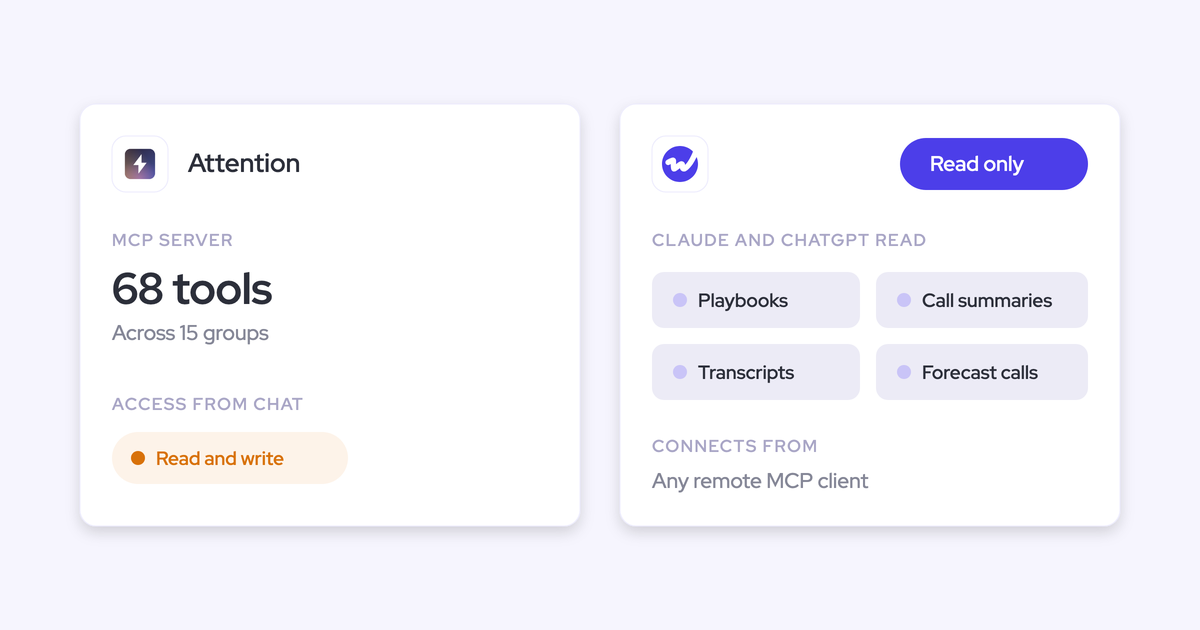

Weflow and Attention both offer an MCP server that Claude and ChatGPT can connect to, but they took opposite approaches.
- Attention's server is read-write: Its 68 tools let the assistant read raw transcripts, change scorecards and users, and hand questions to Attention's own Super Agent.
- Weflow's connector is read-only and narrow on purpose: It gives the assistant your calls, your playbook results and the submitted forecast next to live pipeline, under admin controls you can show your security team.
Because Weflow is built for Salesforce teams, everything Weflow Conversation Intelligence and our capture products produce is written into your Salesforce, where Salesforce's own MCP can read it.
Run both connectors side by side, and a single chat covers the record, the conversation and the forecast.
That's why tool count isn't the right test for your vendor matrix. What matters is which questions each connector can answer, and what you're comfortable letting an assistant do from a chat window. Most matrices we see now include a row that didn't exist a year ago:
MCP server or other means by which an external AI agent can query
Below, we fill in that row for both vendors, covering scope, governance, pricing and where Weflow falls short.
Weflow vs Attention on MCP, integrations, API and pricing
Here's the full comparison at a glance. The biggest differences are in MCP philosophy and whether each vendor publishes a price.
| Capability | Weflow | Attention |
|---|---|---|
| Access from AI assistants (MCP) | A read-only connector with six tools covering recordings, summaries, transcripts (when the admin allows), playbook results, org structure and forecast data, including the submitted forecast call next to live pipeline. An admin switches it on per workspace. The per-rep forecast breakdown is capped at 25 owners. It works with Claude, ChatGPT and any remote MCP client. | A read-write server with 68 tools across 15 groups, nine of them flagged destructive. It offers raw transcripts, full-text transcript search, server-side analysis across up to 25 calls or a whole deal, admin changes by chat and the Super Agent. It works with Claude, ChatGPT and IDE agents. |
| Integrations with other tools | Partial. Weflow connects natively to Salesforce, Gmail, Google Calendar, Outlook, Zoom, Microsoft Teams, Google Meet, Webex, Slack and the Outreach dialer. Weflow's team activates Aircall, CloudTalk, Dialpad and Zoom Phone. Weflow is Salesforce-only, isn't an integration platform, and has no native warehouse connector. | Google, Outlook and Zoom calendars, Zoom Phone and Aircall call imports, and two-way Slack. Workflow steps act inside Gmail, Google Sheets, Google Docs, Salesforce, HubSpot, Pipedrive, Notion, Snowflake and more, with more than 200 integrations claimed. |
| Raw data access outside the tool | A public API on every plan, with 11 read endpoints and an OpenAPI spec. Keys don't expire and admins revoke them in the Admin Console. It's polling only, with no webhooks, and data reaches warehouses through the API. | Raw transcripts, scorecards and insights leave over MCP and through API keys. Workflows push data to Snowflake or to any API through HTTP steps. Org-level keys carry full org access with no user binding. |
| Pricing | Published. Standalone products cost $19 to $39 per user per month, and bundles cost $49, $59 and $79. Billing is annual with a 10-user minimum, and there's no MCP usage charge. | Not published. Cost is a negotiated contract. MCP is rate-limited, with no consumption charge. |
Attention's MCP lets Claude act; Weflow's lets Claude read
Attention and Weflow made opposite bets on what an assistant should be allowed to do. Both are defensible; they just put the risk in different places.
Attention's bet is that the system that's easiest for an agent to reach and operate becomes the one agents use most. So it exposes almost everything:
- Raw transcripts
- The admin surface
- Its own autonomous agent
And it doesn't charge for the traffic. If you want Claude to run your conversation tool, that design makes a lot of sense.
We bet the other way. RevOps has to defend every connector in a security review, and a read-only feed is much easier to defend.
Our connector shares the conversation and the forecast but can't change anything, while the record itself stays in your Salesforce, where the Salesforce connector you may already run can read it.
| Design choice | Attention | Weflow |
|---|---|---|
| What the assistant may do | Read, write and configure, as a logged-in user would | Read only |
| Transcripts | Returned raw and full-text searchable | Returned per recording, only when the admin turns transcript access on |
| Where cross-call analysis runs | Server-side, in Attention's engine | In the assistant, over the data Weflow returns |
| Vendor agent exposed | The Super Agent, reachable over MCP | None; Ask Weflow AI stays inside Weflow |
| Where the CRM record is read | Calls filter by CRM fields; the record lives in your CRM | Salesforce's own MCP reads what Weflow wrote into Salesforce |
For your matrix, the key difference is this: with Attention, you're deciding what an assistant can change. With Weflow, you're deciding what it can see.
Which question goes to Weflow, Attention or Salesforce MCP
Weflow's connector answers questions about the conversation and the forecast, including the submitted forecast call against pipeline, which no Salesforce connector can see.
Salesforce MCP answers questions about the record: the emails, meetings and AI field updates Weflow writes there. Attention goes deeper on conversation questions than we do, thanks to full-text search and server-side analysis.
Here's where the questions your CRO is likely to ask Claude get answered:
| Question you'd ask Claude | Weflow connector | Attention MCP | Salesforce MCP |
|---|---|---|---|
| Are we forecasting above or below our own pipeline this quarter? | Get Forecast returns the latest submitted forecast call, the live pipeline total and the delta between them | Its forecasting tools create and edit forecast categories; a forecast call submitted in Weflow isn't data Attention holds | Reads opportunity amounts and stages, but not a forecast call submitted in Weflow |
| Which reps have the biggest gap to forecast? | Per-rep coverage ratio and gap to forecast for up to 25 owners, with the opportunity IDs behind them | Holds those reps' calls, not Weflow forecast targets or submissions | Opportunity amounts by owner; forecast targets live in Weflow, so the assistant has no target to measure against |
| What did the prospect say about pricing on Tuesday's call? | Get Recording returns the summary, plus the transcript when the admin allows it | get_call_details returns the raw transcript with scorecard results and AI insights | The transcript sits on the Weflow recording object in Salesforce; Weflow's connector is the more direct path |
| Find every call where a competitor came up | Returns tracker hits; there's no full-text transcript search | search_calls runs full-text search inside transcripts and returns who-said-what snippets | Reads records; it isn't a transcript search tool |
| Show me the email history with this account | Doesn't return email content | Its server is built around calls; the email record lives in your CRM | Reads the emails and meetings Weflow Activity & Contact Capture wrote into Salesforce |
| What's the current value of a field on this opportunity? | Doesn't return Salesforce field values | Filters calls by CRM field values, such as every call on opportunities at a given stage | Reads the field, including values written by Weflow's AI field updates |
| Which MEDDPICC elements are still open on this deal? | List Playbooks and Playbook Values return AI playbook results | Returns scorecard results that grade calls against MEDDIC, BANT or your own framework | Reads any MEDDPICC fields Weflow's AI field updates filled |
| Summarize what happened across every call on this deal | The assistant pulls each recording's summary and reasons over them in its own context | ask_attention analyzes up to 25 calls or the whole deal server-side and returns an answer with call references | Reads the call summaries Weflow writes into Salesforce, record by record |
| Prep me for tomorrow's meeting with this account | The assistant builds the briefing from recordings, summaries, playbook results and forecast data | The Super Agent can take the question and choose its own sources | Adds account, contact and opportunity context |
| Create a Discovery scorecard for the AE team | No. Scorecards and templates are configured in the Weflow Admin Console | Yes, for an admin holding the mcp:write scope | Not involved; scorecards aren't Salesforce records |
Connect Weflow's connector and Salesforce MCP to the same Claude workspace, and a single chat can answer questions about the record, the call and the forecast together.
That's the real benefit for teams tired of asking the same question in two tools and stitching the answers together by hand. We often hear it put like this:
If I want to question the state of a deal, all the information should be in one place, no matter how many activity capture or conversation recording tools I use.
What Claude and ChatGPT can read through Weflow's MCP connector
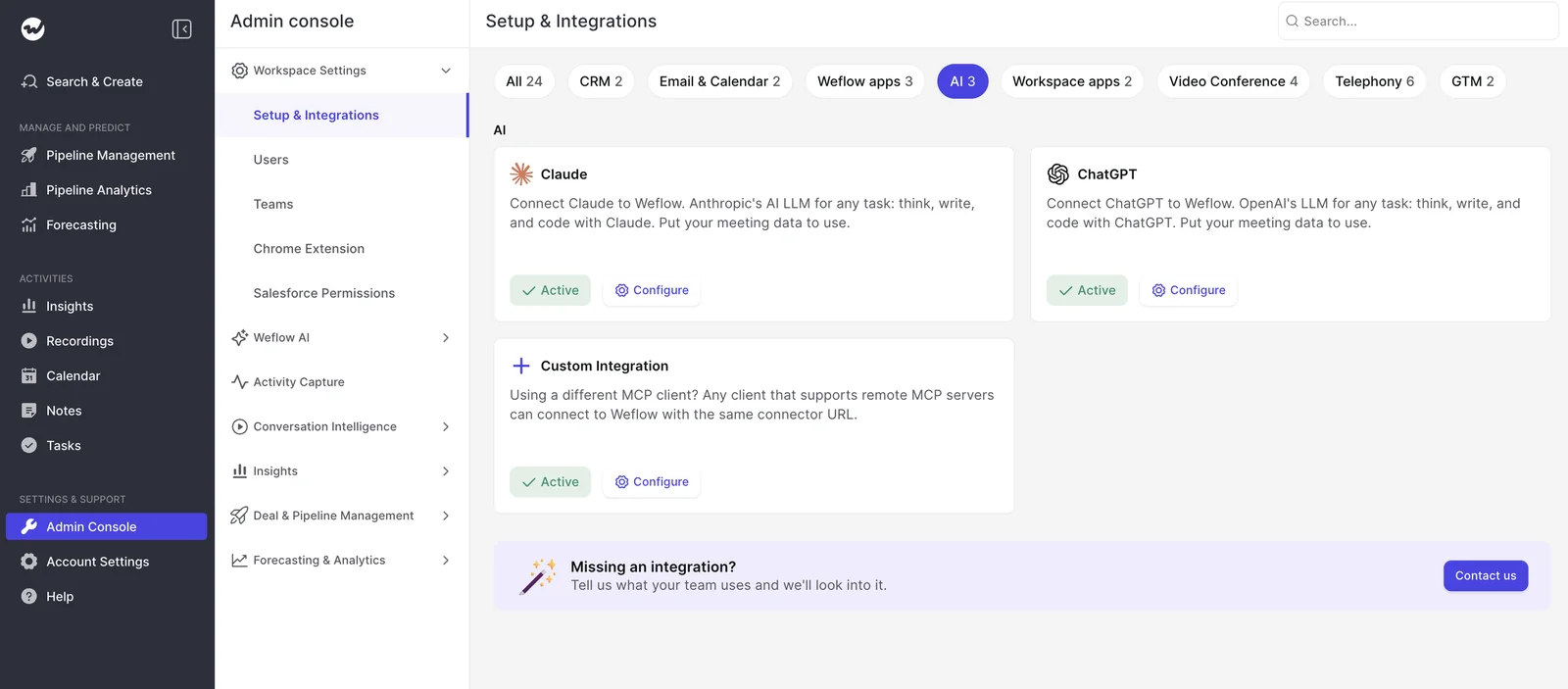
Every client connects to Weflow's MCP connector through the same URL, whether it's Claude, ChatGPT or anything else that supports remote MCP servers.
You'll find Claude, ChatGPT and Custom Integration cards side by side under AI in Setup & Integrations, so if your company has standardized on another assistant, it can reach the same data without a separate build.
Weflow returns recordings, summaries, transcripts and playbook results
The connector gives an assistant six read-only tools:
| Tool | What it returns |
|---|---|
| List Recordings | The recorded calls the connected user can see |
| Get Recording | One recording with its AI summary, plus the transcript when transcript access is on |
| List Playbooks | The AI Playbooks set up in your workspace |
| Playbook Values | AI Playbook results, such as methodology answers per deal |
| Get Org Structure | The Weflow hierarchy that scopes answers |
| Get Forecast | Forecast and pipeline metrics, covered in the next section |
Together, these tools return transcripts, summaries, tracker hits, coaching scores and playbook results. In Claude, each user can set every tool to Always allow, Ask or Block.
Every answer also respects the connected user's Weflow hierarchy (pulled from Salesforce or set up as a custom Weflow hierarchy), so a rep who can't see a teammate's recordings or forecast in Weflow can't reach them through Claude either.
Here's what the connector doesn't return:
- Email content captured by Weflow Activity & Contact Capture. That lives in Salesforce, where the Salesforce connector reads it.
- Values stored on Salesforce records, such as a field on the account or opportunity.
- Saved deal boards or pipeline views, so an assistant that needs the same slice has to rebuild the filter from the records.
- Weflow's meeting prep, which Weflow generates live on request. Instead, the assistant builds its own briefing from the same underlying data.
If you only run Weflow Activity & Contact Capture, our connector won't add much. Its value kicks in once you're recording calls.
Weflow returns your submitted forecast next to live pipeline
Claude can answer forecast questions your Salesforce connector can't. That's because Weflow keeps submitted forecasts in the Weflow application rather than in Salesforce fields, and Get Forecast returns them.
You set a close-date period and a scope of "me" or "team" on each request. For each rep in scope, Get Forecast returns:
- Pipeline value, weighted and unweighted
- Closed-won amount and count
- Total closed count and total opportunity count
- Win rate, average deal size and average contract value
- Average sales cycle length in days
- Coverage ratio and gap to forecast
- The opportunity IDs behind those numbers
Weflow computes these from your Weflow forecast configuration, not from your Salesforce forecast setup.
The most useful part is the forecast call itself. Get Forecast returns the most recently submitted call for the period, the live pipeline total and the delta between them. In other words, you see what the rep locked in next to what the data says now
That gap tells you whether the team is calling above or below its own pipeline. And if the result is null, nobody submitted for that period, which tells you something too.
There are two limits to keep in mind:
- The per-rep breakdown stops at 25 owners. Larger orgs get aggregate answers or can narrow the question to a single team.
- A team-scope request with no hierarchy configured resolves to every active user in the company, so set up the hierarchy before you point an assistant at it.
Which tools Weflow integrates with, and where it stops
Weflow connects to the systems your revenue data comes from and goes to, and that's where it stops. We're not an integration platform with a catalogue of connectors.
Weflow connects to:
- Salesforce, with real-time two-way sync that respects your validation rules, field dependencies and permission sets.
- Gmail, Google Calendar, Outlook and Microsoft calendars for email and meeting capture.
- Zoom, Microsoft Teams, Google Meet and Webex for recording.
- Slack, as a destination for agent reports, meeting summaries and forecast reminders.
- The Outreach dialer, which an admin connects directly in the Admin Console.
- Aircall, CloudTalk, Dialpad and Zoom Phone, once Weflow's support team activates them.
- Outreach and Salesloft sequences, through compatibility mode, so the same email isn't logged twice.
Weflow doesn't:
- Work with any CRM other than Salesforce.
- Capture Slack conversations into the deal record.
- Ship a native Snowflake, Databricks or BigQuery connector. Teams move data into warehouses through the API.
- Connect arbitrary business systems such as finance or ERP into Weflow's agents. For those workflows, our MCP connector and API feed revenue data into the platform you're assembling.
Your security team can build its own MCP on Weflow's API
If your security team won't enable a vendor-hosted connector, they can build their own MCP server inside your boundary on Weflow's public API, which comes with every Weflow plan. It's a request we hear on calls, often in almost these words:
We did not want to open that route. We want to do an MCP server in house so that we protect the data. I created an API key for the platform instead.
The API has 11 read endpoints:
- GET /recordings, with limit (1 to 100, default 20), cursor, startDate, endDate and sfEventId to find the recording linked to a Salesforce event
- GET /recordings/{uid}
- Per recording: /video, /comments, /clips, /interaction-metrics, /transcript, /scorecards, /trackers and /summary
- GET /summary-templates
Admins create keys in the API section of the Admin Console, where the key list shows each key's name, status, created date and last used date. Keys start with wfl_ and are passed as a Bearer token.
Since they don't expire, revoking one is a deliberate step an admin takes in the Admin Console.
The documentation and OpenAPI spec live at api.getweflow.app/api/v1/docs. The recordings endpoint returns every recorded, non-deleted call an admin can see, and allows 30 calls per minute per company.
The API is polling-only. Since Weflow doesn't send webhooks, a scheduled integration polls the recordings endpoint for new transcripts.
Warehouses get Weflow data through the API, already mapped to the right accounts, contacts and opportunities. Keep in mind that the API only reads data out; it doesn't accept ongoing recording uploads from other tools.
What Claude and ChatGPT can read and change through Attention
Attention runs the widest conversation-intelligence MCP surface we've seen, and its server (at api.attention.tech/mcp) is read-write.
An assistant connected to it can act on the workspace just like a logged-in user, across calls, AI analysis, snippets, teams, users and roles, settings, scorecards, labels, forecasting, CRM integrations, API keys, usage reports and the Super Agent.
Attention returns raw transcripts and analyses up to 25 calls
Attention gives an assistant the source text, which is what an external agent needs to reason from evidence rather than from a summary. Here are three things it does that our connector doesn't:
- Raw transcripts: get_call_details returns a call's transcript with its scorecard results and AI insights.
- Full-text transcript search: search_calls searches inside transcripts and returns matching snippets showing who said what.
- Server-side cross-call analysis: ask_attention analyzes up to 25 calls in one request, or every call on a deal, and returns a Markdown answer with references back to specific calls. Because the analysis runs on Attention's side, it doesn't use up the assistant's own context window.
Call search also filters by date, rep, team, title, external participant email, CRM opportunity ID and CRM field values, returning up to 50 calls per page.
The one catch is that transcript search can't be combined with the CRM, rep, participant or title filters, so the assistant runs it as a separate search and cross-references the results.
Attention's 68 tools let an assistant write, configure and delegate
Attention's 68 tools span 15 groups, and an admin can reconfigure much of the workspace by asking an assistant in plain language. For example, Attention's own sample prompt creates a Discovery scorecard with three criteria on a 1 to 5 scale for the AE team.
Through the assistant, an admin can:
- Create and edit scorecards, criteria, weights and score ranges.
- Create, rename, reparent and archive teams.
- Invite, update, deactivate and reactivate users, and assign roles.
- Create and delete labels and forecast categories.
- Create, update and force-sync CRM integrations.
- Manage intelligence prompt collections.
- Create and revoke API keys.
- Send questions to the Super Agent, which picks its own sources across search, CRM and integrations and takes as many steps as it needs.
Nine tools are flagged destructive, including:
- Deleting a user
- Archiving a team
- Deleting a label or a scorecard criterion
- Deleting an intelligence collection or item
- Revoking an API key
- Disconnecting a CRM account
- Deleting a Super Agent session
Mutating tools require the mcp: write scope, and most also require the admin role. Some tools, including inviting or deleting a user and every Super Agent tool, can't be called with an org-level API key at all.
Attention's workflows act inside Gmail, HubSpot, Notion and Snowflake
Attention reaches much further into the rest of your stack than Weflow does, and that's a real strength if your workflows end in tools outside the CRM.
Recording and calendar connections:
- Google, Outlook and Zoom calendars, linked by each user.
- Zoom Phone, where Zoom records the call and Attention imports the audio afterwards.
- Aircall, which syncs recordings, transcripts and call metadata.
Slack works both ways: workflows post summaries and alerts into channels, and people can tag @Attention to ask its agents a question.
Workflow destinations, where steps act directly inside the tool:
- Gmail, Google Sheets and Google Docs
- Salesforce, HubSpot, Pipedrive and Zoho
- Asana, Airtable, Notion and Linear
- Snowflake
Attention claims more than 200 integrations in total. Below is Attention's Builder canvas with its pre-built Slack summary template, showing the trigger-plus-chained-steps structure every Attention workflow follows.
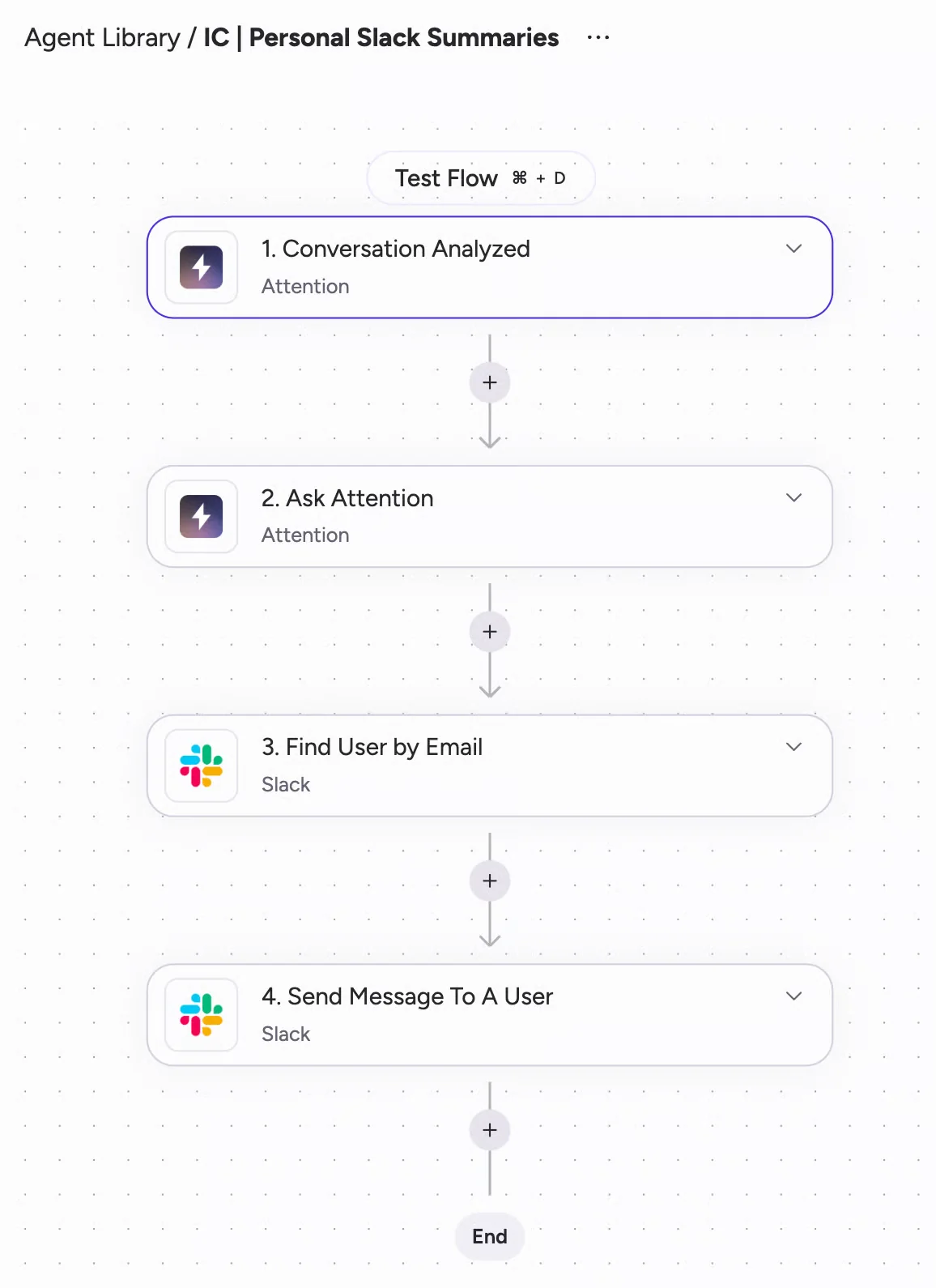
The builder also includes programming steps (routers, loops, storage, an HTTP request step and a custom code step in Node.js and TypeScript), which makes it a general-purpose automation tool.
Just keep in mind that a workflow with code in it is software, and someone on your team will need to maintain it.
Attention hands out raw data through API keys and HTTP steps
Data can leave Attention in three ways:
- Raw transcripts, scorecards and insights over MCP.
- The same data through API keys.
- Workflows that push to Snowflake or to any API through an HTTP request step.
Attention's API also imports conversations from another recorder, with Gong and Salesforce named as example sources.
Authentication runs on OAuth 2.1 with dynamic client registration for people, and API key JWTs for programmatic use. Tokens are shown once at creation and can't be recovered. The two key types behave differently:
- User-level keys inherit that user's roles and team memberships.
- Org-level keys carry full organization access with no user binding, which is what backend integrations use.
How admins govern Weflow and Attention MCP access
Weflow puts MCP access behind admin controls you can show your security team.
An admin turns the connector on per workspace and separately decides whether assistants can see transcripts, while a Connected users table shows who attached an assistant and when they last used it.
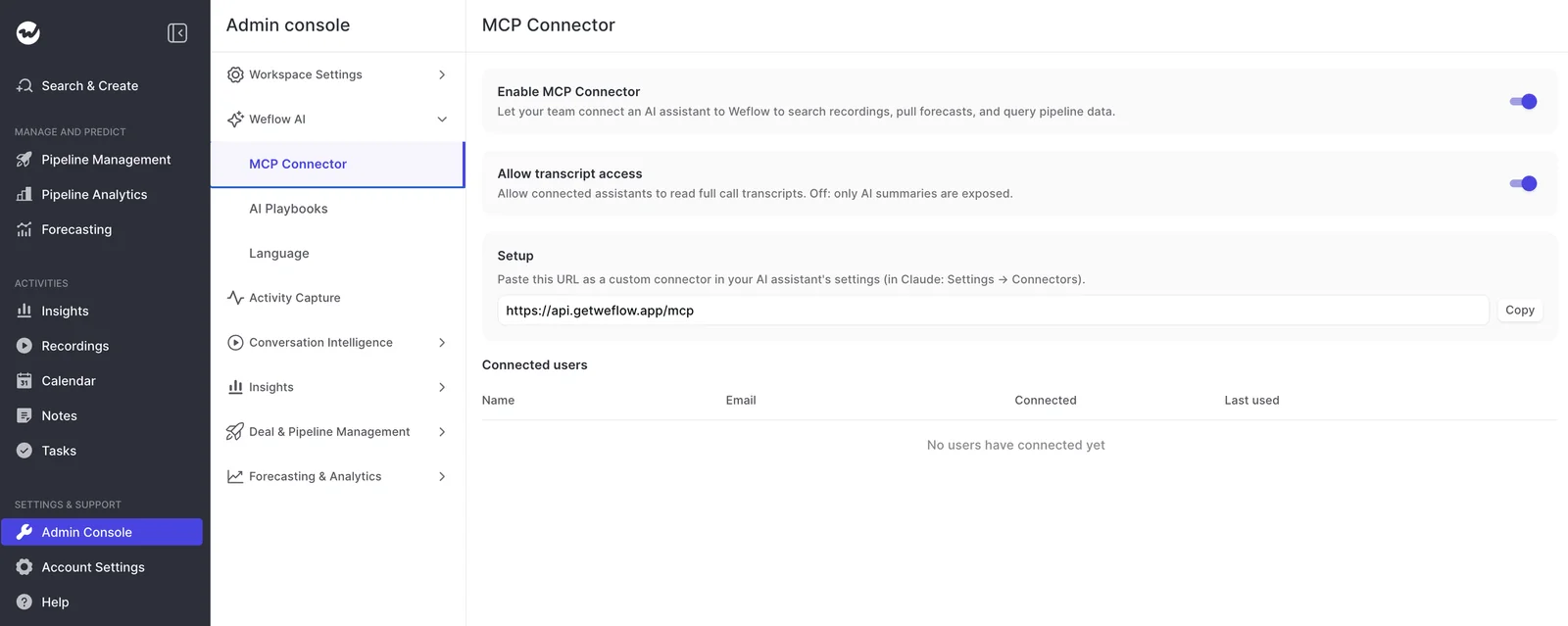
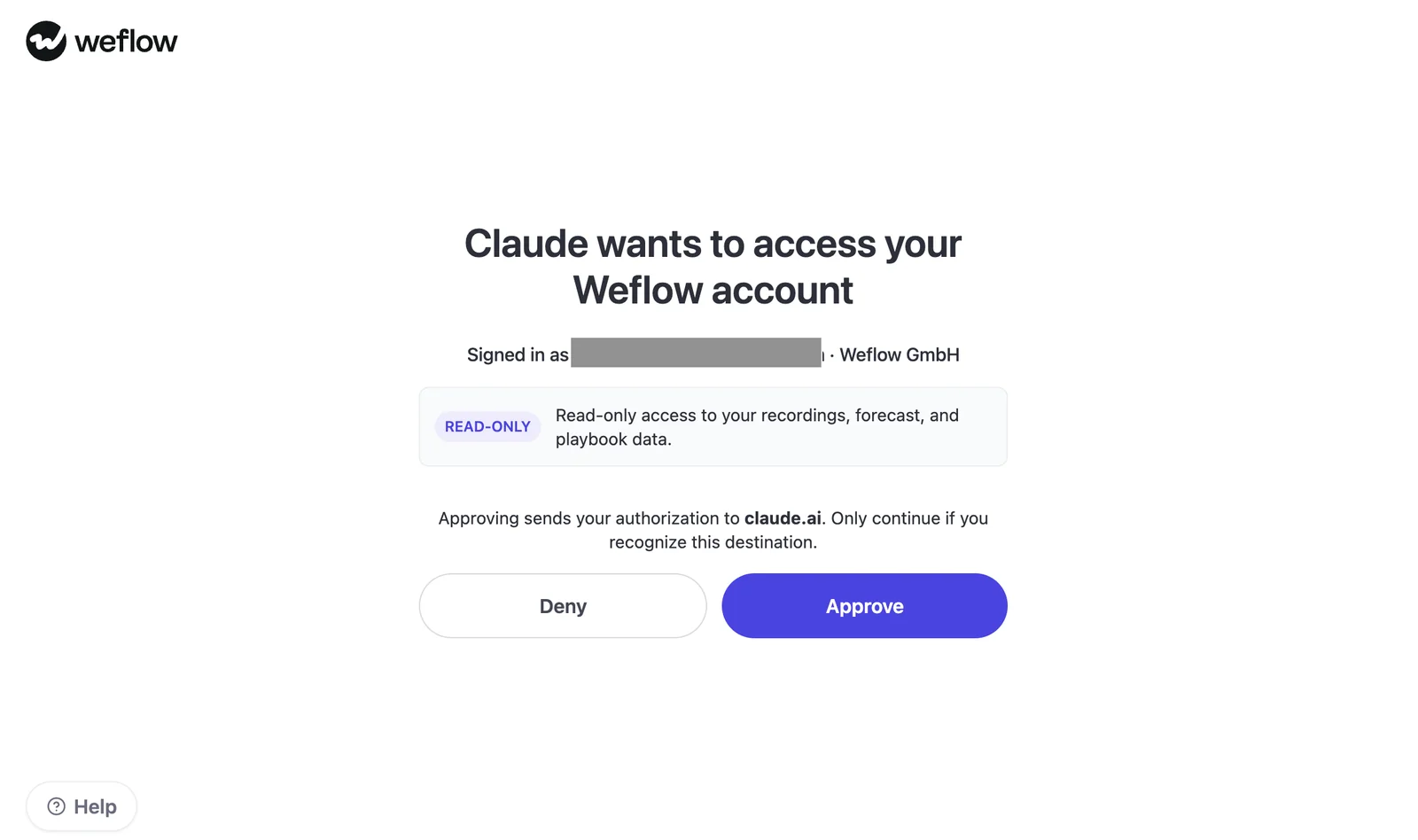
Each user then signs in and approves access themselves on a Weflow consent screen that shows their name, the company and a READ-ONLY badge.
Attention enforces per-user permissions server-side, and does it well, but it leaves more of the governance to you through write scopes and org-level keys. Here's how the two compare, control by control.
| Control | Weflow | Attention |
|---|---|---|
| Workspace enablement | An admin switches Enable MCP Connector on or off for the workspace | The connector is available on every Attention plan; users add it in their client, and on Claude Team and Enterprise the Claude org owner adds it first |
| Transcript exposure | A separate Allow transcript access switch; with it off, assistants see AI summaries and never the verbatim transcript | Raw transcripts are part of what get_call_details and search_calls return |
| Consent shown to the user | A Weflow consent screen with a READ-ONLY badge, naming the user, the company and the assistant's domain, with Approve or Deny | OAuth 2.1 sign-in per person |
| Audit of connected users | A Connected users table with name, email, connected date and last used date | A per-user usage report, callable only with an org-level API key |
| Write or destructive actions reachable | None; the connector can't write or configure anything | 68 read-write tools, nine flagged destructive, gated by the mcp:write scope and mostly the admin role |
| Authentication and key types | Per-user OAuth for MCP; admin-created API keys (wfl_, Bearer) that don't expire | OAuth 2.1 for people; user-level keys that inherit roles; org-level keys with full org access and no user binding |
| Permission scoping | Follows the Weflow hierarchy, from Salesforce or custom; team scope with no hierarchy resolves to every active user | Every call runs under the caller's identity with permissions enforced server-side, except org-level keys |
| Salesforce connection | Inherits Salesforce permission sets, field-level security and role hierarchy | The connecting user needs Modify All Data, which overrides sharing rules |
| Revocation | Switch the connector off for the workspace; revoke API keys in the Admin Console | Disconnecting the connector invalidates access and refresh tokens server-side; or delete the key |
| Rate limiting | 60 requests per user and 600 per company per minute, 10 new connector setups per hour per network, every limit hit logged | Per-second, per-hour and per-day windows; the server fails open if the rate limiter is unavailable |
| Certifications and AI training | SOC 2 Type II, GDPR, Zero Data Retention for AI processing, customer data never used to train models | SOC 2 Type II (Security, Confidentiality, Availability), HIPAA with a BAA, user data not used for training |
Weflow also protects the AI endpoints themselves: we separate system instructions from customer data, sanitize inputs and only let the model return structured results that can't run actions. Those endpoints are also covered by our annual third-party penetration test.
Put simply, nothing reachable through Weflow's connector can change your workspace, and the one sensitive choice (transcripts) is a switch an admin controls.
Attention's controls are solid, but its design asks you to govern write scopes, admin roles and org-level keys that carry full access with no user attached.
That matters because CRM connectors to chat assistants have already been compromised and switched off at management level, and when that happens, security will ask what the assistant could do, not just what it could read.
Where Attention is the stronger choice for your team
If you want the assistant to act inside your conversation tool, Attention is the stronger choice. We'd rather tell you that upfront than have you find out during a trial.
Here's where Attention does better:
- It lets an admin configure scorecards, teams, users, CRM integrations and API keys from a chat window.
- It returns raw transcripts and runs full-text search across them, with who-said-what snippets.
- It analyzes up to 25 calls, or a whole deal, server-side in one request.
- It exposes its own Super Agent over MCP for multi-step questions.
- Its workflow builder reaches Gmail, Google Sheets, HubSpot, Notion, Snowflake and more, with HTTP and custom code steps.
- Its Slack integration lets people tag @Attention and get answers in the channel.
And here's where Weflow falls short:
- Our connector can't write or configure anything, in Weflow or in Salesforce.
- It returns no email content or Salesforce field values; those come through Salesforce MCP.
- There's no full-text transcript search over MCP.
- The per-rep forecast breakdown stops at 25 owners.
- Submitted forecast numbers aren't written back to a Salesforce field today.
- The API sends no webhooks, so integrations have to poll.
- There's no native warehouse connector; data moves through the API.
- Weflow works only with Salesforce.
What Weflow and Attention cost, and how MCP usage is billed
Weflow publishes per-seat prices with no MCP usage charge. Attention publishes no price, and both vendors limit MCP by rate, not by consumption.
Weflow publishes per-seat prices with MCP usage included
Weflow's prices are listed on our website, per user per month and billed annually.
| Product or bundle | Price per user per month |
|---|---|
| Weflow Activity & Contact Capture | $19 |
| Weflow Conversation Intelligence | $39 |
| Weflow Deal Intelligence & Forecasting | $39 |
| Revenue AI Foundation (Activity & Contact Capture + Conversation Intelligence) | $49 |
| Revenue AI Business (Foundation + Deal Intelligence) | $59 |
| Revenue AI Enterprise (all Weflow products, including Forecasting) | $79 |
Terms:
- 10-user minimum per product or bundle.
- Annual billing on a 12-month term, the shortest we offer.
- Bundle, volume and multi-year discounts on top of list price.
- No platform fees and no implementation fees.
What's included vs metered:
- Ask Weflow AI Pro is included in every plan.
- Agent Builder Free, with 25 agent actions per month, is included in every plan.
- The MCP connector and the API carry no usage charge; only rate limits apply.
- Recordings, transcripts, AI templates and Ask Weflow AI prompts have no usage caps.
- Agent Builder's paid tiers are the only consumption-priced item, per workspace: Growth at $299 a month for 500 actions, Scale at $999 a month for 2,500 actions, and a custom Enterprise package.
The Revenue AI Enterprise bundle is the one that includes the forecast data Get Forecast returns, so if comparing submitted calls with pipeline is why you're connecting Claude, that's the bundle to price.
Attention publishes no price and limits MCP by rate
Attention doesn't publish pricing. Costs are set in a negotiated contract, and pricing questions are routed to a demo booking.
To Attention's credit, its MCP server has no credits and no metered AI consumption. Usage is governed by rate limits, and organizations can request custom limits through Attention support.
Since there's no rate card, it's worth getting these in writing from Attention before you score the row:
- The per-seat price at your seat count, and the contract term.
- Whether workflow and Super Agent usage ever carries a charge.
- The default MCP rate limits for your organization.
Choose Weflow or Attention based on what the assistant may do
Both connectors work with Claude and ChatGPT, so the choice comes down to what you want the assistant to be allowed to do.
Choose Weflow if:
- You want Claude or ChatGPT to read calls, playbook results and the submitted forecast against live pipeline.
- You need read-only access you can defend in a security review, with a workspace switch, a transcript toggle and a connected-users audit.
- You want answers scoped to each user's hierarchy, so nobody reaches a teammate's data through the assistant.
- You want your data to stay in your Salesforce, read by the Salesforce connector you already run.
- You need a published per-seat price your finance team can approve without metered surprises.
Choose Attention if:
- You want the assistant to operate the conversation tool, from scorecards to teams to users.
- You need full-text search across raw transcripts from inside Claude.
- You want server-side analysis across a deal's calls and a vendor agent that runs multi-step questions.
- Your workflows end in Gmail, Sheets, Notion, HubSpot or Snowflake, and someone on the team maintains them.
- Your org is set up to govern write scopes, admin roles and org-level keys.
See how Weflow captures activity, updates Salesforce fields from calls, and rolls up your forecast. Book a 30-minute demo.
Weflow vs Attention MCP access: FAQs RevOps teams ask
Do I still need Salesforce's MCP server alongside Weflow's connector?
Yes, if you want emails, meetings and field values in the same chat.
Weflow writes those into Salesforce, where Salesforce's MCP reads them, while Weflow's connector covers what never reaches Salesforce: submitted forecasts, targets and tracker hits, plus recordings and playbook results.
Can Claude search inside Weflow transcripts or only fetch recordings?
Claude can fetch Weflow recordings and read their summaries, plus full transcripts when the admin has Allow transcript access switched on. Weflow's connector doesn't offer full-text search across transcripts, though Attention's MCP server does.
Can Claude update Salesforce fields or Weflow templates through the connector?
No. Both the MCP connector and the public API only read data out of Weflow. Admins edit the prompts behind summaries, AI field updates and scorecards in the Weflow Admin Console, usually with our team during guided setup.
From there, AI field updates write into Salesforce from every recorded call.
How do I restrict transcript access and revoke a connected user?
Weflow admins control transcripts with the Allow transcript access switch in Admin Console > Weflow AI > MCP Connector. With it off, assistants only see AI summaries.
The same page lists every connected user, and switching Enable MCP Connector off shuts the endpoint for the whole workspace.
What are the rate limits on the Weflow and Attention MCP servers?
Weflow's MCP connector allows 60 requests per minute per user, 600 per minute per company and 10 new connector setups per hour from one network. If you go over, the assistant gets a try-again message, and access comes back within a minute.
Attention uses per-second, per-hour and per-day windows and returns a 429 error naming the window that tripped.
What do I get in Claude that I don't get in Ask Weflow AI?
In Claude, you can combine Weflow data with every other connector your company has added, such as Salesforce MCP, signals tools or your knowledge base.
Ask Weflow AI works the other way around: it reads captured email, Salesforce records and the public web, and can take a deal board, deal or meeting directly as context, but it doesn't reach your other knowledge systems.
Can people without a Weflow seat receive agent output?
Yes. Weflow's view-only seats are free (capped at the number of recording licenses you hold), and view-only users receive the reports Weflow agents send.
Each result includes a link back into Ask Weflow AI, so recipients can ask follow-up questions against the same data.
Can Weflow bring over our recordings if we already run Attention?
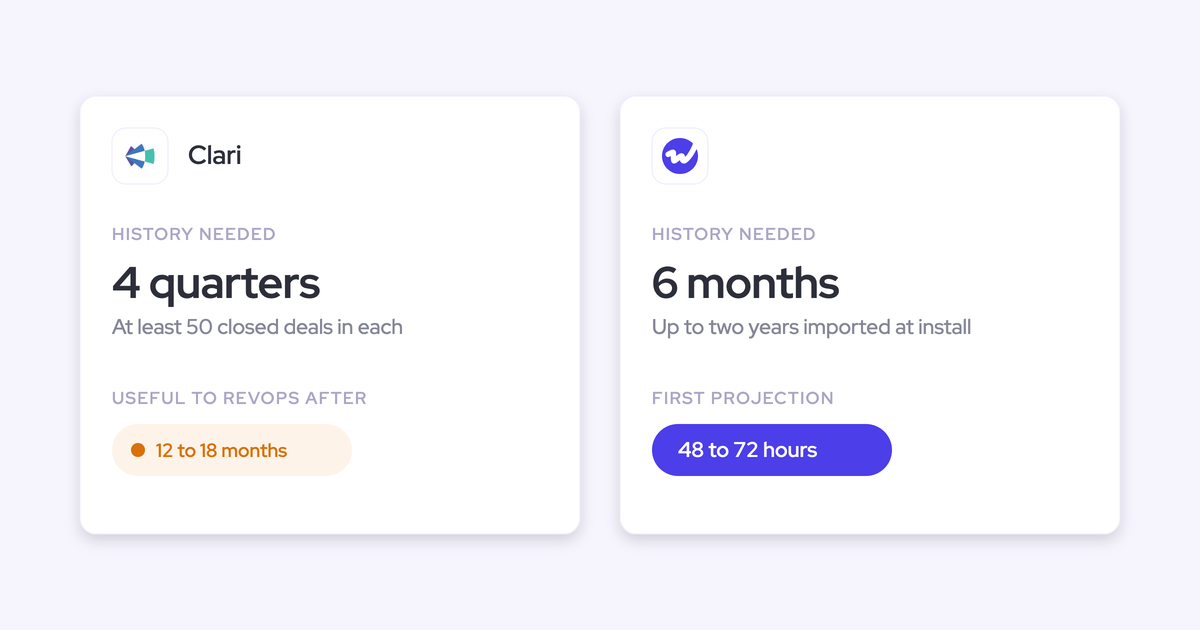
Yes. Our team handles the import of historic recordings from other conversation tools, just as we do for teams coming from Gong and Clari.
Since the public API doesn't accept ongoing uploads, it's a one-off migration, and from go-live, Weflow records meetings itself with its notetaker or desktop app.
Which AI assistants and Claude plans work with each connector?
Weflow's connector works with Claude, ChatGPT and any client that supports remote MCP servers, all using https://api.getweflow.app/mcp.
Attention's server works with Claude on Pro, Max, Team and Enterprise, plus ChatGPT and IDE agents, though on Claude Team and Enterprise, the Claude organization owner has to add the Attention connector before users can connect.
Is Claude plus Salesforce MCP plus Google transcripts enough on its own?
That setup can reach whatever landed in Salesforce and whatever your conferencing tool transcribed. It's a question that comes up in almost every technical evaluation:
What could we build ourselves versus what Weflow offers, as opposed to just using Google transcripts and Claude connected with Salesforce and updating fields that way.
Here's what the DIY route misses:
- A forecast submission process and the submitted calls it produces.
- Methodology playbook results.
- Reliable capture mapped to the right opportunity. Anything capture failed to write is invisible to the assistant.
- Someone other than your team to maintain it.