Weflow vs Attention for EU Data Residency and AI Data Handling (2026)
Decide Weflow vs Attention for EU data residency, AI data handling, and conversation data storage.


Weflow is the Revenue AI Orchestration platform for sales, customer success, and RevOps teams. Because we build it for Salesforce teams, our residency answer starts there.
By default, Weflow stores your data in your Salesforce instance's region, and you can switch to Frankfurt, New York or Sydney instead.
With Weflow Conversation Intelligence, transcripts and call outputs land in your own Salesforce org, while recordings sit in AWS in the region you chose. No AI assistant reaches the data until an admin switches the connector on.
Attention runs an EU instance, but its privacy policy says customer data is stored in the US, and Attention doesn't publish how a customer gets placed on the EU instance.
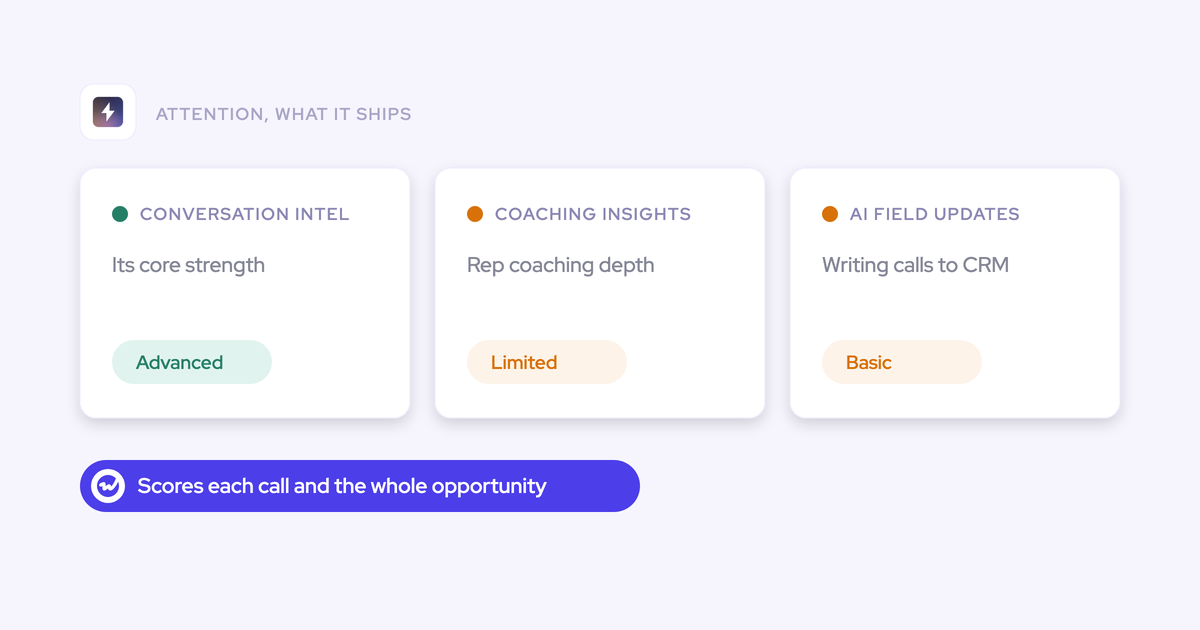
Its defaults also lean open, and it gives AI agents the widest read-write reach we've seen in conversation intelligence.
Below, we put both sets of answers side by side and give Attention credit where it's ahead. Where something isn't documented, you'll find the exact question to send in writing.
Weflow vs Attention at a glance for EU data handling
The biggest differences come down to three things: how the storage region is chosen, how far an AI assistant can reach, and whether you have a price for the business case.
| Capability | Weflow | Attention |
|---|---|---|
| Data residency | Follows your Salesforce region by default. EU (Frankfurt), US (New York) or Australia (Sydney) selectable. Documented in the trust center FAQ. | An EU instance exists on its own API host. The privacy policy says US storage. How a customer is placed on the EU instance isn't published. |
| Integrations with other tools | Native with Salesforce, Gmail, Google Calendar, Outlook, Zoom, Teams, Meet, Webex, Slack and dialers such as Outreach. No connector catalogue, no native Snowflake, Databricks or BigQuery connector. | Claims more than 200 integrations. Slack both ways, plus workflow steps into Gmail, Sheets, Docs, Salesforce, HubSpot, Notion, Snowflake and more. The Salesforce connection needs Modify All Data. |
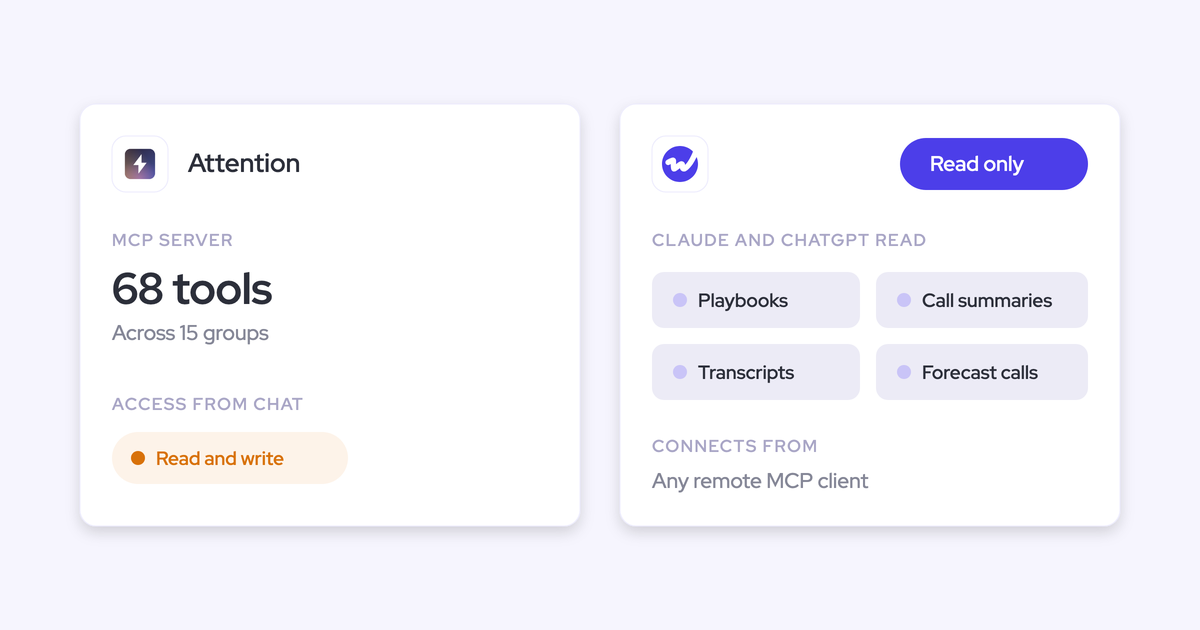
| Access from AI assistants (MCP) | Official read-only connector with six tools. Off until an admin enables it per workspace. A separate toggle decides between full transcripts and summaries only. | Read-write server with 68 tools across 15 groups, nine flagged destructive. Returns raw transcripts. Org-level API keys carry full org access with no user binding. |
| Raw data access outside the tool | REST API in every plan exports transcripts, summaries, scorecards and trackers as JSON or CSV. Video exports to your own storage. Warehouse delivery runs through the API. | Raw transcripts through MCP and API keys. Workflows push data to Snowflake or any API through an HTTP step. Snippet links default to public, and MP4 download is available. |
| Pricing | Published per seat: $19 to $39 per product, bundles at $49, $59 and $79. 10-user minimum, billed annually. | Not published. Quote only. MCP usage is rate-limited, not charged. |
Legal will also look at two more things: how each vendor's AI processes the data, and what meeting participants see. We cover both further down.
Why legal decides between Weflow and Attention, not sales
Conversation intelligence records every customer conversation your company has. That makes it the riskiest data in your revenue stack, which is why security and legal, not sales, end up making the call.
And legal won't settle for a certification pack. They want to know how things work day to day. As one buyer put it:
If I get a request, practically speaking, what do I need to do and how does the system work? How do I address someone's request to remove their data, where do I see the consent logs, where do I see my retention periods?
That request boils down to three questions:
- Where it sits: In which region is the data stored, and how is that region chosen?
- Where it's processed: Which AI providers touch it, and does any of them train on it or keep it?
- Where it can go: Which shared links, assistants, API keys and workflows can move it out?
A vendor that answers "EU data center" has answered only the first one. Gong is open about this gap: new customers can choose EU storage, but Gong still processes data in the US, Israel and Ireland.
Every question legal can't close sends the review back a step, so we'll cover all three for both vendors.
How Weflow handles residency, integrations and AI access
On all four points, our answers are settings you control, written down in the trust center, and closed until someone opens them.
Weflow stores your data in your Salesforce region by default
By default, Weflow stores your data in the same region as your Salesforce instance, so if your org is hosted in Europe, your Weflow data stays in Europe.
You can also choose EU (Frankfurt), US (New York) or Australia (Sydney) instead. Our trust center FAQ documents both the default and the options.
For your DPIA, that means you aren't justifying a new location. You're pointing at a region legal already approved for the CRM.
Weflow is a German company. That tells you who you're dealing with. It isn't a compliance argument on its own.
Here's where each type of data lives:
| Data | Where it lives |
|---|---|
| CRM data, captured emails, meetings and contacts | Your own Salesforce org |
| Weflow fields written to Salesforce | Your own Salesforce org |
| Transcripts and summaries on the Weflow recording object | Your own Salesforce org |
| Recordings and video | Weflow's AWS environment in your chosen region, streamed back to you rather than stored in Salesforce |
| Transcripts and Weflow-native fields held outside Salesforce | Weflow's AWS environment in your chosen region |
| Forecast calls, submissions, targets and tracker hits | The Weflow application, in AWS in your chosen region |
| Temporary processing data | Weflow's AWS environment, deleted after processing |
In AWS, every record is scoped to your workspace ID and access is enforced at the application layer. Data is encrypted with TLS 1.2+ in transit and AES-256 at rest. These segregation controls sit inside our SOC 2 Type II audit scope.
There's one more detail your exit review will care about: transcripts on the recording object are Salesforce records, so they stay in your org after your subscription ends.
Weflow integrates deeply with Salesforce, not with every tool
We focus on Salesforce and the tools around a sales conversation rather than a long catalogue of connectors. Here's what's native:
Our native integrations:
- CRM: Salesforce only, through a bi-directional, real-time API sync that respects validation rules, field dependencies and permissions.
- Email and calendar: Gmail, Google Calendar and Outlook.
- Meetings: Zoom, Microsoft Teams, Google Meet and Webex.
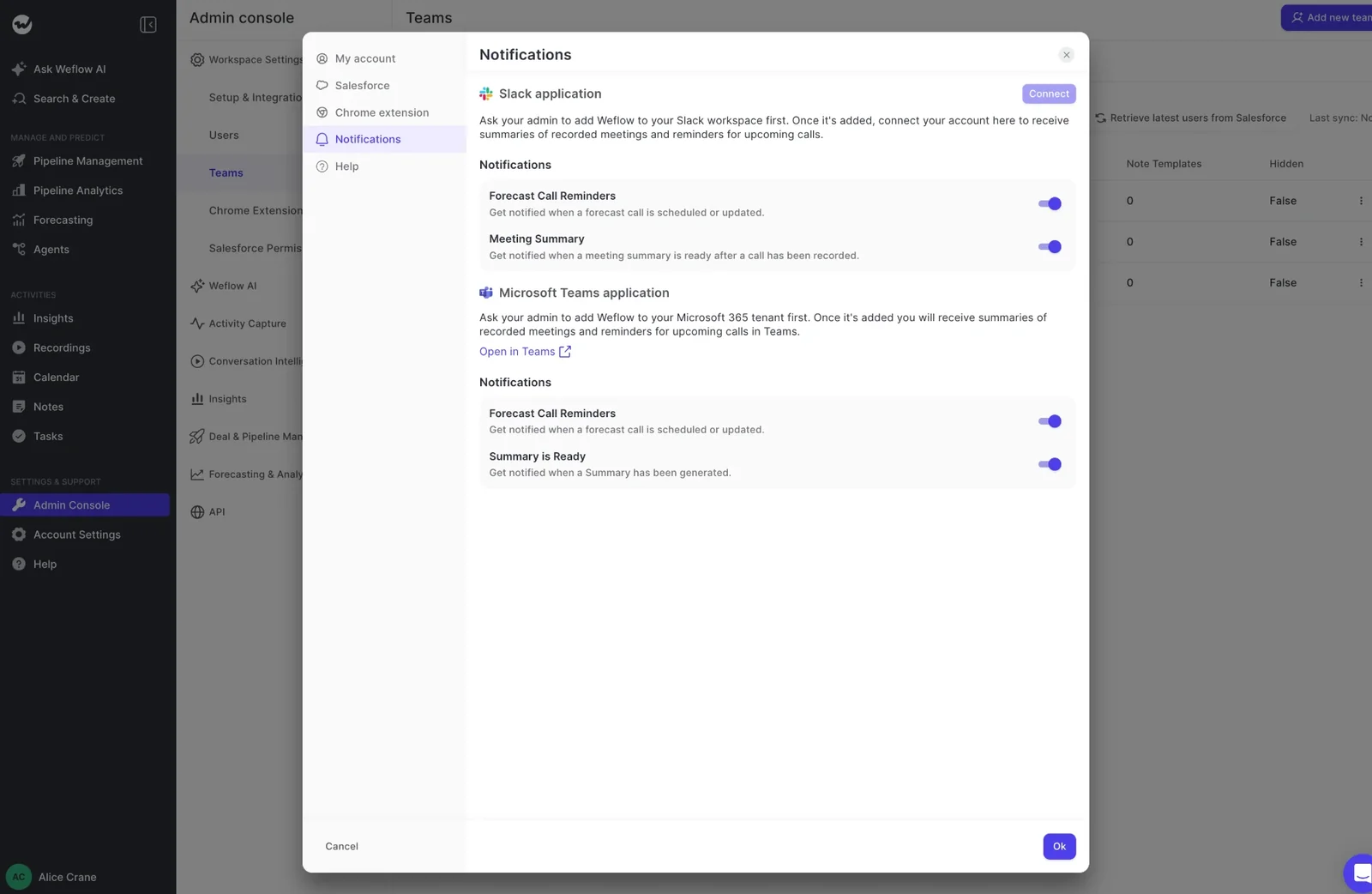
- Messaging: Slack and Microsoft Teams, where Weflow sends meeting summaries and forecast call reminders.
- Dialers: Outreach, connected by your admin, and Aircall, CloudTalk, Dialpad and Zoom Phone, activated by our support team.
There's no native Snowflake, Databricks or BigQuery connector, so teams that centralize go-to-market data in a warehouse move it there through our API.
For legal, a shorter list means fewer processing paths to map. It also means less reach, and that's one area where Attention is ahead.
Your Microsoft admin will want to know this: assigning a group to Weflow's Entra app only limits which mailboxes Weflow reads if the app's Assignment required property is set to Yes. If it's set to No, Weflow can still subscribe to mailboxes outside that group.
Weflow's read-only MCP connector stays off until an admin enables it
This matters most for legal, because a connected assistant is the one egress path nobody else in the company has reviewed.
- The connector has six read-only tools: Get Forecast, Get Org Structure, Get Recording, List Playbooks, List Recordings and Playbook Values. None of them writes or deletes.
- An admin enables the connector per workspace in the admin console.
- A separate Allow transcript access toggle decides whether assistants read full transcripts or only AI summaries.
- The admin console lists every connected user with their email and the date they connected.
- The connector follows the Weflow visibility hierarchy, so a user who can't see a teammate's recordings or forecast in Weflow can't reach them through an assistant either.
- It doesn't return captured email content or Salesforce field values. Those stay behind your Salesforce connector.
- Per-rep forecast breakdowns cap at 25 owners.
- It works with Claude, ChatGPT and any client that supports remote MCP servers.
Before anyone connects, check one setting: team scope follows your reporting hierarchy, and if no hierarchy is configured, it resolves to every active user in the company.
Weflow's public API exports transcripts and recordings to your systems
Every plan includes our public REST API, which is how data leaves Weflow on purpose. Your admin generates API keys in the Admin Console, and each request authenticates with a Bearer token.
The API returns:
- Recordings, transcripts and summaries
- Scorecards, trackers, comments, clips and interaction metrics
- Video URLs, so video exports to your own cloud storage
- Bulk exports as JSON or CSV for BI tools such as Tableau and Looker, or for a warehouse
The API reads data out of Weflow. It doesn't accept ongoing uploads of recordings, and warehouse delivery runs through it rather than through a native connector.
An exportable audit log also records field write-backs and configuration changes, so your compliance team can see what changed and when.
How Attention handles residency, integrations and AI access
Attention is built for flow and reach. That's a real strength, but it also widens what your review has to cover.
Attention runs an EU instance, but its privacy policy says US
Attention runs a separate EU instance for EU-hosted organizations. Its SCIM documentation lists an EU API host, api.eu-a.attention.tech, next to the default api.attention.tech.
Its privacy policy, however, says it stores customer data in the United States using third-party storage providers, with Stripe handling payment data.
How a customer gets placed on the EU instance isn't published. Attention's docs tell admins who aren't sure which instance applies to ask their Attention point of contact.
So the EU instance exists, but legal can't write the placement into a DPIA based on public documentation alone.
Ask Attention: How is our organization placed on the EU instance? Is that placement written into the contract? Which data stays there? Can an existing US-hosted org move?
Attention connects conversation data to far more tools than Weflow
If you want conversation data to drive work across your whole stack, this is the reason to choose Attention.
- Slack, both ways: Workflows post summaries, transcripts and alerts into channels, and people tag @Attention to get answers from its agents.
- Workflow steps inside other tools: Gmail, Google Sheets, Google Docs, Salesforce, HubSpot, Pipedrive, Zoho, Asana, Airtable, Notion, Linear and Snowflake.
- Phone calls: Imports from Zoom Phone and Aircall.
- Calendars: Google, Outlook and Zoom, linked by each user.
- General-purpose steps: HTTP requests to any API, custom Node.js and TypeScript code, and direct calls to OpenAI, Anthropic and Perplexity.
- Total: Attention claims more than 200 integrations.
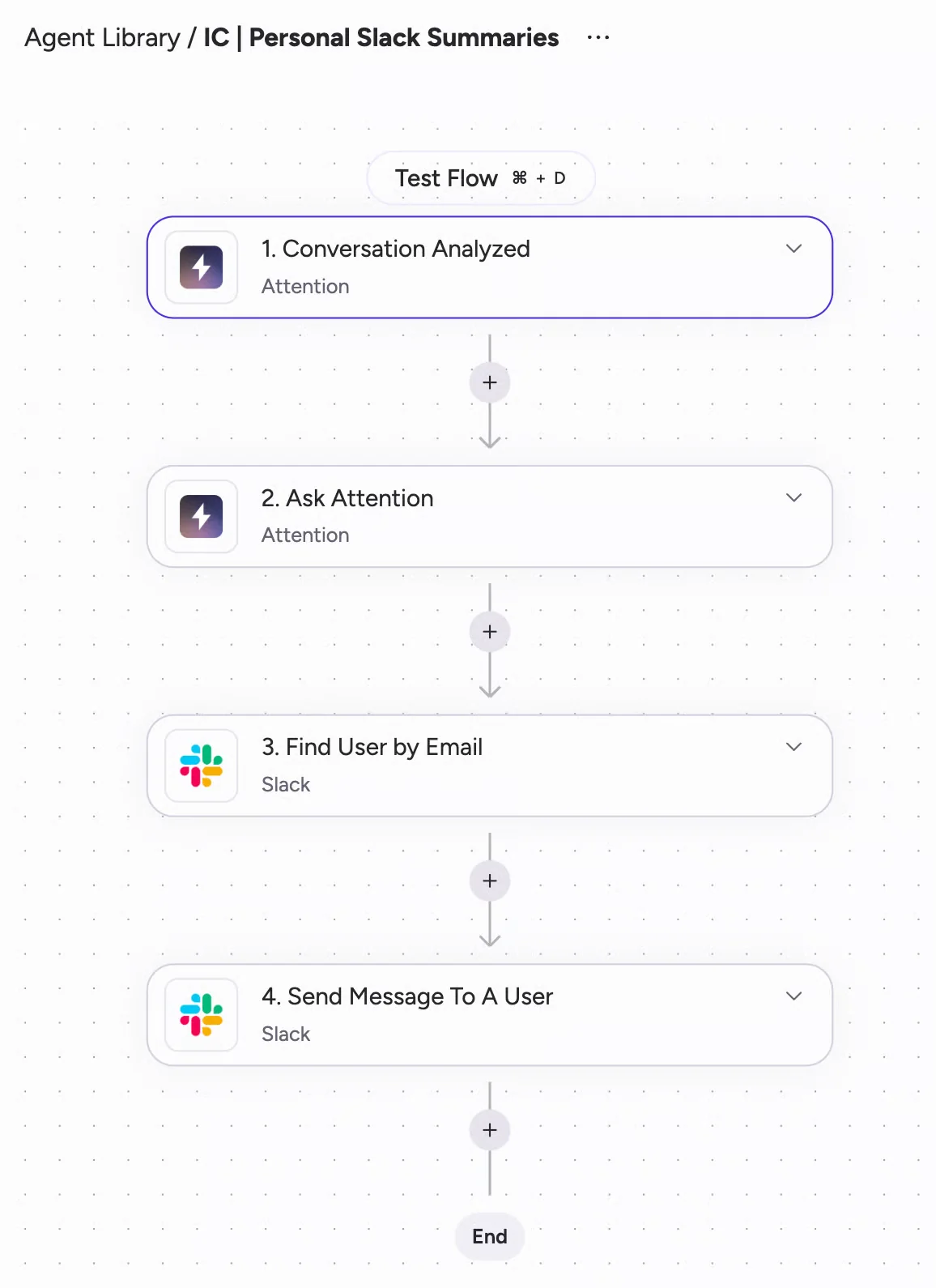
For your review, though, every destination is another processing path. A workflow step that calls OpenAI sends call data to OpenAI, so that provider belongs in your sub-processor mapping too.
The Salesforce connection also requires the connecting user to hold Modify All Data, a permission that overrides sharing rules and every object-level and record-level permission.
Attention's MCP server gives assistants read-write access across 68 tools
Attention has made itself the most agent-accessible conversation store in the category. If you want assistants reasoning over raw calls and acting on the workspace, no other tool here gives you more.
The flip side is more exposure:
- 68 read-write tools across 15 groups, nine of them flagged destructive, including deleting a user, revoking an API key and disconnecting a CRM account.
- Raw transcripts returned, plus full-text search inside them.
- ask_attention runs AI analysis across up to 25 calls in one request, or across every call on a deal.
- Access to Attention's Super Agent, which decides which sources to query across search, CRM and integrations.
- Rate limits instead of credits, and if the rate limiter is unavailable, the server fails open.
- Every call runs under the caller's own identity, with permissions enforced server-side.
- Org-level API keys carry full org access with no user binding, which removes the per-user scoping.
- On Claude Team and Enterprise, the Claude org owner adds the connector before users can connect.
Ask Attention: Who can create org-level API keys in our workspace? Can MCP access be limited to read-only tools?
Attention exports raw transcripts, and its clip links default to public
Raw transcripts can leave Attention through several paths, and the defaults are open. Here's what happens if nobody changes anything:
| Egress path | Default behavior |
|---|---|
| MCP server | Read-write, returns raw transcripts, runs under the caller's permissions |
| Org-level API key | Full org access with no user binding |
| Workflow steps (Snowflake, HTTP request, custom code) | Send data wherever the workflow builder points them |
| Model steps (OpenAI, Anthropic, Perplexity) | Send call data to the chosen provider |
| Snippet share link | Public and unauthenticated. The "only viewable by Attention users at your company" box is off when the dialog opens |
| Recording download | MP4 download available |
| CRM sync | Automatic sync is the recommended setting, so no human reviews extracted values before they land |
How each vendor's AI processes your conversation data
Training commitments and retention controls are close to even. The real differences are Zero Data Retention and sub-processor transparency, and inference location is still an open question for both.
| Point | Weflow | Attention |
|---|---|---|
| Training on customer data | Never used to train AI models | Not used to train generalized AI or ML models |
| Zero data retention | Zero Data Retention for AI processing, stated | No zero data retention stated with its model provider |
| Stated model provider | Established foundation models through their APIs. No model trained or hosted on customer data | Anthropic's Claude as reasoning engine. Workflows can also call OpenAI, Anthropic and Perplexity |
| Retention controls | Delete recordings, transcripts or both after a set period, or keep summaries only | Admin-set media retention policies with configurable hold periods, since April 2026 |
| Sub-processor list | Six on the public trust center. The DPA lists every sub-processor | US third-party storage providers, Stripe and Claude named |
| No-training clause in the DPA | Added on request | Ask Attention |
Both promise no training: Only Weflow states zero data retention
Both vendors commit that customer data doesn't train AI models. Attention's commitment explicitly covers data from Google Workspace and Microsoft 365 APIs.
Where they differ is what the model provider keeps. Weflow states Zero Data Retention for AI processing. Attention names Anthropic's Claude as its reasoning engine and states no zero data retention with its model provider.
That doesn't prove the provider keeps anything, but it does leave legal with nothing written to cite.
On our side, we'll add an explicit no-training clause to your DPA on request, which moves the commitment from a web page into the contract.
Security reviewers also tend to ask about prompt injection. Our annual third-party penetration test covers the AI endpoints. We separate system instructions from customer data, sanitize inputs, and let the model return only structured results that can't run actions.
Both vendors let admins set recording retention periods
This one is parity: both tools let an admin mirror legal's deletion rule. If your legal team sets "everything gone after 60 days," either tool can handle it.
Weflow gives you three options:
- Delete recordings after a set period and keep the transcripts
- Delete both recordings and transcripts
- Delete transcripts and keep the AI summaries
Keeping transcripts means summaries, field updates and Ask Weflow AI still have the text they work from, while the audio and video are deleted.
Attention shipped admin-set media retention policies in April 2026, with configurable hold periods. Once a conversation's retention status is removed, Attention disables content generation on it.
Weflow publishes six sub-processors: Ask Attention for its full list
Weflow's public sub-processor list on the trust center names six services:
- Amazon Web Services: Hosts the product and stores personal data, in your chosen region.
- Vanta: Security and compliance monitoring.
- Jira: Support tickets and engineering work.
- Bitbucket: Code.
- Slack and Google Workspace: Internal and external communication.
Our DPA lists every sub-processor.
Attention names US third-party storage providers, Stripe for payments, and Claude as its reasoning engine, and its workflow steps can add OpenAI, Anthropic and Perplexity on top of that.
Ask Attention: Send us your full sub-processor list with the jurisdiction of each one, including model providers that workflow steps call.
Ask both vendors where LLM inference runs
The storage region doesn't tell you where processing happens, and this comparison doesn't establish an inference region for either vendor.
Weflow's commitments on AI are Zero Data Retention and no training. Since the inference region is a separate line in your DPIA, send the same three questions to both vendors:
- Which model providers process our conversation data?
- In which region does inference run?
- Which transfer mechanism covers it if inference runs outside the EU?
What meeting participants see, and what your works council asks
On both tools, what participants see depends on which recording mode your team runs. For a works council, that's often the whole conversation. As one buyer told us:
But I suspect that with your notetaker with a video part, we have a works council, we would not get through the door with that.
Weflow's notetaker runs consent; its desktop app hands it to reps
Here's how the two recording modes compare:
| Point | Notetaker | Desktop app |
|---|---|---|
| What joins the call | A notetaker participant, admitted like any guest | Nothing. The app records system audio, microphone and video on the rep's machine |
| What participants see | The recorder under the display name your admin sets | No recorder in the attendee list |
| Consent options | Opt-in, opt-out or none | None in the product |
| Notices | A chat notice with a link that stops the recording, plus an optional pre-meeting email | No product notice to participants |
| Who owns consent | The product | The rep, under local law |
| Which meetings record | Users and teams your admin selects, in meetings with at least one attendee outside your internal domains | Meetings the rep starts recording |
If a participant uses the removal option in the chat message, Weflow immediately and permanently deletes all recording data for that meeting. Reps can also turn off recording for a single meeting from the Weflow calendar.
The desktop app removes the visible bot, but it also gives up the automated consent flow. We recommend settling consent requirements for each participant country with your legal team before rollout.
If the council's main concern is stored video, retention settings can help: you can delete recordings after a set period and keep only the transcripts.
Attention's botless recording relies on a beta consent message
Attention's bot joins meetings by default. Its desktop app records without one, and turning the app on stops the bot from auto-joining unless you run both in parallel.
| Point | Notetaker bot (default) | Desktop app |
|---|---|---|
| What joins the call | A bot participant, per four auto-join settings | Nothing in standard mode. A companion device in high-quality mode |
| What participants see | A visible attendee with the name and avatar you set | Standard mode: nothing. High-quality mode on Google Meet: "Companion users joined" and an extra attendee under the rep's name. On Teams: nothing |
| Consent notice | The bot is visible in the call | A chat message announcing the recording, in beta and enabled per organization on request |
| How recording starts | Automatically, per auto-join settings | The app asks the rep, never starts silently, and shows an indicator |
| What IT approves | Calendar access linked by each user | Four macOS permissions, including Full Disk Access. Apple Silicon Macs only |
| Platform limits | Zoom, Google Meet and Teams | Teams in a browser isn't supported, and neither is Google Meet in Edge on Mac. One mixed audio stream gives less accurate speaker labels |
Full Disk Access is the permission a laptop fleet policy is most likely to refuse, and that call sits with IT, not the rep.
What Weflow and Attention cost before procurement starts
Weflow publishes per-seat list prices on our website. Attention doesn't, so its business case has no anchor until you get a quote.
| Point | Weflow | Attention |
|---|---|---|
| Pricing model | Per seat, AI usage included. Discounts by contract size and volume | Custom-priced contract. Pricing questions go to a demo booking |
| Weflow Activity & Contact Capture | $19 per user per month | Not published |
| Weflow Conversation Intelligence | $39 per user per month, desktop app and Mobile Copilot included | |
| Weflow Deal Intelligence & Forecasting | $39 per user per month | |
| Revenue AI Foundation | $49 per user per month | |
| Revenue AI Business | $59 per user per month | |
| Revenue AI Enterprise | $79 per user per month | |
| Minimum and term | 10 users, billed annually, 12-month standard term | Not published |
| What costs extra | Agent Builder beyond the free tier: Growth $299 per month for 500 actions, Scale $999 per month for 2,500, Enterprise custom, priced per workspace | Not published |
| AI and MCP usage | Ask Weflow AI, summaries and field updates in the seat. No caps on recordings, transcripts or prompts. 25 agent actions a month free in every plan | No published credits or metered AI. MCP governed by rate limits |
| API access | Included in every plan | Not published |
Here's the list math at about 62 seats: Revenue AI Foundation comes to roughly $36K a year, and the full platform to roughly $58K.
You can bring that down by mixing bundles, for example by putting most reps on a smaller bundle and only managers on Revenue AI Enterprise.
Agent Builder is the only metered item, so your invoice doesn't move with adoption. That's usually the first objection finance raises.
How to move from Attention to Weflow, or run both
Weflow imports your existing Attention recordings, so your call history carries over at the cutover.
- We pull recordings and transcripts through the vendor's API with an API key, or import the recording files you've exported.
- We re-link each recording and transcript to its Salesforce records.
- The imported transcripts land in your Salesforce, where Ask Weflow AI can search them.
- The import takes about one to two weeks, depending on volume. Up to two years of history is free, and a longer history is a paid service.
If you keep both tools, plan for one problem: duplicate meetings. When two tools write the same meeting to Salesforce, it lands twice, and every report on meetings per rep or per opportunity gets inflated. One buyer described what they wanted instead:
I don't want separate tools collecting data and duplicating meetings inside Salesforce. If I want to question the state of a deal, all the information should be in one place, no matter how many activity capture or conversation recording tools I use.
Weflow creates one Event per meeting and updates it with the call outputs, so decide which tool owns the Event before both go live.
Where each tool is the stronger choice
Each tool fits a different security posture, so the right choice depends on what your legal team will sign off on.
Where Attention is the stronger choice, and Weflow falls short
- Attention gives agents more reach: raw transcripts over MCP, cross-call analysis and its own Super Agent.
- Attention's MCP server is writable, so assistants can act on the workspace. Weflow's connector is read-only.
- Attention connects to far more tools, including Snowflake as a workflow step. Weflow has no native warehouse connector.
- Attention works with HubSpot. Weflow works only with Salesforce.
- Attention shows live talk-track and battlecard prompts during the call. Weflow delivers its output after the call.
- Weflow's desktop app hands consent to the rep, because the automated consent flow runs only through the notetaker.
- Weflow doesn't hold ISO 27001.
Where Weflow pulls ahead in a European security review
- Residency rides on an approved region: Your Weflow data follows your Salesforce region, which shortens the residency section of the DPIA.
- The storage split is written down: Legal can see what sits in your Salesforce org and what sits in AWS without a follow-up call.
- Egress is closed until an admin opens it: The read-only MCP connector, the transcript toggle and the connected-user list cut the assistant review to a configuration check.
- Zero Data Retention is stated: The AI processing section cites a commitment instead of an open question.
- Pricing is public: The business case has a number before procurement opens.
- Conversation data stays yours: Transcripts on Salesforce objects remain in your org if you ever leave.
When to choose Weflow, and when to choose Attention
| Choose Weflow if | Choose Attention if |
|---|---|
| You run on Salesforce and legal sign-off is your blocker | You run on HubSpot, or on another CRM Weflow doesn't support |
| You want residency to follow the Salesforce region you already approved | Your legal team is satisfied with Attention's EU instance terms |
| You want assistant access closed and read-only until an admin opens it | You want agents reading raw transcripts and acting across your whole stack |
| You need a published price for the business case before procurement | Your security posture accepts open sharing and sync defaults |
Questions to send Attention and Weflow before signing the DPA
Send these in writing before the pilot starts, so a single gap doesn't restart the review. The right-hand column shows what Weflow already documents.
| Question | Why legal needs it | What Weflow documents today |
|---|---|---|
| How is our org placed in the EU region, is it in the contract, and can an existing org move? | Residency has to be contractual, not a sales-call answer | Data follows your Salesforce region by default, with EU (Frankfurt), US (New York) or Australia (Sydney) selectable, as the trust center FAQ states |
| Which model providers process our data, and where does inference run? | Storage region doesn't establish processing region | Established foundation models through their APIs, Zero Data Retention for AI processing, and no training. The inference region is the line to get in writing |
| Is zero data retention and no training written into the DPA? | A web page isn't a contractual commitment | Zero Data Retention is a stated trust claim, and an explicit no-training clause is added to the DPA on request |
| What is the full sub-processor list, with the jurisdiction of each one? | Every sub-processor is a transfer to assess | Six on the public trust center, with AWS in your chosen region. The DPA lists every sub-processor |
| How is a deletion request executed, and where are retention and consent configured? | Legal needs the working procedure | Retention deletes recordings, transcripts or both after a set period. The in-call removal option permanently deletes the recording data. Consent settings sit in the Consent and Logging tab of the Conversation Intelligence setup |
| Can we keep specific people or meetings out of capture? | Risk-averse customers treat a recorder as a new sub-processor | Admins choose which users and teams record, and reps switch recording off for a single meeting in the Weflow calendar |
| Can an assistant write or delete, and are API keys bound to a user? | Assistant access is the egress path nobody reviewed | A read-only MCP connector with six tools, enabled per workspace by an admin and scoped to the Weflow visibility hierarchy |
| Which Salesforce permissions does the integration need? | Broad permissions override your sharing model | A managed package whose writes respect validation rules, field dependencies, permissions and role hierarchy |
| What deletion terms apply to POC data? | Legal won't approve a pilot on real calls without them | A 14-day free trial with guided onboarding. Deletion terms go into the POC agreement between both legal teams |
See how Weflow captures activity, updates Salesforce fields from calls, and rolls up your forecast. Book a 30-minute demo.
Weflow vs Attention data handling: FAQ
Does Weflow store call recordings and video inside Salesforce?
Only part of it. Transcripts, summaries and field updates land on Salesforce objects in your org, but video stays in Weflow's AWS environment in your chosen region and streams back to you, because Salesforce storage is a poor fit for large files.
You can also export video to your own cloud storage through our API.
Which security certifications do Weflow and Attention hold today?
Weflow has held SOC 2 Type II since 2021, is HIPAA, GDPR and CCPA compliant, and holds CASA Tier 2 for its Google Workspace access. It doesn't hold ISO 27001.
Attention holds a SOC 2 Type II attestation covering the Security, Confidentiality and Availability criteria, and states HIPAA compliance, with a Business Associate Agreement for regulated customers.
Can we run a proof of concept on real customer calls?
Yes, as long as both legal teams agree on deletion terms for the captured data before the pilot starts. Weflow offers a 14-day free trial with guided onboarding.
What contract term and exit options does Weflow offer?
- The standard term is 12 months, the shortest we offer.
- An early opt-out after three months can be negotiated.
- Seats can be reassigned when someone leaves, and the seat count stays fixed for the term.
Is Weflow GDPR compliant because it is a German company?
No. Being a German company tells you who you're dealing with, but it isn't a compliance argument. Our GDPR position rests on our stated GDPR compliance, residency that follows your Salesforce region, and a DPA that lists every sub-processor.