Best Pipeline Management Software (2026)
Compare best pipeline management software in 2026: Weflow, Clari, Gong, Terret, Aviso, InsightSquared



The pipeline views worth paying for all answer one question: what changed, and why? Salesforce overwrites fields and keeps no history, so the answer has to come from a tool that snapshots your opportunities and shows you the movement.
Here's the short version, across the six tools RevOps teams evaluate most:
- Weflow covers all five pipeline views (an evidence-based deal board, warnings you define, snapshots, waterfall and pacing). It builds them from captured activity and hourly snapshots, and you can see the per-seat price before a demo.
- Terret and Aviso lead on comparing today's pipeline with the same day in previous quarters.
- Clari leads on dashboards and mature roll-ups.
- Gong has the deal board managers get attached to.
- InsightSquared still has deep as-of-any-date reporting, though its owner no longer markets it.
Weflow is the Revenue AI Orchestration platform for sales, customer success, and RevOps teams. A quick disclosure: we build Weflow for Salesforce teams, and the pipeline views in this article live in Weflow Deal Intelligence & Forecasting.
We wrote this comparison, so we've put our own gaps in Weflow's row and in its entry below.
How Weflow, Clari, Gong, Terret, Aviso and InsightSquared compare
On a feature list, the six tools look alike. Where they really differ is on four things: whether you can define your own warnings, where the history comes from, whether the data reaches your own AI and BI, and whether you can see a price.
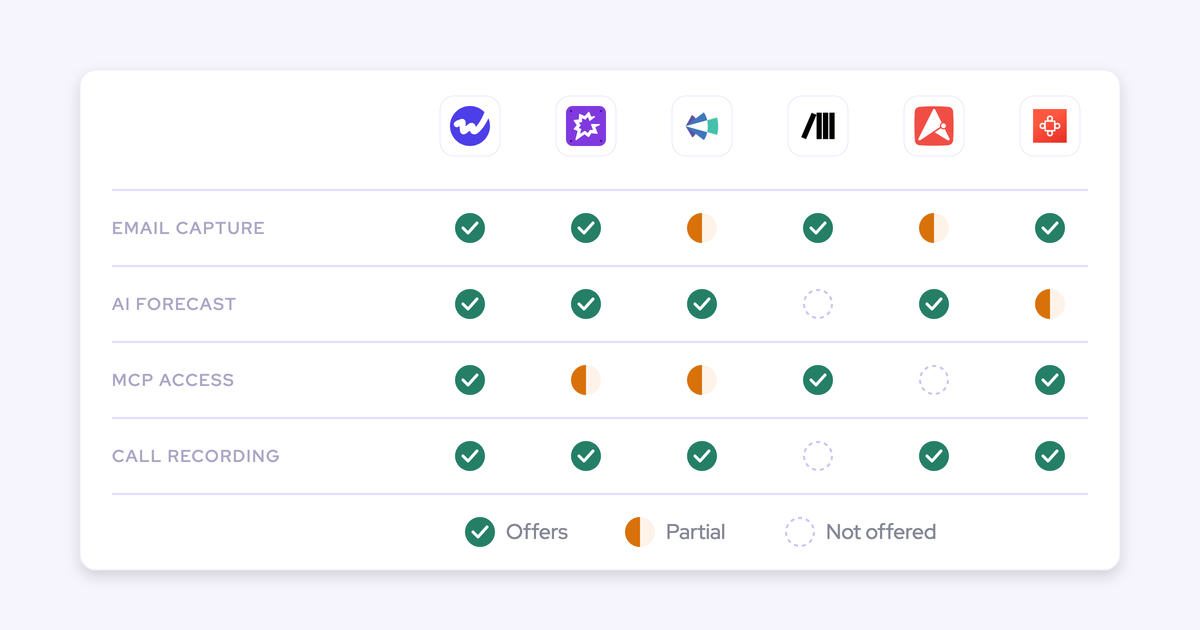
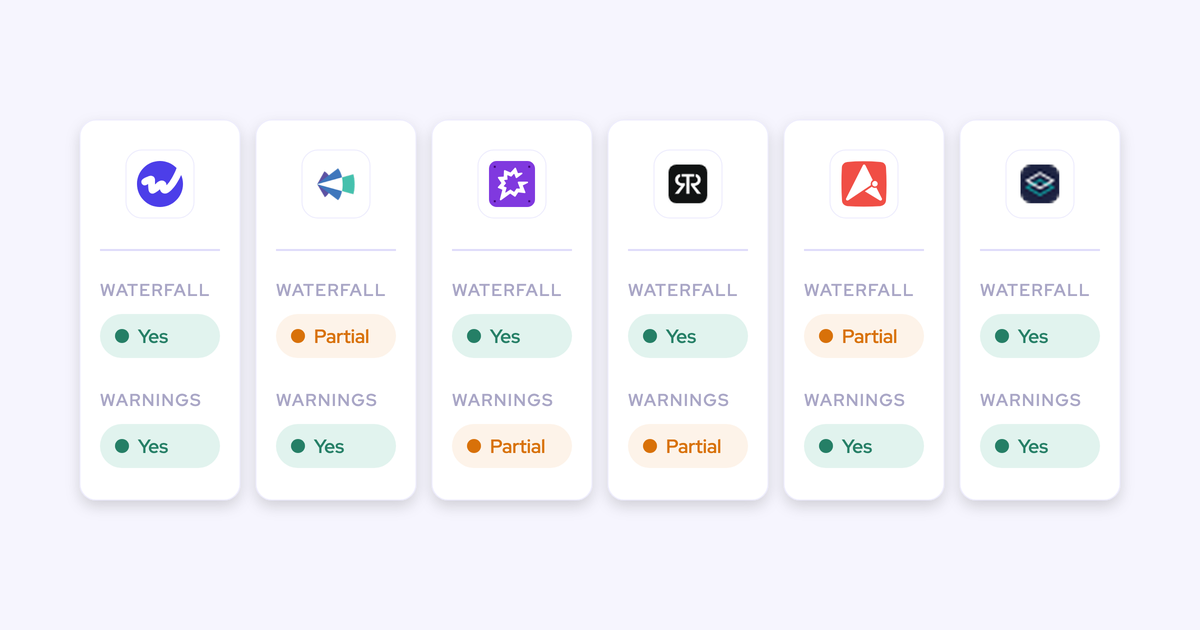
| Capability | Weflow | Clari | Gong | Terret | Aviso | InsightSquared |
|---|---|---|---|---|---|---|
| Deal board | Built from captured activity; opportunity, account and contact fields side by side; edits reach Salesforce in seconds | Configurable Opportunities table with real-time write-back; validation-rule work goes back to Salesforce | Admin-built boards with activity bubbles and change flags; needs Forecast Essentials or Gong Forecast | Editable Opportunities table with risk score and Deal Pulse columns | Deals grid with WinScore, formula columns, inline and bulk edits | Opportunities view with Energy Score and Activity by Day |
| Deal risk warnings | Customer-defined AND/OR rules on opportunity and Weflow fields; not reportable in Salesforce or BI | Admin-built Deal Gaps on any deal field, through Salesloft Deals | Eight fixed Gong-defined warnings, adjustable timing | Model-built engagement risk score; no admin-defined warnings | Nudges, including ones teams create themselves | Energy Score plus Actions alerts admins customize |
| Opportunity snapshots | Hourly snapshots, stored by Weflow | Time Series Data Hub snapshots automatically | Built from CRM field history; backfill through the CSM | Historical snapshots behind waterfall and reports | Time-series CRM copy, 6 to 8 quarters, stored in Aviso | Daily history rebuilt from field change logs, any past date |
| Pipeline waterfall | Seven buckets from start to end, each drills to the deals | Waterfall grouped by any CRM field, plus a flow view | Changes waterfall with sixteen reasons, counted gross | Since any date, drillable, plus a Sankey view | Report-period waterfall; any two dates as a Sankey flow | Flow report between any two dates |
| Pipeline pacing | AI projection, team and weighted forecast against pipeline, commit and closed | Pulse pacing plus an annual pacing view | Pacing chart with pipeline still needed; trend chart against forecasts | Beat chart against target; same-day comparison with previous quarters | Forecast and bookings against plan through the quarter | Bookings against goal with the forecast overlaid |
| Integrations | Salesforce, Gmail, Outlook, Zoom, Teams, Meet, Slack, Outreach dialer; warehouse through the API | Salesloft data layer incl. Dynamics, Snowflake, Databricks | About 450 listings in the Gong Collective | Gong, Chorus, Outreach, Apollo, Snowflake, Databricks; no published catalogue | 200+ claimed connectors, mostly bringing data in | 30+ call systems, Google Workspace, Microsoft 365, four CRMs |
| Access from AI assistants (MCP) | Read-only connector; forecast and per-rep pipeline metrics with opportunity IDs | Separate server per product; Forecast server lacks deal-level data | Nine read-only tools; one call's transcript per request; AI tools metered | No MCP server | No MCP for external assistants | Command MCP covers Value business cases only |
| Raw data access | REST API with bulk export in every plan; forecast data not in the API yet | REST and Export APIs; warehouse sync through Salesloft | API capped at 10,000 calls a day; Data Cloud bought separately | CSV downloads and fields written to Salesforce only | Spreadsheet and file exports only | Intelligence as CSV only; Coach API on request |
| Pricing | Published: $39 per user per month for Deal Intelligence & Forecasting; bundles $49 to $79 | No published price; pricing page leads to a booking form | Model public, prices quote-only | No published prices; quoted after a demo | Licenses by proposal; agents $1 to $1.50 per outcome | No published prices |
Do you need pipeline management software or a forecasting suite?
Most teams need pipeline management first, and many end up paying for a forecasting suite to get it.
Jeff Ignacio explained the difference well on our podcast. Pipeline management inspects the size and shape of open pipeline: how many deals, what they're worth, and how they sit across stages.
Forecasting predicts the range of outcomes from that pipeline. One feeds the other, and no forecasting method can make up for pipeline nobody inspected.
You'll see the same split in adoption. As our co-founder Philipp Stelzer puts it, reps don't adopt forecasting tools, leaders do. Pipeline views get opened every week, while forecasting modules can sit idle for years.
| Pipeline management | Forecasting | |
|---|---|---|
| Question it answers | What's in the pipeline, what moved, and which deals are at risk | Where the quarter will land |
| Who works in it | Reps, managers and RevOps, weekly | Managers and leadership, at the forecast call |
| Views it needs | Deal board, warnings, snapshots, waterfall, pacing | Submissions, roll-ups, AI projection, accuracy tracking |
| What fails without it | Reviews run on what the rep says | The number lives in a spreadsheet |
This distinction matters most when you're mid-contract. Here's how one RevOps leader described it to us:
"There's a trend towards consolidation, but then you're in a renewal cycle with your forecasting solution. And the CFO just blocks you because you can't have two forecasting solutions."
If that sounds familiar, a pipeline management product that doesn't duplicate your forecast is the way in.
What to check in pipeline management software before a demo
Every vendor claims the same 40 features, so a feature grid won't tell you much. What tells you a lot is what your team still opens twelve months later. As one buyer put it:
"We mostly use Clari for roll-ups, simple pipeline analytics, and to inspect and the price point for that is crazy high."
A deal board built from captured activity, not rep notes
If a board runs on fields the rep typed, it just repeats the rep's story back to you.
Columns computed from captured email and meetings show whether the deal is actually being worked: last email, next meeting, reply rate, and how many people on the buyer side are engaged.
The test: Ask which columns the tool computes from activity, and whether edits on the board write back to Salesforce.
Deal risk warnings your team defines for its own sales cycle
Fixed warnings can't capture your own slippage patterns. Two weeks of silence is a red flag on a 60-day cycle but normal on a 12-month one. And a compliance step or a required partner sign-off only becomes a warning if you can write the rule.
The test: In the demo, try building one warning that's specific to your sales motion.
Opportunity snapshots behind the pipeline waterfall and pacing views
Since Salesforce only keeps the current state, every waterfall, pacing chart and same-day comparison depends on stored snapshots. So the real question is where the history comes from: the vendor's own snapshots, or CRM field history it reads back.
Here's the kind of question leadership asks that Salesforce can't answer:
"...at day 35 of the quarter, how are we doing at day 35 of the previous quarters? Like, it's and that's a hard thing to do."
Four things to check:
- How often the tool snapshots.
- How much history you see on day one.
- What happens to history when you change the forecast configuration or your stages.
- Whether a same-day comparison with previous quarters exists as a view.
Pipeline data your own AI assistant and BI tool can reach
If pipeline data only lives inside the vendor's screens, you pay twice: once for the tool, and again to rebuild the analysis wherever your team actually works.
With more RevOps teams now running their own analysis in Claude or ChatGPT, the connector matters as much as the UI.
The test: Ask what one MCP call returns, whether it's metered, and whether there's an API with bulk export.
A price you can see before the first sales call
Published pricing and a small entry point let you get started without colliding with the contract you already have, and build the business case before procurement gets involved.
The test: Look for per-seat prices, the seat minimum, the term, and anything that costs extra, like platform fees, AI credits or professional services.
Weflow: All five pipeline views on Salesforce, at a published price
Weflow captures emails, meetings, contacts and calls into Salesforce automatically, then uses that data for the deal board, warnings, pipeline analytics and forecasting.
The deal board and forecast read Salesforce live, while the history-based views (waterfall, stage conversion, period comparisons) run on hourly snapshots Weflow stores.
- CRM: Salesforce only.
- Setup: Admin-controlled. Calendar and email connect server-side, and company boards appear from a user's first login.
- Pricing model: Per seat, annual billing, 10-user minimum, AI included in the seat.
How Weflow builds the deal board and warnings from captured activity
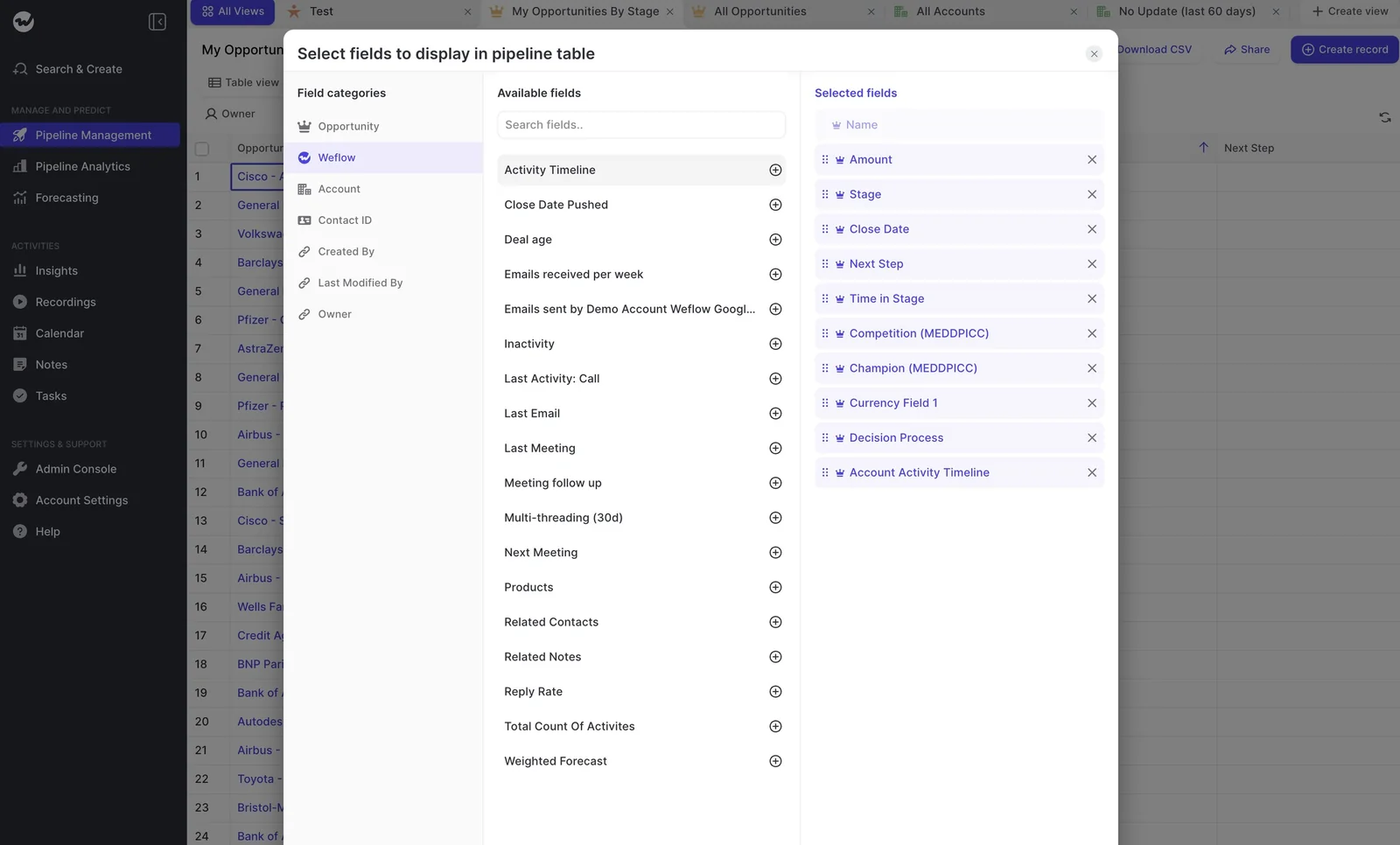
Weflow's deal board puts computed columns next to your Salesforce fields:
- Last email, last and next meeting, and a clickable activity timeline.
- Inactivity, deal age, and how often the close date was pushed.
- Emails per week, reply rate and multi-threading over 30 days.
Opportunity, account and contact fields sit in the same view, which is something a standard Salesforce opportunity report can't do. Every Salesforce field stays editable, and a change made on the board reaches Salesforce within seconds.
You decide what counts as risk. Warnings chain AND/OR conditions on any opportunity-related field (except long and rich text fields) or on Weflow's own fields and AI Playbook scores. Here are a few rules teams build:
- Close date pushed more than twice.
- Only one contact on a deal above a set amount.
- No activity in 14 days on a short-cycle deal.
- A low BANT playbook score in a late stage.
Warnings also show in the forecast submission screen, right when a rep picks which deals to commit. Gong's eight warnings, by comparison, can be tuned but not extended.
Admins publish company boards and lock the field set per team with templates. Reps who want different columns can duplicate the board, so nothing depends on a rep setting anything up.
How Weflow snapshots opportunities hourly for waterfall and pacing
Because Weflow snapshots every opportunity hourly, you get a waterfall even though your CRM only stores today's values. The waterfall reconciles starting pipeline to ending pipeline through seven buckets:
- Newly created
- Increased
- Moved into the period (pulled in)
- Moved out of the period (pushed)
- Lost
- Decreased
- Won
Each bucket drills through to the deals, with whatever fields you want to see. That's how you answer why a quarter that opened strong ended thin. (A deal created and closed inside the window shows up once as an addition and once as a subtraction.)
The pacing view puts the AI projection, the team forecast and the weighted forecast side by side against pipeline, commit and closed.
On top of that, you get stage conversion, stage win rate, team benchmarks, pipeline velocity, average sales cycle and opportunities created, each running per forecast motion, so new logo, renewal and expansion each get their own.
How Claude, ChatGPT and your BI tool reach Weflow data
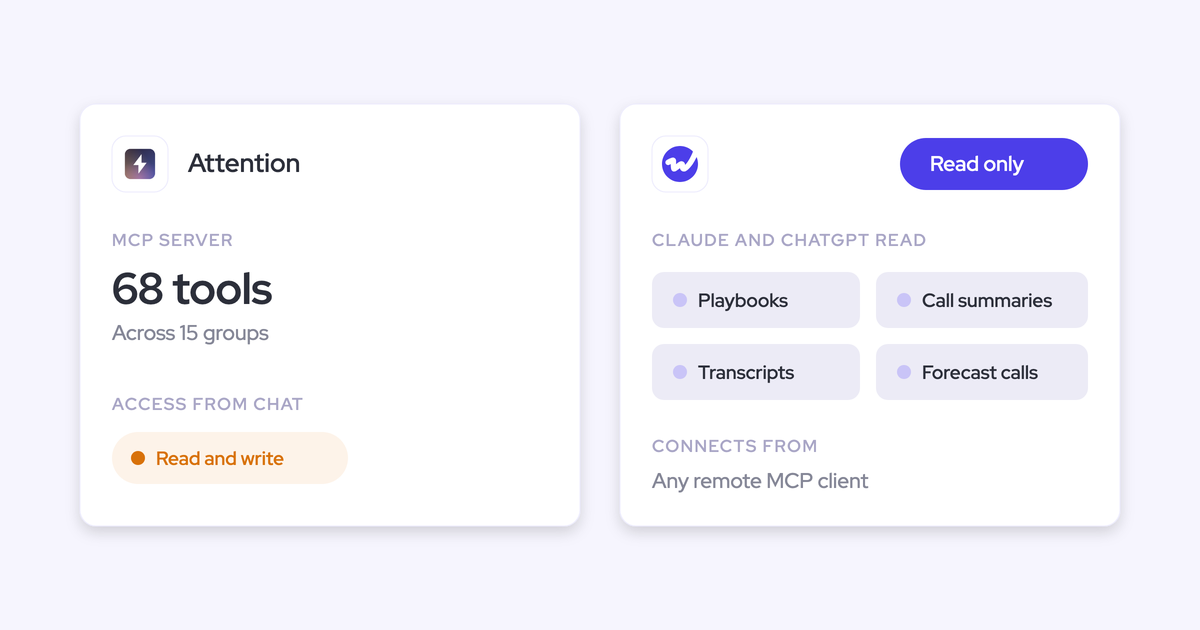
Weflow's MCP connector is read-only, and an admin switches it on per workspace. A separate toggle decides whether assistants read full transcripts or only summaries.
Any client that supports remote MCP servers connects with the same URL as Claude and ChatGPT.
For a chosen close-date period, scoped to you or your team, the connector returns per rep:
- Weighted and unweighted pipeline, closed-won amount and count, and win rate.
- Average deal size, average contract value and average sales cycle in days.
- Coverage ratio and gap to forecast.
- The opportunity IDs behind those numbers.
It also returns recordings, summaries, transcripts and AI Playbook results. The per-rep breakdown covers up to 25 owners.
Every plan includes our REST API, which bulk-exports transcripts, metadata, scores and signals as JSON or CSV into Tableau, Looker or a warehouse.
Native integrations cover Salesforce, Gmail, Google Calendar, Outlook, Zoom, Teams, Meet, Slack and the Outreach dialer, with Aircall and Dialpad activated by our team.
There are a few limits:
- There's no native Snowflake, Databricks or BigQuery connector; teams move data there through the API.
- The public API doesn't return forecast data yet. The MCP connector does.
- Neither exposes saved board views by name, so an external agent rebuilds the filter from raw records.
Which Weflow package includes the waterfall and pacing, and what it costs
The waterfall and pacing come with the Forecasting licence. On its own, Weflow Deal Intelligence & Forecasting costs $39 per user per month.
| Product or bundle | Price per user per month | Includes waterfall and pacing? |
|---|---|---|
| Weflow Activity & Contact Capture | $19 | No |
| Weflow Conversation Intelligence | $39 | No |
| Weflow Deal Intelligence & Forecasting | $39 | Yes |
| Weflow Revenue AI Foundation | $49 | No: capture and conversation intelligence |
| Weflow Revenue AI Business | $59 | No: deal board, warnings and scoring only |
| Weflow Revenue AI Enterprise | $79 | Yes |
One packaging detail to watch: our Pipeline Management product and Weflow Revenue AI Business give you the deal board and warnings, but not the analytics.
That's because Pipeline Analytics is generated from the forecast configurations you build, so it ships with Forecasting.
All plans bill annually with a 10-user minimum, and 12 months is the shortest term. AI summaries, field updates and Ask Weflow AI are included in the seat.
Agent Builder is the one metered product, with 25 free actions a month in every plan. For reference, the full platform at about 62 seats lands around $58,000 a year at list.
Where Weflow falls short and who should pick it
Here's what Weflow doesn't do today:
- There's no view comparing today's pipeline with the same day in earlier quarters. You compare snapshots by hand, whereas Terret and Aviso have this built in.
- There's no central pipeline dashboard, no funnel report and no flow view, so dashboarding is thinner than Clari's.
- Deal warnings are Weflow fields, so you can't report on them in Salesforce or a BI tool.
- Pipeline history is stored by Weflow, not in Salesforce.
- The public API doesn't return forecast data yet.
- Weflow works only with Salesforce.
- A team on a mature, heavily customized Clari setup should expect roughly 80% parity on forecasting, not more.
Choose Weflow if you're a mid-market Salesforce team that wants all five pipeline views from captured activity, rules you define, a published price, and data your own AI can query.
Look elsewhere if leadership lives in a same-day prior-quarter view or a single pipeline dashboard, or you run HubSpot.
Clari: Mature roll-ups and dashboards for larger Salesforce teams
Clari built its name on roll-up forecasting and pipeline inspection. It added Copilot (formerly Wingman) and Groove by acquisition, then merged with Salesloft in December 2025.
The four products now ship in one monthly release, and clari.com/pricing redirects to a Salesloft booking page.
- CRM: Salesforce, with Dynamics through the Salesloft data layer.
- Rollout: Professional services.
- Pricing: Quote-only.
How Clari's Opportunities module and Deal Gaps flag at-risk deals
Clari's Opportunities module is a configurable deal table over Salesforce opportunities. You get saved and shared views, groupings that work like a live pivot, and edits that write back to Salesforce in real time.
Deal inspection can color-code fields that changed in a set window, so a manager sees what moved without opening field history.
Risk flags come from Deal Gaps in Salesloft Deals. A team admin builds rules on any deal field (days in stage, a past close date, an empty next step) and sets how many gaps turn a deal yellow or red.
Two limits come up in evaluations:
- The same grid and side panel show at every stage, so reps see every required field at once.
- Reps can't add products or create the related records a stage's validation rules demand, so they finish that work in Salesforce.
How Clari's Time Series Data Hub powers waterfall and Pulse pacing
This is where Clari really shines. The Time Series Data Hub snapshots opportunity, account and activity data automatically, and that history feeds:
- A waterfall you can group by any CRM field, such as losses by competitor or slips by account health.
- Pulse pacing, plus an annual pacing view that tracks year-to-date against the annual number.
- Quarter-over-quarter comparisons and historical conversion by stage.
- A flow view and dashboard widgets, such as pipeline build by product family.
The waterfall, pacing and same-day comparison are the Clari views teams still use after a year. Weflow matches the waterfall and pacing, but Clari is ahead on the flow view, funnel and dashboard widgets.
How Clari's separate MCP servers and APIs expose your data
Clari runs a separate MCP server per product, so connecting the whole stack to an assistant means several connectors:
- Clari Forecast: Live forecast numbers and historical snapshots, scoped to each user's permissions. Its seven tools include one for related deals, but in evaluations teams still couldn't pull the deal-level opportunity data behind a forecast number through it. Users need a Claude or ChatGPT Business or Enterprise plan.
- Clari Copilot: Conversation data only, not the forecast or pipeline layer.
- Salesloft: Read-only, requires the paid Agentic add-on, and returns call summaries rather than transcripts. Cadences aren't covered.
Outside MCP, Clari has REST and Export APIs, forecast history exports as CSV, and the Salesloft data layer syncs with Snowflake and Databricks.
What Clari costs: Quote-only seats plus professional services
Clari publishes no seat prices and offers no free trial. Based on deals we've seen, we estimate $120 to $180 per user per month, with professional-services implementation fees of $15,000 to $50,000 on top. Smaller deals tend to cost more per seat.
Where Clari falls short and who should stay on it
- Configuration changes go through professional services:
"...if you want to, you know, create a new quarter target, or you want to create a new forecast call, or you want to change the rollout forecast, right? In the product, you want to adjust the columns here, you have to go via professional services."
- The price was set for the whole platform, which makes it hard to justify for a team using three views. One prospect told us their Clari license usage was about 8%.
- Assistant access is split across servers and doesn't reach deal-level forecast data.
Stay on Clari if leadership opens the dashboards weekly and your roll-up carries years of custom configuration.
Leave if you're paying suite prices for roll-ups, a waterfall and inspection, and every change needs a ticket.
Gong: Conversation intelligence with the deal board managers love
Gong records and analyzes sales calls in its own cloud. It's sold as a mandatory Foundation licence, with forecasting, coaching, engagement and data export applications bought on top. The pipeline views sit in Forecast Essentials and Gong Forecast.
- CRMs: Salesforce, HubSpot and Microsoft Dynamics.
- Pricing: quote-only.
- Pipeline views: require Forecast Essentials or Gong Forecast on top of Foundation.
How Gong deal boards and AI Deal Monitor warnings work
The deal board is what keeps teams on Gong. A business admin configures boards from any imported CRM field, plus trackers, warnings and playbooks.
Users edit CRM fields from the board, and the change syncs. Fields that moved show the old value, the new value and when it changed.
Managers especially get attached to the activity bubbles. As a former Gong enterprise customer told us:
"The reason why I stuck with it was like the bubbles, like, you sort of get like addicted to the bubbles."
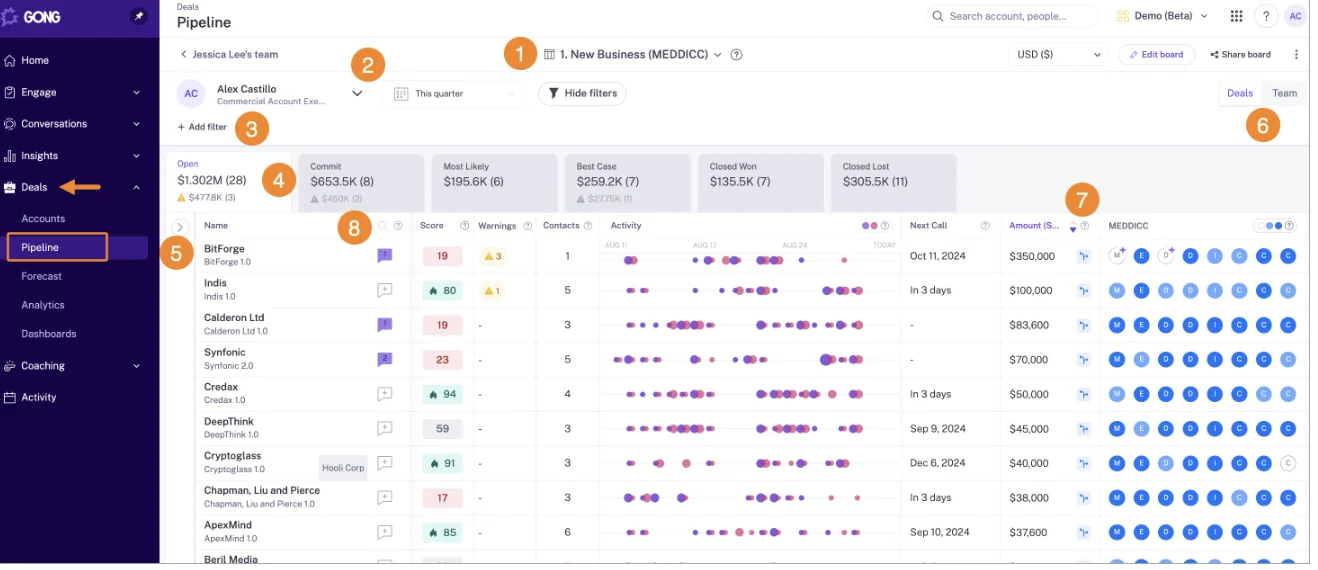
AI Deal Monitor has exactly eight Gong-defined warnings:
- No activity
- Ghosted
- Overdue
- Not enough contacts
- No power
- Pricing not mentioned
- Red flag
- Stalled in stage
You can switch each one on or off and adjust its timing, but you can't define a new one.
How Gong Forecast builds waterfall and pacing from CRM field history
Gong Forecast's Changes report draws a waterfall from starting to ending value, grouped into sixteen reasons such as new, pulled in, pushed out, won and lost. Each bar opens the deals behind it.
Since Gong counts gross movements, a deal created and lost in the same week lands in two bars. And because it only compares stage, close date and amount at the start and end of the period, a deal that moved and came back doesn't show.
The pacing chart tracks closed-won against target and recalculates the pipeline still needed as the period runs down.
A separate trend chart shows pipeline week by week against the projection, the team forecast, the manager forecast and the target. Gong also has a funnel report, which Weflow doesn't.
The history comes from CRM field history. After you change a business line's fields or forecast categories, Gong backfills up to five quarters through your customer success manager, which takes 3 to 5 business days.
How Gong's MCP server, API and Data Cloud expose your data
Gong's MCP server has nine read-only tools. Three of its AI tools each work on one record at a time:
- ask_account: Answers a question about one account.
- ask_deal: Answers a question about one deal.
- generate_brief: Returns a fixed-structure summary.
It also returns one call's full transcript per request, but work across several calls comes back as Gong's AI answer, not the transcripts. It's read-only, and every AI request or API brief draws credits from a shared pool. Before November 2026, buyers told us the earlier server was no more useful than a Salesforce connector.
The API returns transcripts and scorecards, capped at 3 calls a second and 10,000 a day. Warehouse export needs Data Cloud, a separate application at about $5,000 a year.
Where Gong is broad is integrations, with about 450 listings in the Gong Collective and about thirty dialers.
What Gong costs: Foundation licence, Forecast seats and AI credits
Gong publishes its pricing model but no figures. You pay a per-user licence plus a platform fee that scales with users, through a custom proposal.
Seats are per application, so a manager on Foundation and Forecast Essentials takes two seats. AI runs on credits: each paid core seat adds 2,000 a year to a company-wide pool that resets each contract year.
Where Gong falls short and who should keep it
- Warnings are fixed at eight.
- Pipeline history depends on CRM field history and backfills through the CSM.
- MCP access is read-only, transcripts come one call per request, and the AI tools are metered.
- Forecasting and some reports are fixed to preset periods.
- Teams that bought Gong for recording often leave the boards unused while leaders review pipeline in Salesforce.
Keep Gong if your managers run their week from the deal board and you already hold Forecast seats.
Leave if you bought Gong for recording, the boards sit unused, and you'd be adding Forecast seats only to get pipeline views.
Terret (formerly BoostUp): Full pipeline analytics with same-day quarter comparisons
BoostUp renamed itself Terret in September 2025 and shifted toward AI agents, with Terret Nexus generally available from July 2026.
The forecasting and pipeline product underneath is mature, and you'll still see the BoostUp name in the help center and the Salesforce package.
- CRMs: Salesforce and HubSpot.
- Pricing: Quote-only.
How Terret's Opportunities page and engagement risk score flag deals
Terret's Opportunities page is an editable table over Salesforce opportunities. Admins choose the columns, and inline edits write back to Salesforce. A changes-since filter marks fields that moved in a chosen period.
Instead of rules, risk comes from a model. The engagement risk score rates each deal from 0 to 100 using email, meeting and call activity, sentiment and stakeholder engagement compared with similar closed deals.
It deliberately ignores fields reps edit, which is a real strength if you don't want rep optimism skewing the score. What it isn't is a set of warnings you configure.
How Terret's waterfall and beat chart compare against previous quarters
This is where Terret beats Weflow. Its waterfall shows new, pulled-in, increased, pushed, decreased, won and lost pipeline since any date, drillable to the deals, with changed fields highlighted.
The beat chart tracks progress against target, beside a same-day comparison with previous quarters. The Pipeline dashboard also charts pipeline created by the same day of earlier quarters.
There's a caveat, though: changing Salesforce stages or forecast categories makes Terret's projections unusable for one to two quarters, and reconciling the history takes about four weeks through customer success.
Why Terret data stays inside Terret, with no API or MCP
Terret's marketing names Claude and ChatGPT as access routes, but it doesn't publish an MCP server or document a public API for getting data out. Data leaves as CSV downloads and a set of computed fields, such as the risk score, written to Salesforce.
Terret also keeps captured emails and meetings in its own store rather than logging them to Salesforce, so a Salesforce activity report sees none of it.
What Terret costs when every quote comes after a demo
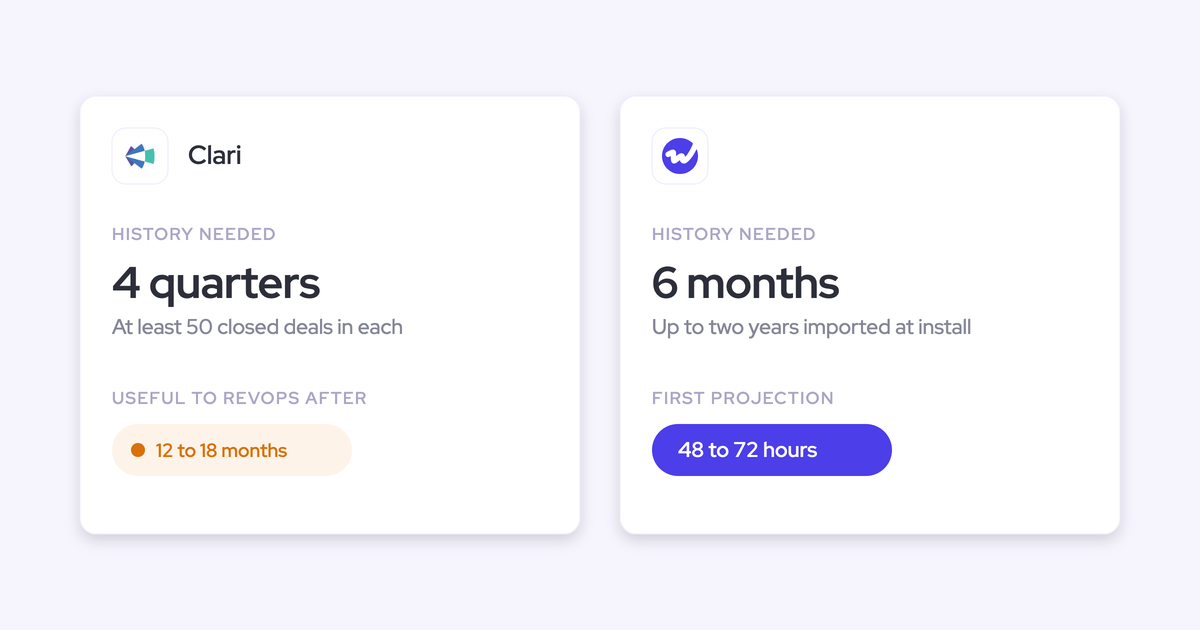
Terret's pricing page leads to a demo booking. In one procurement we saw, Terret listed visibly higher than Weflow and discounted hard, landing five to seven percent below Weflow on a 50 to 100 seat deal.
At that gap, the decision comes down to product and data model. Keep in mind that anyone who only views dashboards still needs a seat.
Where Terret falls short and who should pick it
- AI insights can guess when information is missing instead of saying they don't know.
- Your data stays in Terret: no API, no MCP, no activity logged to Salesforce.
- Stage changes break projections for a quarter or two.
- Reps create new contacts by hand.
Pick Terret if you're a CRO- or RevOps-led team that wants prior-quarter comparisons out of the box and a risk score reps can't talk up.
Skip it if your own AI and BI need to reach the data, or your stages are about to change.
Aviso: AI-led forecasting for enterprises on multiple CRMs
Aviso leads with AI forecasting and copies your CRM into its own time-series store. It positions itself against Clari, Gong and Salesloft as a consolidation play for large enterprises, and it runs on Salesforce, HubSpot, Dynamics, Oracle, SAP and Siebel.
- CRMs: several, including non-Salesforce ones.
- Rollout: implementation team.
- Pricing: custom proposal.
How Aviso's Deals grid and nudges surface at-risk deals
Aviso's Deals grid shows each deal with its CRM fields, WinScore, engagement grade and MEDDPIC score, in list, chart or map view. Admins add formula columns, and reps edit inline or in bulk.
Nudges warn about stages not updated for a set time, a falling WinScore, commit deals at risk, single-threaded deals and accounts going quiet. Teams can also create their own nudges.
How Aviso's time-series CRM copy drives Pipeline Movement and pacing
On average, Aviso keeps six to eight quarters of history in its CRM copy, which powers:
- A Pipeline Movement waterfall for a report period, drillable to the deals.
- A Sankey flow for comparing any two dates.
- A pacing dashboard for forecast and bookings against plan through the quarter.
- Conversion compared with the same point in each of the last four quarters, and a What's Changed view against the previous day, week, month and quarter.
When it comes to the "where were we on this day last quarter" question, Aviso is among the strongest of the six.
Why Aviso data leaves only as spreadsheet and file exports
Aviso has no public API and no MCP server for external assistants. It uses MCP only inside its own Agent Studio. It claims 200+ connectors, but those bring data in.
Deals, reports and the forecast audit trail leave as downloads, and BI tools see only what Aviso writes back to the CRM.
What Aviso costs: Custom proposals, per-outcome agents and buyouts
Aviso quotes licenses per proposal and charges no platform fee. Work done by its agents costs $1 to $1.50 per outcome, and Aviso says it prices at about half of Gong. It also offers to buy out your existing contract and migrate you for free.
Where Aviso falls short and who should pick it
- Your data is closed: no API, no external MCP.
- The CRM copy lives in Aviso, not in your Salesforce.
- Integrations and rollout run through Aviso's implementation team.
Pick Aviso if you're a large enterprise on several CRMs, or a non-Salesforce one, and want an AI-forecast-led platform with deep prior-period comparisons.
Skip it if you're a mid-market Salesforce team with a lean RevOps function that wants to query its own data.
InsightSquared (Mediafly Intelligence): Historic reporting Mediafly no longer markets
Mediafly bought InsightSquared in January 2022, sold it as Intelligence360, and retired the standalone product in January 2023. It runs today as Mediafly Intelligence.
Mediafly now focuses its marketing on content, value and learning products (its old Intelligence360 page even redirects to its Engagement product), but it still runs and supports Intelligence for existing customers.
- CRMs: Salesforce, HubSpot, SAP Sales Cloud (C4C) and SugarCRM.
- Implementation: 8 to 10 weeks.
- Hosting: US only.
- Pricing: Quote-only.
How Mediafly Intelligence's Energy Score and Actions flag weak deals
The Energy Score rates engagement on every account, opportunity and contact daily, from 0 to 100%. Admins weight each activity type, with meetings weighing most by default, and deals at 33% and below show red.
Actions push reminders and missing-information alerts to every user's Actions Feed, customizable by role, stage or region.
How Mediafly Intelligence rebuilds pipeline as of any past date
Intelligence logs every change to tracked fields and assembles daily history documents, so you can report pipeline as of any past date and compare any two dates.
The Flow report is a waterfall over any range, and goal charts overlay the forecast on bookings by rep, team or company. With more than 350 no-code reports, this is the deepest historic reporting in the group.
Why Mediafly Intelligence data leaves only as CSV exports
Intelligence has no public API for its reporting data; data leaves as CSV exports, scheduled emails or fields written to the CRM. Mediafly Coach, the call recorder, has a REST API enabled on request.
Command MCP, in beta, reaches only Value business cases, so no assistant can query Intelligence or Coach data.
What InsightSquared costs now that pricing sits behind Mediafly
Mediafly publishes no prices. It quotes each customer by modules, user count and integrations, and InsightSquared's old pricing link now leads to Mediafly's contact form.
Where InsightSquared falls short and who should keep it
- Its owner no longer markets it.
- Intelligence data is hosted only in the US.
- Changing a machine learning model goes through your CSM and a support ticket.
- Implementation takes 8 to 10 weeks.
Keep it if you're an existing customer and your team relies on the historic reports.
Skip it as a new purchase: Buying into a product the vendor has stopped marketing is a bet on its roadmap.
What each pipeline management tool costs, side by side
Weflow is the only one of the six that publishes per-seat prices; the other five quote through sales. But the bigger cost differences are in what you have to buy on top to get the pipeline views.
| Tool | Published price? | How pricing works | What you add for pipeline views |
|---|---|---|---|
| Weflow | Yes | Per seat, annual, 10-user minimum; AI in the seat, only Agent Builder metered | The Forecasting licence: Weflow Deal Intelligence & Forecasting ($39) or Weflow Revenue AI Enterprise ($79) |
| Clari | No | Quote-only; our estimate $120 to $180 per user per month | Professional-services implementation, $15,000 to $50,000 by our estimate |
| Gong | No, model only | Per-user licence plus platform fee; per-application seats; pooled AI credits | Forecast Essentials or Gong Forecast seats on top of Foundation; Data Cloud for warehouse export |
| Terret | No | Quoted after a demo; high list price, steep discount | Full seats for anyone who only views dashboards |
| Aviso | Partly | Licenses by proposal; agents $1 to $1.50 per outcome; no platform fee | Implementation-team rollout; contract buyout and free migration offered |
| InsightSquared | No | Quoted by modules, users and integrations | An 8 to 10 week implementation |
Should you build your own pipeline snapshots instead of buying?
These days, building a forecast view is quick. Owning the history behind it is the expensive part. We've watched RevOps leaders rebuild forecast views over a weekend with Claude on Salesforce data, and it works, because the current-state data is already in Salesforce.
The waterfall and pacing are a different story. They need a snapshot of every opportunity on a schedule, stored somewhere, starting the day you switch it on. And then the build has to keep running while you also run the business.
| Piece | What it takes |
|---|---|
| Forecast view over current Salesforce data | Quick: a prototype over a weekend with an AI coding tool |
| Snapshot history | A scheduled job, a store, and history that starts only when you build it |
| Hierarchy roll-up | Logic that follows every reorg, team split and territory change |
| Permissions | Making sure each manager sees only their part of the pipeline |
| Activity mapped to the right records | Reading every mailbox and calendar and placing each activity on the right deal; the part internal builds underestimate most |
| Upkeep | Fixes every time stages, fields or forecast categories change |
Our advice: compare a vendor's price with what it would cost to own the build for two years, not with the weekend prototype.
If you have a data engineer and a warehouse already snapshotting opportunities, building the views on top can be the right call. But if RevOps is one to three people, the upkeep lands on you.
Which pipeline management tool fits your team
The right tool depends on three things: the question leadership asks most, your CRM and team size, and the contract you're already in.
Pick by the pipeline question leadership asks most
| Leadership's question | Tools that answer it | Note |
|---|---|---|
| Why did the pipeline move? | Weflow, Terret, Gong, Clari | All four drill from the waterfall bar to the deals |
| Where were we on this day last quarter? | Terret, Aviso, InsightSquared, Clari | Weflow has no same-day prior-quarter view |
| Which deals are at risk under our own rules? | Weflow, Clari through Salesloft Deal Gaps, Aviso | Gong's warnings are fixed; Terret's risk is model-built |
| Are we pacing to the number? | All six | Weflow puts the AI projection, team and weighted forecast on one chart |
| Can our own AI assistant answer pipeline questions? | Weflow, Clari Forecast, Gong | Weflow returns per-rep metrics with opportunity IDs; Clari returns forecast numbers; Gong answers one record at a time |
Pick by team size, CRM and admin capacity
- Mid-market on Salesforce, RevOps of one to three: Weflow. Admin-controlled setup, all five views, nothing for reps to install.
- Large Salesforce team with mature dashboards and roll-ups: Clari.
- Already on Gong, managers living in the board: Gong with Forecast seats.
- Several CRMs, or HubSpot: Aviso or Terret. Weflow is Salesforce only.
Pick by budget and the contract you are already in
If you're locked into a forecasting renewal, don't buy a second forecasting tool. Instead, start with the piece you don't have yet and move forecasting over at renewal:
- The deal board and warnings, through our Pipeline Management product or Weflow Revenue AI Business.
- Activity capture and conversation intelligence, through Weflow Revenue AI Foundation.
And if you'd rather see the views than read about them, you can walk through the product yourself, no call required.
What changed in pipeline management software in 2026
- Clari and Salesloft merged in December 2025 and now ship one monthly release covering Clari, Clari Copilot, Salesloft and Groove.
- Clari launched a Forecast MCP server in its September 2026 release, alongside separate Copilot and Salesloft servers.
- Salesloft removed transcript retrieval from its MCP server, so assistants now get call summaries instead.
- BoostUp became Terret in September 2025, and Terret Nexus became generally available in July 2026.
- Gong moved AI onto credits, emailing companies their allocations in late May 2026, and meters the MCP server's AI tools and API-based AI workflows against that pool.
- Aviso added Historical Execution Benchmarking in spring 2026, comparing coverage with prior fiscal years from week four.
- Mediafly stepped back from InsightSquared, redirecting its Intelligence360 page to its content product.
- Weflow's MCP connector added forecast and per-rep pipeline data, with opportunity IDs.
How we evaluated these six tools, and where our bias sits
We scored each tool on the nine capabilities in the comparison table, for a Salesforce team buying pipeline management. Our sources:
- Each vendor's help center articles and release notes.
- Public pricing pages, and what's missing from them.
- What buyers tell us on evaluation and switch calls about what they use and what broke.
- Our own product documentation for Weflow's row.
Weflow wrote this, so we're not neutral. That's why we applied our own gap list to Weflow's row, credited Clari, Terret, Aviso and InsightSquared where they lead, and left out capabilities we couldn't back with evidence.
FAQs RevOps leaders ask about pipeline management software
How much pipeline history does Weflow show on day one?
Weflow imports your historical opportunities from Salesforce at setup, so the views have history from the start. The import is paced to stay inside your Salesforce API limits, and takes a day or two (longer for a large org).
What happens to Weflow pipeline history when the forecast configuration changes?
Weflow re-runs the historical import, and the waterfall, pacing and analytics rebuild on the new configuration.
While it runs, the views show partial or empty numbers, so settle the amount field, the stage or category basis and the record-type filters before you show the views to sellers.
Can you add pipeline management without replacing your forecasting tool?
Yes. You can keep your current forecasting tool and add Weflow for the deal board and warnings, or for capture and conversation intelligence. Bonus: better captured data in Salesforce also improves what your current forecast reads.
Do reps have to install or connect anything for Weflow?
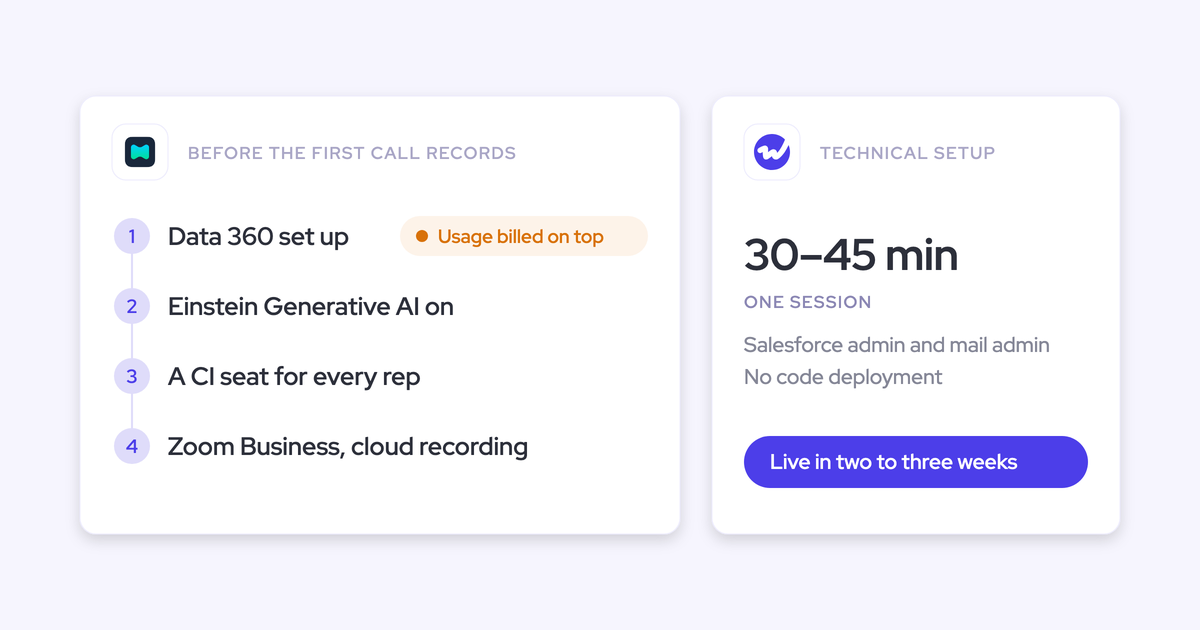
No. A Salesforce admin and a Google Workspace or Microsoft admin connect Weflow server-side in a 30 to 45 minute setup.
Can you report on Weflow deal warnings in Salesforce or BI?
No. But AI Playbook results can reach Salesforce once you switch on write-back for the playbook.
Who keeps the pipeline history if you cancel a snapshot vendor?
Every tool here that takes snapshots keeps that history in its own store.
With Weflow, captured emails, meetings and contacts stay in your Salesforce as native records after you cancel, while pipeline history and recordings are stored by Weflow. You can export recordings through the API to your own storage.
How do you move custom columns and views from Clari or Gong?
For Clari, rebuild the calculated columns as Weflow formula fields: condition groups over your opportunities with arithmetic on top, shown as a forecast column you can click into.
Gong board columns are mostly CRM fields, so they map straight onto a Weflow company board alongside our computed fields. We also migrate up to two years of Gong call history at no charge.
How do you check that a pipeline vendor can support you long term?
Ask who's assigned to your account, how often they check in without being asked, and what happened to customer success after the vendor's last acquisition or merger. Buyers who've been through a support overhaul tell us that's when usage starts to drop off.