

Best Aviso Alternatives for Salesforce Forecasting (2026)
See the best Aviso alternatives for Salesforce forecasting in 2026 by data access, control and price.



Leaving Aviso is rarely about finding a better forecast model. When teams talk to us about it, the decision comes down to three things:
- Where the forecast's data lives, and whether your own stack can reach it.
- Who can change the forecast when leadership asks for something new.
- Whether you can see the price before a sales cycle starts.
Here's the short answer, judged on those three things:
- Weflow fits Salesforce teams that want a roll-up, an AI projection, snapshots and a waterfall on fields they control. The forecast data is reachable by API and MCP, and the price is published.
- Clari (now Salesloft) fits very large orgs that want the most mature enterprise roll-up.
- Gong fits teams whose center of gravity is conversation intelligence and the deal board.
- Aviso is still the right call if you forecast consumption revenue, run on Dynamics or HubSpot, or merge several CRMs.
We're Weflow, so read our entry with that in mind. Weflow is the Revenue AI Orchestration platform for sales, customer success, and RevOps teams, and Weflow Deal Intelligence and Forecasting is the product that competes with Aviso. One thing up front: our forecast calls also live in the Weflow app, not on a Salesforce field. Your assistants reach them through our MCP connector today, and the API route is planned.
How Weflow, Aviso, Clari and Gong compare on forecasting
All four tools roll up a forecast. They split on where the forecast data lives, whether your stack can reach it, and whether the price is published. If you only read three rows, read MCP, raw data access and pricing.
| Capability | Weflow | Aviso | Clari (now Salesloft) | Gong |
|---|---|---|---|---|
| Forecast submissions and roll-ups | Baseline and best case tied to named deals. Every version kept, overrides logged with a rationale. Submissions live in the Weflow web app, not on a Salesforce field. | Commit, best case and most likely roll up across Aviso's own hierarchy, which can differ from Salesforce's. | Roll-up up to eight levels deep, with the inspect view and Quick Submit. Leaders see one level down, and the forecast is tied to the Salesforce hierarchy. | Reps submit per forecast category with notes. No deal-by-deal submission. Roll-up follows the Salesforce hierarchy. |
| AI forecast prediction | Low, middle and high range from 50+ deal signals. Ready 48 to 72 hours after the Salesforce import, with at least six months of history. | AI forecast beside the team's call, built from WinScores whose factors Aviso explains. | Current-quarter new business only. Needs four quarters with 50+ closed deals each. RevOps teams find it useful after 12 to 18 months. | Projection with a "See the math" panel. Needs 400 created opportunities with 150 closed-won across four quarters. |
| Multiple forecast types | Parallel setups, each on its own Salesforce amount and date field. No consumption forecasting. | Segments (new, upsell, renewal) split one forecast. Consumption forecasting included. | Opportunity forecast plus account-based forecasting for existing-customer revenue. | Separate boards per motion, each with its own filters, columns and targets. |
| Forecast accuracy tracking | Per rep, manager and team against a field the admin picks. No setup. | Commit accuracy per AE, plus an audit trail export to compare with actuals. | Week-by-week history of calls, no computed accuracy measure. History exports to BI. | Accuracy report per person with an over or under indicator. |
| Opportunity snapshots | Every opportunity, every few hours. Earlier history from a 12-month Salesforce import. | Time-series copy of the CRM, six to eight quarters, stored in Aviso. | Time Series Data Hub snapshots opportunity, account and activity data automatically. | Weekly, from CRM field history. Backfill up to five quarters through the CSM. |
| Pipeline waterfall | Clickable, from created through won, drilling to the deals. No Sankey flow view. | Pipeline Movement waterfall per report period. Any two dates show as a Sankey flow. | Waterfall by change type, groupable by CRM field. Some teams still rebuild movement in BI. | Changes waterfall over any date range, with sixteen change reasons. |
| Integrations with other tools | Salesforce, Gmail, Google Calendar, Outlook, Zoom, Teams, Meet, Slack, Outreach dialer. No native warehouse connector. | 200+ connections claimed, mostly set up through Aviso's implementation team. | Salesloft's data layer syncs Salesforce, Dynamics, Snowflake, Databricks and more. | About 450 integrations and partner solutions in the Gong Collective. |
| Access from AI assistants (MCP) | Official read-only connector: forecast calls, pipeline metrics, playbooks, summaries and transcripts (separate toggle). Per-rep breakdowns cap at 25 owners. | No MCP server for Claude or ChatGPT. MCP runs only inside Agent Studio. | Clari Forecast MCP exposes forecast data and historical snapshots. Salesloft MCP is in beta, a paid add-on, and returns summaries only. | Three record-scoped tools. Insights only, read-only, metered in credits. |
| Raw data access outside the tool | REST API with bulk JSON or CSV export. Forecast calls via MCP now, API planned. | No public API or warehouse feed. Spreadsheet and file downloads. | REST and Export APIs, forecast history CSV, warehouse sync through Salesloft. | API capped at 3 calls a second and 10,000 a day. Warehouse delivery through Data Cloud, bought separately. |
| Pricing | Published: $19 to $79 per user per month. AI included in the seat, only Agent Builder metered. | Quote-only licences. Agent work at $1 to $1.50 per outcome. | Quote-only, with reported implementation fees. | Quote-only. Foundation core licence plus per-application seats, with AI credits. |
What Aviso does well, and why teams still leave
Aviso is a serious enterprise forecasting platform, used by companies like Lenovo, NetApp and New Relic. Its strengths and its switching triggers come from one design choice: Aviso copies your CRM into its own store and runs forecasting, hierarchies and permissions from that copy.
The sync runs every two to five minutes. That copy is how Aviso keeps quarters of history, runs hierarchies that differ from Salesforce, and merges several CRM instances into one forecast. It's also why the history, the scores and the forecast sit in Aviso instead of your Salesforce.
How Aviso rolls up the forecast and scores deals with WinScore
Aviso rolls the forecast up automatically across every rep, category and team, with commit, best case and most likely numbers. It does this on its own hierarchy, and that's a real strength.
Roll-up. Reps and managers enter their calls and plan on the forecast screen. Plans can be typed in or uploaded from a template, and deals move in and out of commit in one click. Because the hierarchy lives in Aviso, it doesn't have to match your Salesforce roles.
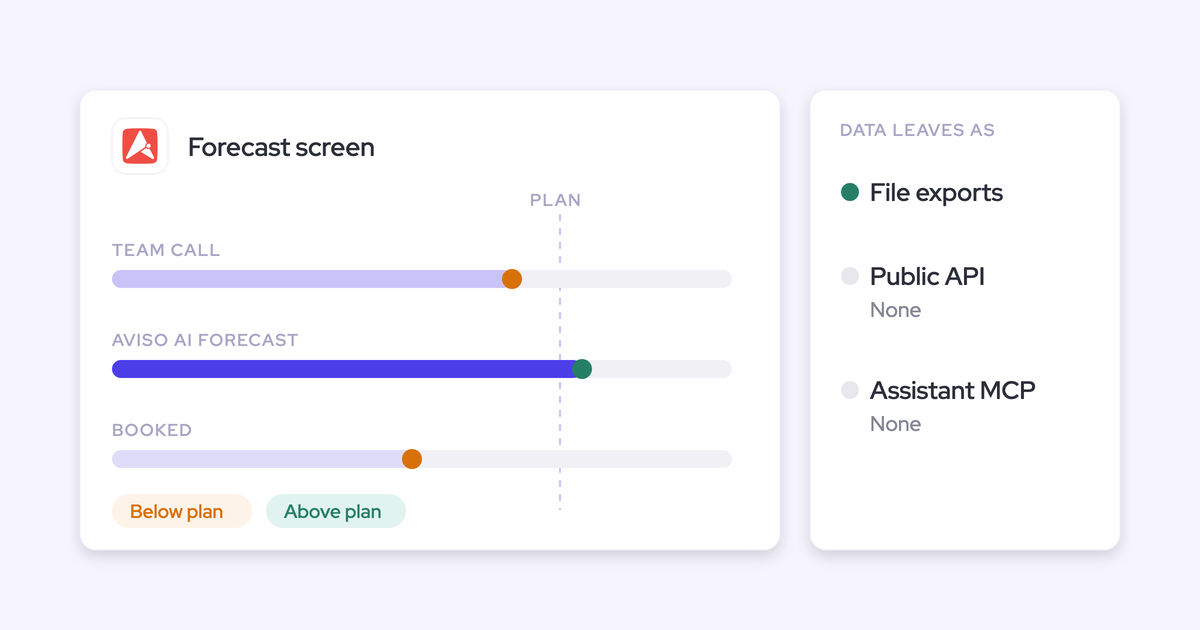
AI forecast. Aviso shows its own AI forecast next to the team's most-likely call and the booked amount, each marked on, above or below plan, with coverage beside it. Underneath sits WinScore, a daily probability that a deal closes this quarter. It's built from:
- Time in each stage and the order of stage moves.
- Deal age, close-date push-outs and time left in the quarter.
- The text of fields such as Next Step and manager comments.
WinScore explains the factors behind each changed deal, which is more than most AI forecasts give you. Aviso also claims 98% forecast accuracy. That's Aviso's own number, not attributed to a named customer with a timeframe, so weigh it that way.
Forecast types. Aviso splits forecasts and deal views by segment: total, new business, upsell and renewal. It also runs consumption forecasting, turning account usage into ARR or MRR, which none of the other three tools here match for usage-based businesses. Separate forecasts with their own fields aren't documented. Segments split one forecast.
How Aviso keeps forecast history and shows pipeline movement
Aviso keeps six to eight quarters of CRM history in its own time-series database and tracks every change of state as it happens. That's what powers its comparisons against the previous day, week, month and quarter.
Accuracy. The dashboard shows commit accuracy per account executive. Past weekly, monthly and quarterly forecast calls download as a spreadsheet from the forecast audit trail, so you can compare them with actuals.
Waterfall. The Pipeline Movement report is a clickable waterfall from starting pipeline through new opportunities, pulled-in and pushed-out deals to closed won, within a report period.
Any two dates. The Analytics screen compares any two points in time as a Sankey flow rather than a waterfall. Pipeline Pulse tracks day-over-day moves: new, expanded, pulled, killed and shrunk.
All of this history lives in Aviso. Your Salesforce never holds it.
Where Aviso keeps your data, and how you get it out
Aviso connects broadly into its platform. It claims more than 200 connections across CRMs, email, calendars, conferencing, telephony, engagement tools, Slack and support systems.
Getting data out is where RevOps teams get stuck:
- Aviso has no public API and no warehouse feed.
- It has no MCP server for Claude or ChatGPT. It uses MCP only inside Agent Studio, where its own agents call other tools.
- Data leaves as downloads: deals to a spreadsheet, reports and analytics as files, the audit trail as a file.
So your BI tools and Salesforce reports see only what Aviso writes back to the CRM. Aviso has no public API, warehouse feed or MCP server, so anything outside Aviso sees only what Aviso writes back to Salesforce.
| Into Aviso | Out of Aviso |
|---|---|
| Your CRM data, synced every two to five minutes into Aviso's store | Deal field edits and rep-approved contacts, written back to the CRM |
| Email, calendar, conferencing and telephony activity | Emails and meetings, written back only when cleanly mapped to an account or opportunity |
| Gong and Outreach data, pulled through their APIs | Deals, reports and analytics as spreadsheet and file downloads |
| Slack, support ticketing and marketing automation signals | The forecast audit trail as a spreadsheet |
Why Salesforce teams start looking for an Aviso alternative
Common reasons to look beyond Aviso include:
- Your stack can't reach the data. If you're building on Claude, ChatGPT or a warehouse, the forecast, the WinScores and the history are out of reach except as downloads.
- Changes go through someone else. Custom screens, formulas and reports are requested from Aviso's implementation team or your CSM, so the forecast stays shaped around what was configured at implementation.
- You can't price it upfront. Every deal is a custom proposal, and agent work is billed at $1 to $1.50 per outcome, so part of the bill moves with usage.
- Captured activity stays in Aviso's module. Emails and meetings reach the CRM only when they're cleanly mapped, and Aviso doesn't document which Salesforce object they're written as.
- Something forces the question. Usually a renewal with opaque pricing, a push for AI assistants that need revenue data, or a new RevOps leader re-deciding the stack.
Aviso does capture activity. But because it lives in Aviso's module, buyers don't experience it as their Salesforce activity record. One put it this way on a call with us:
"Aviso just does forecasting and insights. It's not an activity tracking mechanism."
What to check before you replace Aviso's forecast
Don't choose your Aviso replacement on forecast parity. An honest replacement of a mature forecast lands at roughly 80% of the configuration you built over years. The switch gets decided on what the incumbent can't do at all.
A buyer leaving Clari said it plainly:
"I don't see your solution being better than Clari. I see your solution being able to do at least 80% of what we had with Clari."
So pressure-test these in every demo:
- Where the forecast data lives, and whether your stack reaches it. Ask which data comes back through the API, which through MCP, and how it gets into your warehouse.
- Whether forecast columns read ordinary Salesforce fields RevOps controls. Ask what happens when leadership wants a new column next quarter: an edit on your side, or a ticket on theirs.
- Time to the first usable AI projection. Ask how much history it needs and where that history comes from.
- Whether accuracy is computed in the tool. Some vendors export forecast history and leave the measurement to your BI team.
- Whether snapshots and the waterfall come out of the box. Salesforce doesn't keep pipeline history, so this is the part you'd otherwise build in a warehouse.
- Whether the price is published, and what's metered. Ask which AI features draw on credits or per-outcome billing.
- The entry point under your current contract. Ask whether the new tool adds a login or lets you switch two off.
On the columns question, one RevOps leader described the bar we hear most often:
"Anything that's customizable and uses basic Salesforce logic fields, where I can build my forecast columns based on that, would make me happy."
Weflow: a roll-up forecast built on your Salesforce fields
Weflow Deal Intelligence & Forecasting runs the roll-up, the AI projection and pipeline history on the Salesforce fields you choose. It sits on top of Weflow Activity & Contact Capture and Weflow Conversation Intelligence in the same platform, because a forecast is only as good as the captured data under it.
How Weflow builds the forecast from named deals and three methods
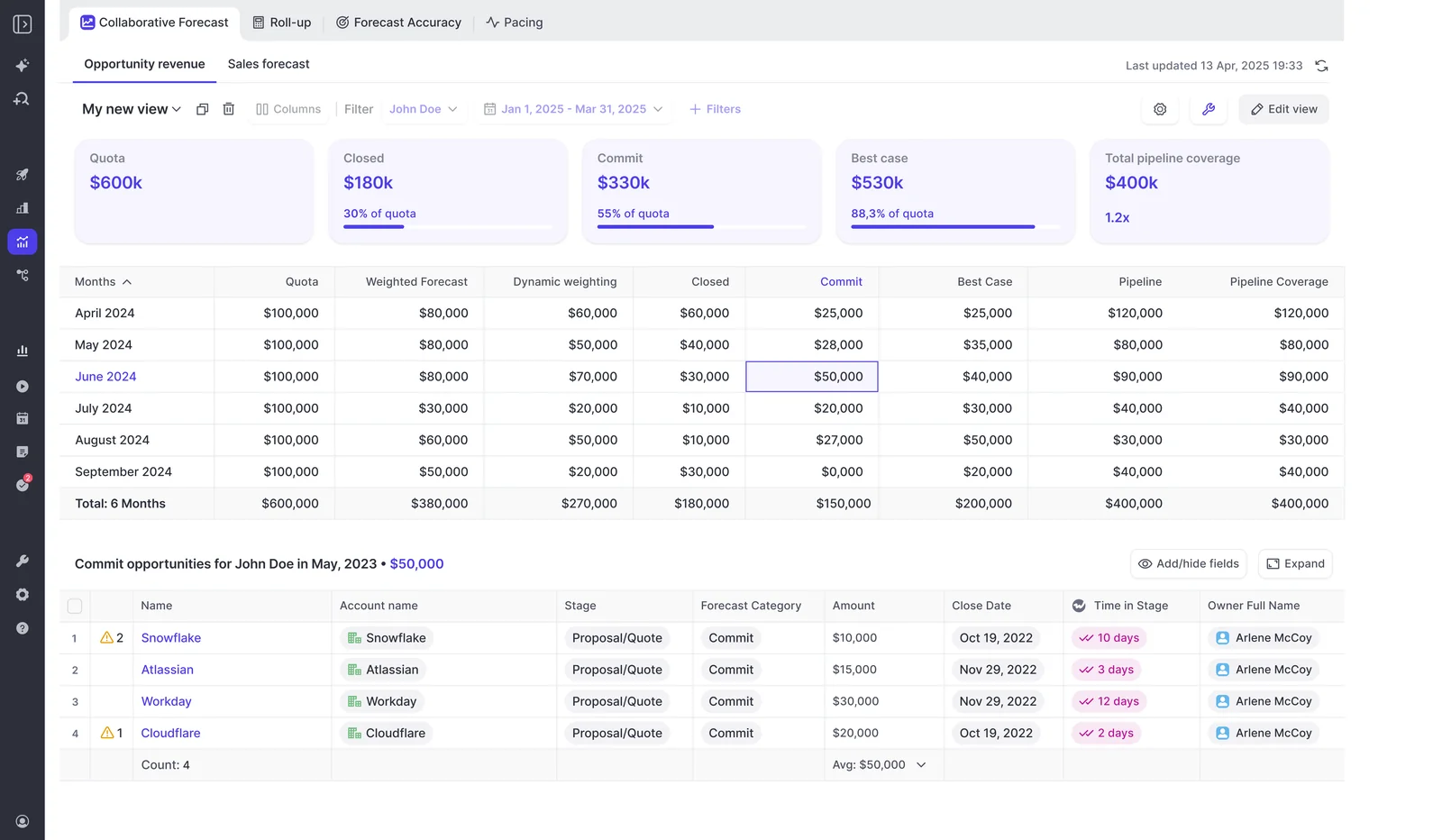
In Weflow, reps submit a baseline and a best case tied to the named opportunities behind each figure, so the forecast review runs deal by deal instead of on a typed total.
Deal-by-deal roll-up. Here's how a submission works:
- A reminder email deep links the rep straight into the submission.
- The rep enters a total or selects the opportunities behind each number, with a free-text comment.
- Every version is kept, and deadlines can lock the field.
- Managers override at the deal or total level. Each override is timestamped, attributed and logged with a rationale, and kept across quarters.
- A manager submitting for the team can pick deals owned by the reps underneath, not only their own.
The version history is what makes a forecast call coachable. You can see whether a rep's number moved through the quarter or never moved at all.
Three methods side by side. Weflow runs three forecasts at once:
- A weighted forecast whose stage win rates are recalculated from a rolling 90- or 180-day window, instead of the fixed probabilities typed into Salesforce stages.
- The team roll-up.
- An AI projection that returns a low, middle and high range from more than 50 deal signals, including communication cadence, whether a next meeting is booked, and deal health against your methodology.
The gap between what the team says, what the pipeline supports and what history predicts becomes the agenda for your forecast call.
Time to the first projection. Weflow's AI projection is ready 48 to 72 hours after the Salesforce history import, and it needs at least six months of history. By comparison:
- RevOps teams tell us Clari's projection takes 12 to 18 months before they find it useful.
- Gong's needs 400 created opportunities with 150 closed-won across four quarters.
When Weflow isn't confident in a range, it shows none and says why.
Forecast types on your fields. Any standard, custom or formula field can drive the forecast. You run several setups in parallel, each with its own amount field, date field, stages, cadence, targets and forecast calls. That's how new business, renewals and expansion stay separate instead of hiding inside one blended number.
Where this stops today:
- Targets are amounts only. You can't set a target for a number of new logos.
- The projection doesn't yet adjust for reps who are still ramping, so a new hire's line gets read with that in mind.
Why capture sits underneath. We learned this ourselves. We launched our first prediction forecast before automating Salesforce data capture, and it wasn't accurate. So we built the forecast on top of Weflow Activity & Contact Capture and Weflow Conversation Intelligence, which fill the records the model reads.
How Weflow tracks accuracy, snapshots and the pipeline waterfall
Weflow gives you the history Salesforce doesn't keep, without a warehouse project.
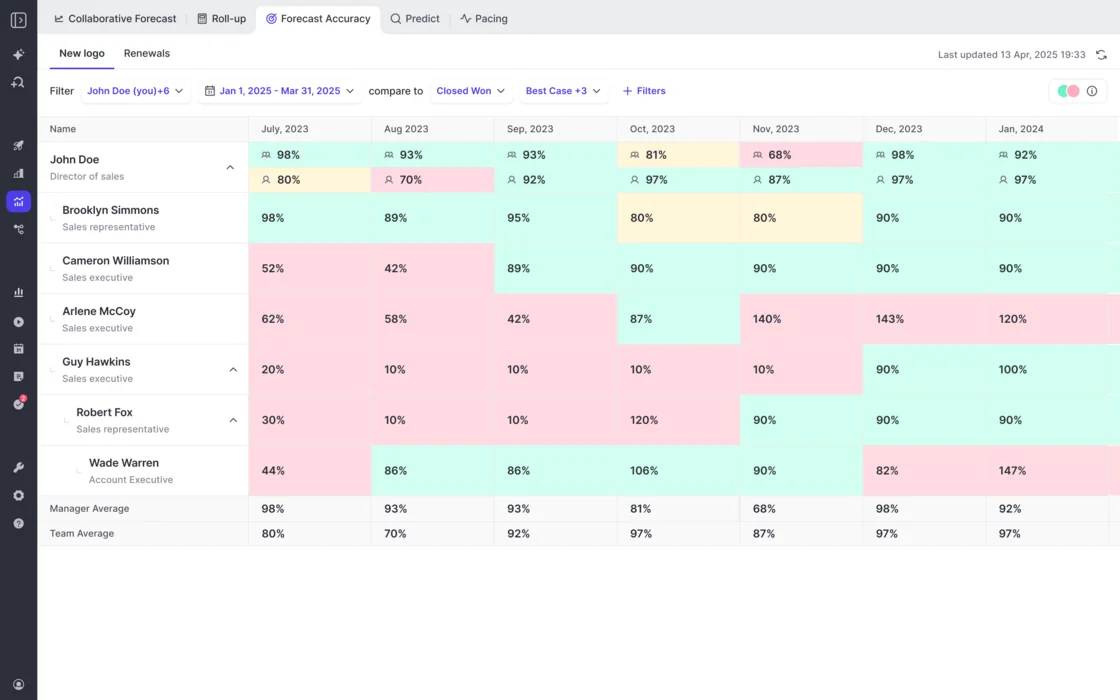
Accuracy, with no setup. Every Forecasting customer gets accuracy tracking per period for each rep, manager and team. Manager and team averages sit on their own rows, so you can read a manager's call against the team's. The admin chooses the field accuracy is measured against, such as Closed Won.
Snapshots. Weflow snapshots every opportunity every few hours. It also tracks days in stage and close-date push counts automatically, so you don't build custom fields and automation to get them.
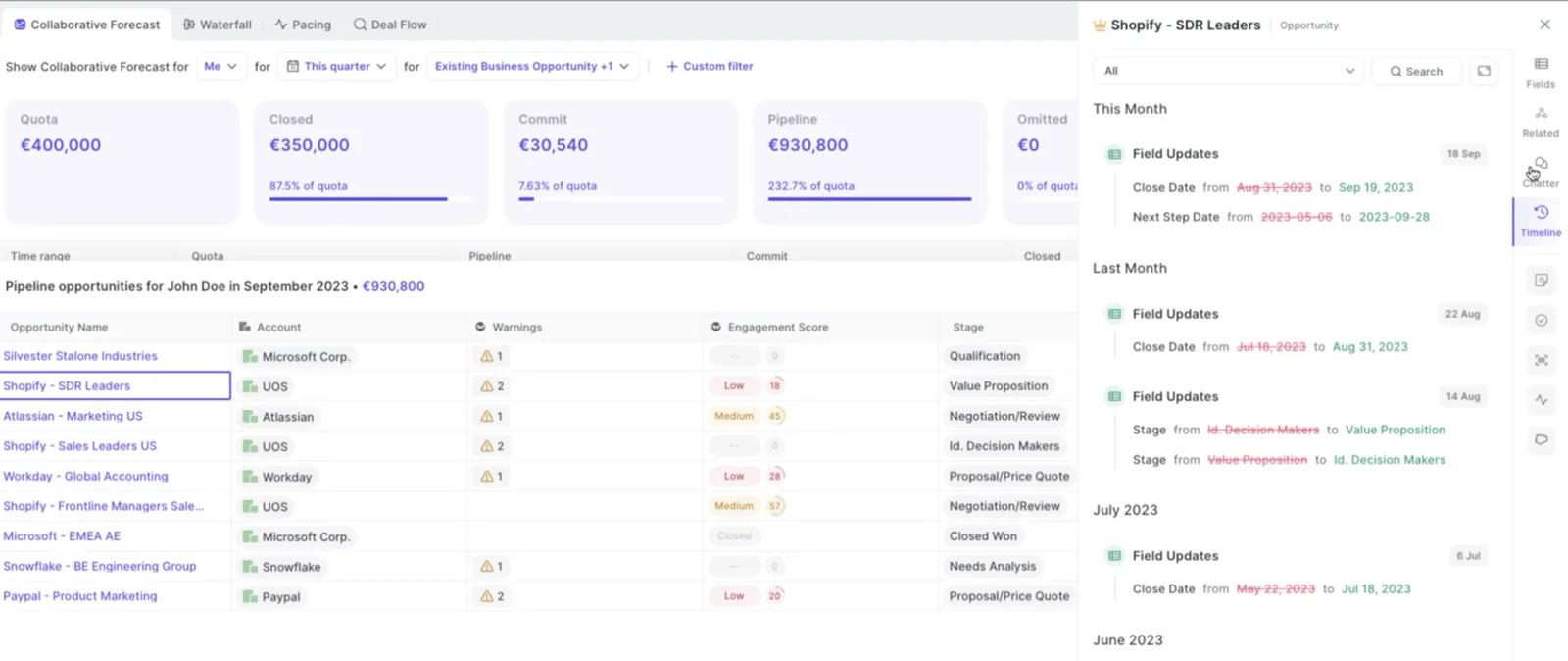
Waterfall. The snapshots feed a clickable waterfall that reconciles your pipeline in this order:
- Starting pipeline
- Created
- Increased
- Pulled in
- Pushed out
- Lost
- Decreased
- Won
Each bar drills through to the opportunities behind it. That's how you answer why a quarter that opened strong ends thin.
History before rollout. Weflow imports 12 months of Salesforce history by default. For custom fields, how far back it goes depends on whether Salesforce field history tracking was switched on.
Zeotap runs its weekly, monthly and quarterly cadence in Weflow. Before that, AEs updated opportunities partially, and next steps and close dates went unfilled. Once the pipeline data was complete, the cadence started producing a number leadership could use, and Zeotap raised its win rate by 12%.
"With Weflow, we forecast within 7% by week 4 of the quarter."
How your stack and AI assistants reach Weflow forecast data
This is the direct answer to Aviso's biggest gap. Weflow forecast data is reachable from outside the tool, through a REST API and an official MCP connector.
REST API. The API bulk-exports transcripts, metadata, scores and signals as JSON or CSV. It feeds BI tools such as Tableau and Looker. Teams move the data into Snowflake, Databricks or BigQuery through the API, since we don't have a native warehouse connector yet.
MCP connector. An admin switches it on per workspace, with a separate toggle for whether assistants read full transcripts or only AI summaries. Claude, ChatGPT and other assistants can then pull:
- Forecast calls for a chosen close-date period, scoped to you or your team.
- Pipeline metrics per rep: weighted and unweighted pipeline, win rate, cycle length, coverage, gap to forecast, and the opportunity IDs behind them.
- Quotas and targets alongside actuals, where you've configured them.
- Playbook output, call summaries and transcripts.
The limits:
- Forecast submissions, targets and the roll-up live in the Weflow app. They aren't written to any Salesforce field.
- Forecast calls are readable via MCP now. The API route for them is planned.
- Deal warnings and AI Playbook scores are Weflow fields, marked with a W in the interface, so they don't reach Salesforce reports.
- A per-rep breakdown caps at 25 owners, so a large org narrows the question to a team.
- Saved deal board views aren't exposed. An external agent rebuilds the filter from the records.
That's why we suggest connecting Weflow's MCP next to Salesforce's own. Salesforce's connector answers questions about the record. Ours answers questions about the forecast and the conversation.
| Lands in Salesforce | Stays in Weflow, reachable by MCP or API |
|---|---|
| Emails, meetings and contacts, on native Salesforce objects | Forecast submissions, targets and roll-up (MCP now, API planned) |
| Call transcripts and AI summaries | Deal warnings and AI Playbook scores (playbook output reachable via MCP) |
| AI field updates, written into the fields you map | Opportunity snapshots behind the waterfall and push counts |
| Opportunity edits made in Weflow, written straight back | Recording video files, exported via the API to your own storage |
Where Weflow stops, and which teams it fits
Weflow stops at:
- Salesforce only. We don't support HubSpot, Dynamics or multi-CRM forecasting.
- No consumption forecasting. Our methods model deal-based revenue.
- No account-level board that rolls renewal and account work up by customer.
- No pipeline flow (Sankey) view.
- No forecast submission from a phone or a chat tool. Submissions happen in the web app.
- Forecast calls and deal warnings live in the Weflow app, not on Salesforce fields.
Weflow fits:
- Salesforce teams that want the forecast on top of automatic capture and call-to-field updates, in one platform.
- Teams that want to switch tools off rather than add another login.
- Teams building on Claude, ChatGPT or a warehouse that need the forecast reachable outside the tool.
- Teams that want forecast columns built from their own Salesforce fields, and a price they can see before the first call.
Clari, now Salesloft: the enterprise roll-up benchmark
Clari's roll-up is the benchmark for very large orgs, and its inspect view and Quick Submit are the UX buyers measure every replacement against. Since 1 September 2026, Clari is sold under the Salesloft brand, so buying or renewing Clari Forecast means a contract with Salesloft.
How Clari Forecast rolls up calls and projects new business
Clari Forecast rolls submissions up a hierarchy up to eight levels deep, and managers with the right permission submit on behalf of their reps.
Roll-up. Quick Submit updates every month and week of a quarter in one action, and the inspect view lets a leader see and edit the forecast inline. Two limits come with it:
- Leaders see what each direct report submitted, not what the reps underneath said. You can't see where in the hierarchy a number changed.
- The forecast is tied to the Salesforce hierarchy, so you can't build a separate forecast outside it.
That hierarchy lock comes up on our calls a lot:
"You're stuck with the Salesforce hierarchy. I want to look at all enterprise reps globally and compare them."
AI forecast. Salesloft's AI Forecast predicts new business closing in the current quarter. Salesloft switches it on per team after an engineering evaluation. A team qualifies with:
- Four preceding quarters with at least 50 closed opportunities each.
- An average of at least 10 open opportunities per day in the current quarter.
Each open deal gets a high, medium or low close probability. RevOps teams tell us the projection takes 12 to 18 months before they find it useful.
Forecast types. Account-based forecasting runs next to the opportunity forecast for existing-customer revenue. Each account carries a machine-predicted Pace number that sellers adjust with an override and a comment. Salesloft designed it for variable or consumption-based revenue.
How Clari tracks forecast history, snapshots and the waterfall
Clari's Time Series Data Hub snapshots opportunity, account and activity data automatically. Clari uses that history to compare the quarter with past quarters and to track conversion by stage.
Forecast history. Clari Forecast keeps a week-by-week history of every forecast call, quota and field next to the historical CRM totals.
Accuracy. There's no computed accuracy measure. Admins export a Forecast History Report of two years of submitted forecasts as a CSV and match it against attainment in a BI tool.
Waterfall. Clari's waterfall breaks pipeline change into types such as amount decreases, lost deals and slipped deals, and each type can be grouped by a CRM field. The waterfall, the pacing view and the same-day-last-quarter comparison are the Clari views teams use most. Some teams still rebuild the movement analysis in Tableau every cycle.
How Clari and Salesloft data reach your warehouse and assistants
Clari is ahead of Aviso here. The Clari Forecast MCP server gives Claude and ChatGPT live forecast data, including historical snapshots, scoped to each user's Clari permissions.
What each route covers:
- Clari Forecast MCP: seven tools across forecast tabs, grid values, hierarchy, periods, snapshots, field configuration and related deals. An admin enables it in Clari Studio, and users need a Claude or ChatGPT Business or Enterprise subscription.
- Salesloft MCP: read-only and in beta. It needs the paid Agentic add-on and returns call summaries, extracted fields and key moments. Transcript retrieval was removed.
- Clari Copilot MCP: reaches call data only.
- Warehouse and APIs: Clari has REST and Export APIs, forecast history exports as CSV, and Salesloft's data layer syncs with Salesforce, Dynamics, Snowflake, Databricks, Gmail, DocuSign, ZoomInfo and LinkedIn.
Where Clari stops, and which teams it fits
Clari stops at:
- A forecast locked to the Salesforce hierarchy.
- Leaders seeing only the level directly below them.
- An AI projection that's slow to become useful and covers current-quarter new business only.
- No computed accuracy measure in the product.
- Quote-only pricing, with reported implementation fees.
- Products assembled by acquisition (Wingman became Copilot, then Groove, then the Salesloft merger), now under one Salesloft contract.
Clari fits:
- Orgs with 1,000+ reps that want the most mature enterprise roll-up.
- Teams whose reporting lines match the Salesforce hierarchy.
- Teams already on Salesloft that want forecasting on the same contract.
Gong Forecast: forecasting on top of conversation intelligence
Gong built the conversation intelligence category and still has the deepest conversation analytics, and its deal board is the reason many teams stay. Gong Forecast is an application you buy on top of the Gong Foundation core licence.
How Gong Forecast handles submissions, projections and separate boards
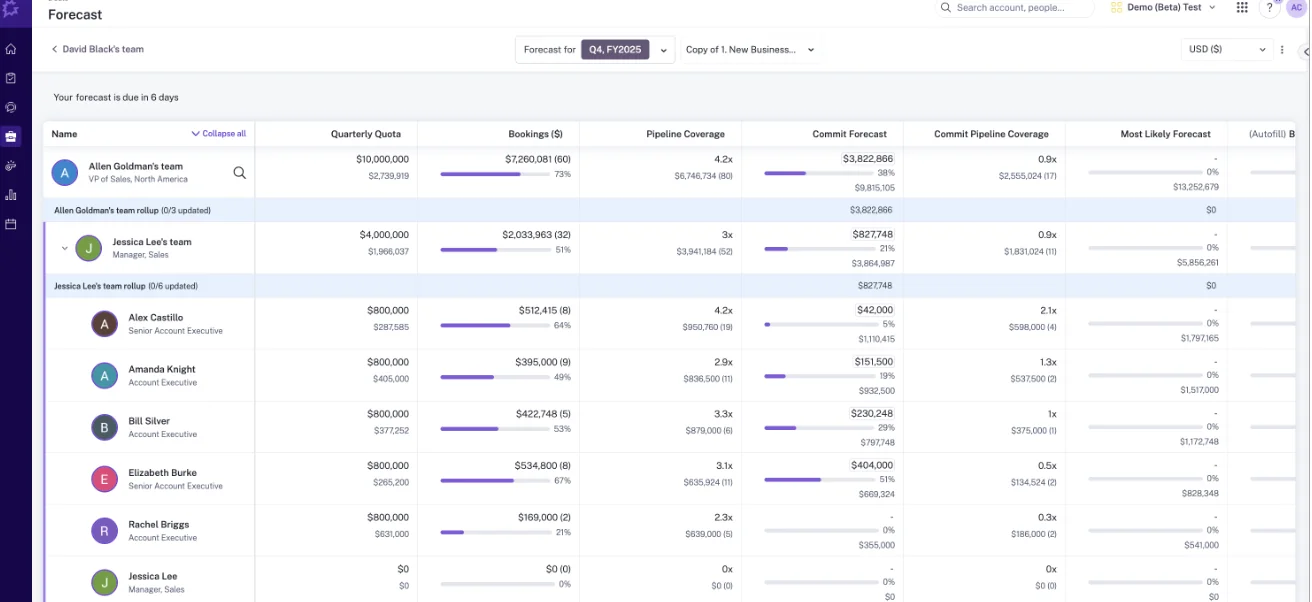
In Gong Forecast, reps submit their own number per forecast category, with notes, and managers see their team's totals with target and coverage beside each number.
Submissions. Managers move up and down the hierarchy, and a clock icon shows whose number is due. There's no deal-by-deal submission. The roll-up follows the Salesforce hierarchy, so teams whose reporting lines differ from the CRM build a placeholder structure to make it resolve.
Here's Gong's own forecast board, nesting from a VP of Sales down to named account executives:
Projection. Gong projects the landing from three inputs:
- Closed-won deals.
- Pipeline weighted by historical stage conversion at the same point in the period.
- Expected new, pulled-in and pushed-in deals.
A See the math panel shows each component, which we like. Reliable projections need at least 400 created opportunities with 150 closed-won across four quarters.
Separate boards. Gong runs separate forecast boards for new business, renewals, retention or any other motion, each with its own filters, columns, metrics and targets.
How Gong tracks accuracy, weekly history and pipeline changes
Gong Forecast has an accuracy report that divides the forecast submitted in a chosen week by actual sales at period end. It shows the result per person, banded high, medium or low, with an over or under indicator.
Weekly history. The trend chart shows each week's deals as they stood that week, against the projection, the team's forecast, the manager's forecast and the target.
Changes waterfall. The Changes report groups movement into sixteen reasons, such as new, pulled in, pushed out, closed-won and amount decreased. Gong compares each deal's stage, close date and amount at the start and end of the period, so a deal that moved and came back doesn't appear.
Where history comes from. Trends, Changes and Pacing read CRM field history. Gong backfills up to five quarters on request through your customer success manager, which takes 3 to 5 business days. You need that backfill again after changing a business line's amount, date or owner fields.
How Gong data reaches your BI stack and AI assistants
Gong's marketplace lists about 450 integrations and partner solutions, and Gong imports calls from about thirty dialers. Reaching your own Gong data at scale costs more:
- API: returns transcripts, participants, trackers and scorecards, capped at 3 calls a second and 10,000 a day.
- Warehouse: delivery to Snowflake, Databricks, BigQuery and Redshift needs Data Cloud, a separate purchase of about $5,000 a year.
- MCP: three tools (ask_account, ask_deal, generate_brief), each on one record at a time. It returns AI insights, never raw transcripts, and it's read-only.
- Metering: the same brief is free when generated in the Gong interface and draws credits through the API or MCP. Every user also needs a paid Gong seat and a paid assistant tier.
Where Gong stops, and which teams it fits
Gong stops at:
- Forecasting needs Foundation plus a Forecast application, with seats paid per application.
- No deal-by-deal forecast submission.
- The projection needs a large history before it's reliable.
- Snapshot history is backfilled through the CSM.
- The MCP returns insights only and is metered in credits.
Gong fits:
- Teams whose center is conversation intelligence and the deal board.
- Teams that want to add forecasting on the same vendor and can run it within Gong's hierarchy and history requirements.
Our Head of Sales, Chris Nethercote, bought Gong at two companies before joining us. On the forecasting module, he told us:
"Our RevOps team spent too many hours building it out and trying to get it to work super well. So we ended up actually doing most forecasting back in spreadsheets."
— Chris Nethercote, Head of Sales at Weflow, former Gong enterprise customer
What Weflow, Aviso, Clari and Gong cost for forecasting
Weflow publishes its per-seat prices and includes AI in the seat, with only Agent Builder metered. Aviso, Clari and Gong quote every deal, and each has something that costs extra or moves with usage.
| Pricing point | Weflow | Aviso | Clari (now Salesloft) | Gong |
|---|---|---|---|---|
| Pricing model | Per seat, by product or bundle | Per-user licences in a custom proposal, no platform fee | Salesloft packages (Advanced, Elite) with paid add-ons, including Forecasting | Per-user licence plus a platform fee that scales with users |
| Published list price | $19 to $79 per user per month | Not published | Not published. Our estimate is $120 to $180 per user per month | Not published |
| AI usage | Included in the seat. Only Agent Builder is metered | Agent work at $1 to $1.50 per outcome. MIKI questions and automated briefs included | Copilot AI Themes metered as a monthly quota of analyses | Credits for AI Trackers, MCP and API workflows, from a company-wide pool |
| What costs extra | Agent Builder beyond the free 25 actions a month: $299 a month for 500, $999 for 2,500, custom above that | Metered agent outcomes | The Forecasting add-on, and the Agentic add-on for Salesloft MCP | The Forecast application, Data Cloud (about $5,000 a year) and credit top-ups |
| Implementation | No implementation fees | Aviso's implementation team, with a contract buyout, free migration and white-glove onboarding offered | Reported professional services fees of $15,000 to $50,000 | Fixed-scope professional services packages |
| Terms and minimums | 12 months, annual billing, 10 users minimum per product or bundle | Not published | Not published. No free trial | Custom proposal. Seats assigned per application |
Weflow sells three products and three bundles, per user per month, billed annually:
- Weflow Activity & Contact Capture: $19
- Weflow Conversation Intelligence: $39
- Weflow Deal Intelligence & Forecasting: $39
- Weflow Revenue AI Foundation (Activity & Contact Capture plus Conversation Intelligence): $49
- Weflow Revenue AI Business (adds Deal Intelligence): $59
- Weflow Revenue AI Enterprise (all products, including Forecasting): $79
For a reference point, at roughly 62 seats, capture plus conversation intelligence lands around $36,000 a year and the full platform around $58,000. Not every seat needs forecasting. Put most reps on a capture bundle and a handful of managers on the full platform, and the same 62 seats come to roughly $45,000. Bundle, volume and multi-year discounts apply, with the meaningful volume breakpoint starting around 30 to 40 seats.
Aviso prices its licences and onboarding at about half of Gong's. That's Aviso's own framing. Our own read is that Weflow comes in at about half of Gong's price with better AI, because we built after transcription and inference costs collapsed.
Which Aviso alternative fits your Salesforce team
Match the tool to your situation. For some teams, staying on Aviso is the right answer.
| If your situation is… | Choose… |
|---|---|
| You run on Salesforce and want a deal-by-deal roll-up, an AI projection, snapshots and a waterfall on fields you control | Weflow |
| You're building on Claude, ChatGPT or a warehouse and need forecast data reachable outside the tool | Weflow |
| You want capture and call-to-field updates in the same platform, and to switch tools off at renewal | Weflow |
| You have 1,000+ reps, want the most mature enterprise roll-up, and your reporting lines match the Salesforce hierarchy | Clari (now Salesloft) |
| Your team lives in the Gong deal board and conversation intelligence is the center of your stack | Gong |
| You forecast consumption revenue, run on Dynamics or HubSpot, merge several CRMs, need an account-level board, or need to submit the forecast from a phone | Stay on Aviso |
| Your Aviso contract has months to run and the CFO won't pay for two forecasting tools | Start on Weflow Revenue AI Foundation now and add forecasting at renewal (see below) |
How to switch from Aviso without paying twice
Timing and the entry point decide this switch as much as the product does.
What forecast history you can bring out of Aviso
Aviso's forecast audit trail exports as a spreadsheet, so your past weekly, monthly and quarterly calls stay with you as a file.
Weflow's AI projection doesn't wait on Aviso at all. It learns from your Salesforce opportunity history, which we import at install: 12 months by default, more on request where field history allows. The projection works from up to two years.
Your forecast setup gets rebuilt as Weflow forecast setups, one per motion, each on the Salesforce amount and date field you choose. Our documented forecast-call import is from Clari, so for Aviso, the audit trail spreadsheet is your record of past calls.
How to start on Weflow before your Aviso renewal
You can start without a second forecasting line item. Here's the sequence we see work:
- Start on Weflow Revenue AI Foundation (Weflow Activity & Contact Capture plus Weflow Conversation Intelligence) at $49 per user per month. It captures every email, meeting and contact into native Salesforce objects and writes call outcomes into the fields you map. It isn't a forecasting tool, so it doesn't collide with your Aviso contract.
- Run capture for the rest of the Aviso term. Aviso copies your CRM, so the fuller Salesforce records feed the forecast you're still paying for.
- Before the renewal date, import your Salesforce opportunity history and build your forecast setups. The AI projection is ready 48 to 72 hours after the import.
- When the Aviso contract ends, add forecasting for about $10 more per user per month, on the seats that need it.
What changes week to week for reps and RevOps
For sellers, the weekly change is small. For RevOps, the change is who holds the controls.
| Role | What changes week to week |
|---|---|
| Reps, on activity | Emails, meetings and contacts land in Salesforce automatically, and call outcomes fill the fields you mapped, so reps stop logging by hand. |
| Reps, on the forecast | Reps open the submission from a reminder email and submit a baseline and best case in the web app, picking the deals behind each number. There's no mobile submission. |
| Managers | Managers review the roll-up deal by deal, override with a logged rationale, and see deal warnings in the submission screen before a deal enters commit. |
| RevOps | RevOps edits forecast setups, columns and targets on Salesforce fields in the Weflow admin console, without a ticket to the vendor. |
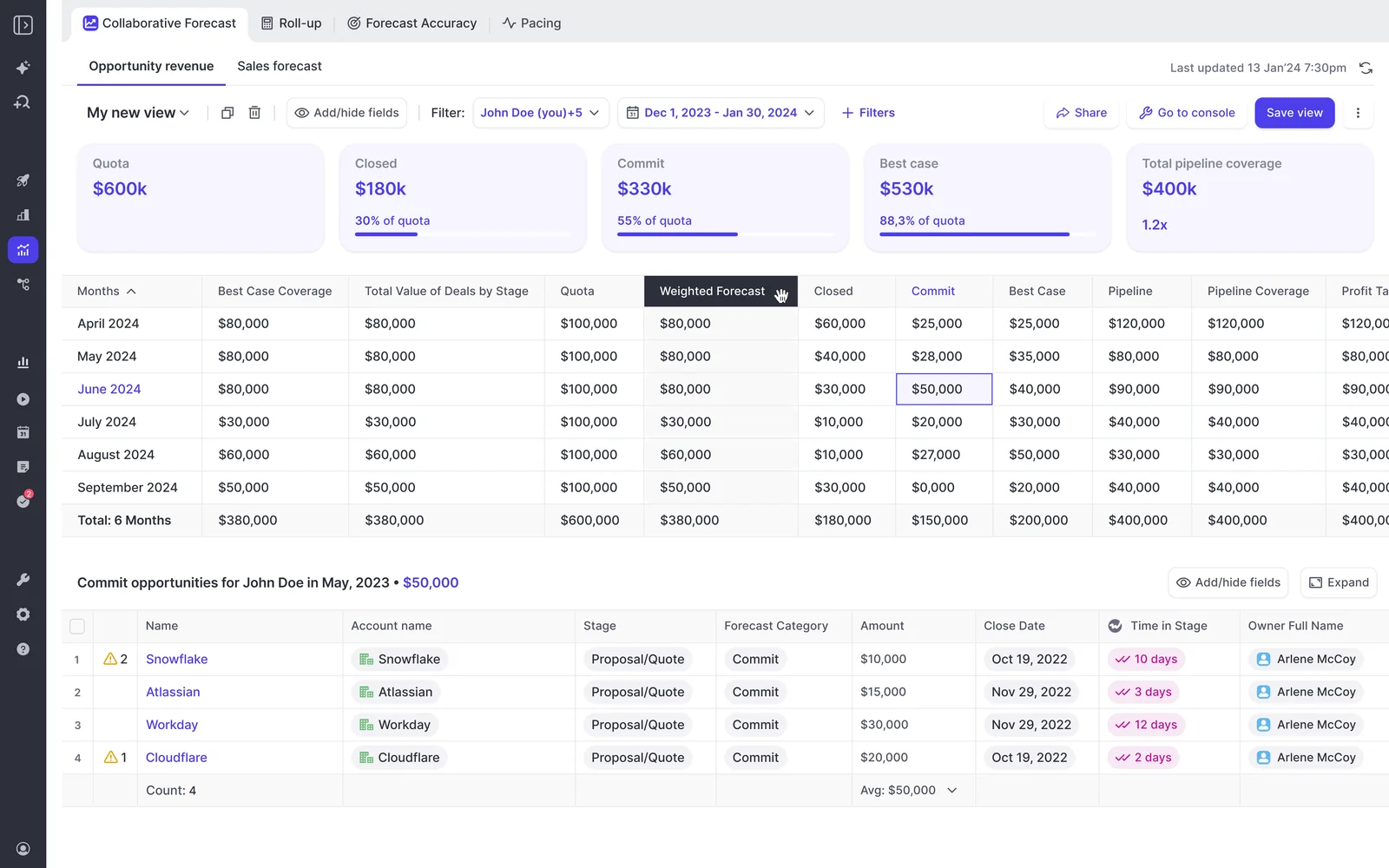
See how Weflow captures activity, updates Salesforce fields from calls, and rolls up your forecast. Book a 30-minute demo.
Questions RevOps leaders ask when replacing Aviso
What does Weflow cost at our seat count, with minimums?
Weflow's list prices are published: $19, $39 and $39 per user per month for the three products, and $49, $59 and $79 for the Weflow Revenue AI Foundation, Business and Enterprise bundles. Every product or bundle has a 10-user minimum and a 12-month term, billed annually. Bundle, volume and multi-year discounts apply, and volume pricing starts to move around 30 to 40 seats.
Can the Weflow forecast hierarchy differ from Salesforce roles?
Weflow's roll-up follows the reporting hierarchy configured in Weflow, which starts from your Salesforce role hierarchy, and admins shape the configuration to the team's process. Accuracy is reported per rep, manager and team on one page. If you need a hierarchy fully independent of Salesforce, or one merged across several CRMs, Aviso's own-store design handles that.
Do reps submit the forecast in Salesforce or in Weflow?
Reps submit in the Weflow web app, usually from a reminder email that deep links into the submission. Submissions aren't written to any Salesforce field. Your BI and assistants reach forecast calls through our MCP connector today, and the API route is planned. The weighted forecast and the AI projection run off CRM data with no rep input.
Who implements Weflow, and can RevOps change the forecast?
Weflow runs onboarding, and there are no implementation fees. The technical setup takes 30 to 45 minutes with your Salesforce admin and your Google Workspace or Microsoft admin, and teams reach full time to value in one to three weeks. After that, RevOps configures forecast setups, targets and columns in the admin console.
Can Weflow forecast renewals, expansion and consumption revenue?
Weflow forecasts renewals and expansion as parallel setups, each with its own field, stages, cadence and targets. Renewal forecasting tracks contract end dates and fires a renewal-kickoff milestone ahead of expiry. You can carry one combined quota and separate targets per deal type at the same time. Weflow doesn't offer consumption forecasting.
Does Weflow replace Aviso's activity and conversation modules?
Yes, and the data lands in Salesforce. Weflow Activity & Contact Capture writes emails, meetings and contacts to native Salesforce objects. Weflow Conversation Intelligence writes transcripts and summaries to Salesforce and updates the fields you map from each call, while recording video exports through the API to your own storage.
What happens to Gong or Outreach when we add Weflow?
Outreach stays: Weflow doesn't do sequencing or dialing, and calls made through Outreach's dialer come into Weflow as recordings with a transcript, summary and coaching. If you're leaving Gong, we migrate your recordings through the Gong API in about a week and relink them to the right Salesforce records.
How does Weflow compare with Aviso in a security review?
Weflow is SOC 2 Type II certified and GDPR compliant, applies Zero Data Retention to AI processing, and never uses customer data to train AI models. Aviso's scope is broader on paper: SOC 2 Type II, ISO 27001 and PCI DSS Service Provider Level 1, with GDPR and CCPA compliance and a choice of hosting region. Aviso makes no public commitment that customer data stays out of model training.
How much Salesforce history does the Weflow AI projection need?
Weflow's AI projection needs at least six months of Salesforce opportunity history, and it's ready 48 to 72 hours after the import. Each forecast setup gets its own model, so new business and renewals are projected from their own history. The projection refreshes nightly and returns a low, middle and high value.











