
Clari vs Salesforce-native forecasting: how to leave Clari without losing forecast rigor
Learn where Salesforce-native forecasting falls short of Clari and how to switch without losing rigor


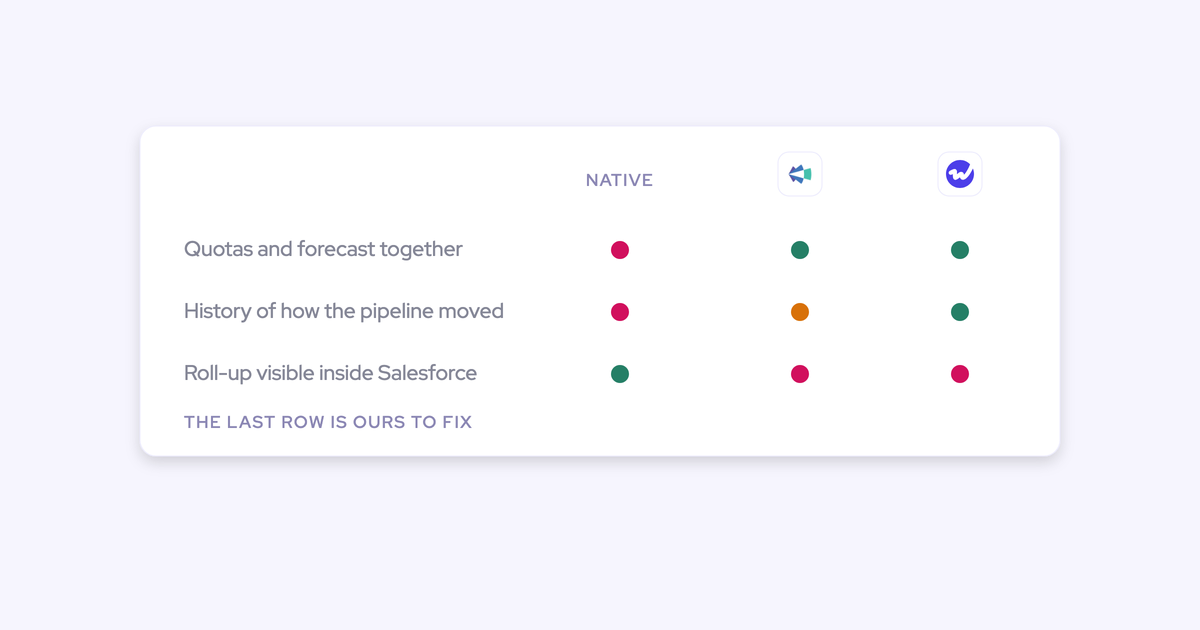

If your Clari renewal is a quarter out and you've already decided to pull forecasting back into the CRM you own, the instinct is right and the plan is half wrong. Right about ownership: paying six figures a year for a roll-up that lives in someone else's cloud, on data you can't report on yourself, stopped making sense a while ago. Wrong about capability: Salesforce on its own cannot do the three things a Clari replacement actually gets judged on.
Salesforce overwrites fields and keeps no pipeline history, so there's no same-day-last-quarter comparison. There's no waterfall. Quota and forecast never sit in one surface. That's not a configuration problem you'll fix in a sprint, it's the shape of the product.
So this article does three things: proves exactly where bare-native forecasting breaks, prices what it costs to close that gap yourself, and shows where Weflow fits as the third path, including the honest bit about where our own forecast submission and roll-ups layer sits, which is not inside Salesforce.
Clari vs Salesforce-native vs Weflow forecasting at a glance
The three paths don't diverge on whether a roll-up exists. They diverge on hierarchy flexibility, pipeline history, and what you pay for both.
| Dimension | Clari | Salesforce-native forecasting | Weflow |
| Forecast hierarchy | Bound to the Salesforce role hierarchy. Buyers report they could not build a separate forecast, or handle one leader over several product teams | The Salesforce role hierarchy is the only roll-up path there is | Weflow supports its own forecast hierarchy, abstracted from the Salesforce hierarchy, so you can compare all enterprise reps globally regardless of who they report to |
| Pipeline history and same-day-last-quarter | Snapshots pipeline state; the quarter-over-quarter comparison is one of the three views teams actually use | Fields overwrite with no history kept. Needs a warehouse plus snapshot jobs to answer "what did day 35 look like" | Automatic field-change storage and opportunity snapshots, so the comparison ships with the forecast rather than as a data project |
| Waterfall and pacing views | Waterfall, pacing and flow analytics | Neither. Salesforce reports show the pipeline as it stands right now | Waterfall and pacing, plus coverage, generation and benchmarks. No flow view |
| Separate roll-ups per revenue motion | Supported, but the renewal motion is the one that commonly never gets implemented, so renewals stay in Salesforce | One forecast shape for the whole org | Parallel forecast setups per opportunity record type, each with its own amount field, date field, stage path, cadence, targets and independent roll-up |
| Where the data lives | Activity and call data sit in Clari's cloud; Clari reads Salesforce and keeps its own logic and mappings alongside it | Everything is in Salesforce, because nothing new gets generated | Activity, contacts, transcripts, summaries and AI field updates land in native Salesforce objects you own. Forecast submissions, targets and the roll-up live in the Weflow app and come out through the public API |
| Forecast accuracy measurement | Does not measure forecast versus actual | Not available | Forecast accuracy report comparing each call against closed-won, by rep and by manager |
| Price and terms | Reported at $120 to $180 per user per month, plus $15k to $50k professional services. Quote-only, no free trial, no standalone products | Included in your Salesforce license. The cost moves to the warehouse and the admin who maintains it | $39 per user per month for Deal Intelligence & Forecasting, $79 for Revenue AI Enterprise. 10-user minimum, annual billing, no implementation fees, 14-day free trial |
Why RevOps teams leave Clari at renewal
The renewal conversation starts because the price stopped matching the usage. Clari is a sales leadership tool for roll-up forecasting and board reporting, it's flexible at that job, and its roll-up mechanics at very large rep counts are more mature than anything a challenger will tell you. That's real. What's also real is that a lot of teams are now paying enterprise money for one screen.
The specific complaints repeat almost word for word across calls:
- The forecast is welded to the Salesforce hierarchy. Buyers tell us they couldn't build out a separate forecast, couldn't model one sales leader running multiple products with different teams, and couldn't compare all enterprise reps globally without the roll-up rewriting itself a level up.
- The number that goes to the board gets rebuilt somewhere else. The worldwide consolidation is exported and reassembled in a BI tool every cycle, which means the company is paying for a forecasting tool that isn't the source of truth for the only forecast that matters.
- The product stalled. No agent builder for revenue workflows. Conversation intelligence that arrived through an acquisition and doesn't share data with the forecast product, so call content never informs the number.
- Deal-level health is thin. A stuck deal and a live deal look identical in the roll-up, and Clari doesn't measure forecast accuracy, so after years of using it a team still can't say how good its calls have been.
- It's a second operating layer to run. Its own mappings, its own logic, its own training. RevOps maintains it in parallel with the CRM that already has permissions and configuration.
Clari is clearly not suited as a reporting tool to present to this type of stakeholders. So we're using Tableau. So we kind of are flowing the data from Clari to Tableau.
The rigor gap: what Salesforce-native forecasting can't replace
Here's the part that gets skipped in the internal pitch deck. Of everything in Clari's interface, three views actually get used: the pipeline waterfall, the pacing view, and the comparison of where this quarter stands against the same day in previous quarters. Those three are real rigor, and Salesforce reporting reproduces none of them.
Pipeline snapshots and same-day-last-quarter comparisons need a warehouse
Salesforce keeps no record of what the pipeline looked like last month. The field is overwritten, no history is retained, so every question about what changed, which deals slipped, what got pulled in, when the amount was cut, is unanswerable after the fact.
Teams find this out the first time a leader asks why the forecast moved and the honest answer is that the evidence no longer exists.
Pipeline analytics need two things switched on before any report gets built: field history tracking, and regular snapshots of opportunity data. Almost every pipeline health report is the same pipeline compared at two points in time. Without a stored history there is nothing to compare, and no downstream analysis recovers a history nobody captured.
No pipeline waterfall or pacing in Salesforce reporting
Salesforce shows you the pipeline as it stands now. When the number drops, the manager has to ask reps which deals slipped and why, rather than opening a view that already shows it.
You can hand-build a version of pacing off close-date reports. You cannot build a waterfall, because a waterfall is a difference between two states and Salesforce only holds one.
Quota and forecast never sit in one place
Native forecasting can't manage quotas and forecast against them in one surface. So quota tracking migrates to a spreadsheet, the spreadsheet becomes the real roll-up, and someone spends a week of every quarter chasing managers for numbers that are stale by the time they land.
Right now our forecast process suboptimal, okay. We're using the Salesforce module, we take a look at it, we end up talking about deals without really a step back roll up of the forecast.
That's the tell. When there's no step-back roll-up, the forecast review becomes a deal-by-deal argument with no aggregate to test it against, and nobody in the room can say whether the total is better or worse than last Tuesday.
What RevOps actually wants from going Salesforce-native
"Native" is a proxy. Nobody is emotionally invested in submitting a forecast inside the Salesforce UI. What they're solving for is narrower and more practical than the slogan.
- Data ownership. The activity, the call content and the fields the number runs on should be records in your CRM, queryable by your flows and readable by your BI tool.
- No vendor lock. If you leave, the history stays. That's the thing Gong and Clari customers say out loud: you can never leave, because you don't own any of the data.
- A renewal the CFO signs without a fight. A price that maps to the number of people who actually open the tool.
- No parallel logic layer. Existing permissions, field-level security, record types and validation rules respected as they are, not duplicated in a second system with its own mappings.
- A forecast they trust. Which means deal health under the roll-up, and a way to measure whether the calls were any good.
Read that list back and the binary falls apart. Clari gives you rigor and fails ownership and price. Bare Salesforce gives you ownership and fails rigor. Neither one delivers both, which is why Project Native feels correct and slightly uncomfortable at the same time.
Weflow: forecast rigor on Salesforce data you own
Weflow is the Revenue AI Orchestration platform for sales, customer success, and RevOps teams, built for Salesforce teams. Capture, conversation data and deal intelligence land in native Salesforce objects you own, and the forecasting layer on top reproduces the rigor the CRM's own forecasting surface doesn't have.
Forecasting was the last part of the platform to get built, and it's the part we'd rather you test than take on trust. The moat underneath it is the capture and unification layer, because a roll-up built on partial activity data is a well-organized opinion.
A forecast hierarchy abstracted from your Salesforce hierarchy
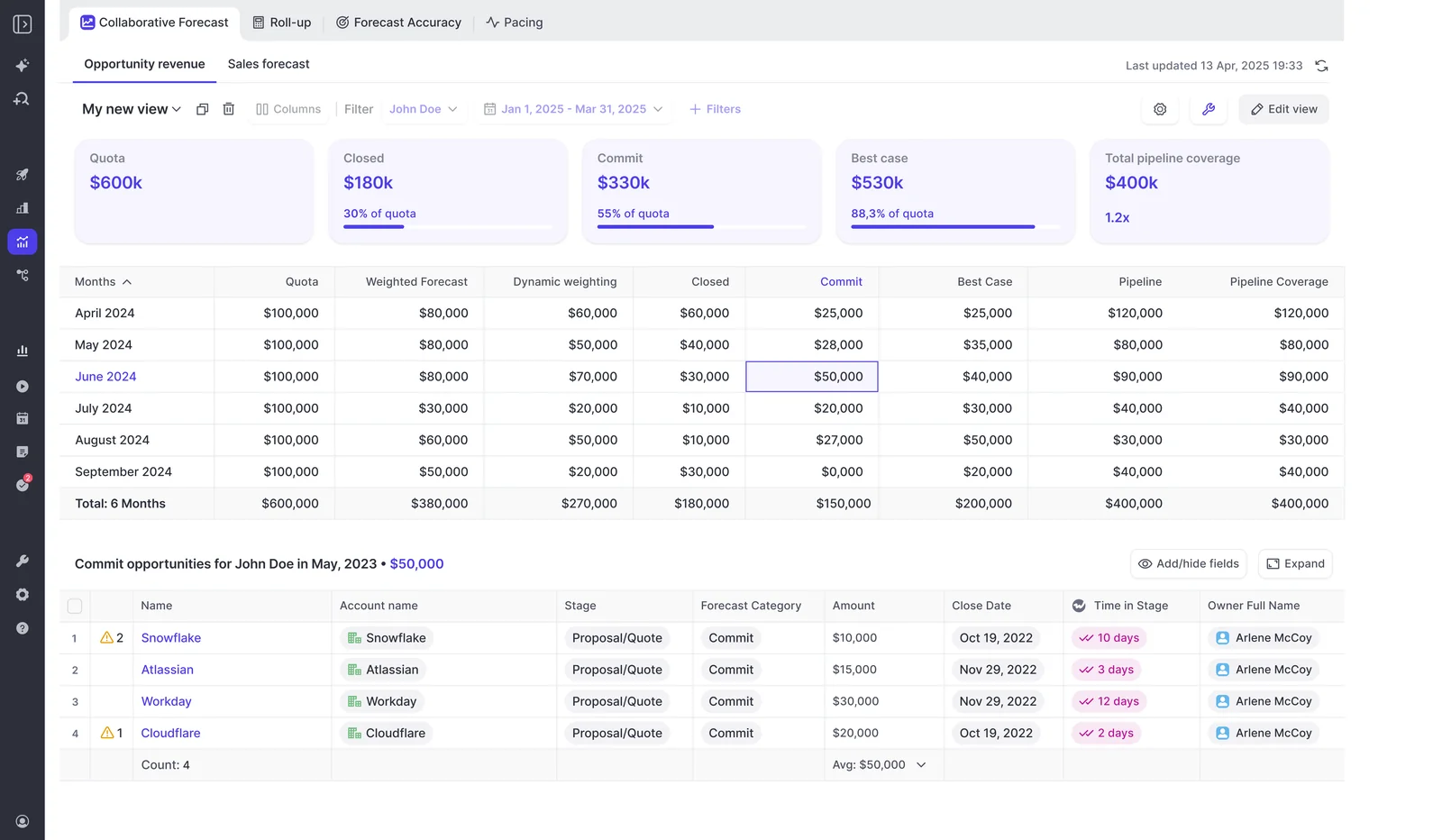
This is the number-one limitation buyers name about Clari, so it's the first thing to check. Weflow supports its own forecast hierarchy, abstracted away from the Salesforce role hierarchy, which means the org chart in Salesforce stops dictating what you're allowed to forecast.
One leader over three product teams gets one forecast. Enterprise reps across four regions can be grouped and compared as a cohort without reporting to the same manager.
You still get manager, VP and executive roll-ups. You just aren't forced to derive them from the reporting lines your HR system happens to hold.
Waterfall, pacing, and quarter-over-quarter from field-change storage
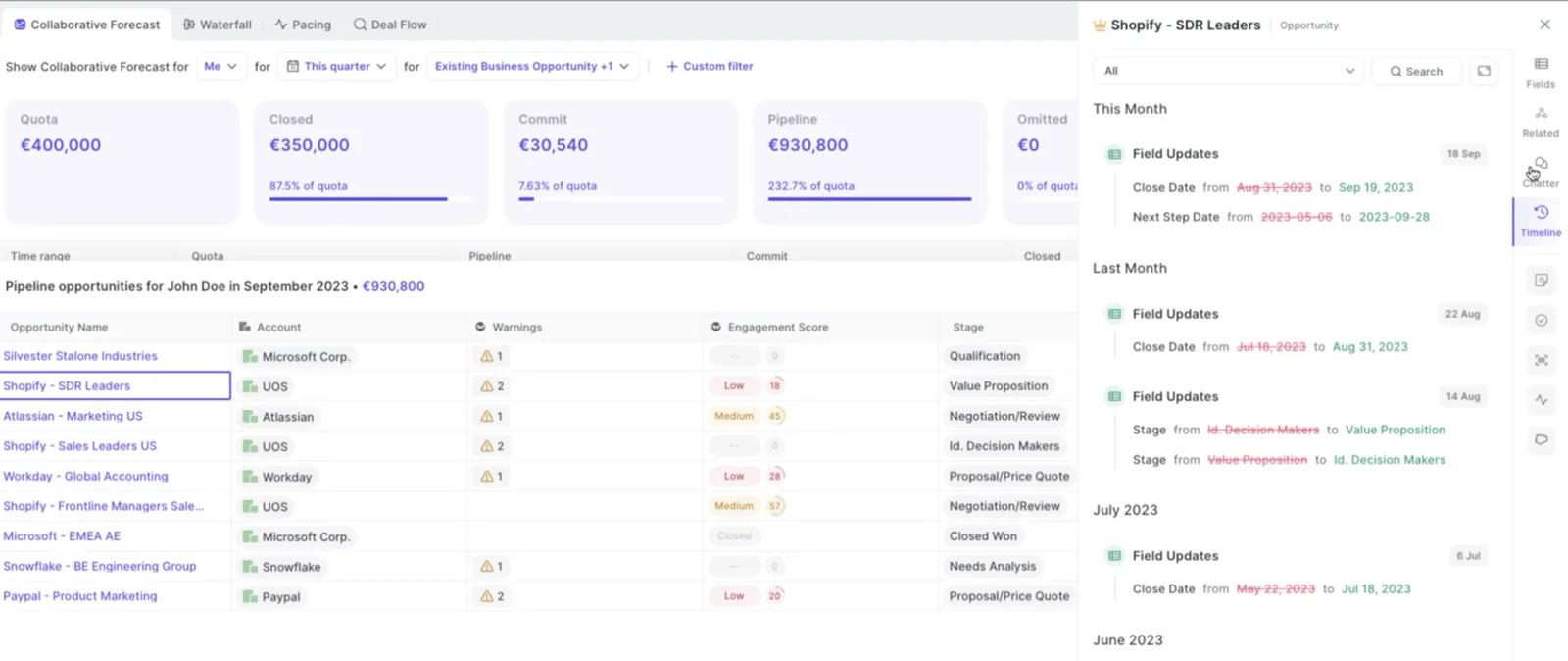
Weflow stores opportunity field changes automatically, which is what makes the historical views possible without a warehouse. Close date moved, stage moved, amount cut: each change is retained with its timestamp, so the pipeline can be reconstructed at any point in the quarter.
That gives you the waterfall, the pacing view, and the same-day-last-quarter comparison, the three Clari views teams actually open. No snapshot engineering project, no BI ticket, no warehouse bill.
One honest gap while we're here: Clari's pipeline analytics also include a flow view, and Weflow doesn't have an equivalent. Pacing and waterfall, yes. Flow, no.
Separate roll-ups for new business, renewals, and expansion
A forecast setup in Weflow is built on one chosen Salesforce amount field, indexed on one chosen date field. An org can run several setups in parallel, each with its own stages, cadence, targets and forecast calls.
That matters because a single blended forecast hides the motion that's actually failing. And it's usually renewals: new business runs in the forecasting tool while the renewal team forecasts straight out of Salesforce, because renewals were always next on the list.
| Motion | Its own setup |
| New business | New Business record type, incremental ARR field, new-logo stage path, its own quota and weekly call |
| Renewal | Renewal record type, contract value field indexed on contract end date, renewal stages, its own targets and independent roll-up |
| Expansion | Existing Business record type, expansion revenue field, its own stage path and cadence |
Each Salesforce opportunity record type keeps its own stage path and forecast-category mapping. So the AM and CSM motions get a forecasting process instead of a spreadsheet.
Deal-by-deal submissions, versioned calls, and AI prediction
Every rep submits a baseline and a best case, either as a total or by selecting the specific opportunities behind each figure, with a free-text comment. A reminder email opens the submission and deep-links the rep straight into it. Deadlines can lock the field.
Two numbers rather than one separates what is very likely to close from what closes if the quarter goes well.
Every submission is versioned. A manager can override, and the override sits next to the rep's original rather than erasing it, so after a missed quarter you can see whose judgment was wrong. That version history is what makes forecast calls coachable: you can see whether a rep's number moved during the quarter or never moved at all.
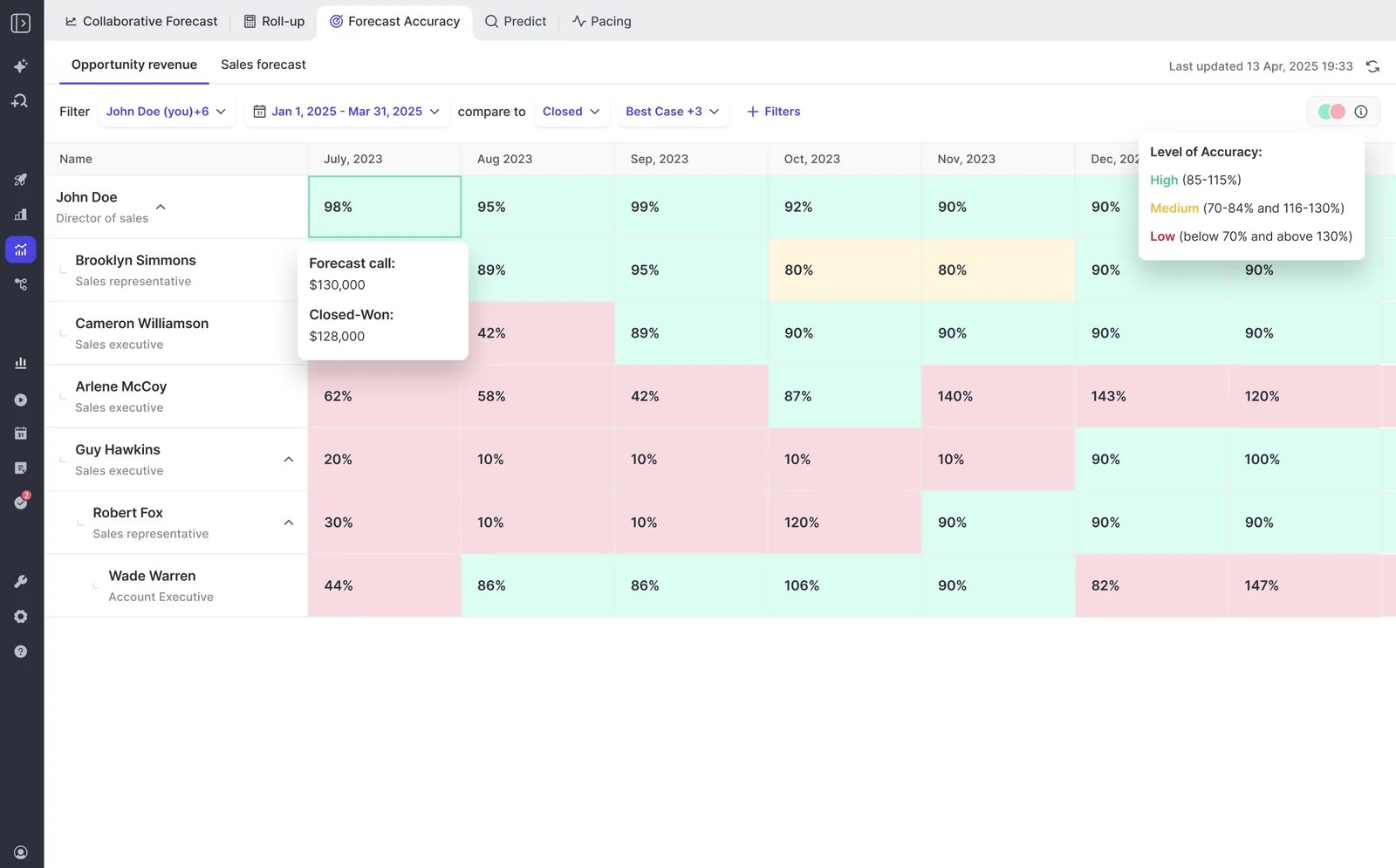
Alongside the team's call, Weflow runs an AI prediction built from historic opportunity snapshots and deal signals, scored deal by deal rather than projected off the aggregate. And because submissions are retained, Weflow measures forecast accuracy per rep and per manager, forecast call against closed-won, which is the number Clari doesn't give you at all.
Where Weflow's forecast roll-up actually lives
You've been burned by overlay tools, so you'll find this boundary in the trial anyway. Better you hear it here.
Everything Weflow captures and generates writes back to Salesforce. Forecasting is the exception. The submission and roll-up layer sits on top of the pipeline in the Weflow app, not as forecast fields on the opportunity record.
Forecast submissions live in the Weflow app, not Salesforce fields
Here's the split, plainly:
| Writes into native Salesforce objects | Lives in the Weflow app |
| Emails, meetings, attachments and auto-created contacts, with opportunity contact roles set | Rep and manager forecast submissions (baseline, best case, comments) |
| Call transcripts, AI summaries and AI field updates into standard or custom fields | Quotas and targets at org, team and individual level |
| Opportunity edits made in Weflow, synced back in real time | The roll-up itself and its version history |
What that costs you depends on one rule. If your hard line is "reps only ever touch Salesforce," roll-up submission breaks it, and you should know that before the trial rather than during it.
The weighted forecast and the AI projection still work for those teams, because both run off CRM data with no rep input at all. And if you snapshot the forecast into Tableau or Power BI, you pull the roll-up through the public API rather than reading it from a Salesforce object.
The other gaps: no flow view, weaker consumption fit
- No pipeline flow analytics view. Clari's pipeline analytics cover pacing, waterfall and flow. Weflow matches pacing and waterfall and has no flow equivalent today.
- Consumption revenue is a weaker fit. Weflow forecasting maps cleanly onto booking-based SaaS, where a contracted deal rolls up from the opportunity. Usage-based revenue depends on data that doesn't sit on the opportunity, and that's a harder, less natural fit.
- Forecasting doesn't work well in isolation. Buy Deal Intelligence & Forecasting with no activity capture or conversation intelligence underneath and the roll-up is thinner, because the deal signals and the AI prediction are computed from that data. We learned this the hard way: we shipped a prediction forecast before we automated capture, and it wasn't accurate enough.
- Salesforce only. No HubSpot, no Dynamics, no Pipedrive. If your CRM isn't Salesforce, stop here.
What Clari, Salesforce-native forecasting, and Weflow cost
Two of these three paths hide most of their cost outside the license line.
| Cost component | Clari | Salesforce-native (including a self-build) | Weflow |
| License | Reported $120 to $180 per user per month; products are not sold standalone | Included in your Salesforce license | $39 per user per month for Deal Intelligence & Forecasting; $79 for Revenue AI Enterprise with capture and conversation intelligence included |
| Implementation | $15k to $50k professional services, reported | Your team's time, priced at whatever else RevOps isn't doing that quarter | None. 30 to 45 minutes of technical setup with a Salesforce admin, then 2 to 3 weeks to full value |
| Pipeline history | Included | Warehouse plus snapshot jobs plus the person who keeps them running | Included through automatic field-change storage and opportunity snapshots |
| Ongoing admin | A parallel layer of mappings, logic and user training alongside Salesforce | You own the code, the pipeline, and every schema change that breaks it | Self-service admin console; existing Salesforce permissions and configuration are respected rather than duplicated |
| Terms and evaluation | Quote-only, no free trial, no self-serve signup | Free to start, indefinite to finish | Published pricing, 10-user minimum, annual billing, 14-day free trial with guided onboarding, free view-only licenses (up to one per recording license) |
Now the build option, because a lot of you have already had a go at it.
On my plane ride home from California last week with Claude, I rebuilt Clari how I would want it in Salesforce. And so then I happened to be talking about that and I saw you guys online and I was like, looks like they went and did this already. So I'm kind of trying to figure out build versus buy.
We're not going to argue you can't build it. You can build the roll-up, the coverage math, the pacing chart. That's the weekend, and it's genuinely good.
What the prototype doesn't cover is the part that has to have been running for a year before it's useful: the history. Snapshots you didn't take last quarter can't be recovered this quarter. Then add the maintenance, the field-history job, the AI prediction, the versioned submission chain with manager overrides, the accuracy measurement.
The bar we have to clear is the one you already set: visibly better than the build, and cheap enough to be worth not owning. At $39 per user per month with no implementation fee, that's an argument about maintenance, not capability.
How to migrate from Clari during the renewal window
You don't have to cut over blind. Run both, in this order.
- Start the trial in parallel, and backfill. Weflow can pull up to two years of historical emails and meetings from your mail server into Salesforce, so a trial can start from a past date and show months of real activity on in-flight deals from day one. If you already ran a capture tool, the history is in the CRM and you can skip this.
- Fix the data layer first, and only run one capture engine. Capture is the lightest lift, it asks nothing of reps, and everything downstream depends on it. If Einstein Activity Capture is still on, set its event sync to one direction only, from calendar into Salesforce, or every meeting gets written twice. If a sequencer is logging email, turn on compatibility mode so Weflow steps back rather than duplicating the record.
- Design the forecast setup with sales leadership in the room. Nothing carries over, not from Clari and not from the Salesforce forecast module, because Weflow forecasting runs independently. That sounds like a cost and is mostly an opportunity: you get to decide the amount field, the date field, the stages, the cadence and the motions rather than inherit a configuration from a consultant who left in 2021.
- Run one quarter side by side. Submit in both, compare the calls against closed-won at the end, and you'll have an accuracy number for the decision instead of a preference.
- Cut over, or cut seats. A partial exit is a legitimate intermediate state. Plenty of teams reduce to a small Clari seat count at renewal, keep the executive views their board is used to, and move the rest across. If a PE sponsor mandates Clari, coexist: one capture layer feeding Salesforce, Clari reading the cleaner activity data.
One warning about step three, which is where these projects actually succeed or stall. The tool doesn't install the discipline.
Forecasting is really like a muscle you need to train and the number in the end, that's sort of the outcome of a long, long training cycle, exercise cycle that you went through before.
If your submission cadence is already weak, moving it to a new system makes it weak somewhere else. Fix the cadence in the quarter you run both.
When to choose Clari, Salesforce-native, or Weflow
Choose Clari if:
- You're rolling up thousands of reps across many layers, where its roll-up mechanics are the most mature option available.
- Your PE sponsor or CRO has standardized on it and raising a replacement internally is a non-starter. Land Weflow next to it on capture and conversation data instead, and wait for the political window.
- Your CRO bought the operating methodology as much as the software, and the weekly cadence is genuinely built around Clari's inspect and submit flow.
Choose pure Salesforce-native if:
- Your forecasting needs genuinely stop at the current-state pipeline and nobody asks how the quarter compares with the last three.
- You already have a warehouse with opportunity snapshots running and a BI team who owns the pipeline views.
- You have one revenue motion, one hierarchy, and a small enough team that a spreadsheet roll-up costs an hour, not a week.
Choose Weflow if:
- You want the waterfall, pacing and same-day-last-quarter comparison without standing up snapshot infrastructure.
- Your forecast hierarchy doesn't match your Salesforce hierarchy, or you need new business, renewal and expansion rolling up separately.
- You want activity, contacts, transcripts and AI field updates as native Salesforce records your flows and BI tool can read, and you can live with the roll-up itself sitting in the Weflow app.
- You need a renewal price your CFO signs, and you'd rather test the claims in a trial than sit through a third call to get a number.
Walk through the product yourself, no call required.
FAQ: leaving Clari for Salesforce-native forecasting
Does Weflow's AI prediction score each deal or the aggregate?
Each deal. Weflow's AI forecast prediction combines historic opportunity snapshots with 50+ deal signals and scores opportunities individually, then rolls that up next to the team's submitted call. Ask any vendor this question, because weak models project from the aggregate and good ones score the deal. The honest caveat: prediction quality tracks the data underneath it, so a prediction running on partial activity data will be a partial prediction.
Can reps who only work in Salesforce still be forecasted?
Yes, for the weighted forecast and the AI projection, because both run off CRM data with no rep input. Roll-up submission is the exception: the rep submits in the Weflow app, reached through a deep link in the reminder email rather than by learning a new screen. If your rule is that reps never leave Salesforce at all, run the weighted and AI forecast and skip submissions.
Can Weflow run capture while Clari stays on forecasting?
Yes, and it's the recommended pattern where leadership or a sponsor is committed to Clari. Clari reads activities from Salesforce, so Weflow Activity & Contact Capture feeds cleaner, better-mapped activity into the CRM and Clari's engagement signals improve with it. The failure mode is running two capture engines at once, which writes duplicate activities and inflates every count built on them. One capture infrastructure, then let Clari consume it.
Can I pull the Weflow roll-up into Tableau or Power BI?
Yes, through Weflow's public API. Be clear on the boundary: the roll-up, the submissions and the targets are not readable from Salesforce objects, so a BI job that queries Salesforce alone won't find them. Everything else Weflow produces, activity, contacts, transcripts, summaries and field updates, is a native Salesforce record your existing reporting already reaches.
What are Weflow's pricing minimums, billing, and trial terms?
Deal Intelligence & Forecasting is $39 per user per month and Revenue AI Enterprise, which adds capture and conversation intelligence underneath the forecast, is $79. Billing is annual with a 10-user minimum, and multi-year discounts are 10% for two years and 20% for three. There are no implementation fees, no platform fees and no usage-based charges, view-only licenses are free, up to one per recording license, and there's a 14-day free trial with guided onboarding.







