
Best Salesloft alternatives for forecasting and conversation intelligence after the Clari merger
Learn which Salesloft alternatives fit forecasting and conversation intelligence after the Clari merger


You don’t have to replace every part of Salesloft at renewal. Keep the engagement workflows your team uses, then evaluate conversation intelligence and forecasting separately. The deciding question is whether call and activity evidence reaches the right Salesforce opportunity and informs the forecast.
That distinction matters if your SDRs depend on Cadence and the dialer while AEs and customer success teams mainly need capture, call insights, and deal reviews. A full replacement can add work without removing the underlying problem. We’d compare the future stack against actual usage, data ownership, and implementation effort. Every path below has limits, including ours.
Weflow is the Revenue AI Orchestration platform for sales, customer success, and RevOps teams. Built for Salesforce teams, Weflow connects call evidence, CRM updates, and deal-execution workflows. It doesn’t replace Salesloft sequencing or the dialer.
Why reconsider Salesloft at this renewal?
Reconsider Salesloft when the renewal exposes a mismatch between the capabilities you pay for and the workflows your team runs. The merger makes that review timely, but it doesn’t make switching the right answer by itself.
Salesloft Conversations is moving to Clari Copilot
Clari Copilot is replacing Salesloft Conversations through a phased rollout. New implementations come first; existing Conversations customers migrate later.
Copilot brings capabilities worth evaluating, including live battlecards, active consent controls, and AI Smart Chapters. Staying can mean gaining functionality, not simply keeping the current experience.
Before renewing, get explicit answers about:
- When your workspace moves and who owns the migration.
- Which recording, coaching, and sharing workflows change.
- How historical recordings and transcripts remain accessible.
- Which license and authentication requirements apply.
Forecasting requirements extend beyond new-business bookings
Salesloft’s AI Forecast predicts current-quarter new business. It also requires sufficient historical opportunity data and an engineering evaluation before activation.
Don’t apply that limitation to Clari Forecast, which remains a distinct product line. Ask which forecasting product the renewal includes, then test your revenue model:
- New-business bookings, expansion, renewals, and churn.
- Separate amount fields and forecast periods.
- Team participation, manager overrides, and roll-up hierarchies.
- Currency handling and the outputs finance needs.
One brand does not prove one shared data layer
Salesloft and Clari now share one company and brand, but commercial consolidation doesn’t prove that every product uses the same evidence.
Cross-product workflows do exist. Copilot recordings, summaries, and action items feed Salesloft experiences such as meeting preparation and the Deal Summary Agent. Clari also sends actions into Salesloft.
The forecast connection still needs its own test. Ask the vendor to follow one customer statement from a recording into a structured field, deal inspection, and forecast reasoning. Adjacent screens don’t establish that connection.
Engagement licenses can hide capture-only usage
Company-wide engagement licensing often grows from a narrower SDR deployment. Capture becomes useful to everyone, so teams keep buying engagement seats for people who never sequence.
Audit each role against the capabilities it uses:
- SDRs: Cadence, dialer, Rhythm, and outbound performance reporting.
- AEs: sequencing usage versus inbox activity, meetings, and deal inspection.
- Customer success: customer conversations, renewal evidence, and account visibility.
- Managers: coaching, forecast submissions, and review-only access.
Keep Salesloft where sellers work in Salesloft. Price capture separately for everyone else.
What should a Salesloft replacement prove?
A Salesloft replacement should prove its data flow in your Salesforce environment before you compare its AI feature list. Use the same records and scenarios across vendors.
Can call evidence become structured Salesforce data?
Conversation intelligence should update usable Salesforce fields, not leave the next step buried in a summary.
Trace one customer statement through the workflow:
- Identify the supporting passage in the transcript.
- Inspect the extracted value and destination field.
- Check allowed picklist values and validation rules.
- Review the approval or automatic-write setting.
- Confirm that a Salesforce report or automation can use the result.
Keep human review on consequential changes such as opportunity stage. A wrong extraction there changes the sales process.
Does conversation data influence forecast decisions?
Buying conversation intelligence and forecasting together earns its price only when the evidence connects the workflows.
- Choose an opportunity with a customer-confirmed risk, such as an unresolved decision process.
- Find the source conversation and inspect how the product represents that risk.
- Open the same opportunity in deal inspection and forecast review.
- Ask which inputs inform the projection and which inform a manager’s judgment.
Don’t require every sentence to move a probability. Require a traceable explanation of what the forecast uses.
Can activities map to the correct opportunity?
Activity capture supports forecasting only when the activity belongs to the relevant deal. An account-level email log won’t answer opportunity-level questions.
Test an account with multiple open opportunities:
- Give a contact a role on one opportunity and inspect the assignment.
- Remove that role and check the fallback.
- Include a closed opportunity and verify how the product treats it.
- Ask a rep to correct an ambiguous association.
Weflow uses opportunity contact roles in its mapping logic, with account fallback when it can’t resolve the deal. That makes contact-role quality part of the implementation.
Can forecasts cover every revenue motion?
A forecast replacement must reproduce the operating model for each revenue motion, not just display another filtered pipeline.
Use a requirements table like this as a starting point. Replace the example metrics and cadences with your own.
| Motion | Metric | Owner | Cadence | Hierarchy | Required output |
|---|---|---|---|---|---|
| New business | Bookings or new ARR | Sales leader | Weekly | Rep through regional leadership | Commit, upside, and projected landing |
| Renewals | Renewable and retained value | CS or account management | Weekly | Account owner through CS leadership | Renewal outlook and exposure |
| Expansion | Incremental contract value | Account management | Weekly | Expansion team structure | Expansion forecast separate from renewals |
| Churn | Expected lost value | CS and finance | Agreed retention review | Customer segment or region | Loss forecast with consistent sign conventions |
Can sequencing stay without duplicate Salesforce activity?
You can retain engagement while replacing intelligence, but each activity type needs a designated logging owner.
| Architecture | Engagement owner | Capture decision | Acceptance test |
|---|---|---|---|
| Retain Salesloft for outbound | Salesloft keeps sequencing and calling workflows | Assign logging between Salesloft and the replacement capture product | A sequenced email produces one intended Salesforce activity |
| Exit Salesloft completely | Choose another engagement product if sellers still need one | Rebuild logging ownership around the new combination | Outbound, inbox, meeting, and calling records reconcile without duplicates |
Weflow’s compatibility mode skips recognized sequencer messages rather than writing a second copy. Test meetings and dialer records separately; email compatibility isn’t a universal deduplication promise.
Can recordings and transcripts remain portable?
Portability means preserving source material and access paths, not merely downloading summaries.
- Recordings: export format, bulk access, storage destination, and playback after termination.
- Transcripts: raw text, speaker labels, timestamps, and search access.
- Metadata: owners, dates, participants, and Salesforce record associations.
- Generated outputs: summaries, scorecards, clips, and extraction results.
- Integrations: API consumers, AI assistants, and access for marketing or customer success.
Test the endpoint itself. An assistant receiving an AI summary doesn’t have the same evidence as one receiving the transcript.
Do permissions and recording controls fit governance?
A replacement must pass both Salesforce access tests and recording-policy tests. One doesn’t substitute for the other.
- Consent: check opt-in, opt-out, exclusion, and deletion behavior on each meeting platform.
- Access: test object permissions, field-level security, record visibility, and external sharing.
- Retention: distinguish CRM records, transcript storage, and video storage.
- Provisioning: verify login, enrollment, and deactivation separately.
- Residency: confirm where each data type lives.
For Weflow, Salesforce permissions and role hierarchy matter. Salesforce list-view restrictions and Lightning component visibility don’t automatically reproduce those restrictions in Weflow.
Are pricing and implementation ownership explicit?
The replacement’s cost includes the retained stack and the people who make it work.
- Vendor cost: paid seats, view-only access, minimums, modules, add-ons, and AI consumption.
- Internal labor: Salesforce configuration, testing, forecast design, and administration.
- Migration: archive exports, imports, integration changes, and training.
- Overlap: remaining incumbent spend and the new contract’s start date.
Ask who owns each deliverable before signature. “Guided onboarding” doesn’t tell you who will rebuild the forecast.
Salesloft replacement options at a glance
These six paths replace different layers of Salesloft. Choose the stack shape first, then compare vendors within it.
| Path | Conversation scope | Forecast scope | Call-to-forecast connection | Salesforce write-back | Engagement requirement | Pricing availability | Migration load | Best fit |
|---|---|---|---|---|---|---|---|---|
| Weflow | Recording, coaching, and structured field updates | Weighted, team roll-up, and AI forecasts | Shared activity, conversation, and CRM evidence | Activity, transcripts, summaries, and field updates | Retain or separately replace sequencing and dialing | Published module and bundle prices | Configure capture, fields, and forecast process | Salesforce teams replacing intelligence layers together |
| Gong | Deep conversation analytics | Forecasting available within its broader offering | Validate the purchased modules on one deal | Test required structured fields | Scope engagement separately | Obtain a scoped quote | Rebuild workflows and confirm archive continuity | Conversation-analysis-led evaluations |
| Attention | Conversation workflows and transcript access | Separate forecasting required | Requires connection to the forecast layer | Workflow-driven CRM updates | Retain or replace engagement separately | No published pricing | Own cross-product joins | Teams keeping an existing forecast |
| Salesforce | Einstein Conversation Insights | Salesforce forecasting | Prove the configured workflow | Inspect object and field behavior | Scope engagement separately | Confirm edition and add-on entitlements | Admin-led configuration | Teams prioritizing their existing Salesforce investment |
| Lightweight recorder plus Salesforce | Meeting archive and summaries | Salesforce forecasting | Integration or manager interpretation | Depends on recorder and configuration | Separate engagement remains | Price the selected combination | Own mapping and field workflow gaps | Limited coaching and forecast requirements |
| DIY | Available transcripts plus AI analysis | Existing Salesforce process or internal build | RevOps designs and maintains it | Configured connector or custom workflow | Separate engagement remains | Existing licenses plus operating costs | Highest internal ownership | Technical teams with narrow requirements |
| Stay with Salesloft | Phased move to Clari Copilot | Confirm Salesloft Forecast versus Clari Forecast | Cross-product flows exist; validate forecast use | Existing sync plus migration-specific tests | Keep Cadence, Rhythm, and dialer | Confirm package and add-on quote | Less engagement change; CI migration remains | Engagement-dependent or complex enterprise teams |
1. Weflow: Salesforce conversation intelligence and forecasting
Weflow fits Salesforce teams that want to replace Salesloft’s capture, conversation intelligence, and forecasting layers while keeping engagement where sellers already work.
- Replaces: activity capture, meeting intelligence, deal inspection, and forecasting workflows.
- Doesn’t replace: Cadence, Rhythm’s engagement workflow, the dialer, or live in-call assistance.
- Best fit: mid-market revenue teams that want call evidence to become usable CRM data.
Weflow Conversation Intelligence extracts next steps, methodology answers, and stage criteria into Salesforce fields. Admins configure prompts and choose review or automatic updates. Weflow checks allowed picklist values before writing.

Per-call field updates reflect one conversation. Scheduled AI playbooks assess the wider opportunity record, which matters when several calls contain changing information about a champion or decision process.
Weflow Activity & Contact Capture maps activity to open opportunities using contact roles, with account fallback and rep correction controls. Missing contact roles still matter. We don’t treat an ambiguous account as proof of a specific deal.
Weflow Deal Intelligence & Forecasting runs three methods side by side:
- A weighted forecast based on historical stage close rates.
- A rep and manager roll-up.
- An AI landing range using more than 50 deal-level signals and up to two years of history.
The shared evidence supports deal inspection alongside forecasting. Managers can examine engagement, inactivity, and deal warnings without rebuilding the activity history elsewhere.
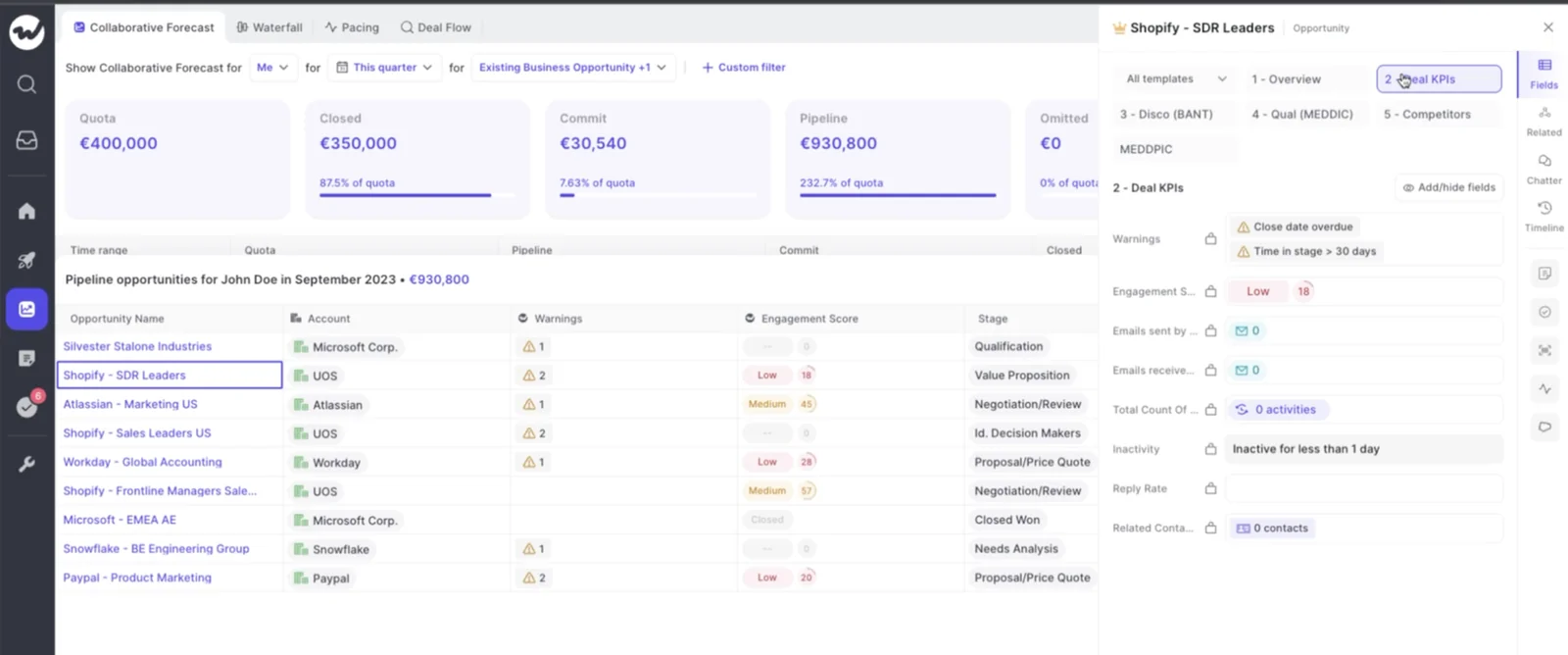
The ownership exception: forecast submissions, targets, and roll-ups stay in Weflow and are available through its API. Activity, transcripts, summaries, AI field updates, and opportunity edits reach Salesforce. Weflow hosts video recordings separately.
| Weflow product or bundle | Scope | Per user/month, billed annually |
|---|---|---|
| Weflow Activity & Contact Capture | Email, meeting, and contact capture | $19 |
| Weflow Conversation Intelligence | Recording, analysis, and Salesforce field updates | $39 |
| Weflow Deal Intelligence & Forecasting | Deal intelligence and forecasting | $39 |
| Revenue AI Foundation | Activity & Contact Capture plus Conversation Intelligence | $49 |
| Revenue AI Business | Revenue AI Foundation plus Deal Intelligence, without forecasting | $59 |
| Revenue AI Enterprise | All three core products, including forecasting | $79 |
Weflow requires a 10-user minimum and annual billing on minimum 12-month terms. At list price, 10 Revenue AI Enterprise seats cost $9,480 annually. Different teams can receive different products.
Weflow includes free view-only licenses (up to one per recording license) and charges no platform or implementation fee. Seat pricing covers recordings, transcripts, AI summaries, and field updates. Agent Builder is the consumption-priced exception.
Start with capture and conversations if an existing forecast contract blocks immediate displacement. Don’t promise a historical Salesloft archive import until we’ve validated the files and migration requirements.
2. Gong: conversation analytics and revenue intelligence
Gong deserves a place on the shortlist when conversation analysis and coaching depth drive the decision. Gong has the deepest conversation analytics in this comparison.
- Replaces: Salesloft conversation intelligence and, with the relevant offering, forecasting.
- What remains: engagement requirements need their own scope and commercial decision.
- Strength: conversation analysis for managers and enablement teams.
- Best fit: organizations willing to prioritize analytical depth over reducing software scope.
For a Salesforce team, the deciding test is structured write-back. Ask Gong to populate your actual fields, respect their constraints, and associate the output with the correct opportunity.
Then inspect the forecast connection. A good call review doesn’t establish which evidence influences a projection or manager submission.
Limitations to evaluate: field mapping effort, data access outside Gong, module overlap, and the full cost of the selected stack. Don’t substitute a headline discount for a scoped comparison.
Pricing and migration: obtain a quote covering every required module and seat type. Inventory the call archive and downstream integrations before committing to the cutover.
3. Attention: conversation workflows with separate forecasting
Attention fits teams replacing Salesloft conversation intelligence while keeping forecasting elsewhere. Its workflow destinations and access to raw transcripts give it a clear role.
- Replaces: the conversation intelligence layer.
- What remains: activity capture, forecasting, and engagement need separate coverage.
- Strength: conversation-driven workflows across systems, including Salesforce.
- Best fit: teams that value transcript portability and already trust their forecast process.
Attention’s MCP server returns raw call transcripts and supports transcript search. That matters when your internal assistant needs to analyze what customers said rather than another system’s summary.
The stack still has separate layers:
- Conversation layer: Attention captures and processes calls.
- CRM layer: configured workflows write outputs to Salesforce.
- Forecast layer: Salesforce or another forecasting product consumes the relevant data.
The trade-off: RevOps must prove the connection across those layers. Attention’s conversation workflows don’t replace company-wide activity capture or a forecasting operating model.
Pricing and migration: Attention doesn’t publish pricing. Request a quote, then test transcript access, Salesforce destinations, and logging behavior alongside your retained products.
4. Salesforce: native conversation and forecasting stack
Salesforce is a credible replacement path when your existing licenses and admin capacity cover the workflows you need. Evaluate Einstein Conversation Insights, Salesforce Einstein Activity Capture (EAC), and Salesforce forecasting as distinct components.
- Replaces: conversation and forecast workflows that your Salesforce configuration supports.
- What remains: engagement must stay in Salesloft or receive separate coverage.
- Strength: using the CRM and procurement relationship your team already has.
- Best fit: teams with defined requirements and an available Salesforce owner.
Don’t dismiss Salesforce because a specialist has more features. If the configured workflow supports your cadence, permissions, and reporting, additional software needs to justify itself.
The trade-off: fewer vendor relationships can mean more configuration work inside your team. Salesforce ownership doesn’t automatically establish call-to-field or call-to-forecast behavior.
Pricing and migration: confirm edition entitlements, add-ons, and implementation costs against your current agreement. Treat “already included” as something to verify.
Native doesn’t mean automatic. Test:
- Which activities EAC captures and where your configuration stores them.
- Which conversation outputs become structured fields.
- How submissions, adjustments, and hierarchies work.
- Who maintains historical comparisons and executive reporting.
5. Lightweight recorder plus Salesforce forecasting
A lightweight recorder plus Salesforce forecasting fits teams that need a meeting archive and a straightforward forecast more than deep conversation-to-deal automation.
- Replaces: basic recording, transcription, and summary workflows, with forecasting handled in Salesforce.
- What remains: engagement and any missing activity-capture coverage.
- Examples to evaluate: Fireflies or Fathom alongside Salesforce.
- Best fit: teams with limited coaching requirements and willingness to own integration gaps.
The appeal is narrower software scope. The risk is quietly assigning the missing work to RevOps.
| Selected vendors deliver | RevOps must validate or own |
|---|---|
| Recording and transcription within supported workflows | Coverage monitoring and recovery for missed meetings |
| Summaries and available CRM integration | Opportunity mapping, duplicate handling, and structured field behavior |
| Salesforce forecast functionality | How conversation evidence enters deal and forecast reviews |
| Available archive and sharing features | Cross-functional access and retention requirements |
Pricing and migration: price the recorder tier that includes your required integrations, not its entry tier. Pilot the complete workflow before comparing its total cost with a broader platform.
6. DIY: Salesforce, transcripts, and an AI assistant
DIY is a legitimate option when a technical RevOps team can meet a narrow requirement with existing transcripts and an AI assistant connected to Salesforce.
- Replaces: selected analysis, meeting-summary, or deal-review workflows.
- What remains: capture infrastructure, engagement, and a forecast process unless you build those too.
- Strength: control over a specific workflow without buying a broad suite.
- Best fit: teams with engineering capacity and a named maintenance owner.
You can test whether Claude plus available meeting transcripts answers the question you need. That’s a useful benchmark for any vendor.
The prototype doesn’t establish production reliability. Missing recordings, changed permissions, picklist constraints, and failed writes still need owners.
| Responsibility | Build | Maintain | Buy when |
|---|---|---|---|
| Conversation analysis | Prompts and source retrieval | Quality tests and model changes | Teams need repeatable workflows across many users |
| CRM updates | Field mapping and approval logic | Validation changes and failed writes | Integration upkeep exceeds available admin time |
| Forecasting | Submission, snapshot, and roll-up logic | Hierarchy changes and accuracy measurement | The operating process needs a supported product |
| Governance | Access checks and retention controls | Provisioning, audits, and incident handling | Internal ownership can’t meet the required service level |
Pricing and migration: count existing licenses, API or model consumption, hosting, and maintenance hours. Start with one bounded workflow. Don’t make an internal prototype the forecast system of record before testing its controls.
When is staying with Salesloft lower risk?
Staying with Salesloft is lower risk when engagement dependence, forecast complexity, or migration constraints outweigh the benefits of changing intelligence products.
| Stay if | Reconsider if |
|---|---|
| Cadence, Rhythm, and the dialer anchor daily selling | Most licensed users need capture rather than engagement |
| Clari Forecast supports a complex enterprise roll-up you can’t reproduce | Your needs center on deal evidence and a simpler forecast cadence |
| Live battlecards are a required workflow | Post-call field updates and coaching matter more |
| The existing archive serves integrations you can’t migrate safely yet | You’ve validated replacement access for every downstream consumer |
| The business can’t staff a change during this renewal window | The vendor and internal owners have agreed a phased rollout |
Clari remains the safer choice for highly complex enterprise roll-ups at 1,000-plus-rep scale. We wouldn’t recommend replacing a working forecast at that scale just to reduce vendor count.
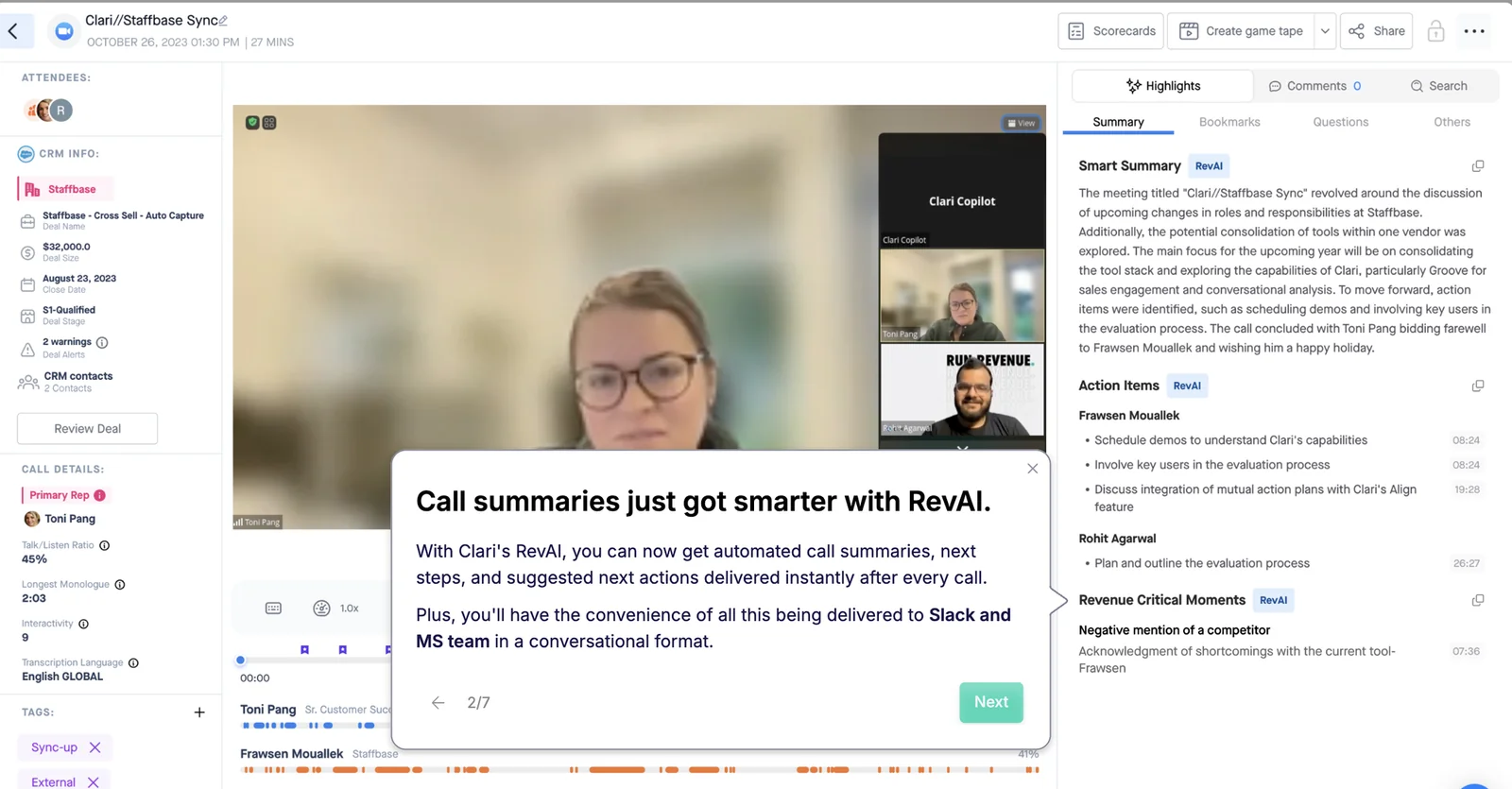
Clari Copilot also provides live assistance that Weflow doesn’t. Its call page combines CRM context with a summary, action items, and revenue-critical moments.
Which Salesloft replacement path fits your stack?
Choose the replacement path from the capabilities you intend to retain. Vendor count alone won’t tell you whether the new stack removes work.
| Primary need | Retained Salesloft capabilities | Forecast complexity | Admin capacity | Vendor appetite | Migration tolerance | Likely path |
|---|---|---|---|---|---|---|
| Connected capture, calls, and forecasts | SDR sequencing and dialing | Validate multi-motion requirements | Available for configuration and testing | Engagement plus intelligence | Phased change | Salesloft plus Weflow |
| Deep conversation analysis | Engagement as needed | Evaluate forecasting separately | Available for integration validation | Accepts specialist scope | CI migration first | Gong |
| Portable conversation workflows | Engagement and existing forecast | Already covered | Can own cross-product connections | Accepts multiple layers | Conversation-only change | Attention |
| Use existing CRM investment | Engagement if required | Fits Salesforce configuration | Dedicated Salesforce owner | Fewer new vendors | Admin-led rebuild | Salesforce |
| Basic recording and forecasting | Engagement if required | Straightforward | Can maintain mapping and review workflows | Accepts a small recorder | Limited scope | Recorder plus Salesforce |
| A narrow custom workflow | Whatever remains useful | Existing process or internal build | Engineering and maintenance capacity | Avoids another broad suite | Incremental development | DIY |
For the mid-market Salesforce team replacing both intelligence layers, we’d start with Weflow and retain Salesloft only where engagement earns its seat. If your forecast already works, leave it alone until the replacement proves a reason to move.
How should RevOps phase the Salesloft replacement?
Replace Salesloft in capability phases with separate acceptance gates for capture, conversations, forecasting, and historical access. A single cutover date hides dependencies that need different tests.
1. Audit actual usage and downstream consumers
Start with a usage inventory that explains every paid seat and every data dependency.
- Capabilities: sequencing, dialing, recording, coaching, capture, and forecasting.
- Roles: active operators, occasional reviewers, and capture-only users.
- Consumers: sales, marketing, CS, enablement, finance, and internal AI workflows.
- Contracts: renewal dates, notice periods, add-ons, and export conditions.
RevOps should own the inventory. Each department should confirm its dependencies before you remove anything.
2. Decide which engagement capabilities remain
Decide whether this is an intelligence replacement or a complete Salesloft exit before configuring the new stack.
- If SDRs depend on Cadence and the dialer, retain those workflows and scope coexistence.
- If sellers mainly work in their inbox, evaluate capture without assuming they need engagement seats.
- If you intend to exit Salesloft entirely, select replacement sequencing and calling products before cutover.
Document logging ownership by activity type. That decision governs duplicate prevention.
3. Define Salesforce data and governance requirements
Write the pass conditions before the vendor connects production data.
| Owner | Requirement | Test method | Pass condition |
|---|---|---|---|
| Salesforce admin | Correct opportunity association | Multi-opportunity account scenario | Expected assignment or documented fallback |
| RevOps | Structured field updates | Transcript-to-field review | Supported value reaches the intended field |
| IT and legal | Consent and exclusion behavior | Opt-out and blocked-record scenarios | Capture follows the approved policy |
| Security and admin | Restricted access | Test users with different permissions | Users see only approved data |
| Finance | Usable forecast outputs | Reconcile a sample roll-up | Metrics and totals match agreed definitions |
4. Validate capture and conversations in a pilot
A two-week pilot can validate capture and conversation workflows if it includes representative users and difficult records.
- Select AEs, an SDR, a manager, and a customer success user where those roles are in scope.
- Include ambiguous opportunities, recurring meetings, exclusions, and sequenced emails.
- Have the Salesforce admin inspect record creation, mapping, and duplicates.
- Have users assess summaries, field suggestions, and correction workflows.
- Review failures and skipped recordings before approving wider enrollment.
Measure recording coverage against eligible meetings, with reasons for misses. A calendar full of video links isn’t a reliable denominator by itself.
5. Test forecasting through an operating cycle
Forecasting needs a real operating cycle because the replacement changes how people submit, challenge, and lock a number.
- Agree metrics and commit criteria with finance and sales leadership.
- Configure participants, hierarchy, deadlines, and overrides.
- Run forecast calls using the proposed workflow.
- Reconcile leadership outputs with the existing process.
- Compare locked submissions with actual outcomes when those outcomes arrive.
A short trial can prove that a forecast screen works. It can’t establish adoption or sustained forecast accuracy.
6. Preserve history before contract cutover
Export and validate the archive before Salesloft access ends. Exportability and import support are separate questions.
| Source | Destination | Format | Owner | Validation | Retention requirement |
|---|---|---|---|---|---|
| Recordings | Approved archive or supported importer | Vendor-supported media export | IT and vendor | Sample playback and record counts | Legal-approved storage period |
| Transcripts | Searchable archive or supported importer | Raw text with available metadata | RevOps | Speaker, timestamp, and association checks | Preserved access for approved consumers |
| CRM history | Salesforce and approved backup | Existing records and required exports | Salesforce admin | Report and relationship reconciliation | No unintended deletion at cutover |
| Integration outputs | Replacement endpoints or storage | Consumer-specific | Integration owner | Each downstream workflow runs successfully | Continuity beyond contract termination |
7. Assign implementation and adoption ownership
Put vendor and customer responsibilities into the rollout agreement. Configuration without an adoption owner recreates the failure you’re trying to leave.
| Workstream | Responsible | Accountable | Consulted |
|---|---|---|---|
| Product setup | Vendor implementation lead and administrators | RevOps owner | IT and security |
| Archive migration | Named migration lead | RevOps owner | Legal and downstream consumers |
| Forecast process | RevOps and sales managers | Revenue leader | Finance |
| Training and adoption | Vendor trainer and enablement | Functional leaders | Frontline users |
| Ongoing administration | Named system administrator | RevOps leader | Vendor support |
Before go-live, confirm acceptance results, archive access, training dates, support escalation, and which incumbent licenses will end. Don’t terminate access while a critical dependency remains untested.
See how Weflow captures activity, updates Salesforce fields from calls, and rolls up your forecast. Book a 30-minute demo.
Frequently asked questions about replacing Salesloft
The final Salesloft replacement decision usually turns on scope boundaries, data access, and rollout requirements. Settle these before the commercial negotiation ends.
Can Weflow replace Salesloft Cadence and Dialer?
No. Weflow doesn’t provide sequencing or a sales dialer.
- For partial displacement, retain Salesloft engagement and use Weflow for the intelligence layers you select.
- For a complete Salesloft exit, choose a separate engagement and calling product wherever those capabilities remain necessary.
Can Weflow run alongside Salesloft without duplicates?
Yes, with configured logging ownership and compatibility mode. Weflow recognizes sequencer tracking patterns in email bodies and skips recognized messages to avoid a second write.
- Confirm which product logs each activity type.
- Test sequenced emails, inbox emails, meetings, and calls separately.
- Inspect Salesforce records and reports for duplicate or missing activity.
Can Weflow forecast renewals and expansion separately?
Yes. Weflow supports new-logo, renewal, and expansion forecasts with independent cadences.
Validate each motion’s configuration before rollout:
- Opportunity selection, amount field, and forecast period.
- Participants, hierarchy, and submission deadlines.
- Manager overrides, targets, and leadership outputs.
Test specialized requirements such as split credit, dual-date logic, and currency treatment explicitly rather than assuming complete parity with an established Clari setup.
Where do Weflow forecast submissions and targets live?
Weflow stores forecast submissions, targets, and roll-ups in Weflow, not Salesforce. Teams can retrieve that forecast-process data through Weflow’s API.
| Written to Salesforce | Retained in Weflow |
|---|---|
| Captured activity and contacts | Forecast submissions |
| Transcripts and summaries | Forecast targets |
| AI field updates and opportunity edits | Forecast roll-up data |
Weflow also hosts video recordings separately. Don’t treat transcript storage in Salesforce as equivalent to ownership of a downloaded video archive.
Can historical Salesloft recordings and transcripts migrate?
Don’t assume Weflow can import every historical Salesloft asset. Validate the export and destination together before promising archive continuity.
- Request representative recording and transcript exports.
- Confirm metadata, permissions, and Salesforce associations.
- Test import support separately from archive storage.
- Confirm whether historical recordings can support the scoring workflow you need.
- Document access after the incumbent contract ends.
How long should a Salesloft replacement pilot run?
Use a two-week pilot for capture and conversation intelligence, then a longer operating evaluation for forecasting.
| Evaluation | What it should prove | Exit gate |
|---|---|---|
| Capture and conversations: two weeks | Coverage, mapping, duplicate handling, field updates, and user controls | Admin and pilot users accept the observed workflow |
| Forecasting: an agreed operating cycle | Submissions, overrides, roll-ups, finance reconciliation, and adoption | Revenue and finance owners approve the process; accuracy assessment follows actual outcomes |
Does Weflow provide live in-call battlecards?
No. Weflow doesn’t provide a live in-meeting assistant or real-time battlecards.
Weflow produces summaries, field updates, follow-up drafts, and coaching after it processes the recording. If live assistance is mandatory, retain a product that provides it, such as Clari Copilot.
Which Salesforce objects and permissions does Weflow require?
Weflow Activity & Contact Capture needs Account and Opportunity access as well as Contact access. Opportunity contact roles determine deal association, while account matching supports contact creation.
| Salesforce area | Access purpose | Configuration owner | Pre-launch test |
|---|---|---|---|
| Accounts, Contacts, and Opportunities | Resolve people, companies, and open deals | Salesforce admin | Map activity on an account with multiple opportunities |
| Opportunity contact roles | Connect participants to the relevant deal | Salesforce admin and RevOps | Compare populated and missing contact-role scenarios |
| Contact creation | Create eligible missing contacts | Salesforce admin | Check required fields and creation permissions |
| Activity objects | Store emails and meetings | Salesforce admin | Confirm Task versus EmailMessage choices and Event reporting |
| Managed-package recording objects | Make transcripts and summaries accessible in Salesforce | Salesforce admin and security | Verify access using restricted test profiles |
| Standard and custom fields | Write extracted values within field constraints | Salesforce admin and RevOps | Test picklists, validation rules, and field-level security |
Make these tests part of acceptance, not post-launch cleanup. Renew or replace only after the chosen stack passes them on your own Salesforce records.







