
Native Salesforce forecasting vs Weflow: quotas, pipeline waterfall, and pipeline history
Compare native Salesforce forecasting vs Weflow on quotas, pipeline waterfall, and history.


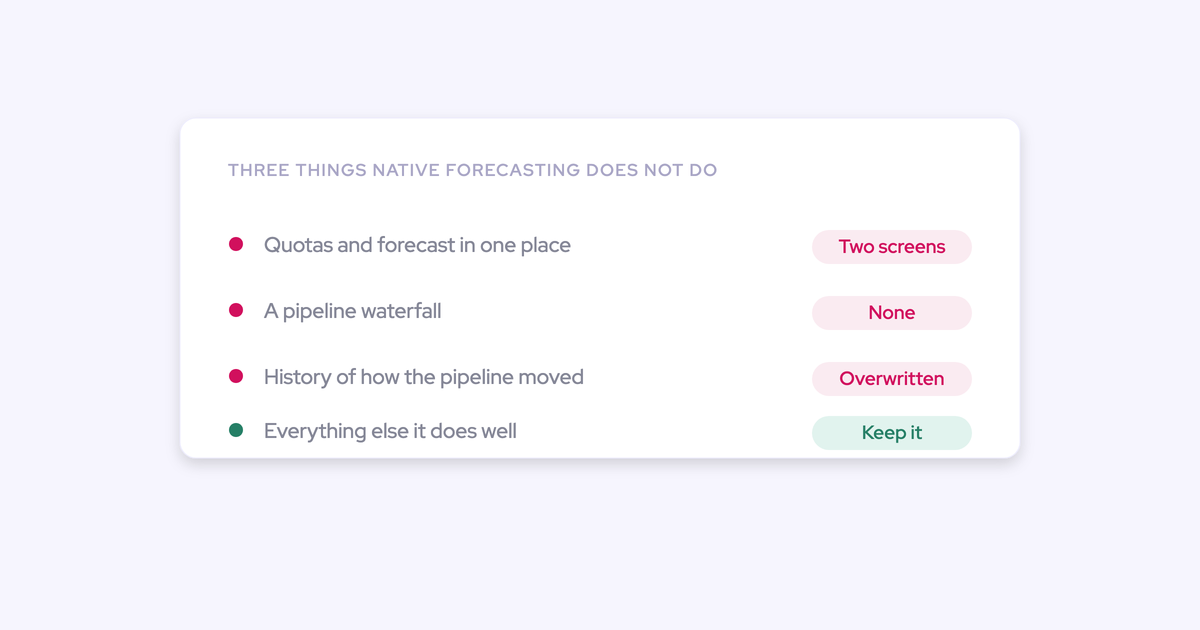

You went looking for what the pipeline looked like on day 35 of last quarter, and Salesforce had nothing. Not a permissions problem, not a report you built wrong. The values were overwritten and no history was kept, so the evidence you need doesn't exist anymore.
That's the wall most RevOps leaders hit before they ever consider a forecasting vendor.
Native Salesforce forecasting is a real forecasting surface and it does a real job for a certain kind of team, but it runs out at five nameable places: pipeline history, the waterfall, quota in one place, which field the forecast reads, and roll-up above the first-line manager.
This article maps each one and what closes it. Weflow is the Revenue AI Orchestration platform for sales, customer success, and RevOps teams, built for teams that run on Salesforce, and it's the tool we'll compare against. You'll also get the parts we can't do yet, and the case for staying native, because you'll find both out anyway.
What Salesforce Collaborative Forecasts covers on its own
Salesforce Collaborative Forecasts is the native forecasting module inside Salesforce: it groups open opportunities into forecast categories, sums the Amount field, rolls those sums up the role hierarchy, and lets managers adjust the number they pass upward.
That's a genuine forecasting process, not a toy. It's also free, already permissioned, and already inside the system your reps live in, which matters more than most vendor comparisons admit.
What the native module handles without help:
- A category-based view of the current quarter (pipeline, best case, commit, closed) on the standard Amount field.
- A roll-up along the Salesforce role hierarchy, with manager adjustments on top.
- Current-state pipeline reporting, filtered and shared with your existing Salesforce sharing rules.
- One selling motion, one pipeline shape, one number, with no second login and no second vendor.
If that describes your business, the rest of this article is optional reading. Most teams outgrow it in a specific order, and the first thing they lose is history.
Why Salesforce can't show how your pipeline changed
Salesforce reporting shows the pipeline as it stands right now. It doesn't history-track calculated or roll-up fields, so the moment an amount, a stage, or a close date is edited, the previous value is gone and there's nothing left to compare against.
This is the platform, not your config. The failure runs the same way in every org:
- A rep changes the close date or cuts the amount. Salesforce overwrites the field.
- Leadership asks why the number moved, or how the quarter compares with the same day in the last three quarters.
- There's no stored state to answer from, so the team either drops the question or stands up a warehouse and pays to snapshot opportunity data into it.
Option three is where a management question turns into a data-engineering project with a bill on it. We hear it framed exactly like this on evaluation calls:
The interim fix is worse. RevOps exports reports, pastes them into a sheet, and rebuilds the same dashboard every week:
A lot of the business partners and RevOps are spending time trying to rebuild a forecasting dashboard based on the Salesforce data.
And the cruel part: history can't be reconstructed later. Whatever you didn't snapshot this quarter is unavailable forever. That's why buyers talk about Salesforce-native forecasting as a category rather than a feature gap. They want to stay in the CRM, and the CRM's own forecasting surface can't do the job.
Native Salesforce forecasting vs Weflow at a glance
Six dimensions carry the whole comparison. Everything else the two do is close enough that it won't decide anything.
| Dimension | Native Salesforce forecasting | Weflow Deal Intelligence & Forecasting |
| Pipeline history | Current state only; no history tracking on calculated or roll-up fields, so day-35 and quarter-over-quarter comparisons need a warehouse plus a snapshot job you own | Snapshots opportunity data every few hours out of the box, which is what makes same-day-last-quarter comparisons possible without a warehouse |
| Pipeline waterfall | None; when the number drops you ask reps which deals moved | Clickable waterfall reconciling starting to ending pipeline through created, increased, moved in, moved out, lost, decreased, and won, with each bucket drilling to the actual opportunities |
| Deal-risk signals | Nothing native; days in stage and close-date push count require custom fields plus automation to populate and maintain | Days in stage and total close-date push count tracked automatically on every opportunity, plus configurable warnings on top |
| Quota and forecast together | Quota is managed away from the forecast view, so the comparison ends up in a spreadsheet | Targets and the forecast against them in one view, with versioned rep submissions rolling up. Note: submissions, targets, and roll-up live in the Weflow app, not as Salesforce fields |
| Forecast foundation field | Tied to the standard Amount field | Any standard, custom, or formula field: ARR, a booking field, a converted-USD amount |
| Hierarchy and motions | Role-hierarchy roll-up that teams tell us breaks above the first-line manager; one pipeline shape for every motion | Roll-up from manager to VP to executive with manager overrides and team targets, and each opportunity record type keeping its own stage path, forecast-category mapping, and independent roll-up |
How Weflow keeps the pipeline history Salesforce overwrites
The history Salesforce doesn't keep is captured continuously, and it's on from day one rather than something RevOps builds. Three mechanics do the work, and all three are testable in your own org.
Opportunity snapshots every few hours, without a data warehouse
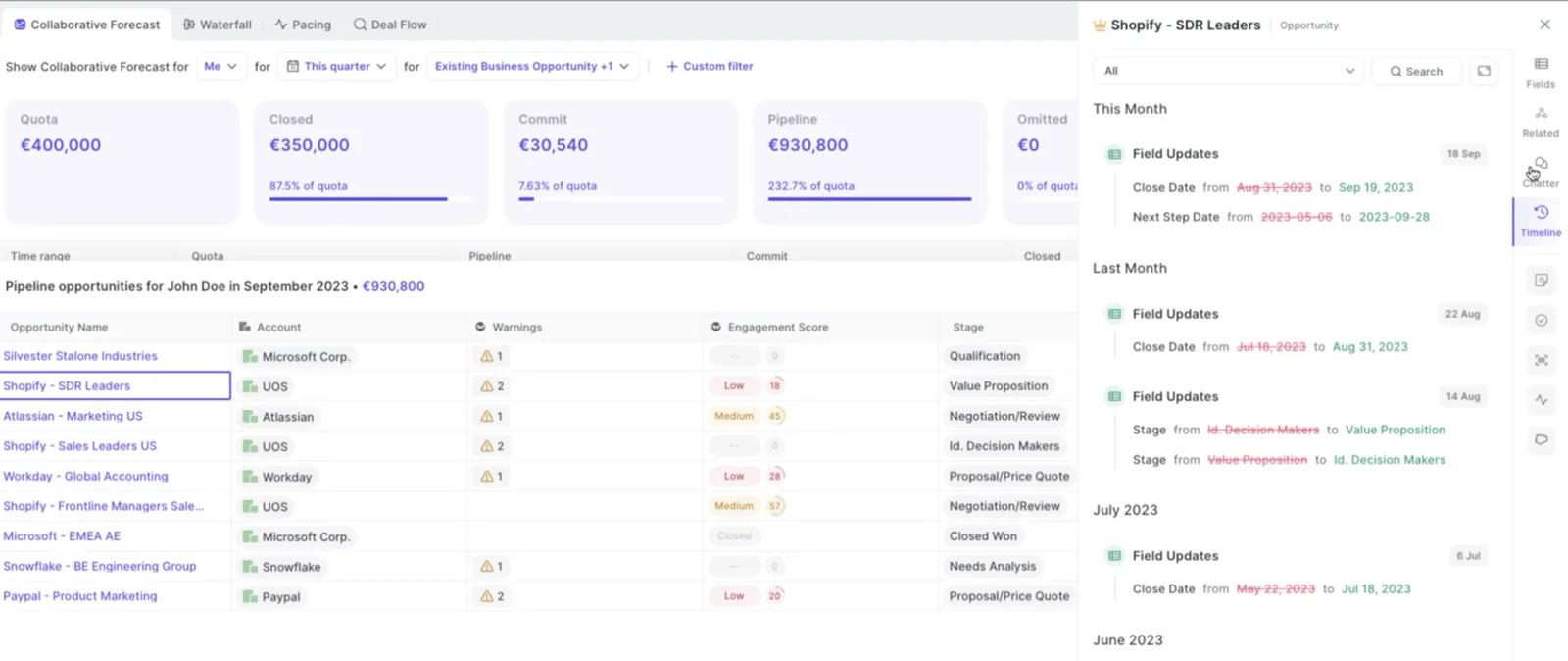
Weflow snapshots opportunity data every few hours and stores the time series, which is what turns "how did the pipeline change" into a report instead of a project.
Compare the two paths honestly. The warehouse route means a pipeline into your data platform, a snapshot schedule, a data model, and a dbt or SQL layer somebody keeps alive while they also run the business. The snapshot route means the comparison views are already there when a leader asks.
What you get from the stored history is the boring stuff that decides forecast calls: stage conversion rates by month and stage, a pacing view against previous quarters, and team benchmarks derived from deals that actually closed won.
The pipeline waterfall: what slipped, moved in, or got cut
The waterfall reconciles starting pipeline to ending pipeline through its buckets, and every bucket drills through to the real opportunities with whatever fields you care about on them.
- Created: new opportunities added inside the period.
- Increased: deals whose amount went up.
- Moved in: deals whose close date pulled into the period.
- Moved out: deals that pushed to a later period.
- Decreased: deals whose amount was cut.
- Lost: deals closed lost.
- Won: deals closed won.
This is what answers the quarter that opened strong and ended thin. Usually the deals didn't die, they moved out mid-quarter, and because the view is built from snapshots rather than the live pipeline, chronic slippage and sandbagging show up as a pattern per rep rather than a feeling.
One honest caveat: stage conversion is available by month and by stage, but it isn't drillable the way the waterfall is. If clicking into every conversion cell is your core workflow, test that before you commit.
Days in stage and push count on every opportunity
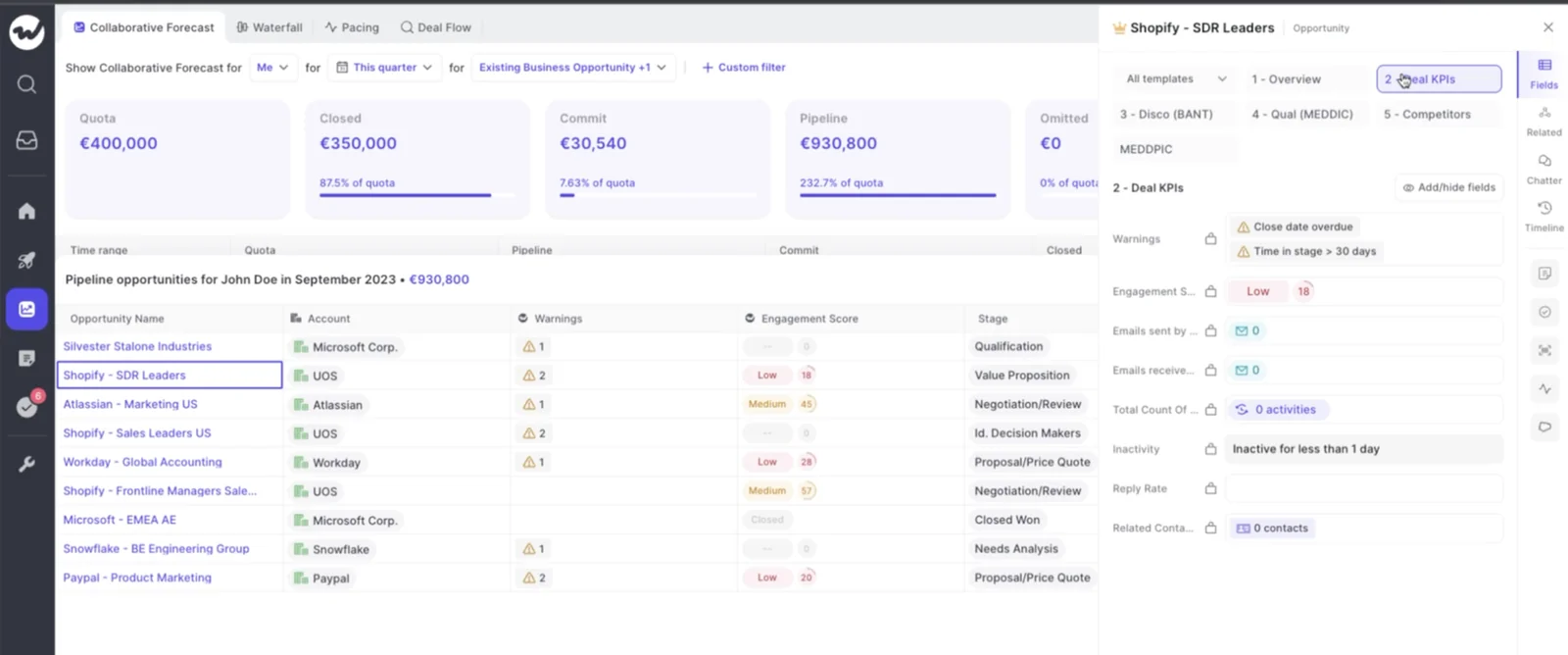
Weflow tracks days in stage and total close-date push count automatically on every opportunity, with no custom fields for you to create and no automation to keep populating them.
That matters more than it sounds, because a dead deal and a live one look identical in a roll-up:
There's a second-order problem underneath it. Reps don't like closing deals lost, so corpses sit in the pipeline with close dates that keep moving, and they stretch your average sales cycle. Now the benchmark you use to judge whether a live deal is late is itself wrong.
Push count and time in stage sitting on the deal make the hygiene conversation evidential. You're not asking a rep to explain a suspicion, you're pointing at a close date that has moved five times.
Quotas, hierarchy, and separate roll-ups per sales motion
The three reasons your roll-up already left Salesforce are quota living somewhere else, hierarchy breaking one level up, and every motion being forced into one pipeline shape. In a dedicated layer, all three are configuration.
Managing quota and the forecast against it in one place
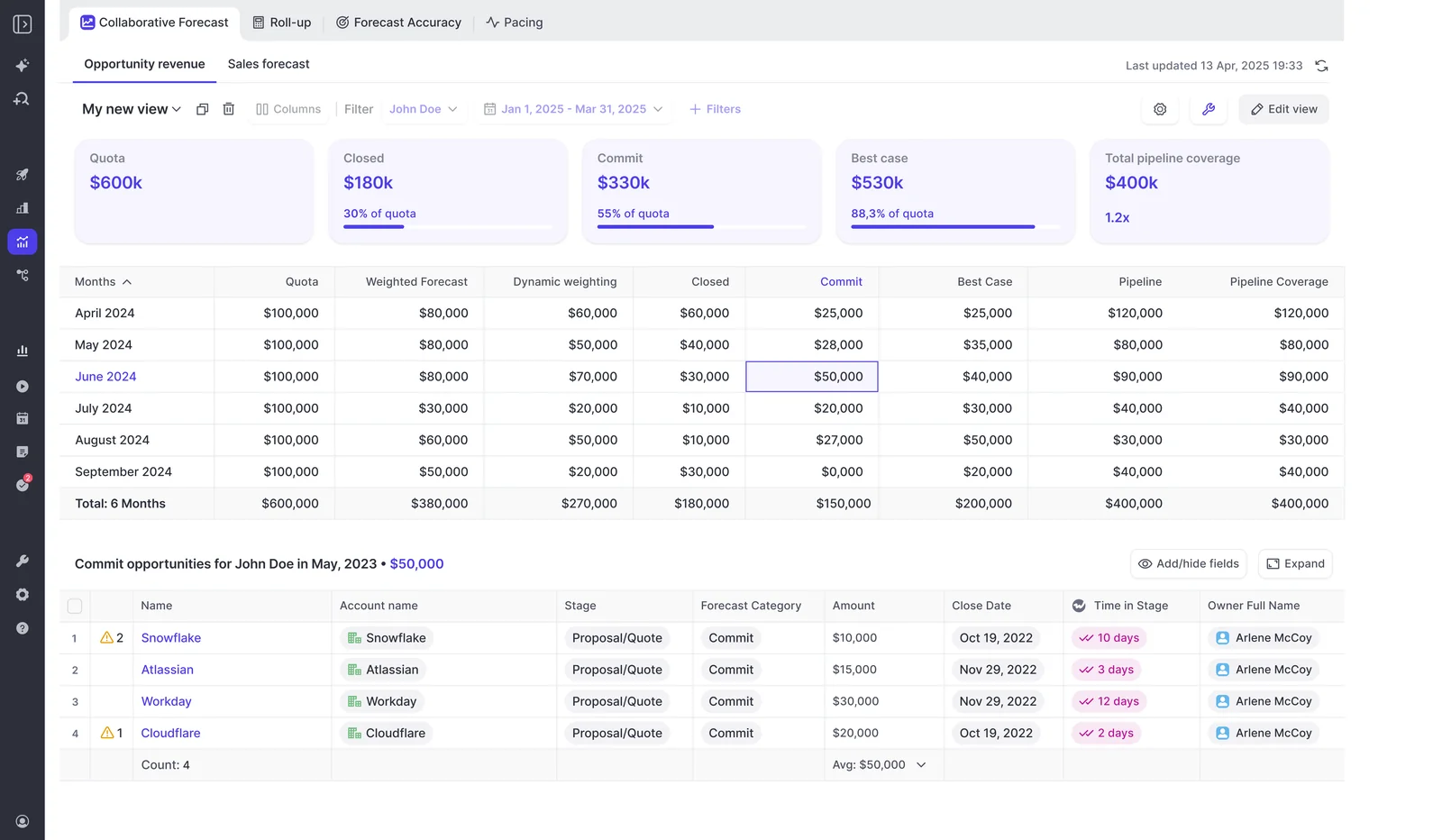
Targets and the forecast against them sit in the same view in Weflow, at org, team, and individual level, so the coverage question and the quota question stop living in two systems.
Underneath it, each rep submits a baseline and a best case, either as a total or by picking the specific opportunities behind each figure, with a free-text comment. Every submission is versioned, managers can override, and a deadline can lock the field.
That's the difference between a forecast call and a deal-by-deal ramble, which is how the pain usually gets described to us:
Right now our forecast process suboptimal, okay. We're using the Salesforce module, we take a look at it, we end up talking about deals without really a step back roll up of the forecast.
Because the number is tied to named opportunities and every revision is kept, a manager can see whether a rep's call moved during the quarter or never moved at all. The version history becomes a record of judgment over time.
A roll-up that holds above the first-line manager
The Weflow roll-up runs rep to manager to VP to executive, with manager overrides at each level and targets you can set for a team rather than only for an individual. This is the exact wall we hear described most often:
the second column works at the first line manager, but the moment I go a level above that, the roll up again messes it up
The other half of the problem is who can change it. RevOps configures hierarchy, targets, forecast calls, and view columns itself through the admin console.
That sounds minor until you've lived without it. Operators coming off Clari tell us a new quarterly target or a new forecast call goes through professional services, so a ten-minute change takes two weeks and gets billed, and the forecast process ossifies around whatever was configured at implementation.
Separate targets for new business, renewal, and expansion
Each Salesforce opportunity record type keeps its own setup in Weflow, so you can run a combined quota and separate targets per motion at the same time.
Per record type (New Business, Renewal, Existing Business, Partner), what stays independent:
- Its own stage path, so a renewal doesn't have to pretend it has a discovery stage.
- Its own forecast-category mapping.
- Its own roll-up, on its own cadence.
The question arrives on calls almost word for word:
Renewals get their own handling too: contract end dates tracked, a configurable renewal-kickoff milestone ahead of expiry, and renewal opportunities forecast in a separate pipeline view. If renewals hitting while new logos collapse currently looks identical to the reverse in your roll-up, this is the fix.
Forecasting on ARR or a booking field, not just Amount
Weflow forecasts on any standard, custom, or formula field, so the forecast shows the number leadership actually manages by. Native forecasting is tied to Amount, and almost nobody runs the business on Amount.
The fields teams point it at:
- A custom ARR field summarizing subscription value.
- A booking forecast field finance closes on.
- A converted-USD amount built so regions selling in local currency roll up at approved rates.
- A weighted-value field, if you want probability baked into the foundation.
Buyers put this in the first demo, and they're right to:
If the tool can only read Amount, every chart in it is wrong on arrival and nobody senior will look at it twice.
Weighted, roll-up, and AI forecast side by side
Weflow runs three forecast methods in parallel, which gives you a corridor instead of one number nobody trusts.
| Method | What it reads | What it tells you |
| Weighted forecast | Historic stage close rates from your own conversion data | What the open pipeline mathematically supports, independent of anyone's opinion |
| Rep and manager roll-up | Baseline and best-case submissions tied to named opportunities, with overrides | What the people closest to the deals actually believe this week |
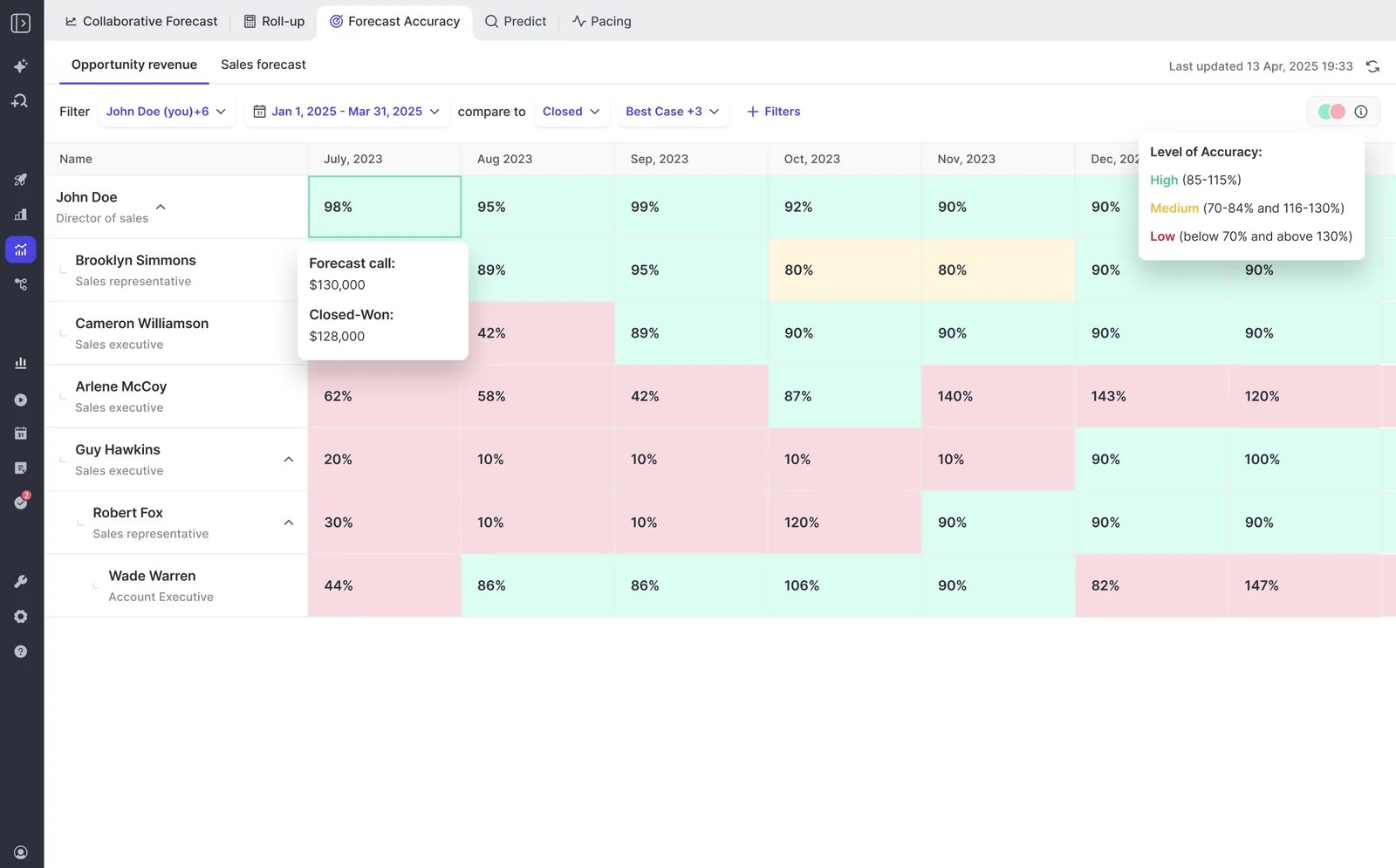
| AI projection | More than fifty deal-level signals and up to two years of history | A landing range, with a large deal that's being worked badly projected down |
The AI projection isn't stage probability with a new label. It reads deal behavior: seasonality, rep performance, conversion rates, communication cadence, whether a next meeting is booked, whether the deal is healthy against your methodology.
The AI prediction is not one number, it is actually a mid, high, and base case, so you have a corridor, because the reality is it is a corridor and a lot of things can happen.
— Janis Zech, Co-founder and CEO, Weflow
The gaps between the three are your forecast-call agenda. A rep sitting far above the weighted number is telling you something, and so is a rep whose submitted number hasn't moved since week one.
Then there's the part your spreadsheet can never do. Every submission is stored against the final closed amount, so forecast-versus-actual variance per rep, per manager, and by segment becomes a coached metric across quarters rather than a story told after the fact.
The limits of Weflow forecasting to check before you switch
Four limits are worth verifying against your setup before anything else. If one of them is a hard constraint for you, better to know now than in month two.
| The limit | What it means for your setup |
| Forecast submissions, targets, and the roll-up live in the Weflow app, not as Salesforce fields | Everything else Weflow captures lands in native Salesforce objects, but forecasting sits on top of the pipeline instead of adding forecast fields to it. If you've decided reps work in Salesforce only, you lose rep roll-up submissions. The weighted forecast and the AI projection still work, because both run off CRM data with no rep input. Teams snapshotting forecasts into a BI tool pull the roll-up through the public API. |
| The roll-up sums the chosen field and applies no stage-probability weighting | If you think in probability terms, five deals at 20% won't show up as one deal of value in the submitted number. Either forecast on a weighted Salesforce field as the foundation, or treat the raw sum as best case and use the baseline call for conviction. The weighted view and the AI projection do model likelihood, just not inside the roll-up. |
| One opportunity's amount can't be split across quarters | The full amount lands in the single period its chosen date field falls into. The date field is configurable, so you can index on close date or a delivery date, but a deal recognized part in Q1 and part in Q2 in Salesforce won't be reproduced that way in the forecast view. |
| The fit is booking-based SaaS, not consumption | Booking forecasts count contracted deals, which maps cleanly onto opportunity roll-up. Usage-based revenue doesn't sit on the opportunity, so a consumption business is a harder and weaker fit. |
One more thing to price in: Weflow forecasting is weaker on its own. Accuracy depends on the activity and conversation data underneath it, so a forecasting-only deployment on top of thin CRM data will underperform what you see in a demo.
When native Salesforce forecasting is enough
Stay native if most of this describes you:
- One selling motion, forecast on the standard Amount field, in a single currency.
- A hierarchy that stops at the first-line manager.
- A team small enough that the manager knows every open deal by name.
- No leadership demand for pipeline history, waterfall, or forecast-accuracy reporting.
- Quota tracked in a sheet that nobody argues about.
That team doesn't need a forecasting layer, and adding one buys change management it can't spend. Forecasting is the highest-change-management thing a revenue team does, and no tool fixes a process nobody runs.
The tipping point is specific: the first time leadership asks a question about how the pipeline changed. That's the moment to add snapshots, because history you didn't capture can't be recovered, and every quarter you wait is a quarter you'll never be able to compare against.
Walk through the product yourself, no call required.
Native Salesforce forecasting vs Weflow: FAQ
Does Weflow replace Salesforce as the system of record?
No. Salesforce stays the system of record, and Weflow is not a CRM replacement, a BI tool, or an FP&A tool. Opportunity edits made in Weflow write straight back to Salesforce in real time, and captured activity, transcripts, summaries, and AI field updates land in native Salesforce objects you own and can report on.
Does the Weflow forecast write back into Salesforce fields?
No. Forecast submissions, targets, and roll-up data live in the Weflow application rather than as fields on the Salesforce opportunity. If you snapshot forecasts into a BI tool or a warehouse, you pull the roll-up through the public API instead of reading it from Salesforce.
Does my Salesforce forecast configuration carry over into Weflow?
No. Weflow forecasting runs independently of Salesforce forecasting and gets set up fresh. That's also what frees it from the Amount field and the native hierarchy, so the setup work is what buys you the flexibility.
How does Weflow handle multi-currency and dated exchange rates?
Weflow forecasts read the standard Salesforce currency field and do not apply Salesforce dated exchange rates. Teams that need dated conversion point the forecast at their own converted-amount field, which keeps the numbers on your finance-approved conversion logic rather than a single standard rate.
How long does it take to prove Weflow forecasting out?
Longer than a trial. Evaluations run as a 14-day free trial with implementation included at no cost, and activity capture and conversation intelligence prove out cleanly in that window because they act on meetings and emails already happening.
Forecasting doesn't. It only proves itself across enough forecast cycles to compare predicted against actual, which is closer to three months, and its accuracy depends on the capture and conversation data layer underneath it.
What does Weflow Deal Intelligence & Forecasting cost?
Weflow Deal Intelligence & Forecasting is $39 per user per month billed annually as a standalone product, with a minimum of ten users. Bundles start at $49 per user per month, and Revenue AI Enterprise, the bundle that includes forecasting alongside capture and conversation intelligence, is $79.
The packaging exists for the renewal problem. A CFO who just signed a forecasting renewal won't approve a second forecasting contract, so teams land on capture and conversation intelligence first and expand into forecasting as a bundle step later.
Should we build our own forecasting layer instead of buying one?
You can get a prototype standing up fast now, and plenty of RevOps leaders do before taking a vendor call. The prototype was never the cost.
Maintenance is: the snapshot job, the data model, permissions, the hierarchy roll-up, and every integration have to keep working while a team of one to three also runs the business. Price the tool against owning that forever, not against building it once.







