Aviso vs Weflow: forecasting without the 12-month data cold start
Decide if Aviso or Weflow fits your forecasting: activity capture, sync-back, and cold start.


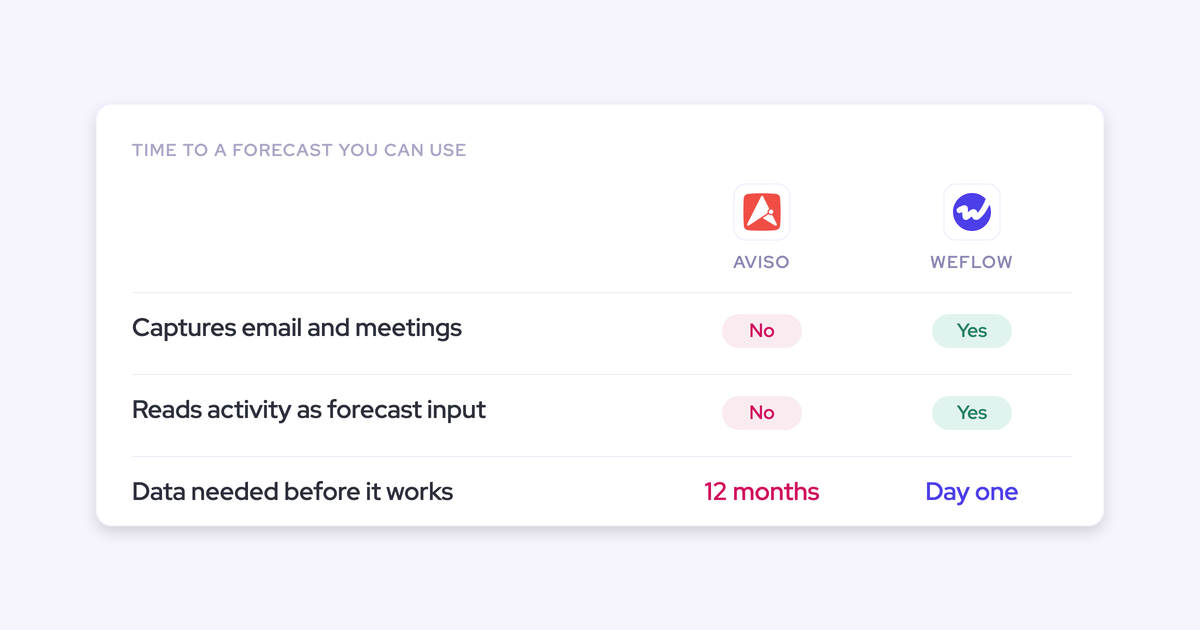

The 12-month wait you heard about on the Aviso demo is not a rollout detail you can negotiate down. It is what happens when you buy a prediction layer that has no activity capture underneath it. A forecast-only tool reads what is already in your CRM, and CRM activity is always thinner than anyone admits, so the model has to be fed for about a year before its insights settle.
That reframes this evaluation. You are not choosing between two forecasting UIs. You are deciding whether the data foundation under the forecast comes with the tool or has to accrue on its own while the board waits.
Weflow is the Revenue AI Orchestration platform for sales, customer success, and RevOps teams, and the product in this comparison is Deal Intelligence & Forecasting. What follows is the head-to-head on that one axis, including where Aviso is the better pick and where Weflow has real limits.
Aviso vs Weflow at a glance
The two tools diverge on one thing, the layer underneath the forecast, and every other difference in this table follows from it.
| Dimension | Weflow | Aviso |
|---|---|---|
| Activity capture under the forecast | Captures emails, meetings, and contacts automatically from Outlook and Google into native Salesforce objects, with no rep logging. | A buyer who evaluated Aviso told us it "just does forecasting and insights. It's not an activity tracking mechanism." Single-source buyer report, not vendor documentation. |
| Time to first usable insight | Day one: imported Salesforce history plus captured activity from go-live. | The same buyer reported roughly 12 months of feeding the tool before its insights work. |
| What the AI prediction reads | 50+ deal-level signals and up to two years of history, scoring each deal individually and returning a landing range. | We have no verified detail on how Aviso's model is built or weighted, so we won't characterize it. |
| Implementation time (G2 Fall 2023) | 2 weeks. | 10 weeks. BoostUp, the usual cross-shop, sits at 5 weeks. |
| Historical data on day one | Forecasting and pipeline analytics import up to 12 months of Salesforce history by default, then snapshot opportunities every few hours going forward. | Per the same buyer account, history builds from go-live rather than being imported. |
| Pricing and packaging | Deal Intelligence & Forecasting is $39 per user per month billed annually, 10-licence minimum, unlimited free viewer seats. Published. | Quote-based, not published. Standalone dedicated forecasting contracts in our evaluations land in the $100 to $200 per user per month range. |
The rest of this article unpacks the first two rows, because they decide the other four.
Why revenue teams compare Aviso and Weflow
Both land on the same trigger: Salesforce forecasting plus a spreadsheet stopped being good enough.
Native Salesforce can't manage quotas and forecast against them in one place, gives you no pipeline waterfall, and keeps no record of what the pipeline looked like last month. So the roll-up gets rebuilt by hand every week, and someone in RevOps takes a manual snapshot every Monday just to see what moved.
From there the shortlist splits along architecture, not features. Aviso and BoostUp answer the trigger as a dedicated prediction and insight layer that sits on top of the pipeline. Weflow answers it by building the data foundation and the forecast together, on one platform.
That's the whole comparison. Everything else is packaging.
Why Aviso needs about 12 months before insights land
The cold start is structural, not a rollout hiccup. A tool with no capture of its own has nothing to learn from except what your reps already typed into Salesforce, so it has to run for roughly a year before its patterns stabilize.
To be precise about the source: the 12-month figure comes from a buyer's own Aviso evaluation, relayed to us on a call, not from Aviso's documentation.
One buyer, one evaluation. But the mechanism behind it applies to any forecast-only tool, BoostUp included, and it is worth walking through before you sign.
Forecast-only tools read Salesforce; they don't capture activity
A prediction layer sits on top of the pipeline. It reads opportunity records, stages, amounts, close dates, and whatever activity happens to be logged against them. It does not read an email. It does not join a meeting.
Here's the split that matters in practice:
- What a forecast-only layer can see: opportunity fields, stage movement, close dates, amounts, and any activity a rep or another tool already wrote into the CRM.
- What it cannot see on its own: the email thread that went quiet three weeks ago, the meeting that happened at a customer site, the second stakeholder who joined the call, the next step nobody typed.
Which brings you to the second thing that buyer flagged, about field reps hand-logging their in-person meetings.
If the tool doesn't capture, capture is your problem. And you solve it on the vendor's timeline, not yours.
Thin CRM activity leaves the AI nothing to learn from
Every forecast you've ever seen was assembled from fields reps did not maintain. That's not cynicism, it's the base rate.
The gaps are always the same:
- Next step blank, or last updated two months ago.
- Close date pushed four times, with no record of why.
- Meetings that happened in person and were never logged at all.
- Dead deals nobody will close lost, so they sit in the pipeline forever with a close date that keeps moving.
- Stage history that's mostly empty, because Salesforce lets a rep drag a deal from stage one to closed won in a single click.
Feed that into a model and you get a confident number built on nothing. We've watched what happens next: the score gets ignored, because the first time it's wrong in front of a manager, it's never trusted again.
The best AI models are based on the data foundation. If you do not automate good data quality on an opportunity by opportunity basis, it will be very hard to have accurate prediction models. We actually launched a prediction forecast before we had automated Salesforce data capture, and we found that it was not that accurate, which made us realize you have to solve it end to end. - Janis Zech, Co-founder and CEO of Weflow
We shipped the prediction first and learned this the expensive way. That's why the 12-month feed period exists in forecast-only architecture: it's the tool waiting for the data foundation you were never given.
Where Aviso is the stronger choice
There's a buyer for whom a dedicated forecast-only tool is the right call, and it isn't a small group.
If your capture problem is already solved, mature activity sync in place, contacts mapped, stage discipline enforced, maintained history going back years, then the data foundation argument in this article doesn't apply to you. Your evaluation really is about the depth of the prediction and insight layer, and a vendor that does only that job has spent all of its engineering there.
Two more honest points on Aviso's side of the ledger:
- Weflow works exclusively with Salesforce. No HubSpot, no Dynamics, no Pipedrive. If your CRM isn't Salesforce, Weflow is off the table regardless of anything else here.
- Some organizations want forecasting as its own project, owned by a separate team, on a separate contract, decoupled from CRM data work. That's a legitimate operating choice, and a single-purpose vendor fits it better than a platform does.
What we won't do is invent limitations for Aviso we can't evidence. Everything we've said about it traces to one buyer's evaluation and to G2's published implementation figures.
Where Weflow pulls ahead: forecasting grounded in captured activity
Weflow builds the data foundation and the forecast on the same platform, so the cold start doesn't apply. Three mechanics do the work.
Automatic activity capture builds the data foundation from day one
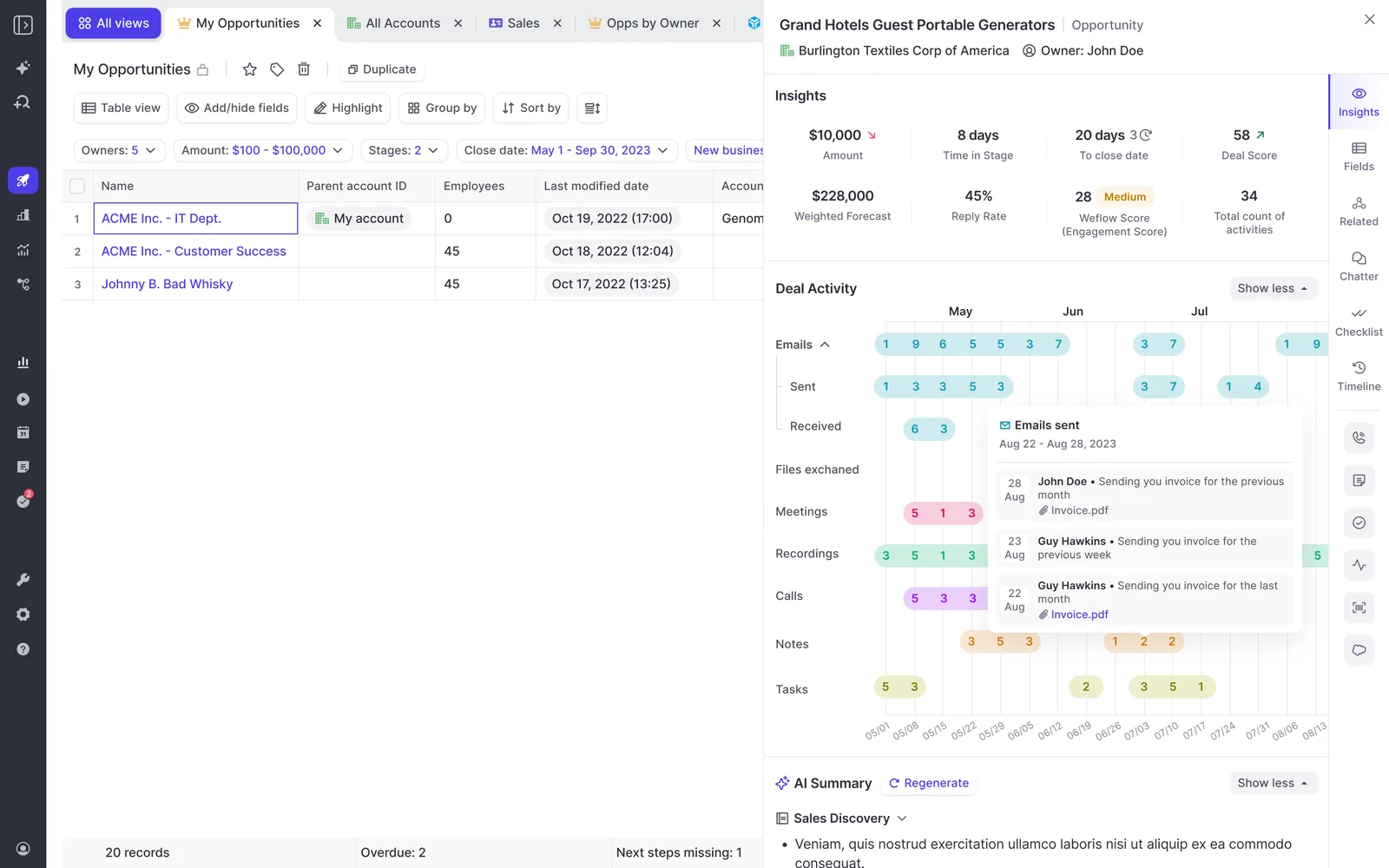
Weflow Activity & Contact Capture syncs emails, meetings, and contacts from Outlook and Google into native Salesforce objects, automatically, with no change to how reps work. Nobody logs anything. That's the point.
What lands in Salesforce:
- Emails sent and received, mapped to the right opportunity and account.
- Meetings from the calendar, including the ones a rep would never have logged.
- Contacts created automatically, with opportunity contact roles set.
On top of that, Weflow computes fields Salesforce doesn't have: a rolling four-week activity timeline, days inactive, last and next meeting, per-contact engagement, activity velocity. Because they're derived from captured activity rather than typed by a rep, they can't be gamed.
That's what makes single-threading and silence visible on the board instead of buried in a report nobody runs. HolidayCheck cut inactive opportunities by over 60% and past-due opportunities by around 75% after switching this on.
Historical sync-back puts 12 months of Salesforce history on screen
Weflow's forecasting and pipeline analytics import up to 12 months of historical Salesforce data by default. History doesn't accrue from zero, it gets imported, then Weflow snapshots opportunity data every few hours from there.
What that buys you in week one:
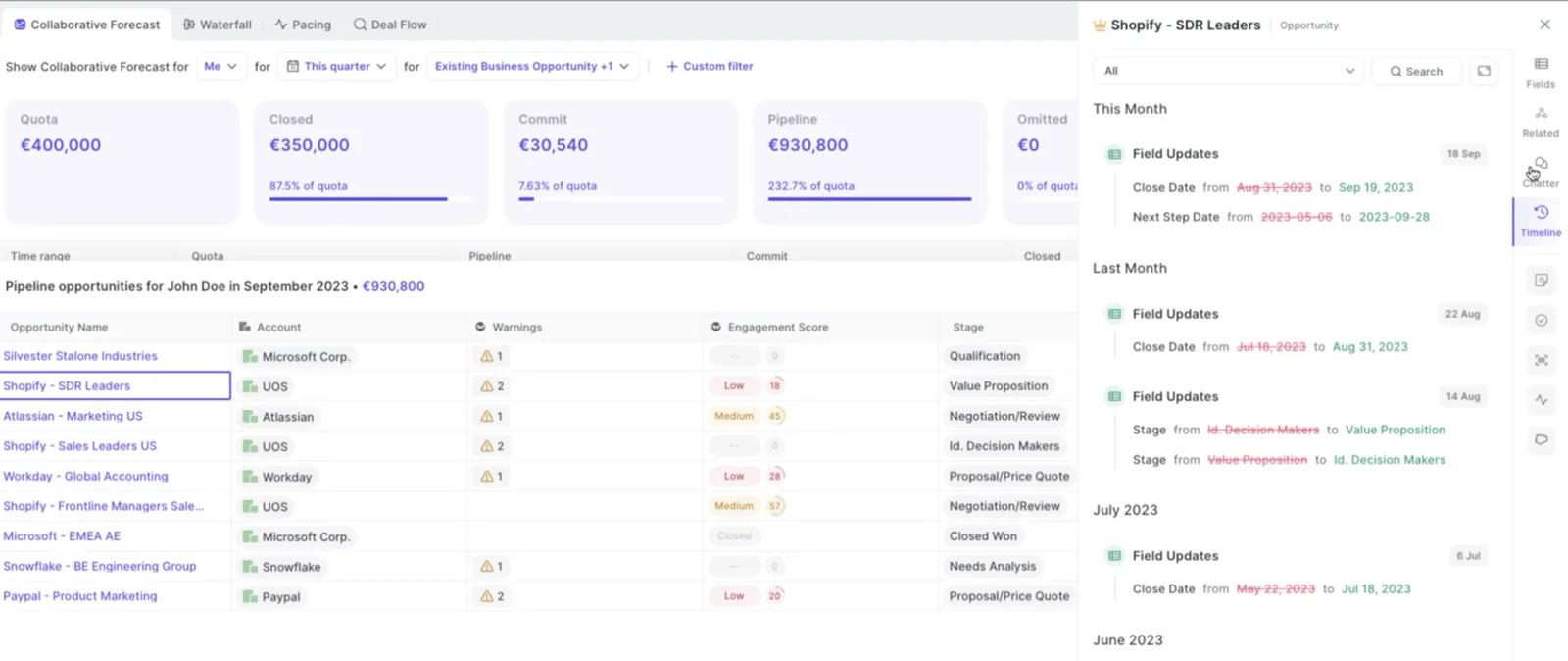
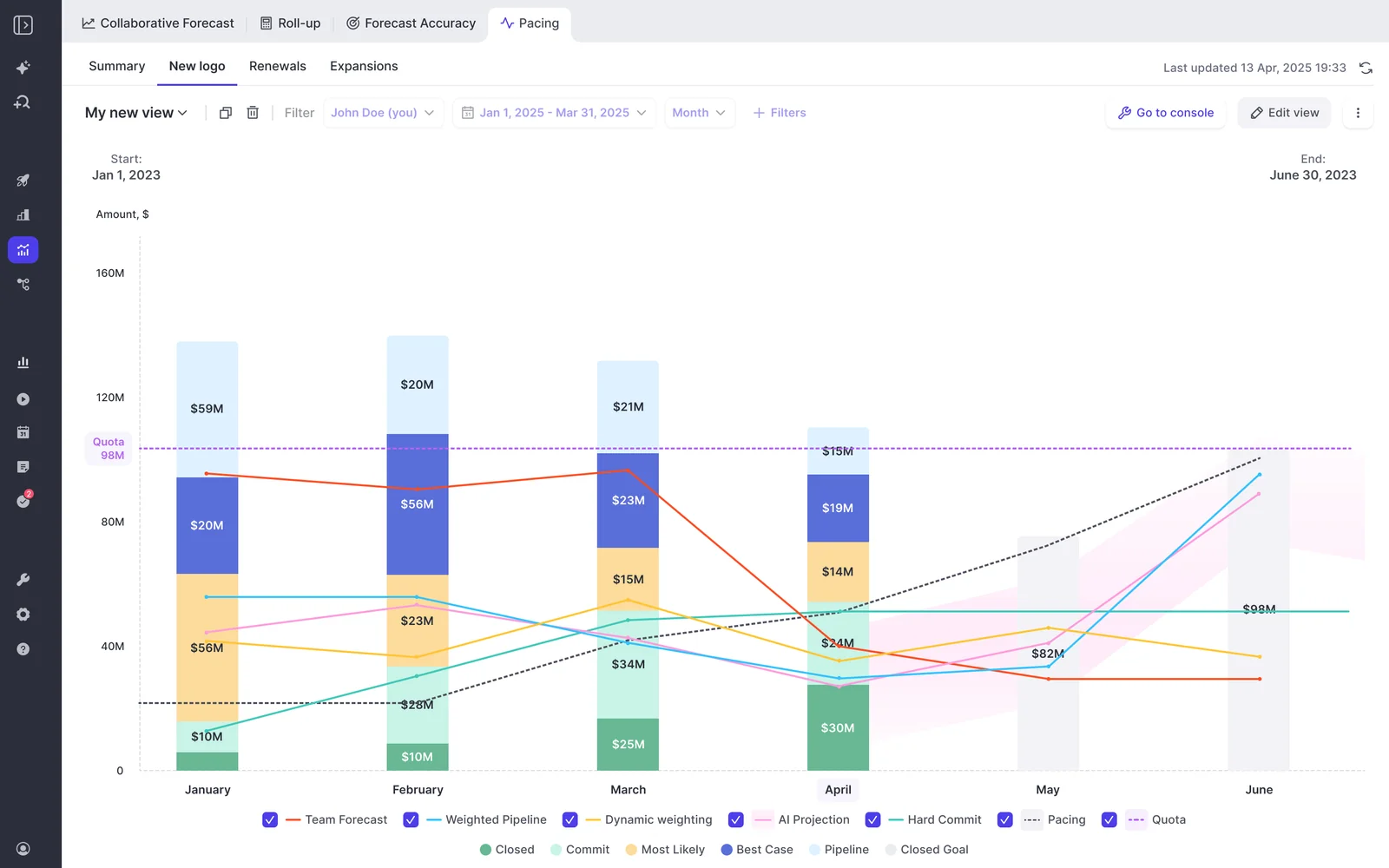
- A clickable pipeline waterfall that reconciles starting pipeline to ending pipeline through created, increased, moved in, moved out, decreased, won, and lost.
- Stage conversion rates and pacing built from your own closed-won history rather than a benchmark from a conference talk.
- The quarter-over-quarter question leadership always asks: how are we doing at day 35 compared with day 35 of the last three quarters.
The honest caveat: historical accuracy for custom fields depends on Salesforce field history tracking having been switched on in advance. Salesforce also can't history-track calculated or roll-up fields at all, which catches teams out, because the custom ARR field you forecast on is often exactly that. Where the history was never tracked, no tool can reconstruct it. Snapshots from Weflow build forward from go-live.
AI projection scores every deal on 50+ signals
Weflow's AI projection reads more than fifty deal-level signals and up to two years of history, scores each deal individually, and returns a landing range rather than a single number.
It is not a stage probability wearing a different hat. It reads deal behavior: seasonality, rep performance, conversion rates, communication cadence, whether a next meeting is booked, whether the deal is healthy against your sales methodology. A large deal that's being poorly worked gets projected down.
And it runs alongside two other methods, not instead of them:
- The weighted forecast says what the pipeline mathematically implies from historic stage close rates.
- The rep and manager roll-up says what the people closest to the deals believe, with each submission versioned and every manager override timestamped and attributed.
- The AI projection weighs deal health and behavior neither of the other two can see.
Where the three converge is your credible corridor. Where they diverge is the agenda for the forecast call, which is a better use of an hour than a round robin of "what's up with that deal, next."
It's no longer third-party hearsay from reps or sales leaders. It's now proof in front of us – AI summaries that tell us we're not talking to the economic buyer, that we're single-threaded, whatever it might be.- Scott Jones, SVP of GTM Revenue Intelligence & Enablement at KORE Wireless
Implementation time: Weflow in 2 weeks, Aviso in 10
The G2 Fall 2023 Report puts implementation at 2 weeks for Weflow, 5 weeks for BoostUp, and 10 weeks for Aviso.
| Tool | Implementation (G2 Fall 2023) | What's usable at go-live |
|---|---|---|
| Weflow | 2 weeks | Captured activity from day one, plus up to 12 months of imported Salesforce history in forecasting and pipeline analytics. |
| BoostUp | 5 weeks | Same forecast-only architecture: whatever is already in the CRM. |
| Aviso | 10 weeks | Per the buyer evaluation above, insights build from scratch over roughly 12 months. |
Now do the board math, because implementation is only when the clock starts.
Ten weeks of implementation, then a year of feeding the model, puts first trustworthy insight somewhere past the four-quarter mark. That's two full board cycles where the answer to "why did the number move" is still a guess.
Weflow's own timeline, from our onboarding data rather than G2: technical setup runs 45 to 60 minutes with a Salesforce admin and a mail admin, and time to live is typically two to four weeks, or four to six for a large org.
One caveat we'd rather say than have you discover: capture and conversation intelligence go live fast because they ask nothing of reps. Forecasting takes longer, because it isn't a tool topic. It's the encoding of an operating cadence, who submits, how often, at deal or manager level, against which quota.
The honest limit: forecast accuracy still takes three cycles
Deal signals and pipeline insight work in week one. Forecast accuracy does not, and no vendor who tells you otherwise has run the process.
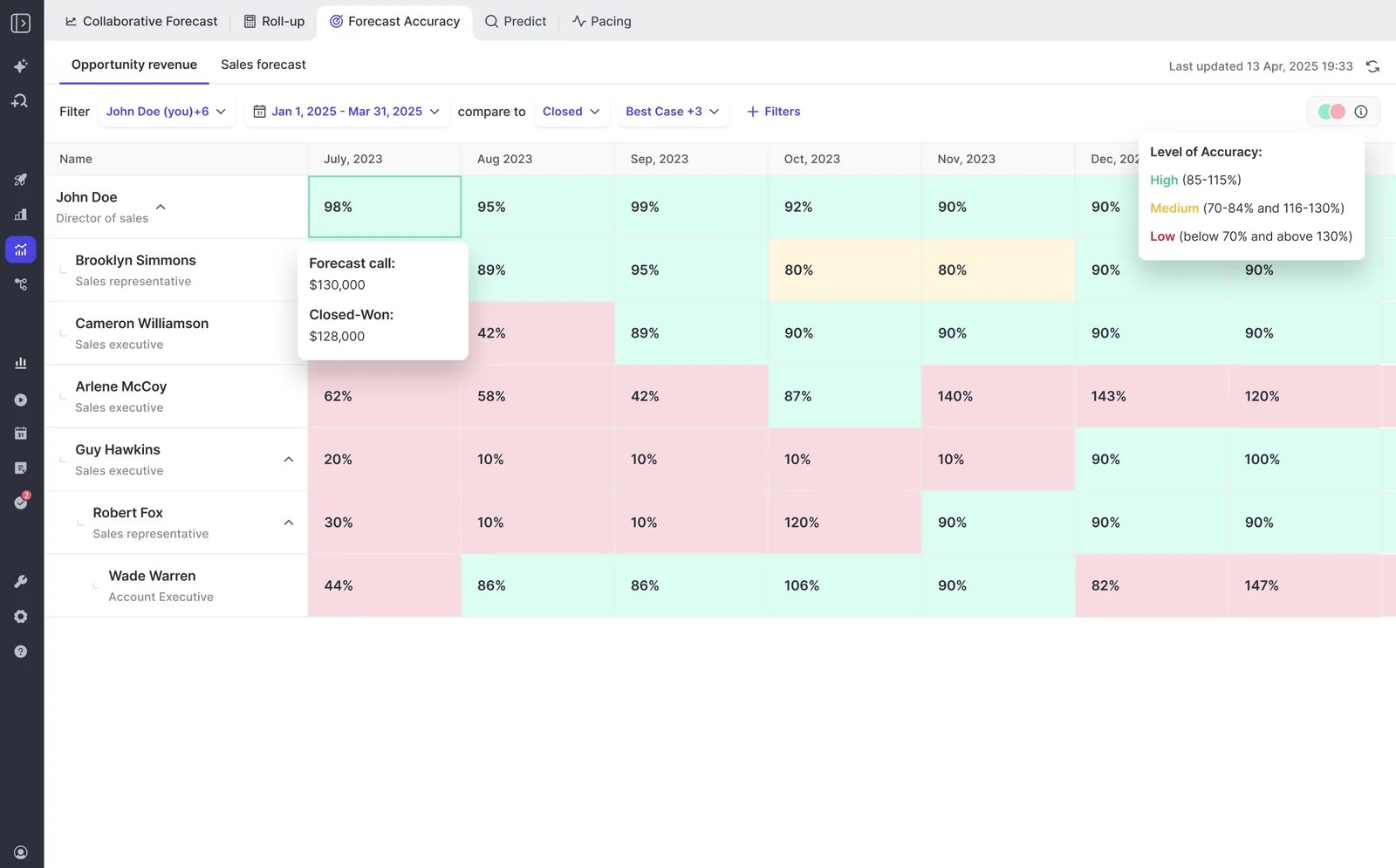
Accuracy is a comparison of what was submitted against what closed. You need submissions, and then you need quarters to compare them to. That's roughly three forecast cycles, call it three months, before the variance report per rep and per manager means anything.
| Working in week one | Needs about three cycles |
|---|---|
| Captured activity, engagement and inactivity signals, deal warnings, waterfall and pacing from imported history, AI deal scoring. | Forecast accuracy by rep, manager, and segment. Variance trends. Knowing whose call is worth listening to. |
The bigger limit is not the software.
If you don't run an operating cadence, the best tool in the world won't help you. You have to look at forecasting as a holistic process that has various ingredients to make it successful. - Philipp Stelzer, Co-founder and CPO of Weflow
We challenge prospects on this before they buy, and we'd rather lose the deal than sell forecasting to a team with no cadence. Forecasting is a muscle. The number is what comes out at the end of the training.
Weflow pricing vs a standalone forecasting contract
Weflow publishes its pricing, and the forecasting product is the cheapest line in this evaluation by a wide margin.
- Deal Intelligence & Forecasting: $39 per user per month, billed annually. Includes pipeline analytics, AI deal signals, roll-up forecasting, and forecast accuracy tracking.
- Viewer and analytics seats are free, unlimited, for leaders and stakeholders who only consume dashboards. Seats can be reallocated between full and viewer each quarter.
- 10-licence minimum, billed annually. No implementation fee, no platform fee, no usage-based charges.
- Bundles: Revenue AI Foundation at $49, Revenue AI Business at $59, Revenue AI Enterprise at $79 per user per month, the last of which includes the full forecasting layer.
One packaging detail that trips people up: Pipeline Analytics is sold with forecasting. A team holding Activity & Contact Capture and Conversation Intelligence alone has no analytics tab.
For context on the other side, dedicated standalone forecasting contracts in the evaluations we run tend to land between $100 and $200 per user per month. Aviso doesn't publish a price list and we won't guess at theirs, so take that as market context, not as Aviso's number.
Switching to Weflow: rollout ownership and renewal timing
If you've been burned before, the features aren't your first question. Who owns the rollout, and what if we're contractually stuck. Here's each.
Who owns the rollout when adoption has stalled before
Weflow runs onboarding itself rather than handing it to a partner, as a project in three phases against a mutual action plan with named owners on both sides:
- Technical implementation, 45 to 60 minutes, with your Salesforce admin and mail admin. This connects the systems and nothing more.
- Configuration, where the real time goes: team structure and hierarchy, sales methodology, which custom fields AI should populate, deal warnings, playbooks, prompt templates.
- Role-based rollout and training, split into separate leadership and rep sessions.
Time to live is typically two to four weeks, four to six for a large org, and there's no implementation charge.
The part worth flagging for anyone whose last tool died at adoption: there's a managed-service option where Weflow does the heavy lifting and your RevOps team only answers questions and unlocks access. We built it because in most displacement deals the blocker isn't product fit, it's RevOps bandwidth.
Locked into a renewal? Start with capture, expand later
The most common blocker in this evaluation isn't the product. It's a CFO who won't approve two forecasting tools at once, and eleven months left on the incumbent contract.
So don't fight it. Enter on Activity & Contact Capture and Conversation Intelligence, capabilities the team doesn't own today and which don't collide with an existing line item. Capture also happens to be the layer that has to be in place first anyway.
Then expand into forecasting for roughly $10 more per user per month at the incumbent's renewal, instead of a second six-figure contract. By the time you get there, you've got months of clean captured data sitting under the forecast on day one of the switch.
Choose Weflow if, choose Aviso if
Choose Weflow if:
- You run on Salesforce and your CRM activity is thin, because capture plus 12 months of imported history is exactly the cold-start problem this is built for.
- Time-to-value is measured in board cycles and you can't spend two of them feeding a model.
- You want the forecast grounded in what actually happened on calls, emails, and meetings, not in fields reps maintained under duress.
- You're consolidating: capture, conversation intelligence, and forecasting on one platform means fewer integrations to babysit and fewer renewals to defend.
- Your revenue is booking-based, and multi-motion, with new business, renewal, and expansion needing their own targets and roll-ups.
Choose Aviso (or another forecast-only tool) if:
- Your CRM isn't Salesforce. Weflow works exclusively with Salesforce, so that's a hard gate, not a preference.
- Your data foundation is already solved, with mature activity capture and maintained history, and the evaluation is purely about prediction depth.
- Your revenue is consumption-dominant. Weflow forecasting fits booking-based models best, because consumption depends on usage that doesn't sit on the opportunity, and that's a weaker fit for us.
- You want forecasting as a separate project on a separate contract, deliberately decoupled from CRM data work.
- You need one opportunity's amount split across multiple quarters. Weflow places the full amount into the single period its chosen date field falls into.
FAQ: evaluating Weflow against Aviso and BoostUp
Our Salesforce activity data is thin today, does sync-back really fill the gap?
Two mechanisms work together. Weflow captures emails, meetings, and contacts automatically from go-live, so the foundation builds itself going forward. And forecasting and pipeline analytics import up to 12 months of historical Salesforce data by default, so waterfall, pacing, and quarter-over-quarter comparison have real history on screen in week one.
The limit: historical accuracy for custom fields depends on Salesforce field history tracking having been enabled beforehand, and Salesforce can't track calculated or roll-up fields at all. Where the history was never recorded, it can't be recovered. Everything from go-live onward is snapshotted by Weflow every few hours.
Does Weflow make reps log activity or change how they work?
No. Weflow captures emails, meetings, and contacts server-side from Outlook or Google and writes them into native Salesforce objects, with no logging step for the rep.
That absence of behavior change is the design, not a side effect. Adoption failures in this category almost always trace back to a tool that asked reps to do something new, and the field team quietly declining.
Does the forecast roll-up live in Salesforce or in Weflow?
Forecast submissions, targets, and roll-up data live in the Weflow application. This is the one exception to Weflow's pattern: activity, transcripts, summaries, and AI field updates all land in Salesforce, and opportunity edits made in Weflow write straight back, but the forecast layer sits on top of the pipeline rather than adding forecast fields to Salesforce.
If your policy is that reps live in Salesforce and nowhere else, roll-up submission breaks that rule. The weighted forecast and the AI projection still work for you, because both run off CRM data with no rep input. Teams pushing forecasts into a BI tool pull the roll-up through the public API.
Can Weflow forecast new business, renewals, and expansion separately?
Yes. Weflow supports separate targets and roll-ups per deal type alongside a single combined quota, with roll-up shown in a tab per deal type plus a combined view.
Each Salesforce opportunity record type, New Business, Renewal, Existing Business, Partner, keeps its own stage path, forecast-category mapping, and independent roll-up. Renewals get a dedicated view that tracks contract end dates and fires a configurable renewal-kickoff milestone ahead of expiry.
That matters because a blended forecast hides the motion that's actually failing. Renewals holding while new logos collapse looks identical in the roll-up to the reverse.
Is Weflow a fit for consumption-based revenue models?
Booking-based revenue is the natural fit, because a booking forecast counts contracted deals and maps cleanly onto opportunity roll-up.
Consumption is a weaker fit and we'll say so on a first call. Consumption forecasting depends on usage that doesn't sit on the opportunity, so a usage-dominant business is a harder job than this product is built for. Teams with a mixed model, bookings plus a consumption tail, usually run the bookings side in Weflow and model the rest with finance.
What are Weflow's contract minimums?
Paid contracts start at a minimum of ten licences, billed annually. Viewer and analytics seats are free and unlimited, and there are no implementation fees or usage-based charges.
See how Weflow captures activity, updates Salesforce fields from calls, and rolls up your forecast. Book a 30-minute demo.