Weflow vs Attention for Follow-Up Emails Drafted After Sales Calls (2026)
Compare Weflow vs Attention on AI follow-up emails from transcripts and where sent emails log.


When it comes to the draft itself, Weflow and Attention are pretty evenly matched. Both write the follow-up email from the call using prompt templates your team controls, and neither sends it for your rep.
Where they differ is what the draft knows and where the follow-up ends up once it's sent:
- Weflow drafts from the call plus your Salesforce deal fields and writes the call summary onto the Salesforce Event. With Weflow Activity & Contact Capture, the email your rep actually sends lands in Salesforce too, so you can see the follow-up happened without asking.
- Attention drafts from the call and hands the draft to Gmail or the clipboard, where it's one piece of a broader set of agents and workflows.
Weflow is the Revenue AI Orchestration platform for sales, customer success, and RevOps teams. In this article, we compare Weflow Conversation Intelligence with Attention on the email after the call.
How Weflow and Attention compare on follow-ups, data and price
Here's the whole comparison on one screen. The detail behind each row follows in the tool sections.
| Capability | Weflow | Attention |
|---|---|---|
| AI follow-up emails | Drafted from the transcript plus mapped Salesforce deal fields, 30 to 60 seconds after the call. The rep copies or opens the draft and adds recipients by hand. With Activity & Contact Capture, the sent email lands in Salesforce. | Drafted from the call using team-assigned prompt templates. The draft opens as a Gmail draft or copies to the clipboard. Nothing logs the send against the opportunity. |
| Integrations with other tools | A native set: Salesforce, Gmail, Outlook, Google Calendar, Zoom, Teams, Meet, Webex, Slack, the Outreach dialer and listed telephony providers. There's no connector catalogue and no native warehouse connector. | Workflow steps act inside Gmail, Docs, Sheets, Salesforce, HubSpot, Pipedrive, Zoho, Asana, Airtable, Notion, Linear, Snowflake and Slack. Slack works both ways. |
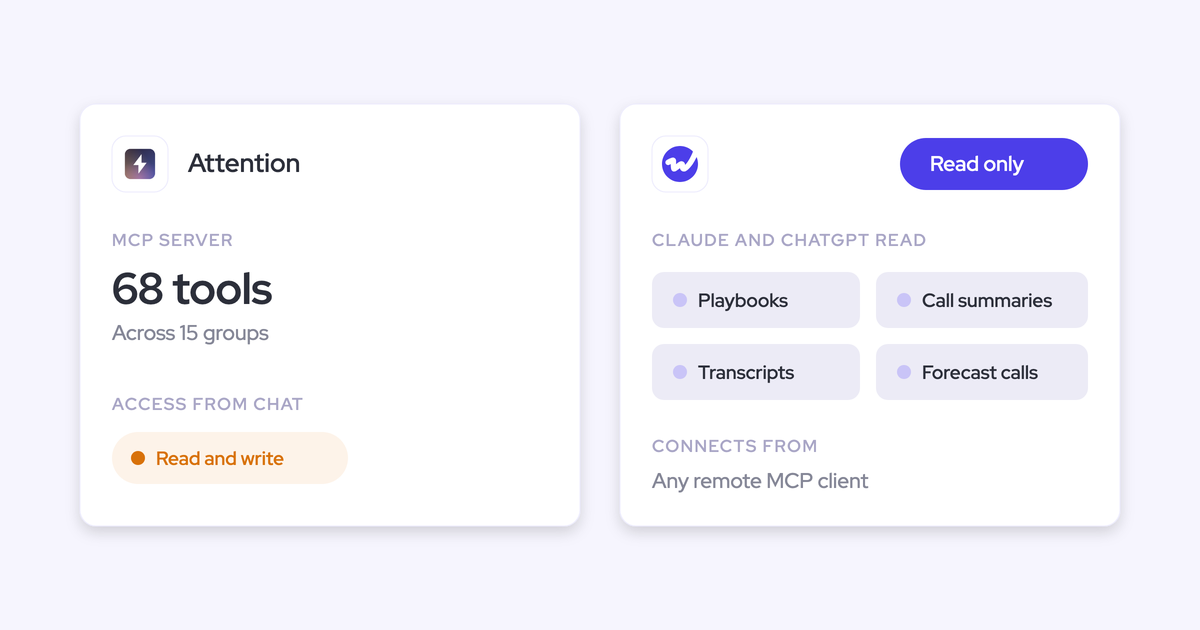
| Access from AI assistants (MCP) | An official read-only connector with six tools. It returns recordings, summaries, transcripts, playbook results and forecast data. | A read-write server with 68 tools across 15 groups. It returns raw transcripts and reaches Attention's Super Agent. |
| Raw data access outside the tool | A REST API in every plan bulk-exports transcripts, metadata, scores and signals as JSON or CSV. Video exports to your own storage. | Raw transcripts, scorecard results and AI insights through the MCP server and API keys. Workflows send data to Snowflake or any API through an HTTP step. |
| Pricing | Published per seat: Conversation Intelligence at $39 per user per month, Revenue AI Foundation at $49. | No published pricing. |
If you manage a team of reps, the first row is the one that decides it. The rest matters mostly to your RevOps lead.
Why sales managers compare Weflow and Attention on the follow-up
Chances are you've stopped judging the recorder. Every conversation intelligence tool transcribes well now, and nearly every one has added a follow-up draft on top, so the comparison moves to the email after the call.
Most managers we talk to are running the same three checks:
- Is the email drafted from the conversation itself, while the call is still fresh?
- Can the rep send it fast from their own mail client, including Outlook?
- Can you see that it went out without becoming the person who asks "did you follow up?"
The first check matters because the follow-up is often the only written record of what was agreed. If it's written hours later from memory, the next steps in the email drift away from the next steps in Salesforce, and both drift from what the buyer thinks was agreed.
Our co-founder puts the memory problem plainly:
"When I have five back to back meetings and I speak to ten different people, there's no chance I can remember everything. The automated summary is the only way I can put the data properly into the CRM."
In the end, prose quality matters less than one question: are the agreed actions in the draft the ones a person in the room would have written down?
How Weflow handles the follow-up and the call data
We built Weflow so that everything a call produces ends up in Salesforce: the summary, the field updates and, with capture, the email your rep sends.
Weflow drafts the follow-up from the call and your Salesforce deal
Weflow follow-up templates map Salesforce fields, so the email pulls deal context alongside the transcript.
That way, the draft reflects where the opportunity stands, not only what was said on the call, which is exactly what most generic check-in emails are missing.
The draft arrives within 30 to 60 seconds of the meeting ending, together with the AI summary and the proposed Salesforce field updates, so your rep can send the follow-up while the conversation is still fresh.
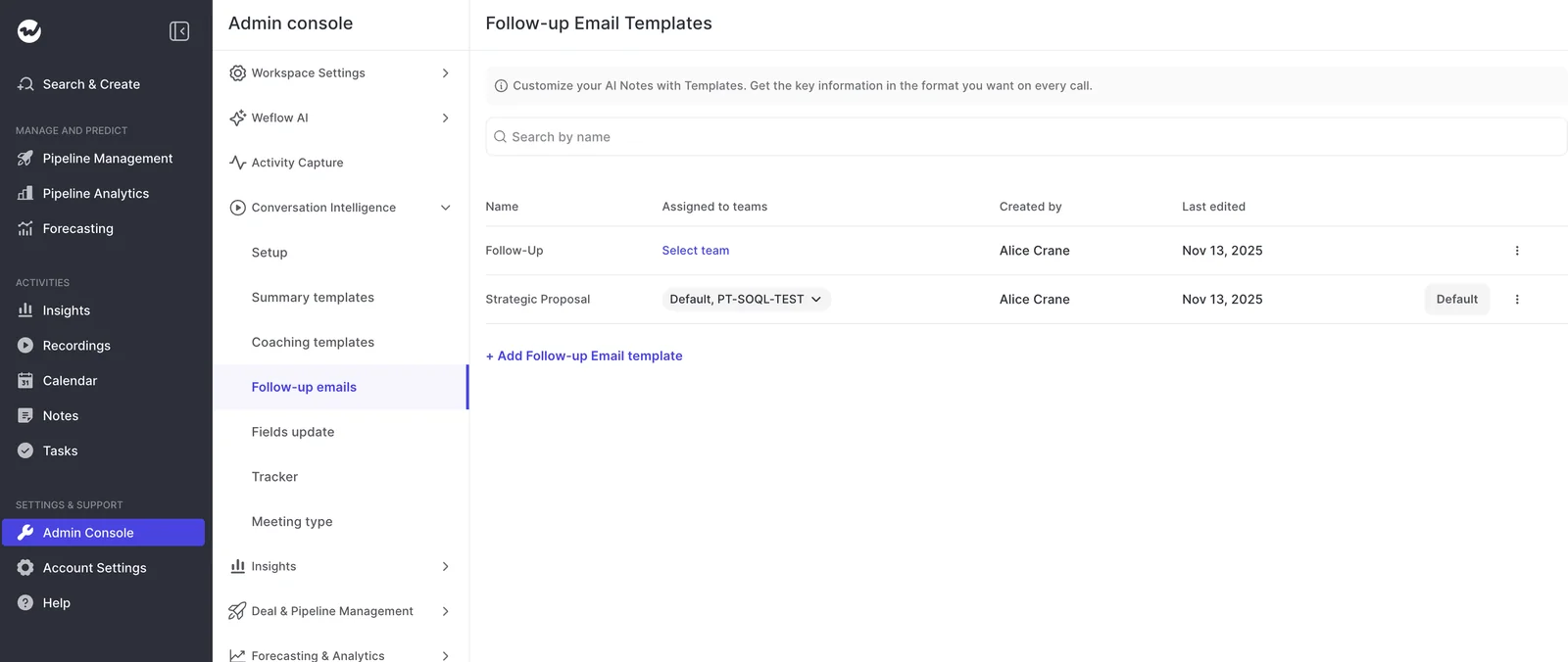
Your admin builds templates from predefined situation prompts:
- Contract and next steps
- No-show follow-up, which offers new time slots
- Objection handling
- Post-proposal and proposal follow-up
- Pricing and budget
- Scheduling the next meeting
- Cross-sell and upsell
- Resource sharing, thanks and summary, and a detailed follow-up
Templates are unlimited, and admins can add custom prompts, assign each template to specific teams and mark one as the default. So if you want every rep on your team following one format, that's how you set it up.
The email is written in the language the meeting was held in. Weflow auto-detects 96 languages, so a German call produces a German follow-up.
There's one dependency to keep in mind: draft quality follows the company business context your workspace runs on, meaning what you sell, who you sell to and who you compete with.
When it's empty, the AI doesn't know who it works for, and follow-ups come out generic. Admins set it once, or send us the material and we build it in.
The rep sends it, and the email lands in Salesforce
Weflow drafts the follow-up but doesn't send it or fill in recipients. Here's how the flow works:
- The call ends, and the draft arrives within 30 to 60 seconds next to the summary and field updates.
- The rep reads it, edits it or regenerates it.
- The rep copies the draft into Gmail or Outlook, or opens it through a link.
- The rep adds the participant addresses by hand.
- The rep sends from their own mailbox.
- Weflow Activity & Contact Capture writes the sent email into Salesforce against the matching records.
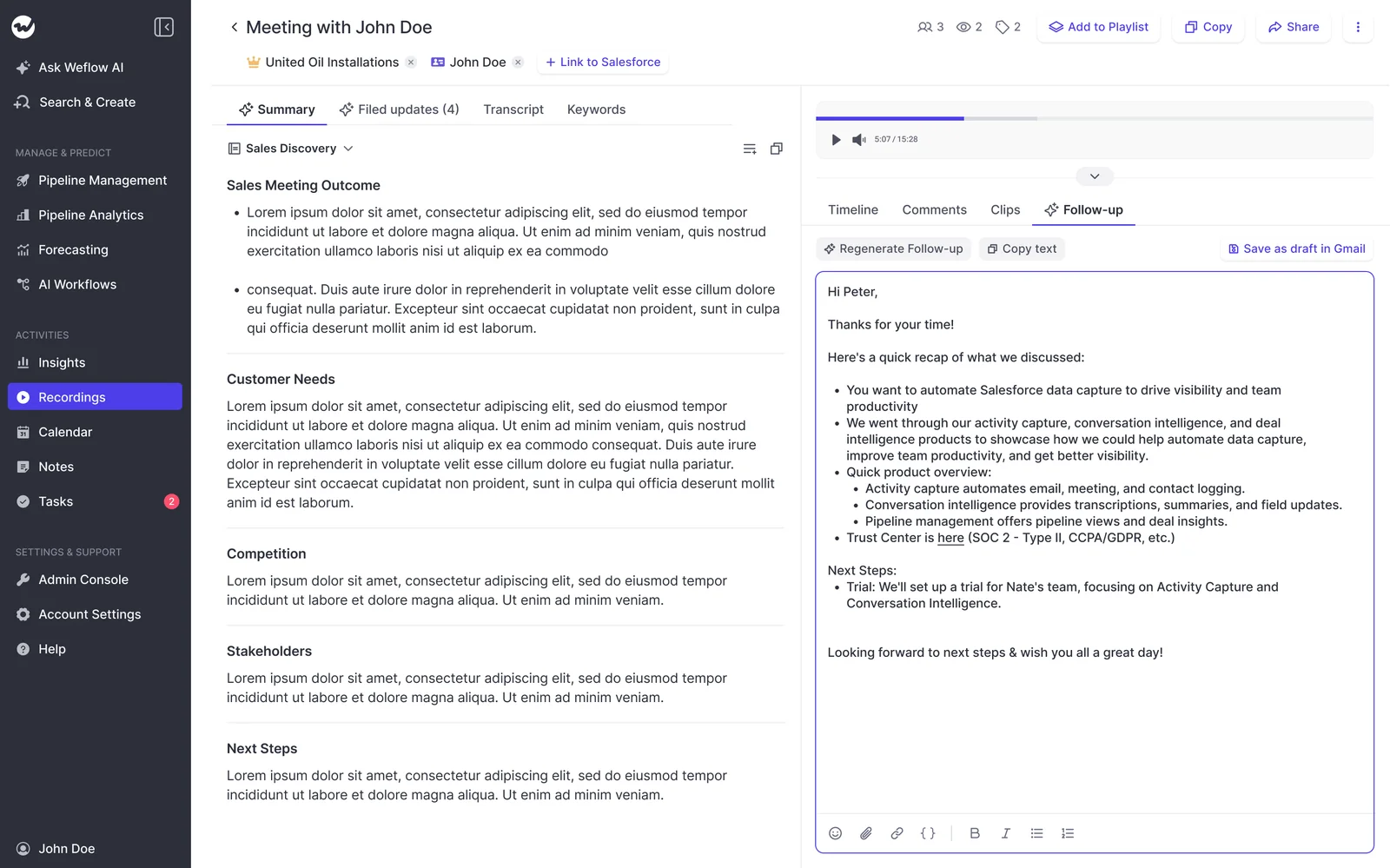
By then, the call summary is already on the Salesforce Event, so it shows on the opportunity activity timeline before the email even goes out.
Step six needs capture, though. Weflow Conversation Intelligence on its own drafts the email and writes the summary.
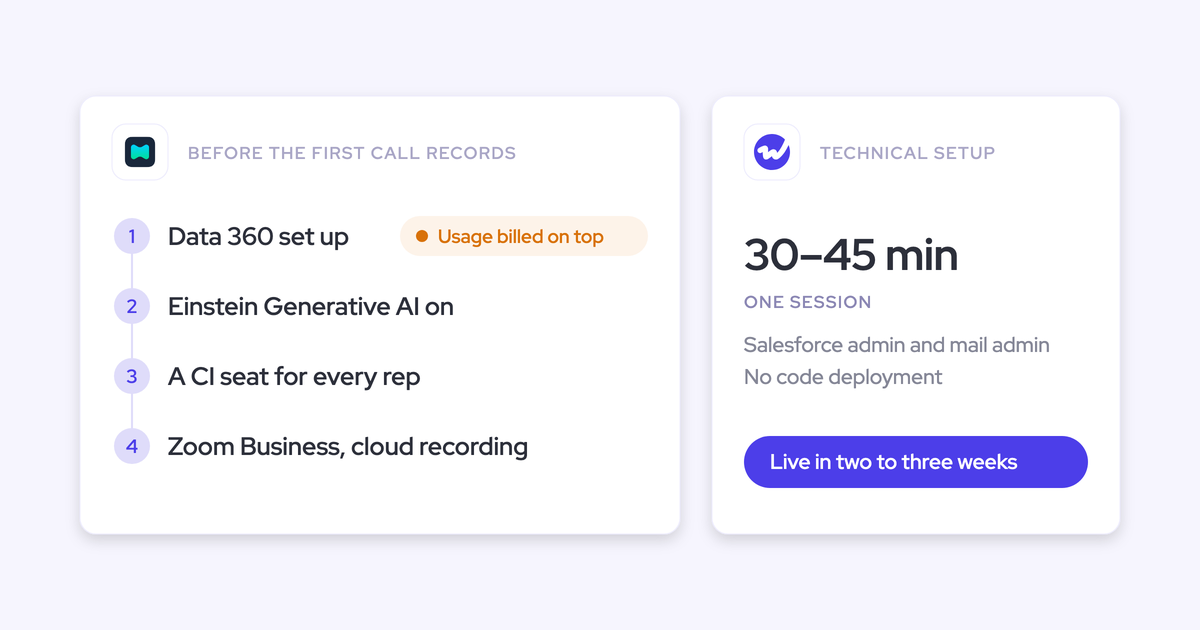
To have the sent email land in Salesforce, you need Weflow Revenue AI Foundation, which pairs Conversation Intelligence with Activity & Contact Capture.
Weflow connects natively to your mail, calendar, meetings and dialer
Weflow has a native set of integrations rather than a connector catalogue. This part is mostly for RevOps, so here's the list by role:
- CRM: Salesforce, exclusively.
- Mail and calendar: Gmail, Google Calendar and Outlook.
- Meetings: The notetaker joins Zoom, Microsoft Teams, Google Meet and Webex. The desktop app records without a notetaker, and Mobile Copilot records in-person meetings.
- Dialers: Your admin connects the Outreach dialer directly. Our team activates Aircall, CloudTalk and Dialpad. The desktop app also records any softphone whose audio runs through the computer.
- Chat: Slack and Microsoft Teams receive meeting summaries and agent output.
- BI and AI assistants: Tableau and Looker through the API, and Claude, ChatGPT and other assistants through the MCP connector.
What you won't find is a native Snowflake, Databricks or BigQuery connector.
Claude and ChatGPT read Weflow call data through a read-only MCP
Weflow's official MCP connector gives Claude, ChatGPT and any remote MCP client six read-only tools:
- Get Forecast
- Get Org Structure
- Get Recording
- List Playbooks
- List Recordings
- Playbook Values
An admin switches it on per workspace, and a separate toggle decides whether assistants can read full transcripts or only AI summaries. The connector also follows each user's Weflow hierarchy.
| Data | Through Weflow's MCP connector |
|---|---|
| Recordings and AI summaries | Returned |
| Full transcripts | Returned when the admin turns on transcript access |
| AI Playbook results | Returned |
| Forecast and pipeline metrics | Returned per rep, for up to 25 owners |
| Captured email content | Not returned. It lives in Salesforce and is read through a Salesforce connector |
| Salesforce field values | Not returned. They're read through a Salesforce connector |
| Write actions | None. The connector is read-only |
RevOps pulls Weflow transcripts and scores out through the API
Weflow's public REST API bulk-exports transcripts, metadata, scores and signals as JSON or CSV into BI tools and data warehouses. It's included in every plan, so any admin can generate keys in the Admin Console.
Video files export to your own cloud storage, while transcripts and call outputs already sit in Salesforce. And since there's no native warehouse connector, the API is how the data gets to your warehouse.
How Attention handles the follow-up and the call data
Attention is conversation-first: a call happens, AI reads it, and agents and workflows push the output out into other tools.
Attention drafts the follow-up from the call with team prompt templates
An Attention email template holds a prompt rather than email copy: your admin writes an instruction covering tone, length and focus, names the template and assigns it to a team.
Attention suggests separate templates per motion, such as first touch, demo recap and renewal follow-up.
When a rep selects a template on a conversation, Attention fills the prompt with details from the call and drafts the email. Since May 2026, Attention also drafts suggested email templates when a CRM is connected.
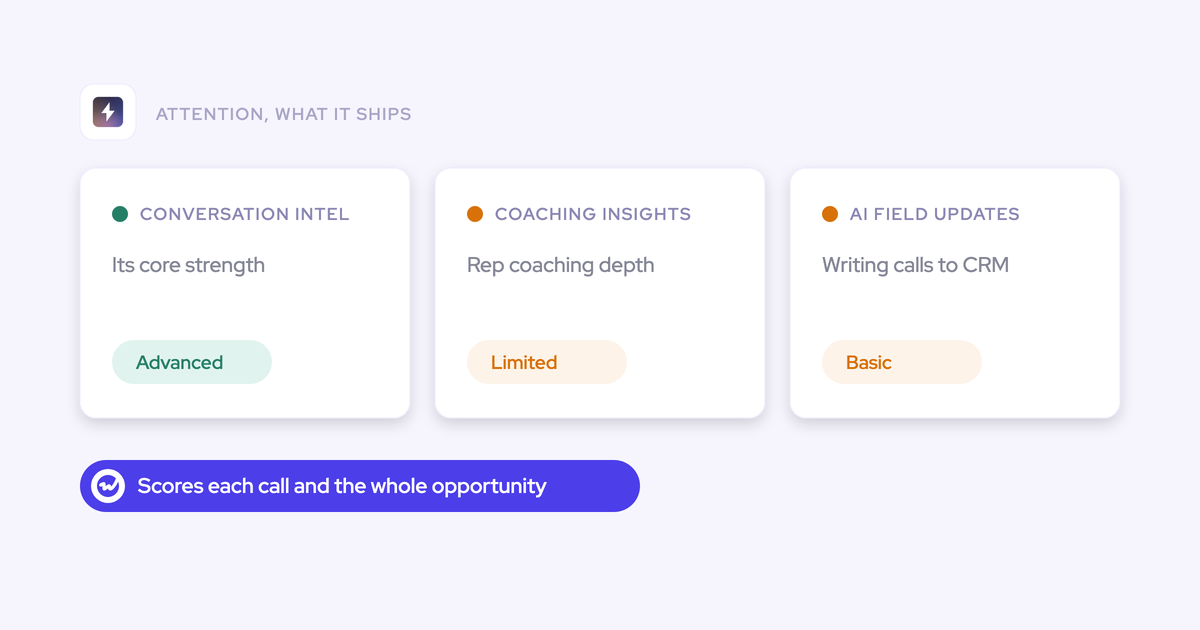
The draft, though, only knows the call. Attention's call-level AI uses CRM data to choose which calls to read, not as material to reason over. The Super Agent is the exception, since it does query Salesforce accounts, pipeline and imported email.
Where Attention goes further is the agents around the follow-up:
- A ready-made Follow-Up Email Automator drafts personalized follow-ups from call insights.
- Suggested actions, shipped in July 2026, propose emails, documents and decks after a conversation, which reps review, edit and rate.
The rep sends it from Gmail or pastes it into Outlook
Attention's follow-up feature doesn't send the email either. Here's how the send works:
- The rep opens the conversation's Email tab and picks a template.
- Attention drafts the email from the call and shows a preview.
- The rep clicks Share to Gmail to open a Gmail draft, or Copy To Clipboard.
- Outlook and Microsoft 365 teams paste the draft by hand.
- The rep sends from their mailbox.
- No path logs that send against the Salesforce opportunity.
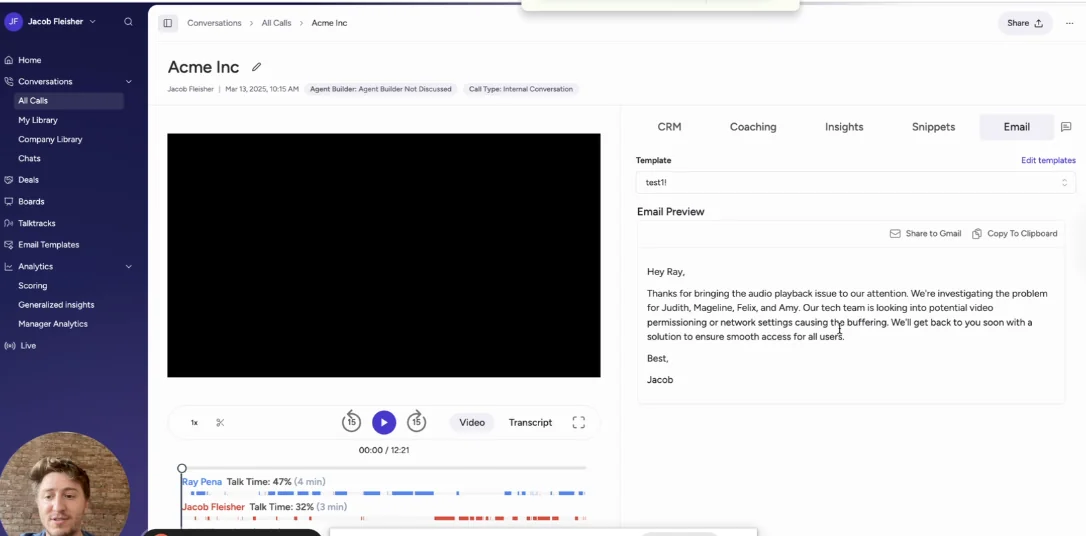
The screenshot above shows Attention's Email tab. This design does have a real upside: every draft passes through a person before it reaches the customer.
Attention Workflows can send email through a Gmail send scope, but that's a workflow you build, not the follow-up feature.
Attention also imports emails into its own store and ties each one to an account and deal, but those are Attention's records, not Salesforce activities.
Attention workflows push call output into Slack, Notion and Snowflake
This is where Attention is strong. Its workflow steps act directly inside a wide set of tools, and Attention claims more than 200 integrations in total:
- Calendars: Each user links Google, Outlook or Zoom.
- Telephony: Attention imports calls from Zoom Phone and Aircall after they end.
- Chat: Slack works both ways. Workflows post summaries and alerts, and people tag @Attention to ask its agents questions.
- Workflow destinations: Gmail, Google Docs, Google Sheets, Salesforce, HubSpot, Pipedrive, Zoho, Asana, Airtable, Notion, Linear and Snowflake.
- Custom logic: An HTTP request step calls any API, and a code step runs Node.js and TypeScript.
- Model steps: Ask OpenAI and Ask Anthropic run alongside Attention's own engine.
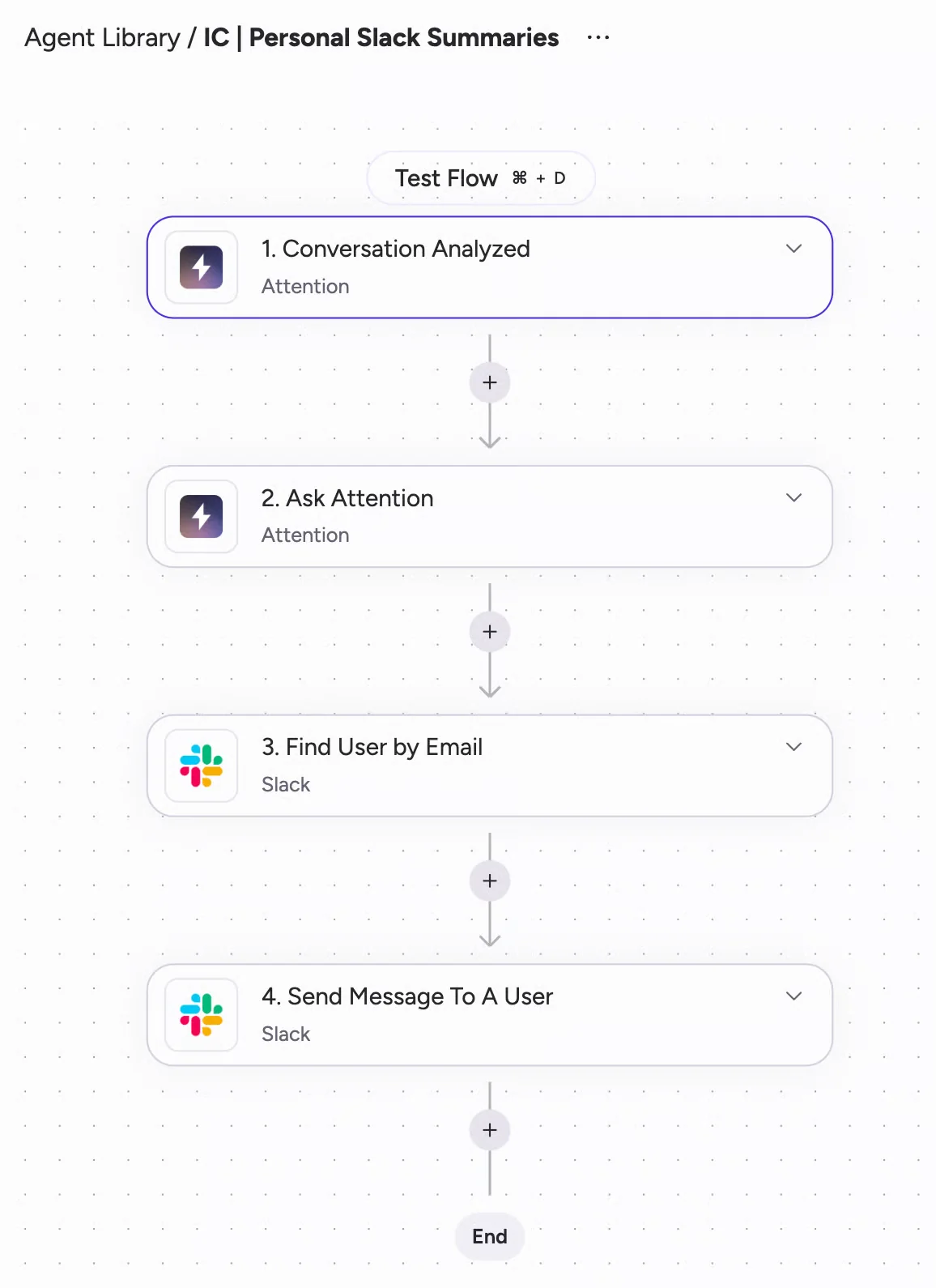
If you want the recap posted in a Slack channel or logged into a Google Doc, Attention's Builder can do it. The tradeoff is ownership, since a workflow with code steps is software, and someone on your team has to maintain it.
Claude and ChatGPT read and write Attention data through MCP
Attention runs the widest read-write MCP server in the conversation intelligence category, and an assistant connected to it acts on the workspace the way a logged-in user would.
| Area | What Attention's MCP server does |
|---|---|
| Scope | 68 tools across 15 groups, read and write, with nine flagged destructive |
| Transcripts | Returns raw transcripts and full-text searches inside them |
| Cross-call analysis | Runs analysis across up to 25 calls or every call on a deal |
| Agent access | Hands questions to Attention's Super Agent |
| Clients | Claude, ChatGPT and IDE agents, on every Attention plan |
| Usage | Rate limits, with no consumption charge |
| What to watch | Calls run under the caller's permissions, but org-level API keys carry full organization access |
RevOps pulls raw Attention transcripts through MCP and workflows
Attention exposes raw transcripts, scorecard results and AI insights through its MCP server, with API keys for programmatic use.
Workflows can also send data to Snowflake or, through an HTTP step, to any API, which opens the door for teams that want the source text in their own models.
Where Attention is the better fit than Weflow
Some teams are better off with Attention, and we'd tell them so on a call:
- You're a Gmail shop that wants one-click drafts: Attention opens the follow-up as a Gmail draft straight from the call page.
- You want follow-ups and recaps pushed into Slack, Docs or Notion: Attention's workflow steps act inside those tools, while Weflow's set is narrower.
- You want live help during the call: Attention's desktop app shows talk tracks and battlecard prompts in real time, while Weflow has no live in-meeting assistant, and its output arrives after the call. We think a rep reading battlecards isn't listening, but if your team wants it, Attention has it.
- Your RevOps team wants read-write MCP with raw transcripts: Attention's server is broader than Weflow's read-only connector.
- You run a CRM other than Salesforce: Attention supports HubSpot, Pipedrive and Zoho, while Weflow works only with Salesforce.
How Weflow lets you see follow-through without asking reps
In Weflow, the follow-up is part of the Salesforce deal record: deal context goes into the draft, and the summary and the sent email come back onto the deal. That's what saves you from asking "did you follow up?"
Here's what changes on your side:
- The recap reaches you: Admins can send the meeting recap to each rep's direct manager as set in Salesforce, with links to the recording, the field updates and the drafted follow-up.
- The summary is on the opportunity: It's written onto the Salesforce Event, so it shows on the opportunity activity timeline.
- The sent email is in Salesforce: With capture, you can report on last email date and last meeting date per account and lead.
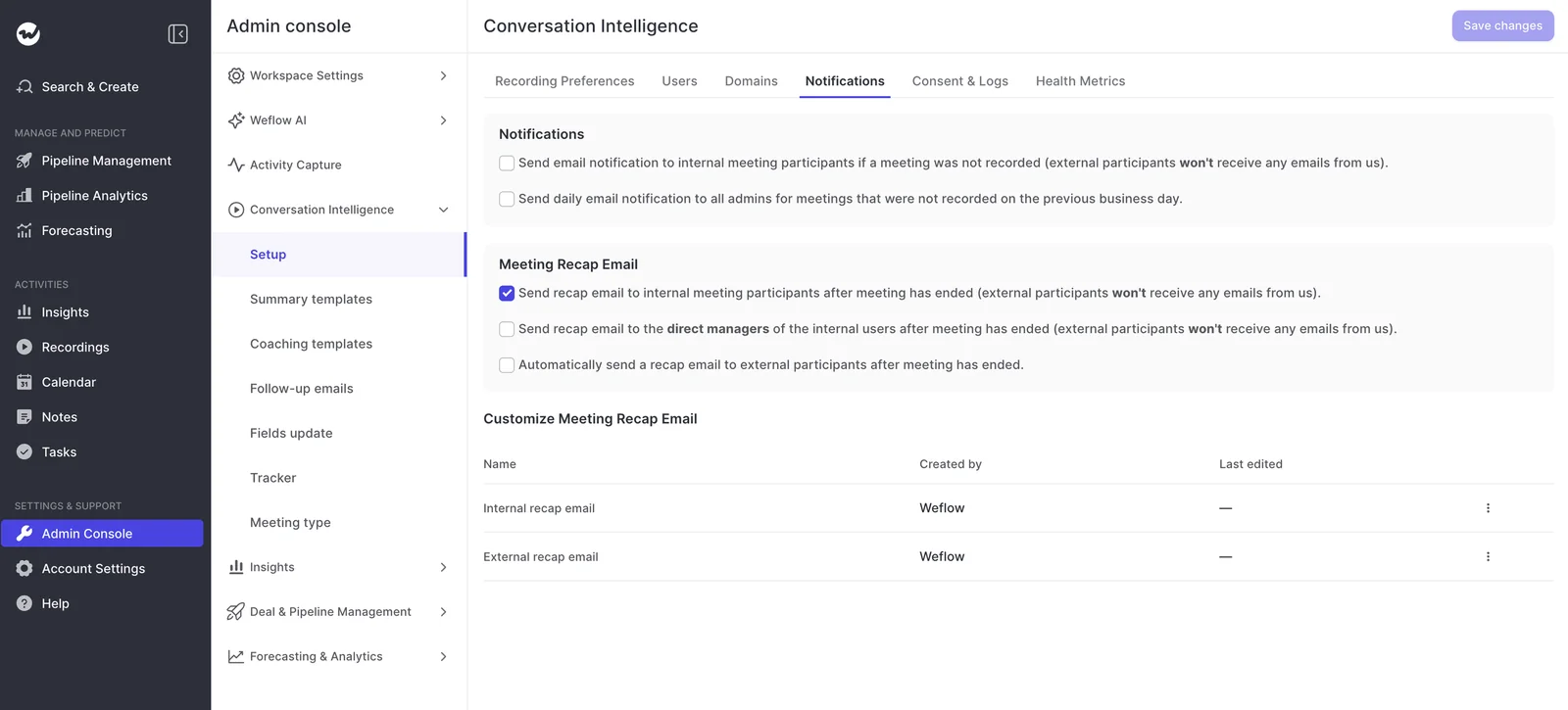
ADVISA runs this setup fully automated, using dashboards that track last email and meeting dates to power their follow-up workflows. As their Director of Operations put it:
"Weflow eliminated the need for our VP to ask, 'Did you follow up?' The system now tracks that automatically, creating a framework that drives accountability across the team."
The three versions of the deal also stop drifting, because the follow-up, the summary and the proposed field updates all come from the same call in the same minute.
Next steps in the summary carry an owner, a due date and a priority, and the rep approves the field updates side by side in one click. That way, the email, Salesforce and the buyer's understanding all start from the same source.
| What you see as the manager | Weflow | Attention |
|---|---|---|
| Call summary | On the Salesforce Event and the opportunity timeline | In Attention; extracted fields push to the CRM |
| Drafted follow-up | Linked in the recap sent to the rep's direct manager | In the conversation's Email tab in Attention |
| Sent email | Captured into Salesforce against the matching records, with Activity & Contact Capture | Not logged against the opportunity; imported emails stay in Attention's store |
| Follow-through reporting | Salesforce reports and dashboards, such as last email date per account | Inside Attention, or through workflows you build |
| Alerts | Recaps to managers; agent output to email, Slack and Teams | Deal Risk Monitor notifies managers; workflows post alerts to Slack |
What Weflow and Attention cost for a sales team
Weflow publishes per-seat prices, while Attention publishes none.
| Pricing detail | Weflow | Attention |
|---|---|---|
| Pricing model | Per seat, with AI usage included. Agent Builder is the only consumption-priced product | Negotiated contract, with no published metering |
| List price | Weflow Conversation Intelligence at $39 per user per month. Weflow Revenue AI Foundation (Activity & Contact Capture plus Conversation Intelligence) at $49 | Not published |
| Minimums and term | 10 users, billed annually, 12-month term. An early opt-out after three months is available as a negotiated concession | Not published |
| Included | Ask Weflow AI Pro, Agent Builder Free with 25 actions a month, the desktop app and Mobile Copilot | Not published |
| Costs extra | Paid Agent Builder tiers per workspace: Growth at $299 a month for 500 actions, Scale at $999 for 2,500, Enterprise custom | Not published |
For the follow-up workflow covered here, you'll need Weflow Revenue AI Foundation at $49 to capture the sent email. Conversation Intelligence on its own, at $39, gives you the draft and the summary on the Event.
Attention publishes no price, so there's no figure to put next to ours.
How to move your Attention call history into Weflow
You don't lose your call history when you switch, because Weflow imports recordings from the tool you're leaving:
- We pull your recordings and transcripts through the vendor's API with an API key, or import the recording files you've exported.
- Weflow re-links each recording to the right Salesforce records.
- The imported transcripts become searchable by Ask Weflow AI alongside new calls.
Migration typically takes one to two weeks, depending on volume. Importing up to two years of history is free, and anything longer is a paid service.
Should your team pick Weflow or Attention for follow-ups?
The choice comes down to where you want the follow-up to live.
| Choose Weflow if | Choose Attention if |
|---|---|
| You run on Salesforce and want the draft to use deal fields alongside the call. | You're on Gmail and want one-click drafts from the call page. |
| You want the summary and the sent email on the opportunity so you can see follow-through without asking. | You want follow-ups and recaps pushed into Slack, Docs or Notion through workflows. |
| Your reps use Outlook and you still want the sent email logged in Salesforce. | You want live talk tracks and battlecards during calls. |
| You want one template per team, with a default, across 96 languages. | Your RevOps team wants read-write MCP with raw transcripts. |
| You want a published per-seat price before you talk to anyone. | You run HubSpot, Pipedrive or Zoho instead of Salesforce. |
See how Weflow captures activity, updates Salesforce fields from calls, and rolls up your forecast. Book a 30-minute demo.
FAQ: Weflow and Attention follow-ups
Does Attention send follow-up emails from Outlook?
No. An Attention follow-up opens as a Gmail draft or copies to the clipboard, so Outlook teams paste it by hand. Nothing logs the send against the Salesforce opportunity.
Does Weflow send the follow-up or fill in recipients?
No. Weflow drafts the follow-up, and the rep copies it or opens it through a link, then adds the recipients by hand. With Activity & Contact Capture, Weflow writes the sent email into Salesforce.
Can Weflow email a recap to the customer automatically, and should it?
Weflow can send an external recap to the meeting's external participants on its own, from a separate template the admin edits, but it doesn't replace the rep's own follow-up.
Many managers keep it off, because an auto-sent recap reaches the customer before the rep has read it, which makes the rep-owned draft the safer default.
What languages do Weflow follow-up emails support?
All 96 that Weflow auto-detects. The follow-up is written in the language of the meeting, while the summary in Salesforce stays in your workspace language.
Who should own the follow-up prompts and templates?
A named person inside your team, usually in RevOps or sales operations. Without an owner, templates go stale and reps stop trusting the drafts.