

Best AI Tools That Write Follow-Up Emails After Sales Calls (2026)
Compare Weflow, Gong, Avoma, Attention, Fathom and Momentum for AI follow-up emails from transcripts.


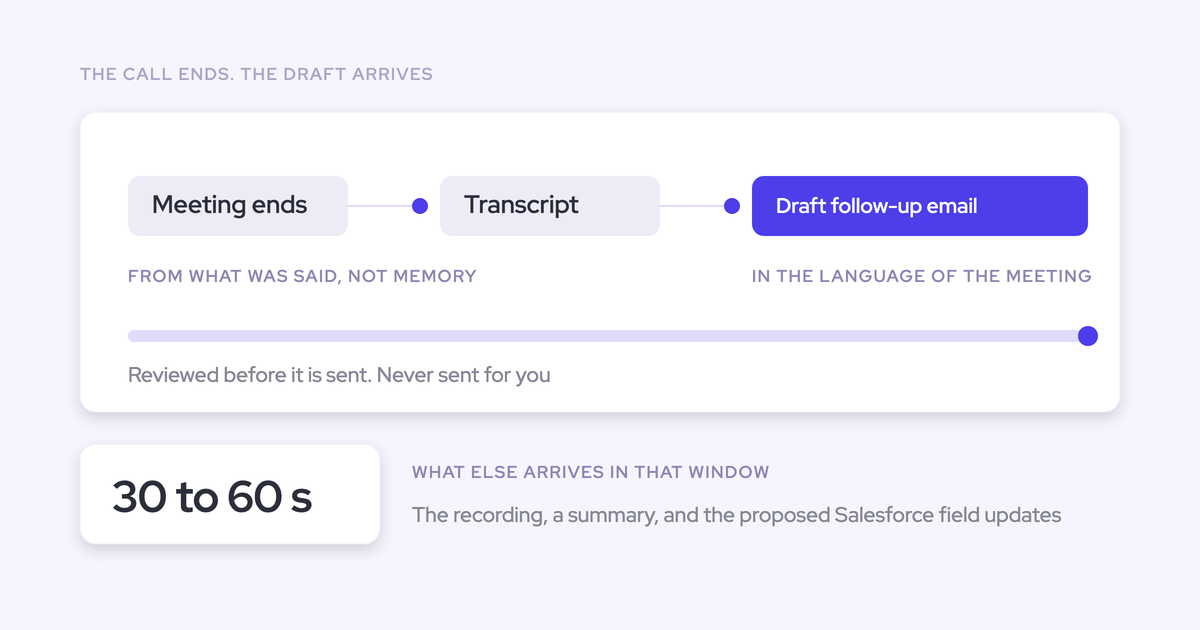

Most follow-ups go out late. After five back-to-back calls, the rep writes the email at the end of the day or the next morning, from memory, or sends a generic check-in. The next steps in that email don't match Salesforce, and neither matches what the buyer thinks was agreed. You usually find this out in a one-on-one.
Every tool on this list drafts a decent follow-up from the call. The ones worth paying for do two more things:
- The draft arrives while the call is still fresh.
- The next steps it commits to also land in your Salesforce fields, so the email, the CRM and the buyer agree.
We compare Weflow, Gong, Attention, Avoma, Fathom and Momentum on those two tests. We also score the send step, and that's where Weflow is behind.
Weflow is the Revenue AI Orchestration platform for sales, customer success, and RevOps teams. It automates Salesforce data capture and uses AI to generate deal, pipeline, forecast, and coaching intelligence. For this job, the relevant product is Weflow Conversation Intelligence + AI Field Updates. It writes the follow-up, the summary and the proposed field updates from the same transcript at the same moment.
This guide is for Salesforce teams narrowing a shortlist. The short answer, by situation:
- You want the draft, the summary and field updates within a minute, at a published seat price: Weflow.
- You want reps to review in Slack and send through Gmail with one click, or you're on the Agentforce path: Momentum.
- You're a smaller team that wants to send from Gmail or Outlook at a low published price: Avoma.
- You already run the full Gong platform with Engage: Gong.
- Your RevOps team wants to build agents on call data with an open MCP: Attention.
- You're a small HubSpot team, or an individual who wants a free notetaker: Fathom.
Weflow, Gong, Attention, Avoma, Fathom and Momentum side by side
All six draft the follow-up. They differ on timing and sending, on what reaches Salesforce, on how data leaves the tool, and on whether the price is public.
The first two rows are what you'll notice as a manager every day. The MCP and raw-data rows are for your RevOps team.
| Capability | Weflow | Gong | Attention | Avoma | Fathom | Momentum |
|---|---|---|---|---|---|---|
| AI follow-up emails | Drafted from the transcript within 30 to 60 seconds. The rep copies it out and adds recipients. | Drafted on request from the call page, in the call's language. The rep copies it or sends through Engage. | Drafted from a team's prompt template. It leaves as a Gmail draft or a clipboard copy. | Drafted when the rep clicks Send Follow Up. The rep edits and sends it from Gmail or Outlook. | Built from detected action items. The rep pastes it into any mail client. | Drafted automatically after each call, reviewed in Slack, sent through Gmail in one click. No Outlook. |
| AI meeting summaries | Unlimited templates that vary by meeting type, written to the Salesforce Event. Next steps can't be assigned to a person. | A brief on every call on any plan. Admin-built templates on Foundation. | Long and short Insights templates, free-form prompts, Slack delivery. | Written automatically when the meeting ends. Over 90 templates, picked by meeting purpose. | 17 templates, including MEDDPICC and SPICED. Organization-wide templates start on Business. | Configurable by call type and Salesforce conditions. Sent to Slack or email, with an optional Salesforce note. |
| CRM field updates from conversations | Every field type except lookups, including picklist, date and number. Review or auto-write is set per field. | Up to 20 admin-built extractors that write only to existing fields and overwrite older values. | One prompt per mapped field. Automatic sync by default. Fields with no finding get prose. | Smart Topics written to Opportunity and Account fields with no review step. No custom objects. | On Business only, and only into text fields, from summary headings. Each meeting overwrites the value. | Autopilot sets auto, confirm, or write-if-empty per field on Opportunity, Account, Lead, Event and Contact. |
| Salesforce integration | Real-time two-way sync on the REST API. It inherits validation rules and permissions. Salesforce only. | Imports accounts, contacts, leads and opportunities. Customers report painful field mapping and sync breaks. | Two-way OAuth sync. The connecting user needs Modify All Data. New fields are mapped by hand. | Native two-way sync, set per field. It creates Events and writes notes to Notes, Events or Tasks. | Matches Contacts and open Opportunities and writes summaries as Tasks. Leads are never matched. | A managed package. Salesforce is its only CRM, Sales Cloud only, and Event mapping is opt-in. |
| Integrations with other tools | Gmail, Outlook, Zoom, Teams, Meet, WebEx, Slack and the Outreach dialer. No native warehouse connector. | About 450 marketplace listings, about 30 dialers and 11 meeting platforms. | Workflow steps in Gmail, Sheets, HubSpot, Snowflake, Slack and more. Imports Zoom Phone and Aircall calls. | 26 native integrations, including nine dialers and sales engagement tools. | 30 directory listings. No dialer, no sequencer, and no BI or warehouse tool. | Five CI tools including Gong, seven dialers, Slack or Teams, and an Outlook calendar integration in early beta. |
| Access from AI assistants (MCP) | An official read-only connector for summaries, transcripts (behind a toggle), playbooks and forecast calls. | Three record-scoped, read-only tools. Returns insights, not transcripts, and uses metered credits. | 68 read-write tools with raw transcripts. Limited by rate, not by credits. | 11 read tools and 3 write tools. Needs the Organization plan or the API Access add-on. | A connector on every plan, scoped to the meetings the user can see. | No MCP of its own. Assistants read Salesforce through Salesforce's hosted MCP. |
| Raw data access outside the tool | The transcript sits on Weflow_Recording__c in your Salesforce. REST API bulk export as JSON or CSV. | API capped at 3 calls a second and 10,000 a day. Warehouse delivery needs Data Cloud, bought separately. | Raw transcripts through MCP and API keys. Workflows can push to Snowflake or any API. | REST API and webhooks at 60 requests a minute, on the Organization plan and up. | API on every plan. Keys are per user, so each key reads only that user's calls. | API returns full transcripts. It's off by default and capped at 100 requests per 15 minutes. |
| Pricing | Published. $39 per user per month for Conversation Intelligence, annual, 10-user minimum, AI included. | Not published. Per-user licence plus a platform fee. Foundation is mandatory. AI credits on top. | Not published. | Published. $19, $29 or $39 per recorder seat, plus $29 add-ons. | Free for individuals. Paid plans from $15 to $25 per user. Enterprise on quote. | Included in Salesforce's Max edition ($550) today. Standalone from $69, plus $30 for CI. |
Why every tool drafts well, and what actually differs
Drafting is table stakes now. Any of these six will turn a 30-minute call into a readable follow-up. Buyers tell us this in the first five minutes of a demo: every vendor sounds the same on the notetaker.
What still differs is everything around the draft:
- Does the draft land while the rep still remembers the call?
- Does the same transcript also write the Salesforce record?
Those two questions decide whether your team runs one version of each deal or three: the email, the CRM and whatever the rep remembers. When the follow-up is a separate feature, the three versions start drifting apart after the first call.
"When I have five back to back meetings, each of these, like, thirty to forty five minutes long, and I speak to basically ten different people, then, yeah, it's just no chance I can remember everything. So I need that. I need to have that automated summary."
— A sales rep describing their day
So judge each tool on the minute after the call ends.
| After the call | Follow-up as a separate feature | Follow-up, summary and field updates from one pass |
|---|---|---|
| When the rep has the draft | Later, when someone asks for it or the call finishes processing | Within about a minute, with the summary |
| Where the summary lives | In the vendor's app, or as a separate activity | On the existing meeting record in Salesforce |
| What happens to Next Step and close date | The rep updates them by hand, if they remember | Proposed changes wait for the rep to review |
| What you see before the Monday review | Stale fields, so you ask each rep | Fields that match what was said |
| What the buyer receives | An email written from memory | An email written from the transcript |
Five things to test in a follow-up tool trial
Run these five tests during a two-week trial. They follow your rep's timeline after the call ends.
Weflow does well on tests 1 and 3. On test 2, it's behind.
| Test | Why it matters to you | How to run it |
|---|---|---|
| 1. Time from call end to draft | A draft that lands in a minute gets sent. A draft that lands in an hour joins the end-of-day pile. | Have two reps time the gap on a short call and on a long call. |
| 2. The send step | Every copy-paste and hand-typed address is friction that reps notice in week one. | Check whether the tool sends or copies, whether it works with Gmail and Outlook, and whether it fills recipients. |
| 3. Next steps in reportable fields | If next steps only live in the email, your pipeline review still runs on asking. | After a call, check Next Step, close date and stage on the opportunity. Then check who approved each change. |
| 4. The summary on the existing meeting | A second meeting record double-counts meetings per rep and meetings per closed deal. | Run the tool next to your activity capture and count the meeting records on one opportunity. |
| 5. Published price and AI metering | A quote-only price your VP has to fight for, plus metered AI, makes the bill hard to predict. | Price your team of reps from the public page, then list everything metered on top. |
Being able to review and correct the AI counts in a tool's favor. Blind auto-writes on single-value fields like close date don't.
Weflow: follow-up, summary and Salesforce fields from one pass
We built Weflow Conversation Intelligence + AI Field Updates so the rep gets three things together, within 30 to 60 seconds of the meeting ending: the drafted follow-up, the summary on the Salesforce Event, and the proposed field updates. All three come from the same transcript at the same moment.
That's why the email and the CRM agree. Nothing needs reconciling later.
How Weflow drafts the follow-up within a minute of the call
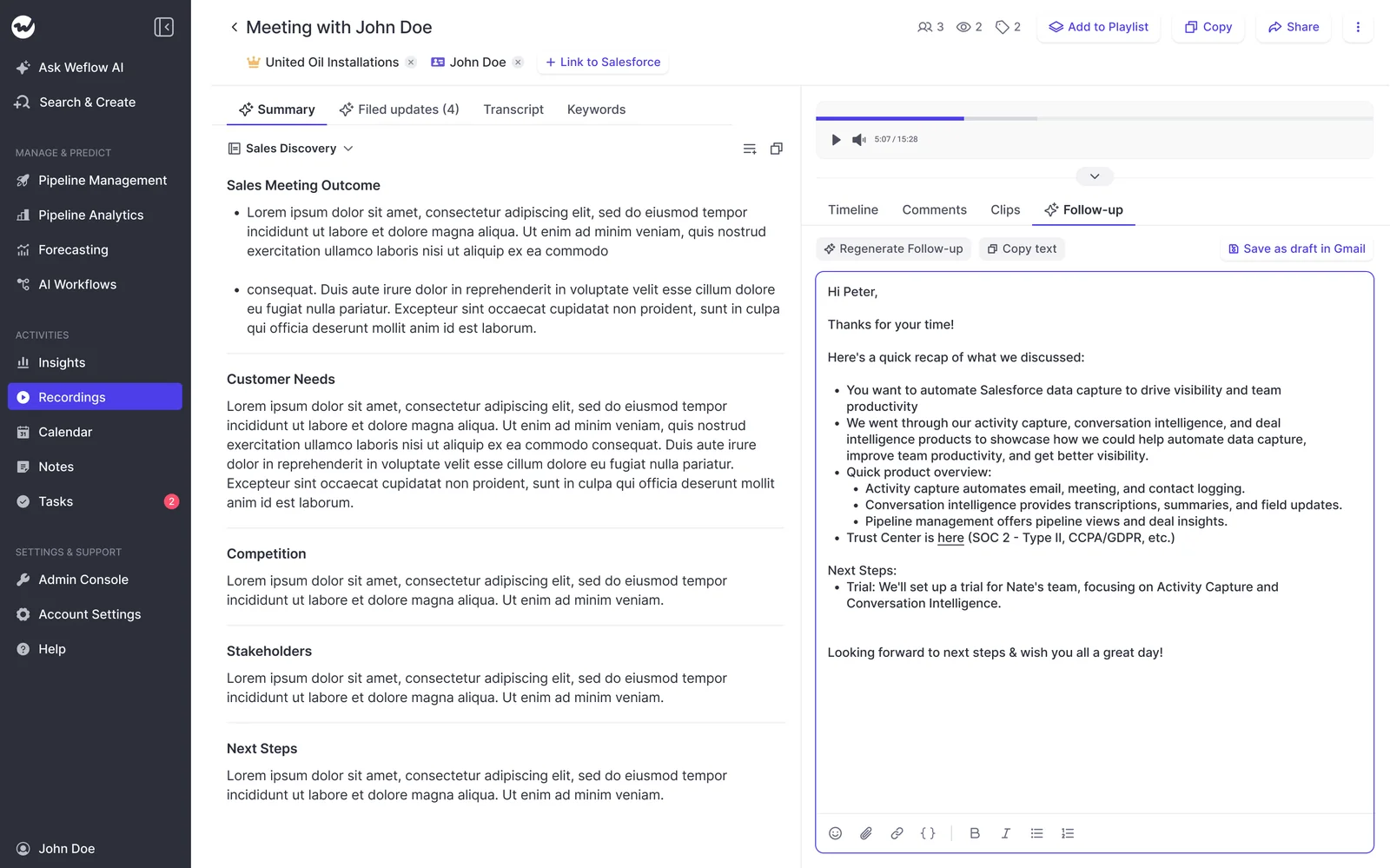
Weflow drafts the follow-up email from the transcript and delivers it with the summary. The rep reads the draft and fixes anything before it goes out. That review is deliberate: reps check the AI's work, and they still think about their deals.
Templates are prompts, so you decide how the email reads:
- Unlimited templates: set per use case, such as discovery recap, demo follow-up or renewal check-in.
- Salesforce context: templates map Salesforce fields, so the email reflects the deal and not just the meeting.
- Meeting type detection: Weflow recognizes a discovery, demo or closing call, so each gets its own summary and field updates.
- Language: the email is written in the language of the meeting, while the CRM summary stays in your workspace language.
This targets the generic check-in. Sellers without sales training tend to send "just following up" emails between meetings. A template that knows the call and the stage replaces that.
What Weflow writes to the Salesforce Event and opportunity fields
Weflow writes the summary onto the existing Salesforce Event, with a link to the recording. It shows on the opportunity activity timeline, and it doesn't create a second meeting.
AI Field Updates handle the next steps the email commits to. They write to every Salesforce field type except relationship lookups, on standard objects and custom objects. Custom objects need setup by Weflow support.
The rep sees each field's current value next to the suggested value, then accepts, edits or rejects it. You decide per field whether a value writes automatically or waits for review.
The integration is real-time and two-way. It follows your validation rules, field dependencies and permissions, so a stage change blocked by a rule stays blocked until the required fields are filled.
Here's how we'd set it up for a team of 8 to 15 AEs:
| Field | What the AI writes | Review setting |
|---|---|---|
| Stage (picklist) | One of the values defined on the field, based on the exit criteria in the prompt | Rep reviews |
| Close date (date) | A date from what the buyer said | Rep reviews |
| Amount (number) | A number from the call | Rep reviews |
| Next Step (text) | The agreed action from the call | Rep reviews |
| Competitors mentioned (multi-select) | Each competitor named on the call | Auto-write |
| MEDDIC or SPICED fields (long text) | New evidence added to the existing text instead of replacing it | Auto-write |
| Relationship lookups | Not writable | Not applicable |
Why split it this way? Single-value fields like stage and close date change your forecast the moment they change, and one misheard sentence can overwrite them. A rep check takes seconds. Methodology fields build up evidence across a deal, and Weflow adds to them instead of overwriting, so auto-write is safe there.

How RevOps reaches Weflow call data through the API and MCP
This part is for your RevOps team:
- Weflow stores the raw transcript in your Salesforce, on the Weflow_Recording__c object, next to the summary. Your own reports and automations can read what was said, not just a summary of it.
- Video files stay out of Salesforce storage. They export to your own cloud storage through the public API.
- The official Weflow MCP connector is read-only. It gives Claude, ChatGPT and other assistants access to call summaries, transcripts, playbooks and forecast calls.
- An admin turns the connector on per workspace. A separate toggle decides whether assistants can read full transcripts or only summaries.
- The REST API bulk-exports transcripts, metadata, scores and signals as JSON or CSV, and feeds BI tools such as Tableau and Looker.
- Weflow has no native Snowflake, Databricks or BigQuery connector. Teams move data into their warehouse through the API.
- Native integrations cover Salesforce, Gmail, Google Calendar, Google Meet, Outlook, Microsoft Teams, Zoom, WebEx, Slack and the Outreach dialer. Weflow isn't an integration platform with a connector catalog.
Who should choose Weflow, and where it falls short
Choose Weflow if:
- You're a Salesforce team and want the follow-up, the summary and the field updates from one pass, within about a minute.
- You want Next Step, close date and stage updated from the call, with your reps reviewing the changes.
- You want a published seat price with AI included and no metering on summaries, emails or field updates.
Look elsewhere if:
- A true send step is a must. Weflow drafts but doesn't send, and it doesn't fill in recipients. The rep copies the draft into their mail client, or opens it through a link, and adds the addresses. Reps notice this first, and it's on us.
- You need next steps assigned to named people inside the summary. Summaries list next steps but can't assign them to a user.
- You're not on Salesforce. Weflow works only with Salesforce.
- You're a small HubSpot team that wants a free drafter. Fathom is the better fit.
Quick specs
- CRM: Salesforce only
- Meeting platforms: Zoom, Google Meet, Microsoft Teams and WebEx
- Phone calls: recordings from the Outreach dialer, and softphone calls recorded through the Weflow desktop app
- Languages: 96, detected automatically
- Price: Weflow Conversation Intelligence at $39 per user per month, billed annually. Includes Ask Weflow AI Pro, Weflow Agent Builder Free, the desktop app and Weflow Mobile Copilot.
- Minimum and term: 10 users, 12 months
Gong: the deepest call analytics, with follow-ups on request
Gong invented this category, and it still has the deepest conversation analytics of the six. If your team lives in Gong's deal boards and call analysis, you'll feel that when you leave.
For the follow-up job specifically, two things hold it back. The draft comes on request, and field writes are capped and overwrite older values.
How Gong drafts the follow-up when a rep asks for it
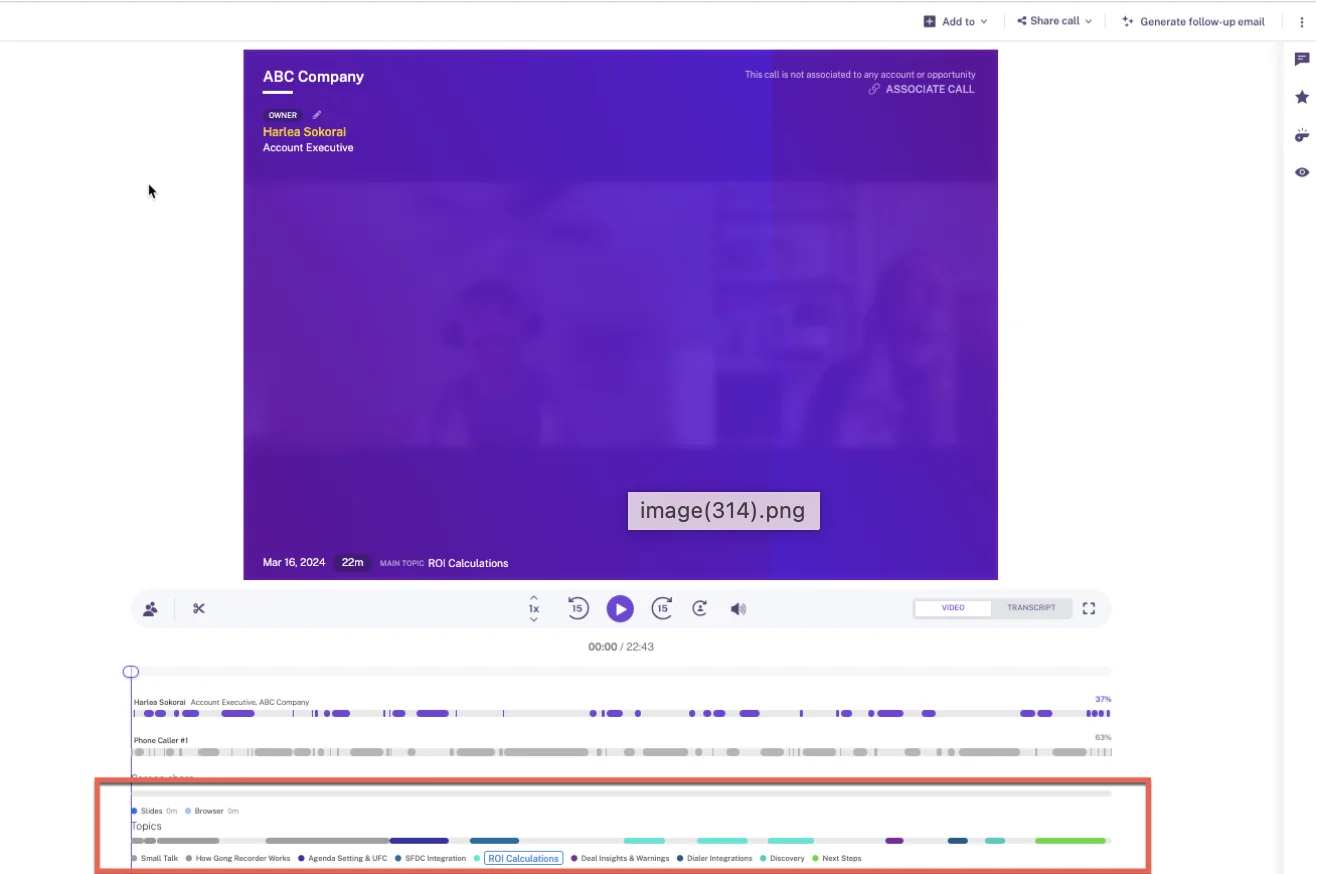
Gong drafts a follow-up email from the transcript when the rep clicks Generate follow-up email on the call page. It's available on any Gong plan.
Gong gets a few things right:
- The draft is written in the language of the call, and it can be regenerated in English.
- It's addressed to the invitees whose emails appear in the meeting metadata.
- It includes a recording link when your sharing settings allow it.
The rep then copies the draft into their mail client, or sends it through Gong Engage. That needs an Engage licence and a connected email account. With Engage, AI Composer also writes a full draft as soon as the rep opens the Gong composer.
Timing is the catch. Teams that switched from Gong have told us a long call took 30 minutes to an hour to process. At that point the follow-up joins the end-of-day batch.
What Gong's AI Data Extractor writes into Salesforce, and its limits
Gong writes a brief for every recorded call. By default it's a recap, key points and next steps, and admins on Foundation can build their own brief templates.
For fields, Gong's AI Data Extractor answers questions from calls and writes the answers into CRM fields automatically. The limits matter for a manager who wants Next Step and close date kept current:
- A workspace can publish at most 20 extractors, and only a business admin can create them.
- Extractors write only into CRM fields that already exist and are imported into Gong.
- Each new finding overwrites the previous value, so earlier qualification disappears.
- Deal boards on Forecast Essentials and Gong Forecast can fill one text field, such as next steps, with AI-suggested updates.
We've also seen Gong push a summary and a document to Salesforce rather than the raw transcript. Customers have told us the Gong-to-Salesforce sync breaks often enough for stage updates to stop flowing, and pipeline then lags behind what reps know.
How Gong connects to dialers, data warehouses and AI assistants
- Gong's marketplace lists about 450 integrations and partner solutions.
- Gong imports calls from about 30 dialers and records on 11 meeting platforms.
- Gong's MCP server has three tools, each scoped to a single account, deal or contact. It returns AI insights, not transcripts, and it's read-only.
- MCP and API use draws AI credits, while the same brief generated by hand in the Gong interface costs nothing.
- The API is capped at 3 calls a second and 10,000 a day.
- Delivery to Snowflake, Databricks, BigQuery or Redshift needs Data Cloud, a separate purchase of about $5,000 a year.
Who should choose Gong, and where it falls short
Choose Gong if:
- You already run the full Gong platform, especially with Engage, where AI Composer drafts inside the email flow.
- Conversation analytics depth matters more to you than what lands in Salesforce.
Look elsewhere if:
- You need the follow-up ready right after the call. Gong drafts on request, and long calls can take time to process.
- You need many structured fields written from calls. Extractors are capped at 20 and overwrite older values.
- You need a price before a sales call. Gong publishes none, Foundation is mandatory before any application, and AI through the API or MCP uses credits.
Quick specs
- CRMs: Salesforce, HubSpot and Microsoft Dynamics 365 natively
- Follow-up send: copy, or through Gong Engage
- Price: not published. Per-user licence plus a platform fee that scales with users, and a custom proposal.
- AI metering: 2,000 credits a year per paid core seat, pooled across the company
Attention: prompt-built follow-ups and the most open MCP server
Attention is the agent-first option in this list. It's highly configurable, and its MCP server is the most open we've seen from any conversation intelligence tool.
The tradeoff is that almost everything is a prompt your team writes or approves. The output is only as good as those prompts.
How Attention turns a prompt template into a Gmail draft
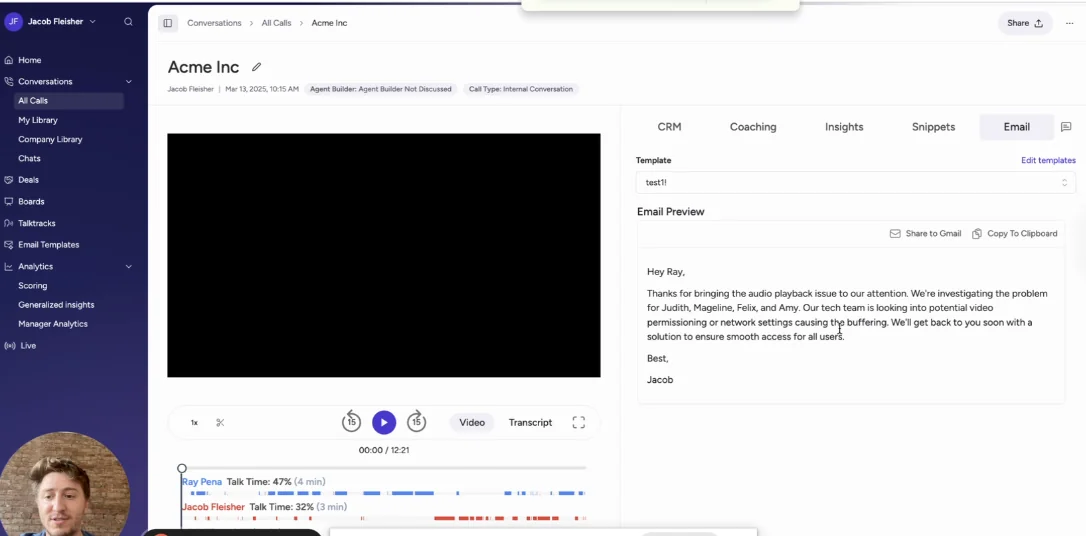
An Attention email template holds an instruction to the model, not email copy. An admin writes something like "write a follow-up, keep it casual, under 50 words, focus on the prospect's pain points" and assigns it to a team. Each team can run its own set, such as first touch, demo recap and renewal.
The draft leaves Attention in one of two ways: as a Gmail draft, or as a clipboard copy. Outlook teams paste by hand. No path logs the send against the opportunity, so the follow-up never becomes an activity Attention records.
What Attention's field prompts write into Salesforce after each call
Attention writes summaries through Insights templates (Long summary and Short summary) and free-form prompts. Its recommended first workflow sends each call summary to the rep in Slack.
Field updates work through one written prompt per field, mapped to a Salesforce or HubSpot field:
- Automatic sync is the common default and the one Attention recommends. On that setting, nobody sees a value before it lands on the opportunity.
- Manual sync gives the rep a CRM tab with a checkbox per field, so they choose what gets pushed.
- A field can be scoped to the deal instead of the call. It then reads every call linked to the opportunity, which suits a field like next step.
- A new Salesforce field has to be mapped by hand in Attention and fills only on future calls.
- The connecting Salesforce user needs Modify All Data, the broadest data permission Salesforce has.
When Attention finds nothing on a call for a field, it writes a paragraph explaining the absence instead of leaving the field empty. On automatic sync, that's the confidently-wrong risk: every report reads those fields as populated.
How Attention's 68-tool MCP server hands raw transcripts to assistants
This is for your RevOps team:
- Attention's MCP server exposes 68 tools across 15 groups, and it's read-write, not read-only.
- It returns raw call transcripts and full-text search inside them.
- It can run analysis across up to 25 calls, or every call on a deal, in one request.
- Usage is limited by rate, not by credits.
- Calls run under the caller's own permissions. The exception is an org-level API key, which carries full organization access with no user binding.
- Workflow steps reach Gmail, Google Sheets and Docs, Salesforce, HubSpot, Snowflake, Slack and more, plus any API through an HTTP step.
Who should choose Attention, and where it falls short
Choose Attention if:
- You're a RevOps-led team that wants agents and workflows acting on calls.
- You want the most open MCP in this set, with raw transcripts and no credits.
Look elsewhere if:
- You don't have someone to write and maintain prompts. Output quality follows prompt quality.
- You want empty fields left empty.
- Your security team won't grant Modify All Data to an integration user.
- Your reps are on Outlook, or you need the send logged.
- You need a published price.
Quick specs
- CRMs: Salesforce and HubSpot, with custom mappings for others on request
- Follow-up send: Gmail draft or clipboard
- Recording: a bot by default, or a desktop app on Apple Silicon Macs
- Price: not published
Avoma: low entry pricing and sending from Gmail or Outlook
Avoma is the budget option in this group, and it has a real send step. For a smaller team that mostly wants the email out the door from the rep's own mailbox, that's a genuine advantage.
How Avoma sends the follow-up from the rep's own mailbox
When the rep clicks Send Follow Up, Avoma drafts the email from the meeting's AI summary or notes. The rep edits it and sends it from their connected Gmail or Outlook account, and the buyer sees it coming from the rep's mailbox.
Outlook support is where Avoma beats Momentum and Attention. Avoma's agent builder also includes a follow-up template.
What Avoma's Smart Topics write into Salesforce without a review step
Avoma writes AI notes automatically when a meeting ends. It has more than 90 note templates and picks one from the meeting's purpose.
On the Salesforce side, Avoma creates an Event for every calendar-synced meeting and writes notes to a Note, the Event description or a Task. Its two-way sync is set per field.
Field updates run through Smart Topics mapped to Salesforce fields:
- They append extracted notes to mapped fields automatically, with no review step before the write.
- They support multi-line text, multi-select, date and number fields, but not single-line text or address fields.
- They map only to Opportunity and Account fields. Custom objects aren't supported.
- Two-way CRM field updates are part of the $29 Revenue Intelligence add-on.
How Avoma connects to dialers, CRMs and AI assistants
- Avoma lists 26 native integrations, including Outreach, Salesloft, Aircall, Dialpad and RingCentral.
- Its MCP connector for Claude and ChatGPT has 11 read tools and 3 write tools. It needs the Organization or Enterprise plan, or the API Access add-on.
- The REST API and webhooks cover meetings, transcripts, notes and scorecards, at 60 requests a minute, on the Organization plan and up.
Who should choose Avoma, and where it falls short
Choose Avoma if:
- You're a smaller team that wants a low published price.
- You want reps to send from Gmail or Outlook without copy-paste.
Look elsewhere if:
- You want deal features without add-ons. They sit behind the Revenue Intelligence add-on.
- You want reps to review field changes before they land.
- You depend on custom objects.
- You need the API or MCP on the entry plan.
Quick specs
- CRMs: Salesforce, HubSpot, Pipedrive, Zoho, Copper and Zendesk Sell
- Follow-up send: from the rep's Gmail or Outlook
- Price: Startup $19, Organization $29 and Enterprise $39 per recorder seat per month, billed annually
- Trial: 14 days on the Organization plan, including add-ons
Fathom: a free notetaker that drafts from action items
Fathom is one of the most widely used AI notetakers, with more than 300,000 companies on it. It's an excellent notetaker. What it doesn't have is Salesforce depth.
How Fathom builds the follow-up from detected action items
Fathom detects the action items in a meeting, including who each one belongs to, and builds the follow-up email from them. The rep copies it into whichever mail client they use.
What Fathom writes into Salesforce: Tasks and text fields only
Fathom summarizes calls from 17 templates, including MEDDPICC, BANT, SPICED and Sandler. Organization-wide custom templates start on the Business plan.
In Salesforce, the write-back is thin:
- Each summary lands as a logged-call Task on the matched Contact.
- Action items become Tasks on the Contact's open Opportunities.
- On Business, headed sections of the deal summary go into Opportunity text fields only, and each new meeting overwrites the field.
- Fathom can't fill picklists, numbers, dates or checkboxes.
- It matches meetings only through a Contact's primary email, and never matches Leads.
How Fathom's API and MCP connector reach your meeting data
- The MCP connector for Claude and ChatGPT and the public API are on every plan.
- API keys belong to individual users, so a key reads only the calls its owner can see.
- Fathom's integrations directory lists 30 integrations, with no dialer, no sequencing tool, and no data warehouse or BI tool.
Who should choose Fathom, and where it falls short
Choose Fathom if:
- You're an individual, or a small team (often on HubSpot), and want a free or low-cost notetaker.
- A follow-up built from action items is enough.
Look elsewhere if:
- You need Next Step, close date or stage updated from calls. Salesforce writes are text-only and overwrite on every meeting.
- You want a send step. The follow-up is copy-paste.
- You want the roadmap tied to a revenue platform. Since Superhuman acquired Fathom, its announced direction runs through Superhuman's email, documents and agents.
Quick specs
- CRMs: Salesforce, HubSpot and Close
- Recording: a bot, or bot-free from the Mac desktop app
- Price: free for individuals. Premium $16, Team $15 and Business $25 per user per month, billed annually. Enterprise on quote.
- Minimum: two users on team plans
Momentum: Slack review and one-click Gmail send for Agentforce teams
Salesforce now owns Momentum, and it has the strongest send flow of the six. If your reps are on Gmail and your company is heading down the Agentforce path, take it seriously.
How Momentum drafts the follow-up in Slack and sends via Gmail
Momentum drafts the follow-up automatically after each call and shows it to the rep in Slack to edit. From there, the rep sends it through Gmail with one click.
You get tone controls at two levels:
- Admins set the company's tone, upload example emails and add shared links, such as a security portal.
- Each rep adds their own examples, adjusts the tone and adds links like a booking page.
Gmail is the only sending route. Momentum doesn't send through Outlook.
What Momentum's Autopilot writes into Salesforce, field by field
Momentum writes a summary of every call, configurable by call type and by Salesforce conditions such as stage or account ARR. It delivers the summary to Slack or email and can save it as a note in Salesforce.
Autopilot is the field-update layer, and it's well thought out:
- Each extraction writes automatically, waits for a human to confirm in Slack or the web app, or writes only when the field is empty.
- It targets Opportunity, Account, Lead, Event and Contact fields, and fields reached from those objects.
- It can append timestamped entries instead of overwriting.
- It runs on top of Gong, Chorus, Clari Copilot, Attention and Salesloft Conversation Intelligence, so you can keep your recorder.
There are gaps on the activity side. Momentum doesn't capture email from the mailbox. It reads only emails already logged to Salesforce Tasks. Event logging is an admin switch that's off by default. We've also heard reports that its event-to-opportunity mapping is unreliable.
How assistants reach Momentum data through Salesforce's MCP server
- Momentum has no MCP server of its own.
- AI assistants reach what it captures through Salesforce's hosted MCP server, by reading the Salesforce records Momentum writes.
- Momentum's own API returns full transcripts. It's off by default, switched on through support, and capped at 100 requests per 15 minutes.
Who should choose Momentum, and where it falls short
Choose Momentum if:
- You're a Salesforce shop going the Agentforce route.
- You want to keep Gong or Clari Copilot as your recorder.
- One-click send from a Slack review is your top priority, and your reps are on Gmail.
Look elsewhere if:
- Your reps are on Outlook.
- You need email captured from the mailbox, not only from logged Tasks.
- You want your conversation tool to have its own MCP connector.
Quick specs
- CRM: Salesforce only, Sales Cloud only
- Follow-up send: Slack review, then one-click Gmail
- Price: included in Salesforce's Max edition at $550 per user per month. Standalone Business at $69 and Transformation at $99 per user per month, plus a $30 CI add-on.
What each follow-up tool costs per seat in 2026
Gong and Attention publish no prices. Weflow, Avoma and Fathom publish seat prices. Momentum's price depends on your Salesforce edition.
| Tool | Pricing model | Published list prices | Minimums and terms | What costs extra or is metered |
|---|---|---|---|---|
| Weflow | Per seat, with AI included | Weflow Conversation Intelligence $39 per user per month, billed annually. Weflow Revenue AI Foundation $49, Weflow Revenue AI Business $59, Weflow Revenue AI Enterprise $79. | 10 users, 12 months. Seats added mid-term are pro rata. No mid-term seat reduction. | Only Weflow Agent Builder above the free 25 actions a month: $299 for 500 actions or $999 for 2,500, per workspace |
| Gong | Per-user licence plus a platform fee | Not published | Custom proposal. Foundation core licence required. | AI credits for trackers, MCP and API workflows. Data Cloud for warehouses. Engage for AI Composer. |
| Attention | Negotiated contract | Not published | Not published | No published credits. MCP is rate-limited. |
| Avoma | Per recorder seat | Startup $19, Organization $29, Enterprise $39, billed annually | 10-seat minimum on Enterprise. 14-day trial. | Revenue Intelligence and Conversation Intelligence add-ons at $29 each. API and MCP on Organization and up. |
| Fathom | Per user, with a free tier | Free for individuals. Premium $16, Team $15, Business $25, billed annually. | Two-user minimum on team plans | Field writes and organization templates need Business. No usage credit on the core product. |
| Momentum | Salesforce edition or standalone | In Max at $550 today. Announced as coming soon for Core ($195) and Advanced ($395). Standalone Business $69, Transformation $99. | Standalone plans are sold through a sales conversation | $30 CI add-on on standalone plans. A quoted add-on on Starter Suite and Pro Suite. |
For a team of 10 AEs, Weflow Conversation Intelligence comes to $4,680 a year at list price. For 15 AEs, it's $7,020. Your VP can see those numbers before anyone books a call.
Metering changes the real cost more than the headline number does. Gong pools AI credits across the company, so a few heavy users draw down everyone's allowance, and the bill grows as adoption grows.
We put AI in the seat instead. Summaries, follow-up emails, field updates and Ask Weflow AI carry no usage charge, so nobody has to ration them. Weflow Agent Builder is the one consumption-priced product, because agents can be pointed at open-ended amounts of data.
Which tool to pick for your team, stack and budget
Each tool wins a specific situation. Find yours.
| If your situation is… | Pick… | Because… |
|---|---|---|
| You want the draft and the Salesforce record updated from the same call | Weflow | The follow-up, the Event summary and the field updates arrive together within about a minute |
| Next Step, close date and stage are always stale | Weflow or Momentum | Both write structured fields with a review option per field |
| One-click send is the top priority, on Gmail | Momentum | Slack review, then a one-click Gmail send |
| Your reps are on Outlook and you want the tool to send | Avoma | It sends from the rep's own Gmail or Outlook |
| You run the full Gong platform with Engage | Gong | AI Composer drafts inside the Engage email flow |
| RevOps wants to build agents on call data | Attention | A 68-tool read-write MCP with raw transcripts |
| You're on the Agentforce path, or keeping Gong or Clari Copilot as your recorder | Momentum | It's part of Salesforce and runs on top of existing recorders |
| You're on HubSpot with a small team | Fathom | A free tier and HubSpot deal field mapping |
| Your budget is zero | Fathom | Free for individuals with unlimited recordings |
| You want a low price that's published | Avoma or Weflow | Both publish seat prices. Weflow starts at 10 users with AI included. |
| Quote-only pricing is fine and you want depth of analytics | Gong | The deepest conversation analytics of the six |
See how Weflow captures activity, updates Salesforce fields from calls, and rolls up your forecast. Book a 30-minute demo.
What changed in AI follow-up tools during 2026
- Late May 2026: Gong introduced AI credits. Automated AI through trackers, the MCP server and the API now draws on a pooled credit balance, so your AI cost moves with usage.
- May 2026: Attention started drafting setups. It now suggests scorecards, field configurations and email templates when a CRM is connected. Your team still has to judge whether they're right.
- July 2026: Attention shipped suggested actions. Reps get suggested emails, documents and decks after calls, which they review and rate. Attention is also pushing self-serve setup while keeping pricing unpublished.
- August 2026: Weflow added automatic meeting type detection. Discovery, demo and closing calls now get different summaries and field updates without anyone tagging them.
- 3 September 2026: Salesforce bundled Momentum into its new sales editions. It's in Max today and announced for Core and Advanced, so Salesforce buyers will see it in their edition quote.
- 14 September 2026: Superhuman acquired Fathom. The product and logins didn't change, but its roadmap now runs through a productivity suite, not a revenue platform.
How we compared these six tools
Weflow wrote this comparison, so we held ourselves to the evidence. We used each vendor's public documentation and pricing pages, plus what we've learned on our own evaluation and switch calls.
Where a point comes from private conversations rather than documentation, we say so and label it as observed or reported. We fixed the six tools and the eight capabilities before writing, and scored every tool on the same ones, including the send step where Weflow is behind.
Questions sales managers ask about AI follow-up tools
Does the tool send the follow-up, or do reps copy it?
It depends on the tool:
- Momentum: sends through Gmail with one click after a Slack review.
- Avoma: sends from the rep's own Gmail or Outlook.
- Attention: opens the draft in Gmail, or copies it to the clipboard.
- Gong: addresses the draft to the meeting invitees. The rep copies it out or sends through Engage.
- Fathom: copy-paste only.
- Weflow: drafts but doesn't send or fill in recipients. The rep copies the draft into their mail client.
How fast does the follow-up draft arrive after the call?
Weflow delivers the follow-up draft, the summary and the proposed field updates within 30 to 60 seconds of the meeting ending. Gong generates its draft when the rep asks for it, and teams that switched from Gong have told us long calls took 30 minutes to an hour to process. Momentum drafts automatically after each call.
Can reps edit the draft and use different templates per call type?
All six let the rep edit before sending. Weflow runs unlimited prompt-based templates and applies different outputs to discovery, demo and closing calls through meeting type detection. Attention assigns prompt templates per team, Avoma picks note templates from the meeting purpose, and Momentum configures summaries by call type and Salesforce conditions.
Do next steps in the email also update Next Step and close date?
In Weflow, yes. The same transcript that writes the email proposes updates to Next Step, close date, stage and any other field except lookups, and the rep reviews each one. Momentum's Autopilot and Attention's field prompts also write structured fields. Fathom writes text sections only, and Gong's extractors write only to existing fields and overwrite older values.
What happens when the AI gets a next step wrong?
Managers fear a confidently wrong answer more than a missing one.
"If the metrics comes back and says they have 50,000 staff, that is a metric, but it's not relevant to what we're looking at in our sales process."
— A sales leader on one of our calls
In Weflow, the rep sees the current value next to the suggested one and can accept, edit or reject it. Keep stage and close date on review. Attention writes prose into fields when a call has no answer, and Gong overwrites the previous value, so both need closer watching on single-value fields.
Will reps push back on a bot joining the call?
Some will.
"I've always gotten a lot of pushback ever since these AI note takers came online, reps not wanting to use it."
— A sales leader on one of our calls
Most tools here now offer a botless option:
- The Weflow desktop app for Windows and macOS
- Fathom's Mac desktop app
- Attention's desktop app on Apple Silicon Macs
- Avoma's desktop app and its Teams and Google Meet cloud recording
Some legal teams prefer a visible bot, though, because the consent prompt is logged. Weflow supports consent flows such as a Teams pre-meeting email and an in-call chat message that lets a participant have the recording deleted.
Will a notetaker create duplicate meetings in Salesforce?
It can. When a capture tool and a notetaker each write their own record of the same meeting, meetings per rep and meetings per closed deal get double-counted until someone deduplicates the report. Weflow writes its summary onto the existing Salesforce Event, so there's no second meeting. Attention creates its own event when it runs next to a separate capture tool, and Momentum's docs suggest leaving its Event logging off for teams that already log meetings another way.
Does the sent follow-up get logged back to the opportunity?
Weflow Conversation Intelligence doesn't send the email. Weflow Activity & Contact Capture, a separate product, captures the sent email from Outlook or Gmail into Salesforce and maps it to the right records.
For the others:
- Avoma: logs synced email to Salesforce as a Task, with the Revenue Intelligence add-on.
- Attention: has no path that logs the send.
- Momentum: reads only emails already logged to Salesforce Tasks.
- Fathom: captures meetings, not email.
Do these tools handle calls in languages other than English?
Weflow transcribes 96 languages and detects the language automatically. It writes the follow-up in the meeting's language, so a German call gets a German email, and keeps the CRM summary in your workspace language. Gong also drafts in the call's language and can regenerate in English. Fathom transcribes 38 languages and translates summaries into six.
Do they cover phone calls from a dialer or Outreach?
Weflow pulls in calls made through the Outreach dialer as recordings, with transcript, summary and field updates. Its desktop app also records softphone calls that run through the computer, such as Aircall or RingCentral, when the rep starts the recording.
Gong imports from about 30 dialers, Avoma connects to nine dialers and sales engagement tools, Momentum to seven dialers and contact centers, and Attention imports Zoom Phone and Aircall calls. Fathom lists no dialer.
Can Weflow run alongside Outreach or Salesloft?
Yes. Weflow isn't a sequencer, so it runs next to Outreach or Salesloft rather than replacing them. Compatibility mode reads the sequencer's tracking pattern in the email and skips the message, so only one system writes it to Salesforce.
If we leave Gong, do we lose our call history?
No. Weflow imports your Gong recordings, metadata and transcripts through a Gong API key, usually in about a week. We re-link each call to the right Salesforce account, opportunity or contact, and run our own lookup matching where Gong's API doesn't carry the association. Keep in mind that Gong retains recordings and transcripts for up to three years by default.
What are Weflow's minimum seats and contract terms?
Weflow requires 10 users per product or bundle on a 12-month term. Seats added mid-term are charged pro rata to the end of the term. You can't reduce seats mid-term, but you can reassign a seat when someone leaves.
Can we start with a small group of reps first?
Yes. Weflow offers a 14-day free trial with guided onboarding, so you can run the five tests above with a pilot group. The standard minimum is 10 users, and we've shown flexibility for smaller starts. Avoma also offers a 14-day trial of its Organization plan with all add-ons.











