Weflow vs Avoma AI Agents: What Each Automates After a Call (2026)
See whether Weflow or Avoma automates CRM updates, tasks, or scheduled deal briefings after calls.


Weflow and Avoma both sell "AI agents," but they put them to work on different jobs. Avoma's agents act on a single meeting.
They fire when the meeting ends, at end of day, or on a weekday schedule, then update the CRM, create tasks, post to Slack or Teams, and wait for a person's approval when a run needs judgement.
Agents in Weflow Agent Builder, run on a schedule you set. They read across your whole Salesforce revenue record and send a briefing to email, Slack or Microsoft Teams.
Writing fields into Salesforce after a call is a separate job, and in Weflow it's handled by AI Field Updates and AI Playbooks, not agents.
Weflow is the Revenue AI Orchestration platform for sales, customer success, and RevOps teams. We build Weflow for sales, customer success and RevOps teams that run on Salesforce, and we'll point out where Avoma is the better pick along the way.
Weflow Agent Builder vs Avoma agents across five capabilities
Both tools let you build your own agents. Where they differ is what those agents read, how you reach the data from outside, and how you pay.
| Capability | Weflow | Avoma |
|---|---|---|
| Building your own AI agents | Admins build scheduled agents that run daily, weekly or monthly. Each agent runs a Salesforce lookup, then an AI step over the attached emails, meetings and transcripts, then delivers to email, Slack or Teams. Agents don't write to Salesforce. | You build agents from a trigger (meeting end, end of day, weekday schedule), if-else conditions, prompt steps and actions, or you start from templates. Actions update the CRM, create tasks, post to Slack or Teams, and can pause for human approval. |
| Integrations with other tools | Salesforce, Gmail, Outlook, Google Calendar, Zoom, Teams, Meet, Webex, Slack and Teams chat, the Outreach dialer, Aircall, CloudTalk, Dialpad and Zoom Phone. There's no Zapier and no connector catalogue. Salesforce is the only CRM. | 26 native integrations, including six CRMs and nine dialers and engagement tools, plus Slack, Teams chat, ClickUp and Zapier. |
| Access from AI assistants (MCP) | A read-only connector with six tools covering forecast data, org structure, recordings, summaries and playbook results. Transcripts sit behind an admin toggle. | 11 read tools and 3 write tools that set a meeting's outcome, purpose and privacy. Requires the Organization or Enterprise plan, or the API Access add-on. |
| Raw data access outside the tool | The public API is in every plan. It bulk-exports transcripts, metadata, scores and signals as JSON or CSV, and recordings export to your own storage. | REST API and webhooks for meetings, recordings, transcripts, notes and scorecards. Limited to 60 requests a minute, on the Organization plan and above. |
| Pricing | Published seat prices from $19 to $79 per user per month. Agent Builder is priced per workspace: 25 free actions a month, then $299, $999 or a custom Enterprise package. | Published recorder-seat prices of $19, $29 and $39 a month billed annually, plus add-ons at $29 a seat. Agent pricing isn't published. |
Why Weflow and Avoma agents automate different work
Transcription and summaries reached parity a while ago, so every conversation tool now calls itself agentic. That one word covers two very different mechanisms, and the agent counts on a vendor page won't tell you which one fits your workflow.
| Question | Weflow Agent Builder | Avoma agents |
|---|---|---|
| What starts a run | A schedule: daily, weekly on chosen days, or monthly | A meeting ending, end of day, or a weekday schedule |
| What the agent reads | Live Salesforce records plus every email, meeting, call and transcript attached to them | Meetings: everything the owner can access for personal agents, and only organization-visible and public meetings for cross-team agents |
| Where the output goes | Email, Slack or Teams, with optional PDF or CSV | CRM updates, tasks, Slack or Teams posts, and email |
| Who builds it | Weflow admins only | Individuals build personal agents, and cross-team agents span the organization |
It helps to judge both tools against the agents revenue teams actually run in production.
These tend to be narrow, recurring questions on a schedule, like why deals were lost or which deals carry risk before the review, rather than autonomous agents chasing a goal for days.
How Weflow Agent Builder runs agents across your Salesforce record
Think of a Weflow agent as a scheduled, scoped lookup over live Salesforce data. An AI step reasons over every attached email, meeting and transcript, and the agent delivers the result as a briefing.
How you build an agent in Weflow Agent Builder
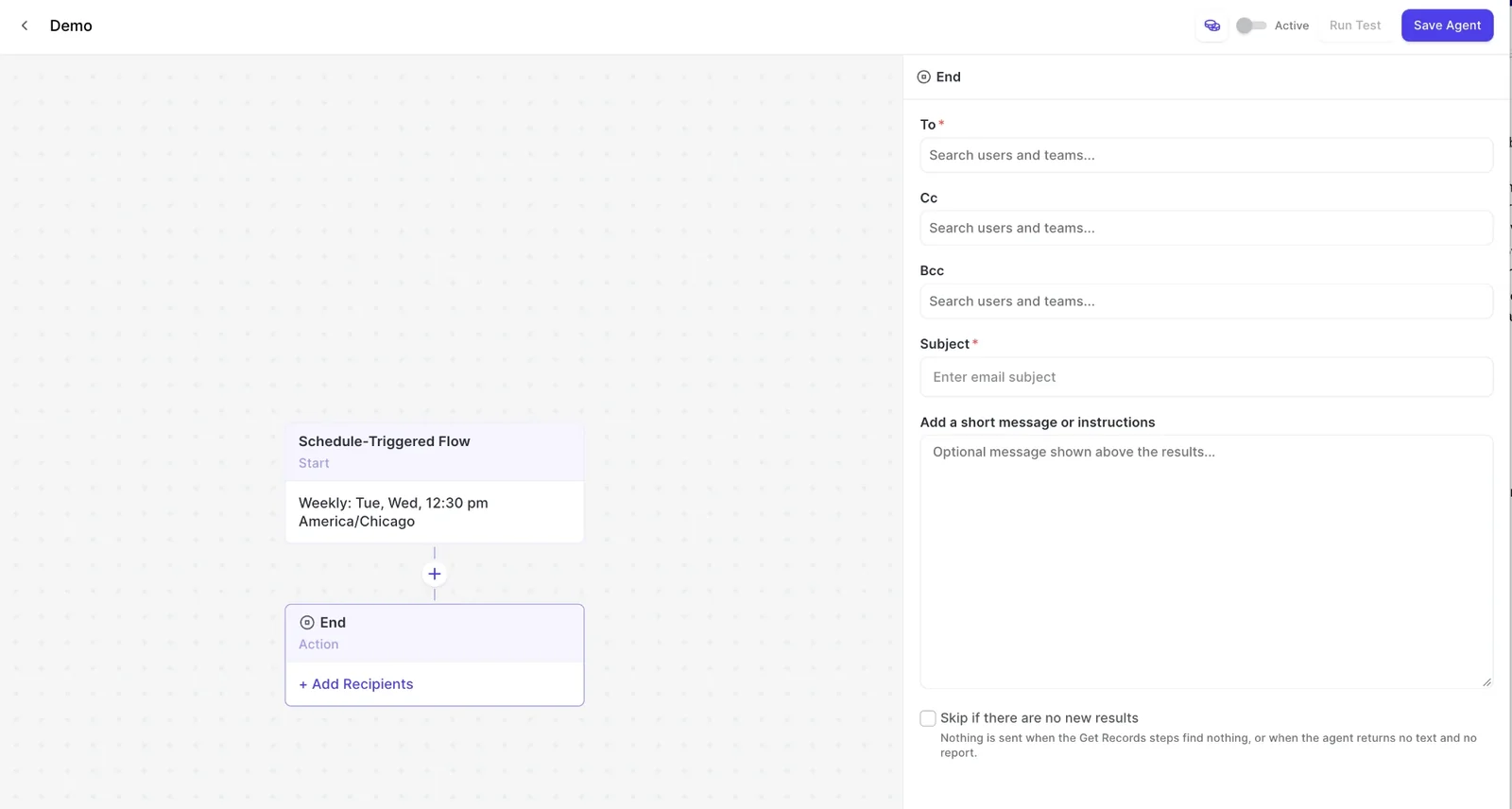
Every agent sits on a canvas that runs from a Schedule-Triggered Flow, through Get/Lookup Record and AI Agent steps, to an End step that delivers the result. You can start from scratch or pick from one of three templates:
- Pipeline Snapshot: A weekly summary of open pipeline.
- Meeting Recap Bundle: A daily digest of the past day's meetings.
- Deal Risk PDF: A monthly deal-risk report delivered as a PDF.
We keep the template prompts deliberately basic, since you're meant to rewrite them for your team.
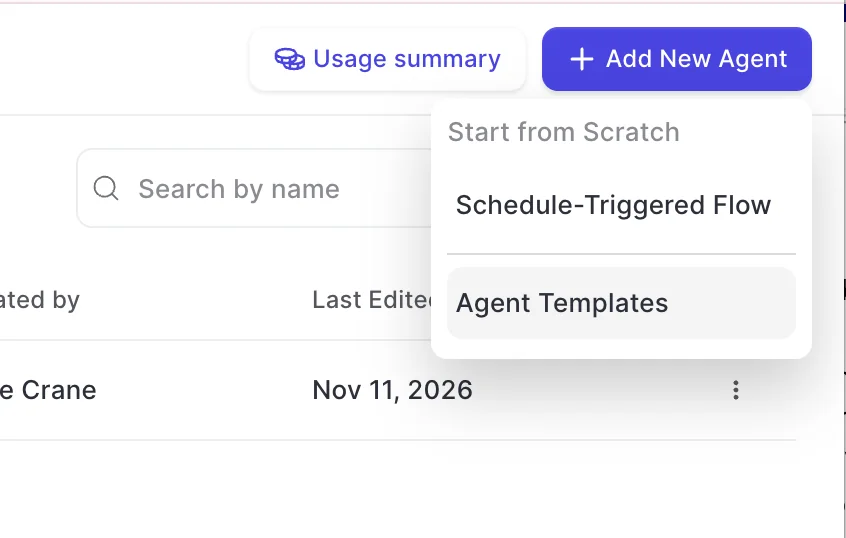
Weflow agents run on a schedule you set
The schedule is the only trigger for a Weflow agent. You can set it to run daily, weekly on one or more chosen days, or monthly, each with its own time and timezone.
There's no meeting-end trigger, and triggering from a Salesforce record change isn't available yet.
In practice, a weekly deal review typically runs Monday morning, and a closed-lost analysis runs on the first Monday of the month. If a deal slips on Tuesday, it shows up at the next scheduled run, so think of a Weflow agent as a briefing rather than an alert.
What a Weflow agent reads before it reasons
Because the lookup step reads Salesforce live, a change made a minute ago is already in the run. The AI step then reasons over everything attached to the records the lookup returned.
Scoping that lookup is what makes the output usable. On setup calls, we often see the same prompt give a strong answer in chat and an empty or unusable report from an agent with no lookup in front of it.
The lookup tells the model what it's allowed to look at, which is why Weflow requires at least one condition before a lookup runs.
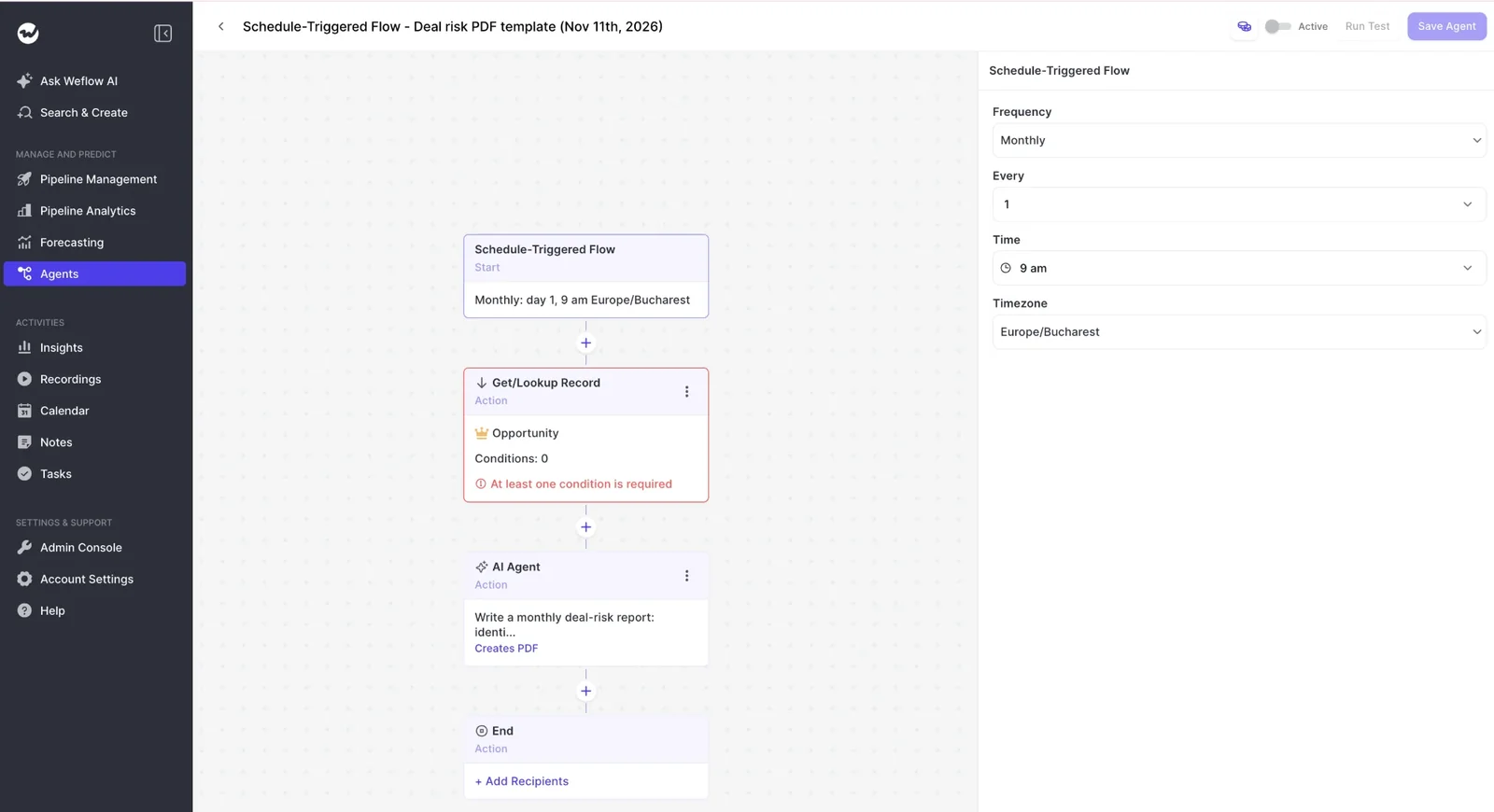
What a Weflow agent reads:
- Salesforce accounts, contacts, leads, opportunities, tasks, events and contracts, plus any custom objects an admin adds in Sources.
- Field-level filters joined by AND or OR, with condition groups for mixed rules such as one stage AND either of two amounts.
- Team and hierarchy scoping. Filtering on a Weflow team holds the agent to deals owned by that team and the teams nested below it.
- Every email, meeting, call and transcript attached to the records the lookup pulled.
- The public web, when you switch on web search in the AI step.
What a Weflow agent doesn't read:
- Slack messages. Slack is a delivery destination today, and reading deal channels is on the roadmap.
- Warehouse data in Snowflake or similar, unless you sync it into Salesforce first.
- Finance, ERP or other systems outside the customer-facing record.
Where Weflow agent output lands, and what writes to Salesforce
Weflow agents deliver to email, Slack or Microsoft Teams. To attach a PDF or CSV, choose it in the AI step's Output Format, because asking for a file in the prompt alone won't produce one.
Agents don't write to Salesforce fields or create tasks yet. For now, a person brings an agent's conclusions into the record, and agent write-back is planned.
The Salesforce writes you'd expect after a call come from two other Weflow mechanisms that set fields directly:
| Mechanism | What starts it | Where the output goes |
|---|---|---|
| AI Field Updates | A recorded call | Structured values written into Salesforce fields |
| AI Playbooks | A schedule | Methodology scores and AI output written to a Salesforce field you choose |
| Agent Builder agents | A schedule | A briefing in email, Slack or Teams, with optional PDF or CSV |
| Ask Weflow AI | A question someone asks | A text answer in chat, or a CSV file |
Every agent result also links back into Ask Weflow AI. A manager who gets a list of at-risk deals almost always has a follow-up question, and they can ask it against the same data instead of replying to a static document.
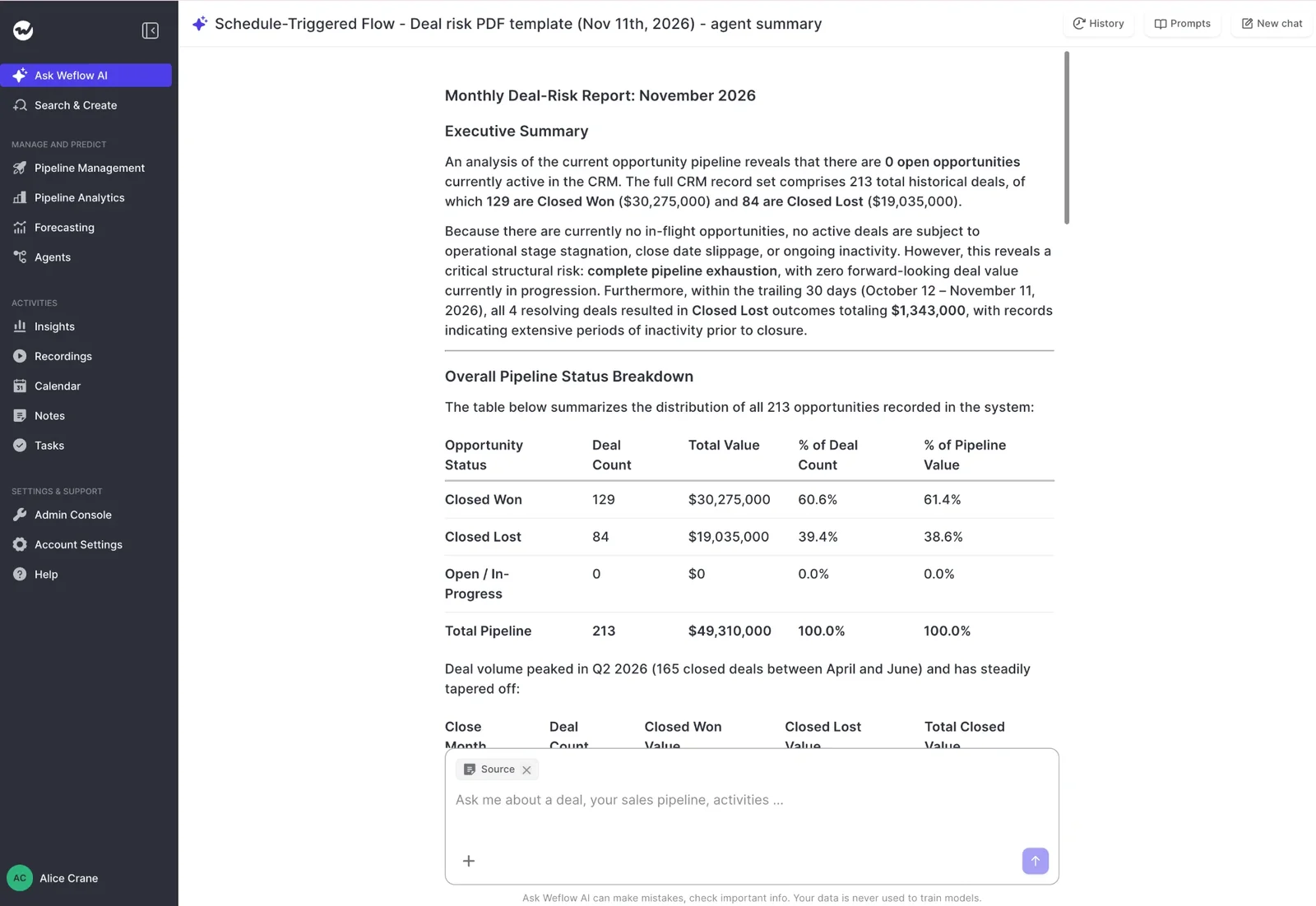
How you test and govern Weflow agents before they go wide
Only Weflow admins can build, edit and manage agents. We made that choice deliberately, because an agent can reach a lot of data and runs on a schedule. Everyone else receives the output and opens it in Ask Weflow AI.
That control matters most with executives, where you only get one first impression. As one admin put it:
"Before adding our CEO, I would like to review it. He is a very technical guy and gets deep into the tools. I would rather that he receives something that we have vetted before and it is in a good state, so we could have a positive first impression."
- Test runs: A test run sends the agent's real output to its own recipients, with TEST RUN in the subject. Since recipients are Weflow users and teams, keep yourself as the only recipient until the output looks right, and point the Slack step at a separate channel while you test. Expect a test run to take a few minutes. Our Deal Risk PDF template took about eight minutes in the demo workspace.
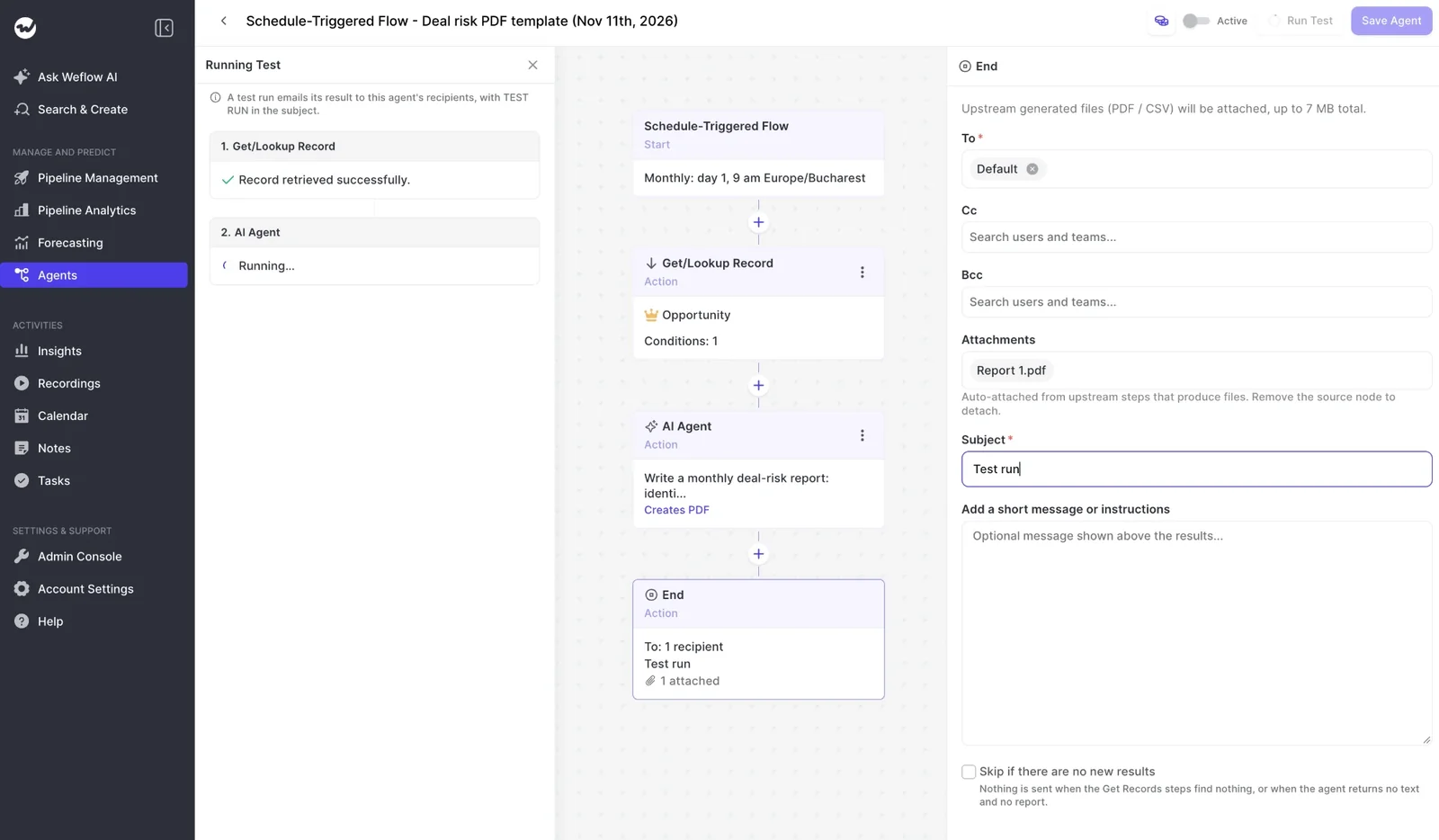
- Skip if there are no new results: This opt-in checkbox on the End step sends nothing when the lookup finds nothing or the agent returns no text and no report. The run history still marks the run as skipped, so you know it ran. It's worth turning on for any agent that would otherwise post "nothing to report" into a channel every Monday.
- Business context: You write up to 2,000 characters once, covering what your company does, your competitors, buyer personas and product terms, and every agent, Ask Weflow AI and AI Playbooks use it automatically. It's the fix for an agent that extracts well but interprets generically.
- Agent Usage page: This page shows actions used this month against your plan and against last month, broken down by workflow: runs, total actions, average actions per run and share of the total.
There are three limits to know about:
- Each agent runs one fixed prompt, with no placeholder that resolves to the person receiving the report.
- You build agents by clicking through the canvas. There's no way to define them in code or keep them in version control.
- Agent Builder is our newest product, and it's still rolling out to existing customers.
The fixed prompt is the one that bites at scale, and we hear the same math on calls:
"But they did a pipeline report every week ... they wanted it for every individual. [a colleague] and I would have to create 150 workflows."
Which tools Weflow connects to, and where it stops
Weflow connects natively to the core revenue stack, but it isn't an integration platform.
Weflow connects to:
- Salesforce, as the only CRM.
- Gmail, Outlook and Google Calendar.
- Zoom, Microsoft Teams, Google Meet and Webex for meeting recording.
- Slack and Microsoft Teams chat for delivering agent output, summaries and reminders.
- The Outreach dialer, which your admin connects in the admin console.
- Aircall, CloudTalk, Dialpad and Zoom Phone, which our team activates for you.
Weflow doesn't offer:
- Zapier or a connector catalogue.
- A native Snowflake, Databricks or BigQuery connector. Teams move data to a warehouse through the API.
- HubSpot or any CRM other than Salesforce.
If you want one workflow that reads your ERP, finance system and CRM together, you'll need a different product. Weflow can send its unified revenue data out to whatever you're building.
What Claude or ChatGPT can read through the Weflow MCP connector
The Weflow MCP connector is read-only, but it reaches forecast data that no Salesforce connector can see. Forecast calls, submissions and targets live in Weflow, not in Salesforce objects.
So if you've already connected Claude to Salesforce, Weflow's connector adds the forecast and conversation layer that connection can't reach.
It's also how Weflow fits into a team running its own agent framework: Weflow feeds that framework rather than competing with it. Any client that supports remote MCP servers connects with the same URL that Claude and ChatGPT use.
What the connector returns, through six tools (Get Forecast, Get Org Structure, Get Recording, List Playbooks, List Recordings, Playbook Values):
- Forecast data for a close-date period, scoped to the user's own opportunities or their team. Team scope includes a per-rep breakdown for up to 25 owners.
- Per-rep pipeline metrics: weighted and unweighted pipeline, closed-won amount, win rate, average deal size, sales cycle length, coverage ratio, gap to forecast and the opportunity IDs behind them.
- Recordings, summaries and AI Playbook results.
- Full transcripts, but only when an admin turns on Allow transcript access.
What it doesn't return:
- Salesforce field values or the content of captured emails. Pair it with Salesforce's own MCP server for those.
- Saved deal boards or pipeline views by name.
- Anything the connected user can't already see in Weflow, because the connector follows their Weflow hierarchy.
An admin switches the connector on per workspace, and the console lists every connected user with their email and the date they connected.
How you get raw Weflow data out through the public API
Every Weflow plan includes the public API, with no add-on or tier upgrade, and admins generate keys in the Admin Console. With the API you can:
- Bulk-export transcripts, metadata, scores and signals as JSON or CSV, on a schedule or on demand.
- Feed BI tools such as Tableau and Looker.
- Load data into a Snowflake, Databricks or BigQuery warehouse, already mapped to the right Salesforce accounts and opportunities.
- Export meeting video to your own cloud storage.
- Export an audit log of field write-backs and configuration changes.
Keep in mind that the API reads data out of Weflow, so ongoing upload of recordings made outside Weflow isn't available.
How Avoma agents fire when a meeting ends
Avoma's builder offers real composition: a trigger, if-else conditions, prompt steps and actions, which you assemble yourself or start from a template.
Its template range covers note-taking, CRM entry, follow-up, sequences, roleplay, coaching, battle cards, win-loss, forecasting and risk detection. Avoma grew out of recording and summarizing calls, so everything still centers on the meeting.
How you build an agent in Avoma
You build an Avoma agent from four building blocks: a trigger, conditions, prompt steps and actions. You can also start from a ready-made template. Avoma grew outward from recording and summarizing calls, and its agents keep that center of gravity.
Avoma agents trigger on meeting end, end of day or schedule
Avoma agents can fire when a meeting ends, at end of day, or on a weekday schedule. That event trigger is something Weflow agents don't have, so if you want something to happen the moment a call finishes, Avoma's builder can do it.
On top of agents, Avoma has a separate rules layer called Automations. Admins configure these rules in Organization Settings, and they apply across the organization:
- Triggers: A meeting being scheduled, a transcript becoming available, or notes becoming available.
- Conditions: Tests such as the meeting title or an external participant domain.
- Actions: Setting the meeting purpose, logging the outcome to the CRM, or creating a task in the CRM or ClickUp.
- Plans: Manual rules come with Startup, and AI-powered rules need Organization or above.
Avoma can also run saved Ask Avoma prompts on a schedule and deliver them to Slack, Teams or email, though that needs the Conversation Intelligence add-on.
Which meetings an Avoma agent can see
Personal agents in Avoma see every meeting their owner can access, while cross-team agents see only organization-visible and public meetings. So for a team-wide risk scan, privacy settings on individual meetings decide what the agent works from.
Deal questions in Ask Avoma need a connected CRM and the Revenue Intelligence add-on.
Where Avoma agent output lands, including CRM writes
Avoma agent actions update the CRM, create tasks, post to Slack or Teams, and email people, which is a write path Weflow agents don't have today.
Under the hood, Avoma's Salesforce integration:
- Creates a Salesforce Event for each meeting.
- Writes notes to a Note, the Event description or a Task.
- Pushes AI-detected action items as Tasks owned by the meeting host.
- Maps Smart Topics to CRM fields and appends extracted notes in real time.
Two-way CRM field updates sit in the Revenue Intelligence add-on.
How Avoma keeps a human in the loop
When an Avoma agent run needs judgement, it waits for a person to approve before the action goes through, and automation rules stay admin-only. That approval step is the right shape for any action that writes to the CRM or reaches a customer straight after a call.
Which tools Avoma connects to, including Zapier
Avoma lists 26 native integrations plus Zapier, a broader footprint than Weflow's:
- Conferencing: Zoom, Google Meet, Microsoft Teams, GoToMeeting, BlueJeans, Highfive, Lifesize and UberConference, with Webex through Webex cloud recording.
- CRMs: Salesforce, HubSpot, Pipedrive, Zoho, Copper and Zendesk Sell.
- Dialers and engagement: Aircall, Dialpad, RingCentral, Zoom Phone, Kixie, Koncert, Outreach, Salesloft and Groove.
- Work tools: Slack, Microsoft Teams chat and ClickUp.
- Automation: Zapier.
What Claude or ChatGPT can read and write through Avoma's MCP
Avoma's MCP connector reads meetings, transcripts, notes, scorecard evaluations and usage metrics through 11 read tools, and it writes through 3 tools that set a meeting's outcome, purpose and privacy from chat.
A workspace admin sets it up and publishes it once, then each member connects their own account.
- Scope: The admin chooses one user's non-private meetings, everything one user can see, or all non-private meetings in the organization.
- Plan: The Organization or Enterprise plan, or the API Access add-on.
- Limits: It disconnects after 30 days without use and is rate-limited, so broad questions across thousands of meetings can time out.
How you get raw Avoma data out through its API
Avoma has a public REST API and webhooks covering meetings, recordings, transcripts, notes and scorecards, which Avoma suggests for feeding internal dashboards and BI tools. A few terms apply:
- It's limited to 60 requests a minute.
- Only admins can create keys.
- It comes with the Organization plan and above.
- Avoma's API documentation describes no managed warehouse export.
When Avoma's per-call agents are the better fit
Avoma's builder fits best if your core job sounds like this: when a call ends, act on it with CRM writes and a human approval step. It's the stronger pick when:
- You want an agent to fire the moment a meeting ends and update the CRM, create a task or draft the follow-up from that meeting.
- You want a person to approve an agent's action before it goes through.
- You need Zapier or a broad native catalogue across conferencing, dialers and engagement tools.
- You want an external assistant to write back through MCP, such as setting a meeting's outcome from Claude.
- You run HubSpot, Pipedrive, Zoho or another CRM besides Salesforce.
- You want monthly billing on the Startup or Organization plan rather than a 12-month term.
Where Weflow Agent Builder pulls ahead on pipeline-wide work
Weflow agents do their best work on the narrow, recurring, cross-deal questions nobody has time to answer by hand. Three plays come up again and again with our customers:
- A Monday pipeline pass that names the deals needing action and pre-writes the follow-up.
- A weekly risk scan before the forecast call, so managers walk into the review knowing which deals to push on.
- A monthly closed-lost read across every lost opportunity's transcripts and emails, rather than the reason code a rep picked from a dropdown, to surface which competitors appeared and which objections kept coming up.
Three mechanics make those plays work:
- The lookup reads the complete record: A Weflow agent starts from live Salesforce data, including custom objects, and then reads every attached conversation. A transcript might tell you a customer sounded unhappy, but only the account record tells you whether that's your largest account. Without that weight, you can't rank a churn list.
- Your own AI reaches the forecast: The Weflow MCP connector returns forecast calls and per-rep pipeline metrics, and the public API comes in every plan.
- Metering stops instead of overrunning: When the workspace allowance runs out, scheduled agents pause, so a badly scoped agent won't inflate your invoice.
What Weflow and Avoma cost once your agents are running
Weflow prices everything per seat except Agent Builder, which is metered per workspace. Avoma prices per recorder seat, sells paid add-ons, and gates API and MCP access by plan.
How Weflow prices seats and Agent Builder actions
Weflow publishes its per-seat prices, billed annually with a 10-user minimum:
| Product or bundle | Price per user per month |
|---|---|
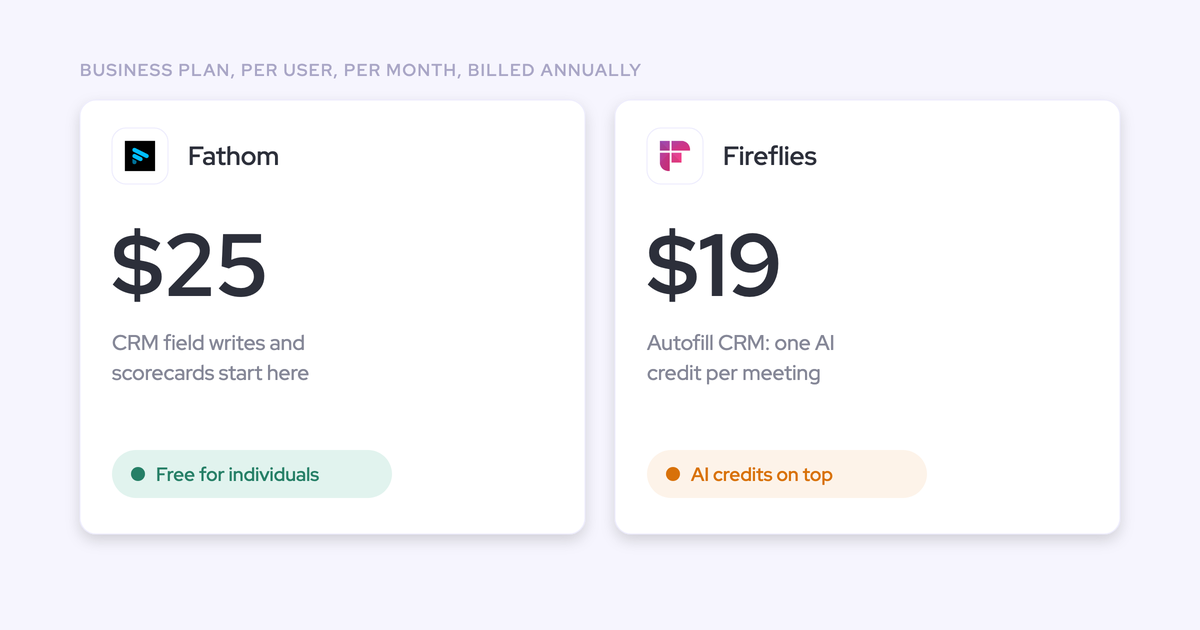
| Weflow Activity & Contact Capture | $19 |
| Weflow Conversation Intelligence | $39 |
| Weflow Deal Intelligence & Forecasting | $39 |
| Revenue AI Foundation (Activity & Contact Capture + Conversation Intelligence) | $49 |
| Revenue AI Business (Foundation + Deal Intelligence) | $59 |
| Revenue AI Enterprise (all Weflow products) | $79 |
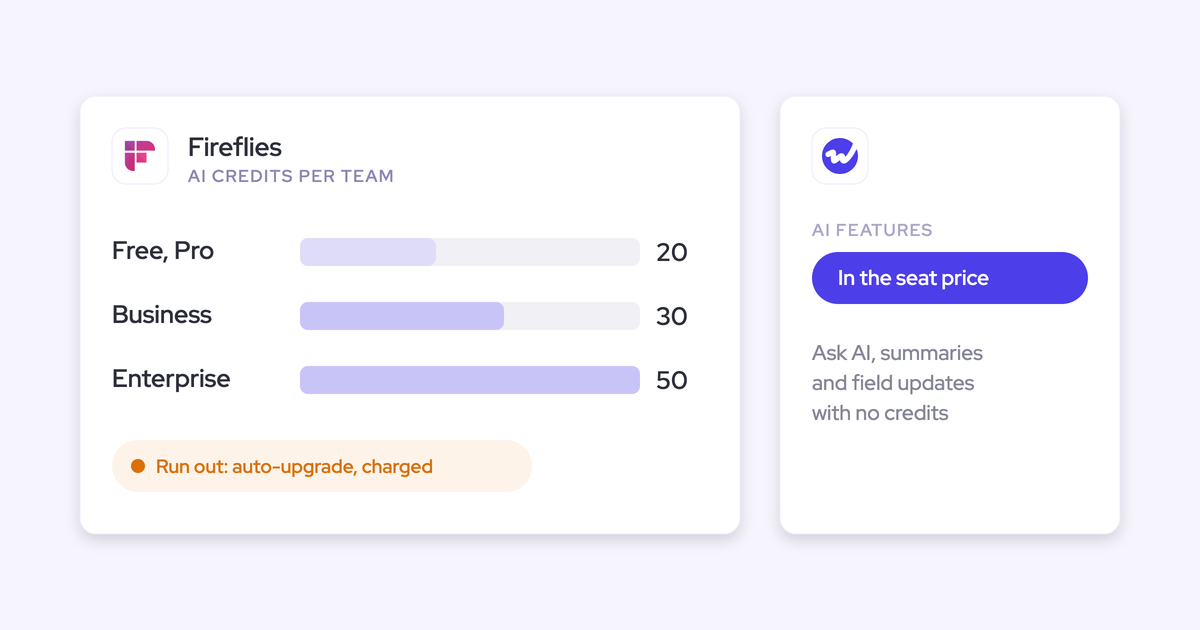
Every plan includes Ask Weflow AI Pro and Agent Builder Free. AI summaries, AI Field Updates and Ask Weflow AI are part of the seat and don't use any agent actions. Agent Builder itself is priced per workspace:
| Agent Builder tier | Price per month | Agent actions |
|---|---|---|
| Free (in every plan) | $0 | 25 |
| Growth | $299 | 500 |
| Scale | $999 | 2,500 |
| Enterprise | Custom | Custom |
We count usage in agent actions, roughly one million tokens each, and every run uses at least one:
- A simple weekly agent uses about one action per run.
- A run that reasons over many transcripts and emails typically uses up to five.
- A daily briefing for every rep burns through the free allowance quickly, so you'll need a paid tier.
Every plan lets you build unlimited agents, and agents simply pause when the allowance runs out.
How Avoma prices seats, add-ons and API access
Avoma publishes per-recorder-seat plans and per-seat add-ons:
| Avoma plan or add-on | Price per seat per month | Notes |
|---|---|---|
| Startup | $19 annual, $29 monthly | Up to 25 seats |
| Organization | $29 annual, $39 monthly | Up to 100 seats. Adds custom AI templates, the API and webhooks |
| Enterprise | $39, annual only | 10-seat minimum. Adds SSO, custom retention, HIPAA and signed DPAs |
| Revenue Intelligence add-on | $29 annual, $35 monthly | Two-way CRM field updates, deal risk, roll-up forecasting |
| Conversation Intelligence add-on | $29 annual, $35 monthly | Call scoring, scorecards, trackers |
| Lead Router add-on | $19 annual, $25 monthly | Lead routing |
| Viewer seats | Free | Unlimited on every plan |
Avoma's MCP connector needs Organization, Enterprise or the API Access add-on. Avoma's pricing page lists no separate price for agents.
What each vendor charges for, line by line
Here's what you'll pay at list price once agents, API and MCP are in use:
| Line item | Weflow | Avoma |
|---|---|---|
| Base seat | $19 to $79 per user per month, by product or bundle | $19, $29 or $39 per recorder seat per month, annual |
| Field updates and deal intelligence | AI Field Updates included in the Conversation Intelligence seat. Deal intelligence in Deal Intelligence & Forecasting or Revenue AI Business and above | Revenue Intelligence add-on, $29 per seat per month |
| Agents | 25 actions free per workspace, then $299, $999 or custom per month | Not published |
| API access | Included in every plan | Organization plan and above |
| MCP access | Read-only connector, admin-enabled per workspace | Organization or Enterprise plan, or the API Access add-on |
| Contract minimum and term | 10 users per product or bundle, 12-month term | 10-seat minimum on Enterprise. Monthly or annual billing on Startup and Organization |
| Onboarding | No implementation fee | Optional $1,000 expert onboarding. Concierge onboarding included on Enterprise |
When to choose Weflow and when to choose Avoma
Choose Weflow if:
- You run Salesforce and want scheduled agents that reason over the full revenue record: live Salesforce objects plus every captured email, meeting and transcript.
- You want fields written after every call by AI Field Updates and on a schedule by AI Playbooks, without building an agent for it.
- You want governance before anything reaches leadership: admin-only authoring, test runs to the agent's own recipients, skip-if-empty and one business context for every agent.
- Your own agents or Claude need forecast data and pipeline metrics through MCP, and you want the API in every plan.
- You want seat pricing with one metered line that pauses instead of overrunning.
Choose Avoma if:
- You want per-call agents that act the moment a meeting ends, with CRM writes and a human approval step.
- You need Zapier or broad native integrations across dialers and engagement tools.
- You want MCP write tools for your assistants.
- You run a CRM other than Salesforce.
See how Weflow captures activity, updates Salesforce fields from calls, and rolls up your forecast. Book a 30-minute demo.
Weflow vs Avoma AI agents: FAQs RevOps leaders ask
How many Agent Builder actions will my agents use, and which tier do I need?
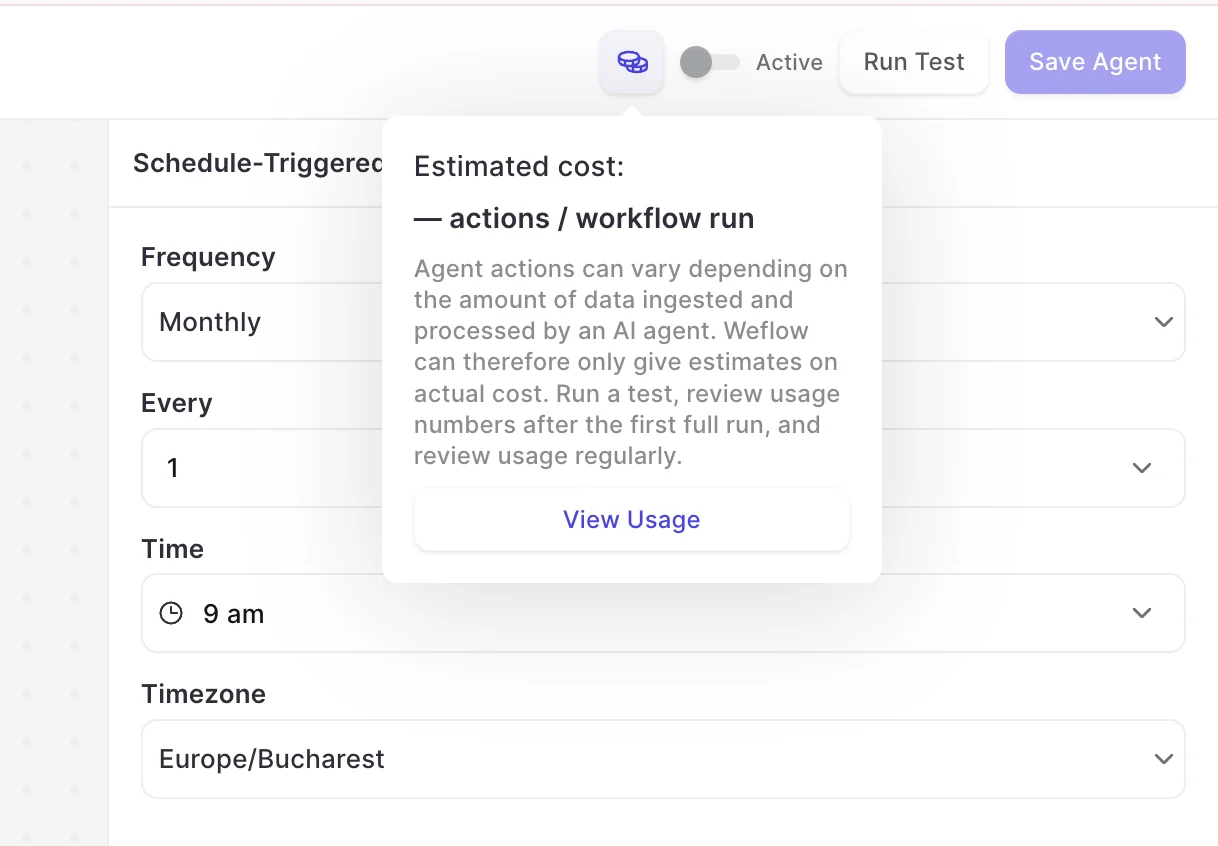
Start on the 25 free actions, run a test, then check the Agent Usage page after the first full run. The Estimated cost popover won't show a figure for an agent that's only been tested, because actions depend on how much data each run ingests.
Once you have real usage, size your tier from that.
Can I send every rep their own weekly report without one agent per rep?
Not with a single template, since a Weflow agent runs one fixed prompt with no per-rep placeholder. You have two options. You can build one agent per rep, since every plan allows unlimited agents and only usage is metered.
Or you can send one team-wide agent, such as stalled deals, and let each rep ask Ask Weflow AI which deals are theirs.
What does an assistant see through the Weflow MCP connector with transcript access off?
It sees call summaries, recording metadata, AI Playbook results, forecast data and org structure, but no verbatim transcripts.
What contract terms does Weflow require?
Weflow requires a 10-user minimum per product or bundle on a 12-month term, which is the shortest we offer. You can reassign seats when someone leaves, and we can negotiate an early opt-out after three months.
Can I move my Avoma recordings into Weflow?
Yes. Our team runs a migration import of historic recordings from other tools, and Avoma lets you export your meeting data before you close your account. From day one, Weflow's notetaker records your new meetings.
Does Weflow work alongside Outreach or Salesloft, and does it record dialer calls?
Yes. Weflow captures emails sent through sequencing tools as ordinary activity, and compatibility mode skips messages the sequencer already logs, so nothing gets logged twice in Salesforce.
Outreach dialer calls come in as recordings with transcripts, summaries and coaching. We also support Aircall, CloudTalk, Dialpad and Zoom Phone, and can scope custom integrations for other dialers.