Gong vs Clari MCP Servers: What Claude and ChatGPT Can Read From Each (2026)
Gong vs Clari MCP servers: what Claude and ChatGPT can read from each, and what it costs.


Gong and Clari both let Claude and ChatGPT read their data over MCP, and the difference is in what comes back. Gong's MCP server returns verbatim transcripts one call at a time and charges credits for every AI answer. Clari runs 3 separate servers, for Clari Forecast, Clari Copilot calls and Salesloft call summaries, and none of them ties a forecast to what buyers said.
Weflow is the Revenue AI Orchestration platform for sales, customer success, and RevOps teams. Built for Salesforce teams, it gives your assistant one read-only connector with no usage charge, returning Weflow Conversation Intelligence data, playbook results and the forecast with the deals behind it.
We wrote this for you if you run Salesforce, your company has standardized on Claude or ChatGPT, and a Gong or Clari renewal is on your desk.
What Claude and ChatGPT can read from Weflow, Gong and Clari at a glance
Weflow's one connector returns both the conversation and the forecast with its deals, while Gong's server has no forecast tool and Clari splits the two across separate servers.
| Dimension | Weflow | Gong | Clari (with Salesloft) |
|---|---|---|---|
| MCP servers and supported assistants | 1 read-only connector with 6 tools; Claude, ChatGPT, any remote MCP client | 9 read-only tools; Claude, ChatGPT, Microsoft Copilot | 3 servers (Forecast, Copilot, Salesloft); Claude, ChatGPT |
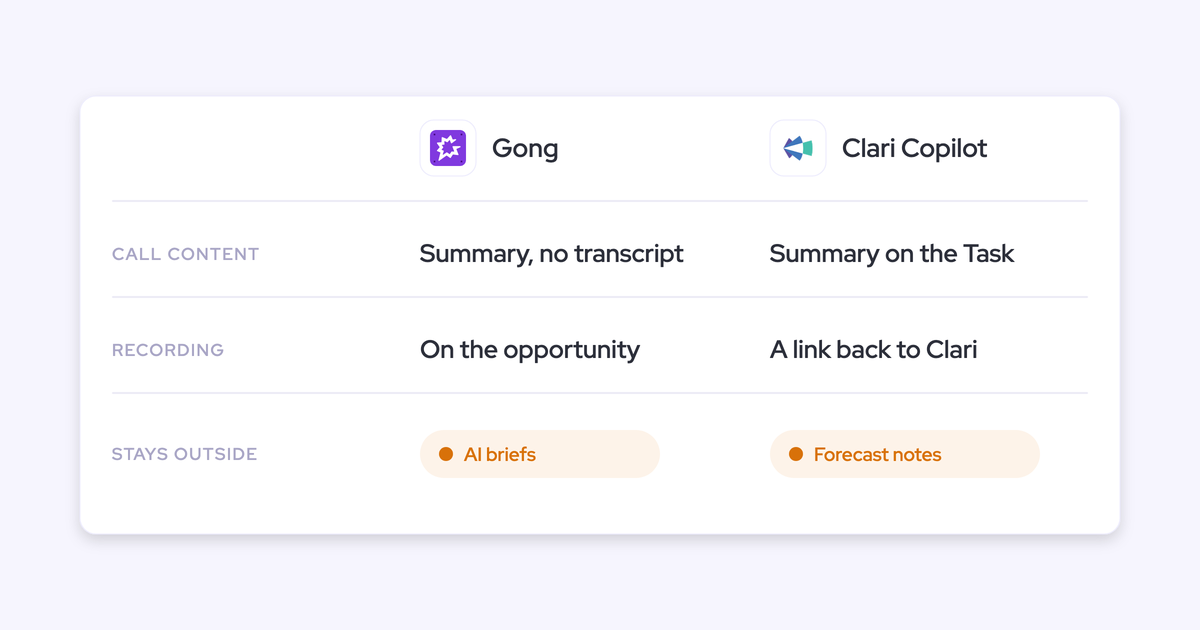
| Call data an assistant reads | Transcripts, summaries, tracker hits, scores, playbook results, forecast data | Verbatim transcripts, one call per request; AI answers | Copilot call data; Salesloft summaries, no transcripts |
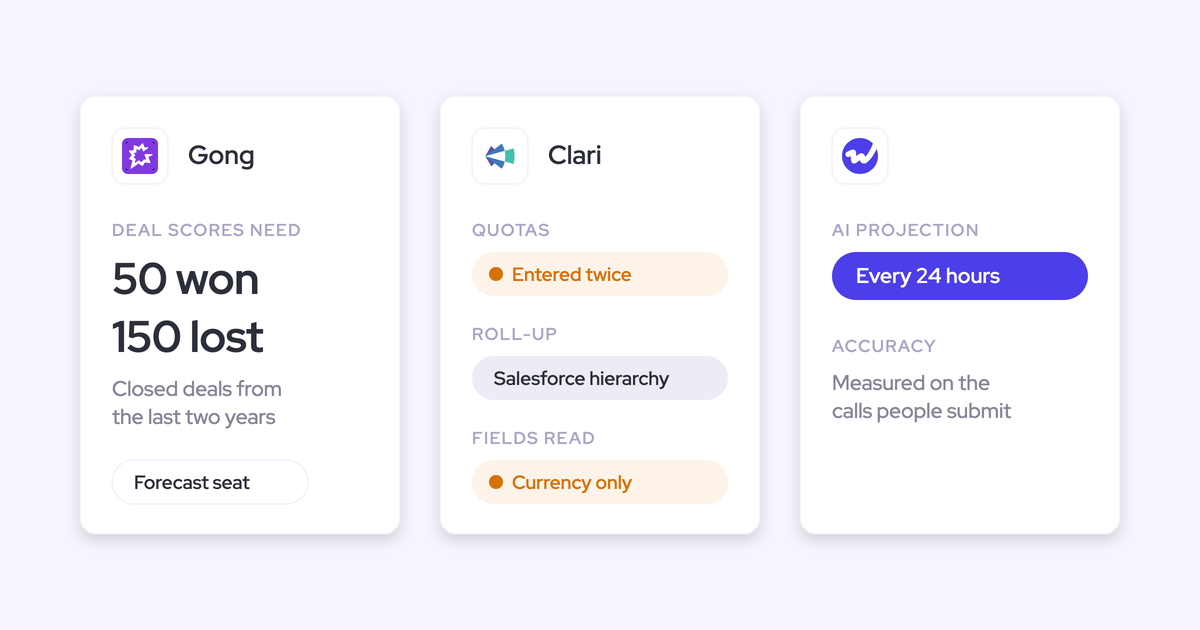
| Forecast and pipeline data an assistant reads | Submitted call, live pipeline, delta, per-rep metrics with opportunity IDs | No forecast tool | Live forecast and historical snapshots |
| Who can connect and what each question costs | Licensed and view-only users; no usage charge | Paid seat plus paid assistant tier; credits per AI answer | Business or Enterprise assistant plans; paid Salesloft add-on |
| Integrations with other tools | Salesforce, email, calendar, conferencing, Slack, selected dialers | About 450 integrations | Salesloft data layer across CRM and warehouses |
| Raw data access outside the tool | Public API on every plan | Capped API; paid Data Cloud for warehouses | Salesloft REST API, warehouse sync, forecast CSV |
| Pricing | Public per-seat prices, AI included | No public prices; AI credits on top | No public prices; Salesloft sales call |
| Best for | Salesforce teams wanting calls and forecast in one connector | Verbatim call research, Microsoft Copilot, integration breadth | Forecast-led enterprises wanting snapshots in an assistant |
Why you should test what each MCP server returns
Every vendor in this comparison has an MCP server, so the useful test is what each server returns, to whom and at what cost.
The reason is how your executives now work. Once a company standardizes on one assistant, executives stop waiting for a RevOps report and query revenue data themselves. The value moves from the vendor's interface to the data the assistant can reach.
What we hear on calls is that the CRO and CEO already pull data into Claude through whatever API will release it. Before you renew, we recommend you run 4 tests on each vendor's server:
- Transcripts: does the assistant get the verbatim transcript or the vendor's summary of it? You can't analyze words you never receive.
- Forecast: does the forecast arrive with the deals behind it, or as numbers alone? An assistant that can't open the opportunities can't explain a gap.
- Connectors: how many connectors cover the whole platform? Each one is another setup, admin switch and permission model for you to maintain.
- Access: who may connect, and who pays per question? Seat rules and credit meters decide how widely your people use the assistant.
Weflow: one read-only connector for calls, playbooks and the forecast
Weflow gives Claude and ChatGPT one read-only MCP connector that returns calls, playbook results and the forecast with its deals, with no usage charge.
What Claude and ChatGPT read from Weflow
Claude and ChatGPT read Weflow through 6 read-only tools: Get Forecast, Get Org Structure, Get Recording, List Playbooks, List Recordings and Playbook Values. Each user approves read-only access to their own recordings, forecast and playbook data on a Weflow consent screen.
Weflow's conversation data covers transcripts, AI summaries, tracker hits, coaching scores and AI Playbooks results. Each one is tied to the Salesforce record Weflow matched it to, so your assistant knows which deal a call belongs to.
Weflow's forecast data comes back for a close-date period, scoped to your own opportunities or your team. It includes:
- the latest submitted forecast call, the live pipeline total and the delta between them
- per-rep metrics such as win rate, coverage ratio and gap to forecast, with the opportunity IDs behind them
- targets, where you've configured them
The opportunity IDs let your assistant open the deals behind a rep's gap and explain the number. Weflow computes those metrics from its own forecast configuration, not from a Salesforce report.
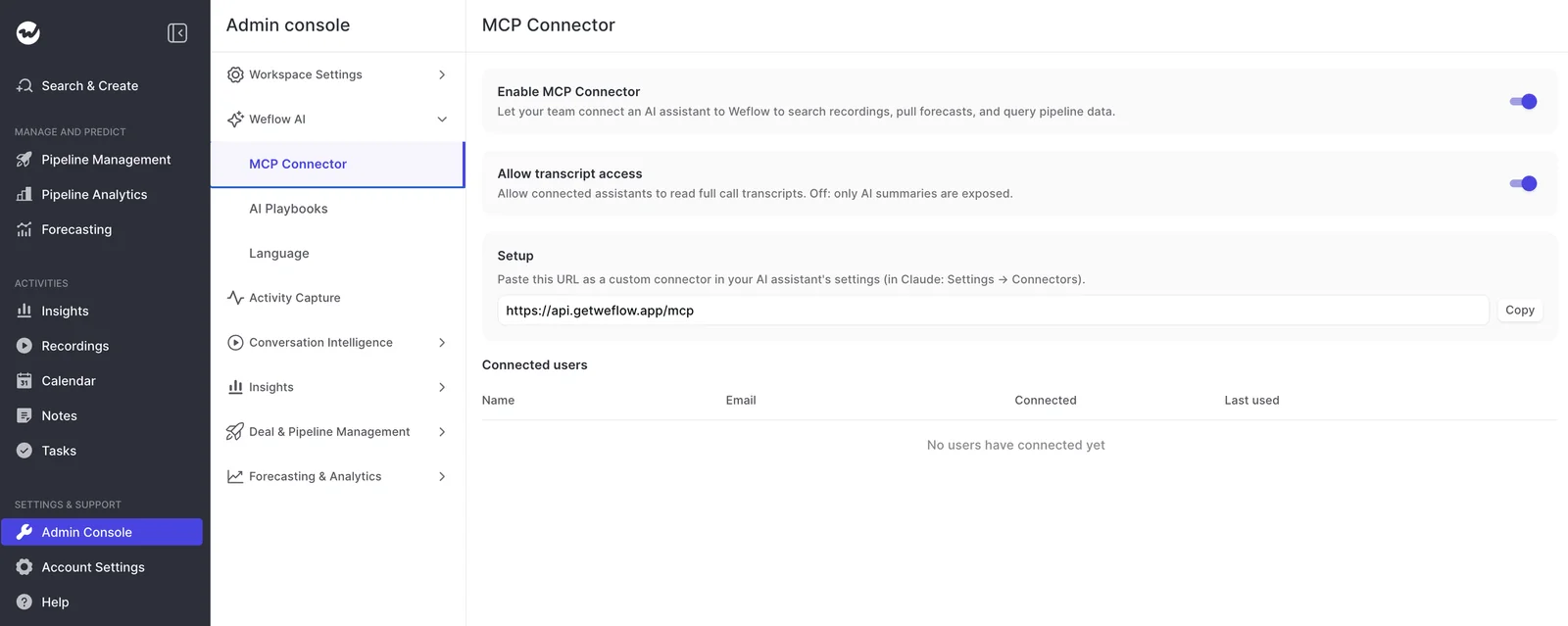
Your admins control the connector with a workspace switch, a Connected users list and a separate toggle that decides whether assistants read full transcripts or only AI summaries. The connector follows the Weflow hierarchy, so nobody reaches a teammate's calls or forecast through Claude that they can't open in Weflow.
The connector URL is the same for Claude, ChatGPT and any client that supports remote MCP servers, and view-only users connect too.
Where the Weflow connector stops and Salesforce's MCP server takes over
Salesforce's own MCP server pairs well with Weflow's MCP connector:
- The Weflow connector doesn't return the content of captured emails or values on Salesforce records, so pair it with Salesforce's MCP server: Salesforce's answers questions about the record, Weflow's about the forecast and the conversation. Inside Weflow, Ask Weflow AI and Weflow agents read captured email alongside Salesforce data.
- Saved views don't come across, so an assistant rebuilds a deal board's filter from the raw records. Ask Weflow AI takes a deal board as context directly.
- The per-rep forecast breakdown stops at 25 owners, so a large org gets aggregate answers until you narrow the question to a team.
- Everything is read-only: an assistant can't change a record or a template prompt. Admins edit prompts in the Admin Console.
- Weflow works only with Salesforce, so it's the wrong fit for a team running HubSpot.
How Weflow data reaches your other tools and your warehouse
Weflow connects natively to the systems a Salesforce revenue team works in and sends everything else out through its public API, included in every plan. Weflow has far fewer native integrations than Gong, so check your stack against the native list first.
- Native integrations: Salesforce, Gmail, Google Calendar, Google Meet, Outlook, Microsoft Teams, Zoom and Slack, plus the Outreach dialer, which your admin connects, and Aircall, CloudTalk, Dialpad and Zoom Phone, which Weflow's support team activates.
- Public API: 11 read endpoints cover recordings and each recording's video URLs, comments, clips, interaction metrics, transcript, scorecards, trackers and summary, plus summary templates.
- Warehouses: Weflow has no native Snowflake, Databricks or BigQuery connector, so customers load captured activity and conversation data into those warehouses through the API, next to their Salesforce sync.
- Salesforce and storage: Weflow writes transcripts and call outputs into Salesforce and exports video files through the API to your own cloud storage.
- New calls: Weflow sends no webhooks, so your integrations poll the recordings endpoint for new transcripts.
Gong: nine read-only MCP tools, verbatim transcripts and metered AI answers
Gong gives Claude, ChatGPT and Microsoft Copilot 9 read-only MCP tools. Verbatim transcripts come free, and every AI answer is metered in credits.
What Claude and ChatGPT read from Gong
Claude and ChatGPT read Gong's verbatim call record and Gong's AI answers about accounts and deals. 4 of the 9 tools use AI:
- ask_account and ask_deal answer a question about one account or deal.
- generate_brief returns a structured summary.
- research_conversations answers one question across calls and emails together in one workspace, returning its own answer with excerpts from both.
The other 5 find calls, return transcripts and look up the account, deal and person IDs the rest need. Gong's transcripts are verbatim, with who said what, timestamps and topics, and the first page carries the linked CRM accounts and deals with their IDs. Content redacted in Gong stays redacted.
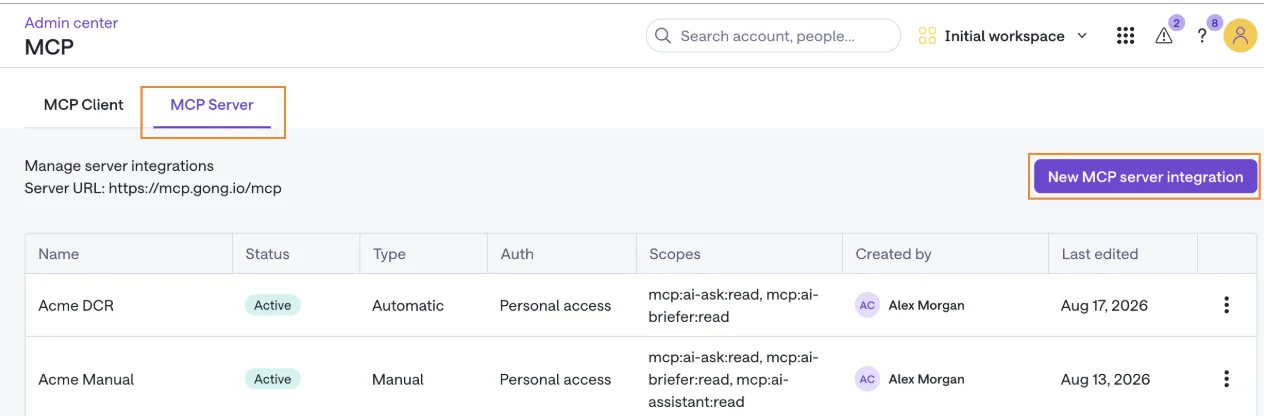
Gong ships native connectors for Claude, ChatGPT and Microsoft Copilot. Personal access is the default for those connectors: each person connects with their own Gong credentials and reaches only what Gong already lets them see.
A Gong admin chooses personal or shared access for each MCP integration in Gong's Admin Center.
Where Gong's MCP server stops or starts drawing credits
Gong's MCP server stops at one transcript per request and starts drawing credits the moment an assistant uses an AI tool.
- Transcripts one at a time: get_transcript returns one call per request, a page at a time, so a deal's calls take a search plus one request each. search_conversations returns call details but nothing that was said.
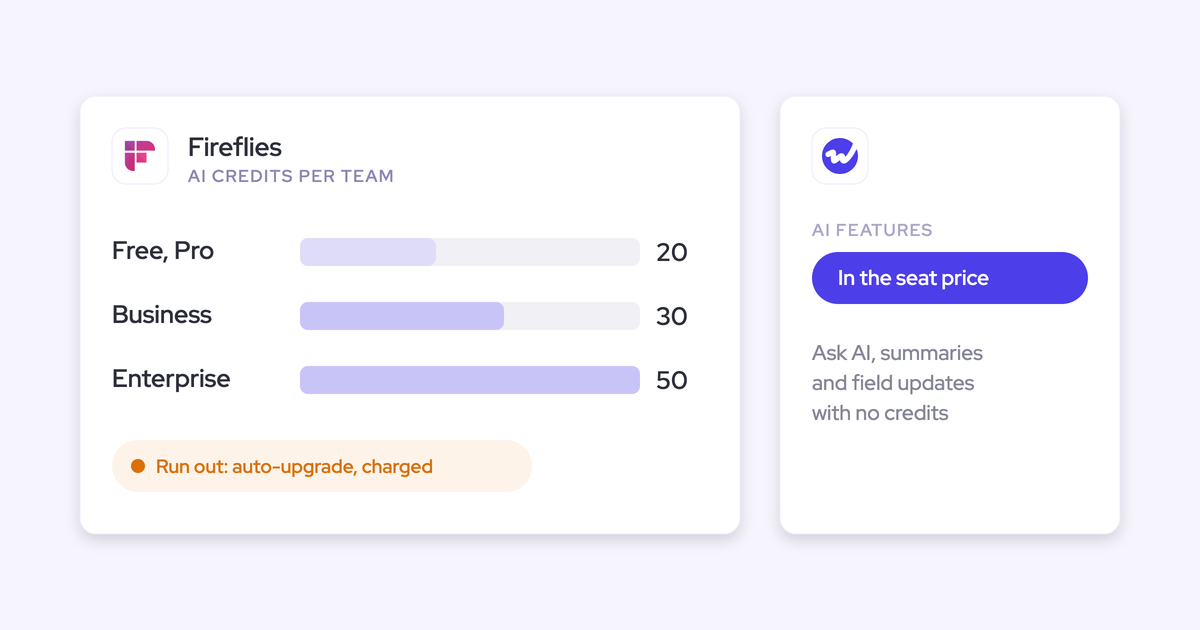
- Credits on every AI answer: Gong's 4 AI tools draw credits on every request, so a repeated question costs twice, and a brief that's free by hand in Gong's interface costs credits over MCP.
- Paid seats to connect: every person who connects needs a paid Gong seat and a paid assistant tier; free Collaborator accounts can't connect.
- Shared access: Gong's shared access, meant for organization-wide reporting agents, gets only 4 tools, without transcripts or search.
- No forecast or full emails: none of Gong's 9 MCP tools is a forecast tool, and full email threads never come back.
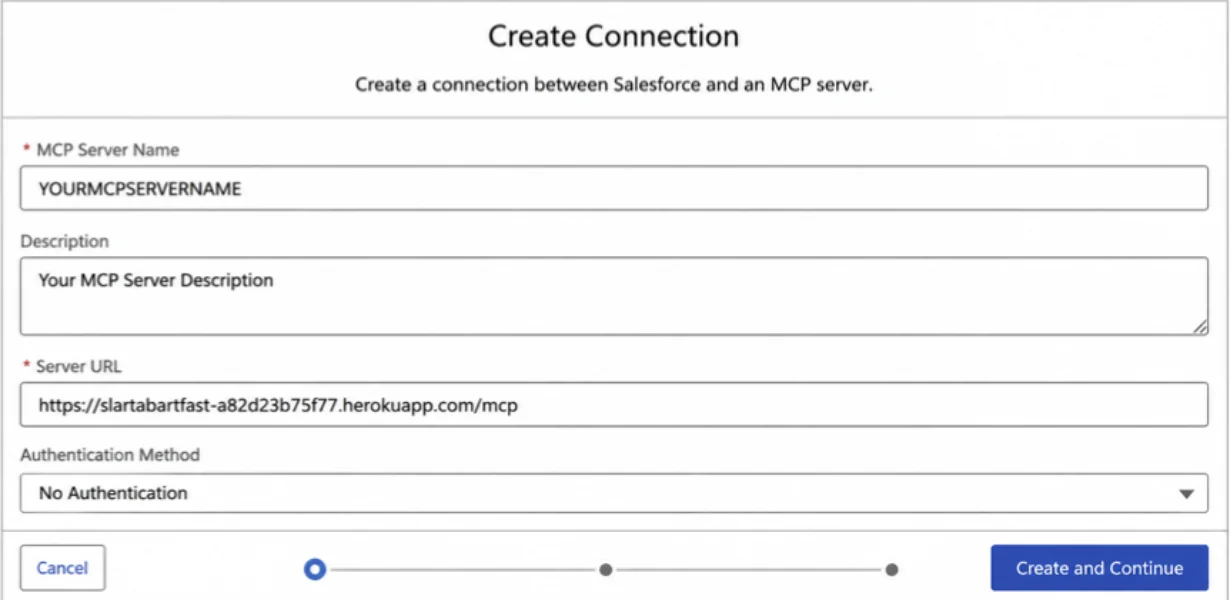
- Agentforce by hand: Gong has no native Agentforce connector, so admins on both sides wire it up through a 6-step OAuth build.
The credit meter changes how some customers use Gong. We've seen Gong customers skip the connector because of the charge and put transcripts into Salesforce for Claude to read.
Gong's Agentforce connection starts in Salesforce, where an admin registers Gong's MCP server by hand.
How Gong data reaches your other tools and your warehouse
Gong reaches more of the revenue stack than any other tool here. Its raw data leaves through a capped public API or a warehouse application you buy separately.
- Marketplace: the Gong Collective lists about 450 integrations and partner solutions across CRM, dialers, web conferencing, email and calendar, BI and data, enrichment, workflow automation and MCP servers.
- Calls and meetings: Gong imports calls from about 30 dialers and records meetings on 11 conferencing platforms, including Zoom, Google Meet, Microsoft Teams and Webex.
- Public API: Gong's API returns participants, topics, trackers, comments, scorecards and transcripts, capped at 3 calls a second and 10,000 a day.
- Warehouses: Gong delivers data to Snowflake, Databricks, BigQuery and Redshift only through Data Cloud, an application bought on top of the Gong Foundation license.
Clari: three MCP servers, each reading one part of the platform
Clari, merged with Salesloft since December 2025, reaches Claude and ChatGPT through 3 MCP servers: one each for Clari Forecast, Clari Copilot and Salesloft.
What Claude and ChatGPT read from Clari Forecast, Clari Copilot and Salesloft
Claude and ChatGPT read a different slice of Clari through each server. The Forecast server is the one that puts historical forecast snapshots in your assistant.
- Clari Forecast: the server gives Claude and ChatGPT live forecast data, historical snapshots included, scoped to each user's Clari permissions. Its 7 tools cover forecast tabs, grid values, the hierarchy, time periods, historical snapshots, field configuration and related deals. A Clari admin switches it on in Clari Studio.
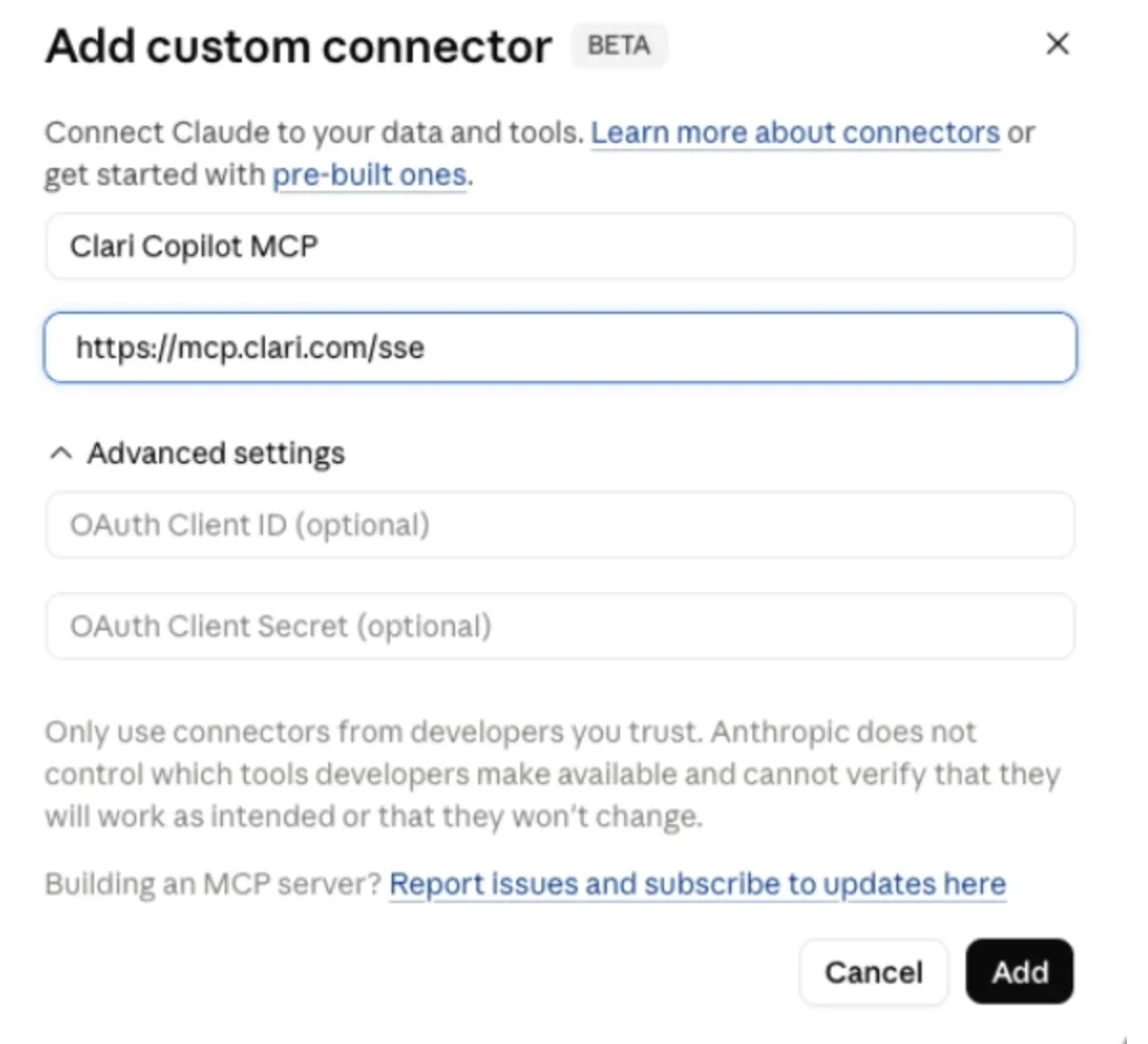
- Clari Copilot: the server reaches Clari Copilot call data from Claude or ChatGPT as a custom connector, once a Copilot admin turns on Copilot tools for MCP in Copilot Settings.
- Salesloft: the server has 13 read-only tools over accounts, people, users, opportunities, conversations and team data, following each user's record permissions. Its conversation details tool returns AI-generated call summaries, extracted fields and key moments.
To add Clari Copilot's MCP server to Claude, you create a custom connector and enter its endpoint by hand.
Where Clari's MCP servers stop
Clari's MCP servers stop at the boundary of each product, so no single Clari connector ties a forecast to what was said on the calls.
- One server per product: reaching forecast, calls and Salesloft means setting up and maintaining 3 connectors, each with its own admin switch.
- Forecast and calls kept apart: Clari Forecast's server exposes forecast tools only, with no call data, and Clari Copilot's server reaches call data but not the forecasting and pipeline product.
- No Salesloft transcripts: Salesloft's server no longer retrieves transcripts because the tool was removed, so an assistant gets Salesloft's AI interpretation of a call rather than what was said.
- Paid add-on: Salesloft's server requires the Salesloft Agentic add-on.
- Assistant plans: Clari Forecast's server needs a Claude or ChatGPT Business or Enterprise subscription, and Clari Copilot's needs ChatGPT Business or Enterprise or a Claude subscription.
- No cadences: Salesloft's server excludes cadences and cadence performance entirely.
How Clari data reaches your other tools and your warehouse
Clari data leaves through Salesloft: its data layer, its REST API and a forecast history export.
- Data layer: Salesloft's Unified Revenue Data Layer syncs with Salesforce, Microsoft Dynamics, Snowflake, Databricks, Gmail, DocuSign, ZoomInfo and LinkedIn.
- Recording: Salesloft's recording integrates with Zoom, Microsoft Teams, Google Meet and Webex.
- REST API: Salesloft's public REST API reads and writes people, accounts, opportunities, activities, calls, emails, meetings and conversations with their media and transcripts, with webhook subscriptions for events. The API is your route to the transcripts its MCP server withholds.
- Forecast history: Salesloft Forecast exports a Forecast History Report of 2 years of submitted forecasts as a CSV, which you can load into a BI tool.
Tracing a forecast gap to the calls behind it through each MCP server
Weflow traces a forecast gap to its calls inside one connector; on Gong the forecast comes from elsewhere, and on Clari you join two servers yourself. Take the question a CRO types into Claude: the team's submitted forecast for this quarter sits below its pipeline, so which deals explain the gap, and what did buyers say on those calls?
Weflow answers inside one connector. Get Forecast, scoped to the team and the quarter's close dates, returns the latest submitted forecast call, the live pipeline total and the delta, with each rep's gap to forecast and the opportunity IDs behind it.
The assistant then reads the recordings Weflow matched to those opportunities through List Recordings and Get Recording, as summaries or transcripts, and Playbook Values adds the AI Playbooks results. It leaves the connector only for Salesforce field values, such as an opportunity's close date, through Salesforce's MCP server.
Gong starts without the forecast, because none of its 9 MCP tools is a forecast tool, so the submitted number and the deal list reach the assistant from another source. The assistant finds each deal's ID with search_crm_entities and asks ask_deal about it, each request drawing credits.
For buyers' own words, the assistant runs search_conversations to find the calls, then get_transcript for each one, one call per request and one page at a time.
Clari starts on the Forecast server, which returns grid values, the hierarchy and snapshots, with its related-deals tool on the same server. For what buyers said, the assistant moves to a second connector: Clari Copilot's server for call data, or Salesloft's, which returns summaries and key moments instead of transcripts. The assistant joins forecast and calls itself.
What reaching each tool from Claude or ChatGPT costs
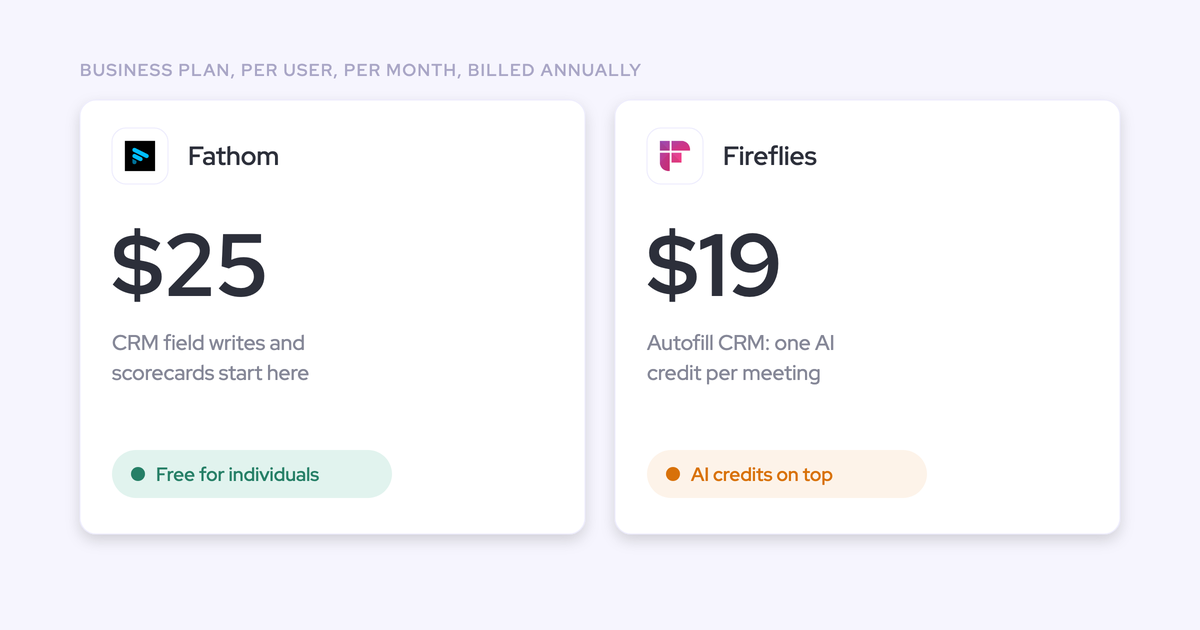
Weflow prices by seat with AI and the connector included. Gong prices by seat and meters AI answers in credits, and Clari quotes through Salesloft and sells MCP access in an add-on. Gong and Clari also name the paid assistant tier each person needs.
Weflow comes in at about half the price of Gong:
- Single products: priced per user per month, billed annually, with a 10-user minimum: Weflow Activity & Contact Capture $19, Weflow Conversation Intelligence $39, Weflow Deal Intelligence & Forecasting $39.
- Bundles: Weflow's bundles are Revenue AI Foundation at $49, which pairs capture with Conversation Intelligence, Revenue AI Business at $59, which adds Deal Intelligence, and Revenue AI Enterprise at $79, which adds pipeline analytics and forecasting.
- Included in the seat: Ask Weflow AI, AI summaries and AI Field Updates. The MCP connector costs nothing beyond rate limits, and view-only seats are free.
Gong's costs come from a custom proposal and a credit meter:
- Licenses: Gong has no public prices; per-user licenses and a platform fee come in a custom proposal for Gong Foundation plus applications on top.
- Credits: the credit pool gets 2,000 credits a year per paid core seat, shared company-wide and reset each contract year. A call over 10 minutes costs 1 credit, a shorter one half a credit, an email a tenth.
- Data Cloud: about $5,000 a year.
- Assistant tier: Gong's connectors need Claude Pro, Max, Team or Enterprise, ChatGPT Plus, Pro, Business, Enterprise or Edu, or Microsoft Copilot with Copilot Studio or Microsoft 365 Copilot extensibility.
Clari's costs run through Salesloft:
- Seats: Clari has no public seat prices; both pricing pages lead to a Salesloft Talk to Sales call.
- Packages: Salesloft sells Advanced and Elite packages, with forecasting, AI agents and the dialer as add-ons, and its MCP server needs the Agentic add-on.
- Assistant tier: Clari Forecast's server needs Claude or ChatGPT on Business or Enterprise.
Moving your call history off Gong or Clari
Moving call history off Gong or Clari takes 6 steps, and your call volume sets the timing.
- Set up every current user in Weflow and have them sign in, because each imported recording lands with the user it belongs to. Map each departed rep to the person who inherits their calls.
- Give Weflow's team API access to the incumbent. A Gong import runs through Gong's API, with up to 2 years of Gong history migrated at no charge and longer history as a paid service. A Clari import needs your Clari API key and secret.
- Let Weflow count the calls to estimate the time. Gong's API moves one call at a time, at about 2,000 to 2,500 calls a day, so around 30,000 calls take about 15 days. A Clari import takes 2 to 3 days.
- Keep the old contract and its API access active until the import ends, because the import reads through that API.
- Rebuild your trackers in Weflow. Calls, transcripts and metadata come across with each call's link to its Salesforce account, but the old tool's trackers don't.
- Give people who read old calls but no longer record a view-only seat, which costs nothing.
When to choose Weflow, Gong or Clari for AI assistant access
Choose Weflow if you want one unmetered Salesforce connector covering calls and the forecast with its deals. Stay on Gong or Clari when their strengths decide it.
Choose Weflow if:
- You run Salesforce and want calls, playbooks and the forecast with its deals in one connector, so your assistant traces a forecast gap to the calls without a second server.
- Your view-only users need assistant access without a credit meter.
Weflow doesn't fit a HubSpot team, since it works only with Salesforce.
Choose Gong if:
- You need research across calls and emails and verbatim transcripts with speakers and timestamps.
- Your company runs Microsoft Copilot or depends on Gong's catalog of integrations.
Gong is also the safe choice, so leaving it takes proof. Weflow's Head of Sales put it this way:
I wasn't going to get fired for buying Gong. It wasn't going to happen, right? So it was a very safe choice. - Chris Nethercote, Head of Sales, Weflow
Choose Clari if:
- Forecasting leads your process and you want live forecast numbers and historical snapshots in an assistant.
- Salesloft already runs your engagement and you want its Snowflake and Databricks sync.
FAQs RevOps teams ask about Gong, Clari and Weflow MCP servers
Can Claude or ChatGPT change anything in Weflow, Gong or Clari over MCP?
No for Weflow, Gong and Salesloft: Weflow's 6 tools, Gong's 9 tools and Salesloft's 13 tools are all read-only. Through Weflow's connector, an assistant can't even write a prompt into a template; admins edit those in the Admin Console.
Does the assistant see more than the user can?
Not on the default setups, because each server follows permissions you already manage:
- Weflow's connector follows the Weflow hierarchy.
- Gong's personal access keeps each person's Gong permissions.
- Clari Forecast's server is scoped to Clari permissions.
- Salesloft's server follows record permissions.
The exception is Gong's shared access, where everyone on one integration sees the same organization-wide data through a single token.
Can people without a paid seat connect an assistant?
On Weflow, yes: free view-only users connect through the MCP connector and get an AI route into the calls they can watch. On Gong, no: free Collaborator accounts can't connect to the MCP server.
Can we keep verbatim transcripts out of the assistant?
On Weflow, yes: turn off Allow transcript access, and connected assistants see AI summaries but never the verbatim transcript. Gong's get_transcript returns the verbatim call, holding back only content redacted in Gong. Salesloft's server returns summaries rather than transcripts in any case.
Which assistants beyond Claude and ChatGPT can connect?
Any client that supports remote MCP servers connects to Weflow with the same URL Claude and ChatGPT use. Gong ships a native Microsoft Copilot connector and connects Salesforce Agentforce by hand, and Clari's servers are documented for Claude and ChatGPT.
Can we run our own MCP server on the API instead?
Yes on Weflow: every plan includes the public API, admins create API keys in the Admin Console, and building your own agents on the API carries no extra charge. Gong and Salesloft both offer public APIs too, Gong's capped per second and per day.
Do we still need Salesforce's MCP server with Weflow?
Yes, if your assistant needs captured email content or Salesforce field values, which Weflow's connector doesn't return. Run both: Salesforce's answers questions about the record, and Weflow's adds the forecast calls, targets and tracker hits that never reach Salesforce.