Gong vs Clari Salesforce Integration: What Each Syncs and Stores (2026)
Gong vs Clari Salesforce integration: which objects each syncs, where data is stored, and what you keep.


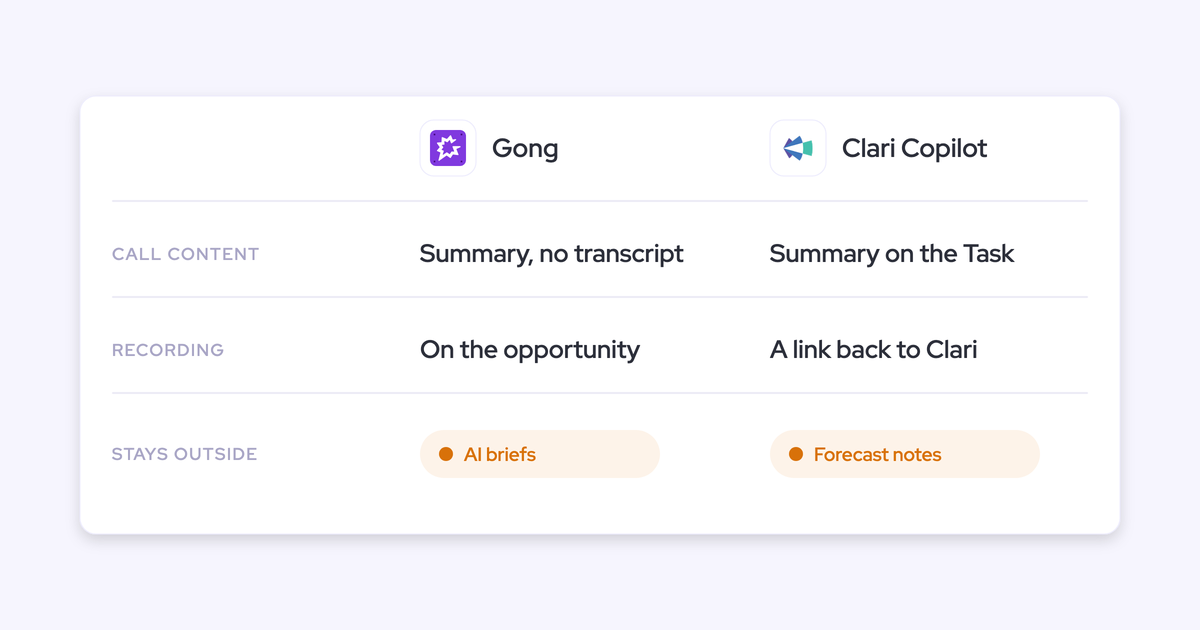

Gong imports 4 standard Salesforce objects: accounts, contacts, leads and opportunities. It writes AI values only into fields that already exist and are imported into Gong, and it keeps the conversation itself in its own cloud.
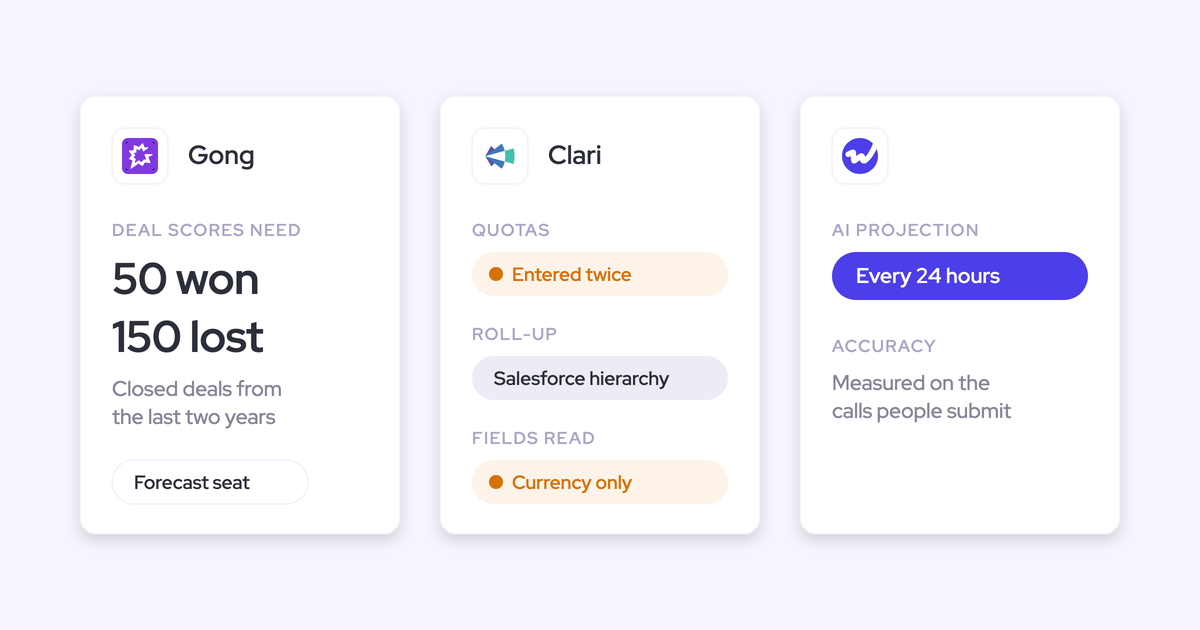
Clari's activity capture is now Salesloft's CRM sync, which polls Salesforce every 1, 5 or 10 minutes. The forecast notes your managers write stay in Clari.
Weflow is the Revenue AI Orchestration platform for sales, customer success, and RevOps teams. Built for Salesforce teams, it writes activity and call transcripts into native Salesforce records in real time. Weflow Activity & Contact Capture logs emails, meetings and contacts, and each call's summary and transcript lands on a Salesforce recording object.
If you own Salesforce, where each tool stores your data decides what you can report on, automate and keep when the contract ends. So we compared Weflow, Gong and Clari object by object: what each writes as a Salesforce record, how often, under which user, and what stays with you when you leave.
Weflow, Gong and Clari compared on Salesforce sync, integrations, AI access, data export and price
Weflow leads on how data lands in Salesforce, Gong on integration breadth, and Clari on native warehouse sync. Each tool's limits sit in a different place, so read the table from the row that matters most to you.
| Capability | Weflow | Gong | Clari |
|---|---|---|---|
| Salesforce integration | Real-time two-way sync on the REST API, writes in about 200 ms, inherits custom objects, validation rules and permissions | Imports accounts, contacts, leads and opportunities; custom objects need roll-ups; AI writes only into existing, imported fields | Merged Clari and Salesloft platform: Salesloft's sync polls every 1, 5 or 10 minutes through a single connector user on your API allowance |
| Integrations with other tools | Email, calendar, Zoom, Teams, Meet, Slack and dialer integrations; far fewer than Gong, no native warehouse connector | Marketplace lists about 450 integrations and partner solutions; about 30 dialers; 11 meeting platforms | Data layer syncs with Salesforce, Dynamics, Snowflake, Databricks, Gmail, DocuSign, ZoomInfo and LinkedIn |
| Access from AI assistants (MCP) | Official read-only connector for Claude, ChatGPT and any remote MCP client: recordings, transcripts, playbooks, forecasts | MCP server with 9 read-only tools for Claude, ChatGPT and Copilot; AI tools draw credits; paid seats on both sides | 3 separate servers for Forecast, Copilot and Salesloft; the Salesloft server needs a paid add-on and gives Claude no transcripts |
| Raw data access outside the tool | REST API bulk-exports transcripts, metadata, scores and signals as JSON or CSV | API capped at 3 calls a second and 10,000 a day; Data Cloud to Snowflake, Databricks, BigQuery and Redshift is a separate purchase | Salesloft REST API, forecast history CSV export, native sync to Snowflake and Databricks |
| Pricing | Per seat, $19 to $79 per user per month billed annually, 10-user minimum | No public prices: per-user licences, a platform fee and AI credits, quoted in a custom proposal | No public seat prices: book a call through Salesloft's Talk to Sales page |
| Best for | Salesforce teams that want activity and conversations as native records they keep | Teams that work in Gong and want the deepest conversation analytics and the widest integrations | Revenue leaders buying roll-up forecasting and inspection alongside Salesloft engagement |
Weflow is strongest on storage. It writes to Salesforce in about 200 milliseconds through the REST API, with no polling and no middleware, and it inherits your custom objects, validation rules and permission sets. In exchange, you get Salesforce only and no native warehouse connector.
Gong is strongest on breadth. Its marketplace lists about 450 integrations and partner solutions, and its MCP server gives assistants 9 read-only tools. On the Salesforce side, Gong imports 4 standard objects, AI over the API and MCP draws on credits, and Gong deletes customer data within 30 days of the contract ending.
Clari is strongest on forecasting and warehouse reach. Clari Forecast runs on Salesloft's data layer, which syncs to Snowflake and Databricks. Its capture polls every 1 to 10 minutes on your API allowance, and Clari disconnects an integration user that hasn't synced in 30 days.
Why Gong vs Clari comes down to what lands in Salesforce
Gong vs Clari comes down to the Salesforce integration because every conversation intelligence tool transcribes well now, and buyers say so in the first 5 minutes of a demo. The tools differ in what they write to Salesforce.
The products also overlap more than a shortlist suggests. Gong sells Gong Forecast on top of Gong Foundation, and Clari sells Clari Copilot for conversation intelligence.
Clari and Salesloft merged in December 2025, and Clari Capture is no longer sold. Activity capture in the merged company is Salesloft's CRM sync, so "Clari's integration" now means Salesloft's connector.
What reaches your org is what the rest of your stack can use. An activity that isn't a record in the core Salesforce database can't trigger a flow or be read inside one, and AI workflows fail on customer data that never reached the CRM.
So trial the integration on your own data before you trust the demo. Check whether each tool:
- Writes to the meeting activity that already exists, rather than creating a second.
- Links every participant to the right contacts and leads.
- Relates the activity to the account and the correct opportunity.
- Fills structured fields, not just a summary in a text box.
Most CI providers see the Salesforce integration as an afterthought. Look at it, trial it. - Janis Zech, CEO & Co-founder, Weflow
Weflow writes activity and conversations into native Salesforce records in real time
Weflow Activity & Contact Capture logs emails, meetings and contacts into native Salesforce objects as they happen. Weflow Conversation Intelligence adds each call's summary and full transcript as a Salesforce record.
How Weflow Activity & Contact Capture reads and writes Salesforce
Weflow Activity & Contact Capture reads and writes Salesforce both ways in real time, through the REST API only, in about 200 milliseconds per write. There's no polling and no middleware, and the managed package catches field changes with webhooks to save API calls.
Weflow writes these native records:
- Emails as EmailMessage or Task records, whichever you choose.
- Meetings as Event records.
- Calls on the Weflow Video Recording object, holding the summary and full transcript.
- New contacts from threads and invites, attached to the matched account and opportunity.
Weflow inherits your standard and custom objects, field dependencies, validation rules, permission sets and role hierarchy, so you don't rebuild your configuration. AI Field Updates write to every object and every field type except relationship lookups.
The integration user gets a least-privilege permission set, never Modify All Data.
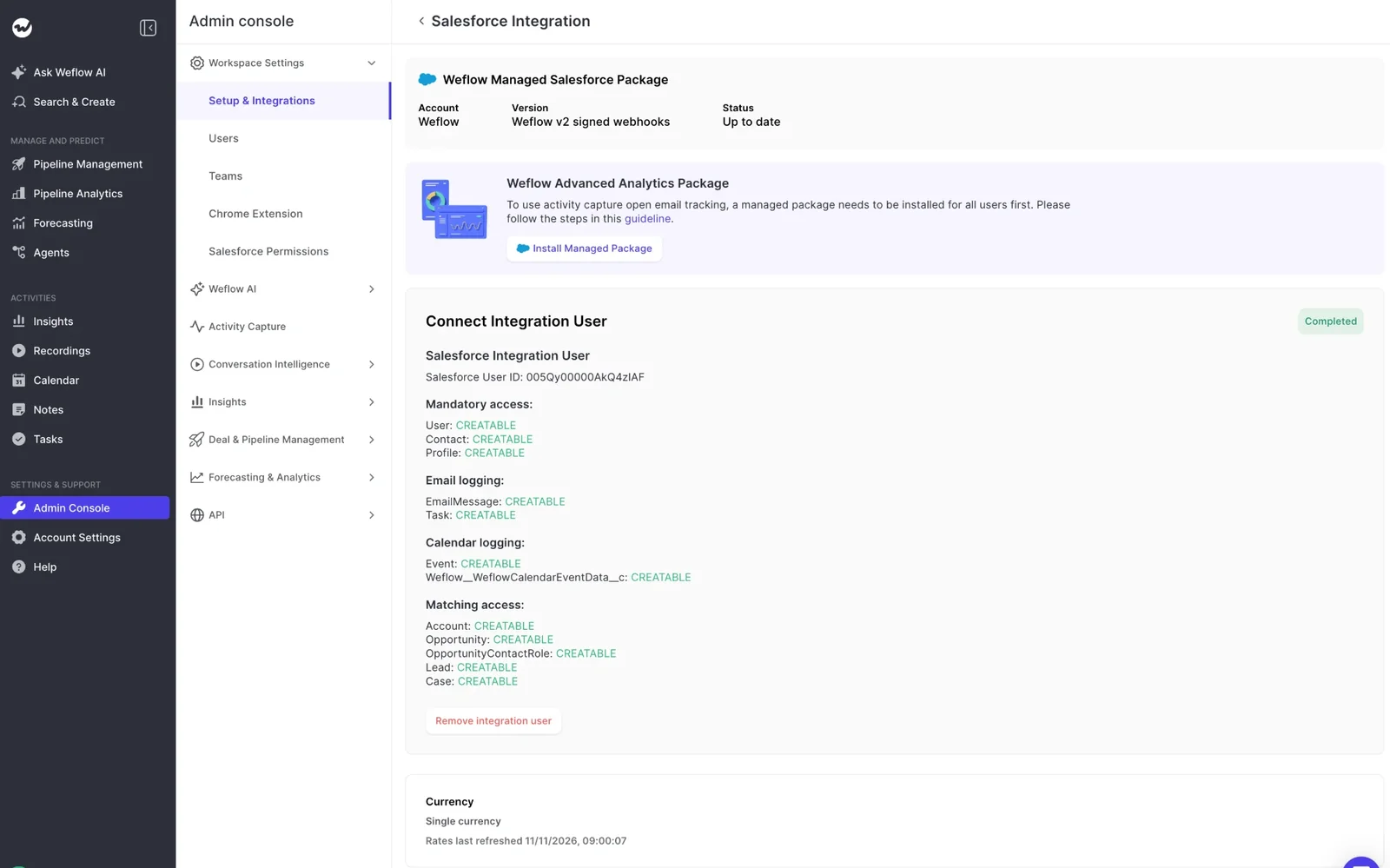
Plan your rollout around these limits:
- Weflow pauses everything that needs Salesforce at your org's daily API limit, until it resets.
- New Salesforce fields take up to 8 hours to appear in Weflow.
- Weflow needs Salesforce Enterprise Edition or higher, or Professional Edition with the API access add-on.
I've worked with Gong before, but Weflow's simplicity and real-time sync are game-changing. Whether I update a deal in Salesforce or Weflow, it's instantly reflected everywhere. - Bastian Stosic, Head of Media Sales Operations, HolidayCheck
What Weflow connects to, and how AI assistants and warehouses reach its data
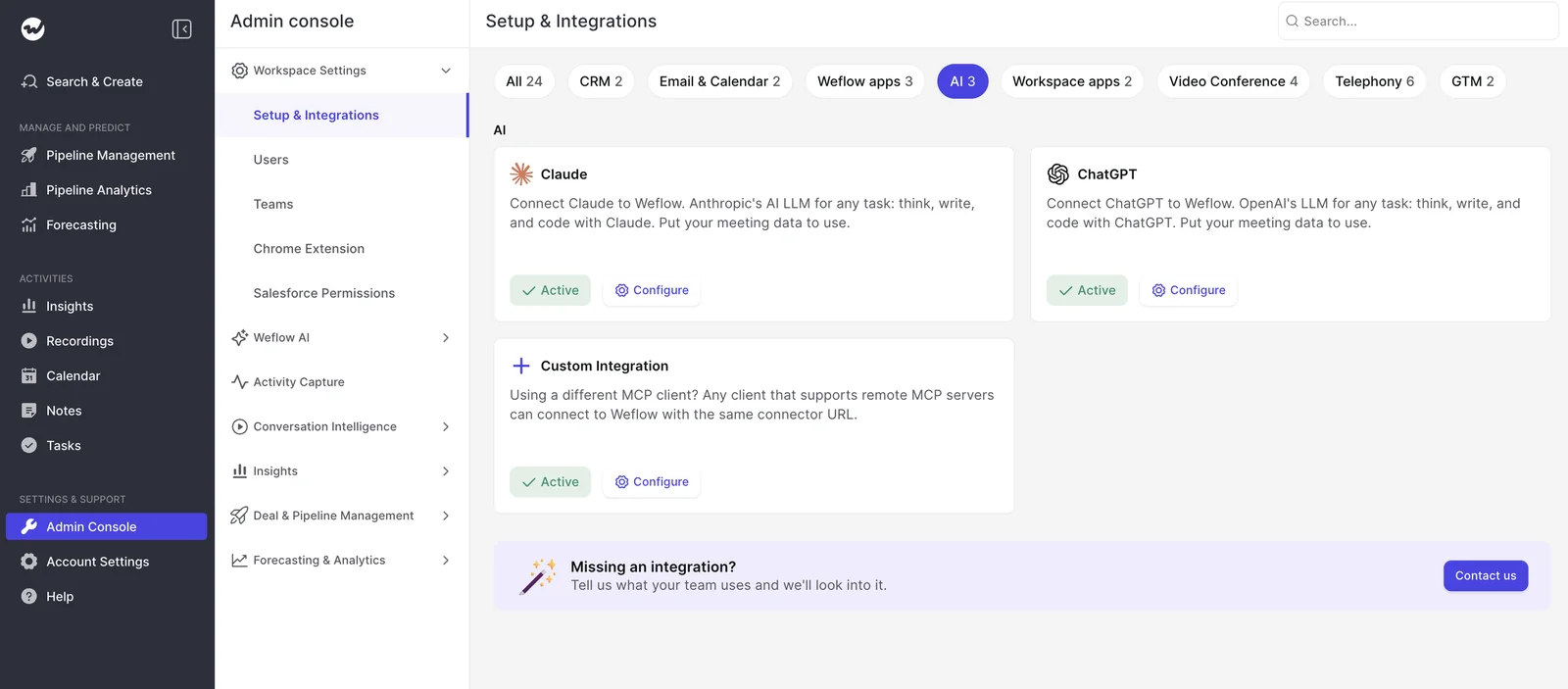
Weflow connects to the email, calendar, meeting and dialer tools around Salesforce, and to AI assistants through a read-only MCP connector:
- Native integrations cover Gmail, Google Calendar, Outlook, Google Meet, Microsoft Teams, Zoom and Slack.
- For dialers, you connect Outreach directly, and Weflow's team activates Aircall, CloudTalk, Dialpad and Zoom Phone.
- The MCP connector gives Claude, ChatGPT and any remote MCP client 6 read-only tools: Get Forecast, Get Org Structure, Get Recording, List Playbooks, List Recordings and Playbook Values.
- The REST API bulk-exports transcripts, metadata, scores and signals as JSON or CSV, and feeds Tableau and Looker.
- For warehouses, Weflow has no native Snowflake, Databricks or BigQuery connector, so you load its data into the warehouse through the API.
You switch the MCP connector on per workspace, with a separate transcript toggle. Per-rep forecast breakdowns stop at 25 owners, and it returns no captured email content or Salesforce field values.
What Weflow costs, and when it is the wrong fit
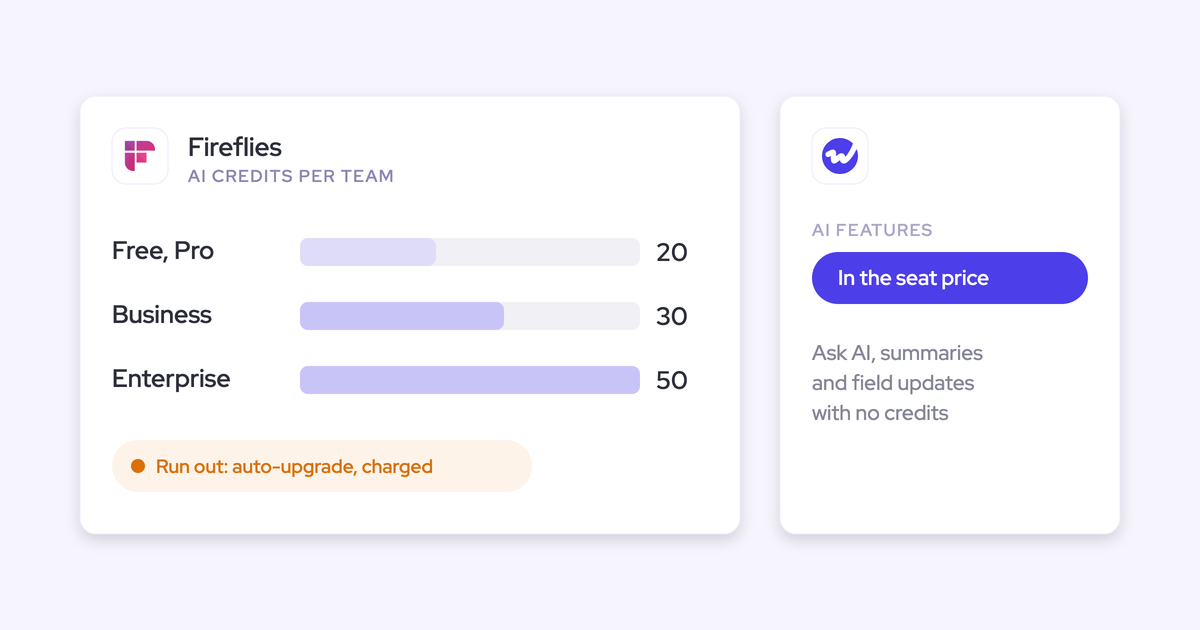
Weflow prices per seat, and AI usage comes with the seat rather than being billed by tokens or credits. Every plan includes Ask Weflow AI, is billed annually on a 12-month minimum term, and needs at least 10 users per product or bundle:
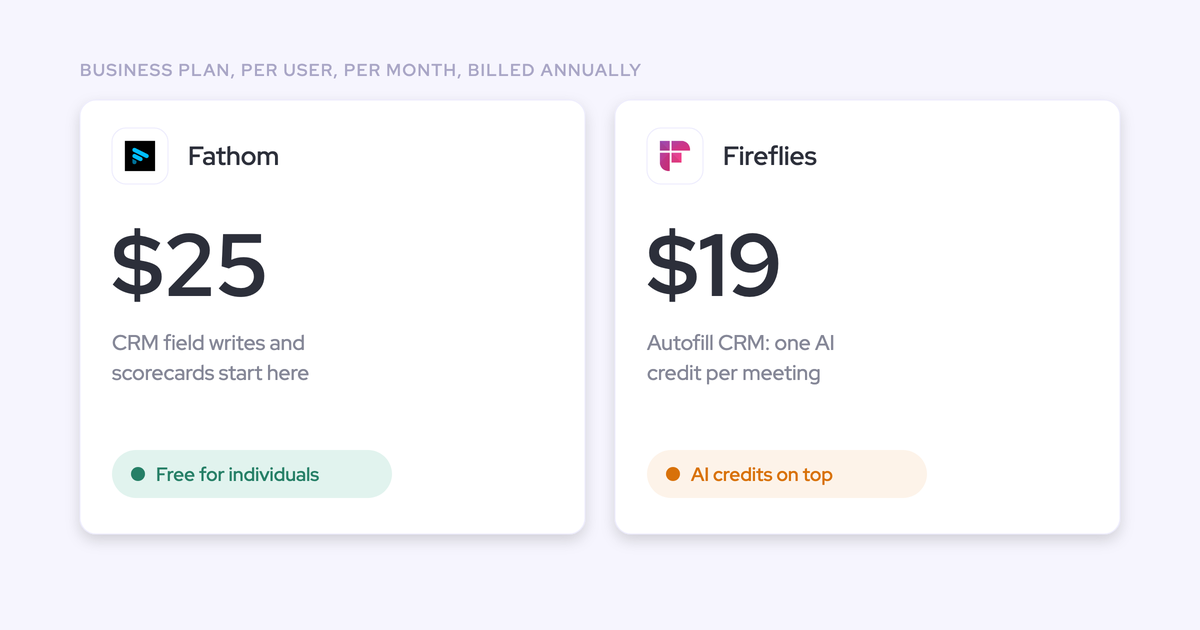
- Weflow Activity & Contact Capture: $19 per user per month.
- Weflow Conversation Intelligence: $39 per user per month.
- Weflow Deal Intelligence & Forecasting: $39 per user per month.
- Revenue AI Foundation, capture plus conversation intelligence: $49 per user per month.
- Revenue AI Business: $59 per user per month.
- Revenue AI Enterprise: $79 per user per month.
Weflow isn't the right fit for every team. These are its limits:
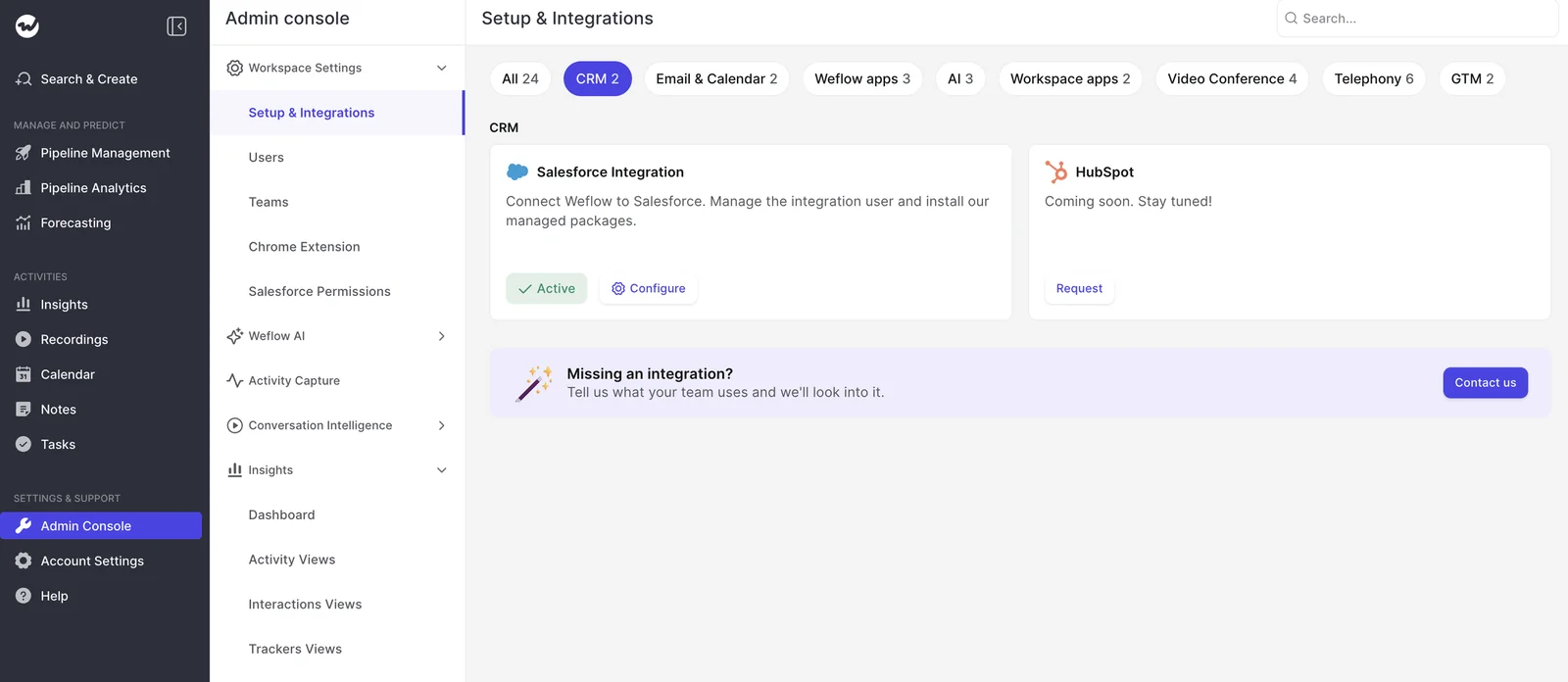
- Weflow works with Salesforce only. HubSpot shows as coming soon with no date, and Microsoft Dynamics, Pipedrive and Zoho aren't supported. If Salesforce isn't your CRM, Gong, which integrates natively with HubSpot and Dynamics 365, is the better fit.
- Weflow has far fewer integrations than Gong and no native warehouse connector, so Gong fits better if you need that breadth.
- Clari's roll-ups across 1,000 or more reps are more mature than Weflow's. If you need them, keep Clari for forecasting with Weflow underneath for capture.
Gong reads four Salesforce objects and keeps the conversation in its own cloud
Gong keeps captured calls in its own Revenue Graph rather than in native Salesforce objects. It reaches Salesforce through imports, field mappings and an object its managed package installs.
What Gong imports from Salesforce and what it writes back
Gong imports 4 Salesforce objects: accounts, contacts, leads and opportunities. Gong can't import custom objects directly, so you spend 2 to 4 hours building roll-up fields or flows onto a supported parent object.
Each route back into Salesforce comes with its own condition:
- The AI Data Extractor writes only into fields that already exist and are already imported into Gong, so you create and import each field first.
- The Task and Event export, once a tech admin turns it on, covers only activity with an external participant matching a Salesforce contact or lead, and email only from the day export starts. Transcripts aren't part of it.
- Gong can write each call's highlights, notes and full transcript onto a custom object its managed package installs.
- Gong doesn't create contacts. You activate its Flow template to create them for call participants.
Gong gets real things right in Salesforce:
- It assigns each task to the rep who owns the activity.
- Its related list opens the recording in 1 click from the opportunity.
- AI Deal Reviewer syncs playbook status both ways.
When the connection between Gong and Salesforce breaks, though, stage updates stop flowing, and pipeline in Salesforce falls behind what reps know about their deals. Chris Nethercote lived with this as a Gong enterprise customer:
That was like just a consistent, I would say like paper cut and annoying thing. And what would end up happening is pipeline wouldn't get updated, you know, fast enough. - Chris Nethercote, Head of Sales at Weflow, former Gong enterprise customer, Weflow
Where Gong reaches further than Weflow: integrations, MCP and Data Cloud
Gong reaches further than Weflow on integration breadth, AI assistant access and warehouse delivery, and each comes at a cost:
- The Gong Collective, Gong's marketplace, lists about 450 integrations and partner solutions across CRM, dialers, conferencing, BI, enrichment, workflow automation and MCP servers.
- Gong imports calls from about 30 dialers and records meetings on Zoom, Google Meet, Microsoft Teams, Webex and 7 other platforms.
- The MCP server gives Claude, ChatGPT and Microsoft Copilot 9 read-only tools, including one call's full transcript per request. Its 4 AI tools spend credits on every request, and connecting needs a paid seat on both sides.
- The API is capped at 3 calls a second and 10,000 a day.
- Gong Data Cloud delivers data to Snowflake, Databricks, BigQuery and Redshift as a separate purchase of about $5,000 a year.
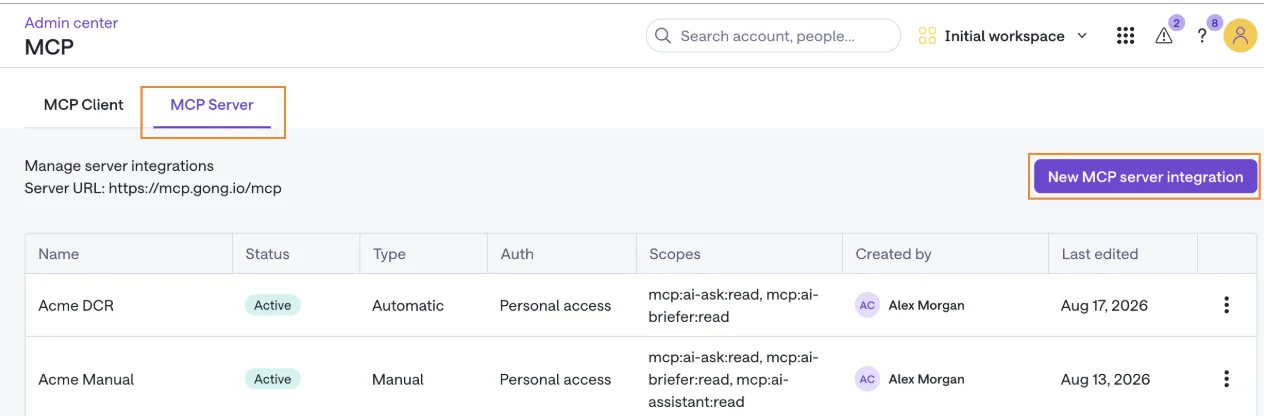
Gong's Admin Center lists each MCP server integration with its registration type, authorization and scopes.
How Gong prices its platform, and which teams it suits
Gong has no public prices. Every figure comes through a custom proposal that starts with a team-size form.
The quote is built from Gong Foundation, the mandatory core licence, plus applications you buy on top, such as Forecast Essentials, Gong Forecast, Gong Engage and Data Cloud. Seats count per application, so a person who needs deal functionality takes a Foundation seat and a Forecast Essentials seat. A platform fee scales with your user count.
AI usage draws on a shared credit pool. Each paid core seat adds 2,000 credits a year, and a call over 10 minutes costs 1 credit, so size the pool against how many of your calls run past 10 minutes.
Gong suits teams that work in Gong and want the deepest conversation analytics. For the capture and conversation layer in Salesforce, Weflow comes in at about half the price.
Clari forecasts on top of Salesloft's polled Salesforce sync
Clari Forecast and Clari Copilot sit on Salesloft's CRM sync, which has handled activity capture for the merged platform since Clari and Salesloft became one company in December 2025.
What Clari and Salesloft sync with Salesforce, and how often
Salesloft polls Salesforce every 1, 5 or 10 minutes, defaulting to 10, through a single connector user. Every poll spends your org's API allowance.
Reads run through the connector user and writes run as the acting user, so Salesforce permissions hold. Salesloft and Clari write to Salesforce under these rules:
- Salesloft writes each activity as a native completed Task or Event on the lead or contact. Its Email Message ID field stops duplicates only among the emails Salesloft itself logged, so it doesn't catch an email another tool already wrote.
- When a contact sits on several opportunities, Salesloft logs to the most recently modified one, unless a rep picks another record.
- Salesloft supports up to 10 Salesforce custom objects per workspace.
- Clari disconnects an integration user that hasn't synced in 30 days, and you reconnect it by hand.
- Clari Copilot pushes each call's summary and next steps with the call metadata to the Salesforce Task, for calls longer than about 5 minutes.
- Clari's Opportunities module writes deal edits back to Salesforce in real time but can't add products, so reps add them in Salesforce.
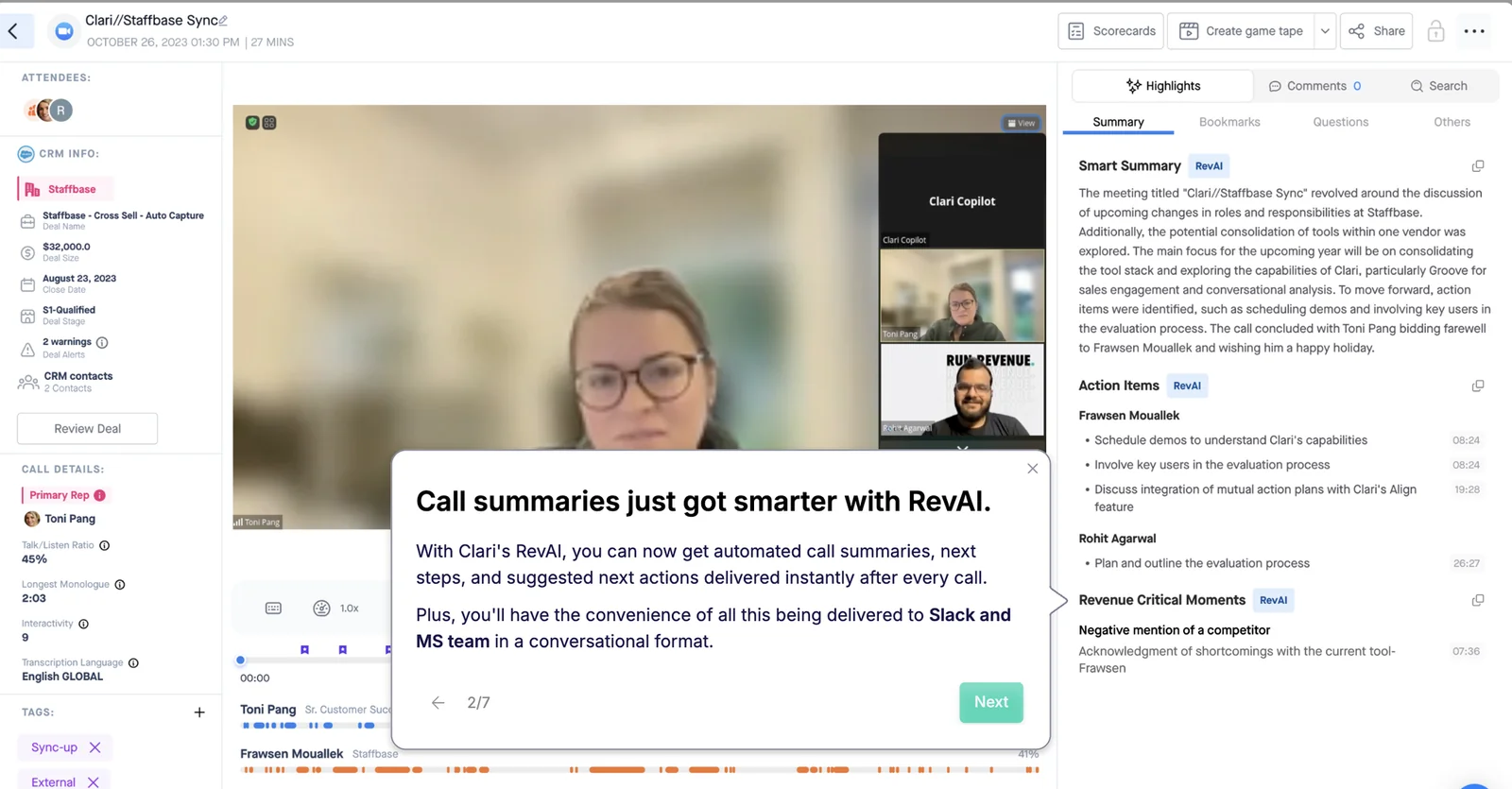
Clari Copilot's call page shows that summary beside action items and critical moments.
Where Clari reaches further: native warehouse sync, with AI access split across three MCP servers
Clari reaches further than Weflow on native warehouse delivery. Your data leaves the merged platform through these routes:
- Salesloft's Unified Revenue Data Layer syncs continuously to Snowflake and Databricks, as well as Salesforce, Dynamics, Gmail, DocuSign, ZoomInfo and LinkedIn.
- Salesloft's public REST API reads and writes people, accounts, opportunities, activities, calls, emails and conversations with their media and transcripts.
- Salesloft Forecast exports the full forecast history as a CSV.
AI assistant access is split across 3 MCP servers, each with its own scope:
- Clari's Forecast MCP server gives Claude and ChatGPT live forecast numbers and historical snapshots, scoped to each user's Clari permissions.
- Clari's Copilot MCP server exposes Copilot tools only, and needs a paid ChatGPT Business or Enterprise plan or a Claude subscription.
- The Salesloft MCP server is read-only and needs the paid Salesloft Agentic add-on. It no longer gives Claude transcripts, only AI summaries, extracted fields and key moments.
How Clari and Salesloft price, and which teams Clari suits
Clari and Salesloft have no public seat prices. Both pricing addresses send you to Salesloft's Talk to Sales page to book a call.
Salesloft sells 2 packages, Advanced and Elite, and both include Conversations, Deals, Cadence, CRM sync and analytics. Elite adds multi-team, sandbox environments and CRM signals for custom objects. Forecasting, AI agents and the dialer are add-ons on either package.
Clari suits revenue leaders who buy roll-up forecasting, board reporting and pipeline inspection alongside Salesloft engagement. Its enterprise roll-ups across 1,000 or more reps are more mature than Weflow's.
What stays in your Salesforce when you leave Gong, Clari or Weflow
What survives the contract is whatever each tool wrote as a Salesforce record, and the 3 differ most on calls and forecasts.
| Data | Weflow | Gong | Clari |
|---|---|---|---|
| Emails and meetings | Stay as native EmailMessage, Task and Event records | Stay where the Task and Event export ran; the rest is deleted with Gong's data | Stay as Salesloft's Task and Event records |
| Call transcripts and summaries | Stay on the Weflow Video Recording object | Stay only if written to Gong's package object | Summaries on the Task stay; each recording is a link back to Clari Copilot |
| AI field values | Stay in your Salesforce fields | Stay in the existing fields Gong wrote to | Stay in the Salesforce fields reps approved |
| Video recordings | Kept by Weflow; export to your own cloud storage through the API | Deleted within 30 days of the contract ending | Stay in Clari Copilot, with no bulk export |
| Forecast notes and pipeline history | Hourly opportunity snapshots stay on Weflow's side | Deleted within 30 days of the contract ending | Forecast call notes stay in Clari; forecast history exports as CSV |
Gong deletes customer data within 30 days of the contract ending, so any conversation that isn't in Salesforce by then is gone. Transcripts that did reach Salesforce sit on Gong's package object. That object stays in your org as a second call object unless you migrate the history and uninstall the package.
Clari offers no bulk export of call recordings, so you download each one by hand or have the new vendor import them. Clari's forecast call notes live in Clari, not Salesforce, so have your RevOps lead export them before the contract ends.
When you cancel Weflow, emails, meetings, contacts and transcripts stay in your Salesforce. Video recordings and the hourly pipeline snapshots stay on Weflow's side, so export the video through the API to your own storage before you go.
If you ever stop using Weflow, the data persists. It is your data. - Janis Zech, Co-founder and CEO, Weflow
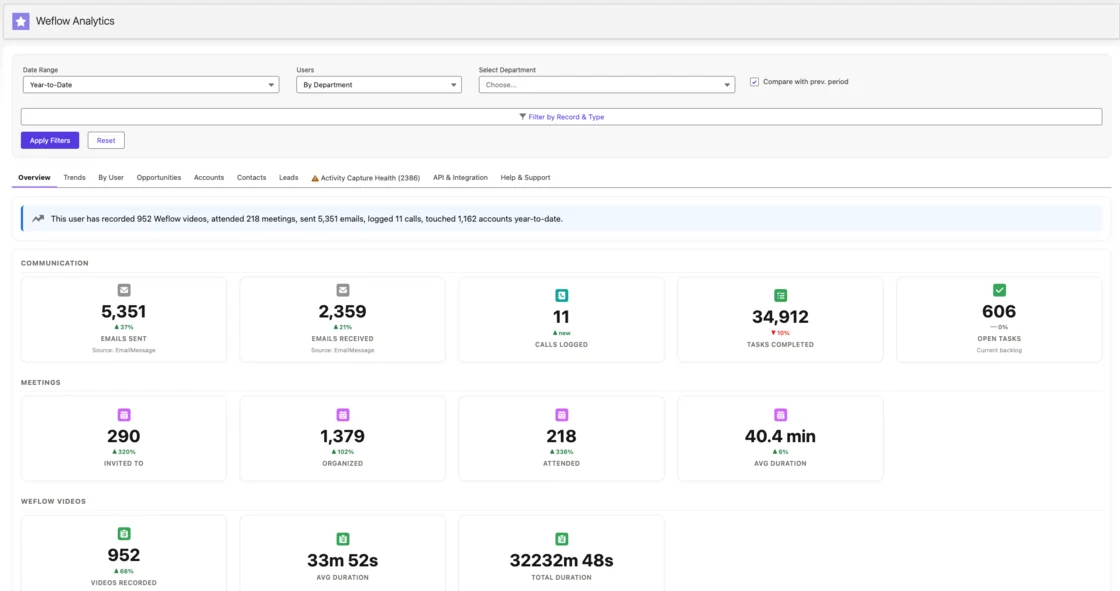
Because the records live in Salesforce, you report on them there: Weflow Analytics runs inside Salesforce itself.
How a move from Gong or Clari to Weflow works
The call history import sets the pace of a move to Weflow, so start it first:
- Start the Gong migration early. Weflow migrates up to 2 years of Gong calls free, and longer as a paid service, keeping each call's Salesforce account link. Gong's API moves one call at a time, at about 2,000 to 2,500 calls a day, so around 30,000 calls take about 15 days. Keep Gong's contract and API access live until it finishes.
- For Clari, set up users in Weflow first, because each imported recording goes to its Weflow user. Name a colleague to receive each departed rep's calls. The Clari import needs your Clari API key and secret, and takes 2 to 3 days once the team has signed in.
- Backfill email history if you need it. Weflow's team syncs historic emails and meetings into Salesforce as a paid add-on, up to 2 to 3 years back, paced to your API allowance.
- Do a parity run before you switch: turn Weflow on unconfigured beside the incumbent and check that nothing gets lost.
- Switch on Compatibility Mode while another tool still logs email, so the same email isn't logged twice. Weflow waits about 10 seconds and skips emails carrying that tool's tracking pattern. Turn it off once the old tool is gone.
Choose Weflow, Gong or Clari by where your data has to live
Pick by where your activity and conversation data has to live, and by what you'd lose when the contract ends:
- Weflow, if you run Salesforce and want emails, meetings, contacts and transcripts as native records you keep after you cancel, at public per-seat prices. On HubSpot or under 10 users, Weflow isn't the pick.
- Gong, if your team works inside Gong, values the deepest conversation analytics, and needs about 450 integrations or Data Cloud. You accept that the conversation lives in Gong's cloud.
- Clari, if you're buying roll-up forecasting and inspection across 1,000 or more reps alongside Salesloft engagement, and polled capture works for you.
- Clari Forecast with Weflow underneath, if leadership is committed to Clari's roll-ups. Clari reads activities from Salesforce, so Weflow captures and Clari forecasts from cleaner data. Run only one capture engine, because two engines duplicate activities.
FAQs Sales Ops asks about Gong, Clari and Weflow in Salesforce
Can Weflow run beside Gong or Clari without duplicate activities?
Yes, as long as only one tool captures activity. Clari reads activities from Salesforce, so Weflow can capture while Clari forecasts. Two capture engines writing the same meeting create 2 records and inflate meeting counts. While another tool still logs email, Weflow's Compatibility Mode skips the emails carrying that tool's tracking pattern.
Does Weflow work with HubSpot?
No. Weflow works with Salesforce only. On Weflow's Setup & Integrations page, HubSpot shows as coming soon with a Request button and no date, and Microsoft Dynamics, Pipedrive and Zoho aren't supported. Gong integrates natively with HubSpot and Dynamics 365, so it fits better when Salesforce isn't your CRM.
What happens when the org reaches its Salesforce API limit?
Weflow works inside your org's Salesforce API allowance, so at the daily limit it pauses everything that needs Salesforce until the limit resets. Weflow still records and transcribes meetings, but it doesn't log activities, and AI Field Updates wait. Salesloft's sync spends the same allowance, and any tool consuming it has the same effect.
Does Clari Capture still exist?
No. Clari Capture is no longer sold as a product: it's part of Salesloft Deals, and activity capture in the merged company is Salesloft's CRM sync. Clari's name stays on Clari Forecast and Clari Copilot, and since September 2026 the company operates under the single Salesloft brand.
Does Gong create contacts in Salesforce?
Not on its own. When Gong finds a new person, it logs their email in Gong only. Gong for Salesforce ships an inactive Flow template that you can activate to create a contact, or a lead when no account is found, for call participants who aren't in Salesforce yet.
What does Weflow need in Salesforce to get set up?
Weflow installs as 2 Salesforce managed packages plus an integration user with a dedicated least-privilege permission set. You install a mail app centrally in the Microsoft or Google admin console, with no code deployment. Weflow needs Enterprise Edition or higher, or Professional Edition with API access, and never asks for Modify All Data.