Fireflies AI Credits Explained: Which Features Use Credits and What Happens When They Run Out (2026)
Which Fireflies features use AI credits, and what happens when the pool runs out and auto-upgrade kicks in.


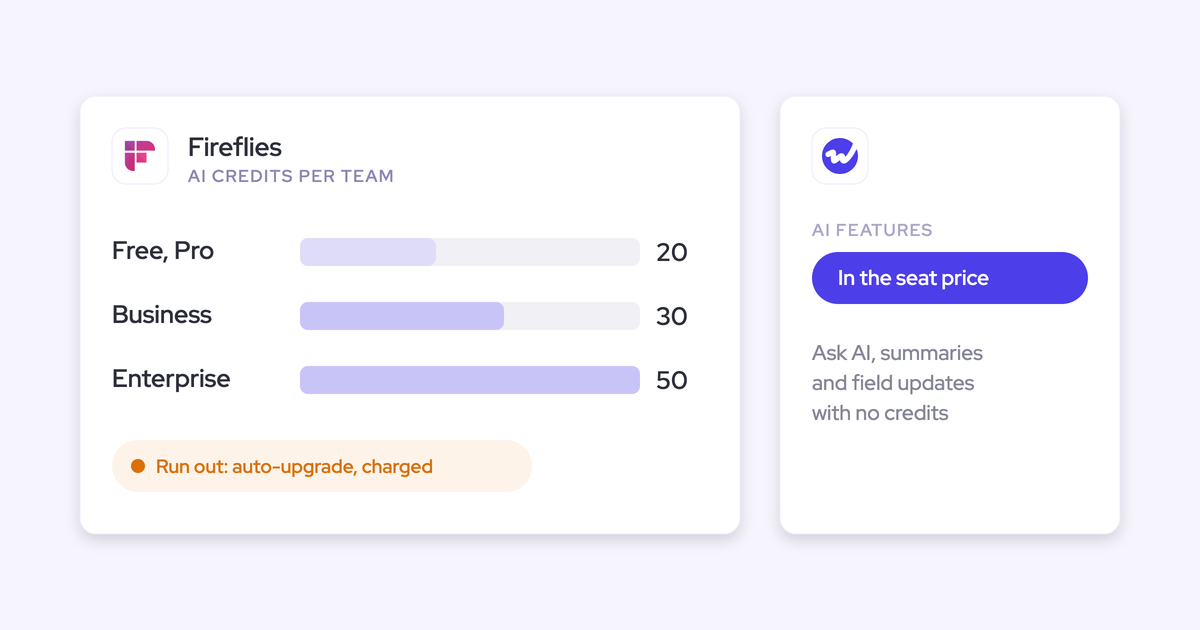

Fireflies charges for its AI features in AI credits on top of the seat price, and keeps transcription and standard summaries outside credits. Each plan gets a small one-time pool of 20 to 50 AI credits, shared by your whole team.
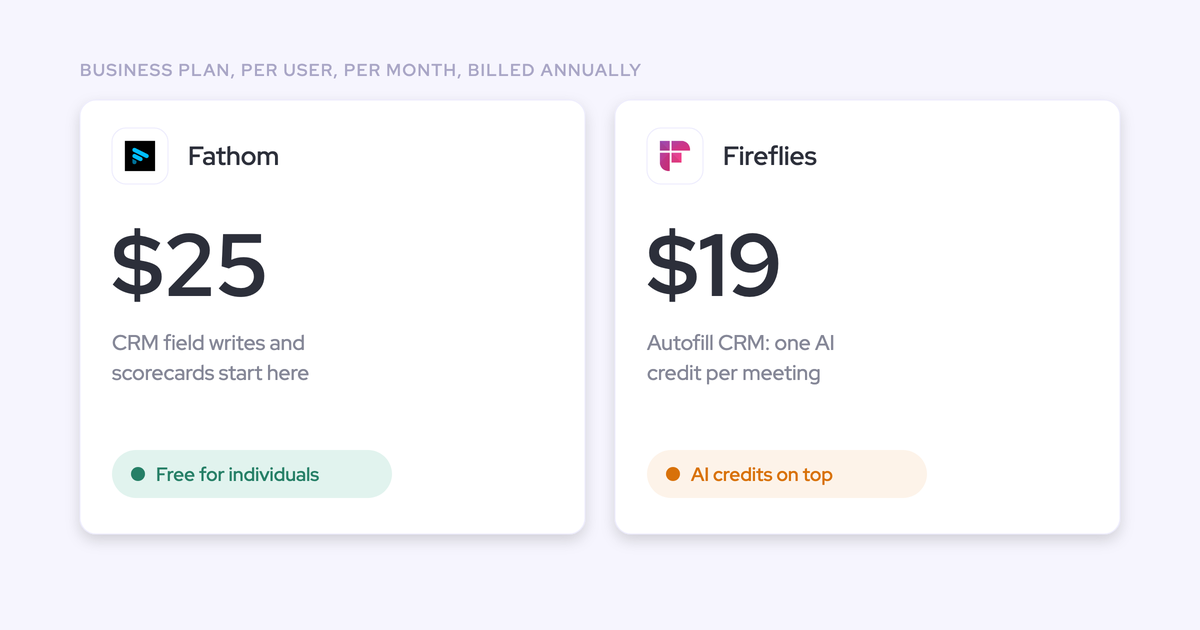
The Autofill CRM, the feature a Salesforce team buys the Fireflies Business plan for, uses 1 credit per meeting.
When your paid team empties that pool, Fireflies subscribes you to the 50-credit package at $5 a month, or moves your existing credit subscription up to the next package. It charges for it automatically unless you've switched auto-upgrade off. Free users hit a paywall instead.
Once your reps use the AI, you pay more than the seat price you approved, and that second number is why sales teams compare Fireflies with Weflow.
Weflow is the Revenue AI Orchestration platform for sales, customer success, and RevOps teams. Built for Salesforce teams, Weflow Conversation Intelligence puts AI Field Updates, Ask Weflow AI and summaries in the seat. It meters only agents, which pause instead of upgrading.
Fireflies and Weflow side by side: AI credits, CRM field updates, Ask AI and summaries
Fireflies charges for AI usage in credits on top of the seat, while Weflow includes AI in the seat and meters only its Agent Builder.
| Fireflies | Weflow | |
|---|---|---|
| Seat price | Free, Pro $10, Business $19, Enterprise $39 per seat per month, billed annually | Weflow Conversation Intelligence $39 per user per month, billed annually, 10-user minimum |
| How AI usage is charged | AI credits on top of the seat, from a one-time pool of 20 to 50 credits per team | AI features included in the seat; Separate Agent Builder is the one metered product, per workspace |
| What happens when AI usage runs out | Paid team subscribed or moved up a credit package and charged, unless auto-upgrade is off | Summaries, meeting prep, AI fields are not metered; |
| CRM field updates from calls | Autofill CRM at 1 credit per meeting, sent by a rep, Contact, Account and Opportunity fields only | AI Field Updates to every field type except lookups, automatic or reviewed per field, no per-call charge |
| Ask-anything AI chat | AskFred across meetings, connected apps and the web, credits per question | Ask Weflow AI across Salesforce, emails, meetings and transcripts, not metered |
| AI meeting summaries | 18+ templates, standard summary outside credits, 1 credit per added section per meeting | As many templates as the team wants, written to the Salesforce Event within about a minute |
| Best for | Cross-functional or HubSpot teams wanting a low-cost notetaker with light AI use | Salesforce sales teams of 10 or more wanting call data in fields and AI for every rep without a meter |
On Fireflies, you pay a $19 Business seat and share a one-time 30-credit Business pool that turns into a paid package when it empties. Autofill CRM values reach Salesforce only after a rep sends them.
On Weflow, you pay a $39 seat with AI Field Updates and Ask Weflow AI included. You need Salesforce as your CRM and a 10-user minimum.
How Fireflies AI credits work
Fireflies AI credits are a team balance that pays for most of Fireflies' AI features, on top of the seat price. Most features charge per query by complexity, so you don't know what a question costs until someone asks it.
Which Fireflies features use AI credits, and which are free
Fireflies charges AI credits for nearly every AI feature beyond the notetaker itself, and keeps transcription and standard summaries outside credits. These features use credits:
- AI Skills, the prompt templates that run after each meeting or on a schedule.
- Meeting Prep and Daily Digest, both on by default.
- Automatic soundbites.
- Custom summary sections, at 1 credit per section per meeting.
- Voice Agents and Sales Assist.
- The Slack Assistant, on each query.
- Autofill CRM, at 1 credit per meeting extraction.
- AskFred questions.
The notetaker core costs you only the seat. What your sales team pays credits for is the work after the call: the CRM update, the question about the deal, the brief before the next meeting.
How big each Fireflies plan's credit pool is
Each Fireflies plan comes with a one-time pool of 20, 30 or 50 AI credits for the whole team, not for each seat.
| Fireflies plan | Seat price, billed annually | One-time AI credits for the team |
|---|---|---|
| Free | Free | 20 |
| Pro | $10 per seat per month | 20 |
| Business | $19 per seat per month | 30 |
| Enterprise | $39 per seat per month | 50 |
The Fireflies pool doesn't grow when you add seats, so a Business team of any size shares the same 30 credits. Every rep you roll Fireflies out to draws on that one balance.
Upgrading your plan replaces the pool rather than adding to it. These sign-up credits don't expire.
What extra Fireflies credit packages cost
Extra Fireflies AI credits come as a monthly add-on package, from $5 for 50 credits up to $600 for 10,000, and annual packages cost 20% less than monthly ones.
Fireflies also offers a 7-day AI credits trial with every AI feature. When a user creates a first Voice Agent, Fireflies adds 100 bonus credits to the team's shared pool, valid for 14 days and granted once per user.
When you budget, you can fix the price of a package in advance, but not how many answers it buys. Because most Fireflies features cost per query by complexity, the same 50 credits go further or run out sooner depending on what your team asks.
What happens when your Fireflies team runs out of AI credits
When your paid Fireflies team runs out of AI credits before the cycle ends, Fireflies buys more on your behalf and charges you for them, unless you've switched auto-upgrade off.
Fireflies subscribes or upgrades paid teams to a bigger package automatically
If your paid team has no AI credits subscription, Fireflies subscribes it automatically to the 50-credit package at $5 a month once the plan credits run out. A banner on the dashboard announces it.
If you already subscribe, Fireflies moves you up to the next higher package instead. On an annual credit plan, Fireflies prorates the extra charge over the cycle.
Auto-upgrade is what turns a one-time pool into a recurring charge that climbs with adoption. Whoever owns the Fireflies bill can pause it or switch it off under Settings, Billing. We recommend checking that setting before rollout rather than after the first invoice, because with it on, Fireflies buys the next package before anyone on your team decides to.
Free users hit a paywall instead of a charge
Free Fireflies users who run out of AI credits hit a paywall and aren't charged automatically. Only paid teams get the automatic subscription and upgrade, and that includes every team running Autofill CRM, because Autofill needs Business or Enterprise.
Purchased credits expire at the end of each cycle
Purchased Fireflies AI credits that go unused lapse at the end of each billing cycle and don't carry over to the next. If you cancel your credit subscription, you keep its credits until the cycle ends.
You can't build a reserve by buying a bigger package ahead of usage, because whatever your team doesn't spend this cycle is gone. Only the plan's original sign-up credits carry from one cycle to the next, so size a package to what your team uses in one cycle.
What a Fireflies sales team spends credits on after every call
A Fireflies sales team spends AI credits after almost every external call, on these features:
- Autofill CRM.
- AskFred and Slack Assistant questions.
- Custom summary sections.
- Meeting Prep and Daily Digest, which run without anyone choosing them.
Autofill CRM costs 1 credit per meeting, whatever the number of fields
Fireflies Autofill CRM, on the Business or Enterprise plan only, uses 1 AI credit each time it extracts a meeting's values, however many fields you map. Reviewing, editing and sending those values to Salesforce costs no further credits.
Autofill CRM runs on external meetings by default. To narrow it by meeting title, host, participants or duration, you need the Enterprise rules engine, so on Business you can't keep Autofill off the external calls that don't need it.
On Business, the pool holds 30 AI credits for the whole team, once. Each Autofill extraction uses 1, so the pool covers 30 extractions across every rep combined.
The next extraction starts a paid package unless auto-upgrade is off. Anything else that spends credits first, such as a default Meeting Prep brief, brings that point closer.
Every AskFred question draws on the shared pool
Every Fireflies AskFred question uses AI credits from the same team pool. So does each query to the Fireflies Slack Assistant, which every workspace member with a Fireflies account can use once anyone connects Slack, so connecting Slack widens who can spend your pool.
Both are priced per query by complexity, like most Fireflies features. We hear on sales calls where that leads: once every question draws down a shared balance, someone has to decide who's allowed to ask. Access shrinks to a trusted few, and the tool never gets the usage that would prove its value.
Standard summaries are free, custom summary sections cost a credit each
Fireflies' standard meeting summary sits outside AI credits, but each section you add to a summary template costs 1 AI credit per meeting. Switching templates regenerates the summary without using credits.
If you add a section for your qualification methodology, every meeting carries a second per-meeting charge on top of Autofill CRM's, drawn from the same pool.
Meeting Prep and Daily Digest spend credits before anyone switches AI on
Fireflies Meeting Prep and Daily Digest draw on the AI credit pool and are on by default, so your team spends credits before anyone chooses an AI feature. Meeting Prep emails a brief about 3 hours before each eligible meeting and costs AI credits per brief at a variable rate.
A meeting is eligible when it's on a connected calendar, has at least 1 other attendee and lasts 5 minutes or more. Internal meetings count too, so your team's internal syncs get briefs and spend credits as well.
A workspace admin can switch Meeting Prep off for everyone or let each teammate choose. We recommend deciding before rollout if Autofill CRM is what you want the pool to pay for, because every brief draws on the same credits.
Fireflies for a Salesforce sales team: where it fits and where it stops
Fireflies is a capable, low-cost notetaker for teams that work across functions. It stops short for a Salesforce sales team that needs call data in fields without a rep sending every meeting.
What Fireflies does well
Fireflies does well on price, summaries, field mapping, search across apps and CRM choice:
- Seat prices stay low, and transcription and standard summaries sit outside AI credits, so a team that only needs the notetaker pays the seat and little else.
- A summary arrives after every meeting from 18+ templates such as BANT, Sales Call and Team Meeting, and users build custom templates from their own instructions or sample notes.
- Autofill CRM writes into standard and custom Contact, Account and Opportunity fields, with a prompt per field and a choice of append or overwrite, so a field can keep a running record across calls.
- AskFred answers across past meetings, connected apps such as Gmail, Slack, HubSpot and Google Drive, and the web, with the model chosen from Anthropic, OpenAI or Google. That reach into other systems goes further than Ask Weflow AI, which stays with Salesforce, captured emails and meetings, and the public web.
- Fireflies works with both HubSpot and Salesforce, and Autofill CRM is available for each.
Where Fireflies stops for a Salesforce sales team
For a Salesforce sales team, Fireflies stops short on field updates, objects, sync, access and forecasting:
- Autofill CRM never writes to Salesforce on its own. A rep opens each meeting in Fireflies, reviews the values, picks the opportunities and clicks Autofill, and a meeting nobody reviews leaves Salesforce unchanged.
- Autofill CRM reaches only Contact, Account and Opportunity fields, and Fireflies has no option to log meetings to custom objects.
- The automatic Salesforce sync writes each meeting as a summary note in Notes & Attachments rather than into fields, so your reports and deal scoring can't read it field by field.
- Deal Intelligence is visible to every workspace member by default once a CRM is connected. Admins restrict it by hand with Manage Access, because nothing maps Fireflies access to Salesforce record permissions.
- Fireflies has no forecasting: no forecast submissions or roll-ups, no forecast categories and no stage conversion views.
Which teams Fireflies fits best
Fireflies fits these teams best:
- Teams that want one notetaker across functions, with sales sitting beside recruiting, product research or finance.
- HubSpot teams, since Fireflies' CRM features work there as well as on Salesforce.
- Teams with light AI use, where transcripts and standard summaries cover most of the need and the credit pool rarely runs dry.
- Teams of fewer than 10 users, below the minimum Weflow sells.
How Weflow Conversation Intelligence includes AI Field Updates, Ask Weflow AI and summaries in the seat
Weflow prices everything per seat except Agent Builder, so AI Field Updates, Ask Weflow AI and AI summaries come with the Weflow Conversation Intelligence seat and carry no credits.
What the Weflow seat includes with no credits
The Weflow seat includes the AI a sales team runs after every call, with no pool to draw down:
- Weflow AI Field Updates write values from each call into every Salesforce field type except relationship lookups, including picklist, number, date and multi-select fields. They work on standard objects and on custom objects that Weflow support sets up. You set each field to write automatically or wait for review, and no call carries a per-meeting charge.
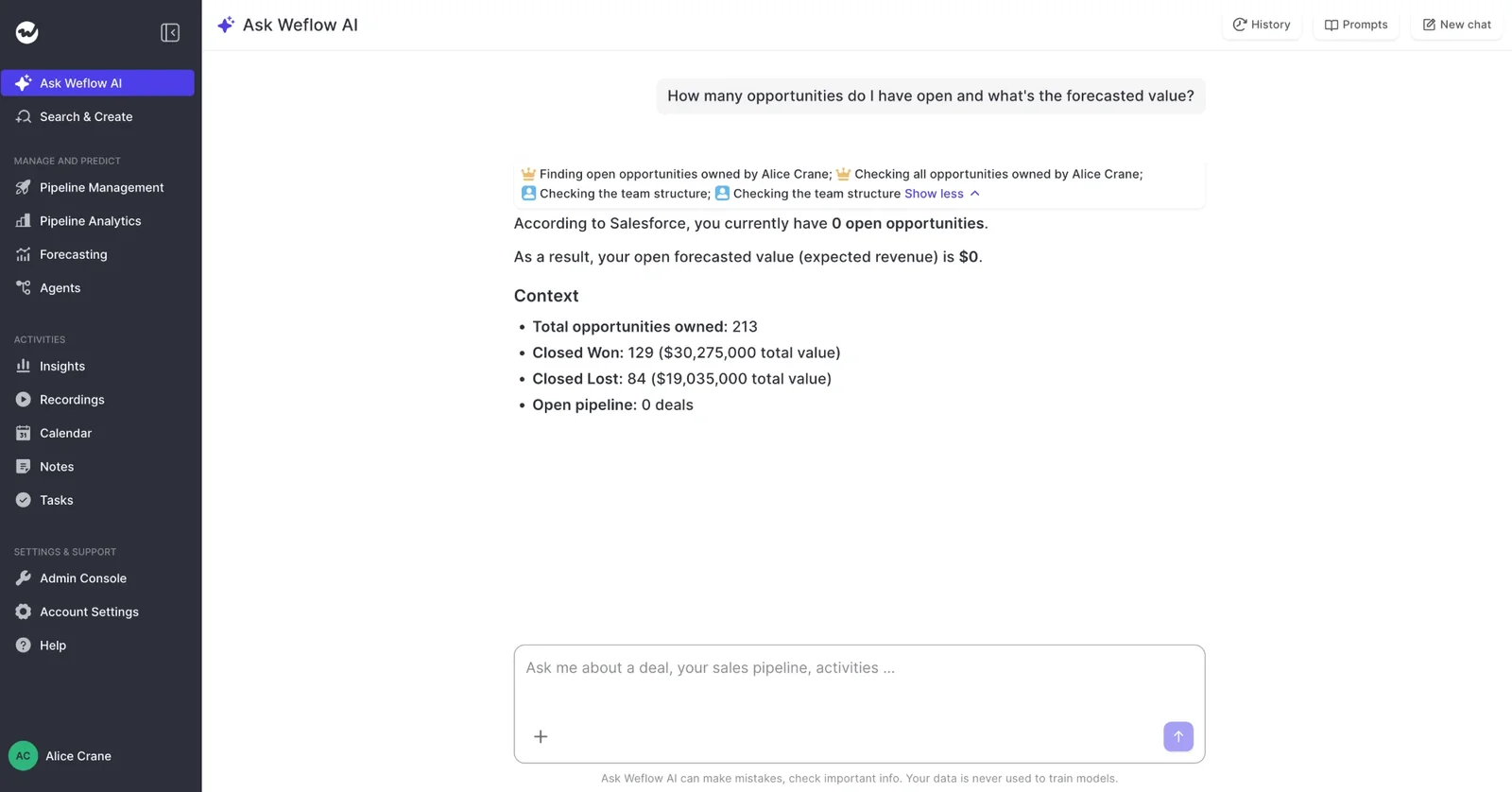
- Ask Weflow AI answers plain-language questions across Salesforce records, captured emails, meetings and call transcripts. It inherits Salesforce permissions and adds its own guardrails on top. It isn't metered or priced separately: usage sits under a fair use policy no customer has reached, and Weflow splits a question too large for one model's context window across several agents, up to roughly 20 million tokens.
- Weflow AI summaries arrive within 30 to 60 seconds of a meeting ending, from as many templates as the team wants. Weflow writes each summary onto the Salesforce Event with a link to the recording.
- Weflow meeting prep, follow-up emails and coaching scorecards come with the seat too and draw on no allowance.
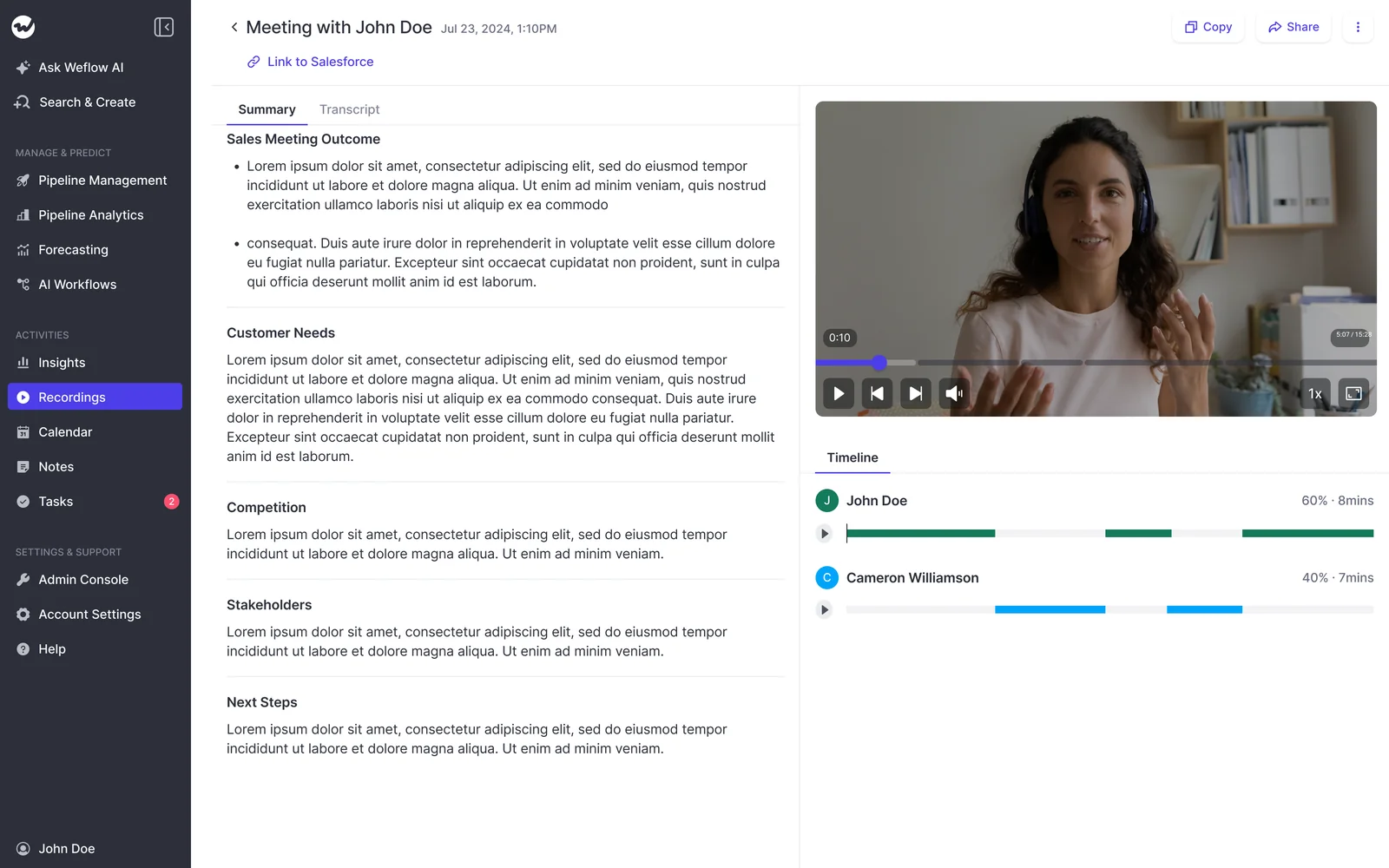
As a RevOps leader with nothing to draw down, you don't have to decide which reps are trusted with Ask Weflow AI, so every rep can ask. Fields set to write automatically fill in whether or not a rep opens the call afterwards.
Agent Builder is the one thing Weflow meters, and it pauses instead of upgrading
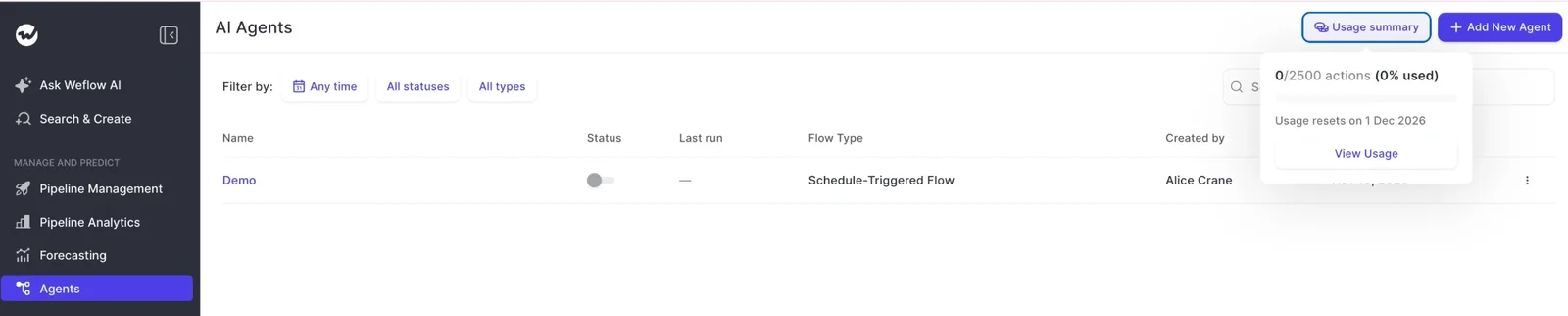
Agent Builder is Weflow's only consumption-priced product, metered per workspace in agent actions. When a workspace has used its actions for the month, Weflow stops its agents until actions are available again. Weflow never bills overage or moves the workspace to a larger tier by itself, which is the opposite of Fireflies' auto-upgrade.
Weflow measures an agent action from the tokens a run consumes, at roughly 1 million tokens per action, and every run uses at least 1. A simple scheduled agent typically uses 1 action per run, and one reasoning across many transcripts and activities up to about 5. Test runs use no actions, so you can build and test an agent without spending the allowance.
| Agent Builder tier | Actions per month | Price per workspace |
|---|---|---|
| Free | 25 | Included in every Weflow plan |
| Growth | 500 | $299 per month |
| Scale | 2,500 | $999 per month |
| Enterprise | Custom volume | Custom package |
The Agent Usage page shows the actions your workspace has used against its plan, a breakdown by workflow and the date usage resets. You see the limit coming and decide whether to buy more before agents pause.
We meter only Agent Builder because it is the one product that consumes tokens at scale. That keeps the variable cost in one place, so the seat price finance approved stays the price of the AI every rep uses each day.
Predictable pricing is very hard to achieve in the age of AI. - Philipp Stelzer, Co-founder and Chief Product Officer, Weflow
What Weflow costs and where it stops
Weflow Conversation Intelligence costs $39 per user per month, billed annually, and every Weflow price is public, not hidden behind a demo call.
The Revenue AI Foundation bundle pairs Weflow Activity & Contact Capture with Weflow Conversation Intelligence at $49 per user per month, and the Revenue AI Business and Revenue AI Enterprise bundles cost $59 and $79.
Every product and bundle needs at least 10 users and runs on a standard 12-month term, and all of them include Ask Weflow AI and the Agent Builder Free tier.
Weflow isn't the right fit for every team. These are its limits:
- Weflow works only with Salesforce, so a team on HubSpot or another CRM can't run it.
- Weflow needs at least 10 users per product or bundle, so it isn't an option for a smaller team.
- Ask Weflow AI reads Salesforce records, captured emails and meetings, and the public web, and doesn't reach a company's other knowledge systems, such as process documentation, product guides or a ticketing system.
- A Weflow Conversation Intelligence seat at $39 costs more than a Fireflies Business seat at $19, but it includes more value.
When to stay on Fireflies and when to move to Weflow
Stay on Fireflies when your team is small, mixed or on HubSpot and uses little AI. Move to Weflow when a Salesforce sales team needs call data in fields and AI for every rep without a credit pool.
Choose Fireflies if:
- Your team uses Fireflies mostly for transcripts and standard summaries, which sit outside AI credits, so the seat is close to the whole bill.
- Your team runs on HubSpot or has fewer than 10 users, which puts it outside what Weflow serves.
- Your notetaker serves recruiting, product or finance as much as sales, and AskFred's reach into Gmail, Slack and Google Drive matters more to you than Salesforce fields.
Choose Weflow if:
- Your sales team runs on Salesforce with 10 or more users and needs call values in opportunity fields, picklists and custom objects included, without a rep sending each meeting.
- Your Fireflies credit pool has already turned into an auto-upgraded package, and you'd rather have AI Field Updates, Ask Weflow AI and summaries inside a $39 seat.
- Your finance team needs a predictable line: a seat price plus one agent meter that pauses at zero instead of charging overage.
See how Weflow captures activity, updates Salesforce fields from calls, and rolls up your forecast. Book a 30-minute demo.
How to move from Fireflies to Weflow without losing your call history
You can move from Fireflies to Weflow in one of two ways: import your Fireflies recordings into Weflow, or run Weflow alongside Fireflies first and let the overlap settle the decision.
The import route brings your call history across. Weflow imports recordings from most conversation intelligence tools, either through the vendor's API, re-linking them to Salesforce records, or from files exported out of the tool.
Fireflies has a public API for transcripts and summaries. Run the import route in this order:
- Have each licensed user sign in to Weflow, because the Weflow notetaker starts joining a user's meetings only after their first sign-in.
- Import the Fireflies recordings through the API or from exported files, so the transcripts land on the right Salesforce records.
- Set your trackers up again in Weflow, because a recording migration brings over calls, transcripts and metadata but not the previous tool's trackers.
- Set each AI Field Update to write automatically or wait for review, field by field, starting with the fields Autofill CRM used to fill.
- Check Fireflies auto-upgrade under Settings, Billing while both tools run, so the overlap doesn't buy a bigger credit package.
The side-by-side route keeps Fireflies running and adds Weflow next to it. Ask Weflow AI and AI Playbooks read the transcripts and summaries another recorder writes into Salesforce, like any other Salesforce data.
So once Fireflies syncs its summary notes and, on Pro or above, full transcripts into Salesforce, Weflow works on top of that history. AI Field Updates and follow-up emails run only on Weflow's own recordings, so they start with the first call Weflow records.
FAQs about Fireflies AI credits
Does the Fireflies AI credit pool grow when you add seats?
No. Each Fireflies plan's pool of 20, 30 or 50 AI credits is a one-time allowance shared by the whole team, and it stays the same size however many seats you add. Upgrading the plan replaces the pool rather than adding to it.
Do unused Fireflies AI credits roll over?
Purchased Fireflies AI credits don't roll over: unused ones lapse at the end of each billing cycle. The plan's sign-up credits don't expire, and if you cancel a credit subscription, you keep its credits until the cycle ends.
How do you turn off Fireflies auto-upgrade?
You pause or switch off Fireflies auto-upgrade under Settings, Billing. With it on, Fireflies subscribes a paid team that runs out of AI credits to the $5 package for 50 credits, or moves it up to the next package, and charges automatically.
Does Fireflies transcription use AI credits?
No. Fireflies doesn't charge AI credits for transcription and standard summaries. It does charge them for custom summary sections, Autofill CRM, AskFred, Meeting Prep and the other AI features.
Do Weflow AI Field Updates cost anything per call?
No. Weflow AI Field Updates are included in the seat, carry no per-meeting charge and don't draw on the Agent Builder allowance, which is the only metered part of Weflow.
Does Weflow work with HubSpot?
No. Weflow supports Salesforce as its only CRM, so it doesn't support HubSpot, Microsoft Dynamics, Pipedrive or Zoho.