Weflow vs Avoma: Creating Salesforce Contacts From Meeting Attendees and Email (2026)
Learn whether Weflow or Avoma gives tighter Salesforce contact controls from meetings and email.


If Weflow and Avoma are both on your shortlist, their feature lists probably look about the same.
So the real question is a mechanical one: when a new person shows up on an email thread or a meeting invite, does a Salesforce contact get created, and what keeps the wrong ones out?
Both tools create contacts. Where they differ is in what each one tells you about when creation stops:
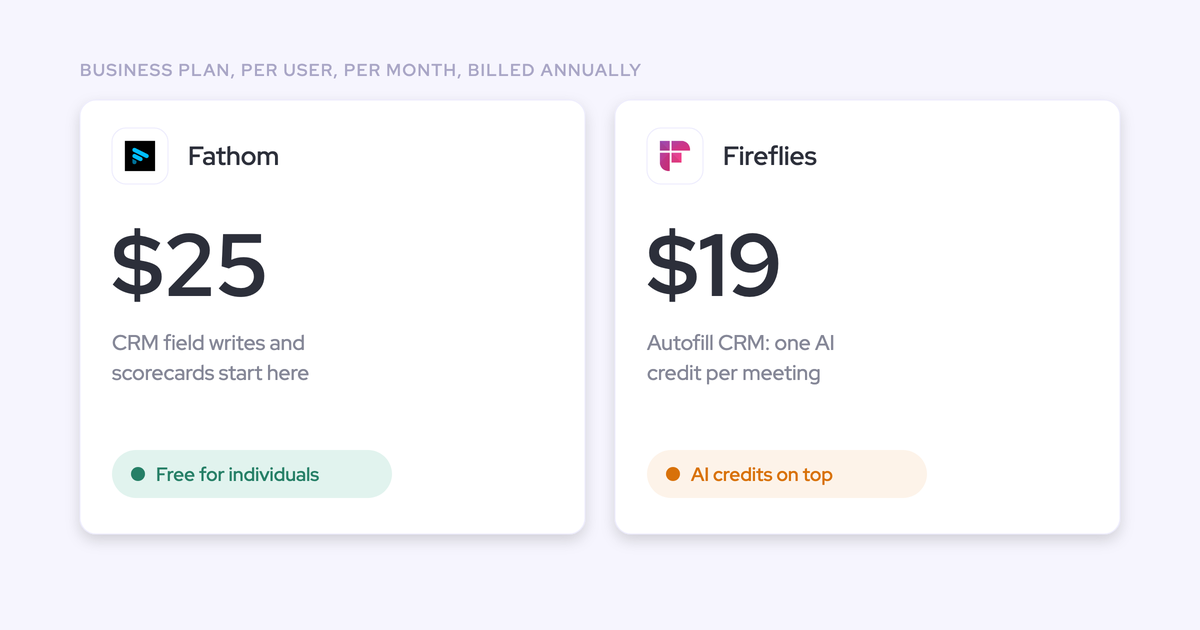
- Weflow: Weflow Activity & Contact Capture creates contacts only, never leads or accounts, and follows rules you set: existing accounts only, a cap per event, blocked prefixes, a duplicate lookup before every create, and optional opportunity contact roles. It costs $19 per user per month. Weflow is the Revenue AI Orchestration platform for sales, customer success, and RevOps teams.
- Avoma: Avoma creates contacts for external meeting participants under admin rules. From synced email, it creates a contact, or a lead when no Salesforce account shares the domain. Email sync needs Avoma's Revenue Intelligence add-on at $29 per seat on top of the base plan. Avoma's contact-creation pages don't describe qualifying rules for email-derived contacts or contact roles.
Below, we walk through the six decisions every contact-creation feature makes, and we're as upfront about our own gaps as we are about Avoma's.
Then we cover integrations, AI-assistant access, raw data, and pricing, and finish with a sandbox test you can run on both tools before you sign.
Weflow vs Avoma side by side, from contacts to pricing
In short, Weflow documents more governance around contact creation, while Avoma connects to more tools. On Avoma, API and MCP access also depend on your plan.
| Capability | Weflow | Avoma |
|---|---|---|
| Automatic contact creation | Contacts only. Created from To and CC recipients when the rep sends, and from calendar attendees. Controls: existing accounts only, a per-event cap, blocked prefixes, a duplicate lookup before every create, and optional contact roles. Never creates leads. | Contacts for external meeting participants, under admin rules (team scope, public-domain skip). From synced email: a contact, or a Salesforce lead when no account shares the domain. The email path needs the Revenue Intelligence add-on. |
| Integrations with other tools | Salesforce only. Native Gmail, Google Calendar, Outlook, Zoom, Teams, Meet, Slack, and the Outreach dialer. Support activates Aircall, CloudTalk, Dialpad, and Zoom Phone. No native warehouse connector; data moves out through the API. | 26 native integrations: 8 conferencing tools, 6 CRMs, 9 dialers and engagement tools, plus Slack, Microsoft Teams chat, and ClickUp. Also connects to Zapier. |
| Access from AI assistants (MCP) | Official read-only connector covering playbooks, summaries, transcripts, and forecast data. An admin turns it on per workspace, with a separate transcript toggle. Created contacts are ordinary Salesforce Contacts, readable through Salesforce's own MCP connector. | Reads meetings, transcripts, notes, scorecards, and usage metrics. Writes meeting outcome, purpose, and privacy. Needs the Organization or Enterprise plan, or the API Access add-on. |
| Raw data access outside the tool | REST API in every plan, with bulk JSON or CSV export. Contacts and transcripts live as Salesforce records you own. | REST API and webhooks on the Organization plan and above, limited to 60 requests a minute. No managed warehouse export described. |
| Pricing | Public. Activity & Contact Capture is $19 per user per month, or $49 bundled with Conversation Intelligence. Billed annually, 10-user minimum. | Public. Base seats run $19 to $39, and Revenue Intelligence adds $29. Startup plus Revenue Intelligence is $48; Organization plus Revenue Intelligence is $58. |
The decision gets made in the first row. The other four rows decide whether the winner of row one fits the rest of your stack and budget.
Why the Weflow vs Avoma decision comes down to contacts
On the recording screen, Weflow and Avoma look alike: both record calls, summarize them, and sync to Salesforce. The difference shows up when you ask what happens to the people on the call.
Avoma started with the meeting. Recording and summaries came first, and CRM depth followed, so contact creation comes as a by-product of meeting and email sync. The email path sits behind an add-on, and the documentation mostly covers what triggers it.
We built Weflow the other way around, starting from capture. Contact creation runs in the same engine that decides which account and opportunity each email belongs to.
Once a new contact is added to the opportunity as a contact role, their next email lands on the right deal, so mapping gets more accurate the longer Weflow runs.
This matters because reps rarely add new participants by hand. Without automatic capture, your CRM shows one champion on a deal with five people on the thread. And if you've been burned before, you know the flip side too. As one admin told us:
I don't want twenty new contacts in there for some prospect I'm just talking to. Only once they're really an account.
Both concerns are fair. Here's how each tool handles them.
What stops Weflow and Avoma creating the wrong Salesforce contacts
Contact creation isn't a single checkbox. It's a set of policy decisions. Weflow documents each one and gives you a setting for it, while Avoma documents some of them. Here's the full picture before we go through them one by one.
| Decision | Weflow | Avoma |
|---|---|---|
| 1. Who qualifies | To and CC recipients when the rep sends, plus calendar attendees. Per-event cap, blocked prefixes, a per-email override, and separate switches for background and rep creation. | External meeting participants, under team rules with an optional public-domain skip. Addresses from synced email. Not documented on Avoma's pages: qualifying rules for email-derived contacts. |
| 2. Which account | The matched account already on the thread, matched on the account's Website field. | A contact when an account shares the email's domain. |
| 3. No matching account | No contact and no lead. With existing accounts only on, the skip is silent. | A Salesforce lead from synced email. |
| 4. Duplicate check | Real-time lookup across contacts, leads, and custom objects with an email field, including secondary email fields. If the person exists as a lead, the activity attaches to that lead. | Meeting creation covers participants not already in Salesforce. Avoma's own troubleshooting attributes duplicate contacts to its rules and to existing leads. |
| 5. Opportunity contact roles | Optional. You set the default role. Weflow never sets primary and never recreates a role a user removed. | Not documented on Avoma's contact-creation pages. |
| 6. Incomplete records | Name comes from the email or invite. Enrichment runs before the write. A required field enrichment can't fill stops that contact from saving. | Not described on Avoma's contact-creation pages. |
Which email and meeting participants qualify for a new contact
Weflow creates contacts from the To and CC recipients on an email the rep sends, and from attendees on the rep's calendar event. It doesn't create contacts when an email arrives or from BCC, so a thread the rep never answers produces no contacts at all.
That send trigger is your first filter. A cold recruiter who emails your AE never becomes a contact unless your AE writes back. The controls below narrow things down further.
| Control | Weflow | Avoma |
|---|---|---|
| What triggers creation | A rep sending to To and CC recipients; attendees on the rep's calendar event | External meeting participants not already in Salesforce; addresses in synced email |
| Scope by team | Separate activity capture configurations per group of users | Rules can limit creation to certain teams, such as Sales or Customer Success |
| Free-mail domains | Kept out by existing accounts only, unless a free-mail domain sits in an account's Website field | A setting skips public domains such as Gmail and Yahoo |
| Webinars and large invites | A per-event cap. Above it, Weflow skips creation and still links the activity to the account or opportunity | Not documented |
| System and vendor addresses | Blocked prefixes such as invoice, billing, no-reply, and support, plus an address block list | Not documented |
| Per-email override | The rep clears the tick in the Outlook add-in or Gmail extension before sending | Not documented |
| Background vs rep creation | Two separate switches, so you can allow one and block the other | Not documented |
| Admin review before creation | None | Not documented |

We don't think you should have to maintain an excluded-domain list to keep vendors and candidates out. Nobody can predict every domain in advance.
The existing-accounts rule does that work for you: a person only becomes a contact if their domain already belongs to an account in Salesforce.
The block list is just for the handful of known addresses you never want logged, and it skips the whole email or meeting.
That said, Avoma's public-domain toggle is a real convenience, and Weflow has no single switch for it.
There are also two Weflow gaps worth knowing about:
- Forwarded invites: People who join through an invite the buyer forwarded internally never appear on the seller's calendar event. Weflow doesn't create them until they reply to, or get added to, an email thread with the seller.
- No review queue: There's no queue where an admin approves new contacts before Weflow writes them. The decision point is the rep, per message, in the extension.
Which Salesforce account each new contact lands on
Weflow attaches a new contact to the account already matched on the thread, based on the account's Website field. With existing accounts only switched on, which is the default, Weflow never creates orphan contacts.
Avoma creates a contact when a Salesforce account shares the email's domain. That follows from its lead fallback: a lead appears only when no account matches.
Domain matching works well until your data gets messy. Here are the Weflow edge cases to know:
- Partners and consultants: A partner or consultant on a customer thread gets created against that customer's account, not their own firm's. You correct it with a Salesforce flow that fires on what Weflow wrote, or the rep creates the contact by hand from the extension.
- A free-mail domain in a Website field: Weflow treats any value in the Website field as a matching domain, including a personal mailbox domain. Every email involving that domain then logs to that one account. The fix is to correct the field and exclude the domain.
- Two accounts sharing one website domain: Capture can't tell which account an email belongs to. Activity Capture Health flags these pairs, covered below.
What happens when no Salesforce account matches the email domain
Here, the two tools made opposite design choices. Avoma creates a Salesforce lead when no account shares the domain. Weflow never creates leads. With existing accounts only on, Weflow skips the contact, and nobody is notified.
| Question | Weflow | Avoma |
|---|---|---|
| What gets created | Nothing in the background | A Salesforce lead, from synced email |
| What happens to the activity | It waits. Once someone creates the account, Weflow logs the earlier emails to it automatically, with no re-sync | The email logs against the new lead |
| How the person gets in | The rep creates the contact from the Chrome extension or Outlook add-in | The lead is already in, and converting it is your normal Salesforce step |
| Who it suits | Teams that have been burned by junk records and want contacts only on known accounts | Inbound teams that run on leads and want unknown domains in the lead queue |
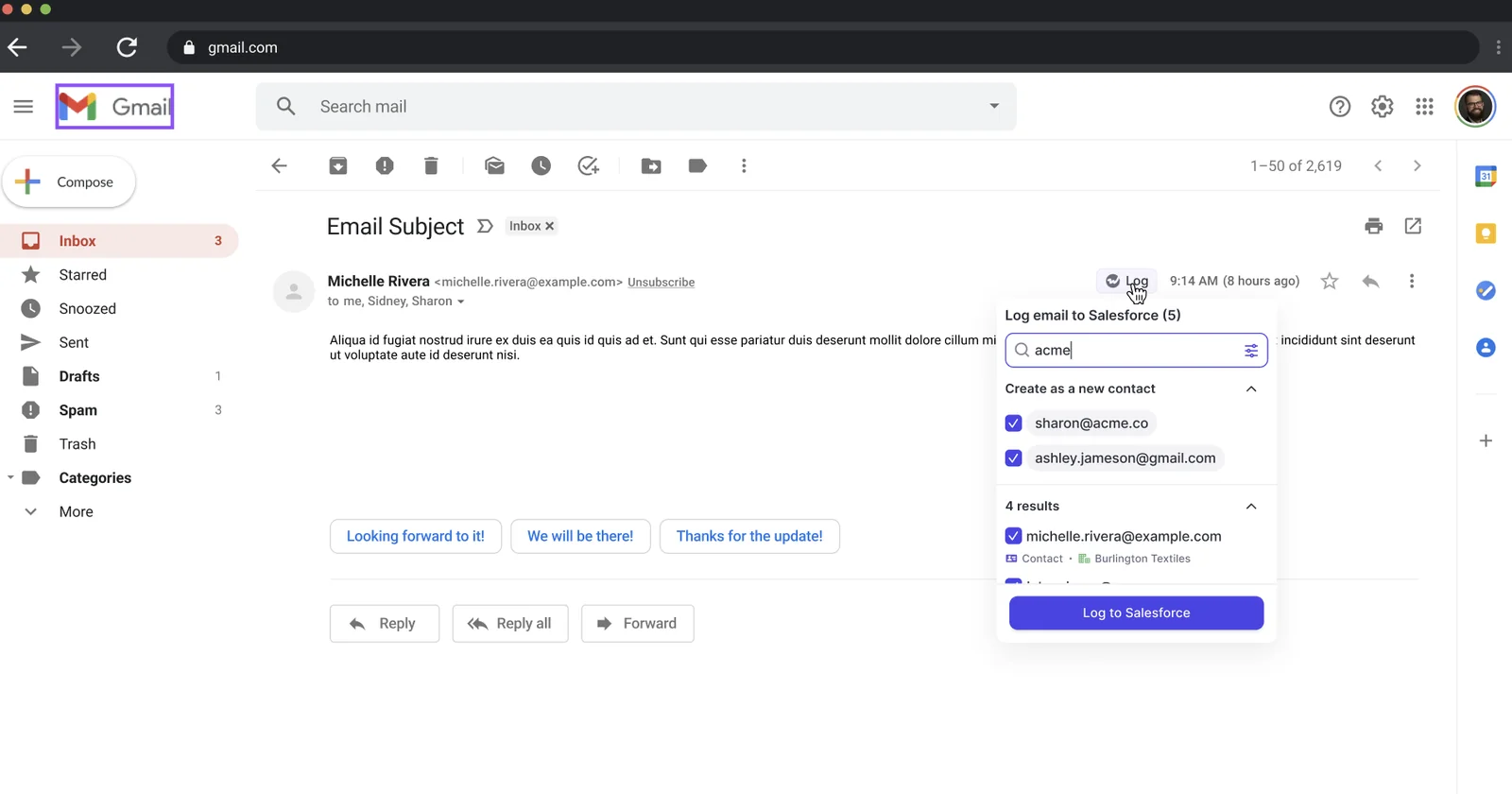
Both approaches have a cost. With Weflow, a new stakeholder at a prospect that isn't in Salesforce yet stays invisible until someone creates the account.
If your motion runs on leads, that's a real trade-off, so keep your lead creation where it is and let Weflow handle the account and contact layer underneath.
With Avoma, every unknown domain a rep emails becomes a lead. That's useful for inbound, but it can turn into a flood if your reps talk to a lot of vendors.
How each tool catches duplicates against existing contacts and leads
Weflow runs a real-time lookup on the email address before every create, so it doesn't write a second contact for someone already in your CRM. It's also the check we'd test hardest if we were in your shoes. It covers:
- Contacts and leads on their primary email field.
- Secondary email fields, so a person already in Salesforce under another address resolves to the existing record.
- Any custom object with an email field.
- Salesforce's own duplicate rules, which Weflow's lookup sits on top of.
- A match on a lead: the activity attaches to that lead, no contact is created, and lead conversion stays a manual Salesforce step.
One limit: Weflow doesn't merge duplicates already in your org. Deduplicating the org is a separate job.
Avoma's meeting rule creates contacts for external participants who aren't already in Salesforce. When duplicate contacts do appear, Avoma's own troubleshooting points to its creation rules and to existing leads.
Whether new contacts get added as opportunity contact roles
Opportunity contact roles tell Salesforce which deal an activity belongs to, yet in most orgs they're empty. So with two open opportunities on an account and no contact roles, there's no way to tell which deal an email belongs to.
Weflow writes opportunity contact roles as it captures, which makes multi-threading reportable. Every later email or meeting from that contact then resolves to the right opportunity.
There are two settings for this, both off by default:
- In contact creation: Adds roles only for contacts Weflow creates.
- In expert settings: Adds a role for every contact related to an activity logged to an opportunity, new or existing, unless the contact already has one. While it's on, it replaces the first setting.
Both settings follow the same rules:
- You choose one default role value, and every role Weflow creates gets that value.
- Weflow never sets the primary flag.
- Weflow never recreates a role a user removed.
- Weflow doesn't infer champion or economic buyer from titles. A VP on a thread could be your champion or your detractor, and that call stays with your team.
- Roles are added only when Salesforce allows it, so a validation rule or another Salesforce limit can block one.
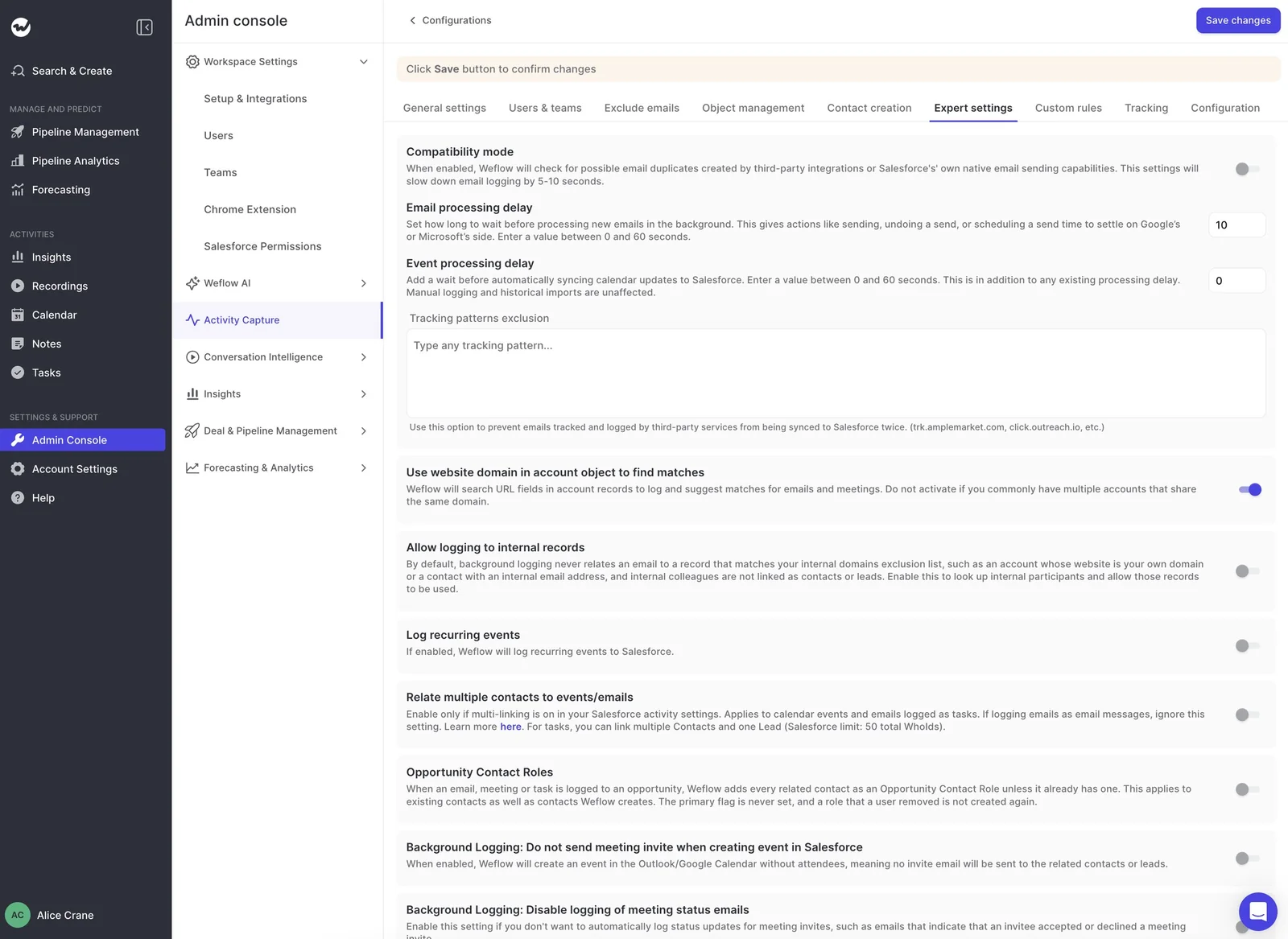
The partner caveat applies here too, since role creation has no condition on which contacts qualify. In a partner-led motion, every partner employee on a thread can become a contact role on the customer's opportunity.
Partner-internal emails then resolve to that deal.
If you get a lot of partner traffic, leave role creation off and create roles with your own Salesforce flow instead.
Avoma's contact-creation docs don't cover contact roles.
It does map deal stakeholders from meetings, tagging each person's title, role, and influence level, and syncs them to the CRM, though its pages don't say whether that sync writes Salesforce opportunity contact roles.
If you want the tool to suggest buying roles, that tagging is a genuine Avoma strength.
What happens when a new contact misses names or required fields
Weflow takes a new contact's name from the email or invite when one arrives. When only an address comes through, enrichment runs before the write and recovers the name in roughly 70% of cases, though the rate varies by industry.
Here's what each case looks like in Salesforce:
| What arrived | What lands in Salesforce |
|---|---|
| A display name with the address | First and last name filled correctly |
| Only an address, and enrichment finds the person | Name plus whatever enrichment found: location, title, phone, LinkedIn profile |
| Only an address, and enrichment finds nothing | The email address in the last name field, first name blank |
| A required Contact field enrichment can't fill | That contact doesn't save |
That third row can look like a bug in a report, but it isn't. Capture reproduces what arrived, and enrichment adds what it can find. Neither invents data.
Validation rules are trickier. Here's what we hear from teams whose contacts feed billing systems:
We do not create contacts, because we have validation rules and we do not want duplicated contacts. This links into our subscription management platform, which is a big, big problem if we do.
With Weflow, you have two options:
- Relax the rule for the integration user: Use this when the rule only exists to discipline reps.
- Keep the rule: Accept that the contacts enrichment couldn't complete get created by hand from the extension, where the full field set, including mandatory fields, is available.
Either way, we'd keep contact creation on, since it's what reveals the buying committee.
Avoma's contact-creation pages don't describe how auto-created contacts behave against validation rules.
How you see what Weflow and Avoma created or skipped
In Weflow, you check two places: Activity Capture Health for org-wide data problems, and the Outlook add-in or Chrome extension for a single email. This matters most in your first month, when capture exposes years of CRM mess and the new tool gets the blame.
Activity Capture Health, a Weflow Analytics view inside Salesforce, flags:
- Duplicate accounts and duplicate contacts.
- Contacts with no email address.
- Unconverted leads that already have a matching contact.
- Accounts sharing the same website domain.
- Capture settings not yet configured for full capture.
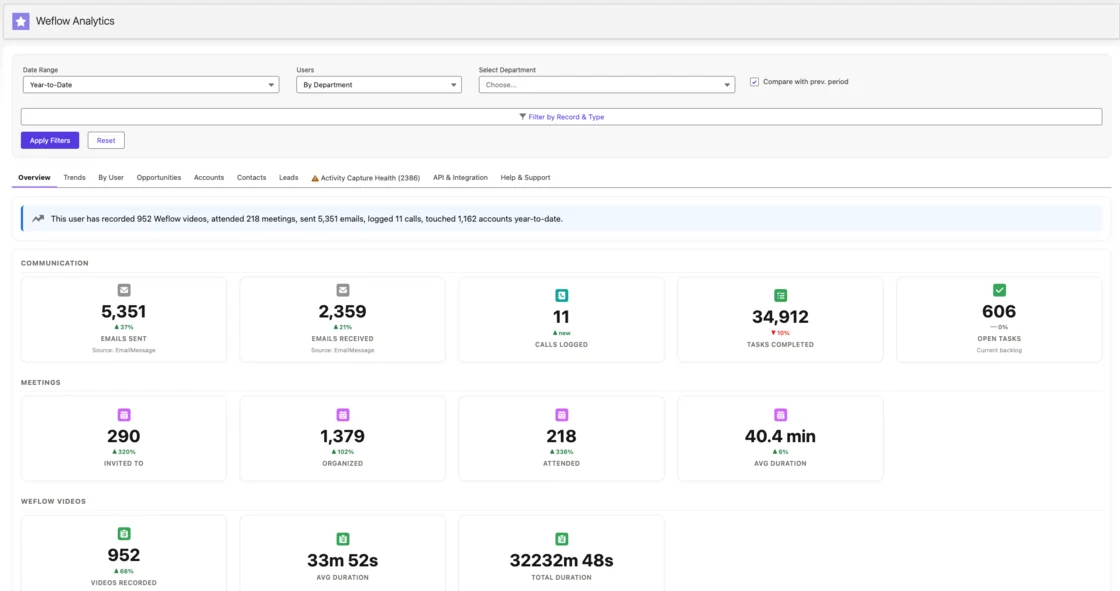
Admins also see skipped and errored emails and meetings in the capture health metrics, with a CSV download. A separate Settings Health check reports on Shared Activities, Enhanced Email, and Einstein Activity Capture in your org.
For a single email, here's how the two tools compare:
| What you need | Weflow | Avoma |
|---|---|---|
| Why one email did or didn't sync | The add-in or extension shows the reason, which accounts the address connects to, and flags an address with no matching account | The Chrome extension in Gmail shows which emails have synced and syncs those that haven't |
| Fixing a wrong link | Move the email to the right record from the Outlook add-in or Chrome extension | Add or remove the linked contact, lead, deal, or company from inside the Gmail thread |
| A meeting that didn't match | Support reads the logging decision for any message, and failed syncs can be backfilled weeks or months later | The No Associations icon on the meeting lets a user link it by hand |
| What it requires | Included with Activity & Contact Capture | The Revenue Intelligence add-on, email sync on, and extension version 0.5.3 or later; HubSpot and Salesforce only |
When a rep says "the tool is broken," the cause is usually a CRM data problem, not a capture one: the contact sits on the wrong account, isn't on the opportunity, or the account doesn't exist.
Weflow's diagnostics show you where the fault is, one record at a time, so you're not stuck defending the vendor.
Where Avoma is genuinely the better choice
Avoma is the better pick in several situations, and we'd rather tell you now than after a pilot:
- You're on HubSpot or another CRM: Weflow works only with Salesforce. Avoma connects to six CRMs.
- Your inbound motion runs on leads: Avoma creates a lead for an unknown domain. Weflow never creates leads.
- You have fewer than 10 seats: Weflow's minimum is 10 users. Avoma's Startup plan covers up to 25 seats, and its 10-seat minimum applies to the Enterprise plan.
- You want monthly billing: Avoma prices Startup and Organization monthly as well as annually. Weflow bills annually.
- You need broad native integrations: Avoma lists 26, including dialers like RingCentral, Kixie, and Koncert, plus Zapier.
- You want an assistant that writes back: Avoma's MCP connector sets a meeting's outcome, purpose, and privacy from chat. Weflow's connector is read-only.
- You want lots of free viewers: Avoma's viewer seats are free and unlimited on every plan. Weflow's view-only licenses are free but capped at the number of recording licenses you hold.
- You want a public-domain skip and stakeholder tagging out of the box: Avoma has a toggle for Gmail and Yahoo addresses, and it tags stakeholders' role and influence from meetings.
Which tools Weflow and Avoma connect to beyond Salesforce
Avoma connects to more tools, while Weflow goes deeper on one CRM.
| Category | Weflow | Avoma |
|---|---|---|
| CRMs | Salesforce only | Salesforce, HubSpot, Pipedrive, Zoho, Copper, Zendesk Sell (one CRM per organization) |
| Meeting platforms | Zoom, Microsoft Teams, Google Meet, Webex (when a paid Webex user organized the meeting) | Zoom, Google Meet, Microsoft Teams, GoToMeeting, BlueJeans, Highfive, Lifesize, UberConference, plus Webex through cloud recording |
| Email and calendar | Gmail, Google Calendar, Outlook | Gmail and Outlook |
| Dialers | Outreach dialer connected by the admin; Aircall, CloudTalk, Dialpad, and Zoom Phone activated by support | Aircall, Dialpad, RingCentral, Zoom Phone, Kixie, Koncert, and more |
| Sequencing | Works alongside Outreach and Salesloft, capturing sequenced email as ordinary activity | Outreach, Salesloft, Groove |
| Chat and other | Slack | Slack, Microsoft Teams chat, ClickUp, Zapier |
| BI and warehouse | Tableau and Looker through the API; no native Snowflake, Databricks, or BigQuery connector | REST API and webhooks for internal dashboards and BI |
Weflow isn't an integration platform with a connector catalog, and we don't pretend otherwise.
Going deep on Salesforce is what lets it respect your custom objects, validation rules, and permission sets as they are. But if your stack spans several CRMs, that depth won't help you much.
How AI assistants reach Weflow and Avoma data via MCP
Because the contacts Weflow creates are ordinary Salesforce Contacts, AI assistants like Claude or ChatGPT can read them through Salesforce's own MCP connector.
Weflow's connector covers what never reaches Salesforce: forecast calls, tracker hits, and playbook output.
| Question | Weflow | Avoma |
|---|---|---|
| What it reads | Playbooks, call summaries, transcripts, forecast data, and pipeline metrics, through six tools | Meetings, transcripts, notes, scorecard evaluations, and usage metrics, through 11 read tools |
| What it writes | Nothing; the connector is read-only | Meeting outcome, purpose, and privacy, through 3 write tools |
| Captured emails and CRM fields | Read through Salesforce's MCP connector, since they live as Salesforce records | Not covered by the connector |
| What it takes to switch on | An admin enables it per workspace; the user pastes the connector URL into any MCP client | The Organization or Enterprise plan, or the API Access add-on; an admin publishes it, then each member connects |
| Admin controls | A separate toggle for transcripts versus summaries only; answers follow the Weflow hierarchy | Three scopes, from one user's meetings to all non-private meetings; disconnects after 30 days without use |
Worth knowing: if you only buy Activity & Contact Capture, Weflow's connector adds little, since your contacts and emails are already in Salesforce. It earns its place once you start recording calls.
How to get raw data out of Weflow and Avoma
With Weflow, contacts and activity already sit in Salesforce as records you own, and they stay there if you ever stop using Weflow. The API covers everything else Weflow holds.
| Question | Weflow | Avoma |
|---|---|---|
| Where the data lives | Contacts and activity in native Salesforce objects; transcripts and summaries on a Salesforce recording object; video in your own cloud storage via the API | Avoma's own cloud on AWS in the US, with meeting notes synced to Salesforce |
| API access | Every plan; keys generated in the Admin Console | Organization plan and above; admin-created keys; 60 requests a minute |
| What you can export | Bulk JSON or CSV of transcripts, metadata, scores, and signals, plus an exportable audit log | Meetings, recordings, transcripts, notes, and scorecards through the API and webhooks; meeting data before closing an account |
| Warehouse route | Through the API into Snowflake, Databricks, or BigQuery; no native connector | No managed warehouse export described |
What Weflow and Avoma charge per seat for contact creation
Weflow Activity & Contact Capture includes contact creation from email and calendar at $19 per user per month. On Avoma, contact creation from email depends on email sync, which needs the Revenue Intelligence add-on at $29 per seat on top of the base plan.
| Plan | What it covers | Per seat per month (annual) | Seat rules and billing |
|---|---|---|---|
| Weflow Activity & Contact Capture | Contact creation from email and calendar, activity capture, the Outlook add-in and Chrome extension. No call recording. | $19 | 10-user minimum, billed annually |
| Weflow Revenue AI Foundation | Activity & Contact Capture plus Weflow Conversation Intelligence: recording, transcripts, and AI field updates | $49 | 10-user minimum, billed annually |
| Avoma Startup + Revenue Intelligence | Recording plus email sync | $48 ($19 + $29) | Up to 25 seats; monthly option at $29 + $35 |
| Avoma Organization + Revenue Intelligence | Startup features plus API and webhooks | $58 ($29 + $29) | Up to 100 seats; monthly option at $39 + $35 |
| Avoma Enterprise + Revenue Intelligence | Organization features plus SSO and custom data retention | $68 ($39 + $29) | Annual only, 10-seat minimum |
Beyond the per-seat price, a few other things affect the business case.
On Avoma's side:
- API and MCP access need the Organization plan or above, or the API Access add-on.
- Onboarding with an Avoma expert is an optional $1,000 one-time service; Enterprise includes concierge onboarding.
- Viewer seats are free and unlimited on every plan.
On Weflow's side:
- A 10-user minimum per product or bundle, on a 12-month term.
- No platform or implementation fees.
- Seats added mid-term are charged pro rata, and volume discounts start around 30 to 40 seats.
- The API, Ask Weflow AI Pro, and Agent Builder Free (25 agent actions per month) come with every plan.
Running Avoma alongside Weflow, or moving off Avoma entirely
You can run both tools as long as you decide which one writes what. And if you switch, nothing Avoma already created gets orphaned.
What happens if you keep Avoma as the meeting recorder
Weflow only creates contacts from activity it logs itself, not from emails or meetings another tool logged. The real risk with two tools is duplicate meetings.
Avoma creates a Salesforce Event for every meeting that arrives through calendar sync. Weflow logs every meeting as an activity, recorded or not. With two writers, you get two meetings per call, and your meetings-per-rep report quietly doubles.
Avoma documents one configured match to an existing Event, for meetings booked through Chili Piper. It doesn't describe general deduplication.
Three setup choices prevent double writes:
- Make one tool the email writer: On Avoma, logging email to the CRM is a separate setting from email sync. Switch logging off, and Weflow writes every email and creates the contacts from them.
- Make one tool the meeting writer: If you switch off Weflow's calendar event logging, Weflow stops creating contacts from invites, because it only creates contacts from what it logs. Email-based creation keeps running.
- Keep contact creation in one tool: That way, your qualifying rules, caps, and exclusions all live in one place.
What happens to the contacts and recordings Avoma already created
You keep what Avoma wrote to Salesforce, and you inherit whatever duplicates already exist:
- Contacts: Avoma-created contacts are ordinary Salesforce records. Weflow's pre-create lookup finds them and attaches activity to them instead of creating new ones.
- Existing duplicates: Weflow doesn't merge them. But Activity Capture Health flags duplicate contacts and accounts, so you can see how much cleanup you're facing on day one.
- Recordings: Weflow's team runs a migration import for historic recordings from other conversation tools. Avoma also lets you export meeting data before you close the account.
Choose Weflow if, choose Avoma if
| Choose Weflow if | Choose Avoma if |
|---|---|
| You run Salesforce with 10 or more seats. | You run HubSpot or another CRM, or you're under 10 seats. |
| You want contacts created only on accounts you already have. | You want unknown domains to arrive as leads. |
| You need a documented duplicate check across leads, secondary emails, and custom objects. | You're comfortable managing duplicates through creation rules and team scoping. |
| You want opportunity contact roles written automatically, so mapping improves on multi-deal accounts. | You want stakeholder role and influence tagging from meetings. |
| You want contact creation at $19 per seat without buying recording. | You want the recorder first, with contact creation as part of the Revenue Intelligence add-on. |
| You want the API in every plan and records you own in Salesforce. | You want 26 native integrations and an MCP connector that writes meeting fields. |
A sandbox contact-creation test to run against both tools
Run both tools through the same cases in a sandbox, with one enrolled user. Weflow reads no mailbox until a user is enrolled in an activity capture configuration, so you control exactly whose mail is in the test.
Send from an address outside your company. Internal mail is excluded, so a test with colleagues logs nothing and looks broken. Use a personal address as the test contact, and add its domain to a test account's Website field.
- Unknown domain: Email an address whose domain matches no account. Check whether a contact, a lead, or nothing appears.
- Matching domain: Email the address on the test account's domain. Check that the contact lands on that account.
- Existing lead: Create a lead with the test address, then email it. Check for a second record.
- Secondary email: Put the test address in a contact's secondary email field, then email it. Check for a duplicate.
- Large invite: Send a calendar invite above your participant cap. Check how many contacts appear.
- Forwarded invite: Have the test contact forward the invite to a second outside address. Check whether the second person becomes a contact.
- System address: Email a no-reply or billing address on the test domain. Check that nothing is created.
- Required field: Add a validation rule requiring phone on Contact, then email a new address. Check whether the contact saves.
- Open opportunity: Turn on contact role creation, email a new person on an account with an open opportunity, and check the role value and primary flag. Remove the role, email again, and check that it stays removed.
- Meeting changes: Create, move, reschedule, and delete a meeting. Creating one proves the create permission, while moving and deleting prove the update rights that otherwise tend to fail weeks after go-live.
| Case | Expected in Weflow | What Avoma documents |
|---|---|---|
| Unknown domain | No contact, no lead; earlier emails log once the account exists | A Salesforce lead from synced email |
| Matching domain | Contact on the matched account | A contact when an account shares the domain |
| Existing lead | Activity on the lead, no contact | Existing leads named as a cause of duplicate contacts |
| Secondary email | Matches the existing record, no new contact | No documented rule |
| Large invite | No contacts above the cap; the meeting still links to the account or opportunity | No documented cap |
| Forwarded invite | Not created until the person joins an email thread | No documented rule |
| System address | Skipped by blocked prefixes | No documented rule |
| Required field | Saves if enrichment fills it; otherwise that contact doesn't save | No documented behavior |
| Open opportunity | Role with your default value, never primary, not recreated after removal | No documented contact-role creation |
Run this once, and you'll know which tool's rules fit your CRM before a single rep is enrolled.
Walk through the product yourself, no call required.
FAQ: Weflow and Avoma contact creation
Does Avoma create leads or contacts in Salesforce?
Both. Avoma creates contacts for external meeting participants who aren't already in Salesforce, based on admin rules.
From synced email, it creates a contact, or a lead when no account shares the email's domain. Email sync requires the Revenue Intelligence add-on.
Does Weflow ever create Salesforce leads, accounts or opportunities?
No. Weflow only creates contacts, and by default only for domains that match an existing account. If you run inbound on leads, your current lead creation stays as is, and Weflow attaches activity to existing leads.
Does Weflow need Salesforce Shared Activities turned on for multi-attendee meetings?
Yes. Shared Activities lets Weflow relate one meeting to every attendee, up to Salesforce's limit of 50: any number of contacts plus one lead. Many orgs have it switched off, so raise it early. In a large org, turning it on is a change request, not a toggle.
Does Weflow contact enrichment need consent, and what does it share?
Yes. An admin gives one company-wide consent, which shares contact email addresses with the enrichment provider for this purpose only.
After that, you can switch enrichment on or off for each activity capture configuration, so one team can keep it off while others use it.
What contract terms come with Weflow?
Weflow runs on a 12-month minimum term with a 10-user minimum per product or bundle. Your seat count stays fixed for the term, but you can reassign seats when someone leaves, and seats added mid-term are charged pro rata.
An early opt-out after three months is available as a negotiated concession.