Duplicate Contacts in Salesforce When Several Tools Write to It: Causes and How to Fix It
Learn why several tools create duplicate Salesforce contacts and how to stop it with one owner.


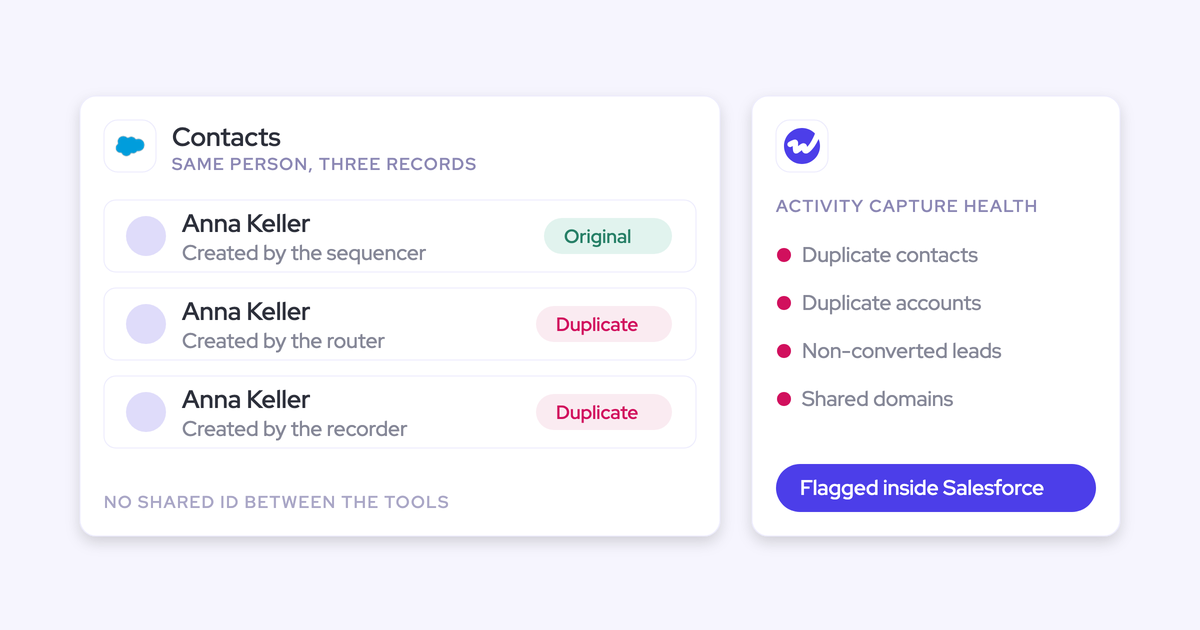

When several tools write to the same Salesforce org, duplicate contacts are almost guaranteed. That’s because each tool decides on its own whether a person already exists.
Your sequencer, your notetaker, and your address-book sync each run a different check, and each one creates a record when that check comes up empty.
So the root problem is who's allowed to create a person in Salesforce. Matching rules come second.
Salesforce duplicate and matching rules catch some of these after the fact, but they don't stop five writers from making five decisions. The fix that holds up has four parts:
- Audit what each writer creates.
- Give contact creation to one tool.
- Require that tool to look up leads, secondary email fields and custom objects before it creates anything.
- Treat the duplicates you already have as a separate merge job.
If you’re reading this, there’s a good chance you’ve already been burned by a tool that created a second contact for everyone in Salesforce under a different address, and the cleanup took longer than the automation ever saved.
Lookup-before-create is the standard we'd hold any capture tool to, and it's how we built Weflow Activity and Contact Capture.
By the end of this guide, you'll have one owner of person creation, and a way to tell new duplicates from old ones.
Why several tools writing to Salesforce create duplicate contacts
Several tools writing to Salesforce create duplicate contacts because each one creates people and none of them reconciles with the others. The sequencer was bought by sales, Einstein Activity Capture by CS, the notetaker by whoever ran the pilot. Each came with its own creation rules.
In most orgs, nobody has decided which of these tools gets to create a person, so they all do.
The email address is the only identifier every tool shares
Salesforce has no person ID that every connected tool shares, so each one falls back on the email address. The catch is that an address doesn't know which person or which relationship it belongs to.
Say your champion emails from her corporate address and replies from her phone on a personal Gmail account. That's one human and two identities. Add aliases, job changes, agencies and resellers, and one person can easily turn into three records without anyone doing anything wrong.
The problem grows with company size and with how often your buyers change roles. Agency and channel businesses tend to feel it first, because the same person shows up under several domains as they move between firms.
Each tool runs its own check for whether a person exists
Most tools check one thing before they create a person: the primary email field on one object. That check is shallow, and it misses three common cases:
- The lead: The person already exists as a lead, so a tool that only checks contacts creates a contact next to it.
- The secondary email: The person exists as a contact under another address, held in a secondary email field the tool never reads.
- The custom object: Your data model keeps people on a custom object with an email field, and the tool doesn't know it exists.
In each case, the tool finds “no match” and creates a new record.
Integration users create records they aren't allowed to see
If a tool's integration user can't see an existing record, it treats that record as missing and creates a new one. Admins rarely suspect this, because it looks like a matching failure.
Nektar.ai documents this directly. Its help center lists three situations that produce a duplicate contact:
- The existing contact or lead was created in the previous 20 minutes
- The integration user's permissions hide the existing record
- Someone creates a duplicate by hand after Nektar has created the contact
Nektar is unusually honest about this. Any tool with a restricted integration user has the same exposure, whether or not its docs say so.
How to see which tools create people in your Salesforce
Start by listing every connected app with create rights on Contact or Lead, then recording its creation rule and its off-switch.
Map what each writer creates and what stops it
Each type of tool creates people differently, and each has a specific setting that stops it. Use the table below as a worksheet to copy. It's not a product comparison, and it only covers behavior these vendors document.
| Writer | What it creates | When it creates | What stops it |
|---|---|---|---|
| Salesloft (sales engagement), Auto-Person Capture | A Salesloft person record from the email address alone. An admin-built automation rule can push those people into Salesforce as leads | When a rep sends a Lofted email or invite, for each To or CC recipient without a Salesloft person. It creates whether or not a CRM match exists. BCC is skipped | Switch off Auto-Person Capture, which is on by default. Remove any automation rule that turns captured people into leads |
| Einstein Activity Capture (address-book sync), contact sync | Salesforce contacts from each user's Microsoft or Google address book, up to 50,000 per user | On sync. Unmatched items go to Unresolved Items, where they either sync to an existing contact or create a new one | Contact sync filters, ownership rules, and the folders or groups you allow, or switching contact sync off |
| Fireflies (AI notetaker) | A Salesforce contact, or a lead if configured | After a meeting, for each participant with no matching contact or lead | The option to log only under existing contacts or leads, which is off until an admin turns it on |
| Nektar.ai (background capture) | Salesforce contacts under the account whose domain matches the person's email | When it sees a new person on an email or meeting and finds no contact or lead with that address. It skips public domains such as gmail.com | Rules that limit contact creation, available in the Harvest package. Full visibility for its integration user |
| Gong (conversation intelligence) | No Salesforce contacts. It logs new people in Gong only | Not applicable | Nothing to switch off for contact creation |
| Every other connected app | Fill in | Fill in | Fill in |
Add a row for every other connected app with create rights, including routing tools and CS platforms. Ask the same three questions of each: what does it create, when, and what stops it.
Trace one duplicate contact back to the tool that created it
The Created By field on a duplicate tells you which tool wrote it, because each tool writes through its own integration user. Run these four checks on a pair of duplicates:
- Created By: Read the integration user on the newer record. Look at Created By, not Owner: Nektar.ai, for example, sets a new contact's owner to the account owner, so Owner hides the writer.
- Created date against rollout dates: Compare the created date with the date each tool went live. A twin created before any current writer existed is legacy backlog.
- Lead or contact: Check whether the twin is a lead. A contact sitting next to a lead with the same address points at a writer that never checks leads.
- Secondary field: Check whether the twin's address sits in a secondary email field on the original. That points to a writer that only reads the primary field.
Run these checks on ten pairs, and a pattern usually points you to the tool responsible.
What you need before you change who creates contacts
Before you change any settings, gather these so the change request goes through in one pass:
- Admin access to every writer on your map, or a named admin for each one who'll make the change.
- A list of the integration users, the tool each one belongs to, and its profile and permission sets.
- Your current Salesforce duplicate rules and matching rules on Contact and Lead, with the action each one takes.
- The validation rules on Contact and the required fields on every Contact page layout.
- Agreement from the functions that own each tool (sales, CS, support), because switching off creation in their tool is a cross-team decision, not an admin setting.
How to stop several tools creating duplicate contacts in Salesforce
The order matters here: choose the owner first, remove the competitors, then tighten the owner's rules.
1. Choose one tool to own contact creation
Pick the tool with the deepest lookup and the tightest scoping controls, and make it the only one allowed to create contacts. Leave lead creation where your inbound motion already runs it, usually forms and routing.
Ask each candidate vendor these questions and get the answers in writing:
- Does it check for an existing lead before creating a contact?
- Does it check secondary email fields, including custom ones?
- Does it create only on accounts that already exist?
- Does it respect our duplicate rules?
- Can we cap how many contacts one meeting or thread creates?
If a vendor’s only answer to “what stops it from creating contacts?” is an exclusion list, keep asking.
2. Switch off person creation in every other tool
Every writer that isn't the owner loses its right to create people. Here’s where to find the switch in each:
- Salesloft: Turn off Auto-Person Capture, and remove any automation rule that turns Salesloft people into Salesforce leads. Activity logging keeps working.
- Fireflies: Turn on the option to log only under existing contacts or leads. Meetings with no match then go to the placeholder record or get skipped, depending on your setting.
- Einstein Activity Capture: Narrow contact sync with filters, ownership rules and folders or groups, or switch contact sync off for users whose contacts the owning tool will create.
One extra note if you run Nektar.ai: it doesn't de-duplicate against other capture tools running on the same users. So if Nektar is your owner, the others have to be fully off for those users, not just tuned down.
3. Require a lookup across leads, secondary emails and custom objects
Before it creates a contact, the owning tool has to search everywhere a person can already live in your org. That means checking:
- The primary email on Contact
- Lead, so an existing lead stops the create
- Every secondary email field, standard and custom
- Any custom object that holds an email address
If the address exists as a lead, the activity should attach to that lead and no contact should be created. Lead conversion stays a deliberate Salesforce step, owned by a human.
4. Let the integration user see every contact and lead
A lookup only finds what the integration user can see, so any hidden record becomes a duplicate. Nektar.ai's own setup guidance warns about exactly this.
Verify three things for the owning tool's integration user:
- Object access: Read access on Contact, Lead and every custom object in the lookup.
- Record visibility: It sees every record, regardless of owner, through View All on those objects or its place in the role hierarchy.
- Sharing: No sharing rules or restriction rules hide records from it, such as a private segment of strategic accounts.
5. Limit creation to existing accounts and real buyers
Scoping does more than an excluded-domain list. You can't predict every vendor, recruiter or inbound domain, but you can describe who a real buyer is.
Set these controls on the owning tool:
- Existing accounts only: This prevents orphan contacts from cold prospects and random inbound.
- A cap per meeting or thread: This stops a 200-person webinar from writing 199 contacts.
- Blocked prefixes such as invoice, billing, no-reply and support. This keeps vendor and system mail out.
- Free-mail domains excluded: This stops personal addresses from attaching to customer accounts.
- Only addresses a rep writes to: Creating on send, from To and CC, keeps out people who only emailed you once.
6. Check validation rules and required page-layout fields first
Required fields on a page layout silently block automated contact creation, because external tools can't see them.
Validation rules come through the API, but page-layout requirements generally don't. So the tool satisfies every rule it can see and still gets rejected, without an error anyone notices.
Enrichment helps, but it won't fill everything. Waterfall enrichment typically matches around 70 to 80 percent of contacts.
If contacts feed billing or subscription systems and you can't loosen the rules, you have two options:
- Relax the rule for the integration user only, so automated contacts save with the fields enrichment found.
- Keep the rule, and create the contacts enrichment couldn’t complete by hand.
7. Keep Salesforce duplicate rules as the safety net
Keep your duplicate and matching rules switched on. They catch what slips past the owner's lookup.
Just don't treat them as the main fix. They only act after a writer has already decided to create, and they only see what they're configured to match. One creator with a deep lookup prevents the duplicate, and the rules are your backstop.
How to clean up the duplicate contacts you already have
Merging existing duplicates is a separate merge project, run with Salesforce's duplicate tools. If your map shows no active writers and the problem is purely legacy, run that cleanup first. A new tool won’t merge your backlog for you.
If writers are still active, fix creation first. Otherwise, new duplicates keep arriving faster than you can merge them, and the cleanup never really ends.
For the merge itself, grab our free Salesforce Data Hygiene Cheat Sheet.
Where duplicate contacts still slip through after the fix
Even a clean setup leaves a handful of predictable cases. It helps to know them upfront, so they don’t catch you off guard after rollout.
- Aliases that aren't stored anywhere: An alias that isn't in a secondary email field still looks like a different person to every lookup. Store known aliases in a secondary field, or consolidate the company onto one domain where you can.
- Free-mail domains in an account's Website field: Domain matching treats whatever sits in that field as the account's domain. A gmail.com value pulls every Gmail sender onto that one account. Correct the field and exclude the domain.
- Partners and agencies on customer threads: A partner on a customer's thread legitimately belongs to more than one relationship, so domain logic files them against the customer. Exclude partner domains from creation, or reassign with a flow.
- Switching creation off entirely: It ends duplicates and hides the buying committee. Your deals look single-threaded because reps almost never add new people by hand.
- Month one of a capture rollout: Automated capture surfaces old duplicates that nobody noticed while logging was selective, and the new tool takes the blame. Take a duplicate baseline before go-live so you can show what predates it.
Should a capture tool prevent duplicates or merge them later?
Both approaches are valid. The right one depends on how long a duplicate can safely exist in your org, and whether you’re comfortable granting delete rights.
Prevention means the tool looks up before it creates. Healing means the tool creates, then cleans up its own duplicate later.
Nektar.ai is the clearest example of healing. It deletes its own duplicate contact and moves that contact's activities and fields to the surviving record, typically 25 to 33 hours after the duplicate appears. This needs delete permissions, and Nektar only deletes records it created that nobody has edited since.
| Prevent at creation | Heal afterwards | |
|---|---|---|
| When a duplicate exists | Ideally never, for the cases the lookup can see | From creation until the merge, typically 25 to 33 hours with Nektar.ai |
| Permissions the tool needs | Read access to everything it looks up, plus create on Contact | Read and create, plus delete on the records it manages |
| What downstream systems see meanwhile | One record | Two records, which billing, routing and sync jobs can pick up |
| Where it's strongest | Orgs where a temporary duplicate in a downstream system is the damage | Retroactive correction, including duplicates someone creates by hand after the tool's contact |
| What it misses | Anything outside the lookup: unstored aliases, records the integration user can't see | The window before the merge, and records it didn't create |
Our take: if contacts flow into billing, subscription or routing systems, prevent. A duplicate that lives for a day has already been synced somewhere you can't merge it.
Healing makes the most sense when your biggest source of duplicates is people creating records by hand after the fact, because prevention can't stop a create that happens later. That's where Nektar's self-healing really shines.
How Weflow Activity and Contact Capture checks before it creates
Weflow is the Revenue AI Orchestration platform for sales, customer success, and RevOps teams. Weflow Activity & Contact Capture is the product in it that captures email, meetings and contacts, and we built it to be the one creator of contacts in your org.
Weflow looks up contacts, leads and custom objects, including secondary emails
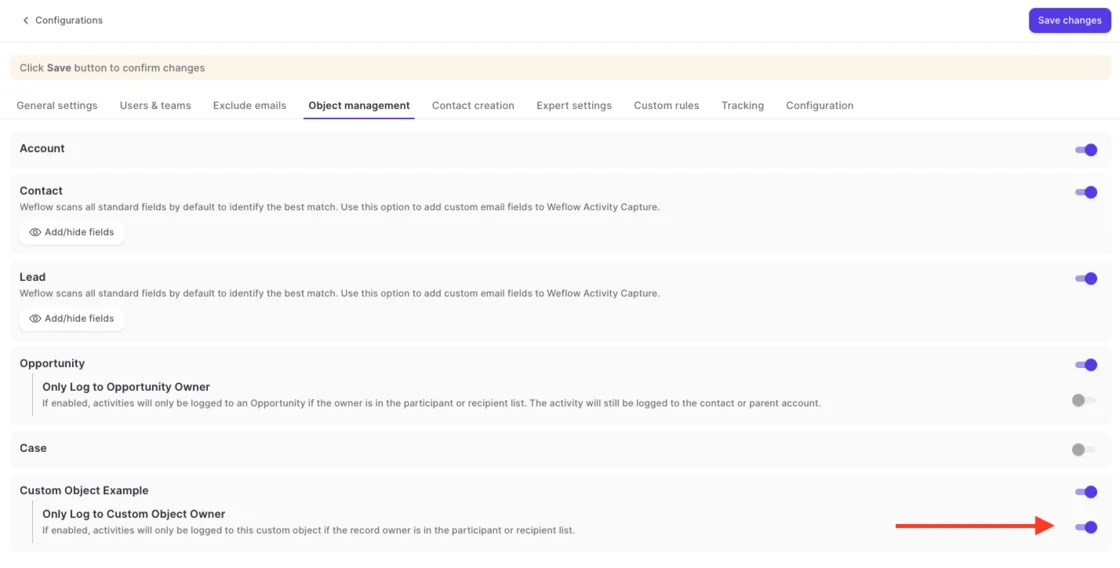
Before it creates a contact, Weflow looks up the email address in real time across contacts, leads and any custom object with an email field, including secondary email fields. If someone is already in Salesforce under another address, Weflow matches them to the existing record instead of creating a new one.
Contact and Lead are scanned on all standard email fields by default, and you add your custom email fields in Object Management.
For Lendz, people using two email addresses was exactly the problem:
"We try really hard to maintain data quality in our data structure, and we don't want to create duplicate contacts just because someone has two sets of emails that they use. Weflow covers this, which was a big saver for us."
— Erick Mahle, Vice President of Revenue Operations & Digital Transformation, Lendz Financial
An existing lead wins, because Weflow never creates leads
If the address already exists as a lead, Weflow attaches the activity to that lead and creates no contact. Lead conversion stays a manual step in Salesforce, so you stay in control.
Weflow creates contacts only. It never creates leads, accounts or opportunities, so it's one fewer competing creator of the record types that collide. Your inbound lead process keeps running exactly as it does today.
You decide which contacts Weflow is allowed to create
Contact creation follows rules you set for each capture configuration. You can:
- Restrict creation to accounts that already exist in Salesforce
- Cap how many contacts a single meeting or thread can create
- Block standard prefixes such as invoice, billing, no-reply and support
- Create only when the rep sends, from To and CC addresses, never BCC
- Keep a dedup layer on top of Salesforce's own duplicate rules
- Switch creation off entirely for any team
Because creation happens on send, a thread the rep never replies to won’t create any contacts.
Activity Capture Health flags duplicates already sitting in Salesforce
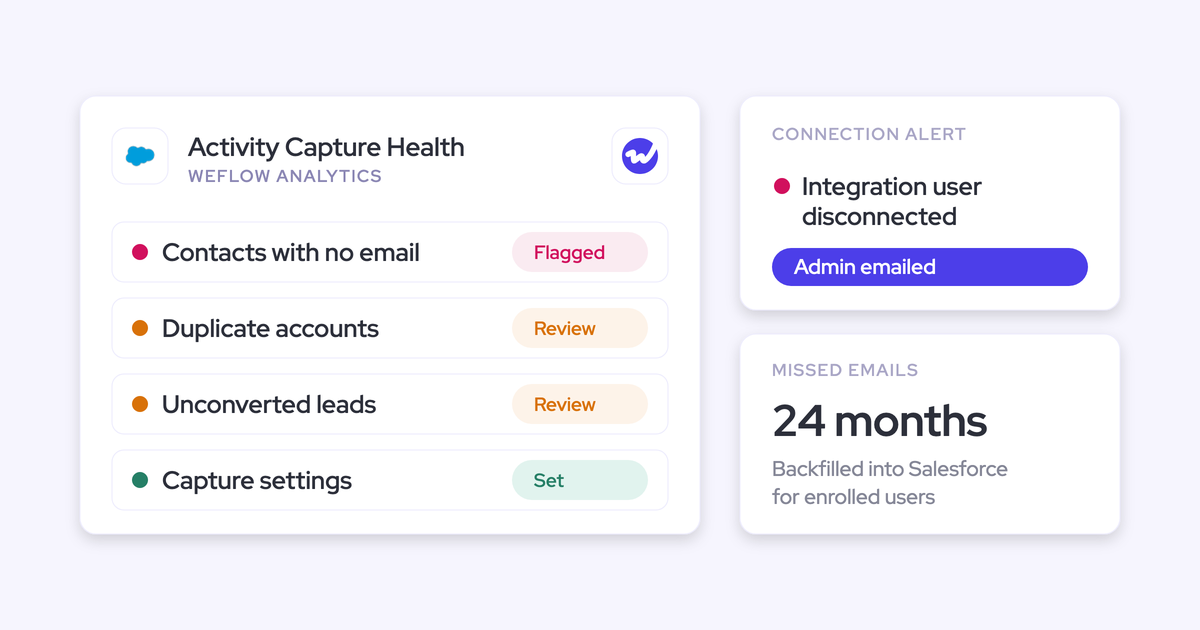
Around week two of most rollouts, someone asks: is this the tool or our data? Activity Capture Health helps you answer that. It's a Weflow Analytics view inside Salesforce, and it flags:
- Duplicate contacts
- Duplicate accounts
- Accounts sharing the same website domain
- Unconverted leads that already have a matching contact
- Capture settings that aren't configured for good capture yet
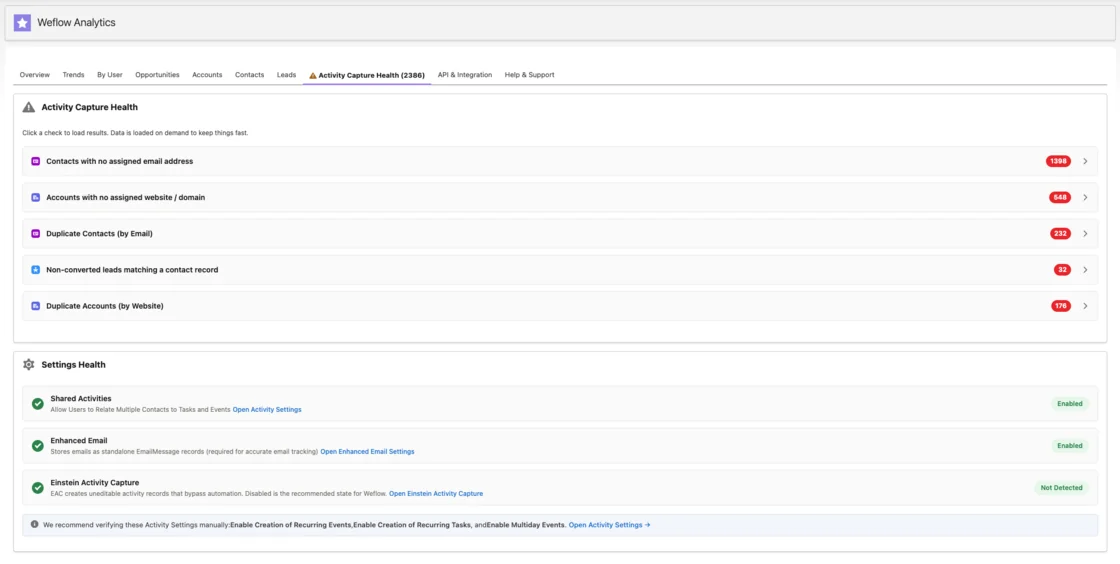
Run it before you enroll the first team. That count is your baseline, and anything above it after go-live is new.
What Weflow Activity and Contact Capture won't fix for you
To be clear about the limits:
- Weflow doesn't merge duplicates that already exist. Your legacy backlog stays a separate cleanup project.
- There's no admin review queue before contacts are written. The controls are the rules above plus the rep's per-email tick.
- Strict validation rules or required page-layout fields block contacts that enrichment can't complete.
- Aliases that aren't held in a secondary email field still look like different people.
What Weflow Activity and Contact Capture costs per user
Weflow Activity & Contact Capture costs $19 per user per month, billed annually, with a 10-user minimum. You can start with one team: capture runs per configuration, and Weflow reads no mailbox until a user is enrolled.
- Every plan includes Ask Weflow AI Pro and Agent Builder Free, with 25 agent actions per month.
- Seats added mid-term are charged pro rata to the end of the term.
- We offer a 14-day free trial with guided onboarding.
- Call recording sits in Weflow Conversation Intelligence, not in capture. The Revenue AI Foundation bundle pairs the two at $49 per user per month.
FAQ: Duplicate contacts when several tools write to Salesforce
Does Weflow respect our existing Salesforce duplicate and matching rules?
Yes. Your duplicate and matching rules stay in force, and Weflow adds its own lookup in front of them. It checks contacts, leads, custom objects and secondary emails before it attempts a create, and its dedup layer sits on top of Salesforce's rules.
Can we add our own secondary email fields to the lookup?
Yes. Weflow scans the standard email fields on Contact and Lead by default, and you add custom email fields in Object Management. Custom objects with an email field are part of the lookup too.
Can an admin approve contacts before Weflow writes them?
No. Weflow has no approval queue. Your controls are switching creation off, restricting it to existing accounts, capping contacts per meeting or thread, and blocking prefixes. Reps can also clear the tick on an individual email in the Outlook add-in or Chrome extension before it sends.
Where does a partner or agency contact on a customer thread end up?
Weflow creates the partner against the customer's account on the thread, because creation attaches to the account already on that thread. You correct it downstream: a Salesforce flow that reassigns what Weflow wrote, an agent that updates the record, or the rep creating the contact by hand from the mail extension.
Does Einstein Activity Capture still create contacts automatically?
Not through email. With Sync Email as Salesforce Activity on, which has been the default for every setup since Summer '25, Contact Auto-Creation and Contact Suggestions are unavailable. Einstein Activity Capture's contact sync from users' address books is a separate writer, with up to 50,000 contacts per user, so keep it on your map.
Does Gong create contacts in Salesforce?
No. When Gong finds a new person, it imports their email and logs them in Gong only. Gong isn't one of your contact writers.
Why do some auto-created contacts have the email in the last name?
Those contacts came from mail that carried an address but no display name. Weflow fills first and last name only when the email or invite included a name. When it didn't, the address goes into Last Name and First Name stays blank, because capture reproduces what arrived and doesn't invent names.
What happens to emails from someone who isn't in Salesforce yet?
Weflow logs nothing it can't match to a Salesforce record. When you later create the account, Weflow logs the earlier emails with people at that company automatically, with no re-sync.