How to Fix Emails and Meetings Logged to the Wrong Opportunity or Account in Salesforce
Learn how to fix emails and meetings logged to the wrong opportunity or account in Salesforce.


If you work in RevOps, you've probably heard a version of this from a rep:
"I have emails going from my sales team to prospects, but that email is getting logged to a different customer's object in Salesforce."
You fix a mis-logged activity in four moves, and the order matters:
- Figure out whether the cause is your CRM data or the capture rule.
- Fix source data.
- Correct history by Salesforce object type. Events edit in place, a sent EmailMessage is deleted and logged again, and a recording is a separate record from its Event.
- Make the correction stick, so the rest of the thread and future emails resolve correctly.
Why does the order matter? Because of two Salesforce facts. An activity relates to one opportunity or one account, never both, and once activity is logged, it doesn't re-route when you fix the data underneath it.
So fixing the data alone leaves history wrong, while correcting history first just gets undone by the next email. Whatever writes activity into Salesforce, whether that's Einstein Activity Capture, a sequencer, or Weflow Activity & Contact Capture, the playbook below gives you a way to prove which side the fault is on, one record at a time.
What you need before you correct mis-logged Salesforce activity
Before you touch a single record, line up your tool, your logging object, and your correction rights. A half-finished correction is worse than none, because the timeline ends up disagreeing with itself.
- Admin access to your capture tool's configuration: Most fixes in Step 2 happen there, not in Salesforce.
- Which object your emails log to: EmailMessage or Task: This decides whether you can edit the record in place and which activity reports the email shows up in.
- Whether Shared Activities is on in your org: It changes how many contacts a meeting relates to, and in a large org turning it on is a change request.
- A sandbox for testing rule changes: Give each test company its own domain (more on why in the pitfalls below).
- The specific case: Note the user, the thread, the record it landed on, and the record it belongs on.
How Salesforce decides where a logged email or meeting lands
Every capture tool works from the same chain, and it breaks at the same link.
Salesforce lets an activity carry several contacts but only one opportunity or account. Within that limit, matching runs in a fixed order:
- The tool looks up the email address on contacts and leads.
- The contact points to its account.
- The account points to an opportunity through the opportunity contact role.
The third step is where things break. In most orgs, opportunity contact roles are mostly empty, and it's normal for an account to have a new business deal, a renewal, and an expansion open at once.
When the data can't decide between open deals, each tool improvises. Einstein Activity Capture runs a tiebreaker chain covering close date, opportunity owner, creation date and recent activity.
Salesloft picks the most recently modified opportunity, and Fireflies attaches the meeting to every open opportunity.
Weflow falls back to the account instead on purpose: logging to the account is easy to fix, and logging to the wrong deal isn't.
The catch is that none of these outcomes produces an error. The account timeline looks busy, the opportunity looks dead, and "days inactive" tells a manager the rep isn't working the deal.
Step 1: Diagnose whether CRM data or capture rules caused it
Every mis-map traces back to one of two causes. Either the opportunity choice was ambiguous, or a CRM data defect sent the activity somewhere it doesn't belong.
Ambiguity is solved with contact roles, thread corrections, and configuration, while a data defect has to be fixed at its source, or the next email undoes every correction you make.
Most ops people we talk to already suspect which one it is:
"I really think the majority of this stuff is not a Weflow problem, it is an us problem."
The checks below turn that suspicion into proof.
When one contact sits on several open opportunities
This is the most common case, and it's one no algorithm can solve. If the contact has no role on any open deal, or the primary contact role was copied onto both the renewal and the expansion, there's no signal in Salesforce that says which deal the email is about.
We tested matching based on an email's content and left it out of Weflow because it wasn't accurate enough. Ultimately, only the rep knows which deal a thread belongs to.
On the affected record, check:
- How many opportunities are open on the account
- Which of them carry a contact role for the person on the email
- Who owns each opportunity, and whose mailbox sent the email
If the contact sits on two open deals with an equal claim, the tool isn't broken, the data just gives it nothing to choose with.
CRM data defects that pull activity onto the wrong account
When an email lands on another customer's account, a data defect is usually to blame. Several of these defects misroute activity company-wide, and none can be fixed inside the activity record itself.
| Symptom you see | Data defect behind it | Fix at source |
|---|---|---|
| The same thread appears on several unrelated accounts | One shared address, such as a gmail.com address, sits on contacts across those accounts | Keep one contact per address, or block the address |
| Colleagues' personal mail and unrelated threads pile up on one customer account | A personal mail domain sits in that account's Website field | Correct the Website field and exclude the domain from the sync |
| Activity splits across two accounts for the same company | Duplicate accounts share a website domain | Merge the duplicates |
| Agency or partner meetings land on the wrong account, or nowhere | The partner's domain doesn't match the account the deal sits on | Exclude partner domains or partner account types, and put partner contacts in the opportunity's contact roles |
| Employees' own threads show up on a "customer" account | An internal test account was built with employee addresses | Block internal and test accounts from logging |
| A rep's outbound touches never appear | They send from an alias or deliverability subdomain that isn't on their user record | Align the sending address with the user record, or consolidate onto one domain |
Treat the personal-domain case as urgent, since anyone who can see the account can see its activity. The exposure reaches back through history and across the whole company.
Why account fallbacks never show up as sync errors
By the tool's own rules, an email that resolves to the account was logged correctly, so it never shows up as a failure. That's why nobody, Weflow included, can hand you a report of everything that went wrong.
We don't offer an admin mis-map rate or failure report. Instead, finding mis-maps is record-by-record work, and Weflow gives you three places to do it:
- The Outlook add-in and Chrome extension show a rep or admin which accounts an address connects to, and flag a contact on the wrong account, a contact missing from the expected opportunity, and an address with no matching account.
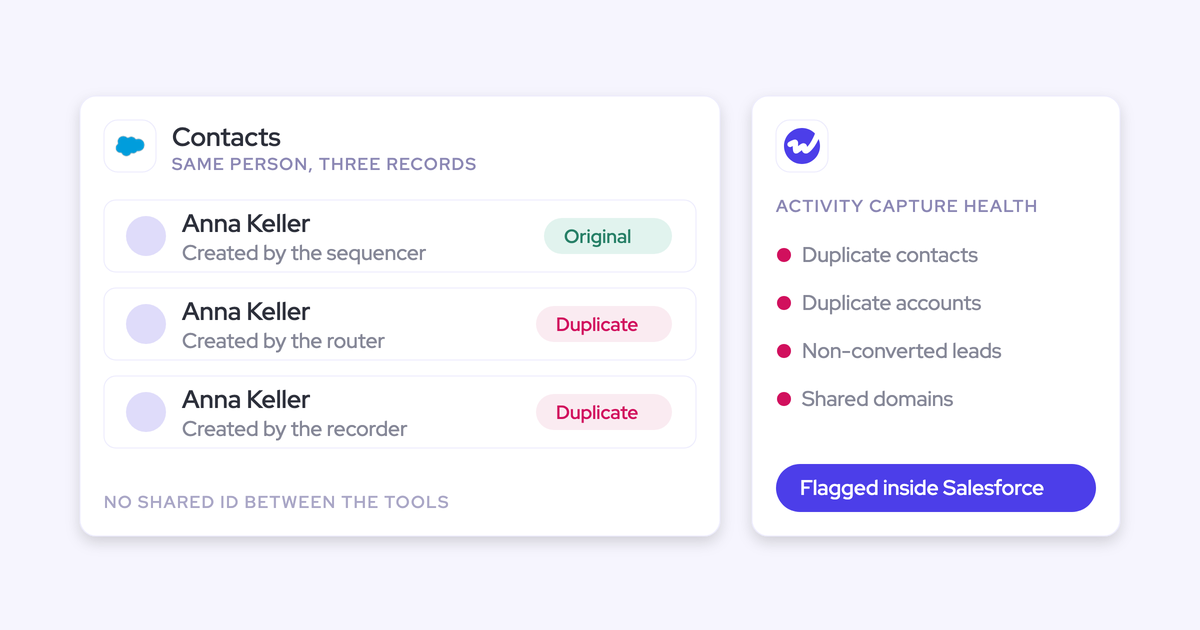
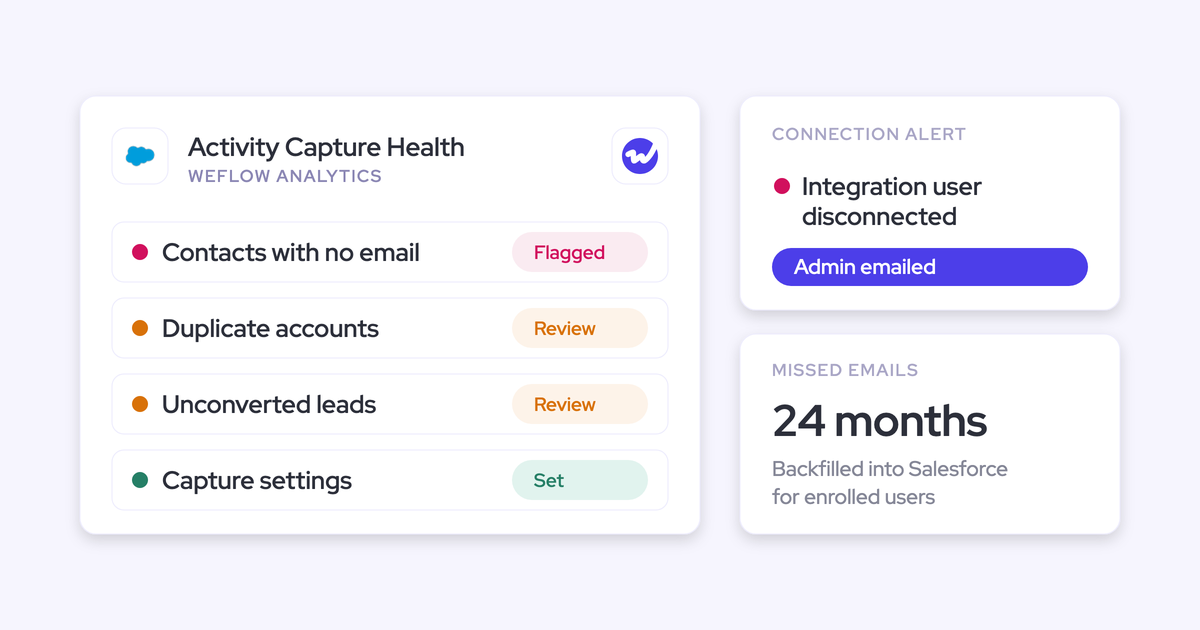
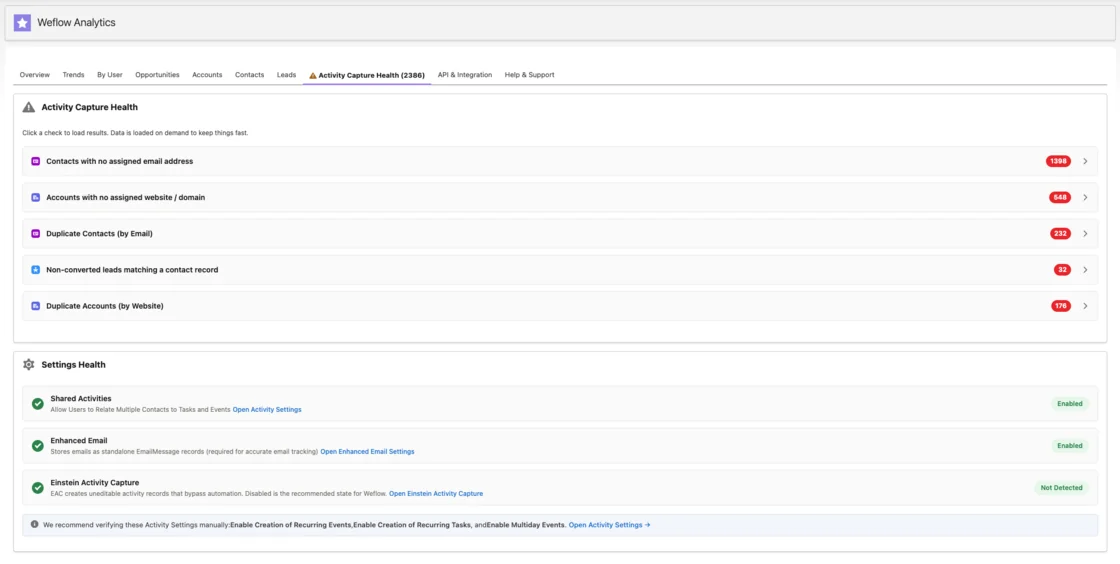
- Activity Capture Health inside Salesforce flags duplicate accounts, duplicate contacts, accounts sharing a website domain, unconverted leads that match a contact, and capture settings that aren't configured yet.
- Weflow support can read the logging decision for any message without reading its content, and can compile a one-off coverage report from the sync logs.
So when a rep says the tool doesn't work, Activity Capture Health shows you whether the fault sits in the capture or in the CRM data underneath it.
Step 2: Fix the source data before touching logged history
Start with the defect you found in Step 1, since data fixes change where new activity lands. Work through them in this order:
- Correct or clear a wrong Website value: Any value in that field acts as a matching domain, including a personal mailbox domain.
- Merge duplicate accounts that share a domain: Capture can't tell which of two identical accounts an email belongs to.
- Keep one contact per shared address, or block the address: One address on five accounts is five valid matches, so the thread gets attached five times.
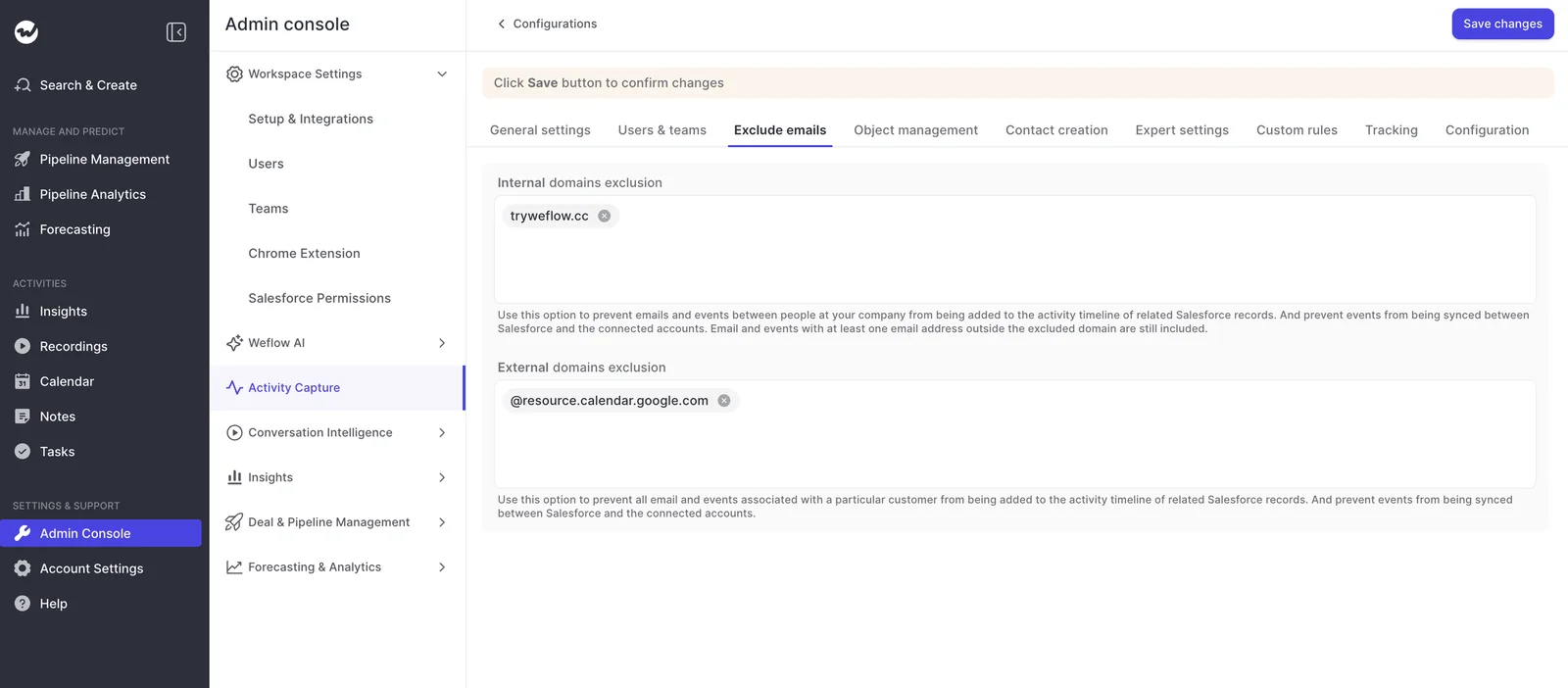
- Exclude personal and partner domains from the sync: In Weflow, external domain exclusions keep all email and events with that domain out of Salesforce.
- Block internal and test accounts: Weflow blocks logging to your own internal records by matching on the Salesforce instance name. A company-name filter covers inherited orgs where the instance name doesn't resemble the company, and a test flag on the record, excluded by a custom rule, covers the rest.
- Add the missing opportunity contact role: Once the contact holds a role on the right deal, their next email resolves there.
Keep in mind that none of these moves an email that's already logged. The history stays exactly where it landed, which is what Step 3 is for.
Step 3: Correct logged activity by Salesforce object type
How you correct depends on the object:
| Object | How to correct it | What reports read afterwards |
|---|---|---|
| Calendar Event | Edit the related record in place | The Event's due date, unchanged |
| Sent EmailMessage | Delete it and log it again against the right record | A new created date; the message date stays the same when Weflow re-logs it |
| Email logged as a Task | Edit in place in Salesforce | The same Task record |
| Conversation recording | Move it together with its Event | The timeline reads the Event, not the recording |
Calendar Events: Change the related record in place
Yes, you can just edit the meeting. Events edit in place in Salesforce:
- Open the Event in Salesforce.
- Change Related To to the correct opportunity or account.
- Save.
The Event can still hold only one opportunity or account, and if the meeting was recorded, the recording won't follow this edit, since it's a separate record.
Sent EmailMessage records: Delete the email and log it again
As our customer success team sees it in customer orgs, Salesforce doesn't let you edit a sent or synced EmailMessage, even through the API, so correcting one means deleting it and logging it again against the right record. Any "bulk correction" of email is really a bulk delete and re-sync.
Salesforce documents a separate path for Einstein Activity Capture. Under Sync Email as Salesforce Activity, a rep updates the association from the email record, and the matching flow doesn't overwrite it. If that's your setup, that's your correction route.
Outside that path, a manual correction looks like this:
- Note the thread, the message date and the correct record.
- Delete the EmailMessage from the wrong record.
- Log the email again against the correct opportunity or account from your capture tool's log action.
Emails logged as Tasks are different, because a Task can be edited directly in Salesforce. Also note that re-logging creates a new record, which affects date-based reports. We'll cover exactly what shifts in the reporting section below.
Meeting recordings: Move the recording together with its Event
A recording and its Event are two Salesforce records with different rules, so fixing one leaves the other wrong. As one buyer who's lived through this put:
"If I moved the call recording but that did not pull through the meeting, I have got the recording on opportunity B and the meeting invite still on A. So the circles of activity, because that is all driven by activity, would actually be wrong."
Since the opportunity timeline reads the Event, that's the record that has to land on the right deal.
| What you see | Only the recording moves | Both records move |
|---|---|---|
| Recording | On opportunity B | On opportunity B |
| Event | Still on opportunity A or the account | On opportunity B |
| Opportunity B timeline | Shows no meeting | Shows the meeting |
| "Days inactive" on B | Keeps counting | Resets to the meeting date |
Step 4: Stop the corrected mapping from breaking again
If reps have to repeat a correction on every email, they'll stop doing it within a week. One correction should hold for the whole conversation, and the data that decides future mapping should improve as the deal gets worked.
Correct the first message so the whole thread follows
The first message sets the mapping for the thread, so one wrong first match pulls the entire conversation onto the wrong record.
In Weflow, a correction holds on for every later reply in that thread, in both directions, so fixing the first message fixes the whole conversation.
Say a buyer emails about pricing, and the thread lands on the account because the contact sits on both the renewal and the expansion. If the rep moves the first message to the expansion. Every reply after that, from the buyer or the rep, logs to the expansion without anyone touching it.
A new thread resets the choice, though. If the same buyer starts a separate conversation about the renewal, it gets matched fresh.
Let opportunity contact roles fill in as reps work the deal
Contact roles are the signal every mapping algorithm needs, but reps don't maintain them, so the fix is to stop relying on reps.
Weflow can create the opportunity contact role automatically at the moment it logs an email to a contact and an opportunity where that contact has no role. Every later email or meeting from that contact then resolves to the opportunity, so mapping gets more accurate the more the deal is worked.
Weflow sets the role without a type, because a job title doesn't tell you whether someone is the champion or the detractor. Naming the economic buyer stays with a human or your playbook.
Split renewal and expansion activity into separate capture configurations
Contact roles don't help when the primary contact is copied onto every open deal, since the signal then points at both. For renewals running alongside expansions, separate the lanes by configuration instead:
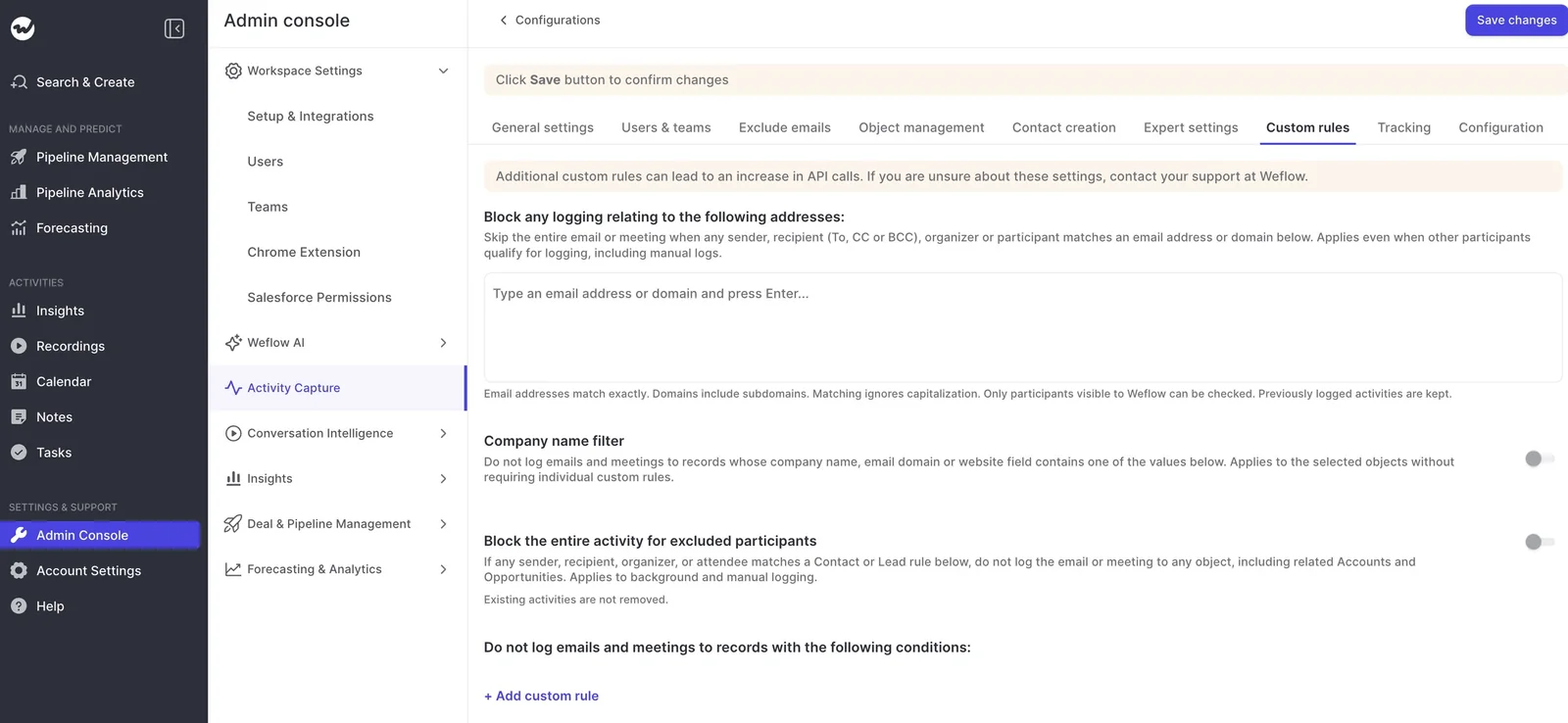
- In the Weflow Admin Console, under Activity Capture, create one configuration for the renewals team and one for everyone else.
- Add the right users to each configuration under Users & teams.
- In each configuration, add a custom rule that keeps logging off the other lane's opportunities, filtered on opportunity type or a close-date threshold.
- Save each configuration, and send a test email from one user in each lane against an account carrying both deal types.
A couple of tradeoffs to know:
- Weflow has no rule that picks the opportunity with the nearest close date, even though it's the rule teams ask for first.
- You can restrict logging to the opportunity owner, and the activity still logs to the contact or parent account. We don't recommend it as a fix for ambiguity, because it drops activity from everyone else on the deal.
How Einstein Activity Capture and other tools handle email corrections
Correction paths differ more between tools than matching does. Here's how each one lets you handle corrections, so you can run this playbook on the stack you already have.
Einstein Activity Capture has a real correction path. Under Sync Email as Salesforce Activity, a rep changes the record an email is matched to on the email record itself, and the Activities: Match Email to Records flow won't overwrite that manual association.
Admins can also tune the matching logic in Flow Builder or with Apex, with rules like preferring a customer account over a partner account, blocking certain emails, or adding a custom tiebreaker.
Outreach lets reps move a past call or meeting to a different opportunity, but it can't re-associate an email once it's sent, so a mis-logged email stays where it landed.
Chorus lets a user reassign a recording inside Chorus. The correction stays there: it doesn't update the CRM, change tasks already written, or change how future calls match.
Terret gives reps no way to re-map. You fix a mismatch by correcting the owner, contact roles, contact email or account domain in Salesforce, or by filing a support ticket.
Gong stands out on the admin side. Admins simulate association rules before activating them and re-associate the last 30 days of activity.
If your mis-maps are rare and your tool already supports re-association inside Salesforce, as Einstein Activity Capture does, fixing the data and staying where you are is a legitimate answer.
How Weflow Activity & Contact Capture fixes mis-logged activity
Weflow is the Revenue AI Orchestration platform for sales, customer success, and RevOps teams. It's built for Salesforce teams, and every email, meeting and contact it captures lands in native Salesforce objects you own.
On correction, Weflow runs a hybrid model. Capture happens automatically on the server, and a rep-facing Outlook add-in and Chrome extension let a rep or admin see and change where an activity landed right from the inbox, without editing in Salesforce.
Move an already-logged email from the Outlook add-in or Chrome extension
The same panel that shows where an email is about to log also moves an email that has already logged:
- Open the logged email in Outlook or Gmail. The Weflow panel shows the Logged badge and the record it landed on.
- Unlog the email from the wrong record.
- Pick the correct opportunity, account or custom object from the matched records, and log it there.
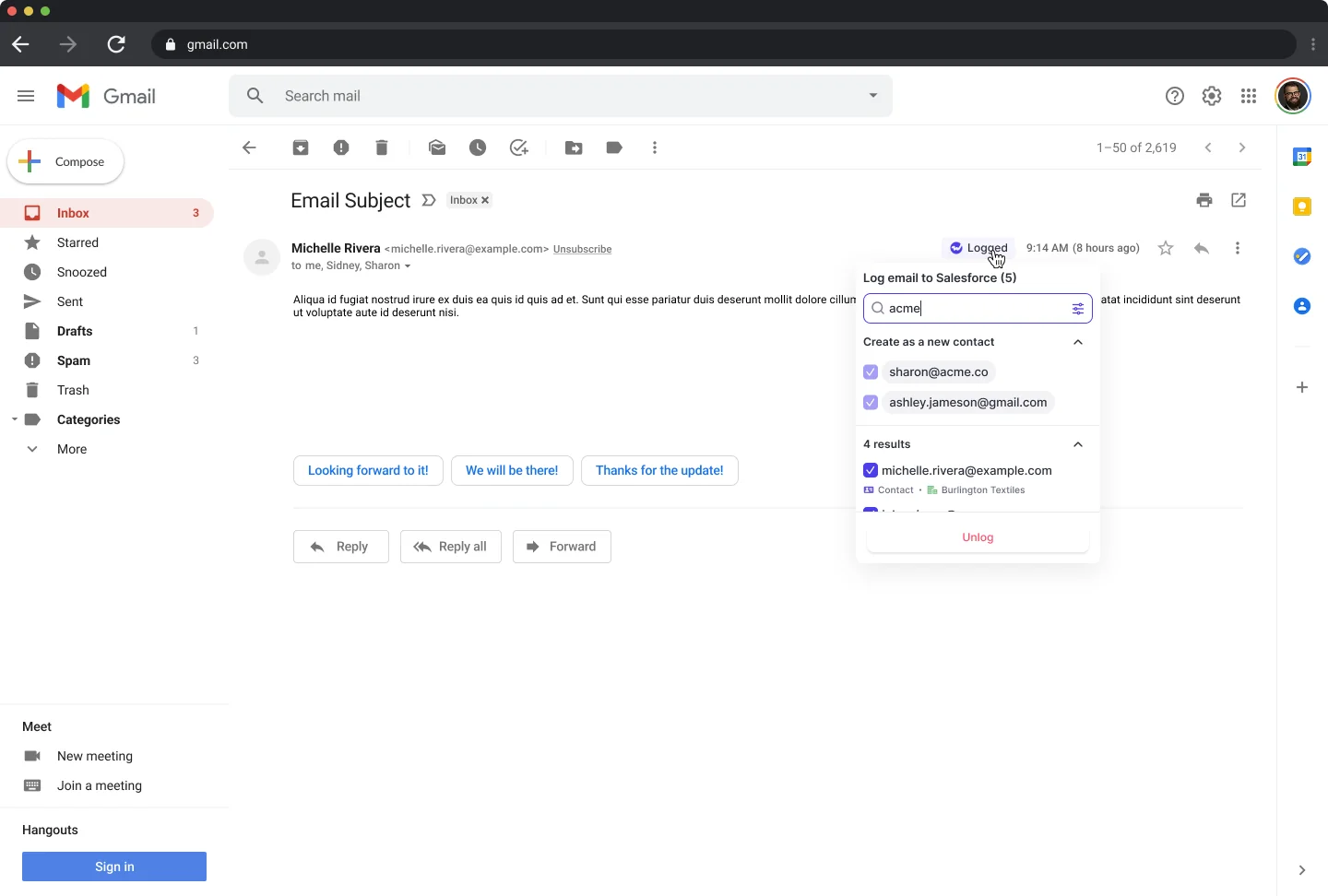
Under the hood, Weflow deletes and re-logs the email because a sent EmailMessage is locked, and the new record keeps the original message date. Weflow runs the same flow for emails logged as Tasks, and the correction holds for the rest of the thread.
Correct a meeting once and move the Event and recording
Correct meetings from your mail client, since that's the one place where a single correction moves both records.
| Where you correct | What moves |
|---|---|
| Outlook add-in | The Event and the recording |
| Chrome extension | The Event and the recording |
| Inside the Weflow app | The recording only |
The in-app behavior is deliberate, since someone working in a recording view shouldn't rewrite a Salesforce activity record by accident.
The recording is also more flexible than the Event. It can sit on an opportunity and its account at once, or on two opportunities when one call covers a renewal and an expansion.
Where Weflow Activity & Contact Capture still leaves you checking by hand
- Weflow has no admin report or rate of mis-mapped or failed logs. Checking is record by record, or a one-off report compiled by support from the sync logs.
- You can't correct from a phone. Mail sent from a phone is still captured and matched automatically, and a thread already mapped on desktop keeps its mapping.
- No rule picks the opportunity with the nearest close date.
- The Event still holds one opportunity, because Salesforce allows only one.
- Missed or mis-mapped history can be backfilled through support once the rule is fixed, whether the gap is a week or a month old.
How correcting an email changes your Salesforce activity reports
A re-logged email is a new record with a new created date, but Weflow keeps the email's message date, so how your report reads depends on which date it's built on.
| Report built on | What you see after a correction |
|---|---|
| Email message date | No change; the email stays on the day it was sent |
| Created date | The email appears on the day it was corrected |
| Event due date (meetings) | No change; Events edit in place |
| Opportunity activity | The email now counts on the right deal, and the rep gets credit for it |
If your KPIs credit reps on logged email, build them on message date. That way, corrections move credit to the right deal without shifting it into the wrong week.
The logging object decides which reports the email appears in at all:
- Task lets one activity report span emails, meetings and calls together, which is why most ops teams choose it.
- EmailMessage sits outside the standard activity reporting model, so emails don't appear next to meetings. In exchange, it carries native From, To and Cc and the thread structure, which you need to count replies or reconstruct who was on a thread.
Weflow's own insights read both, so the choice only affects reporting inside Salesforce.
Mistakes that quietly undo your activity corrections
- Correcting history before the source defect is fixed: New email keeps landing on the wrong record, and you're correcting the same thread again next week.
- Testing rules with gmail.com or outlook.com test accounts: Accounts carrying a public mail domain match every test sender to several accounts at once, creating ties production data rarely has. The test measures your test data, not the rule.
- Restricting logging to the opportunity owner to "solve" ambiguity: Activity from every SE, manager and CSM on the deal stops reaching the opportunity.
- Removing the add-in to stop reps from suppressing logging: You lose re-mapping too. Instead, hand out the add-in with the suppress control removed, so reps can re-map but can't switch logging off.
- Moving personal-domain contamination instead of deleting it: Those emails don't belong on any account. Delete them, correct the Website field, and exclude the domain.
For a reference to work from as you go, grab the free Salesforce Activity Capture Cheat Sheet.
FAQ: Correcting mis-logged activity in Salesforce
Can I bulk-correct historical emails logged to the wrong opportunity?
Yes, but since a sent EmailMessage is corrected by deleting and re-logging it, a bulk correction is really a bulk delete and re-sync. With Weflow, our support team backfills missed or mis-mapped history once the rule causing it is fixed.
Does old activity move after I fix contact roles or the Website field?
No. Logged activity stays where it was logged until someone moves it, and new activity follows the fixed data. There's one exception: when you create an account in Salesforce after reps have already emailed that company, Weflow logs those earlier emails to the new account automatically.
Should reps or only admins correct mis-logged emails?
Both can correct from the Weflow add-in or extension, so it's an ops decision. Since reps know which deal a thread is about, and one correction holds for the whole thread, letting reps fix the first message usually costs just one click per conversation.
Can I stop reps from switching off logging but still let them re-map?
Yes. Admins hand out the Weflow add-in with the suppress control removed. Reps see the mapping and can change it, but they can't stop a thread from logging.
Will turning on Shared Activities fix mis-mapped meetings?
No. Shared Activities relates a meeting to every attendee, which makes contact-level reporting complete and multi-threading measurable, but it doesn't change the one-opportunity-or-account rule. In a large org it's a change request, so raise it early.
What should I do with personal emails already logged to a customer account?
Correct the account's Website field, exclude the domain if it isn't used with customers, and delete the activity already written. Anyone who can see the account can see that activity, so treat it as a cleanup, not a re-map.
Do the opportunity timeline and the recording agree after I move a meeting?
They agree if you corrected from the Outlook add-in or Chrome extension, because both the Event and the recording move. If you corrected inside the Weflow app, only the recording moves, and the timeline still reads the Event on the old record.
Can history be re-logged correctly if I switch off Einstein Activity Capture?
Yes. Our support team backfills history into Salesforce once your rules are in place. Weflow's Settings Health check inside Salesforce reports whether Einstein Activity Capture is detected and recommends disabling it when you run Weflow. Weflow Activity & Contact Capture is $19 per user per month, billed annually, with a minimum of 10 users.
Will I get duplicate activities while two capture tools run during rollout?
Not if you set it up for coexistence:
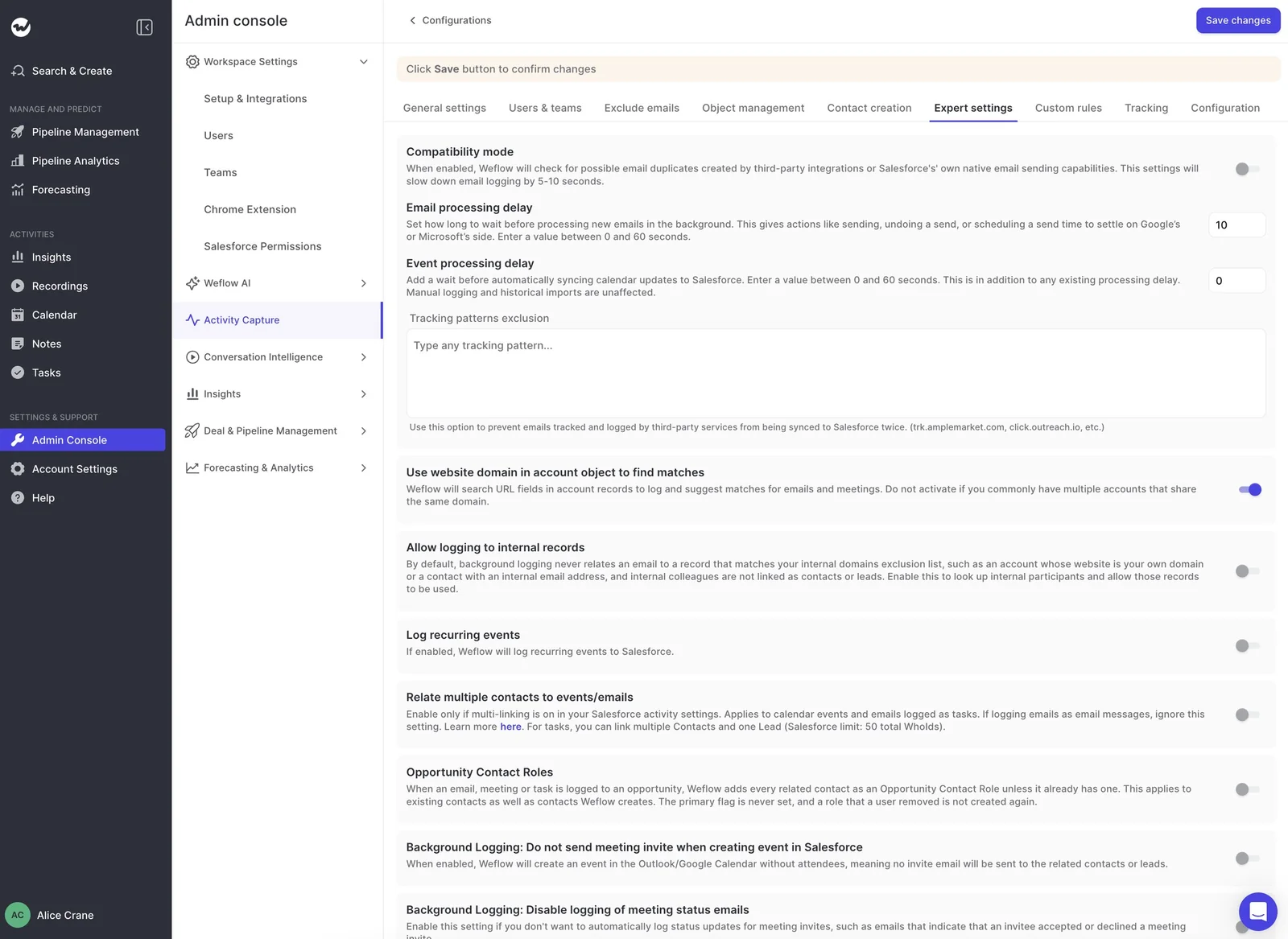
- Compatibility mode holds Weflow's sync back by about ten seconds so the other tool logs first, then matches on the record ID so the same email isn't written twice.
- Tracking patterns suppress a sequencer's bulk emails entirely.
- Backfill recovers anything missed, which makes a phased rollout safe.
Will I need a dedicated person to manage mis-mapping at high email volume?
Usually not. Thread memory and automatic contact roles shrink the problem over time, because each correction holds for its conversation and each logged email teaches the next one where to go.
The one thing that stays manual is spot-checking either record by record in the add-in and Activity Capture Health, or a one-off review from our support team.