Weflow vs Avoma for Logging Emails and Meetings to the Right Salesforce Record (2026)
Decide between Weflow vs Avoma for auto-mapping emails and meetings to the right Salesforce record.


On recording, Weflow and Avoma look almost the same. The real difference shows up when one contact sits on two open opportunities: where does each tool decide which deal the activity belongs to, and can you predict and correct that decision in Salesforce?
Weflow is the Revenue AI Orchestration platform for Salesforce sales, customer success, and RevOps teams. Here's how Weflow Activity & Contact Capture handles the two-deal problem:
- It picks the record using a fixed, documented order.
- When two open deals tie, it falls back to the account instead of guessing.
- Reps can re-map from Outlook or Gmail, and the fix changes the Salesforce record.
Avoma works differently. According to its docs, email links to the opportunity inside Avoma first, and logging to Salesforce is a separate setting.
Email sync also needs the Revenue Intelligence add-on, and the docs don't describe a rule for choosing between several open opportunities.
That said, Avoma is the better pick for some teams, like those on a CRM other than Salesforce or small teams that mostly want meeting notes and coaching. We'll cover those cases too.
Weflow vs Avoma at a glance for Salesforce activity logging
Here's how the two compare on the basics:
| Capability | Weflow | Avoma |
|---|---|---|
| Automatic email capture | Server side through a central app in Google Workspace or Microsoft 365. Covers inbound and outbound mail on any device, with no rep action. Logs only mail that matches a Salesforce record. Misses personal accounts and mail from deliverability subdomains. | Background Gmail and Outlook sync for members on the Avoma Revenue Intelligence add-on. Connects through an org-wide Google Workspace connection or each member's own inbox. Logging to the CRM is a separate setting. |
| Integrations with other tools | Native integrations with Salesforce, Gmail, Google Calendar, Outlook, Zoom, Teams, Meet, Slack and the Outreach dialer. BI tools such as Tableau and Looker connect through the API. No native Snowflake, Databricks or BigQuery connector, and Weflow isn't an integration platform. | 26 native integrations across conferencing tools, six CRMs, dialers and sales engagement tools. Also Slack, Microsoft Teams chat, ClickUp and Zapier. |
| Access from AI assistants (MCP) | Official read-only connector for Claude, ChatGPT and other MCP clients. Returns playbooks, call summaries, transcripts (behind an admin toggle), forecast calls and pipeline metrics. Doesn't return captured email content. | Connector for Claude and ChatGPT. Reads meetings, transcripts, notes, scorecards and usage metrics. Writes a meeting's outcome, purpose and privacy. Needs the Organization or Enterprise plan, or the API Access add-on. |
| Raw data access outside the tool | REST API bulk export of transcripts, metadata, scores and signals as JSON or CSV. Recordings export to your own storage. API access in every plan. No native warehouse connector. | REST API and webhooks for meetings, recordings, transcripts, notes and scorecards. Limited to 60 requests a minute, Organization plan and up. No managed warehouse export described. |
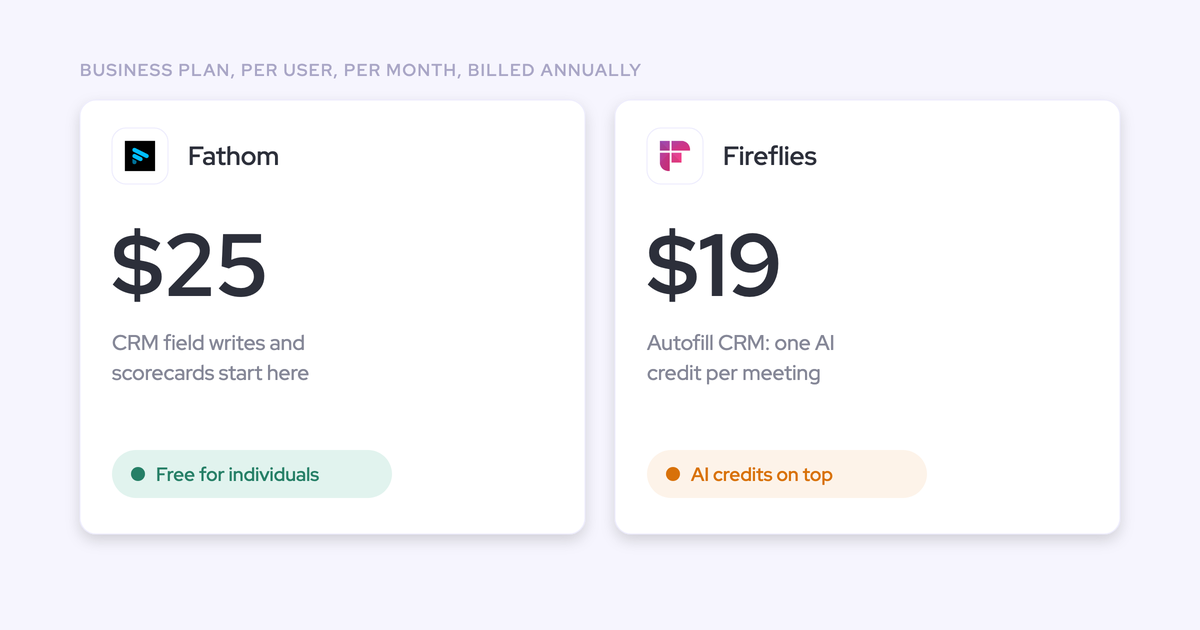
| Pricing | Published. $19 per user per month for capture, $49 for capture plus Conversation Intelligence. Billed annually, 10-user minimum. | Published. Recorder seat at $19 to $39 plus the $29 Revenue Intelligence add-on for email sync, per seat per month billed annually. |
You'll notice mapping isn't in the table. That's on purpose: it's the part that decides this shortlist, so it gets its own sections below.
Why Sales Ops teams end up comparing Weflow and Avoma
Most teams land on this shortlist in one of two ways:
- A conversation intelligence evaluation, where Avoma came in meeting-first.
- A replacement for Einstein Activity Capture or add-in logging.
Either way, the recording demos look alike, so the real question is whether emails and meetings land on the right opportunity, or fall to the account and make a live deal look dead.
It comes down to one Salesforce constraint: an activity can relate to one opportunity or to the account, never both. When a tool can't decide, it falls back to the account without any warning from Salesforce. The account timeline looks busy, while the deal looks untouched.
It's a complaint we hear on sales calls all the time:
If there are multiple opportunities, they just don't know where to map it and just randomly assign it to something. This is not acceptable.
What happens when one contact sits on two open opportunities
To be fair, no tool maps perfectly when the same contacts sit on a renewal, an expansion and a new business deal at once. Opportunity contact roles are supposed to break the tie, but in most orgs they're only half-populated.
So instead of perfection, it's worth grading three things: a stated rule, a safe fallback and a correction path.
How Weflow picks the opportunity, in a fixed order
For every email and meeting, Weflow follows the same steps:
- It looks up the address on the primary and secondary email fields and finds the contact, lead or custom object that holds it.
- If the address exists as both a contact and a lead, the contact wins.
- If the contact holds a contact role on exactly one open opportunity, or the account has exactly one open opportunity, Weflow logs there.
- If several opportunities are open, it weighs five signals: the contact role, the opportunity owner, the mailbox owner, the account relationship and the stage.
- If that evidence doesn't settle it, the activity logs to the account.
Weflow never logs to a closed opportunity, and it doesn't read the email's content to decide. We tested content matching but dropped it because it wasn't accurate enough.
Keep in mind that each email is evaluated on its own, against Salesforce as it stands at that moment. So if a contact role is added or an opportunity closes between two emails, the second one can land somewhere different.
The account fallback is by design. Logging to the account is easy to fix, but logging to the wrong deal isn't: a wrong match gets built on silently, while an account match is visible and a rep can move it in one click.
The rule does have limits:
- An email logs to one opportunity only. A thread that covers two live deals with the same customer lands on one of them or on the account.
- There's no nearest-close-date rule, even though it's the one teams ask for first.
- When renewal and expansion run in parallel with copied contact roles, you separate them by configuration. One lane serves the renewals team and one serves everyone else, filtered on opportunity type or a close-date threshold.
What Avoma's documentation says about choosing the opportunity
Here's what Avoma's documentation does commit to:
- Avoma links each synced email to the relevant opportunity, company and contact inside Avoma first.
- Logging email to Salesforce is a separate setting from sync, and the docs name a Task as the record.
- Avoma matches meeting participants to Salesforce leads, accounts and opportunities and writes meeting notes to those records.
- When meeting matching fails, a user links the meeting by hand through the No Associations icon.
- Edits made in Avoma sync to Salesforce. Edits made in Salesforce don't sync back to Avoma.
- Meetings set to private don't sync automatically.
But it's silent on the cases that matter most here:
- How to choose between several open opportunities.
- What happens with closed opportunities.
- Where activity goes when the opportunity is ambiguous.
Weflow and Avoma mapping rules, side by side
Here's how the two compare, dimension by dimension:
| Mapping dimension | Weflow | Avoma |
|---|---|---|
| Where the mapping decision lives | Written straight to the Salesforce record | Linked inside Avoma first, with CRM logging as a separate setting |
| Lookup fields | Primary and secondary email fields on contacts, leads and custom objects | Not described in Avoma's documentation |
| Several open opportunities | Weighs contact role, opportunity owner, mailbox owner, account relationship and stage | Not described in Avoma's documentation |
| Closed opportunities | Never logged to | Not described in Avoma's documentation |
| Fallback | Logs to the account when the evidence doesn't settle the deal | Not described in Avoma's documentation. Failed meeting matches are fixed by hand |
| Use of email content | Never used to decide | Not described in Avoma's documentation |
| Contact-role creation | Creates the opportunity contact role at the moment of logging | Not described in Avoma's documentation |
| Correction path | Outlook add-in and Chrome extension, before and after logging, changing the Salesforce record | Gmail Chrome extension with the Revenue Intelligence add-on. Meetings fixed through No Associations. Salesforce edits don't sync back |
Weflow creates contact roles so later emails find the deal
When Weflow logs an email to a contact and an opportunity, it can create the opportunity contact role if the contact doesn't have one there yet.
From then on, every email or meeting from that contact resolves to the deal through the role, so half-populated contact roles become less of a problem the longer Weflow runs.
The role is created without a role type, though. A job title doesn't tell you whether someone is the champion or the detractor, so we leave that call to the rep.
Activity logged before the role existed stays where it landed until someone moves it. Avoma's docs, by comparison, describe creating contacts or leads, but not contact roles.
Where a rep's mapping fix lands in Salesforce
A correction only helps if:
- The rep can make it where they already work.
- It carries across the rest of the thread.
- It changes the Salesforce record, not a vendor copy.
Weflow lets reps re-map in Outlook or Gmail, before and after logging
The correction path works the same whether your reps use Outlook or Gmail:
- The Outlook add-in and the Chrome extension show the matched contact, account and open opportunities before the email logs.
- The rep can pick a different opportunity, account or custom object from the same panel.
- A choice made at send carries to every later reply in that thread. A new thread starts fresh.
- A rep or admin can move an email that's already logged from the same panel. That change applies to that one email.
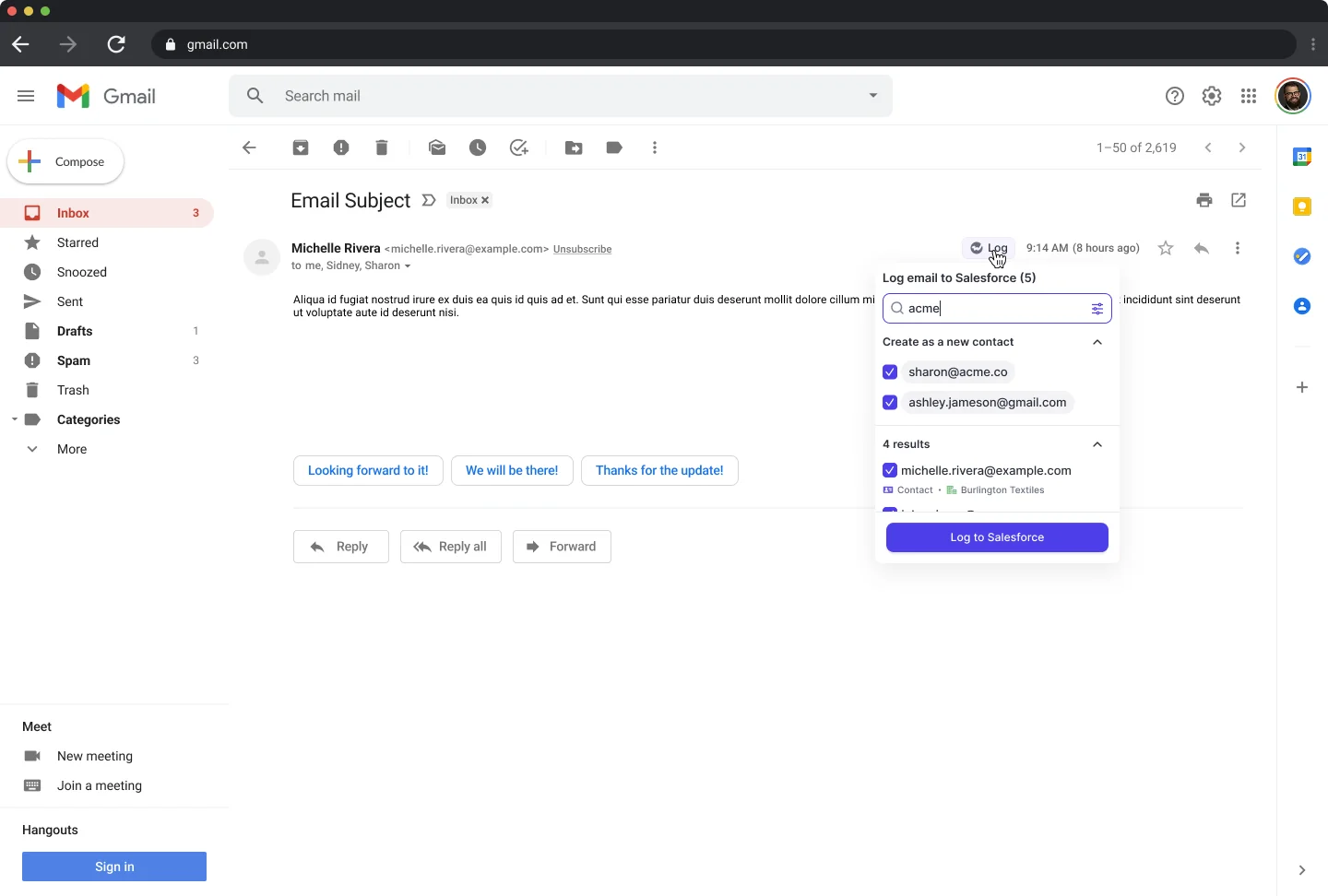
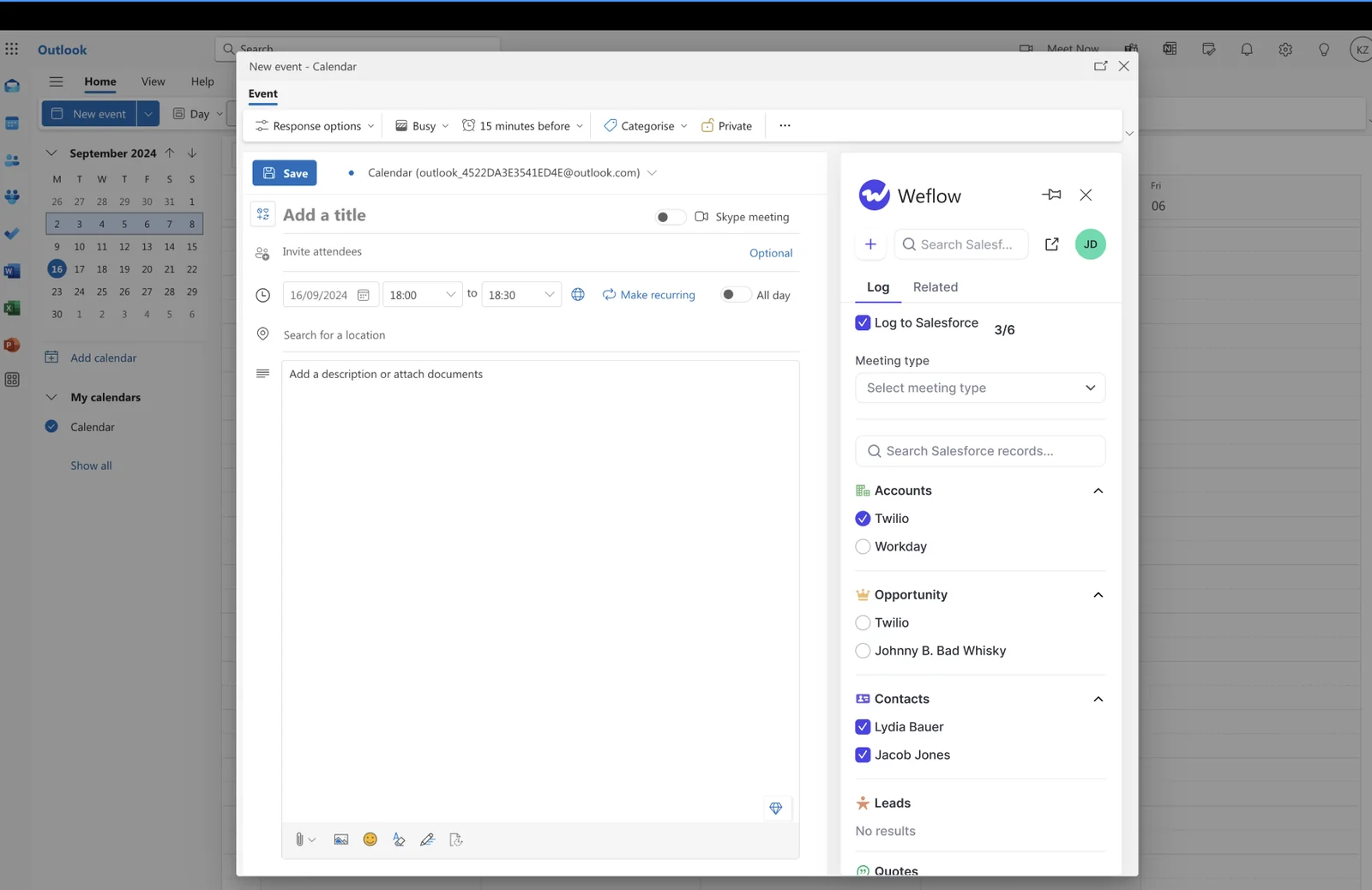
For meetings, give your reps one rule on day one: correct from the mail client.
- A fix from Outlook or the Chrome extension moves both the Salesforce Event and the Weflow recording.
- A fix inside the Weflow app moves only the recording.
We built it this way so nobody rewrites a Salesforce activity by accident from a recording view. But since the opportunity timeline reads the Event, a deal still looks inactive if a rep fixes only the recording.
Avoma fixes mappings in Gmail and on the meeting record
Avoma's documented correction path looks like this:
- Avoma's Chrome extension works inside Gmail. It shows which emails have synced, syncs any that haven't, and lets the rep add or remove the linked contact, lead, deal or company from the thread.
- Those Gmail features need the Revenue Intelligence add-on, email sync switched on and extension version 0.5.3 or later.
- Meetings that fail to match are fixed by hand through the No Associations icon.
- Avoma's documentation does not describe an Outlook equivalent of the Gmail correction path.
What Weflow and Avoma stop writing to Salesforce
Over-capture is the failure nobody plans for. The guards on contact creation, exclusion and duplicate Events decide whether your org gets cleaner or messier.
Contact creation guards against webinar, vendor and free-mail pollution
Most admins we talk to have already watched a tool fill their CRM with junk contacts. As one put it:
I don't want twenty new contacts in there for some prospect I'm just talking to. Only once they're really an account.
| Guard | Weflow | Avoma |
|---|---|---|
| Which accounts qualify | Existing accounts only | Not described in Avoma's documentation |
| Cap per meeting or email | Per-event cap, so a 100-person webinar doesn't write 99 contacts | Not described in Avoma's documentation |
| Duplicate handling | Deduplication on top of Salesforce's own duplicate rules. An address that already exists as a lead attaches to that lead | Not described in Avoma's documentation |
| Records it never creates | Accounts, leads and opportunities | Creates a lead when no Salesforce account shares the email's domain |
| Qualifying rules for addresses | Address exclusions such as noreply@, billing@ and newsletter@ | Not described in Avoma's documentation |

Exclusions for NDA deals, executive mailboxes and internal mail
Exclusions are usually the first thing legal asks about. One buyer summed up the requirement like this:
some of our potential deals are super confidential with NDAs where literally two people at our company should know about it
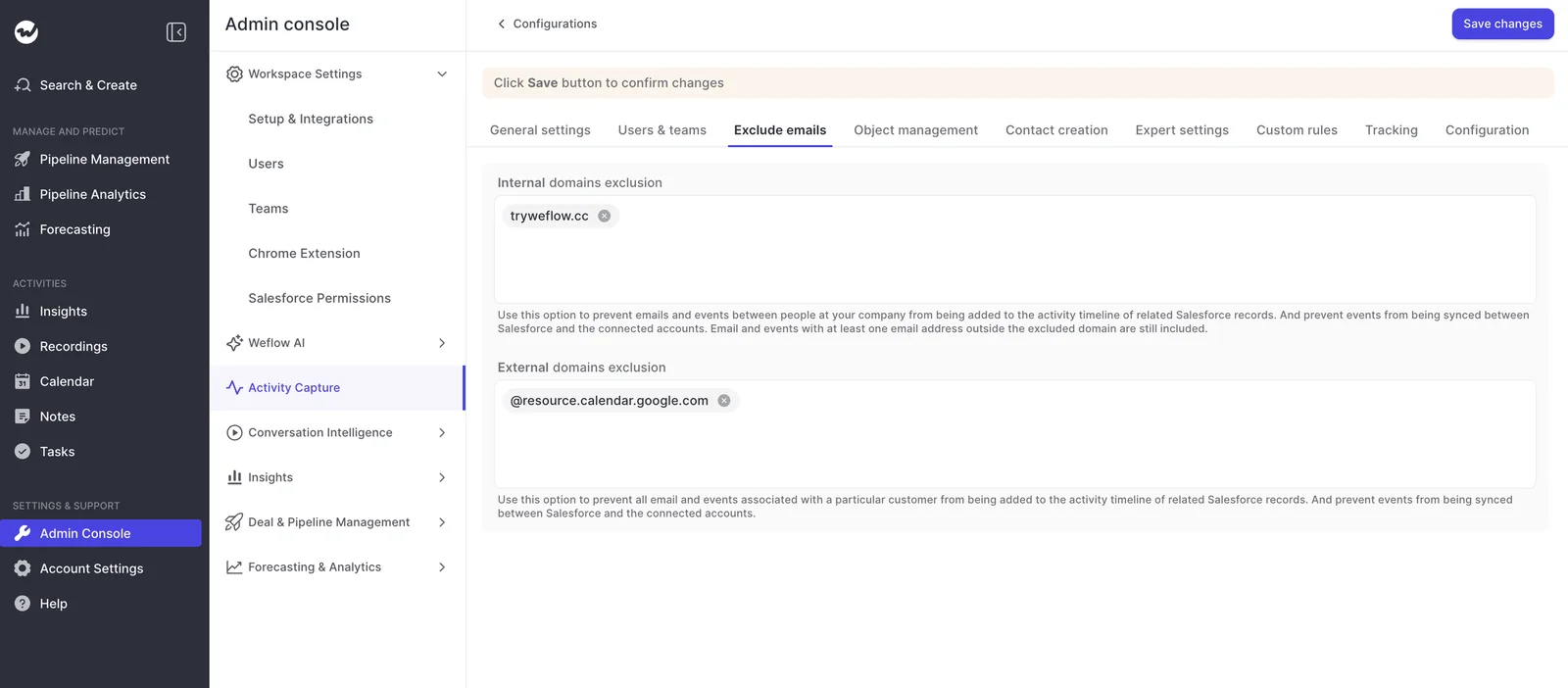
Weflow gives you four layers:
- Internal-domain exclusion is on by default, so threads where every participant is internal never reach Salesforce.
- Each team gets its own mode: fully automated, hybrid or manual, so executives can sit on manual only. If an executive emails a customer alongside sales reps, though, the more permissive sales configuration applies and the thread logs as usual.
- In hybrid mode, a rep can switch logging off for a single thread from the add-in.
- An admin can exclude an account centrally for a customer that must never be captured.
Weflow doesn't detect sensitive mail on its own, and rep-level controls only work when the rep notices. That's why a confidential customer belongs on the admin exclusion list.
Avoma documents admin exclusions only:
- Organization-wide exclusions by external domain, subject keyword or email address.
- An admin switch to turn email sync off for an individual member.
- No rep-level opt-out on a thread is described.
How each tool avoids a second Event for the same meeting
When Weflow both captures and records a meeting, it writes one Event and keeps updating it.
The recording lives on a separate custom object that can link to several records at once, which helps when one call covers a renewal and an expansion. The recording sits on both opportunities, while the Event sits on one.
Avoma creates a Salesforce Event for every meeting that comes through calendar sync, and its documented deduplication covers only one scheduling tool: Chili Piper.
Once you map Chili Piper's booking ID to a custom Event field and Avoma's team configures the match, Avoma writes to the Event Chili Piper already created.
Which Salesforce objects each tool writes emails and meetings to
Where records land decides what you can build on them.
| Record | Weflow | Avoma |
|---|---|---|
| EmailMessage where Enhanced Email is on, or Task, chosen per configuration | Task. An undated Avoma claim also mentions EmailMessage, which we haven't been able to tie to its documentation | |
| Meeting | Event, one per meeting | Event, created for every meeting from calendar sync |
| Recording or notes | Weflow_Recording__c custom object holding summary and transcript. The summary also writes to the Event | Salesforce Note, the Event description or a Task |
| Custom objects | Activity can log to any object, including cases and custom objects | Not described in Avoma's documentation |
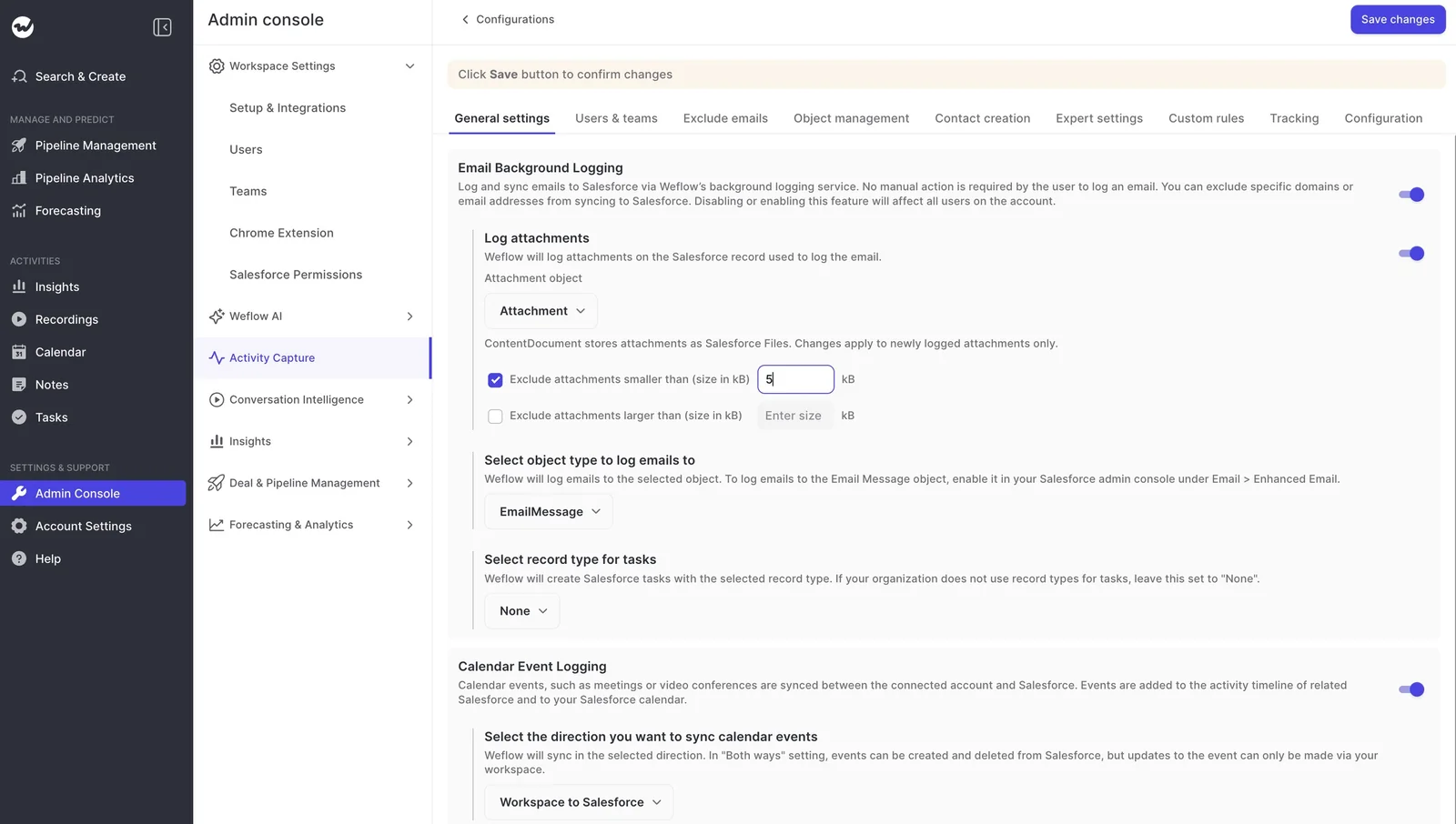
Because Weflow writes native records, your flows, reports and Salesforce connectors can read them directly. For example, a flow can move a lead forward when a meeting gets booked, and your BI tool can pull emails through Salesforce.
About 20 to 30% of our customers log activity to custom objects as well as standard ones. And if you ever leave Weflow, the data stays in your org because it's yours.
How Weflow handles email capture, integrations, MCP and data access
Weflow Activity & Contact Capture captures server side for every enrolled user. Its integrations, MCP connector and API are scoped around Salesforce and conversation data, and each one has a stated boundary.
Weflow captures email server side from Microsoft 365 or Google Workspace
Capture runs from a central app installed in Microsoft Entra or Google Workspace, so it doesn't depend on a plugin or on rep adoption.
- It logs inbound and outbound mail in real time, from phone, browser or desktop.
- Each mailbox is paired with one enrolled Salesforce user.
- It logs only mail that matches a Salesforce contact, lead or account domain, so personal mail never reaches the CRM.
That means Outlook and mobile senders get the same coverage as Gmail users. Capture does miss two things, though: personal email accounts, and mail sent from a separate deliverability subdomain that isn't the address on the rep's Salesforce user.
Weflow connects to Salesforce, Outreach, meeting tools and BI through its API
Weflow's native integrations cover Salesforce, Gmail, Google Calendar, Outlook, Zoom, Microsoft Teams, Google Meet, Slack and the Outreach dialer. BI tools such as Tableau and Looker connect through the API.
To be upfront, this is where we fall short:
- There's no native Snowflake, Databricks or BigQuery connector, so warehouse loads go through the API.
- Weflow isn't an integration platform with a catalogue of connectors.
- Workflows that need your ERP or finance system in the same agent belong in your own platform, fed by our API and MCP connector.
Weflow's MCP connector reads calls and forecasts, not captured email
Weflow's official MCP connector is read-only and works with Claude, ChatGPT and any client that supports remote MCP servers. An admin switches it on per workspace, and a separate toggle decides whether assistants read full transcripts or only AI summaries.
It returns:
- Playbook results and call summaries.
- Transcripts, when the admin toggle allows them.
- Forecast calls.
- Pipeline metrics, with per-rep breakdowns for up to 25 owners.
It doesn't return captured email content or Salesforce field values. Those already live in Salesforce as native records, so your assistant can read them through a Salesforce connector.
That also means if you only use capture, our connector won't add much until you start recording calls.
Weflow exports transcripts, scores and signals through its REST API
Weflow's REST API bulk-exports transcripts, metadata, scores and signals as JSON or CSV, on a schedule or on demand.
- The exports feed warehouses and BI tools.
- Recordings export to your own cloud storage, since we keep video out of Salesforce to save space.
- API access comes with every plan.
How Avoma handles email capture, integrations, MCP and data access
Avoma's email sync and CRM logging depend on the Revenue Intelligence add-on. Its integrations and MCP connector are broader than ours in places. Its API is rate-limited and plan-gated.
Avoma syncs Gmail and Outlook email with the Revenue Intelligence add-on
Avoma syncs Gmail and Outlook email in the background for every member on the Revenue Intelligence add-on.
- A Google Workspace admin can connect everyone once through domain-wide delegation. Otherwise, each member connects their own inbox.
- Admins can switch sync off per member.
- Avoma's documentation describes no attachment capture and no backfill of past email.
Avoma connects to six CRMs and a long list of dialers
Avoma lists 26 native integrations, and this is the clearest place it's ahead of us:
- Eight video conferencing tools.
- Six CRMs: Salesforce, HubSpot, Pipedrive, Zoho, Copper and Zendesk Sell.
- Nine dialers and sales engagement tools, including Aircall, Dialpad, RingCentral, Outreach and Salesloft.
- Slack, Microsoft Teams chat, ClickUp and Zapier.
Avoma's MCP connector reads meetings and writes meeting outcomes
Avoma's MCP connector works with Claude and ChatGPT.
- It has 11 read tools covering meetings, transcripts, notes, scorecard evaluations and usage metrics.
- It has 3 write tools that set a meeting's outcome, purpose and privacy from chat, something ours can't do.
- It needs the Organization or Enterprise plan, or the API Access add-on.
- An admin chooses whether it reaches one user's meetings or all non-private meetings in the organization.
- Connections drop after 30 days without use.
Avoma's API returns meeting data at 60 requests a minute
Avoma also has a public REST API and webhooks for meetings, recordings, transcripts, notes and scorecards, with a few limits:
- It's limited to 60 requests a minute.
- It comes with the Organization plan and above.
- Only admins can create keys.
- Avoma's documentation describes no managed export to a data warehouse.
When Avoma is the better choice for your team
Avoma is a better fit for some teams, and we'd rather you know which ones up front:
- You run a CRM other than Salesforce, or several: Weflow works only with Salesforce, while Avoma supports six CRMs.
- You're a small team that mostly wants meeting notes and coaching: Avoma grew outward from the call, and that's where its center of gravity still sits.
- You want flexible commercial terms: Avoma offers free unlimited viewer seats, plus monthly billing, no setup fee and no 10-seat minimum on its Startup and Organization plans.
- You want an assistant that writes back: Avoma's MCP connector can set meeting outcome, purpose and privacy. Weflow's is read-only.
One thing neither tool solves: if you need native warehouse delivery and won't use an API, plan around it before either rollout, since neither has a native warehouse connector.
Weflow vs Avoma per-seat cost for capture and recording
Both vendors publish their prices. For capture plus recording, the two land close together. For capture only, Weflow costs less, because Avoma's CRM email sync needs a recorder seat plus the Revenue Intelligence add-on.
| Cost dimension | Weflow | Avoma |
|---|---|---|
| Pricing model | Per seat. AI usage included. Agent Builder is the only product priced by consumption | Per recorder seat, plus per-seat add-ons |
| Capture only, per seat per month | $19 for Weflow Activity & Contact Capture, without recording | $48 to $68 billed annually: recorder seat ($19 to $39) plus the Revenue Intelligence add-on ($29) |
| Capture plus recording, per seat per month | $49 for Weflow Revenue AI Foundation | $48 to $68 billed annually, the same recorder seat plus add-on |
| Billing and term | Annual billing, 12-month minimum term. Seats added mid-term are charged pro rata | Annual or monthly on Startup ($29 seat) and Organization ($39 seat). Revenue Intelligence is $35 monthly. Enterprise is annual only |
| Minimums and seat caps | 10 users per product or bundle | Startup up to 25 seats, Organization up to 100, Enterprise 10-seat minimum |
| What costs extra | Agent Builder paid tiers: $299 a month for 500 actions, $999 for 2,500. The free tier with 25 actions is included | Optional onboarding with an Avoma expert at $1,000. Conversation Intelligence add-on at $29 |
| Trial | 14-day free trial with guided onboarding | 14-day trial of the Organization plan with all add-ons |
If you want capture and recording on the same seat, the price difference is a dollar or two either way, so let mapping make the call.
If you'd rather start with capture and add recording later, Weflow starts at $19 and moves to the $49 bundle once you add Conversation Intelligence.
Choose Weflow or Avoma: Which Salesforce team each one fits
Choose Weflow if:
- Your accounts carry new business, renewal and expansion opportunities with the same contacts on each, and activity has to land on the right deal.
- You want a mapping rule you can predict, with a fallback to the account instead of a guess.
- Your reps work in Outlook as well as Gmail and need the same correction path, with fixes that change Salesforce.
- You need guards on contact creation and exclusions at the team and thread level.
- You want capture without recording, or capture first and recording later.
Choose Avoma if:
- Recording, notes and coaching come first, and CRM logging is secondary.
- You run a CRM other than Salesforce, or more than one.
- You want monthly billing, no seat minimum on smaller plans, and free unlimited viewers.
- You want an MCP connector that can write meeting outcomes from chat.
Run a two-week Weflow vs Avoma sandbox test
The best way to decide is to test both. Run them in parallel on default settings, with test data that isolates the rule you're testing, and grade them on three things: the ambiguous case, what each tool refuses to write, and whether corrections reach Salesforce.
Save configuration for after you've settled parity.
Here's how to set it up:
- Enroll one or two test users on each tool in a sandbox and leave both on default settings.
- Give every test company its own domain in the Website field, and never use gmail.com or outlook.com. Free-mail domains match every test sender to several accounts, so you'd end up testing your test data instead of the tool.
- Send from addresses outside your company. Mail between colleagues is excluded as internal, so it'll look like a failure.
- Give each opportunity one clear contact role. Then build one deliberate shared-contact case: the same contact on an open renewal and an open expansion.
- Run for two weeks next to your current capture setup and count what each tool logged.
| Test | What to check on Weflow | What to check on Avoma |
|---|---|---|
| Contact on two open opportunities | The email lands on the account unless the five signals settle it | Where the email lands in Avoma, and where it lands in Salesforce once logging is on |
| Closed opportunity | Nothing logs to the closed deal | Whether the closed deal receives the email |
| Internal-only thread | Nothing reaches Salesforce | Whether it syncs without an admin exclusion |
| Webinar-sized invite | Contact creation stops at the per-event cap | How many contacts or leads appear |
| Excluded NDA account | Nothing logs after the admin exclusion | Whether a domain or address exclusion holds |
| Outlook sender correction | The rep re-maps in the Outlook add-in and later replies follow | What path an Outlook user has to correct the match |
| Correction reaching Salesforce | The Salesforce record moves after a fix from the add-in | The Salesforce record moves after a fix in Avoma, and a Salesforce-side edit stays one-way |
| Recorder plus capture duplicate Event | One Event per meeting with Weflow recording | Event count per meeting when another tool also logs it |
| Meeting created, moved, rescheduled and deleted | The Event updates or disappears each time | The Event updates or disappears each time |
No vendor publishes an override rate, us included. So count how many times your test reps re-map during the two weeks. That number is your override workload, based on your own data.
See how Weflow captures activity, updates Salesforce fields from calls, and rolls up your forecast. Book a 30-minute demo.
FAQ: Weflow vs Avoma questions Sales Ops asks before deciding
Can I run Avoma for recording and Weflow for capture without duplicate Events?
Not out of the box, since Avoma creates an Event for every meeting from calendar sync and its documented deduplication only covers Chili Piper booking IDs.
Weflow's one-Event-per-meeting behavior only applies when Weflow does both capture and recording. So if you split the tools, switch off calendar event logging in Weflow and let one tool own meeting Events.
Should emails log as EmailMessage or Task in Salesforce?
About nine in ten of our customers go with EmailMessage, but here's the trade-off:
- EmailMessage carries native From, To and Cc fields and thread structure. One record relates to up to 50 recipients. It's roughly seven times heavier than a Task.
- Task takes about 1.8 kB. One activity report can span tasks and events, which EmailMessage can't. Salesforce also offers more access controls on tasks.
Since the captured content is identical either way, the choice comes down to storage, reporting and access control.
Do I need Shared Activities on for meetings to relate to every attendee?
Yes. Weflow relates a meeting to every attendee through Salesforce Shared Activities, and the matching option in Weflow only appears once it's on. Many orgs have it switched off, and in a large org turning it on means a change request, so raise it early.
Where does activity land on agency, partner and parent-child accounts?
Weflow matches accounts on the Website field, so activity lands on whichever account holds the matching domain. In agency and partner selling, though, the person on the thread often has a different domain from the account the deal sits under.
In those cases, exclude partner domains or account types and let reps re-map those threads in the add-in.
With parent-child hierarchies, activity attaches to the child account that matched. If you want a roll-up across the hierarchy, you'd build it in Salesforce. Avoma's documentation doesn't describe how it handles these cases.
How does Weflow handle a contact with several email aliases?
Matching runs on primary and secondary email fields, so a buyer with a business and a personal address resolves to one contact.
Seller-side aliases are where it stops: capture matches the sending address on the rep's Salesforce user, so mail sent from a second alias or deliverability subdomain doesn't log.
Does Weflow work alongside Outreach and Salesloft?
Yes, and you pick one of two settings per tool:
- Compatibility mode is for a tool that keeps logging. It holds Weflow's sync back by about ten seconds, then matches on the record ID so the same email isn't written twice.
- Tracking patterns are for a sequencer whose bulk sends should never reach the CRM. They suppress those emails using a string in the message body.
If you pick the wrong one, you'll get either doubled activity counts or a hole in a rep's history.
Can I backfill historical email when moving off Einstein Activity Capture?
Yes. Weflow can sync back up to 24 months of history, batched to protect your daily Salesforce API limits. For example, Blacklane's four months of email and meetings synced over one week. Avoma's documentation describes no email backfill.
What Salesforce setup does Weflow need before capture starts?
You need four things:
- An integration user with the Salesforce REST API enabled.
- The managed packages installed.
- The workspace app installed in Microsoft Entra or Google Workspace.
- If IP restrictions apply to the integration user, our three backend addresses on your allowlist: 13.238.122.179, 3.72.162.152 and 52.22.87.230.
If you want group assignment to limit which mailboxes Weflow reaches, set the app's Assignment required property to Yes in Entra. And since nothing is read until you enroll a user in a capture configuration, you can finish setup while legal review is still open.
Why would automatic contact creation silently fail in my org?
The usual culprit is required fields on a Salesforce page layout, which block any external tool from creating a contact.
Since page layouts aren't exposed through the API the way validation rules are, the tool can't see them, so contacts never appear and no error shows up anywhere. Check your contact layout's required fields before rollout.
How do I answer reps who say the company reads their email?
Be upfront about the logging rules:
- Internal-only mail is excluded by default.
- Only mail that matches a Salesforce customer record logs.
- In hybrid mode, they can switch logging off for any thread.
In the rollouts we've run, mentioning the internal-domain exclusion early is what defuses the objection.
What security certifications do Weflow and Avoma hold?
Both tools hold SOC 2 Type II.
- Weflow is GDPR compliant, applies Zero Data Retention for AI processing, and never uses customer data to train AI models.
- Avoma holds ISO/IEC 42001 and doesn't use meeting data to train models. It hosts all customer data on AWS in the US. For EU data residency, its enterprise team discusses options.