Weflow vs Avoma for Follow-Up Emails Written From Meeting Notes (2026)
Learn Weflow vs Avoma for AI follow-up emails from transcripts or meeting notes, plus sending and tracking.


Weflow and Avoma both draft a follow-up email after a sales call, but they differ on three points: what the draft is built from, when it reaches your rep, and whether you can see that it went out.
Weflow Conversation Intelligence builds the draft from the call transcript and the Salesforce deal fields you map in, and it's waiting within a minute of the meeting ending. You can also see follow-up lag per deal in your pipeline views.
The catch: Weflow doesn't send the email. Your rep copies the draft (or opens it through a link) and adds the recipients by hand.
Avoma, on the other hand, drafts from its AI summary or meeting notes when your rep clicks Send Follow Up, and the email goes out from the rep's own Gmail or Outlook. That one-click send is a real advantage and the main place Avoma comes out ahead.
Weflow is the Revenue AI Orchestration platform for sales, customer success, and RevOps teams. Full disclosure: this is Weflow's blog, but we've covered both tools the same way, including where Avoma is the better fit.
Weflow vs Avoma at a glance for follow-up emails
On a feature grid, both tools "offer" follow-up emails, but the details show how differently they do it.
| Capability | Weflow | Avoma |
|---|---|---|
| AI follow-up emails | Drafted from the transcript plus mapped Salesforce fields and your company context. Ready 30 to 60 seconds after the call ends. The rep copies it and adds recipients by hand. | Drafted from the AI summary or the meeting notes when the rep clicks Send Follow Up. Sent from the rep's connected Gmail or Outlook. |
| Integrations with other tools | Salesforce only. Native Gmail, Outlook, Google Calendar, Zoom, Teams, Meet, Webex and Slack, plus dialers (Outreach, Aircall, CloudTalk, Dialpad, Zoom Phone). Not a connector catalogue. | 26 native integrations: six CRMs, eight conferencing tools, nine dialers and sales engagement tools, plus Slack, Teams chat and ClickUp. Also connects to Zapier. |
| Access from AI assistants (MCP) | Official read-only connector for Claude, ChatGPT and other MCP clients. Reads playbooks, summaries, transcripts and forecast data. An admin enables it per workspace, with a separate transcript toggle. | Connector with 11 read tools and 3 write tools (meeting outcome, purpose, privacy). Needs the Organization or Enterprise plan, or the API Access add-on. |
| Raw data access outside the tool | Public REST API on every plan. Bulk export of transcripts, scores and signals as JSON or CSV to BI tools and warehouses. No native warehouse connector. | REST API and webhooks, limited to 60 requests a minute. Available on the Organization plan and above. |
| Pricing | $39 per user per month for Conversation Intelligence. Follow-ups, summaries, field updates and Ask Weflow AI are included with no usage caps. 10-user minimum, 12-month term. | $19 to $39 per recorder seat for the base plan, plus $29 add-ons. CRM field updates sit in the Revenue Intelligence add-on. AI note regeneration is capped per meeting. |
Why Weflow and Avoma follow-up drafts aren't the same thing
If you've sat through four or five demos that looked almost identical, you already know follow-up drafting is standard now. A "drafts follow-up email: yes" row won't tell you which tool your reps will actually use.
What matters is what each draft is built from and where it ends up.
The source matters because the follow-up is often the only written record of what was agreed on the call. When it's written late or from memory, three versions of the deal start to drift apart:
- The next steps in the email
- The next steps in Salesforce
- What the buyer thinks was agreed
That's why "written from meeting notes" is worth a closer look. Avoma's draft comes from the AI summary or the notes, which is one step removed from what was said. Weflow writes from the transcript itself, with the deal record mapped in.
In practice, four questions separate the two tools:
- What is the draft built from: the conversation, a summary of it, and does it include the deal?
- When does the draft arrive: on its own while the call is fresh, or when someone asks for it?
- What does your rep still do by hand between the draft and a sent email?
- Can you, as the manager, see whether the follow-up went out without asking in every one-on-one?
How Weflow drafts follow-ups and connects to your stack
Weflow treats the follow-up as two things: a draft that knows about the deal, and a signal you can track.
What Weflow builds the follow-up email from
Weflow builds the draft from the call transcript, not a summary. Admins map Salesforce fields into the template, so the email carries context from the opportunity, not just what came up on this one call.
It also draws on a company-level business context: what you sell, your value proposition, buyers, competitors and product terms.
That context does a lot of the heavy lifting. Leave it empty, and the AI doesn't know who it's writing for, so follow-ups come out generic.
You can maintain it yourself in the Admin Console, or send us your value proposition doc, methodology definitions or phrasing to avoid, and we'll build it in.
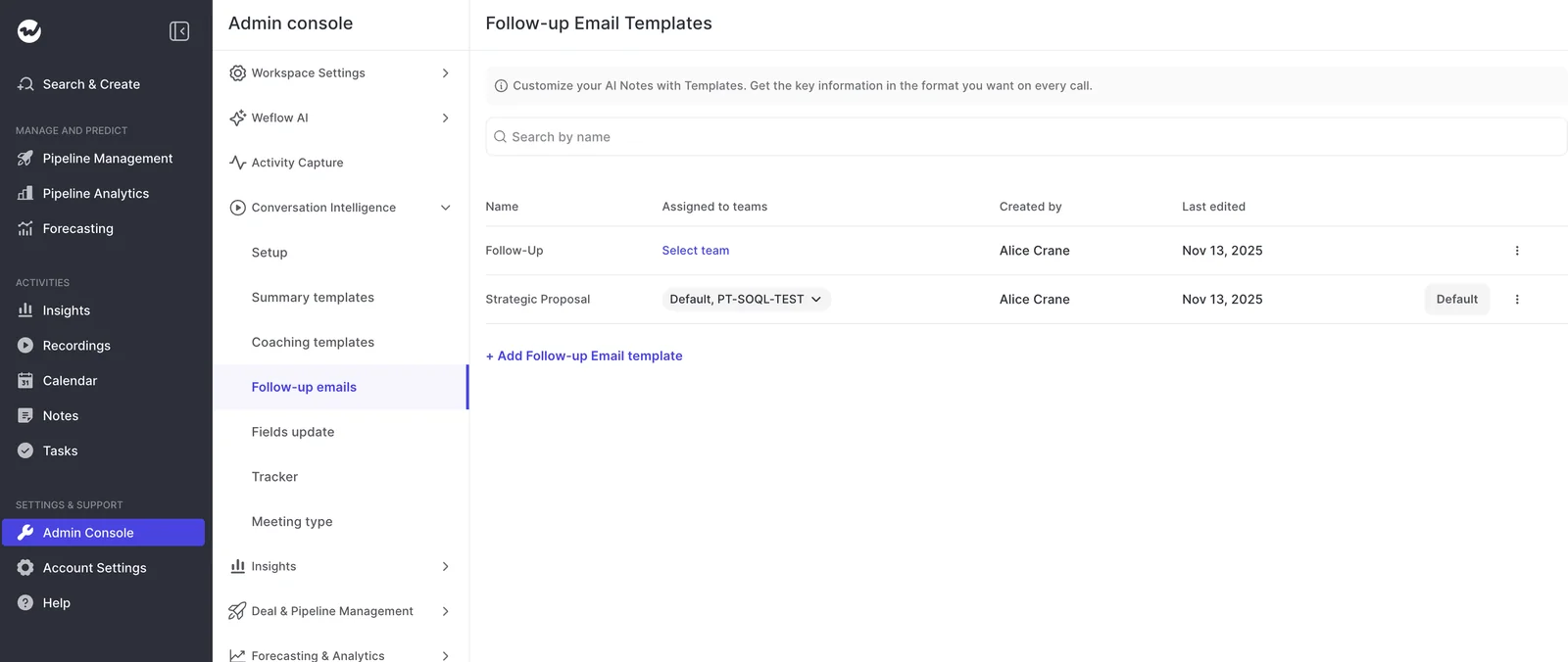
The third input is the situation. Weflow comes with predefined prompts for the follow-ups reps actually write:
- Contract and next steps
- Cross-sell and upsell
- Detailed follow-up
- No-show follow-up, which acknowledges the missed meeting and offers new time slots
- Objection handling
- Post-proposal and proposal follow-up
- Pricing and budget
- Resource sharing
- Scheduling the next meeting
- Thanks and summary
Admins combine these into templates, add their own custom prompts, assign each template to a team and mark one as the default. There's no limit on templates, so your AEs and CSMs don't end up sending the same generic check-in.
When the Weflow draft lands after your rep's call
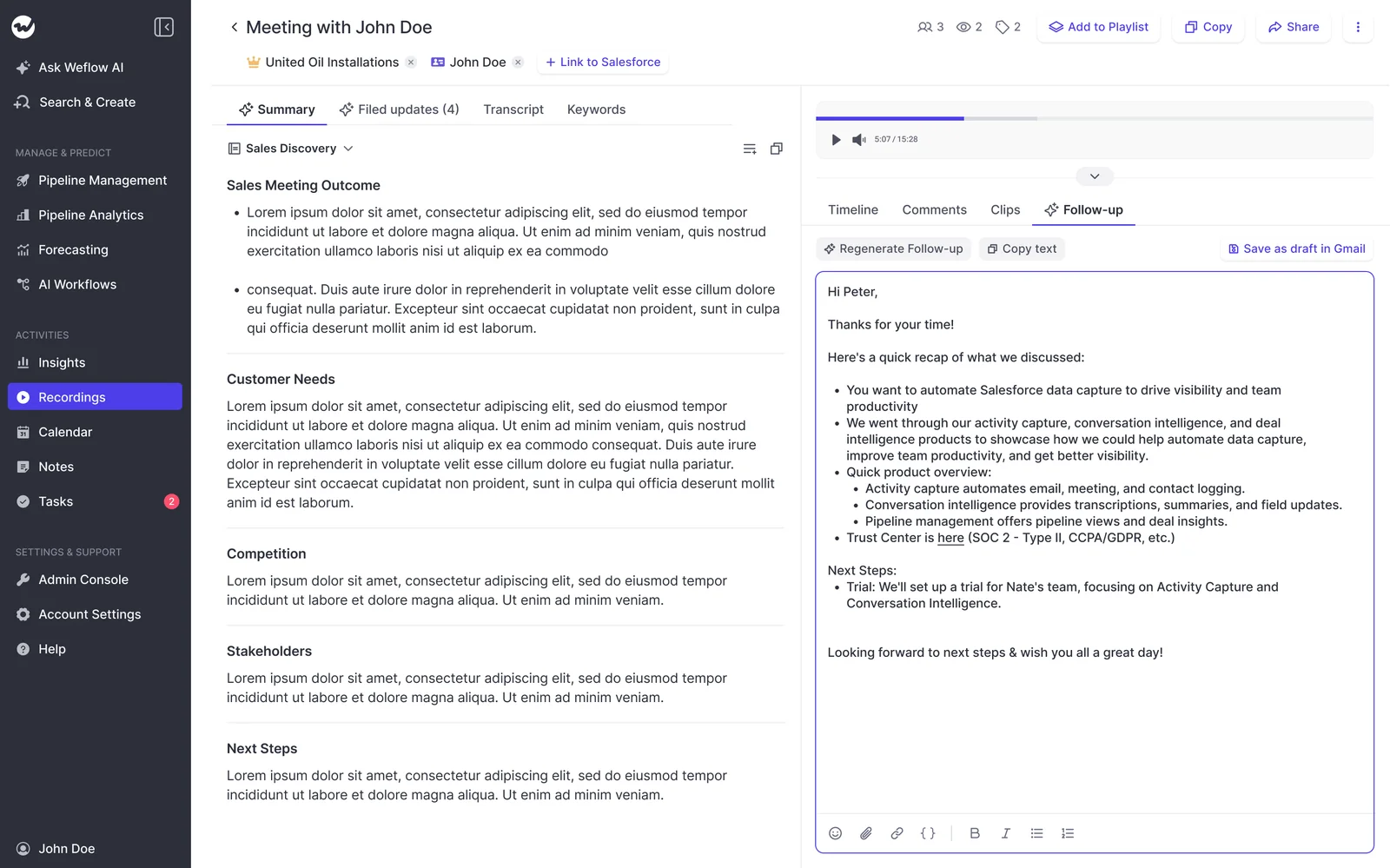
Within 30 to 60 seconds of the meeting ending, your rep gets three things without asking:
- The AI summary
- The drafted follow-up
- The proposed Salesforce field updates
That timing often decides whether the follow-up gets sent at all. A draft that arrives a minute after the call goes out while the conversation is still fresh. One the rep has to reconstruct that evening gets written from scraps, if it gets written at all.
When I have five back to back meetings and I speak to ten different people, there's no chance I can remember everything. The automated summary is the only way I can put the data properly into the CRM.
Weflow writes the summary onto the Salesforce Event, so it sits on the opportunity's activity timeline.
The field review only shows fields where the call surfaced new information, with current and proposed values side by side, and your rep approves them with one click.
The follow-up is written in whatever language the meeting was held in (Weflow detects 96 languages), while the Salesforce summary stays in your workspace language so your CRM reporting stays consistent.
What your rep still does by hand in Weflow
Weflow drafts the follow-up, but it doesn't send it or fill in the recipients. Here's what your rep does between draft and sent:
- Opens the draft on the recording page or from the post-call recap email.
- Reads it and edits anything that needs their own wording.
- Copies the draft into their mail client, or opens it through the link.
- Adds the participants' email addresses by hand, even though those addresses are already on the calendar invite.
- Sends.
Steps three and four are real friction, and reps notice them first. We'd rather you hear it from us now than in week two of a rollout.
Step two is a different story, and it's worth keeping. Many sales leaders still want the rep's own voice and name on the email, so every follow-up gets a human read before it reaches the buyer.
How you spot lagging follow-ups across deals in Weflow
Weflow's Meeting follow up field shows how long the rep took to send an email after the most recent meeting on a deal, and you can use it as a column or a filter in pipeline views.
Here's how the clock works:
- It runs from the end of the last meeting to the first follow-up email.
- It shows hours for the first day, then days.
- It resets when a new meeting takes place.
- It ignores all-day calendar events, so a blocked-out day doesn't count as a meeting.
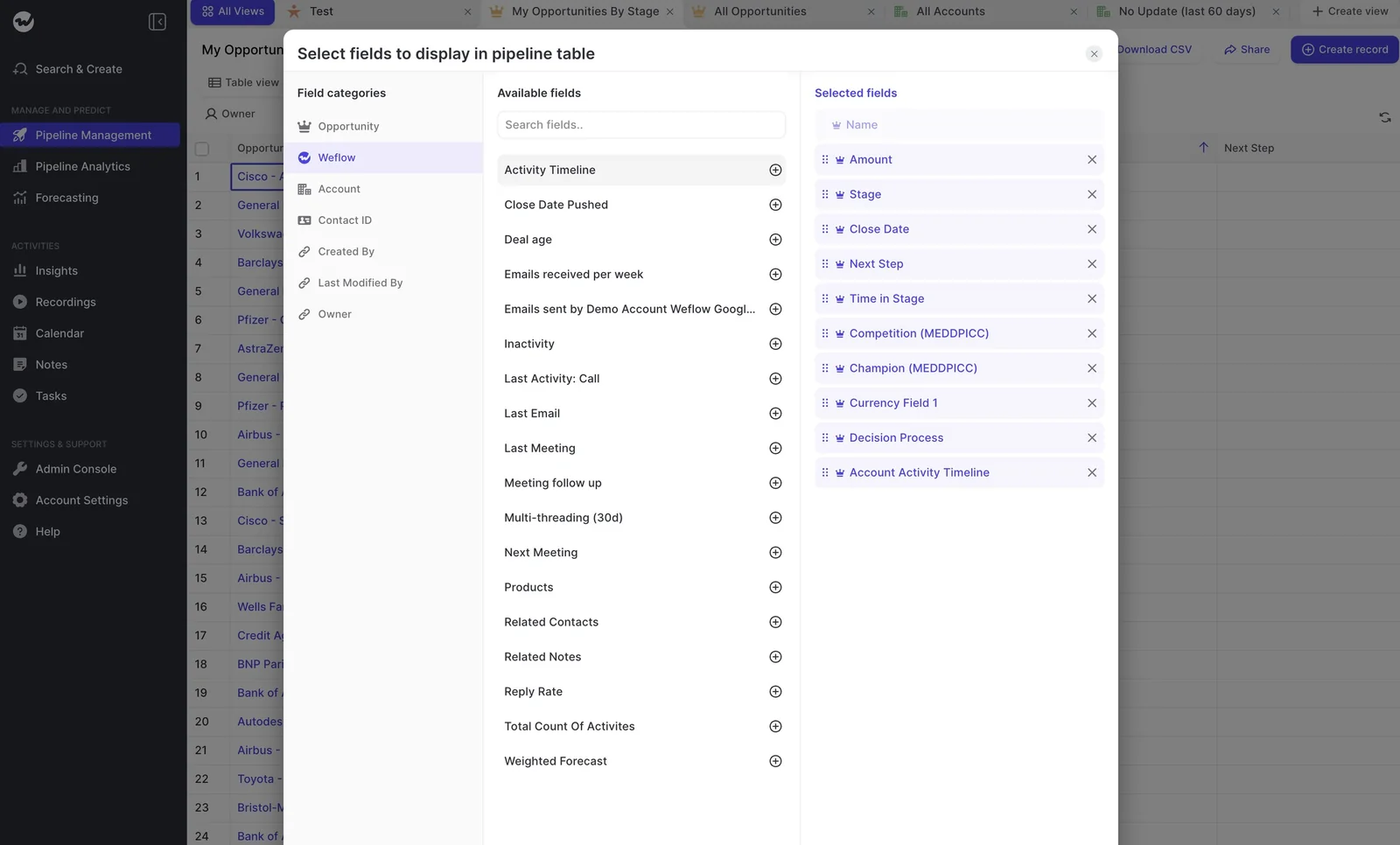
Before pipeline review, filter on the field to see which deals are lagging. Then you can open the one-on-one with those deals instead of asking whether the rep followed up.That's how ADVISA uses it:
Weflow eliminated the need for our VP to ask, 'Did you follow up?' The system now tracks that automatically, creating a framework that drives accountability across the team.
Which tools Weflow connects to beyond Salesforce
Weflow connects natively to the tools a Salesforce sales team uses every day, and reaches BI tools and AI assistants through its API and MCP connector:
- Mail and calendar: Gmail, Google Calendar and Outlook.
- Meeting platforms: Zoom, Microsoft Teams, Google Meet and Webex, through the notetaker.
- Dialers: the Outreach dialer, which your admin connects directly, plus Aircall, CloudTalk, Dialpad and Zoom Phone, which our team activates.
- Desktop app: records meetings without a bot, and records softphone calls such as Aircall or RingCentral because it captures system audio.
- Chat: Slack and Microsoft Teams for meeting summaries and notifications.
- BI and AI: Tableau and Looker through the API, and Claude, ChatGPT and other MCP clients through the connector.
- Limits: Weflow works exclusively with Salesforce and isn't an integration platform with a connector catalogue.
How Claude and ChatGPT read Weflow data through MCP
Weflow's official MCP connector is read-only and gives Claude, ChatGPT or any remote MCP client access to:
- AI Playbook results
- Call summaries
- Transcripts
- Forecast and pipeline data
An admin turns the connector on per workspace, with a separate toggle for whether assistants can read full transcripts or only summaries.
The connector only returns what the connected user can already see in Weflow, so a rep can't reach a teammate's calls through an assistant if they couldn't open them in Weflow.
How RevOps pulls raw Weflow data through the API
Weflow's public API is included in every plan, so you don't need an upsell to get your data out. It bulk-exports transcripts, metadata, scores and signals as JSON or CSV into BI tools and warehouses. Recordings can go to your own cloud storage.
There's no native Snowflake, Databricks or BigQuery connector, so teams that centralize data in a warehouse move it there through the API, already mapped to the right Salesforce accounts, contacts and opportunities.
How Avoma drafts follow-ups and connects to your stack
Avoma is a capable meeting-first tool. Its follow-up starts from the meeting summary and ends in your rep's own mailbox.
What Avoma builds the follow-up email from
Avoma builds the follow-up draft from either its AI summary or the meeting notes.
Those notes are shaped by templates. Avoma has more than 90 of them across 11 functions and picks the right one automatically based on the meeting's purpose. Custom AI templates need the Organization plan.
Its agent builder also includes a ready-made follow-up template. In practice, the quality of an Avoma follow-up depends on how well the notes template fits the meeting, since the draft is a rewrite of the summary, not a second pass over the conversation.
When the Avoma draft appears after your rep's call
Avoma writes its AI notes automatically when the meeting ends, including a summary, key questions and next steps.
The follow-up draft, though, only appears when your rep clicks Send Follow Up. If you'd rather skip the click, Avoma's agent builder can trigger when a meeting ends, but runs that need judgement wait for someone to approve them.
What your rep still does by hand in Avoma
Avoma's path from draft to sent is shorter at the end because it sends the email for the rep:
- Connect their Gmail or Outlook account to Avoma, once.
- Open the meeting and click Send Follow Up.
- Choose whether the draft builds from the AI summary or the meeting notes.
- Edit the draft.
- Send it from Avoma. Recipients see the email as coming from the rep's own mailbox, not from Avoma.
If one-click sending is what your reps care about most, this is Avoma's clearest win.
What you can see about follow-ups across deals in Avoma
Avoma's Revenue Insights shows Salesforce opportunities in saved views with up to 50 columns of CRM and Avoma data, including meetings, calls and emails. Field edits made in those views write back to the CRM.
A side panel shows recent engagement per deal as dots sized by the number of meetings, calls and emails. It gives you a read on how much activity each deal is getting, and Avoma suggests using it to challenge close dates in pipeline reviews.
Which tools Avoma connects to, including other CRMs
Avoma lists 26 native integrations, which is a real advantage if you aren't on Salesforce or run more than one CRM:
- Conferencing: Zoom, Google Meet, Microsoft Teams, GoToMeeting, BlueJeans, Highfive, Lifesize and UberConference.
- CRMs: Salesforce, HubSpot, Pipedrive, Zoho, Copper and Zendesk Sell.
- Dialers and sales engagement: Aircall, Dialpad, RingCentral, Zoom Phone, Kixie, Koncert, Outreach, Salesloft and Groove.
- Collaboration: Slack, Microsoft Teams chat and ClickUp, plus a Zapier connection.
How Claude and ChatGPT read and write Avoma data through MCP
Avoma's MCP connector gives Claude and ChatGPT 11 read tools covering meetings, transcripts, scorecard evaluations and usage metrics, plus 3 write tools that set a meeting's outcome, purpose and privacy from chat.
You'll need the Organization or Enterprise plan, or the API Access add-on. The connector also disconnects after 30 days without use, and very broad queries across thousands of meetings can time out.
How RevOps pulls raw Avoma data through the API
Avoma has a public REST API and webhooks for meetings, recordings, transcripts, notes and scorecards. Only admins can create keys, and the API comes with the Organization plan and above.
Requests are capped at 60 a minute, and Avoma positions the API for feeding internal dashboards and BI tools.
What Weflow and Avoma cost for follow-ups and field updates
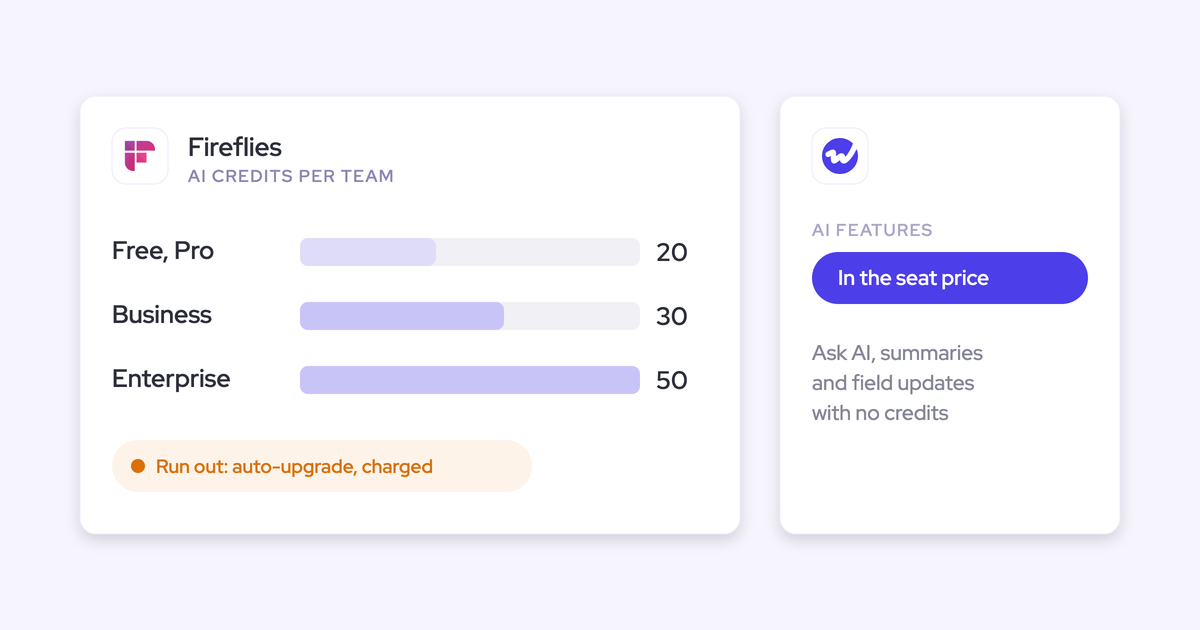
Weflow Conversation Intelligence is a single per-user seat that includes follow-ups, summaries, AI field updates and Ask Weflow AI, with no usage caps.
With Avoma, the same scope is spread across a base plan and per-seat add-ons, with two-way CRM field updates in the Revenue Intelligence add-on.
| Weflow | Avoma | |
|---|---|---|
| Pricing model | Per user seat. AI usage is included in the seat; only Agent Builder is metered beyond its free tier. | Per recorder seat, plus per-seat add-ons on top of the base plan. |
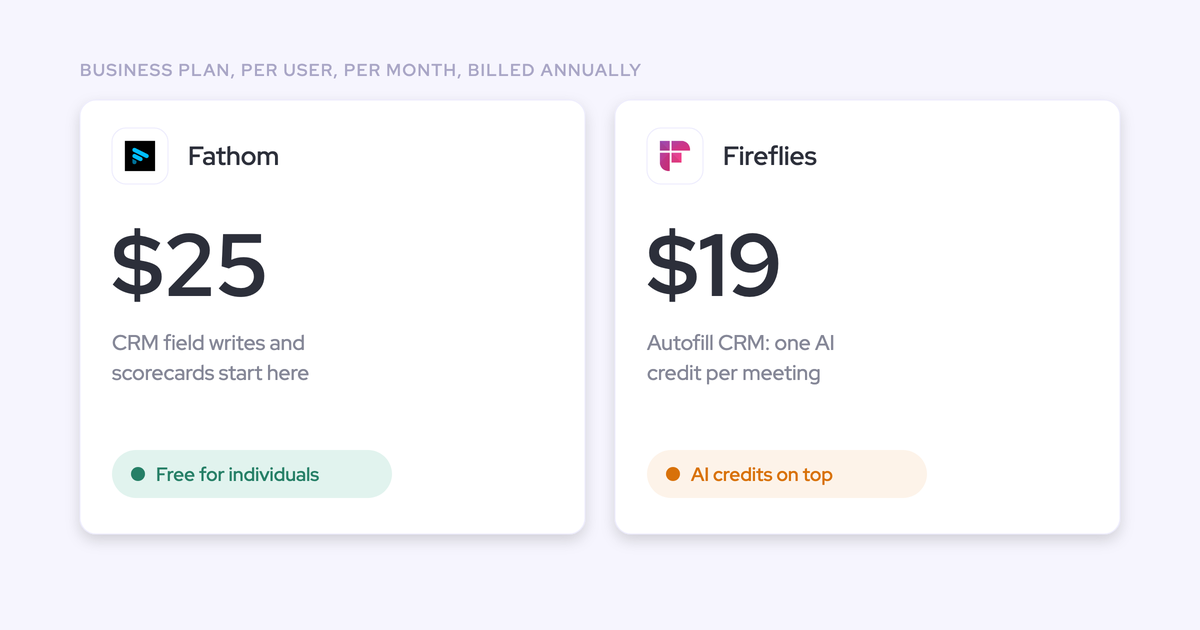
| List price per seat | Conversation Intelligence $39 per month, billed annually. Bundles: Weflow Revenue AI Foundation $49, Revenue AI Business $59, Revenue AI Enterprise $79. | Startup $19, Organization $29, Enterprise $39 per month, billed annually. Startup and Organization are also available monthly at $29 and $39. |
| What follow-ups plus field updates require | The Conversation Intelligence seat on its own. | A base plan plus the Revenue Intelligence add-on at $29 a seat per month. |
| What costs extra or is capped | Agent Builder beyond 25 free actions a month per workspace. No caps on recordings, transcripts, AI templates or Ask Weflow AI. | Coaching scorecards sit in the Conversation Intelligence add-on at $29 a seat. AI notes can be regenerated twice per meeting on standard templates and four times on custom templates. |
| Minimums and term | 10-user minimum, 12-month term. | 10-seat minimum on Enterprise only. Startup is capped at 25 seats and Organization at 100. |
| Free seats | View-only seats are free, up to the number of recording licences you hold. | Viewer seats are free and unlimited on every plan. |
| Onboarding | No implementation fee. | Optional $1,000 onboarding with an Avoma expert. Concierge onboarding is included on Enterprise. |
Here's what a team of ten reps pays per year at list prices, with follow-ups and CRM field updates included:
- Weflow Conversation Intelligence: 10 × $39 × 12 = $4,680. Weflow Revenue AI Foundation adds activity and contact capture for 10 × $49 × 12 = $5,880.
- Avoma Startup plus Revenue Intelligence: 10 × ($19 + $29) × 12 = $5,760.
- Avoma Organization plus Revenue Intelligence: 10 × ($29 + $29) × 12 = $6,960. Organization is the tier that carries the API and custom AI templates.
Weflow publishes its prices openly, and final quotes include volume and multi-year discounts depending on contract size.
How to bring your Avoma recordings into Weflow
Switching doesn't mean your call history ends at the cutover. Weflow imports recordings from other conversation intelligence tools, and our team handles the migration:
- We pull recordings and transcripts through the vendor's API using an API key, or import the recording files you've exported. Avoma lets customers export meeting data before closing an account, so the file route works even on a plan without the API.
- We re-link each imported call to the right Salesforce records.
- The imported transcripts land in your CRM, where Weflow's AI can search them alongside new calls.
Migrations usually take one to two weeks, depending on volume. Up to two years of history is free; longer histories are a paid service.
Should your team pick Weflow or Avoma for follow-ups?
The choice comes down to two things: whether your team runs on Salesforce, and whether one-click sending from the mailbox matters more to you than deal-aware drafts and visibility into lag.
Pick Weflow if follow-ups need deal context and visibility
- Your team sells on Salesforce.
- You want the draft built from the transcript and the deal record, and waiting within a minute of the call ending.
- You want situation templates (no-show, objection, pricing, post-proposal) assigned per team, so AEs and CSMs each get the right one.
- You want to see follow-up lag per deal as a column and filter in your pipeline views, without asking in one-on-ones.
- You want activity capture, conversation intelligence and forecasting on one platform, writing into Salesforce objects you own.
See how Weflow captures activity, updates Salesforce fields from calls, and rolls up your forecast. Book a 30-minute demo.
Pick Avoma if you're off Salesforce or want one-click send
- Your team isn't on Salesforce, or runs HubSpot, Pipedrive, Zoho or another CRM alongside it.
- Your top priority is reps sending the follow-up from their own mailbox in one click.
- You want a broad catalogue of native integrations, including Zapier.
- You want an MCP connector that can write meeting outcome, purpose and privacy back from Claude or ChatGPT.
Weflow vs Avoma follow-up email FAQ
Does Weflow's follow-up draft work with Outlook as well as Gmail?
Yes. Because the rep copies the draft or opens it through a link, it works with either.
What happens to the follow-up if the notetaker can't join the call?
Your rep has three ways to keep the call covered:
- Lobby or late admission: The notetaker waits in the lobby for about ten minutes, and the rep can send it back in mid-call from the Weflow calendar.
- No bot at all: The desktop app for Windows and macOS records without a notetaker joining, and the recording gets the same follow-up, summary and field updates. When the desktop app records, the rep is responsible for getting participants' consent.
- Phone calls: Covered through the dialer integrations, or through the desktop app for softphones that run on the computer.
Does Weflow email a recap to customers automatically?
Yes, as an option. An admin can turn on an external recap that goes to external participants automatically after the meeting, using its own editable template and a link to the recording.
It's separate from the follow-up draft and doesn't replace the rep's own email.
Where do Weflow and Avoma store recordings of European calls?
By default, Weflow stores your data in the same region as your Salesforce instance, with EU, US and Australia available, on AWS in Frankfurt, New York and Sydney.
Avoma hosts all customer data on AWS in the United States, and its enterprise team discusses options for organizations that need EU data residency.