Fathom vs Avoma: AI Meeting Notes and CRM Updates Compared (2026)
Learn whether Fathom or Avoma better syncs AI meeting notes and CRM updates to Salesforce.


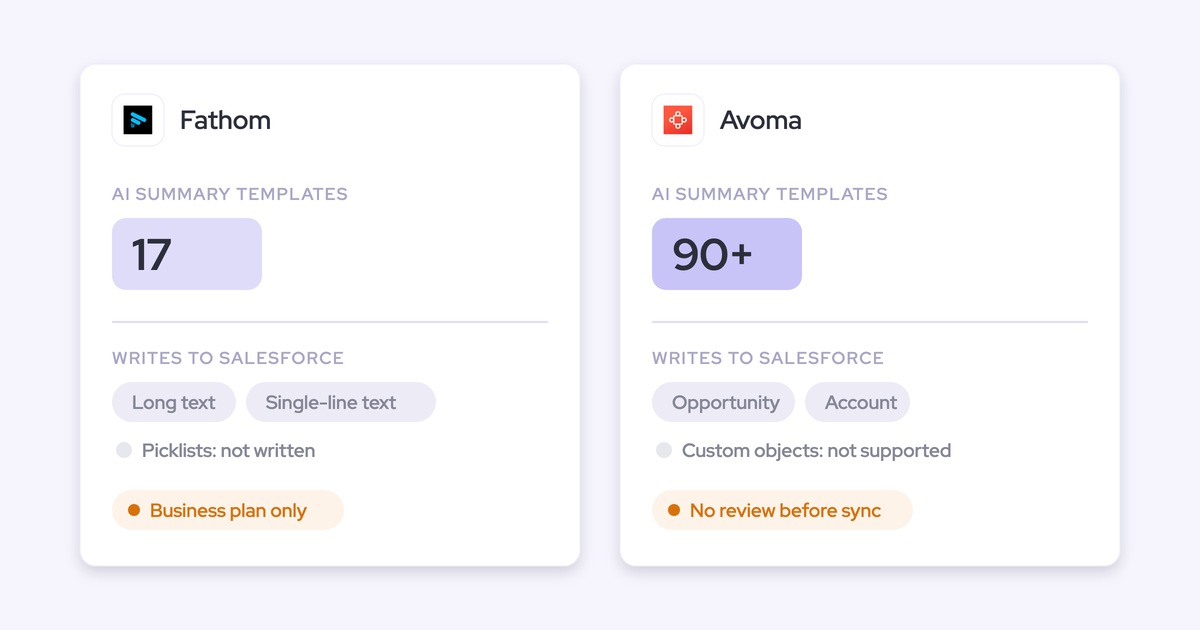

Fathom and Avoma both write good meeting notes. If you run deal reviews from Salesforce opportunity fields, the difference that matters is what reaches the deal record after the call, and which plan you have to pay for to get it there.
Here's the short version:
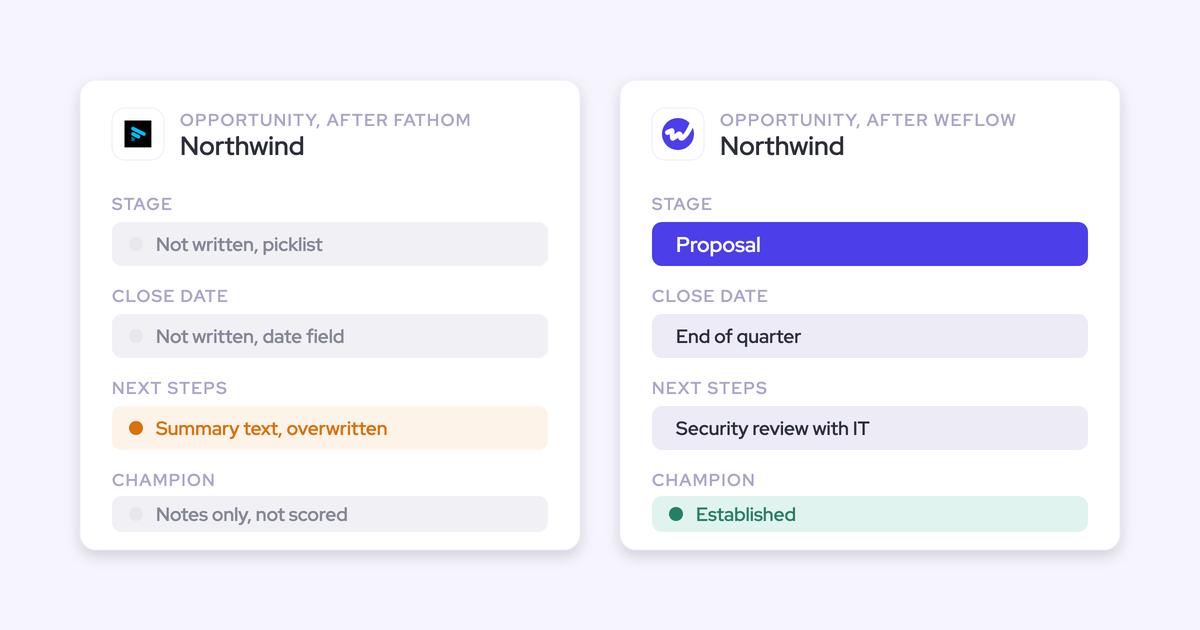
- Fathom writes headed sections of its summary into Opportunity text fields on the Business plan ($25 per user per month, billed annually). Each new meeting overwrites the field, and it can't fill picklists, numbers or dates.
- Avoma writes multi-line text, multi-select, date and number fields on Opportunity and Account. Those writes sit behind the Revenue Intelligence add-on ($29 per seat on top of the base plan) and happen with no review step.
- Weflow is the third option, for Salesforce-only teams of 10 or more reps who run deal reviews from fields.
Weflow is the Revenue AI Orchestration platform for sales, customer success, and RevOps teams. We built Weflow Conversation Intelligence and AI Field Updates for Salesforce teams, so call outcomes land in the field types your deal review reads, with a review step you control per field. Fathom and Avoma also support HubSpot. Weflow works only with Salesforce.
How Fathom, Avoma and Weflow compare on notes, CRM writes and price
On summaries, the three tools are close. They separate on Salesforce field writes and on the plan you pay for to get them.
| Capability | Weflow (Salesforce only) | Fathom | Avoma |
|---|---|---|---|
| AI meeting summaries | Summary 30 to 60 seconds after the call, from unlimited admin templates, varied by detected meeting type, written to the Salesforce Event. Next steps can't be assigned to a named person. | 17 templates, including MEDDPICC, BANT, SPICED and Sandler. Action items carry owners. Organization-wide custom templates start on Business. | 90+ templates, inserted automatically from the meeting's purpose. Notes can be regenerated for a different purpose. |
| CRM field updates from conversations | Every Salesforce field type except lookups, on standard and custom objects (custom objects set up by Weflow support). Write or review set per field. Methodology fields append. Included in the Conversation Intelligence seat. | Business plan only. Opportunity long or single-line text fields, from H3/H4 summary headings. Overwrites each meeting. No picklists, numbers or dates. | Revenue Intelligence add-on. Multi-line text, multi-select, date and number fields on Opportunity and Account only. No custom objects, no single-line text. Appends with no review step. |
| Recording without a bot | Desktop app for Windows and macOS, included in the seat. The rep starts each recording, and the consent flow doesn't run for it. | Per-meeting choice of bot or bot-free. Bot-free runs on Mac only, bot-free video is a limited beta on Zoom, and a summary builds live during the call. | Cloud recording on Zoom, Webex, Microsoft Teams and Google Meet, plus a desktop app. The user is responsible for consent on local recordings. |
| AI follow-up emails | Drafted from the transcript, can pull Salesforce fields, written in the meeting's language. Not sent, and recipients aren't filled in. | Built from action items with owners. The rep copies it into their own email client. | Drafted from the summary or notes, then edited and sent from the rep's Gmail or Outlook. A follow-up agent template exists. |
| Ask AI chat | Ask Weflow AI across Salesforce records, emails, meetings and transcripts. Inherits Salesforce permissions. Included, not metered. | AI search across meetings. Full team history only on Business. Team sees two weeks of team calls. | Ask Avoma across meetings, emails, deals and the web (Conversation Intelligence add-on). CRM permission inheritance isn't documented. |
| Integrations | Salesforce, Gmail, Google Calendar, Outlook, Zoom, Teams, Meet, Webex, Slack and the Outreach dialer. Salesforce is the only CRM. No native warehouse connector. | 30 integrations, including Salesforce, HubSpot, Slack, Zapier and Make. No dialer, sequencing or BI tool. | 26 native integrations, including six CRMs and nine dialers and sales engagement tools, plus Zapier. |
| Access from AI assistants (MCP) | Official read-only connector for playbooks, summaries, transcripts, forecast calls and pipeline metrics. Admin toggle for transcript access. | Official connector for Claude and ChatGPT on every plan, limited to meetings the user can see. | Connector with 11 read tools and 3 write tools. Needs Organization, Enterprise or the API Access add-on. |
| Raw data access | REST API bulk export of transcripts, metadata, scores and signals as JSON or CSV. Recordings export to your own storage. | Public API and webhooks on every plan. Keys belong to individual users. | REST API and webhooks on Organization and above, limited to 60 requests a minute. |
| Pricing | Conversation Intelligence $39 per user per month, billed annually. 10-user minimum, 12-month term. | Free for individuals. Premium $16, Team $15, Business $25 per user per month, billed annually. Two-user minimum on team plans. | Startup $19, Organization $29, Enterprise $39 per seat per month, billed annually. Revenue Intelligence add-on $29 per seat. |
Read the CRM field updates row twice. That's the row where the three tools actually diverge.
Why Salesforce teams end up choosing between Fathom and Avoma
Notetakers were built outward from the meeting. The summary is the product, and the CRM is a destination. That's why the summary is excellent and the Salesforce write is shallow or gated.
Fathom usually arrives rep by rep, because it's free for individuals. Avoma grew from recording and summarizing, then added CRM depth through paid add-ons. Either way, a manager ends up with good notes and the same empty opportunity fields. We hear it on sales calls in almost these words:
"We have Fathom. We just don't grab insights from that and put it in there."
A prospect on a call with Weflow
Transcription is a commodity now. Every one of these tools summarizes well. Our co-founder puts the real work this way:
"So I think it's, you know, part one, capture that conversation. Part two, turn that transcript data that you're able to create from that into actual updates and information that is, you know, structured in your CRM so you can retrieve it and again, use it for reporting automations, flows, tactical reviews, strategic reviews."
So stop comparing the notes and compare where the call ends up. The test is one deal across several calls. For each tool, the rest of this article answers three questions:
- Which Salesforce record and fields does it write, and in what field types?
- Does call three overwrite what call one wrote?
- Which plan do you have to pay for to get it?
Weflow Conversation Intelligence: the third option for Salesforce-only teams
Weflow sits outside the Fathom vs Avoma head-to-head. It suits a Salesforce team of 10 or more reps whose manager reviews deals from opportunity fields. It works only with Salesforce and has a 10-user minimum.
We built Weflow inward from the CRM. Weflow AI Field Updates are the core of Weflow Conversation Intelligence, included in the seat, with no add-on.
How Weflow writes call summaries onto the Salesforce Event
Weflow writes the AI summary onto the Salesforce Event for the meeting and onto the Weflow_Recording__c object, 30 to 60 seconds after the call ends. Because it lands on the Event, the summary shows on the opportunity's activity timeline. You don't leave Salesforce to see what happened on the call.
You can hold as many summary templates as you want. Weflow also detects the meeting type, so a discovery call, a demo and a closing call can each get a different summary. Admins run up to ten meeting types and can add their own.

One limit: the summary lists next steps, but it can't assign a next step to a named person. Fathom and Avoma both do that better.
How Weflow AI Field Updates write picklists, dates and numbers
Weflow AI Field Updates write call outcomes into Salesforce fields of every type except lookups, with a write-or-review setting on each field. Here's how it works:
- Field types: Picklists, multi-selects, numbers, dates and text. Lookup relationship fields are the only type it can't write.
- Picklist values: Before writing to a picklist or multi-picklist, Weflow reads the field's allowed values and matches against them. It never writes a value the field doesn't accept.
- Objects: Account, Contact, Opportunity and Lead, plus custom objects. Custom objects need setup by Weflow support.
- Per-field review: Each field writes automatically or waits for the rep. A website or address can update itself while stage and close date wait for a human. The rep sees the current value beside the suggested one and accepts, edits or rejects it.
- Append vs overwrite: Methodology fields such as MEDDIC or SPICED add to existing text instead of replacing it. Single-value fields like amount can only be overwritten, which is why you'd keep them under review.
- Meeting-type-aware updates: Discovery, demo and closing calls can each run a different set of field updates, so a closing call isn't scored on discovery questions.
- Stage writes: A field update can move Stage when the exit criteria written into the prompt are met on the call. Your validation rules still apply.
- Prompts: Over 250 pre-built prompts cover MEDDIC, MEDDPICC, SPICED, BANT and more. Accuracy depends on how well each prompt is written.

Two honest limits:
- Weflow doesn't mark a value by source. You can't tell from the field whether it came from the call or from a web search, which a prompt can be allowed to run.
- A failed write can't be replayed. The content survives in the recording object, but the write to the Event or field fires once.
How the Weflow desktop app records meetings without a bot
The Weflow desktop app for Windows and macOS records Zoom, Google Meet and Microsoft Teams meetings, including video, without a notetaker joining the call. It's included in the Conversation Intelligence seat. The recording goes through the same pipeline as a bot recording: field updates, summaries, follow-up emails and scorecards.
The catch: the rep starts each recording. And because nothing joins the meeting, Weflow's consent flow doesn't run. Consent becomes the rep's responsibility.
How Weflow drafts follow-up emails, and what you still copy
Weflow drafts the follow-up email from the transcript, using templates that can pull Salesforce fields, in the language the meeting was held in. It doesn't send the email, and it doesn't fill in recipients. The rep copies the draft into their mail client and adds the addresses by hand.
How far Ask Weflow AI, integrations, API and MCP reach
- Ask Weflow AI: Answers questions across Salesforce records, emails, meetings and transcripts, scoped to a call, a deal, a filtered board, an account or everything. It inherits Salesforce permissions and adds its own guardrails. It's included in every seat with no metering.
- Integrations: Salesforce, Gmail, Google Calendar, Outlook, Zoom, Teams, Meet, Webex, Slack and the Outreach dialer. That's narrower than Avoma's list, and Salesforce is the only CRM.
- MCP: A read-only connector gives Claude, ChatGPT and other assistants your playbooks, call summaries, transcripts, forecast calls and pipeline metrics. Admins switch it on per workspace and decide separately whether assistants can read full transcripts.
- Raw data: The REST API bulk-exports transcripts, metadata, scores and signals as JSON or CSV for BI tools such as Tableau and Looker. There's no native Snowflake, Databricks or BigQuery connector, so warehouse teams use the API.
Fathom: excellent free notes, text-only Salesforce field writes
Fathom is one of the most widely used AI notetakers. Hundreds of thousands of companies use it, and it was HubSpot's Most Used App of the Year for 2025. Its Salesforce field writes are real, but narrow.
How Fathom summarizes calls from 17 templates, including MEDDPICC
Fathom's notes are good. It summarizes calls from 17 templates, including MEDDPICC, BANT, SPICED and Sandler, and users can add their own instructions to a template for future calls.
Action items come attributed to the person who owns them, with a timestamp and a link that opens the recording at that moment. Organization-wide custom templates start on the Business plan.
How Fathom writes deal summary headings into Opportunity text fields
Fathom's field mapping is a Business-plan feature that copies headed summary sections into Opportunity text fields. Line by line:
- Plan: Business, at $25 per user per month annually or $34 monthly. On Free, Premium and Team, CRM sync is capped at three users per email domain.
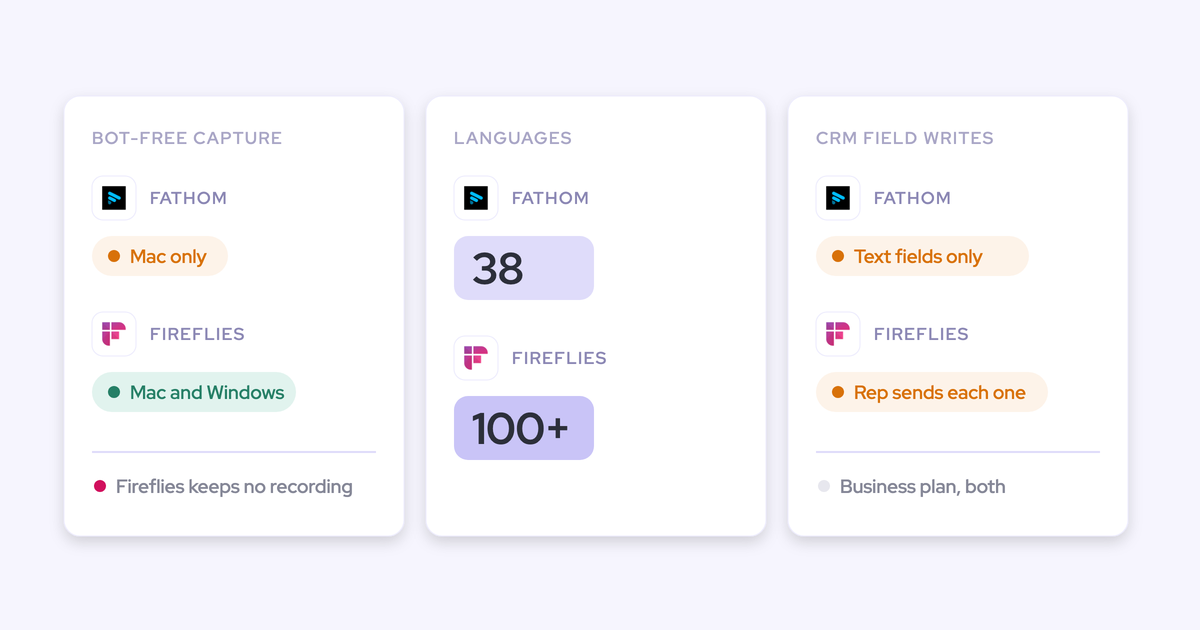
- Field types: Long text or single-line text only. It can't fill picklists, numbers, dates or checkboxes.
- Objects: Opportunity fields in Salesforce. HubSpot deal properties work the same way.
- Source: Only summary sections formatted as H3 or H4 headings. An admin maps a heading such as Next Steps to a field once for the whole team.
- Append vs overwrite: Each new meeting overwrites what the field held.
- Review: Automatic by default, or manual for the whole sync, where someone clicks Sync to CRM on each call.
- Where the summary lands: A logged-call Task on the matched Contact. Action items become Tasks on open Opportunities linked through contact roles, assigned to the call host.
- Matching: Only through an external attendee's primary email, then contact roles. Leads are never matched, and if no Contact matches, Fathom writes nothing.
- Other limits: Content over the field limit (32,000 characters by default) gets cut, and validation rules can block the write.
How Fathom records without a bot from its Mac app
Fathom lets each user choose per meeting between a bot and bot-free capture. Bot-free capture runs from the Mac desktop app, and bot-free video is a limited beta on Zoom. Windows users stay on the older bot experience.
The bot-free experience has one thing none of the others offer: a summary that builds live during the call.
How Fathom builds follow-up emails from owned action items
Fathom builds the follow-up email from the action items it detects, including who each one is assigned to. The rep copies it into the email client of their choice. If assigned next steps matter to your follow-up, this is a genuine strength over Weflow.
How far Fathom's AI search, integrations, API and MCP reach
- AI search: History depends on plan. Free sees two weeks of the user's own calls, Team sees two weeks of team calls, and only Business searches all team history.
- Integrations: 30 integrations, including Salesforce, HubSpot, Zoom, Meet, Teams, Slack, Notion, Zapier and Make. No dialer, sequencing tool or BI tool.
- MCP: An official connector for Claude and ChatGPT on every plan, limited to meetings the connecting user can see.
- Raw data: A public API with webhooks on every plan. Keys belong to individual users, so a key reads only the calls its owner can see.
Avoma: meeting-first notes, structured writes behind an add-on
Avoma suits small businesses that want one meeting-first tool with broad integrations and add-on coaching and forecasting. Its field writes reach more field types than Fathom's, but fewer objects than Weflow's, and they sit behind a paid add-on.
How Avoma picks a notes template from the meeting's purpose
Avoma writes AI notes automatically when a meeting ends, with a summary, key questions and next steps. It ships more than 90 templates and inserts the right one from the meeting's purpose.
You can also regenerate a call's notes for another purpose, say re-running a sales call as a customer success follow-up. Custom templates come with the Organization plan.
How Avoma maps Smart Topics to Opportunity and Account fields
Avoma writes conversation insights into Salesforce by mapping its Smart Topics to fields. Line by line:
- Plan: The Revenue Intelligence add-on, at $29 per seat annually ($35 monthly), on top of the base plan.
- Field types: Multi-line text, multi-select, date and number. Not single-line text, because of its 255-character limit, and not address fields.
- Objects: Opportunity and Account only. No custom objects.
- Append vs overwrite: Avoma appends the extracted notes to the mapped field in real time.
- Review: No review step before the write.
- Sync direction: Edits made in Avoma sync to Salesforce. Edits made in Salesforce don't sync back to Avoma.
- Setup: The first sync covers open deals modified in the last 90 days. A Salesforce admin has to switch on notes, and meetings set to private don't sync automatically.
On every base plan, Avoma also saves meeting notes to Account, Opportunity and Contact records, and pushes action items to Salesforce as Tasks assigned to the meeting owner.
How Avoma records without a bot on Zoom, Teams and Meet
Avoma has the most bot-free routes of the three:
- Zoom cloud recording, on meetings the user hosts, with a paid Zoom account
- Webex cloud recording, when the user is the organizer
- Microsoft Teams cloud recording, once a Microsoft 365 admin grants consent
- Google Meet recording, once a Workspace admin enables it
- A desktop app that captures microphone and system audio, where the user acknowledges that consent is their responsibility
How Avoma drafts follow-ups you send from Gmail or Outlook
Avoma drafts a follow-up email from the AI summary or the meeting notes. The rep edits it and sends it from their own Gmail or Outlook, so it reads as coming from them. Avoma's agent templates also include a follow-up agent.
How far Ask Avoma, integrations, API and MCP reach
- Ask Avoma: Global Ask Avoma answers questions across meeting transcripts, synced emails, deal and pipeline data and the web, with the Conversation Intelligence add-on. Avoma doesn't document how answers respect CRM permissions.
- Integrations: 26 native integrations across conferencing, six CRMs, nine dialers and sales engagement tools, Slack, Teams chat and ClickUp.
- MCP: A connector with 11 read tools and 3 write tools that set a meeting's outcome, purpose and privacy. It needs Organization, Enterprise or the API Access add-on.
- Raw data: A REST API and webhooks on Organization and above, limited to 60 requests a minute.
What your Salesforce deal looks like after three calls in each tool
Take one opportunity with three recorded calls: discovery, demo and closing. Here's what each tool leaves on the deal record you open in your next review.
| What you check | Weflow (Salesforce only) | Fathom | Avoma |
|---|---|---|---|
| Record the summary lands on | The meeting's Event and the Weflow recording object, on the opportunity timeline | A logged-call Task on the matched Contact | Notes on the matched Account, Opportunity and Contact |
| Field types filled | Picklists, multi-selects, numbers, dates and text, on standard and custom objects | Long or single-line text on Opportunity | Multi-line text, multi-select, date and number on Opportunity and Account |
| What call three does to call one's value | Methodology fields keep call one's content and add to it. Single-value fields update to the latest value. | Replaces it. The field holds only the last call's section. | Appends to it. The field grows with each call. |
| Who reviews before the write | Set per field. Stage and close date can wait for the rep while other fields write themselves. | Nobody on automatic sync. On manual, someone pushes each call. | Nobody. No review step. |
| No contact role, or a Lead | Writes to Lead fields as a standard object. The rep can reassign the call to another deal in review, and the AI reanalyzes. | The Opportunity gets nothing without a contact role. Leads are never matched. | Matches participants to leads, accounts and opportunities. A user links the meeting by hand when matching fails. |
| Plan required | Weflow Conversation Intelligence, $39 per user per month | Business, $25 per user per month | Base plan plus Revenue Intelligence, $29 per seat on top |
Overwrite vs append decides whether reps keep trusting the field. If call three wipes the champion and pain your rep captured on discovery, that early qualification is gone, and nobody will say it again on a later call.
Managers are forgiving about imperfect values, as long as the field isn't empty or quietly wrong:
"If it is only 90% accurate, then I will take it, I will work with it."
A sales leader on a call with Weflow
For fields that build across a deal, Weflow AI playbooks go one step further. Part of Weflow Deal Intelligence, they run on a schedule across every email, meeting and field on the opportunity, and keep fields like champion or metrics at the best current answer instead of the most recent one.
What each tool costs per rep once it writes fields
List prices aren't comparable until you price the tier that actually writes fields.
| Cost dimension | Weflow (Salesforce only) | Fathom | Avoma |
|---|---|---|---|
| Entry plan | Weflow Activity & Contact Capture, $19 per user per month, annual | Free for individuals, unlimited recordings | Startup, $19 per seat annual ($29 monthly), up to 25 seats |
| Plan or add-on needed for field writes | Weflow Conversation Intelligence, or Revenue AI Foundation with Activity & Contact Capture | Business plan | Revenue Intelligence add-on on top of the base plan |
| Per-seat price at that level | $39 per user per month annual (Revenue AI Foundation $49) | $25 per user per month annual, $34 monthly | $29 add-on annual ($35 monthly), plus the base seat: Startup $19, Organization $29, Enterprise $39 annual |
| Seat minimum and term | 10 users, 12-month term. Seats added mid-term are charged pro rata. | Two-user minimum on team plans. Monthly billing available. | No minimum below Enterprise. Enterprise has a 10-seat minimum and annual billing only. |
| Included or extra | Ask Weflow AI, desktop app, Mobile Copilot and Agent Builder Free (25 actions a month) included. Agent Builder Growth is $299 a month per workspace for 500 actions. | No platform fee and no usage credits. SSO, SCIM and custom retention are on Enterprise, on quote. | Viewer seats free. Conversation Intelligence add-on $29 per seat for Global Ask Avoma and scoring. Optional onboarding $1,000. |
On price per rep, Fathom Business is the cheapest way to get any field write, and Avoma on Organization with Revenue Intelligence comes to $58 a seat. Weflow's honest trade-off is commitment: a 10-user minimum on a 12-month term, where Fathom and Avoma let you start with two reps.
When Fathom or Avoma fits your team better than Weflow
We'd point you away from Weflow in these situations:
- You run HubSpot. We'd point you to Fathom or Avoma, because Weflow works only with Salesforce.
- You have fewer than 10 seats. We'd point you to Fathom, which is free or has a two-user minimum, or Avoma, which has no minimum below Enterprise.
- You only need good notes. We'd point you to Fathom. It does notes well and cheaply.
- You want next steps assigned to people. We'd point you to Fathom, which attributes action items to owners, or Avoma, which pushes them to Salesforce as Tasks.
- You want something live during the call. We'd point you to Fathom, whose bot-free experience builds a summary as the meeting runs. Weflow has no live in-meeting surface.
- You need dialers and the widest bot-free coverage. We'd point you to Avoma, with nine dialer and sales engagement integrations and five bot-free recording routes.
Which tool fits your team: Fathom, Avoma or Weflow
Fit follows three things: your CRM, your team size, and whether your deal reviews run from fields or from notes.
Choose Fathom if:
- You run HubSpot, or a small Salesforce team that mostly reads notes.
- You want free or cheap capture with action items that carry owners.
- Your reps are on Mac and want bot-free capture with a live summary.
- Text fields that hold the latest call's section are enough for your deal reviews.
Choose Avoma if:
- You want one meeting-first tool with dialer integrations and many bot-free routes.
- You need date, number and multi-select fields on Opportunity and Account, and you're fine with writes landing without review.
- You're under 10 seats and want coaching and forecasting as add-ons later.
Choose Weflow if:
- You run Salesforce and have 10 or more reps.
- You review deals from opportunity fields: qualification, next step, stage and close date.
- You need picklists, dates and numbers written from calls, including on custom objects.
- You want stage and close date held for rep review while other fields write themselves, and methodology fields that keep what reps already wrote.
See how Weflow captures activity, updates Salesforce fields from calls, and rolls up your forecast. Book a 30-minute demo.
Fathom vs Avoma FAQ: Salesforce fields, pricing and switching
Will the AI overwrite what a rep already typed in a field?
Fathom overwrites the mapped field on each new meeting. Avoma appends extracted notes to the existing content. Weflow adds to existing text on methodology fields, while single-value fields such as amount can only be overwritten, which is why we'd keep those under review.
Can AI field updates run hands-off, or does every value need approval?
Weflow sets write-or-review per field, so unambiguous fields can run hands-off while stage or close date wait for the rep. Fathom sets automatic or manual for the whole sync. Avoma writes automatically and describes no review step.
What stops a confidently wrong value from landing in Salesforce?
Weflow reads a picklist's allowed values before writing, so it never writes a value the field won't accept. You can hold interpretive fields under review, where the rep sees the old and new value side by side, and your validation rules still apply. Weflow doesn't mark a value as coming from the call or from a web search, and web search is off unless you allow it in the prompt.
Does Fathom write to Leads or deals without contact roles?
No. Fathom matches only through an external attendee's primary email to a Contact, then reaches open Opportunities through that Contact's contact roles. Leads are never matched. A Contact without a contact role gets the summary, and the Opportunity gets nothing.
Will a notetaker create duplicate meeting records in Salesforce?
When an activity capture tool and a notetaker each write the same meeting, Salesforce ends up with two records, and meetings-per-rep reports inflate. Fathom writes its summary as a logged-call Task, separate from the calendar Event your capture tool logs. Weflow writes its summary onto the meeting's Event instead of creating a second meeting record.
Can any of these tools fill deal fields from email, not just calls?
Fathom captures meetings only. Avoma syncs Gmail and Outlook email with the Revenue Intelligence add-on and links it to the opportunity. Weflow AI playbooks keep fields current across every call and email on the opportunity, with email captured by Weflow Activity & Contact Capture.
Who handles recording consent when no bot joins the call?
With the Weflow desktop app and Avoma's local recording, the rep is responsible for consent. Weflow's consent flow, with a notice in the meeting chat and an optional pre-meeting email, runs only when the notetaker joins. Fathom emails a consent request 24 hours before scheduled external meetings, but sends nothing for same-day or impromptu meetings, and on Zoom only when the Fathom user hosts.
Is there a seat minimum or annual lock-in on each tool?
Weflow has a 10-user minimum on a 12-month term. Fathom is free for individuals, with a two-user minimum on team plans and monthly billing available. Avoma has no minimum below Enterprise, which carries a 10-seat minimum and annual billing only.
Can we take our Fathom call history with us if we switch?
Fathom's public API, available on every plan, lists meetings, summaries, transcripts and action items, and can start downloads. That gives you a route to export your history out of Fathom. API keys belong to individual users, so each key reads only the calls its owner can see.
Does Superhuman owning Fathom change its Salesforce roadmap?
Superhuman, the AI productivity company formerly called Grammarly, bought Fathom to fold meeting notes into its email, documents and agents. Fathom's announced direction runs through that suite. Nothing announced so far covers deeper Salesforce field writes.
Where is each tool's data hosted, and is it used to train models?
Weflow spins up your instance in the region where your Salesforce is hosted, with an override to keep data in the EU or UK, and never uses customer data to train models. Avoma hosts on AWS in the US and never trains on customer meeting data. Fathom stores data in the US and trains its own models on de-identified customer data unless you opt out.
Does Weflow work with HubSpot?
No. Weflow works only with Salesforce. Fathom and Avoma both support HubSpot, so a HubSpot team should choose between those two.