How to Run a Monthly Win-Loss Review From Closed Deals' Calls With Weflow Agent Builder
Learn to build a monthly win-loss review from closed-deal calls with Weflow Agent Builder.


Your closed-lost picklist tells you what a rep typed on the way out of a deal, and more often than not, it says "price." A monthly agent that reads last month's closed deals end to end tells you what buyers actually said, and that's usually a different story.
When one advertising company reviewed its calls this way, the biggest objection wasn't price at all. It was how the customer's accounting team managed advertising budgets.
In this guide, we'll walk you through building that agent in Weflow Agent Builder, which turns your captured calls, emails and Salesforce data into answers that arrive on a schedule. By the end, you'll have an agent that:
- Looks up last month's closed-won and closed-lost opportunities in Salesforce.
- Reads their calls, emails and transcripts alongside the CRM fields.
- Sorts findings into won, slipped and lost reasons, plus the reasons nobody anticipated.
- Delivers a PDF or CSV to Slack, Microsoft Teams or email, after you've reviewed it privately.
One thing to know up front: the agent doesn't write to Salesforce fields.
Weflow is the Revenue AI Orchestration platform for sales, customer success, and RevOps teams. We'll cover how corrected loss reasons reach the record and how the report feeds your monthly loss review and deal reviews with sales managers.
What your monthly win-loss agent delivers, section by section
You get one report a month, split into six parts, and every finding names the deal and the conversation it came from.
| Report section | What it answers |
|---|---|
| Summary | The few things leadership should know about last month's wins and losses, in five bullets or fewer. |
| Won on champion | Which champions carried deals over the line, and what they did to get there. |
| Slipped on decision process | Where a timeline moved because nobody mapped who approves the purchase and how. |
| Lost on decision criteria | Which buying criteria the team never documented, or documented and never met. |
| Picklist mismatches | Which lost deals carry a reason code that contradicts what the buyer said on calls and in emails. |
| Reasons we didn't anticipate | Anything that fits neither the frame nor your loss taxonomy, kept as its own category. |
Findings are ranked by the deal amount they affect, so a pattern across three large losses outranks a complaint on one small deal.
The report lands as a PDF narrative or a CSV table.
What you need in place before you build the agent
You'll need five things in place before you start, and none of them costs more than your current Weflow plan.
- Admin access to Agent Builder: Every Weflow plan and bundle includes Agent Builder Free, with 25 agent actions a month, but only admins can build and edit agents for now.
- Emails and meetings captured and mapped to opportunities: With Weflow Activity & Contact Capture running, the agent reads every email and meeting on the deal, not only the calls someone remembered to record. If your capture is thin, the report will be too.
- Clean close dates and closed stages in Salesforce: The lookup filters on Stage and Close Date, so a deal left open after it died, or closed with the wrong date, won't make it into the review.
- A short written list of your market context: Your competitors, your loss-reason taxonomy and a handful of internal terms. This keeps the agent from reasoning like an outsider.
- A delivery destination: A Slack channel, a Microsoft Teams chat or an email list. Decide now who'll act on the report, since that determines where it goes.
Step 1: Scope the lookup to last month's closed opportunities
Start by filtering the record set before the AI step runs. The lookup decides what the agent gets to read, and that shapes output quality more than anything you write in the prompt.
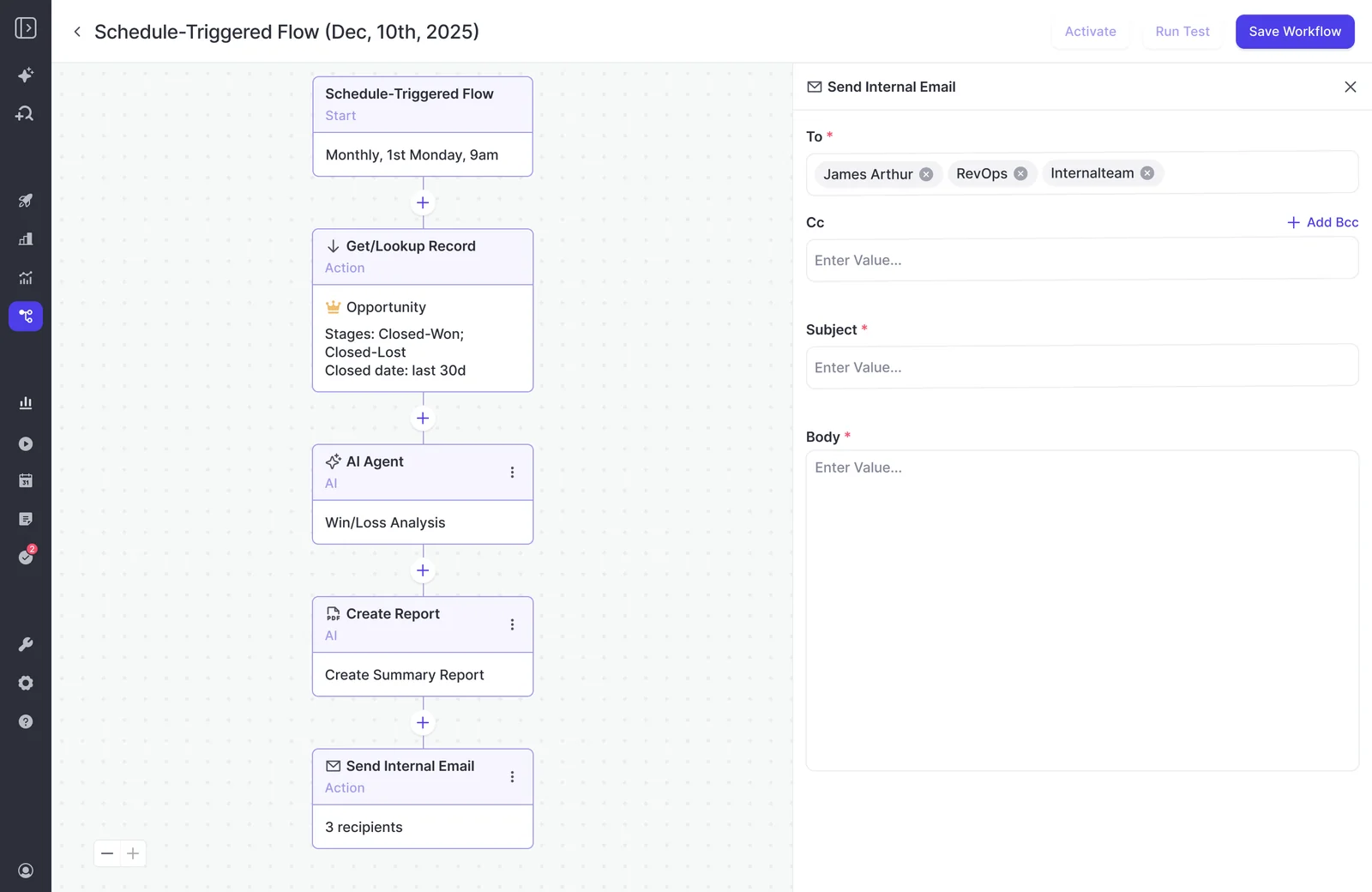
- Start from a Weflow template rather than a blank agent, since templates include the lookup step by default.
- Set the lookup object to Opportunity.
- Add a Stage filter: Closed Won or Closed Lost.
- Add a Close Date filter for the last 30 days. When the agent runs on the first Monday of the month, that window covers last month.
Why not point the agent at everything? We've seen the same prompt that gives a strong answer in chat return an empty or unusable report from an agent with no lookup.
When you ask it to analyze every deal in the CRM, it doesn't know what to focus on. A narrow set gives it a question small enough to answer well, and it uses fewer actions too.
It's also worth knowing that the lookup reads Salesforce live, not from a snapshot, so if a rep corrects a close date a minute before the run, the run picks it up.
Step 2: Write a win-loss prompt that knows your market
A win-loss prompt that works is long and specific. It names whose deals, whose competitors and which period, sets a frame you can defend, leaves room for the unexpected and asks for evidence behind every claim.
You have 2,000 characters to fit it all in, so here's how to spend them.
Frame findings as won on champion, slipped on process, lost on criteria
Give each outcome its own qualification variable. This keeps the report from turning into a word salad of reasons and makes every finding something a manager can coach on.
| Outcome | Variable to look for | What the agent should quote |
|---|---|---|
| Won | Champion strength | The moments the champion opened access to the economic buyer, to power or to information about the decision. |
| Slipped | Missing decision process | Where the buyer revealed an approval step, signer or review nobody had mapped. |
| Lost | Undocumented decision criteria | What the buyer said they were buying for that the team never captured or answered. |
We borrowed this frame from Julien Cerutti, who built it from Meltwater's own won, slipped and lost deals while rolling out SPICED across their 750-person sales org.
"Surprise, surprise, we win deals when we have really strong champions. They're the domino effect of getting access to power, the economic buyer, and information, which is basically the decision process, decision criteria. That's the main thing."
— Julien Cerutti, VP of Global Revenue Strategy at Meltwater
Feel free to swap in your own methodology's variables, but keep it to one per outcome. A frame with ten dimensions just gives you ten thin sections.
Set what buyers said against the closed-lost picklist
Because the agent step reads the CRM fields on each opportunity alongside its transcripts and emails, you can prove the picklist wrong instead of just suspecting it.
Two instructions do the work:
- Compare the rep's picklist reason with what the buyer actually said, and flag every disagreement.
- Weight each finding by Amount and name the segment, so the biggest losses lead.
A transcript-only scan can't do the second one, because a complaint from your smallest account reads the same as one from your largest until the agent can see deal size in the CRM.
Here's an example instruction: "For each lost deal, compare [your closed-lost reason field] with what the buyer said. List every deal where they disagree, ranked by Amount."
This kind of comparison is what surfaced the budget finding from the intro:
"We also do call recordings and just build systems to automatically go through all transcripts of the last week and look for the key objections. And you can do the same with email. You can do the same with calling and just the basic power of an LLM to go through a vast amount of text and just condense it down, right, is basically the beauty of it. And then you get insights. Like, we had one customer in advertising and we found, hey, actually the biggest objection is not their price or whatever, like typical objections, like authority, like path to power, stuff like this. But it was actually just budget management, like how their accounting team dealt with advertising budgets. And that's obviously a huge insight for them because that's something they can fix."
Fit your competitors and loss taxonomy into 2,000 characters
The agent step can't reference an uploaded document, so your company context has to live in the prompt.
This fixes the most common first-attempt problem, where the agent extracts everything fine but then interprets it like an outsider, without knowing who your competitors are or what counts as a loss reason in your market.
Include:
- Your competitor names, plus an instruction to label any other vendor as "other."
- Your loss taxonomy in five or six short labels.
- Two or three glossary terms that change interpretation, such as your typical sales-cycle length or what counts as a competitor for you.
- Who the report is for, so the agent writes for a CEO and a product leader rather than for a rep.
Cut:
- Methodology definitions the model already knows.
- Pleasantries and role-play setup.
- Anything the lookup already handles, like stage and date.
If your context still won't fit, split the work across two agents with their own prompts. Won and lost deals in separate agents is the natural split.
Leave room for loss reasons nobody thought to track
Trackers count the terms you chose in advance, while the open section of the prompt catches the reasons nobody predicted. You'll want both, since they answer different questions.
| Question | Weflow Conversation Intelligence trackers | Open-ended agent prompt |
|---|---|---|
| What does it find? | Mentions of terms you defined: competitors, pricing, objections. | Reasons in the buyer's own words, including ones nobody listed. |
| What does it give you? | Counts: mentions, meetings and share of meetings, per rep and over time. | A narrative of why, tied to specific deals. |
| How far back? | New trackers apply retroactively to past recordings. | Whatever window the lookup covers. |
| Best used for | Trends on known terms, like a competitor climbing in one region. | Discovery, like a budget process nobody thought to ask about. |
Once the agent surfaces a new reason, turn it into a tracker so you get the count every month without waiting for the report.
Make every finding point back to a call or email
Ask the agent to name the opportunity and source conversation for every finding, with a short quote, and to drop anything it can't source. You'll be sharing these findings with people who will push back, so you'll want to be able to open the call first.
For example: "Every finding names the opportunity and the call, meeting or email it came from, with a short quote. No source, no finding."
"I love being able to go right to the call, transcript or email and see where something was said that the AI is referencing."
— Scott Jones, SVP of GTM Revenue Intelligence & Enablement at KORE Wireless
A win-loss prompt template you can adapt
Fill in the brackets with your own competitors and terms.
SCOPE: You are reading closed-won and closed-lost opportunities with a close date in the last 30 days, plus the emails, meetings and call transcripts attached to each.

CONTEXT: We sell [product] to [segment]. Our competitors are [A], [B] and [C]; call any other vendor "other". A typical sales cycle is [X] months. Our loss reasons are [price], [timing], [missing feature], [lost to competitor], [no decision].

FRAME:
Won: how strong was the champion? Name them and quote what shows it.
Slipped: where the timeline moved, what was missing from the decision process?
Lost: which decision criteria did we never document or meet?

PICKLIST CHECK: For each lost deal, compare [your closed-lost reason field] with what the buyer said. Flag every deal where they disagree.

WEIGHTING: Rank findings by total Amount affected and name the segment.

UNANTICIPATED: List any reason for winning or losing that fits neither the frame nor our loss reasons. Don't force it into a category.

EVIDENCE: Every finding names the opportunity and the call, meeting or email it came from, with a short quote. No source, no finding.

OUTPUT:
1. Summary, max 5 bullets
2. Won, Slipped, Lost
3. Picklist mismatches: opportunity | picklist reason | what the buyer said | source
4. Reasons we didn't anticipate
Write for a CEO and a product leader. No generic sales advice.Step 3: Schedule the agent to run once a month
Set the trigger to run just after month close, so the closed set is final when the agent reads it.
- Set the frequency to monthly.
- Pick the first Monday of the month, so the 30-day lookup window covers the month that just ended.
- Pick a time, such as 9am, ahead of your managers' first meetings.
- Set the timezone to where the people reading the report sit.
Monthly is frequent enough to catch a trend while you can still act on it, but not so frequent that the report becomes one more alert people mute.
Keep in mind that agents only run on a schedule. You can't trigger one from a Salesforce record change yet, so a deal that closes mid-month will show up in the next run.
Step 4: Test the report privately before your CEO sees it
A test run shows the agent's output in the app without sending anything, so you can leave the recipient list empty until the report holds up.
Run this loop until the output is something you'd defend:
- Run a test.
- Read the output the way your CEO would.
- Open the cited calls and emails for the three biggest findings.
- Tighten the prompt where the output went wrong.
- Run again.
In each test output, watch for:
- Generic language that could describe any company.
- Competitors you don't compete with, or real competitors filed under "other."
- Findings with no named opportunity or source.
- Picklist mismatches that disappear when you open the call.
- An empty "didn't anticipate" section, which usually means the frame is too tight.
Only add recipients after a clean run, so the first scheduled delivery arrives exactly as you tested it.
Step 5: Deliver the report to Slack, Teams or email
Agent Builder sends the report to Slack, Microsoft Teams or email as a PDF or CSV, and recipients don't need Agent Builder access to read it.
| Format | Best for |
|---|---|
| The narrative report: summary, won, slipped and lost sections, read by a CEO or product leader in their inbox. | |
| CSV | The picklist mismatch table, when a sales manager wants to work through deals line by line. |
Start with a small list of people who will act on the report: the CEO, the head of product or product marketing, and the sales managers who run the loss review. Every extra recipient who ignores it signals to everyone else that it's safe to ignore.
The report also links back into Ask Weflow AI, so a product lead reading it can ask "which of these mentioned competitor X?" and get an answer without asking you to rebuild anything.
What Weflow Agent Builder can't do in this workflow yet
Agent Builder is our newest product, so there are a few limits to plan around
| Limit | How you work around it |
|---|---|
| Agent output doesn't write to Salesforce fields. | A person or a field-writing feature updates the record. The last section covers both routes. |
| Prompts are capped at 2,000 characters, and the agent step can't reference an uploaded document. | Condense your context into the prompt, or split won and lost into two agents. |
| Agents run on a schedule only. | Monthly suits a loss review. Use a separate weekly agent if you need faster reads. |
| Only admins can build and edit agents, in the UI, with no code or version control. | Keep a copy of the live prompt in your own docs so changes are traceable. |
| Each agent runs one fixed prompt. | Build one agent per segment, region or product line you want reported separately. |
| Analysis is text only, with no voice tone. | Frame questions around words and topics, which is where loss reasons live anyway. |
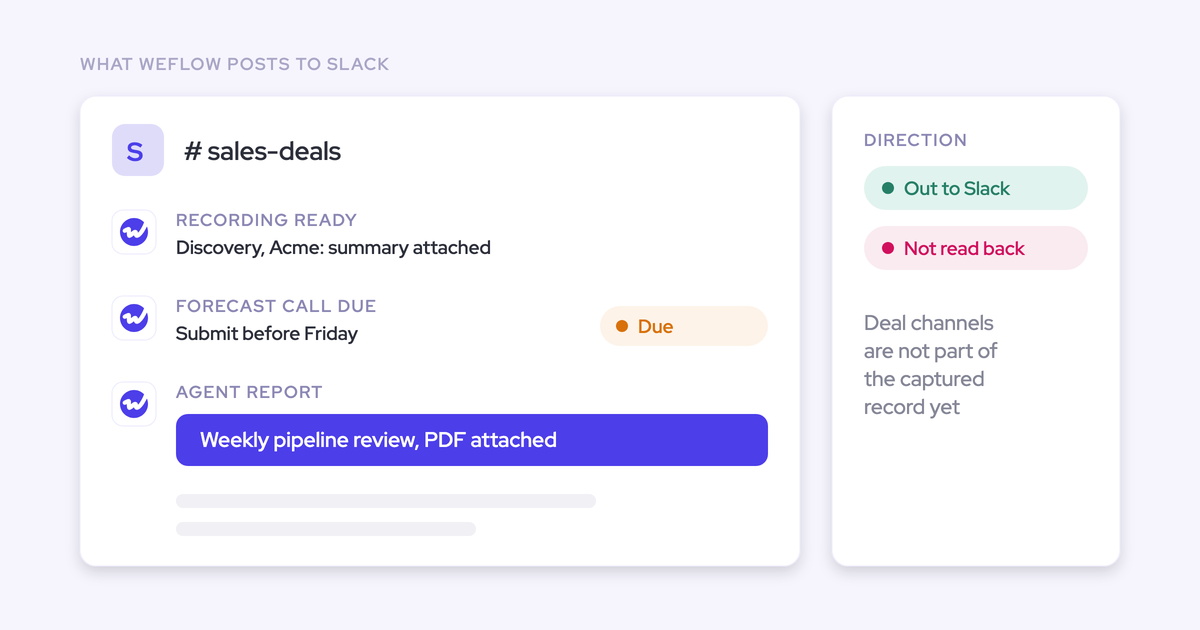
| Slack is a destination, not a source the agent reads. | Deal context held only in Slack channels stays out of the report. Reading channels is on our roadmap. |
When Avoma or Jiminny fits your win-loss need better
This agent isn't the right fit for every team, and two alternatives handle specific versions of the job well.
- Choose Avoma if you want an AI-written Why We Won or Why We Lost reason filled into a CRM field on every closed deal, with a win-loss dashboard showing win-rate trends.
- Choose Jiminny if you want a loss analysis report the vendor switches on for you, delivered by email as a PDF or audio podcast, with nothing to build.
- Build this agent if you want a cross-deal review you configure yourself, joined to complete activity and CRM data, with your own frame, your own competitors and delivery to Slack, Teams or email.
How many Weflow Agent Builder actions a monthly run uses
Agent Builder is the only metered product in Weflow, and it's priced per workspace rather than per user. Everything else, including recordings, transcripts and Ask Weflow AI, is included in the seat.
| Tier | Monthly actions | Price per workspace |
|---|---|---|
| Free | 25 | Included in every Weflow plan |
| Growth | 500 | $299/month |
| Scale | 2,500 | $999/month |
| Enterprise | Custom | Custom package |
Actions per run depend on what each agent does, so size your tier based on your own runs. The Agent Usage page in the admin console breaks usage down by workflow, showing runs, total actions, average actions per run and share of the total.
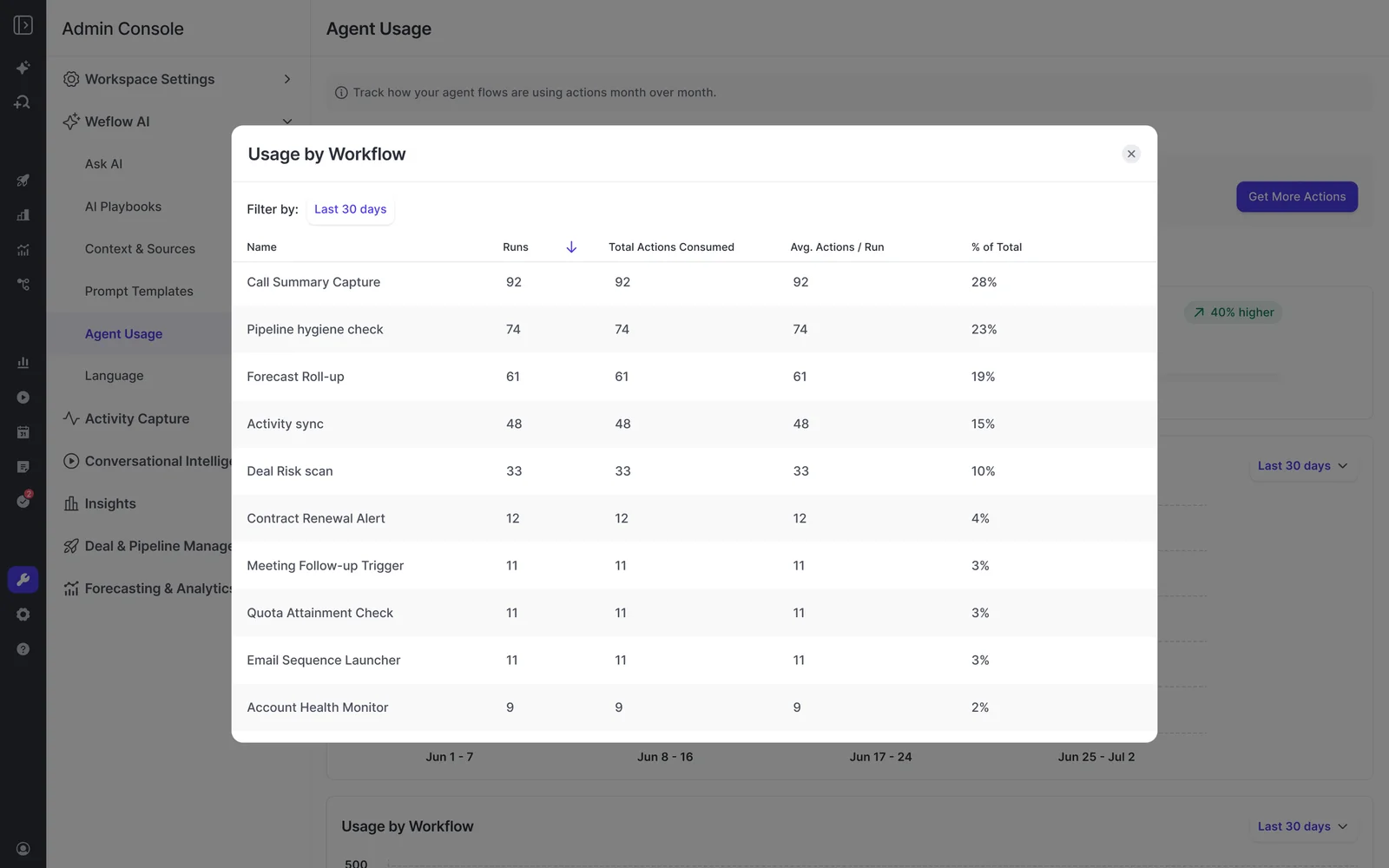
A monthly agent only runs twelve times a year, which makes it one of the lighter jobs you can schedule.
If your workspace uses up its monthly allowance, scheduled agents pause instead of running up an overage, so you can start on Free and upgrade only when your usage calls for it.
Get win-loss findings into Salesforce and your loss review
Even a great report won't change anything until its findings reach the record and the meeting where people act on them. Here's how to get them there.
Have a person correct the loss reason from the report
The simplest route is to name an owner, usually you or the sales manager on the deal, to update the closed-lost reason based on the report's cited evidence.
The CSV picklist mismatch table is built for exactly this: work down the list, open the source and update the field.
It only takes a few minutes a month and keeps a human in the loop on every corrected reason.
Let Weflow AI Field Updates and AI Playbooks write the fields
If you'd rather have structured fields filled in without anyone typing, use the features that write to Salesforce directly:
- Weflow AI Field Updates set Salesforce fields from what was said on calls. Create a field for the buyer-stated loss reason and let it fill from the conversation, while the picklist keeps the rep's view, so the gap between the two becomes something you can report on.
- Weflow AI Playbooks score each deal against your methodology by reading its emails, meetings, transcripts and CRM fields. They refresh on a schedule and write results to Salesforce fields you choose, so the champion and decision-criteria gaps the report describes show up on open deals before they close.
Bring the report to the monthly loss review with sales managers
Run the loss review as its own monthly meeting, separate from the weekly forecast. When you show up with the buyers' own reasons, the conversation changes: managers stop defending a reason code and start working on the pattern behind it.
And because it comes from your own deals rather than a framework someone read, the review becomes evidence you can bring to product and the board.
"This isn't generic. This isn't a book you can read. This is about real Meltwater data that tells you why you're winning, slipping, and losing deals, and the advantages you can have having that context, and what you should do moving forward."
— Julien Cerutti, VP of Global Revenue Strategy at Meltwater
Once your win-loss agent is up and running, you can point the same pattern at a different question. We've collected the agents RevOps teams build most often in 101 Agents for RevOps (Free).
FAQ
How large a closed-deal set should one run read?
Keep each run to one month of closed deals. If that's still a large set, split the review by segment with one agent each, and check the Agent Usage page to see what each size costs.
What happens with closed deals that had no recorded calls?
The agent still reads the emails and meetings mapped to the opportunity, which Weflow Activity & Contact Capture logs even when nobody recorded a call. Email threads often carry the loss reason more plainly than calls anyway, especially late in a deal.
Should won, lost and slipped deals run in one agent or separate agents?
One agent keeps the whole won, slipped and lost frame in a single report, which is easier for a CEO to read. Separate agents give each outcome its own prompt and its own 2,000 characters.
For deals that slipped without closing, build a separate agent with a lookup on open opportunities whose close date fell in the last 30 days.
Can I run the agent over the last two quarters before switching to monthly?
Yes. Widen the close-date window to cover both quarters for a one-off run, keeping an eye on the Agent Usage page since a larger set uses more actions. Then set the window back to 30 days and switch on the monthly schedule.
The backlog run gives you a baseline that makes the first monthly report easier to read.
Can I split the win-loss review by segment, region or product line?
Yes, with one agent per split. Add a lookup filter on the segment, region or product field, and give each agent its own name and recipients.
Who can edit the agent when I'm out of office?
Any Weflow admin in your workspace can edit it. Non-admin permissions aren't available yet, so if you're the only admin, add a second one before you go on leave.
Why not export transcripts and run this in Claude instead?
You can, and a technical RevOps leader will get a similar result. If you need a prompt longer than 2,000 characters, Weflow's API lets you query the same data from Claude.
Just keep in mind that with the export route, you'd have to build and maintain the rest yourself:
- Complete capture of emails and meetings, not only recorded calls.
- A live, scoped Salesforce lookup each month.
- The schedule.
- Delivery to people without a license.
- Follow-up questions through Ask Weflow AI on the same data.
- Someone to keep it running when the person who built it moves on.
Where does call and email data go when the agent runs?
Weflow stores customer data in the region where your Salesforce instance sits, so a European Salesforce org keeps its Weflow data in Europe.
We run on third-party foundation models, primarily Google Gemini, and customer data is never used to train them.
Weflow is SOC 2 Type II certified and GDPR compliant, with Zero Data Retention for AI processing. We're working toward ISO 27001, with a target date of December 2026.