How to Roll Out Weflow to a Distributed Sales Team Without Live Training Sessions
Learn how to roll out Weflow to a distributed sales team without live training sessions.


Good news: you don't need a training roadshow to roll out Weflow across regions and time zones. Only one part of it asks anything of your reps.
Weflow Activity & Contact Capture asks nothing at all. You switch it on centrally for every region on day one, and reps never have to touch it.
Weflow Conversation Intelligence asks just one thing: reps need to know how to keep the notetaker out of a meeting, stop it, or remove it. That fits in a single recorded briefing, and each rep's first sign-in then becomes the gate that enrolls their region.
Weflow is the Revenue AI Orchestration platform for sales, customer success, and RevOps teams. The rollout follows the same logic as the product itself: RevOps sets everything up centrally, and reps find it already working.
To be upfront, our own default onboarding is a short live session per group of reps. This guide walks you through the async version instead, and flags where one live session is still worth keeping.
What each Weflow product actually asks of your reps
Each of the three Weflow products asks something different of a rep, so each one gets its own rollout treatment. Most rollout plans train reps on everything, simply because nobody split it this way first.
| Weflow Activity & Contact Capture | Weflow Conversation Intelligence | Weflow Deal Intelligence & Forecasting | |
|---|---|---|---|
| What the rep must do | Nothing. Capture runs on the server connection to the mailbox. | Sign in to Weflow once. | Nothing until leaders roll out a forecast cadence. |
| What the rep must know | Nothing. Reps can't opt out and don't need to know it exists. | How to keep the notetaker out of a meeting, stop it, or remove it. | Nothing for reps. Leaders learn the forecast structure. |
| Who it's for | Every seller, CSM and manager whose email and calendar should land in Salesforce. | Everyone who runs external meetings. | Managers and revenue leaders. |
| When to switch it on | Day one, every region at once. | Region by region, after the briefing. | Last, once leaders trust the capture data. |
| Training it needs | None. | One recorded briefing, cut per mail client. | A separate session with leaders. |
Read the table top to bottom, and the training plan shrinks to a single row: one recording covers everything reps need to know for the whole rollout.
That's really the whole design goal: no rollout step should depend on a rep doing setup.
What to set up before any rep hears about Weflow
Everything in this rollout rests on four things: one admin session, a tenant install by your mail admin, teams defined from Salesforce, and a named owner for the configuration. Here's what each one involves:
- The people: Book a Salesforce admin and a Microsoft or Google admin into the same session. The technical setup itself takes about 45 minutes. What usually stretches the timeline is getting both admins on the same call.
- The managed packages: You'll install two Salesforce managed packages: one for the core capture objects and fields, and an optional second one for email open tracking.
- The integration user: Weflow writes to Salesforce through one integration user with its own permission set. You'll need to relax IP restrictions on the connected app for the install.
- The mail app: Your Microsoft or Google admin installs Weflow's app once, centrally, in Entra ID or Google Workspace. Reps don't have to grant anything.
- The Microsoft install path: The install has to start from the Microsoft section of Weflow's admin console, which sends your Microsoft admin a setup link. Approving the app in the Microsoft 365 admin center isn't enough to connect the tenant.
- Assignment required in Entra: Set the Weflow enterprise app's Assignment required property to Yes and add your user groups. If you leave it at No, Weflow can still reach mailboxes outside the assigned group.
- Team definitions: Decide how teams map to regions. Weflow builds them dynamically from Salesforce, based on manager, role or a field condition.
- The config owner: Name one internal person who owns the Weflow configuration after go-live.
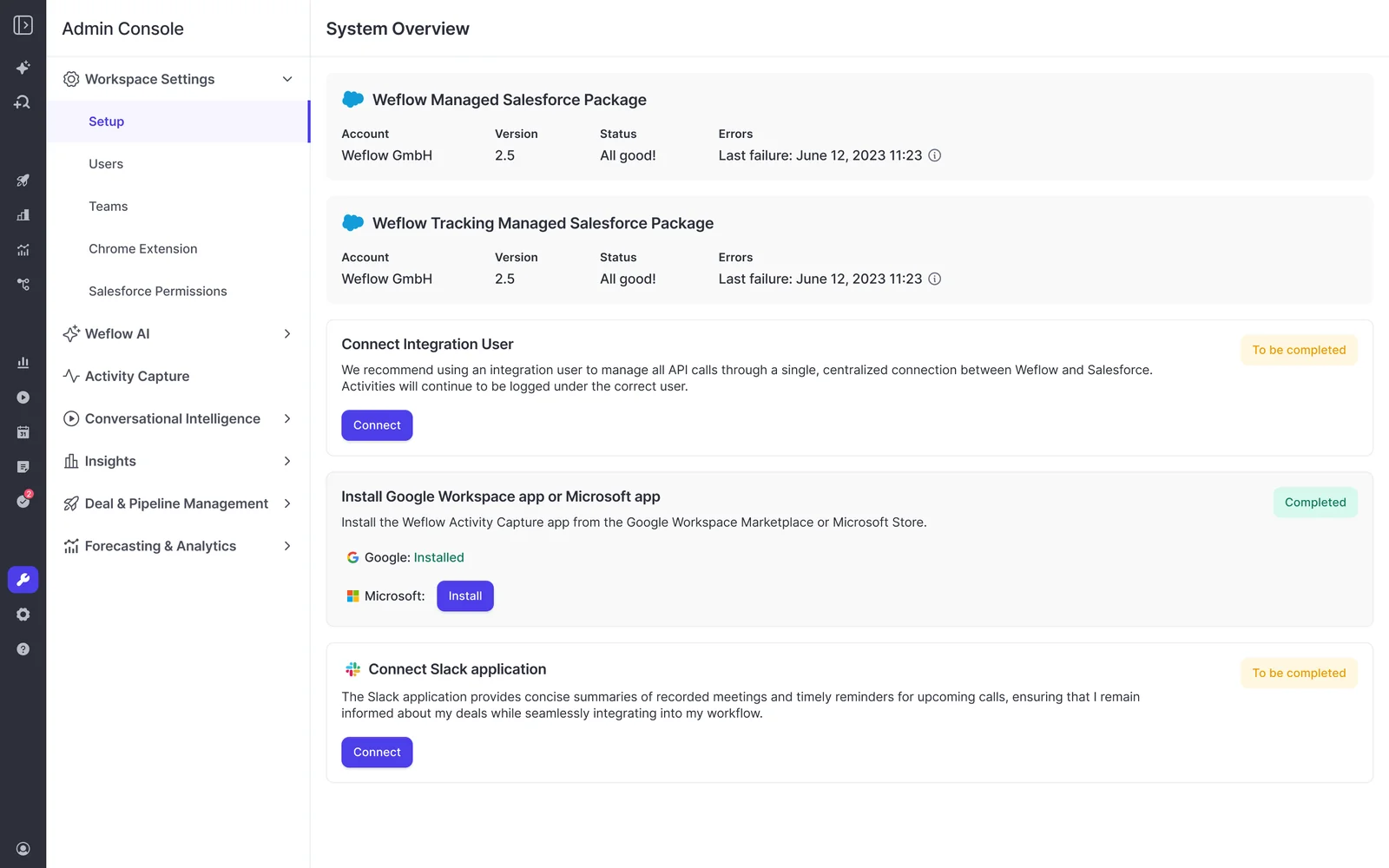
The one dependency you don't control: No capture configuration exists until your mail tenant is connected. Since your IT team's install sets the earliest go-live date, book it first.
Step 1: Test your Weflow configuration in a sandbox first
The failures that matter only show up when you test with an external address, move and delete meetings, and write to every object your activities will map to. So run those tests in a sandbox before anyone is enrolled.
Pick one test user and work through this checklist:
- Send email to an external address: Weflow treats mail between two addresses on your own domain as internal and excludes it, so testing with colleagues logs nothing and makes it look broken. Use a personal address as the test contact instead. To test contact creation too, add that domain to a test account's website field.
- Create, move, reschedule and delete meetings: Creating a meeting only proves the create permission. Moving and deleting it checks the update rights, which can otherwise fail weeks after go-live.
- Test field writes against every target object: Weflow writes an AI summary or field update to Salesforce once, when the call ends. Because a failed write can't be replayed, test every object your activities and fields map to, not just one.
- Set up trackers before enrollment: A tracker you add later can only reprocess the previous two weeks of calls. So if you want competitor and objection tracking across your whole library, enter your trackers first.
When you're ready to cut over, switch off activity capture and conversation intelligence on the sandbox workspace before production goes live, since running both against the same users causes conflicts.
Our team copies your teams and templates from the sandbox to production, so you don't have to rebuild the pilot by hand. The packages, integration user and Entra connection do need to be set up again in production, though.
Step 2: Switch on Weflow Activity & Contact Capture everywhere
Weflow Activity & Contact Capture starts logging for a user the moment you add them to a capture configuration, even if they've never signed in.
That's what makes it safe to switch on in every region on day one. Weflow subscribes to each enrolled mailbox server-side, matches each email and meeting against your Salesforce org, and writes the match into native Salesforce objects.
If you want, you can also scope the mail app to a single organizational unit so only licensed users get captured.
"Most of our team doesn't even know we have Weflow for activity capture. That was a big attraction for me: I didn't need them to set it up or learn anything new."
The switch-on itself only takes three steps:
- Define your teams from Salesforce conditions, such as role or a region field.
- Add those teams to one capture configuration with your logging rules and exclusions.
- Save, and check for warning icons next to any user (more on those in Step 5).
From there, dynamic teams keep coverage current on their own. When a new rep joins in Singapore or someone moves from EMEA to North America, Weflow follows as soon as their Salesforce record changes. You don't have to touch Weflow at all.
Tell the team before Weflow's invitation emails arrive
When you invite users to the Weflow app, each of them gets a sign-in email straight away, including capture-only users who never need to act on it.
Invite the whole user list at once, and every mailbox in the sales org gets a message from a tool nobody announced. That's how a quiet rollout turns into a pile of "is this phishing?" tickets on your desk.
A short heads-up from you before activation avoids all that. Keep it to three points:
- What the email is: an invitation from Weflow, the tool the company is rolling out.
- That no action is needed for activity capture, which already runs in the background.
- When they'll hear more, if their region is getting the notetaker later.
Run the historical sync-back only after your rules are final
A historical sync-back runs your live capture rules backwards in time. Whatever your configuration logs today is what it'll log for the past, so finalize your exclusion lists, custom rules and object settings before the backfill starts.
Run it against draft rules, and you'll write months of activity you then have to unpick, using up your Salesforce API allowance along the way.
Nobody gets notified when the backfill starts or finishes, and historical emails and meetings simply show up on Salesforce records.
Plan for this to take weeks, not days. One month of history for one user takes about 15 to 20 minutes and 2,000 to 3,000 API calls, and your org's daily API allowance sets the overall pace.
If you want certain teams done first, you can prioritize by user, but not by opportunity.
Step 3: Record one briefing on the Weflow notetaker
There's really only one reason to train reps before enrolling them in Weflow Conversation Intelligence. Once a rep is enrolled, the notetaker joins every external meeting, and a rep who hasn't seen how to keep it out, stop it or remove it can get caught out in front of a customer.
That's a single piece of knowledge, and a recording teaches it just fine.
What reps need to know before the notetaker joins calls
Keep the briefing short. It only needs to cover:
- When the notetaker shows up: It joins meetings where at least one attendee is outside your internal domains, once the rep is enrolled and signed in.
- How to keep it out of a meeting before the call starts.
- How to stop it during a call.
- How to remove it from a meeting it has already joined.
- Where the add-in lives: The Outlook add-in sits in the Outlook toolbar, sometimes under More apps until the rep pins it, and becomes active once an email is open. The Chrome extension shows up on its own.
Record one clip per mail client. Outlook and Google users see different add-ins, and a briefing that shows the wrong one triggers exactly the questions you're trying to avoid.
How to get the briefing to every region and time zone
You don't have to build the distribution yourself. Weflow creates a self-serve onboarding page for each customer, with recordings, steps and links tailored to the products they actually use.
Your briefing can reach reps through:
- The Weflow onboarding page for your company.
- Your own LMS, using videos Weflow supplies (handy for onboarding new hires later, too).
- Your regional sales channels, with the sign-in link attached.
For non-English regions like Brazil or APAC, record a translated clip rather than asking those teams to work through an English walkthrough.
Step 4: Enroll Weflow Conversation Intelligence one region at a time
Weflow Conversation Intelligence recording is configured per team, and teams update from Salesforce automatically. That means switching on region by region is just a team definition, not a user list you maintain by hand.
Adding people one at a time is how recording coverage usually slips: a new joiner quietly goes unrecorded until someone remembers to add them. Point the configuration at a team instead, and coverage follows the org chart.
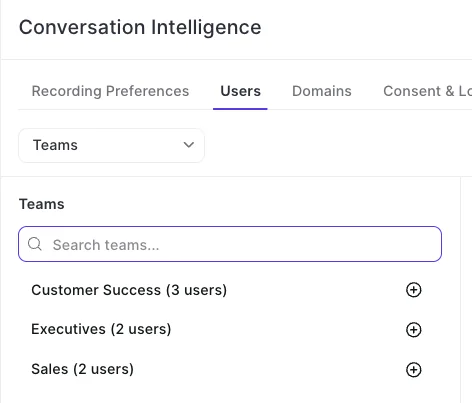
Make first sign-in the enrollment gate for each region
The notetaker only starts joining a licensed user's meetings after they sign in to Weflow for the first time. You can turn that technical rule into your control point, making "watch the briefing, then sign in" the checkpoint for each region.
One thing to watch: the invitation email from Step 2 already lets people sign in, so don't add a region's team to recording until that region has received the briefing.
Then run this sequence for each region:
- Define the region's team from a Salesforce condition.
- Send the briefing clip and the sign-in instruction to that region.
- Add the team to the Conversation Intelligence recording configuration.
- Each rep signs in, and the notetaker joins their next external meeting.
- Check the region's recording coverage about a month later (Step 5).
Keep in mind that a seat assigned without a sign-in means no recordings. Weflow marks that user as external with the license allocated, so their emails and meetings keep landing in Salesforce, but their calls go unrecorded.
Switch off the incumbent notetaker before a region goes live
Two notetakers can't run in the same meeting, so each region's cutover needs to be a clean switch. You don't want a parallel period where two bots sit in front of your customer and split the data across two systems.
Moving old recordings has to wait, too. Every user needs to exist in Weflow and have signed in before their history can transfer, so the migration always comes after the briefing and sign-in.
Step 5: Check capture and recording health without asking reps
Login rate is the wrong metric for a product built to run in the background. Activity capture works best when nobody opens it, so a low login count can actually mean it's doing exactly what you bought it for.
Instead, watch two things: whether activity is being written, and what share of meetings gets recorded by each team.
How to confirm Weflow Activity & Contact Capture is logging
The admin-side signals show you where capture is failing, so you don't have to chase 150 reps to find out.
| Signal | What it tells you |
|---|---|
| Warning icon next to one user | Weflow failed its mailbox and calendar access check for that user. Common causes are a user missing from the Entra ID or Google Workspace app, or an email address that differs from Salesforce. |
| Warning icon next to every user | The cause is the tenant connection, not the users. Either the install never completed or the connection broke, for example when the integration user disconnected. |
| Icon clears after re-saving | The fix worked. Saving the configuration again reruns the check. |
| Insights | Each captured email and meeting with the Salesforce record and contact it attached to, filterable by period, user and direction. |
| Pipeline view with activity fields | How many emails and meetings reached each opportunity, and when the last one landed. |
Weflow doesn't have a built-in capture success rate in the interface. The admin view does show individual outcomes, though, and our support team can compile a one-off rate report from the sync logs whenever you ask.
How to track recording coverage by region
Recording ratio by team (the share of total meetings actually recorded) is the number that tells you whether a region landed. Review it about a month after each region goes live.
If one region's ratio is low, reps there have usually skipped the sign-in or are keeping the notetaker out. What that region needs is a re-brief, not a new tool.
Step 6: Bring Weflow Deal Intelligence & Forecasting to leaders last
Forecasting is a leadership motion, not a rep tool, so it goes last.
It also takes longer, because it's less about the tool and more about how you run the business.
Weflow Deal Intelligence & Forecasting encodes an operating cadence: who submits, how often, at deal or manager level, and against which quota. Designing that needs sales leadership in the room.
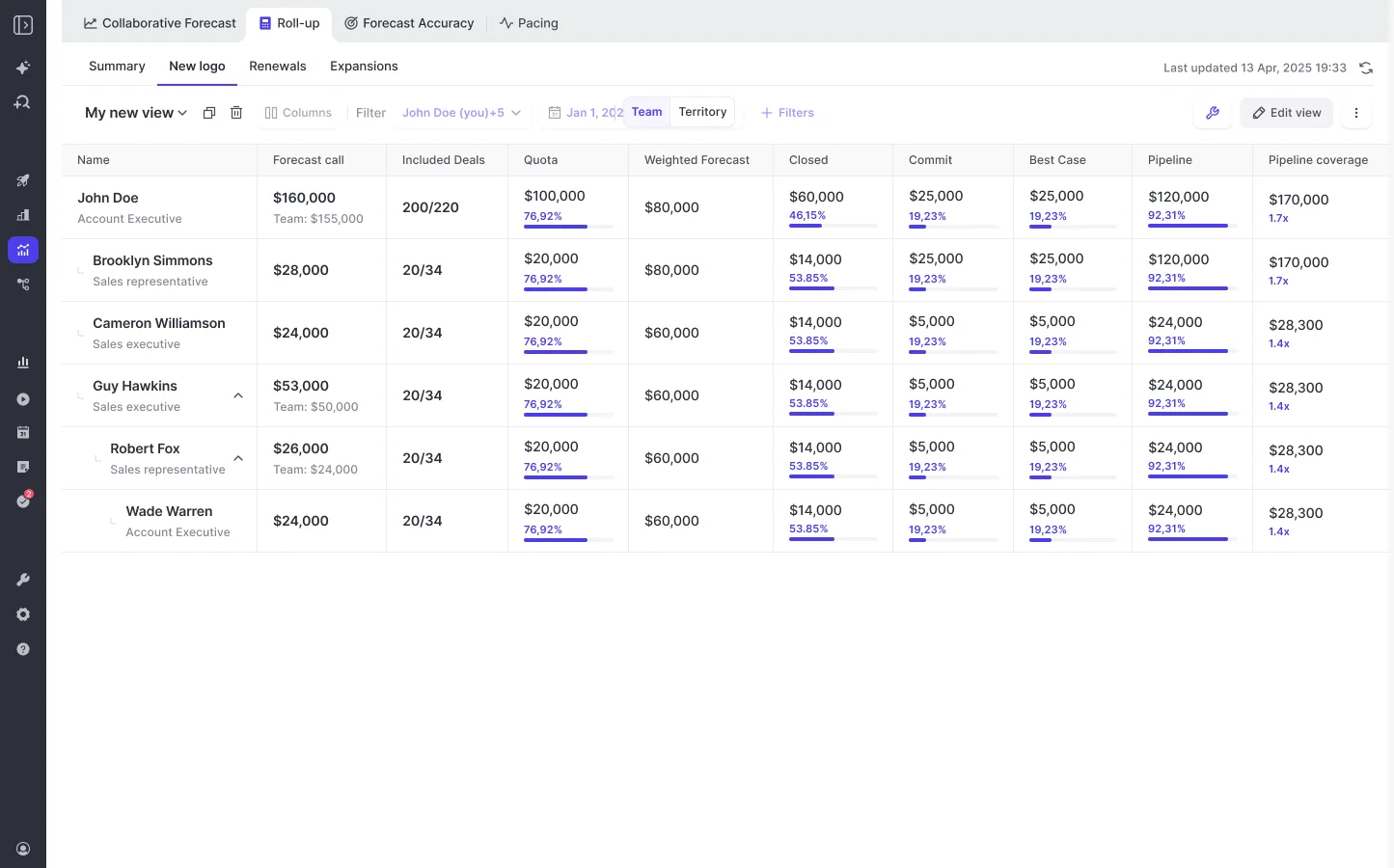
Sequencing it after capture pays off twice. By the time leaders agree on the forecast structure, you'll have weeks of clean activity data underneath it, and reps never get asked to submit numbers built on data they know is incomplete.
We train forecasting separately with leaders once the forecast structure is built. Switching it on for everyone at once is how a platform ends up judged on the parts nobody was ready for.
"You just can't do that to sellers. They need to be consistent. They need to be able to just go and sell."
What breaks silently when you skip a rollout step
Most failures in this setup are silent. Nothing throws an error. You just find out three weeks in, when someone looks for a recording or a report doesn't reconcile. Here's how each one maps back to a step above.
| What you skipped | What happens | How to prevent it |
|---|---|---|
| The rep's first sign-in | Emails and meetings land in Salesforce, but calls never get recorded. | Make "watch the briefing, then sign in" the region gate (Step 4). |
| Testing field writes on every object | Failed AI summaries and field updates can't be replayed, so you copy them across by hand. | Test writes against every target object in the sandbox (Step 1). |
| Setting trackers before enrollment | A late tracker only reprocesses the last two weeks of calls. | Enter competitor and objection trackers first (Step 1). |
| Finalizing rules before the backfill | Months of history get written against draft rules and burn API allowance. | Lock exclusions and custom rules, then start the sync-back (Step 2). |
| Assignment required in Entra | Weflow can still reach mailboxes outside the group you assigned. | Set Assignment required to Yes before go-live (prerequisites). |
| Moving users off classic Outlook | Capture still runs, but the add-in side panel often doesn't populate. | Move add-in users to Outlook on the web or the new Outlook. |
| Announcing the invite emails | Every rep gets an unannounced sign-in email and some report it as phishing. | Send your own note before activation (Step 2). |
| Switching off the incumbent notetaker | Two bots join the same customer meeting. | Make each region's cutover a clean switch (Step 4). |
When you should slow down or keep a live session
The async approach doesn't fit every team. Here's when we'd change the plan:
- Your sellers are still learning Salesforce itself: Reps who've never used a CRM can see automatic capture as surveillance. In that case, roll out capture after the CRM and frame it as coaching.
- Your group runs several mail tenants: Each tenant needs its own capture configuration, and every configuration has to exclude the other entities' domains. Otherwise, internal group mail lands in Salesforce. Conversation Intelligence setup takes one tenant selection, so plan that work before you promise a single switch-on.
- You're running a pilot group or a resistant team: Here, one short live Q&A is still worth the time. A recording covers the script, and a live slot handles the questions the script raises.
- You'd rather follow our default: Our standard onboarding trains reps in groups of about 20 to 25, in a 30 to 40 minute session, with a follow-up about seven days later. That's a fair choice for a single-region team.
What KORE and Zeotap's multi-region rollouts looked like
KORE Wireless rolled Weflow out across four regions (Europe, the Americas, Brazil and APAC) with zero adoption friction, phasing it in over five waves: Activity Capture, Conversation Intelligence, Coaching, Deal Intelligence, then Forecasting.
"It's probably been the most flawless rollout of any product I've ever been involved with."
— Scott Jones, SVP of GTM Revenue Intelligence & Enablement, KORE Wireless
They also ran a Salesforce sandbox beta first. When Weflow was removed for two weeks, beta users were asking for it back within days.
That said, KORE didn't skip live sessions. Weflow owned their onboarding, including live training with a real-time Portuguese translator for the Brazil team.
Zeotap shows what a realistic minimum training effort looks like:
"Weflow was super easy to set up, configure, and navigate around: we did one set of training with the team, and they got everything we would want them to get. One of the easiest tools I've ever implemented."
The async approach in this guide takes their pattern one step further. It uses KORE's phasing, but swaps Zeotap's single training session for one recording and a sign-in gate.
What Weflow's onboarding team takes off your plate
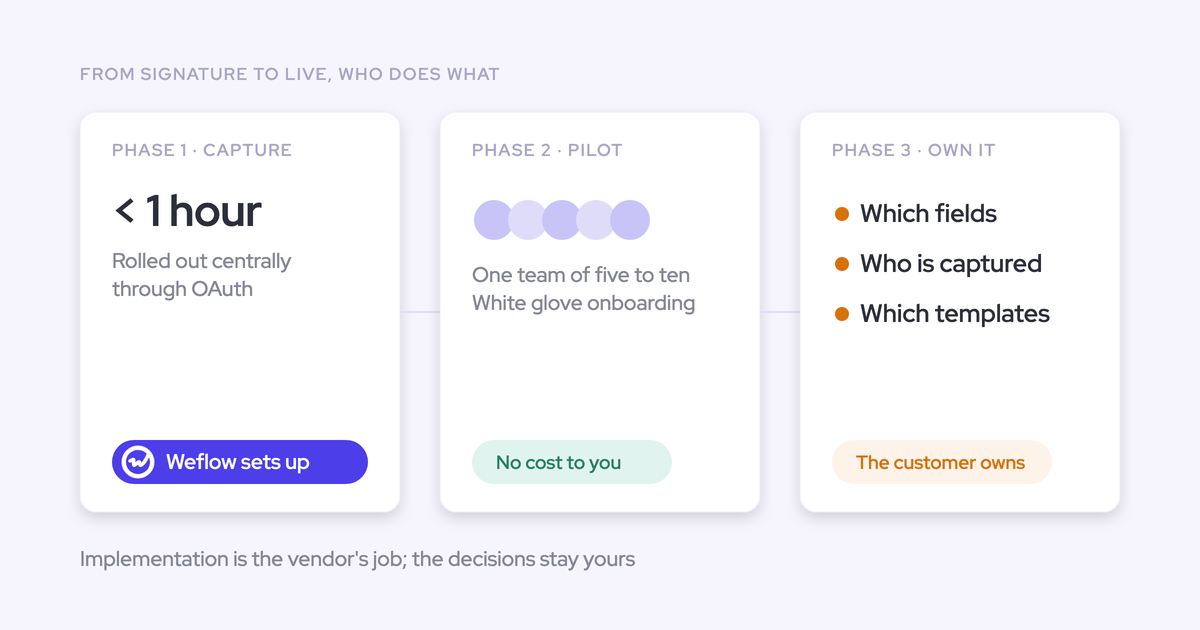
Weflow implementation is free and typically goes live in two to three weeks. And if you're the one person juggling enablement, training and metrics, here's the part that matters most: our team does most of the work in this guide alongside you.
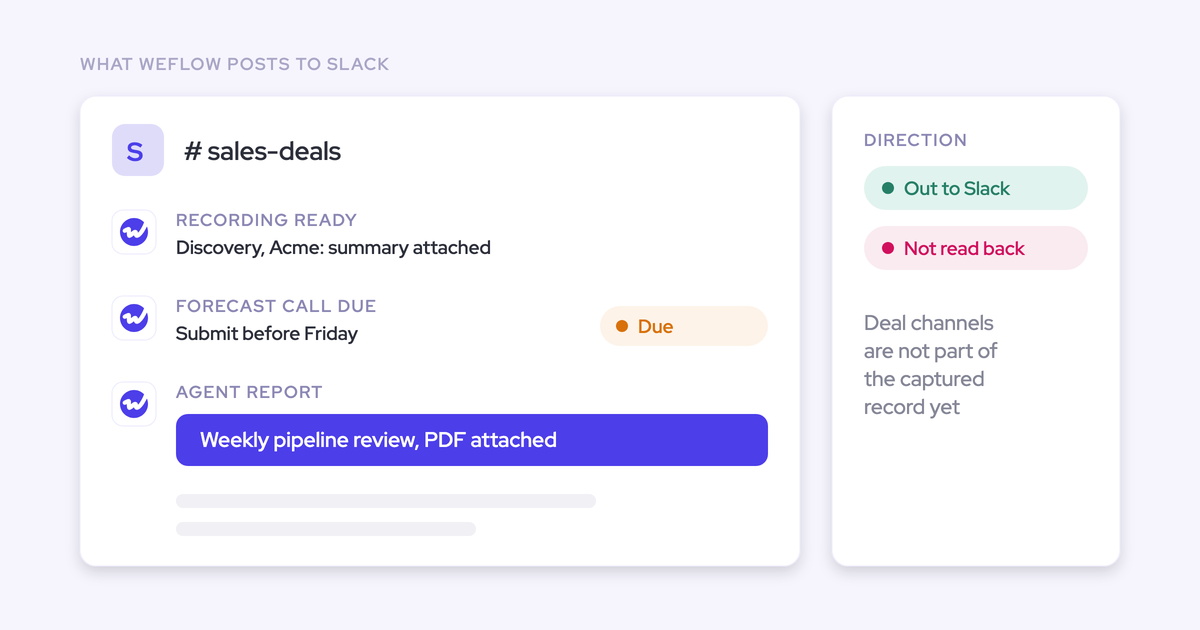
You get a named technical CSM in a shared Slack channel who resolves setup and capture issues directly, so rep questions don't sit unanswered for days while the team decides the tool is broken.
Weflow owns:
- The technical implementation session and configuration guidance.
- Copying teams and templates from your sandbox to production.
- Starting the historical sync-back once your rules are checked.
- Migrating recordings from your previous notetaker, including reassigning departed reps' calls.
- Your self-serve onboarding page and videos for your LMS.
You own:
- Booking your Salesforce and mail admins.
- Deciding logging rules, exclusions and consent with legal.
- Recording and sending the briefing per region.
- Naming the internal config owner.
If even that list feels like too much, our managed service option takes on the heavy lifting. Your RevOps team just answers questions and unlocks access.
"I made a deliberate choice to let Weflow own end-to-end onboarding rather than pull my team off revenue-generating work. That's exactly the kind of partnership leverage I was looking for."
— Scott Jones, SVP of GTM Revenue Intelligence & Enablement, KORE Wireless
Before you script your briefing, walk through the product yourself to see exactly what your reps will see.
FAQ
Do reps on Weflow Activity & Contact Capture need to sign in?
No. Capture runs server-side from the moment you add someone to a configuration. Signing in only matters for people who use the insights, Ask Weflow AI or the manager views.
Can Microsoft 365 and Google Workspace users share one rollout?
Yes. Weflow runs both groups under one capture configuration against one Salesforce org, so the logging rules work the same for everyone.
Only the add-in differs (Outlook users get the Outlook add-in, and Google users get the Chrome extension), so you'll need one briefing clip for each.
Will Weflow double-log activities alongside Outreach or Salesloft?
Not if you turn on compatibility mode, which delays Weflow's write so your engagement tool logs first. Logging is slower while it's on, though.
How do we move old call recordings into Weflow?
Our team migrates them once every current user exists in Weflow and has signed in, since each recording lands on its Weflow user. Departed reps' recordings get reassigned to someone you name, like their line manager.
How do we handle call recording consent in EU regions?
Agree with legal on one of three consent designs before rollout:
- Opt-out: The meeting records by default, and guests get notified and can decline.
- Opt-in: Every participant accepts before recording starts.
- Manual: The seller asks in the room.
Weflow stores data in the region where your Salesforce instance sits. Video recordings are the exception: Weflow holds them and streams them back. You can also set retention rules to delete recordings after a set period while keeping the transcripts.
How do we keep executives' mailboxes out of Salesforce?
Put executives in a separate capture configuration set to manual logging, or block anything involving certain contact roles, accounts or domains, such as investors.
When a thread includes both executives and sellers, the most permissive rule wins, so customer threads the sales team is on still log as usual.
Who keeps the Weflow configuration current after rollout?
Your named internal owner. Capture largely runs itself, but Weflow Conversation Intelligence configuration drifts as the business changes, so they'll want to check that templates and field updates still match how teams work.
Does Weflow have a built-in usage report?
No, but our team can compile one by hand when you ask. Login counts are misleading anyway, since a Weflow authentication token can stay valid for weeks, so we'd suggest tracking sync outcomes and recording ratio instead.
How much do Weflow Activity & Contact Capture and Conversation Intelligence cost?
Weflow Activity & Contact Capture is $19 per user per month, and Weflow Conversation Intelligence is $39 per user per month, both billed annually. Pricing is seat-based and public on our website.
Every plan includes Ask Weflow AI Pro and the free Agent Builder tier. The Conversation Intelligence seat also includes Mobile Copilot and the desktop app.