Ask Weflow AI Prompts for Spotting Churn Risk in Customer Calls and Emails
Learn 13 Ask Weflow AI prompts to find cited churn risk in customer calls and emails.


Here are 13 prompts to paste into Ask Weflow AI before a specific moment, like tomorrow's renewal call, a QBR, an account you just inherited, or your Friday one-to-one.
Each one returns churn evidence cited back to the call, transcript or email where the customer said it, so you get proof instead of one more opinion on the health score.
The prompts are grouped by the six mechanisms that produce churn: a champion change, a gap between what was sold and what was delivered, a stalled implementation, a competitor or suite vendor, engagement that turned reactive, and pricing questions replacing usage questions.
Every prompt is written to challenge your green health score: it pairs what the customer said with a Salesforce field such as ARR or renewal date, and tells you what it can't see.
Weflow is the Revenue AI Orchestration platform for sales, customer success, and RevOps teams. Think of these prompts as the on-demand layer that sits between the scheduled weekly renewal-risk brief and the persistent account playbook score.
How to run these churn prompts in Ask Weflow AI
The prompts below work as written once two things are in place: your post-sale conversations are captured, and you point the prompt at the right scope.
Capture your post-sale calls and emails before you prompt
Ask Weflow AI only reads what Weflow has captured, so if your CSMs' calls and emails aren't being captured yet, start there. No prompt can find a churn signal in a call that was never recorded.
It's a gap we see often: sales gets the capture licenses, CS doesn't, and the post-sale side of the account has no activity data at all. Before you run anything, check that:
- Your CSMs have Weflow Conversation Intelligence if you want their calls recorded and transcribed. Activity & Contact Capture on its own syncs emails, meetings and contacts, but doesn't record calls.
- Your CSMs' inboxes and calendars are connected, so their emails and meetings sync into Salesforce automatically.
- Recordings don't need an opportunity, so implementation calls, escalations and QBRs still get transcribed, with the output written to the account or a custom object.
- CS has its own AI template, so customer success writes to the account object instead of filling the sales team's qualification fields.
- Case logging is on in a separate CS or support configuration. A matching Case takes priority over an opportunity or account, so ticket emails land on the ticket.
- Create task for incoming emails is on under Case. By default, Salesforce only creates a Task for outgoing emails logged to a Case, so without this setting customer replies don't show up.
Point each prompt at one account, a renewal board, or calls
The scope you pick decides what evidence goes into the answer, so pick it based on the moment you're preparing for:
| Scope | What it pulls into the answer | The CSM moment it suits |
|---|---|---|
| One account | Every captured email, meeting and transcript on the account, plus its Salesforce fields | Tomorrow's renewal call, a QBR, an inherited account |
| A filtered renewal board | Every deal in a pipeline view, for example renewal opportunities closing in the next 90 days | Working a renewal cohort, the weekly risk review |
| A set of calls | Every recording you add to the question, read together | Comparing one stretch of conversations, such as the last three escalations |
| One call | The transcript plus the linked Salesforce records and their related activity | The debrief right after a tense call |
| The whole system | Everything you have permission to see | Patterns across the book, such as which competitor keeps coming up in renewals |
You can run any of these in the Weflow app, or on the Salesforce account page through the Weflow Chrome extension, so you never have to leave the record you're preparing from.
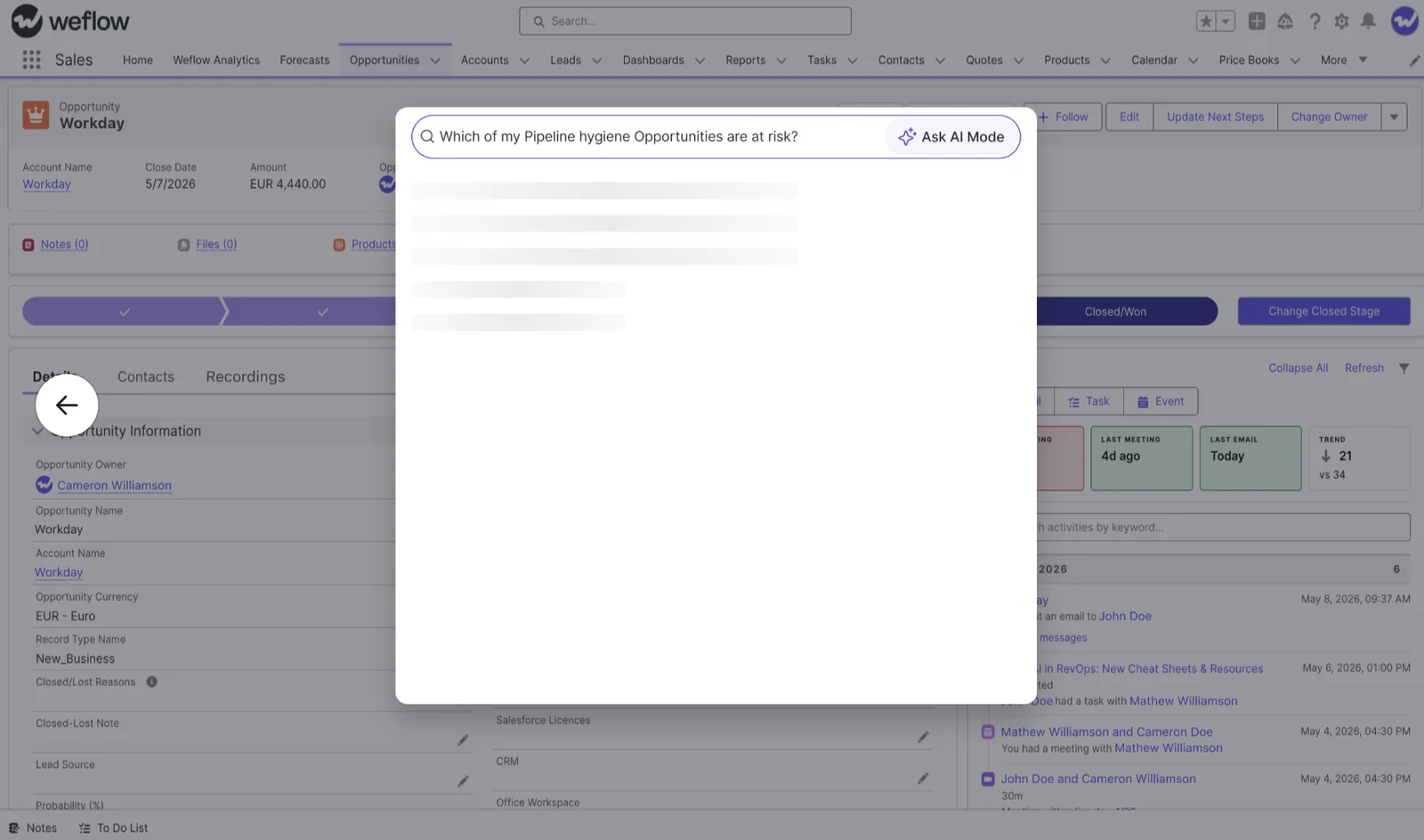
To widen the scope, use Add Source in the composer to attach up to 10 sources to one question, like several pipeline views, records or recordings.
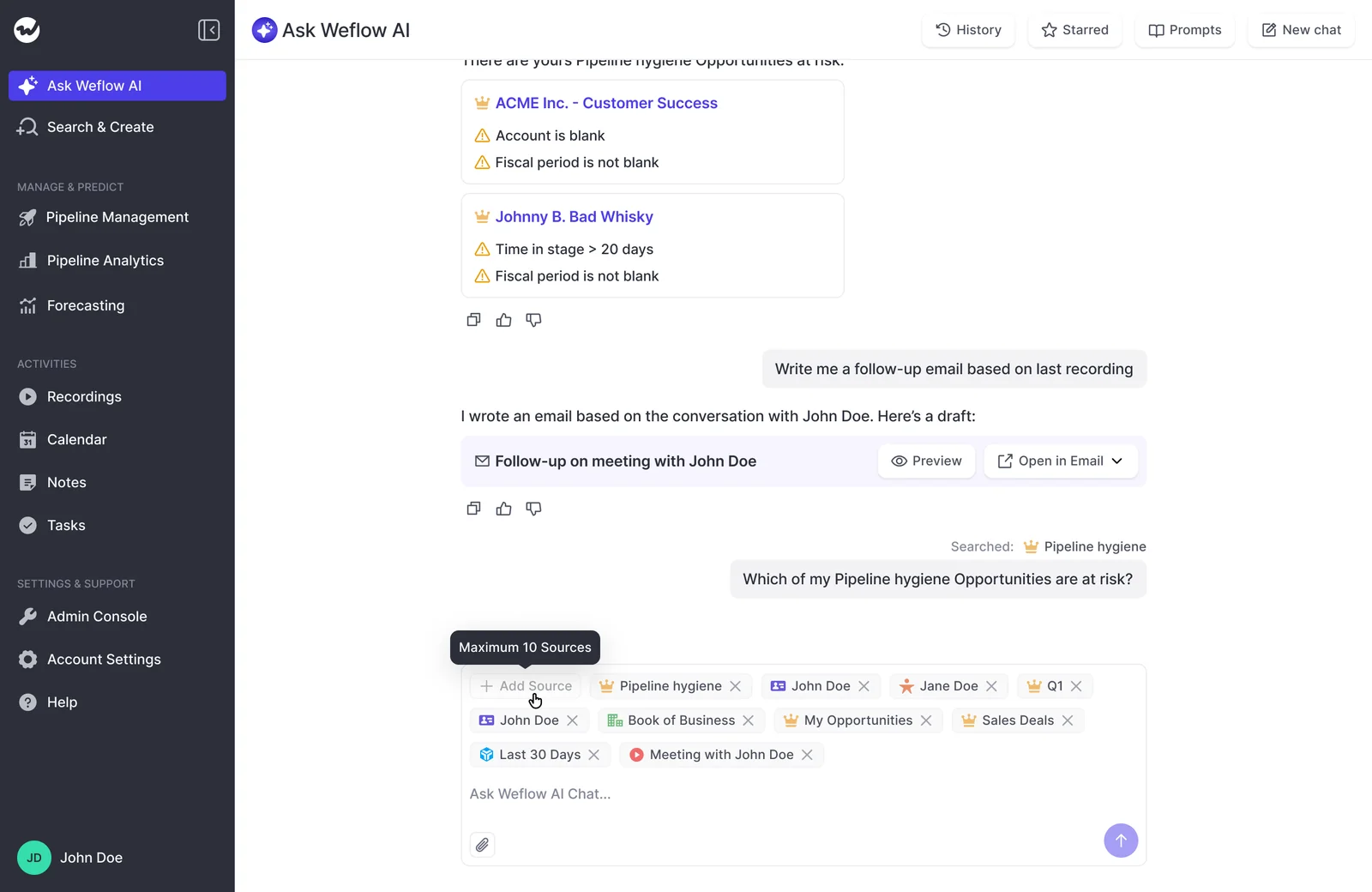
Read each prompt card: Signal, Salesforce field, source, blind spot
Every prompt follows the same structure, because a prompt that just summarizes the account only tells you what you already believe. Instead, each prompt:
- Hunts for the cooling signal.
- Joins the conversation signal to a Salesforce field, usually ARR and renewal date, so a complaint from your largest account doesn't look the same as one from your smallest.
- Asks for a citation on every finding, so you can open the exact call or email.
- Tells the AI to write "no evidence found" instead of guessing.
- Comes with a one-line note on what it can't see.
The citation is what makes the answer trustworthy. Without one, "this account is at risk" is just another opinion.
I love being able to go right to the call, transcript or email and see where something was said that the AI is referencing.
— Scott Jones, SVP of GTM Revenue Intelligence & Enablement, KORE Wireless
Each card below includes the scope, the prompt itself, the Salesforce inputs it uses, what the answer looks like, where to run it and what it can't see.
Where a prompt says ARR or renewal date, swap in the field names your org uses.
Prompts that catch a champion change before the renewal
A champion change almost always shows up in calls and emails before it reaches the renewal.
Someone mentions a reorg, a new name starts answering for the customer, or the person who drove the purchase stops replying, while the contact record still lists the old champion. These prompts look for that change in the conversations.
Check one account for a new or quiet champion
Run this the day before a renewal call, so you walk in knowing who you're actually talking to.
Scope: One account, before a call.
Read every call and email on this account.

1. Identify who drove the relationship on the customer's side in the
   first six months after signing: who scheduled meetings, asked the
   questions and answered for their team.
2. Identify who has engaged in the last 90 days.
3. Flag any of these: the original champion has stopped replying or
   attending; a new person now speaks for the customer; someone
   mentioned a role change, departure, reorg or new leader.

Cite the call or email, with its date, for every finding. If you find
no evidence of a change, write "no evidence of a champion change"
rather than guessing. End with the account's ARR and renewal date.- Salesforce inputs: Contact roles on the account and renewal opportunity, ARR, renewal date.
- What the answer looks like: Two short lists (who drove early conversations, who engages now), then the cited moments where the change shows up.
- Where to run it: On the account page in Salesforce through the Chrome extension, or with the account added as a source in Weflow.
- What it can't see: A reorg nobody mentioned in a captured call or email.
Find renewals where the original champion went silent
This runs the same question across your whole renewal window, with your biggest exposures at the top.
Scope: A pipeline view filtered to renewals closing in the next 120 days.
For each renewal in this view, compare the customer contacts who were
most active in earlier conversations with the contacts active in the
last 60 days.

List only the renewals where the earlier main contact has gone silent,
left, or been replaced by someone new. Return a table with these
columns: account, ARR, renewal date, champion signal, source (call or
email with date).

Sort by ARR, highest first. Do not include renewals where you found no
evidence; list those account names in one line at the end.- Salesforce inputs: ARR, renewal date, contact roles.
- What the answer looks like: A table sorted by ARR, with a source link for each champion signal.
- Where to run it: In Weflow, from the filtered renewal view.
- What it can't see: Phone calls and Slack threads, because Weflow doesn't capture either. A champion who mostly talks to you there looks silent even when they aren't.
Prompts that expose a sold-versus-delivered gap
A lot of churn starts with a promise made during the sales cycle that delivery never kept. The handover usually carries over the contract but loses the reasoning: why the customer bought, what was promised in the room, and what they'd walk away over.
The good news is that the account's pre-sale conversations still hold all of it, so you don't need to chase the AE.
Pull what sales promised from the pre-sale conversations
Use this on an inherited account, or before a first QBR, so the customer doesn't have to explain themselves a third time.
Scope: One account, inherited or at handover.
Read the calls and emails on this account from before the original
deal closed. Produce three labelled lists:

1. Why they bought: the business problem and the outcome they expected.
2. What we promised: features, integrations, timelines, support levels
   and any commercial commitments.
3. What they said would make them leave, walk away or not renew.

Quote the customer's own words where possible and cite the call or
email, with its date, for each item. Mark anything said only by our
team as "our claim". If a list has no evidence, write "nothing found".- Salesforce inputs: The original opportunity's close date, contact roles.
- What the answer looks like: Three labelled lists, each item with a source link.
- Where to run it: On the account page, or in Weflow with the account as the source.
- What it can't see: Promises made in an unrecorded call. If the commitment lives in an order form or statement of work, attach it to the question as a file.
Check recent calls against what the customer was promised
This is the follow-up that puts your green to the test: paste in the promises from the previous prompt and see whether the customer thinks you delivered.
Scope: One account, or the set of post-sale calls from the last six months.
Here are the commitments from this customer's sales cycle:
[paste the "what we promised" list]

Read the post-sale calls and emails from the last six months. For each
commitment, find where the customer says it is missing, late, works
differently than expected, or isn't producing the outcome they bought
it for. Quote the customer and cite the source with its date.

Then list the commitments the customer hasn't mentioned at all.
Don't count our own team's reassurances as evidence of delivery.- Salesforce inputs: Renewal date, ARR.
- What the answer looks like: A two-column contrast, what was promised against what the customer says now, with a cited quote on each row.
- Where to run it: In Weflow, with the account or the selected recordings as sources.
- What it can't see: A gap the customer feels but never says out loud. If they quietly stopped using a feature, product usage data will show that, but the conversation won't.
Prompts that spot an implementation that stalled
An account still talking about setup near its renewal is at risk, whatever its health picklist says. Slow onboarding is one of the earliest churn signals CS leaders name, and it's easy to miss because the calls feel busy and friendly.
slow adoption, slow onboarding is always a sign of future problems, even churn
Ask whether an account's onboarding ever reached go-live
This prompt rebuilds the implementation from what was said, so you know where it actually landed before you open the renewal.
Scope: One account.
Reconstruct this account's implementation from its calls and emails as
a dated timeline: kickoff, configuration, integrations, data migration,
training and go-live.

State the last cited evidence that the customer went live. If there is
none, list the open blockers, who on the customer's side owns each one,
and when each was last mentioned. Cite the source for every entry.
If go-live was never discussed, say so plainly.- Salesforce inputs: Contract start or original close date, renewal date.
- What the answer looks like: A dated timeline with source links, ending in either a go-live moment or a list of open blockers.
- Where to run it: On the account page, or in Weflow with the account as the source.
- What it can't see: Product usage. A customer who says they're live but barely logs in looks live here unless usage values are synced to Salesforce.
List renewing accounts that still talk about setup
This gives you a list to work on this week, not next quarter.
Scope: A pipeline view filtered to renewals closing in the next 120 days.
For each renewal in this view, read the calls and emails from the last
60 days. Flag renewals where the conversation is still mainly about
setup: configuration, integrations, data migration, user training or
unresolved implementation issues.

Return a table: account, ARR, renewal date, latest setup topic, source
(call or email with date). Sort by ARR, highest first. Leave out
renewals where setup isn't discussed.- Salesforce inputs: ARR, renewal date.
- What the answer looks like: A table sorted by ARR, with the latest setup topic and its source for each account.
- Where to run it: In Weflow, from the filtered renewal view.
- What it can't see: Calls your implementation or services team ran without Weflow capturing them.
Prompts that flag suite consolidation or a named competitor
Customers usually name the suite vendor or the competitor before they leave, whether it's a passing "our platform provider showed us something similar" or a direct question about migration.
Your workspace's company system prompt already holds your competitors, so these prompts can ask for them by category instead of listing them. If your list is out of date, send us the competitors and suite vendors you lose renewals to, and we'll add them.
Search one account's calls and emails for competitor talk
Run this before a renewal or a QBR, when you need to know whether someone else is already in the room.
Scope: One account, before a renewal or QBR.
Search every call and email on this account for mentions of our
competitors, alternative tools, building the capability in-house, or a
suite vendor the customer already uses offering something similar.

For each mention give: what was said in one line, who said it (their
side or ours, and the person's name), the date, and the source. List
customer-side mentions first. If there are no mentions, say
"no competitor or consolidation mentions found".- Salesforce inputs: Renewal date, ARR.
- What the answer looks like: A list of mention, speaker, date, context and source.
- Where to run it: On the account page, or in Weflow with the account as the source.
- What it can't see: A competitive evaluation the customer runs quietly and never mentions to you.
Rank this quarter's renewals by competitive pressure and ARR
Not every competitor mention carries the same weight, so this prompt separates a real evaluation from small talk and puts the largest exposures first.
Scope: A pipeline view filtered to this quarter's renewals.
For each renewal in this view, find mentions of competitors, in-house
builds or suite consolidation in its calls and emails.

Classify each renewal's pressure as "active evaluation" (the customer
is comparing, trialling or asking about migration), "passing mention",
or "none". Return a table: account, ARR, renewal date, competitor or
vendor named, pressure level, latest mention date, source.

Sort active evaluations first, then by ARR, highest first. Leave out
renewals with no mentions.- Salesforce inputs: ARR, renewal date.
- What the answer looks like: A ranked table with active evaluations at the top.
- Where to run it: In Weflow, from the filtered renewal view.
- What it can't see: Pressure that never reaches words. It reads what was said, not how it was said.
Prompts that separate proactive engagement from escalations
Raw engagement counts can mislead. CS teams tell us the frequency of real human engagement is their strongest renewal predictor, but only when it counts proactive touchpoints like QBRs, adoption calls and onsite visits.
A busy account full of escalations is a warning sign, so if you count both together, the metric flips. These prompts split the two before judging the trend.
Break down an account's engagement into proactive and reactive
Use this when an account looks active and you want to know whether it's healthy or just loud.
Scope: One account.
Classify every meeting and email thread on this account from the last
six months as either:
- proactive: QBRs, adoption or success reviews, training, roadmap
  sessions, expansion talks, executive check-ins
- reactive: escalations, outages, bugs, complaints, chasing tickets,
  billing disputes

Show the count of each by month in a table, cite every item, and say
whether the proactive share is rising or falling. Note who on the
customer's side attends the proactive meetings.- Salesforce inputs: Renewal date, ARR, Cases on the account where Case logging is on.
- What the answer looks like: A two-column table of proactive against reactive by month, with sources.
- Where to run it: On the account page, or in Weflow with the account as the source.
- What it can't see: Tickets that live only in your helpdesk. With Case logging on, ticket emails on Salesforce Cases are part of the picture.
Find renewals that look busy but run on escalations
This catches the accounts your activity dashboard shows as healthy when they're really firefighting.
Scope: A pipeline view filtered to renewals closing in the next 120 days.
For each renewal in this view, classify the meetings and email threads
from the last 90 days as proactive (QBRs, adoption reviews, training,
expansion, executive check-ins) or reactive (escalations, outages,
bugs, complaints, ticket chasing).

List renewals where reactive items are more than half of the total.
Return a table: account, ARR, renewal date, proactive count, reactive
count, most recent escalation topic, source. Sort by ARR, highest
first.- Salesforce inputs: ARR, renewal date.
- What the answer looks like: A ranked table of the renewals running on firefighting.
- Where to run it: In Weflow, from the filtered renewal view.
- What it can't see: Ticket volume, unless the tickets are in Salesforce.
Prompts that notice pricing questions replacing usage questions
When a customer's questions shift from "how do we use this" to "what does this cost", the renewal conversation has already started without you. It's a late tell, so you'll want to catch it in the first week it shows up.
Track how one account's questions shifted toward price
Here's a before-and-after read you can take into the call.
Scope: One account.
List the questions the customer asked in calls and emails during the
first six months after signing, and the questions they asked in the
last 90 days.

Tag each question as "usage and adoption" or "price, budget, contract
or procurement". Show the two periods side by side and cite every
question. Point to the first conversation where price-related questions
outnumber usage questions. If the mix hasn't shifted, say so.- Salesforce inputs: Original close date, renewal date, ARR.
- What the answer looks like: A two-column table of earlier questions against recent questions, with sources, plus the turning point.
- Where to run it: On the account page, or in Weflow with the account as the source.
- What it can't see: Budget conversations the customer had with someone on your side whose emails and calls aren't captured.
Find renewal calls where budget talk crowds out adoption
Run this across the renewal window to see which customers have started negotiating in their heads.
Scope: A renewal board, or the set of calls from the renewal window.
Read the calls from the last 60 days on the renewals in scope. For each
account, compare how much of the conversation was about pricing,
budget, discounts, contract terms or cutting seats against how much was
about usage, adoption or outcomes.

List accounts where pricing and budget topics outweigh adoption topics.
Return a table: account, ARR, renewal date, main budget topic, a short
customer quote, source. Sort by ARR, highest first.- Salesforce inputs: ARR, renewal date.
- What the answer looks like: A ranked table with a cited customer quote per account.
- Where to run it: In Weflow, from the filtered renewal view or with the recordings added as sources.
- What it can't see: Tone of voice. A customer who sounds strained but asks reasonable questions reads as neutral.
One prompt that ranks your renewals by churn risk and ARR
This prompt checks a filtered renewal board for all six mechanisms at once, cites the evidence and ranks the results by risk and ARR.
Scope: A pipeline view filtered to renewals closing this quarter or next.
For each renewal in this view, check its calls and emails for these six
churn mechanisms:
1. Champion change: the original champion went quiet, left or was
   replaced.
2. Sold versus delivered: the customer says something promised is
   missing, late or not producing the expected outcome.
3. Stalled implementation: recent conversations are still about setup.
4. Competitor or consolidation: a competitor, in-house build or suite
   vendor is under consideration.
5. Reactive engagement: escalations outnumber proactive meetings in the
   last 90 days.
6. Price over usage: recent questions are mainly about cost, budget or
   contract terms.

Count a mechanism only when you can cite a specific call or email.
Return a table: account, ARR, renewal date, mechanisms triggered,
strongest cited evidence (one line plus source), suggested next step.

Rank by number of mechanisms triggered, then by ARR, highest first.
List renewals with no cited evidence by name at the end.- Salesforce inputs: ARR, renewal date, and any health or usage fields you've connected.
- What the answer looks like: A ranked table with the mechanisms triggered, the strongest cited evidence and a next step for each account.
- Where to run it: In Weflow, from the filtered renewal view. Add up to 10 views as sources if your renewals span several.
- What it can't see: Everything listed in the limits section below.
You'll get a ranked answer to take into the meeting, but not a field you can sort or report on in Salesforce. For that, you need a playbook.
When to use a prompt, the weekly brief, or a playbook score
Prompts answer the question you have right now, the weekly renewal-risk brief scans on a schedule, and account-object playbooks write a persistent score to Salesforce fields you can sort and report on.
| Ask Weflow AI prompt | Weekly renewal-risk brief (agent) | Account playbook score | |
|---|---|---|---|
| When it runs | When you ask | On a schedule you set | Kept current on the account |
| Scope | One account, a renewal board, a set of calls, or everything | The accounts or opportunities the agent is pointed at | Everything related to the account, across all its opportunities |
| Output | A cited answer in the chat | A fresh PDF or spreadsheet each run | Results written to Salesforce fields |
| Where the result lives | Your Ask Weflow AI chat history | Slack or an email list | The Salesforce account record, Weflow boards and Salesforce reports |
| Best CS moment | Prep for a call, a QBR, an inherited account, the Friday one-to-one | Monday's portfolio scan of what changed | Sorting the whole book by risk and reporting it to leadership |
| Usage | Included in every plan, no usage caps | Uses Weflow Agent Builder actions | Runs on the account object |
Keep an eye on which findings keep coming back. A mechanism that turns up in your prompts week after week is a good candidate for a playbook criterion, because that's how it becomes a sortable score instead of something a CSM has to remember to ask about.
What Ask Weflow AI can't see when you hunt for churn
Ask Weflow AI reads Salesforce records, captured emails and meetings, call transcripts and the public web, and nothing else. Your churn picture probably lives in more places than that, so here's where the prompts stop:
- Usage, tickets and CS-platform data are invisible unless they sit in Salesforce fields: An account with falling logins and calm calls looks fine. For a one-off check, attach a usage export to the question as a file.
- It reads words, not voice tone: A curt customer who says the right things reads as fine, so write prompts that look for the words people use when they're unhappy.
- There's no built-in health model: Risk is whatever your prompt defines. A quiet but stable customer and a disengaging one look the same unless the prompt spells out the difference.
- It works after the call, never during it: There are no live cues while you're talking to the customer.
- Phone calls and Slack threads aren't captured: Signals from those channels never reach the prompt.
- There's no Clari-style account module: Weflow's forecasting and deal inspection are built on opportunities, and renewal forecasting runs on renewal opportunities and their contract dates.
Some tools handle parts of this differently, and they deserve credit for it. Momentum ships a prebuilt Customer Retention agent and AI Signals that alert Slack, Microsoft Teams or email when a configured topic such as churn risk comes up on a call.
Fathom trackers name churn and renewal risk as a use and push matches as they happen. If you want a call-by-call alert pushed to you, both are built for that.
If your churn signal is mostly product usage and tickets, keep your CS platform as the main source for that, and let Weflow supply the conversation and email layer your CS platform can't hear. Together, they give you the full picture.
How to share churn prompts across your CS team in Weflow
Save the prompts once and tune them to your definitions and fields, so every CSM runs the same churn question in one click.
Save your churn questions as shared prompts in the library
Admins save shared prompts to the prompt library, where everyone in the workspace can run them. Your company system prompt already carries your buyers, value proposition and competitors, so the shared prompts don't have to repeat that context.
- Adapt the wording: Replace ARR and renewal date with your field names, set the time windows to your renewal cycle, and adjust the proactive and reactive lists to the meeting types your team runs.
- Save each one as a shared prompt in the prompt library, named by mechanism and scope, such as "Champion change: one account".
- Tell CSMs when to run which prompt: The account prompts go before every renewal call and QBR, the board prompts go into the weekly risk review, and the ranking prompt goes into the Friday one-to-one.
Teach Ask Weflow AI your health fields and custom objects
Ask Weflow AI reads the Salesforce objects your admin connects in Context and Sources, in the AI section of the Weflow admin console.
Each object, standard or custom, can carry Object Context and Field Context, so the AI knows what a field means instead of guessing. Once a custom object is connected and you've told Ask Weflow AI how your team reads it, its answers follow your rules.
Fields worth connecting for churn work:
- your health score picklist, so prompts can contrast what CSMs typed with what customers said.
- NPS or CSAT values.
- usage values synced from your product analytics or CS platform.
- ARR, contract value and renewal date.
- subscription, license or product objects.
- Cases, if support logs tickets in Salesforce.
Then edit the shared prompts to name those fields, for example "weigh each finding against the health score and the last 90 days of usage".
The account prompts go before every renewal call and QBR, the board prompts go into the weekly risk review, and the ranking prompt goes into the Friday one-to-one.
For more prompts and agent workflows like these, grab our 16 Free AI Workflows & Prompts for RevOps.
FAQ: Ask Weflow AI for customer success teams
Does our CS team need its own Weflow seats, and which product?
Yes, if you want CSMs' conversations captured. Conversation Intelligence records calls, Activity & Contact Capture syncs emails and meetings, and Revenue AI Foundation pairs the two. Ask Weflow AI Pro comes with every plan.
List prices are per user per month, billed annually, with a 10-user minimum:
- Activity & Contact Capture: $19
- Conversation Intelligence: $39
- Revenue AI Foundation: $49
- Revenue AI Business, which adds Deal Intelligence for teams managing pipeline and account health: $59
Is there a limit on how many questions a CSM can ask?
No. Ask Weflow AI isn't metered or capped, so CSMs can ask before every call without rationing. A fair use policy applies, but no customer has reached it.
Weflow Agent Builder is the one consumption-priced product, priced per workspace. Every plan includes its Free tier with 25 agent actions per month. Growth is $299 per month for 500 actions, and Scale is $999 per month for 2,500.
What if our CSMs log activity in ChurnZero instead of Salesforce?
That's fine. Weflow captures CSMs' emails and meetings from Google or Outlook, and records their calls, whatever tool they log in. Data that lives only in ChurnZero stays outside Ask Weflow AI until it's synced into Salesforce fields.
The setup that works best: ChurnZero for usage and health workflows, Weflow for the conversation layer, and key health values synced into Salesforce so your prompts can weigh them.
Will escalation calls land on the renewal opportunity and skew answers?
Not if CS is set up for post-sale work (see the capture checklist above).
For churn prompts, scope to the account so the prompt reads every conversation. The proactive-versus-reactive prompts will sort escalations from renewal talk for you.
Will a CSM only see their own accounts in Ask Weflow AI?
Yes. Weflow inherits Salesforce permission sets, field-level security and role hierarchy, so a CSM sees in Weflow what they see in Salesforce.
The exception is visibility you control through list views or Lightning component visibility, which Weflow doesn't inherit. If your org restricts access that way, your admin can create and assign views centrally per team and switch off users' ability to build their own.
How consistent are the answers, and can I show them to leadership?
AI answers vary between runs, so treat a prompt's answer as cited evidence for a discussion, not a score. Bring the citations into the leadership meeting, and use account playbook fields for anything you report as a number.
Does Ask Weflow AI work on customer calls in other languages?
Yes. Weflow transcribes 96 languages and detects the spoken language automatically. Summaries written to Salesforce use your workspace language, so records stay comparable. Ask Weflow AI will answer in a specific language when you ask it to.
Where is our customer data stored, and is it used for training?
Weflow stores your data in the region where your Salesforce instance sits, so a European org keeps its Weflow data in Europe. Video recordings are the exception: Weflow holds them and streams them back.
Weflow runs on third-party foundation models, primarily Google Gemini, with Zero Data Retention for AI processing. Your customer data is never used to train AI models, and Weflow is SOC 2 Type II certified and GDPR compliant.