

Does Clari's Forecast Use Call Data? Why Clari Copilot and Clari Forecasting Don't Talk
Learn why Clari Forecast can't use Clari Copilot call data and when Salesloft Deals changes that


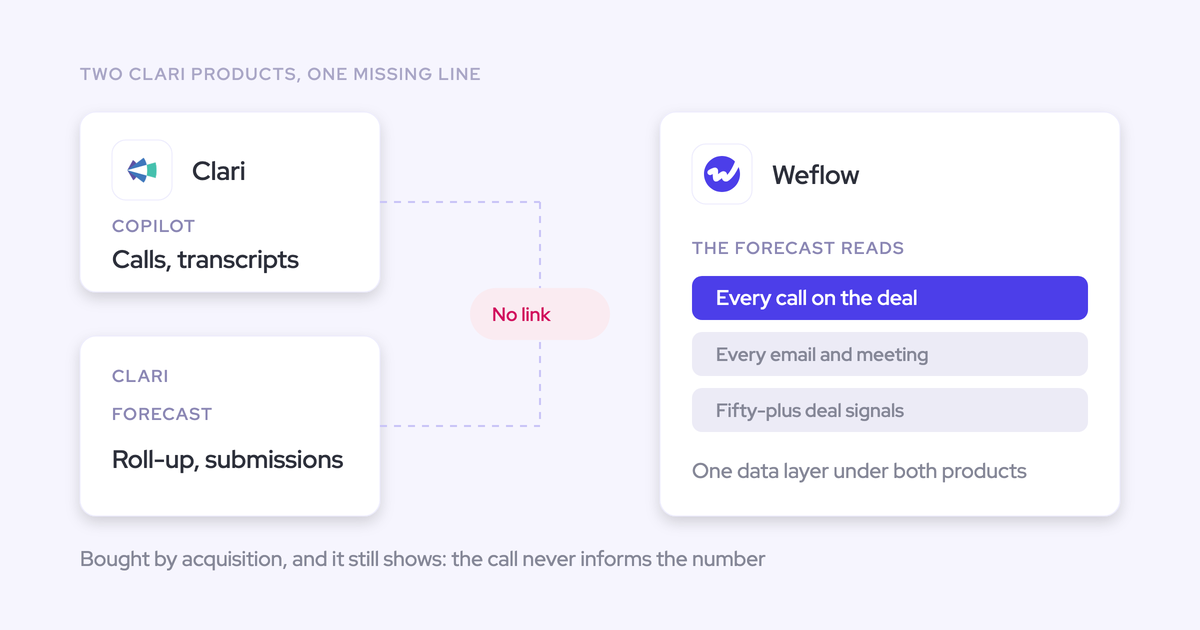

No. Clari Forecast doesn't read what Clari Copilot records. The roll-up runs on your Salesforce opportunity fields and the calls your reps and managers submit. The AI Forecast trains on opportunity, opportunity history and account data. Copilot sends its call summary to a Salesforce Task, not to structured fields on the opportunity, so nothing from the call reaches the fields the forecast reads.
There's one exception. If you also run Salesloft Deals, it writes MEDDPICC and BANT values from transcripts into CRM fields. Separate Copilot and Clari Forecast MCP servers also let you join call and forecast data inside your own assistant. So the answer depends on which Salesloft packages you hold. That matters at this renewal in particular: the Clari brand retired on 1 September 2026, and Clari Forecast is now a Salesloft product line.
We'll be fair about the part you like. Clari Forecast's roll-up, Inspect, Quick Submit, pacing and waterfall are the benchmark most teams we talk to hold a replacement against. Below you'll find a test you can run on any vendor, Clari included, and a plain account of where we pass it and where our own forecast stops. Weflow is the Revenue AI Orchestration platform for sales, customer success, and RevOps teams. Weflow Deal Intelligence & Forecasting is the part of our platform we put up against Clari Forecast here.
Why Clari Forecast can't see what Clari Copilot recorded
The gap comes from how the products are built. It isn't a setting you missed during implementation.
Clari Forecast builds your number from CRM fields and submissions
Every number in Clari Forecast comes from two places: fields on your Salesforce opportunities, and the calls people submit. Neither path reads a recording or a transcript.
| Forecast path | What it reads |
|---|---|
| Roll-up | Rep and manager forecast calls rolled up the hierarchy, next to CRM totals from opportunity fields |
| AI Forecast | Opportunity, opportunity history and account data, using features such as deal size, stage and days open |
| Weighted pipeline (teams without AI Forecast) | Stage probabilities on the opportunity |
So if a rep commits a deal where nobody has spoken to the economic buyer, that fact only reaches the forecast if someone types it into a field.
Clari Copilot writes a summary to a Salesforce Task, not fields
Clari Copilot writes a summary with next steps and suggested actions for calls longer than about five minutes. It sends that summary to the rep in Slack and pushes it, with the call metadata, to the Salesforce Task. That push is on by default.
Copilot doesn't write structured fields. No picklist gets set and no MEDDPICC field gets filled. Nothing lands on the opportunity for a forecast column or filter to read.
Here's Clari Copilot's call page. The summary, action items and critical moments live here and in the Task description.
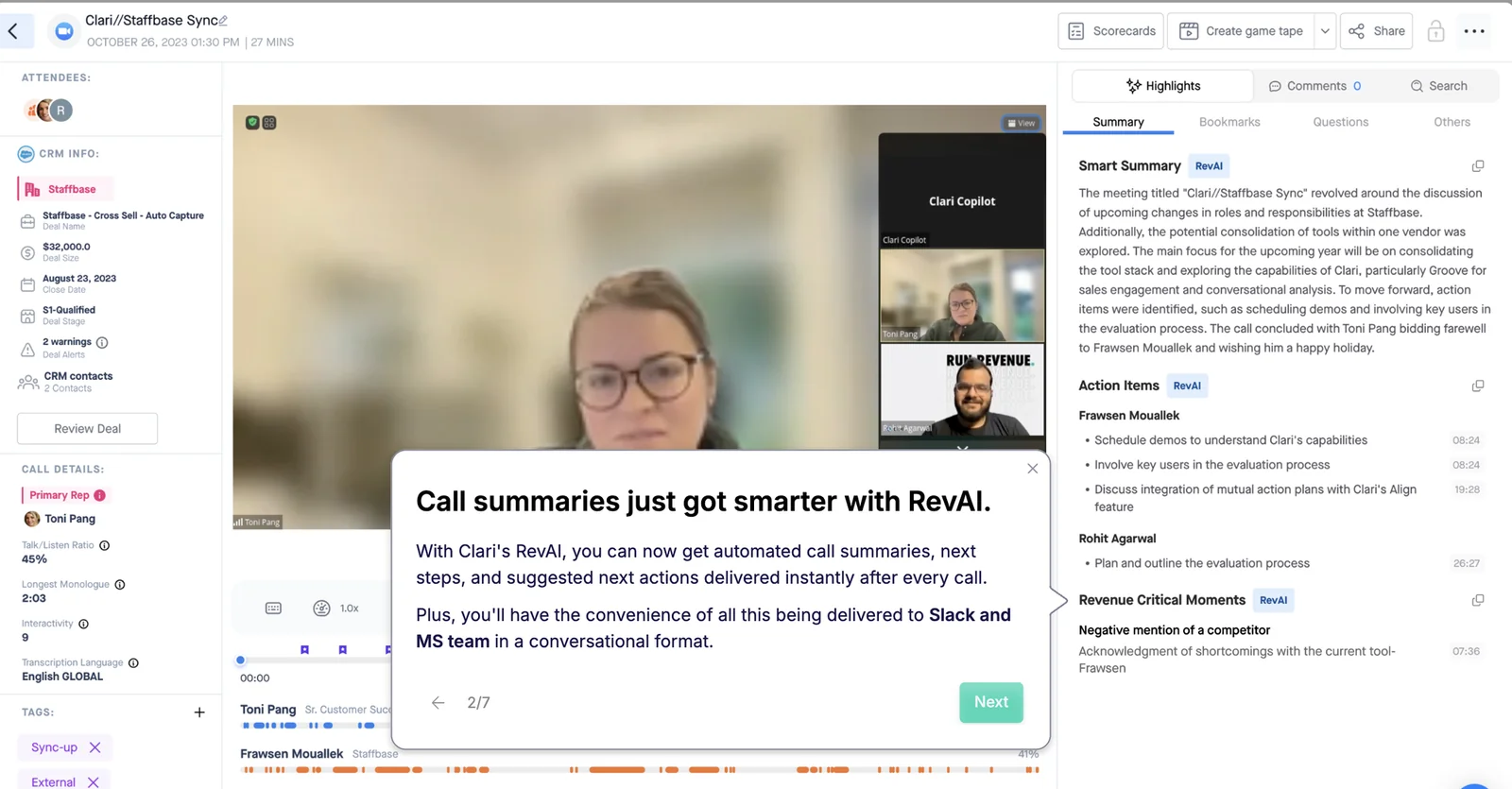
You feel the consequence on forecast day. A commit deal with no economic buyer found on any call looks identical to a qualified one. The evidence that separates them sits in a Task description and a recording.
Clari's acquired products each kept their own data model
Clari grew by acquisition, and the sequence explains the gap:
- 2022: Wingman becomes Clari Copilot.
- August 2023: Clari acquires Groove, which becomes Groove by Clari and still runs as a separate app with its own login.
- December 2025: Clari and Salesloft merge.
- 1 September 2026: the Clari company brand retires, and Clari Forecast continues as a Salesloft product line.
Each product arrived with its own data model, interface and release cycle. None was rebuilt onto a shared foundation.
Clari Forecast can't read Clari Copilot's call data because the two products came in separately and still keep separate data models. Buying both from one vendor consolidated the invoice. The data stayed split.
When Clari call data can make it into your forecast
Two routes exist. Both depend on the Salesloft packages you hold and how much joining you're willing to do yourself.
Salesloft Deals writes MEDDPICC and BANT fields from transcripts
Salesloft Deals is the one route from a Clari call into a CRM field. Through its automatic CRM sync, it fills MEDDPICC and BANT fields from call transcripts. It also updates CRM stages without manual input. There's no step for a rep to review the extracted values before they reach the CRM.
Once a value sits in a Salesforce field, you can build a forecast column on it. In that setup, Clari call data does inform your number.
Salesloft's Deal Summary Agent adds a cross-call view. It summarizes a deal from transcripts and emails combined with CRM data, and it runs on demand from a button on the deal view.
Three things decide whether this route works for you:
- Whether your renewal includes a Salesloft package. Deals is part of Salesloft's Advanced and Elite packages, so the question is whether you hold one of them or only Clari Forecast and Copilot.
- Whether your Copilot recordings flow into Salesloft. That needs an Advanced or higher Salesloft license tier, and new implementations need a unified Okta single sign-on.
- Who owns a written value. With no review step, a wrong extraction lands in the field your forecast reads, and nobody approved it.
Separate Clari MCP servers push the join into your own assistant
AI access is split across products too. Each MCP server reaches its own slice of your data.
| MCP server | What it reaches |
|---|---|
| Clari Copilot MCP server | Copilot conversation data only. A Copilot admin switches it on, and each user needs a paid ChatGPT Business or Enterprise plan or a Claude subscription. |
| Clari Forecast MCP server | Live forecast data and historical snapshots, scoped to each user's Clari permissions. A Clari admin switches it on in Clari Studio. |
| Salesloft MCP server | Accounts, people, opportunities and AI call summaries, read-only and in beta. No raw transcripts, cadences or forecasts, and it needs the paid Salesloft Agentic add-on. |
Connect them all to Claude and you can ask a question that spans calls and forecast. The join then happens in your assistant, on your prompt, every time you ask. None of it goes back into Salesforce for the next forecast call.
How RevOps teams stitch Clari Copilot and Clari Forecast together
This is how teams describe it on our calls:
"I honestly don't see the value today of having copilot and forecast with Clari because they're not talking to each other."
By the time a team says this, they've usually built one of these workarounds:
- An AI workspace. They pipe transcripts into a separate AI tool, pull structured insight out, and type it back into Salesforce by hand.
- Momentum on top of Copilot. Momentum writes call outcomes into Salesforce fields. That's a second contract, and when a write fails, the admin checks Salesforce, Clari and Momentum in turn to find where it broke.
- Tableau or Power BI. They rebuild forecast views in a BI tool, because the forecast that goes to the CFO has to come from a view leadership will accept.
- Manual review before the forecast call. Managers read transcripts or ask reps for the methodology criteria, one opportunity at a time.
Each workaround adds another tool or another manual step to a stack you already pay one vendor for. That's usually what the renewal audit uncovers:
"We mostly use Clari for roll-ups, simple pipeline analytics, and to inspect and the price point for that is crazy high."
Ask any vendor where its call data lands in Salesforce
The question that settles this is whether the forecast can read and filter on a field the conversation product wrote. A product count on a feature grid won't tell you. These five questions will:
- Which Salesforce object and field type does the call output write to? A pass: named fields on the opportunity in types you can report on, such as picklists, numbers, dates and multi-selects. A summary in a Task or Event description is useful context, but you can't filter a forecast on it.
- Can the forecast read or filter on that field? A pass: the vendor builds a forecast column or filter on a call-written field while you watch.
- Do methodology values accumulate or get overwritten? A pass: the champion identified on call two is still there after call five.
- Who reviews a value before it lands? A pass: you decide per field. Stage and champion wait for a person, and a website field writes itself.
- Does one assistant or API reach both call and forecast data? A pass: one connector returns transcripts and forecast calls together, so you don't have to build the join in your prompts.
The test works on a weekend build too. Forecast dashboards are the easy part to rebuild, because they sit on data already in Salesforce. Getting every call onto the right opportunity as a field value is the part in-house builds tend to underestimate.
Clari and Weflow side by side, from call to forecast
Here's the test applied to both tools. The biggest differences are field updates from calls and whether the forecast reads them.
| Capability | Weflow | Clari (under Salesloft) |
|---|---|---|
| AI forecast prediction | AI projection returns a low, middle and high range from 50+ deal signals, including communication cadence, next meeting booked and methodology health. Needs six months of history, delivers a first projection in 48 to 72 hours, and doesn't yet adjust for ramping reps. | Salesloft AI Forecast predicts current-quarter new business only, from opportunity, opportunity history and account data. Salesloft switches it on per team after a data check (four quarters with 50+ closed deals each). Buyers report 12 to 18 months before it's useful. |
| Forecast submissions and roll-ups | Reps submit a baseline and best case tied to named deals, managers override with logged rationale, and every version is kept. Submission happens in the web app only, not in Salesforce fields. | Rolls up a hierarchy up to eight levels deep, managers can submit on behalf of reps, and history exports to CSV. Leaders see only the level directly below them, and the roll-up is tied to the Salesforce hierarchy. |
| Recording video meetings | Zoom, Microsoft Teams, Google Meet and Webex, with Webex switched on per workspace. The notetaker is scheduled onto every external meeting automatically. | Zoom, Microsoft Teams, Google Meet and Webex. The Copilot Zoom bot records only while the organizer is present, and Salesloft skips recordings under two minutes. |
| CRM field updates from conversations | Writes call values into every Salesforce field type except lookups: picklist, number, date, multi-select and methodology fields. Review or automatic is set per field, and methodology fields accumulate across the deal. | Copilot writes a summary to the Salesforce Task and no fields. Salesloft Deals writes MEDDPICC and BANT fields from transcripts, with no review step before values sync. |
| Deal summaries across all interactions | The deal summary reasons across every meeting on the opportunity. AI Playbooks read every email, meeting, transcript and field, and write results back to Salesforce. | Inspect gives deal insights without a cross-call summary or a methodology check. Salesloft's Deal Summary Agent spans transcripts, emails and CRM data, on demand. |
| Integrations with other tools | Salesforce, Gmail, Google Calendar, Outlook, Zoom, Teams, Meet, Slack and the Outreach dialer. The API feeds BI tools such as Tableau and Looker. No native Snowflake, Databricks or BigQuery connector, and Salesforce only. | Salesloft syncs with Salesforce, Dynamics, Snowflake, Databricks, Gmail, DocuSign, ZoomInfo and LinkedIn. Recording covers Zoom, Teams, Meet and Webex. |
| Access from AI assistants (MCP) | One read-only connector reaches playbooks, call summaries, transcripts and forecast calls. An admin toggle controls transcript access, and per-rep breakdowns are capped at 25 owners. | Split: the Copilot MCP server reaches call data only, and the Clari Forecast MCP server reaches forecast data. The Salesloft MCP server is read-only, in beta, needs the paid Agentic add-on and returns no raw transcripts. |
| Raw data access outside the tool | The REST API bulk-exports transcripts, metadata, scores and signals as JSON or CSV, and recordings export to your own storage. No native warehouse connector. | REST and Export APIs plus a Copilot API. Forecast history exports as CSV, and Salesloft syncs to Snowflake and Databricks. |
| Pricing | Published per seat: $19, $39 and $39 for the standalone products, and $49, $59 and $79 for bundles. Billed annually with a 10-user minimum. | No published seat prices. Both pricing pages lead to a Salesloft Talk to Sales page. The package structure (Advanced, Elite, paid add-ons) is public. |
What Clari gets right, and where call data stops
Clari Forecast is a mature roll-up, and the teams that leave it usually miss it. Its strengths:
- Inspect.
- Quick Submit, which updates every month and week of a quarter in one action.
- Pacing and the pipeline waterfall.
- A week-by-week history of every forecast call.
- The comparison against the same day in previous quarters, which Salesforce reporting can't produce without a warehouse.
"Clari was the one screen that I live in most in terms of the forecasting element … their forecasting is really strong, it does everything that we need … where it's lacking, I would say, is the conversation intelligence"
The call-data path is where Clari depends on Salesloft add-ons.
Clari Forecast's AI projection and roll-up follow your Salesforce hierarchy
Salesloft's AI Forecast predicts only new business deals closing in the current quarter. Renewal and expansion get no AI number.
Salesloft switches it on per team after an engineering evaluation of your data. The bar is four prior quarters with at least 50 closed opportunities each, plus an average of 10 open opportunities a day. Each open deal gets a high, medium or low close probability. Buyers tell us the projection takes 12 to 18 months before RevOps finds it useful.
The roll-up drills up to eight levels deep, and managers can submit on behalf of reps. A leader sees only what each direct report submitted, not what the reps underneath them said. Optimism that entered three levels down stays invisible.
The roll-up is also tied to the Salesforce hierarchy. One sales leader running several products with different teams can't get a separate forecast outside it.
Clari Copilot records calls, and only Salesloft Deals writes fields
Recording coverage is broad, with two gaps worth knowing:
- The Copilot Zoom bot joins when the organizer joins and leaves when the organizer leaves. A meeting that continues after the organizer drops goes unrecorded, and no error appears.
- Salesloft Conversations skips recordings under two minutes.
After the call, you get a recording, a transcript and a summary in the Task. Buyers leaving Copilot put it like this:
"Clari's conversation intelligence feels like it's more of a transcription rather than anything else."
Field writes exist only through Salesloft Deals, and they sync without review.
Salesloft's Deal Summary Agent spans calls; Clari Inspect doesn't
Clari Inspect computes deal insights from the CRM record and the engagement signals around it. The call never enters the summary a manager reads before a deal review.
Clari also has no view that scores multiple opportunities against MEDDIC, SPICED or your own methodology. Managers open deals one at a time or ask reps.
Salesloft's Deal Summary Agent does reason across calls. It pulls action items, MEDDPICC fields, risks, decision makers, objections and competitor mentions from transcripts and emails, combined with CRM data. It runs on demand, one deal at a time, from a button on the deal view.
Clari reaches your stack through Salesloft sync, APIs and split MCP servers
- Integrations: Salesloft syncs revenue data with Salesforce, Microsoft Dynamics, Snowflake, Databricks, Gmail, DocuSign, ZoomInfo and LinkedIn.
- AI assistants: Copilot's MCP server reaches calls and Clari Forecast's reaches forecast data, so no single server sees both. The Salesloft MCP server needs the paid Agentic add-on, and its transcript retrieval tool was removed, so assistants get AI summaries rather than what was said.
- Raw data: Clari has REST and Export APIs plus a Copilot API, forecast history exports as CSV, and Salesloft syncs to Snowflake and Databricks.
How Weflow feeds call data into the forecast in Salesforce
On the five-question test, Weflow writes call content into Salesforce fields. Both the forecast and AI Playbooks read call and activity signals, and the results go back to Salesforce, so your data stays in your Salesforce.
Weflow runs an AI projection beside the roll-up and weighted forecast
Weflow runs three forecasts side by side. The gap between them is the agenda for your forecast call: what the team says, what the pipeline supports, and what history predicts.
| Forecast method | What it reads |
|---|---|
| AI projection | 50+ deal signals from up to two years of history: seasonality, rep performance, conversion rates, communication cadence, whether a next meeting is booked, and methodology health |
| Roll-up | Each rep's baseline and best case, tied to named opportunities, plus logged manager overrides |
| Weighted | Stage win rates recalculated from a rolling window, such as the last 90 or 180 days, instead of the fixed probability on the stage |
Because the AI projection reads communication cadence and methodology health, it projects a large, poorly worked deal down. It returns a low, middle and high range and refreshes nightly. When it isn't confident, it shows no range and says why.
It needs six months of Salesforce history and produces a first projection within 48 to 72 hours. Each forecast configuration gets its own model, so new logo and renewal are projected from their own history.
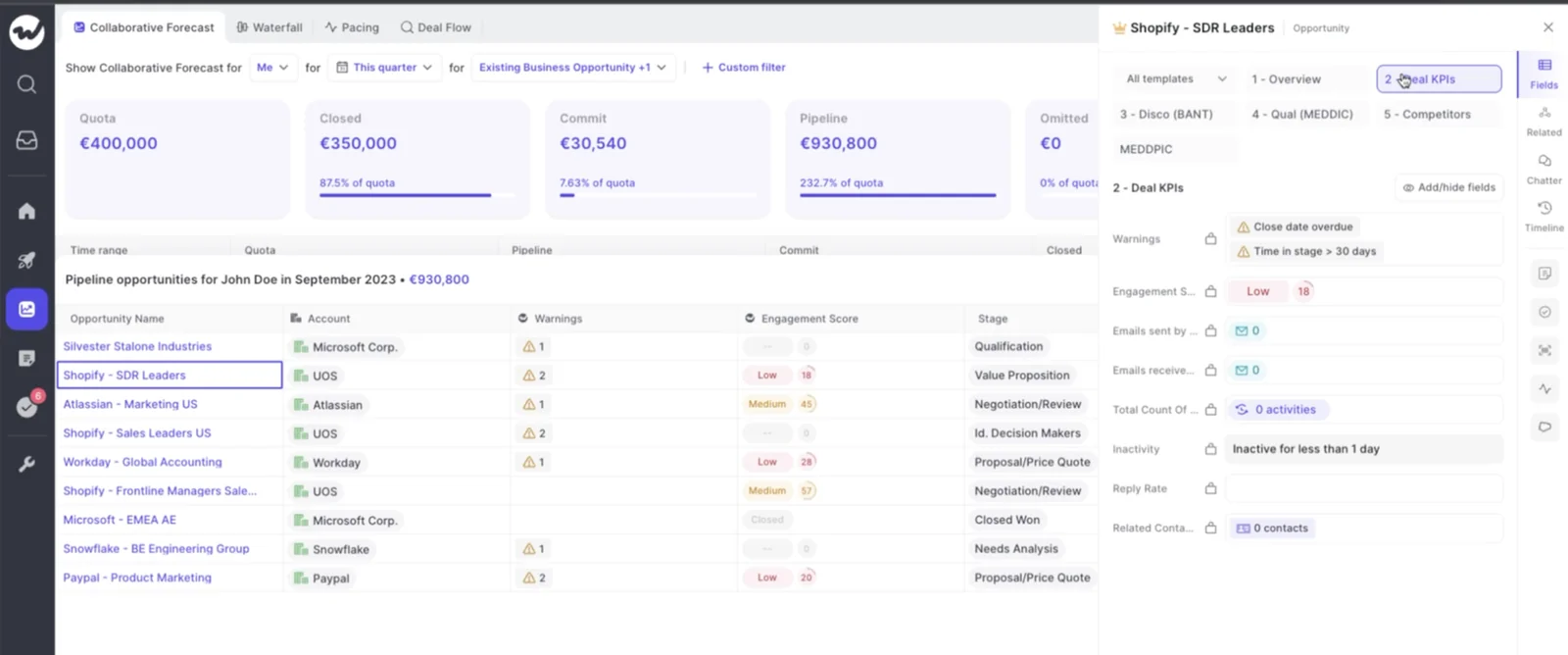
The signals show up on the deal itself. Warnings, engagement score, reply rate and inactivity sit in the opportunity sidebar next to the forecast.
In the roll-up, reps submit a baseline and a best case. They can enter a total or pick the opportunities behind each figure, and add a comment. Every submission is versioned, deadlines can lock the field, and manager overrides are logged with who made them and why.
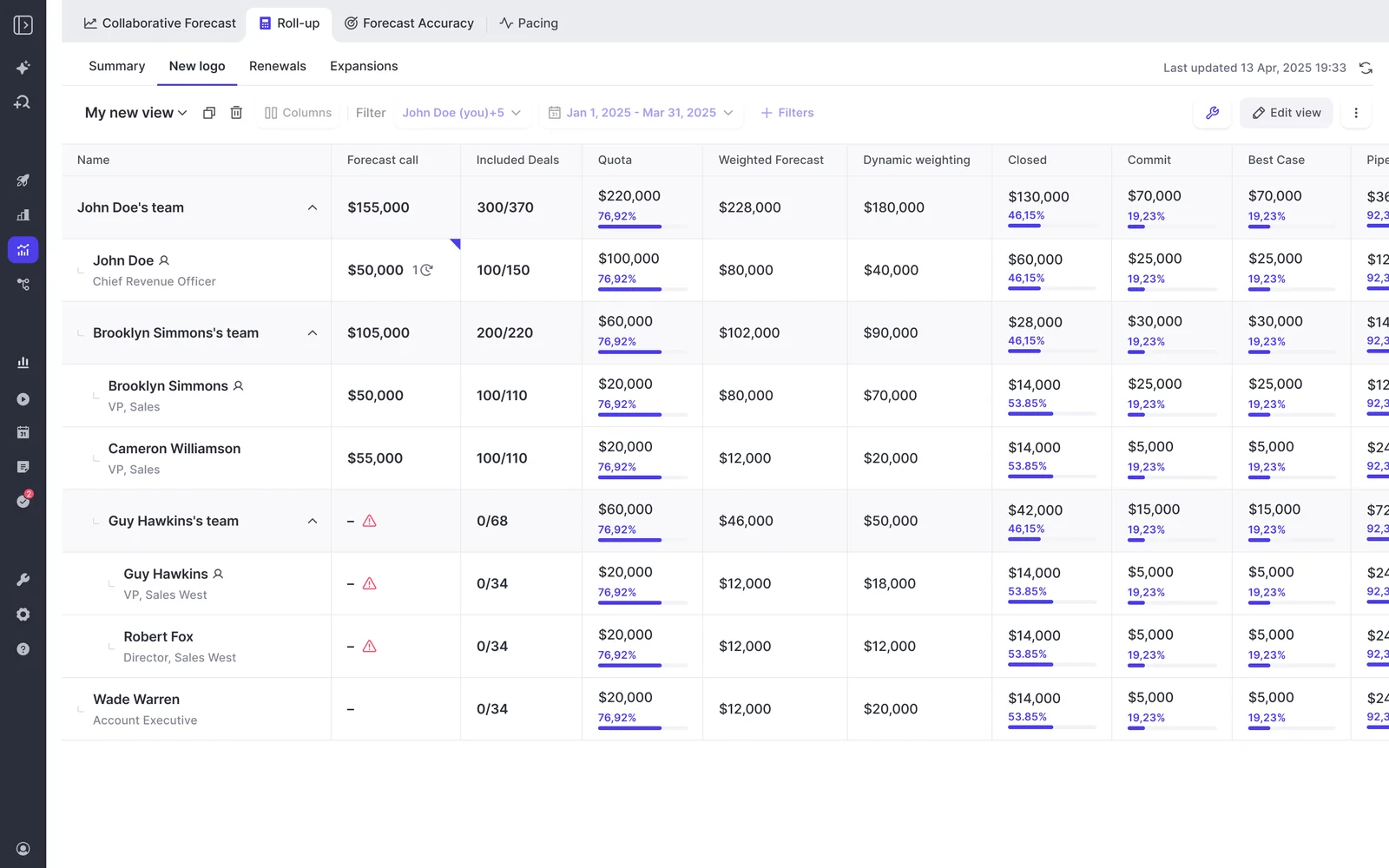
Submissions live in the Weflow app rather than in Salesforce fields. We cover that limit below.
Weflow Conversation Intelligence and AI Field Updates write calls into Salesforce fields
Weflow's notetaker is scheduled onto every external meeting from the calendar on Zoom, Microsoft Teams, Google Meet and Webex. Nobody has to invite it. Webex is switched on per workspace.
Within 30 to 60 seconds of the call ending, the rep has three things:
- A summary, written back to the Salesforce Event with a link to the recording.
- A drafted follow-up email.
- Proposed field updates.
Weflow AI Field Updates write call content into the Salesforce fields your forecast and reports read. You set each field to write automatically or wait for review. A website field can update itself while champion and Stage wait for a person.
Methodology fields accumulate. When a MEDDPICC field already has content, the update adds to it instead of replacing it, so early qualification survives later calls.
Field types Weflow writes from calls:
- Picklists, using the values defined on the field
- Number and date fields
- Multi-select fields, such as competitors mentioned
- Methodology fields for MEDDIC, MEDDPICC, SPICED, BANT or your own framework, with 250+ pre-built prompts
- Opportunity Stage, when the exit criteria in the prompt are met on the call
- Fields on standard and custom objects, with custom objects set up by our support team
Relationship lookup fields are the one type we don't write. Validation rules still apply, so a stage change blocked by a rule stays blocked until the fields it depends on are filled.
Weflow deal summaries and AI Playbooks read every email, meeting and transcript
The Weflow deal summary reasons across every meeting on the opportunity. It sits next to communication velocity, computed from the emails actually sent and received, and every person involved in the deal. A manager can review momentum and multi-threading without opening a single call.
AI Playbooks score the whole opportunity against your methodology. They read every email, meeting, transcript and field on the deal, refresh every few hours, and write the result back to Salesforce fields with a next-step recommendation.
Where nothing supports a criterion, the playbook says so, for example that no relevant data on the economic buyer was found. A deal forecast to close soon with no identified economic buyer shows up as a forecast risk, not just a coaching note.
The playbook panel shows per-letter status beside the deal board. You read MEDDPICC across the pipeline in one place instead of deal by deal. Because the playbook reads evidence, a rep can't pass it just by filling in a field, and any rep override is checked for plausibility against the deal.
Weflow reaches your stack through native integrations, MCP and the API
- Integrations: Weflow connects to Salesforce, Gmail, Google Calendar, Outlook, Zoom, Microsoft Teams, Google Meet, Slack and the Outreach dialer. We don't do sequencing. If you keep a sequencing tool, compatibility mode skips the emails it already logged so nothing lands twice.
- AI assistants: One read-only MCP connector gives Claude, ChatGPT and other assistants playbooks, call summaries, transcripts and forecast calls together. It also returns per-rep pipeline metrics with the opportunity IDs behind them.
- An admin switches the connector on per workspace, with a separate toggle for transcript access.
- Per-rep breakdowns cap at 25 owners.
- Saved deal board views aren't exposed.
- Raw data: The REST API bulk-exports transcripts, metadata, scores and signals as JSON or CSV into BI tools like Tableau and Looker. Recordings export to your own cloud storage. There's no native Snowflake, Databricks or BigQuery connector, so teams move data into the warehouse through the API.
Where Weflow's forecast stops today
Weflow isn't full parity with a mature Clari configuration. Here's what you'd give up:
- Submissions stay in Weflow. Forecast submissions, targets and roll-ups live in the Weflow app, not in Salesforce fields. You reach them over MCP or the API. For a team whose rule is that everything lands in the CRM, this is the one number that doesn't.
- No pipeline flow view. We match pacing and waterfall, but not flow.
- No account board for CSMs. There's no account-level view that rolls renewal and account-management work up by customer.
- No mobile submission. Forecasts can't be submitted from a phone or chat tool. We email reminders and flag missed submissions, but submission happens in the web app.
- No native warehouse connector. Data reaches Snowflake, Databricks or BigQuery through the API.
- Salesforce only. We don't support HubSpot, Dynamics or other CRMs.
- No ramp adjustment. The AI projection doesn't yet adjust for reps who are still ramping, so a new hire's line has little history behind it.
- Six months of history required. The AI projection needs at least six months of opportunity history.
Buyers who evaluate us fairly tend to say something like this:
"I don't see your solution being better than Clari. I see your solution being able to do at least 80% of what we had with Clari."
That's the honest expectation for the forecast screens. The rest of the decision is about what Clari can't do with the calls you're already recording.
What Clari and Weflow cost, and what you pay extra for
Weflow publishes per-seat prices. Clari and Salesloft publish none. At Clari, forecasting, agents and MCP access are add-ons.
| Weflow | Clari (under Salesloft) | |
|---|---|---|
| Pricing model | Per seat, billed annually, with AI usage included. Agent Builder is the only consumption-priced product. | Quote-only, with no free trial. Our estimate, from what we see in deals, is $120 to $180 per user per month. |
| Published list prices | Weflow Activity & Contact Capture $19, Weflow Conversation Intelligence $39, Weflow Deal Intelligence & Forecasting $39. Bundles: Revenue AI Foundation $49, Revenue AI Business $59, Revenue AI Enterprise $79. Forecasting sits in Revenue AI Enterprise, not Revenue AI Business. | None. clari.com/pricing and salesloft.com/pricing both lead to a Talk to Sales booking page. |
| What costs extra | Agent Builder beyond the free 25 actions a month: $299 a month for 500 actions, $999 a month for 2,500, or a custom Enterprise package. Ask Weflow AI Pro, AI summaries and field updates come with the seat. No implementation fees. | Forecasting, the Account Agent, the Coaching Agent and the Dialer are add-ons on Advanced or Elite, and MCP comes with the agent add-ons. Our estimate for professional services is $15,000 to $50,000. |
| Contract terms | 12 months, 10-user minimum per product or bundle, and no mid-term seat reduction (seats can be reassigned). Bundle, volume and multi-year discounts apply. | Not published. Terms come with the quote. |
As a reference point, 62 seats of capture plus Conversation Intelligence lands around $36,000 a year before a formal quote. The full platform lands around $58,000.
If your Clari contract still has months to run, you don't have to replace the forecast first. Start with capture and Conversation Intelligence, then add forecasting at renewal.
When to stay on Clari and when to switch to Weflow
| Stay on Clari if | Switch to Weflow if |
|---|---|
| You run 1,000+ reps on a mature enterprise roll-up. At that scale, Clari's roll-up is more mature than ours. | Your forecast needs to read what's said on calls, not only what reps type into fields. |
| A PE sponsor has standardized on Clari across the portfolio. Keep the forecast and land capture and Conversation Intelligence next to it. | You're paying for Copilot and still rebuilding the join with an AI workspace, Momentum or a BI tool. |
| You hold Salesloft Deals, and field writes without a review step work for your team. | You want per-field review on call-written values, and methodology fields that build across the deal. |
| Your team depends on the flow view, an account board for CSMs, or submitting forecasts from a phone. | You want published per-seat pricing and an AI projection within days of connecting Salesforce. |
See how Weflow captures activity, updates Salesforce fields from calls, and rolls up your forecast. Book a 30-minute demo.
Frequently asked questions about Clari Copilot, Clari Forecast and Weflow
Does Salesloft Deals fix the gap between Clari Copilot and Clari Forecast?
Partly. Salesloft Deals writes MEDDPICC and BANT values from call transcripts into CRM fields, which gives your forecast something to build columns on. It depends on holding a Salesloft package that includes Deals, and there's no step for a rep to review values before they sync.
Is Clari Copilot replacing Salesloft Conversations?
Yes. Clari Copilot is replacing Salesloft Conversations as the conversation intelligence layer inside Salesloft. New Salesloft customers and new Copilot implementations get it first, and existing Conversations customers migrate later. Access requires an Advanced or higher Salesloft license tier, and new implementations need a unified Okta single sign-on.
Are we renewing with Clari or with Salesloft now?
With Salesloft. The two companies merged in December 2025 and have operated under the single Salesloft brand since 1 September 2026. Clari Forecast continues as the platform's forecasting product line, and Clari Copilot keeps its name. Clari Capture is no longer sold as a product and is now part of Salesloft Deals.
Can we start with Weflow Conversation Intelligence while our Clari contract runs?
Yes. Revenue AI Foundation gives you Weflow Activity & Contact Capture and Weflow Conversation Intelligence without a second forecasting tool, which answers a CFO who won't pay for two. Two notetakers can't share a call, so recording moves from Copilot to Weflow while Clari Forecast keeps running. At renewal, you move to Revenue AI Enterprise to add forecasting.
Can we import our Clari forecast history into Weflow?
Yes. Forecast calls your team submitted in Clari import into Weflow from Clari's API or a CSV, so your forecast history survives the switch. You rebuild the forecast setup as Weflow forecast configurations. Opportunity history comes from Salesforce, so the AI projection doesn't wait on the import.
Does Weflow match Clari's Inspect, Quick Submit, pacing and waterfall views?
Weflow has pacing and waterfall views, and reps submit forecast calls against named opportunities. We don't have Clari's pipeline flow view. Expect roughly 80% of a custom Clari configuration on forecast screens.
Where do Weflow forecast numbers live, and can our BI tool reach them?
Forecast submissions, targets and roll-ups live in the Weflow app, not in Salesforce fields. Your BI tool reaches them through the public API, and assistants like Claude reach forecast calls through the MCP connector. Everything else Weflow produces, including activity, transcripts, summaries and AI field updates, is written into Salesforce.
How do we cut over from Clari Copilot without two notetakers on a call?
Plan the switch for a weekend. Two notetakers on one customer call looks odd and splits your data across two systems, so teams turn Copilot off, test Weflow without users on, and train everyone on Monday morning.
Can we run new business, renewal and expansion as separate forecasts in Weflow?
Yes. Each forecast configuration runs in parallel with its own amount field, date field, stages, cadence, targets and forecast calls. Each one also gets its own AI projection model, trained on that motion's history. You can carry a combined quota across deal types and see a combined view next to the separate tabs.
What contract terms does Weflow require?
Weflow contracts run 12 months, with a 10-user minimum per product or bundle, billed annually. There's no contractual right to reduce seats mid-term, though you can reassign a seat when someone leaves. Bundle, volume and multi-year discounts apply to the published list prices.
Who owns the rollout if adoption stalls again?
Name your internal owner before you sign. Copilot rollouts stall when nobody on the customer side owns the tool.
We sequence the rollout so capture and Conversation Intelligence are trusted before forecasting goes live. Reps adopt capture and call tools, and leaders adopt the forecast.
Technical setup takes 30 to 45 minutes with your Salesforce admin, and teams reach full value in one to three weeks with guided onboarding. There are no implementation fees.











